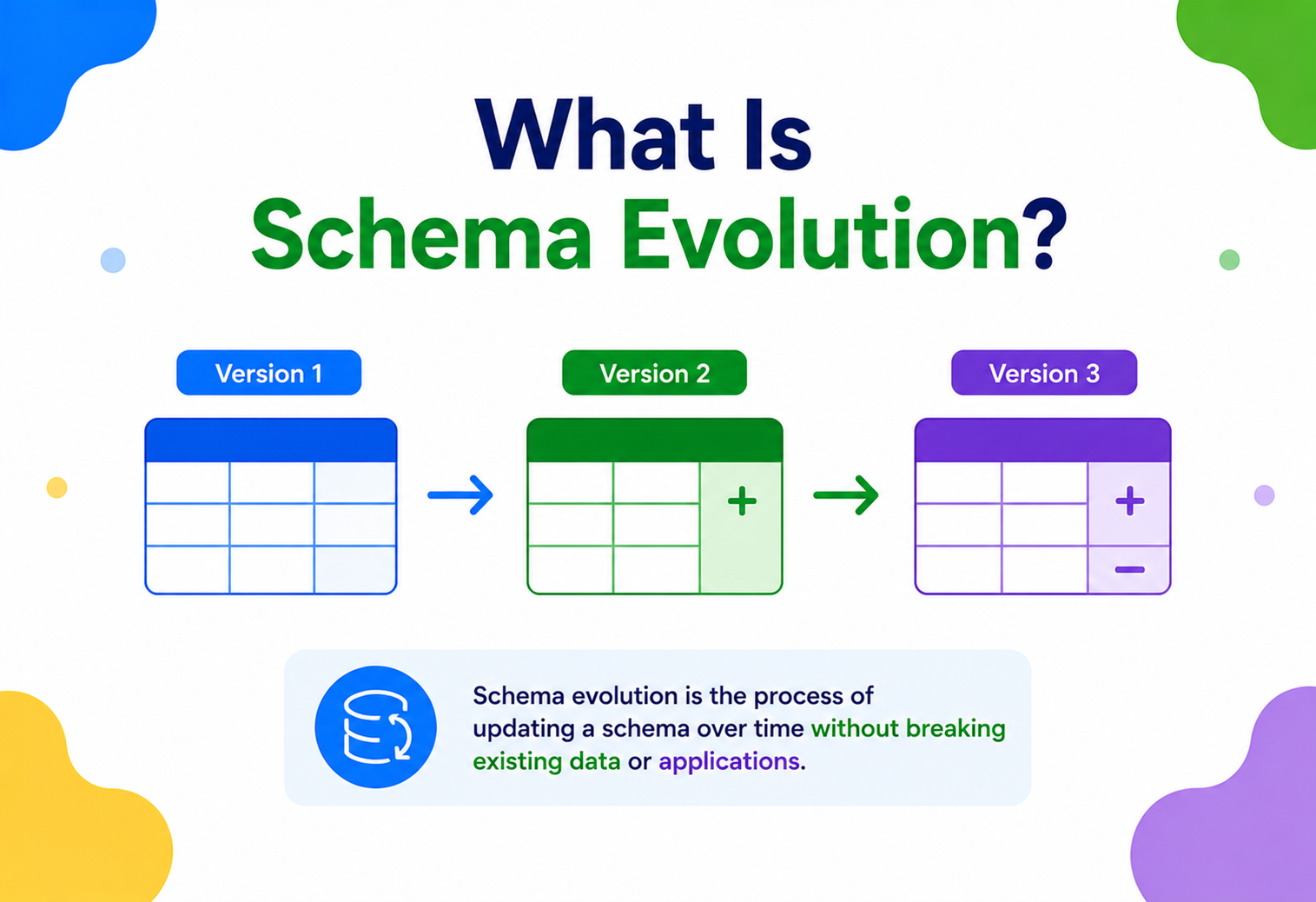
What Is Schema Evolution?
A complete, ground-up guide to how modern systems change the shape of their data over time — adding, removing, renaming and re-typing fields — without breaking the applications, pipelines, and consumers that depend on that data.
What Is Schema Evolution?
The everyday discipline of changing what your data looks like — adding, removing, renaming, or retyping fields — without accidentally breaking every program, pipeline, or team that reads that data.
Imagine you have a notebook where you write down information about every book in your school library: title, author, and year published. One day, your teacher says, “Let’s also track how many pages each book has.” Do you throw away the old notebook and start over? Do you go back and guess the page count for every book you already wrote down? Or do you just add a new column and leave old entries blank until someone fills them in?
That small, everyday problem is exactly what schema evolution deals with, just at the scale of software systems that handle millions or billions of records. A schema is the “shape” of your data — the list of fields, their names, and their types (a number, a piece of text, a date, and so on). Schema evolution is the practice and set of techniques for changing that shape over time — adding fields, removing them, renaming them, changing their types — while keeping old and new data, and old and new programs, working together correctly.
Think of a library card catalog that has been maintained continuously for fifty years. Cards written in 1970 use one layout, cards written in 1995 use a different one, and cards written today use yet another. A librarian looking anything up must be able to read all three formats without getting confused. Schema evolution is what lets that catalog keep working smoothly across every generation of card layout it has ever produced.
A Short History
The idea is not new. Relational databases have supported ALTER TABLE statements since the earliest days of SQL in the 1970s and 1980s, letting administrators add or drop columns. But the modern, more rigorous idea of schema evolution — with formal rules about what changes are “safe” — grew out of the distributed systems and big data world of the 2000s and 2010s. Companies like LinkedIn, Google, and Confluent needed thousands of independently-deployed services and pipelines to keep exchanging data correctly even as each team changed their own data formats on their own schedule.
Systems like Apache Avro, Protocol Buffers (Protobuf), Thrift, and later the Confluent Schema Registry turned schema evolution from an ad-hoc practice into a formal discipline with rules, tooling, and automated checks.
1970s–1980s — Relational Databases
SQL databases introduce ALTER TABLE, giving administrators manual control to add, drop, or modify columns.
2007 — Protocol Buffers
Google open-sources Protobuf, which bakes forward/backward compatibility rules directly into its field-numbering design.
2009 — Apache Avro
Avro is released with a “schema resolution” mechanism, comparing a writer’s schema and a reader’s schema at read time.
2015 — Confluent Schema Registry
Confluent releases a centralized registry for Kafka that enforces compatibility rules automatically before a schema can be published.
2020s — Data Contracts & Streaming Lakehouses
Table formats like Apache Iceberg, Delta Lake, and Apache Hudi bring formal schema evolution to data lakes, and “data contracts” formalize evolution as a cross-team agreement.
What ties all of these eras together is a single realization: data outlives code. A program you wrote last year may be long retired, but the files, database rows, and event logs it produced are often still sitting somewhere, waiting to be read by a program you haven’t written yet. Schema evolution is really about respecting that asymmetry — treating data as a durable asset with its own lifecycle, separate from any single version of the software that happened to create it.
It also helps to notice what schema evolution is not. It is not the same as simply “being flexible” about data shapes, and it’s not the same as skipping validation entirely. A completely schema-less system (raw, untyped JSON blobs with no contract at all) doesn’t solve the problem — it just moves the pain from “structured, checked failures at write time” to “unstructured, mysterious failures at read time, three services downstream.” The goal of schema evolution is to keep the safety benefits of a strict, typed contract while still allowing that contract to change in a controlled, well-understood way.
Think of a school notice board that has run continuously for a decade. Old notices still get read, sometimes years after they were posted; new notices go up every day. If every reader had to be trained separately on every historical notice layout, the notice board would collapse under its own weight. Schema evolution is the invisible convention that lets old readers still make sense of new notices, and new readers still make sense of old ones.
Why Data Can’t Just Change Whenever It Wants
In any real system, the data that one team writes is almost always read by many other teams — today, tomorrow, and often years later. That’s what makes even a “tiny” schema change genuinely risky.
Why can’t we just change data whenever we want? Because in any real system, data is rarely read by only the program that wrote it. Think about a stream of orders flowing from a shopping app into a warehouse system, a billing system, an analytics dashboard, and a fraud-detection service — all at the same time. If the shopping app team adds a new field, renames a field, or changes a field’s type without warning, every one of those downstream systems can break the moment the new data arrives.
This gets even trickier once you remember that data isn’t just “in flight” for a few milliseconds — it’s also sitting still, sometimes for years, in databases, log files, and archived event streams. A batch job that reruns a historical report from three years ago is reading data written under a schema that may have gone through a dozen changes since then. Unlike a live network call, where a client and server negotiate a connection in real time, a program reading old data has no opportunity to “ask” the original writer anything — it only has the bytes on disk and whatever assumptions were baked into the format at write time. This is why schema evolution has to work not just across two services talking to each other today, but across arbitrarily large gaps in time.
Without schema evolution rules, a single well-intentioned change — like renaming email to emailAddress — can silently corrupt data, crash consumers, or cause a cascade of failures across a dozen unrelated teams who had no idea the change was coming.
This is made harder by a fact of distributed systems: you almost never get to update every producer and every consumer at the exact same instant. Some services deploy fast, some deploy slowly, some are owned by other teams entirely, and some are old batch jobs that only run once a night. During any deployment, there will be a window — sometimes seconds, sometimes weeks — where old and new versions of a schema are both alive in the system. Schema evolution exists to make that window safe.
The Core Motivations
- Independent deployability — teams should be able to ship changes to their own services without needing to coordinate a “big bang” release with every other team.
- Zero-downtime upgrades — rolling deployments mean old and new code run side by side; both must be able to read the data the other produces.
- Long-lived data — data written five years ago in an old schema still needs to be readable today.
- Trust between teams — consumers need confidence that a producer’s changes won’t silently break them, so they can build reliable systems on top of shared data.
A Concrete Walk-through
Picture an OrderPlaced event with three fields: orderId, customerId, and amount. Five different services consume this event: billing, shipping, analytics, fraud detection, and a customer-facing notifications service. Now the shopping app team wants to add support for gift orders, so they add a new field, isGift. If they simply push this change without any process, here’s what could go wrong for each downstream team, depending on how their code was written:
| Consumer | What Could Break | Why |
|---|---|---|
| Billing | Deserialization exception, service crash | Strict parser rejects unknown field isGift |
| Shipping | Silent no-op, gift wrapping never applied | Field ignored because shipping wasn’t told it exists |
| Analytics | Nightly batch job fails schema validation | Data warehouse table has a fixed column list |
| Fraud Detection | False positives on legitimate gift orders | Model wasn’t retrained to expect the new signal |
| Notifications | No visible impact | Service only reads fields it already knows about |
Notice that the same underlying change — a harmless-sounding new field — produces five completely different outcomes, ranging from “nothing happens” to “the service crashes.” This is exactly why schema evolution treats every change as something to be classified and checked, rather than judged by gut feeling. A change that “seems small” to the team making it can be catastrophic, cosmetic, or invisible depending entirely on how each consumer was built — and the producer usually has no way of knowing which of those five outcomes it’s about to trigger without a formal compatibility check.
Before shipping any schema change, list every known consumer of that data (services, pipelines, dashboards, batch jobs) and mentally walk each one through what they will see. If you can’t confidently predict the outcome for any consumer, that’s a strong signal that the change needs a compatibility check — not more courage.
The Vocabulary of Schema Evolution
Before going further, let’s define the vocabulary clearly, in plain language, since much of the confusion around this topic comes from people using the same words to mean subtly different things.
Schema
A formal description of a record’s fields, their names, their types, and whether they’re required. Think of it as a blueprint for a piece of data.
Writer Schema
The schema that was used to create (serialize) a particular piece of data at the time it was written.
Reader Schema
The schema that a program expects to use when it reads (deserializes) data. It may be newer or older than the writer schema.
Schema Resolution
The process of reconciling differences between the writer’s and reader’s schema so the data can still be understood.
Default Value
A fallback value used when a field is missing from the data being read, so old records don’t break new readers.
Schema Registry
A central service that stores schema versions and enforces compatibility rules before a new version is accepted.
The Four Types of Compatibility
Most schema evolution systems classify a change according to which direction in time it remains safe. These four terms are the heart of the whole topic.
| Type | Meaning | Example |
|---|---|---|
| Backward Compatible | New readers can read data written with an older schema. | Adding a new field with a default value. |
| Forward Compatible | Old readers can read data written with a newer schema. | Removing a field that had a default (old readers simply ignore new fields; the exact rule depends on the format). |
| Full Compatible | Both backward and forward compatible at once. | Adding an optional field with a default, in a format that ignores unknown fields. |
| Breaking Change | Neither direction works; old and new cannot safely interoperate. | Changing a field’s type from string to integer, or renaming a required field. |
A simple way to remember it: backward compatibility protects your new code from old data. Forward compatibility protects your old code from new data. You almost always want both, which is why “full compatibility” is the gold standard for shared data streams.
The Five Basic Kinds of Schema Change
Nearly every schema change you’ll ever make falls into one of these five buckets. Learning to instantly classify a proposed change into one of these is the single most useful skill in this entire topic.
| Change | Safe? | Notes |
|---|---|---|
| Add an optional field with a default | Usually safe (backward & forward) | The textbook example of a good evolution. |
| Add a required field with no default | Unsafe | Old data has no value to supply; readers requiring it will fail. |
| Remove a field | Depends | Safe if the field had a default and no one strictly required it; unsafe otherwise. |
| Rename a field | Unsafe, unless aliased | Functionally a remove-plus-add; needs explicit alias support to be safe. |
| Change a field’s type | Depends on promotability | int→long is often safe; string→int almost never is. |
Two more terms come up constantly in this space and are worth defining precisely, because people often use them loosely:
- Type promotion — a controlled, lossless widening of a type, such as
inttolong, orfloattodouble. Most serialization formats maintain an explicit table of which promotions are allowed. - Schema fingerprint — a hash computed from a schema’s structure, used to quickly detect whether two schemas are identical without comparing them field-by-field every time. Avro, for example, defines a standardized “single-object encoding” that embeds a schema fingerprint directly in the message header.
Comparing the Major Serialization Formats
Not every format handles evolution the same way, and picking one is often the single biggest decision a team makes about how much evolution pain they’ll feel later. Here’s how the most common choices stack up:
| Format | Evolution Mechanism | Schema Required? | Typical Use |
|---|---|---|---|
| Apache Avro | Writer/reader schema resolution + defaults | Yes, at both write and read | Kafka event streams, Hadoop data files |
| Protocol Buffers | Permanent numeric field tags, skip unknowns | Yes, compiled into code | gRPC services, internal RPC |
| Apache Thrift | Similar tag-based approach to Protobuf | Yes, compiled into code | Cross-language RPC (originated at Facebook) |
| JSON + JSON Schema | Convention (ignore unknown keys) + optional validation | Optional | Public REST APIs, human-readable configs |
| Apache Parquet / Iceberg | Column-level schema tracked in table metadata | Yes, at the table level | Analytical data lakes and warehouses |
A useful rule of thumb: formats that require a schema at both ends (Avro, Protobuf, Thrift) give you the strongest guarantees and the best performance, at the cost of needing a build step and a registry. Loosely-typed formats like plain JSON are easier to get started with but push more of the compatibility burden onto convention and discipline rather than tooling.
The Moving Parts of a Real Schema-Aware System
In a real production system, schema evolution isn’t just a rule in someone’s head — it’s enforced by actual software components working together. Here’s the typical architecture used by systems like Kafka with Confluent Schema Registry, which is the most widely deployed example.
Key Components
Schema Registry
Stores every version of every schema, assigns each a unique ID, and validates new versions against a configured compatibility mode.
Serializer / Deserializer
Library code embedded in producers and consumers that converts objects to bytes (and back), tagging each payload with a schema ID.
Compatibility Checker
The rules engine inside the registry that compares a proposed schema against previous versions and accepts or rejects it.
Schema File / IDL
The human-authored definition, typically an .avsc JSON file for Avro or a .proto file for Protobuf.
Subject / Namespace
A logical grouping (often one per topic or table) under which schema versions are tracked in order.
How Different Platforms Implement This Architecture
The general shape above — register, check, tag, resolve — is common across the industry, but the specific implementations differ in useful ways:
| Platform | Format(s) | Notable Trait |
|---|---|---|
| Confluent Schema Registry | Avro, Protobuf, JSON Schema | Per-subject compatibility settings; the de-facto standard for Kafka. |
| AWS Glue Schema Registry | Avro, Protobuf, JSON | Deep integration with MSK, Kinesis, and Lambda; pay-per-use pricing. |
| Google Cloud Pub/Sub Schemas | Avro, Protobuf | Schema validation attached directly to the topic resource itself. |
| Apache Iceberg / Delta Lake | Table metadata (not a separate registry) | Schema history is versioned alongside table snapshots, enabling time-travel reads. |
| Buf Schema Registry | Protobuf | Focused on gRPC/Protobuf workflows with built-in lint and breaking-change detection in CI. |
Regardless of which platform is in play, the architectural principle stays constant: never trust a producer to police its own compatibility. The check has to live in a shared, independent place that every producer must pass through, the same way a code review or a CI pipeline gate is independent of the developer who wrote the change. This independence is what turns “please don’t break the schema” from a hopeful request into an enforceable guarantee — the registry doesn’t care how busy a team is or how confident they feel about a change; it either passes the compatibility rule or it doesn’t.
How Schema Resolution Actually Works Under the Hood
Understanding this section well will let you debug a mysterious “why did my consumer suddenly start dropping records?” incident far faster than staring at logs alone.
Let’s go under the hood. When a producer serializes a record, it doesn’t send the full schema text with every message — that would be wasteful. Instead, most systems send a small numeric schema ID (often just 4 bytes) followed by the compact binary-encoded data. The consumer looks up that ID in the registry (with local caching, so it’s usually a cheap in-memory lookup after the first time), retrieves the full schema, and uses it to decode the bytes correctly.
The real magic happens during schema resolution: reconciling the writer’s schema (used to produce the bytes) against the reader’s schema (what the consuming code expects). Avro, for instance, defines precise resolution rules:
- If a field exists in the writer’s schema but not the reader’s, it is simply skipped/ignored.
- If a field exists in the reader’s schema but not the writer’s, the reader’s default value is used.
- If a field exists in both but the reader expects a different (but promotable) type — like
inttolong— it is automatically converted. - If a field’s type change isn’t promotable — like
stringtoint— resolution fails and an error is raised.
Here’s a Java example showing how the Confluent Avro serializer performs this resolution behind the scenes when reading records with an older writer schema than the reader expects:
// Consumer reading Avro records where the writer schema may be older
Properties props = new Properties();
props.put("schema.registry.url", "http://localhost:8081");
props.put("specific.avro.reader", "true");

KafkaAvroDeserializer deserializer = new KafkaAvroDeserializer();
deserializer.configure(props, false);

// The deserializer automatically:
// 1. Reads the 4-byte schema ID prefix from the message bytes
// 2. Fetches the matching writer schema from the Schema Registry
// 3. Resolves it against the reader's compiled class (OrderEvent.class)
// 4. Fills in defaults for any fields missing from the writer schema
OrderEvent event = (OrderEvent) deserializer.deserialize("orders-topic", recordBytes);

System.out.println("Order ID: " + event.getOrderId());
// If "discountCode" was added later with a default of null,
// old records simply resolve discountCode = null automatically.Why a Fingerprint Instead of a Full Comparison?
Comparing two full schema definitions field-by-field on every single message would be far too slow for a system processing millions of events per second. Instead, most formats compute a compact fingerprint (a hash, typically 64 bits) of a schema’s structure once, and reuse that fingerprint for all future lookups. Two schemas with the same fingerprint are guaranteed to be structurally identical, so the expensive comparison work only ever has to happen once per distinct schema, not once per message.
Protobuf takes a related but different approach: instead of resolving two arbitrary schemas against each other, it relies on the fact that every field carries a permanent, explicit numeric tag written directly into the wire format. A Protobuf parser doesn’t need to know the “old” schema at all to safely skip fields it doesn’t recognize — the wire format itself encodes enough type information (via “wire types”) to skip past an unknown field’s bytes correctly. This is part of why Protobuf is often described as evolving “by construction” rather than through an external resolution step.
// A minimal illustration of Protobuf's tag-based skip behavior in Java,
// using the generic UnknownFieldSet to inspect fields the compiled
// class doesn't recognize (e.g., because it was compiled against an
// older .proto file than the one that produced the bytes)
Order parsed = Order.parseFrom(payload);
UnknownFieldSet unknown = parsed.getUnknownFields();

for (Map.Entry<Integer, UnknownFieldSet.Field> entry : unknown.asMap().entrySet()) {
    System.out.println("Unrecognized field tag " + entry.getKey()
            + " was safely preserved, not dropped or errored on.");
}
// Because Order.toBuilder().build() round-trips unknown fields too,
// a service can pass messages through without losing data it doesn't
// even understand — a powerful property for proxy and gateway services.The Life Cycle of a Schema
A schema doesn’t just get created once; it has a lifecycle, much like software itself. Understanding that lifecycle helps teams plan changes responsibly instead of reacting to breakage after the fact.
Design
A team defines the initial schema, ideally with input from every known consumer, and chooses a compatibility mode up front.
Registration
The schema is registered in the schema registry (or checked into a shared repository) and assigned version 1.
Propose a Change
A developer proposes a new version — say, adding an optional field — usually via a pull request or a registry API call.
Compatibility Check
An automated check compares the new schema against the configured compatibility mode (backward, forward, full, or none) and rejects it if unsafe.
Rollout
The producer deploys first (for backward-compatible changes) or the consumer deploys first (for forward-compatible changes), following a safe order.
Coexistence
For a period, both old and new schema versions are actively used in production data, and all readers must tolerate both.
Deprecation & Retirement
Once no producer emits the old shape and no consumer needs it, the old version can be marked deprecated and eventually removed from active support.
The Expand-Contract Pattern in Detail
Step 6 (coexistence) is where most real-world pain lives, and the “expand-contract” pattern (also called “parallel change”) is the standard playbook for getting through it safely. It breaks a risky, all-at-once change into three small, individually-safe steps:
- Expand — add the new field or column alongside the old one. Both are written and both are readable. Nothing depends on the new field yet, so nothing can break.
- Migrate — update producers to write both old and new fields, and update consumers, one by one and on their own schedule, to start reading the new field instead of the old one.
- Contract — once telemetry confirms nothing reads the old field anymore, remove it in a final, low-risk cleanup step.
The entire point of spreading a change across three steps is that each individual step, on its own, is backward and forward compatible — so at no point does anything have to happen instantaneously across every service at once. This is what makes the pattern compatible with continuous, uncoordinated deployment.
Think of expand-contract as the schema-world equivalent of a temporary detour on a road: instead of closing the whole highway for a single day of construction, you open a parallel lane, move traffic across gradually, and only close the old lane once the last car has left it. Nobody ever has to stop.
Advantages, Disadvantages & Trade-offs
Schema evolution is not free — but the costs it imposes are almost always much smaller, and much more predictable, than the costs of not doing it.
Advantages
- Teams deploy independently without synchronized “flag day” releases.
- Old data remains readable for years without manual migration.
- Failures are caught at schema-registration time, not in production.
- Clear contracts reduce cross-team friction and 3am incidents.
- Enables safe rolling upgrades and zero-downtime deployments.
Disadvantages & Trade-offs
- Adds process overhead: every change needs a compatibility check.
- Some intuitive changes (renaming a field) become surprisingly hard to do safely.
- Requires disciplined defaults and careful field design up front.
- Old fields can accumulate as “dead weight” if never cleaned up.
- Cross-team schema ownership can become political without clear governance.
It’s worth being honest that these trade-offs are not symmetric across an organization. A platform team that owns the schema registry absorbs most of the up-front tooling cost, while individual product teams get most of the day-to-day benefit of not having to coordinate releases. This mismatch is exactly why schema evolution tends to succeed only when it has clear, org-wide ownership and isn’t left as an optional convention that each team can opt out of under deadline pressure.
When the Trade-offs Tip the Other Way
Not every system needs the full formal machinery. A tiny internal tool with a single consumer, a single producer, and a small team of five people can sometimes get away with much looser conventions — a shared JSON structure documented in a wiki, changed by pull request, and reviewed by the same handful of eyes every time. The moment that same data starts being read by teams you don’t regularly talk to, or systems that run on schedules you don’t control, the equation flips: the formal registry, the compatibility check, and the versioned contract stop being “bureaucracy” and start being the only reliable way to keep a growing set of consumers working in parallel.
Performance & Scalability
Schema evolution machinery must be fast because it sits directly in the hot path of high-throughput systems processing millions of events per second. A few design choices make this possible.
- ID-based lookups instead of embedding full schemas — sending a 4-byte ID instead of a multi-kilobyte schema definition with every message keeps payloads small.
- Client-side caching — producers and consumers cache schema-ID mappings locally, so only the very first lookup for a given schema hits the registry over the network.
- Binary encoding — formats like Avro and Protobuf are far more compact and faster to parse than JSON, because field names aren’t repeated in every record.
- Lazy resolution — some libraries only compute the writer-to-reader resolution plan once per schema pair, then reuse the compiled plan for every subsequent record.
At scale, the schema registry itself must also be horizontally scalable and highly available — because if it goes down, producers and consumers that haven’t cached a needed schema ID yet can stall.
The caching layer is usually just a simple in-memory hash map keyed by schema ID (or by fingerprint, for formats that support single-object encoding), which is what keeps the hot path close to constant time. A simplified version looks like this:
public class CachingSchemaResolver {
    private final ConcurrentHashMap<Integer, ParsedSchema> cache = new ConcurrentHashMap<>();
    private final SchemaRegistryClient registryClient;

    public ParsedSchema resolve(int schemaId) {
        // computeIfAbsent means the network call only ever happens
        // once per distinct schema ID, no matter how many messages
        // reference that same ID afterward
        return cache.computeIfAbsent(schemaId, id -> {
            try {
                return registryClient.getSchemaById(id);
            } catch (RestClientException | IOException e) {
                throw new SchemaResolutionException("Failed to fetch schema " + id, e);
            }
        });
    }
}
Because the cache only ever grows for the lifetime of a distinct schema ID (schemas are immutable once registered), this pattern needs no invalidation logic — a rare and pleasant property in cache design, and one of the reasons schema resolution scales so well even under extreme throughput.
Consistency and the CAP Theorem
Schema registries face a classic distributed-systems trade-off described by the CAP theorem, which says a distributed system can only fully guarantee two of three properties — Consistency, Availability, and Partition tolerance — at the same time. For schema registration (writes), most implementations favor consistency: it’s better for a registration request to briefly fail during a network partition than to let two nodes assign the same numeric ID to two conflicting schemas, since that kind of split-brain corruption is very hard to undo after the fact.
For schema lookups (reads), implementations typically favor availability instead, since a slightly stale cached schema is still safe to use — schemas are immutable once registered, so “stale” simply means “not yet aware of a newer version,” never “wrong about an existing one.” This asymmetry — strict consistency for writes, relaxed availability for reads — is a recurring, deliberate design pattern across nearly every production-grade schema registry implementation.
High Availability & Reliability
Because the schema registry becomes a shared dependency for potentially hundreds of services, it must be treated as critical infrastructure, not an afterthought.
A registry outage doesn’t just affect the team that owns it — it radiates outward to every producer and consumer across the organization that hasn’t already cached the specific schema ID it needs at that moment, which makes the blast radius of a registry incident unusually wide compared to a typical single-service outage.
- Replication — registries like Confluent’s are typically backed by a replicated Kafka topic itself, so schema history survives node failures.
- Local caching as a safety net — well-designed clients keep working off their cache even if the registry is briefly unreachable, only failing for genuinely new schema IDs.
- Leader election — a single registry instance is typically elected as the writer for new schema registrations to avoid conflicting version numbers, with followers serving reads.
- Graceful degradation — systems are often designed so that read paths keep working even if schema registration (writes) is temporarily unavailable.
A surprisingly common failure mode: the schema registry becomes unreachable, and every consumer that hits an uncached schema ID starts throwing errors simultaneously — turning a small infrastructure blip into a system-wide incident. Design your caching and retry strategy with this failure mode in mind.
Under the hood, achieving that “single writer for new registrations” guarantee is a distributed-consensus problem, the same family of problem solved by algorithms like Raft or ZooKeeper’s Zab protocol. Confluent’s Schema Registry, for example, historically used ZooKeeper (and more recently a Kafka-based Raft-like protocol) to elect exactly one primary node responsible for assigning new, strictly increasing schema IDs, while every other node stays a hot read replica. This matters because two nodes independently assigning the same numeric ID to two different schemas would silently corrupt every downstream consumer’s ability to resolve messages correctly — so this single piece of consensus infrastructure is quietly load-bearing for the entire data platform.
Designing Clients That Survive a Registry Outage
A well-behaved client should treat the registry the way an application treats DNS: essential when it works, but with enough local caching and sensible fallback behavior that a brief interruption doesn’t take everything down. Common tactics include pre-loading likely-needed schemas at process startup, extending cache lifetimes during observed registry unavailability, and clearly separating “can’t decode this new schema I’ve never seen” from “can’t decode anything at all,” so partial degradation is possible instead of total failure.
Security Considerations
Schemas often describe sensitive data — user emails, payment details, health information — so protecting the schema layer matters just as much as protecting the data itself.
- Access control — restrict who can register or modify schemas per subject, so one team can’t accidentally (or maliciously) change another team’s data contract.
- Audit logging — every schema registration should be logged with who made the change and when, since a bad schema change can be as damaging as a bad code deploy.
- Field-level sensitivity tagging — some organizations extend schemas with metadata marking fields as PII, so downstream tools can automatically apply masking or encryption.
- Transport security — connections to the schema registry (and the data streams themselves) should use TLS, especially across untrusted networks.
- Backward-incompatible changes as a security risk — a field silently disappearing (e.g., a consent flag) can cause downstream systems to process data they shouldn’t, so strict compatibility checks are also a compliance safeguard.
A practical pattern many regulated organizations adopt is to encrypt sensitive fields individually, rather than the whole payload, so that schema evolution and data protection work together instead of against each other:
// Encrypt only the fields tagged as sensitive in the schema's metadata,
// leaving the rest of the record readable by any consumer that only
// needs non-sensitive fields
public GenericRecord encryptSensitiveFields(GenericRecord record, Schema schema) {
    for (Schema.Field field : schema.getFields()) {
        boolean isSensitive = "true".equals(field.getProp("pii"));
        if (isSensitive) {
            String plain = String.valueOf(record.get(field.name()));
            record.put(field.name(), encryptionService.encrypt(plain));
        }
    }
    return record;
}
Because the schema itself carries the pii metadata flag, this logic automatically applies to any new sensitive field a team adds in the future — the security control evolves along with the schema, instead of relying on someone remembering to update a separate hardcoded list.
For regulations like GDPR, HIPAA, and PCI-DSS, being able to point to the schema itself as the enforced, version-controlled description of what data is collected, what is classified as sensitive, and who can change that classification is genuinely useful to auditors. It turns the abstract question of “how do you protect PII?” into a concrete artifact any reviewer can inspect.
Monitoring, Logging & Metrics
You can’t manage what you don’t measure, and schema-related failures have a habit of hiding in the gap between “the service is technically up” and “the data flowing through it is actually correct.”
A consumer can report a perfectly healthy heartbeat while silently dropping every record that fails to deserialize, so schema-specific observability has to be treated as its own category, separate from ordinary service health checks. Teams running schema-evolved systems in production typically track:
Schema Registration Rate
How often new schema versions are registered, per subject — spikes can indicate churn or instability.
Compatibility Failures
Count of rejected schema changes, which surfaces teams that are frequently attempting breaking changes.
Deserialization Errors
Consumer-side failures to parse a record — often the first sign of a schema mismatch reaching production.
Cache Hit Ratio
How often clients resolve a schema ID from local cache vs. calling the registry, a key performance indicator.
Schema Version Spread
How many distinct schema versions are actively being produced/consumed at once — a proxy for migration health.
Registry Availability
Uptime and latency of the registry service itself, since it’s a shared dependency.
A simple Java snippet showing how a consumer might emit a metric on a deserialization failure caused by a schema mismatch:
try {
    OrderEvent event = (OrderEvent) deserializer.deserialize(topic, bytes);
    process(event);
} catch (SerializationException e) {
    metrics.counter("schema.deserialization.errors",
            "topic", topic,
            "cause", e.getCause() != null ? e.getCause().getClass().getSimpleName() : "unknown")
        .increment();
    log.error("Failed to deserialize record on topic {}: {}", topic, e.getMessage());
    // send to a dead-letter topic instead of crashing the whole consumer
    deadLetterProducer.send(new ProducerRecord<>("orders-dlq", bytes));
}
Beyond raw counters, it helps to define concrete alerting thresholds so schema-related problems surface before they turn into incidents:
| Metric | Healthy Range | What an Alert Usually Means |
|---|---|---|
| Compatibility check failure rate | Near zero | A team is repeatedly attempting unsafe changes; may need training or tooling help. |
| Cache hit ratio | > 99% | A drop suggests schema churn or a cache sizing/eviction problem. |
| Dead-letter queue volume | Near zero | Producers and consumers have drifted out of sync somewhere in the pipeline. |
| Registry p99 latency | Low, stable milliseconds | Rising latency risks stalling any client with a cache miss. |
Deployment & Cloud
Schema evolution shows up across the whole modern data stack, not just in Kafka. Cloud-managed offerings have made it a built-in, rather than bolted-on, capability.
This matters because it lowers the barrier for smaller teams to get the same safety guarantees that once required a dedicated platform team to build and operate in-house:
- Confluent Cloud / AWS MSK with Glue Schema Registry — fully managed schema registries that integrate directly with Kafka clusters.
- Google Cloud Pub/Sub Schemas — lets you attach Avro or Protobuf schemas directly to a topic with enforced validation.
- Data lakehouse formats — Apache Iceberg, Delta Lake, and Apache Hudi bring the same backward/forward compatibility concepts to files stored in S3, ADLS, or GCS, tracking schema changes as part of table metadata/versioning.
- API gateways — REST and GraphQL API versioning follows the same principles: adding optional fields is safe, removing or renaming required fields is not.
When deploying schema-aware systems in the cloud, treat the schema registry (or table catalog) as a Tier-1 dependency in your deployment topology — give it its own health checks, its own alerting, and its own disaster-recovery plan, separate from the applications that use it.
Catching Breaking Changes in CI, Before Deployment
The best time to catch an incompatible schema change is in a pull request, not in production. Most teams wire a compatibility check directly into their build pipeline, so a breaking change fails the build the same way a failing unit test would:
// A Maven build step (using the Confluent Schema Registry Maven plugin)
// that fails the build if the proposed schema isn't compatible
// with previously registered versions for this subject
//
// mvn schema-registry:test-compatibility
//
// pom.xml excerpt:
// <plugin>
//   <groupId>io.confluent</groupId>
//   <artifactId>kafka-schema-registry-maven-plugin</artifactId>
//   <configuration>
//     <schemaRegistryUrls>
//       <param>http://schema-registry.internal:8081</param>
//     </schemaRegistryUrls>
//     <subjects>
//       <order-events-value>src/main/avro/OrderEvent.avsc</order-events-value>
//     </subjects>
//   </configuration>
// </plugin>
This turns schema evolution from a manual discipline that people can forget under deadline pressure into an automated gate that simply won’t let an incompatible change merge in the first place — the same trust model teams already rely on for linters, type checkers, and test suites.
Beyond Streaming: Databases, Caches, and Rolling Deployments
Schema evolution isn’t unique to streaming platforms — it applies wherever data outlives a single version of the code that produced it.
Relational Databases
Online schema migration tools (like gh-ost or pt-online-schema-change for MySQL) apply the same backward-compatible philosophy: add new columns as nullable or with defaults first, deploy code that writes to both old and new columns, backfill historical data, then only later drop the old column once nothing reads it.
-- Step 1 (Expand): add the new column as nullable, so existing
-- INSERT statements from old application code keep working unchanged
ALTER TABLE orders ADD COLUMN gift_wrap_requested BOOLEAN DEFAULT FALSE;

-- Step 2 (Migrate): deployed application code now writes to the
-- new column; a backfill job populates historical rows if needed
UPDATE orders SET gift_wrap_requested = FALSE WHERE gift_wrap_requested IS NULL;

-- Step 3 (Contract): only once every reader and writer has moved on,
-- drop any column that's been fully superseded
-- ALTER TABLE orders DROP COLUMN legacy_gift_flag;
Caching Layers
Cached objects (in Redis, Memcached, or an in-process cache) are effectively “frozen” data written under an old schema. If your application schema changes, cached entries can become stale or unreadable — a common cause of production bugs. A safe pattern is to include a schema version in the cache key itself, so old and new shapes never collide.
// Include the schema version in the cache key so an old
// cached shape is never misread as the new one
String cacheKey = String.format("user:%s:schemaV%d", userId, CURRENT_SCHEMA_VERSION);
String cached = redis.get(cacheKey);
if (cached == null) {
    UserProfile fresh = userService.load(userId);
    redis.setex(cacheKey, 300, serialize(fresh));
}
Load Balancing Across Versions
During a rolling deployment, a load balancer may be routing traffic to a mix of old and new service instances simultaneously. If those instances read or write shared data with different schema expectations, this is exactly the “coexistence window” schema evolution is designed to make safe — another reason backward/forward compatibility isn’t optional in a horizontally scaled system.
Every place data crosses a version boundary — disk, cache, network, load balancer — is a place schema evolution rules apply. The specific tool changes; the underlying discipline is the same.
APIs, Microservices & the Network Boundary
In a microservices architecture, every service boundary is a place where a schema might evolve independently on each side.
Unlike a monolith, where a compiler can catch a mismatched field across the whole codebase in one build, a microservices architecture has no single compiler that spans every service — each one is built, tested, and deployed in isolation. That means the schema, and the compatibility rules around it, effectively become the compiler substitute at every network boundary. Schema evolution principles apply directly to:
- Event-driven architectures — services publish and subscribe to events (via Kafka, Pulsar, or similar), where the event schema is the contract between teams.
- REST APIs — JSON response bodies should generally only gain new optional fields, never repurpose or remove existing ones, to stay backward compatible with existing clients.
- gRPC / Protobuf services — Protobuf’s field-numbering scheme (each field gets a permanent numeric tag) makes safe evolution close to automatic, as long as numbers are never reused.
- GraphQL — the schema is the API; GraphQL explicitly supports deprecating fields with a
@deprecateddirective while keeping them functional for existing clients.
Here’s a compact Java Protobuf example demonstrating a safe evolution: adding a new optional field without disturbing existing consumers.
// order.proto (version 2 — safely evolved from version 1)
// message Order {
//   string order_id = 1;
//   double amount = 2;
//   string currency = 3;
//   optional string promo_code = 4; // NEW — safe: new field number, optional
// }

Order order = Order.newBuilder()
        .setOrderId("ORD-1234")
        .setAmount(59.99)
        .setCurrency("USD")
        .setPromoCode("SUMMER10") // old consumers on v1 code simply ignore field 4
        .build();

byte[] payload = order.toByteArray();

// An OLD consumer still compiled against v1 .proto can deserialize
// this payload without error — it just never sees promo_code.
OrderV1 legacyView = OrderV1.parseFrom(payload);
JSON Schema and GraphQL
For REST APIs validated with JSON Schema, the same additive philosophy applies: adding a new property is safe as long as additionalProperties isn’t set to false and the new property isn’t added to the required array. GraphQL takes an especially graceful approach to deprecation, letting a field stay fully functional while clearly signaling that clients should migrate away from it:
type Order {
  orderId: ID!
  amount: Float!
  # The old field keeps working for existing clients,
  # but tooling (like GraphQL IDEs) will visibly flag it
  legacyDiscount: Float @deprecated(reason: "Use appliedPromotions instead.")
  appliedPromotions: [Promotion!]!
}Whichever protocol you’re on — REST, GraphQL, gRPC, or an event stream — the same additive-first, deprecate-then-remove philosophy applies. The specific syntax changes; the discipline is identical.
Patterns That Work, and Anti-patterns That Reliably Cause Incidents
Over roughly two decades of large-scale systems evolving their data formats, the industry has converged on a fairly small set of recurring patterns that work, and an equally small set of anti-patterns that reliably cause incidents.
Recognizing both quickly, in a design review or a pull request, is far more valuable than memorizing any single format’s specific rule set.
Helpful Patterns
Additive-Only Changes
Only ever add new optional fields with sensible defaults; never remove or repurpose existing ones.
Expand-Contract (Parallel Change)
Add the new field/column alongside the old one, migrate all readers and writers, then remove the old one only once unused.
Tolerant Reader
Consumers are written to ignore unknown fields and supply sensible defaults for missing ones, rather than failing hard.
Schema-as-Contract
Treat the schema definition itself as a reviewed, versioned artifact, just like application code, with its own pull-request workflow.
Anti-patterns to Avoid
Silent Renames
Renaming a field is really a delete-plus-add in disguise, and it breaks both backward and forward compatibility unless handled with an alias.
Reusing Field Numbers/Tags
In Protobuf or Thrift, reassigning an old field’s numeric tag to a new, unrelated field causes silent data corruption.
Required Fields Everywhere
Marking every field as required removes your ability to ever safely add or drop anything later.
Skipping the Registry
Letting producers write directly without a compatibility check “just this once” is how breaking changes reach production undetected.
Schema Aliasing in Practice
When you genuinely need to rename a field, Avro’s alias mechanism lets the reader schema declare the old name as a recognized alternative, so historical data written under the old name resolves correctly without any special-case code in the application:
{
  "type": "record",
  "name": "Customer",
  "fields": [
    {
      "name": "emailAddress",
      "type": "string",
      "aliases": ["email"]
    }
  ]
}
// Records written by an older producer with a field named "email"
// are automatically mapped onto "emailAddress" during resolution —
// no manual field-renaming logic needed in any consumer.
Versioned Topics as a Fallback
When a change is genuinely too disruptive to express safely within a single evolving schema — a full restructuring of a data model, for instance — some teams fall back to creating an entirely new, separately-versioned topic (such as orders-v2) rather than forcing the old topic’s schema to bend beyond what’s reasonable. Both old and new topics run in parallel while consumers migrate at their own pace, and the old topic is retired once it’s no longer in use. This is a heavier-weight pattern than in-place evolution and should be reserved for genuinely structural changes, not used as a shortcut to avoid thinking through compatibility on smaller ones.
Best Practices & Common Mistakes
A short, opinionated checklist of what to do — and the recurring mistakes that show up when teams skip these steps.
Best Practices
- Choose FULL compatibility mode by default for shared, multi-consumer topics.
- Always give new fields a sensible default value.
- Use aliases when you truly need to rename a field, instead of a hard delete-and-add.
- Document and review every schema change like a code change (PR review, changelog).
- Version your schemas explicitly and keep old versions retrievable indefinitely.
- Write consumers as “tolerant readers” that ignore unfamiliar fields gracefully.
Common Mistakes
- Changing a field’s type (e.g., string to int) without realizing it’s a breaking change.
- Forgetting that removing a field is backward-incompatible if it lacked a default.
- Testing schema changes only against the newest data, never against historical records.
- Treating the schema registry as optional in lower environments, then discovering incompatibilities only in production.
- Not communicating deprecations to downstream teams before removing old fields.
One more habit worth calling out separately: keep a written changelog per schema, even a simple one, noting what changed, why, who approved it, and which teams were notified. When an incident happens six months later and someone is trying to figure out why a field’s meaning shifted, that changelog is often the fastest path to an answer — far faster than trying to reconstruct the history from commit logs or asking around in chat.
Real-World & Industry Examples
The same pattern shows up in every large data platform. The scale differs, the details differ, but the underlying commitment — treat the schema as a governed, evolving contract — stays remarkably constant.
Originally built Avro-based schema evolution practices internally to support its enormous Kafka deployment, which later inspired the broader open-source Confluent Schema Registry.
Uses Protobuf and Avro extensively across its data pipelines, with strict compatibility enforcement to let hundreds of independent microservice teams evolve event schemas without central coordination.
Built schema evolution deeply into its data platform, including for Apache Hudi (which Uber originated) to handle evolving schemas in massive data lakes with upserts and incremental processing.
AWS Glue Schema Registry integrates schema evolution directly with managed Kafka (MSK) and Kinesis so producers and consumers across many AWS accounts can share compatibility guarantees.
Protocol Buffers, born at Google, are used across virtually every internal service; the format’s field-tag design exists specifically to make evolution safe by default at Google’s scale.
Publishes internal engineering guidance on “data contracts,” formalizing schema evolution as an explicit agreement between producing and consuming teams, reviewed the same way an API contract would be.
As the company behind the Schema Registry, uses its own product internally and has published widely cited compatibility-type documentation that much of the industry now treats as the standard reference vocabulary for this topic.
Common Thread Across These Examples
In every case, the pattern is the same: identify data as a long-lived asset with many independent consumers, define its shape as an explicit contract, version that contract, and enforce compatibility rules at the boundary rather than trusting each producer to police itself. This single architectural commitment — small in code, large in cultural change — is what turns “every deploy is a coordination meeting” into “every team ships when it’s ready.”
Frequently Asked Questions
The questions that come up most often in interviews and design reviews, followed by the summary and takeaways to carry with you.
Is schema evolution only relevant to Kafka?
No. The same ideas apply to relational databases, REST/GraphQL APIs, gRPC services, data lake table formats, and even cached objects — anywhere data written under one schema might later be read under a different one.
What’s the difference between schema evolution and schema migration?
Schema evolution usually refers to designing changes so old and new data can coexist without rewriting history. Schema migration often refers to actively transforming existing stored data to a new shape. The two are complementary — evolution avoids forcing an urgent migration, but migrations still happen on a controlled schedule.
Can I ever rename a field safely?
Not directly in most systems — a rename is equivalent to removing one field and adding another. Some formats (like Avro) support explicit “aliases” that let a reader schema recognize an old field name as equivalent to a new one, which is the safest way to handle renames.
Which compatibility mode should I use by default?
For shared topics with multiple, independently-deployed consumers, FULL compatibility (both backward and forward) is the safest default. For tightly-coupled point-to-point integrations where you control both ends, a looser mode may be acceptable, but it increases coordination risk.
Does JSON support schema evolution?
JSON itself has no built-in schema, but tools like JSON Schema can define and validate one. Because JSON consumers commonly ignore unknown fields by convention, additive changes tend to be forward-compatible in practice, though this isn’t enforced by the format itself the way Avro or Protobuf enforce it structurally.
How is Avro’s approach different from Protobuf’s?
Avro resolves an entire writer schema against an entire reader schema at read time, which requires both schemas to be available. Protobuf instead embeds enough information in each field’s wire encoding (a numeric tag plus a wire type) that a parser can skip unrecognized fields without needing the writer’s full schema at all. Both achieve safe evolution, but through different mechanisms with different trade-offs around payload size and tooling.
Do I need a schema registry, or can I just rely on convention?
For a small team with a single producer and a couple of well-known consumers, convention plus code review can work — but it degrades quickly as the number of independent consumers grows. A registry gives you an automated, non-negotiable check that convention alone cannot, and it becomes essential the moment you can’t name every consumer of a given data stream from memory.
Summary
Schema evolution is the discipline of changing a data shape over time without breaking the programs and pipelines that depend on it. Its foundation is a small set of formal ideas — backward, forward, and full compatibility — combined with a small set of enforcement tools: a registry, a serializer/deserializer library, and a compatibility check built into the CI pipeline. Together, these turn schema change from an unpredictable source of production incidents into a routine, gated engineering task.
The same principles apply far beyond streaming: to relational databases (through online migrations), REST and GraphQL APIs (through additive changes and @deprecated markers), gRPC/Protobuf services (through permanent field numbers), caching layers (through versioned cache keys), and data lakehouse table formats (through table-metadata-versioned columns). Every place data crosses a version boundary is a place these rules quietly apply.
Getting schema evolution right requires treating the schema itself as a first-class, reviewed, versioned artifact — not a passive by-product of application code — and holding the discipline consistently across teams. The organizations that do this smoothly for a decade look, from the outside, like they simply move faster than everyone else. In reality, they have just paid a small, predictable tax every day so they never pay a huge, unpredictable one all at once.
Key Takeaways
- Schema evolution is the discipline of changing a data shape over time without breaking the programs and pipelines that depend on it.
- The four core compatibility types — backward, forward, full, and breaking — describe exactly which direction of change is safe.
- Real systems enforce this with a schema registry, ID-based binary encoding, and automated compatibility checks at registration time.
- Additive, default-valued changes are almost always safe; renames, removals, and type changes need careful handling (aliases, expand-contract, or a coordinated migration).
- The same principles apply far beyond Kafka — to relational databases, REST/GraphQL APIs, gRPC/Protobuf services, caching layers, and data lakehouse table formats.
- Treating schemas as reviewed, versioned contracts — not casual implementation details — is what lets large organizations move fast without breaking each other’s systems.
- Automate the check in CI so an incompatible change fails a build the same way a failing unit test does.
- Monitor deserialization errors, dead-letter volume, and cache hit ratios as first-class signals, not afterthoughts.
If you take away just one idea from this entire guide, let it be this: every time you’re about to change the shape of data that anyone else depends on, pause and ask which of the four compatibility types your change falls into. That single habit — classifying before shipping — is what separates organizations that evolve their data smoothly for a decade from ones that dread every migration.