What Is Docker?
Everything you need to understand containers, images, the Docker engine, orchestration, security and how companies like Netflix, Uber, Spotify and Amazon use Docker at massive scale — explained simply, step by step, from first principles all the way through to production.
Introduction & History
Imagine you are a chef who has perfected a recipe in your own kitchen — the exact stove, the exact knives, the exact brand of oven. Now imagine you have to cook that same dish in a stranger’s kitchen, with a different stove, different pans, and half the ingredients missing. The dish probably will not turn out the same. This is almost exactly the problem software developers faced for decades: code that worked perfectly on a developer’s laptop would break mysteriously on a colleague’s machine, or on the company’s production servers. Docker was built to solve this problem.
Docker is a platform that lets you package an application together with everything it needs to run — code, runtime, system tools, libraries and settings — into a single unit called a container. That container then runs the same way on any computer that has Docker installed, whether it is your laptop, a teammate’s machine, a testing server, or a data center on the other side of the world.
Think of a container like a shipping container in the real world. Before standardized shipping containers existed, loading a cargo ship was chaotic — every crate, barrel and sack was a different shape, and dock workers had to figure out by hand how to fit everything together. Once the standardized steel shipping container was invented in the 1950s, any object could be packed inside an identically-shaped box, and cranes, trucks, ships and trains all over the world could handle it the exact same way, without ever caring what was inside. Docker did for software what the shipping container did for cargo: it created a standard “box” for applications, and that single idea rewrote how the industry ships software.
1.1 A Brief History
2008 — Linux Containers (LXC)
The Linux kernel already had low-level features (namespaces and cgroups) that could isolate processes, but using them directly was difficult and required deep systems knowledge that only a handful of specialists actually possessed.
2013 — Docker is born
Solomon Hykes and his company, dotCloud, released Docker as an open-source tool that wrapped LXC-style isolation in a simple, developer-friendly command-line interface. It exploded in popularity almost overnight and quickly became one of the fastest-growing open-source projects in history.
2014 — Docker switches to libcontainer
Docker moved away from relying purely on LXC and built its own container runtime library, giving it more control and portability across Linux distributions and less dependency on a single upstream project.
2015 — Open Container Initiative (OCI)
Docker, Google and other major tech companies created the OCI to standardize container formats and runtimes, so containers built by one tool could run using any compliant engine — a critical step in preventing the industry from fragmenting.
2017 — Kubernetes becomes the dominant orchestrator
As companies started running thousands of containers, they needed a system to schedule, restart and scale them automatically. Kubernetes (originally built at Google) became the industry standard, and Docker containers became its default workload.
2020s — Docker today
Docker Inc. now focuses on developer tools (Docker Desktop, Docker Build Cloud), while the underlying container runtime standards it pioneered power almost all modern cloud infrastructure — from public clouds to on-premises Kubernetes clusters.
The Problem & Motivation
Before Docker, deploying software usually meant one of two things: installing everything directly on a shared server (risky and messy), or using a virtual machine (VM), which emulates an entire computer — including its own operating system — inside your real computer.
A virtual machine is like building an entire separate house, with its own foundation, walls, plumbing and roof, just so one person can live in one room. A container is like renting a room in an existing apartment building — you get your own private, locked space, but you share the building’s foundation, plumbing and walls with everyone else. It is dramatically faster and cheaper to set up, and the “landlord” (the host operating system) handles all the shared infrastructure once, not once per tenant.
Virtual machines work, but they are heavy. Each VM needs its own full copy of an operating system (which can be gigabytes in size) and its own slice of CPU and memory reserved just to run that OS, even before your actual application starts. Booting a VM can take minutes. If you wanted to run 50 small applications, you might need 50 full operating systems running side by side, which wastes enormous amounts of hardware — and every one of those OSes has to be patched, updated and monitored independently.
Docker solves this by letting containers share the same underlying operating system kernel (the core part of the OS that talks to hardware), while still keeping each application isolated in its own private filesystem, network and process space. This means containers start in a second or less, use far less memory, and let you run many more applications on the same hardware without giving up the isolation that makes multi-tenant systems safe.
The other huge problem Docker solves is the infamous phrase every developer has heard: “but it works on my machine.” Without containers, an application might depend on a specific version of a programming language, specific system libraries, particular environment variables and exact file paths. If any of these differ between a developer’s laptop and the production server, the application can break in confusing ways that are painful to debug. Docker packages the application and its entire environment together, so what runs on your laptop is byte-for-byte identical to what runs in production.

2.1 Who Faced This Problem?
- Developers who spent hours debugging environment differences instead of writing features — time that in aggregate cost the industry billions.
- Operations teams who had to manually configure servers to match every application’s unique requirements, then keep those configurations in sync as the applications evolved.
- Companies scaling up who needed to run hundreds or thousands of small services efficiently, without wasting hardware on redundant operating systems or paying a large cloud bill for VMs sitting mostly idle.
Core Concepts
Before going further, let us nail down the vocabulary. These few words show up in every Docker tutorial, every Kubernetes manifest and every production incident postmortem — learning them precisely up front pays off later.
3.1 Image
A Docker image is a read-only template — a snapshot — that contains everything needed to run an application: the code, a runtime (like Java or Node.js), libraries and configuration files. Think of an image like a recipe card, or better yet, like a frozen, ready-to-bake pizza: it has every ingredient assembled in the right order, but nothing is “cooking” yet.
3.2 Container
A container is a running instance of an image — the pizza actually in the oven, cooking. You can start, stop, move and delete containers, and you can run many containers from the very same image at the same time, just like you can bake many pizzas from the same recipe.
3.3 Dockerfile
A Dockerfile is a plain text file containing step-by-step instructions for building an image — essentially the recipe itself, written down. Docker reads this file and builds the image automatically, so the same input always produces the same output.
# Start from an official base image
FROM eclipse-temurin:21-jre-alpine

# Set the working directory inside the container
WORKDIR /app

# Copy the compiled application into the image
COPY target/my-app.jar app.jar

# Document which port the app listens on
EXPOSE 8080

# The command to run when the container starts
ENTRYPOINT ["java", "-jar", "app.jar"]
3.4 Registry
A registry is a storage and distribution system for images — think of it as an app store for containers. Docker Hub is the most famous public registry, but companies also run private registries (Amazon ECR, GitHub Container Registry, Google Artifact Registry, Harbor) to store internal images securely and control who can pull them.
3.5 Volume
Containers are meant to be disposable — you can delete one and recreate it without losing anything important, as long as important data is not stored inside the container itself. A volume is a mechanism for storing data outside the container’s own filesystem, so it survives even if the container is deleted. This is essential for databases, uploaded files and anything else you cannot afford to lose on a restart.
3.6 Network
Docker creates virtual networks that let containers talk to each other by name (like database or cache) instead of hard-coded IP addresses, while keeping them isolated from containers that should not have access. This is what makes Docker Compose files and Kubernetes services feel almost declarative — the wiring is described once and Docker enforces it.
Image
A frozen, read-only blueprint of an application and its environment.
Container
A live, running instance created from an image.
Dockerfile
The text recipe used to build an image.
Registry
A place to store and share images, like Docker Hub.
Volume
Persistent storage that survives beyond a container’s life.
Network
Virtual wiring that lets containers communicate safely.
Architecture & Components
Docker uses a client-server architecture made up of a few key pieces working together. Understanding each layer — from the friendly CLI you type into, all the way down to the kernel calls that actually create the isolation — makes the rest of Docker feel much less mysterious.
4.1 Docker Client
The command-line tool (docker) that you type commands into, like docker run or docker build. It sends these commands to the daemon over a REST API — which is why the same CLI can control a daemon running on a completely different machine.
4.2 Docker Daemon (dockerd)
A background process that does the actual heavy lifting: building images, running containers, managing networks and volumes. It listens for requests from the client and translates them into calls to the lower-level runtime pieces below.
4.3 containerd
A lower-level component that manages the complete container lifecycle on a host — starting, stopping and supervising containers. It was split out of Docker so other tools (like Kubernetes) could use the same reliable engine without pulling in the entire Docker daemon.
4.4 runc
The lowest-level piece — a lightweight tool that actually creates and starts containers by talking directly to Linux kernel features. It follows the OCI (Open Container Initiative) standard so it is interchangeable with other compliant runtimes like crun.
4.5 Registry
Where finished images are stored and pulled from, such as Docker Hub, GitHub Container Registry, or a private company registry like Amazon ECR. When you run docker pull nginx, the daemon reaches out to a registry, downloads only the layers it does not already have, and caches them locally for next time.
How Docker Works Internally
Docker’s magic comes from two Linux kernel features that already existed before Docker did — Docker just made them easy to use. Once you understand these two ideas plus a clever layered filesystem, most of Docker’s “how does that even work?” behaviour stops being magic and becomes obvious.
5.1 Namespaces — Isolation
Namespaces give a process its own private view of the system. There are several kinds: PID namespaces (a container thinks its own app is “process 1,” even though on the host it is really process 4821), network namespaces (each container gets its own virtual network interface and IP address), mount namespaces (each container sees its own filesystem), user namespaces, UTS namespaces (hostname), IPC namespaces, and more. It is like giving someone a pair of goggles that only lets them see their own room in a shared building, even though the whole building actually exists around them.
5.2 Control Groups (cgroups) — Resource Limits
cgroups let the kernel limit and measure how much CPU, memory and disk I/O a group of processes can use. This is what stops one noisy container from starving all the others on the same machine — like a landlord installing a separate water meter and circuit breaker for every apartment unit, so one tenant running a hot tub cannot leave everyone else without hot water.
5.3 Union Filesystems and Image Layers
Docker images are built in layers. Each instruction in a Dockerfile (like FROM, COPY, RUN) creates a new, read-only layer stacked on top of the previous one, using a union filesystem (commonly OverlayFS on Linux). When you run a container, Docker adds one thin, writable layer on top of all the read-only image layers. This is extremely efficient: if ten containers all use the same base image, they all share the same read-only layers on disk, and only the small writable layer is unique per container.
Because layers are cached and reused, rebuilding an image after a small code change is usually very fast — Docker only rebuilds the layers that actually changed, and reuses the rest. Order your Dockerfile so the parts that change least frequently (installing dependencies) come first, and the parts that change most often (copying source code) come last, and you get near-instant rebuilds during day-to-day development.
Data Flow & Container Lifecycle
Understanding the journey from source code to a running container helps everything else click into place. From docker build on a developer’s laptop to a running container on a production host halfway around the world, the same four actors keep showing up.
6.1 Container States
| State | Meaning |
|---|---|
| Created | Container exists but has not started running yet. |
| Running | The main process inside the container is actively executing. |
| Paused | All processes inside are temporarily frozen (useful for taking a consistent snapshot). |
| Stopped / Exited | The main process has ended; the container’s filesystem still exists. |
| Removed | The container and its writable layer are permanently deleted. |
docker build -t myapp:1.0 .            # Build an image from a Dockerfile
docker run -d -p 8080:8080 myapp:1.0   # Start a container in the background
docker ps                              # List running containers
docker logs <container_id>             # View a container's output
docker stop <container_id>             # Gracefully stop a container
docker rm  <container_id>              # Delete a stopped container
docker rmi myapp:1.0 # Delete an imageAdvantages, Disadvantages & Trade-offs
Docker is genuinely transformative, but it is not free. Understanding what it gives up in exchange for what it delivers is the difference between using it well and cargo-culting it into places it does not belong.
Advantages
- Consistent environments from laptop to production — the same image runs everywhere.
- Fast startup (seconds, not minutes) enabling responsive autoscaling.
- Efficient use of hardware — many containers per host, sharing one kernel.
- Simple versioning and rollback of entire application environments via image tags.
- Huge ecosystem of pre-built images for databases, caches, message brokers and more.
- Works seamlessly with modern CI/CD pipelines and GitOps workflows.
Disadvantages / Trade-offs
- Weaker isolation than full VMs (shared kernel means a larger blast radius if the kernel is compromised).
- Native Linux containers only — Mac and Windows run a hidden Linux VM underneath, which adds its own overhead.
- Persistent data and networking add operational complexity that first-time users tend to underestimate.
- Orchestrating many containers requires extra tools (e.g. Kubernetes) with their own steep learning curves.
- Poorly built images can be bloated, insecure or non-reproducible, silently undoing many of Docker’s benefits.
Containers are not a universal replacement for virtual machines. When you need to run a completely different operating system kernel, or need the strongest possible isolation between tenants (for example, hosting untrusted code from different customers, or running workloads that must meet strict regulatory isolation requirements), a VM — or a container running inside a VM — is often still the safer choice. The most successful production environments today mix both, using VMs to carve up hardware into strong tenants and containers to pack applications densely inside each tenant.
Performance & Scalability
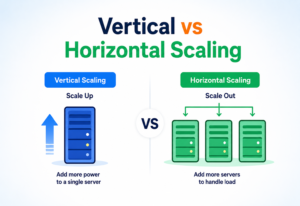
Because containers share the host’s kernel and skip booting a full OS, they start almost instantly and add very little CPU or memory overhead compared to running the application directly on the host. This makes it practical to scale horizontally — running many small, identical containers behind a load balancer — instead of scaling vertically by making one giant server more powerful.
8.1 Horizontal Scaling
Orchestrators like Kubernetes can automatically start more copies (replicas) of a container when traffic increases, and remove them when traffic drops — this is called autoscaling. Because each container starts in about a second, this scaling can react quickly to real traffic spikes, absorbing flash crowds without the minutes-long lag you get when spinning up new virtual machines.
Containers are lightweight, but they are not free. Running too many containers on too little hardware, or forgetting to set resource limits, can cause “noisy neighbour” problems where one runaway container starves the others of CPU or memory. In production, always pair autoscaling with explicit requests and limits, and monitor both together so a broken deployment cannot quietly drag down a whole node.
High Availability & Reliability
A single container running on a single machine is not highly available — if that machine crashes, the application goes down. In production, Docker containers are almost always run under an orchestrator such as Kubernetes, Docker Swarm or Amazon ECS, which is responsible for keeping the desired state of the system alive even as individual machines and processes come and go.
- Restarting containers automatically if they crash, using backoff policies to avoid crash loops that hammer the system.
- Rescheduling containers onto healthy machines if a server fails, so a node loss does not become a customer-visible outage.
- Rolling updates — replacing old containers with new versions gradually, so the app never goes fully offline during a deploy.
- Health checks — periodically confirming a container is actually working, not just running, so “zombie” instances that are up but broken get replaced automatically.
HEALTHCHECK --interval=30s --timeout=5s --retries=3
  CMD curl -f http://localhost:8080/health || exit 1
A common production pattern is to run at least three replicas of each service, spread across different physical machines or availability zones, so that the failure of any single machine never takes the whole service down. Combined with rolling updates and health checks, this quietly turns Docker + orchestrator into one of the most resilient application delivery stacks the industry has ever had.

Security
Because containers on the same host share one kernel, container security is different from VM security, and needs deliberate attention. Treating containers as if they were fully isolated VMs is one of the most common ways real-world Docker deployments get breached.
10.1 Key Practices
- Run as a non-root user inside the container whenever possible, so a compromised app has fewer privileges to abuse.
- Use minimal base images (like Alpine Linux or “distroless” images) to reduce the attack surface — fewer installed tools means fewer things an attacker can exploit if they do get in.
- Scan images for known vulnerabilities using tools like Trivy, Grype or Docker Scout before deploying, ideally as an automatic step in your CI pipeline.
- Never bake secrets (passwords, API keys) into an image — use secret managers or environment variables injected at runtime instead. Anything in an image can be extracted by anyone who pulls it.
- Limit capabilities — drop Linux kernel capabilities a container does not need with flags like
--cap-drop, so even a compromised process cannot escalate. - Keep images updated so security patches for the base OS and libraries are applied regularly; a container image built a year ago and never rebuilt is a rolling vulnerability disclosure.
FROM eclipse-temurin:21-jre-alpine
RUN addgroup -S app && adduser -S app -G app
USER app
COPY --chown=app:app target/my-app.jar app.jar
ENTRYPOINT ["java", "-jar", "app.jar"]Docker containers should never be treated as a strong security boundary against fully untrusted or hostile code. For that level of isolation, use a virtual machine, or a hardened container runtime like gVisor or Kata Containers that adds a stronger isolation layer between the container and the host kernel. The general rule of thumb: containers isolate code you trust from bugs; VMs isolate code from code you do not trust at all.
Monitoring, Logging & Metrics
Once containers are running in production, you need visibility into what they are doing. “It is up” is not the same as “it is healthy”, and only observability tells you which of the two is actually true right now.
11.1 Logging
By default, Docker captures anything a container prints to its standard output and standard error streams. Tools like the ELK stack (Elasticsearch, Logstash, Kibana) or Grafana Loki collect these logs from every container across a whole cluster and make them searchable in one place — so you never have to SSH into a specific host just to read a stack trace.
11.2 Metrics
Metrics track numeric measurements over time — CPU usage, memory usage, request latency, error rates. Prometheus is the most widely used tool for collecting container and application metrics, and Grafana is commonly used to visualize them on dashboards. The two together have become the de-facto observability stack of the container era.
docker stats
# Shows live CPU %, memory usage/limit, network I/O, and block I/O
# for every running container
11.3 Tracing
In a microservices system, one user request might pass through ten different containers. Distributed tracing tools (like Jaeger, Zipkin or Grafana Tempo) attach a unique ID to each request so you can follow its full path and pinpoint exactly which service is slow or failing. Without traces, debugging a slow request in a microservices system is essentially detective work with no evidence.
Deployment & Cloud
Getting containers from a developer’s machine into production usually flows through a CI/CD pipeline (Continuous Integration / Continuous Deployment) — an automated assembly line for software. The pipeline is what turns Docker’s per-container promises into a fleet-wide reality.
12.1 Where Containers Run in the Cloud
Kubernetes (EKS, GKE, AKS)
The industry-standard orchestrator for large, complex container deployments, offered as a managed service on every major cloud.
Amazon ECS / Fargate
A simpler, fully managed way to run containers on AWS without managing servers — you hand over an image, AWS handles the rest.
Docker Swarm
Docker’s own lightweight built-in orchestrator — simpler than Kubernetes and often perfect for small teams and smaller fleets.
PaaS platforms
Services like Google Cloud Run or Azure Container Apps that run a single container with almost no configuration and scale to zero when idle.
Multi-stage Dockerfiles keep production images small by using one stage to compile the app and a separate, minimal final stage that only contains the compiled output — the build tools never make it into the final image, which is smaller, faster to pull and dramatically less exposed to vulnerabilities in build-only dependencies.
# Stage 1: build
FROM maven:3.9-eclipse-temurin-21 AS build
WORKDIR /src
COPY . .
RUN mvn clean package -DskipTests

# Stage 2: run
FROM eclipse-temurin:21-jre-alpine
WORKDIR /app
COPY --from=build /src/target/my-app.jar app.jar
ENTRYPOINT ["java", "-jar", "app.jar"]Databases, Caching & Load Balancing
Containers are stateless by default, but real applications need to keep data. Handling data correctly in a container world is where a lot of first-time Docker users get burned — and where a few small habits (volumes, named services, load balancers) make the whole model click.
13.1 Running Databases in Containers
Databases can run in containers too, but because they store important data that must survive restarts, they always need a volume attached so data lives outside the container’s temporary writable layer. Without that volume, deleting the container silently deletes your customers’ data with it.
version: "3.9"
services:
  app:
    build: .
    ports:
      - "8080:8080"
    depends_on:
      - db
      - cache
  db:
    image: postgres:16
    environment:
      POSTGRES_PASSWORD: example
    volumes:
      - db-data:/var/lib/postgresql/data
  cache:
    image: redis:7-alpine

volumes:
  db-data:
13.2 Caching
Tools like Redis are frequently run as their own container to store frequently accessed data in memory, dramatically reducing load on the main database and speeding up responses. Because the cache is a separate container, you can scale, upgrade or replace it independently of the application.
13.3 Load Balancing
When multiple container replicas of the same service run at once, a load balancer (like NGINX, HAProxy, or a cloud provider’s built-in load balancer) distributes incoming traffic evenly across them, and stops sending traffic to any replica that fails its health check. That single ingredient — a load balancer in front of replicated containers — is what turns a single-machine setup into a horizontally scalable system.
APIs & Microservices
Docker is a natural fit for microservices architecture, where a large application is broken into many small, independent services that each do one thing well and communicate over the network (usually via HTTP/REST APIs or message queues), instead of being built as one giant, tightly coupled program.
Each microservice can be packaged as its own Docker image, built and deployed independently, written in a different programming language if needed, and scaled up or down separately based on its own demand. Teams can move faster because they no longer have to coordinate every release with every other team — the container boundary becomes the coordination boundary.
import java.net.URI;
import java.net.http.HttpClient;
import java.net.http.HttpRequest;
import java.net.http.HttpResponse;

public class DockerApiExample {
    public static void main(String[] args) throws Exception {
        // Docker exposes a REST API, typically over a Unix socket or TCP port,
        // that lets other programs manage containers programmatically.
        HttpClient client = HttpClient.newHttpClient();

        HttpRequest request = HttpRequest.newBuilder()
                .uri(URI.create("http://localhost:2375/containers/json"))
                .GET()
                .build();

        HttpResponse<String> response =
                client.send(request, HttpResponse.BodyHandlers.ofString());

        // response.body() contains a JSON array of running containers
        System.out.println("Running containers: " + response.body());
    }
}This is exactly how tools like Kubernetes, Portainer and CI/CD systems manage containers — they do not type commands into a terminal, they call this same REST API programmatically. Once you have seen the API, most of the “magic” of higher-level container tools stops looking like magic.
Design Patterns & Anti-patterns
A handful of patterns show up over and over in well-designed Docker deployments, and a handful of anti-patterns show up over and over in the ones that later end up as production incident reports. Learning both by name is one of the quickest wins for anyone working with containers day to day.
15.1 Useful Patterns
- Sidecar pattern — running a helper container alongside the main application container in the same pod (e.g., a logging agent or a proxy), sharing network and storage so the main app stays focused on its core job.
- Ambassador pattern — a sidecar that handles outbound network connections on behalf of the main container, simplifying service discovery and letting the app treat “the outside world” as a single localhost address.
- Init container pattern — a short-lived container that runs setup tasks (like database migrations or waiting for a dependency) before the main container starts.
- One process per container — each container should run a single responsibility, making it easier to scale, monitor and replace independently.
15.2 Anti-patterns to Avoid
- Storing state inside a container — writing important data to the container’s own filesystem instead of a volume, causing data loss the first time the container is replaced.
- Giant “god” images — cramming an entire application stack (web server, database, cache) into one container instead of separate, focused ones, sacrificing every benefit containers were built to give you.
- Using the
latesttag in production — this makes deployments unpredictable, sincelatestcan silently point to a different image over time, meaning “the same” deploy today and tomorrow may install different code. - Running containers as root unnecessarily, increasing the security blast radius if the app is compromised.
- Ignoring image size — bloated images slow down deployments, waste registry storage and increase the attack surface.
Best Practices & Common Mistakes
If the earlier sections explained how Docker works, this one is the concise checklist experienced engineers keep in their head when reviewing a Dockerfile or a deployment manifest. Almost every real-world Docker mistake maps back to violating one of these.
Pin exact versions
Use specific image tags (e.g. postgres:16.2) instead of latest for reproducible builds — today’s build should be the same as tomorrow’s.
Use .dockerignore
Exclude unnecessary files (like local build folders or .git) from the build context to keep builds fast and images small.
Order layers wisely
Put instructions that rarely change (like installing dependencies) before ones that change often (like copying source code), so Docker’s cache is used efficiently.
Set resource limits
Always define CPU and memory limits so one container cannot starve the whole host, and so autoscaling has clear signals to work with.
Keep images small
Use slim or Alpine base images and multi-stage builds to shrink final image size — every megabyte you cut is a megabyte you never pay to pull.
Externalize configuration
Use environment variables or config files mounted at runtime instead of hard-coding settings into the image, so the same image can safely move across environments.
“Build once, run anywhere” only works if you actually treat your container as immutable — the same image should move unchanged from testing straight through to production.
Real-World Industry Examples
Looking at how the largest companies in the world use Docker is one of the fastest ways to internalise which parts of the theory really matter at scale, and which parts turn out to be optional. Every one of these companies started with monoliths and physical servers, and containers were a decisive step in how they escaped that.
Thousands of microservices
Netflix runs thousands of microservices, many in containers, to handle everything from recommendations to video encoding, using its own orchestration tooling (Titus) built on top of container technology to schedule workloads across a massive fleet of machines.
Monolith to microservices
Uber migrated from a large single application to thousands of independently deployable microservices, packaged in containers, which let different teams ship updates to pricing, mapping and matching systems independently without waiting on each other.
Backend microservices
Spotify uses containers extensively to isolate the huge number of backend services powering music streaming, search and recommendations, enabling different teams to deploy independently many times per day.
ECS, EKS, Fargate
Amazon’s own internal infrastructure, and its AWS cloud offerings like ECS, EKS and Fargate, are built around efficiently packing and scheduling containers across enormous data centers, letting customers run workloads without managing individual servers.
In every case, the underlying motivation is the same: break a large system into small, independently deployable pieces, and use containers to make each piece portable, consistent and easy to scale on demand. Docker did not invent that architectural idea — but it made it economically and operationally practical for the first time.
Frequently Asked Questions
A handful of the questions that come up most often when engineers actually start using Docker for the first time, answered plainly — without pretending the answers are simpler than they really are.
Is Docker the same as Kubernetes?
No. Docker builds and runs individual containers on a single machine. Kubernetes orchestrates many containers across many machines — scheduling, scaling and healing them automatically. They are complementary, not competitors, and Kubernetes actually uses container runtimes (originally Docker’s, now more commonly containerd) underneath.
Do I need Docker for small personal projects?
Not always, but it is often still worth it — it makes your setup reproducible, easy to share with others and easy to deploy later without reconfiguring your machine from scratch. Even a solo developer benefits from being able to docker compose up and get a working stack instantly.
Can Docker run Windows applications?
Docker can run Windows containers on a Windows host, but most of the ecosystem — and this guide — focuses on Linux containers, which are far more common and portable. On Mac and Windows dev machines, Docker Desktop transparently runs a small Linux VM to host Linux containers.
Is a container a lightweight virtual machine?
Not technically — a container does not emulate hardware or run its own kernel. It is an isolated set of processes sharing the host’s kernel, which is why it is so much lighter and faster than a VM. The mental model “lightweight VM” is close enough to be useful but wrong enough to mislead you the first time it matters (usually around security or storage).
What happens to my data when a container is deleted?
Any data written inside the container’s own writable layer is lost. Data written to an attached volume persists, because volumes live outside the container’s lifecycle. This is exactly why databases in containers always need a volume.
Is Docker still relevant with newer tools like Podman?
Yes. Docker remains the most widely used developer tool for building and running containers, and it helped define the OCI standards that alternative tools like Podman also follow. Choosing between them is often a matter of ergonomics and organisational policy, not underlying capability.
Summary & Key Takeaways
Docker packages an application and everything it needs into a portable, consistent unit called a container, solving the age-old “works on my machine” problem. It achieves this using Linux kernel features — namespaces for isolation and cgroups for resource limits — combined with a layered image format that makes builds fast and storage efficient.
Containers are lighter and faster than virtual machines, which makes them ideal for microservices architectures, rapid scaling and modern CI/CD pipelines. In production, Docker is almost always paired with an orchestrator like Kubernetes to provide high availability, automated healing and horizontal scaling, while security practices like minimal images, non-root users and vulnerability scanning keep deployments safe.
Key takeaways to carry with you
- Docker containers package code + dependencies into one portable, consistent unit that runs the same everywhere.
- Containers share the host kernel and use namespaces + cgroups for isolation and resource limits — making them far lighter than VMs.
- Images are built in layers, cached and stored in registries like Docker Hub — smart layer ordering makes rebuilds nearly instant.
- Volumes handle persistent data; containers themselves should be treated as disposable, replaceable and stateless.
- Production systems pair Docker with an orchestrator (usually Kubernetes) for scaling, health checks and self-healing.
- Security requires deliberate effort: minimal images, non-root users, image scanning, and never bake secrets into an image.
- Docker underpins the microservices architectures used by Netflix, Uber, Spotify, Amazon and most modern tech companies — it is not going anywhere.

