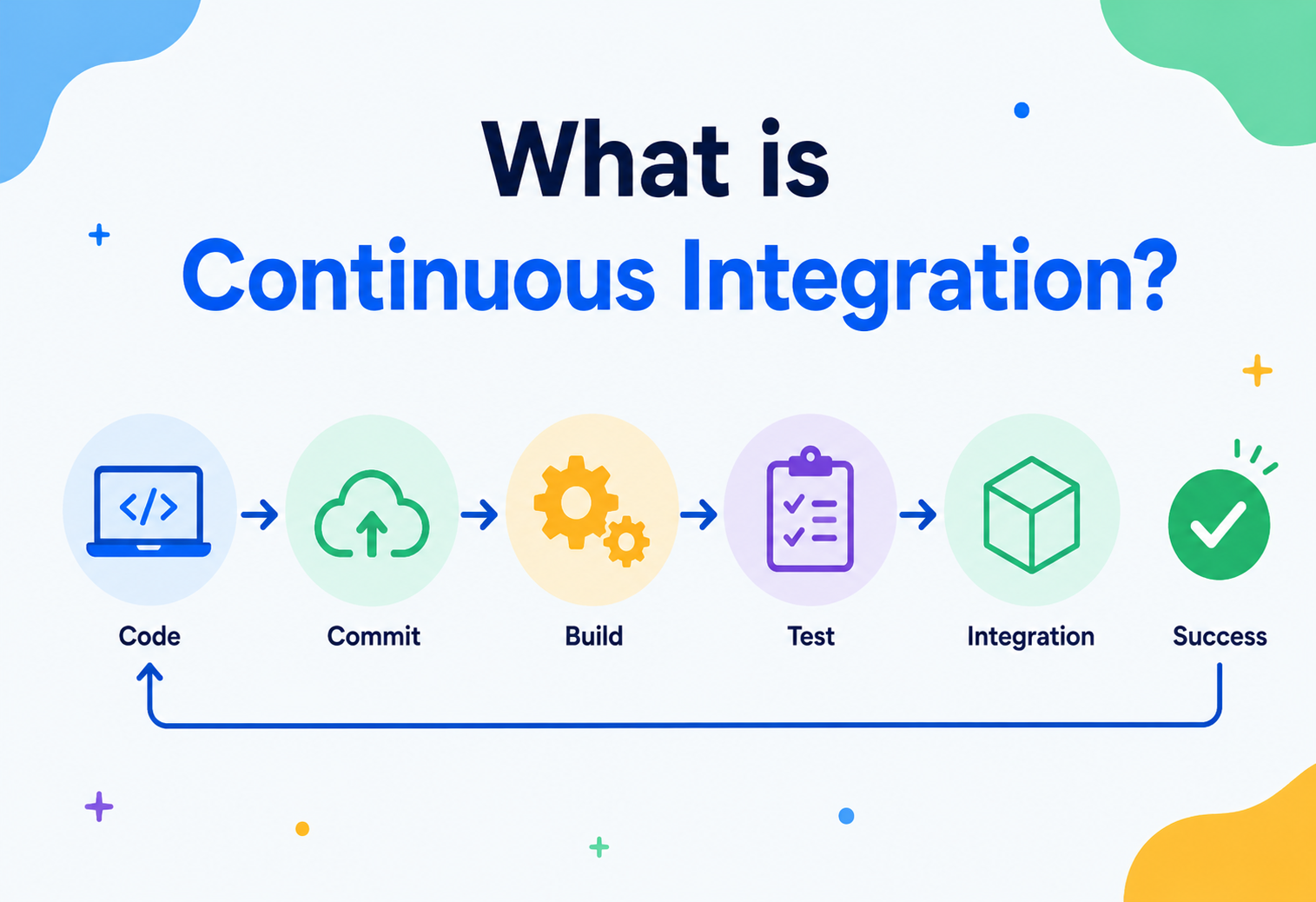
What is Continuous Integration?
A complete, beginner-friendly guide to Continuous Integration — from the history and core ideas, through architecture, internals, security, and how Netflix, Google, and Amazon do it at scale.
Introduction & History
Continuous Integration (CI) is a software development practice where developers merge their code changes into a shared repository frequently — often several times a day — and, every time they do, an automated system builds the project and runs its tests to check that nothing broke.
Think of it like a group of students writing a class essay together, one paragraph each, in a shared document. If everyone waited three weeks to combine their paragraphs, you’d get a mess: clashing styles, contradicting facts, broken transitions. CI is the equivalent of everyone dropping their paragraph into the shared doc every hour, with a very fast teacher who instantly reads the whole essay and says “this sentence doesn’t make sense” the moment it happens — while the mistake is still fresh and easy to fix.
CI is a fast, tireless proofreader sitting behind every developer. The instant a paragraph is written, it’s checked against the rest of the book. Contradictions, typos, and broken references surface within seconds, not weeks.
1.1 Where CI Came From
The idea traces back to the early 1990s, when Grady Booch described a practice of integrating software builds frequently instead of leaving integration as a single terrifying event at the end of a project. But CI as we know it today was popularized by Kent Beck as part of Extreme Programming (XP) in the late 1990s. XP’s core insight was simple: the longer you wait to combine everyone’s code, the more painful the combining becomes. So do it constantly, and make it cheap and automatic.
In 2001, CruiseControl arrived as one of the first widely used CI servers. Then came Hudson (2004), which later forked into Jenkins (2011) after a dispute with Oracle — Jenkins remains the most widely deployed self-hosted CI tool today. As software moved to the cloud, hosted CI services emerged: Travis CI (2011), CircleCI (2011), GitLab CI (2012), and GitHub Actions (2018), each making CI easier to adopt by removing the burden of running your own server.

1991 — The seed idea
Grady Booch describes frequent micro-integration of code as a healthier alternative to big-bang integration.
1997–1999 — Extreme Programming
Kent Beck formalizes “Continuous Integration” as one of XP’s twelve core practices.
2001 — CruiseControl
One of the first dedicated, widely adopted CI servers is released as open source.
2004–2011 — Hudson → Jenkins
Hudson becomes the dominant self-hosted CI tool, later forking into Jenkins.
2011–2018 — Cloud-native CI
Travis CI, CircleCI, GitLab CI, and GitHub Actions bring CI to the cloud as a managed service.
Today
CI is a default expectation on virtually every professional software team, tightly paired with Continuous Delivery/Deployment (CI/CD).
The Problem CI Solves
Before CI became common practice, teams often worked in isolation on separate branches for weeks or months, then tried to merge everything right before a release. This was called “integration hell.”
Ten developers each work alone for a month. On release day, they all merge their code at once. Function names collide, one developer’s database changes break another’s queries, and nobody remembers why they wrote a particular line three weeks ago. Debugging this mess can take days or weeks — right when the team is under the most pressure to ship.
The core problem is that the cost of fixing a bug grows the longer it goes undetected. A typo caught the second you type it costs nothing. The same typo, discovered a month later after ten other people have built on top of it, might require untangling dozens of files.
CI attacks this problem directly by shrinking the gap between “a mistake is made” and “a mistake is discovered” down to minutes, using automation instead of relying on humans to remember to check.
Core Concepts
Before going further, let’s define the vocabulary you’ll see throughout this guide.
Repository (repo)
The shared storage location — usually Git — that holds all of a project’s source code and its history.
Commit
A saved snapshot of changes to the code, with a message describing what changed.
Branch
An independent line of development, allowing work to happen without disturbing the main codebase.
Build
The process of turning source code into a runnable program — compiling, linking, packaging.
Pipeline
An ordered sequence of automated steps (build, test, package, deploy) triggered by a code change.
Test Suite
The full collection of automated tests — unit, integration, end-to-end — that verify the code behaves correctly.
Artifact
The packaged output of a build — a JAR file, a Docker image, a compiled binary — ready to be deployed.
CI Server / Runner
The machine (physical or virtual) that actually executes the pipeline’s steps.
3.1 CI vs. CD — Don’t Mix Them Up
People often say “CI/CD” as one phrase, but they are three related, distinct ideas:
| Term | What it means |
|---|---|
| Continuous Integration (CI) | Automatically build and test every code change as soon as it’s merged. |
| Continuous Delivery | Automatically prepare every passing change into a release-ready artifact — a human still clicks “deploy.” |
| Continuous Deployment | Every passing change is automatically deployed to production with no human step at all. |
CI is the foundation. Without reliable, automated testing on every change, delivery and deployment automation would just ship bugs to users faster.

Architecture & Components
A CI system is made of a handful of cooperating parts. Understanding each piece makes the whole system much less mysterious.
Fig 1. Cooperating components of a modern CI system.
Source Control
Git (GitHub, GitLab, Bitbucket) hosts the code and fires a webhook whenever a push or pull request happens.
CI Orchestrator
The “brain” — Jenkins, GitHub Actions, GitLab CI, CircleCI — that receives triggers and decides what pipeline to run.
Build Agents/Runners
The actual worker machines (often ephemeral containers or VMs) where compilation and tests execute.
Artifact Repository
Storage for build outputs — Nexus, Artifactory, Docker Hub, or a cloud registry.
Configuration File
A YAML/Groovy file in the repo (e.g. .github/workflows/ci.yml) declaring the pipeline as code.
Notification Layer
Slack, email, or dashboard integrations that tell humans the result of a run.
Modern CI tools store the pipeline definition as a text file that lives in the repository itself, right next to the code it builds. This means the build process is version-controlled, reviewable, and changes with the code — instead of being a fragile setting buried in someone’s browser.
Internal Working
Let’s open the hood. When a developer pushes code, a very specific sequence of events happens under the surface.
Trigger detection
The source control host sends an HTTP webhook to the CI server the instant a push or pull request happens.
Queueing
The CI orchestrator places a new “job” onto a queue, since many jobs may arrive at once across a busy team.
Agent allocation
A free build agent (often a fresh, disposable container) is assigned the job.
Workspace checkout
The agent clones the exact commit that triggered the build into a clean workspace.
Dependency resolution
Package managers (Maven, npm, pip) download the libraries the project needs, often from a cache to save time.
Compilation
Source code is translated into an executable or bytecode form.
Test execution
The automated test suite runs against the compiled code, usually in parallel batches.
Static analysis
Linters and security scanners inspect the code for style issues or known vulnerabilities.
Artifact packaging
A deployable unit (JAR, Docker image, zip) is produced and uploaded to a repository.
Reporting
Pass/fail status, logs, and test coverage are published back to the pull request and to a dashboard.
5.1 A Minimal CI Configuration Example
Here is what a very small CI pipeline definition looks like, using a Java/Maven project as the example (the syntax below follows the common YAML style used by tools like GitHub Actions and GitLab CI):
name: ci-pipeline
on: [push, pull_request]

jobs:
  build-and-test:
    runs-on: ubuntu-latest
    steps:
      - name: Checkout code
        uses: actions/checkout@v4

      - name: Set up Java
        uses: actions/setup-java@v4
        with:
          java-version: '21'
          distribution: 'temurin'

      - name: Build with Maven
        run: mvn -B compile

      - name: Run tests
        run: mvn -B test

      - name: Package artifact
        run: mvn -B package -DskipTests
5.2 A Sample Unit Test CI Would Run
CI is only as useful as the tests it executes. Here’s a tiny example — a class that calculates order totals, and a JUnit test that CI would run on every push:
// OrderCalculator.java
public class OrderCalculator {
    public double calculateTotal(double price, int quantity, double taxRate) {
        if (quantity < 0) {
            throw new IllegalArgumentException("Quantity cannot be negative");
        }
        double subtotal = price * quantity;
        return subtotal + (subtotal * taxRate);
    }
}

// OrderCalculatorTest.java
import org.junit.jupiter.api.Test;
import static org.junit.jupiter.api.Assertions.*;

class OrderCalculatorTest {

    @Test
    void calculatesTotalWithTax() {
        OrderCalculator calc = new OrderCalculator();
        double result = calc.calculateTotal(10.0, 3, 0.08);
        assertEquals(32.4, result, 0.001);
    }

    @Test
    void throwsOnNegativeQuantity() {
        OrderCalculator calc = new OrderCalculator();
        assertThrows(IllegalArgumentException.class,
            () -> calc.calculateTotal(10.0, -1, 0.08));
    }
}
If a teammate accidentally breaks calculateTotal — say, by forgetting to add tax — the second test above would fail the moment CI runs, and the pull request would be blocked from merging until it’s fixed.
Data Flow & Lifecycle of a Build
Zooming out, here’s the full lifecycle of a single change from a developer’s keyboard to a validated, ready-to-ship artifact.
Fig 2. Full lifecycle of a single change from developer keyboard to validated, ready-to-ship artifact.
Each stage of this lifecycle is designed around a single goal: give the developer feedback as fast as possible, so a mistake is caught while it’s still cheap to fix.

Advantages, Disadvantages & Trade-offs
Like every engineering practice, CI comes with real upsides and real costs. Weigh both honestly before adopting.
Advantages
- Bugs are caught within minutes, not weeks
- Merge conflicts stay small and manageable
- The codebase is always in a known, testable state
- Frees developers from manual, error-prone build steps
- Builds team confidence to ship frequently
- Creates a paper trail (logs, reports) for every change
Disadvantages / Costs
- Requires an upfront investment in test coverage
- Pipeline infrastructure has real maintenance cost
- Flaky tests can erode trust in the whole system
- Slow pipelines create bottlenecks if not optimized
- Poorly designed pipelines can give false confidence
The trade-off is essentially pay now, save later: teams that invest in good tests and fast pipelines spend less total time debugging over the life of a project, but the investment isn’t free, and a team with zero tests gets little value from CI on day one.
Performance & Scalability
As a codebase and team grow, a CI pipeline that took two minutes can balloon to forty. Several techniques keep pipelines fast even as the project scales.
8.1 Parallelization
Instead of running 10,000 tests one after another on a single machine, split them into, say, 10 groups of 1,000 and run all ten groups simultaneously on separate agents. This is called test sharding, and it can cut wall-clock time by nearly the number of shards used.
8.2 Caching
Downloading every dependency from scratch on every build wastes minutes repeatedly. CI systems cache dependency directories (like Maven’s .m2 or npm’s node_modules) between runs, and often cache compiled build outputs too — this is analogous to how a cook preps ingredients once and reuses them across many dishes instead of re-shopping every time.
8.3 Incremental Builds
Rather than rebuilding the entire project, an incremental build only recompiles the files that actually changed and anything that depends on them, using a dependency graph to know what’s safe to skip.
8.4 Fail Fast
Cheap, fast checks (like a linter or a quick unit-test subset) run before expensive ones (full integration or end-to-end suites), so obviously broken changes get rejected in seconds instead of waiting for a 30-minute run to fail at the very end.
High Availability & Reliability
If the CI server goes down, an entire team can be blocked from merging code — so reliability matters as much for CI infrastructure as it does for production systems.
Ephemeral Agents
Spinning up a fresh container per build means a corrupted agent never silently poisons future builds — each run starts from a known-clean state.
Redundant Orchestrators
Running multiple CI server instances behind a load balancer avoids a single point of failure taking down the whole pipeline system.
Retry Logic
Transient failures (a flaky network call, a momentarily unavailable package registry) can be automatically retried instead of failing the whole build outright.
Idempotent Pipelines
Re-running the exact same pipeline on the exact same commit should always produce the exact same result — a property that makes debugging failures far easier.
A test that sometimes passes and sometimes fails on identical code — often due to timing issues, shared test state, or network calls — trains developers to ignore CI failures altogether (“just re-run it”). This is one of the most common ways teams quietly lose trust in their CI system.
Security in CI
A CI pipeline has broad access — to source code, to credentials, and often to production deployment permissions — which makes it a high-value target.
- Secrets management: API keys and passwords should live in a dedicated secrets manager (e.g. Vault, or the CI provider’s encrypted secrets store), never hard-coded in the pipeline file or committed to the repo.
- Least privilege: build agents should only have the permissions the specific job actually needs, not broad admin access “just in case.”
- Dependency scanning: automated tools (like Dependabot or Snyk) check third-party libraries for known vulnerabilities on every build.
- Signed commits & artifacts: cryptographic signing verifies that code and build outputs weren’t tampered with between steps.
- Isolated, ephemeral runners: untrusted pull requests (e.g. from open-source contributors) should build in a sandbox with no access to production secrets.
- Supply chain awareness: pin dependency versions and verify checksums to guard against a compromised upstream package silently entering your build.
Several high-profile software supply-chain attacks (like the 2021 Codecov breach) happened by compromising CI pipeline scripts to exfiltrate secrets — a reminder that CI security is not optional infrastructure hygiene, it’s a direct line to your production systems.
Monitoring, Logging & Metrics
Teams track a handful of key CI metrics to know whether their pipeline is actually helping or quietly becoming a bottleneck.
| Metric | What it tells you |
|---|---|
| Build success rate | Percentage of builds that pass — a sharp drop signals a systemic problem. |
| Mean time to feedback (MTTF) | How long a developer waits between pushing code and getting a result. |
| Flaky test rate | How often tests fail non-deterministically — high rates erode trust. |
| Mean time to recovery (MTTR) | How quickly a broken build (“red” pipeline) gets fixed. |
| Test coverage | What percentage of code is exercised by automated tests. |
| Queue time | How long jobs wait for a free agent — a proxy for infrastructure capacity. |
Logs from every step of every build should be centralized and searchable, and dashboards (visible to the whole team, sometimes literally on an office screen) keep pipeline health visible instead of hidden until something breaks badly.
Deployment & Cloud Integration
CI increasingly runs in the cloud rather than on a machine under someone’s desk. This shift brought several patterns.
Containerized Builds
Each build runs inside a Docker container, guaranteeing the exact same environment every single time, regardless of which physical machine executes it.
Managed CI Services
GitHub Actions, GitLab CI, and CircleCI provide on-demand build infrastructure, so teams don’t operate their own servers.
Elastic Agent Pools
Cloud-based runners scale up automatically during busy periods and scale down to zero when idle, controlling cost.
Infrastructure as Code
Tools like Terraform can be validated by CI itself, testing infrastructure changes the same way application code is tested.
CI typically hands off to a Continuous Delivery/Deployment pipeline once a build passes, which pushes the validated artifact to staging or production environments — often using strategies like blue-green deployments or canary releases to reduce risk.
APIs, Microservices & CI
In a microservices architecture, dozens or hundreds of small, independently deployable services each need their own CI pipeline. This introduces new challenges.
- Per-service pipelines: each microservice typically has its own repository and its own pipeline, so a change to the “payments” service doesn’t trigger a rebuild of “inventory.”
- Contract testing: since services communicate over APIs, CI often includes consumer-driven contract tests (e.g. with a tool like Pact) to catch breaking API changes before they hit a dependent service in production.
- Shared pipeline templates: to avoid every team reinventing pipeline configuration, organizations often centralize reusable pipeline templates that individual services extend.
- Monorepo CI: some organizations keep all services in a single repository instead, using dependency-graph-aware CI tools that only rebuild the services actually affected by a given change.
In a monolith, a broken API call fails immediately at compile time. Across microservices, two independently-deployed services can drift apart silently — contract tests give CI a way to catch that drift before it reaches production.
Design Patterns & Anti-Patterns
A small number of good habits compound powerfully over time. So do the bad ones — usually in the opposite direction.
14.1 Good Patterns
Trunk-Based Development
Everyone commits small changes directly to a single main branch frequently, minimizing the size — and pain — of any single merge.
Feature Flags
Unfinished work is merged behind a toggle that’s off by default, decoupling “merging code” from “releasing a feature.”
Pipeline as Code
The pipeline definition lives in version control alongside the application, reviewed the same way code is.
Fail Fast, Fail Loud
Cheapest checks run first; failures are surfaced immediately and unmissably, not buried in a log nobody reads.
14.2 Common Anti-Patterns
The Long-Lived Branch
Feature branches that live for weeks recreate “integration hell” — the opposite of what CI is meant to prevent.
The Ignored Red Build
When a broken pipeline is tolerated instead of fixed immediately, the team stops trusting — and eventually stops looking at — CI results at all.
The Snowflake Pipeline
Manually-configured build servers that nobody can reproduce, making the whole CI setup a fragile single point of failure.
Testing in Production Only
Skipping a real test suite and relying on CI purely to “build and deploy” defeats the entire purpose of catching bugs early.
“If it hurts, do it more often, and bring the pain forward.” — a core philosophy behind Continuous Integration.
Best Practices & Common Mistakes
A distilled list of what tends to work — and what tends to quietly go wrong.
Best Practices
- Commit small, frequent changes rather than huge ones
- Keep the build fast — aim for well under 10 minutes
- Treat a red (failing) build as the team’s top priority to fix
- Write tests alongside the code, not after the fact
- Keep pipeline configuration in version control
- Make results visible to the whole team, not just the author
Common Mistakes
- Letting the pipeline grow slow and bloated over time
- Skipping tests “just this once” to hit a deadline
- Allowing flaky tests to linger instead of fixing or removing them
- Giving every pipeline broad, unnecessary permissions
- Treating CI as a one-time setup instead of ongoing maintenance
Real-World Examples
The same principles that help a two-person startup also power the biggest engineering organizations on the planet — just at a very different scale.
Runs one of the largest monorepos in the world, with a CI/build system (Blaze/Bazel-based) that runs millions of automated builds and tests per day across a single shared codebase.
Netflix
Uses CI heavily paired with Spinnaker for delivery, enabling hundreds of microservice deployments per day while maintaining resilience through automated canary analysis.
Amazon
Famously deploys code to production extremely frequently (historically cited as roughly every 11.7 seconds company-wide), enabled by deep CI/CD automation across thousands of independent services.
Uber
Runs a large-scale CI infrastructure to support thousands of microservices, investing heavily in build caching and test sharding to keep feedback loops fast despite massive scale.
Across all these companies, the underlying philosophy is identical to what a small team practices: integrate often, automate the checks, and treat a broken build as an emergency — just executed at a scale of thousands of engineers instead of a handful.
Frequently Asked Questions
Short, direct answers to the questions that most often come up as teams begin practicing CI seriously.
Q: Is CI only for large teams?
No — even a solo developer benefits from CI, since it catches mistakes automatically without relying on memory or manual discipline, and it becomes essential the moment a second person joins the project.
Q: Do I need 100% test coverage for CI to be useful?
No. CI provides value with any amount of automated testing — it simply catches whatever the test suite is designed to catch. Coverage should grow over time rather than being a blocking prerequisite to starting.
Q: Is Jenkins still relevant?
Yes — Jenkins remains one of the most widely deployed self-hosted CI tools, valued for its flexibility and huge plugin ecosystem, though many newer teams prefer managed options like GitHub Actions for lower operational overhead.
Q: What’s the difference between CI and a build script?
A build script (like a Maven or Gradle file) defines how to compile and test code. CI is the automated system that triggers that script on every change and reports the result — the script is one ingredient, CI is the whole kitchen.
Q: Can CI catch every bug?
No. CI only catches what its test suite is written to check. It’s a powerful safety net, not a guarantee of bug-free software — good CI complements, but doesn’t replace, careful design and code review.
Summary & Key Takeaways
CI, boiled down: integrate small changes constantly, verify them automatically, and treat a broken build as an emergency. Everything else is detail.
Key Takeaways
- Continuous Integration means merging and testing code changes frequently and automatically, catching problems while they’re still cheap to fix.
- CI is distinct from — but foundational to — Continuous Delivery and Continuous Deployment.
- A CI system is made of source control, an orchestrator, build agents, an artifact repository, and reporting/notifications, all tied together by a pipeline defined as code.
- Speed and reliability come from parallelization, caching, incremental builds, and fail-fast ordering.
- Security matters deeply — CI pipelines hold real credentials and deployment power, and must be treated as sensitive infrastructure.
- At scale (Google, Netflix, Amazon, Uber), CI is the same core idea — integrate often, automate the checks — just applied across thousands of engineers and services.
- CI is as much a cultural practice (fix the red build immediately, commit small and often) as it is a technical one.
“A red build is not a status. It’s an emergency.”

