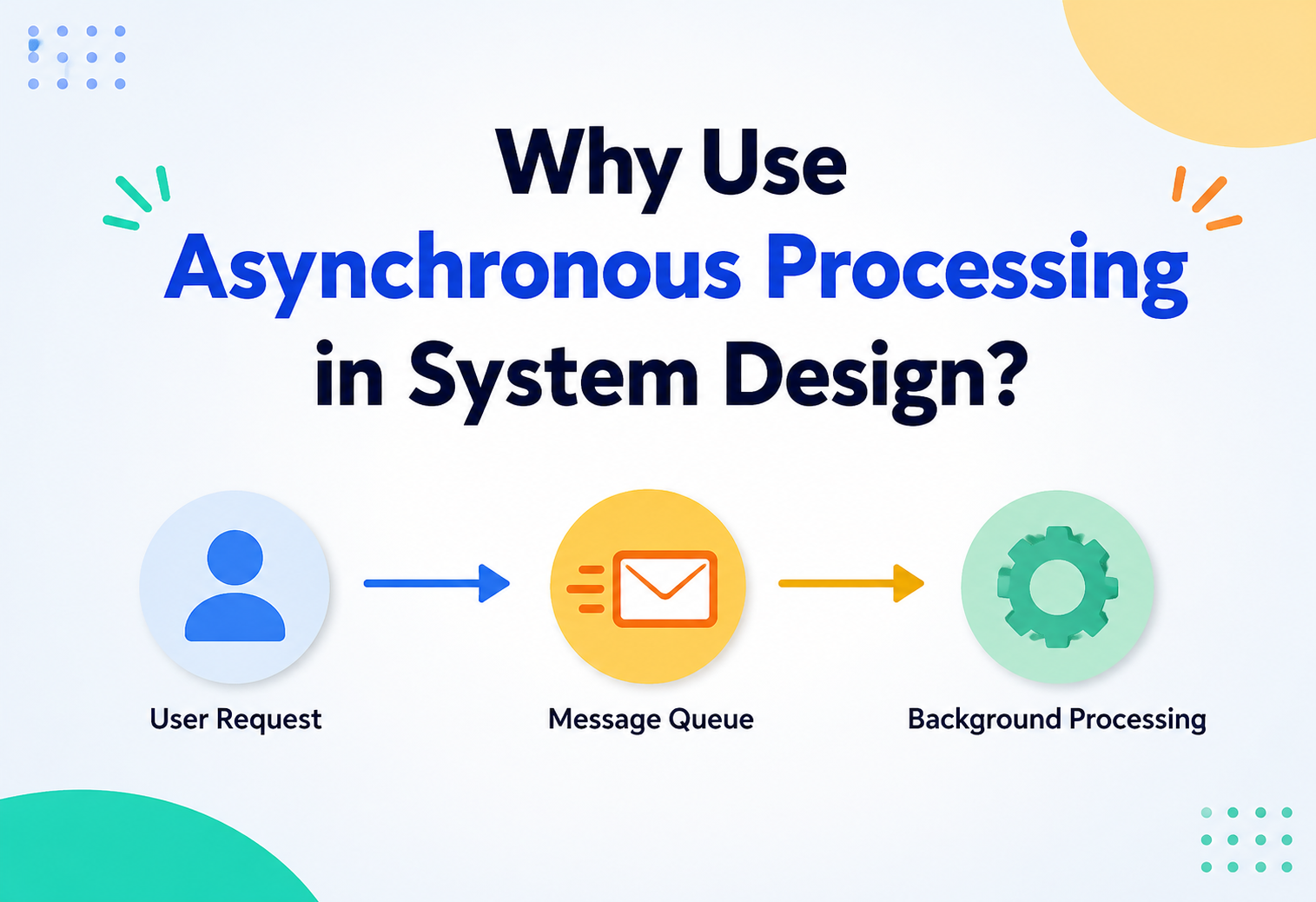
Why Use Asynchronous Processing in System Design?
Some jobs need an answer right this second. Others can happily wait a few seconds, or even a few minutes, without anyone noticing. This guide explains why teaching a system to tell the difference is one of the smartest moves in software architecture.
Sync vs. Async, Simply Put
Imagine you call a friend on the phone to ask a question. You stay on the line, waiting, because you need the answer right now before you can do anything else. That is synchronous behaviour — one thing happens, then it finishes, then the next thing can start.
Now imagine instead you send that same friend a text message. You do not sit there staring at your phone, frozen, unable to do anything else until they reply. You send the text and go on with your day — maybe you make a sandwich, maybe you watch a video — and whenever your friend gets around to replying, you will see it and respond. That is asynchronous behaviour — a task gets started, but the person who started it does not have to sit around waiting for it to finish before moving on to other things.
In computer systems, this exact same idea shows up constantly. A synchronous system makes the person (or the next piece of code) wait for a task to completely finish before continuing. An asynchronous system starts a task, immediately moves on to something else, and deals with the result later, whenever it is ready.
Think about ordering food at two different kinds of restaurants. At a fast-food counter, you order, then you stand there and wait right at the register until your tray is ready — that is synchronous. At a sit-down restaurant, you order, and the waiter walks away to hand your order to the kitchen while you keep chatting with your friends — the kitchen cooks in the background, and your food arrives whenever it is ready, without anyone standing frozen at the table doing nothing else. That is asynchronous.
Asynchronous processing, as a system design idea, means deliberately building parts of a system so that slow or non-urgent work happens in the background, separate from the part that is directly talking to the user. Instead of making someone wait for the slow part, the system says “got it, I will handle that,” frees them up immediately, and finishes the work quietly behind the scenes.
Asynchronous processing lets a system start a task and move on immediately, instead of freezing everything until that task is completely done.
It is worth untangling asynchronous processing from a couple of similar-sounding words it often gets mixed up with. Concurrency is about a system being able to juggle more than one task at a time, switching attention between them, without necessarily running them at the exact same instant. Parallelism is about literally running multiple tasks at the exact same moment, usually because there is more than one processor available to share the work. Asynchronous processing overlaps with both ideas but is not quite the same as either — it is really about the relationship between the task-starter and the task itself: does the starter wait, or does it not? A system can be asynchronous without being parallel at all, the same way one very efficient waiter can serve ten tables “asynchronously” by never standing still at any single one, even without ever being in two places at once.
Picture a librarian who takes requests for rare books kept in a distant storage building. Instead of walking over there herself and making you wait at the counter, she writes your request on a slip, drops it in a request bin, and moves on to help the next person in line immediately. Later, a runner collects the slips, fetches the books, and brings them back for pickup. You did not have to stand frozen at the counter, and neither did she — that is the essence of asynchronous processing.
Why Any of This Matters
It is tempting to think of synchronous versus asynchronous as a small technical detail buried deep in the code. In practice, this single decision shapes how fast an app feels, how much traffic it can survive, and how gracefully it recovers when something outside its control goes wrong.
Users feel it instantly
A screen that responds in 200 milliseconds feels alive. One that freezes for eight seconds feels broken — even if the work being done is identical.
More traffic, less strain
Freeing up resources the moment the essential work is done lets one system serve far more people with the same hardware.
One slow part does not sink the ship
If a background job stalls, the rest of the system can usually keep running instead of grinding to a halt with it.
Smoother spending
Spreading bursty work out over time, instead of demanding instant capacity for every spike, is often noticeably cheaper to run.
There is also a very human reason this matters. Nobody enjoys staring at a spinning wheel. Every extra second a person waits for something that did not strictly need to happen instantly is a small, avoidable tax on their patience — and across millions of users, those small taxes add up to real, measurable frustration and lost business.
Not everything needs to happen right now — and knowing which things do not is half the job.
There is a more technical version of this same idea that is worth understanding, even in plain terms. A server that handles requests synchronously usually dedicates a thread — a little slot of attention — to each request, and that thread sits idle, doing nothing useful, for however long the slow work takes. If a thousand people are all waiting on a task that takes five seconds, a purely synchronous design needs a thousand of those idle slots sitting around simultaneously, just waiting. Asynchronous designs let that same server free up its attention the moment it hands work off to a queue, meaning it can accept far more incoming requests using far fewer resources, because it is no longer paying the cost of a thousand slots frozen in place doing nothing.
How Asynchronous Work Actually Flows
Underneath the friendly analogies, asynchronous systems tend to be built from the same handful of moving parts, arranged in a fairly consistent shape.
- Producer — the part of the system that creates a piece of work and hands it off, without waiting around for it to be finished.
- Queue or broker — a safe, temporary holding area where that work waits until someone is ready to pick it up.
- Consumer (or worker) — the part of the system that actually picks up the waiting work and does it.
- Acknowledgment — a signal sent back once the work is genuinely finished, so the queue knows it is safe to forget about that task.
The queue in the middle is what makes the whole arrangement work so smoothly. It acts like a shock absorber, soaking up the difference between how fast work arrives and how fast it can be finished. Without it, a slow worker would directly slow down the producer too, dragging both back to the pace of whichever one is struggling.
A restaurant’s order-ticket rail works exactly like a queue. The waiter clips a new order onto the rail and immediately goes back to serving other tables, without waiting beside the stove. The cooks pull tickets off the rail whenever they finish the previous dish. The rail is the buffer that lets waiters and cooks each work at their own pace, instead of one having to freeze and watch the other.
There are two general ways a worker can get its hands on waiting work. In a pull model, workers actively reach into the queue whenever they are free and grab the next available task — this fits naturally with worker pools that scale up and down, since each worker simply asks for more work whenever it has spare capacity. In a push model, the queue or broker actively delivers work to a worker, similar to a manager walking around and handing out assignments rather than waiting for people to ask. Most modern systems lean toward pull-based consumption because it naturally balances load — a fast worker simply grabs more tasks than a slow one, without anyone needing to plan that out in advance.
It also helps to know what actually travels inside one of these messages. A typical message usually carries three things: a payload (the actual data — say, an order ID and its contents), some metadata (things like a timestamp, a message type, or a unique identifier used to detect duplicates), and sometimes routing information that tells the broker which queue or topic the message belongs to. Keeping these messages small and self-contained, rather than bloated with unnecessary detail, keeps the whole pipeline fast and easy to reason about.
One more idea rounds out the basic anatomy: backpressure. If workers ever fall seriously behind, a healthy system needs a way to signal that upstream, rather than letting an unbounded queue grow forever until something runs out of memory. This can be as simple as capping how large a queue is allowed to grow, and once it hits that cap, briefly asking producers to slow down or wait their turn. It is the digital equivalent of a restaurant temporarily pausing new seatings when the kitchen is visibly overwhelmed, rather than cramming in more orders it has no realistic hope of fulfilling on time.
The Main Messaging Patterns
Once a team decides to go asynchronous, there are a handful of well-worn patterns for actually wiring things together. Each one solves a slightly different shape of problem.
Simple Message Queue
This is the most straightforward pattern: one producer places a task into a queue, and exactly one consumer picks it up and processes it. It is ideal for distributing work — like resizing a batch of uploaded photos — across a pool of workers, since each photo only needs to be handled once.
Publish/Subscribe (Pub/Sub)
Here, a publisher announces that something happened, and every subscriber interested in that kind of event gets its own copy of the message. This is perfect for situations where many different parts of a system need to react to the same happening — for instance, when an order is placed, the shipping system, the analytics system, and the email system might all need to know about it independently.
Event Streams
An event stream keeps a durable, ordered, replayable log of everything that has happened, rather than just delivering a message once and forgetting it. Multiple different consumers can read through that log at their own pace, and if a new consumer joins later, it can even go back and read older events it missed. This is especially useful for things like activity histories, analytics pipelines, or rebuilding the current state of a system by replaying everything that ever happened to it.
Webhooks
A webhook is a way for one system to reach out and notify another system the moment something happens, instead of that second system having to constantly ask “has anything changed yet?” over and over (a wasteful habit called polling). When a payment succeeds on a payment provider’s platform, for example, it can send a webhook to an online store the instant that success happens, rather than the store needing to check back every few seconds.
Background Jobs / Task Queues
Sometimes there is not even another system involved — it is simply a slow task that a single application wants to push out of the main flow. Sending a welcome email, generating a monthly report, or crunching a large data export are classic examples handled by dedicated background-job systems.
Asynchronous Request-Reply
Occasionally, a caller does eventually need a real answer back — just not immediately. In this pattern, the caller submits a request and receives a ticket or reference number right away, then either checks back later (“what is the status of job #4471?”) or gets notified when the result is ready. This is the pattern behind things like a document being converted to a PDF: you get an instant acknowledgment, then a link or notification once the conversion is genuinely finished.
Sagas & Workflow Orchestration
Some real-world processes involve several asynchronous steps that all need to happen in a coordinated sequence, with a sensible way to clean up if one step fails partway through — think of booking a flight, a hotel, and a rental car together, where a failed hotel booking should probably cancel the flight too. A saga is a pattern for managing exactly this kind of multi-step, asynchronous workflow, keeping track of progress and running “undo” steps (called compensating actions) if something along the way goes wrong.
| Pattern | Who receives it | Best for |
|---|---|---|
| Message Queue | Exactly one consumer | Distributing work across a pool of workers |
| Pub/Sub | Every interested subscriber | Broadcasting “something happened” to many parts of a system |
| Event Stream | Any number, replayable | Long-term history, audits, rebuilding state |
| Webhook | One registered external system | Cross-company or cross-service real-time notifications |
| Background Job | An internal worker pool | Offloading a single app’s slow, non-urgent tasks |
| Async Request-Reply | The original caller, eventually | Long-running tasks that still need a final answer |
| Saga / Orchestration | A coordinating workflow | Multi-step processes needing rollback on failure |
When Synchronous Is Still the Right Choice
It would be a mistake to walk away from this guide thinking asynchronous is always better. Synchronous processing remains the correct choice in plenty of everyday situations, and forcing everything to be asynchronous just to seem modern often creates more problems than it solves.
The next step depends on the answer
If you cannot do anything else until you know the result — like checking whether a username is available — synchronous is simpler and more honest.
People expect instant feedback
Clicking a button and seeing nothing happen for several seconds feels broken, even if work is quietly happening somewhere.
The action must be all-or-nothing, right now
Transferring money between two bank accounts usually cannot tolerate “we will get to it eventually” — it needs an immediate, certain outcome.
The team or task does not need the complexity
A small internal tool with light traffic may simply not need the operational overhead that asynchronous systems bring along with them.
A good general habit is this: keep the parts of a system that a person is actively watching and waiting on synchronous, so the experience feels honest and responsive, and push everything else — the side effects, the notifications, the slow cleanup work — into the asynchronous world.
It is also worth noticing that synchronous does not automatically mean slow, and asynchronous does not automatically mean fast. A well-optimised synchronous database lookup that takes ten milliseconds is perfectly fine to make someone wait for — there is nothing to gain by needlessly complicating it into a background job. The decision was never really “synchronous is old-fashioned, asynchronous is modern.” It is a much narrower, more practical question: given how long this specific task takes and how urgently its result is needed, does waiting actually cost us anything real?
When Asynchronous Wins
On the other side of the coin, a handful of situations practically beg for an asynchronous approach.
1. The work is genuinely slow
Encoding a video, training a model, or generating a large PDF report can take seconds or minutes — far too long to make someone stare at a loading screen.
2. Traffic arrives in bursts
A flash sale, a viral post, or a scheduled ticket release can send a sudden wave of requests that a queue can absorb gracefully, spreading the actual processing out over time.
3. Multiple systems need to know
When one action should trigger several unrelated follow-up actions — updating inventory, sending a receipt, notifying a warehouse — pub/sub keeps those systems decoupled from each other.
4. The downstream system might be unavailable
If the service handling the next step could be temporarily down, a queue lets work wait safely until that service comes back, instead of failing outright.
5. You need to isolate failures
A crash in a background worker processing thumbnails should not take down the entire website — asynchronous boundaries naturally contain the blast radius of a failure.
6. The task does not depend on an immediate reply
Logging an analytics event, updating a search index, or archiving old data are all things nobody is standing around waiting to see finish — perfect candidates to move off the critical path.
Ask yourself: “Does the user (or the very next line of code) truly need this result before moving forward?” If the honest answer is no, that task is a strong candidate for going asynchronous.
Everyday Use Cases
Asynchronous processing is so common that most people interact with it dozens of times a day without ever realising it is happening.
Order confirmation emails
Your payment is confirmed instantly, but the confirmation email, the receipt, and the loyalty-points update all happen quietly afterward.
Video and photo uploads
A video platform accepts your upload right away, then spends the next several minutes converting it into multiple resolutions in the background.
Push alerts and texts
An app can queue up thousands of “your package has shipped” notifications and send them out steadily, rather than all at once.
Logging and reporting
Every click and page view gets recorded and processed later to build dashboards, without slowing down the page the user is actually looking at.
Webhooks between companies
A payment provider tells an online store the moment a charge succeeds, so the store’s own systems do not need to keep asking “did it work yet?”
Builds and deployments
Pushing code to a shared repository can automatically kick off tests and deployments in the background, without the developer needing to babysit the process.
Dropping a letter into a mailbox is a perfect everyday example of asynchronous behaviour. You do not stand next to the mailbox waiting for the letter to be delivered. You drop it in, walk away, and trust that the postal system will handle the delivery on its own schedule, letting you know later (through a reply) that it arrived.
Most real applications, once you look closely, turn out to be a careful blend of both approaches rather than purely one or the other. A single “place order” button might synchronously check that an item is in stock and that the payment method is valid — because the customer genuinely needs to know right away if either of those fails — while asynchronously handling the receipt, the warehouse notification, the loyalty points, and the recommendation-engine update that happens afterward. Recognising that almost nothing is “fully synchronous” or “fully asynchronous,” but rather a thoughtful mixture of both at different points along the way, is one of the more mature insights in system design.
The Big Benefits, One by One
Responsiveness
The most immediately noticeable benefit is speed from the user’s point of view. Acknowledging a request instantly, even while the real work continues behind the scenes, makes an application feel snappy and alive rather than sluggish.
Scalability
Because producers and consumers are not tightly locked together, each side can be scaled independently. If uploads suddenly spike, more worker processes can be added to chew through the backlog, without needing to touch the part of the system that is accepting the uploads in the first place.
Resilience & Fault Isolation
If a downstream service goes down temporarily, work waiting in a queue does not just vanish — it patiently waits until that service recovers, then gets processed as normal. This buys a system real breathing room during partial outages instead of forcing an all-or-nothing failure.
Decoupling
Producers and consumers do not need to know much, or anything, about each other. A team can completely rewrite how order-confirmation emails are generated without touching a single line of the checkout code, as long as the queue’s contract stays the same.
Better Resource Usage
Instead of provisioning enough servers to instantly handle every possible peak, an asynchronous system can smooth bursty demand out over a slightly longer window, often needing meaningfully less total infrastructure to get the same work done.
Load Levelling
A queue naturally acts like a reservoir that soaks up sudden bursts and releases them at a steady, manageable pace. Rather than a workload arriving as a terrifying wall of ten thousand simultaneous tasks, workers can drain that same ten thousand tasks over the next several minutes at whatever rate they can comfortably sustain — a technique often called load levelling or traffic shaping.
Easier Extensibility
Because pub/sub and event-driven patterns let new subscribers listen in on existing events without touching the original producer’s code, adding a brand-new feature — say, a fraud-detection service that watches every new order — often means writing an entirely new, independent subscriber rather than modifying and re-testing the original checkout flow at all.
The upside
- Faster-feeling user experience.
- Independent, flexible scaling.
- Natural resilience to partial outages.
- Looser coupling between teams and services.
The bill
- More moving parts to build and monitor.
- Results are not available the instant work is submitted.
- New categories of bugs (duplicates, ordering, timing).
The Trade-Offs Nobody Should Skip
Every genuine architectural decision involves giving something up in exchange for something else, and asynchronous processing is no exception. Being clear-eyed about the costs is what separates a well-designed async system from a fragile one.
Added Complexity
A synchronous function call is refreshingly simple to reason about — it runs, it returns a result or an error, and you know exactly where you stand. An asynchronous flow spreads that same logic across multiple moving parts (a producer, a queue, a worker, maybe a database to track status), which is simply more surface area to design, test, and maintain.
Delayed Feedback
By definition, the person or system that kicked off an asynchronous task does not get an immediate final answer. If something does go wrong, they may not find out until well after the fact, which means the system needs a thoughtful way to surface failures later — through a notification, a status page, or a follow-up message.
Debugging Gets Harder
Tracing a single request through a synchronous system is usually a matter of reading top to bottom. Tracing a single piece of work through an asynchronous system — across a producer, a queue, and possibly several workers — takes deliberate tooling, like correlation IDs that tag a piece of work so its whole journey can be reconstructed later.
New Failure Modes
Messages can arrive out of order, get delivered more than once, or occasionally get lost if something is not built carefully. None of these problems exist in a simple synchronous call, so an async system has to deliberately design around each one rather than assuming they will not happen.

Operational and Infrastructure Cost
A message broker or queueing service is itself a piece of infrastructure that needs to be run, monitored, secured, and kept healthy — it is an additional system that can, ironically, become its own point of failure or its own bottleneck if it is not sized and maintained properly. Small teams sometimes underestimate just how much ongoing care a message broker needs compared to a single, simple synchronous function call.
Adopting asynchronous processing purely because it sounds impressive, without a genuine need for it. The added complexity has to be worth it — otherwise a team pays the cost without collecting the benefit.
Eventual Consistency, Explained Gently
In a synchronous world, when an action finishes, everything related to it is instantly, completely up to date — the order is placed, the inventory count is updated, and the receipt exists, all before the next thing happens. This is often called strong consistency.
Asynchronous systems usually trade that immediate certainty for something called eventual consistency: the guarantee that everything will line up correctly, just not necessarily the very instant the first action happens. There might be a short window — a second, a few seconds, occasionally longer — where different parts of the system briefly disagree about the current state of the world, before everything settles into agreement.
Think about a group chat where messages can take a moment to sync across everyone’s phones. For a brief second, one friend might see a new message while another friend’s phone has not caught up yet. Nobody panics about this — everyone trusts that within a moment, all the phones will show the exact same conversation. That short window of disagreement, followed by everyone catching up, is exactly what eventual consistency feels like.
This trade-off is completely fine for plenty of situations — nobody is harmed if a “likes” counter on a social post takes two seconds to update everywhere. It becomes a genuinely serious design question for situations involving money, medical records, or anything where a brief disagreement between systems could cause real harm. Part of an architect’s job is deciding, feature by feature, which parts of a system can tolerate that short window of “not quite caught up yet,” and which parts absolutely cannot.
This connects to a well-known idea in distributed systems called the CAP theorem, which observes that a system spread across multiple machines cannot simultaneously guarantee perfect consistency, complete availability, and full tolerance of network problems all at once — something has to give a little. Many popular messaging and queueing tools deliberately lean toward staying available and tolerant of network hiccups, accepting eventual consistency as the price for that resilience. Understanding this trade-off up front helps explain why “the numbers do not match for a second” is not a bug in most asynchronous systems — it is an accepted, well-understood consequence of a deliberate design choice.
Retries, Dead Letter Queues & Idempotency
Because messages travel across a network and depend on multiple independent systems staying healthy, failures are simply a normal, expected part of asynchronous processing — not a rare edge case. Three ideas form the backbone of building something reliable on top of that reality.
Retries
When a worker fails to process a message — maybe a downstream service was briefly unreachable — the sensible response is usually to try again, rather than giving up immediately. A well-designed retry strategy waits a little longer between each attempt (called “backoff”), so a struggling service gets breathing room to recover instead of being bombarded by an angry flood of instant retries.
Dead Letter Queues
Sometimes a message simply cannot be processed successfully, no matter how many times it is retried — perhaps its data is malformed. Rather than retrying forever or silently throwing it away, a dead letter queue catches these problem messages after a set number of failed attempts, setting them aside for a human to look at later without letting them clog up the main queue.
Idempotency
Because networks are unreliable, a message might occasionally get delivered and processed more than once. An idempotent operation is one built so that processing the same message twice produces exactly the same result as processing it once — charging a customer’s card a second time for the same order, for instance, should be safely ignored rather than doubling the charge. This is usually achieved by giving each piece of work a unique identifier and checking, before doing the work, whether that identifier has already been handled.
Delivery Guarantees
Messaging systems typically promise one of three levels of delivery certainty, and it is worth knowing the difference. At-most-once delivery means a message might occasionally be lost but will never be duplicated — fine for things like live metrics where losing an occasional data point barely matters. At-least-once delivery means a message will never be silently lost, but might occasionally arrive more than once — this is the most common guarantee, and exactly why idempotency matters so much. Exactly-once delivery, the rarest and most expensive to guarantee, promises a message is processed once and only once — genuinely useful for something like billing, but often costly enough in performance that teams instead choose at-least-once delivery paired with careful idempotency, which achieves the same practical outcome more cheaply.
| Concept | Problem it solves |
|---|---|
| Retry with backoff | Temporary failures — a service briefly unavailable |
| Dead letter queue | Permanently broken or “poison” messages |
| Idempotency key | The same message being processed more than once |
| Correlation ID | Tracing one piece of work across many services |
Common Tools & Technologies
Teams rarely build a message broker from scratch — a healthy ecosystem of mature, battle-tested tools already exists for exactly this purpose.
| Category | Well-known examples |
|---|---|
| Message Queues | RabbitMQ, Amazon SQS, ActiveMQ |
| Event Streaming | Apache Kafka, Amazon Kinesis, Apache Pulsar |
| Pub/Sub Services | Google Cloud Pub/Sub, Amazon SNS, Redis Pub/Sub |
| Background Job Frameworks | Celery (Python), Sidekiq (Ruby), Bull (Node.js) |
| Workflow Orchestration | Temporal, AWS Step Functions, Apache Airflow |
Picking between them usually comes down to a handful of practical questions: does this job need strict message ordering, does it need to be replayed later for auditing, how many subscribers need to see the same event, and how much operational effort is the team realistically able to take on. There is rarely one “correct” tool — only one that fits the shape of the problem in front of you.
There is also a broader choice sitting above the individual tool: whether to run the messaging infrastructure yourself or lean on a managed cloud service. Self-hosting a broker gives a team complete control over configuration and cost at scale, but it also means that team is responsible for patching, scaling, and troubleshooting it at two in the morning if it misbehaves. A managed service trades some of that control and a bit of extra cost for a provider handling durability, scaling, and uptime on your behalf — a trade-off that tends to make a lot of sense for smaller teams, and a decision worth revisiting only once a system has genuinely outgrown what a managed option comfortably offers.
Watching an Async System While It Runs
A handful of numbers, tracked continuously, tend to reveal almost everything worth knowing about the health of an asynchronous pipeline. Queue depth shows how much work is currently waiting — a number that should stay roughly flat under normal conditions and only climb temporarily during genuine bursts. Consumer lag measures how far behind the workers are from the most recent message, which is especially important in event-stream systems. Processing latency tracks how long a message actually takes once a worker picks it up, separate from how long it waited in line beforehand. And the dead letter rate — how often messages end up unable to be processed at all — is often the single clearest signal that something upstream has changed in a way nobody planned for.
Real-World Case Studies
Why your receipt does not hold up checkout
When a customer completes an online purchase, a payment provider typically approves the charge and then sends the store a webhook to confirm it — sometimes moments after the customer has already closed the browser. The store’s system does not make the customer wait for every downstream step; it grants access or confirms the order the instant payment succeeds, then quietly triggers the receipt, the shipping label, and the analytics event afterward.
What happens when everything stays synchronous
One well-documented incident involved an online retailer running a flash sale where checkout requests called the payment processor directly, with no queue in between. A payment service built for a modest number of concurrent connections was suddenly hit with tens of thousands at once. It began returning errors, shoppers understandably clicked “buy” again believing it had not worked, and those repeated attempts multiplied the load even further within minutes — a costly outage that a message queue between the two services would very likely have prevented.
Why your video is not watchable the second you upload it
Video-sharing platforms accept an uploaded file almost instantly, confirming receipt to the person who uploaded it. Behind that quick confirmation, a chain of background jobs converts the video into multiple resolutions and formats so it can play smoothly on everything from a phone to a smart TV — work that would be far too slow to make anyone wait through directly.
Push code, walk away, come back to a finished build
When a developer pushes new code to a shared repository, a webhook fires automatically, kicking off tests and a deployment pipeline in the background. The developer does not sit and watch every step happen live — they get on with other work and are notified once the pipeline finishes, succeeding or failing.
A thermostat that reacts without anyone watching
A smart building’s temperature sensors constantly send small event messages whenever conditions change. When a sensor detects an unusually high temperature, an event-driven system can automatically adjust the climate controls and alert the facilities team — all without a person having to be actively monitoring a dashboard at that exact moment.
Finding a driver while you watch the map
When someone requests a ride, the app confirms the request instantly while, behind the scenes, an asynchronous matching process searches nearby drivers, checks their availability, and negotiates the assignment — all streamed back to the rider’s screen as a series of quick updates rather than one long, silent wait for a single final answer.
One ticket, several teams notified at once
When a customer submits a support request, a pub/sub event can simultaneously notify the support queue, update an internal dashboard, and trigger an automated acknowledgment email — three independent reactions to one event, none of which need to know the others exist.
In each success story, the user-facing action stayed fast and simple, while everything slow, uncertain, or non-essential moved into the background. In the flash-sale failure, that separation was missing — and the whole system paid for it.
A Checklist for Designing Async Systems
1. Separate the “must happen now” from the “can happen soon”
Be explicit about which parts of a flow truly need an immediate answer, and which are side effects that can be deferred.
2. Choose the right messaging pattern
A single-consumer queue, a broadcast pub/sub topic, and a replayable event stream solve different problems — pick deliberately, not by default.
3. Design for at-least-once delivery
Assume messages can be delivered more than once, and build idempotent consumers so that is never a problem.
4. Plan for failure from day one
Decide the retry policy, the backoff timing, and where a permanently failing message will land before it is needed in production, not during an incident.
5. Give the user visibility into “in progress”
If a person triggered a background task, show them a clear status — “processing,” “complete,” “failed” — instead of leaving them guessing.
6. Instrument everything
Track queue depth, processing latency, and error rates from the start; these numbers are how you will notice trouble before users do.
7. Test failure, not just success
Deliberately kill a worker mid-task, delay a downstream service, or send a malformed message during testing — this is far cheaper than discovering these gaps for the first time in production.

Keep the user-facing path synchronous and honest; move side effects and heavy lifting asynchronous. Synchronous paths protect correctness; asynchronous paths protect scale.
Common Pitfalls
Treating Async as a Free Performance Upgrade
Asynchronous processing does not make work disappear — it only changes when and where that work happens. A system doing more work than its infrastructure can handle will still eventually struggle, queue or no queue; the queue just buys a little extra time before that becomes visible.
Forgetting About Ordering
Many messaging systems do not guarantee that messages arrive in the exact order they were sent, especially with multiple producers or consumers involved. A system that quietly assumes strict ordering, without designing for it, can end up processing an “item deleted” event before the “item created” event that should have come first.
No Visibility Into Queue Health
A queue that is silently growing faster than it is being drained is one of the clearest early warning signs of trouble in an entire system — but only if someone is actually watching it. Skipping monitoring on queue depth and processing lag means that warning sign goes completely unnoticed until a much bigger problem appears.
Over-Fragmenting Into Tiny, Chatty Events
It is possible to take decoupling too far, breaking a single logical action into so many tiny asynchronous events that understanding “what actually happens when someone places an order” requires tracing through a dozen separate services and topics. A useful discipline is to keep events meaningful and business-relevant — “OrderPlaced” rather than five separate micro-events for each field that changed — so the system stays readable, not just technically decoupled.
Skipping Idempotency “Because It Is Rare”
Duplicate message delivery might feel like a rare edge case during testing, but at real-world scale, over millions of messages, it becomes a near certainty rather than an exception. Building idempotent consumers from the start is far cheaper than retrofitting them after duplicate charges or duplicate emails have already upset real customers.
Losing Sight of the End-to-End Journey
It is easy to test each piece of an asynchronous pipeline in isolation and declare victory, while never actually tracing a single request from the very first click all the way through to the final background job completing. Problems that only appear across the full journey — a message that silently drops between two specific services, for instance — can hide for a surprisingly long time if nobody ever looks at the complete picture at once.
A background job system with no dashboard, no alerting, and no dead letter queue. It will work fine in the demo — and fail silently, invisibly, in production, for weeks before anyone notices.
Frequently Asked Questions
Does asynchronous always mean faster?
Not for the individual task itself — the background work still takes exactly as long to complete either way. What gets faster is the response the user or caller receives, since they are no longer forced to wait through the entire duration of that slow work before moving on.
Is asynchronous processing the same thing as microservices?
No, though the two ideas often show up together. Microservices are about splitting a system into independently deployable pieces; asynchronous processing is about how those pieces (or any pieces at all, even inside a single application) communicate. You can have a monolith with asynchronous background jobs, and you can have microservices that only ever talk to each other synchronously — they are genuinely separate decisions.
What happens if the queue itself goes down?
This is exactly why message brokers are usually built with durability and replication in mind, storing messages on disk and across multiple machines so a single failure does not wipe out pending work. A well-run production system also monitors the health of its broker just as closely as it monitors its own application servers, since the broker has effectively become a critical, load-bearing part of the architecture.
How do you decide which messaging pattern to use?
Start by asking how many things need to know about this event. If it is exactly one worker doing a defined job, a simple queue usually fits best. If several unrelated parts of the system all need their own independent copy of the same event, pub/sub is the natural fit. If you need a long-term, replayable history — for audits, debugging, or rebuilding state — an event stream earns its extra complexity.
Can a small project or hobby app benefit from this?
Yes, often in a scaled-down form. Even a small personal project can benefit from moving something like sending an email or resizing an image into a lightweight background task, rather than making a visitor wait on it — the underlying idea works at any size, even if a small project might use a simple built-in task queue rather than a full dedicated message broker.
Key Takeaways
Asynchronous processing is not a trendy buzzword — it is a genuinely practical answer to a very old problem: not every task deserves to make someone wait. The teams that use it well are not the ones who apply it everywhere; they are the ones who have learned to spot exactly which pieces of a system benefit from letting go of the wait, and which pieces genuinely need an answer right now.
Remember This
- Sync waits, async does not. Synchronous processing makes the caller wait for a task to finish; asynchronous processing lets the caller move on immediately while the task finishes in the background.
- The queue is a shock absorber. A queue or broker sits in the middle, absorbing the difference in speed between how fast work arrives and how fast it can be handled.
- Pick the shape. Common patterns — simple queues, pub/sub, event streams, webhooks, background jobs, request-reply, sagas — each fit a different shape of problem.
- Real gains, real costs. Async brings responsiveness, scalability, resilience, and decoupling — but also complexity, delayed feedback, and new kinds of bugs.
- Reliability is a design decision. Eventual consistency, retries, dead letter queues, and idempotency are not optional extras — they are the core ingredients that make async systems trustworthy.
- Watch what you cannot see. Queue depth, consumer lag, processing latency, and dead-letter rate are the vital signs of any async pipeline.
- Blend, do not pick. The best systems keep the user-facing, must-happen-now path synchronous, and quietly push everything else into the background.
Async is forgiving in one important way: you do not have to get it perfect on day one. Start by moving just one or two clearly slow, clearly non-urgent tasks off the critical path — a welcome email, a thumbnail generation, an analytics event — and observe how the user-facing part of the system starts feeling snappier without any other change. That small first win teaches a team, in a way no diagram ever could, exactly what asynchronous processing buys you and exactly what it costs to keep running well. Every larger design decision from there builds on that same simple instinct: notice the wait, and ask honestly whether anybody actually needs it.

