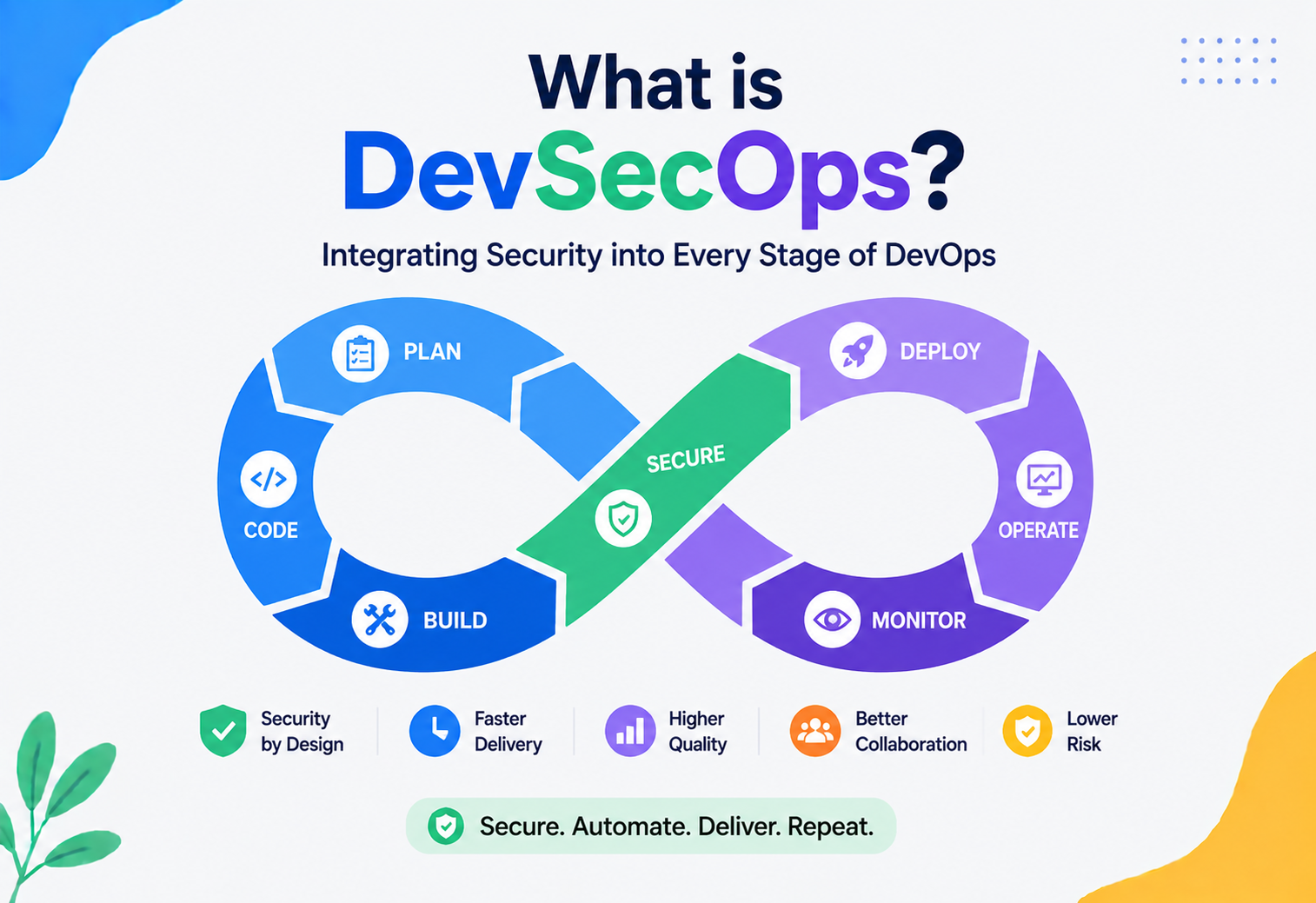
What is DevSecOps?
A complete, beginner-friendly, production-grade guide to embedding security into every stage of the software delivery lifecycle — with real-world analogies, Java/Spring Boot examples, and lessons from Netflix, Amazon, and Google.
Introduction & History
Imagine a house being built by three separate teams who never talk to each other. The architects design the floor plan. The construction crew builds the walls, plumbing, and electrical systems. And a safety inspector shows up only after the house is fully built — at which point they discover the wiring is a fire hazard and the foundation cracks under load. Tearing open finished walls to fix these problems is slow, expensive, and frustrating for everyone involved. This, for decades, was how most software was built and secured.
DevSecOps is the practice of integrating security into every phase of the software development lifecycle (SDLC) — from planning and coding through building, testing, releasing, deploying, operating, and monitoring — rather than treating security as a final gate before release. The name itself tells the story: Development + Security + Operations, three disciplines that used to work in silos, now fused into one continuous, collaborative practice.
Where DevSecOps Came From
To understand DevSecOps, you have to understand the movement it grew out of: DevOps. Around 2007–2009, engineers like Patrick Debois (who coined the term “DevOps” after organizing the first “DevOpsDays” conference in Belgium in 2009) grew frustrated with the wall between developers who wrote code and operations teams who ran it in production. Developers wanted to ship features fast; operations wanted stability and were often blamed when new code broke production. DevOps emerged as a culture and a set of practices — continuous integration, continuous delivery, infrastructure as code, shared ownership — that broke down that wall and let small teams ship software many times a day instead of a few times a year.
DevOps solved the speed problem. But it created a new one. As organizations began deploying dozens or hundreds of times per day, traditional security teams — who were used to spending weeks doing a manual security review before a quarterly release — simply couldn’t keep up. Security became the new bottleneck, or worse, got skipped entirely because nobody had time to wait for it. High-profile breaches throughout the 2010s (Target in 2013, Equifax in 2017, and many others) made it painfully clear that bolting security on at the end, or treating it as someone else’s job, was not sustainable at the speed modern software moved.
The term DevSecOps started gaining traction around 2012–2015, popularized by security practitioners and organizations like Gartner, who argued that security needed to “shift left” — move earlier in the pipeline — and become a shared responsibility of everyone on the team, not a separate department that shows up at the very end. Some argue the “Sec” shouldn’t even need to be called out separately, since security should simply be part of what “Dev” and “Ops” already mean — but in practice, naming it explicitly has helped organizations budget for it, hire for it, and build tooling around it.
Think of building codes and fire inspections in modern construction. A good contractor doesn’t wait until the house is finished to check if the wiring is up to code — inspections happen at the framing stage, the electrical stage, and the plumbing stage, woven into the build process itself. DevSecOps applies the same idea to software: security checks happen continuously, at every stage, not as a single inspection at the end.
Timeline at a Glance
Pre-2009 · Waterfall + Siloed Security
Security review happens weeks before a quarterly release; often manual and paper-based. Every release ends in a mad scramble to interpret a PDF checklist nobody read during design.
2009–2012 · DevOps Emerges
Dev and Ops merge; CI/CD, automation, and shared ownership take hold. Security is not yet part of the conversation — and deployment velocity begins to outrun manual review entirely.
2012–2016 · “Shift Left” Movement
Security practitioners push to move security earlier in the SDLC. The term “DevSecOps” gains adoption; analysts and enterprises begin naming it as a formal discipline.
2016–2020 · Tooling Maturity
SAST, DAST, SCA, and container scanning tools become mainstream and integrate into CI pipelines. Security signals begin appearing in the same place as unit-test failures.
2020–Present · “Shift Everywhere” / Continuous Security
Security embedded in IDEs, pull requests, IaC templates, runtime, and supply chain (SBOMs, image signing) — not just “left” but throughout the entire lifecycle.
The Problem & Motivation
Why did the industry need a new discipline at all? Because the old model of security had three structural problems that got worse as software delivery accelerated.
Problem 1: Security as a Bottleneck
In a traditional model, a dedicated security team reviews an application right before release. If they find issues, the release is delayed while developers — who may have moved on to other work weeks ago — scramble to remember the context and fix the problem. When a team ships once a quarter, this is painful but survivable. When a team ships fifty times a day, as many modern engineering organizations do, a manual gate like this simply cannot scale. Either releases grind to a halt, or teams start skipping the review.
Problem 2: The Cost of Finding Bugs Late
Decades of software engineering research (originating with IBM’s studies in the 1970s and repeated in various forms since) point to the same pattern: the cost of fixing a defect grows dramatically the later it’s discovered. A vulnerability caught while a developer is typing code in their IDE might take five minutes to fix. The same vulnerability, if it survives all the way into production, can require emergency patches, customer notification, regulatory reporting, incident response, and reputational damage — a cost that can run into millions of dollars and weeks of engineering time.
A study frequently cited in the DevSecOps community shows the relative cost of fixing a bug roughly multiplies at each stage: design → build → test → production, each stage often being several times more expensive than the last. The exact multiplier varies by source, but the direction is universally agreed upon: earlier is always cheaper.
Problem 3: Security Was Nobody’s Job (and Everybody’s Blame)
In siloed organizations, developers assumed “security will catch it,” security assumed “developers know what they’re doing,” and operations assumed “that’s a security team problem.” When a breach happened, there was plenty of blame to go around but no clear owner beforehand. DevSecOps addresses this by making security a shared, explicit responsibility baked into team norms, tooling, and even performance expectations — not an afterthought owned by a separate department.
The Motivating Question
DevSecOps exists to answer one question that traditional processes couldn’t answer well: “How do we move fast without breaking security?” The answer isn’t to slow down development to security’s old pace, and it isn’t to skip security to keep development’s new pace. The answer is to make security fast enough, automated enough, and embedded enough that it becomes a natural part of the existing development rhythm rather than a separate, slower process bolted onto the end.
Imagine a small team building a to-do list app. Early on, a developer accidentally commits a database password directly into the source code. In a traditional model, this might not be caught until a security audit months later — by which time the code (and the exposed password) has been public on GitHub the whole time. In a DevSecOps setup, an automated secret-scanning tool blocks the commit within seconds, before it ever reaches the shared repository.
A large e-commerce company deploying hundreds of microservices a day cannot have a human security reviewer manually inspect every deployment. Instead, every code change automatically passes through static analysis, dependency vulnerability scanning, container image scanning, and policy checks — all in the same pipeline that runs the unit tests — before it’s allowed anywhere near production.
Core Concepts
Before going further, let’s build a shared vocabulary. Every term below is explained in plain language first, then tied back to how it’s actually used.
Shift Left
What: Moving security activities earlier (“left,” if you imagine the SDLC as a timeline drawn left to right) in the development process.
Why: Because fixing issues earlier is cheaper and faster, as covered above.
Where: IDE plugins, pre-commit hooks, pull request checks, and design-phase threat modeling are all “shift left” activities.
Analogy: Proofreading an essay paragraph-by-paragraph as you write it, instead of writing the whole essay and then discovering on the last page that your thesis doesn’t make sense.
Shared Responsibility
What: The principle that security is not the job of a single team, but a shared obligation across developers, operations, and security specialists.
Why: Because no single team has visibility into every layer — developers know the code, operations knows the infrastructure, and security knows the threat landscape. All three perspectives are needed.
Security as Code
What: Expressing security policies, checks, and configurations as version-controlled code (scripts, YAML policies, pipeline configuration) rather than manual checklists or tribal knowledge.
Example: A policy like “no container image may run as root” expressed as a machine-readable rule that automatically fails a build, rather than a line in a PDF document nobody reads.
Continuous Security
What: Security checks that run continuously and automatically throughout the pipeline — on every commit, every build, every deployment — rather than as a periodic, manual audit.
The Core Security Testing Toolbox
Static Application Security Testing
Analyzes source code without running it, looking for patterns known to be dangerous (like string-concatenated SQL queries). Runs early, typically on every commit or pull request.
Dynamic Application Security Testing
Tests a running application from the outside, like an automated attacker, sending malicious inputs to see how the app responds. Runs later, usually against a staging environment.
Software Composition Analysis
Scans your project’s third-party dependencies (npm packages, Maven artifacts, etc.) against databases of known vulnerabilities (CVEs).
Interactive Application Security Testing
Combines elements of SAST and DAST by instrumenting the running application during tests to observe code paths and data flow in real time.
Container / Image Scanning
Inspects container images (like Docker images) for vulnerable OS packages, outdated libraries, or embedded secrets before they’re deployed.
Infrastructure-as-Code Scanning
Analyzes IaC templates (Terraform, CloudFormation, Kubernetes manifests) for misconfigurations, like an S3 bucket accidentally left publicly readable.
Threat Modeling
What: A structured exercise, usually done at design time, to answer “what could go wrong, and how would an attacker exploit it?” A common framework is STRIDE — Spoofing, Tampering, Repudiation, Information Disclosure, Denial of Service, Elevation of Privilege.
Analogy: Before building a bank vault, an architect imagines every way a thief might try to break in — through the walls, the vents, the door hinges — and designs against each one, rather than building the vault first and testing it against burglars afterward.
Zero Trust
What: A security model that assumes no user, device, or service should be trusted by default — even if it’s already inside the network perimeter. Every request must be authenticated and authorized, every time.
Why: Traditional security assumed “inside the firewall = safe.” Modern distributed systems, cloud infrastructure, and remote work have made that assumption dangerous — attackers who get past the perimeter once used to have free rein. Zero Trust removes that free rein.
SBOM — Software Bill of Materials
What: A complete, machine-readable inventory of every component, library, and dependency that makes up a piece of software — like a nutrition label for code.
Why: When a new vulnerability is announced (like Log4Shell in the Apache Log4j library in December 2021), an SBOM lets an organization instantly answer “are we affected, and where?” instead of manually auditing hundreds of applications.
If your application is a meal served at a restaurant: SAST is checking the recipe for mistakes before cooking. DAST is a health inspector tasting the finished dish. SCA is checking whether any ingredient you bought from a supplier has been recalled. An SBOM is the full ingredient list printed on the menu.
Architecture & Components
DevSecOps is not a single tool — it’s an architecture of people, process, and tooling stitched together around the software delivery pipeline. Here’s what a typical DevSecOps toolchain architecture looks like, mapped to the pipeline stages it protects.
Key Components
1. Version Control & Pre-Commit Layer
The earliest point of intervention. Tools here include Git hooks and secret scanners (like Gitleaks or TruffleHog) that stop hard-coded credentials, API keys, or private keys from ever being committed. IDE plugins (like SonarLint) give developers real-time feedback as they type.
2. CI Pipeline Security Gates
Your continuous integration server (Jenkins, GitHub Actions, GitLab CI, Azure DevOps) becomes the enforcement point. Every pull request automatically triggers SAST and SCA scans; a build can be configured to fail if a critical vulnerability is found, blocking the merge until it’s resolved.
3. Artifact & Container Registry Security
Before a built artifact (a JAR file, a Docker image) is stored in a registry, it’s scanned for vulnerabilities. Many organizations require images to be cryptographically signed (using tools like Sigstore/Cosign) so that only verified, unmodified images can be deployed — preventing supply chain tampering.
4. Policy-as-Code Gate
Tools like Open Policy Agent (OPA) enforce organizational rules automatically: “no image may run as root,” “no public S3 buckets,” “all deployments must have resource limits set.” These policies live in version control alongside application code.
5. Deployment & Infrastructure Layer
Infrastructure-as-Code templates are scanned before provisioning. Kubernetes admission controllers can reject a pod deployment that violates security policy, even if it passed every earlier check.
6. Runtime & Operations Layer
Once running, applications are protected by Web Application Firewalls (WAFs), runtime application self-protection (RASP), network segmentation, and Zero Trust identity checks for every service-to-service call.
7. Monitoring & Feedback Layer
Security Information and Event Management (SIEM) systems aggregate logs, detect anomalies, and feed findings back to the “Plan” stage — closing the loop so the next cycle of development is informed by what actually happened in production.
Component-to-Stage Cheat Sheet
Secret Scanning
Gitleaks · TruffleHog · GitHub Secret Scanning. Blocks credentials from ever leaving the developer’s laptop.
SAST
SonarQube · Checkmarx · Semgrep. Analyzes source without running it; catches injection, unsafe deserialization, hard-coded crypto.
SCA
OWASP Dependency-Check · Snyk · Dependabot. Cross-references every dependency against public CVE feeds.
DAST
OWASP ZAP · Burp Suite. Attacks a running staging environment the way a real adversary would.
Container Scanning
Trivy · Grype · Clair. Reads image layers, identifies vulnerable OS packages and libraries baked into the artifact.
IaC Scanning
Checkov · tfsec · Terrascan. Catches misconfigured cloud primitives (open buckets, permissive IAM) before they exist.
Policy-as-Code
Open Policy Agent (OPA) · Kyverno. Rejects any manifest that violates organizational rules at admission time.
Runtime Protection
Falco · WAFs · service mesh mTLS. Watches live workloads for unexpected system calls, network calls, or file access.
SIEM / Monitoring
Splunk · Datadog · ELK Stack. Correlates signals across many services to surface attacks a single log line would never reveal.
Internal Working: How a Security Gate Actually Runs
Let’s zoom into the mechanics of a single, common DevSecOps workflow: a developer opens a pull request, and the pipeline decides automatically whether it’s safe to merge.
Developer opens the Pull Request
The git server receives the push and fires a webhook toward the CI system, carrying the diff and metadata for the change.
CI pipeline fans out security checks in parallel
Static analysis (SAST) inspects the changed source, dependency scanning (SCA) inspects the manifest, and unit tests run — all at the same time, not one after the other.
Findings arrive at a policy gate
Every finding is evaluated against organizational policy (e.g. “fail on any CRITICAL, warn on MEDIUM”). Zero critical + two medium is a pass; one high-severity CVE is a fail.
If the gate fails: block the merge
The PR is annotated inline with exactly which line, dependency, or config triggered the failure. The developer pushes a fix; the pipeline re-runs from scratch.
If the gate passes: hand off to a human reviewer
Only after every automated check is green does a human reviewer get notified. The reviewer approves, the merge lands, and the release pipeline takes over.
Notice what’s happening here: the security checks run in parallel with — not instead of — the normal build and test process. A developer doesn’t file a ticket and wait days for a security team’s response. They get feedback annotated directly on their pull request, often within minutes, in the same place they’re already looking at test failures or code review comments.
Example: A SAST Rule Catching a Real Vulnerability
Here’s a simplified example of the kind of vulnerable code a SAST tool would flag in a Java/Spring Boot application, and the fix a developer would apply.
// VULNERABLE: string concatenation allows SQL Injection
@Repository
public class UserRepository {

    @Autowired
    private JdbcTemplate jdbcTemplate;

    public User findByUsername(String username) {
        // A SAST tool flags this line immediately: untrusted input
        // is concatenated directly into a SQL query.
        String sql = "SELECT * FROM users WHERE username = '" + username + "'";
        return jdbcTemplate.queryForObject(sql, new UserRowMapper());
    }
}// FIXED: parameterized query eliminates the injection vector
@Repository
public class UserRepository {
@Autowired
private JdbcTemplate jdbcTemplate;
public User findByUsername(String username) {
// Parameter binding ensures user input is never
// interpreted as part of the SQL statement itself.
String sql = "SELECT * FROM users WHERE username = ?";
return jdbcTemplate.queryForObject(sql, new UserRowMapper(), username);
}
}A SAST engine identifies this pattern by analyzing the code’s control and data flow — tracing that username originates from an untrusted source (like an HTTP request parameter) and flows, unsanitized, into a query execution sink. This is exactly the kind of issue that’s trivial to fix in a code review but can be catastrophic in production.
Example: A CI Pipeline Configuration with Security Gates
# GitHub Actions example
name: build-and-secure
on: [pull_request]

jobs:
  security-pipeline:
    runs-on: ubuntu-latest
    steps:
      - uses: actions/checkout@v4

      - name: Set up JDK 21
        uses: actions/setup-java@v4
        with:
          java-version: '21'
          distribution: 'temurin'

      - name: Run unit tests
        run: mvn test

      - name: Static Application Security Testing (SAST)
        run: mvn sonar:sonar -Dsonar.qualitygate.wait=true

      - name: Software Composition Analysis (SCA)
        run: mvn org.owasp:dependency-check-maven:check
        # Fails the build automatically if a dependency has a
        # CVE with CVSS score above the configured threshold.

      - name: Build container image
        run: docker build -t myapp:${{ github.sha }} .

      - name: Scan container image
        run: trivy image --exit-code 1 --severity CRITICAL,HIGH myapp:${{ github.sha }}

      - name: Sign image (only on merge to main)
        if: github.ref == 'refs/heads/main'
        run: cosign sign myapp:${{ github.sha }}
Every step above is automated and deterministic — the same checks run identically for every single change, with no room for a rushed manual reviewer to miss something on a Friday afternoon before a release.
Data Flow & Lifecycle
DevSecOps maps directly onto the classic “infinity loop” diagram used to describe DevOps, with security controls attached at every point. Let’s trace what happens to a single code change from the moment a developer starts typing, to the moment it’s serving live traffic.
Developer writes code
An IDE security plugin flags issues live — hard-coded secrets, insecure crypto choices, unsafe deserialization — while the developer is still typing.
Pre-commit hook
Blocks secrets, private keys, and other high-signal patterns from being committed at all — the earliest possible enforcement point.
Pull Request opened
SAST and SCA run automatically against the diff. Findings are annotated inline on the PR the same way test failures are.
Human code review + automated approval of the security gate
A reviewer looks at intent and design; the pipeline confirms the change didn’t regress security posture.
Merge to main — artifact / container image created
A reproducible build produces the image (or JAR) that will actually be deployed. Nothing built on a developer laptop makes it to production.
Image scanned + signed · SBOM generated
Container scanners inspect layers for vulnerable packages; a cryptographic signature proves the artifact hasn’t been swapped; an SBOM lists every dependency baked in.
Deploy to staging · DAST scan against the running app
A DAST tool now attacks the running staging environment the way an outside adversary would — catching issues invisible to source-only analysis.
IaC scan + policy check before production deploy
Terraform / Kubernetes manifests are scanned; policy-as-code gates (OPA, Kyverno) refuse anything that violates the rules.
Deploy to production via progressive rollout / canary
5% → 25% → 50% → 100%. If anomaly signals fire during any step, the rollout auto-reverses.
Runtime monitoring · WAF, SIEM, anomaly detection
Everything that runs in production is watched. Learnings feed back into the planning stage for the next cycle — the loop closes.
Each stage produces evidence — scan reports, SBOMs, signed attestations — that together form an auditable trail. This matters not just for catching bugs, but for compliance: regulators and auditors increasingly want proof that security controls ran on every release, not just a statement that they did.
What Happens When a Vulnerability Is Found in Production
The lifecycle doesn’t end at deployment. When a new CVE is publicly disclosed (say, in a widely used library your application depends on), the feedback loop kicks in from the other direction:
- Detection: An SCA tool or SBOM inventory automatically flags that the newly disclosed CVE affects a dependency your application uses.
- Triage: The security and development teams assess real exploitability — is the vulnerable code path actually reachable in your application?
- Remediation: A fix (usually a dependency version bump) is developed and passes through the exact same automated pipeline described above.
- Deployment: The fix is rolled out, often through the same progressive delivery mechanism used for regular releases.
- Retrospective: The incident feeds back into planning — should this class of dependency be pinned more strictly? Should scanning frequency increase?
When the Log4Shell vulnerability was disclosed in December 2021, organizations with mature DevSecOps practices and complete SBOMs could query “which of our services use Log4j version 2.x?” and get an answer in minutes. Organizations without this visibility spent days or weeks manually auditing every application — a stark, real illustration of why the SBOM and continuous scanning parts of this lifecycle matter.
Pros, Cons & Tradeoffs
Like every architectural discipline, DevSecOps has a strong case for adoption and real, honest tradeoffs teams should walk into with eyes open.
Advantages
- Vulnerabilities are caught earlier, when they’re dramatically cheaper and faster to fix.
- Security scales with deployment frequency instead of becoming a bottleneck.
- Shared ownership reduces the “throw it over the wall” friction between teams.
- Automated, consistent checks reduce human error and reviewer fatigue.
- Produces an auditable trail useful for compliance (SOC 2, ISO 27001, PCI-DSS).
- Improves incident response speed via better visibility (SBOMs, logging).
Challenges & Tradeoffs
- Upfront investment in tooling, training, and pipeline redesign can be significant.
- Poorly tuned scanners generate false positives, causing “alert fatigue” that erodes trust in the system.
- Cultural resistance: developers may see security gates as slowing them down if not implemented thoughtfully.
- Requires genuine cross-team collaboration — tooling alone doesn’t create a DevSecOps culture.
- Adds pipeline execution time, which must be carefully managed (e.g., via parallelization) to avoid becoming a new bottleneck.
- Security expertise is still scarce, and automation doesn’t replace the need for skilled reviewers on complex issues.
The Central Tradeoff: Speed vs. Thoroughness
Every security check takes time to run and has a false-positive rate. A team must decide, for each stage of the pipeline, how strict to be. Blocking every pull request on an exhaustive DAST scan would make development unbearably slow; skipping scans entirely defeats the purpose. Mature DevSecOps practices resolve this tradeoff by using risk-based tiering: fast, lightweight checks (like SAST on a diff) run on every commit; slower, more thorough checks (like full DAST scans) run less frequently, such as nightly or before major releases.
Fast SAST / SCA on the diff
Speed: Very fast (seconds–minutes). Thoroughness: Moderate. Best used for: continuous, everyday feedback in the developer’s loop.
Full DAST scan on staging
Speed: Slow (tens of minutes). Thoroughness: High. Best used for: pre-release validation of the whole running application, not a diff.
Manual penetration testing
Speed: Very slow (days–weeks). Thoroughness: Very high — catches design-level flaws automation cannot. Best used for: periodic deep audits and major releases.
Runtime anomaly detection
Speed: Continuous, real-time. Thoroughness: Catches unknown/zero-day patterns automation didn’t know to look for. Best used for: production monitoring.
Performance & Scalability
A common early criticism of DevSecOps is: “won’t all this scanning slow down our pipeline?” It’s a fair concern, and addressing it is itself a core engineering problem within DevSecOps.
Strategies for Keeping Pipelines Fast
- Incremental scanning: Instead of scanning an entire codebase on every commit, tools scan only the changed files (the “diff”), dramatically reducing scan time on large monorepos.
- Parallelization: SAST, SCA, unit tests, and linting can all run concurrently in separate pipeline jobs rather than sequentially, so total wall-clock time is bounded by the slowest single check, not the sum of all checks.
- Caching: Dependency scanners cache results for unchanged dependencies rather than re-analyzing the entire dependency tree every run.
- Tiered gating: Fast, cheap checks run on every commit; expensive checks (full DAST, fuzz testing) run on a schedule (nightly) or before specific milestones (release candidates), not on every single push.
- Risk-based prioritization: Findings are triaged by severity (using CVSS scores) so pipelines can be configured to fail only on critical/high findings, while medium/low findings are tracked but non-blocking.
Airport security doesn’t fully disassemble every piece of luggage. Most bags pass through a fast X-ray scan (a cheap, fast, “good enough” check); only bags that trigger a specific flag get pulled aside for a slower, more thorough manual inspection. DevSecOps pipelines apply the same tiered logic.
Scaling Across an Organization
Scalability isn’t just about pipeline speed — it’s about how a security practice scales from one team to hundreds. Centralized platform teams often build a “golden path”: pre-approved pipeline templates, base container images, and shared libraries that come with security controls already baked in. Individual product teams then inherit these defaults automatically, instead of each team having to independently configure SAST, SCA, and container scanning from scratch. This turns security from something every team must build themselves into something every team gets for free by using the platform.
// A shared, reusable Spring Boot starter that bakes in
// secure defaults so individual teams don't have to
// configure security headers themselves.
@Configuration
public class SecurityHeadersAutoConfiguration {

    @Bean
    public FilterRegistrationBean<SecurityHeaderFilter> securityHeaderFilter() {
        FilterRegistrationBean<SecurityHeaderFilter> bean = new FilterRegistrationBean<>();
        bean.setFilter(new SecurityHeaderFilter());
        bean.setOrder(Ordered.HIGHEST_PRECEDENCE);
        return bean;
    }
}

class SecurityHeaderFilter extends OncePerRequestFilter {
    @Override
    protected void doFilterInternal(HttpServletRequest req, HttpServletResponse res,
                                     FilterChain chain) throws ServletException, IOException {
        res.setHeader("X-Content-Type-Options", "nosniff");
        res.setHeader("X-Frame-Options", "DENY");
        res.setHeader("Content-Security-Policy", "default-src 'self'");
        res.setHeader("Strict-Transport-Security", "max-age=31536000; includeSubDomains");
        chain.doFilter(req, res);
    }
}
A shared starter like this one becomes the “paved road” in code: every service that adds it to its dependencies inherits sensible security headers automatically, without a single line of duplication and without relying on human memory to configure it correctly on service number 200.
High Availability & Reliability
DevSecOps intersects with availability and reliability in two directions: security controls must themselves be highly available (a scanner outage shouldn’t block every deployment in the company), and security practices directly contribute to overall system reliability by preventing security incidents that cause outages.
Making Security Tooling Resilient
- Fail gracefully, not silently: If a SAST scanner service is down, pipelines should be configured to clearly flag “security scan skipped due to outage” and require manual sign-off — not silently pass the build as if it were scanned.
- Redundant scanning infrastructure: Just like any production service, centralized scanning services should run with multiple replicas, health checks, and failover, since they sit on the critical path of every deployment.
- Decoupled architecture: Running scanners as independent services (rather than tightly coupled steps that can only run on one CI runner) makes it easier to scale horizontally as build volume grows.
Security Incidents as Availability Incidents
It’s easy to think of “security” and “availability” as separate concerns, but many of the worst outages in software history were security incidents at their root — a Distributed Denial of Service (DDoS) attack, a compromised credential leading to a destructive deletion, a misconfigured cloud resource left open to the internet and abused for cryptomining until resources were exhausted. A mature DevSecOps practice treats these as reliability risks, not just compliance risks, and applies the same tools used for general reliability engineering — redundancy, rate limiting, circuit breakers, chaos testing — to security-relevant failure modes too.
Netflix’s internal security tooling and “paved road” platform are designed with the same reliability principles as the rest of their infrastructure — because a security control that’s unreliable either gets bypassed by frustrated engineers or becomes a single point of failure for the entire release process.
Security (Deep Dive)
Since DevSecOps is a security discipline, this section goes deeper into the core security models and practices that give it substance beyond “run some scanners.”
The OWASP Top 10
Maintained by the Open Web Application Security Project, the OWASP Top 10 is a regularly updated list of the most critical web application security risks, and it serves as a baseline checklist for what SAST/DAST tools look for. Key categories include:
- Broken Access Control — users able to act outside their intended permissions (e.g., viewing another user’s data by changing an ID in a URL).
- Cryptographic Failures — sensitive data transmitted or stored without proper encryption.
- Injection — untrusted data interpreted as commands (SQL injection, as shown earlier, is the classic example).
- Insecure Design — flaws baked into the architecture itself, not fixable by a patch alone.
- Security Misconfiguration — default credentials, verbose error messages, unnecessary open ports.
- Vulnerable and Outdated Components — exactly what SCA tools are built to catch.
- Identification and Authentication Failures — weak session management, credential stuffing vulnerabilities.
- Software and Data Integrity Failures — trusting unsigned code or updates, relevant to supply chain security.
- Security Logging and Monitoring Failures — breaches going undetected because nobody was watching the logs.
- Server-Side Request Forgery (SSRF) — tricking a server into making requests to unintended internal resources.
Example: Fixing Broken Access Control in Spring Boot
// VULNERABLE: any authenticated user can fetch any order,
// even one that doesn't belong to them, just by changing the ID.
@GetMapping("/orders/{id}")
public OrderDto getOrder(@PathVariable Long id) {
    Order order = orderRepository.findById(id)
        .orElseThrow(() -> new NotFoundException("Order not found"));
    return orderMapper.toDto(order);
}// FIXED: ownership is verified before returning data.
@GetMapping("/orders/{id}")
public OrderDto getOrder(@PathVariable Long id, Authentication auth) {
Order order = orderRepository.findById(id)
.orElseThrow(() -> new NotFoundException("Order not found"));
String currentUser = auth.getName();
if (!order.getOwnerUsername().equals(currentUser)) {
// Deny access rather than silently returning someone else's data.
throw new AccessDeniedException("Not authorized to view this order");
}
return orderMapper.toDto(order);
}Identity, Authentication & Authorization
DevSecOps places heavy emphasis on strong identity foundations: authentication (proving who you are — passwords, multi-factor authentication, certificates) and authorization (determining what an already-authenticated identity is allowed to do). Modern practice favors short-lived, automatically rotated credentials (like OAuth2 tokens or cloud IAM roles) over long-lived static passwords or API keys, precisely because a leaked long-lived credential is a much bigger, longer-lasting risk.
Secrets Management
Hard-coded secrets (database passwords, API keys) in source code are one of the most common and most preventable security failures. DevSecOps practice mandates dedicated secrets management systems — like HashiCorp Vault, AWS Secrets Manager, or Kubernetes Secrets combined with encryption at rest — so that applications retrieve credentials at runtime rather than storing them in version control.
// BAD: secret hard-coded directly in application.properties
// spring.datasource.password=SuperSecretPassword123

// GOOD: secret injected at runtime from a secrets manager,
// referenced only by name in configuration.
@Configuration
public class DataSourceConfig {

    @Value("${DB_PASSWORD}") // populated from Vault/Secrets Manager
    private String dbPassword;                                   // via environment injection, never committed

    @Bean
    public DataSource dataSource(@Value("${DB_URL}") String url,
                                  @Value("${DB_USER}") String user) {
        return DataSourceBuilder.create()
            .url(url)
            .username(user)
            .password(dbPassword)
            .build();
    }
}
Supply Chain Security
Modern applications are assembled from dozens or hundreds of third-party dependencies, each of which could itself be compromised (as happened in high-profile incidents like the SolarWinds attack in 2020). Supply chain security practices within DevSecOps include: signing artifacts so their origin and integrity can be verified, generating SBOMs, pinning dependency versions instead of always pulling “latest,” and verifying the provenance of build systems themselves (frameworks like SLSA — Supply-chain Levels for Software Artifacts — formalize this).
Compliance as Code
Regulatory frameworks like PCI-DSS (payment card data), HIPAA (healthcare data), and SOC 2 (general trust and security controls) require organizations to prove specific controls are in place. Rather than a manual annual audit, DevSecOps expresses these requirements as automated policy checks that run continuously, generating always-current compliance evidence instead of a stale point-in-time snapshot.
Monitoring, Logging & Metrics
You cannot secure what you cannot see. Observability is as central to DevSecOps as it is to general reliability engineering — the difference is what you’re looking for.
What to Log
- Authentication events: every login success and failure, with enough context to detect credential stuffing or brute-force patterns.
- Authorization decisions: especially denied access attempts, which can indicate probing or privilege escalation attempts.
- Administrative actions: changes to permissions, infrastructure, or configuration — who did what, when.
- Data access to sensitive resources: who read or modified regulated data (PII, payment data, health records).
- Pipeline security scan results: a historical record of every scan, its findings, and how they were resolved — critical for audits.
Logging too much sensitive data is itself a security risk. Logs that capture full request bodies can accidentally record passwords, credit card numbers, or personal data in plaintext — turning your logging system into a new attack target. Structured logging with explicit field-level redaction is essential.
Key Security Metrics
Mean Time to Detect
How quickly the organization notices a security issue after it occurs. A high MTTD means attackers can operate for days or weeks before being spotted.
Mean Time to Remediate
How quickly a discovered vulnerability is actually fixed. Detection without remediation just moves the risk from “unknown” to “known but still there.”
Vulnerabilities per KLOC
Number of vulnerabilities per thousand lines of code — a proxy for code-quality and hygiene trends over time.
% of builds passing security gates
Whether security checks are becoming a routine pass or a chronic blocker — either extreme is worth investigating.
Secrets detected in commits
Trending this number tells you whether developer awareness and tooling are improving over time.
SBOM coverage
Percentage of production services with an up-to-date, accurate software inventory. Log4Shell taught us why this number matters.
SIEM: Bringing It All Together
A Security Information and Event Management (SIEM) system centralizes logs from applications, infrastructure, and network devices, correlating them to detect patterns a human would never spot by reading individual log files — like the same IP address attempting to authenticate against fifty different user accounts within a minute, a classic sign of credential stuffing. Tools like Splunk, Elastic Security, and Datadog Security Monitoring serve this role, often layered with machine-learning-based anomaly detection to catch novel attack patterns that don’t match a known signature.
Individual application logs are like a single security camera pointed at one door. A SIEM is the control room where feeds from every camera in the building are watched together — so a pattern that’s invisible from any single camera (someone circling the building, testing every door) becomes obvious when you can see the whole picture at once.
Deployment & Cloud
Cloud-native deployment models introduce both new tools and new risks for DevSecOps to address.
Cloud Security Posture Management (CSPM)
Cloud environments (AWS, Azure, GCP) offer enormous flexibility, but that flexibility means a single misconfigured setting — a publicly readable storage bucket, an overly permissive IAM role — can expose data to the entire internet. CSPM tools continuously scan live cloud environments against best-practice benchmarks (like the CIS Benchmarks) and alert on drift from secure configuration.
Immutable Infrastructure & Progressive Delivery
Rather than patching servers in place, modern deployment favors immutable infrastructure: a new, fully-scanned container image or machine image is deployed fresh for every release, and the old one is discarded rather than modified. Combined with progressive delivery techniques — canary releases, blue-green deployments — this limits the blast radius if a security issue does slip through: a canary deployment exposed to 5% of traffic can be automatically rolled back the moment monitoring detects anomalous behavior, long before it reaches every user.
Kubernetes Admission Control
In Kubernetes environments, admission controllers act as a final enforcement point at deploy time — even if a manifest passed every earlier scan, the cluster itself can reject a pod that, say, tries to run as root or mount a sensitive host path.
# Kyverno policy: reject any pod that runs as root
apiVersion: kyverno.io/v1
kind: ClusterPolicy
metadata:
  name: disallow-root-user
spec:
  validationFailureAction: Enforce
  rules:
    - name: check-runasnonroot
      match:
        resources:
          kinds:
            - Pod
      validate:
        message: "Containers must not run as root."
        pattern:
          spec:
            securityContext:
              runAsNonRoot: true
Multi-Cloud & Shared Responsibility
Cloud providers operate under a shared responsibility model: the provider secures the underlying infrastructure (“security of the cloud”), while the customer is responsible for securing what they build on top of it (“security in the cloud”) — configuration, identity, data, and application code. Misunderstanding this boundary is one of the most common causes of cloud security incidents; DevSecOps practice makes the customer’s half of that boundary explicit and continuously verified.
Databases, Caching & Load Balancing
Security considerations extend into the data and traffic layers of an architecture, not just the application code layer.
Database Security
- Encryption at rest and in transit: database volumes encrypted on disk, and TLS enforced for every connection to the database.
- Least-privilege database accounts: an application’s database user should have only the exact permissions it needs (e.g., no
DROP TABLEpermission for a read-heavy reporting service) rather than a single shared superuser account. - Query parameterization: as shown in the SQL injection example earlier — this is a database-security concern as much as an application-security one.
- Automated backup integrity checks: ensuring backups are both encrypted and regularly tested for successful restoration, since ransomware attacks specifically target backups.
Caching Layer Considerations
Caches (like Redis or Memcached) are often deployed with weaker default security than primary databases, since they’re seen as “just performance infrastructure.” But a cache frequently holds session tokens, user data, or computed authorization decisions — an exposed cache can be as damaging as an exposed database. DevSecOps practice treats caching infrastructure with the same rigor: authentication enabled, network-isolated, encrypted connections, and included in the same vulnerability scanning as any other production service.
Load Balancers & the Edge
Load balancers and API gateways sit at the network edge and are a natural place to enforce security controls before traffic ever reaches application code: TLS termination, rate limiting to blunt denial-of-service attempts, Web Application Firewall (WAF) rules to block known attack signatures, and geo-blocking where relevant. Centralizing these controls at the edge means every service behind the load balancer benefits automatically, rather than each service having to reimplement rate limiting individually.
// A simple rate-limiting filter at the API gateway layer,
// protecting every downstream service uniformly.
@Component
public class RateLimitFilter extends OncePerRequestFilter {

    private final Map<String, Bucket> buckets = new ConcurrentHashMap<>();

    @Override
    protected void doFilterInternal(HttpServletRequest req, HttpServletResponse res,
                                     FilterChain chain) throws ServletException, IOException {
        String clientIp = req.getRemoteAddr();
        Bucket bucket = buckets.computeIfAbsent(clientIp,
            k -> Bucket.builder()
                .addLimit(Bandwidth.simple(100, Duration.ofMinutes(1)))
                .build());

        if (bucket.tryConsume(1)) {
            chain.doFilter(req, res);
        } else {
            res.setStatus(429); // Too Many Requests
            res.getWriter().write("Rate limit exceeded");
        }
    }
}APIs & Microservices
Microservice architectures multiply the number of network boundaries in a system, and every one of those boundaries is a place where DevSecOps controls must be applied consistently.
Service-to-Service Authentication (mTLS)
In a Zero Trust model, services don’t implicitly trust requests just because they originate from inside the network. Mutual TLS (mTLS) requires both the calling service and the receiving service to present and verify cryptographic certificates, ensuring every internal call is authenticated — not just external, user-facing traffic. Service meshes like Istio or Linkerd can enforce mTLS automatically across an entire microservices fleet without requiring each individual service to implement it.

API Security Fundamentals
- Input validation at every boundary: never assume a request is well-formed just because it came from “another internal service” — internal services can be compromised too.
- Consistent authentication/authorization: using standards like OAuth2 and OpenID Connect rather than ad-hoc, service-specific schemes.
- API gateways as a policy enforcement point: centralizing authentication, rate limiting, and schema validation rather than duplicating it in every microservice.
- Versioned, documented contracts: using OpenAPI specifications that can themselves be scanned for insecure patterns (like accepting overly permissive input types).
The Expanded Attack Surface Problem
A monolithic application might have a handful of externally exposed endpoints. A microservices architecture with fifty services might have hundreds of internal APIs, each a potential entry point if a single service is compromised. DevSecOps addresses this expanded surface with the principle of defense in depth — no single control is relied upon exclusively. Even if a network boundary is breached, service-level authentication, least-privilege database access, and runtime monitoring each provide an additional layer that must also be bypassed.
Amazon’s internal services famously communicate through well-defined, authenticated APIs rather than direct data access — a principle credited to a 2002 internal mandate from Jeff Bezos requiring all teams to expose functionality only through service interfaces. This architectural discipline, decades later, is also a strong security boundary: no service can reach into another’s data store directly.
Design Patterns & Anti-patterns
Some ways of doing DevSecOps consistently work; others quietly undermine the entire effort. It’s worth naming both.
Effective Patterns
Paved Road / Golden Path
A platform team provides pre-approved, secure-by-default templates and pipelines. Teams that use the paved road inherit security automatically; teams that deviate take on the responsibility of implementing controls themselves.
Security Champions
Rather than requiring every team to have a dedicated security engineer, one developer per team is trained as a “security champion” — a bridge between the central security team and day-to-day development.
Policy as Code
Security and compliance rules expressed as version-controlled, automatically enforced code (e.g., OPA/Rego policies) rather than documents that quietly go stale.
Break-Glass Access
Normal operations run under least-privilege, tightly scoped permissions; a documented, audited “break-glass” procedure grants temporary elevated access only during genuine emergencies.
Anti-patterns to Avoid
Security Theater
Running scans that generate reports nobody reads, purely to check a compliance box, without any process to actually triage or fix findings.
Big-Bang Gate
A single, all-or-nothing security review right before release — exactly the bottleneck DevSecOps was created to eliminate.
Alert Fatigue
Overly noisy scanners with high false-positive rates that developers learn to ignore, eventually missing genuine critical findings buried in the noise.
Shadow IT / Shadow Pipelines
Teams bypassing the secure golden-path pipeline because it’s perceived as too slow, deploying through unmonitored, unscanned paths instead.
Security as Blame, Not Support
Treating a discovered vulnerability as a personal failure of the developer who wrote it, rather than a normal, expected part of the development process to be fixed collaboratively.
Tool Sprawl Without Ownership
Adopting a dozen different security tools without a clear owner for triaging their output, leaving critical findings unactioned in a dashboard nobody checks.
Best Practices & Common Mistakes
Adopting DevSecOps is as much about the small habits as it is about the big architecture. Here are the practices most likely to move the needle, and the mistakes most likely to sabotage the effort.
Best Practices
- Start with high-signal, low-noise checks. Introduce secret scanning and SCA before more complex SAST rulesets — build trust in the system before adding friction.
- Make the secure path the easy path. If following security best practice requires more effort than ignoring it, most developers under deadline pressure will take the easier route.
- Fail fast, fail clearly. A pipeline failure should tell the developer exactly what’s wrong and, ideally, how to fix it — not just “security check failed.”
- Tune before you enforce. Run new scanners in “report only” mode first to calibrate thresholds and eliminate false positives before making them build-blocking.
- Automate evidence collection. Design pipelines so compliance evidence (scan results, approvals, SBOMs) is generated automatically as a byproduct of normal delivery, not as separate manual work.
- Invest in developer security training, not just tooling — a developer who understands why SQL injection is dangerous writes safer code even in places tools don’t check.
- Treat security debt like technical debt. Track non-critical findings visibly and revisit them regularly, rather than letting them silently accumulate.
Common Mistakes
Bolting on scanners without process
Consequence: Findings pile up unaddressed; tooling investment wasted. Fix: Define clear triage ownership and SLAs for findings by severity.
Blocking every build on every finding
Consequence: Developers route around the pipeline or lose trust in it. Fix: Gate only on critical/high severity; track lower severity separately.
Treating DevSecOps as a tools purchase
Consequence: Culture and process gaps remain; tools underused. Fix: Pair tooling rollout with training and process change.
No feedback loop from production incidents
Consequence: Same class of vulnerability recurs repeatedly. Fix: Feed incident post-mortems back into pipeline rules and training.
Ignoring the human element
Consequence: Security seen as “the department of no.” Fix: Build security champions and a collaborative review culture.
Real-World / Industry Examples
The patterns in this guide are not theoretical — they show up, in slightly different forms, at every organization that has managed to ship secure software at scale.
The Paved Road, Perfected
Netflix’s platform engineering culture pioneered the “paved road” concept — providing a secure, well-supported default path for the vast majority of teams, while allowing experienced teams to deviate at their own risk and responsibility. Their open-source security tools (like Security Monkey, an early cloud configuration auditor) reflect a philosophy of continuous, automated verification rather than periodic manual audits.
APIs as Security Boundaries
Amazon’s service-oriented architecture mandate — every team exposes functionality only through well-defined APIs — created strong security boundaries as a side effect of an architectural decision made for scalability reasons, illustrating how good architecture and good security often reinforce each other.
BeyondCorp & Zero Trust
Google’s BeyondCorp initiative is widely cited as one of the origin points of the modern Zero Trust model, moving away from a trusted internal network perimeter toward continuous, context-aware verification of every device and user, regardless of network location.
Automation at Deployment Velocity
Operating at massive scale across many microservices and a fast-moving codebase, Uber has published extensively on internal tooling for automated secret detection and access-control auditing, reflecting the reality that manual review cannot keep pace with their deployment velocity.
A Cautionary Tale: Equifax (2017)
The Equifax breach, which exposed sensitive data for roughly 147 million people, is frequently cited in DevSecOps training precisely because its root cause was preventable by the practices described in this article: a known, publicly disclosed vulnerability in the Apache Struts framework went unpatched for months after a fix was available. This is exactly the failure mode that SCA scanning and SBOM-driven vulnerability tracking are designed to prevent — knowing immediately which systems use a vulnerable component the moment a CVE is disclosed, rather than discovering it during an incident response investigation after the damage is done.
The Equifax story isn’t a story about a clever, previously-unknown attack. It’s a story about a known-vulnerable component sitting in production long after the fix existed. Every SCA scanner, every SBOM, every “update the dependency” pull request is, in some sense, a small answer to the specific failure mode that breach represents.
FAQ, Summary & Key Takeaways
Is DevSecOps just DevOps with a security team involved?
Not quite. DevOps already implies collaboration between development and operations; DevSecOps explicitly extends that collaboration to include security as a first-class, continuous concern woven through every stage — not an external team that reviews work at the end, but a shared responsibility embedded in the same pipelines, tools, and culture developers already use.
Does adopting DevSecOps mean we don’t need a dedicated security team anymore?
No. Dedicated security expertise remains essential — for threat modeling complex systems, investigating incidents, setting policy, and handling issues automation can’t catch. DevSecOps changes the security team’s role from a manual gatekeeper reviewing everything to an enabler who builds tools, policies, and training that let every team ship securely by default.
How is DevSecOps different from just “shifting left”?
Shift left is one important idea within DevSecOps — move security earlier in the process. But DevSecOps is broader: it also covers runtime protection, monitoring, incident response, and the feedback loop back into planning. Modern practitioners sometimes describe this as “shift everywhere” rather than shift left alone.
What’s the very first step for a team with no security automation at all?
Start with secret scanning and dependency (SCA) scanning — they’re low-friction, produce high-signal findings, and require minimal cultural change to adopt, making them a strong foundation before introducing more involved practices like SAST or DAST.
Do small teams and startups need DevSecOps, or is it only for large enterprises?
Team size doesn’t change the underlying risk — a small startup’s customer data is just as valuable to attackers, and a breach can be even more existentially damaging to a small company with less capacity to absorb the fallout. The practices simply scale down: a two-person team can still enable free secret scanning and dependency scanning in their CI pipeline in an afternoon.
Summary
DevSecOps is the practice of integrating security continuously and collaboratively throughout the entire software delivery lifecycle, rather than treating it as a final, separate gate before release. It emerged from the DevOps movement’s success at increasing delivery speed, which exposed the limits of traditional, manual, end-of-pipeline security review. It combines cultural change (shared responsibility, security champions), architectural thinking (Zero Trust, defense in depth, least privilege), and tooling (SAST, DAST, SCA, container and IaC scanning, policy-as-code, SIEM) into a continuous loop that spans planning, coding, building, testing, deploying, operating, and monitoring — with lessons from production feeding back into the next cycle of planning.
Key Takeaways
What to Remember From This Guide
- Security that’s bolted on at the end doesn’t scale with modern deployment velocity — it must be embedded throughout the pipeline.
- The earlier a vulnerability is caught, the cheaper and faster it is to fix — this economic reality is the core motivation for “shifting left.”
- DevSecOps is as much a cultural and organizational shift (shared ownership, security champions, paved roads) as it is a set of tools.
- A layered toolchain — secret scanning, SAST, SCA, DAST, container/IaC scanning, policy-as-code, runtime monitoring — covers different risks at different stages; no single tool is sufficient alone.
- Zero Trust, least privilege, and defense in depth are the architectural principles that give DevSecOps practices their substance.
- Observability (logging, metrics, SIEM) closes the loop, turning production reality into input for the next planning cycle.
- Real-world breaches like Equifax repeatedly demonstrate that the failures DevSecOps addresses are not theoretical — they are the actual, recurring root causes of major incidents.

