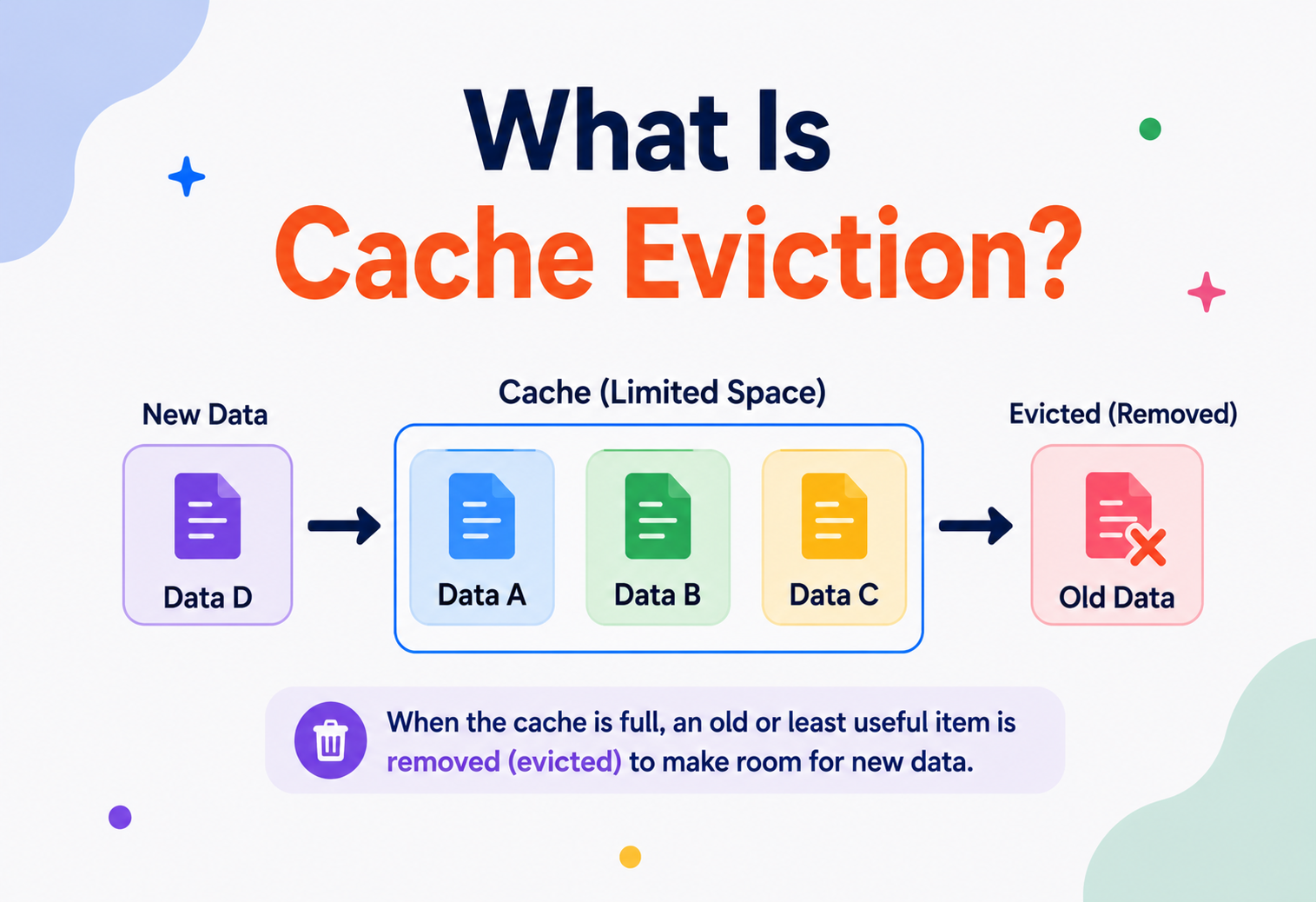
What Is Cache Eviction?
A friendly, deep, and practical walkthrough of how computers decide what to keep and what to throw away — from first principles to how Netflix, Redis, CPUs and your browser handle billions of requests a second.
Introduction & History
Imagine you have a small backpack, but you own hundreds of toys. You cannot carry all your toys everywhere, so you pick your favorites — the ones you play with the most — and keep them in the backpack. The rest stay at home in a big toy box. When you get bored of a toy in your backpack, you swap it out for a different one from the toy box.
That simple act of swapping — deciding what stays in your small, fast-to-reach backpack and what goes back into the big, slow-to-reach toy box — is exactly what computers do every single second. This process is called cache eviction.
A cache is like your kitchen counter. Your fridge and pantry (the “main storage”) hold everything, but they’re a few steps away. The counter is small but instantly reachable. You keep your most-used spices and utensils on the counter. When the counter gets full and you need space for something new, you must decide what to put away. That decision — what to remove — is eviction.
What is a “cache”?
A cache (pronounced “cash”) is a small, fast storage layer that sits between a slow data source and the user who wants that data. Computers store a copy of frequently used data in this fast layer so that future requests for the same data are served quickly, without going all the way back to the slow, original source.
A short history
The idea of caching is almost as old as computing itself. In the 1960s, engineers building early mainframe computers noticed something interesting: a CPU (the “brain” of the computer) was incredibly fast, but the main memory (RAM) that fed it instructions and data was comparatively slow. The CPU would sit idle, waiting for data. This gap between processor speed and memory speed became known as the memory wall.
In 1965, a computer scientist named Maurice Wilkes proposed adding a small amount of very fast memory close to the CPU to hold recently used data. This was the birth of the hardware cache. Since fast memory is expensive, it could never be as big as main memory — so from day one, engineers had to answer a critical question: “When this small memory is full and I need to store something new, what should I remove?”
That question is the entire subject of this tutorial. As computing grew — from single CPUs, to operating systems, to databases, to the World Wide Web, to globally distributed systems like Netflix and Amazon — the same core problem kept reappearing at every layer: CPU caches, disk caches, browser caches, database query caches, Content Delivery Networks (CDNs), and distributed caching systems like Redis and Memcached. Every one of them needs a strategy for cache eviction.
Today, cache eviction is not just a computer science topic — it is one of the most frequently discussed subjects in software engineering interviews and one of the most important concepts for building systems that are fast, cheap to run, and reliable at scale.
Problem & Motivation
To understand why eviction matters, we first need to understand why caches exist, and why they can never be infinitely large.
Why do we need caches at all?
Every piece of data in a computer system lives somewhere: a hard disk, a database on another server, or across the internet. Reading data from these places takes time — sometimes a tiny amount of time, sometimes a very noticeable amount.
| Storage Type | Approximate Access Time | Everyday Comparison |
|---|---|---|
| CPU Register | ~0.3 nanoseconds | Blinking your eye in a thousandth of a second |
| CPU Cache (L1) | ~1 nanosecond | Reaching into your pocket |
| RAM (Main Memory) | ~100 nanoseconds | Walking to the next room |
| SSD Disk | ~100 microseconds | Driving to a nearby store |
| Network call (same region) | ~1 millisecond | Taking a short flight |
| Network call (across the world) | ~150+ milliseconds | A long international journey |
Notice how dramatic the difference is. If your application had to fetch every single piece of data from a database on the other side of the world every time a user asked for it, your app would feel painfully slow. A cache solves this by keeping a copy of recently or frequently requested data close by — in memory, on the same machine, or at least much closer than the original source.
Why can’t we just cache everything?
This is where the real problem begins. Fast memory (like RAM) is expensive and physically limited. You cannot buy infinite RAM, and even if you could, searching through a gigantic cache would itself become slow. So every cache has a fixed, limited size — a capacity.
A cache is always smaller than the data source it represents. Once the cache is full, and new data needs to be stored, something old must be removed to make room. Deciding what to remove — in a way that keeps the cache useful — is the problem that cache eviction solves.
If we evict the wrong data — say, data that was about to be requested again in the next second — we lose the speed benefit of caching entirely. The application has to go all the way back to the slow source, defeating the purpose. This is why the eviction strategy is just as important as the decision to cache in the first place.
Think of a small classroom library shelf that can only hold 10 books, while the school has 10,000 books in the main library. If the teacher randomly throws away a book every time a new one arrives, students may lose their favorite, most-read book. A smart teacher instead removes the book nobody has picked up in months. That “smart removal” is cache eviction in action.
Core Concepts
Before diving into algorithms, let’s build a solid vocabulary. Every term below is something you will see again and again in caching discussions and interviews.
Cache Hit and Cache Miss
A cache hit happens when requested data is found in the cache. A cache miss happens when it is not found, forcing the system to fetch it from the slower original source (often called the “origin” or “backing store”).
You ask your mom, “Where are my socks?” If she instantly points to the drawer (fast answer, no searching), that’s a hit. If she has to go search through boxes in the attic, that’s a miss.
Software Example
When you visit a website you visited yesterday, your browser might already have the images and CSS files stored locally. Loading them from your own hard disk (a hit) is much faster than downloading them again from the internet (a miss).
Cache Capacity
This is the maximum amount of data a cache can hold — measured in number of items, or in bytes/megabytes. Once this limit is reached, the cache is “full,” and adding new data requires eviction.
Cache Eviction
Cache eviction is the process of removing an existing item from a full cache to make room for a new item. The rule that decides which item gets removed is called an eviction policy (also called a replacement policy).
Eviction Policy / Algorithm
This is the “brain” behind eviction — the specific strategy used to pick a victim. Common examples include LRU (Least Recently Used), LFU (Least Frequently Used), and FIFO (First In, First Out). We will explore each in depth in Section 5.
TTL (Time To Live)
TTL is a timer attached to a cached item. Once the timer expires, the item is considered “stale” (outdated) and is either removed automatically or refreshed from the original source on the next request.
Milk in your fridge has an expiry date. Even if there’s room in the fridge, you throw away milk once it passes its date because it’s no longer safe or fresh. TTL works the same way for cached data — some data (like today’s weather) becomes “expired” and unreliable after a short time.
Cache Invalidation
Sometimes data in the cache becomes outdated not because time passed, but because the original data changed. Cache invalidation is the act of marking or removing cached data because we know it no longer matches the real, current data. This is different from eviction — eviction happens because of space pressure; invalidation happens because of a correctness problem. There’s a famous saying in computer science:
Working Set
The working set is the group of data items that a program or system actively needs during a given period of time. A good cache tries to hold the current working set so that most requests become hits.
Hit Ratio (Hit Rate)
This is the percentage of requests served directly from the cache, calculated as:
Hit Ratio = (Number of Cache Hits) / (Total Requests) × 100A higher hit ratio generally means the cache — and its eviction policy — is doing a good job.
Cache Hit
Data found instantly in the cache.
Cache Miss
Data not found; fetched from source.
Eviction
Removing old data to make room.
TTL Expiry
Data removed because time ran out.
Architecture & Components
Let’s now look inside a cache system to understand what it is actually made of.
1. The Storage Structure
Most caches are built using a combination of two data structures:
- Hash Map (Hash Table): Gives near-instant (O(1) average time) lookup of a value using its key — like an index at the back of a book that tells you exactly which page to open.
- Doubly Linked List: Keeps track of the order of items — for example, which item was used most recently or least recently. This ordering is essential for many eviction algorithms.
2. The Eviction Policy Module
This is the decision-making component. It watches how items are accessed and, when the cache is full, tells the storage structure which key to remove.
3. Capacity Manager
Keeps track of current size versus maximum allowed size (either item-count based or memory-size based) and triggers eviction when a new insert would exceed the limit.
4. Expiration Manager (TTL Handler)
Independently of eviction-due-to-space, this component tracks per-item expiry timers and removes or refreshes expired entries — sometimes proactively (a background sweep) and sometimes lazily (checked only when the item is accessed).
5. Metrics Collector
Tracks hits, misses, evictions, and latency so engineers can monitor how well the cache is performing (more in Section 11).
Where caches live in a system
CPU Cache
Hardware-level, stores instructions & data near the processor.
Browser Cache
Stores web page assets on your local device.
Database Cache
Stores results of expensive queries.
CDN Cache
Stores content at edge locations near users worldwide.
Application Cache
In-memory store like Redis or Memcached, used by microservices.
Mobile App Cache
Local storage for offline access and speed.
Internal Working & Eviction Algorithms
This is the heart of the tutorial. Let’s go through the major eviction algorithms one by one — what they are, why they exist, how they work internally, and how to implement them.
5.1 FIFO — First In, First Out
What it is: The oldest item added to the cache is the first one removed, regardless of how often or recently it was used.
Think of a queue at a bakery — the first person who joined the line is served first, and once served, they leave, no matter how “important” they are.
Why it exists: It’s the simplest possible policy to implement — just a queue.
Downside: It ignores usage patterns. An item that is used constantly might still get evicted just because it was added early.
5.2 LIFO — Last In, First Out
The newest item is evicted first. This is rarely used in general-purpose caching because it can immediately throw away the very data that was just requested, but it has niche uses in specific stack-based processing scenarios.
5.3 LRU — Least Recently Used
What it is: The item that has not been accessed for the longest time is evicted first. This is the most widely used eviction policy in the real world.
Imagine your desk can hold only 5 books. Every time you use a book, you place it on top of the pile. When the desk is full and you need space for a new book, you remove the book at the very bottom — the one you haven’t touched in the longest time.
Why it works well: It’s based on the idea of temporal locality — the observation that data used recently is likely to be used again soon. This holds true for a huge number of real-world access patterns (like a shopping website showing recently viewed products).
How LRU is implemented internally
LRU is typically implemented using a combination of a HashMap (for O(1) lookups) and a Doubly Linked List (to maintain usage order). The most recently used item sits at the “head” of the list, and the least recently used item sits at the “tail.” When an item is accessed, it’s unlinked and moved to the head — an O(1) operation. When eviction is needed, the tail item is removed — also O(1).
import java.util.LinkedHashMap;
import java.util.Map;

public class LRUCache<K, V> extends LinkedHashMap<K, V> {
    private final int capacity;

    public LRUCache(int capacity) {
        // accessOrder = true means the map reorders entries
        // based on access, not just insertion.
        super(capacity, 0.75f, true);
        this.capacity = capacity;
    }

    @Override
    protected boolean removeEldestEntry(Map.Entry<K, V> eldest) {
        // Called automatically after every insertion.
        // Returning true tells the map to evict the eldest entry.
        return size() > capacity;
    }

    public static void main(String[] args) {
        LRUCache<Integer, String> cache = new LRUCache<>(3);
        cache.put(1, "A");
        cache.put(2, "B");
        cache.put(3, "C");
        cache.get(1);          // "A" becomes most recently used
        cache.put(4, "D");     // Evicts "B" (least recently used)
        System.out.println(cache.keySet()); // [3, 1, 4]
    }
}
This example uses Java’s built-in LinkedHashMap, which already maintains access order internally, making it an elegant, production-safe way to build a simple LRU cache without writing your own linked list.
5.4 LFU — Least Frequently Used
What it is: The item accessed the fewest number of times is evicted first, regardless of when it was last used.
A restaurant keeps track of how many times each dish has been ordered. When the menu needs a new spot, the dish ordered the fewest times gets removed — even if it was ordered once yesterday.
Why it exists: LRU can be tricked by a single, one-time burst of access — an item used once recently might push out something that is used constantly but wasn’t touched in the last few seconds. LFU tries to fix this by counting total usage, favoring consistently popular items.
Downside: LFU has a “new item problem” — a brand-new, genuinely useful item starts with a frequency count of 1 and may be evicted quickly before it has a chance to prove its value. Many production systems solve this using a hybrid design.
How LFU is implemented internally
A naive approach keeps a frequency counter per item and scans for the minimum — but that’s slow (O(n)). Efficient LFU implementations use a HashMap of key → frequency, plus a HashMap of frequency → doubly linked list of keys with that frequency, allowing O(1) get and put operations.
5.5 MRU — Most Recently Used
The exact opposite of LRU — the most recently used item is evicted first. This sounds strange, but it is useful in specific scenarios, such as when a system scans through a large dataset sequentially and is unlikely to reuse an item right after touching it (for example, iterating through a huge file only once).
5.6 Random Replacement (RR)
A randomly chosen item is evicted. It sounds too simple to be useful, but it has one big advantage: extremely low overhead, since there’s no bookkeeping of order or frequency needed. Some CPU hardware caches actually use randomized or pseudo-random eviction because tracking exact LRU order for millions of tiny hardware cache lines is expensive in silicon.
5.7 TTL-Based Eviction (Time-based)
Every cached item is given an expiration time. When that time passes, the item becomes invalid and is evicted, either immediately by a background cleanup process or “lazily” the next time someone tries to read it. This is extremely common for data that becomes stale quickly, like stock prices, weather data, or authentication tokens.
public class TTLCacheEntry<V> {
    private final V value;
    private final long expiryTimeMillis;

    public TTLCacheEntry(V value, long ttlMillis) {
        this.value = value;
        this.expiryTimeMillis = System.currentTimeMillis() + ttlMillis;
    }

    public boolean isExpired() {
        return System.currentTimeMillis() > expiryTimeMillis;
    }

    public V getValue() {
        return isExpired() ? null : value;
    }
}
5.8 Clock (Second-Chance) Algorithm
What it is: An efficient approximation of LRU, widely used in operating systems for page replacement. Items are arranged in a circular list (like a clock face) with a “reference bit” on each item. When the clock hand passes an item, if its reference bit is 1 (recently used), the bit is reset to 0 and the item gets a “second chance.” If the bit is already 0, the item is evicted.
Why it exists: True LRU requires updating a list on every single access, which is costly at the scale of operating system memory pages (millions of pages, constant access). Clock gives a “good enough” approximation of LRU with far less overhead.
5.9 ARC — Adaptive Replacement Cache
What it is: A more advanced algorithm (developed at IBM) that dynamically balances between recency (like LRU) and frequency (like LFU), adjusting itself automatically based on the actual access pattern it observes. ARC keeps two lists — one for recently used items and one for frequently used items — and shifts the “boundary” between them based on which strategy has been more successful recently.
Why it exists: Real-world workloads often mix short bursts of one-time reads with long-term hot data. ARC tries to get “the best of both worlds” without requiring engineers to manually tune the cache. Redis’s Least Frequently Used config and databases like PostgreSQL’s buffer cache have drawn inspiration from ARC-like ideas.
5.10 Comparing All Policies
| Algorithm | Tracks | Best For | Weakness |
|---|---|---|---|
| FIFO | Insertion order | Simplicity, streaming data | Ignores usage patterns |
| LRU | Recency | General-purpose, most workloads | Vulnerable to one-time scan floods |
| LFU | Frequency | Stable, long-term popularity patterns | Slow to adopt new popular items |
| MRU | Recency (inverse) | Sequential one-pass scans | Rare, niche use case |
| Random | Nothing | Hardware caches, ultra-low overhead | Unpredictable performance |
| TTL | Time | Data with a natural expiry | Doesn’t consider usage at all |
| Clock | Approximate recency | OS page replacement | Less precise than true LRU |
| ARC | Recency + Frequency | Mixed, unpredictable workloads | More complex to implement |
When asked to “design a cache,” the expected answer in most interviews is an LRU cache built with a HashMap + Doubly Linked List, achieving O(1) time for both get and put operations. Be ready to explain why a plain array or single linked list would be too slow (O(n) for finding and moving items).
5.11 Time & Space Complexity Cheat Sheet
Understanding the computational cost of each policy is important, especially for interviews. Here is how the major algorithms compare when implemented efficiently:
| Algorithm | Get | Put/Insert | Eviction | Extra Space |
|---|---|---|---|---|
| FIFO | O(1) | O(1) | O(1) | O(n) for the queue |
| LRU | O(1) | O(1) | O(1) | O(n) for hashmap + linked list |
| LFU (efficient) | O(1) | O(1) | O(1) | O(n) for two hashmaps |
| LFU (naive, heap-based) | O(log n) | O(log n) | O(log n) | O(n) for the heap |
| Random | O(1) | O(1) | O(1) | O(n) for a simple array |
| Clock | O(1) | O(1) | Amortized O(1) | O(n) for the circular buffer |
Notice that most production-grade implementations aim for O(1) average time on every operation. This is a strict requirement because a cache is only useful if it is faster than going to the original data source — a slow cache defeats its own purpose.
5.12 Concurrency & Thread Safety
In real applications, many threads (or many separate application processes) read from and write to the same cache at the same time. If two threads try to evict and insert at the same instant without any coordination, the cache’s internal data structures — like the linked list used for LRU — can become corrupted, leading to crashes or silently wrong data.
Picture two people trying to rearrange the same bookshelf at the same time, both grabbing and moving books without talking to each other. Books can end up in the wrong place, or even fall and get lost. A cache needs the same kind of “one person moves the shelf at a time” discipline.
There are several common strategies for making a cache safe under concurrent access:
- Coarse-grained locking: A single lock guards the entire cache. Simple and safe, but every thread must wait its turn, which can become a bottleneck under heavy load.
- Fine-grained (striped) locking: The cache is split into multiple independent segments, each with its own lock — similar to how Java’s
ConcurrentHashMapworks internally. Threads working on different segments don’t block each other, greatly improving throughput. - Lock-free / CAS-based structures: Using atomic “compare-and-swap” hardware instructions to update shared counters (like access frequency) without traditional locks at all, reducing contention even further.
- Single-threaded event loop: Some caches (most famously Redis) avoid the problem entirely by processing commands one at a time on a single thread, which removes race conditions by design, at the cost of not using multiple CPU cores for a single instance.
import java.util.concurrent.locks.ReentrantReadWriteLock;
import java.util.LinkedHashMap;
import java.util.Map;

public class ThreadSafeLRUCache<K, V> {
    private final int capacity;
    private final LinkedHashMap<K, V> store;
    private final ReentrantReadWriteLock lock = new ReentrantReadWriteLock();

    public ThreadSafeLRUCache(int capacity) {
        this.capacity = capacity;
        this.store = new LinkedHashMap<>(capacity, 0.75f, true) {
            @Override
            protected boolean removeEldestEntry(Map.Entry<K, V> eldest) {
                return size() > ThreadSafeLRUCache.this.capacity;
            }
        };
    }

    public V get(K key) {
        lock.readLock().lock();
        try {
            return store.get(key);
        } finally {
            lock.readLock().unlock();
        }
    }

    public void put(K key, V value) {
        lock.writeLock().lock();
        try {
            store.put(key, value);
        } finally {
            lock.writeLock().unlock();
        }
    }
}
This example uses a ReentrantReadWriteLock, which allows multiple threads to read simultaneously but ensures only one thread can write (insert or evict) at a time — a common, practical balance between safety and performance.
Data Flow & Lifecycle
Let’s trace the complete life of a single cached item, from birth to eviction.
- 1Request arrivesA client asks for a piece of data using a key (like a user ID or a product ID).
- 2Cache lookupThe system checks whether the key exists in the cache.
- 3Cache miss handlingIf not found, the system fetches the data from the origin (database, API, disk) — this is naturally slower.
- 4Cache populationThe fetched data is stored in the cache with metadata like timestamp, TTL, and access count.
- 5Capacity checkIf the cache is now over capacity, the eviction policy chooses a victim and removes it.
- 6Repeated access (Hits)Future requests for the same key are served instantly from the cache, updating recency/frequency metadata each time.
- 7Expiration or invalidationEventually the item either expires (TTL), gets invalidated (source data changed), or gets evicted (space pressure) — and the cycle can begin again on the next miss.
Advantages, Disadvantages & Trade-offs
Caching with a good eviction policy provides massive benefits, but nothing in engineering is free. Let’s look at both sides honestly.
- Dramatically faster response times for repeated data
- Reduces load on databases and backend services
- Lowers infrastructure and bandwidth costs
- Improves scalability under high traffic
- Enables offline or low-connectivity experiences
- Risk of serving stale (outdated) data
- Extra memory cost for the cache layer itself
- Added system complexity (invalidation, TTL, consistency)
- Wrong eviction policy can hurt performance (“cache thrashing”)
- Distributed caches introduce network and consistency challenges
Cache Thrashing
This happens when the cache is too small for the actual working set, causing items to be evicted right before they’re needed again — leading to a constant cycle of misses. It’s like trying to fit 20 people’s lunch into a fridge meant for 5 — nothing stays long enough to be useful.
Increasing cache size is not always the answer to thrashing. Sometimes the real fix is choosing a smarter eviction policy (like ARC instead of plain LRU) or improving how the application accesses data.
Performance & Scalability
The performance of a cache is measured not just by raw speed, but by how well it scales as traffic grows.
Key Performance Metrics
Scaling a cache
A single machine’s memory has limits. To scale caching beyond one server, engineers typically use:
- Vertical scaling: Adding more RAM to a single cache server (simple, but limited by hardware).
- Horizontal scaling (sharding): Splitting the cache across multiple servers, where each server holds a portion of the keys, often using consistent hashing to decide which server owns which key.
- Tiered caching: Combining multiple cache layers — for example, a small, ultra-fast local (in-process) cache, backed by a larger distributed cache like Redis, backed by the database.
Consistent Hashing
When a cache is spread across many servers, we need a way to decide which server stores which key — and to avoid re-shuffling almost everything when a server is added or removed. Consistent hashing arranges servers and keys on a virtual circle (“hash ring”), so adding or removing one server only affects a small fraction of the keys nearby it on the ring, not the entire dataset.
High Availability & Reliability
In large systems, the cache itself must not become a single point of failure. If your one cache server crashes and every request suddenly floods the database at once, this is called a “cache stampede” or “thundering herd” problem.
Techniques for reliability
- Replication: Keeping copies of cache data on multiple nodes, so if one fails, others can serve requests.
- Partitioning (Sharding): Spreading data across nodes so a single node failure only affects part of the cache, not all of it.
- Request Coalescing: When many requests ask for the same missing key at once, only one request actually goes to the database, and the rest wait for that result — preventing a stampede.
- Jittered TTLs: Adding small random variation to expiration times so that many items don’t expire at the exact same moment, which would otherwise cause a sudden traffic spike to the database.
- Graceful degradation: If the cache is down, the system should still function (slower), rather than crashing entirely.
CAP Theorem and Caching
The CAP theorem states that a distributed system can only guarantee two out of three properties at the same time: Consistency (everyone sees the same data), Availability (the system always responds), and Partition Tolerance (the system keeps working despite network failures). Distributed caches typically favor Availability and Partition Tolerance over strict Consistency — meaning it’s usually acceptable for a cache to serve slightly stale data for a short window rather than become unavailable. This is why TTLs and eventual consistency are so common in caching design.
Imagine several branches of a library that share updates with each other. If one branch updates a book’s location, it might take a few minutes for other branches to hear about the change. During that short window, someone might get slightly outdated information — but the library stays open and useful the whole time.
Disaster Recovery and Backup
Because a cache is often treated as disposable, rebuildable data, many teams skip backing it up entirely — the database remains the “source of truth,” and the cache can always be rebuilt by replaying real traffic. However, for caches holding computationally expensive results (like machine learning feature stores), losing the entire cache at once can cause a severe, sudden spike in load on the origin system. In these cases, engineers use snapshotting (periodically saving cache contents to disk, as Redis does with its RDB snapshots) or append-only logs (like Redis’s AOF) so the cache can be restored quickly after a crash instead of starting completely cold.
Consensus and Replication
When a distributed cache has multiple copies of the same data across different nodes, the nodes need to agree on which copy is authoritative, especially after a network failure and reconnection. Systems like Redis Sentinel and Redis Cluster use leader-election style consensus (a designated “primary” node accepts writes, and “replica” nodes copy from it) to keep replicas synchronized and to automatically promote a new primary if the original one fails. This is conceptually related to broader distributed consensus algorithms like Raft and Paxos, which are used in many distributed databases to safely agree on a single source of truth across many machines.
Security
Caches store real data, which means they can become a security risk if not handled carefully.
Sensitive Data Exposure
Avoid caching passwords, tokens, or personal data in plaintext, especially in shared or logged caches.
Cache Poisoning
Attackers may try to trick a cache into storing malicious or incorrect content that gets served to other users.
Access Control
Distributed caches like Redis should require authentication and run in private networks, not exposed to the public internet.
Denial of Service
Attackers might flood a system with unique, uncacheable requests specifically to force cache misses and overload the origin database.
Never cache per-user sensitive data (like another user’s private profile) under a shared or predictable cache key. Always scope sensitive cache keys per authenticated user, and set short TTLs for anything security-related, like session tokens.
Monitoring, Logging & Metrics
You cannot improve what you don’t measure. Production caching systems are closely monitored using metrics such as:
| Metric | What It Tells You |
|---|---|
| Hit Ratio | How effective the cache is overall |
| Eviction Count | How often items are forced out — high numbers may mean the cache is too small |
| Memory Usage | How close the cache is to its capacity limit |
| Latency (p50, p95, p99) | How fast typical and worst-case requests are served |
| Key Expiration Rate | How often TTL-based removal happens versus capacity-based eviction |
| Error Rate | Connection failures, timeouts, or serialization errors |
Popular tools for monitoring caches in production include Prometheus + Grafana for metrics dashboards, Redis INFO / SLOWLOG commands for built-in diagnostics, and distributed tracing tools like OpenTelemetry to see exactly how much time a request spends waiting on the cache versus the database.
A sudden drop in hit ratio is often the very first sign of a bigger problem — like a bad deployment invalidating too many keys at once, or a traffic pattern change that the current eviction policy can’t handle well.
Deployment & Cloud
Modern applications rarely build caching from scratch. Cloud providers offer managed caching services that handle scaling, replication, and failover automatically:
- Amazon ElastiCache — managed Redis or Memcached on AWS
- Google Cloud Memorystore — managed Redis on Google Cloud
- Azure Cache for Redis — managed Redis on Microsoft Azure
- Cloudflare / Akamai / Fastly — global CDN caching at the network edge
These managed services take care of infrastructure concerns (patching, scaling, backups) while engineers focus on configuring eviction policy, TTLs, and cache-key design — the parts that actually determine application performance.
Container & Orchestration Considerations
In Kubernetes-based deployments, caches are often deployed as StatefulSets (to preserve stable network identities and storage) rather than regular stateless Deployments, since cache nodes frequently need predictable addressing for clients to find the correct shard.
Databases, Caching & Load Balancing
Caching sits closely alongside two other core building blocks of scalable systems: databases and load balancers.
Database Query Caching
Expensive database queries (like complex joins or aggregations) can be cached so repeat requests skip the database entirely. Many databases (like MySQL, PostgreSQL) have internal buffer caches, and applications often add an external layer (Redis) in front for even more control.
Read-Through and Write-Through Caching
| Pattern | How It Works | Trade-off |
|---|---|---|
| Cache-Aside (Lazy Loading) | Application checks cache first; on miss, loads from DB and populates cache | Simple, but first request is always slow |
| Read-Through | Cache itself is responsible for loading missing data from the DB | Cleaner app code, but tighter coupling to the cache layer |
| Write-Through | Every write goes to the cache and the DB at the same time | Always fresh data, but slightly slower writes |
| Write-Behind (Write-Back) | Writes go to the cache first, and are asynchronously flushed to the DB later | Very fast writes, but risk of data loss if cache crashes before flush |
Load Balancing and Caching
Load balancers distribute incoming traffic across multiple servers. When paired with caching, they can use techniques like sticky sessions (routing the same user to the same server, so local in-memory caches stay useful) or route through a shared distributed cache so any server can serve any user with the same fast performance.
APIs & Microservices
In microservice architectures, each service often manages its own local cache, plus a shared distributed cache for data used across multiple services.
HTTP Caching (API Layer)
Web APIs use HTTP headers to control caching behavior at the browser or proxy level:
Cache-Control: max-age=3600— tells clients they can reuse the response for one hourETag— a fingerprint of the content, used to check “has this changed?” without re-downloading everythingCache-Control: no-store— tells clients never to cache this response, common for sensitive data
Sharing a cache across microservices reduces duplicate work, but requires careful key naming (like service:entity:id) so that services don’t accidentally overwrite each other’s data.
Design Patterns & Anti-patterns
Good Patterns
- Cache-Aside with jittered TTL: A simple, resilient default for most applications.
- Tiered caching (L1 local + L2 distributed): Balances raw speed with shared consistency.
- Negative caching: Even caching “this item does not exist” briefly, to avoid repeatedly hitting the database for known-missing keys.
- Request coalescing / single-flight: Ensures only one request fetches a missing key while others wait, avoiding stampedes.
Anti-patterns to Avoid
Not all data benefits from caching. Rapidly changing data with low reuse (like a live vote counter checked once) can waste cache space and cause more harm (staleness bugs) than good.
Caching data forever without a TTL or invalidation plan is one of the most common real-world bugs, leading to users seeing outdated information indefinitely.
Applying plain LRU to a workload dominated by rare, one-time large scans can flush out genuinely valuable “hot” data — a well-known problem that ARC and similar algorithms were designed to solve.
Best Practices & Common Mistakes
Best Practices
- Choose an eviction policy that matches your actual access pattern — measure before guessing.
- Always set a sensible TTL, even for “rarely changing” data, as a safety net.
- Use jitter on TTLs to prevent synchronized mass expiration.
- Monitor hit ratio and eviction rate continuously, not just during setup.
- Design cache keys carefully — include versioning (like
user:v2:123) so you can safely change data formats later. - Plan for cache failure — your system should degrade gracefully, not crash, if the cache is unavailable.
Common Mistakes
- Forgetting to invalidate the cache after an update, leading to stale reads.
- Setting cache size based on guesswork instead of real traffic and memory analysis.
- Caching large objects that rarely change together with tiny, frequently changing ones in the same pool without separation.
- Ignoring cold-start problems — a freshly restarted cache with 0% hit ratio can briefly overload the database.
To avoid the “cold start” problem, some systems proactively load frequently used data into the cache right after a restart or deployment, before real traffic arrives. This is called cache warming.
Real-World & Industry Examples
Netflix
Uses a multi-layered caching architecture (EVCache, built on Memcached) across global regions to serve personalized recommendations and video metadata with very low latency, using time-based and LRU-style eviction across shards.
Amazon
Uses aggressive caching for product pages and pricing, since even a 100-millisecond delay has been shown historically to measurably affect sales — caching absorbs traffic spikes during big sales events.
Uber
Caches driver location and trip-matching data with very short TTLs (seconds) because the underlying data (driver positions) changes constantly — an example of TTL-driven eviction being essential, not optional.
Content Delivery Networks (CDNs)
Services like Cloudflare and Akamai cache static website content (images, videos, scripts) at edge servers physically close to users worldwide, evicting the least-used regional content to make room for trending content.
Twitter / X
Uses caching heavily for timelines and trending topics, since regenerating a personalized feed from scratch for every request would be far too slow at their scale.
CPUs (Intel / AMD / Apple Silicon)
Modern processors use multi-level (L1, L2, L3) hardware caches with pseudo-LRU eviction circuits, since true LRU tracking for every cache line would be too costly to build in hardware at that scale.
Frequently Asked Questions
Is cache eviction the same as cache invalidation?
Which eviction policy should I use by default?
Can a cache have no eviction policy at all?
What is a cache stampede, and how does eviction relate to it?
Do all caches use the same eviction algorithm?
Is a bigger cache always better?
Summary & Key Takeaways
Cache eviction is one of those quiet, behind-the-scenes decisions that shapes the speed, cost, and reliability of nearly every application you use every day — from the phone in your pocket to the CPU running these very words. Whenever storage is limited (and it always is), something must decide what stays and what goes. That decision is cache eviction.
Key Takeaways
- A cache is fast, limited storage placed between users and a slower data source.
- Eviction removes existing cached data to make room for new data when the cache is full.
- LRU, LFU, FIFO, TTL, Clock, and ARC are the major eviction strategies, each suited to different access patterns.
- LRU + HashMap + Doubly Linked List (O(1) operations) is the classic, interview-ready implementation pattern.
- Real systems combine multiple techniques: tiered caching, TTL with jitter, request coalescing, and monitoring.
- The right eviction policy is chosen based on real access patterns — not guesswork — and should always be measured with hit-ratio and eviction-rate metrics in production.

