Data Lake vs Data Warehouse
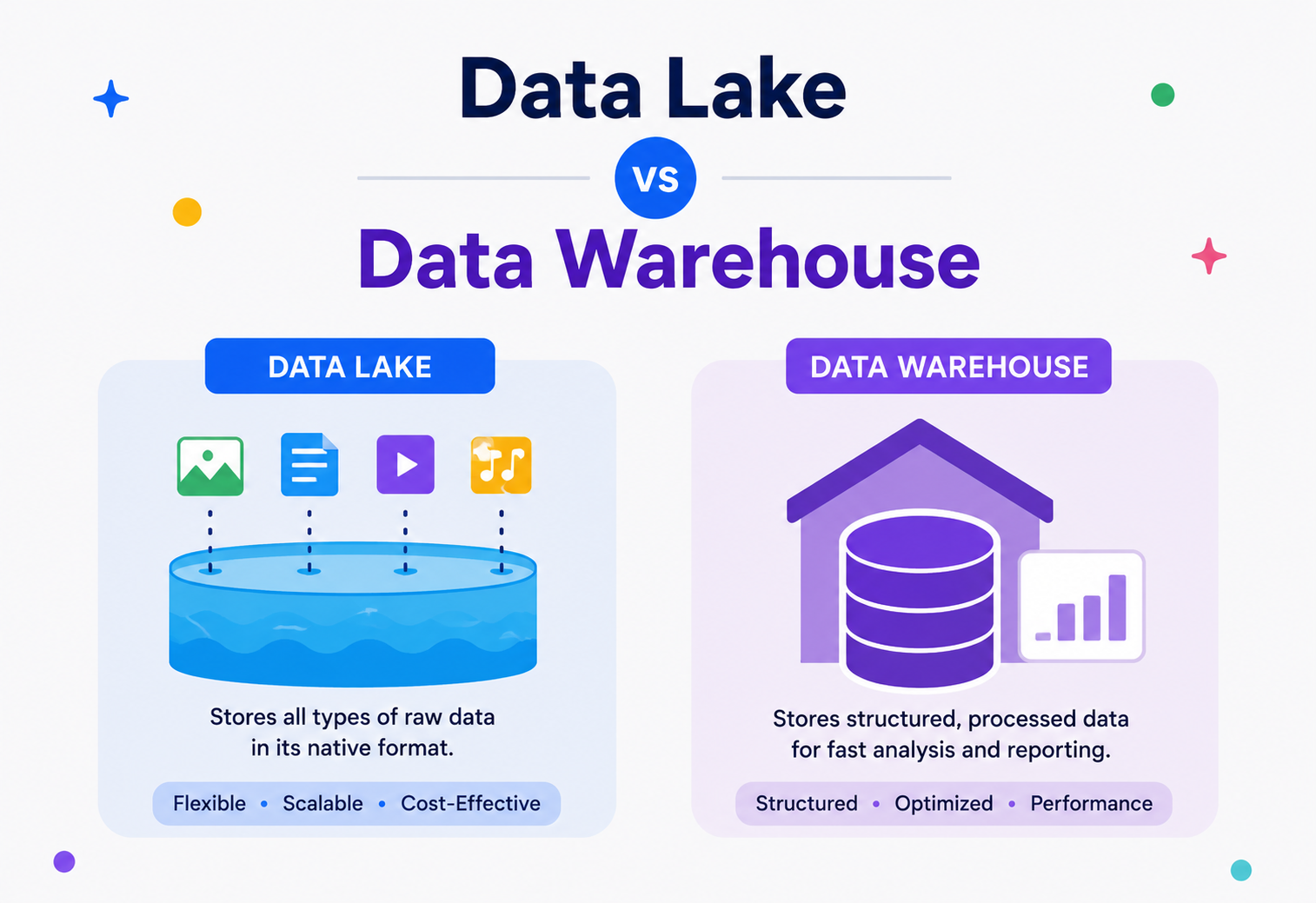
A data warehouse is a well-organised library where every book is catalogued and shelved. A data lake is a giant storage warehouse where books, boxes, and loose papers arrive as they are and get sorted only when someone actually needs them. This guide walks both systems end to end — from the 1988 origins to today's lakehouse.
Almost every question a modern business asks about itself eventually lands on one of two systems: a data warehouse or a data lake. This guide starts from “what is a database, and why isn't it enough” and ends at the lakehouse pattern that most large organisations are converging on in 2026 — the way a Software Architect actually reasons about it.
Introduction & History
A warehouse is a catalogued library. A lake is a raw storage warehouse. Both were invented to escape the limits of one all-purpose database.
Imagine you run a small shop. At the end of every day, you write down how much you sold, what you sold, and to whom, in a neat notebook with columns: Date, Item, Price, Customer. After a year, you have twelve notebooks, all organised the same way. Any question you ask — “How much did I sell in June?” — is easy to answer because everything is written in the same clean format.
Now imagine your shop grows into a giant supermarket chain. You are no longer just recording sales. You are collecting security camera videos, customer app clicks, delivery truck GPS logs, supplier emails, voice recordings from the call centre, and sensor data from your refrigerators. Some of this data fits neatly into rows and columns. A lot of it does not. A video is not a row in a spreadsheet. A customer support call is not a number you can add up.
This is exactly the problem that businesses across the world started facing in the 1980s, and then again — at a much bigger scale — in the 2010s. Two different kinds of storage systems were invented to solve it: the data warehouse and the data lake. This tutorial explains both, in plain language, from the ground up.
Real-life analogy
A data warehouse is like a well-organised library where every book is catalogued, labelled, and placed on a specific shelf by subject and author. A data lake is like a giant storage warehouse where you throw in books, boxes, furniture, and loose papers exactly as they arrive, and figure out how to organise them later, only when someone actually needs something.
1.1 · A SHORT HISTORY
The term data warehouse was popularised in the late 1980s by two IBM researchers, Barry Devlin and Paul Murphy, and later formalised by Bill Inmon, who is often called the “father of data warehousing.” Inmon defined a data warehouse as a subject-oriented, integrated, time-variant, and non-volatile collection of data used to support management decisions. Around the same time, Ralph Kimball proposed a more practical, bottom-up approach using “star schemas,” which we will explain later in this guide. Their two philosophies (Inmon's top-down approach and Kimball's bottom-up approach) still shape how data warehouses are designed today.
The term data lake is much newer. It was coined around 2010 by James Dixon, who was the Chief Technology Officer at Pentaho. He used the analogy deliberately: if a data mart (a small, refined subset of a warehouse) is like a bottle of water — cleaned, packaged, and ready to drink — then a data lake is the actual lake: raw, untreated, and containing everything from fish to mud to rainwater, all mixed together, until you decide what to filter out and use.
Data lakes became practical because of a technology shift: the rise of distributed storage systems like the Hadoop Distributed File System (HDFS) around 2006, and later, cheap and virtually unlimited cloud object storage like Amazon S3, Google Cloud Storage, and Azure Data Lake Storage. Suddenly, storing petabytes of raw, unstructured data became affordable, which was simply not true when data warehouses were first designed for expensive relational database hardware.
By the end of this tutorial, you will understand not just the dictionary definitions of these two systems, but how they are built internally, how real companies use them together, and which one to reach for when you are designing a system yourself.
Problem & Motivation
One database cannot cheaply serve both live customer traffic and huge analytical scans — that split is where both systems are born.
To understand why data warehouses and data lakes exist, we first need to understand a much simpler system that came before both of them: the regular operational database.
2.1 · THE PROBLEM WITH USING ONE DATABASE FOR EVERYTHING
Every app you use — a food delivery app, a banking app, an online store — runs on a database that is optimised for one job: handling many small, fast transactions. When you place an order, the database inserts one row. When you check your order status, it reads one row. This kind of workload is called OLTP (Online Transaction Processing).
Now suppose the business asks a very different kind of question: “What were our total sales, broken down by city and product category, for every month over the last three years?” To answer this, the database has to scan millions or billions of rows, group them, and calculate sums. This kind of workload is called OLAP (Online Analytical Processing).
If you run heavy analytical queries directly on your production OLTP database, you slow down the exact system that is trying to process live customer orders. This is one of the most common and costly mistakes engineering teams make, especially in early-stage startups.
This conflict — fast, small writes versus slow, huge reads — is the core motivation for separating “the database that runs the business” from “the database that helps you understand the business.” That second system started out as the data warehouse.
2.2 · THEN CAME A SECOND PROBLEM: NOT ALL DATA IS NEAT
Data warehouses solved the OLTP-versus-OLAP problem beautifully, but they had one strict requirement: your data had to be structured — it had to fit into rows and columns, with a fixed schema decided in advance. This worked fine when businesses only cared about sales records and customer details.
But by the 2010s, companies wanted to analyse things that do not naturally fit into rows and columns: website clickstream logs, mobile app crash reports, product images, audio from customer service calls, sensor readings from IoT devices, and free-form text from social media. Forcing all of this into a rigid warehouse schema was slow, expensive, and often threw away valuable detail. This is the exact gap that the data lake was built to fill.
What a Data Warehouse solves
“I have millions of clean sales records and I need fast, reliable answers to business questions like revenue trends, so leadership can make decisions.”
What a Data Lake solves
“I have huge volumes of raw, messy, mixed-format data and I don't yet know every question I'll want to ask, but I want to keep everything so I can find out later.”
Keep these two motivating questions in your head. Nearly every architectural difference between the two systems, which we'll cover next, traces back to these two different goals.
Core Concepts
Schema-on-write vs schema-on-read, and ETL vs ELT — two pairs of ideas that explain almost every downstream difference.
3.1 · WHAT IS A DATA WAREHOUSE?
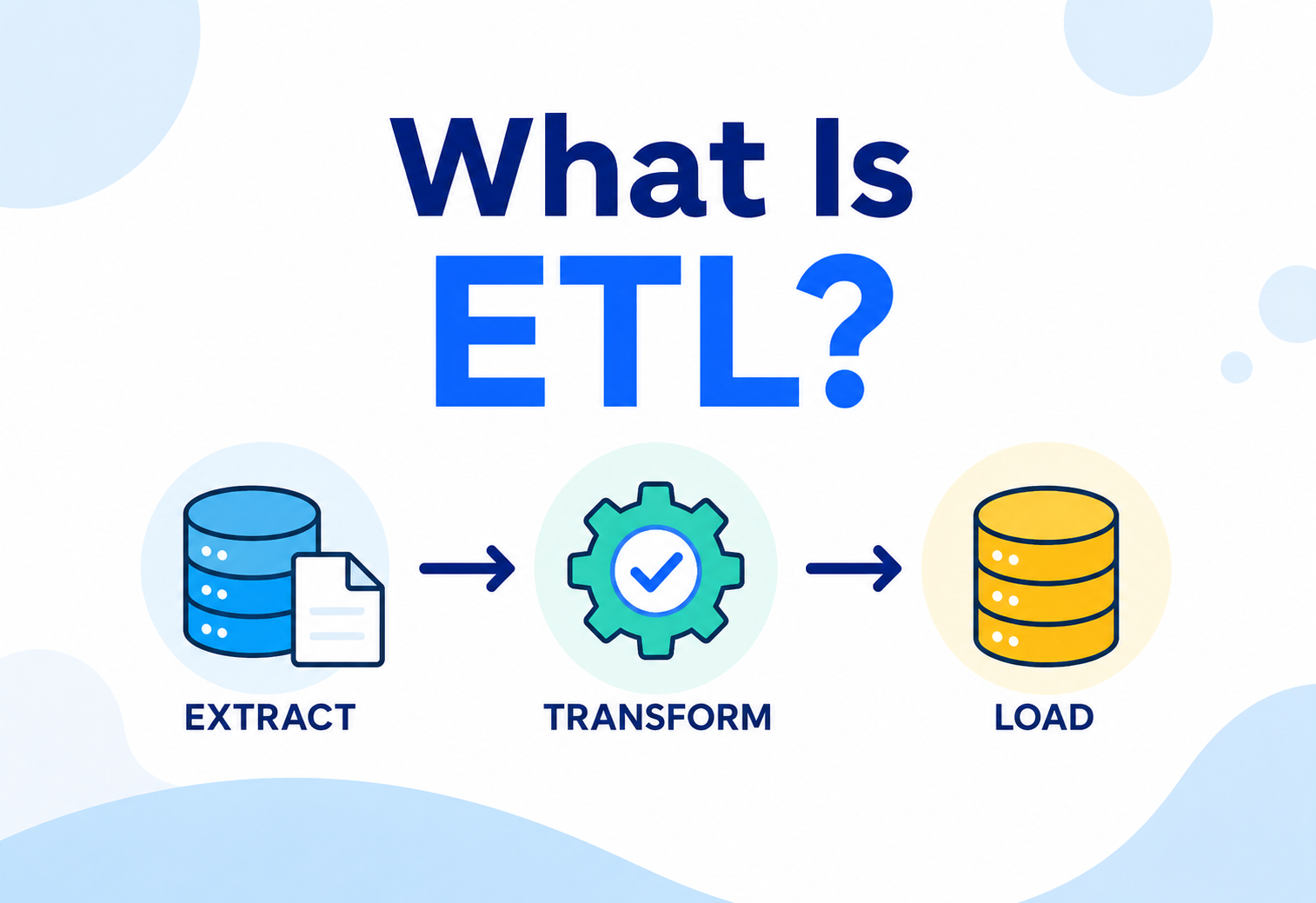
A data warehouse is a centralised system that stores large amounts of structured, cleaned, and organised data, specifically designed to make business reporting and analysis fast and reliable. Data enters a warehouse only after it has been cleaned, validated, and shaped into a predictable format — a process we will explain in detail called ETL (Extract, Transform, Load).
Think of a spreadsheet with perfectly named columns: order_id, customer_name, order_date, amount. Every single row follows this exact same structure. No row is ever missing a column or has an extra one. That predictability is the whole point of a warehouse.
3.2 · WHAT IS A DATA LAKE?
A data lake is a centralised storage system that holds vast amounts of raw data in its native format — structured, semi-structured, and unstructured — until it's needed. Nothing has to be cleaned or organised before it goes in. The idea is: store first, decide how to use it later. This is often called schema-on-read, compared to a warehouse's schema-on-write.
A data lake folder might simultaneously contain a CSV file of yesterday's orders, a folder of JPEG product photos, a stream of raw JSON click events from the mobile app, and a dump of unformatted customer support chat transcripts. Nothing forces them to share a structure.
3.3 · SCHEMA-ON-WRITE VS SCHEMA-ON-READ
This single idea is the most important concept in this entire tutorial, so let's slow down.
Schema-on-write means: before you can store any data, you must first define its exact structure (its “schema”) — the column names, data types, and rules — and every piece of incoming data must match that structure, or it gets rejected. This is how data warehouses work.
Schema-on-read means: you store the raw data exactly as it is, with no upfront structure required. The structure is only applied later, at the moment someone reads and interprets the data for a specific purpose. This is how data lakes work.
Real-life analogy
Schema-on-write is like a strict form at a government office: you cannot submit it unless every field is filled in the exact required format, checked at the counter before they accept it. Schema-on-read is like dropping a box of mixed documents into a filing room: nobody checks them on the way in, but whoever picks them out later has to make sense of what's inside, on their own.
3.4 · STRUCTURED, SEMI-STRUCTURED, AND UNSTRUCTURED DATA
These three terms come up constantly, so let's define them clearly.
| Type | Definition | Examples |
|---|---|---|
| Structured | Fits neatly into rows and columns, with a fixed, known schema. | SQL database tables, CSV files, Excel sheets |
| Semi-structured | Has some organisational structure (tags, keys) but not a rigid, fixed schema. | JSON, XML, log files, sensor readings, emails with headers |
| Unstructured | Has no predefined structure at all. | Images, videos, audio files, PDFs, free-text documents |
A data warehouse can only really handle structured data well. A data lake happily stores all three types side by side, which is precisely why it's called a “lake” instead of a “reservoir” — it holds whatever flows into it.
Real-life analogy
Think about your school bag. A structured item is like a labelled pencil box with fixed slots for pens, pencils, and an eraser — you always know exactly where each thing goes. A semi-structured item is like a lunch box with a few compartments, but you can put different snacks in each one on different days — there's some organisation, but it's flexible. An unstructured item is like a random photo you took on a school trip and stuffed into your bag — useful and meaningful, but with no built-in slot or label at all. A data lake is happy to carry your pencil box, your lunch box, and your loose photo, all in the same bag, at the same time.
3.5 · ETL VS ELT
These two acronyms describe the order in which data is processed, and this order is one of the clearest technical differences between a warehouse and a lake.
- ETL (Extract, Transform, Load): Data is pulled from a source, cleaned and reshaped before it is loaded into storage. This is the traditional data warehouse approach.
- ELT (Extract, Load, Transform): Data is pulled from a source and loaded as-is, and the cleaning/transformation happens later, only when needed. This is the data lake approach.
Architecture & Components
A warehouse is an assembly line. A lake is a set of zones with different levels of polish.
4.1 · DATA WAREHOUSE ARCHITECTURE
A classic data warehouse has four major layers. Let's walk through them like an assembly line.
Source systems
The OLTP databases, third-party APIs, CRMs, and files that generate the raw data.
Staging area
A temporary holding zone where extracted data lands before transformation.
ETL engine
The tool that cleans, validates, deduplicates, and reshapes the data into the warehouse's schema.
The warehouse itself
A relational (or columnar) database, organised into fact tables and dimension tables, typically using a star schema or snowflake schema (explained in section 5).
Data marts
Smaller, department-specific slices of the warehouse (for example, a “Marketing” data mart or a “Finance” data mart) built for specific teams.
BI & reporting tools
Dashboards (like Tableau, Power BI, or Looker) that business users query directly.
4.2 · DATA LAKE ARCHITECTURE
A data lake is usually organised in “zones” (sometimes called a medallion architecture, with Bronze, Silver, and Gold layers — a pattern popularised by Databricks).
- Bronze zone (raw zone): Data lands here exactly as it arrived from the source — untouched, unfiltered.
- Silver zone (cleaned zone): Light cleaning happens here — deduplication, fixing obvious errors, standardising formats — but the data is still fairly granular and flexible.
- Gold zone (curated zone): Business-ready, aggregated data, often structured enough to resemble a warehouse table, used directly for reporting.
A data warehouse forces cleaning to happen before storage (a strict, one-way gate). A data lake allows cleaning to happen after storage, at multiple stages, for multiple different purposes. This flexibility is the lake's biggest strength — and, as we'll see later, also its biggest risk.
4.3 · CORE COMPONENTS COMPARED
| Component | Data Warehouse | Data Lake |
|---|---|---|
| Storage engine | Relational / columnar database (e.g., Snowflake, Redshift, BigQuery) | Distributed object storage (e.g., Amazon S3, HDFS, Azure Data Lake Storage) |
| Data format | Structured tables (rows & columns) | Any file format: Parquet, ORC, Avro, JSON, CSV, images, video |
| Schema | Enforced on write | Applied on read |
| Primary users | Business analysts, executives | Data scientists, ML engineers, data engineers |
| Query language | SQL | SQL (via query engines), Python, Spark, R |
Internal Working
Star schemas and columnar storage inside the warehouse. Object stores, Parquet, and catalogs inside the lake.
5.1 · HOW A DATA WAREHOUSE WORKS INTERNALLY: STAR AND SNOWFLAKE SCHEMAS
Inside a data warehouse, data is organised using dimensional modelling, a technique made popular by Ralph Kimball. The two building blocks are:
- Fact tables: store measurable, numeric events — things you can count or sum, like
sale_amount,quantity_sold, orclick_count. Each row is usually one event. - Dimension tables: store descriptive context around those facts — who, what, where, when. For example, a
Customerdimension table, aProductdimension table, and aDatedimension table.
When one central fact table connects directly to several dimension tables, the resulting diagram looks like a star — hence the name star schema. When dimension tables are further broken down into sub-dimension tables (to reduce duplication), the diagram looks like a snowflake — hence snowflake schema.
Modern cloud data warehouses (Snowflake, BigQuery, Redshift) also use columnar storage internally, instead of the row-based storage used by OLTP databases. In row storage, an entire row is stored together on disk. In columnar storage, each column is stored together. For analytical queries that only need a few columns out of many (e.g., “just give me amount and city, ignore everything else”), columnar storage is dramatically faster because the engine can skip reading irrelevant columns entirely.
Real-life analogy
Row storage is like a spice rack drawer where each box contains one full meal's worth of every spice, all mixed together in one box per meal. Columnar storage is like a spice rack where every drawer holds only one spice, but for many meals. If a recipe needs only cumin and turmeric, columnar storage lets you open exactly two drawers, instead of opening every meal's mixed box.
5.2 · HOW A DATA LAKE WORKS INTERNALLY: OBJECT STORAGE AND FILE FORMATS
A data lake is not really a “database” in the traditional sense — it's a huge, distributed file system. Cloud object stores like Amazon S3 store data as “objects” (essentially, files) inside “buckets,” addressed by a key (essentially, a file path). There is no built-in concept of rows, columns, or schemas at the storage layer itself — that logic lives in the tools that read the files.
To make data lakes queryable and efficient, engineers typically store files in optimised formats rather than plain CSV or JSON:
| Format | Type | Why it's used |
|---|---|---|
| Parquet | Columnar | Compressed, column-oriented, extremely fast for analytical queries. The most common lake format today. |
| ORC | Columnar | Similar to Parquet, popular in the Hadoop / Hive ecosystem. |
| Avro | Row-based | Great for write-heavy streaming data and schema evolution. |
| JSON / CSV | Row-based, text | Human-readable, but slow and large; usually only used for raw / bronze zone landing. |
To make a data lake queryable with SQL, engineers add a metadata layer (sometimes called a “catalog”) on top of the raw files, such as the Hive Metastore, AWS Glue Data Catalog, or Unity Catalog. This catalog tracks which files belong to which “table,” what schema they follow, and where they're physically located — without moving or duplicating the actual data.
In a warehouse, the schema is a hard rule enforced by the database engine itself. In a lake, the schema is just metadata — a description that the catalog and query engine agree to trust. Nothing stops a rogue process from writing a file that violates it. This is why data lakes are more prone to becoming “data swamps” without discipline (more on this in section 15).
Data Flow & Lifecycle
Trace a single order end to end through both systems — the same event travels two different paths at once.
Let's trace a single piece of data — a customer's order — through both systems, end to end.
6.1 · LIFECYCLE IN A DATA WAREHOUSE
Extract
A scheduled job (often nightly, sometimes hourly) pulls new order rows from the production OLTP database.
Transform
The ETL engine cleans the data — fixes date formats, removes duplicate rows, converts currencies, joins in customer details, and calculates derived fields like tax.
Load
The clean, transformed rows are inserted into the warehouse's fact and dimension tables.
Serve
Business analysts write SQL queries, or dashboards run pre-built reports, against the warehouse.
Archive / Retire
Very old data may be moved to cheaper “cold storage” tiers or summarised and the detail dropped, based on retention policy.
6.2 · LIFECYCLE IN A DATA LAKE
Ingest
Raw order events (often as JSON) are streamed or batch-copied directly into the Bronze zone, unchanged.
Clean (Silver)
A processing job (often Apache Spark) removes obvious junk, deduplicates, and converts the raw JSON into structured Parquet files.
Curate (Gold)
Aggregated, business-friendly tables are built — for example, “daily orders per region” — ready for dashboards.
Serve
Multiple types of consumers read from different zones: analysts query Gold tables with SQL, data scientists train ML models directly on Silver or even Bronze data.
Lifecycle management
Storage lifecycle rules automatically move old, rarely-accessed files to cheaper storage tiers (e.g., S3 Glacier), or delete them per compliance policy.
Uber famously built its own data lake (and later, its own table format called Apache Hudi) to handle the sheer scale of ride events, driver GPS pings, and pricing signals arriving every second. Raw events land in the lake first, and curated, aggregated tables are built on top for finance reporting and city-ops dashboards.
Advantages, Disadvantages & Trade-offs
Both systems earn their place. Most large companies run them side by side.
Data Warehouse: Advantages
- Fast, predictable queries — because the schema and structure are fixed, query engines can optimise aggressively.
- High data quality — data is validated and cleaned before it ever gets stored.
- Easy for non-technical users — business analysts can write simple SQL or use drag-and-drop BI tools with confidence in the results.
- Strong governance — access controls, auditing, and compliance are mature and well-understood.
Data Warehouse: Disadvantages
- Expensive at scale — storing petabytes of raw data in a warehouse is far costlier than object storage.
- Rigid — adding a new data source often means redesigning the schema and ETL pipeline.
- Cannot store unstructured data well — no native way to hold images, video, or free text usefully.
- Slower to onboard new data — the ETL transformation step must be built before any value can be extracted.
Data Lake: Advantages
- Extremely cheap storage — cloud object storage can cost a fraction of warehouse storage per gigabyte.
- Stores everything — structured, semi-structured, and unstructured data, all in one place.
- Flexible for future use cases — because raw data is preserved, you can ask questions later that you didn't anticipate when the data was first collected.
- Ideal for machine learning — ML models often need raw, granular, high-volume data, which warehouses discard during transformation.
Data Lake: Disadvantages
- Risk of becoming a “data swamp” — without strong metadata management, a lake can become an unusable pile of undocumented files.
- Slower for simple business queries — scanning raw files is slower than querying a pre-optimised warehouse table.
- Requires more technical skill — using a lake well typically requires knowledge of Spark, Python, or specialised query engines.
- Weaker default governance — access control and data quality must be deliberately engineered in, rather than being automatic.
Many beginners assume “data lake = better, newer, replaces the warehouse.” In practice, most large companies run both, and increasingly a hybrid called a lakehouse (section 14) that tries to combine the lake's flexibility with the warehouse's reliability and speed.
7.1 · HOW TO DECIDE WHICH ONE YOU ACTUALLY NEED
A simple mental checklist helps here. Ask yourself three questions. First, is your data mostly structured, coming from a small, known set of sources like a handful of internal databases? If yes, a warehouse alone might be enough. Second, do you need to support machine learning, data science experimentation, or storage of images, audio, video, or free text? If yes, you need a lake, at least alongside the warehouse. Third, do your business users need fast, predictable dashboards with sub-second response times? If yes, make sure there's a warehouse (or a curated Gold layer in the lakehouse) sitting between raw data and those dashboards, rather than pointing BI tools directly at raw lake files.
7.2 · SIDE-BY-SIDE TRADE-OFF SUMMARY
| Dimension | Data Warehouse | Data Lake |
|---|---|---|
| Cost per TB | Higher | Much lower |
| Data types supported | Structured only | All types |
| Query speed for known reports | Very fast | Slower, unless curated (Gold zone) |
| Flexibility for new questions | Low | High |
| Ease of use for business users | High | Low, unless a curated layer is provided |
| Best suited for | Dashboards, financial reporting, KPIs | ML / AI, data science, exploratory analytics, archiving |
Performance & Scalability
Warehouses win with columnar, MPP, and pre-aggregation. Lakes win with elastic compute over cheap object storage.
8.1 · HOW DATA WAREHOUSES ACHIEVE PERFORMANCE
Modern cloud warehouses use several techniques together:
- Columnar storage (explained above) to skip irrelevant columns.
- Massively Parallel Processing (MPP): the query is split across many compute nodes that each scan a portion of the data simultaneously, then combine results. This is how Redshift and BigQuery scan billions of rows in seconds.
- Data partitioning: tables are physically split by a common filter column, like date. A query for “last month's sales” only touches the relevant partitions, not the entire table.
- Materialised views and pre-aggregation: common queries are pre-computed and cached, so the dashboard doesn't recompute from scratch every time.
- Query result caching: if the exact same query runs twice, the second run can be nearly instant.
8.2 · HOW DATA LAKES ACHIEVE SCALABILITY
Data lakes scale differently — they lean on the near-infinite horizontal scalability of distributed object storage and distributed compute engines:
- Separation of storage and compute: unlike a traditional warehouse where storage and compute were historically bundled, a lake stores data in S3 / HDFS while separate compute clusters (Spark, Presto, Trino) scale up or down independently, on demand.
- Partitioning by folder structure: files are often organised as
/year=2026/month=07/day=18/, so a query engine can skip entire folders that don't match the filter — called partition pruning. - Parallel file scanning: thousands of Parquet files can be read simultaneously by hundreds of compute workers.
- Elastic compute: because compute is decoupled from storage, you can spin up 500 machines for one hour to process a huge backlog, then shut them down — paying only for what you use.
Netflix processes hundreds of petabytes of viewing-event data. Rather than loading everything into a warehouse, Netflix stores raw and semi-processed data in a data lake (built on S3 and, historically, tools like Apache Iceberg — which Netflix itself originally created) and uses elastic Spark clusters to scale compute up during peak processing windows, then scale back down to control cost.
8.3 · JAVA EXAMPLE: READING A PARTITIONED PARQUET DATASET CONCEPTUALLY
While Parquet files are usually read through engines like Spark, it helps to see how partition filtering works at a conceptual code level:
public class PartitionPruningExample {

    // Simulates how a query engine decides which partitions to scan
    public static List<String> pruneToRelevantPartitions(
            List<String> allPartitionPaths, String targetYear, String targetMonth) {

        List<String> relevant = new ArrayList<>();
        String filter = "year=" + targetYear + "/month=" + targetMonth;

        for (String path : allPartitionPaths) {
            if (path.contains(filter)) {
                relevant.add(path); // Only these files get read from disk
            }
        }
        return relevant; // All other partitions are skipped entirely - huge time savings
    }
}
This simple filtering idea — skip the folders you don't need — is the single biggest reason well-partitioned data lake queries can be fast, even over huge datasets.
High Availability & Reliability
ACID inside the warehouse; open table formats bring the same guarantees to the lake.
Both systems must survive hardware failures, network issues, and mistakes — but they achieve reliability through somewhat different mechanisms.
9.1 · RELIABILITY IN DATA WAREHOUSES
- ACID transactions: most modern warehouses (Snowflake, BigQuery, Redshift) guarantee Atomicity, Consistency, Isolation, and Durability for loads, meaning a failed load never leaves half-written, corrupt data visible to users.
- Automatic replication: data is replicated across multiple availability zones or data centres, so a single hardware failure doesn't cause data loss.
- Time travel / versioning: systems like Snowflake let you query the exact state of a table as it existed minutes or days ago, which is invaluable for recovering from a bad data load.
9.2 · RELIABILITY IN DATA LAKES
Historically, raw object storage (like plain S3 or HDFS) had no concept of transactions. If two jobs wrote to the same table folder at the same time, or a job failed halfway through, readers could see partial, inconsistent data. This was one of the lake's biggest early weaknesses.
The fix came from open table formats — Apache Iceberg, Delta Lake, and Apache Hudi — which add a transaction log on top of plain files in object storage, bringing warehouse-like guarantees to the lake:
- ACID transactions on top of files: a write either fully commits or fully rolls back, tracked in a metadata log.
- Schema evolution safely: you can add or rename columns without breaking existing readers.
- Time travel: just like modern warehouses, you can query “this table as it looked yesterday at 3pm.”
- Underlying storage durability: object stores like S3 already replicate data across multiple physical locations by design, giving very high durability (often quoted as “eleven nines”).
9.3 · DISASTER RECOVERY AND BACKUPS
Both systems typically rely on a combination of: cross-region replication, point-in-time recovery snapshots, and regular automated backups. The key practical difference is cost: replicating a data lake's raw object storage across regions is comparatively cheap, while replicating an entire structured warehouse (with all its indexes and compute state) can be significantly more expensive at the same data volume.
Security
Same pillars, different plumbing — and a public S3 bucket is still one of the most common ways a real breach happens.
Security in both systems rests on the same core pillars: authentication, authorisation, encryption, and auditing — but the implementation details differ.
10.1 · SECURITY IN DATA WAREHOUSES
- Role-Based Access Control (RBAC): permissions are granted at the table, column, or even row level (row-level security), tied to user roles.
- Column masking: sensitive columns (like a customer's phone number) can be automatically masked for users without the right permission, while remaining visible to authorised roles.
- Encryption at rest and in transit: data is encrypted on disk and while being transferred, usually by default in modern cloud warehouses.
- Audit logging: every query can be logged — who ran what, when, and against which tables — important for compliance frameworks like SOC 2, GDPR, and HIPAA.
10.2 · SECURITY IN DATA LAKES
Because a lake is fundamentally a file system, access control is trickier — permissions are often set at the folder / bucket level rather than the fine-grained table / column level a warehouse naturally supports. This is a common source of security gaps if not carefully engineered.
- Bucket and object-level policies: tools like AWS IAM policies and S3 bucket policies control who can read or write which folders.
- Fine-grained access via catalog tools: modern tools like AWS Lake Formation, Databricks Unity Catalog, or Apache Ranger add table-, column-, and even row-level permissions on top of raw object storage, closing the gap with warehouse-level security.
- Encryption: server-side encryption (e.g., S3-SSE, KMS-managed keys) at rest, and TLS in transit.
- Data classification and tagging: because a lake holds so many different data types, teams often tag sensitive files (e.g., “contains PII”) so automated policies can restrict or anonymise them.
A very common real-world security failure is an accidentally public S3 bucket used as a data lake, exposing sensitive raw data to the internet. This has caused major data breaches at real companies. Always apply the principle of least privilege, enable bucket-level encryption, and block public access by default.
10.3 · COMPLIANCE CONSIDERATIONS
Regulations like GDPR (Europe) and the DPDP Act (India) require the ability to find and delete a specific person's data on request (“right to be forgotten”). This is straightforward in a warehouse, where a person's data lives in a few well-known rows. In a data lake, the same person's data might be scattered across thousands of raw files, making deletion much harder — which is one reason open table formats (with proper delete / update support) have become so important for lakes handling personal data.
Monitoring, Logging & Metrics
You cannot trust data you cannot observe. Warehouses and lakes fail in different ways — watch for both.
You cannot trust data you cannot observe. Both systems need dedicated monitoring, but they watch for different failure modes.
11.1 · WHAT TO MONITOR IN A DATA WAREHOUSE
- ETL job success / failure: did last night's load complete? How long did it take compared to usual?
- Query performance: are dashboard queries getting slower over time? Are there expensive, unindexed full-table scans?
- Data freshness: how old is the data currently visible to business users? (a critical metric often called “data latency”)
- Row counts and data quality checks: did today's load bring in a suspiciously low or high number of rows compared to yesterday?
- Compute cost / credits consumed: cloud warehouses like Snowflake and BigQuery bill by compute used, so cost monitoring is a first-class concern.
11.2 · WHAT TO MONITOR IN A DATA LAKE
- Ingestion pipeline health: are streaming or batch jobs writing new files on schedule?
- Small file problem: are jobs accidentally creating millions of tiny files (instead of fewer, well-sized ones), which slows down every downstream query? This is one of the most common lake performance issues.
- Schema drift alerts: did an upstream source suddenly start sending a new or renamed field, silently breaking downstream jobs?
- Storage growth and cost: raw zones can silently balloon in size if old, unused data isn't archived or deleted.
- Data catalog completeness: what percentage of tables / files have documented owners, schemas, and descriptions? (A proxy for “swamp risk.”)
A typical alert rule: “If the Gold-zone daily_orders table has not been updated in the last 4 hours, page the on-call data engineer.” Tools like Great Expectations, Monte Carlo, or dbt tests are commonly used to automate these data quality and freshness checks in both warehouses and lakes.
11.3 · OBSERVABILITY STACK EXAMPLES
| Concern | Common Tools |
|---|---|
| Pipeline orchestration & monitoring | Apache Airflow, Dagster, AWS Step Functions |
| Data quality testing | Great Expectations, dbt tests, Deequ |
| Data observability / anomaly detection | Monte Carlo, Datadog, Bigeye |
| Cost monitoring | Snowflake's Query History, BigQuery's cost dashboards, AWS Cost Explorer |
Deployment & Cloud
Almost nobody builds these from scratch. Pick your cloud, pick your managed service, and lean on lifecycle policies.
Almost nobody builds these systems entirely from scratch anymore. Both warehouses and lakes are typically deployed using managed cloud services.
12.1 · POPULAR MANAGED DATA WAREHOUSES
| Product | Cloud Provider | Notes |
|---|---|---|
| Amazon Redshift | AWS | MPP columnar warehouse, deeply integrated with the AWS ecosystem |
| Google BigQuery | GCP | Serverless, pay-per-query pricing model, very popular for its simplicity |
| Snowflake | Multi-cloud (AWS / GCP / Azure) | Separates storage and compute; extremely popular for elastic scaling |
| Azure Synapse Analytics | Azure | Combines warehousing and big-data analytics in one service |
12.2 · POPULAR MANAGED DATA LAKE BUILDING BLOCKS
| Product | Cloud Provider | Notes |
|---|---|---|
| Amazon S3 + AWS Glue + Athena | AWS | The classic “lake on S3” combo: storage, cataloging, and SQL querying |
| Azure Data Lake Storage (ADLS Gen2) | Azure | Hierarchical namespace object storage purpose-built for analytics |
| Google Cloud Storage + BigLake | GCP | Object storage with a unified lakehouse-style query layer |
| Databricks (Delta Lake) | Multi-cloud | Popularised the medallion architecture and the “lakehouse” term itself |
A common, effective pattern is to keep all historical raw data in the cheap data lake, and only load the recent, frequently-queried subset (say, the last 13 months) into the more expensive warehouse. This can cut warehouse storage costs dramatically while keeping full history available for occasional deep analysis or ML.
APIs, Integration & Microservices
Change Data Capture, event buses, and reverse ETL — how the analytical world meets the operational one.
In a modern microservices-based company, dozens or hundreds of independent services each own their own small database. Neither a warehouse nor a lake typically talks to these services directly through a request / response API in real time — instead, data flows in through dedicated integration patterns.
13.1 · COMMON INGESTION PATTERNS
- Change Data Capture (CDC): tools like Debezium watch a microservice's database transaction log and stream every insert / update / delete as an event, without the microservice needing to do any extra work.
- Event streaming: services publish events (e.g., “OrderPlaced,” “PaymentFailed”) to a message broker like Apache Kafka. Both the warehouse's ETL pipeline and the data lake's ingestion layer can subscribe to these events independently.
- Batch API pulls: a scheduled job calls a service's REST or GraphQL API periodically to pull recent records — simpler, but less real-time.
- Managed connectors: tools like Fivetran, Airbyte, and Stitch offer pre-built connectors for hundreds of common data sources (Salesforce, Stripe, Google Ads, etc.), so engineers don't have to hand-write extraction code for every source.
13.2 · SERVING DATA BACK OUT: REVERSE ETL
Increasingly, companies also push curated warehouse data back into operational tools — for example, syncing a customer's calculated “lifetime value” from the warehouse into the sales team's CRM. This pattern is called reverse ETL, handled by tools like Hightouch or Census, and represents the warehouse acting almost like an API-accessible source of truth for other applications.
Many query engines (like Amazon Athena or Trino) expose a standard JDBC interface, so a Java application can query lake data almost like a regular SQL database:
import java.sql.*;

public class AthenaQueryExample {
    public static void main(String[] args) throws SQLException {
        String url = "jdbc:awsathena://AwsRegion=us-east-1;"
                    + "S3OutputLocation=s3://my-query-results/";

        try (Connection conn = DriverManager.getConnection(url, "ACCESS_KEY", "SECRET_KEY");
             Statement stmt = conn.createStatement()) {

            String sql = "SELECT city, SUM(amount) AS total_sales "
                       + "FROM gold.daily_orders "
                       + "WHERE order_date >= DATE '2026-07-01' "
                       + "GROUP BY city "
                       + "ORDER BY total_sales DESC "
                       + "LIMIT 10";

            ResultSet rs = stmt.executeQuery(sql);
            while (rs.next()) {
                System.out.printf("%s -> %.2f%n",
                    rs.getString("city"), rs.getDouble("total_sales"));
            }
        }
    }
}
Notice this code looks almost identical to querying a normal relational database — the query engine (Athena, in this case) hides the fact that, underneath, it's actually scanning Parquet files sitting in S3.
Design Patterns & Anti-patterns
The medallion, Lambda, Kappa, and the Lakehouse — plus the mistakes that make a lake unusable.
14.1 · GOOD PATTERNS
- Medallion architecture (Bronze / Silver / Gold): covered in section 4 — a clean separation of raw, cleaned, and business-ready data, making it clear which zone is safe for which kind of use.
- Lambda architecture: runs two parallel pipelines — a “batch layer” that processes complete historical data accurately, and a “speed layer” that processes recent data quickly but approximately, later reconciled by the batch layer. Common in systems needing both real-time dashboards and accurate historical reports.
- Kappa architecture: a simplification of Lambda that treats everything as a stream, even historical data (replayed through the same streaming pipeline), reducing the complexity of maintaining two separate code paths.
- The Lakehouse pattern: use open table formats (Delta Lake, Iceberg, Hudi) directly on top of the data lake, adding warehouse-like ACID transactions, schema enforcement, and fast SQL — while keeping the lake's low storage cost and support for all data types. This is the dominant trend in modern data platform design as of 2026.
14.2 · ANTI-PATTERNS TO AVOID
The Data Swamp
A data lake with no catalog, no ownership, no naming conventions, and no data quality checks. Nobody trusts it, nobody can find anything in it, and it eventually gets abandoned. This is the single most common failure mode for data lake initiatives.
The “one big warehouse table”
Cramming unrelated facts into one giant, wide table instead of proper fact / dimension modelling, making queries slow and confusing.
ETL spaghetti
Dozens of hand-written, undocumented transformation scripts with hidden dependencies on each other, making the pipeline fragile and terrifying to change. Modern tools like dbt address this by making transformations version-controlled, tested, and documented like real software.
Ignoring the small-file problem
Streaming millions of tiny files into a lake without periodic “compaction” (merging small files into larger ones) silently destroys query performance over time.
Skipping data contracts
Allowing upstream teams to change event formats without any agreement or versioning, silently breaking every downstream consumer.
If asked “how would you prevent a data lake from becoming a data swamp,” a strong answer covers: a searchable data catalog with ownership metadata, enforced naming / partitioning conventions, automated data quality checks, and a curated Gold layer that business users are directed to instead of raw Bronze data.
Best Practices & Common Mistakes
The habits that keep either system trustworthy — and the mistakes that trigger midnight pages.
15.1 · BEST PRACTICES FOR DATA WAREHOUSES
- Model data using well-understood star schemas before building dashboards on top — don't let BI tools query raw, un-modelled data.
- Use incremental loads (only process new / changed rows) instead of reloading entire tables every time, to save cost and time.
- Version-control your transformation logic (tools like dbt make SQL transformations testable and reviewable, just like application code).
- Set clear data retention policies — not everything needs to live in expensive warehouse storage forever.
- Document every table and column; a warehouse that only the original author understands is a liability.
15.2 · BEST PRACTICES FOR DATA LAKES
- Always organise storage into zones (Bronze / Silver / Gold or Raw / Cleaned / Curated) — never let business users query the raw zone directly.
- Use an open table format (Iceberg, Delta, or Hudi) instead of plain files, to get ACID guarantees and avoid consistency bugs.
- Partition data sensibly (commonly by date) to enable partition pruning and keep queries fast.
- Run periodic file compaction to avoid the small-file problem degrading performance over time.
- Maintain a data catalog with clear ownership for every dataset — this is the single biggest defence against becoming a data swamp.
- Enforce schema validation at the Silver layer, even though raw ingestion is schema-free, so downstream consumers get a reliable contract.
15.3 · COMMON MISTAKES ACROSS BOTH SYSTEMS
| Mistake | Consequence | Fix |
|---|---|---|
| Running analytics directly on the production OLTP database | Slows down live customer traffic | Always separate operational and analytical workloads |
| No data ownership or documentation | Tables nobody trusts or understands | Assign clear owners; use a data catalog |
| Treating the lake as a dumping ground with no zones | Data swamp; unusable long-term | Enforce Bronze / Silver / Gold structure from day one |
| Ignoring cost monitoring | Runaway cloud bills from unoptimised queries or storage | Set up cost alerts and periodically review expensive queries |
| Not planning for schema evolution | Pipelines break silently when upstream formats change | Use open table formats with schema evolution support, and data contracts |
Real-World / Industry Examples
Netflix, Amazon, Uber, Airbnb, and every large bank — nobody chose “just a warehouse” or “just a lake.”
Lake-first, Iceberg-native
Netflix uses a data lake (built on Amazon S3) as the foundation of its analytics platform, storing raw viewing events, A/B test results, and content metadata. Netflix engineers created Apache Iceberg specifically to solve the consistency and performance problems of querying huge lake tables reliably at their scale, and it's now one of the most widely adopted open table formats in the industry.
Warehouse for finance, lake for ML
Amazon's retail business relies heavily on Redshift-based data warehouses for structured business reporting (inventory, sales, supply chain), while also operating massive S3-based data lakes for machine learning use cases like product recommendations, fraud detection, and demand forecasting, which need raw, granular behavioural data that a warehouse would normally discard.
Built Apache Hudi for lake updates
Uber's scale — millions of trips, driver location pings, and pricing calculations happening every minute — pushed the company to build its own data lake tooling, including Apache Hudi, specifically to support fast, incremental updates to huge lake tables (a capability plain object storage didn't originally offer).
Gave the industry Airflow
Airbnb built Airflow (now one of the most widely used open-source workflow orchestrators in the industry) originally to manage the complex web of ETL and data pipeline dependencies feeding both its warehouse and lake environments.
Regulatory reports + fraud ML
Banks typically lean heavily on data warehouses for regulatory reporting (which demands strict accuracy, auditability, and structured schemas) while increasingly adopting data lakes for fraud detection models, which need to analyse huge volumes of raw transaction and behavioural data to spot subtle patterns.
Notice that none of these companies chose “only a warehouse” or “only a lake.” Every one of them runs both, connected together, choosing the right tool for each specific job: warehouses for reliable business reporting, lakes for flexible, large-scale, and ML-oriented workloads.
Frequently Asked Questions
Fast answers to the questions that come up in every architecture review and every interview.
Is a data lake just a cheaper data warehouse?
No. They solve different problems. A lake is cheaper for raw storage, but a warehouse is usually faster and easier for standard business reporting. Cost is only one of several differences.
Can a data lake replace a data warehouse completely?
In theory, a “lakehouse” (a lake with an open table format layer) can serve both purposes. In practice, many organisations still run a dedicated warehouse for business-critical reporting, alongside a lake or lakehouse for everything else, though this is converging over time.
What's the difference between a data lake and a data lakehouse?
A data lake is raw object storage with files in it. A data lakehouse adds a transactional table layer (like Delta Lake or Iceberg) on top of that storage, giving it warehouse-like reliability, schema enforcement, and fast SQL, while keeping the lake's low cost and flexibility.
What's a data mart, and how is it different from a data lake?
A data mart is a small, focused subset of a data warehouse built for one department, like Sales or Finance. It's always structured and always derived from cleaned data — unlike a data lake, which stores everything, raw, for many possible future uses.
Do small companies need a data lake?
Usually not right away. Most small companies are well served by a single cloud data warehouse (like BigQuery or Snowflake) until their data volume, variety, or machine learning needs grow enough to justify the added complexity of a lake.
Which one should I learn first as a beginner data engineer?
Start with data warehouse concepts — SQL, star schemas, and ETL — since they're foundational and used everywhere. Once comfortable, move to data lake concepts like Spark, Parquet, and open table formats, which are more advanced but build directly on the same underlying ideas.
Summary & Key Takeaways
One sentence to remember, seven bullets to internalise.
Let's bring everything together. A data warehouse and a data lake both exist to answer the same underlying question — “how do we store data so we can learn from it?” — but they make very different trade-offs to get there.
- A data warehouse stores clean, structured data with a fixed schema, optimised for fast, reliable business reporting (schema-on-write, ETL).
- A data lake stores raw data of any type — structured, semi-structured, unstructured — cheaply and flexibly, with structure applied later (schema-on-read, ELT).
- Warehouses use dimensional modelling (star / snowflake schemas) and columnar storage for speed; lakes use distributed object storage, file formats like Parquet, and a metadata catalog.
- Historically, lakes lacked ACID guarantees; modern open table formats (Delta Lake, Iceberg, Hudi) fixed this, giving rise to the lakehouse pattern that blends both worlds.
- Real companies almost always use both systems together, connected by event streams and pipelines, choosing the right tool for reporting versus machine learning and exploratory analysis.
- The biggest risk with a data lake is neglect — without zones, cataloging, and governance, it becomes an unusable “data swamp.”
- The biggest risk with a data warehouse is rigidity — without careful modelling and incremental design, it becomes slow and expensive to evolve.
You almost never have to choose one and forever exclude the other. Start with the workload — predictable business reporting, or exploratory / ML / mixed-format analysis — and let that pick the tool for you. Then let the lakehouse pattern quietly narrow the gap between the two over time, so the boundary matters less and less each year.