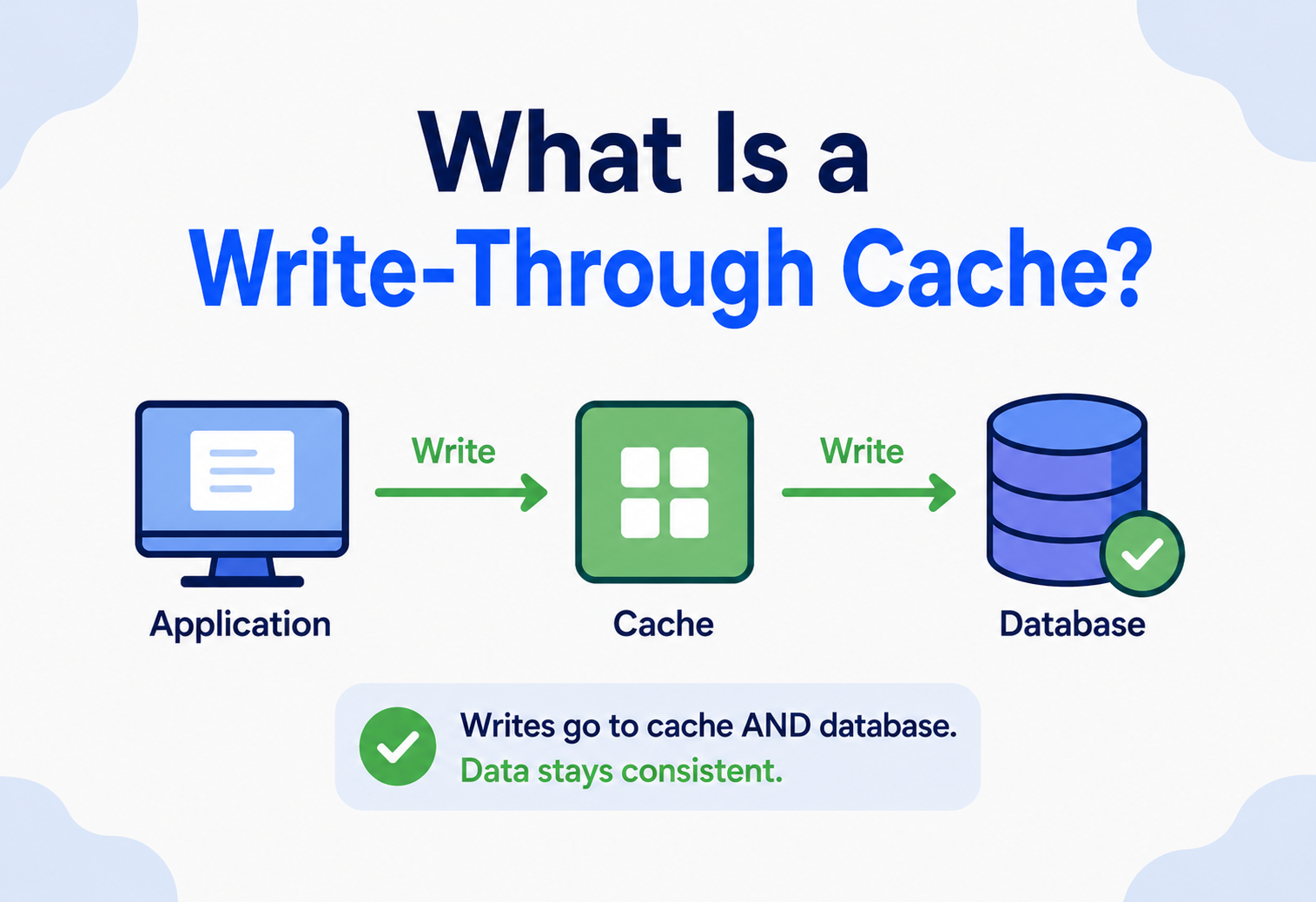
What Is a Write-Through Cache?
Learn how write-through caching keeps your cache and your database in perfect agreement, why big companies like Netflix and Amazon depend on it, and how to build one yourself in Java — explained so simply that even a 10-year-old could follow along, and detailed enough to walk into a senior systems design interview with confidence.
Introduction & History
Imagine you have a small notebook that you keep in your pocket, and a giant filing cabinet in the basement of your building. Every time you learn something important, you could walk down to the basement, open a heavy drawer, and write it in the right folder. But that takes a long time. So instead, you write it in your pocket notebook first — fast and easy — and then, before the day ends, you always walk down and copy the same note into the filing cabinet too, so both places agree.
That is, in plain human terms, exactly what a write-through cache does. It is a caching strategy where every single piece of data you write is saved to the fast, nearby cache and to the slower, permanent storage (like a database) at the same time, before the write is considered complete. Nothing is left “for later.” The notebook and the filing cabinet are always in sync.
Think of a classroom whiteboard (the cache) and a student’s homework notebook (the database). A write-through rule would be: “Before you erase anything from the whiteboard, you must first copy it into your notebook.” That way, even if the whiteboard is wiped clean, nothing is ever lost — the notebook always has the full, true copy.
1.1 What Is Caching, in the First Place?
Before we go further, let us define the basic word: a cache is a small, fast storage area that keeps a copy of data so that future requests for that data can be served quickly, instead of going all the way to a slower original source. Computers use caches everywhere — inside the CPU, inside your web browser, inside mobile apps, and inside huge backend systems that power apps like Instagram or Amazon.
A cache exists for one reason: speed. Fetching data from RAM (memory) is thousands of times faster than fetching it from a hard disk or a database sitting on another server. So engineers keep “hot” (frequently used) data in a cache so the system does not have to repeatedly do slow work.

1.2 A Short History
The idea of caching is almost as old as computing itself. In the 1960s and 1970s, computer scientists working on early mainframes and CPU designs noticed something: most programs repeatedly touch the same small set of data (“locality of reference”). This observation led to the invention of hardware caches inside CPUs — small, extremely fast memory chips sitting between the processor and the much slower main memory (RAM).
CPU designers then had to answer a hard question: when the processor writes new data, should that write go only to the fast cache, or also to the slow main memory right away? Two competing answers emerged, and they are still used today, decades later:
- Write-through — write to the cache and the main store together, every time.
- Write-back (also called write-behind) — write only to the cache immediately, and copy it to the main store later, in batches.
Over time, this same idea moved out of CPU hardware and into software systems: databases, web application caches (like Redis and Memcached), content delivery networks, and distributed systems. The core trade-off from the 1970s — “fast now, or safe now?” — is exactly the same trade-off system designers face today when they choose between write-through, write-around, and write-back caching in modern architectures.
Even with modern tools like Redis, DynamoDB Accelerator (DAX), and Amazon ElastiCache, the fundamental decision — write-through vs write-back vs write-around — has not changed. What has changed is that these policies are now often configurable settings in managed cloud caching services, rather than something you hand-build from scratch. Understanding the underlying theory lets you configure these tools correctly instead of guessing.
The Problem & Motivation
To understand why write-through caching exists, we need to understand the problem it solves: keeping fast storage and slow storage in agreement, without losing data.
2.1 The Read Problem (Solved Long Ago)
Most people learn about caching through reads first. Say your app needs a user’s profile information. Without a cache, every single page load queries the database. If a million users check their profile every minute, that is a million database queries — expensive and slow. A cache fixes this: the first request goes to the database and the result is stored in the cache; every request after that is served instantly from the cache.
This is called the cache-aside or lazy-loading read pattern, and it is simple to reason about for reads. But real applications do not just read data — they also write data: a user updates their bio, a shopping cart changes, an account balance is debited. And this is where the real engineering problem begins.
2.2 The Write Problem: Two Copies of the Truth
The moment you have a cache and a database holding the same piece of information, you have two copies of the truth. If a user changes their profile photo, which copy gets updated first? What happens if the system crashes halfway through? What if one copy gets updated and the other does not?
This mismatch has a name: cache inconsistency (or “stale cache”). It is one of the most common — and most annoying — bugs in real software systems. A user updates their email, refreshes the page, and sees their old email again, because the cache was never told about the change.

Stale cache data is not just an annoyance. In banking systems, it can mean a customer sees an old account balance and overspends. In e-commerce, it can mean an item shows as “in stock” when it is actually sold out. In healthcare systems, it can mean a doctor sees outdated patient information. The cost of getting this wrong is real.
2.3 Enter Write-Through Caching
Write-through caching solves the write problem with a simple, strict rule: never let the cache and the database disagree, even for a moment. Every write operation updates both locations as a single logical step. Only after both are confirmed does the system tell the calling application, “Your write succeeded.”
This guarantee — that cache and storage are always synchronized — is exactly why write-through caching is chosen whenever correctness matters more than raw write speed: financial transactions, inventory counts, user account settings, and configuration data are classic examples.
2.4 Why Not Just Skip the Database Update?
A beginner might reasonably ask: “If the cache is fast, why not just keep everything in the cache and skip the slow database entirely?” The answer is durability. Caches typically live in RAM (memory), and RAM is volatile — it loses everything the instant the power goes off or the process crashes. A database, on the other hand, writes to disk (or replicated storage), which survives crashes, restarts, and power failures. Write-through caching gives you the best of both: cache-speed reads afterward, and database-grade durability for every write.
A write-through cache is a caching strategy where every write is saved to the cache and the backing store together, synchronously, before the write is acknowledged as successful.
Core Concepts
Before diving into architecture, let us build a solid vocabulary. Every term below is something you will see again and again in caching discussions, interviews, and production incident reports.
The fast speed layer
A smaller, faster storage layer that holds a subset of data, usually in memory (RAM). Used in CPUs, browsers, mobile apps, web servers, databases and CDNs. Analogy: a small basket of your most-used kitchen spices on the counter, so you do not walk to the pantry every time. Example: Redis storing a user’s session data so the app does not query the database on every click.
The source of truth
The permanent, durable storage system that the cache is a “speed layer” in front of — usually a database, disk, or another persistent system. Used with PostgreSQL, MySQL, MongoDB, DynamoDB, S3. Analogy: the filing cabinet in the basement — slower to reach, but it never forgets anything, even if the power goes out.
Was it in the cache?
A cache hit happens when requested data is found in the cache; a cache miss forces a trip to the backing store. The “hit ratio” is the single most important health metric for any cache. A product-page cache with a 95% hit ratio means only 5% of requests ever touch the database.
When does the DB get updated?
The rule that decides when and how data written to the cache gets propagated to the backing store. Three major policies: write-through (both together, synchronously), write-back / write-behind (cache now, DB later), and write-around (skip the cache, write straight to the DB).
Wait, or move on?
A synchronous operation waits until a task is fully done before moving on. An asynchronous operation starts a task and moves on. Write-through is, by definition, synchronous for the database write. Analogy: synchronous is waiting at the bank counter for your receipt; asynchronous is dropping the deposit in a mailbox.
How “in agreement” the copies are
A guarantee about how in agreement different copies of the same data are at any moment. Any system with more than one copy (cache + database) must define what happens when they briefly disagree. Write-through caching provides strong consistency because both are updated together.
Time to Live
A timer attached to cached data that automatically deletes (evicts) it after a set duration. Prevents caches from growing forever and bounds how stale data can become. Analogy: a carton of milk with an expiry date — after that date you throw it out and get a fresh one. Example: 10-minute TTL on cached currency exchange rates.
Who gets kicked out?
The rule a cache uses to decide which data to remove when it runs out of space. Common types: LRU (Least Recently Used), LFU (Least Frequently Used), FIFO (First In First Out). Analogy: a small fridge — when it is full and you need to add fresh food, you first throw out whatever has been sitting untouched the longest (LRU).
3.9 The Three Write Policies at a Glance
| Policy | What happens on a write | Best for |
|---|---|---|
| Write-Through | Write to cache AND database together, synchronously, before confirming success | Correctness-critical data (banking, inventory) |
| Write-Back (Write-Behind) | Write to cache immediately; database is updated later, asynchronously, in batches | High write-throughput systems tolerant of brief data-loss risk |
| Write-Around | Write goes directly to the database, bypassing the cache entirely | Data written once and rarely read again soon after |
write-through = safe & synchronous · write-back = fast & async · write-around = skip the cache
Architecture & Components
Let us look at the pieces that make up a write-through caching system, and how they connect.
4.1 The Core Components
Application / Service Layer
The code that decides “I need to read or write this piece of data.” This is where the write-through orchestration lives in most Java/Spring systems.
Cache Layer
An in-memory store like Redis, Memcached, or an application-level cache (e.g., Caffeine in Java) that sits between the application and the database.
Backing Store (Database)
The durable system of record: PostgreSQL, MySQL, MongoDB, DynamoDB, and similar. Always the source of truth in a well-designed write-through system.
Cache Client / SDK
The library the application uses to talk to the cache — e.g., Jedis or Lettuce for Redis in Java.
Write Coordinator Logic
The piece of code (often inside a repository or service class) that enforces the “write to both, in order, before confirming” rule.
Monitoring & Observability
Cache hit-ratio, write latency, and partial-failure tracking — without these, silent degradation goes unnoticed.
4.2 Where the Write Coordinator Lives
There are two common architectural placements for the “write to both” logic:
Application-Managed Write-Through
The application code itself is responsible for writing to the cache and the database, usually inside a repository or data-access class. This is the most common pattern in real-world Java/Spring applications, because it gives full control over ordering, error handling, and retries.
Cache-Managed Write-Through
Some caching systems (like certain configurations of Amazon DAX, or caching abstractions in frameworks) can be configured with a “loader” and a “writer” so that the cache itself calls the database automatically on both reads (on a miss) and writes. The application only ever talks to the cache; the cache internally manages the database. More elegant, but requires a caching product that supports it.
For most teams, Option A (application-managed) is simpler to reason about, easier to debug, and works with any cache + database combination. Option B is powerful but adds a dependency on specific caching-product features. Most production Java systems using Redis or Memcached implement Option A.
4.3 Component Responsibilities
| Component | Responsibility | Failure impact if missing |
|---|---|---|
| Application Layer | Orchestrate read/write order, handle errors | No coordination between cache and DB |
| Cache Layer | Serve fast reads, store recent writes | Every read hits the database (slow) |
| Backing Store | Durable, permanent storage of all data | Data lost on cache/server restart |
| Monitoring | Track hit ratio, latency, error rate | Silent performance degradation |
Internal Working
Let us walk through exactly what happens, step by step, when a write-through cache processes a write and later a read.
5.1 Step-by-Step: A Write Operation
- Step 1 — Request arrives. The application receives a request to update data, e.g., “change user 42’s email address.”
- Step 2 — Write to the database first. Most robust write-through implementations write to the database first, because the database is the durable source of truth. If this step fails, the whole operation fails immediately — nothing is cached that is not also safely stored.
- Step 3 — Write to the cache. Once the database write is confirmed, the same data is written into the cache, using the same key that reads will later use.
- Step 4 — Confirm success. Only after both writes succeed does the application tell the caller, “Your update was successful.”
- Step 5 — Handle partial failure. If the database write succeeds but the cache write fails, the safest response is to invalidate (delete) that cache key rather than leave possibly-wrong data cached. The next read will then be a cache miss, which safely re-fetches fresh data from the database.
If you wrote to the cache first and the database write then failed, your cache would now hold data that does not exist anywhere durable — a dangerous illusion of success. Writing to the database first, then the cache, means the worst-case failure (cache write fails) only costs you a temporary cache miss, not incorrect data.
5.2 Step-by-Step: A Read Operation
- Step 1 — Application receives a read request, e.g., “get user 42’s profile.”
- Step 2 — It checks the cache first.
- Step 3a — Cache Hit: If found, return the cached value immediately. Because this is write-through caching, this value is guaranteed to be up to date (as of the last write), since the cache was updated at write time, not lazily.
- Step 3b — Cache Miss: If not found (e.g., due to TTL expiry, cache restart, or eviction), fetch from the database, return the result, and typically re-populate the cache so future reads are fast again.
5.3 What Happens During a Crash Mid-Write?
This is a favorite interview question, so let us be precise. Suppose the server crashes exactly between Step 2 (database write confirmed) and Step 3 (cache write). What happens?
- The database already has the correct, new data — safe and durable.
- The cache still holds the old value, or nothing at all if it was never cached.
- On restart, the next read for that key will be a cache miss (if the cache also restarted) or will serve stale data briefly (if the cache survived the crash but the app never updated it).
- The fix: most production systems attach a short TTL to cache entries specifically to bound how long this rare inconsistency window can last, and/or use cache invalidation on write failure instead of leaving stale data cached.
If asked “is write-through caching 100% consistent?” the precise answer is: it is consistent under normal operation because both writes are part of one logical transaction-like flow, but it is not perfectly immune to rare crash windows between the two writes. Well-designed systems minimize this window and use invalidation-on-failure to stay safe.
5.4 Concurrency and Race Conditions
Real systems do not process one write at a time — many requests can arrive for the same key at almost the same instant. Imagine two admins both changing the price of the same product within a few milliseconds of each other. Without care, this can produce a “lost update,” where the second write silently overwrites the first, or worse, the cache and database end up remembering two different “final” values because the two writes interleaved their cache and database steps in different orders.
What it is: A race condition is a bug that happens when the correctness of a result depends on the unpredictable timing of two or more operations happening around the same time.
Why it matters here: Because write-through involves two separate write steps (database, then cache), two concurrent writers can “interleave” — writer A updates the database, writer B updates the database, writer B updates the cache, writer A updates the cache — leaving the cache holding writer A’s older value while the database correctly holds writer B’s newer value.
Analogy: Two people editing the same shared shopping list notebook and whiteboard at the same time, but taking turns updating each one separately, can accidentally leave the notebook and whiteboard showing different final items.
Common defenses against this problem include:

- Per-key locking: Acquiring a short-lived lock (e.g., a Redis-based distributed lock) on a specific key before performing its write-through sequence, so no two writers can interleave steps for the same key.
- Optimistic concurrency control: Attaching a version number to each record; a write only succeeds if the version it is updating matches the version currently in the database, forcing the “losing” writer to retry with fresh data instead of blindly overwriting.
- Single-writer ownership: Routing all writes for a given key to one consistent owner (common in some distributed systems), so true concurrent writes to the same key never happen at the hardware or process level.
- Atomic dual-write helpers: Some caching frameworks provide a single call that performs the database write and cache write as one guarded unit, reducing the window where interleaving can occur.
A typical answer: “I would add a version column to the row. Each write-through update does UPDATE ... SET value = ?, version = version + 1 WHERE id = ? AND version = ?. If zero rows are affected, someone else won the race, so I re-read the latest value, reapply my change, and retry.” This single sentence demonstrates a real, production-grade understanding of concurrent write safety.
Data Flow & Lifecycle
Let us trace the complete life of one piece of data — say, a product’s price in an online store — from the moment it is created to the moment it is eventually removed from the cache.
6.1 Lifecycle Stages Explained
Both stores populated
New data is written to the database and cache together in a single write-through operation.
Reads hit the cache
Subsequent reads are served instantly from the cache, saving database load and shrinking p99 latency.
Same write-through path
Any change goes through the same write-through path — both copies updated together, keeping them consistent.
TTL as safety net
After a configured time, the cache entry is automatically removed, forcing a fresh fetch on the next read. This acts as a safety net against any subtle drift.
Memory pressure removal
If the cache runs low on memory, less-used entries are removed based on the eviction policy (commonly LRU), regardless of TTL.
Coordinated removal
When data is deleted from the system, a correct write-through implementation deletes it from both the cache and the database, in the same coordinated way as a write.
6.2 A Concrete Walkthrough
Let us follow a real value end to end:
- An admin sets the price of “Wireless Headphones” to ₹2,999. The application writes ₹2,999 to the database, then to the cache, then responds “Saved.”
- For the next 500 customers who view the product page, the application reads the price straight from the cache — no database call needed.
- An hour later, the admin changes the price to ₹2,499 during a flash sale. The write-through path updates the database and the cache together again. The very next customer, even one millisecond later, sees ₹2,499 — never the stale ₹2,999.
- At midnight, the TTL on that cache entry expires as a routine safety measure. The next request is a cache miss, quietly re-fetches ₹2,499 from the database (confirming nothing drifted), and re-populates the cache.
The cache is never more than one write-through operation “behind” the truth — and under normal conditions, it is not behind at all.
Advantages, Disadvantages & Trade-offs
Every caching decision is a trade-off. Write-through gives up some raw write speed in exchange for a very specific, valuable property: cache and database that never disagree under normal operation. Below is a careful accounting of what you get and what you give up.
7.1 Advantages
| Advantage | Why it matters |
|---|---|
| Strong consistency | Cache and database are always in agreement after a write completes; no “surprise stale reads.” |
| Simple mental model | Developers can reason about the system as “one source of truth, mirrored,” rather than tracking async lag. |
| Safe against cache loss | Even if the cache crashes entirely, the database always has the complete, correct data. |
| Great for read-heavy workloads after the first write | Once written, data is immediately available at cache speed for all future reads. |
| Reduces thundering herd on hot data | Since the cache is proactively populated at write time, there is no gap where many readers stampede the database for freshly written data. |
7.2 Disadvantages
| Disadvantage | Why it matters |
|---|---|
| Higher write latency | Every write waits on two operations (cache + database) instead of one, making writes slower than write-back. |
| Wasted cache space | Data that is written but never read again still consumes cache memory unnecessarily. |
| Database remains the write bottleneck | Because every write still touches the database synchronously, write-through does not reduce database write load — only write-back does that. |
| More complex failure handling | Engineers must carefully decide what happens if one of the two writes succeeds and the other fails. |
7.3 Write-Through vs Write-Back vs Write-Around — Side by Side
| Aspect | Write-Through | Write-Back | Write-Around |
|---|---|---|---|
| Write speed | Slower (waits for both) | Fastest (cache only, DB later) | Same as direct DB write |
| Consistency | Strong | Eventual (lag window) | Strong for DB, cache stays stale/empty |
| Risk of data loss on crash | Very low | Higher (unflushed writes lost) | Very low |
| Best for | Banking, inventory, config data | High-volume writes, analytics buffers | Write-once, rarely-read-immediately data (logs, bulk imports) |
| Cache pollution risk | Medium (caches everything written) | Medium | Low (cache stays clean of one-off writes) |
Ask yourself: “If I lose the last few seconds of writes during a crash, is that acceptable?” If the answer is a firm no (money, inventory, medical records), choose write-through. If the answer is “yes, a little loss is tolerable for much higher throughput” (analytics counters, logs, view counts), consider write-back.
Performance & Scalability
8.1 Latency Characteristics
In a write-through system, write latency is roughly the sum (or max, if done in parallel) of the cache write time and the database write time. In practice, teams often perform both writes concurrently (in parallel threads or async tasks) rather than one after another, to reduce total latency — but they still wait for both to finish before confirming success, which is the defining trait of write-through.
~0.1–1 ms
Typical Redis write latency, when the cache is on the same private network as the application.
~2–20 ms
Typical database write latency on SSD-backed managed databases (e.g., RDS, Aurora, Cloud SQL).
< 1 ms
Typical cache read latency (hit), including a single network round-trip inside a VPC.
8.2 Scaling the Cache Layer
As traffic grows, a single cache server becomes a bottleneck or a single point of failure. The common scaling techniques are:
- Sharding (Partitioning): Splitting the cache’s keys across multiple cache nodes, e.g., using consistent hashing, so no single node holds all the data.
- Replication: Running multiple copies of the cache (a primary and replicas) so reads can be spread out and a replica can take over if the primary fails.
- Clustering: Tools like Redis Cluster automatically manage sharding and replication together, presenting a single logical cache to the application.
8.3 Scaling the Database Under Write-Through Load
Because write-through always writes to the database, the database’s write capacity becomes the real ceiling on system throughput — the cache does not reduce write load, only read load. Common techniques to raise this ceiling include:

- Vertical scaling — using a bigger, faster database server (more CPU, RAM, faster disks).
- Write sharding — splitting the database itself across multiple machines by key range or hash, so writes are distributed.
- Connection pooling — reusing database connections efficiently instead of opening a new one per request.
- Batching where safe — grouping multiple small writes into fewer round trips, when strict per-write acknowledgment is not required.
8.4 Measuring Cache Effectiveness
The key formulas every engineer should know:
Hit Ratio = (Cache Hits) / (Cache Hits + Cache Misses) × 100%

Average Latency = (Hit Ratio × Cache Latency) + (Miss Ratio × DB Latency)
A healthy production cache typically targets a hit ratio above 90% for frequently-read data. If hit ratio is low, it often signals a TTL that is too short, an eviction policy that is too aggressive for available memory, or a workload with low data reuse (in which case caching may not help much at all).
High Availability & Reliability
9.1 What Happens When the Cache Goes Down?
A well-designed write-through system should never lose data if the cache fails, because the database always has the authoritative copy. The application should detect the cache outage and temporarily fall back to reading and writing directly against the database, ideally with circuit breakers to avoid overwhelming the database or hanging on a dead cache connection.
If the entire cache goes down and all traffic suddenly falls back to the database at once, the database can be overwhelmed — this is called a cache stampede or thundering herd. Mitigations include rate-limiting fallback reads, using request coalescing (only one request per key fetches from the DB while others wait), and warming the cache gradually after recovery instead of all at once.
9.2 Replication for the Cache Layer
Production caches like Redis support primary-replica replication: writes go to a primary node, which asynchronously streams changes to one or more replica nodes. If the primary fails, a replica can be promoted (often automatically via a tool like Redis Sentinel or Redis Cluster) to take over, minimizing downtime.
9.3 Consistency Across Multiple Application Instances
In real systems, many application server instances run in parallel behind a load balancer. Write-through caching still works correctly here because the cache is a shared, external service (like Redis) — not something local to one server. Every application instance writes to and reads from the same shared cache, so all instances instantly see the latest data after any write, no matter which instance performed it.
9.4 Disaster Recovery
Since the database is the durable source of truth, disaster recovery planning should focus primarily on the database: regular backups, point-in-time recovery, and cross-region replication. The cache, by contrast, is treated as disposable — it can always be rebuilt (re-warmed) from the database after a disaster, because write-through guarantees the database was never dependent on the cache for correctness.
In a write-through architecture, the cache should always be treated as rebuildable and disposable. If you can delete your entire cache and your system still produces correct answers (just slower, until it is warm again), your write-through design is sound.
9.5 Failure Recovery Playbook
Well-run production teams do not just hope failures will not happen — they write down exactly what to do when they do. Here is a simple playbook for the most common write-through failure scenarios:
| Failure scenario | Immediate effect | Recovery action |
|---|---|---|
| Cache node crashes | All reads become cache misses; database load rises temporarily | Failover to replica (if clustered) or let the cache rebuild gradually from live traffic (“cache warming”) |
| Database write fails mid-operation | Write-through operation aborts before touching the cache | Return an error to the caller; no cleanup needed since the cache was never touched |
| Cache write fails after DB write succeeds | Cache may hold stale or no data for that key | Immediately invalidate (delete) that specific cache key; rely on TTL as a backstop |
| Network partition between app and cache | App cannot reach cache at all | Circuit breaker trips; app temporarily reads/writes directly against the database until the cache is reachable again |
| Full cache cluster loss | All cached data gone; every request becomes a database read | Rebuild cache gradually from real traffic, or run a scripted “cache warm-up” job for the hottest known keys before reopening to full traffic |
The unifying theme across every row of this table is that the database’s durability is what makes recovery safe — no scenario above results in permanently incorrect or lost data, only temporarily degraded performance while the cache catches back up.
Security
10.1 Data Exposure Risks
Caches often hold sensitive data (session tokens, personal details, sometimes even partial payment information) in memory, which can be a target if the cache server itself is not secured properly.

- Network isolation: Cache servers (like Redis) should never be exposed directly to the public internet; they should live inside a private network/VPC, reachable only by application servers.
- Authentication: Enable password/ACL-based authentication (e.g., Redis
requirepassor Redis 6+ ACLs) rather than running an open, unauthenticated cache instance. - Encryption in transit: Use TLS between the application and the cache, especially across network boundaries or cloud availability zones.
- Encryption at rest: If the cache persists snapshots to disk (like Redis RDB/AOF files), those files should be encrypted, since they may contain sensitive cached data.
10.2 Consistency as a Security Property
It is easy to forget that stale or inconsistent data can itself be a security issue. For example, if a user’s access permissions are revoked in the database but the cache still serves the old (elevated) permissions for several minutes, that is a real vulnerability window. Write-through caching directly reduces this risk because permission changes propagate to the cache immediately, as part of the same write — unlike write-back, which could leave stale permissions cached for longer.
Even with write-through, always pair sensitive data (like permissions or account status) with a short TTL as a defense-in-depth measure, in case a write-through update is ever missed due to a bug, a network partition, or a bypassed code path (e.g., a database change made directly via an admin script, skipping the application layer entirely).
10.3 Input Validation and Injection Risks
Just like database queries, cache keys and values built from user input should be validated and sanitized. Poorly constructed cache keys (e.g., directly concatenating user input) can lead to key collisions, cache poisoning, or unexpected data leakage between users if keys are not properly namespaced (e.g., user:1234:profile rather than just profile).
Monitoring, Logging & Metrics
You cannot manage what you do not measure. A production write-through cache needs continuous visibility into its health.
11.1 Key Metrics to Track
| Metric | What it tells you |
|---|---|
| Hit Ratio | How effective the cache is at avoiding database trips |
| Write Latency (p50 / p95 / p99) | How long dual writes (cache + DB) are taking, and whether tail latency is spiking |
| Eviction Rate | Whether the cache is under memory pressure, losing data too aggressively |
| Cache-DB Write Failure Rate | How often one of the two writes fails, signaling reliability issues |
| Memory Usage | Whether the cache is approaching capacity limits |
| Replication Lag (if replicated) | How far behind cache replicas are from the primary |
11.2 Logging Best Practices
- Log every partial-failure case (e.g., “DB write succeeded, cache write failed”) with enough context to debug: key, timestamp, error, retry outcome.
- Avoid logging full sensitive values (like passwords or tokens) even in debug logs — log keys and metadata instead.
- Use structured logging (JSON logs) so metrics can be extracted and aggregated automatically by tools like the ELK stack or Grafana Loki.
11.3 Alerting
Set alerts on: hit ratio dropping below a threshold (e.g., under 80% for a normally 95%+ cache), write failure rate exceeding a small percentage, and memory usage crossing 80–85% of allocated capacity. These early warnings usually catch problems long before users notice slowness.
Prometheus + Grafana for metrics dashboards, Redis’s own INFO command and RedisInsight for cache-specific stats, OpenTelemetry for distributed tracing across the application-cache-database path, and centralized logging (ELK / Loki) for debugging partial failures.
Deployment & Cloud
12.1 Self-Hosted vs Managed Caching
| Approach | Examples | Trade-off |
|---|---|---|
| Self-hosted | Running Redis / Memcached on your own EC2 / VMs or Kubernetes pods | Full control, but you manage patching, scaling, and failover yourself |
| Managed cloud service | Amazon ElastiCache, Amazon MemoryDB, Google Memorystore, Azure Cache for Redis | Automated backups, failover, and patching, at a higher cost per GB |
12.2 Deploying in a Cloud-Native Architecture
In a typical modern cloud deployment, application services run as containers (e.g., on Kubernetes or ECS), the cache runs as a managed service in the same private network, and the database runs as a managed relational or NoSQL service (like Amazon RDS, Aurora, or DynamoDB). This keeps network latency between components low, since they are within the same cloud region and VPC.
12.3 Cost Optimization
- Right-size cache instances — oversized caches waste money; undersized ones cause excessive eviction.
- Use TTLs aggressively for data that does not need to live forever in cache, reducing required cache memory (and cost).
- Consider tiered caching: a small, very fast local (in-process) cache for the hottest keys, backed by a larger shared Redis cache, backed by the database — reducing network calls to the shared cache for the most frequently accessed items.
- Use reserved or committed-use pricing for predictable, steady-state cache and database workloads in the cloud.
12.4 CI/CD and Configuration Management
Cache configuration (TTLs, eviction policy, cluster size) should be version-controlled and deployed through the same CI/CD pipeline as application code, not manually adjusted in production. This avoids “it worked in staging but not in production” surprises caused by configuration drift.
Databases, Caching & Load Balancing
13.1 Where Write-Through Fits in the Bigger Picture
Write-through caching is one piece of a larger system design puzzle that usually also includes load balancers and database scaling strategies. Here is how they work together:
13.2 Load Balancing and Statelessness
Write-through caching works especially well with a stateless application server design (a core cloud-native principle): because the cache and database are shared, external services, any app server can handle any request. The load balancer does not need to route a specific user’s requests to a specific server — write-through consistency means every server sees the same up-to-date data.

13.3 Database Read Replicas and Write-Through
Some architectures combine write-through caching with database read replicas for extra scaling: writes go to the primary database and the cache; reads are served from either the cache (fastest) or a read replica (if a cache miss occurs), rather than always hitting the primary. This further protects the primary database from read load, letting it focus its capacity on writes.
13.4 CAP Theorem and Write-Through Caching
The CAP theorem states that a distributed system can only fully guarantee two out of three properties at once: Consistency, Availability, and Partition tolerance. Write-through caching leans toward consistency: it deliberately makes the write operation wait for both the cache and database to confirm, even if that means slightly reduced availability during network hiccups between the cache and database, rather than risk serving stale data.
If asked “how does write-through caching relate to CAP theorem,” the sharp answer is: write-through prioritizes consistency (C) over pure write availability (A) during partitions, because it refuses to confirm a write until both stores agree — unlike write-back, which favors availability and write speed by deferring the durability guarantee.
APIs & Microservices
14.1 Write-Through Caching Inside a Single Service
In a typical microservice, the write-through pattern lives inside the service’s own data-access layer, hidden behind a clean repository interface. The rest of the codebase — including the REST or gRPC API controllers — never needs to know whether data came from the cache or the database.
public interface UserRepository {
    User findById(String userId);
    void save(User user);
}

public class WriteThroughUserRepository implements UserRepository {

    private final Cache<String, User> cache;      // e.g., backed by Redis client
    private final UserDatabase database;           // e.g., backed by JDBC/JPA

    public WriteThroughUserRepository(Cache<String, User> cache, UserDatabase database) {
        this.cache = cache;
        this.database = database;
    }

    @Override
    public User findById(String userId) {
        User cached = cache.get(userId);
        if (cached != null) {
            return cached;               // cache hit — fast path
        }
        User fromDb = database.findById(userId);   // cache miss — slow path
        if (fromDb != null) {
            cache.put(userId, fromDb);   // repopulate cache for next time
        }
        return fromDb;
    }

    @Override
    public void save(User user) {
        database.save(user);             // 1. Write to database first (source of truth)
        cache.put(user.getId(), user);   // 2. Write-through to cache
    }
}
Notice how save() writes to the database first, then the cache — matching the safe ordering explained in Section 5. If database.save() throws an exception, the cache is never touched, so it can never hold data the database does not have.
14.2 REST API Perspective
From the outside, a REST API consumer never sees the caching mechanism directly — they just call PUT /users/42 and get a 200 OK once the write-through operation completes. This is intentional: caching strategy is an internal implementation detail, not something that should leak into API contracts.
14.3 Microservices and Shared vs Per-Service Caches
In a microservices architecture, each service typically owns its own database and its own cache — following the principle that a service’s internal storage should never be directly accessed by other services. If Service A needs data owned by Service B, it should call Service B’s API, not read Service B’s cache or database directly. This keeps write-through consistency local and predictable within clear service boundaries.
14.4 Cache Invalidation Across Service Boundaries
Sometimes one service’s data change should invalidate another service’s cache — for example, when a “Product” service updates a price, an “Order” service’s cached snapshot of that price might need refreshing too. This is commonly solved with event-driven architecture: the writing service publishes an event (e.g., via Kafka or a message queue) after a write-through update, and interested services subscribe and update or invalidate their own caches accordingly.
Design Patterns & Anti-patterns
15.1 Related Design Patterns
Repository Pattern
Write-through logic is almost always implemented inside a repository class, which cleanly separates “how data is stored / cached” from “what the business logic does with it.”
Decorator Pattern
A cache can be implemented as a decorator around a plain database repository — wrapping it with caching behavior without changing the repository’s interface.
Proxy Pattern
The cache client library itself often acts as a proxy, intercepting calls and deciding whether to serve from local memory or forward to the real backing store.
Read-Through (companion)
Often paired with write-through — reads that miss the cache automatically trigger a fetch-and-populate from the database, so the application code for reads stays simple too.
public class CachingUserRepositoryDecorator implements UserRepository {

    private final UserRepository delegate;         // the "real" database repository
    private final Cache<String, User> cache;

    public CachingUserRepositoryDecorator(UserRepository delegate, Cache<String, User> cache) {
        this.delegate = delegate;
        this.cache = cache;
    }

    @Override
    public User findById(String userId) {
        return cache.get(userId, key -> delegate.findById(key)); // read-through on miss
    }

    @Override
    public void save(User user) {
        delegate.save(user);            // write to real database
        cache.put(user.getId(), user);  // write-through to cache
    }
}
15.2 Anti-Patterns to Avoid
Writing to the cache first and the database second (or worse, only updating the database “eventually”) breaks the safety guarantee of write-through and can leave the cache holding data that was never durably saved if the database write later fails.
If the database write succeeds but the cache write silently fails and nobody notices, the cache now serves stale data indefinitely (or until TTL expiry). Always log and monitor these partial failures, and prefer invalidating the cache key over leaving it stale.
Applying write-through caching uniformly to all data — including data that is written once and almost never read again — wastes cache memory and adds unnecessary write latency for no read-speed benefit. Reserve write-through for data that is both frequently read and requires strong consistency.
If any part of the system (an admin script, a batch job, another service) writes directly to the database without going through the write-through repository, the cache will silently drift out of sync, since it never learns about that write. Every write path must go through the same coordinated logic.
Best Practices & Common Mistakes
16.1 Best Practices
Write DB first, then cache
This ordering minimizes the damage from partial failures, as explained in Section 5.
Always set a TTL
Even on write-through data — treat it as a safety net against rare inconsistency windows, not the primary consistency mechanism.
Namespace your keys
Use clear prefixes like service:entity:id to avoid collisions and make debugging easier.
Invalidate on partial failure
If the cache write fails after a successful database write, delete the (possibly stale) cache key rather than leaving old data cached.
Monitor from day one
Track hit ratio and write failure rate from day one — these two metrics catch most real-world caching problems early.
One code path for writes
Keep all writes flowing through one code path — never let a batch job or admin tool bypass the write-through repository.
Test cache-down scenarios
Regularly verify the system still works correctly (just slower) with the cache entirely disabled.
16.2 Common Mistakes
| Mistake | Consequence | Fix |
|---|---|---|
| No TTL on cached data | Any missed invalidation lives forever | Always attach a reasonable TTL |
| Caching before validating input | Invalid / malicious data gets cached and served repeatedly | Validate before both the DB write and the cache write |
| Treating cache as the source of truth | Data loss if cache is flushed or restarted | Database always remains authoritative |
| Ignoring cache write failures | Silent, hard-to-debug staleness | Log, alert, and invalidate on failure |
| One giant cache for unrelated data types | Hard to tune TTL / eviction per data type; noisy neighbor issues | Use separate logical caches or key prefixes per data type |
Real-World & Industry Examples
Financial systems
Banks and payment processors are the textbook use case for write-through caching. When a customer’s account balance changes, it must be reflected everywhere immediately and durably — there is zero tolerance for a customer seeing an outdated balance or for a balance update to be “lost” because it only lived in a volatile cache. Core banking platforms typically use write-through (or even stronger, fully transactional) approaches for balance and ledger data.
Inventory systems
Retailers like Amazon must keep “items in stock” counts tightly synchronized between their fast-serving cache layer (so millions of shoppers can see stock status instantly) and their backend inventory database (the true count). A write-through approach for stock-count updates helps avoid the classic “overselling” problem, where more units are sold than actually exist.
Streaming platforms
Companies like Netflix use a mix of caching strategies. For data like user account settings, subscription status, and playback position (where inconsistency would immediately be noticed — e.g., “resume watching” jumping to the wrong spot), write-through style consistency is valuable. For less consistency-sensitive data — like aggregated view counts used for recommendations — more relaxed, eventually-consistent approaches are often used instead.
Ride-sharing & logistics
Platforms like Uber need driver availability and trip status to be accurate right now, not “eventually.” A driver marked “available” in a stale cache after they have actually accepted another trip would create a broken user experience. Write-through-style consistency for this kind of state-critical data helps avoid double-booking and dispatch errors.
Configuration & feature flags
Large tech companies often cache application configuration and feature flags aggressively for performance (since they are read on nearly every request), while still requiring that any admin change to a flag propagate correctly and promptly to the cache — a natural fit for write-through, since flag changes are relatively rare but must be reflected accurately and quickly across all serving instances.
No one-size-fits-all
No major company relies on a single caching policy for everything. Real systems mix write-through for correctness-critical data with write-back or write-around for high-volume, loss-tolerant data. Recognizing which category a given piece of data falls into is the actual system design skill being tested — not memorizing “Netflix uses write-through.”
FAQ, Summary & Key Takeaways
18.1 Frequently Asked Questions
Is write-through caching the same as a database transaction?
No. A database transaction is an atomic, all-or-nothing guarantee provided by a single database engine. Write-through caching coordinates two separate systems (cache and database) that do not share a true atomic transaction between them, which is why careful ordering and failure handling (Section 5) matter so much.
Does write-through caching slow down writes?
Yes, compared to write-back, because it waits for both the cache and database writes to complete before confirming success. This is a deliberate trade-off: slightly slower writes in exchange for strong consistency and safety.
Can write-through and write-back be used together in the same system?
Yes, and this is common. Different types of data in the same application can use different write policies — for example, write-through for account balances and write-back for analytics event counters — chosen based on each data type’s consistency and durability needs.
Does write-through caching eliminate the need for database backups?
No. Write-through caching improves consistency between cache and database, but the database remains the sole durable source of truth and still needs its own backup, replication, and disaster recovery strategy, entirely independent of caching.
What is the difference between write-through and read-through caching?
Write-through governs what happens on a write (update both cache and database together). Read-through governs what happens on a read miss (automatically fetch from the database and populate the cache). The two are complementary and are very often implemented together in the same system, as shown in the Java examples in Sections 14 and 15.
18.2 Summary
A write-through cache is a caching strategy that keeps a fast cache and a durable backing store synchronized by writing to both, together, before confirming any write as successful. It trades a small amount of write speed for strong consistency and safety, making it the natural choice for data where correctness matters more than raw write throughput — account balances, inventory counts, permissions, and configuration data. It contrasts with write-back caching (fast, asynchronous, some risk of loss) and write-around caching (bypasses the cache entirely on writes).
Key Takeaways
- Write-through = write to cache and database together, synchronously, before confirming success.
- It provides strong consistency between cache and database, at the cost of somewhat higher write latency.
- Always write to the database first, then the cache, to minimize damage from partial failures.
- Pair write-through with sensible TTLs and monitoring — never treat it as a perfect, unbreakable guarantee.
- The cache should always be treated as rebuildable and disposable; the database remains the true source of record.
- Real production systems mix write-through with write-back and write-around, choosing per data type based on how much inconsistency or data loss risk is tolerable.
The best system designers do not memorize “always use write-through” or “always use write-back.” They ask, for every piece of data: “What happens if this is briefly wrong or briefly lost — and can my users and business tolerate that?” The answer to that single question almost always tells you which caching write policy to reach for.

