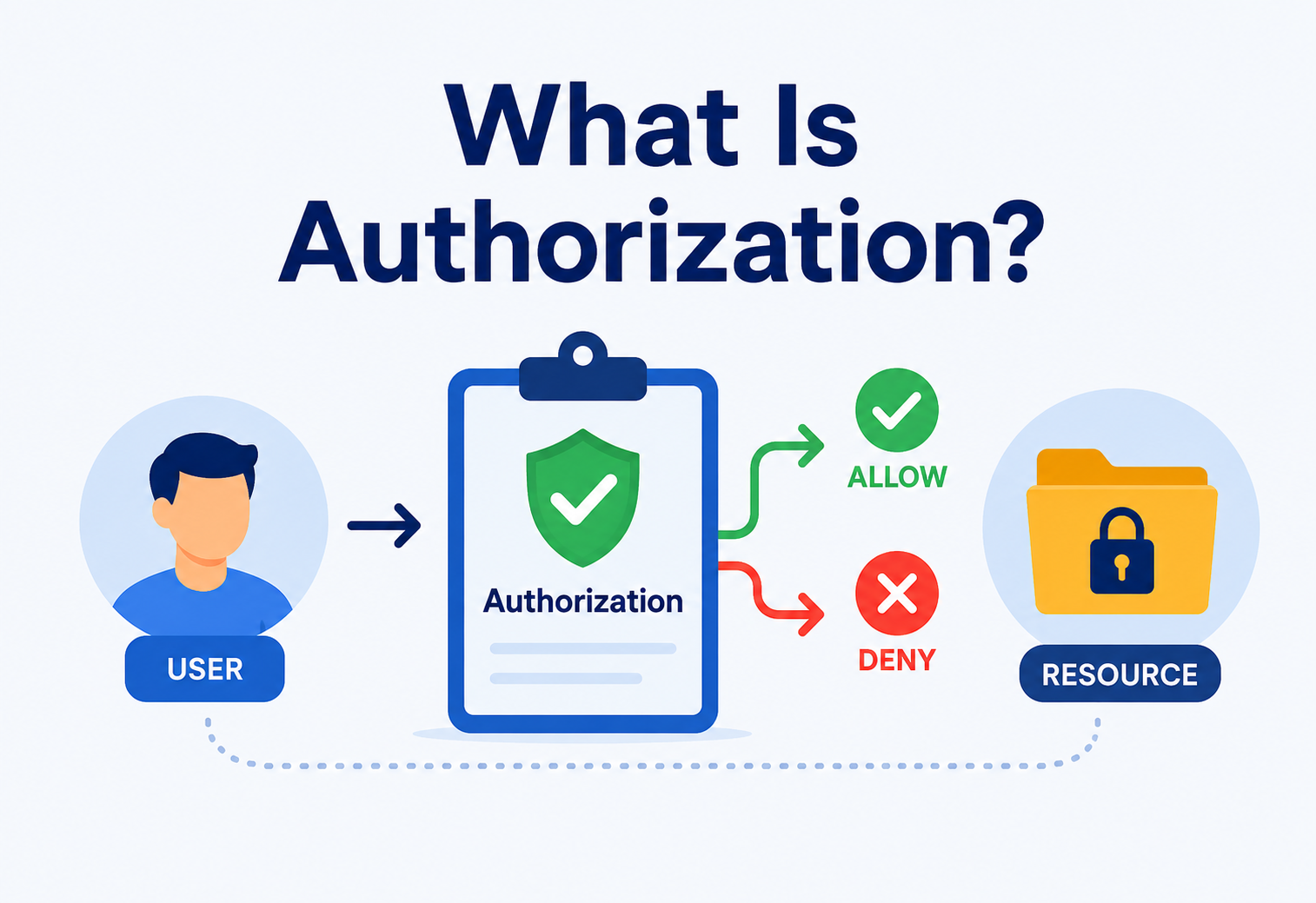
What Is Authorization?
A deep, ground-up guide to how systems decide what you are allowed to do — from a single if statement in a small startup’s codebase, all the way up to the planet-scale policy engines running quietly inside Netflix, Google, Uber and AWS.
Introduction & History
Long before computers existed, humans were already solving the authorization problem with keys, badges, guest lists and doormen. The moment more than one person had to share the same lock, we had to decide who was allowed to open it — and that is exactly what every authorization system on the internet is still doing today, just at a very different scale.
Picture a school for a moment. A teacher can enter the staff room, a student cannot. A janitor can unlock every door in the building, but only during certain hours. Nobody had to explain a computer to you for that scenario to make sense — you already understand it, because it is the same idea humans have used for as long as we have had locks, keys, badges and doormen. Authorization is simply the computer version of that: the set of rules a system uses to decide who gets to do what, to which thing, and under what conditions.
Formally, authorization is the process of determining whether a subject (a user, a service, a device) is permitted to perform a specific action (read, write, delete, approve) on a specific resource (a file, a database row, an API endpoint, a physical door). It answers one question, and only one question: “Is this allowed?” Everything else — the model you pick, the engine that evaluates the rules, the way you cache the decision — is engineering wrapped around that one small sentence.
The idea is much older than computing. Militaries have used classification levels (“Top Secret”, “Confidential”) since at least the 19th century. Banks have used dual-signature rules on cheques for centuries. When computers started being shared by multiple people in the 1960s — mainframes like the IBM System/360 running time-sharing operating systems — the same problem appeared in code form: if ten people are logged into one computer, how do you stop them from reading each other’s files?
The first formal academic treatment came from Butler Lampson’s 1971 paper on protection systems, which introduced the idea of an access matrix — a grid with subjects on one axis, resources on the other, and permissions in the cells. That single idea is still, in essence, what every authorization system in the world is built on, sixty-plus years later, just wrapped in more sophisticated clothing (roles, attributes, relationships, policies).
1.1 A Short Timeline
- 1960s — Time-sharing systems. Multiple users share one mainframe; the operating system needs to isolate their files and memory from each other, and the modern authorization problem is born.
- 1971 — The Access Matrix. Butler Lampson formalises subjects, objects and permissions as a mathematical model that is still, quietly, the foundation under every modern engine.
- 1970s–80s — ACLs & Unix permissions. Unix ships with owner / group / other read-write-execute bits — one of the first mass-deployed authorization schemes, still running under nearly every server today.
- 1992 — RBAC formalised. NIST researchers Ferraiolo and Kuhn formalise Role-Based Access Control for enterprise systems, giving the industry a common vocabulary for “roles” and “permissions”.
- 2000s — Web & API authorization. OAuth (2007), then OAuth 2.0 (2012), standardise how third-party apps get limited, revocable access to your data without ever seeing your password.
- 2010s — ABAC & policy-as-code. Attribute-Based Access Control and engines like Open Policy Agent decouple policy from application code, so security teams can change rules without shipping a new build.
- 2020s — Fine-grained & relationship-based (ReBAC). Google’s Zanzibar paper (2019) inspires systems like Ory Keto and OpenFGA for Google-Docs-style sharing at massive scale, where permission has to follow relationships (folder → document, team → project).
Authorization is the bouncer at the club door checking your name against a guest list — not the ID check at the front (that is authentication), but the decision of whether you, specifically, get past the rope. Same idea, whether the “club” is a nightclub, a bank vault, a Kubernetes cluster, or a Google Doc.
The Problem & Motivation
Why does authorization need to be its own discipline instead of a handful of if statements sprinkled through your code? Because as systems grow, the naive approach breaks in predictable, painful, and remarkably expensive ways.
Picture a small startup’s codebase. Early on, someone writes something like this in a controller or middleware:
if (user.getRole().equals("admin")) {
    // allow delete
}
This works fine when there are three roles and ten screens. But two years later there are 40 roles, 300 screens, a mobile app, a partner API, and a support team that needs to see (but not edit) billing data. Now that same if statement is copy-pasted in 200 places. A new hire changes one copy and forgets the other 199. A customer discovers they can delete another customer’s account by guessing a URL. This is not a hypothetical — it is one of the most common real-world causes of security breaches, catalogued year after year as “Broken Access Control”, which has topped the OWASP Top 10 list of web application security risks since 2021 and shows no sign of moving.
What tends to go wrong
- Logic duplicated everywhere, drifting out of sync as different developers touch different copies.
- No single place to audit “who can do what” — the answer requires reading the entire codebase.
- Privilege escalation: users find paths to data or actions that were never intended for them.
- Slow, risky changes whenever a business rule shifts, because every affected check must be found by hand.
- Compliance failures under GDPR, HIPAA, SOC 2 and similar frameworks that require provable access controls.
What you actually get
- One source of truth for permissions, that both engineers and auditors can read.
- Consistent enforcement across web, mobile, backend and internal service-to-service calls.
- Auditable decisions — every allow / deny leaves a trail explaining why.
- Policy changes without redeploying every application (huge for large orgs).
- A concrete foundation for compliance and least-privilege security posture.
The motivation, in short, is the same reason we do not let every employee carry a master key to every room in a hospital: the cost of getting it wrong — a data breach, a wrong medication being administered, a leaked financial record — is far higher than the cost of building the checking system properly in the first place. Every serious system, sooner or later, either invests in a real authorization layer, or ends up on the front page of a newspaper explaining why it didn’t.
Core Concepts
Before going further, let us nail down the vocabulary. These words get used loosely in casual conversation, but in a well-designed system they mean very specific things — and mixing them up is where an alarming number of real production bugs are born.
Authentication
Proving who you are — usually a password, a fingerprint, or a signed token. Always happens first.
Authorization
Deciding what you are allowed to do, once your identity is already known and trusted.
Subject / Principal
The “who” — a user, a service account, a device, an API key, sometimes a whole team.
Resource / Object
The “what” — a file, a database row, a button in the UI, an API route, a physical door.
Action / Permission
The “verb” — read, write, delete, approve, refund, export, publish, share.
Policy
The rule connecting subject + resource + action into a single allow / deny decision at request time.
Authentication and authorization are not the same thing, even though they are often abbreviated the same way (AuthN vs AuthZ) and often sit in the same codebase. Knowing who someone is — they logged in with a valid password — tells you nothing about what they should be able to do. A hospital badge scanner proving you are Dr. Smith does not automatically mean Dr. Smith should be allowed into the pharmacy’s controlled-substance vault.
A few more building blocks show up constantly in authorization design, and every one of them is worth reading twice:
- Principle of Least Privilege. Give every subject the minimum access needed to do their job, nothing more. This one idea prevents more breaches than every other technique combined.
- Default Deny. Unless a rule explicitly allows an action, the system says no. This is dramatically safer than “default allow” because it makes forgetfulness safe: forgetting to write a rule means “locked”, not “open”.
- Separation of Duties. Sensitive operations require two different people — e.g., one person requests a wire transfer, another approves it — so a single compromised account cannot cause disaster on its own.
- Session vs. request-time authorization. Some systems check permissions once at login; better systems re-check on every sensitive request, since permissions can change mid-session (a user is fired, a role is revoked, a document is unshared) and stale decisions become security holes.
“Authentication answers who are you? Authorization answers what can you do now that I know?” — a distinction every security engineer learns to repeat until it becomes second nature.
Authorization Models
Over the decades, a handful of well-known models — reusable strategies for structuring authorization rules — have emerged. Almost every real system in production today is built on one of these, or a deliberate mix of two or three, depending on where flexibility is needed and where simplicity matters more.
4.1 Access Control List (ACL)
The oldest and simplest model. Each resource keeps a list of who can do what to it directly. Think of a shared Google Doc’s “Share” dialog: it lists individual people and their permission level (viewer, commenter, editor). ACLs work beautifully for small numbers of resources and small numbers of users; they start to strain the moment either side grows.
// A conceptual ACL entry
Resource: "document_482"
  - user:alice   -> EDIT
  - user:bob     -> VIEW
  - group:sales  -> VIEW
4.2 Role-Based Access Control (RBAC)
Instead of assigning permissions to each person individually, you define roles (Admin, Editor, Viewer, Support, Finance Analyst) that bundle permissions together, then assign people to roles. This is by far the most widely used model in business software because it scales well with the way organisations actually work — when someone joins the finance team, you assign them the “Finance Analyst” role instead of hand-picking forty permissions from a checklist.
4.3 Attribute-Based Access Control (ABAC)
Decisions are made from attributes: who the user is, what department they are in, what time it is, where they are connecting from, how sensitive the document is. A rule might read something like: “Allow if user.department == resource.department AND time is between 9am–6pm AND user.clearance ≥ resource.classification.” ABAC is more flexible than RBAC but harder to reason about, harder to test, and harder to audit — every extra attribute is another axis your policy has to cover.
4.4 Relationship-Based Access Control (ReBAC)
Popularised by Google’s internal “Zanzibar” system (the engine behind sharing permissions in Google Docs and Drive), ReBAC expresses permission as a graph of relationships: “Alice is an owner of Folder X” → “Folder X contains Document Y” → therefore “Alice can edit Document Y” through inheritance. This is what makes nested folder sharing, team-based ownership, and organisation-wide roles work correctly at planet-scale without every check turning into a graph walk in the application.
4.5 Policy-Based Access Control (PBAC) / Policy-as-Code
Rules are written in a dedicated policy language (like Rego, used by Open Policy Agent) and evaluated by a separate engine, decoupled entirely from application code. This lets security teams change rules without a developer touching the app, and lets policies be version-controlled, code-reviewed and unit-tested just like any other software artefact.
| Model | Best for | Weakness |
|---|---|---|
| ACL | Small, simple resource sharing | Does not scale to thousands of users or resources |
| RBAC | Enterprise apps with predictable job functions | “Role explosion” as needs get granular |
| ABAC | Context-sensitive, dynamic rules (time, location, sensitivity) | Complex to write, test, and audit correctly |
| ReBAC | Sharing / collaboration products (docs, drives, boards) | Requires a graph-aware engine and careful indexing |
| PBAC | Centralised governance across many services and teams | Adds an external dependency and a network hop |
Most large systems are hybrids. A single company will typically run RBAC as the base layer (“this person is a Finance Manager”), ABAC on top for context (“during business hours, from a corporate device”), and ReBAC for anything shared (“because this folder was shared with your team”). The art is knowing when to reach for which one, not treating any single model as the whole answer.
Architecture & Components
Modern authorization systems, especially ones built with policy-as-code, borrow a standard vocabulary from the XACML (eXtensible Access Control Markup Language) standard. Even if you never touch XACML itself, these four roles appear — sometimes as separate services, sometimes as one function — in nearly every real design in the industry.
Policy Enforcement Point
Sits in the request path (e.g., an API gateway or a middleware layer). Intercepts the request and asks the PDP: “is this allowed?” It never decides anything itself — it only enforces the verdict.
Policy Decision Point
The brain of the system. Evaluates the loaded policy against the incoming request and returns a simple allow or deny (often with a reason attached for logging).
Policy Information Point
Supplies extra data the PDP needs to make its decision — user attributes, resource metadata, time of day, IP geolocation, current organisational structure.
Policy Administration Point
Where humans write, test, review, and publish the policies — typically an admin UI, a CLI, or a Git repository of policy files that are shipped to the PDP on merge.
Why split it up like this instead of one big function inside every service? Because it mirrors how real organisations actually work: the security team writes policy (PAP), HR systems hold the facts about employees (PIP), a central engine applies the rules (PDP), and every application at the edge simply obeys the verdict (PEP). It also means you can swap the decision engine without touching every application, and vice versa — a huge win once you have more than a handful of services.
Internal Working — How a Decision Actually Gets Made
Let us trace one concrete request from start to finish. A support agent named Priya tries to issue a $200 refund through an internal tool. What actually happens between her click and the money moving?
- Priya is already authenticated — the system has a valid token proving she is
priya@company.com. - Her browser sends
POST /orders/9182/refundwith the token attached in theAuthorizationheader. - The PEP (middleware in the API gateway) intercepts the request before it reaches any business logic.
- The PEP builds an authorization query:
subject=priya, action=refund, resource=order:9182, context={amount: 200, time: 14:02}. - The PDP evaluates this against the loaded policy. It may need extra facts from the PIP — e.g., “what is Priya’s role?” and “what is this order’s total value?”
- The policy says: support agents may refund orders under $500 without manager approval. 200 < 500, condition met.
- PDP returns
ALLOW. The PEP lets the request continue to the actual refund logic in the payments service. - The decision (and its full reasoning) is logged for audit purposes, so a compliance officer can reconstruct it months later.
Here is a simplified Java sketch of a PDP evaluating an RBAC-style rule with an optional ABAC-style overlay of conditions:
public class AuthorizationService {

    public Decision authorize(Subject subject, String action, Resource resource) {
        // 1. Load the roles assigned to this subject
        Set<Role> roles = roleRepository.getRolesFor(subject);

        // 2. Check each role's permission set for a match
        for (Role role : roles) {
            for (Permission perm : role.getPermissions()) {
                if (perm.getAction().equals(action)
                        && perm.matchesResourceType(resource.getType())) {

                    // 3. Evaluate any extra conditions (ABAC-style overlay)
                    if (perm.getConditions().stream()
                            .allMatch(c -> c.evaluate(subject, resource))) {
                        auditLog.record(subject, action, resource, Decision.ALLOW);
                        return Decision.ALLOW;
                    }
                }
            }
        }

        // 4. Default deny -- nothing matched
        auditLog.record(subject, action, resource, Decision.DENY);
        return Decision.DENY;
    }
}Notice the default deny at the bottom. This one design choice is arguably the single most important line in any authorization engine. If nothing explicitly says “yes,” the answer must be “no” — never the reverse. A forgotten rule then means “locked”, which is safe, instead of “open”, which is a breach waiting to happen.
Data Flow & Lifecycle
Zooming out from a single request, it helps to see the full lifecycle of a permission, from the moment a security administrator writes a new rule to the moment a user experiences the effect of that rule at request time.
Three lifecycle stages matter in real production systems, and each one is worth owning explicitly rather than leaving to chance:
- Provisioning. A user is granted a role or attribute — e.g., HR marks someone as “Manager” on their first day, and that fact propagates to the authorization system automatically. Manual provisioning is where the majority of “wrong access” incidents start.
- Evaluation. Every request re-checks current permissions — this is where caching, latency, and correctness all compete for attention (much more on this in Section 9). A permission that is checked once at login and then trusted forever is a permission that is eventually wrong.
- De-provisioning. When someone leaves a team or the company, their access must be revoked promptly. Delayed de-provisioning is one of the most common audit findings in real companies, and one of the easiest for an insider or a compromised account to exploit.
Advantages, Disadvantages & Trade-offs
No single approach to authorization is free. Centralising it brings real, measurable benefits, but also real, sometimes surprising costs that engineering teams should go in with eyes open about, rather than discover the hard way.
Advantages of a dedicated layer
- Consistency across web, mobile, and backend services — the same question always gets the same answer.
- Single audit trail for compliance frameworks (SOC 2, HIPAA, GDPR, ISO 27001).
- Policy changes without redeploying every app — huge when you have dozens of services.
- Easier to reason about “who can access what” because the answer lives in one place.
- Enables truly fine-grained, least-privilege security in a way scattered
ifs never can.
Disadvantages / real costs
- Adds a network hop and some latency to every protected request.
- Another system that must stay highly available (or the whole app freezes).
- Requires discipline to keep policies from sprawling into an unreadable mess.
- Debugging “why was I denied?” can be non-trivial once policies are nested.
- Upfront design cost is meaningfully higher than a quick inline check.
The trade-off, boiled down to one sentence: you are exchanging short-term development speed for long-term safety, maintainability and auditability. For a weekend hobby project, hardcoded checks are fine and honestly appropriate. For anything handling real user data, real money, or real health records, that trade almost always favours a proper design — and the earlier you commit to it, the less painful the transition will be.
Performance & Scalability
Because authorization sits on the critical path of nearly every request in your system, its speed directly affects your whole system’s speed. A slow authorization layer is a slow application, full stop. A few well-known techniques keep it fast at scale.
In-memory policy caching
Load policies into memory on each service instance; refresh them periodically, or push updates via a broadcast channel — instead of doing a network call per request.
Decision caching
Cache “subject X can do Y on Z” for a short TTL, since the same check often repeats many times within a single user session.
Sidecar deployment
Run the PDP as a local sidecar process (as OPA commonly is) so evaluation is a localhost call in microseconds, not a network round trip in milliseconds.
Precomputed ACL indexes
For “list everything I can see” queries, precompute reverse indexes rather than scanning every resource per request.
- < 1 ms — typical local OPA sidecar evaluation over a Unix socket or localhost.
- 10–50 ms — typical remote PDP call over a network hop, sometimes more under load.
- Millions of checks / sec — sustained throughput seen at hyperscale companies (Google Zanzibar handles trillions per week).
The classic scalability trap is the “list what I can access” query — e.g., “show me every document I am allowed to see” out of ten million documents. Naively checking every document one at a time does not scale, and produces the kind of query that quietly kills a database. Systems like Google’s Zanzibar solve this with a specialised graph-indexing approach so these fan-out queries stay fast even at planetary scale, without asking application developers to think about the underlying algorithm at all.
High Availability & Reliability
If your authorization service goes down, what happens? This is a design decision, not an accident, and the two obvious options have very different risk profiles — picking wrongly here can turn a small outage into either a security incident or a full-application outage.
“Fail-open” means if the PDP cannot be reached, requests are allowed by default — great for uptime, terrible for security (an outage instantly becomes a security hole). “Fail-closed” means requests are denied by default when the PDP is unreachable — safer, but an authorization outage becomes a full application outage. Most security-conscious systems choose fail-closed for sensitive actions and may allow read-only, low-risk operations to degrade gracefully with a stale cached decision.
Practical high-availability techniques for authorization services, in roughly the order most teams reach for them:
- Local decision caching with short TTLs, so a brief PDP blip does not cascade into a full application outage. A 30-second TTL is often the right balance between freshness and resilience.
- Replicated policy stores — e.g., policies bundled and shipped to every node, refreshed asynchronously — so no single point of failure exists for reads, even if the central admin plane is temporarily down.
- Multi-region deployment of the PDP itself, with policies kept eventually consistent across regions using a well-understood replication protocol.
- Circuit breakers in the PEP so a slow PDP does not create a pile-up of blocked requests that eventually exhausts thread pools and takes down the whole service.
Security Considerations
Authorization is a security control, but the system implementing it can itself be attacked or misconfigured. A poorly designed authorization layer is not just useless — it can actively make a system less safe, by giving false confidence that something is protected when it is not. A few recurring failure modes are worth memorising.
IDOR (Insecure Direct Object Reference)
Changing /orders/1001 to /orders/1002 in the URL and getting someone else’s data because the server never re-checked ownership. Depressingly common in real breach reports.
Privilege Escalation
A regular user finds a path to gain admin-level actions, often through an unchecked internal endpoint that was assumed to be “only called by our own frontend”.
Confused Deputy
A trusted service is tricked into performing an action on behalf of an attacker because it did not verify the original requester’s rights — only its own.
Stale Permissions
A user’s access is cached and not revoked promptly after their role changes or they are offboarded, leaving a window where a former employee still has power they should not.
Broken access control has consistently ranked as the #1 risk category in the OWASP Top 10 for web applications, ahead of even injection attacks — a strong signal that this is not a solved problem industry-wide, and that careful design matters more than almost any other security investment your team can make.
Never trust the client to tell you what it is allowed to do. Every sensitive action must be re-checked on the server, on every single request — not just hidden behind a disabled button in the UI. A disabled button is a UX affordance; the security control lives on the server, and only on the server.
Monitoring, Logging & Metrics
An authorization system you cannot observe is one you cannot trust — and one you cannot debug when someone shows up at your desk saying “why did I get a 403?” At minimum, every production authorization system should track a small, well-chosen set of signals.
- Decision logs. Every allow / deny, with the subject, action, resource, and which policy rule fired — essential for audits and incident investigations, and non-negotiable for regulated industries.
- Deny rate. A sudden spike often signals either an ongoing attack or a broken policy deployment. Alerting on a change in deny rate catches both classes of problem early.
- Latency (p50 / p95 / p99). Since this sits on the hot path, tail latency matters a lot — a slow p99 will drag down the entire service’s tail.
- Policy change history. Who changed what rule, when, and why — version-controlled policy-as-code makes this trivial via Git history, which is one of the strongest arguments for that approach.
- Cache hit ratio. For decision or policy caches, to catch performance regressions or misconfigured invalidation early, before they become customer-visible latency.
// Example structured audit log entry
{
  "timestamp":       "2026-07-19T14:02:11Z",
  "subject":         "priya@company.com",
  "action":          "refund",
  "resource":        "order:9182",
  "decision":        "ALLOW",
  "matchedPolicy":   "support-agent-refund-limit-v12",
  "latencyMs":       4
}
These logs double as compliance evidence: when an auditor asks “prove that only finance staff can approve payments over $10,000,” a well-instrumented authorization system can answer with a query instead of a scramble through a codebase.
Deployment & Cloud Patterns
How authorization actually gets deployed varies by scale, latency budget, and where in the request path enforcement makes most sense. There is no universally correct answer — only trade-offs that different teams reasonably weigh differently.
Embedded Library
Authorization logic runs in-process inside the application (simple, but hard to keep consistent across many services and easy to let drift out of sync).
Sidecar
A local process (e.g., OPA) runs next to each service instance in the same pod, called over localhost for very low latency and easy per-service scaling.
Centralized Service
A dedicated authorization microservice that all other services call over the network — easiest to govern centrally, but adds a network hop and a hard dependency.
API Gateway Plugin
Enforcement happens at the edge (e.g., Kong, Envoy, AWS API Gateway with Lambda authorizers) before requests even reach services, and is applied uniformly regardless of language.
Major cloud providers ship managed building blocks for this: AWS offers IAM policies and Cognito; Google Cloud offers IAM and Zanzibar-inspired products; Azure offers Azure AD (Entra ID) role assignments. Open-source options like Open Policy Agent, Casbin, and OpenFGA are cloud-agnostic and popular for teams that want portability across providers, or that want to run their own control plane rather than lean on a vendor for anything security-critical.

Data Storage, Caching & Load Balancing
Authorization data has unusual storage requirements: it must be read extremely often (on nearly every request), written relatively rarely (role changes are infrequent compared to logins), and must be consistent enough that a revoked permission does not linger dangerously in a cache somewhere.
- Storage. Role and permission tables typically live in a relational database (normalised as users, roles, permissions, role_assignments) for RBAC, or a graph database / specialised store (like Zanzibar’s Spanner-backed design) for ReBAC. The choice depends heavily on how deeply nested your relationships get.
- Caching. Read-heavy, write-light data is a textbook caching candidate. A common pattern is caching resolved permissions in Redis with a short TTL (seconds to a few minutes), combined with active invalidation on role changes so revocations propagate faster than TTL expiry alone would allow.
- Load balancing. Centralised PDP services are usually stateless, so they scale horizontally behind a standard load balancer; the genuinely tricky part is keeping the policy and cache layers they all read from consistent, especially across regions.
If you cache “Bob is an Editor” for 5 minutes and Bob is fired at minute 1, he still has editor access for 4 more minutes unless you actively invalidate the cache on role changes rather than only relying on TTL expiry. Every serious authorization system needs an explicit invalidation path — TTLs alone are not enough for security-critical data.
APIs & Microservices
In a monolith, authorization can comfortably live in one place. In a microservices architecture with dozens of independently deployed services, the same decision needs to be enforced consistently everywhere — a genuinely harder problem, because not every internal call passes back through your public gateway.
Two closely related but distinct standards matter here, and confusing them is one of the more common architectural mistakes when introducing authorization to a service:
- OAuth 2.0 is a delegation protocol — it lets a user grant a third-party app limited access to their data without ever sharing a password, via scopes (e.g.,
read:calendar). OAuth handles the “what can this app do on my behalf” question, which is a coarse-grained authorization question. - OpenID Connect (OIDC) sits on top of OAuth 2.0 and handles authentication (who is this user?), producing an identity token that other systems can verify and inspect.
Neither OAuth nor OIDC is itself a full authorization system — they establish identity and coarse-grained scopes, but fine-grained decisions (“can this specific user edit this specific order?”) are still handled by an application-level authorization layer, often a PDP like OPA evaluating a JWT’s claims against business policy.
// Java: extracting claims from a JWT for a downstream authorization check
public boolean canEditOrder(DecodedJWT jwt, String orderId) {
    String userId = jwt.getSubject();
    List<String> scopes = jwt.getClaim("scope").asList(String.class);

    if (!scopes.contains("orders:write")) {
        return false; // missing required OAuth scope
    }
    // Coarse scope check passed -- now do the fine-grained check
    return authorizationService
            .authorize(userId, "edit", "order:" + orderId) == Decision.ALLOW;
}Design Patterns & Anti-Patterns
A handful of patterns show up over and over in well-designed authorization layers, and a handful of anti-patterns show up over and over in the ones that later end up on incident postmortems. Learning to recognise both by name is one of the most efficient security skills a developer can pick up.
Centralize the Decision
Keep the “allow / deny” logic in one evaluated place, even if enforcement happens in many places. One brain, many hands.
Policy-as-Code
Store policies as version-controlled, testable code (e.g., Rego files) rather than rows hidden in an admin UI database that nobody backs up.
Deny by Default
Every new resource or endpoint starts locked down; access is explicitly granted, never implicitly assumed to exist.
Security Through Obscurity
Relying on an unlisted URL or a hidden button instead of a real server-side check — a determined user will find the URL.
Client-Side-Only Checks
Hiding a “Delete” button in the UI without also blocking the underlying API call server-side, so anyone with the network tab can bypass it.
Role Explosion
Creating a new role for every tiny permission variation until you have more roles than actual users — a strong sign the model is wrong.
Best Practices & Common Mistakes
If the earlier sections were about how authorization works, this one is the concise checklist experienced engineers keep in their head when reviewing a design or a pull request. Most authorization bugs in the wild come from doing one of these things slightly wrong.
Best practices
- Enforce authorization server-side, on every request, without exception.
- Apply least privilege as the default posture — grant, don’t retract.
- Version-control and test policies like application code, with real unit tests.
- Log every decision for audit and incident response, not just denials.
- Revisit and prune unused roles / permissions on a regular schedule.
- Re-verify permissions at request time, not just at login — sessions can outlive access.
Common mistakes
- Trusting a JWT’s claims without verifying the token is still valid (not revoked, not expired, correct signature).
- Checking authorization only on the “happy path” endpoint, and missing an alternate route to the same data.
- Forgetting to de-provision access when someone changes teams or leaves.
- Mixing authentication and authorization logic together in one function, making both harder to change safely.
- Writing tests only for “this user CAN do X” and never for “this user should NOT be able to do Y” — the negative tests catch the real bugs.
Real-World & Industry Examples
Looking at how the largest companies in the world approach authorization is one of the fastest ways to internalise which problems really matter at scale, and which parts of the theory turn out to matter most in practice.
Zanzibar
Google’s global authorization system handles trillions of permission checks per week, powering sharing in Drive, Docs, Photos and Calendar with sub-10 ms latency — described in their landmark 2019 research paper that has since inspired an entire family of open-source clones.
Fine-grained internal AuthZ
Uses fine-grained, attribute-aware authorization internally to control which engineering teams and services can access which production systems and pieces of customer data, with strict audit logging given the sensitivity of viewing habits.
AWS IAM
AWS Identity and Access Management is a JSON-policy-based ABAC / RBAC hybrid controlling access to virtually every AWS resource, used by millions of accounts and effectively the default authorization mental model for a whole generation of cloud engineers.
Internal policy engines
Runs internal policy engines to ensure that only authorised support staff can view sensitive trip and payment data, with strict audit logging given the sensitivity of real-time location data.
Layered permissions
Uses a layered model of organisation roles, team permissions, and per-repository access levels to manage who can push, merge, or administer millions of repositories — a great example of RBAC + ReBAC combined.
Break-glass access
Electronic Health Record systems use strict RBAC plus “break-glass” emergency-override policies (with mandatory extra logging) so doctors can access records in emergencies while everything is auditable after the fact.
Frequently Asked Questions
A handful of the questions that come up most often when engineers actually start designing an authorization layer for the first time, answered plainly — without pretending the answers are simpler than they really are.
Is authorization the same as access control?
They are closely related; “access control” is often used as the umbrella term covering both authentication and authorization, while “authorization” specifically refers to the permission-checking decision itself — the “is this allowed?” question, once identity is already established.
Should I build my own authorization system or use an existing tool?
For simple apps, a small RBAC table is fine to build yourself. For anything with complex, evolving rules or compliance requirements, established tools (Open Policy Agent, Casbin, OpenFGA, AWS IAM, Auth0 / Okta Fine-Grained Authorization) save significant time and reduce the risk of subtle, hard-to-notice security bugs that come from writing your own policy engine.
Where should authorization checks live — frontend or backend?
Always the backend. The frontend can hide buttons for a better user experience, but that is a UX nicety, not a security control — a determined user can call the API directly, bypassing any frontend-only check with nothing more than the browser’s developer tools.
What is the difference between RBAC and ABAC in practice?
RBAC asks “what role does this person have?” — simple, predictable, and easy to reason about. ABAC asks “given all these facts (role, department, time, location, resource sensitivity), does this specific combination satisfy the rule?” — more flexible, but harder to audit and harder to explain to a non-engineer.
Does OAuth handle authorization for me?
Partially. OAuth handles coarse-grained delegated access (scopes like “read your calendar”), but fine-grained business rules (“can this user edit this specific order?”) still need an application-level authorization layer sitting behind the token.
Summary & Key Takeaways
Authorization is the quiet, constant gatekeeper running behind nearly every action in every system you use — deciding, thousands of times per second across the internet, whether a given “who” is allowed to do a given “what” to a given “thing”.
It is easy to bolt on badly with scattered if statements, and expensive to fix once bad habits calcify into a codebase used by millions of people. Done well, it becomes invisible — users never notice it; auditors have simple answers; engineers can change policy without redeploying the world. Done badly, it becomes the front-page story of the next big breach.
Key takeaways to carry with you
- Authorization answers “what can you do?” — distinct from authentication’s “who are you?”
- Core models are ACL, RBAC, ABAC, ReBAC and PBAC — each with different trade-offs in flexibility vs. simplicity.
- The PEP / PDP / PIP / PAP architecture separates enforcement, decision-making, data, and administration for maintainability at scale.
- Default deny and least privilege are the two most important defensive principles — internalise them before anything else.
- Always enforce on the server, on every request — never trust the client, never trust a cached decision blindly.
- Broken access control remains one of the most common and costly real-world security failures, year after year.
- At scale, caching, sidecar deployment, and specialised indexing (à la Zanzibar) are what keep authorization both fast and correct.
- Log every decision. An authorization system you cannot observe is one you cannot trust.

