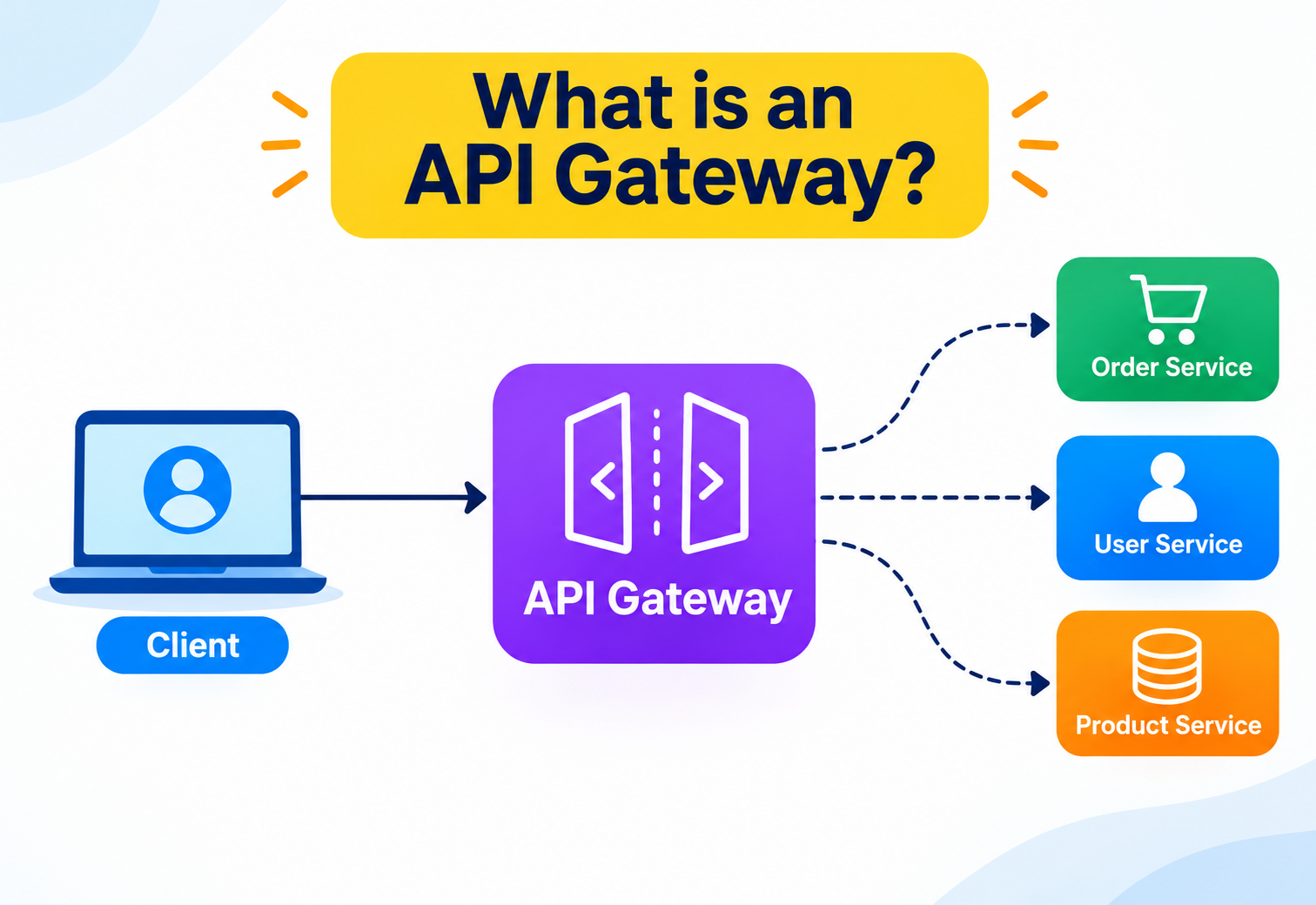
What is an API Gateway?
A complete, beginner-to-production guide to the single front door that sits between the outside world and your microservices — why it exists, how it works internally, and how companies like Netflix, Amazon, and Uber use it to serve billions of requests a day.
Introduction & History
The single friendly front door that stands between chaos on the outside and specialised services on the inside.
Imagine a big office building with fifty different departments inside — billing, HR, support, sales, and so on. Now imagine that, instead of one reception desk at the entrance, every visitor had to know exactly which floor, which door, and which department to walk into directly. Visitors would get lost. Security would be a nightmare, because every single department would need its own guard checking IDs. If the billing department moved to a new floor, every visitor who used to go there would show up at the wrong place.
This is almost exactly the problem that large software systems ran into once they stopped being one single giant program and became many small, independent programs — called microservices — that each did one job. An API Gateway is the reception desk of that building. It is the single, well-guarded front door that every outside visitor (a mobile app, a browser, a partner company’s server) walks through before reaching any department (service) inside.
Formally: an API Gateway is a server that sits between client applications and a collection of backend services, and acts as a single entry point for all incoming API requests. It receives every request, decides what to do with it, and forwards it to the correct backend service — while also handling cross-cutting concerns like authentication, rate limiting, logging, and response shaping along the way.
1.1 · A short history
To understand why API Gateways exist, it helps to look at how backend systems evolved over roughly three decades.
In the 1990s and early 2000s, most business applications were built as a single deployable unit — a monolith. One codebase, one database, one deployment. A client (say, a desktop application or an early website) would talk directly to this one application over a single connection. There was no need for a gateway because there was only one “department” to visit.
Through the 2000s, as companies exposed their systems to partners and later to the public over the web, Service-Oriented Architecture (SOA) became popular. Businesses started breaking large systems into services that talked to each other using protocols like SOAP over an Enterprise Service Bus (ESB). The ESB was, in some ways, an early cousin of today’s API Gateway — it routed messages, transformed data formats, and enforced policies. However, ESBs were often heavyweight, centrally controlled, and became bottlenecks for change.
In the 2010s, the rise of cloud computing, mobile apps, and companies like Netflix and Amazon operating at massive scale pushed the industry toward microservices architecture — many small, independently deployable services, each owning its own data and logic. This solved a lot of monolith problems, but it created a new one: now a single mobile app screen might need data from ten different microservices. Should the mobile app really need to know the network address of ten different services, call each one separately, and merge the results itself? That would be slow, fragile, and a security headache.
Netflix was one of the pioneers here. Around 2012–2013, as it moved from a monolithic DVD-rental-era system to hundreds of microservices, it built and open-sourced Zuul, one of the first widely used API Gateways, specifically to give its mobile and TV apps one stable place to connect to, no matter how the backend changed underneath. Amazon followed a similar path internally, eventually offering Amazon API Gateway as a managed cloud product in 2015. Around the same time, open-source and commercial gateways like Kong, Apigee (later acquired by Google), and later Envoy-based gateways became mainstream building blocks of modern backend systems.
In one line
An API Gateway is the single, secure front door that all outside traffic passes through before reaching the many small services that make up a modern application.
The Problem & Motivation
Before appreciating any solution, it helps to feel the pain it removes.
Before appreciating any solution, it helps to feel the pain it removes. Let’s build up the problem step by step, the way an architect would discover it in real life.
2.1 · Step 1 — one app, many services
Suppose you are building a food delivery app like a smaller version of Uber Eats. To show a single restaurant page, your mobile app might need:
- Restaurant details from a Restaurant Service
- Menu items and prices from a Menu Service
- Ratings and reviews from a Review Service
- Delivery time estimate from a Logistics Service
- Personalised recommendations from a Recommendation Service
If the mobile app calls all five services directly, it needs to know five different addresses (hostnames/IP addresses), five different authentication mechanisms, and it has to make five network round trips over a mobile network that might be slow or unreliable — draining the user’s battery and data plan.
2.2 · Step 2 — change becomes dangerous
Now suppose the backend team decides to split the Menu Service into a Menu Service and a separate Pricing Service, because pricing logic has become complex enough to deserve its own team and its own database. Without a gateway, every single client app — iOS, Android, web, and any partner integrations — must be updated at the same time to know about this new service. That is extremely risky. You cannot force millions of users to update their app overnight.
2.3 · Step 3 — cross-cutting concerns get duplicated
Every one of those five services needs to answer questions like: “Is this a valid, logged-in user?”, “Is this request coming too fast (should it be rate-limited)?”, “Should I log this request for auditing?”, “Is this connection encrypted?” If there is no gateway, every service team has to build and maintain this logic separately. That means five teams writing five slightly different versions of authentication code — a recipe for bugs and security holes.
Real-life analogy
Think of an airport. Passengers do not walk directly onto the tarmac and knock on each airline’s private office door. Instead, everyone goes through one security checkpoint and one check-in counter area. The checkpoint checks your ID and ticket once. After that, you are routed to the correct gate. If an airline changes which gate it uses, you don’t need to change your behaviour — the airport’s signage (routing) handles it. The API Gateway plays the role of that airport’s central checkpoint and signage system.
2.4 · Step 4 — the gateway appears
An API Gateway solves all three problems at once:
| Problem | How the Gateway helps |
|---|---|
| Client needs to talk to many services | Client talks to one address; the gateway fans requests out internally, or aggregates results. |
| Backend structure keeps changing | Gateway hides internal addresses behind stable public routes. |
| Every service repeats auth, logging, rate limiting | Gateway centralises these “cross-cutting concerns” in one place. |
This single idea — put one smart, controllable layer between the outside world and your internal services — is the entire motivation behind the API Gateway pattern. Everything else in this tutorial is really just a deeper explanation of how that one idea is implemented well.
Core Concepts
Every term below is defined the way you’d explain it to someone new to backend engineering.
Before going further, let’s define the vocabulary you’ll need. Each term below is explained the way you would explain it to someone who has never touched backend engineering before.
3.1 · API
What it is: API stands for Application Programming Interface. It is a defined way for one piece of software to ask another piece of software to do something or give it information.
Why it exists: Programs need a predictable “menu” of things they’re allowed to ask for, instead of poking around inside each other’s code.
Simple analogy: A restaurant menu is an API. You don’t walk into the kitchen and cook your own food; you order from a fixed list of dishes, and the kitchen decides how to prepare it.
Practical example: When a weather app shows you today’s forecast, it called a weather API — sending a request like “give me the forecast for Delhi” and receiving structured data back.
3.2 · Client
What it is: Any program that sends a request and consumes a service — a mobile app, a browser, another server, or even a smart TV app.
Where it’s used: Every time you open an app that shows live data, that app is acting as a client.
3.3 · Backend service (or microservice)
What it is: A small, focused program responsible for one business capability — for example, a Payment Service only knows about processing payments.
Why it exists: Splitting a large system into small services lets different teams build, deploy, and scale their piece independently.
Simple analogy: A hospital has separate departments — cardiology, radiology, pharmacy — each specialised, rather than one doctor who does everything.
3.4 · Gateway (in networking, generally)
What it is: A gateway, in general networking terms, is any node that connects two different networks and controls traffic passing between them, like your home Wi-Fi router connecting your house to the internet.
Where it’s used: API Gateways borrow this idea and apply it specifically to API traffic at the application layer.
3.5 · API Gateway
What it is: A specialised server (or managed cloud service) that receives all external API calls, applies policies, and routes each request to the right backend service, often combining or transforming the response before sending it back.
Why it exists: To centralise routing and cross-cutting concerns, as covered in the previous section.
Simple analogy: A hotel concierge desk. You tell the concierge what you need (a taxi, a restaurant reservation, room service), and the concierge contacts the right internal team on your behalf — you never need to know each team’s internal phone extension.
Practical example: When you open a food delivery app and it shows the restaurant list, your ratings, and delivery estimate all in one screen, you’re very likely looking at data that was assembled by an API Gateway calling multiple services behind the scenes.
3.6 · Reverse proxy
What it is: A server that sits in front of one or more backend servers and forwards client requests to them, while hiding the backend server’s details from the client.
Why it matters here: An API Gateway is, at its core, a specialised reverse proxy — but with a lot of extra API-aware intelligence layered on top (authentication, rate limiting, request transformation, and so on), which a plain reverse proxy typically does not do on its own.
3.7 · Routing
What it is: The process of deciding, based on the incoming request’s URL, headers, or other details, which backend service should handle it.
Simple analogy: A building directory board in the lobby that tells you “Accounting → 3rd floor, HR → 5th floor.”
3.8 · Cross-cutting concern
What it is: A piece of functionality that many different parts of a system need, but which isn’t the core business logic of any one of them — like security checks, logging, or rate limiting.
Why it exists as a term: Naming this concept helps architects recognise functionality that should be centralised (like in a gateway) rather than duplicated in every service.
Tip for beginners
If you remember only one sentence from this section, remember this: an API Gateway is a smart reverse proxy that speaks “API” fluently — it understands requests well enough to authenticate them, rate-limit them, transform them, and route them intelligently, not just blindly forward bytes.
Architecture & Components
A gateway is not one feature — it’s a bundle of related capabilities, usually organised into layers or modules.
An API Gateway is not one single feature — it’s a bundle of related capabilities, usually organised into layers or modules. Let’s look at the typical building blocks found inside a production-grade gateway.
4.1 · Listener / Edge layer
This is the network-facing part that accepts incoming TCP/HTTP connections from the internet. It typically terminates TLS (decrypts HTTPS traffic) here, so backend services don’t each need to manage certificates themselves.
4.2 · Authentication & Authorisation module
Verifies who is calling (authentication — “who are you?”) and what they’re allowed to do (authorisation — “are you allowed to do this?”). This often involves validating an API key, a JWT (JSON Web Token), or an OAuth 2.0 access token.
4.3 · Rate Limiter / Throttler
Counts how many requests a client has made in a time window and rejects requests beyond an agreed limit, protecting backend services from being overwhelmed — whether by an accidental bug in a client app or a deliberate attack.
4.4 · Router
Matches the incoming request’s path, method, host, or headers against a set of configured rules, and decides which backend service (and which specific instance of it) should handle the request.
4.5 · Transformer
Rewrites requests or responses — for example, converting an old API version’s JSON shape into the new shape a backend service expects, or stripping internal fields out of a response before it reaches the client.
4.6 · Load Balancer
Once the router decides which service should handle a request, the load balancer decides which instance of that service (out of possibly dozens running for scalability) should get this particular request.
4.7 · Circuit Breaker
Watches for a backend service that is failing repeatedly, and temporarily stops sending it traffic, giving it time to recover instead of piling failed requests on top of an already struggling service.
4.8 · Cache
Stores responses to frequent, repeatable requests so the gateway can answer instantly without calling the backend again, reducing load and latency.
4.9 · Observability module
Records logs, metrics (like request counts and latencies), and distributed traces for every request that passes through, which becomes essential for debugging and capacity planning later.
Auth
Confirms identity and permissions before anything else runs.
Rate Limiting
Protects backend capacity from overload and abuse.
Routing
Maps external URLs to internal services.
Load Balancing
Spreads traffic across healthy instances.
Not every gateway implements every one of these components with equal depth. Lightweight gateways may only do routing and TLS termination; enterprise gateways like Kong, Apigee, or Amazon API Gateway implement most or all of the above, often as configurable plugins.
Internal Working
Under the hood: event-driven, non-blocking servers organised as a filter chain.
Let’s go one level deeper and understand what actually happens, technically, when the gateway processes a request. Most production gateways today are built as event-driven, non-blocking servers. This is an important design decision, so let’s unpack it.
5.1 · Why non-blocking I/O matters
A traditional (“blocking”) server assigns one operating system thread per incoming connection. If a request needs to wait for a slow backend service to respond, that thread just sits idle, doing nothing, but still consuming memory and being unavailable for other requests. Under heavy load with thousands of concurrent connections, this quickly runs out of threads.
Modern gateways such as those built on Netty (used by Spring Cloud Gateway), NGINX’s event loop, or Envoy’s multi-threaded event-loop model instead use non-blocking I/O: a small number of threads handle many thousands of connections by only doing work when there’s actually data to read or write, and “parking” cheaply while waiting on slow I/O like a network call to a backend.
Real-life analogy
A blocking server is like a waiter who takes your order, then stands at your table doing nothing while the kitchen cooks your food, unable to serve any other table until your dish is ready. A non-blocking server is like a good waiter who takes your order, moves on to serve five other tables, and comes back to you the moment your food is ready. The same waiter (thread) serves far more tables (requests) this way.
5.2 · The plugin / filter chain model
Almost every modern gateway (Kong, Spring Cloud Gateway, Envoy, Apigee) is built around a filter chain or plugin pipeline: a request passes through an ordered list of small, independent processing units, each one able to inspect, modify, allow, or reject the request before passing it to the next one.
Request →  [TLS Termination]
        →  [Auth Filter]
        →  [Rate Limit Filter]
        →  [Header Transform Filter]
        →  [Router]
        →  [Load Balancer]
        →  Backend Service
        ←  [Response Transform Filter]
        ←  [Logging Filter]
Client  ←
This design is powerful because it’s extensible: to add a new capability (say, request signing verification), you write one new filter and insert it into the chain, without touching the rest of the gateway’s code.
5.3 · A minimal Java example — a simple routing filter
Below is a simplified, educational example (not a full production implementation) showing how a routing decision might look inside a Java-based gateway, similar in spirit to how Spring Cloud Gateway’s route predicates work.
public class SimpleRouter {

    private final Map<String, String> routeTable = Map.of(
        "/restaurants", "http://restaurant-service:8081",
        "/menu",        "http://menu-service:8082",
        "/reviews",     "http://review-service:8083"
    );

    public String resolveBackend(String requestPath) {
        for (Map.Entry<String, String> route : routeTable.entrySet()) {
            if (requestPath.startsWith(route.getKey())) {
                return route.getValue();
            }
        }
        throw new NoRouteFoundException(requestPath);
    }
}
In real gateways, this simple string-matching logic is replaced by a much richer rule engine that can match on HTTP method, headers, query parameters, and even weighted percentages of traffic (useful for canary releases), but the core idea — “look at the request, decide the destination” — stays the same.
5.4 · Connection pooling to backends
Opening a brand-new network connection for every single request to a backend service is expensive. Production gateways maintain a pool of already-open, reusable connections to each backend instance, which dramatically reduces latency and CPU overhead under high traffic.
Data Flow & Request Lifecycle
From button-tap to on-screen result — the whole journey of one request.
Let’s trace one complete request from the moment a user taps a button on their phone to the moment they see a result on screen.
6.1 · Step-by-step breakdown
Connection & TLS
The phone opens a secure HTTPS connection. The gateway terminates TLS, meaning it decrypts the traffic here so it can inspect and route it.
Authentication
The gateway reads the access token from the request (usually in an
Authorizationheader) and verifies it’s genuine and not expired — often by checking a digital signature locally, or by calling an identity service.Rate limiting
The gateway checks whether this user or API key has exceeded their allowed request rate.
Routing
Based on the URL path
/restaurants/42, the gateway decides this needs data from both the Menu Service and the Review Service.Load balancing
For each of those services, the gateway picks one healthy running instance out of possibly many, using a load-balancing algorithm.
Backend calls
The gateway calls both services — often in parallel, to save time.
Response transformation
The gateway merges the two JSON responses into one shape that’s convenient for the mobile app, and may strip out any internal-only fields.
Logging & metrics
The gateway records how long the whole thing took, the response status code, and other details for monitoring.
Response delivery
The final combined response is sent back to the phone over the same secure connection.
Common misunderstanding
Beginners sometimes think the gateway “is” the backend. It is not — the gateway does not usually contain business logic like “how do we calculate a delivery fee.” It coordinates, secures, and shapes traffic; the actual business rules live inside the backend services.
Advantages, Disadvantages & Trade-offs
Every architectural choice has two honest sides. Here they are laid out plainly.
7.1 · Advantages
| Benefit | Explanation |
|---|---|
| Single entry point | Clients only need to know one address, simplifying app development and DNS/certificate management. |
| Centralised security | Authentication, authorisation, and TLS are enforced consistently in one place instead of being duplicated (and possibly done wrong) in every service. |
| Decoupling | Backend services can be renamed, split, merged, or moved without breaking any client, as long as the gateway’s public routes stay stable. |
| Cross-cutting concerns handled once | Rate limiting, logging, caching, and metrics collection live in one layer. |
| Protocol translation | A gateway can accept simple REST/JSON from clients while talking gRPC or even older SOAP internally. |
| Traffic control | Enables canary releases, A/B testing, and blue-green deployments by routing a percentage of traffic to new versions. |
7.2 · Disadvantages & risks
| Risk | Explanation |
|---|---|
| Single point of failure | If the gateway goes down and there’s no redundancy, the entire system becomes unreachable from outside — even if every backend service is perfectly healthy. |
| Added latency | Every request now passes through an extra network hop and extra processing (auth, routing, transformation), adding a few milliseconds of overhead. |
| Operational complexity | Someone has to design, deploy, scale, secure, and monitor the gateway itself — it’s one more critical system to run well. |
| Risk of becoming a bottleneck | If not scaled properly, the gateway can become the slowest, most congested part of the whole architecture. |
| Risk of becoming a “God object” | Teams sometimes push too much business logic into the gateway over time, turning it into a second monolith (see anti-patterns later). |
How to think about the trade-off
You are trading a small, well-understood amount of added latency and operational responsibility for a large reduction in client-side complexity and duplicated security logic. For almost any system with more than a handful of services exposed to the outside world, this trade strongly favours having a gateway — the trick is building the gateway to be highly available and fast, which the next two sections cover.
Performance & Scalability
Because every request flows through the gateway, its performance caps the performance of the whole system.
Because literally every external request flows through the gateway, its performance directly caps the performance of the entire system. Let’s look at how production gateways are engineered to handle enormous scale.
8.1 · Horizontal scaling
Gateways are typically stateless — they don’t store per-user session data in their own memory between requests (session data, if needed, lives in an external store like Redis). This statelessness means you can run many identical gateway instances behind a network load balancer and add more instances whenever traffic increases, with no coordination needed between them.
8.2 · Key performance levers
- Non-blocking I/O (covered earlier) — lets a single instance handle tens of thousands of concurrent connections efficiently.
- Connection pooling to backend services, avoiding the cost of establishing a new TCP/TLS connection per request.
- Response caching for frequently requested, rarely changing data (like a restaurant’s static details).
- Efficient serialisation — using fast JSON libraries, or binary protocols like Protocol Buffers internally, to reduce CPU time spent parsing and building payloads.
- Edge deployment / CDN integration — placing gateway instances (or a CDN in front of them) geographically closer to users reduces network round-trip time.
8.3 · Measuring gateway performance
The two most important metrics engineers watch are latency (how long a request takes, typically measured at percentiles like p50, p95, p99) and throughput (how many requests per second the gateway can sustain). A well-tuned gateway typically adds only single-digit-to-low-double-digit milliseconds of its own overhead, with the majority of total response time coming from the backend services themselves.
Why percentiles, not averages?
An average can hide a bad experience for a meaningful slice of users. If 99 requests take 10 ms and one takes 5 seconds, the average looks fine, but that one user had a terrible experience. Engineers watch p95 and p99 latency precisely to catch these hidden slow outliers.
High Availability & Reliability
Because the gateway is the single point of contact for the outside world, it must have no true single point of failure.
Because the gateway is a single point of contact for the outside world, it must be engineered so that it — and the paths to it — never has a true single point of failure.
9.1 · Redundancy at every layer
Production deployments run multiple gateway instances across multiple servers, and often across multiple availability zones (physically separate data centres within a region) or even multiple geographic regions, so that the failure of one machine, rack, or data centre doesn’t take the whole system down.
9.2 · Health checks
The load balancer in front of the gateway instances, and the gateway itself when talking to backend services, continuously sends small “are you alive?” health-check requests. Any instance that stops responding correctly is automatically removed from the pool of instances receiving traffic.
9.3 · Circuit breakers
Introduced by Netflix’s Hystrix library and now a standard pattern (implemented today in libraries like Resilience4j), a circuit breaker monitors the failure rate of calls to a backend service. If failures cross a threshold, the circuit “opens,” and the gateway stops sending requests to that service for a cooldown period, immediately returning a fallback response instead. This prevents a single failing service from causing a cascading pile-up of slow, failing requests across the whole system.
Real-life analogy
A circuit breaker in your home’s electrical panel trips and cuts power the moment it senses a dangerous surge, protecting the rest of the house’s wiring from damage — instead of letting the surge keep flowing and burning out everything downstream. A software circuit breaker does the same thing for a failing service.
9.4 · Retries with backoff
For safe, idempotent operations (ones that can be repeated without side effects, like a GET request), the gateway can automatically retry a failed call, usually with exponential backoff (waiting progressively longer between attempts) to avoid making an already-struggling service even more overwhelmed.
9.5 · Graceful degradation and fallbacks
If the Review Service is temporarily down, a well-designed gateway can still return the restaurant and menu data, simply omitting reviews or showing a cached/default value, rather than failing the entire request. This idea — that a partial, slightly degraded response is often better than a total failure — is one of the most important reliability principles in distributed systems.
9.6 · CAP theorem, briefly
The CAP theorem states that a distributed data system can only guarantee two out of three properties at the same time during a network failure: Consistency (every read gets the latest write), Availability (every request gets a response), and Partition tolerance (the system keeps working despite network splits). Since network partitions are unavoidable in real distributed systems, the real choice is usually between consistency and availability during a partition. API Gateways themselves are typically built to favour availability — better to serve a slightly stale cached response than to show the user an error — while the backend data stores behind them make their own CAP trade-offs based on their specific needs.
Security
One of the biggest reasons companies adopt a gateway — enforce strong, consistent protection at one chokepoint.
Security is one of the single biggest reasons companies adopt an API Gateway, because it lets them enforce strong, consistent protection at one chokepoint instead of trusting every individual service team to get it right.
10.1 · Authentication mechanisms
- API keys: A simple, static secret string a client includes with every request. Easy to implement, but weaker — if leaked, it must be manually revoked and rotated.
- OAuth 2.0 / OpenID Connect: An industry-standard framework where a client obtains a short-lived access token after the user logs in, and includes that token with every request. This is the modern standard for user-facing applications.
- JWT (JSON Web Token): A compact, digitally signed token format commonly used to carry identity and permission claims. The gateway can verify a JWT’s signature locally, without an extra network call, making authentication very fast.
- Mutual TLS (mTLS): Both the client and the server present certificates to each other, commonly used for securing service-to-service or partner-to-partner traffic.
// Simplified JWT validation inside a Java gateway filter
public class JwtAuthFilter {

    private final JwtVerifier verifier;

    public AuthResult authenticate(String authorizationHeader) {
        if (authorizationHeader == null || !authorizationHeader.startsWith("Bearer ")) {
            return AuthResult.reject("Missing bearer token");
        }
        String token = authorizationHeader.substring(7);
        try {
            Claims claims = verifier.verifySignatureAndExpiry(token);
            return AuthResult.accept(claims.getUserId(), claims.getScopes());
        } catch (ExpiredTokenException e) {
            return AuthResult.reject("Token expired");
        } catch (InvalidSignatureException e) {
            return AuthResult.reject("Invalid token signature");
        }
    }
}
10.2 · Authorisation
Once identity is confirmed, the gateway (or the backend, informed by claims the gateway attaches) decides what the caller is allowed to do — often using role-based access control (RBAC) (permissions tied to a role like “admin” or “customer”) or the more flexible attribute-based access control (ABAC) (permissions computed from multiple attributes like department, time of day, or resource ownership).
10.3 · Rate limiting and abuse prevention
Beyond protecting performance, rate limiting is a core security control: it blunts brute-force login attempts, scraping, and denial-of-service style abuse. Common algorithms include the token bucket (a bucket refills with tokens at a fixed rate; each request consumes one token, and requests are rejected once the bucket is empty) and the sliding window log (tracking exact timestamps of recent requests for more precise limiting).
10.4 · Input validation and WAF integration
Many gateways integrate with or include a Web Application Firewall (WAF) layer that inspects incoming requests for known attack signatures — such as SQL injection attempts, cross-site scripting payloads, or oversized payloads designed to exhaust memory — and blocks them before they ever reach a backend service.
10.5 · TLS everywhere
All external traffic should use HTTPS (TLS), and increasingly, traffic between the gateway and internal backend services is also encrypted with TLS (sometimes called “TLS everywhere” or enforced automatically via a service mesh), so that even someone who gains access to the internal network cannot read traffic in plain text.
10.6 · Secrets management
API keys, signing keys, and certificates used by the gateway should never be hard-coded. They are stored in a dedicated secrets manager (like AWS Secrets Manager, HashiCorp Vault, or Google Secret Manager) and injected into the gateway at runtime, with automatic rotation on a schedule.
Common mistake
A frequent beginner mistake is assuming that because the gateway checks authentication, individual backend services don’t need any security checks of their own. In a defence-in-depth approach, backend services should still validate that requests carry legitimate, gateway-signed identity information — protecting against the case where an attacker somehow gains direct network access to a backend service, bypassing the gateway entirely.
Monitoring, Logging & Metrics
Every request flows through the gateway — the ideal place to observe the whole system.
Because every request flows through the gateway, it is the ideal place to gather a rich, unified picture of how the whole system is behaving — which is exactly why gateways are treated as a primary observability layer.
11.1 · The three pillars of observability
Logs
Structured, timestamped records of individual events — for example, “Request 8f2a… to /restaurants/42 returned 200 in 34 ms for user U123.” Gateways typically emit logs in a structured format like JSON, which downstream tools (like Elasticsearch, Splunk, or a cloud logging service) can index and search.
Metrics
Numerical measurements aggregated over time — request counts, error rates, latency percentiles, and active connection counts. These are usually collected by tools like Prometheus and visualised in dashboards like Grafana, letting teams watch system health at a glance and set up alerts (for example, “page the on-call engineer if the error rate exceeds 2% for five minutes”).
Distributed tracing
A single user action can trigger a chain of calls across the gateway and multiple backend services. Distributed tracing (using tools like Jaeger, Zipkin, or standards like OpenTelemetry) attaches a unique trace ID to a request when it first arrives at the gateway, and that ID is passed along to every downstream service call, so engineers can later reconstruct the entire journey of that one request across the whole system and pinpoint exactly which step was slow or failed.
11.2 · What good gateway dashboards track
| Metric | Why it matters |
|---|---|
| Request rate (RPS) | Reveals traffic patterns and helps with capacity planning. |
| Error rate (4xx / 5xx) | Surfaces client mistakes vs. real backend problems. |
| Latency percentiles | Shows real user-perceived performance, not just averages. |
| Rate-limit rejections | Flags abuse attempts or clients that need higher quotas. |
| Backend health check status | Early warning of a failing service instance. |
Practical tip
Always propagate a correlation/trace ID from the very first entry point (the gateway) through every downstream call, and log it everywhere. When something breaks at 3 a.m., this single habit is often the difference between finding the root cause in five minutes versus five hours.
Deployment & Cloud
Build and run your own, or lean on a fully managed cloud service.
There are two broad ways organisations get an API Gateway: build/run one themselves using open-source or self-hosted software, or use a fully managed cloud service.
12.1 · Self-hosted / open-source gateways
| Gateway | Notes |
|---|---|
| Kong | Built on NGINX/OpenResty, highly plugin-driven, popular for both cloud and on-premise deployments. |
| NGINX / NGINX Plus | Originally a web server and reverse proxy, widely extended into a full API gateway role. |
| Spring Cloud Gateway | A Java-based gateway built on the reactive Netty engine, popular in Spring/Java microservice ecosystems. |
| Envoy | A high-performance proxy written in C++, originally built at Lyft, now the foundation of many service meshes (like Istio) and modern gateways. |
| Netflix Zuul | One of the earliest widely-used gateways; Zuul 1 was blocking, Zuul 2 moved to a non-blocking, async model. Netflix has since also adopted Envoy-based infrastructure for parts of its edge. |
12.2 · Managed cloud gateways
| Service | Provider |
|---|---|
| Amazon API Gateway | AWS — deeply integrated with Lambda, IAM, and other AWS services. |
| Azure API Management | Microsoft Azure. |
| Apigee | Google Cloud — strong in enterprise API monetisation and analytics. |
| Google Cloud API Gateway | Google Cloud — lighter-weight option than Apigee. |
Managed services remove the operational burden of patching, scaling, and securing the gateway software itself, in exchange for less low-level control and, usually, a pay-per-request pricing model. Self-hosted gateways give full control and can be cheaper at very high volume, but require a team to run them reliably.
12.3 · Deployment patterns
Containers and orchestration
Most modern gateways run as containers (Docker) managed by an orchestrator like Kubernetes, which handles restarting failed instances, scaling the number of replicas based on load, and rolling out new versions with zero downtime.
Gateway at the edge vs. gateway per-team (“Backend for Frontend”)
Some organisations run one large, shared gateway for all traffic. Others run multiple smaller, purpose-specific gateways — for example, a separate gateway tuned for the mobile app versus one for partner integrations. This second approach is closely related to the Backend for Frontend (BFF) pattern, covered later in the design patterns section.
Zero-downtime deployments
Because the gateway is business-critical, new versions are typically rolled out using rolling updates (replacing instances gradually while old ones keep serving traffic) or blue-green deployments (running the new version fully in parallel, then switching traffic over instantly, with the old version kept warm for an immediate rollback if something goes wrong).
12.4 · Cost optimisation
For managed, pay-per-request gateways, cost scales directly with traffic, so caching frequently-requested data and rejecting invalid/abusive requests early (before they trigger expensive backend calls) directly reduces cost. For self-hosted gateways, right-sizing the number of running instances to actual traffic (auto-scaling down during low-traffic hours) is the main lever.
Load Balancing & Caching
Picking the right backend instance, and remembering answers when it’s safe to.
13.1 · Load balancing algorithms
Once the gateway knows which service should handle a request, it must pick which running instance of that service to send it to. Common algorithms include:
- Round robin: Instances are chosen in a repeating rotating order — simple and fair when all instances have similar capacity.
- Least connections: The instance currently handling the fewest active requests is chosen — better when requests can take very different amounts of time.
- Weighted: Instances are given different weights (for example, a more powerful server gets more traffic), useful in mixed-capacity fleets or during a gradual rollout of a new version.
- Consistent hashing: Requests with the same key (like a user ID) are consistently routed to the same instance, useful when an instance holds some local cache or state tied to that key.
13.2 · Caching at the gateway
Caching means storing a copy of a response so a future identical (or similar) request can be answered instantly, without repeating the expensive work. At the gateway layer, caching typically happens at two levels:
- In-memory / local cache: Fast, but limited to one gateway instance’s memory, and lost if that instance restarts.
- Distributed cache (e.g., Redis or Memcached): Shared across all gateway instances, so a cache entry created by one instance can be reused by any other, at the cost of a small network round trip to the cache server.
Cache entries are given a Time To Live (TTL) — a duration after which they expire and must be refreshed from the backend. Choosing the right TTL is a balancing act: too long, and users may see stale data; too short, and you lose most of the caching benefit.
Real-life analogy
Caching is like a restaurant keeping a tray of pre-cut vegetables ready in the fridge instead of chopping fresh ones for every single order. It’s much faster, as long as the pre-cut batch doesn’t sit around so long that it goes stale — which is exactly what a TTL controls.
13.3 · Cache invalidation
Sometimes data changes before its TTL expires — for example, a restaurant updates its menu. Gateways (or the services behind them) can proactively invalidate (immediately remove) the relevant cache entry the moment an update happens, rather than waiting for it to naturally expire, keeping responses fresh without sacrificing caching benefits the rest of the time.
APIs & Microservices
Microservices made the gateway pattern essential — here’s exactly how they relate.
The API Gateway pattern only really became essential once microservices architecture became common, so it’s worth being precise about how the two relate.
14.1 · Monolith vs. microservices, quickly
| Monolith | Microservices | |
|---|---|---|
| Deployment | One unit, deployed together. | Many independent units, deployed separately. |
| Scaling | Scale the whole app together. | Scale each service independently based on its own load. |
| Team ownership | Often one large team. | Small teams each own one or a few services. |
| Client complexity | Low — one thing to talk to. | High without a gateway — many things to talk to. |
Microservices bring real benefits — independent scaling, independent deployment, smaller and more understandable codebases, and the freedom for different teams to choose different technologies for different services. But they push complexity out to the edges of the system: now something has to coordinate all these independent moving parts for the outside world. That “something” is the API Gateway.
14.2 · Service discovery
In a microservices system, service instances are constantly starting, stopping, and moving (especially in a container-orchestrated environment like Kubernetes). The gateway needs to always know the current, correct network address of each healthy instance. This is solved through service discovery: services register themselves (or are automatically registered by the orchestrator) with a service registry, and the gateway queries this registry — rather than using hard-coded addresses — to find where to send traffic right now.
14.3 · API Gateway vs. Service Mesh
A related but distinct concept is a service mesh (like Istio or Linkerd), which manages traffic between internal services (service-to-service or “east-west” traffic), handling things like mutual TLS, retries, and internal load balancing at that layer. The API Gateway typically manages external traffic coming in from outside the system (“north-south” traffic). Many modern architectures use both together: the gateway is the front door, and the mesh manages traffic between rooms inside the building.
Design Patterns & Anti-patterns
Four patterns that make gateways brilliant, and four traps that turn them into monoliths.
15.1 · Useful patterns
Backend for Frontend (BFF)
Instead of one giant gateway serving every kind of client identically, each type of client (mobile app, web app, smart TV app) gets its own tailored gateway layer, shaped exactly around what that client needs — for instance, a mobile BFF might return smaller, more compressed payloads than a desktop web BFF. This avoids a single gateway’s configuration becoming an unwieldy mess of client-specific special cases.
Gateway Aggregation / Composition
As shown in the earlier request lifecycle diagram, the gateway calls multiple backend services for a single client request and combines the results into one response, saving the client multiple round trips.
Gateway Offloading
Moving shared, non-business-specific responsibilities — TLS termination, authentication, compression, caching — out of every individual service and into the gateway, so backend services can focus purely on business logic.
Strangler Fig pattern (during migrations)
When migrating a monolith to microservices gradually, the gateway can route some paths to the old monolith and others to new microservices as they’re built, letting a team migrate piece by piece without a risky “big bang” cutover. Over time, more and more traffic is “strangled” away from the monolith until nothing is left of it.
BFF
One tailored gateway per client type.
Aggregation
Combine multiple backend calls into one response.
Offloading
Move shared concerns out of every service, into the gateway.
Strangler Fig
Migrate a monolith gradually behind a stable gateway facade.
15.2 · Anti-patterns to avoid
The “God Gateway”
Gradually stuffing real business logic — pricing rules, complex workflow orchestration, database queries — directly into the gateway. This turns the gateway into a second, hidden monolith that’s hard to test, hard to scale independently, and becomes exactly the kind of tightly-coupled bottleneck microservices were meant to avoid.
Chatty aggregation
Having the gateway make dozens of sequential (not parallel) calls to backend services for a single client request, causing latency to add up linearly instead of taking advantage of concurrency.
No independent scaling of the gateway
Treating the gateway as an afterthought and running just one or two instances, when it needs to handle the combined traffic of the entire system — often orders of magnitude more load than any single backend service.
Ignoring gateway versioning
Changing routes or response shapes at the gateway without a proper API versioning strategy, silently breaking older client app versions still in use by real users who haven’t updated yet.
Anti-pattern warning
A useful rule of thumb: if a change to the gateway requires deep knowledge of a specific business domain (like “how do we calculate a loyalty discount”), that logic almost certainly belongs in a backend service, not the gateway.
Best Practices & Common Mistakes
Eight habits the best teams follow — and five recurring mistakes the rest fall into.
16.1 · Best practices
Keep the gateway thin
Cross-cutting concerns only — no business logic.
Design for statelessness
Store session/user state externally (like in Redis), so any gateway instance can handle any request.
Version your APIs explicitly
Use a clear scheme (like
/v1/,/v2/in the URL, or a version header) so old clients keep working while new features roll out.Fail gracefully
Prefer partial, degraded responses over total failures whenever a non-critical backend call fails.
Automate scaling and health checks
Don’t rely on manual intervention to add capacity or remove an unhealthy instance.
Propagate trace IDs everywhere
Make debugging a distributed request possible in minutes, not hours.
Test the gateway’s own failure modes
Deliberately simulate a backend outage, a spike in traffic, or a certificate expiry in a staging environment before it happens for real.
Document routes and contracts clearly
Treat the gateway’s public API as a real product contract with client teams.
16.2 · Common mistakes
| Mistake | Why it hurts |
|---|---|
| Hard-coding backend addresses | Skipping service discovery causes painful manual updates every time infrastructure changes. |
| Overly aggressive or overly loose rate limits | Setting limits without real data either frustrates legitimate users or leaves the door open to abuse. |
| Forgetting to load-test the gateway itself | Discovering its true capacity limit only during a real traffic spike is a painful, avoidable lesson. |
| Skipping defence-in-depth | Assuming gateway-level authentication alone is enough, with no backend-side verification. |
| Not planning for gateway downtime | Running a single instance, or all instances in a single availability zone, defeats the whole reliability story. |
Real-World & Industry Examples
The exact gateways behind services you use every day.
Netflix
Netflix built and open-sourced Zuul specifically to give its many client apps (smart TVs, phones, game consoles, web browsers) one stable edge to talk to, while its backend evolved into hundreds of independently deployed microservices. Zuul also became the enforcement point for dynamic routing, canary testing new service versions, and resiliency features working alongside Netflix’s Hystrix circuit breaker library.
Amazon
Amazon’s own internal services architecture, and its public-facing Amazon API Gateway product, reflect the same core idea at massive scale: a managed front door that handles authentication, throttling, and request/response transformation, commonly paired with AWS Lambda to build fully serverless backends where the gateway triggers a small function for each request instead of routing to an always-running server.
Uber
Operating thousands of microservices, Uber relies on an internal edge gateway layer to handle authentication, routing, and traffic shaping for its rider and driver apps, allowing backend teams to evolve services independently while apps in the field continue working against a stable public contract.
Google / Apigee
Apigee, now part of Google Cloud, focuses heavily on API management for enterprises — including API monetisation (charging partners per API call), detailed analytics on API consumption, and developer portals that let external developers discover and subscribe to a company’s APIs.
The common thread
Every one of these companies arrived at the same architectural conclusion independently: once you have more than a handful of services and more than one type of client, you need a dedicated, well-engineered front door. The specific technology differs, but the underlying pattern — the one this entire tutorial has explained — is identical.
FAQ, Summary & Key Takeaways
Five common questions, one paragraph of summary, eight one-line takeaways.
18.1 · Frequently asked questions
Q1 · Is an API Gateway the same as a load balancer?
No. A load balancer distributes traffic across multiple instances of the same service, typically without understanding the content of the request beyond basic network details. An API Gateway understands the request at the application level — it can authenticate, transform, and route based on API-specific logic — and often uses a load balancer internally as one of its components.
Q2 · Is an API Gateway the same as a reverse proxy?
An API Gateway is a specialised, API-aware type of reverse proxy. All API Gateways are reverse proxies, but not all reverse proxies have gateway features like authentication, rate limiting, and request transformation.
Q3 · Do small applications need an API Gateway?
Not always. A small application with one or two services and a single client type may not need the full complexity of a dedicated gateway — a simple reverse proxy might be enough. The value of a gateway grows as the number of services, client types, and cross-cutting requirements (like security and rate limiting) grows.
Q4 · Can an API Gateway become a bottleneck?
Yes, if it isn’t scaled and engineered properly. This is why non-blocking architectures, statelessness, horizontal scaling, and caching (all covered in this tutorial) are essential parts of a production-grade gateway design, not optional extras.
Q5 · What is the difference between an API Gateway and an Enterprise Service Bus (ESB)?
Both route and transform messages, but an ESB traditionally centralised a lot of business logic and data transformation, becoming a heavyweight, tightly-coupled hub. Modern API Gateways deliberately stay “thin,” pushing business logic back out to the services, and favouring lightweight, decentralised ownership — a direct architectural reaction to the pain ESBs caused.
18.2 · Summary
An API Gateway is the single, well-guarded entry point that sits between the outside world and a system built from many independent services. It exists because, without it, every client would need to know about every backend service directly, and every service would need to duplicate the same security and traffic-management logic. Internally, a gateway is built as a fast, non-blocking, stateless reverse proxy organised as a chain of filters — authentication, rate limiting, routing, transformation, load balancing — each doing one clear job. Production gateways are deployed redundantly across multiple instances and zones, monitored closely with logs, metrics, and distributed tracing, and secured with modern authentication standards like OAuth 2.0 and JWTs. Used well, following patterns like Backend for Frontend and Gateway Aggregation while avoiding anti-patterns like the “God Gateway,” an API Gateway becomes one of the most valuable pieces of infrastructure in a modern, microservices-based system — exactly why virtually every large-scale technology company, from Netflix to Amazon to Uber, has built or adopted one.
18.3 · Key takeaways
- An API Gateway is a single front door for API traffic, sitting between clients and backend services.
- It exists to solve three problems: client complexity, backend change fragility, and duplicated cross-cutting concerns.
- Core components include authentication, rate limiting, routing, transformation, load balancing, caching, and observability.
- Modern gateways use non-blocking I/O and a filter/plugin chain architecture for speed and extensibility.
- High availability comes from statelessness, redundancy across zones, health checks, and circuit breakers.
- Security should follow defence-in-depth: gateway-level checks plus backend-level verification.
- The gateway should stay “thin” — cross-cutting concerns only, never core business logic.
- Patterns like Backend for Frontend and Gateway Aggregation solve real problems; the “God Gateway” anti-pattern should be actively avoided.
The one idea to remember
An API Gateway is a smart, API-aware reverse proxy that gives you exactly one place to enforce security, apply traffic rules, and hide backend change — buying you a small, well-understood latency cost in exchange for enormous reductions in client complexity and duplicated logic.

