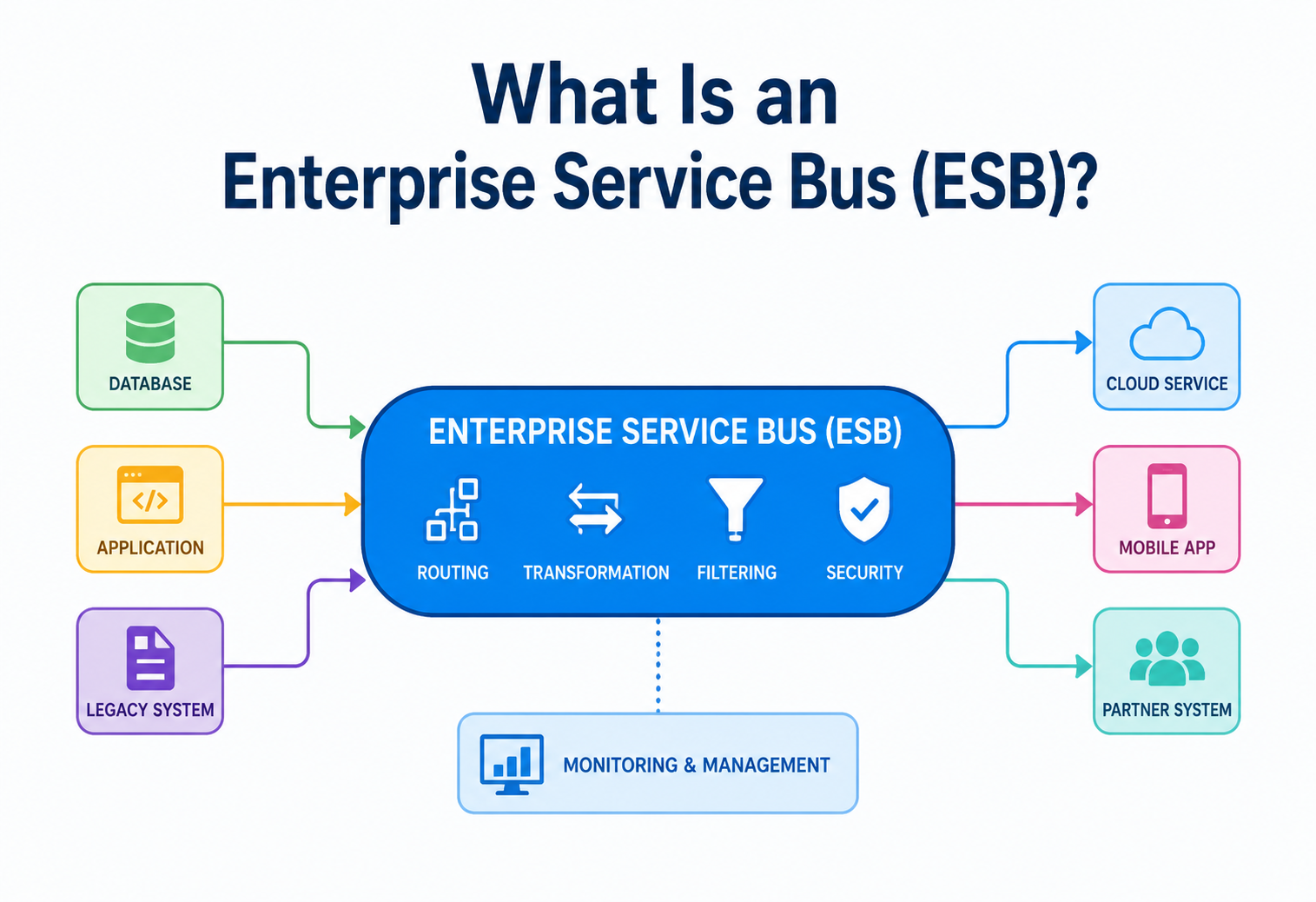
What Is an Enterprise Service Bus (ESB)?
A complete, beginner-friendly walkthrough of the architecture pattern that let thousands of disconnected enterprise systems finally talk to each other — how it works internally, why it was invented, where it shines, where it fails, and how it compares to the microservices world we live in today.
Introduction & History
Imagine an office building where every single employee has to run a physical cable directly to every other employee’s desk just to send them a memo. Ten employees means 45 cables. A hundred employees means almost 5,000 cables. The building becomes an unmanageable mess of wires before anyone gets any real work done.
That’s what large companies looked like on the inside in the 1990s and early 2000s — except instead of cables, it was custom-built, point-to-point software connections between systems. The Enterprise Service Bus (ESB) is the architectural pattern (and family of products) invented to fix exactly this problem. An ESB is a piece of middleware — software that sits “in the middle” between other software — that acts like a central communication highway. Every application connects to the bus once, and the bus takes care of routing, translating, and delivering messages to whichever other application needs them.
Think of it like a country’s postal system. You don’t personally drive a letter to every recipient’s house. You drop it in a mailbox (one connection point), and the postal service (the bus) figures out the address, sorts it, translates it if needed (say, converting between currencies or units on a customs form), and delivers it to the right place. You never need to know how the recipient’s local delivery system works — the postal service handles that translation for you.
A short history
1. 1970s–1980s — Point-to-point integration
Systems were wired directly to each other with custom code. Worked fine for two or three systems, became a “spaghetti” nightmare beyond that.
2. 1990s — EAI (Enterprise Application Integration) hubs
Vendors introduced centralized “hub-and-spoke” integration brokers — the direct ancestor of the ESB — but these were often heavyweight, proprietary, and expensive.
3. 2002–2004 — The term “ESB” is coined
Analysts and vendors (Gartner, Sonic Software, IBM, and others) popularized “Enterprise Service Bus” as a lighter-weight, standards-based evolution of EAI, built around Web Services (SOAP/XML) and message queues.
4. 2005–2012 — Golden age of the ESB
Products like IBM WebSphere ESB, Oracle Service Bus, MuleSoft (Mule ESB), TIBCO BusinessWorks, and open-source Apache ServiceMix / Apache Camel dominated enterprise integration strategy, tied closely to the rise of Service-Oriented Architecture (SOA).
5. 2012–present — The microservices shift
As organizations moved toward microservices, the “smart pipe, dumb endpoints” philosophy of the classic ESB fell out of favor in favor of “dumb pipes, smart endpoints” (lightweight message brokers + logic inside services). ESBs didn’t disappear — they evolved into API gateways, iPaaS (integration Platform-as-a-Service) tools, and event-streaming platforms like Kafka.
An ESB is a piece of software that sits between all your applications and handles connecting them, translating their messages into formats each one understands, routing those messages to the right place, and making sure the message arrives even if something briefly goes wrong.
Why Was the ESB Invented?
Picture a mid-size insurance company. It has a claims system written in Java, a billing system written in COBOL running on a mainframe, a customer relationship management (CRM) tool bought from a vendor, and a new mobile app. Each of these needs to exchange information with the others: when a claim is approved, billing needs to know; when a customer updates their address in the CRM, the mobile app needs to reflect it.
Without an ESB, developers build direct, custom connections between each pair of systems. This is called point-to-point integration, and it grows in complexity following a simple formula: for n systems, you can end up needing up to n × (n−1) / 2 connections. With 4 systems, that’s 6 connections. With 20 systems, that’s 190 possible connections. Every connection is custom code, custom error handling, and a custom format translator — and every time one system changes its data format, every connection touching it might break.
This tangle is often literally called “spaghetti architecture.” Every new system added doesn’t just add one connection — it potentially adds one connection to every existing system, and every one of those connections has to be individually written, tested, deployed, and maintained.
The ESB’s promise: hub-and-spoke
The ESB flips this model. Instead of n × (n−1) / 2 connections, each system builds exactly one connection — to the bus. The bus becomes the single, well-understood integration point.
What This Fixes
- Linear growth in connections instead of quadratic
- Centralized place to add logging, security, and monitoring
- Format translation happens once, not n times
- Systems can be swapped out without breaking everyone else
What This Trades Away
- The bus becomes a single point of failure if not made highly available
- Central team can become a bottleneck for every integration change
- Risk of the bus becoming an overloaded “God component”
Core Concepts & Terminology
Before going further, let’s define the words you’ll see constantly in ESB literature — explained the simple way first, then more precisely.
01 · Message
A packet of data sent from one system to another — like an envelope carrying information. Could be a new order, a customer update, or an alert.
02 · Message Broker
The component (or product) that actually queues and delivers messages. An ESB usually contains or connects to a message broker underneath it.
03 · Canonical Data Model
A single “common language” data format that the bus translates every message into, so N formats become 1 shared format instead of N×N pairwise translators.
04 · Adapter / Connector
A small piece of code that knows how to speak a specific system’s native protocol (e.g., SAP IDocs, a mainframe’s flat files, a REST API) and translate it to/from the bus’s internal format.
05 · Routing
Deciding which destination(s) a message should go to — based on its content, its type, or business rules.
06 · Orchestration
Coordinating a multi-step business process across several systems, in a defined order, often with the bus itself controlling the sequence.
07 · Transformation
Converting a message’s structure or format — like turning an XML invoice into a JSON invoice, or converting date formats.
08 · Mediation
The umbrella term for everything the bus does to a message in transit: validating, enriching, transforming, routing, and securing it.
Enterprise Integration Patterns (EIPs)
Most ESB products implement a shared catalog of reusable solutions known as Enterprise Integration Patterns (from the well-known book by Gregor Hohpe and Bobby Woolf). A few you’ll meet constantly:
| Pattern | What it does | Analogy |
|---|---|---|
| Message Router | Sends a message to different destinations based on content or rules | A mail sorting machine reading zip codes |
| Message Translator | Converts one message format into another | A human interpreter at a UN meeting |
| Content Enricher | Adds missing data to a message by looking it up elsewhere | Adding a customer’s full address before shipping a package |
| Message Filter | Drops messages that don’t meet a condition | A spam filter for your inbox |
| Aggregator | Combines several related messages into one | Collecting all items in a shopping cart before checkout |
| Splitter | Breaks one big message into several smaller ones | Unpacking a bulk order into individual shipments |
Architecture & Components
An ESB is not one single tool — it’s a collection of cooperating components, usually running as one or more deployable services.
A · Adapters
Protocol-specific connectors: JDBC for databases, JMS for queues, HTTP/REST, SOAP, FTP, SAP-specific adapters, mainframe adapters, etc.
B · Messaging Backbone
Underlying queueing/topic system (e.g., JMS, ActiveMQ, RabbitMQ) that guarantees delivery even if a receiver is briefly offline.
C · Routing Engine
Evaluates rules — content-based, header-based — to decide the message’s next stop(s).
D · Transformation Engine
Runs XSLT, mapping scripts, or code to reshape a message’s structure and data types.
E · Orchestration Engine
Executes multi-step workflows (often modeled in BPEL or a visual flow designer) that call multiple services in sequence.
F · Security Layer
Authentication, authorization, encryption, and message signing applied uniformly to all traffic crossing the bus.
G · Management & Monitoring Console
Dashboards for tracking message flow, throughput, errors, and SLAs.
An ESB is not just a message queue. A queue (like plain RabbitMQ) only moves bytes from A to B. An ESB adds understanding of the message’s meaning — it can look inside, transform it, validate it against business rules, and route it intelligently.
Internal Working — How a Message Moves Through the Bus
Let’s trace one message step by step, the way it would flow inside a typical ESB product (conceptually similar across MuleSoft, TIBCO, WebSphere ESB, or an Apache Camel route).
1. Reception
An inbound adapter listens on a protocol endpoint (an HTTP port, a file folder, a queue) and receives a raw message — e.g., an XML order from a partner’s SOAP call.
2. Normalization
The message is parsed and converted into the bus’s internal canonical format, so every downstream component works with one consistent shape regardless of the original protocol.
3. Validation
The bus checks the message against a schema (e.g., XSD or JSON Schema) and rejects or quarantines malformed messages before they cause downstream damage.
4. Enrichment
Missing fields are filled in — for instance, looking up a customer’s loyalty tier from a database before forwarding an order.
5. Routing decision
The routing engine inspects headers or content (“if order.total > 10000, route to Fraud-Check service first”) and decides the next hop(s).
6. Transformation
The message is reshaped into the exact format the destination system expects (e.g., canonical JSON → SAP IDoc XML).
7. Delivery
An outbound adapter delivers the transformed message to the target system, and typically waits for and processes an acknowledgment.
8. Error handling
If delivery fails, the bus retries according to policy, and if retries are exhausted, moves the message to a Dead Letter Queue (DLQ) for manual review.
The same steps show up almost verbatim in a real Apache Camel route — the popular open-source Java DSL that many modern ESBs run under the hood:
from("jms:queue:incomingOrders")
    .routeId("orderProcessingRoute")
    .doTry()
        .to("validator:schemas/order.xsd")           // 3. Validation
        .enrich("direct:lookupCustomerTier", (oldEx, newEx) -> {
            oldEx.getIn().setHeader("tier", newEx.getIn().getBody());
            return oldEx;                              // 4. Enrichment
        })
        .choice()                                      // 5. Routing
            .when(xpath("/order/total > 10000"))
                .to("direct:fraudCheck")
            .otherwise()
                .to("direct:standardOrder")
        .end()
        .to("xslt:transform/orderToSapIdoc.xsl")        // 6. Transformation
        .to("sap:idoc:ORDERS05")                        // 7. Delivery
    .doCatch(Exception.class)
        .to("jms:queue:orderDeadLetterQueue")           // 8. Error handling
.end();Data Flow & Message Lifecycle — Synchronous vs Asynchronous
ESBs typically support two fundamentally different delivery styles, and choosing the right one for each integration matters a lot.
Synchronous (request–response)
The caller sends a request and blocks, waiting for a response — like a phone call. Good for cases where the caller genuinely needs an immediate answer (e.g., “is this credit card valid?”).
Asynchronous (fire-and-forget / publish-subscribe)
The caller sends a message and moves on immediately — like sending a letter. The bus guarantees eventual delivery. Good for events that many systems may care about (e.g., “order shipped”) without the sender needing to know or wait for every subscriber.
Synchronous Is Best When…
- The caller needs the result to continue (e.g., payment authorization)
- Low latency matters more than decoupling
Asynchronous Is Best When…
- Multiple systems need to react to the same event
- The receiving system might be slow or temporarily down
- You want to absorb traffic spikes with a queue as a buffer
Message lifecycle and guaranteed delivery
Because most ESBs sit on top of a durable messaging backbone, a message isn’t just “sent and hoped for” — it typically goes through states similar to this:
This lifecycle is what gives ESBs their reputation for reliability: a message is never simply dropped on the floor. It’s persisted in the queue until it’s positively acknowledged, and if something keeps failing, it lands in a Dead Letter Queue where a human or an automated process can inspect and resolve it — rather than silently vanishing.
Advantages, Disadvantages & Trade-offs
Every architectural pattern is a trade-off. Here is where the ESB genuinely shines — and where it can hurt if applied without care.
Advantages
- Loose coupling — systems don’t need to know about each other, just about the bus
- Centralized governance — one place to enforce security, logging, and standards
- Protocol/format bridging — connects legacy mainframes to modern REST APIs seamlessly
- Reuse — a transformation or connector built once can serve many integrations
- Reduced integration count — linear growth instead of quadratic
- Guaranteed delivery — built-in retries, queuing, and dead-letter handling
Disadvantages
- Single point of failure if not clustered and made highly available
- Central bottleneck — every integration change goes through one team/tool
- “God component” risk — business logic creeps into the bus, making it a monolith in disguise
- Vendor lock-in — proprietary tooling and formats can be hard to migrate away from
- Operational complexity — specialized skills needed to run and tune it
- Latency overhead — every hop through the bus adds processing time
Performance & Scalability
Because every message potentially flows through the bus, its performance directly caps the performance of the whole enterprise’s integrations. A few core scaling techniques:
1 · Horizontal clustering
Run multiple ESB instances behind a load balancer, sharing message queues, so throughput scales by adding nodes.
2 · Asynchronous processing
Prefer queue-based, non-blocking flows over synchronous request-response chains to avoid thread starvation under load.
3 · Connection pooling
Reuse database and backend connections instead of opening new ones per message.
4 · Message batching
Group small messages for bulk processing where real-time delivery isn’t required.
5 · Caching
Cache lookups (like the “enrich” step) that don’t change often, instead of hitting a database on every message.
6 · Partitioning by topic/queue
Split traffic across multiple queues by message type so one noisy integration doesn’t starve others.
High Availability & Reliability — Never Letting the Bus Be a Single Point of Failure
Because so much depends on it, production ESB deployments are almost always clustered across at least two, often three, availability zones or data centers.
- Active-active clustering: multiple ESB nodes all process traffic simultaneously; if one dies, the others absorb its load.
- Persistent message stores: queues are backed by disk (or replicated databases) so in-flight messages survive a node crash.
- Idempotent consumers: because retries can cause a message to be delivered more than once, downstream services are designed to safely process the same message twice without duplicating effects (e.g., checking an order ID before creating a new order).
- Circuit breakers: if a downstream system is failing repeatedly, the bus temporarily stops calling it (instead of piling up timeouts), giving it time to recover.
- Health checks & failover: load balancers continuously probe ESB nodes and route around unhealthy ones.
Here is a small Java example of the circuit-breaker pattern (using the Resilience4j library) guarding a fragile downstream call:
CircuitBreaker breaker = CircuitBreaker.ofDefaults("paymentService");

Supplier<String> decorated = CircuitBreaker
    .decorateSupplier(breaker, () -> paymentClient.charge(order));

try {
    String result = decorated.get();
    processSuccess(result);
} catch (CallNotPermittedException ex) {
    // Circuit is open - backend is unhealthy, fail fast instead of piling up
    routeToFallbackQueue(order);
}If your ESB cluster and its message store can both survive the loss of one node without losing a single in-flight message, you’ve achieved the baseline reliability enterprises expect.
Security — Securing the Central Highway
Because all traffic crosses the bus, it’s also the natural place to enforce security consistently — but also a very attractive target if compromised.
| Concern | Typical ESB mechanism |
|---|---|
| Authentication | OAuth2, SAML, mutual TLS (mTLS), API keys per system |
| Authorization | Role/policy-based access control on which systems can call which routes |
| Encryption in transit | TLS on every adapter endpoint |
| Encryption at rest | Encrypting persisted messages in the queue store |
| Message integrity | Digital signatures (e.g., XML-Signature) to detect tampering |
| Auditability | Immutable logs of every message that crossed the bus, for compliance (SOX, HIPAA, PCI-DSS, GDPR) |
| Data masking | Redacting sensitive fields (e.g., credit card numbers) in logs and traces |
A vulnerability in the ESB doesn’t just expose one application — because it’s connected to everything, a breach can potentially expose every system behind it. Defense-in-depth (per-adapter auth, not just perimeter security) is essential.
Monitoring, Logging & Metrics — Seeing What’s Flowing Through the Bus
Because the ESB touches nearly every business transaction, its observability tooling is often the best “single pane of glass” an enterprise has for its overall system health.
Throughput metrics
Messages per second, per route, per adapter — to spot growth trends and bottlenecks.
Latency tracking
Time spent per hop, so you can pinpoint exactly which transformation or backend call is slow.
Error rate & DLQ size
A growing Dead Letter Queue is an early warning sign of an upstream data or contract problem.
Distributed tracing
Correlation IDs attached to a message at entry let you follow its whole journey across every hop, even into downstream microservices.
Structured audit logs
Who sent what, when, and where it went — required for compliance and for root-causing incidents.
Modern ESB deployments typically ship these metrics to observability stacks like Prometheus + Grafana, or enterprise APM tools (Dynatrace, AppDynamics, Splunk), and propagate a correlation/trace ID (often via the W3C Trace Context standard) through every hop so a single business transaction can be reconstructed end-to-end even after it leaves the bus.
Deployment & Cloud — Where an ESB Actually Runs
Classic ESBs were deployed as heavyweight Java application server clusters (WebSphere, WebLogic) inside a company’s own data center. That model has evolved significantly:
1. On-premises cluster
Traditional model: dedicated servers, application server clusters, hardware load balancers. Still common in banking, insurance, and government.
2. Containerized ESB
Modern ESB engines (Apache Camel, WSO2, MuleSoft runtime) packaged as Docker containers, orchestrated with Kubernetes for elastic scaling and self-healing.
3. iPaaS (Integration Platform-as-a-Service)
Fully managed cloud offerings (MuleSoft Anypoint, Boomi, Azure Logic Apps, AWS Step Functions/EventBridge) where the vendor runs the bus infrastructure and you just configure flows.
4. Hybrid
A common real-world pattern: an on-prem ESB handles legacy mainframe/SAP connections, while a cloud iPaaS or API gateway handles SaaS and partner integrations, bridged together.
Kubernetes health probes, horizontal pod autoscaling, and persistent-volume-backed queues let a containerized ESB scale up during peak season (e.g., Black Friday order volume) and back down afterward — something a fixed on-prem cluster can’t do economically.
Databases, Caching & Load Balancing — Supporting Infrastructure Around the Bus
Databases
The ESB itself is usually stateless in terms of business data, but it typically depends on a database for: persisted message stores (for guaranteed delivery), audit/transaction logs, and configuration/route definitions. These are often relational databases (Oracle, PostgreSQL) chosen for strong consistency, since losing a message record is unacceptable.
Caching
Lookups used repeatedly during enrichment (like “get customer tier” or “get product price”) are prime caching candidates. An in-memory cache (Redis, Hazelcast, Ehcache) in front of the database can cut enrichment latency from tens of milliseconds to sub-millisecond, and dramatically reduce load on backend systems that weren’t designed for high query volume.
Load balancing
Incoming traffic is spread across ESB cluster nodes using a load balancer (hardware appliance, NGINX, or a cloud load balancer), typically using round-robin or least-connections algorithms, combined with health checks so traffic never routes to a node that’s down or degraded.
APIs, Microservices & the ESB — Does It Still Matter?
This is the single most common question asked about ESBs today. The short answer: the classic, heavyweight, “smart pipe” ESB has fallen out of favor, but the problems it solved never went away — they’re now solved by a different combination of tools.
| Classic ESB | Microservices approach | |
|---|---|---|
| Philosophy | “Smart pipes, dumb endpoints” — logic lives in the bus | “Dumb pipes, smart endpoints” — logic lives in each service |
| Coupling | Central team owns integration logic | Each team owns its own service’s contract and logic |
| Messaging | Built-in broker + orchestration engine | Lightweight brokers (Kafka, RabbitMQ) used directly by services |
| Transformation | Centralized transformation engine | Each service transforms its own data at its own boundary |
| External access | Often doubled as the API layer | Dedicated API Gateway handles routing/auth for external clients |
| Scaling | Scale the whole bus cluster together | Scale each service independently |
In practice, many modern architectures still have an “ESB-shaped” component — it’s just been split into specialized pieces: an API Gateway (Kong, Apigee, AWS API Gateway) for external-facing routing and auth, an event streaming platform (Apache Kafka) for asynchronous, high-throughput event distribution, and lightweight service mesh tooling (Istio, Linkerd) for service-to-service traffic management. Together, these cover most of what a classic ESB did — but distributed, rather than centralized in one monolithic bus.
Large enterprises with heavy legacy footprints — mainframes, SAP, decades-old COBOL systems — still lean on ESBs (or their iPaaS descendants) because those systems simply can’t participate in a lightweight event-streaming architecture without heavy adapter/translation work, which is exactly what an ESB specializes in.
Design Patterns & Anti-patterns — Doing It Well vs Doing It Badly
Good Patterns
- Canonical Data Model — one shared internal format, translated at the edges
- Content-Based Router — route by inspecting message content, not hardcoded destinations
- Dead Letter Queue — never silently drop failed messages
- Idempotency keys — safe handling of duplicate deliveries
- Circuit breaker — fail fast against unhealthy backends
- Versioned contracts — evolve message schemas without breaking consumers
Anti-patterns
- “God bus” — cramming full business logic and workflows into the bus, making it a hidden monolith
- Tight coupling via the bus — hardcoding system-specific logic instead of using the canonical model
- No dead-letter strategy — failed messages vanish with no visibility
- Synchronous chains everywhere — long blocking call chains that cascade failures
- One team owns all integrations — creates an organizational bottleneck mirroring the technical one
- No schema versioning — any format change breaks every consumer simultaneously
Best Practices & Common Mistakes — Lessons from Real Deployments
1 · Keep the bus dumb-ish
Favor routing/transformation over deep business logic. Business rules belong closer to the owning system.
2 · Design for idempotency early
Assume every message can be delivered more than once, from day one — retrofitting this later is painful.
3 · Version everything
Schemas, routes, and contracts should be versioned so producers and consumers can upgrade independently.
4 · Monitor the DLQ like a hawk
Set alerts on Dead Letter Queue growth — it’s the earliest signal something upstream broke.
5 · Load test realistic peaks
Test at the volume of your busiest hour of the year (holiday sales, month-end close), not average traffic.
6 · Avoid single-team gatekeeping
Give application teams self-service tooling to define their own routes where possible, to avoid a central bottleneck.
Real-World / Industry Examples — Who Actually Uses ESBs, and Why
Companies like Netflix and Amazon, often cited as poster children of microservices, largely moved away from a centralized ESB toward event streaming (Kafka) and API gateways specifically because their scale and organizational independence needs outgrew the centralized-bus model — but this was a deliberate trade-off for their specific scale, not evidence that ESBs are universally obsolete.
Frequently Asked Questions
Is an ESB the same as a message queue?
No. A message queue (like plain RabbitMQ) just moves data from one place to another. An ESB adds routing intelligence, transformation, orchestration, and governance on top of a messaging backbone — the queue is one ingredient, not the whole dish.
Is an ESB the same as an API Gateway?
They overlap but aren’t identical. An API Gateway mainly handles external-facing concerns for APIs: authentication, rate limiting, and routing HTTP requests. An ESB traditionally handles broader internal integration: protocol bridging, complex transformation, and orchestration across many system types, not just HTTP APIs.
Are ESBs dead?
Not dead, but no longer the default choice for new greenfield architectures. They remain heavily used where legacy system integration and centralized governance matter more than the flexibility microservices offer.
What’s the difference between SOA and ESB?
Service-Oriented Architecture (SOA) is a broader architectural philosophy — building systems as a set of reusable services. An ESB is one common technical implementation choice for making an SOA’s services able to find and talk to each other.
What are popular ESB products?
MuleSoft Anypoint (Mule ESB), IBM App Connect / WebSphere ESB, Oracle Service Bus, TIBCO BusinessWorks, WSO2 Enterprise Integrator, and the open-source Apache Camel / Apache ServiceMix combination.
Can an ESB and microservices coexist?
Yes, and this is extremely common in practice — an ESB handling legacy/back-office integration, while newer domains are built as independent microservices communicating via lightweight event streams, with an API Gateway or the ESB itself acting as the bridge between the two worlds.
Does an ESB always require a message broker underneath?
In practice, almost always. The messaging backbone (JMS, ActiveMQ, IBM MQ, RabbitMQ, or similar) is what gives the ESB its guaranteed-delivery, retry, and dead-letter capabilities. A bus without a durable broker underneath would lose messages on the first crash.
How is an ESB different from Apache Kafka?
Kafka is a high-throughput distributed event log — excellent for streaming events between many consumers, but it does not natively do the transformation, orchestration, protocol adaptation, or content-based routing that an ESB provides. Many modern architectures pair the two: Kafka carries events at scale, while an ESB or integration platform handles the “translation and orchestration” work at the edges.
Summary — Bringing It All Together
An Enterprise Service Bus is, at its core, a translator and traffic controller for enterprise software. It replaced a chaotic web of custom point-to-point connections with a single, well-governed hub that every system connects to once. It gained enormous popularity in the 2000s alongside Service-Oriented Architecture, offering reliability, format-bridging, and centralized security and monitoring that were hard to achieve any other way at the time.
As systems became more numerous, teams more independent, and cloud-native tooling more mature, the industry shifted toward distributing the ESB’s responsibilities across specialized tools — API gateways, event-streaming platforms, and service meshes. But the underlying problem the ESB was built to solve — getting many different systems, old and new, to reliably and securely exchange information — is exactly as relevant today as it was twenty years ago. Understanding the ESB pattern deeply is still one of the best ways to understand integration architecture as a whole, whether or not you ever deploy a literal “ESB” product.
Key Takeaways
- What it is: Centralized middleware that routes, transforms, and reliably delivers messages between enterprise systems.
- Why it exists: To replace unmanageable point-to-point integration (O(n²) connections) with a single hub-and-spoke model (O(n) connections).
- Core jobs: Adaptation, normalization, validation, routing, transformation, orchestration, and guaranteed delivery.
- Biggest risk: Becoming a single point of failure or an overloaded “God component” if not clustered and kept lean.
- Today: Its responsibilities are often split across API gateways, event-streaming platforms (Kafka), and service meshes — but it remains vital for legacy and heavily regulated environments.

