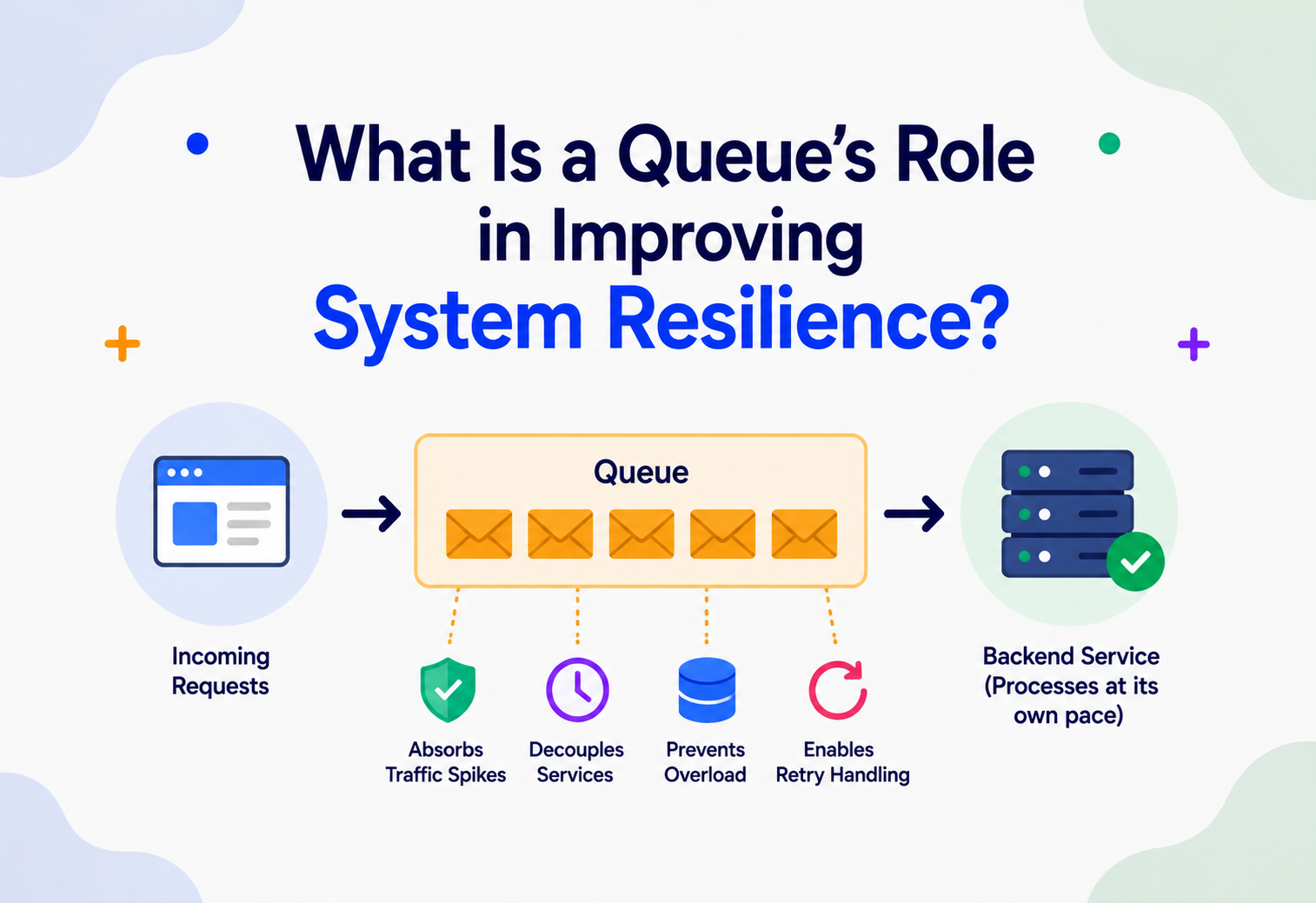
What Is a Queue’s Role in Improving System Resilience?
A ground-up, no-assumptions guide to message queues — what they are, why almost every large-scale system leans on them, and how they quietly stop small failures from becoming big ones.
What Is a Queue — and Why Care About It?
Imagine a small coffee shop with one barista. On a quiet morning, a customer orders, the barista makes the coffee, hands it over, and calls the next customer. This works fine — until a tour bus of 40 people arrives at once. If everyone has to be served instantly or leave, the shop loses most of that crowd and probably breaks the barista’s spirit too. But if the shop puts out a simple order line — a queue — everyone can join it, get a number, and wait their turn. The barista keeps working at a steady pace, nobody is turned away, and the shop absorbs the sudden rush without collapsing.
That everyday queue — a line of people waiting their turn — is the exact same idea that powers some of the most important reliability tricks in modern computer systems. In software, a queue is a waiting line for pieces of work (called messages) instead of people. One part of a system drops work into the queue, and another part picks it up and processes it, at its own pace, whenever it’s ready.
1.1 A Short History
The idea of a queue as a data structure goes back to the earliest days of computer science — a simple “first in, first out” (FIFO) list, taught in every introductory programming course. But queues as an infrastructure component — a standalone, network-accessible service that different programs use to talk to each other — grew out of a very practical industry problem in the 1980s and 1990s: mainframe banking and telecom systems needed a reliable way to pass transactions between programs that weren’t always online at the same time.
This gave birth to a category called Message-Oriented Middleware (MOM). IBM’s MQSeries (now IBM MQ), launched in 1993, was one of the first commercially successful message-queue products, used heavily in banking. In the 2000s, open protocols like AMQP (Advanced Message Queuing Protocol) and products like RabbitMQ made queues accessible to a much wider range of companies, not just banks with big budgets. Then in 2011, LinkedIn open-sourced Apache Kafka, which reimagined a queue as a durable, replayable log — built for the scale of modern web companies with millions of events per second. Around the same time, cloud providers began offering queues as a managed service — Amazon SQS launched in 2006, one of the very first AWS services ever, well before EC2 even had many features people take for granted today.
Today, queues (and their close cousins, event streams) are considered a foundational building block of distributed systems — right alongside databases, caches, and load balancers. Almost no large-scale system that needs to survive traffic spikes, partial outages, or slow downstream services is built without one.
1980s — MOM Emerges
Banking and telecom mainframes need reliable ways to hand off transactions between programs that aren’t always online together. Message-Oriented Middleware is born.
1993 — IBM MQSeries
The first commercially successful message-queue product ships; still runs mission-critical banking traffic decades later.
2006 — Amazon SQS
One of the very first AWS services democratizes managed queuing for everyone, no ops team required.
2007 — RabbitMQ & AMQP
Open protocols and open-source brokers put message queuing within reach of any startup.
2011 — Apache Kafka
LinkedIn open-sources Kafka, reimagining a queue as a durable, replayable log built for millions of events per second.
Today — A Foundational Primitive
Queues sit alongside databases, caches, and load balancers as one of the four or five things almost every large system uses.
The Problem & Motivation
Before we explain what a queue is in detail, it helps to deeply understand the problem it solves. Resilience — a system’s ability to keep working, or recover quickly, when something goes wrong — is threatened by a few very common situations in distributed systems.
2.1 Problem 1 — Tight Coupling Makes One Failure Everyone’s Failure
Picture an e-commerce checkout. When a customer clicks “Place Order,” the system might need to: charge the card, update inventory, send a confirmation email, notify the warehouse, and update analytics. If your code calls all five of these directly, one after another, and waits for each to finish before doing the next (this is called a synchronous call), then if the email service is slow or down, the entire order is stuck — even though charging the card and updating inventory worked perfectly fine.
This is called a cascading failure: a problem in one small, non-critical part of the system (sending an email) spreads backward and blocks or crashes a critical part (placing the order). Resilient systems are specifically designed to prevent this kind of spread.
2.2 Problem 2 — Sudden Traffic Spikes Overwhelm Slow Parts of the System
Systems rarely receive traffic at a perfectly even rate. A flash sale, a viral social-media post, a Black Friday event, or even a scheduled batch job can cause requests to spike 10x or 100x in seconds. If every incoming request must be handled immediately by a fixed number of backend workers, the system either crashes, becomes painfully slow for everyone, or starts rejecting requests outright.
2.3 Problem 3 — Different Parts of a System Run at Different Speeds
A web server can accept thousands of requests per second, but a service that generates a PDF invoice or trains a machine-learning feature might only handle a few dozen per second. This mismatch is called impedance mismatch in system design — the “speed” of one component doesn’t match another’s.
2.4 Problem 4 — Things Fail. Every Day.
In any large enough system, failure isn’t a rare edge case; it’s a certainty that happens every single day, somewhere. A resilient system doesn’t try to prevent all failure (that’s impossible) — it tries to make sure that failure in one place doesn’t bring down the whole system, and that lost work can be recovered.
Think about a hospital emergency room without a triage/waiting system. If every patient had to be seen by a doctor the instant they walked in, one bad car-crash night would completely overwhelm the ER, and doctors — trying to rush — might make mistakes on every patient at once. Instead, hospitals use a triage queue: patients wait, are prioritized, and doctors work through the queue at a sustainable pace. The waiting room doesn’t cure anyone, but it’s what keeps the whole ER from collapsing under pressure.
A message queue is the software version of that waiting room. It sits between the part of the system that creates work and the part that does the work, and it absorbs the shock of mismatched speed, temporary failure, and sudden spikes — which is precisely why it’s one of the most powerful tools for improving resilience.
Tight Coupling
Synchronous chains propagate a single failure backward through every caller that was waiting for it.
Sudden Spikes
Bursty traffic overwhelms fixed downstream capacity, causing timeouts, drops, or full crashes.
Impedance Mismatch
Fast producers and slow consumers can’t sustainably talk directly without buffering somewhere in between.
Everyday Failures
Nodes crash, networks flap, deploys go wrong. Resilience means one broken piece doesn’t break the whole system.
Core Concepts & Vocabulary
Let’s build up the vocabulary piece by piece. Every term below is explained in plain English before we use it anywhere else in this guide.
3.1 What Is a Message?
A message is a small packet of information representing one unit of work or one fact that happened. It’s usually structured data (often JSON or a binary format) — for example, {"orderId": "1234", "action": "SEND_CONFIRMATION_EMAIL"}. Think of a message like a sticky note: short, self-contained, and telling whoever picks it up exactly what needs to happen.
3.2 What Is a Queue?
A queue is an ordered (usually first-in-first-out) collection of messages waiting to be processed. New messages are added at the back (this is called enqueueing or publishing) and are removed from the front to be worked on (this is called dequeueing or consuming).
It’s exactly like a deli-counter ticket dispenser. You take a number (your message joins the queue), you wait, and the counter staff calls numbers in order (the queue is consumed). If ten people show up in the same minute, nobody is turned away — they just wait a little longer, and the counter staff work through the line steadily instead of being mobbed all at once.
3.3 Producer, Consumer, and Broker
- Producer (or Publisher): The part of the system that creates a message and puts it on the queue. Example: the checkout service, after successfully charging a card, produces a message saying “order 1234 was paid.”
- Consumer (or Worker/Subscriber): The part of the system that takes messages off the queue and does the actual work. Example: an email service that consumes “order paid” messages and sends confirmation emails.
- Broker: The middleman software (like RabbitMQ, Kafka, or Amazon SQS) that actually stores the queue, accepts messages from producers, and hands them out to consumers. The broker is the “post office” in this system.
3.4 Decoupling
Decoupling means two parts of a system don’t need to know about each other’s internal details, speed, or even whether the other one is currently running. The producer doesn’t call the consumer directly — it just drops a message in the queue and moves on. The consumer doesn’t know or care who produced the message — it just processes whatever shows up.
Think of dropping a letter in a mailbox. You (the producer) don’t need to know if the recipient (the consumer) is home, asleep, or on vacation. You just drop the letter and walk away. The postal system (the broker) holds it safely until the recipient is ready to read it.
3.5 Asynchronous Processing
Asynchronous (“async”) means the producer doesn’t wait around for the consumer to finish the work. It fires off the message and immediately continues doing other things. This is the opposite of synchronous processing, where the producer blocks (waits) until it gets a direct answer back.
3.6 Buffering and Backpressure
Buffering is the queue’s ability to hold a growing pile of unprocessed messages temporarily, smoothing out bursts of traffic. Backpressure is a signal — direct or indirect — that tells upstream producers “slow down, I can’t keep up,” so the system degrades gracefully rather than crashing outright. A queue naturally creates a buffer, which is one of its biggest resilience superpowers.
3.7 Delivery Guarantees
These describe how certain you can be that a message actually gets processed:
| Guarantee | Meaning | Trade-off |
|---|---|---|
| At-most-once | Message is delivered zero or one times — it might get lost, but is never duplicated. | Fast, but risk of silent data loss. |
| At-least-once | Message is delivered one or more times — it’s never lost, but might be processed twice. | Safe from loss, but consumers must handle duplicates. |
| Exactly-once | Message is delivered and processed exactly one time, no more, no less. | Hardest and most expensive to guarantee correctly; often achieved via at-least-once + deduplication. |
3.8 Idempotency
An operation is idempotent if doing it multiple times has the same effect as doing it once. This matters enormously with queues because most real-world systems use “at-least-once” delivery, meaning a consumer might see the same message twice (for example, if it crashed right after processing but before confirming). If “charge the credit card $50” isn’t idempotent, a duplicate message could charge the customer twice — a real production bug that has happened at real companies.
Pressing an elevator call button is idempotent — pressing it five times doesn’t call five elevators. But shouting “add one more topping to my pizza” over the phone is not idempotent — if the order taker mishears you and you repeat it, you might end up with three extra toppings instead of one.
3.9 Dead-Letter Queue (DLQ)
A dead-letter queue is a special “side queue” where messages go if they repeatedly fail to be processed (say, after 5 failed retry attempts). Instead of being retried forever or silently thrown away, they’re set aside for engineers to inspect later. This is a critical resilience feature — it prevents one “poison pill” message from blocking the whole queue.
3.10 Message Acknowledgment (ack)
When a consumer successfully finishes processing a message, it sends an acknowledgment (ack) back to the broker, which then safely deletes the message from the queue. If no ack arrives within a timeout (say the consumer crashed), the broker assumes the work wasn’t done and puts the message back for another consumer to try.
Architecture & Components
Let’s zoom out and look at the moving pieces of a queue-based system as a whole — producers, broker, consumers, and the safety-net around them.
4.1 The Main Components
Broker / Queue Server
The core software that stores messages, manages order, tracks acknowledgments, and hands out messages to consumers. Examples: RabbitMQ, Apache Kafka, Amazon SQS, Redis Streams, Google Pub/Sub.
Producers
Any service, app, or script that creates and sends messages. There can be one or many producers writing to the same queue.
Consumers / Consumer Groups
Workers that pull and process messages. Multiple consumers can share the load (each message processed once) or each get a copy (fan-out), depending on the pattern.
Topics / Queues / Partitions
Logical channels that separate different kinds of messages. Kafka further splits a topic into partitions for parallelism; RabbitMQ uses exchanges and queues; SQS uses simple named queues.
Dead-Letter Queue
A safety-net queue for messages that fail repeatedly, so bad data doesn’t block the healthy flow.
Schema / Message Contract
The agreed-upon shape of a message (fields and types), often enforced with a schema registry so producers and consumers don’t silently drift apart.
4.2 Two Broad Architectural Styles
Point-to-point (queue model): Each message is consumed by exactly one consumer, even if many consumers are listening. This is the classic “task queue” — great for distributing work like image-resizing jobs across a pool of identical workers.
Publish/subscribe (pub-sub / topic model): Each message is delivered to every subscriber that’s interested, not just one. This is great for broadcasting an event (“order was placed”) to multiple independent services (email, analytics, warehouse) that each need to react in their own way.
Internal Working — What Happens Inside
Let’s go one level deeper and see, mechanically, what happens when a message travels through a queue — from the moment a producer opens a connection to the moment the broker deletes it after a successful ack.
5.1 Step-by-step Internal Flow
- Connection & publish: The producer opens a connection (often over TCP, sometimes via HTTPS for cloud queues) to the broker and sends the message, along with metadata like a routing key or topic name.
- Persistence: A resilient broker writes the message to disk (not just memory) before confirming receipt, so a broker crash doesn’t lose it. Kafka literally appends messages to an immutable log file on disk, which is also what makes it so fast — sequential disk writes are cheap.
- Replication (in clustered brokers): The message is copied to other broker nodes so that even if one machine dies, the message survives on another. This is core to high availability.
- Delivery to consumer: The broker either pushes the message to a subscribed consumer or waits for a consumer to pull/poll for it, depending on the broker’s design.
- Processing: The consumer does the actual work — sending an email, updating a database, calling another service.
- Acknowledgment: On success, the consumer tells the broker “done,” and the broker marks the message as processed (deleted, or in Kafka’s case, the consumer’s “read pointer” — called an offset — moves forward).
- Retry or dead-letter on failure: If the consumer crashes or explicitly reports failure, the broker makes the message visible again for another attempt, up to a configured retry limit, after which it’s routed to the dead-letter queue.
5.2 Visibility Timeout — A Key Internal Mechanism
Most queues use a concept called a visibility timeout (SQS’s term) or lock/lease (RabbitMQ’s term). When a consumer picks up a message, the broker doesn’t delete it immediately — instead, it hides that message from other consumers for a set period (say 30 seconds), assuming the consumer is working on it. If the consumer acknowledges within that window, the message is deleted for good. If the timer expires without an ack, the broker assumes the consumer died mid-task and makes the message visible again for someone else to try.
It’s like a restaurant order ticket rail. When a cook grabs a ticket, they don’t erase it from the rail immediately — they pin it aside. If the dish comes out and is served, the ticket is torn up (acked). But if that cook suddenly walks off the job mid-order and nobody notices for a while, eventually someone checks the rail, sees an old un-torn ticket, and makes the dish again.
5.3 A Minimal Java Producer and Consumer
To make this concrete, here’s a simplified example using a JMS-style API (the pattern most Java message-queue libraries — ActiveMQ, IBM MQ, and others — follow closely).
import javax.jms.*;

public class OrderEventProducer {
    public void publishOrderPaid(String orderId) throws JMSException {
        ConnectionFactory factory = new com.example.mq.MqConnectionFactory("broker-host:5672");
        try (Connection connection = factory.createConnection()) {
            connection.start();
            Session session = connection.createSession(false, Session.AUTO_ACKNOWLEDGE);
            Queue queue = session.createQueue("order.paid.queue");
            MessageProducer producer = session.createProducer(queue);

            // Build a small, self-contained message -- like a sticky note
            TextMessage message = session.createTextMessage(
                "{"orderId":"" + orderId + "","event":"ORDER_PAID"}"
            );
            message.setJMSMessageID(orderId); // helps with idempotent dedup downstream

            producer.send(message);
            // The producer's job ends HERE. It does not wait for the
            // email, warehouse, or analytics service to finish anything.
        }
    }
}import javax.jms.*;
public class EmailWorker implements MessageListener {
public void startListening() throws JMSException {
ConnectionFactory factory = new com.example.mq.MqConnectionFactory("broker-host:5672");
Connection connection = factory.createConnection();
connection.start();
// CLIENT_ACKNOWLEDGE gives us manual control -- we only confirm
// success AFTER the email actually sends, so a crash mid-send
// means the message comes back for a retry instead of vanishing.
Session session = connection.createSession(false, Session.CLIENT_ACKNOWLEDGE);
Queue queue = session.createQueue("order.paid.queue");
MessageConsumer consumer = session.createConsumer(queue);
consumer.setMessageListener(this);
}
@Override
public void onMessage(Message message) {
try {
TextMessage textMessage = (TextMessage) message;
String payload = textMessage.getText();
String orderId = extractOrderId(payload);
if (alreadyProcessed(orderId)) {
// Idempotency guard: at-least-once delivery means we might
// see this message again. Skip safely instead of re-sending.
message.acknowledge();
return;
}
sendConfirmationEmail(orderId);
markAsProcessed(orderId);
message.acknowledge(); // tell the broker: safe to remove this
} catch (Exception e) {
// Do NOT acknowledge. The broker's visibility timeout will
// expire and another worker (or a retry) will pick it up.
System.err.println("Failed to process message, will retry: " + e.getMessage());
}
}
private boolean alreadyProcessed(String orderId) { /* check a dedup store */ return false; }
private void markAsProcessed(String orderId) { /* record in dedup store */ }
private void sendConfirmationEmail(String orderId) { /* actual email send logic */ }
private String extractOrderId(String json) { /* parse JSON */ return ""; }
}If the email provider (say, an external API) is down for 10 minutes, the sendConfirmationEmail call throws an exception, the message is never acknowledged, and it simply waits in the queue to be retried later — automatically. Meanwhile, the checkout flow that published this message finished instantly and the customer already sees “Order confirmed” on their screen. The email delay is invisible to them.
Data Flow & Message Lifecycle
Let’s trace the full lifecycle of a single message from birth to death, including the resilience mechanisms at each stage.
6.1 The Stages in Plain Words
- Creation: A producer decides something worth recording has happened (“payment succeeded”) and builds a message.
- Transit & durability: The message travels to the broker and is written durably — often to disk and to multiple replicas — so it survives a crash.
- Waiting (buffering): The message sits in the queue until a consumer is ready. This waiting period is exactly what smooths out traffic spikes — the queue can grow temporarily without anything breaking.
- Delivery: A consumer receives the message, either because the broker pushed it or the consumer polled for it.
- Processing: Business logic runs. This is the only stage where “real work” happens; everything else is plumbing.
- Completion or failure: Success leads to acknowledgment and cleanup. Failure leads to retry, backoff, and eventually the dead-letter queue if the failures persist.
- Archival or expiry: Depending on the broker, processed messages may be deleted immediately (SQS, RabbitMQ) or kept around for a configured retention period even after being read (Kafka), which allows replaying history if needed.
6.2 Why This Lifecycle Is the Heart of Resilience
Notice that steps 3 (waiting) and 6 (retry/dead-letter) are the two stages that don’t exist at all in a direct, synchronous call. They are pure resilience machinery — extra “shock absorbers” bolted onto the basic idea of “do this work,” and they’re exactly why queues are so effective at preventing outages from cascading.
Advantages, Disadvantages & Trade-offs
Queues buy a lot — but they also cost something. Here’s the honest ledger.
7.1 Advantages
- Shock absorption: Traffic spikes fill up the queue instead of crashing downstream services.
- Failure isolation: A downstream outage doesn’t propagate backward to producers; messages simply wait.
- Decoupling: Teams can build, deploy, and scale producers and consumers independently.
- Load leveling: Bursty input becomes a smooth, steady output rate that downstream systems can handle.
- Elastic scalability: You can add more consumers to drain a growing queue faster, and remove them when it’s quiet.
- Retry & recovery for free: Many brokers provide automatic redelivery, so transient failures self-heal without custom code.
- Auditability: Especially with log-based queues like Kafka, you get a durable record of everything that happened, useful for debugging and replay.
7.2 Disadvantages & Costs
- Added complexity: You now have a new piece of infrastructure to deploy, monitor, secure, and understand.
- Eventual consistency: Because processing happens later, the rest of the system might briefly be in an “in-between” state (e.g., order placed but email not yet sent).
- Debugging is harder: A bug’s effects may not show up until minutes later, in a completely different service, making root-cause tracing trickier without good tooling.
- Duplicate and out-of-order delivery: Developers must design for idempotency and, if order matters, use ordering-aware features (like Kafka partitions or FIFO queues).
- Operational burden: Someone has to run, patch, back up, and tune the broker itself, unless it’s a fully managed cloud service.
What You Gain
- Shock absorption during traffic spikes
- Failure isolation between services
- Independent deployment of producer and consumer teams
- Automatic retry & recovery for transient failures
- Durable event log for audit and replay
What You Pay For It
- A new piece of infrastructure to run and monitor
- Eventual, not instantaneous, consistency
- Debugging traces span time and services
- Consumers must be idempotent
- Ordering guarantees are weaker than a single process
7.3 The Core Trade-off
Queues trade a small amount of consistency and simplicity for a large amount of resilience and scalability. This mirrors a very general rule in distributed systems: making a system more tolerant of failure almost always means accepting that results won’t be instantly, perfectly synchronized everywhere at once.
Performance & Scalability
Queues are also a scaling lever, not just a resilience lever — and the two goals interact in a few useful, and a few surprising, ways.
8.1 Throughput vs. Latency
Throughput is how many messages a system can process per second. Latency is how long it takes for one specific message to go from published to processed. Queues let you tune these independently: you can add more consumers to raise throughput, and you can adjust batching (grouping several messages together for efficiency) to trade a bit of latency for a lot more throughput.
8.2 Horizontal Scaling of Consumers
Because consumers don’t need to coordinate directly with producers, you can scale them horizontally — just add more worker instances, and the broker distributes messages among them. This is one of the simplest, most effective scaling techniques in all of distributed systems.
8.3 Partitioning (Kafka-style Scaling)
Log-based systems like Kafka split a topic into multiple partitions. Each partition can be consumed independently, letting you parallelize processing across many machines while still preserving order within each partition (e.g., all events for the same customer ID go to the same partition, so they’re processed in order, but different customers’ events flow through different partitions simultaneously).
8.4 Batching and Back-of-the-envelope Thinking
Rather than acknowledging or fetching one message at a time, high-throughput consumers often pull a batch (say 100 messages) in one network round trip. This dramatically cuts overhead — the same idea as carrying a stack of dishes to the kitchen at once instead of one plate per trip.
8.5 Queue Depth as a Scaling Signal
A very common production pattern is auto-scaling: monitor the number of unprocessed messages (queue depth or backlog), and automatically spin up more consumer instances when it grows past a threshold, then scale back down when it’s drained. This lets a system absorb a 100x traffic spike gracefully by scaling out, rather than falling over.
High Availability & Reliability
Once the queue itself becomes a critical path, it needs the same durability and failover thinking as any other core piece of infrastructure.
9.1 Replication
Production-grade brokers replicate every message across multiple physical machines (often 3, sometimes across different data centres or “availability zones”). If one broker node dies, another already has a full copy of the data and can take over serving consumers without data loss.
9.2 Clustering and Leader Election
Brokers like Kafka and RabbitMQ run as a cluster of nodes. For each partition/queue, one node is elected the “leader” (handles reads and writes) while others are “followers” (keep in sync, ready to take over). If the leader fails, the cluster automatically elects a new leader from the up-to-date followers — this process is a specific application of consensus algorithms (e.g., Raft, or Kafka’s own controller-based approach using its internal metadata quorum).
9.3 CAP Theorem, Applied to Queues
The CAP theorem says a distributed system can only fully guarantee two of three properties at once during a network failure: Consistency (everyone sees the same data), Availability (the system keeps responding), and Partition tolerance (the system keeps working even if parts of the network can’t talk to each other). Since network partitions are unavoidable in the real world, the practical choice is between consistency and availability. Most message queues lean toward availability — they’d rather accept a message and risk a brief inconsistency (like a duplicate) than reject it outright and lose the work entirely.
9.4 Failure Recovery in Practice
| Failure | What the queue does |
|---|---|
| A single consumer crashes mid-task | Visibility timeout expires; message redelivered to a healthy consumer. |
| A broker node dies | A replica takes over as leader; producers/consumers reconnect, often automatically. |
| Downstream service is fully down for an hour | Messages pile up safely in the queue; once the service recovers, the backlog drains without any lost work. |
| A malformed message keeps crashing the consumer | After N retries, it’s routed to the dead-letter queue instead of blocking everything behind it. |
| An entire data centre goes offline | Cross-region replicated brokers, or a secondary standby cluster, take over — this requires deliberate multi-region design. |
Think of it like a water reservoir upstream of a city. If a pipe downstream bursts or a treatment plant needs maintenance, the reservoir keeps holding water rather than flooding the streets or leaving the city dry. It buys time for repairs without anyone downstream noticing an interruption — up to a point.
Security
A queue often carries some of the most sensitive events in a system (payments, personal data, internal commands), so it needs the same security rigour as a database.

10.1 Authentication and Authorization
Producers and consumers should authenticate (prove who they are, e.g., via API keys, mutual TLS certificates, or IAM roles in the cloud) and be authorized only for the specific queues/topics they need — not given blanket access to every queue in the system. This follows the principle of least privilege.
10.2 Encryption
- In transit: Connections between producers/consumers and the broker should use TLS, so messages can’t be read or tampered with while travelling over the network.
- At rest: Messages stored on the broker’s disk should be encrypted, so a stolen disk or backup doesn’t expose sensitive data.
10.3 Message-level Concerns
- Avoid putting secrets directly in messages (like raw credit-card numbers) — reference a secure token or ID instead, and look up the sensitive data from a protected store when actually needed.
- Validate and sanitize message content on the consumer side — never assume a message is well-formed or safe just because it came from an internal queue; a compromised producer or a bug could send malicious payloads.
- Rate limiting and quotas prevent a misbehaving or compromised producer from flooding a queue and effectively causing a denial-of-service against its own consumers.
10.4 Auditability
Because a queue is a central chokepoint for events flowing through a system, it’s also a great place to build audit logs — who published what, when, and who consumed it — which helps both with security investigations and general debugging.
A queue that’s resilient but insecure isn’t actually resilient in the way that matters — an attacker who can flood a queue, poison it with malformed messages, or read sensitive payloads in transit can cause just as much damage as a network outage, deliberately and repeatedly.
Monitoring, Logging & Metrics
A queue that nobody watches can silently become a ticking time bomb — messages piling up for hours without anyone noticing until customers start complaining. Good observability turns a queue from a black box into a clear, trustworthy signal of system health.
11.1 Key Metrics to Track
| Metric | Why it matters |
|---|---|
| Queue depth / backlog size | A growing backlog means consumers can’t keep up — either scale out or investigate a slowdown. |
| Message age (oldest unprocessed message) | Directly tells you how “stale” your processing is — critical for time-sensitive work like fraud checks. |
| Consumer lag | (Kafka term) How far behind the latest message a consumer group is; a leading indicator of trouble. |
| Processing rate (messages/sec) | Tracks throughput over time; sudden drops signal a problem in consumers or downstream dependencies. |
| Error / retry rate | Spikes indicate a bug, a bad deployment, or an upstream dependency failing. |
| Dead-letter queue size | Should normally be near zero; a rising DLQ means something is systematically broken and needs a human. |
| End-to-end latency | Time from publish to successful processing — the metric closest to actual user-facing impact. |
11.2 Logging and Tracing
Every message should carry a correlation ID (a unique tag, often generated at the very start of a user request) that gets logged at every stage — publish, receive, process, ack. This lets engineers reconstruct the full journey of one piece of work across many services, which is essential once processing is asynchronous and spread across time. Distributed tracing tools (like OpenTelemetry, Jaeger, or Zipkin) are commonly wired directly into queue producers and consumers for exactly this reason.
11.3 Alerting
Good alerting rules include: queue depth exceeding a threshold for more than N minutes, oldest message age exceeding an SLA, dead-letter queue receiving new messages, and consumer error rate crossing a percentage threshold. Alerts should be actionable — pointing at what likely broke, not just that “something is wrong.”
A production incident story that plays out often: a downstream payment provider’s API silently starts timing out. Because the payment-processing consumer is queue-based, orders keep flowing in and queuing up rather than failing loudly at checkout. Without monitoring, customers might not notice anything is wrong for hours — but their payments simply aren’t being finalized. This is exactly why “queue depth” and “oldest message age” alerts are considered must-haves, not nice-to-haves, in any resilient queue-based architecture.
Deployment & Cloud
Run it yourself, or let the cloud run it for you — either way, the resilience decisions are the same.
12.1 Self-managed vs. Fully Managed
You can run your own broker cluster (e.g., self-hosted RabbitMQ or Kafka on your own servers or Kubernetes), or use a fully managed cloud service where the provider handles replication, patching, and scaling for you. Common managed options: Amazon SQS and Amazon MSK (managed Kafka), Google Cloud Pub/Sub, Azure Service Bus, and Confluent Cloud (managed Kafka by Kafka’s original creators).
12.2 Deployment Topology for Resilience
- Multi-AZ (multiple availability zones): Broker nodes spread across physically separate data centres within a region, so a single data-centre outage doesn’t take down the queue.
- Multi-region: For the highest resilience needs (e.g., global financial systems), some architectures replicate queues across entire geographic regions, trading extra latency and cost for protection against a whole-region outage.
- Containers & orchestration: Brokers are commonly deployed via Kubernetes with StatefulSets (for stable identity and storage) and Helm charts, integrated with cluster auto-scaling for consumer workloads.
12.3 Infrastructure as Code
Modern teams define queues, their retry policies, and their dead-letter configuration in code (using tools like Terraform or CloudFormation), so the configuration is versioned, reviewed, and reproducible — rather than manually clicked together in a cloud console, which is fragile and hard to audit.
12.4 CI/CD Considerations
Because producers and consumers are decoupled, they can — and should — be deployed independently. A common resilience practice is to deploy consumer changes with care around message-schema compatibility: a new consumer version must still be able to handle messages published by the older producer version during a rolling deployment, and vice versa. This is why schema versioning and backward compatibility rules matter so much in queue-based systems.
Databases, Caching & Load Balancing
Queues rarely work alone — they’re one piece of a toolkit that also includes databases, caches, and load balancers. Understanding how they relate clarifies why queues specifically target resilience rather than, say, raw speed.
13.1 Queues vs. Databases
A database is optimized for storing and querying structured data long-term, with complex lookups. A queue is optimized for fast, ordered, transient handoff of work between processes. Some systems misuse a database as a makeshift queue (polling a “pending jobs” table) — this works at small scale but breaks down under load because databases aren’t built for the specific access pattern of “grab the next unprocessed item and lock it,” which real queues handle natively and efficiently.
13.2 Queues vs. Caches
A cache (like Redis or Memcached) stores a copy of data for fast repeated reads. A queue stores work items for eventual, often one-time processing. Interestingly, some technologies (like Redis Streams) blur this line, offering both caching and lightweight queuing capabilities in one system.
13.3 Queues and Load Balancers
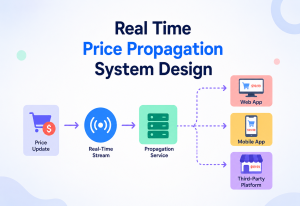
A load balancer distributes incoming synchronous requests across multiple servers in real time. A queue does something related but different: it distributes asynchronous work across multiple consumers, and — crucially — it can also delay that work if consumers are temporarily overwhelmed, something a load balancer alone cannot do (a load balancer will still send you a request even if every backend is struggling; a queue just lets the request wait).
13.4 The Transactional Outbox Pattern
A subtle but important reliability problem: what if your service updates the database and publishes a queue message, but crashes in between those two steps? You could end up with a database change that nobody ever hears about. The transactional outbox pattern solves this by writing the message into an “outbox” table in the same database transaction as the actual change, then having a separate small process reliably relay outbox rows into the real queue — guaranteeing the database and the queue never disagree.
APIs & Microservices
Queues are one of the two ways microservices talk to each other — and the one that quietly makes the whole architecture survivable.
14.1 Synchronous APIs vs. Asynchronous Queues
In a microservices architecture, services can talk to each other in two broad ways: synchronous (REST or gRPC calls that wait for a direct response) or asynchronous (publishing events to a queue, with no direct response expected). Resilient systems typically use a mix: synchronous APIs for things the user is actively waiting on (like “show me my cart”), and queues for things that can happen slightly later (like “update the recommendation engine” or “send a receipt”).
14.2 Event-driven Architecture
Queues (especially pub-sub style ones) are the backbone of event-driven architecture, where services broadcast facts about what happened (“UserSignedUp”, “PaymentFailed”, “InventoryLow”) rather than directly commanding each other. Any interested service can subscribe without the original service needing to know or change anything. This dramatically reduces the “blast radius” of adding new features — a new “send a welcome SMS” service can be added just by subscribing to the existing “UserSignedUp” topic, with zero changes to the signup service itself.
14.3 The Saga Pattern for Distributed Transactions
In a single database, you can wrap multiple changes in one atomic transaction — either everything succeeds, or everything rolls back. Across microservices, that’s not possible directly. The Saga pattern uses a sequence of queue-driven steps, each with a matching “compensating action” to undo it if a later step fails. For example: reserve inventory → charge payment → confirm order; if payment fails, a compensating “release inventory” message is published to undo the reservation. Queues are what make each step reliable and retryable.
14.4 API Gateways and Rate Limiting with Queues
Some API gateways queue incoming requests internally when backend capacity is temporarily exceeded, rather than immediately rejecting them — smoothing out short bursts while still protecting backend services, which is really the same resilience principle applied at the edge of the system instead of deep inside it.
Design Patterns & Anti-patterns
A short catalogue of the moves that repeatedly work in queue-based systems, and the ones that repeatedly cause outages.
15.1 Useful Patterns
Competing Consumers
Multiple identical consumers pull from the same queue, sharing the workload and providing redundancy — if one consumer crashes, others keep processing.
Priority Queue
Separate queues (or priority fields) let urgent messages (e.g., fraud alerts) jump ahead of routine ones (e.g., weekly digest emails).
Retry with Exponential Backoff
Instead of retrying instantly and hammering a struggling downstream service, wait progressively longer between attempts (1s, 2s, 4s, 8s…), giving it room to recover.
Circuit Breaker (paired with queues)
If a downstream dependency is clearly down, temporarily stop even trying, and let messages accumulate safely in the queue rather than burning resources on doomed attempts.
Dead-Letter Queue
Isolates permanently failing messages so they don’t block the healthy flow, while preserving them for investigation instead of silently dropping them.
Outbox Pattern
Guarantees a database change and a queue message are never inconsistent with each other, even across crashes.
15.2 Anti-patterns to Avoid
Using a queue as a database. Queues are for transient work, not long-term storage or complex querying. If you find yourself needing to “search” the queue for a specific message, that’s a sign you need a database instead.
Ignoring idempotency. Assuming a message will only ever be processed exactly once is one of the most common — and most damaging — mistakes in queue-based systems, because at-least-once delivery is the norm, not the exception.
No dead-letter queue. Without one, a single malformed or “poison pill” message can be retried forever, wasting resources and sometimes blocking the queue entirely, depending on the broker’s ordering guarantees.
Giant messages. Cramming large payloads (like whole file contents) into a message instead of just a reference (like a link to file storage) bloats the broker and slows everything down. Store the large blob elsewhere and put only a pointer in the message.
Overusing synchronous request-response over a queue. Sometimes teams build an async “request” queue and then make the caller block, waiting for a “response” message — recreating a slow, fragile synchronous call while paying all the complexity cost of a queue. If you need an immediate answer, a direct API call is usually simpler and more appropriate.
Best Practices & Common Mistakes
The short version: idempotent consumers, DLQs with alerts, small self-contained messages, versioned schemas, correlation IDs, sensible visibility timeouts, and load testing under real backlog conditions.
16.1 Best Practices
- Design consumers to be idempotent from day one — treat duplicate delivery as the normal case, not a rare edge case.
- Always configure a dead-letter queue with a sensible retry limit, and actually monitor it — an unmonitored DLQ is just a slower way to lose data.
- Keep messages small and self-contained; reference large data instead of embedding it.
- Version your message schemas and maintain backward compatibility so rolling deployments never break in-flight messages.
- Add correlation IDs to every message for tracing across the whole system.
- Set realistic visibility timeouts — too short causes duplicate processing from premature redelivery; too long delays recovery when a consumer really has crashed.
- Load test with realistic backlog scenarios, not just steady-state traffic — resilience is proven under stress, not calm conditions.
- Alert on queue depth and message age, not just error counts — a silently growing backlog is often the earliest sign of trouble.
16.2 Common Mistakes
- Forgetting that “at-least-once” is the practical default and writing consumers that assume single delivery.
- Not setting a maximum retry count, letting a broken message retry forever and burn resources.
- Coupling the message schema too tightly to internal database structures, making future refactors painful.
- Treating queue-based systems as if they were perfectly ordered by default, when many brokers only guarantee order within a partition or not at all globally.
- Skipping monitoring until after the first major incident — by which point the cost of the outage has already been paid.
Real-World Industry Examples
These aren’t abstract patterns — every large system you use every day is built on some variant of them.
17.1 Netflix
Netflix relies heavily on asynchronous, queue-and-event-driven pipelines for tasks like video encoding, content recommendations, and telemetry processing. When a new title is uploaded, a chain of background jobs — transcoding into dozens of formats and resolutions — is coordinated through message-driven workflows rather than one giant synchronous pipeline, so a slow or failing step (say, one resolution’s encode fails) doesn’t block the rest, and can be retried independently.
17.2 Amazon
Amazon’s own retail platform and AWS itself are famously built on decoupled, queue-based services — SQS was created internally at Amazon before becoming a public AWS product, specifically because order processing, inventory updates, and shipping notifications needed to survive partial outages without stalling the entire checkout experience during massive events like Prime Day.
17.3 Uber
Uber processes enormous volumes of real-time events — ride requests, driver location updates, pricing calculations — through Kafka-based event-streaming pipelines, allowing many independent teams (pricing, matching, fraud detection, analytics) to consume the same stream of events without any of them blocking or slowing down the ride-matching system itself.
17.4 LinkedIn
LinkedIn created Apache Kafka specifically to handle the firehose of activity data (views, likes, connections) flowing between its many internal systems, replacing a tangle of fragile point-to-point integrations with one durable, replayable, and highly resilient central nervous system for the whole company’s data.
17.5 Banking & Financial Systems
Traditional banks have relied on message queues like IBM MQ for decades to move transactions reliably between mainframes, branch systems, and card networks — resilience here isn’t optional, since a lost transaction message could mean real money silently vanishing, which is why these systems place enormous emphasis on guaranteed, exactly-once-style delivery and thorough auditing.
Netflix
Queue-driven video encoding and telemetry — a stuck resolution encode never blocks the rest.
Amazon
SQS was born inside Amazon Retail so Prime Day traffic couldn’t stall checkout.
Uber
Kafka event streams let pricing, matching, and fraud detection consume the same firehose independently.
Kafka was invented here to replace fragile point-to-point integrations with a single durable log.
Banking
IBM MQ has moved money reliably between mainframes and card networks for decades.
Frequently Asked Questions
The questions engineers ask most often when they first meet queues — answered plainly.
Q: Is a message queue the same thing as a database table used for job tracking?
No. A database table can technically be used to simulate a queue (often called “polling the jobs table”), but real message-queue systems are purpose-built for fast, safe hand-off of work — with native support for visibility timeouts, retries, and efficient “give me the next item” operations at high concurrency, which a plain database table struggles to do well at scale.
Q: Does adding a queue make my system slower?
For the specific request that publishes the message, no — it typically gets faster, because the producer no longer waits for the full downstream work to complete. The overall end-to-end completion of the background task takes some extra time compared to doing it instantly and synchronously, but that delay is usually invisible or acceptable to the user, and it’s a small price for far greater resilience.
Q: Can a queue guarantee messages are processed in the exact order they were sent?
It depends on the broker and configuration. Some queues (like SQS FIFO queues, or Kafka within a single partition) guarantee strict order. Standard, highly parallel queues generally trade strict ordering for higher throughput, since enforcing a strict global order limits how much you can parallelize.
Q: What happens if the queue itself goes down?
In a well-designed production setup, the broker itself is clustered and replicated, so a single node failure doesn’t take the whole queue down. A total, simultaneous failure of an entire managed queue service is rare but not impossible — which is why some extremely high-resilience systems add further layers like local buffering at the producer or multi-region failover.
Q: Do I need a message queue for a small application?
Often not right away. Queues add real operational complexity, so many small systems are better served by simple background job runners or even direct synchronous calls until traffic, team size, or reliability requirements grow enough to justify the added infrastructure.
Q: How is Kafka different from a “traditional” queue like RabbitMQ or SQS?
Traditional queues typically delete a message once it’s successfully consumed. Kafka instead keeps messages in a durable, ordered log for a configurable retention period (hours, days, or forever), and consumers simply track their own “read position” (offset) in that log. This lets multiple independent consumer groups replay the same history at different times, which is powerful for analytics and rebuilding state, though it’s a different mental model than a simple task queue.
Summary & Key Takeaways
If you remember nothing else, remember this: a queue is a shock absorber. It buys you time when things break, and it lets pieces of the system fail without dragging the rest down with them.
Key Takeaways
- A queue is a waiting line for units of work (messages), sitting between producers (who create work) and consumers (who do the work).
- Resilience problems in distributed systems usually come from tight coupling, mismatched speeds, sudden traffic spikes, and inevitable partial failures — and a queue directly addresses all four.
- By decoupling producers from consumers, queues stop a slow or broken downstream service from cascading backward and breaking everything upstream of it.
- Buffering absorbs traffic spikes; retries and visibility timeouts recover automatically from transient failures; dead-letter queues isolate permanently broken messages instead of letting them block healthy traffic.
- Delivery guarantees (at-most-once, at-least-once, exactly-once) and idempotency are essential concepts — most real systems use at-least-once delivery, so consumers must be built to safely handle duplicates.
- Queues enable horizontal scaling of consumers, load leveling, and patterns like the Saga pattern for reliable distributed transactions across microservices.
- Real resilience also requires proper monitoring (queue depth, message age, DLQ size), security (authentication, encryption, validation), and thoughtful deployment (replication, multi-AZ, and sometimes multi-region).
- Companies like Netflix, Amazon, Uber, and LinkedIn rely on queue-and-event-driven architectures precisely because they let independent teams and services fail, recover, and scale without dragging the rest of the system down with them.
- The core trade-off: queues exchange a bit of simplicity and instant consistency for a large, durable gain in resilience, scalability, and the ability to keep serving users even when parts of the system are struggling.
19.1 Where to Go From Here
Once you’re comfortable with the concepts in this guide, the natural next steps are: standing up a small local broker (RabbitMQ or Kafka in Docker) and building a toy producer/consumer against it, so the timing and back-pressure become tangible rather than abstract; reading one broker’s design paper end-to-end (Kafka’s original paper is short and unusually readable); and studying post-incident writeups from teams whose outages traced back to queue misuse — unmonitored DLQs, missing idempotency, or overloaded consumers — since those are exactly the failure modes this guide describes in the abstract. Reading how experienced teams reasoned through those failures is one of the fastest ways to deepen real-world resilience intuition beyond what any single guide can cover.

