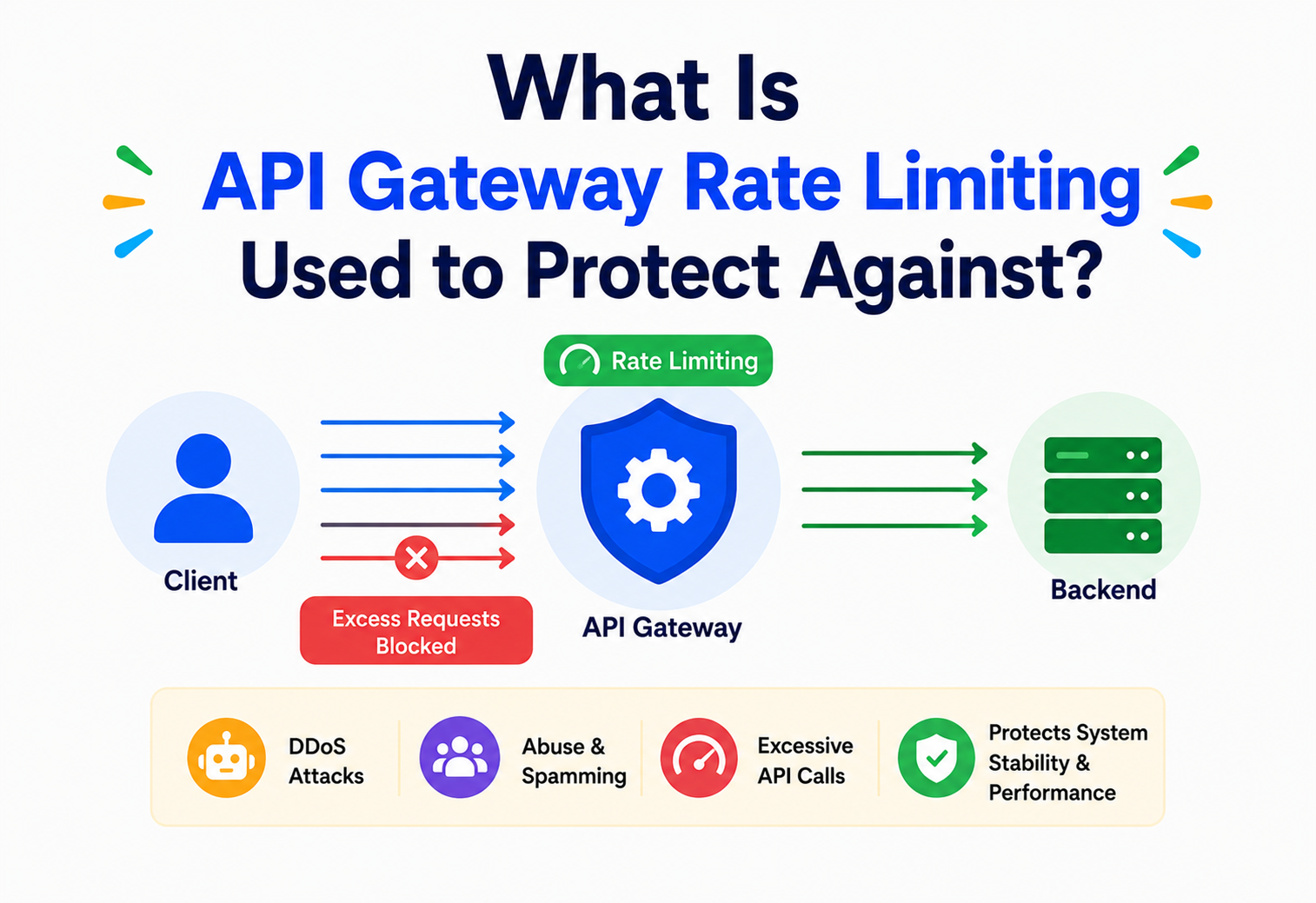
What Is API Gateway Rate Limiting Used to Protect Against?
A complete, beginner-to-production guide to rate limiting at the API gateway layer — why it exists, the threats and failure modes it defends against, the algorithms that implement it (fixed window, sliding window, token bucket, leaky bucket), and how companies like Stripe, GitHub, Netflix and Shopify run it at scale.
Introduction & History
Every popular API eventually meets the same problem: too many requests, arriving faster than the system can safely handle them. Rate limiting is the technique of controlling how many requests a client — a user, a device, an API key, or an IP address — is allowed to make within a given time window. When rate limiting is enforced at the API gateway, the single front door through which all external traffic enters a system, it becomes a first line of defense that protects everything sitting behind it: services, databases, queues, and third-party integrations.
The idea of throttling traffic is not new. Telecommunications networks used traffic shaping and leaky bucket algorithms in the 1980s and 1990s to keep voice and data traffic from overwhelming shared network links. As the web matured and public APIs became common — think Twitter’s API in the mid-2000s, or Google Maps — the same idea was repurposed for HTTP traffic. Twitter’s now-famous X-Rate-Limit-Remaining headers, introduced in its API, became one of the earliest widely-recognised examples of rate limiting exposed directly to API consumers.
As architectures shifted from monoliths to microservices in the 2010s, a new problem emerged: dozens or hundreds of internal services, all reachable through internal networks, all vulnerable to being overwhelmed by a single misbehaving client or a runaway internal job. The API gateway pattern — a single, well-guarded entry point in front of many backend services — became the natural place to centralise rate limiting, alongside authentication, routing, and request transformation. Today, rate limiting at the gateway is considered a baseline requirement for any public-facing or even internal-facing API platform.
Think of a busy restaurant with a single host stand at the entrance. If the host let every walk-in group inside the moment they arrived, the kitchen would be flooded with orders it cannot cook, servers would be overwhelmed, and the whole dining room would grind to a halt. Instead, the host manages a waitlist and seats groups at a pace the kitchen can handle. The host stand is the API gateway; the pace of seating is the rate limit; the kitchen and servers are your backend services.
It’s worth being precise about vocabulary here, because the industry uses several closely related words almost interchangeably, which can confuse beginners. Rate limiting is the general practice of capping request volume for a given client over a given window. Throttling is often used specifically for the enforcement action — slowing or delaying requests rather than flatly rejecting them. Quota management usually refers to longer-horizon caps, such as a monthly API call allowance tied to a billing plan, layered on top of short-window rate limits. All three work together in a mature API platform, but this guide focuses specifically on the short-window, requests-per-second-or-minute style of rate limiting enforced at the API gateway layer, and on the concrete threats that specific mechanism protects a system against.
Understanding why this capability lives at the gateway — rather than being left to each individual backend team to implement independently — is the thread that runs through the rest of this article. The gateway is architecturally the earliest possible point in a request’s journey where a decision to reject can be made, and that early rejection is precisely what turns rate limiting from a nice-to-have into a genuine protective control rather than a purely cosmetic one.
The Problem & Motivation
Without any limit on incoming requests, an API is exposed to a simple but dangerous truth: clients are not obligated to be well-behaved. A client might be malicious (an attacker probing for vulnerabilities), careless (a developer’s retry loop with no backoff), or simply successful beyond expectations (a viral feature suddenly driving ten times normal traffic). In every one of these cases, the backend systems can be pushed past their capacity.
When that happens, several things tend to go wrong at once:
- Resource exhaustion — CPU, memory, database connections, and thread pools fill up.
- Increased latency — requests start queueing, and response times climb for every client, not just the offending one.
- Cascading failures — one overwhelmed service causes timeouts in the services that call it, which in turn causes failures further up the chain.
- Unpredictable cost — cloud infrastructure that autoscales in response to load can generate a very large bill in a very short time.
- Unfair resource allocation — a single noisy client can starve every other client of capacity, even well-behaved ones.
The motivation for rate limiting at the gateway, specifically, is centralisation. Enforcing limits inside every individual microservice means every team has to implement, test, and maintain the same logic — and inconsistencies between services create gaps attackers can exploit. Enforcing it once, at the edge, before a request ever reaches internal services, is simpler, more consistent, and far cheaper: a rejected request at the gateway costs almost nothing, while a rejected request deep inside the call graph has already consumed database connections, thread pool slots, and network bandwidth on its way there.
Scaling out backend capacity helps with legitimate traffic growth, but it does not solve abusive or runaway traffic — it only raises the cost of the problem. A determined attacker, or a buggy retry loop, will happily consume however much capacity you provision. Rate limiting addresses the traffic pattern itself, not just the capacity behind it.
Where the fix belongs: the “shift left” argument for gateway-level enforcement
A useful mental model is to picture every request as travelling through a chain of components: network, load balancer, gateway, service, cache, database. Every component the request passes through before being rejected represents wasted work. If a malicious or excessive request is only rejected inside a downstream microservice — after authentication, after a database connection has been checked out, after business logic has partially executed — the system has already paid almost the full cost of serving that request, only to throw the result away.
“Shifting left” means moving the rejection decision as early in that chain as practically possible. The API gateway, sitting right after the network layer and before any backend service is touched, is the earliest point where the system has enough information (who is the client, what are they asking for, how many times have they asked recently) to make that decision. This is the core architectural motivation for centralising rate limiting at the gateway rather than scattering it — inconsistently — across every individual service.
Imagine an e-commerce checkout API without any rate limiting. A poorly written mobile app update accidentally retries a failed payment request every 100 milliseconds instead of backing off. Within a minute, that single buggy client has generated over 500 requests, each one attempting to open a new database connection to check inventory and charge a card. Multiply this by a few thousand users who received the same buggy update, and the payments database connection pool — sized for normal traffic — is exhausted, and checkout fails for every customer on the platform, not just the ones running the buggy app.
Core Concepts
What is a rate limit?
A rate limit is a rule of the form: “this client may make at most N requests per time window T.” For example, “100 requests per minute per API key” or “5 login attempts per 15 minutes per IP address.” The gateway tracks how many requests each client has made recently and rejects (or delays) requests that would exceed the configured limit.
Key terms explained
| Term | What it means | Why it matters |
|---|---|---|
| Client identifier | The value used to group requests — API key, user ID, IP address, or a combination | Determines who the limit applies to |
| Window | The period of time over which requests are counted (e.g., 1 minute, 1 hour) | Defines how “bursty” traffic can be |
| Quota / Limit | The maximum number of requests allowed per window | The actual ceiling enforced |
| Burst | A short spike of requests exceeding the average rate | Some algorithms tolerate bursts, others don’t |
| Throttling | Slowing down or delaying requests instead of rejecting them outright | A softer alternative to hard rejection |
| 429 Too Many Requests | The standard HTTP status code returned when a limit is exceeded | Tells the client exactly what happened |
| Retry-After header | Tells the client how long to wait before retrying | Enables well-behaved clients to back off correctly |
Imagine a free weather API that allows 60 requests per minute per API key. If your script calls it 61 times in one minute, the 61st call receives an HTTP 429 response instead of weather data, along with a header telling you to wait a few seconds before trying again.
Stripe’s public API documents specific rate limits per account (commonly around 100 read and 100 write requests per second in live mode, higher in test mode), and returns a 429 with guidance to implement exponential backoff — a pattern widely copied across the industry because it works.
Rate limiting vs. related concepts
| Concept | Purpose | How it differs from rate limiting |
|---|---|---|
| Throttling | Slow down traffic smoothly | Often implemented using rate limiting, but focuses on shaping rather than hard cutoffs |
| Circuit breaker | Stop calling a failing downstream service | Reacts to downstream health, not client request volume |
| Load balancing | Distribute traffic across instances | Spreads load; doesn’t cap total volume |
| Quota management | Long-term usage caps (e.g., monthly) | Business-level limits, often layered on top of rate limiting |
| Bulkheading | Isolate resource pools per client/service | Limits blast radius rather than request rate directly |
Standard rate-limit response headers
Most APIs that implement rate limiting expose the client’s current status through response headers, so well-behaved clients can adapt their behaviour without ever hitting a hard rejection. While exact header names vary between providers, the concepts are consistent:
| Header (common convention) | Meaning |
|---|---|
X-RateLimit-Limit | The total quota allowed for the current window |
X-RateLimit-Remaining | How many requests are left before the limit is hit |
X-RateLimit-Reset | When the window resets (often a Unix timestamp) |
Retry-After | Seconds to wait before retrying, sent alongside a 429 response |
A well-designed SDK reads X-RateLimit-Remaining proactively and slows its own request rate before ever receiving a 429 — this is far friendlier to both the client and the server than reacting only after being rejected.
Architecture & Components
An API gateway sits between clients and backend services. Rate limiting is one of several cross-cutting concerns it typically handles, alongside authentication, TLS termination, routing, and request/response transformation.
Core components of a rate-limiting subsystem
- Identifier extractor — pulls the client identity from the request (API key, JWT claim, IP address).
- Rule engine — decides which limit rules apply to this request (per-route, per-plan, per-tenant).
- Counter store — tracks how many requests a client has made in the current window. Often an in-memory cache like Redis, since it must support extremely fast increments.
- Decision point — compares the current count against the limit and allows or rejects the request.
- Response writer — attaches rate-limit headers and, if rejected, returns a
429with a clear body andRetry-Afterheader.
The rule engine is like the restaurant’s seating policy (“parties of 6+ need a reservation”); the counter store is the host’s notepad tracking how many tables are currently occupied; the decision point is the host glancing at that notepad before waving the next group in.
Where rate limiting fits among the gateway’s other responsibilities
A modern API gateway is rarely a single-purpose tool. It typically bundles together several cross-cutting concerns that would otherwise need to be duplicated in every backend service:
- TLS termination — decrypting HTTPS traffic once, at the edge.
- Authentication & authorisation — validating API keys, JWTs, or OAuth tokens.
- Routing — directing requests to the correct backend service based on path, host, or headers.
- Rate limiting & throttling — the focus of this article.
- Request/response transformation — reshaping payloads, adding or stripping headers.
- Observability — centralised logging, tracing, and metrics for every request that enters the system.
Rate limiting typically executes early in this pipeline — usually right after (or alongside) authentication, since knowing who the client is often determines which limit applies to them. An unauthenticated request might fall back to a stricter, IP-based limit, while an authenticated request gets a limit tied to its account’s subscription plan.
Internal Working: Rate Limiting Algorithms
There are four algorithms that show up in almost every rate limiting implementation. Understanding their trade-offs is essential, because the choice of algorithm directly determines what kind of abusive traffic pattern the gateway can — and cannot — protect against.
1. Fixed Window Counter
Divide time into fixed windows (e.g., every 00–59 seconds of a minute). Count requests per client per window; reset the counter when the window changes.
public class FixedWindowRateLimiter {
    private final int limit;
    private final long windowMillis;
    private final Map<String, WindowCounter> counters = new ConcurrentHashMap<>();

    public FixedWindowRateLimiter(int limit, long windowMillis) {
        this.limit = limit;
        this.windowMillis = windowMillis;
    }

    public boolean allowRequest(String clientId) {
        long now = System.currentTimeMillis();
        WindowCounter counter = counters.computeIfAbsent(clientId,
            k -> new WindowCounter(now));

        synchronized (counter) {
            if (now - counter.windowStart >= windowMillis) {
                counter.windowStart = now;
                counter.count = 0;
            }
            if (counter.count < limit) {
                counter.count++;
                return true;
            }
            return false;
        }
    }

    private static class WindowCounter {
        long windowStart;
        int count = 0;
        WindowCounter(long start) { this.windowStart = start; }
    }
}
Weakness: a client can send its full quota right at the end of one window and its full quota again right at the start of the next, doubling the effective burst at the window boundary. For example, with a limit of 100 requests per minute, a client could send 100 requests at 0:59 and another 100 at 1:00 — 200 requests in a two-second span — while technically never exceeding the stated limit in either window. For workloads where burst control genuinely matters (protecting a fragile downstream dependency, for instance), this boundary effect is a real gap, not just a theoretical curiosity, which is why sliding window and token bucket approaches are generally preferred for anything more than the simplest use cases.
2. Sliding Window Log / Counter
Instead of resetting sharply, track requests over a rolling window that “slides” continuously, smoothing out the boundary problem. A common efficient variant blends the previous and current fixed windows using a weighted estimate.
public boolean allowRequest(String clientId, long now) {
    long currentWindowStart = now - (now % windowMillis);
    long previousWindowStart = currentWindowStart - windowMillis;

    int currentCount = getCount(clientId, currentWindowStart);
    int previousCount = getCount(clientId, previousWindowStart);

    double elapsedInCurrent = (now - currentWindowStart) / (double) windowMillis;
    double weightedCount = previousCount * (1 - elapsedInCurrent) + currentCount;

    if (weightedCount < limit) {
        incrementCount(clientId, currentWindowStart);
        return true;
    }
    return false;
}
3. Token Bucket
Each client has a “bucket” that holds tokens, refilled at a steady rate up to a maximum capacity. Every request consumes one token; if the bucket is empty, the request is rejected. This naturally allows short bursts (as long as tokens have accumulated) while enforcing a long-term average rate.
public class TokenBucket {
    private final long capacity;
    private final double refillTokensPerMillis;
    private double tokens;
    private long lastRefillTimestamp;

    public TokenBucket(long capacity, double refillTokensPerSecond) {
        this.capacity = capacity;
        this.tokens = capacity;
        this.refillTokensPerMillis = refillTokensPerSecond / 1000.0;
        this.lastRefillTimestamp = System.currentTimeMillis();
    }

    public synchronized boolean tryConsume() {
        refill();
        if (tokens >= 1) {
            tokens -= 1;
            return true;
        }
        return false;
    }

    private void refill() {
        long now = System.currentTimeMillis();
        double tokensToAdd = (now - lastRefillTimestamp) * refillTokensPerMillis;
        tokens = Math.min(capacity, tokens + tokensToAdd);
        lastRefillTimestamp = now;
    }
}It is simple, memory-efficient (just two numbers per client), and it models real-world traffic well: brief bursts are fine, sustained abuse is not. This is the algorithm behind most cloud API gateways, including AWS API Gateway’s default throttling behaviour.
4. Leaky Bucket
Requests enter a queue (the “bucket”) and are processed (“leaked”) at a constant rate. If the queue is full, new requests overflow and are rejected. Unlike token bucket, leaky bucket enforces a smooth, constant output rate rather than permitting bursts.
public class LeakyBucket {
    private final int capacity;
    private final double leakRatePerMillis;
    private double waterLevel = 0;
    private long lastLeakTimestamp = System.currentTimeMillis();

    public LeakyBucket(int capacity, double leakRatePerSecond) {
        this.capacity = capacity;
        this.leakRatePerMillis = leakRatePerSecond / 1000.0;
    }

    public synchronized boolean tryAdd() {
        leak();
        if (waterLevel < capacity) {
            waterLevel += 1;
            return true;
        }
        return false; // bucket overflowed, reject request
    }

    private void leak() {
        long now = System.currentTimeMillis();
        double leaked = (now - lastLeakTimestamp) * leakRatePerMillis;
        waterLevel = Math.max(0, waterLevel - leaked);
        lastLeakTimestamp = now;
    }
}
Leaky bucket is the algorithm of choice when the priority is protecting a fragile downstream dependency that genuinely cannot handle any burst at all — for example, a legacy mainframe integration or a third-party payment processor with a strict, unforgiving per-second cap. Token bucket, by contrast, is preferred when the goal is fairness and burst tolerance for a typical web or mobile client.
Distributed rate limiting across many gateway instances
Every algorithm above is easy to reason about on a single machine, but production gateways almost never run as a single instance — they run as a fleet behind a load balancer, for redundancy and scale. This introduces a real problem: if each gateway instance keeps its own local counters in memory, a client could be routed to five different instances and effectively get five times its intended limit, since no single instance ever sees the client’s full request volume.
The standard solution is to move the counters out of each gateway instance’s local memory and into a shared, centralised store — almost always Redis, because it offers atomic increment operations with sub-millisecond latency at very high throughput. Every gateway instance, regardless of which one a given request lands on, reads and writes the same counter for a given client, giving a globally accurate count.
| Algorithm | Allows bursts? | Memory cost | Best for |
|---|---|---|---|
| Fixed Window | Yes (at boundaries — a flaw) | Very low | Simple, coarse limits |
| Sliding Window | Controlled | Low–medium | Accurate general-purpose limiting |
| Token Bucket | Yes (by design) | Very low | APIs that tolerate short bursts |
| Leaky Bucket | No — smooths output | Medium (queue) | Protecting fragile downstream systems |
Data Flow & Lifecycle of a Rate-Limited Request
Notice that the counter check happens before the request is forwarded to any backend service. This ordering is exactly what makes gateway-level rate limiting protective rather than merely observational — rejected requests never touch the database, never occupy an application thread, and never appear in backend logs as load.
What Rate Limiting at the Gateway Protects Against
This is the central question. Rate limiting is not a single-purpose tool — it is a general defense mechanism that happens to address several very different threats and failure modes, all by controlling the same underlying variable: request volume per client over time.
1. Denial-of-Service (DoS) and Distributed Denial-of-Service (DDoS) attacks
An attacker (or a botnet of many compromised machines) floods an API with requests intending to exhaust its capacity so legitimate users cannot be served. Per-client and per-IP rate limits cap how much damage any single source can do, and combined with upstream network-level DDoS protection (like a CDN or scrubbing service), they form a layered defense.
It’s important to be honest about the limits of this protection. A gateway-level rate limit is extremely effective against a single attacking IP or a modest botnet, because each individual source is capped. It is much less effective, on its own, against a truly massive distributed attack spread across tens of thousands of unique IP addresses, since each one might individually stay under the per-IP threshold while the aggregate traffic is still enormous. This is precisely why production systems layer gateway rate limiting underneath, not instead of, network- and CDN-level DDoS scrubbing that can look at aggregate traffic patterns across the entire platform rather than one client at a time.
2. Brute-force and credential-stuffing attacks
Login endpoints, password reset endpoints, and OTP verification endpoints are prime targets for attackers guessing credentials or one-time codes. A strict rate limit — for example, 5 login attempts per 15 minutes per IP and per account — makes brute-forcing computationally impractical without meaningfully affecting real users.
Credential stuffing is a related but distinct attack worth calling out specifically: instead of guessing passwords for one account, the attacker takes a large list of username/password pairs leaked from some unrelated breach and tries them, at scale, against your login endpoint, betting that some fraction of users reused the same password elsewhere. Because each guess targets a different account, a naive per-account rate limit does little to stop it — the attacker never exceeds the per-account threshold for any single account. Effective defense here usually combines a per-IP rate limit (since the attack still originates from a limited pool of source addresses or proxies) with additional signals like device fingerprinting and CAPTCHA challenges once suspicious velocity is detected.
Without rate limiting, an attacker’s script could try thousands of password guesses per second against a login endpoint. With a limit of 5 attempts per 15 minutes, the same attack would take years to have any meaningful chance of success.
3. Resource exhaustion in backend services
Databases have a finite connection pool. Thread pools have a finite size. Even a burst of entirely legitimate traffic can exhaust these resources, causing timeouts and errors for everyone — not just the client generating the burst. Rate limiting keeps aggregate load within a range the backend was actually provisioned to handle.
It helps to think about capacity planning as a promise: when a team provisions a database with, say, a 200-connection pool, they are implicitly promising that the system can safely handle the load that generates. Every request that bypasses rate limiting and reaches that database is, in effect, cashing a check against that promise. Rate limiting is what makes the promise enforceable — without it, the actual load the system experiences is determined entirely by client behaviour, not by anything the backend team decided during capacity planning.
4. Cascading failures across microservices
In a microservices architecture, an overloaded downstream service causes calling services to queue or time out, which then causes their callers to queue or time out, and so on up the call graph — a domino effect that can take down an entire platform from a single overloaded component. Rate limiting at the edge prevents excess load from ever entering the system in the first place, reducing the chance this chain reaction starts.
This failure mode deserves special attention because it is often the most damaging in practice — a single overloaded service can, within seconds, degrade a system that was otherwise completely healthy. Thread pools are a common trigger: if Service A calls Service B synchronously, and Service B starts responding slowly under load, every thread in Service A that is waiting on a response from B eventually gets tied up. Once Service A’s thread pool is exhausted, it can no longer serve any request — including requests that have nothing to do with Service B — because there are simply no threads left to handle them. Rate limiting at the gateway reduces the odds that Service B ever gets pushed into that slow, degraded state to begin with, which in turn protects every other service that depends on it, directly or transitively.
5. API scraping and unauthorised data harvesting
Bots that scrape product catalogs, pricing data, or user-generated content at high speed can be slowed to a crawl by rate limits, making large-scale scraping economically unattractive even if it’s not fully prevented.
Consider a travel booking site whose entire competitive advantage rests on its pricing data. Without rate limiting, a competitor could write a script that queries every route and date combination, effectively mirroring the site’s entire pricing database within hours. With a rate limit of, say, 20 requests per minute per IP on the pricing endpoint, the same scrape would take weeks, during which time prices have already changed many times over — turning a one-time data theft into a far less useful, constantly-stale snapshot. Rate limiting doesn’t make scraping impossible, but it changes the economics enough that it’s often no longer worth attempting.
6. The “noisy neighbour” problem in multi-tenant systems
In a shared, multi-tenant platform, one customer’s traffic spike should never degrade service for every other customer. Per-tenant rate limits guarantee fair allocation of shared capacity, which is why virtually every SaaS API with tiered plans (free/pro/enterprise) enforces different limits per plan.
This matters even when every “noisy” client is completely legitimate. Imagine a project-management SaaS product where one enterprise customer runs a nightly batch job that syncs 50,000 tasks through the public API. Without per-tenant limits, that single sync job could saturate the shared API infrastructure for the ten minutes it runs, causing timeouts for every other customer trying to use the product at the same time — none of whom did anything wrong. Per-tenant rate limiting, often paired with per-tenant capacity planning, ensures that one customer’s usage pattern, however legitimate, cannot degrade the experience of every other customer sharing the same infrastructure.
7. Unbounded infrastructure cost
Cloud-native architectures that autoscale in response to load can generate very large bills if traffic is allowed to grow without limit — whether from a genuine viral spike or from a bug in a client’s retry logic. Rate limiting puts a predictable ceiling on the load the backend will ever process, and therefore on the cost of serving it.
This is a subtler protection than it might first appear. Autoscaling is usually framed as a purely positive capability — the system grows to meet demand — but from a cost-control perspective, unbounded autoscaling in response to any traffic pattern, including abusive or accidental traffic, is a liability. A rate limit effectively caps the maximum possible autoscaling trigger from any single client, converting an open-ended cost risk into a bounded, predictable one that finance and engineering teams can actually plan around.
8. Third-party and downstream dependency protection
APIs often call out to third-party services (payment processors, SMS gateways, external data providers) that themselves enforce rate limits and charge per call. Gateway-level limiting prevents a bug or an attack from silently running up massive third-party bills or getting the platform’s own API key banned for exceeding someone else’s limits.
This protection cuts in an interesting direction: it’s not just about capacity, it’s about liability. If an internal client bug causes 100,000 unnecessary SMS messages to be sent through a third-party provider that charges per message, the resulting bill is a direct, measurable financial loss — and if it happens fast enough, that provider may also suspend the account entirely for anomalous usage, breaking the feature for every legitimate user at the same time. Rate limiting the internal path that triggers those outbound calls, right at the gateway, is often the cheapest and most reliable way to put a hard ceiling on that exposure.
9. Accidental self-inflicted overload (“bad client” bugs)
Not every dangerous traffic pattern is malicious. A client with a retry loop that lacks exponential backoff, or a cron job accidentally scheduled to run every second instead of every hour, can generate damaging load purely by accident. Rate limiting protects against these just as effectively as it protects against intentional attacks.
This is worth emphasising because it’s easy to mentally file rate limiting purely under “security,” when in practice, the majority of incidents it actually prevents in most organisations are accidental rather than malicious. A misconfigured deployment that causes a service to retry every failed call in a tight loop, a mobile app that polls too aggressively after a bug fix, or a well-intentioned internal script that someone forgot to add pagination to — these mundane, everyday mistakes are exactly the traffic patterns rate limiting is quietly absorbing on a regular basis, long before any headline-worthy attack ever occurs.
| Threat / Failure Mode | How rate limiting helps |
|---|---|
| DDoS / volumetric attacks | Caps requests per source, reducing attacker impact |
| Brute-force login attempts | Makes credential guessing computationally infeasible |
| Resource exhaustion | Keeps load within provisioned capacity |
| Cascading failures | Stops overload before it propagates downstream |
| Scraping / data harvesting | Slows bulk automated extraction |
| Noisy neighbour | Guarantees fair capacity across tenants |
| Runaway cloud costs | Bounds the maximum load, and therefore cost |
| Third-party quota violations | Prevents exceeding external API limits |
| Buggy retry loops | Contains accidental self-inflicted floods |
GitHub’s REST API enforces both authenticated (5,000 requests/hour for standard users) and unauthenticated (60 requests/hour) rate limits, explicitly to keep the platform stable for millions of concurrent integrations, CI pipelines, and scripts hitting the same shared infrastructure.
Pros, Cons & Trade-offs
| Pros | Cons / Trade-offs |
|---|---|
| Protects backend services from overload | Adds a small amount of latency per request (a counter check) |
| Provides fair access across clients/tenants | Misconfigured limits can block legitimate traffic |
| Reduces blast radius of attacks and bugs | Requires a fast, highly-available counter store |
| Bounds infrastructure and third-party costs | Distributed rate limiting across many gateway nodes is non-trivial |
| Gives clients clear, actionable feedback (429 + Retry-After) | Choosing the “right” limit values requires ongoing tuning |
Set limits too low, and legitimate power users or integrations get throttled, generating support complaints. Set them too high, and the protection becomes symbolic rather than real. Most mature platforms solve this with tiered limits (by plan) plus a documented process for requesting higher limits.
There is also a less obvious trade-off around where the limit is enforced within a request’s lifecycle. Rejecting a request purely based on request count, without any understanding of how expensive that particular request actually is, treats a cheap “get my profile” call the same as an expensive “generate a 500-page report” call. Some platforms address this with cost-weighted rate limiting, where different endpoints consume different amounts of quota per call — a pattern used by GitHub’s GraphQL API, which assigns a calculated “point cost” to each query based on its complexity rather than counting every query as a single unit. This adds implementation complexity but produces a far more accurate reflection of actual backend load.
Performance & Scalability
A rate limiter that itself becomes a bottleneck defeats its own purpose. Performance considerations include:
- Counter store latency — every request typically requires at least one read/write to the counter store. Using an in-memory store like Redis, with sub-millisecond operations, keeps this overhead negligible.
- Distributed counting — when the gateway runs as many parallel instances, all instances must agree on the current count for a client. This is usually solved by centralising counters in a shared store (Redis) rather than keeping them in each gateway instance’s local memory.
- Approximate vs. exact counting — at very high scale, some systems trade perfect accuracy for speed, using local counters with periodic synchronisation (“eventually consistent” rate limiting) rather than a strict global count on every request.
Incrementing a counter and checking it against a limit must be atomic to avoid race conditions between concurrent requests. Redis’s INCR combined with EXPIRE, or a small Lua script executed atomically, is the standard approach.
At very high scale — think platforms processing hundreds of thousands of requests per second — even a sub-millisecond round trip to a shared counter store on every single request can add up to meaningful load on that store itself. Some systems address this with local approximate counting: each gateway instance keeps a local, in-memory counter and only periodically synchronises with the shared store (say, every few hundred milliseconds), accepting a small amount of temporary over-counting in exchange for dramatically reduced load on the shared infrastructure. This is a deliberate accuracy-for-throughput trade-off, and it’s the right choice when the limit is meant to provide broad protection against large-scale abuse rather than enforcing an exact quota to the last request.
High Availability & Reliability
Because the rate limiter sits directly in the request path, its own availability matters enormously. If the counter store goes down, the gateway must have a defined fail-open or fail-closed policy:
- Fail-open — if the counter store is unreachable, allow the request through. Prioritises availability over strict protection.
- Fail-closed — if the counter store is unreachable, reject the request. Prioritises protection over availability.
Most production systems choose fail-open for the rate limiter specifically (since a rate limiter outage should not become a full platform outage) while running the counter store itself as a highly available cluster (e.g., Redis Sentinel or Redis Cluster) to make that failure rare.
There is a subtlety worth internalising here: fail-open sounds like it defeats the entire purpose of rate limiting, but in practice it’s the more defensible default for most systems. A rate limiter outage is typically brief and infrequent if the counter store is properly clustered, whereas fail-closed turns any hiccup in that store — even a transient network blip — into an instant, platform-wide outage where every single request gets rejected, regardless of whether it came from an attacker or your most important customer. Some platforms use a hybrid approach: fail-open for a short grace period while alerting on-call engineers, and only fail-closed if the counter store remains unreachable beyond that grace period.
Security Considerations
- Correct client identification — rate limiting by IP address alone can be bypassed using proxies or large botnets; combining IP with API key or account ID gives stronger protection.
- Protect the rate-limit bypass paths — internal admin routes or health-check endpoints should not become unmonitored backdoors around the limiter.
- Don’t leak too much in headers — rate-limit headers are useful for legitimate clients but also give attackers a precise picture of the limit; some APIs deliberately return coarse-grained information for highly sensitive endpoints.
- Layer with WAF and DDoS protection — rate limiting is one layer of defense, not a replacement for a web application firewall or network-level DDoS mitigation.
It’s a common misconception among newer engineers that a strict rate limit somehow substitutes for proper authentication. It does not. A rate-limited but otherwise unauthenticated endpoint can still be probed slowly, patiently, over a long period of time, by an attacker willing to stay under the threshold. Rate limiting raises the cost and time required for an attack; it does not eliminate the need for strong authentication, input validation, and authorisation checks on every endpoint.
Monitoring, Logging & Metrics
Rate limiting is only effective if its behaviour is observable. Key metrics to track:
- Rejection rate — percentage of requests receiving 429, overall and per client/tenant.
- Top throttled clients — identifies whether limits are catching abuse or blocking legitimate heavy users.
- Counter store latency and error rate — since this is now on the critical request path.
- Limit utilisation — how close well-behaved clients typically run to their configured limit, useful for tuning.
Log every 429 response with the client identifier, route, and current count — this data is invaluable both for detecting real attacks and for spotting limits that are too aggressive for legitimate use.
A well-instrumented rate limiter also feeds directly into security monitoring. A sudden, sharp spike in 429 responses from a single client identifier, especially concentrated on sensitive endpoints like login or password reset, is a strong signal of an active attack in progress and is often wired up to trigger an automated alert or a temporary, more aggressive limit (sometimes called an “adaptive” or “dynamic” limit) for that specific client while the security team investigates.
Deployment & Cloud
Rate limiting can be implemented at multiple layers, and production systems often combine several:
| Layer | Examples | Notes |
|---|---|---|
| CDN / Edge | Cloudflare, Akamai, Fastly | Blocks volumetric attacks before they reach your infrastructure |
| Managed API Gateway | AWS API Gateway, Azure API Management, Google Apigee | Built-in throttling configured declaratively |
| Self-hosted Gateway | Kong, Nginx, Envoy, Spring Cloud Gateway | Full control; typically backed by Redis for counters |
| Service mesh | Istio, Linkerd | Rate limiting between internal services, not just at the edge |
Example: Spring Cloud Gateway with Redis-backed rate limiting
@Bean
public RedisRateLimiter redisRateLimiter() {
    // replenishRate: steady tokens/sec, burstCapacity: max bucket size
    return new RedisRateLimiter(10, 20);
}

@Bean
public RouteLocator routes(RouteLocatorBuilder builder,
                            RedisRateLimiter redisRateLimiter) {
    return builder.routes()
        .route("orders-service", r -> r.path("/api/orders/**")
            .filters(f -> f.requestRateLimiter(c ->
                c.setRateLimiter(redisRateLimiter)
                 .setKeyResolver(exchange ->
                     Mono.just(exchange.getRequest()
                         .getHeaders().getFirst("X-API-Key")))))
            .uri("lb://orders-service"))
        .build();
}Databases, Caching & Load Balancing
The counter store is almost always an in-memory cache rather than a traditional relational database, because it must support extremely high-throughput atomic increments with very low latency — capabilities that Redis (or similar in-memory stores) provide directly, while relational databases generally do not scale to this pattern efficiently. Rate limiting also interacts with load balancing: if a load balancer sends traffic unevenly to gateway nodes that maintain local-only counters, per-client limits can be silently exceeded, which is exactly why a shared, centralised counter store is standard practice for any multi-node gateway deployment.
APIs & Microservices
In a microservices architecture, rate limiting typically happens at two levels: at the edge gateway (protecting the whole platform from external clients) and, increasingly, at the service mesh level between internal services (protecting individual services from each other). This second layer matters because internal services can also misbehave — a batch job, a misconfigured internal client, or a bug can generate just as much damaging load as an external attacker.
A useful way to think about this is that “the client” from a rate limiter’s perspective doesn’t have to be an external human user at all — it can just as easily be another internal service. A recommendations service that calls a product-catalog service, for instance, benefits from a rate limit on that internal call path just as much as the public API benefits from limiting external callers, because a bug or a sudden spike in the recommendations service’s own traffic should not be allowed to take down the product catalog for the entire platform. This is one of the reasons rate limiting is increasingly treated as a general-purpose resilience pattern, not solely as an edge-security concern.
Design Patterns & Anti-Patterns
Good patterns
- Tiered limits by plan — free/pro/enterprise customers get different quotas.
- Graceful degradation — return cached or partial data instead of a hard rejection where possible.
- Exponential backoff guidance — clearly communicate
Retry-Afterso clients back off correctly instead of retrying immediately and making things worse.
Anti-patterns
- Rate limiting only by IP — easily defeated by botnets or shared corporate NAT addresses that punish many innocent users at once.
- No limit tiering — treating a trial user and an enterprise customer identically leads to either overly generous free limits or overly strict paid limits.
- Silent throttling with no headers or documentation — leaves client developers guessing why requests are failing.
- Rate limiting deep inside the call graph only — by the time an internal service rejects a request, it has already consumed gateway, network, and partial processing resources.
Best Practices & Common Mistakes
Best practices
- Enforce limits as early as possible — ideally at the gateway, before backend resources are touched.
- Use a token bucket (or similar) algorithm that tolerates short, legitimate bursts.
- Always return standard headers: remaining quota, limit, and reset time.
- Combine per-IP and per-account/API-key identification for stronger, harder-to-evade limits.
- Monitor rejection rates continuously and adjust limits based on real traffic data.
Common mistakes
- Setting a single global limit with no per-tenant fairness, allowing one client to starve others.
- Forgetting to rate-limit expensive endpoints (bulk export, search) more strictly than cheap ones.
- Not testing what happens when the counter store itself is slow or unavailable.
- Rolling out new, stricter limits without warning existing integrators in advance.
- Relying solely on client-side rate limiting (inside an SDK) without server-side enforcement — client-side logic can always be bypassed by a custom or malicious client.
- Treating rate limiting as a “set once and forget” configuration rather than revisiting it as traffic patterns and business needs evolve.
It’s easy to write a fail-open policy in code and never actually verify it works. Include a rate-limiter-outage scenario in regular chaos engineering or game-day exercises, deliberately taking the counter store offline in a staging environment to confirm the gateway behaves exactly as intended — not just as documented.
Real-World Industry Examples
| Company | How they use rate limiting |
|---|---|
| Stripe | Per-account request-per-second limits on live API calls, with documented backoff guidance |
| GitHub | Hourly quotas that differ for authenticated vs. unauthenticated requests, protecting shared infrastructure from millions of integrations |
| Netflix | Uses rate limiting and circuit breakers together across its microservices mesh to prevent cascading failures during traffic spikes |
| Shopify | Leaky-bucket-style limits on its Admin API to keep merchant storefronts stable under bulk app usage |
| Cloud providers (AWS, GCP, Azure) | Layer rate limiting at both the managed API Gateway and account/service quota levels |
These examples share a common thread worth calling out explicitly: none of these companies treat rate limiting as a purely technical, invisible implementation detail. Each of them documents their limits publicly, exposes them through response headers, and gives client developers a clear, predictable way to understand and work within those limits. This transparency is itself part of the protection — a client that understands the rules is far less likely to accidentally trigger the very failure modes rate limiting exists to prevent, which reduces support burden as much as it reduces attack surface.
A short walkthrough: rate limiting a public search endpoint
To bring the concepts together, consider a concrete scenario. A SaaS product exposes a /api/search endpoint that queries a large product catalog. This endpoint is expensive — each call touches a search index and a database — and it is also the single most likely target for scraping, since a competitor could use it to extract the entire catalog.
- Identify the client — combine the authenticated account ID (for logged-in API consumers) with the source IP (as a fallback for anonymous traffic).
- Choose an algorithm — token bucket, since occasional bursts (a user typing and re-searching quickly) are legitimate and should not be punished, but sustained high-volume querying should be.
- Set tiered limits — free-tier accounts get 30 requests/minute, paid accounts get 300 requests/minute, and enterprise accounts negotiate a custom limit.
- Return clear feedback — every response includes
X-RateLimit-Remaining; rejected requests receive a429with aRetry-Afterheader and a JSON body explaining the limit and linking to documentation. - Monitor and iterate — after launch, the team watches the rejection rate dashboard and discovers that a handful of legitimate integration partners are hitting the paid-tier limit during batch sync jobs; the team introduces a separate, higher “bulk sync” limit for a dedicated endpoint rather than raising the general search limit for everyone.
This walkthrough illustrates a point that’s easy to miss in the abstract: rate limiting is rarely a single static number chosen once and forgotten. It’s a living configuration, tuned continuously against real traffic data, real abuse attempts, and real customer feedback.
FAQ, Summary & Key Takeaways
Does rate limiting fully prevent DDoS attacks?
No. It significantly limits the damage any single client or IP can do, but large-scale volumetric DDoS attacks typically require additional network-level and CDN-based protection working alongside gateway rate limiting.
What HTTP status code should a rate-limited response use?
The standard is 429 Too Many Requests, ideally paired with a Retry-After header telling the client when it’s safe to try again.
Should rate limiting be done per IP or per API key?
Both, when possible. Per-API-key (or per-account) limiting is more accurate for authenticated traffic, while per-IP limiting adds a layer of protection against unauthenticated abuse and helps catch attacks before authentication even happens.
Is rate limiting the same as throttling?
They’re closely related. Rate limiting typically refers to the rule (how many requests are allowed), while throttling refers to the enforcement action (delaying or rejecting requests that exceed the rule).
How do I choose the right limit value for an endpoint?
Start by measuring real traffic: what does a typical, well-behaved client’s request pattern actually look like today? Set the initial limit generously above that observed pattern — enough to avoid disrupting legitimate usage — then tighten gradually while watching rejection rates and support tickets. Expensive or sensitive endpoints (bulk export, login, search) generally warrant stricter limits than cheap, frequently-polled ones (health checks, simple lookups).
Can rate limiting alone stop a sophisticated attacker?
No single control ever stops a sophisticated, motivated attacker on its own. Rate limiting is one layer in a defense-in-depth strategy that also includes strong authentication, input validation, WAF rules, anomaly detection, and network-level DDoS protection. Its role is to make abuse slower, more expensive, and more detectable — not to guarantee it is impossible.
Does rate limiting apply to internal service-to-service traffic too?
Increasingly, yes. While the most visible use case is protecting a public API from external clients, many organisations also apply rate limiting between internal microservices — often via a service mesh — to prevent one internal service’s bug or traffic spike from overwhelming another.
Summary
API gateway rate limiting is a centralised control point that caps how many requests any given client can make in a given time window. Placed at the edge of a system, it protects against a wide range of threats and failure modes at once: deliberate attacks like DDoS and brute-forcing, systemic risks like resource exhaustion and cascading failures, business risks like runaway infrastructure cost, and even accidental self-inflicted damage from buggy clients. It is typically implemented using algorithms like token bucket or sliding window, backed by a fast, shared counter store such as Redis, and layered alongside other protections like CDNs, WAFs, and circuit breakers.
Key Takeaways
- Rate limiting at the gateway rejects excess requests before they consume any backend resources — this is what makes it protective, not just observational.
- It defends against a broad range of threats: DDoS, brute-force attacks, resource exhaustion, cascading failures, scraping, noisy neighbours, and runaway costs.
- Token bucket and sliding window are the most widely used algorithms because they balance burst tolerance with long-term protection.
- A shared, low-latency counter store (typically Redis) is essential once the gateway runs as more than one instance.
- Effective rate limiting requires clear client feedback (429 + Retry-After), tiered limits by plan, and continuous monitoring of rejection rates.

