SYSTEM DESIGN · PERFORMANCE · SCALABILITY
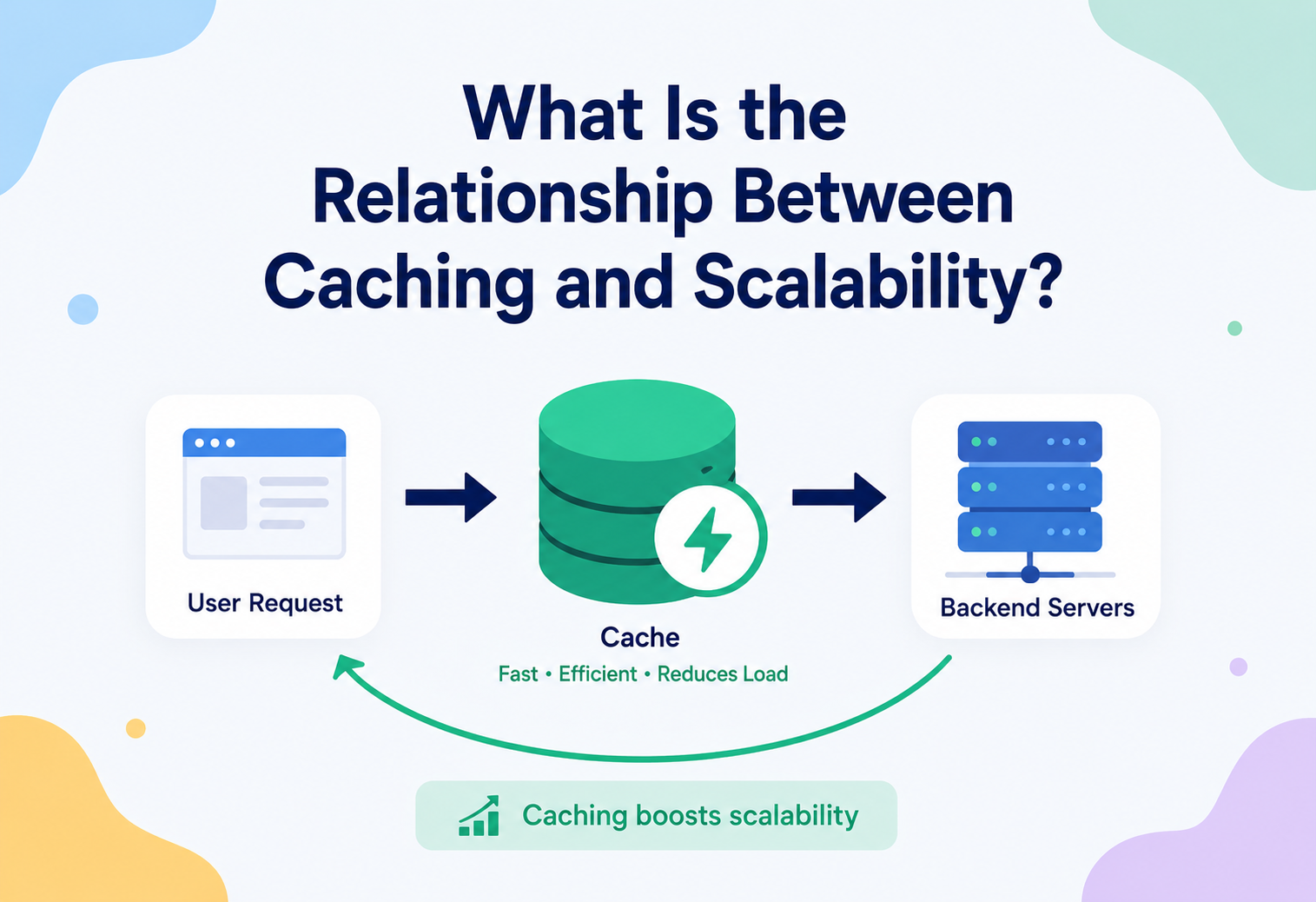
What Is The Relationship Between Caching And Scalability?
A ground-up, no-assumptions tour of why almost every system that needs to serve more people, faster, ends up leaning on a cache — and exactly how that leaning works, where it breaks, and how the engineers behind Netflix, Amazon, and Twitter have used it to survive traffic that would flatten anything else.
01 · INTRODUCTION & HISTORY
From A Hot Pot Of Tea To A Trillion Cached Items
Imagine you run a small tea stall. Every time a customer asks for tea, you walk to the well, draw water, boil it, brew the leaves, and serve it. That takes five minutes. If one customer comes every ten minutes, you are fine. But what happens when fifty customers show up at once, all asking for the exact same thing — a cup of tea, no sugar? If you keep walking to the well for every single person, most of them will give up and leave before you even get to them.
Now imagine instead that you boil a big pot of water once, keep it hot on the stove, and pour from that pot for every customer who wants the same tea. You still walk to the well occasionally to refill the pot, but most requests are served instantly, straight from what is already hot and ready. That hot pot sitting next to you, holding something you already prepared so you do not have to prepare it again, is a cache. And your ability to now serve fifty customers instead of five without falling over is scalability.
This single idea — keep a copy of something expensive-to-produce somewhere fast-to-reach, so you do not have to redo the expensive work every time — is one of the oldest tricks in computing, and it shows up at almost every layer of a modern system: inside your CPU (the L1 / L2 / L3 caches sitting between the processor and main memory), inside your browser (which caches images and scripts so a page loads instantly the second time), inside your operating system (which caches disk blocks in RAM), and inside the distributed systems that power the apps you use every day.

A short history
The word “cache” comes from the French cacher, meaning “to hide” — originally used for a hidden store of provisions or treasure that explorers would bury for later use. Computer scientists borrowed the word in the 1960s when IBM engineers, led by Lyle R. Johnson and colleagues on the IBM System/360 Model 85 (1968), built a small, extremely fast block of memory that sat between the slow main memory and the processor, holding recently used data so the processor did not have to wait for slow memory every single time. That was the first hardware cache, and the underlying idea has barely changed since — only the layer it is applied to has multiplied.
As applications grew from single machines serving a handful of users to distributed systems serving hundreds of millions of people, the same pattern moved up the stack: from CPU caches, to OS page caches, to application-level caches like Memcached (created in 2003 by Brad Fitzpatrick for LiveJournal, to survive a database that could not keep up with page views), to today’s feature-rich distributed caches like Redis (2009) and cloud-managed offerings like Amazon ElastiCache and Google Memorystore. Every time engineers hit a wall where “doing the real work” was too slow to keep up with demand, caching was the tool that let them keep the lights on without rebuilding everything from scratch — and that is precisely the thread connecting caching to scalability.
Think of a library. If every reader had to wait for the librarian to special-order a fresh copy of a book from a printing press every time they wanted to read something, the library would serve almost nobody in a day. Instead, popular books sit on the shelves — already printed, ready to hand over instantly. The shelf is the cache. The printing press is your database or origin server. A library that only stocks the shelf with popular titles, and only special-orders rare ones, can serve thousands of readers a day with the same number of librarians.
IBM System/360 Model 85
The first hardware cache — a small, extremely fast block of memory between slow main memory and the processor. The idea has barely changed since.
OS & browser caches
Operating systems cache disk blocks in RAM; browsers cache images and scripts locally so repeat visits are instant.
Memcached (Brad Fitzpatrick, LiveJournal)
The first widely-used distributed application-level cache — built specifically to survive a database that could not keep up with page views.
Redis
Richer data structures, optional persistence, built-in replication and clustering — today the most-used distributed cache in production.
Managed cache-as-a-service
Amazon ElastiCache, Google Memorystore, Azure Cache for Redis — caching becomes something you rent, not build.
02 · THE PROBLEM & MOTIVATION
Why “Doing The Work Every Time” Eventually Breaks
To understand why caching and scalability are joined at the hip, you first need to understand what scalability actually asks of a system, and why that ask is so hard to satisfy by just “doing the work every time.”
What does it mean for a system to “not scale”?
A system that does not scale is one where, as the number of users or requests grows, the cost of serving each request grows too — or worse, the system slows down or falls over entirely. Picture a system where every webpage view triggers a fresh, expensive database query that scans millions of rows, recalculates a result, and formats a response. That query might take 300 milliseconds and lightly tax the database when only 10 people are visiting per second. But at 10,000 people per second, that same database is now being asked to do 10,000 heavy queries every second — something no single database server can sustain. Response times balloon, timeouts happen, and eventually the whole site goes down. This is sometimes called the system “falling over” under load.
The fundamental problem is this: the expensive part of computing — reading from disk, querying a database, calling a slow external API, running a complex calculation — does not get cheaper just because more people are asking for it. If anything, it gets more expensive, because now everyone is competing for the same limited resource (CPU, disk I/O, database connections, network bandwidth).
Why “just add more servers” is not the whole answer
A common first instinct is: if the database is overwhelmed, buy a bigger database server (this is called vertical scaling), or add more database servers (horizontal scaling). Both approaches genuinely help, but they run into two walls:
- Cost. Bigger and more servers cost real money, and the cost grows roughly linearly (or worse) with load, while your revenue per user usually does not.
- Physics and coordination overhead. Beyond a certain point, adding more database replicas introduces its own problems — data has to be kept in sync across replicas, writes have to be coordinated, and the complexity of the system increases. There is a ceiling to how far raw “add more hardware” scaling can take you before the coordination cost eats the benefit.
Caching attacks the problem from a completely different angle: instead of making the expensive work faster or spreading it across more machines, it tries to avoid doing the expensive work at all, as often as possible. If 95% of requests for a product page can be served from a cache that costs a fraction of a millisecond, then your database only ever has to deal with the remaining 5% — the traffic it was actually built to handle. This is the core motivation: caching converts a workload that grows linearly (or worse) with user count into one where only a small, much more manageable slice of traffic ever reaches your slow, expensive systems.
What caching changes
- Amount of expensive work per request drops sharply.
- Database load grows with misses, not raw traffic.
- Latency for cached items drops 10–100×.
- Traffic spikes get absorbed at the cache layer.
What “just add servers” cannot fix
- Linear cost growth with linear traffic growth.
- Coordination overhead of ever-more replicas.
- Database write bottlenecks that replicas do not help.
- The wall where more hardware buys diminishing returns.
Scalability is not just “can the system handle more users” — it is “can the system handle more users without cost, latency, or failure rate growing out of control.” Caching is one of the very few techniques that can bend that curve, because it reduces the amount of expensive work required per user, rather than just paying for more capacity to do the same amount of expensive work.
03 · CORE CONCEPTS
The Vocabulary You Will Reuse For The Rest Of The Guide
Before going further, let us build a vocabulary. Every term below will be used repeatedly for the rest of this guide, so take your time here — nothing after this point assumes you already know these words.
Cache
A cache is a smaller, faster storage layer that holds a copy of data that is normally kept in a slower, larger storage layer (like a database, disk, or remote API), so that future requests for that data can be served faster.
Cache hit and cache miss
When the data being requested is found in the cache, that is called a cache hit — like reaching for the hot tea pot and finding it full. When the data is not in the cache and the system has to go fetch it the slow way, that is a cache miss — like finding the pot empty and having to walk to the well.
Hit ratio
The hit ratio (or hit rate) is simply the percentage of requests served as cache hits: hit ratio = hits / (hits + misses). A hit ratio of 95% means 95 out of every 100 requests never touch the slow system at all. This single number is often the most important health indicator of a caching layer — the whole point of caching for scalability is to push this number as high as reasonably possible.
Latency vs. throughput
Latency is how long a single request takes (e.g., “this API call takes 120 ms”). Throughput is how many requests a system can handle per unit of time (e.g., “this server can handle 5,000 requests per second”). Caching improves both: it reduces latency for individual cached requests (a cache hit might take 1 ms versus a 100 ms database round trip), and it increases overall throughput because the origin system is freed up to spend its limited capacity on only the requests that truly need it.

Latency is how long it takes one customer to get served. Throughput is how many customers the whole stall can serve in an hour. A hot pot of tea reduces both: each customer waits less (low latency), and because you are not stuck at the well for five minutes per person, you can serve far more people per hour (high throughput).
TTL (Time To Live)
Cached data can go stale — imagine the tea sitting in the pot for six hours, going cold and flat. A TTL is an expiration timer attached to cached data: after a set duration (say, 60 seconds), the cache entry is considered expired and will be refreshed from the original source on the next request. TTLs are how caches balance freshness against performance.
Eviction policy
A cache is almost always much smaller than the full dataset it is caching from — you cannot keep an infinitely large pot of tea on the stove. When the cache fills up, it needs to decide what to throw away to make room for new data. The rule it uses to decide is called an eviction policy. The most common ones are:
| Policy | Rule | Good for |
|---|---|---|
| LRU (Least Recently Used) | Evict the item that has not been accessed for the longest time | General-purpose, most common default |
| LFU (Least Frequently Used) | Evict the item accessed the fewest number of times | Workloads with a stable set of “hot” items |
| FIFO (First In, First Out) | Evict the oldest inserted item, regardless of use | Simple, predictable workloads |
| TTL-based | Evict items purely because their timer expired | Time-sensitive data (stock prices, session tokens) |
Scalability
Scalability is a system’s ability to handle a growing amount of work — more users, more requests, more data — by adding resources (scaling out / up) or by making the work itself cheaper (which is exactly what caching does), without a proportional or worse degradation in performance, cost-efficiency, or reliability.
- Vertical scaling: making a single machine more powerful (more CPU, RAM).
- Horizontal scaling: adding more machines that share the load.
Caching is technically neither of these — it is sometimes called a “third lever” because it reduces the amount of work that needs to scale in the first place, making both vertical and horizontal scaling go much further on the same budget.
Hit ratio
The single most important health metric of a cache. Higher is better; every additional percent is expensive database work avoided.
TTL
Expiration timer per key. Balances freshness against performance — the shorter, the fresher; the longer, the faster.
Eviction
The rule for what to drop when the cache is full. LRU is the standard default for a reason: it captures “recency” cheaply.
Latency / Throughput
Latency is how fast one request is. Throughput is how many the system can handle. Caching improves both.
04 · ARCHITECTURE & COMPONENTS
Every Layer Catches Traffic Before It Reaches The Next Slower One
Caching does not happen in one place — real systems layer multiple caches on top of each other, each one catching requests before they reach the next, slower layer. Understanding these layers is key to understanding how large-scale systems actually achieve their scalability.
The layers of caching, from closest to the user to furthest
- Browser cache — your web browser stores images, CSS, and JavaScript files locally so a page you have visited before loads instantly without any network request at all.
- CDN (Content Delivery Network) cache — services like Cloudflare or Akamai keep copies of static (and sometimes dynamic) content on servers physically close to users around the world, so a user in Mumbai does not have to wait for a response from a server in Virginia.
- Reverse proxy / API gateway cache — a layer like Nginx or Varnish sitting in front of your application servers, caching full HTTP responses.
- Application-level (in-memory) cache — data cached directly inside your application process’s memory (e.g., using a library like Caffeine in Java), the fastest cache layer because there is no network hop at all.
- Distributed cache — a shared cache cluster (like Redis or Memcached) that all instances of your application talk to over the network, so they all see the same cached data.
- Database-level cache — databases themselves cache query results and frequently accessed pages of data in memory (e.g., MySQL’s buffer pool).
Caching patterns (how the cache and the source of truth talk to each other)
These describe who is responsible for keeping the cache filled and in sync.
Cache-aside (a.k.a. lazy loading)
The application checks the cache first. On a miss, the application itself fetches from the database, then writes the result into the cache for next time. This is the most common pattern because it is simple and only caches data that is actually being requested.
public class ProductService {

    private final Cache<String, Product> cache; // e.g. Caffeine cache
    private final ProductRepository database;

    public Product getProduct(String productId) {
        // 1. Try the cache first
        Product product = cache.getIfPresent(productId);
        if (product != null) {
            return product; // cache HIT — fast path
        }

        // 2. Cache MISS — fall back to the slow source of truth
        product = database.findById(productId);

        // 3. Populate the cache so the *next* request is a hit
        if (product != null) {
            cache.put(productId, product);
        }
        return product;
    }
}
Read-through
Similar to cache-aside, but the cache library itself is responsible for loading data from the database on a miss, rather than the application code doing it manually. The application only ever talks to the cache.
Write-through
Every write goes to the cache first, and the cache synchronously writes it through to the database before confirming success. This keeps the cache always consistent with the database, at the cost of slightly slower writes.
Write-behind (write-back)
Writes go to the cache immediately (fast), and the cache asynchronously flushes changes to the database later, in batches. This is very fast for writes but risks data loss if the cache crashes before flushing.
| Pattern | Write speed | Consistency | Risk |
|---|---|---|---|
| Cache-aside | Normal (writes go direct to DB) | Can be briefly stale | Cache / DB can drift if not invalidated properly |
| Read-through | Normal | Same as cache-aside | Cache library complexity |
| Write-through | Slower (waits on DB) | Strong | Extra write latency |
| Write-behind | Very fast | Eventually consistent | Possible data loss on crash |
Browser cache
Local to the user — no network hop at all for a hit. Fastest possible layer.
CDN edge
Physically close to the user — keeps traffic off your origin datacentre entirely.
In-process cache
Caffeine, Guava — RAM inside the app itself, no network hop at all.
Distributed cache
Redis / Memcached — shared across all app instances, one network hop away.
Database cache
Buffer pool, query cache — the last line of defence before disk.
05 · INTERNAL WORKING
What Is Actually Happening Inside The Magic Box
So far we have treated the cache as a magic box. Let us open it up and see what is actually happening inside — both for a single in-memory cache, and for the distributed caches that let scalability extend across many machines.
How a single-node cache finds data instantly: hash tables
At its heart, an in-memory cache is almost always built on a hash table (also called a hash map). A hash table takes a key (like a product ID), runs it through a mathematical function called a hash function that converts it into a number, and uses that number to jump directly to the “bucket” where the value is stored — no scanning, no searching. This is why cache lookups are described as O(1), or constant time: whether the cache holds 10 items or 10 million, a lookup takes roughly the same, tiny amount of time. That is the mathematical reason caches are so much faster than scanning a database table.
A hash table is like a coat-check counter with numbered pegs. Instead of the attendant searching through every coat to find yours, your ticket number tells them exactly which peg to go to. Whether there are 10 coats or 10,000, finding yours takes the same tiny amount of time.
How LRU eviction actually works internally
A common way to implement an LRU (Least Recently Used) cache is to combine a hash table (for O(1) lookups) with a doubly linked list (to track usage order). Every time an item is accessed, it is moved to the front of the list. When the cache is full and a new item needs to be inserted, the item at the back of the list — the least recently used one — is evicted.
import java.util.LinkedHashMap;
import java.util.Map;

public class SimpleLruCache<K, V> extends LinkedHashMap<K, V> {

    private final int capacity;

    public SimpleLruCache(int capacity) {
        // accessOrder = true means "reorder on get(), not just put()"
        super(capacity, 0.75f, true);
        this.capacity = capacity;
    }

    @Override
    protected boolean removeEldestEntry(Map.Entry<K, V> eldest) {
        // Called automatically after every put(); returning true evicts
        // the least-recently-used entry once we exceed capacity.
        return size() > capacity;
    }

    public static void main(String[] args) {
        SimpleLruCache<String, String> cache = new SimpleLruCache<>(3);
        cache.put("a", "Apple");
        cache.put("b", "Banana");
        cache.put("c", "Cherry");
        cache.get("a");            // "a" is now most-recently-used
        cache.put("d", "Date");    // evicts "b" (least recently used)
        System.out.println(cache.keySet()); // [c, a, d]
    }
}
How a distributed cache spreads data across many machines
A single cache server, no matter how fast, eventually runs out of memory and can only handle so many requests per second. To scale caching itself, systems spread the cache across many machines — a distributed cache cluster. But this raises a question: given a key like "product:8271", how does the application know which of the (say) 20 cache servers holds that data?
The naive approach — server_index = hash(key) % number_of_servers — has a serious flaw: the moment you add or remove a server (which will happen constantly at scale, due to failures or growth), number_of_servers changes, and almost every key now maps to a different server than before. That would mean nearly the entire cache goes cold at once — a catastrophic, self-inflicted mass cache miss right when your cluster is already under stress from scaling.
The solution, used by virtually every production distributed cache, is called consistent hashing. Instead of a plain modulo, both the servers and the keys are placed on a conceptual circle (a “hash ring”) using the same hash function. Each key is then assigned to the next server found by walking clockwise around the ring. When a server is added or removed, only the keys that were mapped to the neighbouring section of the ring need to move — typically just 1/N of all keys, instead of nearly all of them.
Virtual nodes
A refinement on top of consistent hashing: each physical server is given many points on the ring (called virtual nodes), rather than just one. This spreads load more evenly, because with only one point per server, an unlucky ring layout could give one server a much bigger “slice” of the ring than others. With hundreds of virtual nodes per server, the law of averages keeps the load balanced fairly evenly across the real machines.
Losing one node in a 20-node cluster with plain hash(key) % 20 re-maps roughly 95% of keys to new servers — a self-inflicted stampede at exactly the worst possible moment. Consistent hashing keeps that number at ~5%.
06 · DATA FLOW & LIFECYCLE
The Full Journey Of One Request And One Cache Entry
Let us trace the full life of a single request, end to end, through a system with a cache — and compare it to the same request without one.
User        Application         Cache               Database
 |               |                 |                    |
 |---- GET ----->|                 |                    |
 |               |---- GET key --->|                    |
 |               |                 |
 |               |  (a) HIT branch:                    |
 |               |<-- cached data -|                    |    ~1 ms
 |<-- 200 OK ---|                 |                    |
 |               |                 |
 |               |  (b) MISS branch:                   |
 |               |<-- null --------|                    |
 |               |------------------ SELECT ---------->|
 |               |<-------------- product row --------|    ~80 ms
 |               |---- SET key TTL 60s ------->|       |
 |<-- 200 OK ---|                 |                    |
 |
Notice that only the very first request for a given product pays the full database cost; every request for the next 60 seconds (the TTL) is served almost entirely from the cache.
Life of a cache entry
- Miss & populate — first request for a key is not found; it is fetched from the source and written into the cache.
- Warm / hot — subsequent requests are served directly, entry sits in memory.
- Update or invalidate — when the underlying data changes (e.g., the product’s price is updated), the cache entry must either be updated to match, or explicitly deleted (“invalidated”) so the next request re-fetches fresh data.
- Expire (TTL) — if untouched and not explicitly invalidated, the entry eventually expires on its own once its TTL passes.
- Evict — if the cache fills up before the TTL expires, the eviction policy (e.g., LRU) may remove the entry early to make room for other data.
Miss & populate
First request pays the full origin cost, then writes the result into the cache for next time.
Warm
All following requests within the TTL are served from RAM in microseconds — the origin never sees them.
Invalidate
When source data changes, the entry is updated or deleted so users do not see stale data.
Expire
Untouched entries eventually reach their TTL and are naturally refreshed on next access.
Evict
Under memory pressure, the eviction policy may remove an entry early to make room for something else.
Computer scientist Phil Karlton famously said: “There are only two hard things in computer science: cache invalidation and naming things.” Knowing when to remove or refresh stale cache data — without either serving outdated information or wiping the cache so often that it stops helping — is genuinely one of the trickiest parts of building a caching layer, and we will return to it in the trade-offs and best-practices chapters.
07 · ADVANTAGES, DISADVANTAGES & TRADE-OFFS
What The Cache Buys You — And What It Charges In Return
Advantages
- Dramatically lower latency for cached data (often 10–100× faster).
- Reduces load on databases and downstream services, letting them serve far more users on the same hardware.
- Improves throughput and helps systems absorb traffic spikes.
- Can reduce cost — fewer, smaller database instances needed.
- Improves resilience — a well-designed cache can keep serving stale-but-available data even if the origin briefly goes down.
Disadvantages
- Adds complexity — another moving part that can fail or be misconfigured.
- Risk of serving stale (outdated) data if invalidation is not handled carefully.
- Extra infrastructure to run, monitor, and pay for.
- Cache stampedes / thundering herds can cause sudden spikes on the origin system.
- Debugging becomes harder — “is this bug in the data, or in the cache?”
The central trade-off: consistency vs. performance
Every caching decision is, at its core, a trade-off between how fresh (consistent with the source of truth) your data is, and how fast and scalable your system is. A TTL of 0 seconds (no caching) guarantees perfectly fresh data but gives you none of the performance benefit. A TTL of 24 hours gives you huge performance and scalability wins but risks users seeing day-old information. Nearly all real-world caching strategy is about finding the right point on this spectrum for each specific piece of data — a product’s price might need a short TTL, while a blog post’s content might tolerate a much longer one.
Strong consistency vs. eventual consistency
This connects to a broader concept in distributed systems: strong consistency means every read sees the absolute latest write, no matter which server answers. Eventual consistency means reads might briefly see stale data, but the system guarantees it will “catch up” and become consistent given enough time. Caches, by their very nature, almost always introduce eventual consistency into a system, because there is always a small window (the TTL, or the time between an update and its invalidation) where the cache and the source of truth disagree. Accepting a small, controlled amount of staleness is usually the price paid for the scalability gain.
“A TTL of 0 seconds gives you perfect freshness and none of the scalability. A TTL of 24 hours gives you huge scalability and potentially day-old data. Real caching strategy is picking the right point on that dial per data type.”
08 · PERFORMANCE & SCALABILITY — THE CORE RELATIONSHIP
The Math That Turns User Growth Into Bounded Origin Load
This is the heart of the guide, so let us be precise and mathematical about exactly how caching produces scalability, not just that it does.
Reframing scalability as “expensive work per request”
Think of the total cost of serving a system’s traffic as roughly:
total_load_on_origin = number_of_requests × (1 − hit_ratio)If your hit ratio is 0% (no caching), every single request hits the origin (database, API, whatever is doing the expensive work), and load on the origin scales exactly 1:1 with traffic. Double your users, double your database load — and eventually you hit the database’s ceiling and the whole system falls over.
But if your hit ratio is 90%, only 10% of requests ever reach the origin. You could grow your user base 10× and your origin system would see the same load as before caching was introduced at 1× traffic. This is the mathematical essence of why caching enables scalability: it decouples the growth of your user base from the growth of load on your most fragile, expensive, and hardest-to-scale components.
| Traffic | Hit ratio | DB queries / sec | State |
|---|---|---|---|
| 1,000 req / s | 0% | 1,000 | Fine on a small DB |
| 10,000 req / s | 0% | 10,000 | Overloaded — falls over |
| 1,000 req / s | 95% | ~50 | Comfortable |
| 10,000 req / s | 95% | ~500 | Still comfortable — same small DB |
The table above is the entire argument in miniature: with a 95% hit ratio, a 10× increase in traffic produces only a 10× increase in an already-tiny number, keeping the database comfortably within capacity. Without caching, the same 10× growth crushes the database.

Amdahl’s Law and caching
There is a useful parallel here to Amdahl’s Law, a formula originally about parallel computing that describes how much a system can speed up when you optimise one part of it. The law says the maximum possible speedup is limited by the portion of the work that cannot be sped up. Applied to caching: if 95% of your requests can be served from cache (sped up dramatically), but 5% must always hit the slow database, your overall system’s ceiling is ultimately bounded by how well that remaining 5% scales. This is why “improve the hit ratio” and “make the origin faster / more scalable for the remaining misses” are both still important — caching raises the ceiling enormously, but does not remove the need for a reasonably well-architected origin system underneath it.
Read-heavy vs. write-heavy workloads
Caching’s scalability benefit is strongest for read-heavy workloads — systems where data is read far more often than it is written (e.g., a news article read by a million people but written once by one author, or a product page viewed constantly but updated rarely). Most real-world consumer applications are heavily read-skewed, which is exactly why caching is such a universally reached-for scalability tool.
For write-heavy workloads, caching helps less directly for scaling the writes themselves (though write-behind caching can help absorb write bursts), and other techniques — like database sharding, write batching, or message queues — become more important alongside caching.
CAP theorem and caching’s role
In distributed systems theory, the CAP theorem states that a distributed system can only fully guarantee two of three properties at the same time during a network failure: Consistency, Availability, and Partition tolerance. Since network partitions are a fact of life in distributed systems, this really becomes a choice between consistency and availability during a partition. Caching layers, especially distributed ones, typically lean toward availability — a cache node that cannot reach its peers will usually keep serving whatever data it has (possibly stale) rather than refuse to answer, because for most use cases (like showing a product’s price with a 1-minute lag) “answer fast, slightly stale” beats “refuse to answer at all.”
A concrete Java benchmark-style illustration
Below is a simplified example showing the conceptual latency difference a cache introduces — not a real benchmark, but a useful mental model in code form.
public class LatencyDemo {

    private static final Cache<String, String> cache = CacheBuilder.newBuilder()
            .maximumSize(10_000)
            .expireAfterWrite(60, TimeUnit.SECONDS) // TTL
            .build();

    public String handleRequest(String userId) throws InterruptedException {
        String cached = cache.getIfPresent(userId);
        if (cached != null) {
            return cached; // ~0.1ms — served from RAM
        }

        // Simulate an expensive database call
        Thread.sleep(100); // ~100ms — real DB round trip
        String freshData = "profile-data-for-" + userId;

        cache.put(userId, freshData);
        return freshData;
    }
}
// Result: the FIRST request for each user costs ~100ms.
// Every request after that, for the next 60 seconds, costs ~0.1ms.
// At 10,000 requests/second with a 95% hit ratio, the database
// only needs to sustain roughly 500 requests/second — well within
// reach of a single modest database server.09 · HIGH AVAILABILITY & RELIABILITY
Do Not Let The Cache Become Its Own Single Point Of Failure
A cache that becomes a single point of failure defeats its own purpose — if your cache goes down and your whole system was relying on that 95% hit ratio to survive, suddenly 100% of traffic slams into a database that was only ever sized for 5%. This is one of the most important and counter-intuitive lessons in caching: a cache can create a new, dangerous kind of fragility if you are not careful.
Cache stampede (a.k.a. thundering herd)
Imagine a popular cache entry — say, the homepage of a major news site — expires at exactly the same moment that 10,000 requests arrive. All 10,000 requests see a cache miss simultaneously, and all 10,000 stampede toward the database at once to regenerate the same data. The database, which was happily coasting on a 95% hit ratio, suddenly gets hit with a massive spike it was never sized for — and can fall over.
10,000 Users        Cache                  Database
     |                 |                        |
     |    Entry expires at T=0
     |                 |
     |-- GET x10,000 ->|                        |
     |<-- 10,000 MISSES-                        |
     |                 |
     |----------- 10,000 simultaneous queries ->|
     |                 |                        |  <-- Overloaded
     |                 |                        |      possible outage
Common mitigations
- Locking / request coalescing — only let the first request that misses go to the database; make the other 9,999 wait briefly for that one result and share it.
- Jittered TTLs — add small random variation to expiration times so entries do not all expire at exactly the same moment.
- Stale-while-revalidate — keep serving the slightly-expired cached value while one background request refreshes it, instead of making everyone wait.
- Early refresh — proactively refresh popular entries slightly before they actually expire.
public class CoalescingCache {

    private final Cache<String, String> cache;
    private final ConcurrentHashMap<String, CompletableFuture<String>> inFlight
            = new ConcurrentHashMap<>();

    public String get(String key) {
        String cached = cache.getIfPresent(key);
        if (cached != null) return cached;

        // Only ONE thread per key actually queries the database;
        // everyone else waits on the same in-flight future.
        CompletableFuture<String> future = inFlight.computeIfAbsent(key,
            k -> CompletableFuture.supplyAsync(() -> {
                String freshData = database.query(k); // slow call, runs once
                cache.put(k, freshData);
                return freshData;
            }).whenComplete((result, ex) -> inFlight.remove(k))
        );

        return future.join();
    }
}
Replication and failover for the cache itself
Just like databases, distributed caches like Redis support replication (keeping copies of data on multiple nodes) so that if one cache node dies, a replica can take over without losing all cached data at once. Redis Sentinel and Redis Cluster are common tools for automatic failover — detecting a dead primary node and promoting a replica to take its place, usually within seconds.
Graceful degradation
A well-designed system treats the cache as an optimisation, not a dependency it cannot survive without. If the cache is entirely unreachable, the application should still be able to fall back to querying the database directly — slower, but functional — rather than crashing outright. This principle, sometimes summarised as “fail open, not closed” for caches, is central to reliability.
Systems that were sized assuming a 95% hit ratio can be far more fragile than the raw hardware suggests. If the cache disappears, load on the origin can jump 20× instantly. Always test what happens to your system when the cache is gone, not just when it is present.
10 · SECURITY
A Cache Is A New Place Your Data Lives — Secure It Like One
Caching introduces its own set of security considerations that are easy to overlook.
Caching sensitive data
It is tempting to cache everything for speed, but caching personally identifiable information (PII), authentication tokens, or other sensitive data carries risk: a shared cache is a new place that data lives, with its own access controls (or lack thereof) that need to be secured just as carefully as the database. A common mistake is caching a user’s private data under a predictable key and then accidentally serving it to a different user due to a bug in the cache key logic.

Cache poisoning
In web caching (like CDN or reverse-proxy caches), cache poisoning occurs when an attacker manipulates a request (for example, by injecting a malicious value into an HTTP header that the cache uses as part of its cache key) so that a malicious response gets cached and then served to every subsequent legitimate user who requests that same resource. Defences include being strict about which request parameters and headers are allowed to influence cache keys, and validating / sanitising any input that affects caching behaviour.
Cross-user data leakage
When caching per-user data (like a personalised dashboard), the cache key must always include a unique user identifier. Forgetting this — for example, caching by URL alone when the URL does not encode the user — can cause one user’s private data to be served to another user entirely. This has caused real, embarrassing data leaks in production systems.
Denial of service via cache-bypass
If an attacker can craft requests that deliberately always miss the cache (for example, by adding a random query parameter to every request), they can bypass the cache’s protective effect entirely and send a flood of expensive, uncached requests straight at the origin — effectively turning off your scalability defences. Rate limiting and normalising cache keys (stripping irrelevant query parameters) are common defences.
PII & secrets
Treat the cache like the database when it holds sensitive data — access control, network isolation, encryption.
Cache poisoning
Be strict about which headers & params contribute to cache keys. Attackers weaponise sloppy keying.
Cross-user leakage
Always include the user ID in per-user cache keys. Never key by URL alone if response varies by user.
DoS via bypass
Normalise keys, drop unknown query params, rate-limit uncached traffic aggressively.
11 · MONITORING, LOGGING & METRICS
You Cannot Manage What You Do Not Measure
You cannot manage what you do not measure. A caching layer needs its own dashboard of health metrics, separate from general application monitoring.
| Metric | What it tells you |
|---|---|
| Hit ratio | The single most important number — how effectively the cache is absorbing traffic |
| Eviction rate | How often items are being kicked out before their TTL — high eviction usually means the cache is too small |
| Latency (p50, p95, p99) | Not just average response time, but the tail — the slowest 1% of requests often reveal real problems |
| Memory usage | How full the cache is, to plan capacity before it starts evicting aggressively |
| Origin (database) QPS | Tracked alongside hit ratio to confirm caching is actually reducing origin load as expected |
| Error / timeout rate | Connection failures to the cache cluster, which should trigger graceful fallback |
A sudden, unexplained drop in hit ratio is often the earliest warning sign of a brewing incident — it might mean a deploy changed cache keys, a TTL got misconfigured, or the cache cluster lost a node. Because a hit-ratio drop translates almost directly into a spike in origin load, teams typically set alerts on hit ratio dropping below a threshold, not just on the database itself becoming slow (by the time the database is visibly struggling, it may already be too late).
Distributed tracing (tools like OpenTelemetry, Jaeger, or Zipkin) is also valuable here — tagging each request span with whether it was a cache hit or miss lets engineers see, end to end, exactly where time was spent for any individual slow request.
Database CPU is a lagging indicator — by the time it is high, users are already suffering. Cache hit ratio is a leading indicator — a dip here almost always precedes the database spike that follows. Alert on the leading indicator.
12 · DEPLOYMENT & CLOUD
What Teams Actually Reach For In Production
In modern practice, very few teams build their own caching infrastructure from scratch. Instead, they use well-established open-source or managed tools:
- Redis — an in-memory data store supporting rich data structures (strings, lists, sets, sorted sets, hashes), persistence options, pub / sub, and clustering. The most widely used distributed cache today.
- Memcached — a simpler, purely in-memory key-value cache, historically known for being extremely fast and lightweight for pure caching use cases.
- Caffeine / Guava Cache (Java) — popular local, in-process caching libraries for the application layer.
- CDNs — Cloudflare, Akamai, Amazon CloudFront, Fastly, caching static and sometimes dynamic content at edge locations around the world.
Cloud providers offer these as managed services — Amazon ElastiCache (Redis / Memcached), Google Cloud Memorystore, and Azure Cache for Redis — which handle provisioning, patching, replication, and failover, letting teams focus on cache strategy rather than operating cache infrastructure.
A modern deployment often runs the cache cluster in the same cloud region (and even the same availability zone where possible) as the application servers, to minimise network latency between the app and the cache — since if the cache round trip itself becomes slow, much of its benefit is lost. Containerised deployments (Kubernetes) commonly run the cache cluster as a separate StatefulSet with persistent volumes, distinct from the stateless application pods that talk to it.
Redis
Rich data structures, optional persistence, Sentinel / Cluster for HA. The default choice in most new systems today.
Memcached
Simpler, purely in-memory key-value. Extremely fast and lightweight where richness is not needed.
Caffeine / Guava
In-process Java caches with LRU, TTL, and refresh — no network hop at all.
CDNs
Cloudflare, Akamai, CloudFront, Fastly — caching close to users geographically.
ElastiCache / Memorystore
Managed Redis / Memcached on AWS & GCP — less operational burden, faster to adopt.
Kubernetes StatefulSets
Standard way to run a stateful cache cluster next to stateless app pods, with persistent volumes.
13 · CACHING, DATABASES & LOAD BALANCING
How Caching Sits Next To The Other Scaling Levers
Caching does not operate in isolation — it works hand-in-hand with other core scalability techniques.
Caching vs. database read replicas
A read replica is a copy of a database that only serves read queries, letting reads be spread across multiple database servers. Both read replicas and caches serve the same underlying goal — offloading read traffic — but caching is generally faster (in-memory vs. disk-backed database engine) and cheaper per request, while replicas can serve more complex, arbitrary queries that a simple key-based cache cannot. Most large systems use both: caching for the hottest, most repeated queries, and replicas for the long tail of varied read queries that do not cache well.
Caching vs. sharding
Sharding splits a database’s data across multiple servers based on some key (e.g., user ID range), so no single server holds all the data. Sharding scales the total data volume and write throughput a system can handle. Caching scales read throughput for frequently accessed data. They solve different problems and are commonly combined: a sharded database underneath, with a caching layer in front absorbing the majority of reads before they ever need to be routed to the correct shard.

Caching and load balancers
A load balancer distributes incoming requests across multiple application servers. Some load balancers and reverse proxies (like Nginx or Varnish) can themselves cache full HTTP responses, serving repeat requests without the traffic ever reaching an application server at all — effectively adding a caching layer at the very front door of the system, before load balancing logic even runs for that particular request.
| Technique | What it scales | Where it lives |
|---|---|---|
| Caching | Read throughput for hot / repeated data | Browser, CDN, LB, in-process, distributed |
| Read replicas | Read throughput for varied / arbitrary queries | Database layer |
| Sharding | Total data volume & write throughput | Database layer |
| Load balancing | Concurrent request handling | Network / proxy layer |
Every layer absorbs as much traffic as it can before passing the remainder deeper into the system. Caching in front of a sharded database with read replicas and a caching load balancer is not overkill — it is the standard shape of a large-scale read-heavy system.
14 · DESIGN PATTERNS & ANTI-PATTERNS
Patterns That Compound Well — And Ones That Rot The System
Good patterns
- Cache-aside with explicit invalidation — update or delete the cache entry immediately when the underlying data changes, rather than relying solely on TTL expiry.
- Layered caching — combine a fast local (in-process) cache with a shared distributed cache, so most requests are served without even a network hop.
- Negative caching — cache the fact that something was not found (e.g., a 404), with a short TTL, to protect against repeated lookups for nonexistent data.
- Cache warming — proactively populate the cache with known-popular data (e.g., before a big product launch) instead of waiting for the first wave of users to trigger cold misses.
Cache-aside + invalidate
Update or delete on write, do not just rely on TTLs to eventually be right.
Layered caching
In-process cache in front of a distributed cache in front of the database.
Negative caching
Cache “not found” too, briefly — stops repeated expensive lookups for missing data.
Cache warming
Pre-populate hot keys before launch or a scheduled traffic spike, avoiding a cold-start stampede.
Anti-patterns to avoid
| Anti-pattern | Why it hurts |
|---|---|
| Caching everything indiscriminately | Wastes memory on rarely-used data and can push out genuinely hot data (this is sometimes called “cache pollution”). |
| No invalidation strategy | Relying purely on long TTLs to “eventually” become correct can leave users seeing badly stale data for far too long. |
| Caching without a fallback | Treating the cache as infallible; when it goes down, the whole application goes down with it. |
| Using the cache as the only copy of data | Caches are not databases — data can be evicted or lost at any time. Never store data in a cache that does not exist anywhere else. |
15 · BEST PRACTICES & COMMON MISTAKES
A Portable Checklist For Every Cache You Ever Add
- Choose TTLs deliberately, per data type — not one global TTL for everything. Fast-changing data gets short TTLs; slow-changing data gets longer ones.
- Always design for cache unavailability — the system should degrade gracefully, not fail outright, if the cache is unreachable.
- Include enough context in cache keys — user ID, locale, API version, and any other dimension that changes the response, to avoid cross-user or cross-context leakage.
- Monitor hit ratio as a first-class metric, with alerts, not just an afterthought.
- Protect against stampedes with jitter, locking, or stale-while-revalidate, especially for very popular (“hot”) keys.
- Right-size the cache — too small causes excessive eviction (thrashing); too large wastes money on memory that is not improving the hit ratio.
- Version cache keys when data formats change (e.g.,
product:v2:8271) so a code deploy that changes the shape of cached objects does not crash on old, incompatible cached data. - Avoid caching highly personalised or rapidly changing data without careful thought — some data genuinely is not a good fit for caching.
Do
- Pick TTLs per data type, not one global default.
- Design for cache being gone — test failing over.
- Include user / locale / version in keys.
- Alert on hit ratio and eviction rate.
- Jitter TTLs and coalesce misses for hot keys.
- Version keys when object shapes change.
Don’t
- Cache absolutely everything by default.
- Rely only on TTL to eventually be correct.
- Assume the cache will never disappear.
- Use the cache as the only copy of data.
- Key personalised responses by URL alone.
- Wait until the database is on fire to look at the cache.
16 · REAL-WORLD INDUSTRY EXAMPLES
How The Biggest Read-Heavy Systems On The Planet Use Caching
Facebook / Meta · Memcache at massive scale
Facebook published a well-known engineering paper describing how they run one of the largest deployments of Memcached in the world, caching trillions of items to serve billions of reads per second, drastically reducing load on their backend databases. Their system had to solve exactly the problems described in this guide at extreme scale — stampede prevention, consistency across thousands of cache servers, and graceful handling of cache server failures.
Netflix · EVCache
Netflix built and open-sourced EVCache, a distributed caching solution built on top of Memcached, specifically designed to keep working reliably across multiple AWS availability zones and regions — because for a service streaming to hundreds of millions of users, even a brief cache outage in one region needs to be absorbed without users noticing.
Twitter (X) · heavy caching for the timeline
Twitter’s home timeline, one of the most read-heavy pieces of data on the platform, has long relied on aggressive caching (using Memcached-based systems) to avoid recomputing a user’s feed from scratch on every single request — a computation that would be far too expensive to run per-request at Twitter’s scale.
Amazon · caching in e-commerce
Amazon’s product pages, one of the most viewed types of content on the internet, rely heavily on caching (both CDN-level for images / static assets and application-level for product data) so that the underlying inventory and pricing databases — which need to stay focused on the harder job of handling actual orders and stock updates — are not also drowned in the far larger volume of people just browsing.
Uber · caching for real-time systems
Uber uses caching extensively for things like driver location lookups and surge-pricing calculations — data that changes often, but where an extremely short TTL (sometimes just a few seconds) still meaningfully reduces load on backend systems during traffic peaks, while keeping the data “fresh enough” for a fast-moving real-world use case.
Cloudflare · caching at the edge
Cloudflare’s global CDN caches enormous volumes of static (and increasingly dynamic) content at hundreds of edge locations around the world, cutting the number of requests that ever reach a customer’s origin infrastructure by orders of magnitude — a scalability multiplier that applies to millions of websites at once.
A common thread across all of these: at extreme scale, caching stops being a “nice optimisation” and becomes a foundational architectural pillar. Removing it is not really an option — the origin systems are not sized to survive without it.
17 · FAQ
The Questions That Come Up In Every Design Review
Does caching always make a system more scalable?
Not automatically — a poorly designed cache (too small, no stampede protection, no fallback) can introduce new failure modes. Caching enables scalability when it is designed thoughtfully around the real access patterns and failure scenarios of the system.
Is caching the same as a CDN?
A CDN is one specific, geographically distributed application of caching — caching content close to users around the world. Caching as a concept is much broader and shows up at many other layers too (application, database, CPU, etc.).
Should I cache everything to be safe?
No — caching data that is rarely reused, changes constantly, or is highly sensitive often is not worth the complexity and risk. Cache selectively, based on what is actually read often relative to how often it changes.
What is the difference between Redis and Memcached?
Memcached is simpler and purely an in-memory key-value store. Redis supports richer data structures (lists, sets, sorted sets), optional persistence to disk, and built-in replication / clustering features, making it more flexible for use cases beyond pure caching.
Can caching cause bugs?
Yes — stale data, cross-user data leakage from badly designed cache keys, and cache stampedes are all real, common classes of bugs introduced specifically by caching layers, which is why careful design and monitoring matter so much.
How do I pick the right TTL for a piece of data?
Start with the honest question: “how stale is this data allowed to be, from the user’s point of view?” A product’s price on a marketplace might tolerate ~60 seconds of staleness; a user’s session token might need 0 seconds of staleness on logout; a blog post might happily be cached for hours. Match the TTL to the data’s real freshness requirement, not to a comfortable round number.
If removing the cache would cause your system to fall over immediately, you have made the cache load-bearing — treat it with the same reliability rigour as the database itself.
18 · SUMMARY & KEY TAKEAWAYS
What To Carry Into The Next System Design Interview — And The Next Design Doc
Caching and scalability are not two separate topics you can learn independently — they are two sides of the same coin. At every scale from a hot pot of tea to Facebook’s trillion-item Memcached fleet, the same idea keeps returning: keep the result of expensive work close by, so most of the time you do not have to redo it. That single move is what lets a system grow its users without growing its most fragile parts in lockstep.
Key takeaways
- A cache stores a copy of expensive-to-produce data in a faster, closer location, so future requests can be served without redoing the expensive work.
- Scalability is the ability to handle growing load without proportional (or worse) growth in cost, latency, or failure rate — and caching is one of the most powerful tools for achieving it, because it reduces the amount of expensive work a growing user base actually generates.
- The relationship is mathematical:
origin load = requests × (1 − hit ratio). A high hit ratio decouples user growth from load on your most fragile systems. - Caching exists at many layers — browser, CDN, reverse proxy, application, distributed cache, and database — each absorbing traffic before it reaches the next, slower layer.
- Distributed caches use consistent hashing to spread data across many machines without massive reshuffling when servers are added or removed — this is itself a scalability technique applied to the cache layer.
- Caching is not free: it trades some data freshness (consistency) for speed, and introduces new risks like stampedes, staleness, and security pitfalls that must be actively managed.
- In production, caching is always used alongside — not instead of — other scaling techniques like read replicas, sharding, and load balancing.
- The companies serving the largest user bases in the world — Facebook, Netflix, Twitter, Amazon, Uber — all rely on sophisticated, carefully engineered caching layers as a foundational part of how they scale.
“Scalability is not just being able to serve more users — it is being able to serve more users without your cost, your latency, or your failure rate quietly running away. Caching is the lever that bends that curve.”

