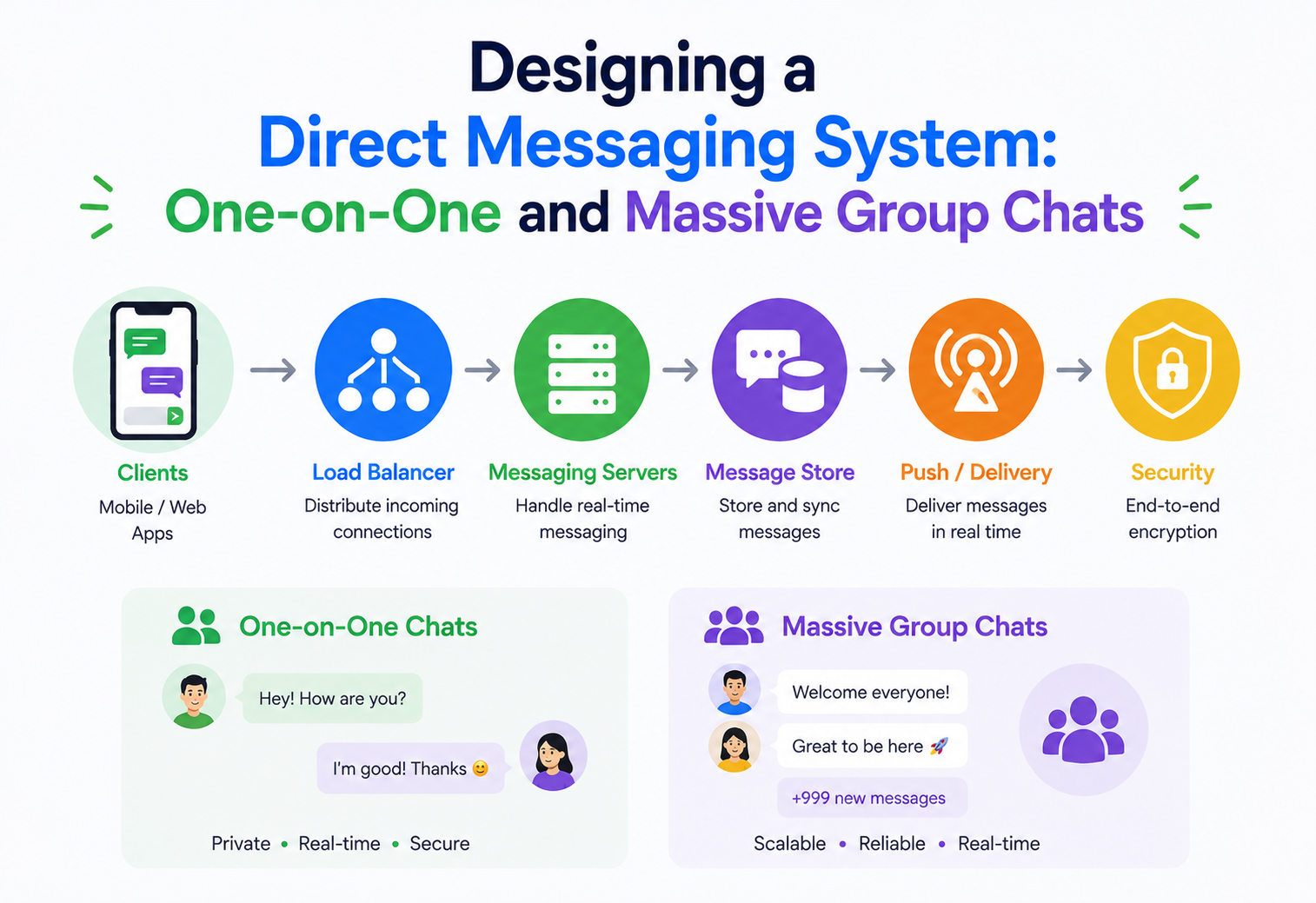
Designing a Direct Messaging System: One-on-One and Massive Group Chats
How to build a chat platform that works just as well for two friends texting as it does for a 50,000-member community group — covering architecture, protocols, scaling, and the hard trade-offs behind products like WhatsApp, Slack, and Discord.
Introduction & History
Messaging feels simple from the outside. You type a sentence, tap send, and a moment later it appears on someone else’s screen, maybe thousands of kilometers away. But underneath that simple action sits one of the most demanding problems in distributed systems: delivering short pieces of data, in the right order, to the right people, in near real time, at a scale of billions of messages a day, without losing a single one.
The idea of instant text communication is older than the internet as most people know it. In the 1970s, mainframe systems allowed users on the same machine to send short notes to each other. In the 1980s and 1990s, Internet Relay Chat (IRC) let strangers around the world talk in real time inside shared “channels” — an early ancestor of today’s group chats. Then came the era of AOL Instant Messenger, Yahoo Messenger, and MSN Messenger, which brought one-on-one messaging to ordinary households and introduced ideas we still rely on: online/offline presence, typing indicators, and “buddy lists.”
The next leap came with mobile phones and always-on internet. WhatsApp, launched in 2009, proved that a tiny, fast, reliable messaging app could replace SMS for over a billion people. Slack, launched in 2013, took the same core idea and reshaped it for teams, adding organized channels, threads, and search. Discord, born out of gaming communities, pushed group chat scale even further, supporting communities with hundreds of thousands of simultaneous members in a single server.
What ties all of these systems together is a common technical backbone: a way to keep a live connection open between a user’s device and the server (instead of the device repeatedly asking “any new messages?”), a way to route a message to the correct recipient device(s) quickly, and a way to store the conversation durably so nothing is lost even if a phone is switched off for a week.
Think of a messaging system like a postal service that has been redesigned to work at the speed of a phone call. Instead of a letter traveling by truck and plane over days, this “postal service” builds a live pneumatic tube directly between two houses, so a note dropped in one end appears in the other within milliseconds — and if the second house is empty, the tube gently holds onto the note until someone arrives home.
Understanding this history matters for a design exercise because it explains why certain ideas — sequence numbers, delivery receipts, presence, offline queuing — aren’t arbitrary product features. They emerged because each generation of messaging systems ran into the same underlying distributed-systems problems: networks are unreliable, devices go offline unpredictably, and a growing user base eventually breaks whatever solution worked at a smaller scale. Every design decision in this guide traces back to one of those recurring pressures.
Problem & Motivation
Let’s define exactly what we are being asked to build, because “chat system” hides an enormous range of requirements inside one phrase.
2.1 The stated requirement
We need a direct messaging (DM) system that supports:
- One-on-one conversations — two users exchanging messages, the classic private chat.
- Large group conversations — a single conversation with thousands of participants, where a message sent by one person must reach every other member, potentially all at once.
These two use cases sound similar, but they stress completely different parts of a system. A one-on-one chat is a “narrow but frequent” problem: millions of independent pairs of users, each exchanging messages rarely by comparison, but the total number of pairs is huge. A large group chat is a “wide but occasional” problem: one message send can trigger thousands of individual delivery events at once — a phenomenon usually called a fan-out or a write amplification problem.
2.2 Functional requirements
- Users can send and receive text messages (and, typically, images, files, and reactions) in real time.
- Users can create one-on-one and group conversations, and groups can have from 2 to tens of thousands of members.
- Message ordering within a conversation must be consistent for all participants.
- Messages must be delivered even if the recipient is offline, and delivered later when they reconnect.
- Users should see delivery and read receipts (sent, delivered, seen) — at least for one-on-one chats, and often for groups in a summarized form.
- Message history must be searchable and persisted, typically indefinitely.
- Support for multiple devices per user (phone, laptop, tablet) all showing a synchronized conversation.
2.3 Non-functional requirements
- Low latency — messages should arrive within a few hundred milliseconds under normal network conditions.
- High availability — the system should keep working even when individual servers or entire data centers fail.
- Durability — a message that has been acknowledged as “sent” must never be silently lost.
- Massive scalability — the design must handle both a huge number of small conversations and a smaller number of extremely large ones, without one case degrading the other.
- Security and privacy — messages should be protected in transit and, depending on the product, end-to-end encrypted so that even the service provider cannot read them.
2.4 Why this is hard
Three forces pull against each other in every messaging system design:
| Force | What it demands |
|---|---|
| Real-time delivery | Keep millions of long-lived connections open simultaneously, and push data the instant it’s ready. |
| Durability & ordering | Never lose a message and always show it in the same order to every participant — this pulls toward strong, disk-backed, sequential writes. |
| Fan-out at scale | A message to a 50,000-member group must be efficiently distributed without turning one write into 50,000 immediate, synchronous writes. |
“Why can’t we just use a normal REST API where the client polls every few seconds for new messages?” — Because polling wastes bandwidth and battery, and the effective latency is bounded by the polling interval. Interviewers want you to explain why a persistent connection (WebSocket or a similar protocol) is preferred, and to be able to describe the fallback (long polling) for environments where persistent connections aren’t possible.
2.5 Framing the problem as two systems in one
A useful mental model going into this design is to treat it as two closely related but distinct problems sharing common infrastructure. The first is a small-fan-out problem: millions of independent one-on-one and small-group conversations, each with very few participants, where the dominant cost is simply the sheer number of independent conversations happening at once. The second is a large-fan-out problem: a comparatively small number of conversations, but each one potentially needing to reach an enormous number of participants the moment a single message is sent. Good architecture recognizes that optimizing purely for one of these cases tends to hurt the other, and deliberately designs a shared core (connection handling, durable storage, ordering) with a fan-out layer flexible enough to behave differently depending on which situation it’s handling.
2.6 Who are the users of this system?
It helps to explicitly separate the actors interacting with the system: the sender, who wants fast confirmation their message went out; the online recipient, who expects near-instant delivery; the offline recipient, who expects nothing to be lost and a smooth catch-up when they return; and the platform operator, who needs the system to remain stable, secure, and cost-effective at massive scale. Every architectural decision in this guide can be traced back to serving one or more of these four actors without unduly harming the others.
Core Concepts
Before diagramming anything, we need a shared vocabulary. Each term below is explained from scratch — what it is, why it exists, where it shows up, a simple analogy, and a concrete example.
3.1 Persistent Connection (WebSocket)
What it is: A long-lived, two-way communication channel between a client (phone or browser) and a server, opened once and kept open, over which either side can send data at any time.
Why it exists: Regular HTTP is request-response: the client asks, the server answers, and the connection closes. That model is fine for loading a web page, but terrible for chat, where the server needs to push a message to the client the instant it arrives, without the client asking first.
Simple analogy: A phone call versus exchanging letters. With letters (HTTP requests), you have to mail a new letter every time you want to check if there’s a reply. With a phone call (WebSocket), the line stays open and either person can speak whenever they want.
Software example: A chat client opens a WebSocket connection to wss://chat.example.com/socket when the app starts, and keeps it open in the background for as long as the app is active.
Production example: Slack, Discord, and WhatsApp Web all use persistent connections (WebSockets or custom binary protocols over TCP) to deliver messages instantly rather than making the client poll.
3.2 Fan-out
What it is: The process of taking one incoming message and delivering (or preparing to deliver) it to many recipients.
Why it exists: Group chats have more than one recipient per message. The system has to decide, for every message, how to get a copy — or a pointer to a shared copy — in front of every member.
Simple analogy: A teacher announcing homework to a class of 40 students versus mailing 40 separate letters. Fan-out design decides whether you “announce once and let everyone look at the board” (fan-out on read) or “write 40 individual notebooks” (fan-out on write).
Beginner example: In a 3-person group chat, one message becomes at most 2 delivery events (to the other two members).
Production example: Discord’s largest servers can have hundreds of thousands of members; sending a message doesn’t create hundreds of thousands of database writes — it uses a hybrid strategy discussed later in this guide.
3.3 Message Ordering & Sequence Numbers
What it is: A guarantee that messages in a conversation appear in the same order to every participant, usually enforced with a monotonically increasing sequence number per conversation.
Why it exists: Messages can arrive out of order because of network delays, retries, or being routed through different servers. Without ordering, “Are you free tomorrow?” might appear after “Yes, 3pm works,” which is confusing.
Analogy: Numbering pages in a notebook so that even if pages get shuffled, you can always put them back in the right order.
Software example: Each message stores a conversation_id and a per-conversation sequence_number; clients render messages sorted by that number, not by arrival time.
3.4 Delivery Guarantees: At-Least-Once vs Exactly-Once
What it is: A promise about how many times a message might be delivered. At-least-once means a message might be delivered more than once (and the client must de-duplicate). Exactly-once means it is delivered precisely one time, which is far harder to guarantee in a distributed system.
Why it exists: Networks are unreliable. If a server doesn’t get an acknowledgment for a sent message, it doesn’t know if the message was lost or if just the acknowledgment was lost. To be safe, it usually resends — creating the possibility of duplicates.
Analogy: Sending a courier back to re-deliver a parcel because you never got the signed receipt, even though the parcel actually arrived and the receipt was lost on the way back.
Production example: Most large-scale chat systems choose at-least-once delivery combined with a client-side unique message ID for de-duplication, rather than trying to build true exactly-once delivery, which is expensive and complex.
3.5 Presence
What it is: Real-time status information about whether a user is online, offline, or “typing…”
Why it exists: Presence adds context that makes conversations feel alive and helps set expectations about how quickly a reply might come.
Analogy: A porch light left on to show someone is home, versus a dark house.
3.6 Message Queue / Broker
What it is: A durable, ordered buffer that sits between message producers (senders) and consumers (delivery workers, storage writers), decoupling the speed of one from the other.
Why it exists: If every message send had to be written to permanent storage and pushed to every recipient synchronously, one slow step would stall the whole system. A queue lets the “accept the message” step finish fast, while delivery and fan-out happen asynchronously and reliably in the background.
Analogy: A restaurant order ticket rail. The waiter (producer) pins the order and moves on immediately; the kitchen (consumer) processes tickets at its own pace, in order, without the waiter having to wait and watch.
Production example: Apache Kafka is commonly used as the backbone that ingests messages and fans them out to storage services, push-notification services, and search-indexing pipelines.
3.7 Backoff and Jitter
What it is: A strategy where a client that fails to connect or send waits progressively longer between retries (backoff), with a small random delay added (jitter) so that many clients don’t all retry at the exact same moment.
Why it exists: Without jitter, thousands of clients that lost connection at the same time (say, because a gateway crashed) would all reconnect at the same instant, creating a fresh spike that could crash the very server they’re trying to reach — a phenomenon often called a “thundering herd.”
Analogy: If a single doorway to a stadium closes and reopens, letting everyone rush in at once causes a crush. Staggering people’s arrival, even by a few random seconds each, avoids the crush entirely.
Software example: A mobile client whose socket drops waits 1s, then 2s, then 4s, then 8s before each reconnect attempt, each time adding a random 0–500ms jitter.
3.8 Idempotency
What it is: A property of an operation where performing it multiple times has the same effect as performing it once.
Why it exists: Because networks can silently drop responses, clients often can’t tell whether a request actually succeeded, so they retry. Idempotency makes retries safe rather than dangerous.
Analogy: Pressing an elevator call button five times because you’re not sure it registered doesn’t summon five elevators — the button remembers it’s already been pressed.
Software example: Every “send message” request includes a client-generated UUID; if the same UUID arrives twice, the server returns the original result instead of creating a duplicate message.
3.9 Partitioning and Sharding
What it is: Splitting a large dataset or workload across many smaller, independent pieces (partitions or shards) so that no single machine has to hold or process all of it.
Why it exists: A single database server has finite CPU, memory, and disk throughput. Sharding lets the system scale horizontally by adding more machines, each responsible for a slice of the data.
Analogy: Instead of one giant filing cabinet holding every customer’s records, a company keeps 100 smaller cabinets, each responsible for customers whose last name starts with a particular set of letters.
Software example: The message store partitions data by conversation_id, so all messages belonging to one conversation live together, making retrieval fast, while different conversations spread across many partitions for scale.
3.10 Heartbeats and Keep-Alives
What it is: Small, periodic signals exchanged over a persistent connection purely to confirm that both sides are still alive and the connection is still functioning.
Why it exists: A TCP connection can appear open at the operating-system level even after the actual network path has silently broken — for example, a phone moving out of Wi-Fi range without a clean disconnect. Heartbeats let both sides detect this quickly instead of only discovering it when an actual message fails to arrive.
Analogy: Two people on a long phone call occasionally saying “still there?” during a quiet moment, just to confirm the line hasn’t gone dead.
Software example: The gateway sends a WebSocket ping frame every 25 seconds; if no pong response arrives within 10 seconds, the connection is treated as dead and cleaned up, freeing the slot and prompting the client to reconnect.
3.11 Materialized Views
What it is: A precomputed, stored version of a query result, kept up to date as the underlying data changes, so that reading it is much cheaper than recomputing the query every time.
Why it exists: Some queries — like “how many unread messages does this user have across all their conversations” — would be expensive to compute from scratch on every request. A materialized view keeps a running, precomputed answer instead.
Analogy: A shop keeping a running total in the cash register rather than recounting every item in the store each time someone asks how much money has been taken today.
Software example: An unread-count table, incremented by the fan-out worker whenever a new message arrives for an offline member and reset to zero when that member reads the conversation, so the client can fetch unread badges instantly rather than counting unread messages on demand.
Architecture & Components
At a high level, a modern messaging system is made of a handful of cooperating services rather than one monolithic server. Below is the full architecture we will build up piece by piece.
Cassandra / DynamoDB”)] C –> E[“Kafka: Message Events Topic”] E –> F[“Fan-out Worker”] F –> G[(“Conversation Membership Store”)] F –> H[“Push Notification Service”] F –> B B –> I[(“Presence Store (Redis)”)] C –> J[“Search Indexing Service”] J –> K[(“Search Index”)] L[“Media Service”] –> M[(“Object Storage – S3”)] C –> L
Let’s go through every box in this diagram.
4.1 Connection Gateway (WebSocket Servers)
This is the front door of the system. Every client keeps one persistent connection open to a gateway server. The gateway’s jobs are: authenticate the connection, keep it alive with heartbeats / pings, and know which user (and which device) is attached to which connection so that messages can be routed to the right socket.
Because a single machine can only hold so many open sockets (often in the low millions with careful tuning, but realistically hundreds of thousands per box in production), this layer is horizontally scaled — many gateway servers behind a load balancer, and a lookup service (often backed by Redis) mapping user_id → gateway_server_id + connection_id.
4.2 Message Service
This is the core business-logic service that accepts a “send message” request, validates it (is the sender a member of the conversation? is the content within limits?), assigns it a sequence number, and durably writes it before acknowledging success to the sender. This is the one step that absolutely must be reliable — once the sender’s client shows a message as “sent,” it must genuinely be safe.
4.3 Message Store
A database optimized for extremely high write throughput and for retrieving a conversation’s recent messages quickly. Wide-column stores like Apache Cassandra or managed equivalents like Amazon DynamoDB are popular here because messages are naturally modeled as an append-only, time-ordered list per conversation — exactly the access pattern these databases are built for.
4.4 Event Backbone (Kafka)
Once a message is durably stored, an event describing it (“message 8842 was sent in conversation 501 by user 12”) is published onto a topic. Every downstream concern — delivering it to online recipients, sending push notifications to offline ones, indexing it for search, updating unread counts — subscribes to this stream independently. This decoupling is what allows the system to add new features (like a new notification channel) without touching the core send path.
4.5 Fan-out Worker
For group conversations, this component is responsible for turning “one message” into “N delivery actions,” using the membership list of the conversation. How it does this efficiently for a 50,000-member group is one of the most important design decisions in the whole system, covered in detail in Section 7.
4.6 Presence Service
A fast, in-memory store (typically Redis) tracking which users are currently connected, to which gateway, and their last-seen timestamp. Presence changes are also published as events so that friends / contacts can be notified in near real time.
4.7 Push Notification Service
For offline or backgrounded devices, this service talks to platform-specific push gateways (Apple Push Notification service, Firebase Cloud Messaging) to wake the device and show a notification, even though the WebSocket connection is closed.
4.8 Media & Search Services
Media (images, videos, files) is uploaded to object storage (like Amazon S3) directly by the client using pre-signed URLs, and the message simply carries a reference / link — never the raw bytes — through the messaging pipeline. A separate search-indexing service consumes the same message event stream to keep a searchable index of conversation history up to date. Uploading media directly from the client to object storage, bypassing the message pipeline entirely, is deliberate: it keeps potentially large binary payloads off the latency-sensitive, high-throughput path that text messages travel through, and it lets media uploads scale independently using infrastructure purpose-built for large file transfer rather than competing for capacity with the core messaging system.
4.9 Client-side architecture
The server-side design covered so far is only half the picture — the client application also plays an active architectural role. A well-built messaging client maintains a local, persistent store of recent conversations (so the app opens instantly showing cached history even before the network responds), an outgoing queue for messages composed while offline, and a reconciliation layer that merges local optimistic state (a message shown as “sending…” the instant the user hits send) with the server’s authoritative state once acknowledgment arrives. This client-side design is what makes the overall experience feel instantaneous even though, underneath, a full round trip to the server and back is still happening for every message.
“Why split this into so many services instead of one big server that does everything?” A good answer: each concern has a different scaling shape and failure profile. Connection handling scales with concurrent users; message storage scales with write throughput; fan-out scales with group size; push notifications depend on external, sometimes slow, third-party APIs. Coupling them means a slowdown in one (e.g., push notifications) can back up message sending itself.
4.10 Component summary table
The table below summarizes what each component owns, how it scales, and what happens if it fails — a useful way to reason about the whole architecture at a glance.
| Component | Owns | Scales with | Failure impact |
|---|---|---|---|
| Connection Gateway | Live sockets, heartbeats, auth on handshake | Concurrent connected users | Affected clients reconnect to a healthy gateway and resync |
| Message Service | Validation, sequencing, durable write, acknowledgment | Messages sent per second | Sends fail fast and clients retry with backoff; no data loss because writes are transactional |
| Message Store | Durable, ordered message history | Total conversations and message volume | Replicated; a single node loss does not lose data |
| Event Backbone (Kafka) | Ordered stream of message events for downstream consumers | Event throughput and topic partitions | Consumers fall behind (lag) but catch up once healthy; no events are dropped |
| Fan-out Worker | Deciding who gets pushed live vs. notified vs. left to sync later | Group size and online member count | Delivery is delayed, not lost — offline sync always recovers missed messages |
| Presence Service | Online / offline status, connection routing table | Total connected users | Worst case, the system falls back to always attempting delivery and letting the gateway report “not connected” |
| Push Notification Service | Talking to APNs / FCM for offline devices | Number of offline recipients needing a nudge | Notifications are delayed; message itself is already safely stored |
Internal Working
5.1 Establishing a connection
Authenticate
Client authenticates (usually with a short-lived token obtained via a normal HTTPS login flow).
Open socket
Client opens a WebSocket connection to a gateway, presenting the token in the handshake.
Register
Gateway verifies the token, then registers user_id → (gateway_id, connection_id) in the presence / routing store.
Heartbeat
Gateway begins sending periodic ping frames; if the client doesn’t respond within a timeout, the connection is considered dead and cleaned up.
5.2 Sending a one-on-one message
Here is a simplified version of the message service’s send handler in Java, illustrating the core steps: validate, persist, acknowledge, publish.
@Service
public class MessageService {

    private final MessageRepository messageRepository;
    private final SequenceGenerator sequenceGenerator;
    private final EventPublisher eventPublisher;

    public MessageAck sendMessage(SendMessageRequest request) {
        // 1. Validate sender is a member of the conversation
        if (!membershipService.isMember(request.getConversationId(), request.getSenderId())) {
            throw new ForbiddenException("Not a member of this conversation");
        }

        // 2. Assign a monotonically increasing sequence number per conversation
        long seq = sequenceGenerator.nextSequence(request.getConversationId());

        // 3. Build and durably persist the message (this write must succeed
        //    before we tell the client it was "sent")
        Message message = Message.builder()
                .conversationId(request.getConversationId())
                .senderId(request.getSenderId())
                .clientMessageId(request.getClientMessageId()) // for de-duplication
                .sequence(seq)
                .content(request.getContent())
                .createdAt(Instant.now())
                .build();

        messageRepository.save(message);

        // 4. Publish an event so downstream services (fan-out, push, search)
        //    can react asynchronously, off the critical path
        eventPublisher.publish("message.sent", MessageEvent.from(message));

        // 5. Acknowledge to the sender immediately
        return MessageAck.success(message.getId(), seq);
    }
}
Note that step 4 is asynchronous and does not block the acknowledgment in step 5. This keeps the sender’s experience fast (a message shows as “sent” quickly) while heavier work — delivering to a recipient who might be offline, sending a push notification, indexing for search — happens in the background without slowing down the sender.
5.3 Delivering to an online recipient
A “delivery worker” (which may be part of the fan-out worker) consumes the message.sent event, looks up whether the recipient(s) are currently online via the presence store, and if so, forwards the message directly to the gateway server holding their connection, which pushes it down the socket.
@Component
public class DeliveryWorker {

    private final PresenceStore presenceStore;
    private final GatewayClient gatewayClient;
    private final PushNotificationService pushService;

    @KafkaListener(topics = "message.sent")
    public void onMessageSent(MessageEvent event) {
        for (Long recipientId : event.getRecipientIds()) {
            Optional<Connection> conn = presenceStore.find(recipientId);
            if (conn.isPresent()) {
                // Recipient is online: push directly through their gateway
                gatewayClient.push(conn.get().getGatewayId(),
                                    conn.get().getConnectionId(),
                                    event.toClientPayload());
            } else {
                // Recipient is offline: trigger a mobile push notification
                pushService.notify(recipientId, event.toNotificationPayload());
            }
        }
    }
}
5.4 Handling an offline recipient
When the recipient’s client reconnects later, it calls a “sync” endpoint with the last sequence number it has seen for each conversation. The server returns every message with a higher sequence number, guaranteeing no gaps regardless of how long the device was offline.
@RestController
@RequestMapping("/v1/sync")
public class SyncController {

    private final MessageRepository messageRepository;

    @GetMapping
    public SyncResponse sync(@RequestParam Map<Long, Long> sinceSequenceByConversation,
                              @AuthenticationPrincipal Long userId) {
        List<ConversationCatchUp> catchUps = new ArrayList<>();

        for (Map.Entry<Long, Long> entry : sinceSequenceByConversation.entrySet()) {
            Long conversationId = entry.getKey();
            Long lastKnownSeq = entry.getValue();

            List<Message> missed = messageRepository
                    .findByConversationIdAndSequenceGreaterThan(conversationId, lastKnownSeq);

            if (!missed.isEmpty()) {
                catchUps.add(new ConversationCatchUp(conversationId, missed));
            }
        }
        return new SyncResponse(catchUps);
    }
}
This “pull-based catch-up” pattern is the single most important reliability mechanism in the whole design. It means the live push path (Section 5.3) is allowed to be best-effort — if a push fails or is missed for any reason, the client will always recover the complete, correctly ordered history the next time it calls sync. No message is ever truly lost as long as it made it into durable storage.
5.5 Multi-device synchronization
Modern chat products expect a user to be logged in on a phone, a laptop, and a tablet simultaneously, with every device showing a consistent view. This is handled by treating each physical device as its own connection in the presence / routing table, all mapped to the same user_id. When a message is sent or read, the event fans out to every device belonging to that user, not just one. Read state (has this conversation been seen) is stored server-side per user, not per device, so reading a message on a laptop correctly clears the unread badge on the phone too.
5.6 Typing indicators and ephemeral events
Not every event needs the durability guarantees of a message. Typing indicators, for example, are short-lived, low-stakes signals: it doesn’t matter if one is occasionally dropped. These are usually sent directly gateway-to-gateway (or through a lightweight pub / sub channel) without ever touching the durable message store or the Kafka event backbone, keeping the expensive, durable path reserved for data that truly must never be lost.
Data Flow & Lifecycle
The full lifecycle of a single message moves through four states, and every production messaging system exposes some version of this to the UI as ticks or status labels:
| State | Meaning | Triggered by |
|---|---|---|
| Sent | Durably stored on the server | Successful write to message store |
| Delivered | Reached the recipient’s device | Recipient’s client acknowledges receipt over the socket |
| Read / Seen | Recipient has viewed the message | Recipient’s client reports the message entered view |
| Failed | Could not be sent (e.g. blocked, network permanently down) | Explicit error from the server or client-side timeout with retries exhausted |
Keep the “sent” acknowledgment on the fast, synchronous path (client waits for it), but push “delivered” and “read” updates as asynchronous, best-effort events. Users tolerate a slightly delayed double-tick far more than they tolerate a message that appears “sent” but was actually never even received by the server.
6.1 What happens when a message edit or delete occurs
Editing or deleting a message doesn’t rewrite history in place; instead, it’s modeled as a new event (“message 8842 was edited to X” or “message 8842 was deleted”) that references the original message’s ID, flows through the same event pipeline, and is applied by each client as an update layered on top of the original. This keeps the append-only nature of the underlying storage intact — nothing is ever mutated destructively — while still giving users the edit and delete experience they expect.
6.2 Ordering guarantees across edits and new messages
Because edit and delete events carry their own sequence numbers just like new messages, a client can always correctly interleave “message 10 arrived,” “message 8 was edited,” and “message 11 arrived” in the right order, even if these events don’t arrive from the server in a perfectly synchronized real-time stream — the client simply applies events in increasing sequence order as they’re received, buffering out-of-order arrivals briefly if needed.
Scaling Group Chats: The Fan-out Problem
This is the heart of the interview question, so it deserves its own deep section. The naive approach — write a copy of the message into every member’s personal inbox the instant it’s sent — works fine for a 5-person group but collapses for a 50,000-member one. Let’s walk through the three main strategies.
7.1 Fan-out on Write (Push Model)
What it is: When a message is sent, the system immediately writes a reference to that message into every member’s personal “inbox” table or feed.
Why it exists: It makes reading extremely fast — a client just queries “my inbox,” a small, indexed table, and gets results instantly, because all the fan-out work already happened at write time.
Trade-off: For a 50,000-member group, sending one message now means 50,000 writes. This is expensive, slow, and can create huge, uneven load spikes (imagine a celebrity or company account messaging a huge community).
Analogy: A newspaper being physically printed and delivered to every subscriber’s doorstep the moment it’s published.
7.2 Fan-out on Read (Pull Model)
What it is: The message is written once, to the conversation’s shared timeline. Each member’s client independently reads directly from that shared timeline whenever they open the conversation, rather than having a personal copy pushed to them.
Why it exists: Writing is now O(1) regardless of group size — one message, one write, no matter if the group has 3 or 300,000 members.
Trade-off: Reading is more expensive per request, and it’s harder to push a “you have a new message” notification instantly to every member, since nothing was proactively delivered to them.
Analogy: A single notice board pinned in a shared hallway. Nobody delivers a copy to each apartment; residents check the board when they pass by.
7.3 The Hybrid Model (used by large-scale systems)
What it is: Combine both: store the message once (shared, cheap write), but proactively “wake up” only the members who are currently online and connected, pushing directly to their live sockets. For offline members, don’t fan out at all — just increment an unread counter and, above a small threshold, send a single push notification (not one per message). When they reconnect, they pull the missed messages from the shared timeline using the sync / sequence mechanism from Section 5.4.
Why it exists: It gets the best of both approaches — cheap, single writes at send time, and real-time delivery only to the users who can actually benefit from it (those currently connected), while deferring work for offline users until they actually come back.
7.4 Handling extremely large groups (tens of thousands of members)
Even the hybrid model needs extra care at extreme scale, because a busy 100,000-member community could still have tens of thousands of simultaneously online members. Two further techniques help:
- Sharding fan-out by member ranges — split the online membership list into chunks and let multiple fan-out workers process chunks in parallel instead of one worker looping through all recipients serially.
- Read receipt aggregation — for a huge group, showing “seen by 41,203 people” one delivery-receipt-event at a time would itself flood the system; instead, delivery / read counts are aggregated in batches (e.g., updated once a second) rather than per-event.
- Priority-based delivery within a large fan-out — recently-active members are pushed to first, since they’re statistically more likely to still be at their device and engaged, while long-idle-but-still-connected sessions can tolerate a slightly longer delivery delay without materially harming the experience.
“Would you use fan-out on write or fan-out on read for a chat app?” There’s no single correct answer — the interviewer wants you to reason about the trade-off between group size and read / write ratios out loud, and land on a hybrid design, explaining specifically what happens differently for a 3-person chat versus a 50,000-person one.
7.5 Comparing the three strategies side by side
| Aspect | Fan-out on Write | Fan-out on Read | Hybrid (recommended) |
|---|---|---|---|
| Write cost for a small group (5 members) | Low — 5 writes | Very low — 1 write | Very low — 1 write |
| Write cost for a huge group (50,000 members) | Extremely high — 50,000 writes | Very low — 1 write | Very low — 1 write, plus targeted pushes only to online members |
| Read cost | Very low — read your own inbox | Higher — read from a shared, larger timeline | Low for recent messages (cached); moderate for deep history |
| Real-time delivery to online users | Naturally fast | Requires a separate notification mechanism | Fast — explicit live-push step for online members |
| Best fit | Small, static groups | Very large, mostly-read-only broadcast channels | General-purpose messaging spanning both extremes |
7.6 Group membership changes at scale
Adding or removing a member from a 50,000-person group is itself a scaling concern. Rather than rewriting a materialized per-member list on every change, membership is typically stored as its own versioned, incrementally updatable structure (for example, a membership table keyed by conversation and updated timestamp), and consumers of “who is in this group right now” — like the fan-out worker — read the current version lazily rather than the fan-out worker being notified synchronously of every join or leave.
7.7 Handling bursty send patterns in large groups
A very active large group can see many members sending messages within the same second — an announcement channel reacting to breaking news, for example. To prevent the sequence-number assignment step (which must be strictly ordered per conversation) from becoming a bottleneck, that specific hot conversation’s writes are pinned to a single, well-provisioned partition leader capable of high single-writer throughput, while unrelated conversations are entirely unaffected because they live on different partitions.
Trade-offs
| Decision | Option A | Option B | What we chose & why |
|---|---|---|---|
| Fan-out strategy | Pure push (write-heavy) | Pure pull (read-heavy) | Hybrid: cheap shared write, push only to currently-online members. |
| Delivery guarantee | Exactly-once | At-least-once + client de-dup | At-least-once — simpler, cheaper, and client-side idempotency keys solve duplicates effectively. |
| Consistency of message order | Strong global order | Strong order per conversation only | Per-conversation ordering — global ordering across unrelated conversations has no real product value and is far more expensive. |
| Read receipts in large groups | Per-user, real-time | Aggregated counts | Aggregated — real-time per-user receipts don’t scale past a few hundred members and add little value at large scale. |
| Storage engine | Relational (SQL) | Wide-column NoSQL | Wide-column (e.g., Cassandra) — the access pattern (append-only, time-ordered, partitioned by conversation) matches it far better than a relational join-heavy model. |
| Transport protocol | Plain HTTP polling | Persistent connection (WebSocket) | WebSocket — polling cannot match push-based latency or efficiency at scale. |
| Cross-region replication | Synchronous | Asynchronous | Asynchronous — synchronous cross-region writes add unacceptable latency to every message; a small, bounded risk window is preferred. |
| Encryption model | Server-side only (server can read content) | End-to-end encryption | Product-dependent — E2EE maximizes privacy but limits server-side moderation and search; many products offer it as the default with clear trade-offs communicated. |
No single answer is correct in isolation for any of these rows — each is a genuine trade-off between competing goals (latency vs. cost, privacy vs. moderation capability, simplicity vs. absolute durability), and a strong system design answer explicitly names the trade-off rather than presenting the chosen option as though it had no downside.
Performance & Scalability
9.1 Connection scaling
Gateway servers are stateless with respect to message content but stateful with respect to which sockets they hold — this means they can be scaled horizontally, but routing has to be aware of which gateway owns which connection (handled through the presence / routing store).
9.2 Write scaling
Message writes are partitioned (sharded) by conversation_id, so that a single hot conversation lands consistently on the same partition (good for maintaining order), while unrelated conversations spread evenly across the cluster (good for throughput).
9.3 Hot conversation problem
A single very active group (or a broadcast-style channel) can create a “hot partition” — one shard receiving disproportionate traffic. Mitigations include splitting extremely hot conversations across multiple physical partitions with an application-level merge step, and rate-limiting message frequency for abusive or bot-like senders.
9.4 Caching
Recent messages for active conversations are cached (typically in Redis) so that opening a chat doesn’t always hit the primary message store. Presence data lives entirely in a fast in-memory store, since it changes constantly and doesn’t need long-term durability.
9.5 Back-pressure and load shedding
When the fan-out pipeline falls behind (for example, during a traffic spike), the system should degrade gracefully: prioritize delivering to online users in real time, and let offline-user notifications lag slightly rather than dropping messages or timing out sender requests.
9.6 Horizontal vs vertical scaling
Vertical scaling (a bigger machine) has a hard ceiling and a single point of failure; horizontal scaling (more machines, each handling a slice of the load) is what allows every layer of this system — gateways, message service instances, storage partitions, Kafka brokers — to grow roughly linearly with user count. The entire architecture is deliberately built so that no single component needs to hold all the data or all the connections; every layer is designed to be added to, rather than upgraded.
9.7 Read path optimization
Opening a conversation is one of the most frequent operations in the whole system, far more frequent than sending a message. The read path is optimized separately from the write path: recent messages are cached aggressively, pagination is cursor-based (using the sequence number as the cursor, rather than offset-based pagination which gets slower and less consistent as a conversation grows), and older history is served from the primary store only when a user explicitly scrolls back far enough to need it.
9.8 Latency budget
A useful way to reason about end-to-end delivery latency is to break it into a budget across each hop: client-to-gateway network time, gateway-to-message-service processing, the durable write itself, publishing the event, the fan-out worker picking it up, and finally gateway-to-recipient delivery. In a well-tuned system, each of these hops individually takes single-digit milliseconds, and the whole chain typically completes in well under 200 milliseconds for an online recipient on a reasonable network — durable storage write and network transit dominate the budget, while in-memory routing steps are comparatively negligible.
High Availability & Reliability
- Multi-AZ / multi-region deployment — gateways, message services, and databases are deployed across multiple availability zones so a single data center failure doesn’t take the system down.
- Replicated storage — the message store replicates each write to multiple nodes before acknowledging, so a single node failure doesn’t lose data.
- Idempotent retries — every send request carries a client-generated unique ID; if a client doesn’t get an acknowledgment and retries, the server recognizes the duplicate ID and returns the original result instead of creating a second message.
- Graceful reconnect — when a gateway server dies, clients detect the dropped socket and reconnect to another gateway automatically, then resync using their last-known sequence number per conversation.
- Circuit breakers — calls to external, less reliable dependencies (like push notification providers) are wrapped in circuit breakers so a slow third party can’t cascade into slowing down message sending itself.
10.1 Health checks and automatic failover
Every gateway and service instance exposes a lightweight health-check endpoint that the load balancer polls continuously. An instance that fails several consecutive checks is automatically removed from the routing pool, and its traffic is redistributed without any manual intervention. For stateful components like the message store, health checks feed into the leader-election mechanism described in Section 21, so a failed leader is replaced within seconds.
10.2 Chaos testing
Because failures are inevitable at scale, mature messaging platforms deliberately and routinely inject failures into production or production-like environments — killing a gateway server, dropping network links between data centers, or forcing a database leader election — to verify that the reconnect and resync mechanisms actually work under real conditions, rather than only in theory.
10.3 Client-side resilience
Reliability isn’t only a server-side concern. Clients queue outgoing messages locally when the network is unavailable, retry with jittered backoff (Section 3.7) once connectivity returns, and always reconcile their local view with the server’s sequence numbers on reconnect, so a flaky mobile network never results in a message being silently lost from the user’s perspective.
Security
11.1 Transport security
All connections use TLS, so data cannot be read or tampered with in transit between the client and the gateway.
11.2 End-to-end encryption (E2EE)
In many modern messaging products, messages are encrypted on the sender’s device and only decrypted on the recipient’s device, using a per-conversation key exchanged via a protocol like the Signal Protocol (which combines the Double Ratchet Algorithm with public-key cryptography). This means even the company operating the servers cannot read message content — the server only ever handles encrypted bytes.
11.3 Authentication & authorization
Every request — including the initial WebSocket handshake — is authenticated with a short-lived token. Every action (send message, add member, read history) is authorized by checking conversation membership, so users cannot read or write to conversations they don’t belong to.
11.4 Abuse and spam prevention
Rate limiting per user and per conversation prevents spam floods. Content moderation pipelines (automated and human-reviewed) handle reported abusive content, typically applied to metadata and reports rather than message content itself when end-to-end encryption is used.
Beyond simple rate limits, abuse-prevention systems typically look at behavioral signals that don’t require reading message content at all: an account sending near-identical messages to many different conversations in a short window, an account with no prior history suddenly messaging thousands of strangers, or a burst of new-account creation from the same network origin. These signals let a platform detect likely spam or abuse patterns even in a fully end-to-end encrypted product where the actual message text is never visible to the server.
11.4.1 Blocking and reporting
A user blocking another is enforced at the membership / authorization layer described in Section 4 — once blocked, the blocked party’s messages are rejected at the Message Service’s validation step before they’re ever persisted or fanned out, rather than being delivered and then hidden client-side, which would still leak metadata and waste server resources.
11.5 Data at rest
Even without E2EE, message stores are encrypted at rest, and access to raw database contents is tightly restricted and audited.
11.6 Key exchange for group conversations
End-to-end encryption is straightforward to reason about for a one-on-one chat: two people, one shared secret. Group conversations are harder — every message must be readable by every current member, and a member who leaves the group should no longer be able to decrypt future messages. Modern approaches use a shared, periodically rotated group key, distributed to each member individually through their own one-on-one encrypted channel with the group’s key-management logic, so no single message needs to be individually encrypted once per member.
11.7 Metadata privacy
Even when message content is end-to-end encrypted, metadata — who talked to whom, when, and how often — is still visible to the server, because it’s needed for routing and delivery. Privacy-focused designs minimize how long this metadata is retained and restrict internal access to it as tightly as the message content itself, treating “who messaged whom” as sensitive even when the words exchanged are not visible.
11.8 Content moderation without breaking encryption
For products that offer end-to-end encryption, moderation typically relies on user reports (a recipient can choose to share a decrypted, flagged message with a trust-and-safety team) rather than server-side scanning, since the server never has access to plaintext by design. This is a deliberate product and policy trade-off between privacy and proactive content moderation.
Monitoring, Logging & Metrics
- Latency metrics — end-to-end delivery latency (send to receive), broken down by percentile (p50, p95, p99), is the single most important health signal for a messaging system.
- Connection metrics — number of open connections per gateway, connection churn rate, and reconnect storms (a sign something upstream failed).
- Queue lag — how far behind the fan-out workers are from the head of the event stream; growing lag is an early warning of overload.
- Delivery success rate — percentage of messages that reach “delivered” state within an expected time window.
- Distributed tracing — a trace ID attached to each message as it flows through gateway → message service → event bus → fan-out worker → recipient gateway, so a slow or failed delivery can be diagnosed step by step.
- Alerting — automated alerts on rising p99 latency, growing consumer lag, or a drop in delivery success rate, rather than waiting for user complaints.
- Structured logging — every service emits structured (not free-text) logs tagged with the message ID, conversation ID, and trace ID, so an engineer investigating an incident can filter directly to the relevant events instead of grepping through unstructured text.
- Capacity dashboards — real-time dashboards showing connection counts per gateway, partition-level write throughput, and storage growth rate, used both for day-to-day operations and for longer-term capacity planning.
- Synthetic monitoring — automated “canary” clients that continuously send and receive test messages between synthetic accounts, so a delivery problem is detected by the monitoring system itself within seconds, rather than being discovered only when real users report it.
12.1 Percentile-based SLOs
Averages hide the experience of the unluckiest users. A system might have an average delivery latency of 80 milliseconds while its 99th percentile is 3 seconds — meaning 1% of messages are experiencing a genuinely bad delay. Service level objectives (SLOs) for a messaging system are therefore defined in terms of percentiles (for example, “99% of messages delivered to an online recipient within 500ms”), and dashboards are built around percentile distributions rather than single averaged numbers.
Deployment & Cloud
A typical production deployment runs each service (gateway, message service, fan-out worker, push service) as an independently scalable set of containers orchestrated by Kubernetes, with autoscaling rules tied to connection count (for gateways) and consumer lag (for fan-out workers). The message store and Kafka cluster are deployed across multiple availability zones for durability, and the whole stack is typically replicated across at least two geographic regions, with users routed to their nearest region via global load balancing (e.g., latency-based DNS routing) to minimize round-trip time.
13.1 Stateless vs stateful services
Most services in this architecture — the message service, the fan-out worker, the push notification service — are stateless: any instance can handle any request, which makes them trivial to autoscale up or down with standard container orchestration. Gateways are a partial exception: while any gateway can accept a new connection, once a connection is established it is “sticky” to that specific gateway instance for its lifetime, which is why the presence / routing table exists as a separate, explicit piece of shared state rather than relying on the load balancer alone.

13.2 Rolling deployments without dropping connections
Deploying a new version of the gateway service is trickier than a typical stateless web service, because simply killing an old instance would drop every connection it holds. Production systems handle this with a graceful drain process: a gateway instance being retired stops accepting new connections, sends its existing clients a signal to reconnect (often to a newer instance), and only fully shuts down once its connection count reaches zero or a timeout is hit — spreading the reconnect load over a short window instead of all at once.
13.3 Autoscaling signals
Different services scale on different signals: gateways scale on concurrent connection count and CPU used for encryption / heartbeats; the message service scales on requests-per-second and write latency to the message store; fan-out workers scale on Kafka consumer lag, since a growing lag is a direct signal that fan-out is falling behind incoming message volume.
13.4 Infrastructure as code
The entire deployment — Kubernetes manifests, database cluster topology, networking rules, autoscaling policies — is typically defined declaratively in version-controlled configuration, so that environments can be reliably recreated, audited, and rolled back, and so a new region can be stood up by applying the same configuration rather than manual setup.
Databases, Caching & Load Balancing
14.1 Choosing the message store
Messages are naturally append-only and always queried by conversation and time range (“give me the last 50 messages in conversation X”). This maps cleanly onto a wide-column store like Cassandra, where the conversation ID is the partition key and the sequence number (or timestamp) is the clustering key — meaning a query for “recent messages in this conversation” is a fast, sequential read from a single partition.
This partition-key choice deserves a closer look, because it’s easy to get wrong. Choosing conversation_id as the partition key means all of one conversation’s messages live together on the same set of replica nodes — great for the dominant read pattern, but it also means a single, extraordinarily hot conversation (an enormous broadcast-style group, for instance) could overload the specific nodes hosting that one partition, even while the rest of the cluster sits comfortably under load. This is the same “hot partition” problem introduced in Section 9.3, and it’s the direct, unavoidable cost of picking a partition key that otherwise fits the access pattern so well.
14.2 Metadata store
Conversation metadata (who is a member, conversation name, settings) is typically kept in a separate, smaller relational or key-value store, since it’s read far more often than it’s written and doesn’t need the same write-optimized shape as messages.
Separating metadata from message content this way also has a security and privacy benefit: access-control decisions (“is this user allowed to read this conversation”) can be evaluated quickly against a small, frequently-cached metadata store without needing to touch the far larger and more sensitive message store at all for every single authorization check.
14.3 Caching layers
Redis (or a similar in-memory store) serves three purposes here: presence tracking, connection routing (user_id → gateway), and caching the most recent messages of active conversations to avoid repeatedly hitting the primary store.
14.4 Load balancing
Two different kinds of load balancing are needed: a standard Layer 4 / 7 load balancer to distribute new incoming WebSocket connections evenly across gateway servers, and application-level routing to find the specific gateway holding an existing connection when delivering a message (this is not something a generic load balancer can do — it requires the presence / routing lookup described earlier).
14.5 Search index
Full-text search over years of message history is a different data-access pattern from either the message store or the metadata store — it needs efficient inverted-index lookups by keyword, not by conversation and time. A dedicated search engine (such as an Elasticsearch-style inverted index) is kept eventually consistent with the message store by consuming the same event stream used for fan-out, meaning search indexing never sits on the critical send path and a temporary indexing delay never affects message delivery.
14.6 Choosing consistency levels per query
Wide-column stores like Cassandra allow different consistency levels to be chosen per read or write. A message send uses a quorum write (a majority of replicas must acknowledge) to balance durability and speed, while a routine “load recent history” read can use a lighter, single-replica read for speed, since a rare, slightly stale read of already-delivered history is a far smaller problem than a slow or failed write.
14.7 Cache invalidation strategy
Caching recent messages introduces the classic problem of keeping a cache consistent with its underlying source of truth. This system uses a straightforward and reliable pattern: the cache is only ever appended to (a new message is added to the cached recent-messages list for a conversation as it’s written), and it never needs to handle in-place updates for the common case, since messages are immutable once sent — the exception being edits and deletes, which are applied to the cache the same way they’re applied to any client, as new events layered on top rather than destructive rewrites. A time-based or size-based eviction policy keeps the cache bounded, quietly dropping the oldest cached messages for conversations that haven’t been active recently, since those can always be fetched from the durable store on demand.
14.8 Read replicas for reporting and analytics
Analytics workloads (measuring engagement, message volume trends, growth metrics) query patterns very differently from the live product — often large scans across huge time ranges rather than small, latency-sensitive lookups. Running these queries against dedicated read replicas, rather than the primary write path, keeps heavy analytical workloads from ever competing with real user traffic for the same database resources.
APIs & Microservices
Below is a simplified REST / WebSocket API surface for the system.
POST   /v1/conversations                  // create a 1:1 or group conversation
POST   /v1/conversations/{id}/messages    // send a message (also usable over WS)
GET    /v1/conversations/{id}/messages    // paginated history, ?after_seq=123
POST   /v1/conversations/{id}/members     // add member(s) to a group
GET    /v1/sync?since={sequence_map}      // catch-up sync after reconnect
WS     /v1/socket                          // persistent connection for live events
The system is split into independently deployable microservices: a Gateway service (connection handling only), a Message service (validation and persistence), a Membership service (who belongs to which conversation), a Fan-out / Delivery service, a Presence service, a Push Notification service, and a Search / Indexing service. Each communicates with the others primarily through the Kafka event backbone rather than direct synchronous calls, which keeps them independently scalable and resilient to each other’s slowdowns.
15.1 Why WebSocket send doesn’t fully replace the REST endpoint
Even though most message sends in practice travel over the already-open WebSocket connection for lower latency, a REST fallback endpoint is still valuable: it supports environments where persistent connections are blocked (some restrictive corporate networks), it gives background processes or bots a simple, well-understood integration point, and it makes the send operation testable and scriptable independently of maintaining a live socket.
15.2 Service boundaries and ownership
Each microservice owns its own data and exposes it only through its API — the Gateway service never reads directly from the message database, and the Message service never reaches into the presence store. This strict boundary means each team responsible for a service can change its internal storage or implementation without coordinating a synchronized deployment across every other service, as long as the API contract between them stays stable.
15.3 Versioning and backward compatibility
Because messaging clients (mobile apps in particular) can lag behind the latest server version by weeks — users don’t update instantly — the API is versioned explicitly (as seen in the /v1/ prefix), and new fields are added in a backward-compatible way rather than changing the meaning of existing fields, so old clients keep working correctly while new clients gain new capabilities.
Design Patterns & Anti-patterns
16.1 Useful patterns
The patterns below aren’t chosen for their own sake — each solves a specific, recurring failure mode that shows up naturally once a messaging system grows past a handful of users, and recognizing which pattern maps to which problem is often exactly what a system design interview is probing for.
✓ Event-driven architecture
Decouples the fast, critical “accept and store” path from slower downstream work like push notifications and search indexing.
✓ CQRS
Writes (sending messages) and reads (fetching history) are handled by different, independently optimized paths, which fits naturally with the fan-out-on-read model.
✓ Idempotency keys
Client-generated unique IDs on every send request make retries safe.
✓ Circuit breaker
Isolates the core send path from slow or failing external dependencies like push notification providers.
✓ Bulkhead isolation
Running different consumer groups (fan-out, search indexing, analytics) on separate resource pools so that one downstream consumer falling behind or misbehaving cannot starve the others of resources.
✓ Outbox pattern
Writing the message and the “publish this event” intent within the same durable transaction, then having a separate process reliably publish it, so a crash between “save the message” and “publish the event” can never silently drop the event.
✓ Sharding by natural key
Partitioning by conversation_id so that reads and writes for a given conversation are naturally co-located, avoiding expensive cross-partition joins or scatter-gather queries for the most common access pattern.
16.2 Anti-patterns to avoid
✗ Synchronous fan-out on the critical path
- Making the sender wait for all N recipients’ deliveries before acknowledging “sent” turns a 50,000-member group message into a request that could take seconds or fail unpredictably.
✗ Polling instead of push
- Using short-interval HTTP polling for “new message” checks wastes resources and adds latency; it belongs only as a fallback for unusual network environments.
✗ One database for everything
- Trying to force message storage, presence, and search into a single relational database ignores that each has a fundamentally different access pattern and scaling need.
✗ Global message ordering
- Attempting to keep a single global sequence across all conversations creates an unnecessary bottleneck; ordering only needs to be guaranteed within a conversation.
Best Practices & Common Mistakes
- Do design the send path to be as short and synchronous as possible, and push everything else (notifications, indexing, analytics) to asynchronous consumers.
- Do make every client operation idempotent using client-generated IDs, since retries are inevitable on mobile networks.
- Do treat “online” fan-out and “offline” fan-out as two genuinely different code paths with different cost profiles.
- Don’t assume group chats scale the same way one-on-one chats do — test explicitly with very large synthetic groups.
- Don’t underestimate reconnection storms — if a gateway server or an entire availability zone goes down, thousands of clients reconnecting simultaneously can overwhelm the remaining infrastructure unless reconnects are staggered with jittered backoff.
- Don’t forget multi-device sync — a user reading a message on their laptop should mark it read on their phone too; this requires “read state” to live server-side, not purely on-device.
- Do separate ephemeral signals (typing indicators, presence pings) from durable ones (actual messages) — routing everything through the same heavyweight, durable pipeline wastes capacity on data that was never meant to be permanent.
- Do design pagination around the sequence number rather than a row offset, since offset-based pagination degrades in both speed and correctness as a conversation grows and new messages are inserted while a user is scrolling.
- Don’t couple message delivery success to the availability of third-party push notification providers — a slow or failing external push API should never be able to delay or block a message being marked “sent” for the sender.
- Do plan capacity around peak load, not average load — messaging traffic is highly time-of-day dependent, and a system provisioned only for the daily average will fail during predictable evening peaks.
- Don’t treat all consistency requirements as equal — apply strong consistency only where it’s genuinely needed (sequence assignment) and allow eventual consistency everywhere else (presence, read receipts, search index freshness) to keep the system fast and available.
Real-World Examples
WhatsApp is famous for handling an enormous volume of messages with a comparatively small engineering team in its early years, largely by using Erlang for connection handling (well suited to managing millions of lightweight, concurrent connections) and end-to-end encryption via the Signal Protocol for one-on-one and group chats alike. Erlang’s lightweight process model — where each connection can be represented as an inexpensive, independently scheduled process rather than a heavyweight operating-system thread — is a large part of why a relatively small number of physical servers could hold such an enormous number of simultaneous connections; this is the same underlying idea described more generally in Section 22.1 on event-driven, non-blocking I/O.
Slack
Slack organizes messaging around channels rather than free-form groups, and relies heavily on a job-queue-driven architecture to fan out messages, update unread counts, and trigger integrations (bots, webhooks) without slowing down the core send path. Because Slack is a workplace tool with heavy programmatic usage (bots, workflow automations, third-party app integrations), its API surface places particular emphasis on webhooks and rate-limited programmatic access, alongside the human-facing real-time messaging path — a reminder that the “recipients” of a fan-out aren’t always human users typing on a phone; they can just as easily be automated systems reacting to conversation events.
Discord
Discord’s largest servers can have hundreds of thousands of members, which pushed them toward a hybrid fan-out approach and heavy use of Elixir / Erlang (again, for connection concurrency) along with careful sharding of both connections and message storage by server (guild) ID.
Common threads across all three
Despite very different product shapes — a personal messenger, a workplace tool, and a gaming community platform — all three converge on the same underlying architectural instincts covered in this guide: persistent connections instead of polling, an asynchronous event pipeline instead of synchronous fan-out, storage engines chosen for append-heavy, time-ordered access patterns, and a clear separation between the fast “accept and store” path and everything else. This convergence is a strong signal that these aren’t arbitrary choices — they are the natural shape a messaging system takes once it has to operate at real-world scale.
Capacity Estimation
Interviewers often want rough, back-of-the-envelope numbers to check that a candidate can connect design decisions to real scale. Let’s work through a plausible estimate for a platform with 500 million monthly active users.
19.1 Concurrent connections
If roughly 20% of monthly active users are online at any given peak moment, that’s 100 million concurrent WebSocket connections. If a single, well-tuned gateway server can hold around 200,000 concurrent connections, that requires roughly 500 gateway servers at peak, spread across regions — a large number, but entirely achievable with horizontal scaling and modern operating system tuning (raising file descriptor limits, using efficient event-driven I/O models like epoll).
19.2 Message throughput
If the average user sends 40 messages a day, that’s 500 million × 40 = 20 billion messages per day, or roughly 230,000 messages per second on average. Real traffic is not evenly distributed — it peaks around evenings and specific regional hours — so a well-designed system typically provisions for 3 to 5 times the average, meaning it should comfortably sustain 700,000 to 1,000,000+ writes per second at peak.
19.3 Storage estimation
If an average message (with metadata) takes up roughly 200 bytes, 20 billion messages a day is about 4 terabytes of new data per day, or well over a petabyte per year before replication. With typical 3x replication for durability, that becomes several petabytes annually — a clear signal that the message store must be a horizontally scalable, distributed system rather than a single large machine.
19.4 Fan-out load for large groups
For a community with 50,000 members where 10% (5,000) are online at a given moment, one message triggers roughly 5,000 live push events plus a much smaller number of batched notifications for the rest — a manageable number for a single fan-out worker, and trivially parallelizable across many workers for even larger groups.
Interviewers rarely care about the exact final number — they care whether you can reason from a stated assumption (active users, messages per user, message size) to a concrete number (connections, writes per second, storage per year) and then use that number to justify a design decision, such as choosing a horizontally scalable store over a single relational database.
19.5 Bandwidth estimation
At 230,000 messages per second averaging 200 bytes each, raw message bandwidth is roughly 46 megabytes per second on the ingestion side alone — modest compared to the bandwidth consumed by media attachments, which is precisely why media is routed through dedicated object storage with pre-signed upload URLs (Section 4.8) rather than flowing through the same pipeline as text messages.
19.6 Sizing the presence store
With 100 million concurrent connections, a presence entry of roughly 100 bytes (user ID, gateway ID, connection ID, last-heartbeat timestamp) means the entire presence table occupies around 10 gigabytes — comfortably fitting in memory across a modestly sized, sharded in-memory cluster, which is exactly why an in-memory store like Redis is a natural fit rather than a disk-backed database for this particular piece of state.
CAP Theorem & Consistency Models
The CAP theorem states that a distributed data system can only fully guarantee two of three properties at the same time: Consistency (every read sees the latest write), Availability (every request gets a response, even if it might not be the latest data), and Partition tolerance (the system keeps working even when network links between nodes fail). Because network partitions are a fact of life in any real distributed system, the meaningful choice in practice is between consistency and availability when a partition actually happens.
20.1 Where a messaging system leans
For the message store itself, most large-scale messaging systems lean toward availability with a form of eventual consistency for replica synchronization, because a temporarily stale read (a slightly delayed message appearing on a secondary replica) is far less damaging to the user experience than the entire conversation becoming unavailable during a network blip.
20.2 Where strong consistency still matters
Not every part of the system can tolerate eventual consistency. Assigning a sequence number to a message within a conversation needs strong, single-writer consistency — two messages in the same conversation cannot be assigned the same sequence number, or ordering breaks. This is typically achieved by routing all writes for a given conversation to a single partition leader, rather than trying to coordinate consistency globally across the whole cluster.
20.3 Read-your-writes consistency
A specific, important consistency guarantee for chat: the sender of a message should always immediately see their own message in their own view of the conversation, even if a replica elsewhere in the system hasn’t caught up yet. This is usually solved by having the sender’s client render the message optimistically the instant it’s accepted, rather than waiting for a subsequent read to confirm it.
Different pieces of the same system can make different CAP trade-offs. Treat “the whole system is CP” or “the whole system is AP” as an oversimplification — the sequence-number assignment path needs strong consistency, while presence status and read receipts are comfortably eventually consistent.
20.4 What “eventual” actually means in practice
Eventual consistency doesn’t mean “consistency whenever it happens to get around to it” — in a well-run system, replicas typically converge within milliseconds under normal conditions, and the “eventual” window only widens meaningfully during an actual network partition or node failure, which is precisely the scenario the design is built to tolerate gracefully rather than the everyday case.
20.5 PACELC as a more complete framing
CAP only describes behavior during a network partition. The PACELC extension adds a second half: even when there is no partition (the common case), a system still has to choose between lower Latency and stronger Consistency for every operation. For a messaging system, this shows up clearly — the sequence-assignment write chooses consistency over the lowest possible latency by routing through a single partition leader, while a “read recent messages” call chooses lower latency by allowing a cached or slightly-behind replica to answer.
Consensus & Failure Recovery
21.1 Why consensus matters here
Whenever multiple replicas of the same data exist (as they must, for durability), the system needs a way to agree on what the current, authoritative state is — especially after a failure. This is the role of consensus protocols.
21.2 Leader election
For each partition of the message store, one replica acts as the leader, accepting writes and replicating them to followers. If the leader fails, the remaining replicas run a leader-election protocol (conceptually similar to Raft or Paxos, which many distributed databases implement internally) to agree on a new leader before write availability is restored for that partition.
21.3 Write acknowledgment and durability trade-off
A write can be acknowledged after it reaches just the leader (fast, but risks loss if the leader crashes before replicating), after a majority of replicas (a common, balanced choice — often called a “quorum write”), or after all replicas (safest, but slowest). Most production messaging systems choose quorum-based acknowledgment as the practical middle ground between speed and durability.
21.4 Failure recovery scenarios
| Failure | Detection | Recovery |
|---|---|---|
| Single gateway server crash | Load balancer health checks fail | Traffic routed to healthy gateways; affected clients reconnect and resync via sequence numbers |
| Message store node crash | Replication heartbeat missed | New leader elected for affected partitions from surviving replicas; no data lost due to quorum writes |
| Kafka broker crash | Broker heartbeat missed in the cluster metadata | Partition leadership moves to an in-sync replica broker; consumers reconnect automatically |
| Entire availability zone outage | Regional health checks and monitoring alarms | Traffic shifted to a healthy zone or region; data already replicated across zones remains available |
21.5 Avoiding split-brain
A dangerous failure mode is “split-brain,” where a network partition causes two nodes to each believe they are the leader for the same partition and both start accepting writes independently, leading to conflicting, unreconcilable data. Consensus protocols avoid this by requiring a leader to be elected and recognized by a strict majority (quorum) of nodes — mathematically, it’s impossible for two disjoint majorities to exist among the same set of nodes at the same time, which is precisely why quorum-based decisions are safe even when the network is behaving unpredictably.
21.6 Quorum math in practice
For a partition replicated across 5 nodes, a majority quorum is 3. This means the system can tolerate up to 2 simultaneous node failures (or network partitions isolating up to 2 nodes) while still being able to elect a leader and accept writes from the remaining 3 — a concrete, tunable trade-off between the replication factor (cost) and the number of simultaneous failures the system can absorb (resilience).
21.7 Graceful degradation during extended outages
If a partition loses quorum entirely (more than half its replicas are unreachable), the safest behavior is to become read-only or unavailable for writes on that specific partition rather than accepting writes that risk being lost or conflicting once connectivity is restored — a deliberate choice to briefly sacrifice availability for a small slice of conversations rather than risk silent data corruption.
Concurrency, Networking & Algorithms
22.1 Event-driven I/O for millions of connections
A gateway server cannot dedicate one operating system thread per connection when holding hundreds of thousands of sockets — that would exhaust memory and CPU on context switching alone. Instead, gateways use event-driven, non-blocking I/O models (such as the epoll mechanism on Linux, or higher-level runtimes built on top of it) where a small number of threads efficiently monitor huge numbers of sockets, only doing work when a socket actually has data ready.
22.2 Concurrency inside the message service
Multiple requests to send messages in the same conversation can arrive concurrently from different servers. The sequence-number assignment step must be safe under this concurrency, typically implemented with an atomic increment operation backed by the partition leader, or a lightweight distributed counter, rather than a naive read-then-write which would risk two messages getting the same number under high concurrency.
22.3 Key data structures
- Skip lists / LSM-trees — the underlying storage engines of wide-column databases like Cassandra use log-structured merge trees, which turn random writes into fast sequential disk writes, ideal for a high-throughput, append-heavy workload like message storage.
- Hash maps for routing — the presence / routing table (
user_id → gateway) is fundamentally a distributed hash map, giving O(1) average lookup time when deciding where to deliver a message. - Priority queues for retry scheduling — failed delivery attempts that need to be retried after a backoff delay are naturally modeled with a time-ordered priority queue, so the system always processes the next-due retry first.
22.4 Networking considerations
Persistent connections need periodic heartbeats (ping / pong frames) because intermediate network devices — corporate firewalls, mobile carrier NAT gateways — silently close idle connections after a timeout if no traffic is seen. A heartbeat every 20–30 seconds keeps the connection alive and lets the client detect a dead connection quickly rather than waiting for a failed send to notice.
22.5 Choosing the transport protocol
WebSocket, built on top of TCP, is the most common choice because it’s widely supported by browsers and mobile networks and provides a simple full-duplex stream. Some systems favor a custom binary protocol over raw TCP for lower per-message overhead than WebSocket’s framing, at the cost of losing browser compatibility. Newer designs increasingly explore protocols built on QUIC (which runs over UDP) because QUIC handles connection migration gracefully — for example, a phone switching from Wi-Fi to mobile data can keep the same logical connection alive, whereas a TCP-based WebSocket must fully reconnect.
22.6 Head-of-line blocking
A subtle networking issue with TCP-based connections is head-of-line blocking: if one packet is lost, TCP holds up delivery of every packet after it until the lost one is retransmitted, even if those later packets have already arrived. On a poor mobile connection, this can noticeably delay message delivery. This is one of the practical reasons some large-scale systems are exploring QUIC-based transports, since QUIC handles lost packets per-stream rather than blocking the entire connection.
22.7 Algorithmic complexity of key operations
| Operation | Typical complexity | Why |
|---|---|---|
| Append a new message | O(1) amortized | LSM-tree-based storage turns writes into fast sequential appends |
| Fetch recent N messages in a conversation | O(log n + N) | Indexed, ordered lookup by partition key and clustering key |
| Route a message to an online recipient | O(1) average | Hash-map based presence / routing lookup |
| Fan-out to all online members of a group | O(k) where k = online member count | Must touch each currently-online member at least once |
Disaster Recovery & Cost Optimization
23.1 Backup strategy
Even with multi-replica durability, periodic snapshots of the message store are taken and stored in cold, low-cost object storage, guarding against a category of failure that replication alone cannot fix — such as a software bug that corrupts data across all replicas simultaneously.
23.2 Regional failover
For a full regional outage, traffic is redirected to a healthy region via global DNS or anycast routing. Because message data is asynchronously replicated cross-region, there is a small, bounded risk of losing the very last few seconds of unreplicated writes during a sudden regional failure — an explicit, documented trade-off against the cost and latency of synchronous cross-region replication for every single message.
23.3 Cost optimization
- Tiered storage — recent, frequently accessed messages stay on fast (and expensive) storage, while older conversation history moves automatically to cheaper, colder storage tiers after a defined age, since old messages are read far less often.
- Connection multiplexing — a single physical connection carries all of a user’s conversations, rather than opening one connection per conversation, dramatically reducing the total connection count the infrastructure must sustain.
- Batching notifications — grouping multiple missed messages into a single push notification (instead of one push per message) reduces both cost and notification fatigue for the user.
- Right-sizing fan-out work — skipping live push work entirely for offline users (deferring to sync-on-reconnect) avoids paying compute cost to “deliver” to someone who isn’t there to receive it.
- Compression — text messages compress extremely well; compressing payloads both over the wire and at rest meaningfully reduces both bandwidth and storage cost at the scale of billions of daily messages.
- Reserved capacity for predictable baseline load — since a large portion of traffic follows predictable daily and weekly patterns, committing to reserved cloud capacity for the baseline load (with elastic autoscaling only for the unpredictable peak on top) is typically far cheaper than paying on-demand rates for the entire load around the clock.
23.4 Recovery time and recovery point objectives
Two standard metrics frame disaster-recovery planning: Recovery Time Objective (RTO), how long the system may be down before service is restored, and Recovery Point Objective (RPO), how much recent data may be lost in the worst case. A well-designed messaging system typically targets an RTO of a few minutes (automatic failover to a healthy region) and an RPO measured in seconds (bounded by the asynchronous cross-region replication lag), and these two numbers should be explicit, tested targets rather than vague aspirations.
Frequently Asked Questions
Polling works for prototypes but scales poorly: at meaningful user counts, constant polling wastes server capacity and battery, and the perceived latency is bounded by however often you poll. A persistent connection avoids both problems.
Order is defined by the server-assigned per-conversation sequence number, not by when each device happened to receive the message — every device sorts by that number, so they always converge on the same order.
Both messages are accepted and stored; the sequence generator (often backed by a single-writer-per-partition scheme) assigns them consecutive numbers in whatever order they were durably written, and both clients will render them in that same resulting order.
No — per-user read receipts don’t scale to huge groups, so large groups typically show only an aggregated count or omit granular read receipts entirely.
True exactly-once delivery across a distributed system is extremely difficult and costly to guarantee end-to-end. Most production systems instead use at-least-once delivery with client-side de-duplication, which is simpler and achieves the same practical outcome for the user.
Because delivery and storage are organized per conversation rather than per user, a user belonging to thousands of conversations doesn’t create a single bottleneck — the sync-on-reconnect step simply checks the last known sequence number for each conversation the user belongs to, which is a fast, parallelizable lookup rather than a heavy scan.
Rate limiting is applied both per user (how many messages a single account can send per minute) and per conversation (how many total messages a conversation can absorb per minute before throttling kicks in), combined with automated abuse-detection signals such as sudden bursts of near-identical content from an account.
Presence is driven by the connection lifecycle itself rather than a separate polling mechanism — a user is marked online the moment their gateway registers a connection, and offline the moment that connection closes or a heartbeat is missed, so presence naturally stays fresh with no additional work.
Kafka retains events for a configurable window and allows many independent consumer groups (fan-out, search indexing, analytics, notifications) to each read the same stream at their own pace, whereas a simple task queue typically removes a message once it’s consumed by the first worker, which doesn’t fit a scenario where several unrelated services all need to react to the same event.
Much of the architecture stays the same — persistent connections, durable per-conversation storage, sequence-based ordering, and sync-on-reconnect are all just as necessary for a pure one-on-one product. What simplifies significantly is the fan-out layer: without large groups, the fan-out worker’s job shrinks to a single recipient lookup per message, removing the need for online / offline batching logic, membership sharding, and the priority-based delivery techniques described in Section 7.4, since those exist specifically to handle the extreme end of the group-size spectrum.
Summary & Key Takeaways
- A messaging system needs persistent connections (WebSockets) rather than polling, to deliver messages with low latency.
- One-on-one and large group chats stress the system differently — group chats introduce the fan-out problem, where one message must reach many recipients efficiently.
- A hybrid fan-out strategy — cheap single writes plus real-time push only to currently-online members, deferred sync for offline members — scales from 2-person chats to communities with tens of thousands of members.
- Message ordering only needs to be guaranteed within a conversation, using a per-conversation sequence number, not globally.
- At-least-once delivery with client-side idempotency keys is a simpler and equally effective alternative to true exactly-once delivery.
- An event-driven architecture (with a backbone like Kafka) decouples the fast, critical send path from slower downstream work like notifications, search indexing, and analytics.
- Wide-column stores like Cassandra fit the append-only, time-ordered, per-conversation access pattern of messages far better than relational databases.
- Security spans transport encryption (TLS), often end-to-end encryption (Signal Protocol), strict authorization on every conversation action, and abuse / rate-limiting protections.
- High availability comes from multi-AZ / multi-region deployment, replicated storage, idempotent retries, and graceful client reconnection with sequence-based resync.
- Capacity planning turns vague scale (“millions of users”) into concrete numbers — concurrent connections, writes per second, storage growth — that justify specific architectural choices rather than being assumed.
- The CAP theorem and its PACELC extension explain why different pieces of the same system deliberately make different consistency-versus-availability and consistency-versus-latency trade-offs, rather than applying one blanket policy everywhere.
- Consensus and quorum-based writes protect against split-brain and data loss during leader failures, at the cost of a small, well-understood latency overhead on the write path.
Taken together, these decisions describe a system that treats “send a message” as deceptively simple on the surface but genuinely hard underneath — and one where nearly every hard problem (fan-out, ordering, durability, consistency, failure recovery) traces back to the same root tension between doing work quickly and doing it correctly at massive, unpredictable scale. A strong system design answer for this question is one that names that tension explicitly and shows, piece by piece, how each part of the architecture resolves it.

