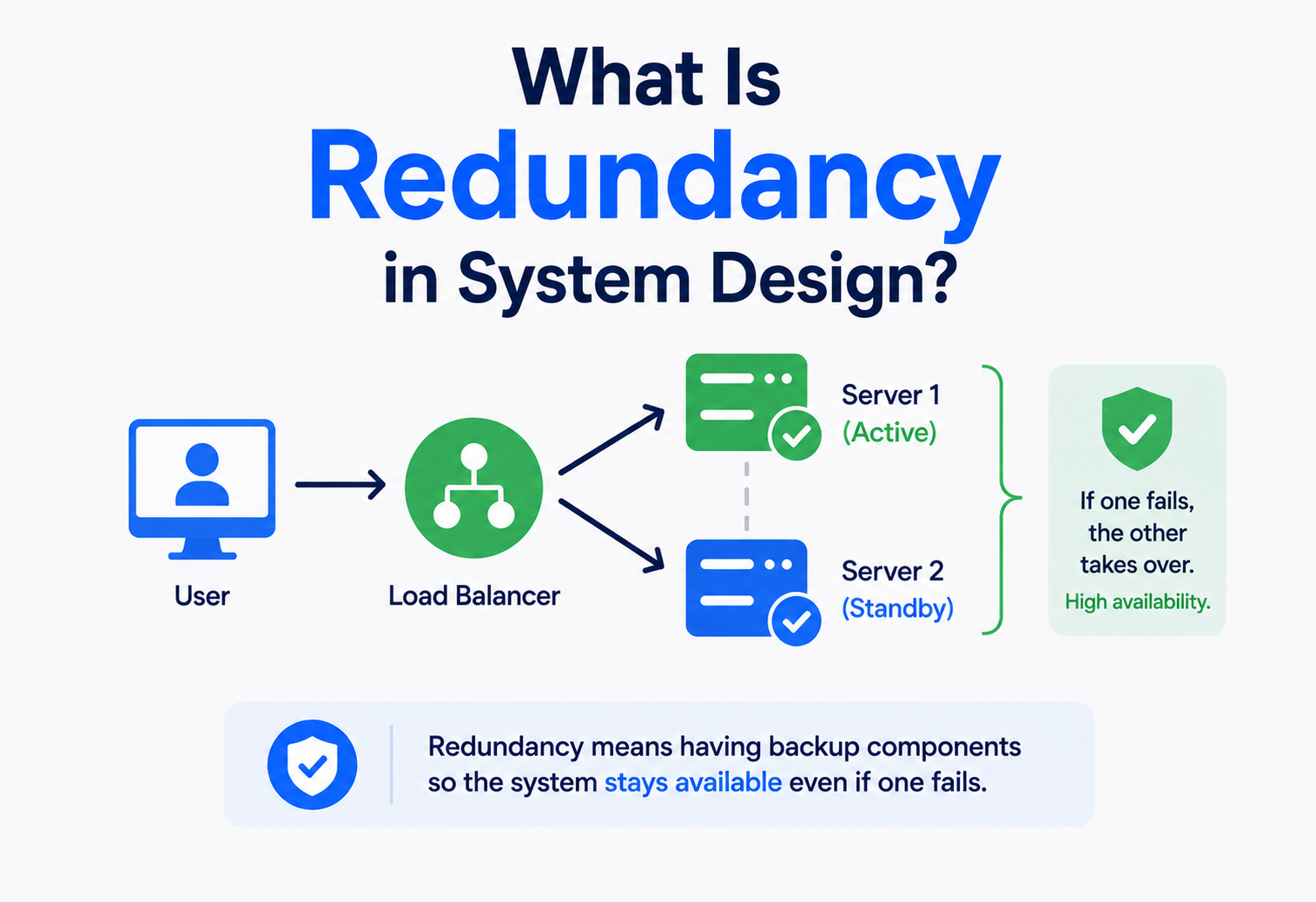
What Is Redundancy in System Design?
Every physical thing eventually breaks. Redundancy is what quietly keeps that fact from turning into a disaster — extra copies of important pieces, ready to take over the moment something fails, so that the people using a system never even notice it happened.
The Big Idea, in One Breath
Think about a bicycle with two brakes — one on the front wheel, one on the back. You almost never need both at the same time; either one, on its own, can slow you down safely. So why bother with two? Because if a cable snaps on one brake at the worst possible moment, you still have the other one to rely on. You didn’t add a second brake because you expected the first one to fail today. You added it because “today” is exactly the kind of day nobody can predict, and the cost of being wrong is far too high to risk on a single point of failure.
That’s the entire idea behind redundancy in system design, transplanted from bicycles to computers, power grids, and everything in between. It means deliberately building extra copies of important parts of a system — servers, databases, network connections, power supplies — so that if one of them breaks, the system as a whole keeps working without anyone even noticing. It’s not about expecting failure constantly. It’s about accepting that failure is inevitable eventually, and refusing to let one broken part take down everything that depends on it.
A tightrope walker at a circus almost always performs with a safety net stretched out below. The net doesn’t make the walker better at balancing, and on a good day, it’s never even touched. But on the one day something does go wrong, that net is the entire difference between a scary moment and a disaster. Redundancy in a computer system is exactly that safety net — quietly present, rarely needed, and absolutely essential on the one day it actually gets used.
What makes redundancy worth understanding deeply, rather than treating as a checkbox on a project plan, is how differently it changes the character of a system. A system without redundancy is fragile in a very specific way — it might run perfectly for months, giving everyone a false sense of security, right up until the one component nobody thought to double finally gives out, and everything built on top of it stops working all at once. A system built with genuine redundancy in mind behaves completely differently under the exact same failure: a part quietly dies, a backup quietly takes over, and most people using the system never even find out anything happened at all. Same failure, wildly different outcome — and the only thing separating the two is a decision made ahead of time, long before the failure itself.
What Redundancy Really Is
Redundancy is the deliberate duplication of critical components or functions within a system, so that a backup is ready to take over the moment the primary one fails. The word can sound negative in everyday language — nobody wants to hear their job is “redundant” — but in engineering, it means almost the opposite: something valuable enough that losing your only copy of it would be a real problem, so a second, independent copy is kept ready just in case.
The core assumption behind redundancy is refreshingly honest: every single component in a system, no matter how well built, will eventually fail. Hard drives wear out. Power supplies burn out. Network cables get accidentally cut. Servers crash. Redundancy doesn’t try to prevent these individual failures from ever happening — that’s a losing battle against physics and probability. Instead, it changes the question from “how do we stop this one part from ever failing?” to “how do we make sure that when it inevitably does fail, nobody using the system even notices?”
If someone asks “is this system redundant?”, they’re really asking: “If I reached in right now and switched off any one single piece of this, would everything else keep working just fine?”
It’s worth being precise about what redundancy targets specifically: components, not the overall goal. A redundant power supply doesn’t make electricity itself more reliable — it makes the system’s access to electricity more reliable, by giving it more than one way to get it. This distinction between “making the individual part perfect” and “making sure the loss of any one part doesn’t matter” is the whole engine behind why redundancy works so well in practice.
There’s also an important word buried inside the definition worth pausing on: independent. A backup only genuinely protects a system if its failure isn’t caused by the exact same thing that could take out the original. Two servers sitting in the same rack, plugged into the same power circuit, are duplicated in name, but they’re not truly independent — a single tripped circuit breaker takes both of them out at once, and the redundancy that looked solid on a diagram turns out to have been an illusion the whole time. Genuine redundancy requires actively asking, for every backup added, “what specific failure would take out both the original and its backup at the same time?” — and then working to make that shared failure as unlikely, or as physically impossible, as the budget and the situation reasonably allow.

Why It Matters So Much
It’s tempting to think of redundancy as a nice-to-have, something only huge companies with unlimited budgets need to worry about. In reality, the cost of not having it shows up the moment something inevitably breaks — and by then, it’s far too late to add.
The True Cost of Downtime
When an online store’s checkout page goes down for even a few minutes during a busy shopping period, the lost sales are immediate and easy to measure — but the damage rarely stops there. Customers who hit an error message once often don’t come back to try again, and word about an unreliable service spreads quickly. For services that people depend on constantly — banking apps, hospital systems, emergency communication networks — a period of downtime isn’t just inconvenient; it can mean genuinely serious consequences for real people relying on that system at the worst possible moment.
Failure Is a Certainty, Not a Possibility
Every physical component that makes up a computer system has a finite lifespan. Hard drives are rated with an expected number of hours before failure becomes statistically likely. Power supplies degrade with heat and age. Even software, running on perfectly healthy hardware, occasionally crashes due to a rare bug nobody caught in testing. A system built with the hopeful assumption that “nothing will ever break” isn’t being optimistic — it’s simply ignoring a mathematical certainty and hoping the certainty arrives on someone else’s watch.
Ask of any critical component: “If this one thing failed at 3 a.m. with nobody watching, would the system recover on its own, or would it simply stay broken until a human noticed?” Redundancy exists to make the answer “it recovers on its own.”
The Quiet Value of Predictability
There’s a less obvious benefit to redundancy worth naming directly: it changes how a team relates to its own system. Engineers working on a fragile system, where one bad component could bring everything down at any moment, tend to work cautiously and anxiously — afraid to make routine changes, afraid to schedule normal maintenance, because any small mistake could tip an already-precarious system over. A properly redundant system removes that background anxiety. Maintenance can be scheduled during business hours, because a backup can absorb the load while one component is taken offline on purpose. Updates can be rolled out gradually, one redundant instance at a time, rather than as a single risky, all-at-once event. Redundancy doesn’t just protect against unplanned failure — it gives a team room to plan, experiment, and improve a system confidently, without constantly fearing they might accidentally break the only copy of something important.
Single Points of Failure
The concept that redundancy exists specifically to eliminate is called a single point of failure — any one component whose failure, on its own, is enough to bring down the entire system. Finding and removing these is really the whole practical job of designing for redundancy.
A single point of failure can hide in surprising places. A company might run two separate web servers for redundancy, feeling well protected — but if both servers plug into the very same single power strip, or route through the very same single internet connection, or depend on the very same single database with no backup, the “redundant” servers were never actually protected against the failure that matters most. True redundancy requires following every dependency all the way down, not just duplicating the most visible, obvious layer.
A hidden single point of failure is far more dangerous than an obvious one, precisely because nobody thinks to double it. Shared power circuits, a single DNS provider, one engineer who’s the only person who understands a critical system — these all count.
That last example — a single person holding critical, undocumented knowledge — deserves its own moment of attention, because it’s genuinely one of the most common single points of failure in real organisations, and one of the easiest to overlook entirely. A system can have perfectly duplicated servers, storage, and network paths, and still be dangerously fragile if only one engineer actually understands how to operate it correctly during an emergency, or if that person is the only one with the necessary access credentials. This kind of human single point of failure is sometimes only discovered the hard way, when that person is unreachable on holiday during the exact moment something breaks. Good redundancy thinking extends beyond hardware and software to include people and knowledge too — documentation, shared access, and cross-training exist precisely to remove this often-invisible risk.

The Main Types of Redundancy
Redundancy isn’t one single technique — it’s a family of related strategies, each aimed at a different layer of a system that could potentially fail.
Physical backups
Extra servers, disks, power supplies, or network cards ready to take over if their counterpart physically fails.
Multiple copies of information
The same data stored in more than one place, so losing one copy doesn’t mean losing the information itself.
Multiple paths for traffic
More than one route for data to travel, so a single cut cable or failed router doesn’t isolate a system.
Spread across locations
Entire copies of a system running in physically separate places, protecting against events that affect one whole site.
Multiple running instances
Several copies of the same application running at once, so a crash in one doesn’t take the service down.
Backup energy sources
Uninterruptible power supplies and backup generators that keep critical systems running through an outage.
Most serious systems combine several of these layers at once, because redundancy is only as strong as its weakest, undoubled layer. A data centre might have redundant servers, redundant network paths, and redundant power — but all of that careful duplication is undone if the entire building itself is the single point of failure, which is exactly the problem geographic redundancy exists to solve.
It also helps to notice that these layers aren’t independent choices made once and forgotten — they interact with each other constantly, and weaknesses in one layer can quietly undermine the strength of another. Redundant hardware sitting inside a single building with no backup power is really only as reliable as that building’s electricity supply. Redundant data spread across multiple servers is only as safe as the network connecting them, since a network partition can leave two supposedly synchronised copies silently drifting apart from each other without anyone immediately realising it. A thorough architect walks through every layer deliberately, one at a time, rather than assuming that strength in one area automatically covers gaps in another.
Active-Active vs. Active-Passive
Once a team decides to add a backup component, a fundamental design choice follows immediately: should the backup sit idle until needed, or should it be doing real work all along?
Standby, ready to step in
One primary handles all traffic. Backup stays on standby, ready to take over. Simpler to manage and reason about. Backup resources sit unused until a failure occurs. A short pause usually happens during failover.
Everyone working, all the time
All instances handle traffic simultaneously. No resources sit idle — better use of capacity. Failover can be nearly instant and unnoticed. Requires careful coordination between instances. More complex to design and keep consistent.
Active-passive is like a school having one main gym teacher, with a second qualified teacher sitting in the staff room, ready to step in only if the first one calls in sick. Active-active is like a school running two gym classes side by side at the same time, both fully staffed — if one teacher suddenly can’t continue, the other simply absorbs both groups of students without missing a beat, but coordinating two live classes takes more planning than keeping one on standby.
Neither approach is universally “better” — the right choice depends on how much a brief pause during failover actually matters for a given system, and how much extra complexity a team can comfortably manage. A personal blog can usually tolerate the short pause of an active-passive failover without anyone noticing. A stock trading platform, where even a few seconds of interruption has real financial consequences, usually justifies the added complexity of a fully active-active setup.
What Actually Happens During Failover
It’s worth walking through what a failover actually involves, because the phrase can sound instantaneous when the reality has several distinct steps. First, something has to notice the primary has actually failed — usually a repeated health check that stops getting a response, rather than a single missed check that could just be a temporary blip. Then, the system has to decide, often automatically, that the failure is real and lasting rather than momentary, to avoid the wasteful and disruptive scenario of switching over unnecessarily for a brief hiccup that would have resolved itself. Finally, traffic actually gets redirected to the backup, whether that means a load balancer updating its routing table, a database promoting a replica to become the new primary, or a DNS record being updated to point somewhere else. Each of these steps takes some amount of time, and the total — often called the failover time — is exactly what determines whether users experience a barely-noticeable blip or a more disruptive pause.
N+1, N+M, 2N & Voting Systems
Beyond the basic active/passive choice, engineers use a compact shorthand to describe exactly how much spare capacity a redundant system carries. This vocabulary shows up constantly in data centre design, and it’s worth understanding precisely.
Bare minimum, no spare
Exactly enough components to meet demand, with zero tolerance for any failure at all.
One spare component
The minimum required (N) plus exactly one extra, able to absorb a single component failure.
Several spare components
The minimum required plus M extras, allowing the system to survive multiple simultaneous failures.
A complete mirror
An entire second, independent copy of the whole system, eliminating any single shared point of failure.
Data centres often push this even further with 2N+1, combining a full mirrored duplicate with an extra spare on top, for facilities where downtime simply isn’t an acceptable outcome under almost any circumstance. Aircraft and other safety-critical systems sometimes go a step further still, using triple modular redundancy — three independent systems running the same calculation simultaneously, with a voting mechanism that trusts whatever two out of the three systems agree on, quietly ignoring the odd one out if it disagrees.
| Level | Meaning | Typical Use |
|---|---|---|
| N | No spare capacity at all | Non-critical, low-stakes systems |
| N+1 | One extra component beyond minimum | Common baseline for important systems |
| N+M | Multiple extra components | Systems needing to survive several failures at once |
| 2N | Complete duplicate of everything | Mission-critical data centres, hospitals |
| 2N+1 | Full duplicate plus one more spare | The highest-tier, most demanding facilities |
Higher redundancy levels cost real money and add real operational complexity. The right level isn’t “the highest possible” — it’s the level that genuinely matches how much a failure would actually cost the business.
These notations originally came from the world of physical infrastructure — data centre power and cooling systems, industrial equipment, and aviation — but the same underlying vocabulary has been adopted widely across software architecture too, because the shape of the problem is identical. A cluster of application servers behind a load balancer, sized to handle expected demand plus one spare instance for safety, is genuinely an N+1 design in exactly the same sense as a data centre’s backup generator setup, even though nothing about it is physical hardware sitting in a warehouse. Recognising that the same simple vocabulary applies across such different contexts is part of what makes it so useful — an engineer moving from designing web services to reviewing a data centre’s power redundancy plan, or the other way around, doesn’t need to learn an entirely new way of thinking, just a new set of physical details layered on top of a familiar underlying idea.
Data Redundancy & RAID
Losing a server is recoverable if you can quickly start another one. Losing the actual data — customer records, financial transactions, years of photos — is often far more serious, because unlike a server, information that’s genuinely gone usually can’t simply be rebuilt from scratch. This is why data redundancy gets its own dedicated set of techniques.

RAID: Redundancy Inside a Single Machine
One of the oldest and most widely used data redundancy techniques is RAID, short for Redundant Array of Independent Disks — a method of combining several physical disk drives so they behave, from the outside, like one reliable drive, while protecting against the failure of any single disk inside the group.
Speed, zero protection
Splits data across drives for maximum speed, but offers no redundancy at all — losing one drive loses everything.
Simple mirroring
Duplicates data identically across two drives — if one fails, the other keeps working with a full, exact copy.
Striping with parity
Spreads data and recovery information across at least three drives, tolerating the loss of any single drive.
Double protection
Like RAID 5 but with extra recovery information, able to survive two drives failing at the same time.
Replication: Redundancy Across Machines
Beyond a single machine, databases commonly use replication — continuously copying data to one or more additional servers, often in real time, so that a complete, current copy exists somewhere else entirely. This protects against a failure RAID alone can’t help with: the entire server, RAID array and all, becoming unreachable due to a power outage, a network failure, or physical damage to the building it sits in.
Think of a family’s most treasured photo album. Keeping a duplicate print in a second drawer of the same house protects against a torn page, but not against a house fire. Keeping a copy at a relative’s house across town protects against the fire too. RAID is the second drawer; replication to another server, especially in another location, is the relative’s house.
Backups: The Last Line of Defence
Redundancy and backups solve related but genuinely different problems, and it’s worth being precise about the difference. Redundancy keeps a system running continuously through a failure. A backup is a separate, often slightly older snapshot of data, kept specifically to recover from disasters that redundancy itself can’t protect against — like someone accidentally deleting important data, where a perfectly healthy redundant copy would simply and faithfully replicate that very same mistake everywhere, instantly.
The Trade-Off Between Consistency and Speed
Keeping multiple copies of data reliably in sync introduces a genuine engineering challenge that’s easy to underestimate: every time data changes, that change has to reach every redundant copy, and doing so instantly, every single time, without ever slowing anything down, turns out to be surprisingly difficult at scale. Some systems choose to wait until a change has been confirmed on every copy before telling the user “done,” which is safer but slower. Others confirm the change immediately on the primary copy and let the backups catch up moments later, which feels faster to the user but carries a small risk that a failure at exactly the wrong instant loses a tiny sliver of very recent data. Neither choice is simply “correct” — it’s a genuine trade-off between speed and safety that a thoughtful architect makes deliberately, based on how serious that small window of risk actually is for the specific kind of data involved.
Geographic Redundancy
Even a beautifully redundant system, with duplicated servers, duplicated storage, and duplicated power, still has one enormous shared dependency if everything sits inside a single building: the building itself. A flood, a fire, a regional power grid failure, or a natural disaster can take out every carefully duplicated component at once, because they were never actually independent of each other in the one way that mattered most.
Geographic redundancy solves this by spreading complete, independent copies of a system across genuinely separate physical locations — different buildings, different cities, sometimes different countries entirely, each with its own independent power grid, its own independent network connection, and often its own independent operational staff. If disaster strikes one location, traffic and workload shift to another location that was never affected in the first place.
Geographic redundancy only genuinely helps if the two locations truly don’t share a dependency. Two “separate” data centres that both rely on the same regional power substation, or the same single internet backbone provider, aren’t as independent as they look on paper.
Geographic redundancy also raises a genuinely tricky question that hardware redundancy doesn’t: how far apart is far enough? Two data centres on opposite sides of the same city might be independent enough to survive a local power outage or a single building fire, but not independent enough to survive a widespread regional event like a major storm or an earthquake. Spreading locations across entirely different countries or continents solves that problem more thoroughly, but introduces its own new complications — data travelling a genuinely longer physical distance takes measurably longer to arrive, which can slow down a service for users, and different countries often have different legal requirements about where certain kinds of data are allowed to be stored at all. There’s rarely a single “correct” distance; the right answer depends on which specific kinds of disaster a system genuinely needs to survive, weighed honestly against the real costs that distance introduces.
Redundancy vs. Resiliency vs. Fault Tolerance
These three words get used almost interchangeably in casual conversation, but architects benefit from keeping them distinct, because each describes a genuinely different property of a system.
| Term | What It Means | Key Question |
|---|---|---|
| Redundancy | Having duplicate components ready as backups | Is there a spare if this breaks? |
| Resiliency | The broader ability to absorb problems and keep functioning, including recovering gracefully | Can the system bend without breaking, and bounce back? |
| Fault Tolerance | Continuing to operate with zero interruption, even during a failure | Does the user notice anything at all when something breaks? |
| High Availability | Staying accessible and usable for the vast majority of the time | What percentage of the time does this actually work? |
Redundancy is best understood as one specific, concrete tool used to build the broader, more general goals of resiliency, fault tolerance, and high availability — not a synonym for any of them. A system can be redundant without being fully fault-tolerant, if failover still causes a brief, noticeable pause. A system can be resilient in ways that go beyond redundancy entirely — for instance, by automatically slowing itself down gracefully under heavy load rather than crashing outright, which is a form of resilience that doesn’t involve duplicate components at all.
Redundancy is the spare tyre in your car’s boot. Resiliency is your overall ability to keep the journey going smoothly, of which the spare tyre is just one part. Fault tolerance would mean the flat tyre never even slowed the car down in the first place.
It’s worth appreciating why architects bother keeping these terms separate at all, rather than treating the distinction as pedantic hair-splitting. Each term points a team toward a different kind of question, and conflating them tends to produce lopsided systems. A team that only ever asks “is this redundant?” might end up with plenty of duplicated hardware but no real plan for how the system behaves gracefully under unexpected, unusual conditions that aren’t simple component failures — a sudden, unplanned surge in traffic, for instance, which redundancy alone doesn’t automatically handle well. A team that only asks the broader “is this resilient?” question, without ever getting concrete about specific redundant components, risks staying vague and never actually building the tangible backups a real failure will require. Using all four terms deliberately, each for the specific question it’s suited to, tends to produce a much more complete and honest picture of how a system will actually behave when something eventually goes wrong.

Pros, Cons, and the Real Cost
What redundancy buys you
Removes single points of failure from critical systems. Keeps services running through component failures. Protects valuable data against loss. Builds genuine trust with people relying on the system. Buys time to repair a failed component without pressure.
What it quietly costs
Doubles or multiplies infrastructure and operating cost. Adds real complexity to design, testing, and monitoring. Can introduce new failure modes of its own, like split-brain issues. Requires ongoing discipline to keep backups genuinely ready. Diminishing returns beyond a certain point of criticality.
Redundancy is never free, and pretending otherwise leads to poor decisions. Every extra server, every duplicated database, every additional data centre carries real, ongoing cost — in hardware, in electricity, in the engineering time needed to keep it all correctly synchronised and tested. The right question is never “should we add more redundancy?” in the abstract, but “does the cost of this specific redundancy genuinely make sense against the cost of the failure it protects against?”
A useful gut check: multiply how often a failure is likely to happen by how much damage it would cause if it did. Compare that number honestly against the ongoing cost of preventing it. Redundancy earns its keep when the first number is bigger.
This kind of honest cost-benefit thinking is where system design shifts from a purely technical exercise into something closer to genuine business judgement, and it’s exactly the kind of reasoning an experienced architect is expected to bring to the table. Not every part of a system deserves equal protection — a company’s core payment processing logic almost certainly justifies a far higher level of redundancy than, say, an internal tool used occasionally by three people in the marketing team, even though both are technically “part of the system.” Spreading redundancy investment evenly across a whole system, rather than concentrating it where the real business risk actually lives, is a subtle but common mistake — it feels fair and thorough, but it often means under-protecting the parts that matter most while over-protecting the parts that don’t.
Common Pitfalls
Redundancy That Shares a Hidden Dependency
Two “independent” servers plugged into the same power strip, or two data centres relying on the same undersea internet cable, aren’t truly redundant — they share an invisible single point of failure that only reveals itself the day it actually breaks.
Never Testing the Failover
A backup that’s never actually been switched to in practice is a backup nobody can fully trust. It’s common, and quietly dangerous, for a standby system to have silently drifted out of sync or developed its own hidden fault, discovered only during a real emergency — precisely the worst possible moment to find out.
Split-Brain Situations
In an active-active setup, if the communication link between two “equal” copies of a system breaks, both sides can sometimes mistakenly believe they’re now the only one in charge, each accepting changes independently — a confusing, hard-to-repair situation engineers call split-brain. Careful coordination and clear tie-breaking rules are needed to prevent this from happening.
Over-Engineering for Unlikely Failures
Not every component deserves the highest possible level of redundancy. Applying 2N+1 protection to a low-stakes, easily replaceable part of a system wastes money and adds needless complexity that could have gone toward protecting something that actually matters more.
Confusing Redundancy With Backups
Assuming that a redundant, continuously synchronised system also protects against accidental deletion or corruption is a costly misunderstanding — a mistake made on the primary copy gets faithfully and instantly copied to every redundant copy too, unless a genuinely separate backup strategy exists alongside it.
Letting Redundant Capacity Quietly Rot
A standby server that hasn’t been updated with the latest software patches, or a backup database whose schema has quietly drifted out of sync with the primary over months of small, forgotten changes, isn’t a reliable backup anymore — it’s a false sense of security waiting to be discovered at the worst possible time. Redundant components need the exact same ongoing care and maintenance as the primary components they’re meant to replace, and skipping that maintenance because “it’s just the backup” defeats the entire purpose of having it.
“We have redundancy” is not the same claim as “we have tested, working redundancy.” The only way to know for certain is to deliberately, safely simulate a failure and watch what actually happens.
Designing Redundancy Well
Building genuinely effective redundancy is less about buying more hardware and more about following a disciplined process.
Map every dependency, honestly
List every component a critical service actually relies on — including power, network, and shared infrastructure most teams overlook.
Identify true single points of failure
Look specifically for any component whose failure alone would take the whole system down, including ones hidden behind “redundant” layers.
Match redundancy level to real risk
Decide N+1, N+M, or 2N based on genuine business impact, not a generic industry default applied everywhere blindly.
Automate detection and failover
Build health checks and automatic switching so recovery doesn’t depend on a human noticing and reacting fast enough at 3 a.m.
Test the failure on purpose, regularly
Deliberately trigger failures in a controlled way to confirm the backup genuinely works, rather than hoping it will when the real emergency arrives.
Untested redundancy is just an expensive guess.
It’s worth adding a sixth, ongoing habit to this list, because redundancy isn’t a project with a finish line — it’s a standing commitment that needs revisiting as a system grows and changes. A redundancy plan built when a company had a hundred customers may quietly stop matching reality once that company has a million, because both the acceptable cost of downtime and the realistic scale of traffic have shifted enormously in the meantime. Good architects treat their redundancy design the same way they treat any other living part of the system: reviewed periodically, questioned honestly, and adjusted deliberately, rather than set once during an initial launch and left untouched for years afterward.

Real-World Examples
Aeroplanes
A commercial aircraft typically flies with multiple independent hydraulic systems, multiple engines, and multiple independent computers calculating the same critical flight measurements simultaneously, comparing results and trusting whichever answer the majority agree on. Redundancy here isn’t a cost-saving afterthought — it’s foundational to the entire design, precisely because the consequences of a single point of failure are so severe.
Power Grids
Electrical grids route power along multiple independent paths between generating stations and homes, so that a single downed line or damaged substation doesn’t leave an entire region without electricity. Hospitals go a further step, keeping their own backup generators and battery systems on-site, adding a private layer of redundancy on top of the shared public grid.
Online Retail
A large online store typically runs multiple copies of its website across several geographically separate data centres, with its product database continuously replicated between them. If one entire data centre goes offline unexpectedly, customer traffic shifts smoothly to another, and most shoppers never notice anything happened at all.
Home Networking
Even outside large companies, the same principle shows up at a small scale: a household keeping a mobile hotspot as a backup internet connection in case the main broadband line goes down is applying exactly the same redundancy thinking used in a billion-dollar data centre, just at a much smaller, more personal scale.
Emergency Communication Networks
Systems that coordinate emergency responders — police, fire, and ambulance dispatch — are often built with especially aggressive redundancy, because the cost of a failure isn’t measured in lost revenue but in lost time during a genuine emergency. These networks commonly maintain multiple independent radio frequencies, backup dispatch centres in entirely separate locations staffed and ready to take over instantly, and battery or generator power lasting well beyond a typical outage, precisely because “we’ll fix it in a few hours” is never an acceptable answer when someone’s safety depends on the system working right now.
Redundancy in Modern Practice
Cloud computing has fundamentally changed how affordable and accessible redundancy has become. Where geographic redundancy once required a company to build and staff its own second physical data centre — an enormous undertaking reserved for only the largest organisations — modern cloud providers let a small team spin up a fully redundant, multi-region deployment with a few configuration choices, paying only for what they actually use.
Redundancy as Code
Modern infrastructure is increasingly defined through code rather than manual setup, which means redundancy configurations — how many replicas, across which regions, with what failover rules — can be written down, reviewed, tested, and reliably reproduced exactly, rather than depending on one engineer’s memory of how a system was originally wired together by hand years earlier.
Chaos Engineering
Some of the most sophisticated teams have taken the idea of “testing the failover” a step further, deliberately and safely injecting real failures into live production systems on a regular, controlled basis, specifically to confirm that redundancy actually behaves the way it’s assumed to. This practice, sometimes called chaos engineering, treats untested assumptions about reliability as a real risk worth actively hunting down, rather than a comfortable belief left unchallenged until a genuine emergency exposes the gap.
Modern redundancy is judged less by how much duplicate hardware exists on paper, and more by how confidently a team can say “we’ve actually watched this failover happen successfully, on purpose, recently.”
Redundancy in an AI-Assisted Development Era
As more infrastructure gets generated and configured with the help of AI coding assistants, clear, well-understood redundancy vocabulary becomes just as valuable for communicating with an assistant as it always was for communicating with a human colleague. Asking an assistant to “set this database up with active-active replication across two regions, N+1 for the application tier” conveys a precise, well-defined architecture in one sentence, and gives the assistant a specific, checkable target rather than a vague request to “make it reliable.” As with any AI-generated infrastructure, though, the same discipline still applies afterward — the resulting redundancy still needs to be reviewed against real dependencies and genuinely tested, since a plausible-looking configuration is not the same thing as one that’s actually been proven to work.
Frequently Asked Questions
Does every system need redundancy?
No. A personal project, a small internal tool, or anything where brief downtime causes little real harm often doesn’t justify the added cost and complexity. Redundancy should scale with how much a failure would actually cost.

Is redundancy the same thing as backups?
No, and this is a common and costly confusion. Redundancy keeps a system running through a failure in real time. A backup is a separate, often slightly older snapshot kept specifically to recover from mistakes or disasters that redundancy alone can’t protect against, like accidental deletion.
Can you have too much redundancy?
Yes. Beyond a certain point, additional redundancy adds cost and complexity without meaningfully reducing real risk, and can even introduce new failure modes of its own, like coordination problems between too many duplicate parts.
What’s the difference between N+1 and 2N?
N+1 adds exactly one spare component to the minimum required, protecting against a single failure. 2N duplicates the entire system completely, protecting against far more severe, simultaneous, or total failures, at a significantly higher cost.
How do you know if your redundancy actually works?
The only reliable way is to test it deliberately — safely triggering the failure it’s meant to protect against, in a controlled setting, and confirming the backup genuinely takes over as expected, rather than assuming it will.
Does redundancy slow a system down?
Not usually in an active-active setup, where extra capacity often improves performance under normal conditions. Active-passive setups may introduce a brief pause specifically during the moment of failover, though the system runs at full speed the rest of the time.
Who typically decides how much redundancy a system needs?
Usually a collaborative decision between architects, who understand the technical trade-offs, and business stakeholders, who understand the real cost of downtime to the organisation. Neither side alone has the full picture needed to make this call well.
Is cloud infrastructure automatically redundant?
Not automatically — cloud providers offer the building blocks for redundancy, like multiple regions and availability zones, but a team still has to deliberately choose to use them correctly. Simply running something “in the cloud” doesn’t guarantee it’s actually protected against failure.
Glossary
| Term | Definition |
|---|---|
| Redundancy | Deliberate duplication of components so a backup is ready if the primary fails. |
| Single Point of Failure | Any one component whose failure alone can bring down the whole system. |
| Failover | The process of automatically switching from a failed component to a working backup. |
| Active-Active | A setup where all redundant components handle work simultaneously. |
| Active-Passive | A setup where a backup stays idle until the primary component fails. |
| N+1 Redundancy | The minimum required components plus one spare, tolerating a single failure. |
| 2N Redundancy | A complete, independent duplicate of an entire system. |
| RAID | A technique combining multiple physical disks to protect against individual drive failure. |
| Replication | Continuously copying data to one or more additional servers or locations. |
| Geographic Redundancy | Running full system copies across physically separate locations. |
| Split-Brain | A failure where two parts of a redundant system both believe they’re in sole control. |
| Chaos Engineering | Deliberately injecting controlled failures into live systems to test resilience. |
Key Takeaways
Redundancy is really an honest response to a simple, uncomfortable truth: everything eventually breaks. Rather than chasing the impossible goal of a component that never fails, redundancy accepts that failure will happen and quietly makes sure that when it does, nobody depending on the system needs to suffer for it. Getting it right takes more than duplicating hardware — it takes carefully tracing every real dependency, matching the level of protection to genuine risk, and testing the whole arrangement on purpose, rather than trusting it blindly. Done well, redundancy is one of the quietest, most unglamorous, and most genuinely valuable things an architect can build into a system.
Perhaps the most important shift in thinking redundancy asks of anyone new to system design is this: stop asking “will this fail?” — the honest answer is always eventually, yes — and start asking “when it fails, what happens next, and who notices?” That single change in the question asked completely reshapes how a system gets built, moving the goal from an impossible promise of perfection toward the far more achievable, far more honest promise of graceful, quiet recovery.
Remember This
- Redundancy means deliberately duplicating critical components so a backup is ready when the primary fails.
- The core goal is eliminating single points of failure — any one part whose failure alone breaks everything.
- Common layers include hardware, data, network, geographic, software, and power redundancy.
- Active-passive is simpler; active-active offers faster, often unnoticeable failover at greater complexity.
- Redundancy levels like N+1, N+M, and 2N describe exactly how much spare capacity a system carries.
- Redundancy is a tool used to build resiliency, fault tolerance, and high availability — not a synonym for any of them.
- Redundancy is not a substitute for backups; a mistake replicated everywhere is still a mistake everywhere.
- Untested redundancy is an assumption, not a guarantee — it should be deliberately verified, regularly.

