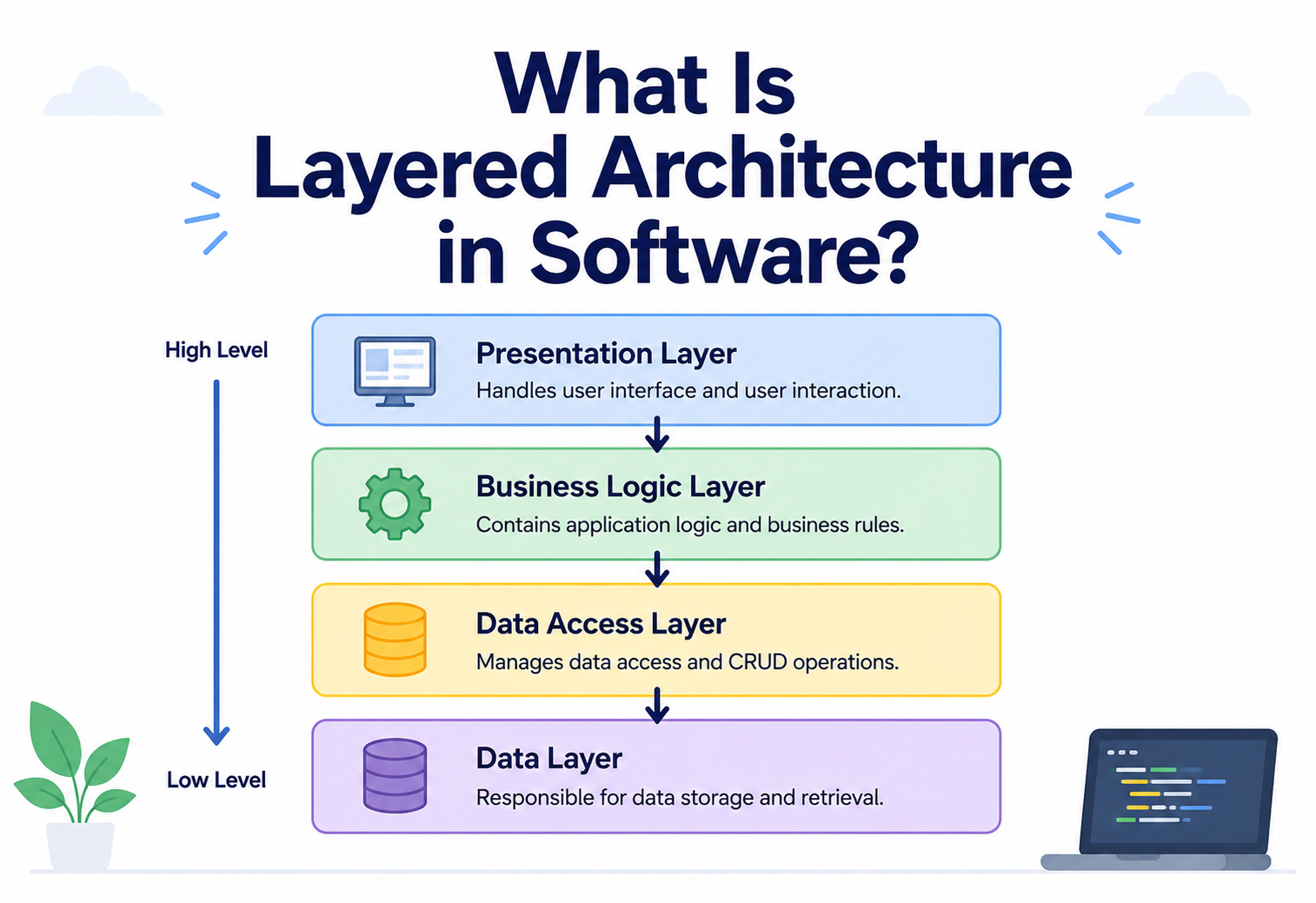
What Is Layered Architecture in Software?
Think of your favourite layer cake — sponge, then cream, then fruit, each layer sitting neatly on the one below it. Software can be built the very same way. This guide unpacks the layered architecture style from the ground up, using plain words and everyday pictures.
The Big Idea, in One Breath
Sponge, cream, fruit — each layer sits neatly on the one below it, each with one clear job. A huge amount of software is organised in exactly the same shape.
Picture a layer cake sitting on a table. At the bottom is the sponge, holding everything up. On top of that sits a layer of cream. And on top of the cream sits a layer of fruit and icing. Each layer rests neatly on the one beneath it, and each layer has one clear job — the sponge gives structure, the cream adds richness, the topping makes it beautiful. Nobody expects the fruit topping to also hold the whole cake together; that is not its job.
A huge number of software applications are organised in exactly this way. The system is split into horizontal slices, stacked one on top of another, where each slice handles one clear responsibility and only ever talks to the slice directly beneath it. This way of organising a system is called a layered architecture, and it is one of the oldest, most widely taught, and most widely used architectural styles in all of software development.
Think about a restaurant. The waiter takes your order and brings your food — that is the part you see. The kitchen cooks the meal based on the order — that is the part working behind the scenes. The store room holds the raw ingredients the kitchen needs. You never walk into the store room yourself; you always go through the waiter, who goes through the kitchen. That is a layered system in action, and it is exactly how a layered software architecture is meant to behave.
It is worth pausing on why this particular idea has stuck around for so long. Almost everything humans build at scale ends up organised into layers of some kind, because layering is simply a very natural way for people to manage complexity together. A hospital has reception, then nurses, then doctors, then specialists — each step handling a different depth of the same problem. Software teams, faced with the same challenge of managing complexity across many hands, arrived at a strikingly similar answer.

What Layered Architecture Really Is
A precise definition, the golden rule that keeps it clean, and the quiet role that abstraction plays in tying the whole stack together.
In formal terms, a layered architecture (sometimes called n-tier architecture) organises a software system into horizontal groups of related responsibilities, called layers. Each layer sits at its own level of abstraction, offers a defined set of services to the layer above it, and relies on the services of the layer below it. The golden rule underneath all of this is simple: a layer should only ever talk to the layer immediately next to it, never reach far above or below to grab something directly.
It helps to think of it as a chain of trust. The top layer trusts the layer below to get a job done correctly, without needing to know exactly how that job happens. The layer below does the same for the one beneath it, and so on, all the way down. Nobody needs to understand the whole chain at once — they only need to understand their own link and the link right next to them.
If someone asks “what does a layered architecture look like?”, the honest answer is: imagine a stack of trays, each one responsible for a different job, where information only ever moves between trays that are directly touching.
There is a second idea quietly holding all of this together: abstraction. Each layer offers a simple, well-labelled doorway — often called an interface — that hides everything messy happening on the other side of it. The business layer doesn’t need to know whether the data layer is using one kind of database or another; it only needs to know that asking politely through the doorway will bring back the right answer. It works a lot like a light switch — you don’t need to understand the wiring behind the wall to turn a light on, you just need the switch to behave the same predictable way every single time you flip it.
Why This Style Was Invented
Growing programs became tangled messes. Layering, borrowed from how networks and organisations already worked, gave engineers a familiar shape for separating concerns.
Long before today’s cloud platforms and mobile apps existed, early software teams ran into a very human problem: as programs grew bigger, they became tangled messes where a tiny change in one place could unexpectedly break something completely unrelated somewhere else. Engineers needed a way to keep related pieces of logic together, keep unrelated pieces apart, and make it obvious where new code should go.
Layering solved this by borrowing an idea that shows up everywhere in the real world — from postal systems to company org charts — the idea of separation of concerns. Each layer worries about exactly one concern and nothing else. The part that draws buttons on a screen doesn’t need to know how data gets saved to a hard drive. The part that saves data doesn’t need to know what colour the button was. Keeping those concerns apart made large systems dramatically easier to build, test, and later hand over to new engineers.
The idea itself traces back to how computer networks were designed decades ago, where engineers found it far easier to reason about a network if they described it as separate layers — one layer worrying only about physical cables, another about addressing, another about the actual message being sent. That same thinking was borrowed and applied to application software, and it stuck around for good reason: it maps naturally onto how humans already like to organise complicated work, by breaking a big job into smaller, clearly labelled jobs.
Everyone knows where things live
New engineers can guess, correctly, which layer holds the code they are looking for, without reading the whole codebase.
Problems stay contained
A bug in how data is displayed rarely has anything to do with how data is stored, because the two are cleanly separated.
Pieces can be tested alone
Each layer can be tested on its own, using fake stand-ins for the layers around it.
Work can be divided cleanly
One group can focus on the screens, another on the business rules, another on the data — with far fewer collisions.
The Layers Explained
Presentation at the top, data at the bottom, and everything else stacked in between. The order isn’t arbitrary — it mirrors how stable each kind of work tends to be.
Most layered systems settle on three or four layers, though larger systems sometimes split things further. The order of the layers is never arbitrary — each one sits exactly where it does because of how stable or changeable that kind of work tends to be. Presentation, at the top, changes the most often, since screens get redesigned frequently. Data, at the bottom, changes the least, since core information tends to stay meaningful for years. Placing the most stable work at the foundation and the most changeable work at the top is precisely what keeps the whole structure from wobbling every time a designer decides to try a new colour scheme. Here is what each classic layer is responsible for.

Presentation Layer
This is the part of the system a person actually sees and touches — the screens, buttons, forms, and menus. Its only job is to show information clearly and collect what the user wants to do. It should never contain business rules of its own; it simply passes requests down and displays whatever comes back.
Application / Business Logic Layer
This is the brain of the system. It holds the actual rules — “a discount only applies if the cart total is above a certain amount,” or “a password must be at least eight characters.” This layer decides what should happen; it doesn’t care how the result gets shown on screen or where the data eventually gets stored.
Persistence Layer
Sometimes folded into the business layer, sometimes kept separate, this layer’s job is translating between the business layer’s world and the database’s world — turning an object in memory into rows that can be saved, and turning saved rows back into something the business layer understands.
Data Layer
At the very bottom sits the actual storage — the database itself, or a file system, where information physically lives once the running program shuts down. This is the layer that remembers things even after the power goes off.
Cross-Cutting Concerns
A few responsibilities don’t belong neatly to any single layer, because every layer needs them at once — things like logging what happened, checking whether a user is allowed to do something, or measuring how long an action took. These are usually called cross-cutting concerns, and rather than duplicating them inside every layer, most teams build them as a thin, shared thread that quietly runs alongside the whole stack, a bit like the electrical wiring that runs through every floor of a building without being “part of” any single floor.
How a Request Actually Travels Through the Layers
Let’s follow one simple action — a shopper clicking “Buy Now” — all the way down the stack and back up, to see the whole idea in motion.
Let’s follow one simple action — a shopper clicking “Buy Now” — all the way down and back up through the stack, to see the whole idea in motion.
Notice that once the database confirms the order is saved, the good news travels all the way back up through the exact same layers, in reverse — persistence hears “success,” business logic packages that into a friendly message, and presentation finally shows “Order Confirmed!” on the screen. At no point does the presentation layer talk to the database directly; every message passes through the layer standing right next to it.
The same pattern holds true no matter what the action actually is. A student submitting homework through a school app follows the identical journey: the presentation layer collects the file, the business layer checks whether the deadline has passed and whether the file type is allowed, the persistence layer prepares the record for storage, and the data layer keeps it safe. Swap “Buy Now” for “Submit Homework,” and the underlying shape of the journey barely changes at all — which is exactly the kind of predictability that makes this style so easy to reason about, no matter what the application is actually for.
Different Flavours of Layering
Not every layered system looks identical. A few well-known variations — strict vs. relaxed, open vs. closed, plus close cousins like hexagonal and onion — are worth knowing by name.
Not every layered system looks identical. Over time, a few useful variations have emerged, and it is worth knowing them by name.

3-Tier vs. N-Tier
A “tier” is a layer that also lives on its own physical machine — so a 3-tier architecture usually means the presentation layer runs on the user’s device, the business layer runs on an application server, and the data layer runs on a separate database server. “N-tier” simply means “however many tiers this particular system needs,” acknowledging that some systems split things further than three.
Strict Layering vs. Relaxed Layering
In strict layering, a layer is only ever allowed to call the layer directly below it — no exceptions, no shortcuts. In relaxed layering, a layer is occasionally permitted to skip down to a layer further below when there is a good practical reason. Strict layering is cleaner and easier to reason about; relaxed layering can be faster to build but risks turning into a tangled mess if teams aren’t careful.
Open Layers vs. Closed Layers
A closed layer insists that every request must pass through it — nothing is allowed to skip it. An open layer is optional; a request may pass straight through it if there is nothing useful for that layer to add in this particular case. Marking a layer as open is sometimes done deliberately to avoid unnecessary detours, but it should always be a conscious decision, written down, rather than an accidental habit.
A Note on Hexagonal and Onion Variations
You may also come across terms like hexagonal architecture or onion architecture. These are close cousins of classic layering, built around the same core belief — keep business logic independent from outside details like databases and screens — but drawn as rings around a central core instead of a straight vertical stack. The direction of dependency is the same idea wearing a different diagram: whether it is drawn top-to-bottom or inside-out, the innermost, most important logic still shouldn’t depend on the outermost, most replaceable details.
How This Relates to MVC
Many engineers also come across the term MVC — Model, View, Controller — and wonder how it connects to layering. The honest answer is that MVC is a smaller, more focused pattern that usually lives inside the presentation layer, organising exactly how a screen, its data, and the logic connecting them are structured. It is entirely possible, and very common, to build the presentation layer of a layered system using MVC internally, while the layers below it are organised quite differently. Think of MVC as a well-designed room inside a larger house — it doesn’t replace the house’s overall floor plan, it just makes one room work beautifully.
Strengths That Made This Style So Popular
A side-by-side look at what layering gets right and where the very same neat stacking can start to feel like a bottleneck.
What It Gets Right
- Extremely easy for new engineers to learn and navigate
- Clear separation between what users see, what the system decides, and what gets stored
- Each layer can be tested in isolation, using fake versions of its neighbours
- Well suited to smaller teams and everyday business applications
- A huge amount of documentation, tutorials, and hiring talent already exists for this style
Where It Struggles
- Can become rigid and slow to change as the application keeps growing
- The whole application is usually built and released together, even for a tiny change
- A single new feature can sometimes ripple through several layers at once
- Doesn’t scale each piece independently — everything grows or shrinks together
- Can hide performance issues, since one slow layer quietly slows down every layer above it
A layered system is like an assembly line in a small workshop. It is wonderfully organised when the workshop makes a modest number of items a day. But if demand suddenly explodes to a million orders, that same neat line can become the very thing slowing everyone down, because every single item still has to pass through every single station, one at a time, in order.
What makes these strengths so durable is that they compound over the life of a project rather than fading after the first release. A team that keeps its layers clean on day one tends to find that adding feature fifty is still nearly as smooth as adding feature five, because new work always has an obvious home. That predictability is quietly one of the most valuable things any architecture can offer a growing team, long after the excitement of the very first launch has passed.
A Closer Look at the Trade-offs
Four honest trade-offs baked into a horizontally stacked design, plus a warning about the “god layer” that appears when a boundary is quietly ignored for too long.
It is worth spending a little extra time on the downsides, because understanding them well is exactly what helps a team decide whether this style still fits as their project grows.
The “Ripple Effect”
Because each layer depends on the one below it, a change deep in the data layer — say, renaming a column — can force updates in the persistence layer, then the business layer, then even the presentation layer, if that column’s value was being shown on screen. In a small app, this ripple is barely noticeable. In a very large app, it can turn a five-minute change into a multi-day effort.

Everything Scales Together
If the presentation layer suddenly gets ten times more visitors, the whole application usually has to be scaled up together — even the parts, like the data layer, that weren’t actually under pressure. This is very different from styles like microservices, where only the busy piece needs more resources.
Layer Bypassing Temptation
Under deadline pressure, it is tempting for a developer to let the presentation layer quietly reach straight into the database “just this once, to save time.” Every one of these shortcuts chips away at the cleanliness that made the style valuable in the first place, and they tend to multiply quietly until nobody remembers which rules are still being followed.
Duplicated Validation Logic
It is common for the same simple check — like “this field cannot be empty” — to end up written three separate times: once in the presentation layer for a quick, friendly warning, once in the business layer as a genuine rule, and once again in the data layer as a final safety net. This repetition is sometimes unavoidable and even healthy in small doses, but left unmanaged it can mean a single rule change has to be remembered and updated in three different places at once.
A layer that has quietly grown so large it does the job of two or three layers at once. This is sometimes nicknamed a “god layer,” and it is usually a sign the boundaries need to be redrawn.
When to Use It — and When Not To
Three quick signals that layering is the right foundation, plus a simple test for spotting the moment a project is genuinely ready for something more distributed.
Layered architecture tends to be an excellent choice when a team is small, the application’s scale is modest to moderate, and the priority is building something correct and understandable quickly. It is also a perfectly sensible starting point even for a project that might grow large one day — many long-lived, successful systems began exactly this way, and only moved toward something like microservices once genuine, measurable growth demanded it.
It tends to be a weaker fit when a system needs different parts to scale independently at very different rates, when many separate teams need to release updates without stepping on each other, or when the business genuinely requires near-instant reactions to thousands of events happening at once. In those situations, styles like microservices or event-driven architecture usually serve the business better.
Start layered unless you already have clear, specific evidence that you need something more complex. It is far easier to grow out of a clean layered system later than to manage an overly complex system too early.
A useful way to test the decision is to ask what would actually break first if the system suddenly became far more popular overnight. If the honest answer is “the whole thing would slow down together, and that would be fine to fix as one unit,” layering is probably still the right call. If the honest answer is “one specific part would be completely overwhelmed while the rest stayed calm,” that is usually the earliest real signal that a more distributed style is worth exploring.
Common Mistakes Teams Make
Even a well-understood style like this one gets misapplied surprisingly often. Five recurring patterns to keep on the shortlist.
Even a well-understood style like this one gets misapplied surprisingly often, usually not through carelessness but through small, reasonable-feeling shortcuts taken under real deadline pressure. Recognising these patterns early is often the difference between a system that stays pleasant to work in for years and one that quietly turns into a maze nobody wants to touch.
Putting Business Rules in the Presentation Layer
It is tempting to slip a quick calculation or a small decision directly into a screen’s code because it feels faster in the moment. Over time, this scatters business rules across dozens of screens, so nobody can find them all in one place when the rules eventually need to change.

Anemic Business Layers
Sometimes the business layer ends up doing almost nothing — just passing data straight through — while all the real thinking secretly happens elsewhere. This is often called an “anemic” layer, and it defeats the whole purpose of having a dedicated layer for business rules in the first place.
Skipping Layers “Just This Once”
Every shortcut that lets one layer reach past its neighbour weakens the whole structure a little. A handful of shortcuts might be harmless, but they rarely stay a handful — they tend to multiply as deadlines get tighter.
Never Revisiting the Boundaries
As a system grows for years, the original layer boundaries drawn on day one may no longer make sense. Healthy teams revisit and redraw those boundaries occasionally, rather than treating the very first design as permanent and untouchable.
Confusing “Layers” With “Folders”
Creating folders named after each layer feels like progress, but a folder name alone guarantees nothing. It is entirely possible to have perfectly labelled folders while the actual code inside them freely breaks every layering rule. Real layering lives in the discipline of how code calls other code, not merely in how files happen to be organised on disk.
Best Practices for Building Clean Layers
Four habits that quietly keep a growing codebase’s layers honest for years, without demanding one big cleanup project.
Knowing the theory is one thing; keeping a real, growing codebase clean for years is another. A handful of habits make the biggest difference.
Talk through doorways, not walls
Define a clear interface for what each layer offers, and have every neighbouring layer depend only on that interface — never on the messy details behind it.
Keep dependencies flowing one way
Lower layers should never need to know anything about the layers above them. A database layer should work perfectly even if the presentation layer were swapped out entirely.
Resist the urge to overload one layer
If a single layer starts handling three different kinds of responsibility, it is usually a sign it needs to be split rather than stretched further.
Write the boundaries down
Whether layers are strict or relaxed, open or closed, put that decision somewhere every engineer on the team can find it — not just in one person’s memory.
It is also worth reviewing the layer boundaries every so often, especially after a big new feature has been added. A boundary that made perfect sense a year ago can quietly stop fitting the system as it actually exists today, and a short, honest review catches that early — long before it turns into the kind of tangled mess the whole style was designed to prevent in the first place.
Quick Questions, Straight Answers
Short, honest answers to the questions engineers ask most often once layered thinking has clicked into place.
Is layered architecture old-fashioned?
Not at all. It is older than many newer styles, but “older” doesn’t mean “outdated.” Plenty of brand-new applications launched today are still built as clean, layered systems, simply because that is genuinely the right amount of structure for what they need to do. A hammer isn’t outdated just because a power drill was invented later — they solve different problems.
How many layers should a system have?
There is no fixed number that is correct for every project. Three layers — presentation, business, and data — cover the vast majority of everyday applications comfortably. Larger systems sometimes split things into five or six layers for extra clarity, but adding layers purely for the sake of having more layers usually adds confusion rather than removing it. The right number is simply “as many as genuinely help, and no more.”

Can a layered system still use a database like a document store instead of a traditional one?
Yes, easily. The whole point of the persistence and data layers is that the business layer above them never needs to know or care what kind of database sits underneath. Swapping one storage technology for another should, in a well-built layered system, only require changes inside that bottom layer.
Does layering slow down performance?
Passing a request through several layers does add a small amount of overhead compared to doing everything in one place, but for the overwhelming majority of applications, that tiny overhead is completely unnoticeable to a real user. The clarity and safety gained from clean layering is almost always worth far more than the sliver of speed it costs.
Is it possible to combine layered architecture with microservices?
Absolutely, and it is actually one of the most common real-world setups. A system can be split into several independent microservices at the large scale, while each individual microservice is quietly built using clean internal layers of its own. The two ideas operate at different zoom levels and complement each other nicely.
Do small hobby projects really need layers at all?
For a tiny weekend project, full formal layering can genuinely be more ceremony than the project needs, and that is perfectly fine. Even so, most experienced engineers still find themselves naturally keeping “what the user sees” separate from “how the data is handled,” simply out of habit — a lightweight, informal version of the same idea, adopted long before the project ever grows large enough to need it written down as a formal rule.
Layered Architecture Compared to Other Styles
A side-by-side view of layering, microservices, and event-driven design — followed by three familiar systems in which layering is quietly doing its job every day.
Seeing layered architecture next to its two closest relatives makes its trade-offs much easier to picture.
| Style | Shape | Best For | Main Limitation |
|---|---|---|---|
| Layered | Horizontal stack of responsibilities | Small-to-medium teams, business apps | Grows rigid; scales as one unit |
| Microservices | Many small, independent services | Large products, many teams | Operationally complex to run |
| Event-Driven | Components reacting to shared events | Real-time, reactive systems | Harder to trace and debug |
Many real systems actually blend layering with other ideas rather than picking just one style in isolation. It is common, for example, to build each individual microservice internally using a small layered structure — getting the clarity of layering inside each service, while still getting the independent scaling of microservices across the whole system. In that sense, layering and microservices aren’t really rivals fighting for the same job; they often work at two different levels of the same system, one describing the inside of a component and the other describing how components relate to each other.
The same blending shows up with event-driven systems too. A service that reacts to an incoming event will frequently still process that event using its own internal layers — a thin entry point that receives the event, a business layer that decides what to do about it, and a persistence layer that saves the outcome. The event-driven part decides how work arrives; the layered part decides how that work gets done once it has arrived.
A school management system
A classic three-layer build — a screen for teachers, business rules for grading and attendance, and a database holding student records — because the scale genuinely fits.
A company’s internal HR tool
Usually layered, since it is used by a limited number of employees and doesn’t need to survive massive, unpredictable spikes in traffic.
A single service inside a larger platform
Even inside a big microservices system, the “Payments” service on its own is very often organised as a clean, small layered application internally.
Ultimately, understanding layered architecture well isn’t just about learning one specific style — it is about learning the underlying habit of separating concerns that shows up, in one form or another, inside almost every other architectural style that follows it. Once that habit feels natural, every more advanced style covered elsewhere becomes noticeably easier to pick up, because the core instinct — keep unrelated things apart, let related things sit together — never really goes away.
Key Takeaways
If you remember only six ideas from this guide, let it be these. Together they cover most of the situations where layered thinking actually matters in day-to-day engineering practice.
Remember This
- Horizontal stack, one job each. Layered architecture stacks a system into horizontal responsibilities, where each layer only talks to its direct neighbour.
- Four classic layers. Presentation, business logic, persistence, and data — each with one clear job.
- Down, then back up. Requests travel down the stack and responses travel back up, following the same path in reverse.
- Clarity in, scale out. It shines in clarity, testability, and ease of learning, but can become rigid and hard to scale as a system grows very large.
- Know the variations. 3-tier vs. n-tier, strict vs. relaxed, and open vs. closed layers are useful variations worth knowing by name.
- An excellent default. It remains an excellent starting point for most new projects — complexity should only be added once it is genuinely earned.

