What Is a Dead‑Letter Queue?
A deep, ground‑up guide to the pattern that keeps broken messages from silently breaking your entire system — from the “why” to production‑grade Java implementations.
Introduction & History
Imagine a post office that delivers letters all day. Every so often, a letter shows up with a torn envelope, a smudged address, or no address at all. The mail carrier can’t deliver it, but throwing it in the trash feels wrong — someone might need it. So the post office has a special bin: the dead‑letter bin. Undeliverable mail goes there instead of vanishing. A supervisor checks that bin later to figure out what went wrong and whether the letter can be fixed and resent.
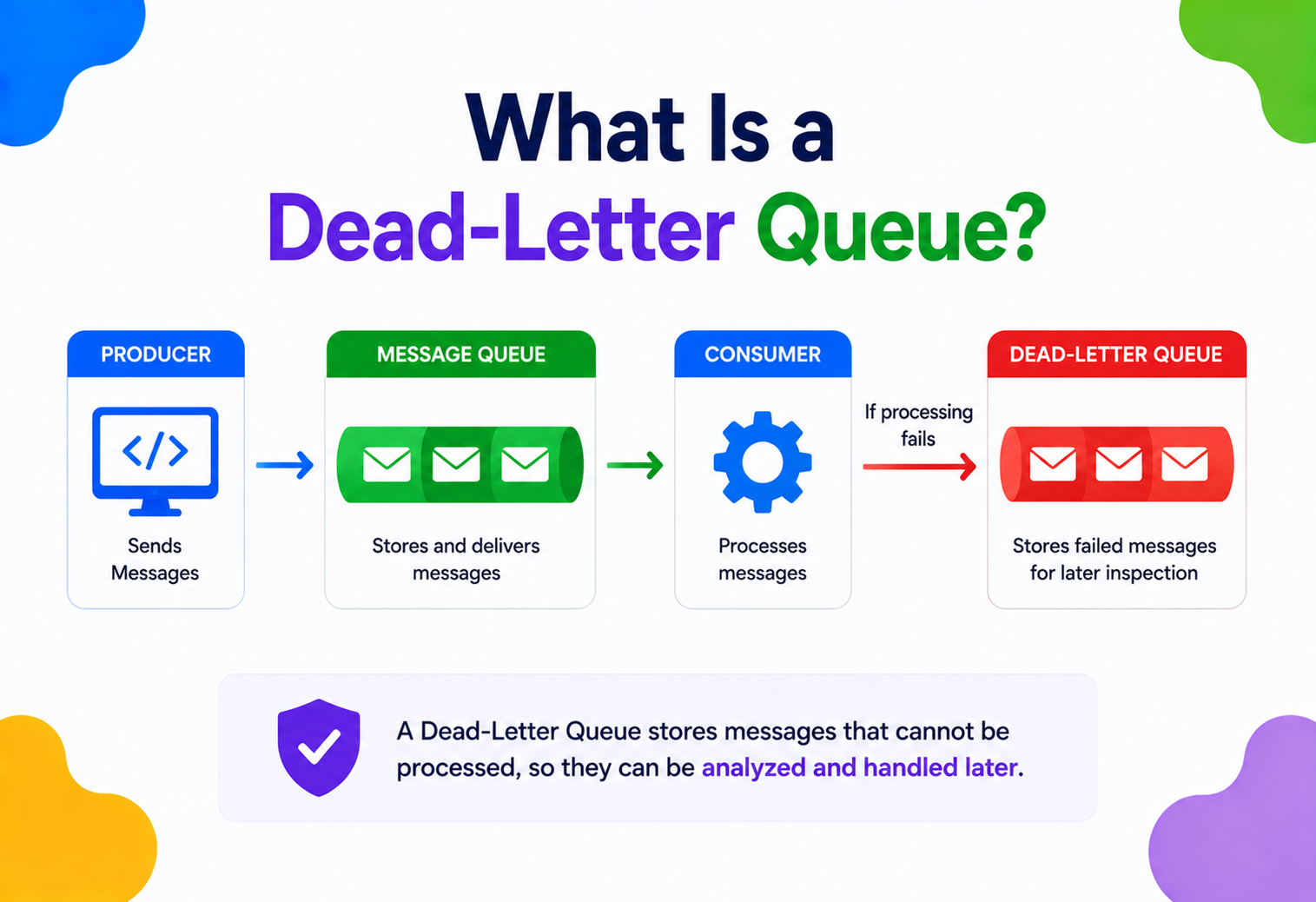
A dead‑letter queue (DLQ) is the software version of that bin. When applications talk to each other by sending messages through a queue or topic (think: “process this order,” “send this email,” “resize this image”), sometimes a message can’t be processed — the data is malformed, a downstream service is down, or the code throws an exception every time it tries. Instead of losing that message forever or letting it block every message behind it, the messaging system moves it into a separate queue reserved for “letters that couldn’t be delivered.” That queue is the dead‑letter queue.
The term “dead letter” itself predates computers by well over a century — postal services have used it since the 1800s for mail that cannot be delivered or returned. When engineers building the first enterprise messaging systems in the 1990s (IBM MQSeries, later renamed IBM MQ, was one of the earliest) needed a name for “the place broken messages go,” the postal metaphor was sitting right there, and it stuck. As message‑oriented middleware matured — JMS (Java Message Service) in 1999, followed by AMQP, RabbitMQ, Apache Kafka, and cloud‑native services like Amazon SQS and Azure Service Bus — the dead‑letter queue pattern became a near‑universal feature, because the underlying problem (some messages just won’t process, no matter how many times you retry) is universal too.
This guide walks through dead‑letter queues from first principles: why they exist, how they work under the hood, how to build one yourself in Java, and how the biggest tech companies use them in production. By the end, you should be able to explain a DLQ to a beginner, design one for a real system, and avoid the common traps that turn a safety net into its own outage.
A short timeline of “dead letters” in software
Postal “dead letter” offices
Real‑world post offices maintain a “dead letter office” for undeliverable mail — the exact metaphor engineers borrowed a century later.
IBM MQSeries
One of the first widely used enterprise messaging systems ships with a built‑in “dead‑letter queue” concept — the term enters mainstream software vocabulary.
JMS 1.0
The Java Message Service specification standardizes queue‑based messaging for JVM applications, with dead‑letter destinations as a well‑known configuration knob.
RabbitMQ & AMQP
Open‑source brokers popularise dead‑letter exchanges — failed messages are re‑routed via a dedicated exchange, giving fine‑grained control over quarantine.
Cloud managed queues
Amazon SQS adds first‑class dead‑letter queue support via redrive policies; Azure Service Bus ships every queue with a built‑in $DeadLetterQueue sub‑queue.
Kafka + application‑level DLQs
Apache Kafka doesn’t ship a broker‑level DLQ — but Kafka Connect and Spring Kafka add opinionated dead‑letter topic patterns that most large‑scale Kafka deployments now follow.
The Problem & Motivation
To understand why dead‑letter queues exist, you first need to understand the environment they live in: message queues. A message queue is a buffer that sits between two parts of a system — a producer that sends messages and a consumer that reads and processes them. Producers don’t call consumers directly; they drop a message in the queue and move on. Consumers pull messages off the queue whenever they’re ready. This decoupling is powerful — the producer doesn’t need the consumer to be online, fast, or even working correctly at that exact moment.
But decoupling doesn’t make failure disappear — it just moves the question of “what happens when this fails?” somewhere else. Consider an order‑processing consumer that reads messages like {"orderId": 4471, "amount": 59.99} and charges a credit card. What happens when:
- The message is malformed JSON and can never be parsed, no matter how many times you retry?
- The payment provider’s API is down for ten minutes?
- The message references an order ID that was deleted, so there’s nothing to process?
- A bug in the consumer code throws a
NullPointerExceptionon this specific message every single time?
Without a dead‑letter queue, systems typically fall into one of two bad patterns:
Pattern A · Retry Forever
- The consumer keeps re‑reading the same failing message.
- Every retry blocks the messages behind it (head‑of‑line blocking).
- Throughput for the entire queue collapses to zero.
- One bad message takes down an entire pipeline.
Pattern B · Drop and Forget
- The consumer catches the exception and discards the message.
- Data is silently lost with no trace.
- No one is alerted; the problem is invisible until a customer complains.
- Impossible to debug or replay later.
Both patterns fail for the same underlying reason: they treat “message I currently can’t process” as either “block everything” or “delete and pretend it never happened.” A dead‑letter queue offers a third option — quarantine and continue. The bad message is set aside where it can’t block healthy messages, but it is preserved so a human or an automated process can inspect, fix, retry, or knowingly discard it later, with a full audit trail.
This single idea — isolate the failure, don’t let it cascade — is one of the most important resilience patterns in distributed systems, closely related to circuit breakers and bulkheads, which we’ll touch on in the patterns section.
Transient vs. Permanent Failures
Not all failures are the same, and a dead‑letter queue design lives or dies on recognizing the difference between them. A transient failure is temporary — the database was briefly unreachable, a network packet got dropped, a downstream service returned a 503 because it was momentarily overloaded. Retrying a transient failure a few seconds later usually succeeds, because the underlying condition has already cleared up by the time the retry happens.
A permanent failure, on the other hand, will never succeed no matter how many times you retry it, because the problem lives in the message itself or in a bug in the code that processes it. A message with invalid JSON will always be invalid JSON. A message referencing a foreign key that was deleted will always reference something that doesn’t exist. A consumer with a bug that throws a NullPointerException whenever a field is missing will throw that exception every single time it sees that shape of message, until the code itself is fixed.
The entire value proposition of a dead‑letter queue rests on being able to tell these two categories apart operationally, even if you can’t always tell them apart at the moment of failure. The trick most systems use is simple: assume every failure might be transient at first, retry it a small number of times with increasing delay, and only conclude “this is probably permanent” once it has failed repeatedly under multiple different conditions. That’s exactly what the retry‑then‑dead‑letter mechanism formalizes.
Core Concepts
Before going further, let’s define the vocabulary you’ll see throughout this guide, explained simply.
Producer
The part of the system that creates and sends a message, like someone dropping a letter in a mailbox.
Consumer
The part of the system that reads and processes messages, like the mail carrier who delivers letters.
Main Queue
The normal queue where messages wait to be processed for the first time.
Dead‑Letter Queue (DLQ)
A separate queue that holds messages the consumer could not successfully process after giving up.
Redelivery / Retry
Giving a message another attempt at processing, usually a limited number of times.
Max Delivery Count
The maximum number of retry attempts before a message is declared “dead” and routed to the DLQ.
Poison Message
A message that will never succeed no matter how many times it’s retried — usually due to a permanent data or code bug.
Acknowledgement (ACK)
A signal the consumer sends back to the queue meaning “I successfully processed this, you can remove it.”
Negative Acknowledgement (NACK)
A signal meaning “I could not process this,” which can trigger a retry or a move to the DLQ.
Visibility Timeout
How long a message is hidden from other consumers while one consumer is trying to process it.
Redrive
The act of moving messages from the DLQ back into the main queue, usually after fixing the root cause.
Here’s the everyday analogy again, mapped directly onto the technical terms: a customer mails a form (producer sends a message). The clerk at the counter tries to process it (consumer reads it). If the form is filled out wrong, the clerk tries a couple more times to make sense of it (retries). If it still doesn’t work, it goes into the “problem forms” tray (DLQ) instead of the shredder or the “urgent” pile, so a supervisor can review it without slowing down the line of customers behind it.
Architecture & Components
A dead‑letter queue is never a standalone thing — it’s always attached to a main queue as part of a larger messaging architecture. Here’s what a typical setup looks like:
The key components involved:
- Broker / Messaging system — the software that owns the queues (e.g. Kafka, RabbitMQ, Amazon SQS, Azure Service Bus, ActiveMQ). It tracks delivery attempts and enforces routing rules.
- Main queue — where new and retried messages live.
- Dead‑letter queue — a queue with the same message format, but no active consumer processing it automatically; it exists purely to hold and expose failed messages.
- Retry / redelivery policy — configuration that says how many attempts are allowed, and sometimes how long to wait between attempts (backoff).
- DLQ consumer / handler — a separate, deliberately simple process (often a human dashboard, or a lightweight service) that inspects dead messages, logs them, alerts a team, and optionally redrives them.
The DLQ is a queue, not a database. It’s meant for short‑ to medium‑term triage, not permanent storage. Many teams also persist dead‑letter data into a database or object store (like S3) for long‑term analysis, keeping the queue itself lean.
Where the DLQ Concept Differs by Technology
| System | How DLQ is implemented |
|---|---|
| Amazon SQS | A separate queue linked via a “redrive policy” with a maxReceiveCount. |
| RabbitMQ | Dead‑lettering exchange (DLX) — failed messages are re‑published to a different exchange. |
| Apache Kafka | No built‑in DLQ; implemented at the application / consumer level (e.g., Kafka Connect’s errors.deadletterqueue.topic.name, or custom producer code) as a separate topic. |
| Azure Service Bus | Every queue / subscription has a built‑in sub‑queue automatically named $DeadLetterQueue. |
| ActiveMQ / JMS | Configurable “dead letter strategy” per destination, often an ActiveMQ.DLQ queue. |
Internal Working
Let’s zoom into what actually happens, step by step, inside the broker when a message fails.
Delivery attempt
The broker hands the message to a consumer and starts a “visibility timeout” — a window during which no other consumer can see this message, so two workers don’t process it twice.
Processing outcome
The consumer either finishes successfully and sends an ACK (the broker deletes the message), or it fails — by throwing an exception, timing out, or explicitly sending a NACK.
Delivery counter increments
The broker tracks how many times this specific message has been delivered. Every failed attempt bumps the counter.
Retry decision
If the counter is below the configured maximum (e.g., 5 attempts), the message becomes visible again — often after a backoff delay — and step 1 repeats.
Dead‑lettering
Once the counter hits the maximum, the broker automatically moves the message out of the main queue and into the DLQ, usually preserving the original payload plus useful metadata (timestamp of first failure, number of attempts, last error reason if available).
Quarantine
The message now sits in the DLQ. It does not block the main queue anymore. Nothing consumes it automatically (by default) — it just waits.
Triage
A human, dashboard, or automated job inspects the DLQ, looking at message content and metadata to diagnose the root cause.
Resolution
The team either fixes the bug and redrives the message back to the main queue, transforms the message and resubmits it, or deliberately discards it (e.g., it was test data or a genuinely invalid request).
maxAttempts times, spacing each retry out with a backoff. When the ceiling is reached, the broker moves the payload plus its metadata into the DLQ, where it sits until someone reviews it.A Minimal Java Example: Manual Dead‑Lettering
Most real systems (SQS, RabbitMQ) handle the counting and moving for you via configuration. But it helps to see the logic laid out explicitly in code, so let’s build a tiny in‑memory version.
import java.util.*;
import java.util.concurrent.*;

class Message {
    final String id;
    final String payload;
    int deliveryAttempts = 0;
    Message(String id, String payload) {
        this.id = id;
        this.payload = payload;
    }
}

class QueueWithDLQ {
    private final BlockingQueue<Message> mainQueue = new LinkedBlockingQueue<>();
    private final BlockingQueue<Message> deadLetterQueue = new LinkedBlockingQueue<>();
    private final int maxAttempts;

    QueueWithDLQ(int maxAttempts) {
        this.maxAttempts = maxAttempts;
    }

    void publish(Message msg) {
        mainQueue.offer(msg);
    }

    // Simulates a consumer pulling and processing one message
    void consumeOnce(java.util.function.Consumer<Message> processor) throws InterruptedException {
        Message msg = mainQueue.take();
        msg.deliveryAttempts++;
        try {
            processor.accept(msg);
            System.out.println("Processed " + msg.id + " successfully.");
        } catch (Exception e) {
            System.out.println("Attempt " + msg.deliveryAttempts + " failed for " + msg.id + ": " + e.getMessage());
            if (msg.deliveryAttempts >= maxAttempts) {
                deadLetterQueue.offer(msg);
                System.out.println(msg.id + " moved to DEAD-LETTER QUEUE after "
                        + msg.deliveryAttempts + " attempts.");
            } else {
                mainQueue.offer(msg); // retry
            }
        }
    }

    BlockingQueue<Message> getDeadLetterQueue() {
        return deadLetterQueue;
    }
}
Using it: a producer publishes a “poison” message that always throws, and we watch it retry three times before landing in the DLQ.
public class Demo {
    public static void main(String[] args) throws InterruptedException {
        QueueWithDLQ queue = new QueueWithDLQ(3);
        queue.publish(new Message("order-101", "{ malformed json"));

        for (int i = 0; i < 3; i++) {
            queue.consumeOnce(msg -> {
                throw new RuntimeException("cannot parse payload");
            });
        }

        System.out.println("DLQ size: " + queue.getDeadLetterQueue().size());
        // Output: DLQ size: 1
    }
}
This toy example captures the essence of every real DLQ implementation: count attempts, retry up to a limit, and reroute on exhaustion — the rest is production concerns like persistence, backoff timing, and observability, which we’ll cover next.
Data Flow & Message Lifecycle
It helps to picture the complete lifecycle of a single message as a state machine — every message that enters a queue is, at any moment, in exactly one of these states.
Published
Producer sends the message; it lands in the main queue, invisible to consumers until picked up.
In‑flight
A consumer has received it and is actively processing; it’s hidden from other consumers during the visibility timeout.
Acknowledged (success path)
Processing succeeded; the broker permanently deletes the message. Lifecycle ends here for the “happy path.”
Retried (failure path)
Processing failed; the message becomes visible again, often after a backoff delay, and returns to state 2 on the next attempt.
Dead‑lettered
Retry limit exceeded; broker moves the message (with metadata) into the DLQ. It stops competing for consumer time.
Triaged
A human or automated process inspects the message and its failure metadata to decide the next action.
Resolved
The message is redriven (sent back to the main queue), transformed and resubmitted, archived, or permanently discarded.
Two details are easy to overlook but matter a great deal in production:
- Metadata travels with the message. A well‑designed DLQ entry isn’t just the raw payload — it should carry the original queue name, timestamp of first failure, delivery count, and ideally the last exception message or stack trace, so triage doesn’t require guesswork.
- Ordering is usually lost. If message #5 dead‑letters but messages #6—10 succeed, and you later redrive #5, it will be processed out of order relative to the others. Systems that depend on strict ordering (like Kafka partitions) need to think carefully about this — sometimes the safer move is to pause the entire partition rather than skip ahead.
Advantages, Disadvantages & Trade‑offs
Advantages
- Prevents one bad message from blocking an entire queue (no head‑of‑line blocking).
- No silent data loss — every failure is captured and inspectable.
- Enables root‑cause debugging with full message context.
- Supports safe reprocessing (redrive) once bugs are fixed.
- Improves system observability — DLQ depth is a strong health signal.
- Decouples “keep the pipeline moving” from “fix this specific problem.”
Disadvantages / Costs
- Added architectural complexity — another queue to provision, monitor, and secure.
- Messages can be dead‑lettered out of order relative to their siblings.
- If nobody monitors the DLQ, it becomes a silent graveyard — same problem as dropping messages, just delayed.
- Redriving carelessly can cause duplicate side effects (e.g., double‑charging a customer).
- Sensitive data sitting in a DLQ for a long time is a security / compliance concern.
- Storage and retention costs, especially at high message volume.
A DLQ trades “guaranteed instant delivery” for “guaranteed eventual visibility of failure” — you’re choosing to slow down or defer some messages in exchange for never losing information about what went wrong.
Performance & Scalability
A DLQ, done right, actually improves the performance of the main pipeline, because it removes stuck messages that would otherwise consume consumer time and retry cycles indefinitely. But there are real scalability considerations:
Backoff Strategy Matters
Retrying instantly, over and over, can turn a temporary hiccup (like a downstream API being briefly overloaded) into a full outage by hammering that dependency with retries — sometimes called a “retry storm.” Exponential backoff (wait 1s, then 2s, then 4s, then 8s…) with jitter (a small random offset) spreads out retries and gives failing dependencies room to recover.
long computeBackoffMillis(int attempt) {
    long base = 1000L; // 1 second
    long maxBackoff = 30_000L; // cap at 30 seconds
    long exp = (long) (base * Math.pow(2, attempt - 1));
    long capped = Math.min(exp, maxBackoff);
    long jitter = (long) (Math.random() * 0.3 * capped); // up to 30% jitter
    return capped + jitter;
}
DLQ Throughput Planning
At scale, the DLQ itself needs to be provisioned like any other queue — if a bad deploy suddenly causes 40% of traffic to fail, the DLQ must be able to absorb that burst without becoming a bottleneck or, worse, silently dropping messages because it’s full. Cloud DLQs (SQS, Service Bus) scale automatically with the underlying broker; self‑hosted ones (Kafka, RabbitMQ) need capacity planning like any other topic or queue.
Worked Example: How Retries Affect Consumer Throughput
Picture a consumer fleet that can process 1,000 messages per second when everything succeeds. Now imagine 2% of incoming messages are permanently broken, and the retry policy allows 5 attempts with no backoff at all. Every one of those broken messages consumes 5 processing slots instead of 1 before it finally dead‑letters. That means the “effective” load on the consumer fleet isn’t 1,000 messages per second of real work — it’s 1,000 messages per second of arrivals, but roughly 1,080 processing slots consumed per second once you account for the wasted retries (2% × 5 extra attempts). At low failure rates this is barely noticeable, but if a bad deploy spikes the failure rate to 30%, the same math means the fleet is suddenly doing nearly twice as much processing work as before for the same volume of genuinely new messages — and with instant retries and no backoff, most of that wasted work happens in a tight loop that can itself overload downstream systems, a feedback loop sometimes called a “retry storm.” This is precisely why backoff and a firm max‑attempts ceiling aren’t just nice‑to‑haves; they’re what keeps a partial outage from amplifying itself.
Because of this dynamic, teams operating at high scale often track “wasted work” (retry attempts that end in dead‑lettering) as its own metric, separate from raw DLQ depth, since a sudden increase in wasted retries is often the earliest signal that something is wrong — well before the DLQ itself has accumulated enough messages to trip a depth‑based alert.
High Availability & Reliability
A dead‑letter queue is a reliability tool, but it needs to itself be reliable — a DLQ that loses messages defeats its entire purpose. A few principles:
- Replication. The DLQ should live on the same durable, replicated storage as the main queue (e.g., Kafka topics replicated across brokers, SQS which is inherently multi‑AZ) so a single node failure doesn’t wipe out quarantined messages.
- At‑least‑once semantics. Moving a message to the DLQ should itself be treated as a delivery — if the move fails partway, the message should not be silently lost from both the main queue and the DLQ.
- Idempotent redrive. Because retries and redrives can cause a message to be processed more than once, the actual business logic (e.g., “charge this credit card”) should be idempotent — safe to run twice — usually via a unique idempotency key per message.
- Poison‑message isolation, not deletion. High availability of the overall system depends on the DLQ absorbing failures without itself becoming a single point of failure; that means it needs its own alerting, its own capacity, and ideally its own on‑call runbook.
Think of the DLQ as a hospital’s quarantine ward, not its trash incinerator. Patients (messages) go there to be safely isolated and treated, not disposed of.
Security Considerations
DLQs are an underrated security and compliance risk, because they accumulate exactly the messages that are “interesting” — malformed input, edge cases, sometimes attack payloads — and they’re often forgotten compared to the main pipeline.
- Sensitive data at rest. A dead‑lettered payment or PII message might sit in the DLQ for days or weeks. It should be encrypted at rest, exactly like the main queue, and covered by the same data‑retention policy (e.g., GDPR “right to be forgotten” applies to DLQ contents too).
- Access control. Only the same trust boundary that can access the main queue’s data should be able to read the DLQ — it’s common (and dangerous) for DLQs to be left with looser permissions “because it’s just for debugging.”
- Injection via redrive. If an operator or automated tool blindly redrives every message in the DLQ without validation, a maliciously crafted poison message (e.g., one designed to exploit a parser bug) could be replayed straight back into production. Validate before you redrive.
- Audit logging. Every redrive or manual deletion from a DLQ should be logged with who did it and when — this is often required for compliance audits.
Logging full message payloads (including credit card numbers, passwords, or tokens) into application logs “for debugging” when a message dead‑letters. Log a redacted summary and a correlation ID instead, and let engineers pull the full payload from the secured DLQ only when needed.
Monitoring, Logging & Metrics
An unmonitored DLQ is barely better than no DLQ at all — it just delays the moment you discover data loss instead of preventing it. Good observability turns the DLQ into an early‑warning system.
Metrics Worth Tracking
DLQ depth
Number of messages currently sitting in the DLQ. A sudden spike usually means a new bug or a downstream outage.
Dead‑letter rate
Messages dead‑lettered per minute / hour, ideally as a percentage of total throughput.
Time‑to‑triage
How long messages sit in the DLQ before someone looks at them — a proxy for on‑call responsiveness.
Redrive success rate
Of messages sent back to the main queue, what percentage now succeed vs. dead‑letter again.
Top error reasons
Grouping dead‑lettered messages by exception type or error code to spot systemic issues fast.
Age of oldest message
Flags DLQs that have quietly become long‑term (and non‑compliant) storage.
A Simple Structured Log Entry on Dead‑Lettering
{
  "event": "message.dead_lettered",
  "messageId": "order-101",
  "sourceQueue": "orders-main",
  "dlqName": "orders-dlq",
  "deliveryAttempts": 5,
  "firstFailedAt": "2026-07-19T08:12:03Z",
  "lastError": "JsonParseException: unexpected token at position 14",
  "correlationId": "trace-98213abf"
}
Alerting rules should fire on rate of change, not just absolute thresholds — a DLQ that normally receives 2 messages / hour suddenly receiving 200 / hour is a strong outage signal even if 200 is still a “small” number in absolute terms. Most teams pair DLQ metrics with distributed tracing (a correlationId or traceId carried through the whole request) so an engineer can jump from “this message dead‑lettered” straight to “here’s the full trace of everything that happened to it.”
A Simple Scheduled Health Check in Java
Many teams wire up a lightweight background job that polls DLQ depth on a schedule and raises an alert (via email, Slack, or a paging system) once it crosses a threshold. Here’s a simplified version of the idea:
public class DlqHealthMonitor {
    private final QueueWithDLQ queue;
    private final int alertThreshold;
    private final AlertSender alertSender;

    public DlqHealthMonitor(QueueWithDLQ queue, int alertThreshold, AlertSender alertSender) {
        this.queue = queue;
        this.alertThreshold = alertThreshold;
        this.alertSender = alertSender;
    }

    public void checkHealth() {
        int depth = queue.getDeadLetterQueue().size();
        if (depth >= alertThreshold) {
            alertSender.send(String.format(
                "DLQ depth is %d, at or above threshold of %d. Investigate immediately.",
                depth, alertThreshold));
        }
    }
}

// Run every minute using a scheduled executor
ScheduledExecutorService scheduler = Executors.newSingleThreadScheduledExecutor();
DlqHealthMonitor monitor = new DlqHealthMonitor(queue, 50, alertSender);
scheduler.scheduleAtFixedRate(monitor::checkHealth, 0, 1, TimeUnit.MINUTES);
In production, this same idea is usually implemented with a proper metrics pipeline (Prometheus, CloudWatch, Datadog) rather than a hand‑rolled scheduler, but the underlying logic — poll depth, compare to threshold, alert — is identical regardless of the tooling.
Deployment & Cloud Considerations
How you deploy a DLQ depends heavily on whether you’re using a managed cloud service or self‑hosting a broker.
Amazon SQS
// Terraform-style pseudo-config for illustration
resource "aws_sqs_queue" "orders_dlq" {
  name                      = "orders-dlq"
  message_retention_seconds = 1209600 // 14 days
}

resource "aws_sqs_queue" "orders_main" {
  name = "orders-main"
  redrive_policy = jsonencode({
    deadLetterTargetArn = aws_sqs_queue.orders_dlq.arn
    maxReceiveCount      = 5
  })
}
RabbitMQ (Dead-Letter Exchange)
Map<String, Object> args = new HashMap<>();
args.put("x-dead-letter-exchange", "orders-dlx");
args.put("x-dead-letter-routing-key", "orders-dead");
args.put("x-message-ttl", 60000); // optional: also dead-letter on timeout

channel.queueDeclare("orders-main", true, false, false, args);
channel.exchangeDeclare("orders-dlx", "direct", true);
channel.queueDeclare("orders-dlq", true, false, false, null);
channel.queueBind("orders-dlq", "orders-dlx", "orders-dead");
Apache Kafka (Application-Level DLQ Topic)
try {
    processRecord(record);
} catch (Exception e) {
    ProducerRecord<String, String> dlqRecord =
        new ProducerRecord<>("orders-dlq", record.key(), record.value());
    dlqRecord.headers().add("original-topic", record.topic().getBytes());
    dlqRecord.headers().add("error-message", e.getMessage().getBytes());
    dlqProducer.send(dlqRecord);
}Managed services (SQS, Service Bus) handle DLQ replication, durability, and scaling for you — self‑hosted brokers (Kafka, RabbitMQ) require you to plan topic / queue replication factor, disk capacity, and backup strategy for the DLQ exactly as carefully as for the main pipeline.
APIs & Microservices
In a microservices architecture, message queues (and therefore DLQs) are usually the connective tissue between services — one service publishes an event, several others consume it independently. This raises DLQ questions unique to distributed systems:
- Per‑service or shared DLQ? Each consuming microservice should generally have its own DLQ, even if they all consume the same topic — service A failing to process an event shouldn’t be conflated with service B failing on a different one.
- DLQ as an API contract. Some teams expose a small internal API (or dashboard) over the DLQ so other teams can query “did my event dead‑letter, and why?” without needing broker‑level access.
- Event schemas and dead‑lettering. When services communicate via events (event‑driven architecture), a schema‑validation failure is one of the most common dead‑letter causes — using a schema registry (like Avro / Protobuf with Confluent Schema Registry) catches many of these before they even reach the consumer.
@Component
public class OrderEventConsumer {

    @KafkaListener(topics = "orders-main")
    public void consume(ConsumerRecord<String, String> record) {
        try {
            OrderEvent event = objectMapper.readValue(record.value(), OrderEvent.class);
            orderService.process(event);
        } catch (Exception e) {
            deadLetterPublisher.publish(record, e);
        }
    }
}
This pattern — a thin try / catch wrapper around the “real” business logic that forwards failures to a dedicated publisher — is the most common way teams retrofit dead‑lettering onto systems (like Kafka) that don’t provide it automatically at the infrastructure level.
Design Patterns & Anti‑patterns
Related and Complementary Patterns
Retry with Backoff
Almost always paired with a DLQ — retries handle transient failures, the DLQ handles permanent ones.
Circuit Breaker
Stops calling a failing downstream dependency entirely for a while, reducing the volume of messages that would otherwise dead‑letter.
Bulkhead
Isolates failure domains so one overloaded component can’t sink the whole system — the DLQ is a bulkhead for “bad data.”
Outbox Pattern
Ensures a message is reliably published exactly once alongside a database transaction, reducing certain classes of dead‑letter causes at the source.
Saga Pattern
Coordinates multi‑step distributed transactions; dead‑lettered steps often need compensating actions to undo partial work.
Anti‑patterns to Avoid
The Silent Graveyard
- DLQ exists but nothing monitors or alerts on it.
- Failures accumulate invisibly for months.
Blind Auto‑Redrive
- Automatically retrying everything in the DLQ on a timer without fixing the root cause.
- Poison messages loop endlessly between main queue and DLQ.
One Giant Shared DLQ
- All services dump failures into one queue.
- Impossible to tell which team owns which failure.
Zero Retries Before Dead‑Lettering
- Every transient blip (a 200ms network hiccup) immediately dead‑letters.
- DLQ fills with messages that would have succeeded on attempt 2.
Best Practices & Common Mistakes
Set a sensible max‑retry count (typically 3—5) with exponential backoff and jitter before dead‑lettering, so transient errors self‑heal without ever touching the DLQ.
Attach rich metadata (error reason, timestamp, attempt count, original destination) to every dead‑lettered message so triage doesn’t require reproducing the bug from scratch.
Alert on DLQ depth and rate‑of‑change, and assign clear ownership — a DLQ without an on‑call owner will be ignored.
Make consumer processing idempotent so redriven or duplicate messages never cause duplicate side effects (double charges, duplicate emails).
Treat the DLQ as permanent storage — set a retention policy and archive to cheaper, longer‑term storage (like S3 or a database) if you need to keep records for months or years.
Redrive messages in bulk without inspecting them first — you may be replaying the exact bug that caused the outage, straight back into production.
Forget encryption and access control on the DLQ — it often contains the most sensitive edge‑case data in your whole system.
Real‑world / Industry Examples
Dead‑letter queues are used pervasively at large scale — here’s how the pattern shows up at a few well‑known companies (described at a conceptual level, based on publicly discussed engineering practices).
Netflix
Netflix’s event‑driven microservices (built on Kafka and internal messaging) rely on dead‑lettering to isolate malformed viewing‑history or telemetry events without stalling the pipelines that power recommendations and billing, letting engineers replay fixed events later without reprocessing the entire stream.
Amazon
Amazon popularized DLQs as a first‑class, managed feature of SQS specifically because of the retail platform’s own internal experience: order and inventory events that couldn’t be processed needed a durable, queryable home instead of being retried forever or dropped, especially during high‑traffic events like Prime Day.
Uber
Uber’s trip and payment systems process enormous volumes of asynchronous events (ride requests, driver location pings, payment confirmations); dead‑lettering isolates edge cases like a driver’s app sending malformed GPS data, so a single corrupted event doesn’t stall matching or dispatch for everyone else in a city.
As the original creators of Apache Kafka, LinkedIn’s engineering teams have written extensively about layering dead‑letter topics on top of Kafka Connect and stream‑processing jobs to catch schema mismatches and serialization errors in high‑throughput data pipelines feeding analytics and search indexing.
Financial services
Payment processors commonly route failed transaction messages to a DLQ rather than silently retrying, both for reliability and because financial regulations often require every failed transaction attempt to be auditable rather than discarded.
The common thread
In every case, the motivation is the same one described in Section 2: at high volume, some fraction of messages will always be bad, and the cost of losing or blocking on them is far higher than the cost of quarantining and reviewing them later.
Frequently Asked Questions
Is a dead‑letter queue the same as an error log?
No. An error log is a record that something went wrong. A DLQ preserves the actual message itself, so it can be inspected, transformed, and resubmitted — it’s actionable data, not just a note that a failure happened.
How many retries should happen before a message is dead‑lettered?
There’s no universal number, but 3—5 attempts with exponential backoff is a common starting point. Too few retries dead‑letters transient blips unnecessarily; too many delays detection of real problems and can waste consumer capacity.
Should every queue have a DLQ?
Not necessarily. Queues carrying purely non‑critical, best‑effort data (like some analytics pings) might reasonably choose to drop failures instead. But anything involving money, user data, or irreversible side effects almost always warrants one.
Can a message be redriven automatically?
Yes, but carefully — automated redrive is safe for known‑transient issues (e.g., “downstream was down for 10 minutes, now it’s back”), but risky for messages that failed due to a data or logic bug, since it can create an infinite retry loop between the main queue and DLQ.
Does Kafka have dead‑letter queues built in?
Not at the broker level. Kafka is a distributed log, so “dead‑lettering” is implemented at the application or framework level (e.g., Kafka Connect, Spring Kafka, or custom consumer code), typically as a separate topic.
What’s the difference between a DLQ and a “poison pill” handler?
They’re closely related — a “poison pill” is the message itself (one that will never process successfully), and dead‑lettering is the mechanism used to isolate poison pills once detected, typically via a fixed retry limit.
What happens if the dead‑letter queue itself fills up or goes down?
This is one of the most important edge cases to design for, and it’s often overlooked. If the DLQ has a size limit and it’s reached, most brokers will reject new dead‑letter writes, which effectively pushes the failure back to the main queue — messages that should have been quarantined start blocking healthy traffic again, exactly the problem the DLQ was meant to prevent. The mitigation is twofold: size the DLQ generously relative to expected failure volume, and alert well before it approaches capacity rather than after. If the DLQ becomes unavailable entirely (a broker outage, for example), well‑designed consumers should fail closed — pausing consumption or holding the message for retry — rather than silently dropping the message because the “safe” quarantine destination wasn’t reachable.
Should the DLQ use the same message schema as the main queue?
Generally yes, with additions rather than changes. The DLQ should be able to hold the exact original payload, byte‑for‑byte, so nothing is lost or altered in translation — but it typically wraps that payload with extra metadata fields (error reason, attempt count, timestamps) rather than reshaping the payload itself. Keeping the core payload untouched means a redrive can push the message straight back to the main queue without any transformation step, reducing the chance of introducing new bugs during recovery.
Summary & Key Takeaways
A dead‑letter queue is a deceptively simple idea with an outsized impact on system reliability: when a message can’t be processed after a reasonable number of attempts, move it somewhere safe instead of blocking everything behind it or losing it silently.
The core ideas, one more time
- DLQs solve the head‑of‑line blocking and silent‑data‑loss problems that plague naive retry‑forever or drop‑and‑forget approaches.
- The core mechanism is universal: track delivery attempts, retry with backoff up to a limit, then reroute to a dedicated queue with rich failure metadata.
- Different brokers implement it differently — SQS redrive policies, RabbitMQ dead‑letter exchanges, Kafka’s application‑level DLQ topics, and Azure Service Bus’s built‑in sub‑queues.
- A DLQ is only as useful as its observability — unmonitored DLQs become silent graveyards, defeating the entire purpose.
- Security, idempotency, and careful redrive practices are essential; a DLQ can otherwise become its own liability.
- The pattern pairs naturally with retries‑with‑backoff, circuit breakers, and bulkheads as part of a broader resilience toolkit for distributed systems.
Whether you’re building your first message‑driven service or hardening a system that already processes millions of events a day, a well‑designed dead‑letter queue is one of the highest‑leverage reliability investments you can make — it turns invisible failures into visible, fixable ones.