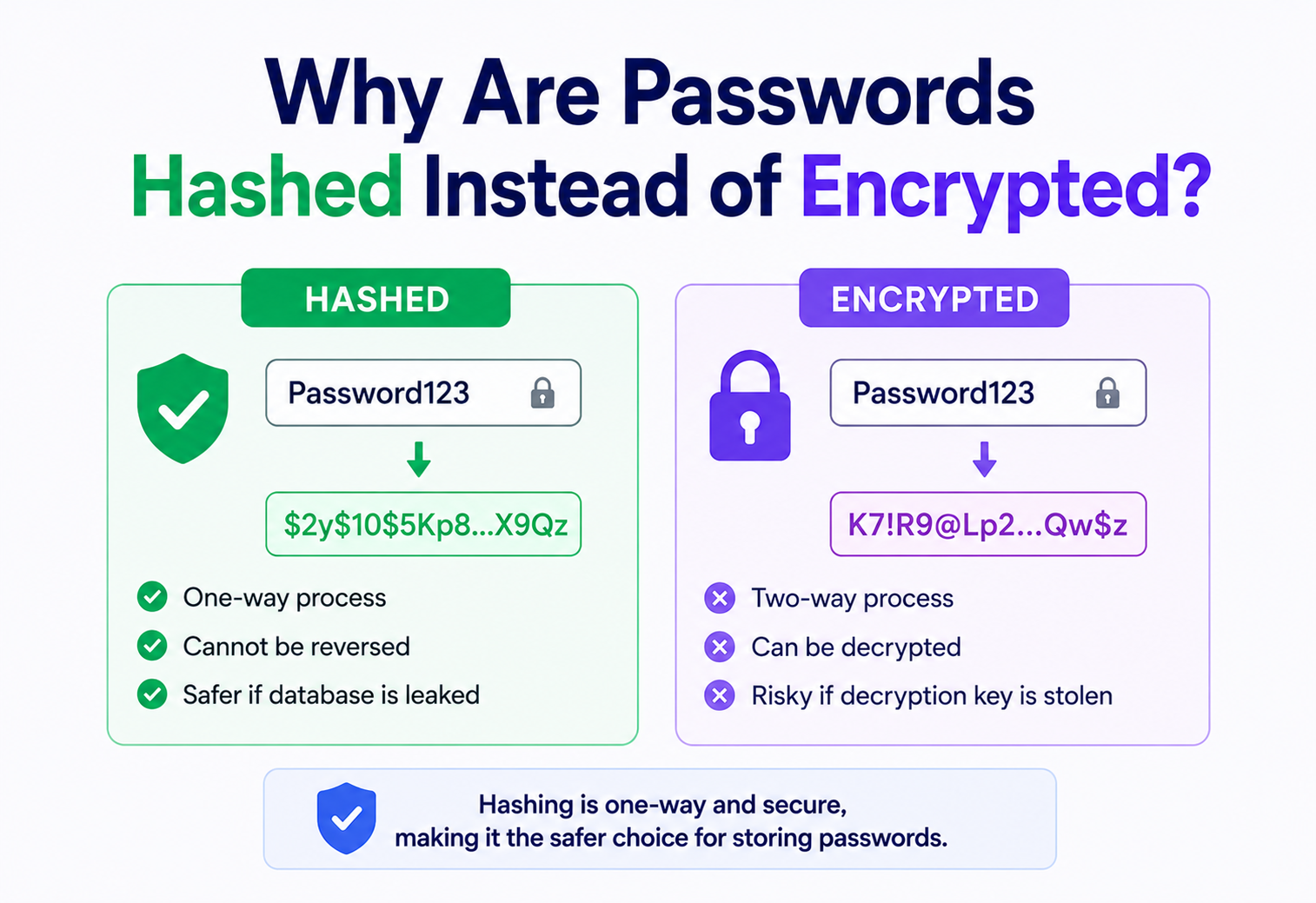
Why Are Passwords Hashed Instead of Encrypted?
A deep, beginner‑friendly walkthrough of one of the most important — and most misunderstood — decisions in software security: why every well‑built login system turns your password into an unreadable hash, and never, ever encrypts it.
Introduction & History
Imagine you have a locker at school. Instead of a key, you set a secret combination — say, 7‑3‑9‑1. The locker manufacturer doesn’t store your combination anywhere. Instead, it stores a special “fingerprint” of your combination. When you type 7‑3‑9‑1 again, the locker recomputes the fingerprint and checks if it matches. Nobody — not even the manufacturer — can look at that fingerprint and figure out your original combination. That, in a nutshell, is password hashing, and it’s the reason your passwords should never be stored in a way that lets anyone, even the company you signed up with, read them back.
The story of password storage stretches back to the early 1960s, when MIT’s Compatible Time‑Sharing System (CTSS) became one of the first computers to require individual user passwords. Those passwords were stored in a plain text file — and predictably, in 1962, a printer glitch caused that entire file to be printed out and left where any student could read it. It was an early, embarrassing lesson: if you can read a password, so can someone else, eventually.
By the early 1970s, Robert Morris Sr. at Bell Labs designed the Unix password scheme that introduced two ideas we still rely on today: a one‑way function (based on the DES cipher, used in a non‑reversible way) and a salt — a small random value mixed in with each password so that identical passwords produced different stored values. That single insight — “don’t store something reversible, store a fingerprint of it” — became the seed of everything modern authentication systems do. Over the decades, the “fingerprinting” function evolved from crypt(3), to MD5, to SHA‑1, to purpose‑built password hashing algorithms like bcrypt (1999), PBKDF2 (2000), scrypt (2009), and finally Argon2 (2015, winner of the Password Hashing Competition) — each generation designed specifically to make attackers’ jobs slower and harder.
A hash function is like a blender: you put a fruit smoothie’s ingredients (your password) in, and out comes a smoothie (a fixed‑length scrambled value). You can never “un‑blend” the smoothie back into the original bananas and strawberries. Encryption, on the other hand, is like a locked box with a key: you can always open the box again if you have the right key.
CTSS password file printed
MIT’s Compatible Time‑Sharing System stores its user password file in plaintext. A printer glitch prints the whole file — the first documented lesson that “readable passwords eventually get read.”
Unix crypt + salt
Robert Morris Sr. at Bell Labs designs the Unix password scheme, introducing one‑way functions and per‑user salts — the two ideas that still define safe password storage half a century later.
bcrypt arrives
Niels Provos and David Mazières publish bcrypt — a tunably‑slow, Blowfish‑based password hash, still one of the most widely deployed choices for new systems in 2026.
PBKDF2 and scrypt
PBKDF2 is standardised by NIST for regulated systems; Colin Percival later publishes scrypt, adding a hard memory requirement to blunt custom cracking hardware.
Argon2 wins the PHC
Argon2 (particularly the Argon2id variant) wins the multi‑year Password Hashing Competition and is now widely recommended by OWASP as the modern default for new systems.
The Problem & Motivation
Every system that lets people log in has to answer a deceptively hard question: “How do I check that you know the right password, without keeping a copy of the password lying around?” If the answer is “just store it and compare it directly,” you’ve created a single point of catastrophic failure. The moment a database is stolen — through a SQL injection, a leaked backup, an insider, or a misconfigured cloud storage bucket — every single password in that table is instantly compromised, in the clear, for the whole world to read.
This isn’t a hypothetical. Data breaches happen constantly, to companies with enormous security budgets. The question is never really “will our database ever be stolen” — mature security teams assume it eventually will be. The real question is: “When it is stolen, what does the attacker actually get?” That single design decision — hash, don’t encrypt — is what separates a breach that costs a company a bad news cycle from a breach that hands attackers the literal keys (plaintext passwords) to hundreds of millions of user accounts, including their email, banking, and social media logins, because people reuse passwords everywhere.
So the motivation for hashing isn’t “hashing is a nice‑to‑have feature.” It’s a recognition of a hard truth: the database will eventually leak, and the only real defense is designing the system so that leaking the stored value doesn’t leak the password.
Core Concepts: Hashing vs. Encryption
Both hashing and encryption take some input and transform it into something unreadable. That surface‑level similarity is exactly why people confuse them. But they solve two completely different problems, and mixing them up is one of the most consequential mistakes in software security.
Encryption: A Two‑Way Street
Encryption transforms data using a key, and that same (or a related) key can transform it back to the original. Think of it as writing a message in a locked diary. Anyone with the key can open the diary and read the original message. This is exactly what you want for data that a legitimate party needs to read again later — like a credit card number your payment processor needs to charge, or a medical record a doctor needs to view. Encryption is reversible by design.
Hashing: A One‑Way Street
Hashing transforms data using a mathematical function that is deliberately designed to be a “one‑way street.” There is no key that reverses it. Given the output, there’s no mathematical shortcut back to the input — the only way to “reverse” it is to guess inputs, hash each guess, and see if the output matches (this is exactly what password crackers do, which is why hash design matters so much). Hashing is irreversible by design, and that’s precisely the property you want for passwords: the system doesn’t need to know your original password. It only needs to verify that you know it.
Encryption is right for…
- Data the app must read back later (files, card numbers, messages)
- Data shared between two trusted parties
- Situations where a “recover my data” flow must exist
Encryption is wrong for passwords because…
- Anyone with the decryption key can read every password
- Stealing the key + database = instant plaintext breach
- The app never actually needs to “read” your password back
A login system never needs to know what your password is. It only needs to know whether the password you just typed produces the same fingerprint as the one you set originally. That’s a verification problem, not a data‑retrieval problem — and hashing is the tool built exactly for verification.
A Third Concept: Encoding (Not Security At All)
Beginners sometimes also confuse hashing with encoding (like Base64). Encoding isn’t a security measure at all — it’s just a reversible format conversion with no secret involved. Anyone can decode Base64 in one line of code. If you ever see a system storing passwords as Base64 “for security,” that’s a serious red flag; it offers zero protection.
Architecture & Components
A production‑grade password storage system isn’t just “run the password through a hash function.” It’s built from several cooperating components, each closing a specific attack path.
Hash Function
The core one‑way algorithm. For passwords specifically, this should be a slow, memory‑hard function like Argon2, bcrypt, scrypt, or PBKDF2 — never a fast general‑purpose hash like MD5 or SHA‑256 used alone.
Salt
A random value, unique per user, mixed into the password before hashing. It guarantees two users with the same password get completely different stored hashes.
Work Factor (Cost)
A tunable “difficulty dial” (iterations, memory, parallelism) that intentionally slows the hash computation down, so attackers can only try a limited number of guesses per second.
Pepper (Optional)
A secret value, shared across all passwords, stored outside the database (e.g., in a secrets manager or HSM) — an extra layer so a stolen database alone isn’t enough.
Anatomy of a Stored Hash
Modern hashing libraries store everything needed to verify a password later — algorithm name, cost parameters, salt, and hash — in a single self‑describing string. A typical bcrypt hash looks like this:
// $2b$  = bcrypt version
// 12    = cost factor (2^12 rounds)
// next 22 chars = salt
// remaining chars = the actual hash
$2b$12$KIXQ8Z1n5vQyq9F1nZ8FZuY8pQ1J8xVZ2mX6dQ8Y4pRZ3sT5wKJa
Because the salt and parameters travel with the hash, the verifying server doesn’t need a separate lookup table — everything required to re‑run the same computation is right there in the stored string.
Internal Working
To really understand why hashing is safe for this job, you need to understand two properties every cryptographic hash function guarantees:
- Determinism: the same input always produces the same output, every single time.
- The Avalanche Effect: changing even a single character of the input completely scrambles the output — the two results look nothing alike.
Here’s a simple illustration using SHA‑256 (note: SHA‑256 alone is not recommended for passwords — this is just to demonstrate the avalanche effect):
Input:   "Password1"
SHA-256: 8be3c943b1609fffbfc51aad666d0a04adf83c9d...

Input:   "Password2"
SHA-256: c8b8e5a1d1e97c1f0c9c9b0e8e4a2f9b5d3c1a7e...
One character changed — the outputs share nothing in common. This is exactly why a hash can’t be “reverse‑engineered” through pattern analysis; there’s no partial credit, no gradual approach to the answer, only exhaustive guessing.
Why Fast Hashes Are Dangerous for Passwords
General‑purpose hash functions like SHA‑256 or MD5 are built to be extremely fast, because they’re designed for things like verifying file integrity, where speed is a feature. But speed is a liability for passwords: modern GPUs can compute billions of SHA‑256 hashes per second. If your stored password hash is just SHA256(password + salt), an attacker with a stolen database and a decent GPU can try billions of guesses per second against it.
Purpose‑built password hashing functions solve this by being deliberately, tunably slow:
bcrypt
Based on the Blowfish cipher; uses a tunable “cost” (rounds = 2^cost). Widely supported, battle‑tested since 1999.
PBKDF2
Applies HMAC thousands of times iteratively. NIST‑approved, common in regulated/government systems.
scrypt
Adds a memory‑hardness requirement, making custom ASIC/GPU cracking hardware far less effective.
Argon2
Winner of the 2015 Password Hashing Competition; tunable in time, memory, and parallelism. The current gold standard (Argon2id variant).
Java Example: Hashing a Password with BCrypt
import org.mindrot.jbcrypt.BCrypt;

public class PasswordService {

    // Called once, when the user sets or changes their password
    public String hashPassword(String plainPassword) {
        // BCrypt generates a random salt internally and embeds it in the result
        String salt = BCrypt.gensalt(12); // cost factor = 12
        return BCrypt.hashpw(plainPassword, salt);
    }

    // Called every time the user logs in
    public boolean verifyPassword(String plainPassword, String storedHash) {
        // BCrypt re-extracts the salt from storedHash and recomputes the hash
        return BCrypt.checkpw(plainPassword, storedHash);
    }
}
Notice what’s missing: there is no decryptPassword() method. It cannot exist, because the transformation was never designed to be reversed — only re‑verified.
Data Flow & Lifecycle
Let’s trace exactly what happens to a password from the moment a user types it, through registration, storage, and every subsequent login.
Registration Flow
- User submits a new password over an encrypted channel (TLS/HTTPS — this is a separate use of encryption, protecting the password in transit, not in storage).
- Server generates a fresh, cryptographically random salt.
- Server runs the slow hash function over (password + salt).
- Server stores the resulting hash, salt, and algorithm parameters. The plaintext password is discarded from memory immediately.
Login (Verification) Flow
- User submits their password again over TLS.
- Server looks up the stored hash and salt for that username.
- Server re‑runs the exact same hash function with the exact same salt over the newly submitted password.
- Server compares the two hash outputs using a constant‑time comparison (more on why in Section 10).
- Match → authenticated. No match → rejected. Either way, the original password was never “looked up” or “decrypted” — only recomputed and compared.
At no point in this entire lifecycle does the server ever need to answer the question “what is this user’s password?” It only ever needs to answer “does this input produce the same fingerprint as before?” That’s why irreversibility isn’t a limitation — it’s the entire point.
Advantages, Disadvantages & Trade‑offs
Like every deliberate design decision, hashing passwords buys real safety at the cost of a few narrow, well‑understood constraints. Both sides are worth being honest about.
Advantages of hashing passwords
- A stolen database doesn’t hand over plaintext passwords
- No decryption key exists anywhere to be stolen or misused
- Even system administrators cannot see user passwords
- Slow, tunable hash functions make brute‑force attacks costly
- Salts defeat precomputed rainbow‑table attacks entirely
Disadvantages / limitations
- You can never “recover” a forgotten password — only reset it
- CPU/memory cost adds real, measurable latency to logins at scale
- Weak passwords are still crackable no matter how good the hash is
- Choosing outdated algorithms (MD5, SHA‑1, unsalted hashes) gives a false sense of security
This is precisely why “Forgot password?” flows always say “reset your password” rather than “we’ll email you your password.” Any system that can email you your actual current password is, by definition, storing it in a reversible (and therefore dangerous) way.
Performance & Scalability
The very property that makes hashing secure — deliberate slowness — becomes an operational engineering problem at scale. If your login endpoint needs to handle 50,000 logins per minute, and each Argon2 computation takes 250 ms of CPU time and 64 MB of memory, you need real capacity planning, not just “turn the cost factor up.”
Tuning the Cost Factor
Security teams periodically benchmark their hash function against current hardware, aiming for roughly 200–500 ms of computation time per hash on their production servers — slow enough to blunt brute‑force attempts, fast enough that a real user doesn’t notice the delay on login.
| Algorithm | Tunable parameters | Typical target time |
|---|---|---|
| bcrypt | cost (rounds = 2^cost) | ~250 ms per hash |
| PBKDF2 | iteration count | ~200–300 ms (600k+ iterations, per OWASP) |
| scrypt | CPU cost, memory cost, parallelism | ~300 ms, 16–64 MB memory |
| Argon2id | time cost, memory cost, parallelism | ~250 ms, 19–64 MB memory |
Scaling Login Infrastructure
- Horizontal scaling: stateless auth servers behind a load balancer, so hashing work is distributed across many machines.
- Rate limiting: throttling login attempts per user/IP so the CPU cost of hashing can’t be weaponized as a denial‑of‑service vector.
- Async verification queues: under extreme load, some systems queue and batch‑verify logins rather than blocking a single request thread per hash computation.
- Session tokens: once verified, issue a lightweight signed token (e.g., JWT) so the expensive hash computation happens only once per login, not on every subsequent request.
Turning the cost factor up “for security” without load‑testing your login path is a classic mistake — it can silently turn your authentication service into your system’s biggest bottleneck during a traffic spike or a credential‑stuffing attack.
High Availability & Reliability
Authentication is almost always on the “critical path” of a product — if login is down, effectively the entire application is down for every user. A few reliability patterns matter specifically for password verification systems:
- Replicated credential stores: the user table (with hashes) is replicated across multiple database nodes/regions, so a single node failure doesn’t lock everyone out.
- Graceful degradation: if a secondary check (like a pepper stored in a remote secrets manager) is briefly unavailable, well‑designed systems fail safely — denying login rather than silently skipping a security check.
- Consistent hashing algorithm across regions: every region must use identical hash parameters, or a user who registers in one region may fail to authenticate when routed to another.
- Backups must preserve hash + salt + params together — restoring a backup with an outdated parameter set can silently break every login until reconciled.
Because hash verification is a pure, stateless computation (input in, boolean out), it’s naturally easy to horizontally scale and replicate — one more reason hashing fits cleanly into distributed authentication architectures.
Security Deep Dive
This is the chapter where the theoretical “why hashing” meets the concrete attacks it’s built to defeat. Each defense is a direct response to a specific, historically‑observed attack.
Rainbow Tables
A rainbow table is a giant precomputed lookup table mapping common passwords to their hash values. Without a salt, an attacker just looks up your stolen hash in the table and instantly recovers the password. Salting defeats this completely — because every user’s salt is different, an attacker would need a separate rainbow table for every single salt, which is computationally infeasible.
Brute‑Force & Dictionary Attacks
Even with salting, an attacker who steals the database can still try guessing passwords one at a time against each hash. This is exactly what slow hash functions defend against: if hashing takes 250 ms, an attacker with one GPU can only try roughly 4 guesses per second per password, rather than billions.
Timing Attacks
If a server compares hashes character‑by‑character and returns “wrong” the instant it finds a mismatch, an attacker can measure tiny timing differences to guess the hash one byte at a time. Production systems must use a constant‑time comparison function that always takes the same amount of time regardless of where (or whether) a mismatch occurs.
import java.security.MessageDigest;

public boolean constantTimeEquals(byte[] a, byte[] b) {
    // MessageDigest.isEqual is specifically designed to run in constant time
    return MessageDigest.isEqual(a, b);
}
Salt vs. Pepper
| Property | Salt | Pepper |
|---|---|---|
| Uniqueness | Unique per user | Shared across all users |
| Storage location | Stored alongside the hash in the DB | Stored separately (secrets manager / HSM / env var) |
| Purpose | Defeats rainbow tables, ensures unique hashes | Adds protection even if the entire DB leaks |
| Secrecy | Not secret | Must remain secret |
Why “Encrypting” Passwords Actively Makes Things Worse
If a company encrypts passwords instead of hashing them, then anyone who obtains both the encrypted database and the decryption key — a rogue employee, a compromised application server, a misconfigured key vault — instantly recovers every plaintext password at once. There’s no “slow it down” defense possible, because decryption is meant to be fast and exact. Hashing removes this entire class of risk by design: there is no key to steal because there is no reverse operation to perform.
“We encrypt passwords with AES‑256, so we’re secure.” This statement reveals a fundamental misunderstanding — AES‑256 is a strong encryption algorithm, but strong encryption of a password is still reversible, and reversibility is the actual vulnerability, not the algorithm’s strength.
Monitoring, Logging & Metrics
Authentication systems need careful observability — but with a critical rule: never log plaintext passwords, hashes, or salts, even in debug logs, even temporarily. What you should monitor instead:
Failed login rate
Sudden spikes often indicate credential‑stuffing attacks (attackers testing breached password lists against your login form).
Hash computation latency
Track p50/p95/p99 latency of the hashing step; a regression here can signal infrastructure issues or a misconfigured cost factor.
Password reset volume
Unusual spikes can indicate account takeover attempts or a leaked “forgot password” endpoint.
Algorithm/version distribution
Tracks how many stored hashes still use an outdated algorithm, guiding rehash‑on‑login migration progress.
Log the event (“login succeeded/failed for user_id=123 from IP=…”), never the secret material. If your logging pipeline could ever contain a raw password or hash, treat that as an active security incident.
Deployment & Cloud
In modern cloud deployments, password hashing rarely stands alone — it’s part of a broader identity architecture:
- Managed identity providers (e.g., Auth0, AWS Cognito, Okta, Firebase Auth) handle hashing internally, so many teams never implement it themselves — but understanding it remains essential for evaluating these services and for incident response.
- Secrets managers / KMS (AWS KMS, HashiCorp Vault, GCP Secret Manager) are the correct home for a pepper value — never hardcoded, never checked into source control.
- Container/orchestration considerations: CPU‑intensive hashing (Argon2/bcrypt) should be resource‑limited per pod so a login spike can’t starve other services on the same node.
- Zero‑downtime algorithm migration: when upgrading from an older hash algorithm to a newer one, systems typically rehash a user’s password transparently the next time they log in successfully — never forcing a mass password reset.
Databases, Caching & Load Balancing
Where and how the stored hash lives in the data layer matters almost as much as how it’s computed. Small missteps here silently widen the blast radius of a future breach.
Database Design
The password hash column should store the full self‑describing hash string (algorithm + parameters + salt + hash), typically as a VARCHAR(255) or similar. It should never sit in a table that’s routinely exported, replicated to analytics warehouses, or included in casual database dumps without the same access controls as the primary credential store.
Caching Considerations
Password hashes should generally not be cached in fast‑access layers like Redis, because that widens the attack surface (a compromised cache becomes an additional path to stolen hashes). What is commonly cached, safely, is the outcome of authentication — a short‑lived signed session token — so the expensive hash computation isn’t repeated on every request.
Load Balancing
Because verification is stateless and CPU‑bound, login requests balance well across a horizontal fleet of auth servers. The main design nuance is ensuring the load balancer doesn’t accidentally create hot spots — e.g., a credential‑stuffing attack from a botnet can concentrate expensive hash computations on specific nodes, so rate limiting typically happens at the edge/gateway layer, before requests even reach the hashing tier.
Good data‑layer practice
- Hashes stored only in the primary, access‑controlled user table
- Sessions cached, not credentials
- Rate limiting enforced before hashing work happens
Common data‑layer mistakes
- Hash columns included in analytics/reporting database copies
- No rate limiting, letting attackers drive massive hashing load
- Password hashes cached in the same layer as public data
APIs & Microservices
In a microservices architecture, password verification is almost always isolated into a dedicated Authentication Service, so that:
- Only one service ever touches raw passwords or hashes — reducing the blast radius if any other service is compromised.
- Other services authenticate users indirectly, by validating a signed token (JWT/OAuth2 access token) issued by the auth service — they never see the password or hash at all.
- The hashing algorithm and its parameters can be upgraded independently, without touching every downstream service.
A Minimal REST Contract
POST /auth/register
{ "email": "user@example.com", "password": "Sunshine!42" }
→ 201 Created  (server hashes password before persisting; never returns it)

POST /auth/login
{ "email": "user@example.com", "password": "Sunshine!42" }
→ 200 OK { "accessToken": "eyJhbGciOi..." }
→ 401 Unauthorized (on mismatch, generic message — no hint about which field was wrong)Login endpoints should return a generic “invalid email or password” message for both a wrong email and a wrong password. Distinguishing between the two lets attackers enumerate valid accounts — a subtle but real security leak.
Design Patterns & Anti‑Patterns
Some habits keep password systems safe for years at a time. Others reliably reintroduce risk after a well‑meaning refactor. Both are worth naming out loud.
Rehash‑on‑login
Transparently upgrade a user’s stored hash to a stronger algorithm the moment they successfully log in with their current password — no forced reset required.
Dedicated auth boundary
Isolate all password logic behind one service/module; nothing else in the codebase should import a hashing library directly.
Roll your own crypto
Writing a custom hash function (“just for fun” or “to be unique”) almost always introduces subtle, exploitable weaknesses. Always use audited, standard libraries.
Fast hash + no salt
MD5(password) or SHA256(password) with no salt is crackable via rainbow tables in seconds — this remains shockingly common in legacy systems.
Classic Anti‑Pattern: “Encrypt for Convenience”
Some legacy systems encrypt passwords so support staff can “help users who forgot their password” by decrypting and reading it back to them. This pattern should be considered a serious vulnerability today — it means a support employee, a compromised admin panel, or a stolen encryption key can expose every user’s password at once. The correct pattern is always: hash for storage, and offer a secure password reset (not recovery) flow instead.
Best Practices & Common Mistakes
Most password‑storage incidents in real engineering organizations don’t come from missing knowledge — they come from a checklist item that quietly stopped being followed. The two lists below are deliberately framed as things to actively verify, not just things to “know.”
Best practices
- Use Argon2id (preferred) or bcrypt for new systems
- Generate a unique, random salt per password automatically
- Tune cost parameters to ~200–500 ms per hash on production hardware
- Use constant‑time comparison for verification
- Enforce TLS for passwords in transit
- Rate‑limit and monitor login attempts
- Rehash transparently when upgrading algorithms
Common mistakes
- Using MD5/SHA‑1/SHA‑256 alone, with no salt and no slowness
- Reusing the same salt across all users
- Encrypting passwords “for recovery” flows
- Logging plaintext passwords during debugging
- Emailing users their existing password
- Truncating or silently modifying passwords before hashing
Real‑World Industry Examples
The names below are a rough hall of fame for password‑storage mistakes — the incidents whose fallout directly shaped today’s best practices.
RockYou
A breach exposing 32 million passwords stored in plaintext — no hashing at all. The leaked list became one of the most famous “wordlists” used ever since to test the strength of hashing systems and password policies elsewhere.
Roughly 6.5 million password hashes were leaked, hashed with unsalted SHA‑1. Because there was no salt, attackers cracked a huge portion of them within days using precomputed tables — a textbook example of “hashing without salting isn’t enough.”
Adobe
Adobe had actually encrypted ~150 million passwords with 3DES in ECB mode, using the same key for everyone, and even stored optional password hints in plaintext right next to them. Because encryption is reversible and the key was compromised alongside the data, attackers could recover enormous numbers of real passwords — and the unsalted, deterministic ECB mode meant identical passwords produced identical ciphertext, making pattern analysis trivial. This is often cited as the canonical case for “never encrypt passwords.”
Modern industry standard
Companies like Google, Microsoft, and most contemporary identity platforms now use Argon2id or bcrypt with per‑user salts, hardware security modules for peppers, and automated rehash‑on‑login pipelines — directly incorporating the lessons of the breaches above.
Frequently Asked Questions
A short list of the questions that come up almost every time an engineer, product manager, or founder first thinks about how their login system actually works.
Can a hash ever be “decrypted”?
No — that’s a contradiction in terms. A hash isn’t encrypted data; there’s no reverse function. The only way to find what produced a given hash is to guess inputs and hash each guess, which is exactly why slow hash functions and strong passwords matter.
If two users pick the same password, will their hashes match?
Not if the system uses per‑user salts (which every modern system should). Identical passwords will produce completely different stored hashes because each user’s random salt is different.
Why can’t “forgot password” just show me my old password?
Because the system never stored it — only its irreversible fingerprint. That’s why the only real option is to let you set a brand‑new password.
Is bcrypt “outdated” compared to Argon2?
Not outdated, but Argon2id is generally considered the stronger modern choice due to its memory‑hardness, which better resists GPU/ASIC cracking. bcrypt remains widely used, well‑audited, and acceptable, especially in existing systems.
Do I need a pepper if I already have a salt?
A pepper is an extra layer, not a replacement for a salt. It protects against the specific scenario where the database (with salts) is stolen but the application’s separate secret store isn’t.
Why is TLS/HTTPS still needed if passwords are hashed at rest?
Hashing protects passwords at rest (in the database). TLS protects them in transit (as they travel from the user’s browser to the server). Both are necessary; they solve different problems in the same flow.
Summary & Key Takeaways
Passwords are hashed instead of encrypted because a login system’s real job is verification, not data retrieval. Encryption is reversible by design — perfect for data you need to read again, disastrous for a secret you should never need to read at all. Hashing, especially with a unique salt and a deliberately slow, memory‑hard algorithm like Argon2id or bcrypt, ensures that even a fully stolen database gives an attacker nothing but a wall of unreadable, expensive‑to‑guess fingerprints.
Key takeaways
- Hashing is one‑way; encryption is two‑way — passwords only ever need verification, never retrieval.
- Always salt every password uniquely to defeat rainbow‑table attacks.
- Use slow, memory‑hard, purpose‑built algorithms (Argon2id, bcrypt) — never fast general‑purpose hashes alone.
- A pepper, stored outside the database, adds defense‑in‑depth against a fully compromised DB.
- “Forgot password” should always mean reset, never recovery — if a system can show you your old password, it’s fundamentally broken.
- Real breaches (Adobe, LinkedIn, RockYou) are the clearest possible proof of why this design decision matters in practice, not just in theory.

