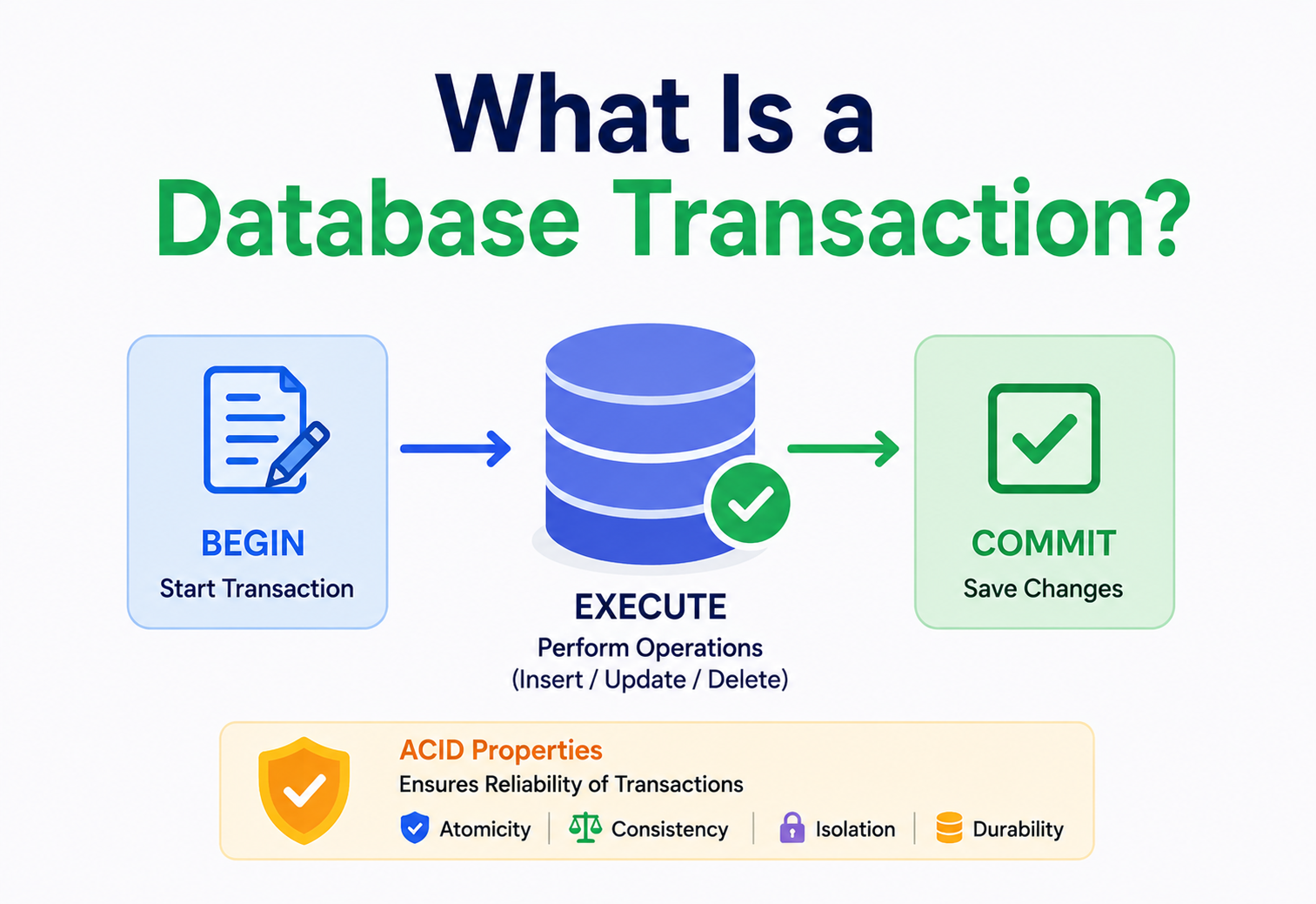
What Is a Database Transaction?
A beginner‑to‑production tour of database transactions — what they are, why they exist, how ACID works under the hood, how databases use locks, logs, and MVCC to keep your data safe, and how distributed systems at Uber, Netflix, Google Spanner and beyond handle transactions at massive scale.
Introduction & History
Imagine you are sending money to a friend using a mobile banking app. You type in the amount, tap “Send,” and within a second you see “Transaction Successful.” Behind that one tap, a database silently performed a small miracle: it took money out of your account and put it into your friend’s account, and it made sure that either both of those things happened, or neither of them happened. There was no moment where the money vanished from your account without appearing in your friend’s account.
That silent miracle has a name: a database transaction. It is one of the most important ideas in all of computer science, and yet most people who use apps every day have no idea it exists. This guide will take you from knowing nothing about transactions to understanding exactly how they work inside real databases like PostgreSQL, MySQL, Oracle, and distributed systems like Google Spanner.
Think of a transaction like a single “move” in a board game. When it is your turn, you might need to do three things: move your piece, remove an opponent’s piece, and update the score. In a well‑designed game, either your entire turn completes properly, or if something interrupts it (like the game crashing), the board resets back to how it was before your turn started. Nobody wants a board game where your piece moved but the opponent’s piece is still there and the score didn’t update — that would be a broken game. A database transaction guarantees your “turn” on the data always finishes completely or not at all.
1.1 A Short History
The idea of a transaction did not start with computers — it borrows its name and spirit from the world of business and banking, where a “transaction” simply means a completed exchange, like buying bread from a baker. Early computer scientists working on databases in the 1970s realised that computer systems needed the same guarantee that a business transaction has: it either fully happens, or it doesn’t happen at all — there is no “half a purchase.”
The formal theory of transactions was shaped heavily by Jim Gray, a computer scientist at IBM, who in the 1970s and 1980s developed much of the mathematical foundation for what we now call transaction processing. His work, along with research from IBM’s System R project (one of the first relational database prototypes) and later work at IBM, Oracle, and academic institutions, gave us the term ACID — a set of four guarantees that every serious database tries to provide. We will explore ACID in deep detail in Section 4.
By the 1980s and 1990s, transactions became a standard feature of relational databases like Oracle, IBM DB2, Microsoft SQL Server, and later open‑source databases like PostgreSQL and MySQL. Today, even many “NoSQL” databases that originally skipped transactions (to gain speed) — such as MongoDB and Google Cloud Spanner — have added transaction support back in, because developers found it too hard and too risky to build reliable applications without them.
1.2 A Quick Timeline
- 1970sIBM’s System R project pioneers relational databases; Jim Gray develops much of the theoretical foundation of transaction processing.
- 1981The term ACID is popularised in academic literature, capturing the four guarantees serious transactional systems aim for.
- 1980s–1990sTransactions become a standard feature of Oracle, IBM DB2, Microsoft SQL Server, and other commercial relational databases.
- 1990s–2000sPostgreSQL and MySQL bring solid transactional support to the open‑source world.
- 2000s–2010sEarly NoSQL systems trade transactions for scale; developers quickly discover the operational pain of that trade.
- 2012‑presentGoogle Spanner, CockroachDB, YugabyteDB, and other distributed SQL systems bring globally‑consistent ACID transactions back at planetary scale.
Understanding that transactions were invented to solve a real, painful, expensive problem (corrupted bank balances, lost orders, duplicate charges) will help you appreciate why every rule around them exists. Nothing in this guide is arbitrary — every concept solves a real failure that happened to real companies before these rules existed.
The Problem: Why Transactions Exist
To understand why we need transactions, let’s imagine a world without them. Suppose you run an online bookstore. A customer, Riya, buys a book for ₹500. To complete this “purchase,” your application needs to do three separate things in the database:
- Reduce the book’s stock count by 1.
- Insert a new row into the “orders” table.
- Deduct ₹500 from Riya’s wallet balance.
Without transactions, these are three independent database operations. Now imagine the server crashes, or the network drops, right after step 2 but before step 3. What happens? The order exists in your system, the stock has been reduced — but Riya’s wallet was never charged. She got a free book. Or worse: imagine the crash happens between step 3 and step 2 — she got charged, but no order was created and the stock was never reduced. She paid for nothing.
This is not a hypothetical problem. In the early days of e‑commerce, companies lost real money to exactly this kind of bug — inventory going negative, customers double‑charged, or orders “disappearing” after payment. Multiply a small chance of failure by millions of operations per day, and even a 0.01% failure rate becomes thousands of broken orders daily.
2.1 The Core Problems Transactions Solve
1. Partial Failure
A multi‑step operation might crash halfway, leaving the database in an inconsistent, half‑finished state.
2. Concurrent Access
Thousands of users might read and write the same data at the same time, causing them to overwrite or corrupt each other’s work.
3. Data Corruption
Without rules, a database can end up in a state that violates real‑world logic — like negative stock or a bank account with money that came from nowhere.
4. Lost Updates
Two people editing the same record at once might cause one person’s changes to silently vanish.
Imagine two people trying to book the very last movie seat at the exact same second — one through a website, one through a mobile app. Without transaction control, both bookings might succeed, and now two people show up expecting the same seat. Transactions are what prevent this “double booking” problem by making sure only one booking can succeed for that one seat.
The solution computer scientists arrived at is elegant: group related operations into a single logical unit called a transaction, and let the database guarantee that this unit behaves like one atomic (indivisible) step — even though it is really made up of multiple smaller steps internally.
Core Concepts: What Is a Transaction?
A database transaction is a sequence of one or more database operations (reads and writes) that are treated as a single, indivisible unit of work. Either all the operations inside the transaction succeed and are permanently saved, or none of them are — the database is left exactly as if the transaction never started.
“A transaction is the database’s way of saying: ‘Trust me, I will either finish this job completely, or I will act as if I never touched anything.’”
3.1 Where Transactions Are Used
- Banking systems: money transfers, EMI deductions, interest calculations.
- E‑commerce: checkout flows, inventory deduction, order creation, coupon redemption.
- Airline & ride booking: seat reservation, ride matching, fare deduction.
- Social media: posting content plus updating counters (likes, follower counts) together.
- Inventory & warehouse systems: stock movement between warehouses.
- Multiplayer games: trading items between two players’ inventories.
When you click “Place Order” on Amazon, a transaction (or a coordinated group of transactions across services) typically reduces available inventory, creates an order record, reserves a payment authorisation, and triggers a confirmation — all designed so a crash mid‑way does not leave you charged with no order, or an order with no payment.
3.2 A Transaction Is Defined by Statements, Not Just SQL
In SQL databases, a transaction is usually written using three key commands:
BEGIN;  -- or START TRANSACTION;

UPDATE accounts SET balance = balance - 500 WHERE id = 'riya';
UPDATE accounts SET balance = balance + 500 WHERE id = 'store';
INSERT INTO orders (customer_id, amount) VALUES ('riya', 500);

COMMIT;  -- save everything permanently
-- OR
ROLLBACK; -- undo everything if something went wrong
BEGIN tells the database: “Everything from here onward is one group — don’t finalise anything until I say so.” COMMIT tells the database: “I’m done, and everything worked — please save it all permanently.” ROLLBACK tells the database: “Something went wrong — please undo everything back to how it was before BEGIN.”
Between BEGIN and COMMIT, the database writes your changes “in pencil” — they exist, but they’re not final and can be erased. COMMIT is like tracing over the pencil with permanent pen — now it cannot be undone. ROLLBACK is like erasing the pencil marks completely, as if you never wrote anything.
3.3 Key Terms You Must Know
WhatA sequence of one or more database operations executed as a single, indivisible unit of work — all statements between BEGIN and COMMIT.
WhyTo guarantee that a group of related changes either fully happens or fully doesn’t, even in the face of crashes and concurrent access.
WhereEvery serious relational database (PostgreSQL, MySQL, Oracle, SQL Server) and many modern NoSQL systems (MongoDB, Spanner, CockroachDB).
WhatThe point at which a transaction’s changes are made permanent and visible to other transactions.
WhyBefore commit, changes are provisional and can be discarded; after commit, they are durable and can be relied on.
WhatAn operation that undoes every change made inside an in‑progress transaction and returns the database to its state before the transaction began.
WhyTo ensure that failed or interrupted transactions leave no half‑done side effects behind.
WhatA mode where every single SQL statement is automatically wrapped in its own tiny transaction and committed as soon as it succeeds.
WhyConvenient for simple, ad‑hoc queries; dangerous for multi‑step business logic where you actually need statements to succeed or fail together.
ACID Properties Explained
ACID is an acronym that describes the four guarantees a properly implemented transaction provides: Atomicity, Consistency, Isolation, Durability. Let’s go through each one slowly, because interview questions about databases almost always start here.
Fig 4.1 — The four ACID properties, each protecting against a different kind of failure.
4.1 A — Atomicity: All or Nothing
What it is: atomicity guarantees that a transaction is treated as a single indivisible unit. If any part of it fails, the entire transaction fails, and the database rolls back to its state before the transaction began.
Why it exists: without atomicity, a crash halfway through a multi‑step operation leaves the database in a broken, half‑done state — like Riya’s book‑order example from Section 2.
Atomicity is like a light switch: it can only be fully ON or fully OFF. There is no “half on” position. A transaction is the same — fully applied, or not applied at all.
In a money transfer, both the debit from account A and the credit to account B are wrapped in one transaction. If the credit operation fails (say, account B doesn’t exist), the database automatically undoes the debit from account A too — nobody loses money.
4.2 C — Consistency: Valid State to Valid State
What it is: consistency means a transaction can only bring the database from one valid state to another valid state, respecting all defined rules — such as constraints, foreign keys, unique indexes, and triggers. A transaction that would break these rules is rejected entirely.
Why it exists: every real‑world system has rules that must never be violated — for example, “account balance cannot go below zero” or “a seat cannot be assigned to two passengers.” Consistency ensures the database enforces these rules on every single transaction.
Think of consistency like the rules of a sport. A goal only counts if it follows the rules (ball fully crossed the line, no offside). If a play breaks the rules, the referee cancels it — the scoreboard (the database) never shows an invalid result.
If a table has a rule (a CHECK constraint) that balance >= 0, and a transaction tries to withdraw more money than is available, the database will refuse the transaction and roll it back — the balance can never become negative, no matter what the application code tries to do.
4.3 I — Isolation: Transactions Don’t Step on Each Other
What it is: isolation ensures that concurrently running transactions do not interfere with each other. Even though many transactions may run at the exact same time, each one should behave as though it is running alone.
Why it exists: real systems have thousands of transactions happening every second. Without isolation, one transaction could read another’s half‑finished, uncommitted changes, leading to wrong results (we cover this in depth in Section 7).
Isolation is like separate exam rooms for students taking the same test. Even though hundreds of students write the same exam at the same time, each student works inside their own room without seeing or being influenced by anyone else’s answers, until the papers are collected (committed).
4.4 D — Durability: Once Saved, Always Saved
What it is: durability guarantees that once a transaction is committed, its changes are permanent — they will survive even a power failure, crash, or system restart.
Why it exists: imagine your bank confirms a deposit, but the server crashes 1 second later and the deposit disappears. That would destroy all trust in the system. Durability is the database’s promise that “committed means committed, forever.”
Durability is like writing something in permanent ink on paper and locking it in a fireproof safe, instead of writing it on a whiteboard that gets erased if the power goes out.
4.5 ACID at a Glance
| Property | Protects Against | Mechanism Typically Used |
|---|---|---|
| Atomicity | Partial / half‑finished operations | Rollback logs, undo logs |
| Consistency | Broken business rules | Constraints, triggers, foreign keys |
| Isolation | Interference between concurrent transactions | Locks, MVCC |
| Durability | Data loss on crash | Write‑ahead log (WAL), disk flush, replication |
Transaction Lifecycle
Every transaction moves through a well‑defined set of states from the moment it begins to the moment it finishes. Understanding this lifecycle helps you reason about what can go wrong and when.
Fig 5.1 — The transaction lifecycle — from Active, through either success (Committed) or failure (Aborted).
5.1 The States Explained
- Active: the transaction has started (BEGIN) and is executing its statements (reads and writes).
- Partially Committed: the final statement has executed, but the database hasn’t yet permanently written the results to disk.
- Committed: all changes are permanently saved. This is the successful end state.
- Failed: something went wrong (a constraint violation, a crash, a deadlock) during execution.
- Aborted: the database has rolled back all changes made by the failed transaction, restoring the previous state.
Picture filling out a paper form for a bank deposit. “Active” is you writing on the form. “Partially committed” is handing the form to the teller, who is about to stamp it. “Committed” is the stamp landing on the paper — now it’s official. If the teller notices an error before stamping, they hand the form back and say “start over” — that’s “Aborted.”
Internal Working: Logs & Storage
Now let’s go deeper. How does a database actually guarantee atomicity and durability internally? The answer, for almost every relational database, is a mechanism called the Write‑Ahead Log (WAL), sometimes called the transaction log or redo log.
6.1 Write‑Ahead Logging (WAL)
What it is: WAL is a rule that says: before any change is made to the actual data files on disk, the database must first write a record describing that change to an append‑only log file, and that log record must be safely flushed to disk.
Why it exists: updating actual data pages on disk is slow and complex (data pages are scattered across the disk). But writing a simple sequential log entry is fast. WAL lets the database confirm “this change is durable” quickly by writing to the log, while the slower job of updating the real data pages happens later, in the background.
Imagine a construction site foreman who keeps a small notebook. Before any worker touches a wall, the foreman writes down exactly what will be changed. If a fire breaks out and destroys half‑built work, the foreman’s notebook alone is enough to know exactly what needs to be redone or undone to get back to a known, safe state.
Fig 6.1 — Write‑ahead logging — the log is written and confirmed before (and faster than) the actual data pages are updated.
6.2 Undo Logs and Redo Logs
Databases like MySQL’s InnoDB engine and Oracle use two complementary logs:
Redo Log
Records what changes to apply if the database crashes after a commit but before the data pages were fully updated on disk. Used to “replay forward” to a consistent, up‑to‑date state.
Undo Log
Records the previous version of data before a change, so the database can “roll backward” if a transaction is aborted, or provide older versions of a row for other readers (used heavily in MVCC — Section 9).
6.3 Crash Recovery
When a database restarts after a crash, it runs a recovery process (often called ARIES in academic literature, used conceptually by most modern databases) with three phases:
- Analysis: scan the log to find out which transactions were active at the time of the crash.
- Redo: reapply all logged changes, even for committed transactions, to bring data pages up to date (because writes to disk may not have completed before the crash).
- Undo: roll back any transactions that were never committed, using the undo log, so the database ends up in a clean, consistent state.
PostgreSQL’s WAL, MySQL InnoDB’s redo/undo logs, and Oracle’s redo log buffer all follow this same fundamental idea. This is why, even after a sudden power failure, you can restart PostgreSQL or MySQL and find your committed data intact, with no manual repair needed.
Concurrency & Isolation Levels
Isolation sounds simple in theory (“transactions shouldn’t interfere with each other”), but in practice, perfect isolation is expensive — it can make a database slow, because it means transactions often have to wait for each other. So database designers created several isolation levels, each offering a different trade‑off between correctness and performance.
7.1 The Anomalies Isolation Levels Prevent
Before understanding the levels, you need to understand the problems (called “anomalies”) that can happen when isolation is weak:
Dirty Read
Transaction A reads data that Transaction B has changed but not yet committed. If B rolls back, A has read data that never really existed.
Non‑Repeatable Read
Transaction A reads a row twice, and gets different values each time, because Transaction B committed a change to that row in between.
Phantom Read
Transaction A runs the same query twice (e.g. “count all orders over ₹1000”) and gets a different number of rows, because Transaction B inserted or deleted matching rows in between.
Lost Update
Two transactions read the same value, both calculate a new value based on it, and both write it back — one of the updates is silently overwritten and lost.
Two roommates both check the shared grocery fund balance: ₹1000. Both decide to spend ₹200 and update the balance to ₹800, based on what they each individually saw. Whichever update happens last simply overwrites the other — the fund shows ₹800, even though ₹400 was actually spent. ₹200 worth of spending got “lost” from the record.
7.2 The Four Standard Isolation Levels (SQL Standard)
| Isolation Level | Dirty Read | Non‑Repeatable Read | Phantom Read | Typical Use |
|---|---|---|---|---|
| Read Uncommitted | Possible | Possible | Possible | Rarely used; fastest, least safe |
| Read Committed | Prevented | Possible | Possible | Default in PostgreSQL, Oracle, SQL Server |
| Repeatable Read | Prevented | Prevented | Possible* | Default in MySQL InnoDB |
| Serializable | Prevented | Prevented | Prevented | Financial / critical operations |
*Note: MySQL InnoDB’s Repeatable Read actually prevents most phantom reads too, thanks to its MVCC + gap locking implementation — this is a well‑known deviation from the strict SQL standard definition.
Think of isolation levels like privacy settings on a shared document. “Read Uncommitted” is like everyone seeing every keystroke you type in real time, even before you save. “Read Committed” means people only see your changes after you hit save. “Repeatable Read” means once someone opens the document, it looks frozen to them even if others save changes elsewhere. “Serializable” is like giving one person exclusive editing access at a time, as if everyone took turns.
7.3 Serializable: The Strongest Guarantee
What it is: Serializable isolation guarantees that the result of running multiple transactions concurrently is identical to some order of running them one after another (serially), even though they actually overlapped in time.
Why it exists: this is the safest possible guarantee — but it comes at a real performance cost, because the database might need to detect conflicts and force one transaction to retry.
Banks typically use Serializable or carefully designed Repeatable Read + explicit locking for money transfers, because even a rare anomaly involving real money is unacceptable. E‑commerce product listing pages, by contrast, often use Read Committed, because showing a slightly stale review count is a harmless trade‑off for better speed.
Locking Mechanisms & Deadlocks
One classic way databases achieve isolation is through locks — a mechanism that controls which transactions are allowed to read or write a piece of data at any given moment.
8.1 Shared Locks vs. Exclusive Locks
Shared Lock (S‑Lock)
Used for reading. Multiple transactions can hold a shared lock on the same row at the same time — many people can “read” together, but nobody can write while any shared lock is held.
Exclusive Lock (X‑Lock)
Used for writing. Only one transaction can hold an exclusive lock on a row, and no other transaction can read or write it until the lock is released.
Think of a library book. A “shared lock” is like several people reading photocopies of the same page at the same time — nobody minds. An “exclusive lock” is like someone taking the only original copy home to edit it — nobody else can even read it until they bring it back.
8.2 Two‑Phase Locking (2PL)
What it is: Two‑Phase Locking is a protocol where a transaction acquires all the locks it needs during a “growing phase,” and only starts releasing locks during a “shrinking phase” — once it starts releasing locks, it is not allowed to acquire any new ones.
Why it exists: this simple rule mathematically guarantees serialisability — it prevents certain classes of conflicts from ever corrupting the data.
8.3 Deadlocks
What it is: a deadlock happens when two (or more) transactions are each waiting for a lock the other one is holding, so neither can ever proceed.
Fig 8.1 — A classic deadlock — Transaction A wants what B holds, and B wants what A holds. Neither can proceed.
Two cars meet on a single‑lane bridge, facing each other. Car A won’t reverse because Car B is blocking the way it wants to go, and Car B won’t reverse for the same reason. Both are stuck forever unless something (or someone) forces one of them to back up.
How databases resolve deadlocks: almost every production database runs a background deadlock detector. It periodically looks for cycles in a “wait‑for graph” (which transaction is waiting for which). When it finds a cycle, it picks one transaction as the “victim,” forcibly rolls it back, and lets the other proceed. The application is expected to catch this error and retry the transaction.
A frequent bug in real applications is updating rows in an inconsistent order across different code paths (e.g., one function updates accounts A then B, another updates B then A). Always update related rows in a consistent, agreed‑upon order to minimise deadlocks.
MVCC: Multi‑Version Concurrency Control
Locking works, but it has a downside: readers can block writers, and writers can block readers, hurting performance under heavy concurrent load. Modern databases like PostgreSQL, MySQL InnoDB, and Oracle solve this using a smarter approach called MVCC (Multi‑Version Concurrency Control).
What it is: instead of locking a row every time someone reads it, the database keeps multiple “versions” of each row. When a transaction updates a row, the database doesn’t overwrite the old data immediately — it creates a new version while keeping the old version around for any transactions that might still need to see it.
Why it exists: MVCC allows readers to never block writers, and writers to never block readers. A read simply looks at the version of the data that was valid when its transaction started, while writers can create new versions in parallel.
Think of MVCC like Google Docs’ version history. When you open a document, you see a snapshot as it was at that moment. Someone else can be actively editing and saving new versions elsewhere, but your view stays consistent with the moment you opened it, until you refresh (start a new transaction).
9.1 How MVCC Works Internally
- Every row gets hidden metadata: which transaction created it, and (if deleted/updated) which transaction removed it.
- Each transaction gets a unique, increasing transaction ID (or a timestamp/snapshot).
- When reading, a transaction only “sees” row versions that were committed before its own snapshot began, and ignores versions created by transactions that started later or haven’t committed.
- Old, no‑longer‑needed row versions are eventually cleaned up by a background process — in PostgreSQL this is called VACUUM.
PostgreSQL relies heavily on MVCC, which is why a long‑running analytics query (a report generator, for example) can read a huge, stable snapshot of a table while thousands of new orders are being written to that same table at the same time, without either one blocking the other.
MVCC’s biggest weakness is “bloat” — old row versions pile up and must be cleaned up (vacuumed), or they slow the database down and waste disk space. This is a common real‑world PostgreSQL operations concern.
Distributed Transactions
Everything so far assumed a transaction lives inside one single database. But modern systems are often split across many databases or microservices — for example, an “order service” and a “payment service” might each have their own separate database. How do you get ACID‑like guarantees across multiple, independent systems?
10.1 Two‑Phase Commit (2PC)
What it is: 2PC is a protocol that coordinates a transaction across multiple databases (called “participants”) using a central coordinator, in two phases: a “prepare” phase, and a “commit” phase.
Fig 10.1 — Two‑Phase Commit — the coordinator asks all participants to “prepare,” and only commits everywhere if all say yes.
- Phase 1 (Prepare): the coordinator asks every participant database, “Can you guarantee you’ll be able to commit this?” Each participant locks its resources, writes to its own log, and replies “yes” or “no,” without actually committing yet.
- Phase 2 (Commit/Abort): if every participant said “yes,” the coordinator tells everyone to commit for real. If even one said “no” (or timed out), the coordinator tells everyone to abort.
If the coordinator crashes after Phase 1 but before sending the final decision, participants are stuck holding locks indefinitely, waiting for an answer that may never come. This is called the “blocking problem,” and it’s why many modern distributed systems avoid 2PC in favour of other patterns.
10.2 The Saga Pattern
What it is: instead of one giant distributed transaction, a Saga breaks a business process into a sequence of smaller, local transactions, each in its own service. If a later step fails, the Saga executes compensating actions — essentially “undo” operations — for the steps that already succeeded.
A Saga is like planning a trip with separate bookings: flights, hotel, and a rental car, each booked with a different company. There’s no single button that books all three atomically. Instead, if the hotel booking fails after you’ve already booked the flight, you simply cancel the flight (a compensating action) instead of expecting one company to undo everything for you.
When you book a ride, several systems are involved: rider matching, driver assignment, pricing, and payment pre‑authorisation. Rather than locking all these systems together in one giant distributed transaction, ride‑hailing platforms typically use saga‑like workflows: if payment pre‑authorisation fails after a driver was matched, the system releases the driver back to the pool as a compensating step.
10.3 CAP Theorem and Transactions
What it is: the CAP theorem states that a distributed system can only guarantee two out of three properties at the same time: Consistency (every read gets the latest write), Availability (every request gets a response), and Partition Tolerance (the system keeps working despite network failures between nodes).
Since network partitions are unavoidable in real distributed systems, the real‑world choice is between Consistency and Availability during a partition. Systems that prioritise strong consistency for transactions (like Google Spanner, using a special globally synchronised clock system called TrueTime) sacrifice some availability during network issues, while systems that prioritise availability (like many NoSQL databases) may serve slightly stale data during a partition.
Google Spanner is a globally distributed database that provides strong, externally‑consistent transactions across data centres on different continents, using precisely synchronised clocks (TrueTime) to order transactions correctly — a solution that took years of specialised infrastructure investment to achieve reliably.
Java Code Examples
Let’s see how transactions look in real Java code, using plain JDBC first, then Spring’s higher‑level abstraction, and finally the deadlock‑retry idiom you’ll want in production.
11.1 Plain JDBC Transaction
Connection conn = null;
try {
    conn = dataSource.getConnection();
    conn.setAutoCommit(false); // start the "transaction mode"

    PreparedStatement debit = conn.prepareStatement(
        "UPDATE accounts SET balance = balance - ? WHERE id = ?");
    debit.setBigDecimal(1, amount);
    debit.setString(2, fromAccountId);
    debit.executeUpdate();

    PreparedStatement credit = conn.prepareStatement(
        "UPDATE accounts SET balance = balance + ? WHERE id = ?");
    credit.setBigDecimal(1, amount);
    credit.setString(2, toAccountId);
    credit.executeUpdate();

    conn.commit(); // save both changes permanently
} catch (SQLException e) {
    if (conn != null) conn.rollback(); // undo everything
    throw new RuntimeException("Transfer failed, rolled back", e);
} finally {
    if (conn != null) conn.setAutoCommit(true);
    if (conn != null) conn.close();
}
Here, setAutoCommit(false) tells JDBC “don’t save every single statement automatically — wait for my explicit signal.” commit() finalises both updates together; rollback() undoes both if any exception occurs.
11.2 Spring Framework: @Transactional
Manually managing connections and rollback logic in every method is repetitive and error‑prone. Spring Framework provides the @Transactional annotation, which wraps a method in transaction boundaries automatically.
@Service
public class TransferService {

    private final AccountRepository accountRepository;

    public TransferService(AccountRepository accountRepository) {
        this.accountRepository = accountRepository;
    }

    @Transactional(isolation = Isolation.READ_COMMITTED,
                   rollbackFor = InsufficientFundsException.class)
    public void transfer(String fromId, String toId, BigDecimal amount) {
        Account from = accountRepository.findById(fromId)
            .orElseThrow(() -> new AccountNotFoundException(fromId));
        Account to = accountRepository.findById(toId)
            .orElseThrow(() -> new AccountNotFoundException(toId));

        if (from.getBalance().compareTo(amount) < 0) {
            throw new InsufficientFundsException(fromId);
        }

        from.setBalance(from.getBalance().subtract(amount));
        to.setBalance(to.getBalance().add(amount));

        accountRepository.save(from);
        accountRepository.save(to);
        // Spring commits automatically here if no exception was thrown
    }
}
Spring uses an underlying proxy that starts a transaction before the method runs, and commits it after the method returns successfully — or rolls it back automatically if a RuntimeException (or any exception you explicitly configure with rollbackFor) is thrown.
A very common bug: calling a @Transactional method from another method within the same class does not trigger the transaction, because Spring’s proxy‑based mechanism is bypassed when you call this.method() directly instead of going through the Spring‑managed proxy. The fix is usually to move the transactional method into a separate, injected bean.
11.3 Handling Deadlock Retries in Java
int attempts = 0;
while (attempts < 3) {
    try {
        transferService.transfer(fromId, toId, amount);
        break; // success
    } catch (DeadlockLoserDataAccessException e) {
        attempts++;
        if (attempts == 3) throw e;
        Thread.sleep(50L * attempts); // simple backoff
    }
}
Because the database’s deadlock detector may pick your transaction as the “victim” and force a rollback (see Section 8), well‑designed applications retry the operation a small number of times with a short backoff delay, rather than failing the user’s request immediately.
Advantages, Disadvantages & Trade-offs
Every architectural choice is a trade‑off. Transactions buy correctness and simplicity — but in exchange, they cost performance, add complexity in distributed settings, and require careful design.
Advantages
- Guarantees data correctness even during crashes or concurrent access.
- Simplifies application code — developers don’t need to manually handle every partial‑failure scenario.
- Enforces business rules consistently at the database level.
- Builds trust in critical systems like banking, payments, and healthcare.
Disadvantages
- Adds performance overhead (locking, logging, log flushing).
- Can reduce throughput under high contention.
- Distributed transactions are complex and sometimes impossible to do cheaply at global scale.
- Strict isolation levels can cause increased waiting and retries.
12.1 The Fundamental Trade-off: Safety vs. Speed
Every isolation level, every locking strategy, and every distributed‑transaction protocol is a trade‑off between how correct the guarantee is and how much it costs in terms of speed and complexity. This is one of the most important intuitions to build as an architect: there is no free lunch — stronger guarantees always cost something, whether it’s latency, throughput, or engineering complexity.
| Choice | Gain | Cost |
|---|---|---|
| Stronger isolation (Serializable) | Fewer anomalies, more correctness | More waiting, more retries, lower throughput |
| Weaker isolation (Read Committed) | Higher throughput, less waiting | Possible anomalies (non‑repeatable reads, phantoms) |
| Distributed 2PC | Strong cross‑service consistency | Blocking risk, added latency, coordinator dependency |
| Saga pattern | No blocking, independent scaling | Eventual consistency, complex compensation logic |
Performance & Scalability
Transactions, if used carelessly, are one of the most common sources of performance problems in production systems. Here are the key levers architects and engineers use to keep transactional systems fast at scale.
13.1 Keep Transactions Short
The longer a transaction stays open, the longer it holds locks (or, under MVCC, the longer it prevents old row versions from being cleaned up). Long transactions increase contention and can cause other transactions to wait or fail.
Calling an external API (like sending an email or calling a payment gateway) inside a database transaction is a classic anti‑pattern. If that external call is slow, it holds database locks open the entire time, blocking other users. Do external calls before or after the transaction, not during it.
13.2 Batching
Instead of committing one row at a time (which forces a disk flush per commit), batching groups multiple inserts/updates into fewer transactions, dramatically reducing overhead — especially useful for bulk data loading.
13.3 Connection Pooling
Opening a new database connection is expensive. Connection pools (like HikariCP in the Java ecosystem) keep a set of ready‑to‑use connections open, so transactions can start instantly instead of paying connection setup costs every time.
13.4 Read Replicas for Read‑Heavy Workloads
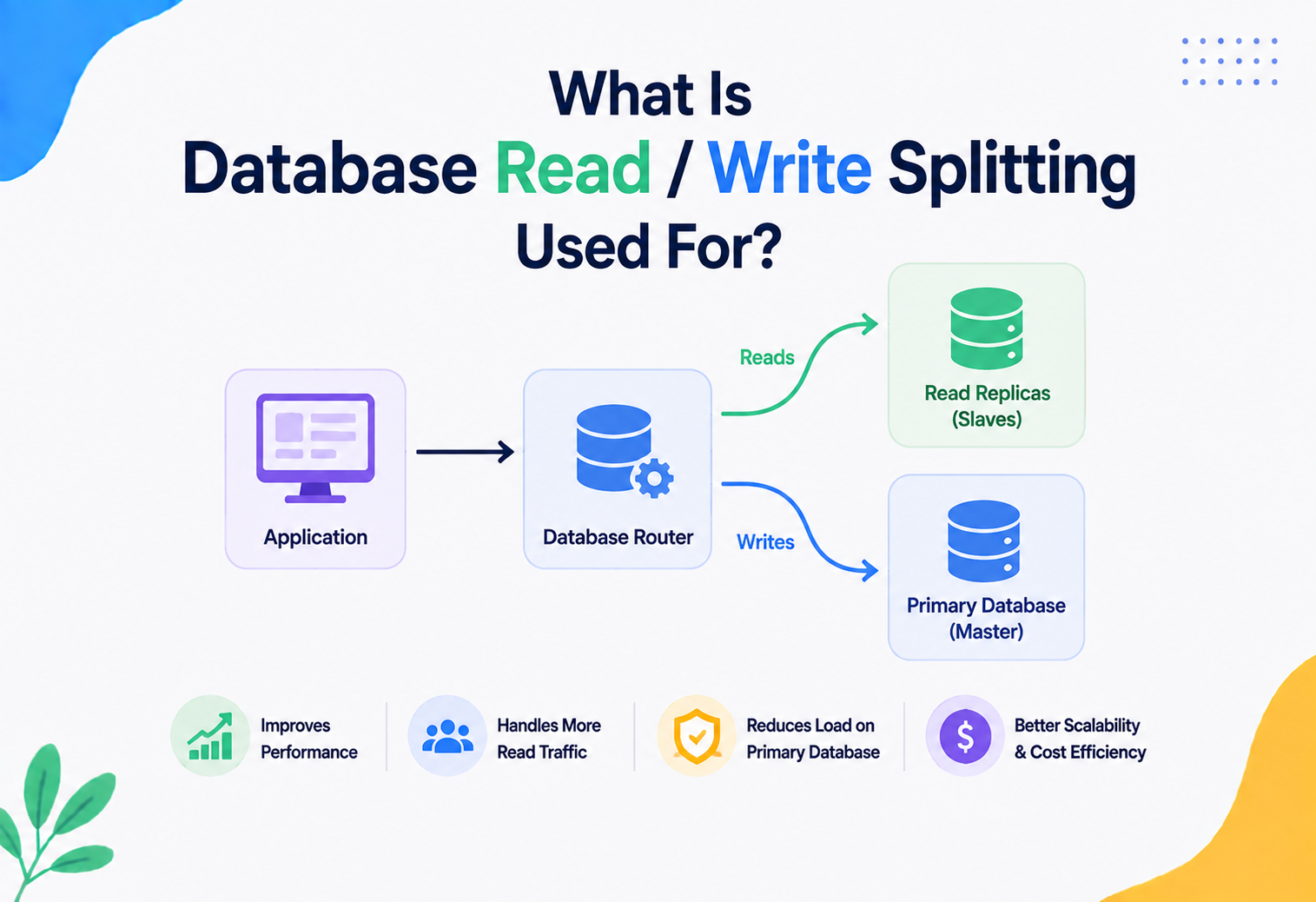
Many systems separate “read” traffic from “write” traffic, sending reads that don’t need the absolute latest data to replica databases, while all writes (which need strong transactional guarantees) go to the primary database. This reduces load on the primary and improves overall throughput.
13.5 Sharding / Partitioning
At very large scale, a single database server cannot handle all the transaction load. Sharding splits data across multiple database servers (for example, by customer region or user ID range), so transactions on different shards can run fully in parallel, with no contention between them — at the cost of making cross‑shard transactions much harder (this is exactly the problem 2PC and Sagas try to solve).
Netflix’s architecture famously favours many small, independently deployable microservices, each typically owning its own datastore. This avoids large, slow, cross‑service distributed transactions, favouring eventual consistency and asynchronous event‑driven updates for most non‑critical data, while reserving strict transactional guarantees for the few workflows (like billing) that truly need them.
High Availability & Reliability
A transactional guarantee is only as good as the system’s ability to survive failure. Two key techniques make transactional databases highly available:
14.1 Replication
What it is: replication keeps copies of the same data on multiple servers. If the primary server fails, a replica can be promoted to take over, minimising downtime.
- Synchronous replication: a transaction isn’t considered committed until at least one replica confirms it has the data too. Safer (no data loss on failover), but slower.
- Asynchronous replication: the primary commits immediately and sends changes to replicas afterward. Faster, but a crash right after commit could lose the last few transactions that hadn’t reached the replica yet.
14.2 Backup and Point‑in‑Time Recovery
Because the transaction log (WAL) contains a complete, ordered history of every change, databases can restore a backup and then “replay” the log up to any exact point in time — extremely useful for recovering from accidental data corruption, like an engineer’s mistaken bulk delete.
Amazon RDS and Google Cloud SQL both offer “point‑in‑time recovery” features built directly on top of the underlying database’s write‑ahead log, letting teams restore a database to its exact state one second before a bad deployment caused data loss.
14.3 Disaster Recovery
Beyond a single data centre failing, well‑run systems plan for entire regions going offline. This typically means maintaining replicas in geographically distant data centres, along with clear, tested failover procedures and a defined RPO (Recovery Point Objective — how much data loss is acceptable) and RTO (Recovery Time Objective — how much downtime is acceptable).
Security
Transactions are about correctness, not access control — but the two intersect at critical points, and getting either one wrong can be catastrophic.
15.1 SQL Injection and Transactions
Transactions don’t protect against SQL injection — that’s a separate concern solved by using parameterised queries (as shown in the JDBC example in Section 11, using PreparedStatement). However, a poorly secured transaction that allows arbitrary SQL injection can be devastating, since an attacker could manipulate multiple related statements within the same transactional context.
15.2 Least‑Privilege Database Accounts
Application accounts used to run transactions should have the minimum permissions necessary. An application account that only needs to read and write specific tables should never have permission to drop tables or alter schemas — this limits the damage from a compromised application.
15.3 Auditing Transactional Changes
Sensitive systems (like banking or healthcare) often maintain an audit log — a separate, often append‑only, record of who changed what and when, distinct from the database’s internal WAL. This is important both for security investigations and for regulatory compliance (such as financial regulations requiring a full audit trail).
Never trust the client to define transaction boundaries for security‑sensitive logic (e.g., never let a mobile app tell the server “trust these two operations as one transaction” without server‑side validation) — always enforce the transaction and its business rules on the trusted server side.
15.4 Encryption
Data written during a transaction — both the actual data files and the transaction log itself — should be encrypted at rest, and connections carrying transactional traffic should use TLS encryption in transit, so that a compromised disk or intercepted network packet doesn’t expose sensitive information like account balances or personal data.
Monitoring, Logging & Metrics
In production, you can’t just “hope” transactions are working well — you need visibility. Here are the metrics that matter most for transactional health.
Transaction Duration
Track average and p99 (99th percentile) transaction times. Rising duration often signals lock contention or slow queries.
Deadlock Rate
A rising number of deadlocks per minute usually points to a specific hot table or a bad access‑order pattern in the code.
Rollback Rate
A high percentage of transactions rolling back (versus committing) often signals a bug, a bad constraint, or excessive retry storms.
Lock Wait Time
How long transactions spend waiting to acquire locks — a strong early‑warning signal for contention before it becomes a full outage.
WAL / Log Growth
Rapid growth in the transaction log can indicate long‑running transactions preventing log cleanup, or an unexpectedly high write volume.
Connection Pool Saturation
If all pooled connections are busy holding open transactions, new requests queue up or fail — a common cascading‑failure trigger.
16.1 Distributed Tracing
In microservice architectures using Sagas, tools like OpenTelemetry, Jaeger, or Zipkin let engineers trace a single business transaction (e.g. “place order”) as it flows across multiple services and their individual local transactions, making it possible to see exactly where in a multi‑step saga something failed.
Database tools like PostgreSQL’s pg_stat_activity view, MySQL’s Performance Schema, and cloud monitoring dashboards (Amazon CloudWatch, Google Cloud Monitoring) are commonly wired into alerting systems, so an on‑call engineer gets paged automatically the moment deadlock rates or transaction durations cross a defined threshold.
Deployment & Cloud
Modern cloud platforms have made deploying transactional databases significantly easier, while also introducing new distributed‑transaction‑friendly options.
17.1 Managed Relational Databases
Services like Amazon RDS, Google Cloud SQL, and Azure Database handle patching, backups, replication, and failover automatically for traditional transactional databases (PostgreSQL, MySQL, SQL Server), while still exposing full ACID transaction support to the application.
17.2 Distributed SQL Databases
A newer category of databases — Google Cloud Spanner, CockroachDB, and YugabyteDB — combine the horizontal scalability of NoSQL systems with full ACID transaction guarantees across many machines and even multiple regions, using consensus algorithms (commonly Raft or Paxos) to keep replicas agreeing on the true state of the data.
Consensus algorithms like Raft let a group of machines agree on a single, ordered sequence of operations, even if some machines fail or messages are delayed — this is the underlying building block that lets distributed SQL databases offer strong transactional guarantees without a single point of failure.
17.3 Containers and Kubernetes
When databases run in containers (via Kubernetes StatefulSets, for example), special care is needed for transactional systems: persistent storage volumes must survive pod restarts, and failover automation must ensure only one instance believes it is the “primary” at any time (avoiding a dangerous “split‑brain” scenario where two nodes both accept writes independently).
17.4 Cost Optimisation
Transactional workloads often dictate database sizing (CPU, memory, IOPS) more than raw data volume does, because heavy write/lock contention needs more compute headroom. Common cost levers include right‑sizing instances based on actual transaction throughput, using read replicas to offload read traffic from the more expensive primary instance, and archiving old transactional data to cheaper storage once it’s no longer actively updated.
Design Patterns & Anti-patterns
A small number of named patterns keep showing up around transactions because they answer recurring problems well. An equally small number of anti‑patterns keep showing up because they’re the shortcuts everyone is tempted to take.
18.1 Unit of Work Pattern
What it is: a design pattern where all the changes to be made during a business operation are collected in memory first, and then submitted to the database as a single transaction at the end — rather than issuing separate database calls scattered across the code.
Spring’s @Transactional combined with JPA/Hibernate’s persistence context is a practical implementation of Unit of Work — entity changes are tracked in memory and flushed to the database together when the transaction commits.
18.2 Outbox Pattern
What it is: a pattern for reliably publishing events alongside a database transaction. Instead of writing to the database and separately publishing a message to a queue (which can fail independently, causing inconsistency), the event is written to an “outbox” table as part of the same local transaction. A separate background process then reliably publishes it to the message queue.
E‑commerce platforms use the Outbox pattern so that “order created” events are guaranteed to be published if and only if the order was actually saved to the database — preventing the classic bug where a message is published but the matching database write failed, or vice versa.
18.3 Common Anti-patterns
Long‑Running Transactions
Holding a transaction open across slow operations (user think‑time, external API calls) causes lock contention and blocks other users.
Distributed Monolith via 2PC
Overusing 2PC across many microservices creates tight coupling and fragility — a single slow service can stall the entire distributed transaction.
Chatty Transactions
Making many small, separate round trips to the database inside one transaction (instead of batching) increases latency and lock hold time.
Ignoring Isolation Defaults
Assuming “the database will just handle it” without understanding the default isolation level can lead to subtle, hard‑to‑reproduce bugs under real production load.
Best Practices & Common Mistakes
The gap between a healthy transactional system and a fragile, deadlock‑ridden one is usually not a technology gap — it’s a discipline gap. These are the habits successful teams share.
19.1 Best Practices
- 01Keep transactions as short as possible. Do all slow work (API calls, file I/O, heavy computation) outside the transaction boundary.
- 02Choose the weakest isolation level that is still safe for your use case — don’t default to Serializable everywhere; it’s often unnecessary and costly.
- 03Always handle rollback and retry logic explicitly for deadlocks and transient failures, rather than assuming every transaction will succeed on the first try.
- 04Update related rows in a consistent order across your entire codebase to minimise deadlocks.
- 05Use connection pooling and avoid opening a fresh raw connection for every transaction.
- 06Avoid distributed transactions where possible. Prefer Sagas or the Outbox pattern over 2PC when working across microservices.
- 07Never let a transaction span a user’s “think time” (e.g., don’t open a transaction, wait for a user to click a button, then commit).
- 08Set sensible transaction timeouts so a stuck transaction doesn’t hold resources indefinitely.
- 09Monitor deadlocks, rollback rates, and lock wait times as first‑class production metrics, not an afterthought.
- 10Test failure scenarios deliberately — simulate crashes mid‑transaction in staging environments to confirm your rollback and recovery logic actually works.
19.2 Common Mistakes and Their Fixes
Mistake
Making an external HTTP call (payment gateway, email, third‑party API) from inside a transaction, blocking all other users while the call is slow.
Fix
Move the external call before or after the transaction; if the two must be tied together, use the Outbox pattern to publish the event reliably.
Mistake
Calling a Spring @Transactional method from another method in the same class, silently bypassing the proxy and losing the transaction.
Fix
Move the transactional method into a separate, injected service bean so all calls go through the Spring‑managed proxy.
Mistake
Two code paths update the same pair of rows in opposite orders, producing sporadic deadlocks under load.
Fix
Standardise on a single, consistent update order (e.g. always update the row with the smaller ID first) across every code path.
Real-World Industry Examples
Almost every recognisable digital experience is quietly powered by transactions somewhere in the stack. Here’s a short tour of how large systems apply them at scale.
Banking — Core Banking Systems
Fund transfers, interest postings, and EMI deductions run as strictly isolated transactions, often at Serializable or carefully controlled Repeatable Read levels, with mandatory audit logs for regulatory compliance.
Amazon — Checkout & Inventory
Order placement coordinates inventory reservation, payment authorisation, and order record creation, using a mix of local transactions and saga‑style compensations across services to avoid a single giant distributed lock.
Uber — Ride Matching
Matching a rider to a driver, updating driver availability, and initiating a fare estimate happen across multiple services with carefully designed compensating actions if any step fails partway.
Netflix — Billing & Subscriptions
While most of Netflix’s data (like viewing history) tolerates eventual consistency, billing and subscription state changes use strict transactional guarantees, since incorrect billing directly affects customer trust and revenue.
Google Spanner — Global Consistency
Powers services requiring strong consistency across continents, such as Google’s own advertising billing systems, using TrueTime‑based distributed transactions.
Airline Reservation Systems
Seat assignment uses strict locking or serialisable isolation to guarantee that the same physical seat is never sold to two different passengers, even under massive concurrent booking load during a sale.
Frequently Asked Questions
A short set of the questions engineers, students, and interviewers ask most about database transactions.
Is a single SQL statement automatically a transaction?
Yes. Most databases treat every individual statement as its own implicit transaction if you don’t explicitly start one with BEGIN. This is often called “autocommit mode,” and it’s the default behaviour in most database clients.
Can a transaction span multiple tables?
Absolutely — that’s one of the main reasons transactions exist. A single transaction can read and write across as many tables as needed, and they will all be committed or rolled back together.
What’s the difference between a transaction and a lock?
A transaction is a logical unit of work with a beginning and an end. A lock is one of the tools (alongside MVCC) that databases use internally to implement the Isolation guarantee of a transaction.
Do NoSQL databases support transactions?
Many modern NoSQL databases do now, though historically many traded transactions away for scalability. MongoDB added multi‑document ACID transactions in version 4.0. Cassandra offers limited “lightweight transactions” using a consensus protocol. Google Spanner and CockroachDB were designed from the ground up to offer full ACID transactions at global scale.
What happens if my application crashes mid‑transaction?
The database itself detects the dropped connection and automatically rolls back any uncommitted work from that transaction — you don’t need to manually clean it up. This is a core part of the Atomicity guarantee.
Why is Serializable isolation not always the default?
Because it can significantly reduce throughput under high concurrency — transactions may need to retry more often when the database detects conflicting reads/writes. Most databases default to a weaker (but still practical) level like Read Committed for better everyday performance.
What is the difference between optimistic and pessimistic locking?
Pessimistic locking assumes conflicts are likely, so it locks data upfront before making changes. Optimistic locking assumes conflicts are rare — it lets transactions proceed without locks, but checks (often using a version number column) at commit time whether anything changed, and rejects the commit if a conflict is detected.
This is a technical, educational topic and does not involve any sensitive personal or safety concerns.
Summary & Key Takeaways
A database transaction is the fundamental building block that lets applications treat multiple related database operations as one safe, indivisible unit — a promise that either everything happens, or nothing does. This one idea, formalised through the ACID properties, quietly protects nearly every digital interaction you have, from a bank transfer to an online purchase to booking a ride.
Key Takeaways
- 01Atomicity, Consistency, Isolation, and Durability are the four guarantees every serious transactional database strives to provide.
- 02Internally, databases achieve these guarantees using write‑ahead logs, locks, and modern techniques like MVCC.
- 03Isolation levels (Read Uncommitted, Read Committed, Repeatable Read, Serializable) let you trade off correctness against performance based on your specific needs.
- 04Deadlocks are a normal, expected part of concurrent systems — databases detect and resolve them automatically, and well‑designed applications retry gracefully.
- 05Across microservices, 2PC and the Saga pattern offer two very different philosophies for coordinating transactions spanning multiple independent systems.
- 06Real production systems — from Amazon to Uber to Netflix to Google Spanner — make deliberate, thoughtful trade‑offs about where strict transactional guarantees are worth the cost, and where eventual consistency is good enough.
- 07Mastering transactions means mastering trade‑offs: every extra bit of safety costs something in speed or complexity, and a good engineer knows exactly when that cost is worth paying.
To deepen your understanding, try setting up a local PostgreSQL or MySQL instance, deliberately open two transactions in separate terminal windows, and experiment with different isolation levels to see dirty reads, non‑repeatable reads, and phantom reads happen with your own eyes — there’s no better way to internalise this topic than watching it happen firsthand.
“A transaction is a small, quiet promise between the database and the world: either everything happened, or nothing did — and you can always trust the answer.”