What Is OAuth 2.0?
A ground-up tour of the delegated-authorization protocol that quietly powers “Sign in with Google,” Slack integrations, Open Banking, and virtually every “connect this app to that account” flow you’ve ever tapped through — from the four core roles, through Authorization Code + PKCE and refresh-token rotation, all the way to JWT-vs-opaque tokens, DPoP, and OAuth in a microservices fabric.
OAuth 2.0 is the internet’s version of a hotel keycard system: a way for one application to hand another application a limited, revocable “key” instead of your actual password. This guide walks the standard end to end — roles, tokens, flows, storage, security, scale, and real-world usage — with concrete Spring Boot examples throughout.
Introduction & History
From the “password anti-pattern” of the mid-2000s to the near-universal 2012 standard behind every “Continue with Google” button.
Imagine you check into a hotel. You don’t get a copy of the master key that opens every room in the building. You get a keycard that opens exactly your room, for exactly the nights you’re staying, and nothing more. The front desk can also deactivate that card instantly without changing anyone else’s lock. OAuth 2.0 is the internet’s version of that keycard system — a way for one application to hand another application a limited, revocable “key” instead of your actual password.
OAuth stands for Open Authorization. It is an open standard — meaning anyone can implement it for free, and it isn’t owned by a single company — that lets a user grant a third-party application limited access to their resources on another service, without ever sharing their username and password with that third-party application.
1.1 · A SHORT HISTORY
Before OAuth existed, if you wanted a website like “PrintMyPhotos.com” to pull your photos from Flickr, you had two bad options: give PrintMyPhotos your actual Flickr password (terrifying), or manually download and re-upload every photo (tedious). Around 2006–2007, engineers at Twitter, Google, and other companies were independently solving the exact same “password anti-pattern” problem, and they realized they should standardize it instead of building ten incompatible solutions.
The first version, OAuth 1.0, was published in December 2007. It worked, but it required complex cryptographic request-signing that was painful for developers, especially on mobile devices. In response, a completely redesigned, simpler protocol called OAuth 2.0 was published as RFC 6749 by the IETF in October 2012. OAuth 2.0 traded cryptographic signing for mandatory HTTPS/TLS encryption, which made it dramatically easier to implement — and it is this version that has become the near-universal standard used today by Google, Microsoft, Facebook, GitHub, Amazon, banks, and virtually every API-driven product on the internet.
Every time you clicked “Continue with Google” or “Sign in with GitHub” on a website, that flow — the popup, the “This app wants to access your email and profile” screen, the redirect back — was OAuth 2.0 in action.
1.2 · OAUTH 2.0 vs OAUTH 1.0 vs OPENID CONNECT
| Term | What it actually is |
|---|---|
| OAuth 1.0 | Legacy 2007 spec, used request signing (HMAC-SHA1). Mostly retired. |
| OAuth 2.0 | The modern authorization framework this article covers — “can App X access Resource Y on my behalf?” |
| OpenID Connect (OIDC) | A thin identity layer built on top of OAuth 2.0 that answers a different question — “who is this user?” — by adding an ID Token. |
This distinction trips up almost every beginner, so remember it as a rule of thumb: OAuth 2.0 is about permission (authorization). OpenID Connect is about identity (authentication). We’ll revisit this in the FAQ.
The Problem OAuth Solves
The “password anti-pattern,” why sharing a password violates least-privilege, and what OAuth's scoped, expiring, revocable tokens actually fix.
Let’s ground this in a beginner-friendly example before touching any code.
Real-life analogy — the valet key
Many cars come with a special “valet key.” It starts the engine and opens the driver’s door, but it locks the glovebox and trunk, and it can’t be used to unlock the car from the outside. You hand this key to a parking valet — a stranger — with confidence, because even if they misuse it, the damage they can do is limited and you can always get your key back. Your regular house key, by contrast, opens everything you own; you’d never hand that to a stranger. OAuth exists so that apps only ever get “valet keys” to your data, never your master key (your password).
2.1 · THE PASSWORD ANTI-PATTERN
Before OAuth, the only way for a third-party app to act on your behalf on another service was the “password anti-pattern”:
- You type your Gmail password directly into some random photo-printing app’s login form.
- That app now has your actual Gmail password, forever, stored who-knows-how.
- It can now read your email, delete it, reset your bank password via “forgot password” email links, impersonate you — everything, not just “look at my contacts” like it asked for.
- The only way to revoke access is to change your Gmail password, which breaks every other app you’d given that password to as well.
Sharing a password violates the security principle of least privilege — giving someone the smallest amount of access necessary to do their job. A photo-printing app needs to read your photo library. It has zero legitimate need for the ability to send emails, view your search history, or change your account recovery phone number — yet a shared password grants all of that.
2.2 · WHAT OAUTH 2.0 ACTUALLY FIXES
| Without OAuth | With OAuth 2.0 |
|---|---|
| Third-party app gets your real password | Third-party app never sees your password |
| Access is all-or-nothing | Access is scoped — e.g. “read-only calendar” |
| Access never expires unless you change your password | Access tokens expire automatically (often in minutes to hours) |
| Revoking means changing your password everywhere | Revoking one app doesn’t affect any other app |
| Service provider can’t see which apps you authorized | You get a dashboard of exactly which apps have access to what |
Beginner example: You install a budgeting app and it asks to connect to your bank. With OAuth (via a standard like Open Banking / FDX in many countries), you’re redirected to your actual bank’s login page — never the budgeting app’s — you log in there, and the bank asks “Allow BudgetApp to view your transaction history for 90 days? (Read-only)”. You approve, and the budgeting app receives a token that can only fetch read-only transaction data — it cannot move money.
Production example: Slack’s app directory has thousands of third-party integrations (Google Drive, Zoom, Salesforce, etc.). Every single one of them uses OAuth 2.0 to request specific, narrow scopes like channels:read or chat:write rather than getting your Slack password. Workspace admins can review and revoke any app’s access from a single settings page at any time.
2.3 · DELEGATED ACCESS, NOT IDENTITY FEDERATION
It’s worth being precise about what problem OAuth 2.0 was designed to solve, because it’s narrower than people often assume. It solves delegated authorization — “let this app act on my behalf, within limits.” It was never designed to solve identity federation — “prove to this app who I am” — even though the two problems show up together constantly in practice (you usually want to log in and grant some access at the same time). That overlap is exactly why OpenID Connect was later built as a thin, standardized identity layer on top of OAuth’s plumbing, rather than everyone inventing their own ad hoc way of stuffing identity claims into an access token.
A news app that only wants to know “is this a returning reader?” needs identity (OpenID Connect) but no data access at all. A calendar-sync app needs to actually read and write your events — that’s authorization (OAuth 2.0), with or without also needing to know your name. Most real products need both simultaneously, which is why “Sign in with Google” flows almost always combine an ID Token (identity) with an access token (authorization) in a single exchange.
Core Concepts & Terminology
Four actors, three artifacts, one rule — once these click, the rest of the spec falls into place.
OAuth 2.0’s biggest learning hurdle is vocabulary. Once the four core “actors” and three core “artifacts” click, the rest of the spec falls into place quickly.
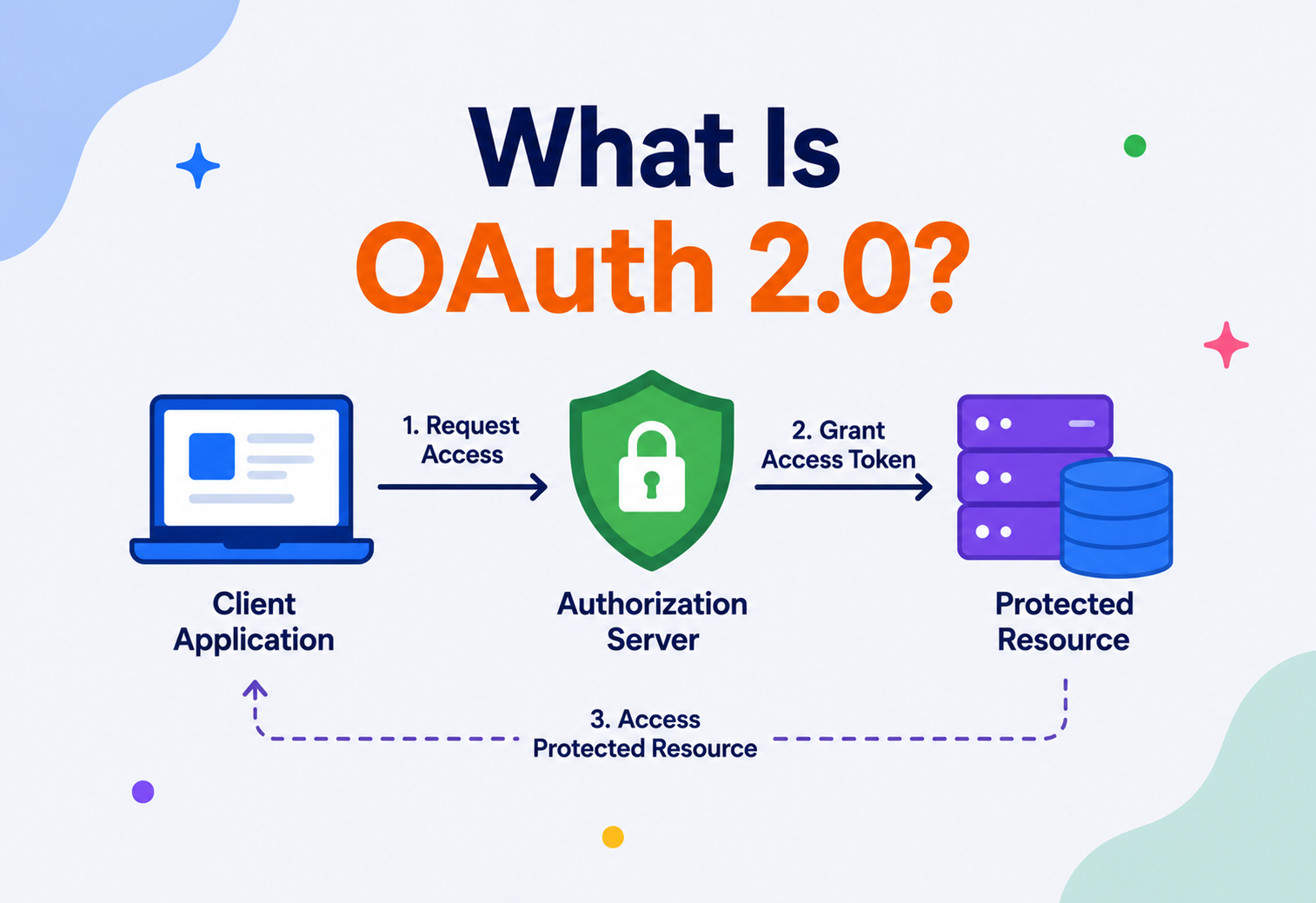
3.1 · THE FOUR ROLES (ACTORS)
Resource Owner
This is you, the human user. You own the data (your photos, your email, your bank account) and you’re the one who decides who gets to access it.
Client
The third-party application that wants access to your data — e.g., the budgeting app, the photo printer, the Slack integration.
Authorization Server
The system that authenticates you and issues tokens after you approve access — e.g., Google’s or GitHub’s login/consent servers.
Resource Server
The API that actually holds your data and will accept the token as proof of permission — e.g., the Gmail API, the Google Photos API. (Often the same company runs both the Authorization Server and Resource Server, but architecturally they’re distinct roles.)
Mapping the hotel analogy to the four roles
You (resource owner) want a friend (client) to be able to enter your hotel room while you’re out. You call the front desk (authorization server) and ask them to issue a keycard scoped only to Room 402, valid only until Friday. Your friend then uses that card at the door lock (resource server), which checks with the front desk’s system that the card is valid before opening.
3.2 · THE CORE ARTIFACTS (TOKENS AND CODES)
| Artifact | What it is | Typical lifetime |
|---|---|---|
| Authorization Code | A short-lived, one-time-use code proving the user approved access. Exchanged for tokens. | ~30–60 seconds |
| Access Token | The actual “keycard” — sent with every API request to prove permission. | Minutes to a few hours |
| Refresh Token | A long-lived credential used to silently obtain a new access token without re-logging in. | Days to months (or until revoked) |
| Scope | A string describing exactly what the token allows, e.g. read:calendar, write:contacts. | N/A — attribute of a token |
This is a deliberate security tradeoff. Access tokens are kept short-lived so that if one leaks (e.g., in a browser history or a compromised log file), the damage window is small. Refresh tokens are long-lived but are only ever sent to the Authorization Server directly over a secure back-channel — never to the Resource Server — which limits their exposure surface.
3.3 · BEARER TOKENS
Access tokens in OAuth 2.0 are typically bearer tokens — meaning whoever “bears” (holds) the token can use it, similar to cash or a movie ticket. No additional proof of identity is required at the API. This is simple and fast, but it’s also why every OAuth 2.0 exchange must happen over TLS/HTTPS — if a bearer token is intercepted in transit, the attacker can use it exactly as the legitimate client would, at least until it expires.
Architecture & Components
Zoom out: how the four roles, the tokens, and the confidential-vs-public client distinction fit together as one system.
Let’s zoom out and see how the four roles and the tokens fit together as a system.
4.1 · THE BUILDING BLOCKS INSIDE AN AUTHORIZATION SERVER
- Authentication module — verifies the resource owner is who they claim to be (password, passkey, MFA).
- Consent screen engine — renders the “App X wants to access Y” approval UI and records the user’s decision.
- Client registry — a database of every registered client app, its
client_id,client_secret(for confidential clients), and its allowedredirect_uris. - Token issuer — mints access tokens (often as signed JWTs) and refresh tokens, and signs them with a private key.
- Token introspection / revocation endpoint — lets resource servers check if a token is still valid, and lets users or admins revoke it.
A confidential client is a backend server that can safely keep a secret (e.g., a Spring Boot server storing a client_secret in an environment variable). A public client is one that cannot keep secrets safely — a mobile app or single-page JavaScript app, since anyone can decompile the app or open browser dev tools. This distinction directly determines which OAuth flow (“grant type”) is appropriate, covered next.
4.2 · WHERE THE RESOURCE SERVER FITS IN
It’s easy to think of the Resource Server as an afterthought, but architecturally it does real work on every request: extracting the bearer token from the Authorization header, validating it (locally for JWTs, or via introspection for opaque tokens), checking the token’s scopes against the specific endpoint being called, and only then executing the business logic. In a well-designed system, this validation logic is implemented once as shared middleware or a framework filter (like Spring Security’s OAuth2 resource server support) rather than being re-implemented by hand in every controller — a common source of subtle authorization bugs when teams skip this and check scopes inconsistently across endpoints.
Internal Working: The Grant Types (Flows)
Authorization Code + PKCE, Client Credentials, Refresh, Device Grant — and the deprecated ones you should still recognise in the wild.
OAuth 2.0 defines several “grant types” — different step-by-step recipes for obtaining a token, each suited to a different kind of client.
5.1 · AUTHORIZATION CODE + PKCE — THE DEFAULT
This is the gold-standard flow for web apps, mobile apps, and single-page apps in 2026. It was strengthened in 2015 with an extension called PKCE (Proof Key for Code Exchange, pronounced “pixy”), which is now considered mandatory best practice for every client type, not just public ones.
Why PKCE matters: Without it, if an attacker intercepts the authorization code (e.g., via a malicious app registering the same custom URL scheme on a phone), they could exchange it for tokens themselves. PKCE fixes this by having the client generate a random secret (code_verifier) up front, send only its hashed form (code_challenge) in step 1, and reveal the original secret only in the final token exchange — so a stolen code alone is useless without the verifier that only the legitimate client holds.
5.2 · CLIENT CREDENTIALS — MACHINE-TO-MACHINE
Used when there’s no human user at all — one backend service authenticating directly to another, such as a nightly batch job calling a partner’s API. The client simply presents its own client_id and client_secret directly to get a token representing the application itself, not any particular user.
// Client Credentials flow -- server-to-server
@Bean
public OAuth2AuthorizedClientManager authorizedClientManager(
        ClientRegistrationRepository clients,
        OAuth2AuthorizedClientRepository authorizedClients) {

    OAuth2AuthorizedClientProvider provider =
        OAuth2AuthorizedClientProviderBuilder.builder()
            .clientCredentials()   // <-- selects the client_credentials grant
            .build();

    DefaultOAuth2AuthorizedClientManager manager =
        new DefaultOAuth2AuthorizedClientManager(clients, authorizedClients);
    manager.setAuthorizedClientProvider(provider);
    return manager;
}
5.3 · REFRESH TOKEN FLOW
When an access token expires, the client silently sends its refresh token to the Authorization Server’s token endpoint to get a fresh access token, without bothering the user again. Many providers also issue a new refresh token on each use (“refresh token rotation”) to limit the blast radius if one is ever stolen — reusing an old, rotated-out refresh token is treated as a signal of theft and can trigger revocation of the entire token family.
POST /oauth/token HTTP/1.1
Host: auth.example.com
Content-Type: application/x-www-form-urlencoded

grant_type=refresh_token
&refresh_token=8xLOxBtZp8
&client_id=web-app-123
5.4 · DEPRECATED / DISCOURAGED FLOWS
| Flow | Status in 2026 | Why it fell out of favor |
|---|---|---|
| Implicit Grant | Deprecated by IETF best practice | Returned access tokens directly in the URL fragment — easily leaked via browser history, referrer headers, logs |
| Resource Owner Password Credentials | Discouraged | Requires the client to directly handle the user’s raw password — recreates the exact problem OAuth was built to solve |
Treat it as legacy. Modern OAuth 2.0 guidance (OAuth 2.1, currently being finalized as of this writing) formally drops the Implicit and Password grants and makes PKCE mandatory for the Authorization Code flow across all client types.
5.5 · QUICK COMPARISON OF THE GRANT TYPES
| Grant type | Who’s involved | Typical client | Still recommended? |
|---|---|---|---|
| Authorization Code + PKCE | Human user present | Web app, mobile app, SPA | Yes — default choice |
| Client Credentials | No human user | Backend service, batch job | Yes — for machine-to-machine |
| Refresh Token | Reuses an earlier user grant | Any client holding a refresh token | Yes — paired with Authorization Code |
| Device Authorization | Human user, on a second device | Smart TV, console, CLI tool | Yes — for input-constrained devices |
| Implicit | Human user present | Legacy SPA | No — deprecated |
| Resource Owner Password Credentials | Human user present | Legacy first-party app | No — discouraged |
5.6 · DEVICE AUTHORIZATION GRANT
Ever set up a streaming app on a smart TV and seen “Go to example.com/activate on your phone and enter code ABCD-1234”? That’s the Device Authorization Grant. It exists because a television remote is a terrible way to type a password, and a TV browser is an even worse place to trust with your credentials.
Real-life analogy — the hotel gym wristband desk
Instead of the TV itself proving who you are, it displays a short code and politely asks you to walk over to a device that’s actually good at typing — your phone — and finish the check-in there. The front desk (Authorization Server) links that code to your approval once you complete it on your phone, and the TV, which has just been polling in the background, picks up its token the moment you’re done.
// Step 1: Device requests a code
POST /oauth/device_authorization
&client_id=smart-tv-app

// Response:
{
  "device_code": "GmRhmhcxhwAzkoEqiMEg_DnyEysNkuNhszIySk9eS",
  "user_code": "WDJB-MJHT",
  "verification_uri": "https://auth.example.com/activate",
  "expires_in": 600,
  "interval": 5
}

// Step 2: TV shows "WDJB-MJHT" and polls every 5s:
POST /oauth/token
&grant_type=urn:ietf:params:oauth:grant-type:device_code
&device_code=GmRhmhcxhwAzkoEqiMEg_DnyEysNkuNhszIySk9eS
&client_id=smart-tv-app

// Step 3: Once the user approves on their phone, polling returns tokens
This same pattern is why command-line tools like the GitHub CLI or AWS CLI can authenticate you through a proper browser flow instead of asking you to paste a password into a terminal.
Data Flow & Token Lifecycle, End to End
Trace one token from issuance through API calls, expiry, silent refresh, and revocation — with a concrete Spring Boot resource server example.
Let’s trace one token from birth to death using a concrete Spring Boot resource server example.
6.1 · STEP 1 — TOKEN ISSUANCE
After a successful Authorization Code + PKCE exchange, the Authorization Server typically returns a JSON response:
{
  "access_token": "eyJhbGciOiJSUzI1NiIsInR5cCI6IkpXVCJ9...",
  "token_type": "Bearer",
  "expires_in": 3600,
  "refresh_token": "8xLOxBtZp8...",
  "scope": "read:profile read:calendar"
}
6.2 · STEP 2 — MAKING AN AUTHENTICATED API CALL
GET /api/v1/calendar/events HTTP/1.1
Host: api.example.com
Authorization: Bearer eyJhbGciOiJSUzI1NiIsInR5cCI6IkpXVCJ9...
6.3 · STEP 3 — RESOURCE SERVER VALIDATES THE TOKEN
Many modern OAuth 2.0 deployments use JWT access tokens, which are self-contained and cryptographically signed — the resource server can verify them locally using the Authorization Server’s public key, with no network round-trip needed:
@Configuration
@EnableWebSecurity
public class ResourceServerConfig {

    @Bean
    SecurityFilterChain filterChain(HttpSecurity http) throws Exception {
        http
          .authorizeHttpRequests(auth -> auth
              .requestMatchers("/api/v1/calendar/**")
                  .hasAuthority("SCOPE_read:calendar")
              .anyRequest().authenticated()
          )
          .oauth2ResourceServer(oauth2 -> oauth2.jwt(Customizer.withDefaults()));
        return http.build();
    }
}spring:
security:
oauth2:
resourceserver:
jwt:
issuer-uri: https://auth.example.com
# Spring Security auto-fetches the public signing keys from
# https://auth.example.com/.well-known/jwks.jsonIf instead the Authorization Server issues opaque tokens (a random string with no embedded meaning), the resource server must call a token introspection endpoint on every request to ask “is this token still valid, and for what scopes?” — trading a small performance cost for the ability to instantly invalidate a token server-side at any moment.
6.4 · STEP 4 — EXPIRY AND SILENT REFRESH
6.5 · STEP 5 — REVOCATION
The user (or an admin, or an automated fraud system) can revoke access at any time via the Authorization Server’s revocation endpoint or consent-management dashboard. From that moment, the refresh token is dead immediately, and any live access tokens die at their natural expiry (or immediately, if the resource server does introspection instead of local JWT validation).
Pros, Cons & Tradeoffs
The blast-radius argument in one sentence — and where the protocol's complexity buys you real value.
Advantages
- Passwords never leave the identity provider.
- Fine-grained, revocable, expiring access via scopes.
- One login system can serve hundreds of client apps.
- Industry-standard — huge ecosystem of libraries, and security audits from thousands of implementers.
- Supports both human (Authorization Code) and machine (Client Credentials) use cases.
Tradeoffs & limitations
- OAuth 2.0 alone says nothing about user identity — that’s OpenID Connect’s job (a common beginner mistake).
- More moving parts than “just check a password” — redirect URIs, token exchange, key rotation.
- Bearer tokens are only as safe as the transport and storage around them — a leaked token is fully usable by anyone until it expires.
- Multiple grant types mean multiple ways to misconfigure it, especially for public clients.
OAuth 2.0 trades a small amount of implementation complexity for a large reduction in blast radius when something inevitably goes wrong — a compromised third-party app leaks a scoped, short-lived token instead of your actual password.
Performance & Scalability
JWT vs opaque, caching strategies, rate-limited token endpoints, and the boring truth that connection pools cause more slowdowns than crypto ever does.
At companies operating OAuth at Google or Amazon scale, token issuance and validation can happen billions of times a day. A few architectural decisions determine whether that scales cleanly.
8.1 · JWT vs. OPAQUE TOKENS — A DIRECT TRADEOFF
| JWT (self-contained) | Opaque + introspection | |
|---|---|---|
| Validation cost | Local signature check — very fast, no network call | Network round-trip to Authorization Server on every request |
| Revocation | Not instant — valid until natural expiry unless you add a denylist | Instant — Authorization Server is the single source of truth |
| Token size | Larger (often 500–2000+ bytes, sent on every request) | Small — usually a short random string |
| Best for | High-throughput microservices, short-lived tokens | Sensitive operations needing instant revocation (banking, admin actions) |
8.2 · CACHING STRATEGIES THAT KEEP THINGS FAST
- JWKS (public key) caching — resource servers cache the Authorization Server’s public signing keys for minutes to hours rather than fetching them on every request.
- Introspection result caching — for opaque tokens, cache “yes, valid, these scopes” for a few seconds in something like Redis, bounded so revocation still propagates quickly.
- Short access token TTLs + long refresh token TTLs — this is itself a scalability lever: shorter access tokens shrink the “stale but not yet revoked” window without forcing constant re-authentication, because refreshes are cheap, database-backed operations rather than full logins.
Netflix’s internal service mesh issues short-lived, scoped access tokens between microservices so that a compromised service can’t silently gain broad access to unrelated systems — an application of OAuth-style scoped, short-lived credentials at very high request volume, where local JWT validation avoids turning the Authorization Server into a bottleneck.
8.3 · RATE LIMITING THE TOKEN ENDPOINT
The /token endpoint is one of the most attractive targets on the entire Authorization Server, because it’s where credential-stuffing and refresh-token-guessing attacks are actually executed. A typical production setup applies multiple layers of limits at once: per-client-IP limits to slow down brute force, per-client-ID limits to catch a single compromised app going rogue, and a global circuit breaker that sheds load gracefully rather than letting the database connection pool exhaust and take down unrelated traffic.
@Bean
public Bucket tokenEndpointBucket() {
    Bandwidth limit = Bandwidth.classic(20,
        Refill.greedy(20, Duration.ofMinutes(1))); // 20 req/min per client
    return Bucket.builder().addLimit(limit).build();
}

@PostMapping("/oauth/token")
public ResponseEntity<?> token(HttpServletRequest req) {
    if (!tokenEndpointBucket().tryConsume(1)) {
        return ResponseEntity.status(429).body(Map.of(
            "error", "slow_down",
            "error_description", "Too many token requests"));
    }
    // ... proceed with normal token issuance
}
8.4 · CONNECTION POOLING MATTERS MORE THAN IT SEEMS
Because every token issuance and every introspection call typically involves at least one database round-trip (to check client credentials, look up a refresh token’s hash, or record a new grant), a poorly tuned database connection pool is one of the most common real-world causes of Authorization Server slowdowns under load — not the cryptographic signing itself, which is comparatively cheap on modern hardware.
High Availability & Reliability
If the Authorization Server dies, every dependent app dies with it. Multi-region, graceful expiry buffers, and DR for signing keys.
If your Authorization Server goes down, every single app that depends on it for login and token refresh goes down too — this makes it one of the most critical single points of failure in a modern architecture.
9.1 · KEY RELIABILITY PATTERNS
- Multi-region Authorization Server deployment — active-active clusters across regions so a regional outage doesn’t take down global login.
- Graceful token expiry buffers — clients proactively refresh tokens a few minutes before actual expiry, so a brief Authorization Server blip doesn’t cause a wave of simultaneous failed requests.
- Read replicas for introspection — introspection/validation traffic (very high volume, read-heavy) is served from replicas, separate from the write-heavy consent and token-issuance path.
- Circuit breakers on the resource server side — if the introspection endpoint is slow or down, a resource server can fall back to serving cached “still valid” results for a bounded grace period rather than rejecting every request outright.
If refresh tokens and access tokens are both validated only against a single database with no caching layer, a spike in traffic (e.g., a mobile app update that causes millions of clients to refresh their tokens at once) can overwhelm that database and cause a login outage across every dependent app simultaneously. This is why large identity providers front their token endpoints with aggressive rate limiting, queuing, and caching.
9.2 · DISASTER RECOVERY FOR IDENTITY INFRASTRUCTURE
Because the Authorization Server’s database holds client registrations, consent grants, and signing keys, its disaster-recovery plan deserves the same rigor as a core payments database — not the lighter treatment sometimes given to “just an auth service.” Practical measures include cross-region database replication with a tested, timed failover runbook; regular backup restoration drills (a backup nobody has ever restored is not a real backup); and keeping a cold copy of signing keys in a separate, access-controlled vault so a full regional loss doesn’t also mean losing the ability to issue and validate tokens.
9.3 · CONSENSUS AND CONSISTENCY TRADEOFFS
Multi-region Authorization Server deployments face a classic distributed-systems tradeoff: should consent-grant writes be synchronously replicated across regions (strong consistency, slower writes, and a shared fate if the replication link fails) or asynchronously replicated (faster writes, but a small window where a just-issued revocation in one region hasn’t yet propagated to another)? Most large-scale identity providers accept eventual consistency for less security-critical reads (like showing a consent dashboard) while treating revocation propagation as higher priority, often backed by a fast, globally-replicated cache specifically for “is this token/grant still valid” lookups.
Security Deep Dive
PKCE, exact redirect URI matching, the state parameter, scope minimisation, token storage, DPoP, and mix-up attacks — the section to read carefully.
OAuth 2.0’s entire value proposition is security, so this is the section to read most carefully.
10.1 · ALWAYS USE PKCE — EVEN FOR CONFIDENTIAL CLIENTS
Originally designed for public clients (mobile, SPA), PKCE is now recommended universally because it protects against authorization code interception regardless of client type, at essentially zero cost.
10.2 · VALIDATE THE redirect_uri EXACTLY
The Authorization Server must only ever redirect to a redirect_uri that was pre-registered exactly — no wildcards, no partial matches. A loose redirect URI check is one of the most common real-world OAuth vulnerabilities, letting an attacker redirect a stolen authorization code to a server they control.
10.3 · ALWAYS USE AND VALIDATE THE state PARAMETER
The state parameter is a random value the client generates before redirecting to the Authorization Server, and checks matches on the way back. It’s the standard defense against Cross-Site Request Forgery (CSRF) in the OAuth flow — without it, an attacker could trick a victim’s browser into completing an OAuth flow initiated by the attacker, linking the attacker’s third-party account to the victim’s session.
// Generating and validating state (Spring Security handles this
// automatically, but conceptually):
String state = UUID.randomUUID().toString();
session.setAttribute("oauth_state", state);
// ...append &state=<value> to the authorization redirect URL...

// On callback:
if (!request.getParameter("state").equals(session.getAttribute("oauth_state"))) {
    throw new SecurityException("Possible CSRF attack -- state mismatch");
}
10.4 · SCOPE MINIMIZATION
Request the narrowest set of scopes that accomplishes the task, and design your Authorization Server to let users approve or reject individual scopes rather than an all-or-nothing bundle. This is the least-privilege principle applied directly to OAuth design.
10.5 · TOKEN STORAGE ON THE CLIENT
| Client type | Recommended storage | Avoid |
|---|---|---|
| Single-page app (browser JS) | In-memory variable, or an HttpOnly, Secure, SameSite cookie set by a backend-for-frontend | localStorage / sessionStorage — readable by any injected JavaScript (XSS risk) |
| Mobile app | OS-level secure storage — Android Keystore, iOS Keychain | Plain SharedPreferences / plist files |
| Backend server | Encrypted database column, secrets manager (e.g., AWS Secrets Manager, HashiCorp Vault) | Plaintext config files, hardcoded values, application logs |
10.6 · COMMON VULNERABILITIES TO GUARD AGAINST
- Authorization code injection — mitigated by PKCE.
- Open redirect via loose redirect_uri matching — mitigated by exact-match registration.
- CSRF on the callback — mitigated by the
stateparameter. - Token leakage via referer headers or browser history — mitigated by never putting tokens in URL query strings, favoring POST bodies and headers.
- Overly broad scopes granted “just in case” — mitigated by scope minimization and periodic access review.
- Refresh token theft and replay — mitigated by refresh token rotation and reuse-detection (treat reuse of an old rotated token as a theft signal and revoke the whole session family).
10.7 · BEYOND BEARER TOKENS — DPoP
A newer extension called DPoP (Demonstrating Proof-of-Possession, RFC 9449) addresses bearer tokens’ core weakness — that anyone holding the token can use it — by binding a token to a specific cryptographic key pair held only by the legitimate client. Each API request is accompanied by a short-lived, signed proof that the caller actually possesses the private key the token was issued to, so a token intercepted in transit or leaked from a log file is far less useful to an attacker who doesn’t also have that private key. High-security domains like open banking (via FAPI 2.0) increasingly require this or a similar mechanism, in addition to everything covered above.
10.8 · MIX-UP AND AUDIENCE CONFUSION ATTACKS
In deployments with multiple Authorization Servers (common in large enterprises with several identity providers), a client that doesn’t carefully verify which Authorization Server actually issued a given token can be tricked into accepting a token intended for a completely different, less trusted service. Modern guidance addresses this by having clients validate the token’s issuer (iss) claim and intended audience (aud) claim on every single token received, not just checking that the signature is valid.
A common real-world vulnerability class is a partner or third-party app storing OAuth refresh tokens without encryption, or logging full request/response bodies (including tokens) to an observability platform. Because a refresh token is effectively a long-lived credential, either mistake is functionally equivalent to leaking a password database. Treat refresh tokens with the same handling discipline as passwords, not as “just another API field.”
Monitoring, Logging & Metrics
Because the Authorization Server sits on the critical path for every user action, it needs first-class observability.
11.1 · METRICS WORTH TRACKING
- Token issuance rate — sudden spikes can indicate a credential-stuffing attack or a misbehaving client stuck in a refresh loop.
- Token error rate by type —
invalid_grant,invalid_client,invalid_scope— a jump ininvalid_grantoften signals expired or reused refresh tokens across many clients simultaneously, worth investigating. - Authorization Server latency (p50/p95/p99) — since it’s a hard dependency for logins across the whole ecosystem, even p99 latency spikes matter.
- Consent grant vs. deny ratio, per client — a client whose deny rate suddenly spikes may be requesting scopes users find suspicious, or may itself be compromised and requesting unusual new scopes.
- Introspection call volume — for opaque token deployments, this is often the single highest-QPS endpoint in the whole system and needs dedicated capacity planning.
11.2 · WHAT TO LOG — AND WHAT NEVER TO LOG
Metadata only
Client ID, scopes requested/granted, timestamps, IP address (for anomaly detection), token type, error codes.
Anything that is or replaces a credential
Raw access tokens, raw refresh tokens, client secrets, authorization codes, or the user’s password — even in debug-level logs, since debug logging is regularly left on accidentally in production.
Attach a correlation ID to every step of a single OAuth flow (initial redirect, callback, token exchange, first API call) so that when a user reports “I couldn’t log in,” support engineers can trace the entire flow across the client, Authorization Server, and Resource Server logs as one connected story instead of three disconnected log entries.
11.3 · ALERTING THRESHOLDS WORTH SETTING UP ON DAY ONE
- Sudden drop in successful token issuance — a leading indicator of an Authorization Server outage or a misbehaving downstream dependency, often visible minutes before user-facing complaints arrive.
- Spike in
invalid_clienterrors from a single client ID — can mean a client accidentally shipped a build with a rotated-out old secret, or that credentials for that client were compromised and are being probed. - Unusual geographic distribution of token requests for a single refresh token — a classic signal of a stolen refresh token being used from an unexpected location, worth feeding into an automated revocation workflow rather than only a manual review queue.
- JWKS endpoint latency or failure — since every resource server in the ecosystem depends on being able to fetch signing keys, even a brief outage here can cascade into widespread authentication failures across unrelated services.
Teams operating an Authorization Server at scale typically keep one dashboard showing golden-signal metrics (latency, traffic, errors, saturation) for the token and introspection endpoints specifically, separate from the rest of the platform’s general API dashboards — because this single service being slow has an outsized, ecosystem-wide blast radius compared to almost any other internal service.
Deployment & Cloud Considerations
Managed IdP, self-hosted open source, or cloud-native building blocks — plus a minimal Spring Authorization Server example.
Most teams in 2026 don’t build an Authorization Server from scratch — they either adopt a managed Identity Provider (IdP) or self-host a mature open-source implementation.
| Approach | Examples | Best for |
|---|---|---|
| Managed IdP (SaaS) | Auth0, Okta, AWS Cognito, Azure AD B2C, Google Identity Platform | Teams that want to move fast and offload key rotation, compliance, and uptime SLAs |
| Self-hosted open source | Keycloak, Spring Authorization Server, ORY Hydra | Teams with strict data-residency requirements, or needing deep customization |
| Cloud-native building block | API Gateway + Lambda authorizer, Kubernetes with an OAuth2 Proxy sidecar | Teams already deeply invested in a specific cloud’s ecosystem |
12.1 · MINIMAL SELF-HOSTED EXAMPLE — SPRING AUTHORIZATION SERVER
@Configuration
public class AuthServerConfig {

    @Bean
    public RegisteredClientRepository registeredClientRepository() {
        RegisteredClient webClient = RegisteredClient.withId(UUID.randomUUID().toString())
            .clientId("web-app-123")
            .clientAuthenticationMethod(ClientAuthenticationMethod.CLIENT_SECRET_BASIC)
            .authorizationGrantType(AuthorizationGrantType.AUTHORIZATION_CODE)
            .authorizationGrantType(AuthorizationGrantType.REFRESH_TOKEN)
            .redirectUri("https://app.example.com/callback")
            .scope("read:calendar")
            .clientSettings(ClientSettings.builder().requireProofKey(true).build()) // enforce PKCE
            .tokenSettings(TokenSettings.builder()
                .accessTokenTimeToLive(Duration.ofMinutes(15))
                .refreshTokenTimeToLive(Duration.ofDays(30))
                .reuseRefreshTokens(false) // rotation enabled
                .build())
            .build();

        return new InMemoryRegisteredClientRepository(webClient);
    }
}
12.2 · CONTAINER / KUBERNETES NOTES
- Store
client_secrets and signing keys in Kubernetes Secrets or an external secrets manager — never bake them into container images. - Run the Authorization Server behind a load balancer with health checks tied to actual token-issuance success, not just a basic HTTP 200 ping.
- Rotate JWT signing keys on a schedule, publishing both the old and new public key at the JWKS endpoint during the overlap window so in-flight tokens don’t suddenly fail validation.
Token Storage, Databases & Caching in the Authorization Server
Behind every “Login with Google” button is a set of very ordinary data-engineering decisions.
13.1 · WHAT TYPICALLY LIVES IN A RELATIONAL DATABASE
- Registered clients (client_id, hashed client_secret, allowed redirect URIs, allowed scopes)
- User accounts and hashed passwords (or delegation to an external identity source)
- Consent grants — which user approved which client for which scopes, and when
- Refresh tokens (often hashed at rest, just like passwords, so a database leak doesn’t directly hand out usable long-lived credentials)
13.2 · WHAT TYPICALLY LIVES IN A FAST CACHE (e.g. REDIS)
- Short-lived authorization codes (they live for seconds, so an in-memory store with TTL is a natural fit)
- Rate-limiting counters per client / per IP on the token endpoint
- Introspection results for opaque tokens, cached for a few seconds
- Revocation denylists for JWTs that were explicitly revoked before their natural expiry
This mirrors password storage best practice: hashing is one-way, so even a full database compromise doesn’t hand an attacker usable tokens — the server compares an incoming refresh token’s hash against the stored hash rather than decrypting a stored value back into a usable secret.
APIs & Microservices Integration
Two OAuth layers that beginners often conflate: edge validation for user tokens, and service-to-service tokens inside.
In a microservices architecture, OAuth 2.0 typically shows up at two different layers, and beginners often conflate them.
14.1 · LAYER 1 — EDGE / USER-FACING AUTHORIZATION
A single API Gateway sits at the edge, validates the incoming user’s access token once, and forwards the request inward — often attaching the validated user identity and scopes as internal headers so downstream services don’t each need to re-implement OAuth validation.
14.2 · LAYER 2 — SERVICE-TO-SERVICE AUTHORIZATION
Internally, service A calling service B often uses the Client Credentials grant to get its own machine-identity token, so that Payments Service can distinguish “a request from the legitimate Orders Service” from “a request from something else on the internal network” — this matters a great deal under a zero-trust network model where the internal network is not implicitly trusted.
14.3 · SPRING CLOUD GATEWAY — VALIDATE ONCE AT THE EDGE
spring:
  cloud:
    gateway:
      routes:
        - id: orders-service
          uri: lb://orders-service
          predicates:
            - Path=/api/orders/**
          filters:
            - TokenRelay=   # forwards the validated OAuth2 token downstream
  security:
    oauth2:
      resourceserver:
        jwt:
          issuer-uri: https://auth.example.com
Design Patterns & Anti-Patterns
Backend-for-Frontend, token relay, scope-per-capability — and the tempting shortcuts that quietly break the model.
15.1 · RECOMMENDED PATTERNS
- Backend-for-Frontend (BFF) — the browser never directly holds tokens; a thin backend performs the OAuth flow and hands the browser only an HttpOnly session cookie, eliminating an entire class of token-theft-via-XSS risk.
- Token relay at the gateway — validate once at the edge, propagate a lightweight internal context downstream, rather than every microservice independently calling the Authorization Server.
- Scope-per-capability — design scopes around specific capabilities (
orders:write) rather than broad roles (admin), so clients request and receive the minimum necessary.
15.2 · ANTI-PATTERNS TO AVOID
The “god scope”
A single all-powerful scope like full_access that every client ends up requesting because it’s the path of least resistance, defeating the purpose of scoping entirely.
Tokens in localStorage
Convenient, but directly readable by any successful XSS injection.
Sharing one client registration across many apps
Makes it impossible to distinguish or independently revoke access per app, and blurs audit trails.
Rolling your own crypto / token format
Implementing custom token signing instead of using a vetted library invites subtle, hard-to-catch vulnerabilities.
Treating OAuth 2.0 alone as “login”
Without OpenID Connect’s ID Token, you only know an access token was issued, not reliably who the user is; conflating the two has caused real account-linking vulnerabilities in the past.
Best Practices & Common Mistakes
The recurring shortcuts that show up in real post-mortems — and the day-one habits that prevent them.
Most OAuth 2.0 incidents in production don’t come from a flaw in the protocol itself — they come from small implementation shortcuts that seemed harmless at the time: a slightly loose redirect URI check, a debug log line that happened to include a token, a scope that got left broad “temporarily” during a demo and never got narrowed afterward. The lists below are drawn from exactly that category of real, recurring mistakes.
Best practices
- Always use Authorization Code + PKCE, for every client type.
- Keep access tokens short-lived (minutes), refresh tokens longer but rotated.
- Validate
redirect_uriwith exact matching. - Always verify the
stateparameter. - Use a vetted OAuth library/framework — never hand-roll the protocol.
- Log scopes and outcomes, never raw tokens.
- Review and prune unused client registrations and stale consent grants periodically.
Common beginner mistakes
- Confusing OAuth 2.0 (authorization) with OpenID Connect (authentication).
- Putting tokens in URL query strings, where they end up in server logs and browser history.
- Requesting broad scopes “just in case we need them later.”
- Skipping PKCE because “we’re a confidential client, we don’t need it.”
- Not handling refresh token rotation correctly, causing users to be silently logged out.
- Forgetting that revoking a user’s consent should also invalidate any cached introspection results.
Real-World / Industry Examples
Google, GitHub, Uber, Open Banking, Amazon, Spotify — the same pattern under six different consumer surfaces.
Sign in with Google
Google’s implementation layers OpenID Connect on top of OAuth 2.0, using Authorization Code + PKCE, short-lived JWT access tokens, and a granular per-app consent dashboard at myaccount.google.com where users can review and revoke exactly which apps have exactly which scopes, at any time.
Third-party app integrations
GitHub uses OAuth 2.0 scopes like repo, read:org, and workflow to let CI/CD tools, code-review bots, and IDE extensions request only the specific repository permissions they need, and shows every authorized application under Settings > Applications with one-click revocation.
Driver & rider partner APIs
Uber’s public developer API uses OAuth 2.0’s Authorization Code flow for apps acting on behalf of a rider or driver, and the Client Credentials flow for backend integrations like fleet-management partners that need to query trip data without a specific end-user in the loop.
Open Banking / FDX standards
Regulatory open-banking frameworks in the UK, EU, and increasingly elsewhere mandate OAuth 2.0 (often with additional layers like FAPI — Financial-grade API — for extra security) so that budgeting apps, accounting software, and payment initiators can access read-only transaction data or initiate a payment with explicit, scoped, time-boxed, revocable consent — never touching the customer’s actual banking credentials.
Login with Amazon & Alexa Skills
Amazon uses OAuth 2.0 both for “Login with Amazon” (paired with OpenID Connect for identity) and, separately, for Alexa Skills that need account linking — for example, a smart-thermostat skill that needs permission to read and adjust a specific device, scoped narrowly enough that the skill developer never sees the user’s actual Amazon credentials.
Third-party music apps
Spotify’s Web API uses the Authorization Code flow so that apps like lyrics displays, DJ software, or party-playlist tools can request narrow scopes such as user-read-currently-playing or playlist-modify-public, and users can review exactly which apps are connected from their account’s Apps page at any time — a pattern common across nearly every major consumer platform with a developer ecosystem.
In every case, the pattern is the same: scoped access, short-lived tokens, a visible consent record, and one-click revocation. That combination is the actual product OAuth 2.0 delivers — not the specific redirect mechanics, which are just plumbing.
FAQ, Summary & Key Takeaways
The recurring questions, the seven things worth memorising, and a short pointer to where to go next.
Is OAuth 2.0 the same as authentication (login)?
No. OAuth 2.0 by itself is an authorization framework — it answers “can this app access this resource?” It does not standardize a way to reliably learn who the user is. That’s what OpenID Connect (OIDC), a layer built on top of OAuth 2.0, is for — it adds a signed ID Token containing identity claims like the user’s email and name.
Why can't the client just store my password and skip all this?
Because that reintroduces the exact password anti-pattern OAuth was designed to eliminate — unlimited, unscoped, non-revocable access, and a client now responsible for safely storing a raw password it has no business holding.
What happens if my access token is stolen?
The attacker can use it exactly as your app would, but only within its scope and only until it expires — typically minutes to a few hours. This is precisely why access tokens are kept short-lived: to bound the damage window of exactly this scenario.
Do I need PKCE if my backend can keep a client_secret safe?
Modern best practice (and the emerging OAuth 2.1 spec) says yes — PKCE protects against authorization code interception regardless of whether the client can also keep a secret, and it costs essentially nothing to implement.
What's the difference between a scope and a role?
A scope describes what a specific token is allowed to do (e.g., read:calendar) and is a property of that one grant of access. A role usually describes a broader set of permissions tied to a user’s identity within an application (e.g., “admin”). Well-designed systems keep these concepts separate — scopes constrain what any given app can do, while roles determine what the underlying user is generally permitted to do.
Why does the authorization code expire so quickly, if the access token lasts much longer?
The authorization code only needs to survive one single hop — the redirect from the Authorization Server’s consent screen back to the client, and the immediate server-to-server exchange that follows. Keeping that window to seconds drastically shrinks the opportunity for an attacker to intercept and reuse it, and there’s no legitimate reason for it to live any longer since it’s only ever used once.
Can I use OAuth 2.0 without HTTPS for local development?
Most Authorization Servers make an explicit exception for http://localhost during development, since it never leaves the developer’s own machine. Everywhere else — staging, production, any real network hop — TLS is not optional, because OAuth 2.0’s entire security model assumes an encrypted transport; without it, bearer tokens are trivially interceptable.
What is token introspection, exactly?
It’s an endpoint (defined in RFC 7662) that a Resource Server calls to ask the Authorization Server, in real time, “is this specific token still active, and if so, for which client, user, and scopes?” It’s the mechanism that makes opaque (non-JWT) tokens workable, since the token string itself carries no information on its own.
Is it safe to put an access token in a mobile app's deep link?
No — deep links and custom URL schemes can potentially be intercepted by other apps registered for the same scheme on the device. This is exactly the class of attack PKCE was introduced to defend against, which is why PKCE is mandatory for any OAuth flow that relies on redirects into a native app.
18.1 · SUMMARY
OAuth 2.0 is a standard for delegated authorization: it lets a third-party client obtain a scoped, expiring, revocable token to act on a user’s behalf, without ever seeing the user’s password. Four roles (Resource Owner, Client, Authorization Server, Resource Server) and a small set of artifacts (authorization code, access token, refresh token, scope) power almost every “connect this to that” experience on the modern internet. Authorization Code + PKCE is the default flow across web, mobile, and SPA clients; Client Credentials handles machine-to-machine calls; and the Device Grant handles TVs, consoles, and CLI tools. Get the security details right — exact redirect URIs, state, PKCE, scope minimisation, safe token storage — and OAuth 2.0 buys you a dramatically smaller blast radius the day something inevitably goes wrong.
18.2 · KEY TAKEAWAYS
- OAuth 2.0 lets a third-party app access your data without ever seeing your password, by issuing scoped, expiring, revocable tokens instead.
- The four roles are Resource Owner (you), Client (the app), Authorization Server (issues tokens), and Resource Server (holds the data).
- Authorization Code + PKCE is the correct flow for essentially every modern client — web, mobile, and single-page apps alike.
- Access tokens are short-lived and sent on every API call; refresh tokens are longer-lived and used only to mint new access tokens.
- OAuth 2.0 answers “what can this app do?” — OpenID Connect, built on top of it, answers “who is this user?”
- Security depends on more than the protocol itself: exact redirect URI matching, the
stateparameter, safe token storage, and scope minimization all matter just as much as picking the right flow. - At scale, the choice between JWT and opaque tokens is a real engineering tradeoff between fast local validation and instant revocability.
18.3 · WHERE TO GO FROM HERE
If you’re implementing OAuth 2.0 for the first time, resist the urge to hand-roll any part of the token issuance or validation logic — use a mature library or managed provider, since the protocol’s security guarantees depend on dozens of small details (exact redirect matching, constant-time secret comparison, correct PKCE verification) that are easy to get subtly wrong under deadline pressure. Once the basic Authorization Code + PKCE flow is working end to end, the natural next topics to study are OpenID Connect for identity, token introspection versus JWT validation tradeoffs at your expected scale, and — if you’re operating in a regulated space like finance or healthcare — the stricter FAPI security profile built on top of OAuth 2.0. None of this needs to be learned all at once; the core mental model from this guide — four roles, a handful of short-lived tokens, and scoped, revocable delegation instead of shared passwords — will carry you through almost every real-world integration you’re likely to build.