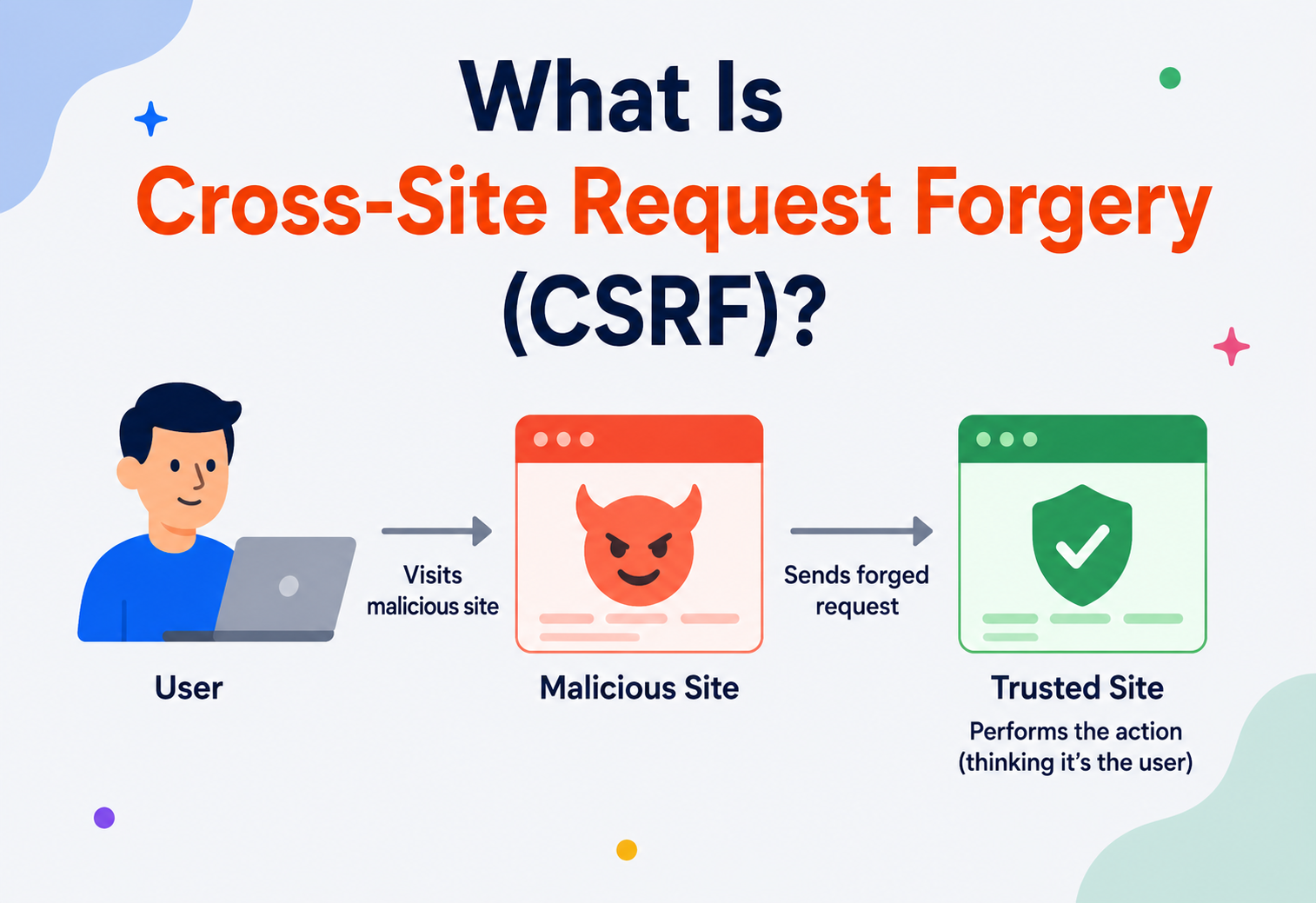
What Is Cross‑Site Request Forgery (CSRF)?
A ground‑up, beginner‑friendly deep dive into one of the web’s oldest and sneakiest attacks — how it works, why it works, how to stop it, and how the industry’s biggest platforms have been bitten by it.
Introduction & History
Imagine you’re logged into your online banking website in one browser tab. In another tab, you visit a completely unrelated website — maybe a forum, maybe a meme site. Unknown to you, that page contains a single, invisible line of code that quietly tells your browser: “Hey, go send a money transfer request to the bank.” Because your browser is still logged into the bank in the other tab, it happily attaches your session cookie to that request, and the bank — seeing what looks like a perfectly normal, authenticated request from you — processes it. You never clicked “Transfer.” You never even saw a form. That is Cross‑Site Request Forgery, or CSRF (sometimes pronounced “sea‑surf,” and also written XSRF).
CSRF is not a new idea. Security researchers were writing about “session riding” and “confused deputy” attacks as far back as the early 2000s, with Peter Watkins credited with coining the term “Cross‑Site Request Forgery” around 2001. The underlying flaw is even older than that — it’s baked into the fundamental design of how the web decides “who is making this request.” For most of the web’s history, browsers and servers cooperated using cookies to answer that question, and cookies, by design, are sent automatically with every request to a domain, regardless of which page triggered that request. That convenience is exactly the crack CSRF slips through.
For over a decade, CSRF sat comfortably in the OWASP Top 10 list of the most critical web application security risks. High‑profile incidents hit household names — Netflix, YouTube, Gmail, ING Direct, and even the home routers of ordinary people — before browser vendors and framework authors converged on modern defenses. Today, CSRF is far less common than it used to be, largely thanks to a browser feature called SameSite cookies, but it remains a real risk in APIs, legacy systems, and any application where developers unknowingly disable the newer protections.
It’s also a genuinely instructive case study for anyone learning application security more broadly, because unlike many vulnerabilities that stem from a coding mistake in a single function, CSRF stems from an entire, reasonable‑sounding design assumption baked deep into how the web works — which is exactly why understanding it well pays off far beyond just “patching one bug.” Once the underlying pattern clicks, you start noticing “confused deputy” shaped problems in all sorts of unrelated systems, from operating system permissions to cloud IAM policies.
CSRF tricks a victim’s browser into sending a request the victim never intended to send, using credentials the browser already has lying around (like login cookies).
To make this concrete with an everyday analogy: imagine you hand your house keys to a trusted courier every morning so they can drop off your mail. One day, a stranger slips a forged note into the courier’s bag that says “also, please let yourself into apartment 4B and turn off the smoke alarm.” The courier doesn’t know the note is fake — they just see “this is part of today’s job” and follow it, because they already have the keys and the authority to enter. The courier is your browser. The keys are your session cookie. The forged note is the malicious page. And the courier never questions who wrote the note — only whether they have the keys to do what it asks. That’s the entire mental model you need to carry through the rest of this guide.
Netscape introduces cookies
Cookies are added to solve HTTP’s statelessness — automatically re‑sending them on every request makes persistent logins and shopping carts possible almost overnight.
The term is coined
Peter Watkins is widely credited with naming the class “Cross‑Site Request Forgery,” though the underlying “confused deputy” and “session riding” ideas trace back further in the security literature.
Household names get hit
Netflix, YouTube, and Gmail all disclose CSRF vulnerabilities in the same short window, pushing the attack class into mainstream engineering awareness.
OWASP Top 10 fixture
CSRF sits comfortably on the OWASP Top 10 for over a decade — every major web framework (Spring Security, Django, Rails, ASP.NET, Laravel) ships built‑in synchronizer‑token defenses on by default.
SameSite arrives
Chrome ships the SameSite cookie attribute and later flips the default to Lax; other major browsers follow. A huge share of the historical CSRF attack surface closes quietly, for free.
Still relevant, less common
CSRF remains a real risk for APIs, legacy systems, SPAs storing tokens in cookies, and any codebase where a developer disabled framework defaults “temporarily.” Defense‑in‑depth is the norm.
It’s also worth understanding why this design decision was made in the first place, rather than treating it as simply a mistake. Cookies were introduced by Netscape in 1994 specifically to solve the problem of “statelessness” in HTTP — the protocol has no built‑in memory of who you are between requests. Automatically re‑sending cookies on every request to a domain was a deliberate, pragmatic choice that made persistent logins, shopping carts, and personalization possible across the entire web, almost overnight. Nobody in 1994 was thinking about a future where thousands of unrelated third‑party websites would exist specifically to exploit that convenience. CSRF is, in a very real sense, a multi‑decade‑late invoice for a founding assumption of the web.
The Problem & Motivation
To understand why CSRF exists, you need to understand a design decision the web made decades ago and has been quietly living with ever since: the browser doesn’t ask “who wrote this request?” — it only asks “which website is this request going to?”
When your browser sends a request to bank.com, it looks in its cookie jar for any cookies that belong to bank.com and attaches them automatically — no matter which webpage told it to make that request. It doesn’t matter if you typed the URL yourself, clicked a button on bank.com, or if some completely different website, say evil‑forum.com, silently triggered the request in the background. The cookie goes along for the ride either way.
This is sometimes called the “confused deputy” problem. A “deputy” is a program (here, your browser, acting on your behalf, with your authority) that gets tricked into using its own legitimate authority to do something on behalf of someone who shouldn’t have that authority — the attacker. The bank’s server isn’t confused about who you are (it correctly identifies you via your cookie) — but it’s confused about whether you actually intended this specific action. That’s the whole problem in one sentence: authentication proves who you are; it says nothing about whether you meant to do this.
Why this is dangerous
- No malware or code execution needed on the victim’s machine.
- Works even if the victim’s password is never stolen.
- Can silently change settings, transfer money, delete data, or escalate privileges.
- Victims often never realize an attack happened.
Why it’s (thankfully) limited
- The attacker is “blind” — they can trigger actions but usually can’t read the response.
- Modern browsers now block most cookie auto‑attachment by default (SameSite).
- It only works on state‑changing actions reachable via predictable requests.
- Well‑known, well‑understood defenses exist and are mature.
It’s worth contrasting this with what CSRF is not. CSRF is not a way to break into an account you don’t already have implicit access to through the victim’s own browser. It’s not a way to bypass a password. It’s not a way to read private data directly (though, as later sections show, it can sometimes be chained with other bugs to achieve that). It is narrowly, specifically, a way to make an authenticated browser perform an unintended action. That narrowness is actually good news for defenders — it means the fix doesn’t require rethinking authentication from scratch, only adding a second question alongside “who are you?”: namely, “did you actually mean to do this, right now, from this page?”
There’s also a useful way to think about why CSRF disproportionately affects certain kinds of applications. Any system where a single, predictable HTTP request is sufficient to trigger a meaningful action — and where that request relies solely on ambient authority (like a cookie that’s automatically present) rather than an explicit, freshly‑supplied proof of intent — is a candidate. Banking transfers, email forwarding rules, password changes, admin privilege grants, and social account settings have historically been prime targets precisely because a single request can cause outsized, hard‑to‑reverse damage.
Core Concepts
Before going further, let’s define the vocabulary you’ll need. Think of this as the glossary you can come back to. Nearly every mistake teams make with CSRF traces back to conflating two or more of these terms — mixing up authentication with authorization, or assuming a defense meant for one layer (like the browser) automatically covers another layer (like the API gateway) — so it’s worth reading through carefully even if some terms feel familiar.
Ambient identity
A small piece of data the server gives your browser after login. The browser stores it and automatically resends it on every future request to that same site, proving “this is still me.”
Reads, not writes
A browser rule that stops JavaScript on one website from reading the response of a request made to another website. Crucially, SOP does not stop the request from being sent — only from being read. This gap is exactly where CSRF lives.
The real target
Any request that changes something on the server — transferring money, changing an email address, deleting a post. CSRF targets these, not simple “read‑only” requests like viewing a page.
Proof of intent
A random, unpredictable, secret value the server embeds in a form or page. The browser must send it back with the next request. An attacker on another site cannot read or guess it, so they cannot forge a valid request.
Browser‑native defense
A modern cookie setting that tells the browser: “only send this cookie if the request originated from this same site.” This single flag closes most CSRF holes by default in modern browsers.
The pattern name
A general security term for any program that is tricked into misusing its own legitimate authority on behalf of an attacker. CSRF is the classic web example of this pattern.
Scheme + host + port
The combination of scheme, host, and port (e.g. https://bank.com:443) that browsers use to decide whether two pages are “the same site” for security purposes. CSRF defenses like SameSite and Origin‑checking hinge entirely on this concept.
Replay protection
A unique identifier a client sends with a request so that if it’s accidentally (or maliciously) replayed, the server processes it only once. Not a CSRF defense by itself, but a useful complementary safety net for financial actions.
Unspoofable browser signal
A modern browser‑generated header that tells the server whether a request came from the same site, a different site, or was user‑initiated navigation — giving servers a reliable, unspoofable signal to reject suspicious cross‑site requests.
The forgotten variant
A lesser‑known variant where the attacker forges a login request using their own credentials, logging the victim into the attacker’s account without their knowledge — used to later harvest data the victim enters, like saved payment details.
One more distinction worth nailing down early: CSRF is about the browser being tricked into sending a request it shouldn’t. It has a cousin problem called clickjacking, where the attacker tricks the user into clicking something they didn’t mean to (usually via an invisible, overlaid iframe), which can sometimes be combined with CSRF‑style techniques but is defended against differently — primarily with the X‑Frame‑Options or Content‑Security‑Policy: frame‑ancestors headers rather than CSRF tokens.
CSRF is frequently confused with XSS (Cross‑Site Scripting). They are different: XSS injects malicious code that runs inside the trusted site to steal data or session tokens directly. CSRF never touches the trusted site’s code at all — it forges a request from the outside, exploiting the browser’s automatic credential‑attaching behavior. XSS can be used to bypass CSRF defenses, but the two are distinct vulnerability classes with different root causes.
Architecture & Components
A CSRF attack always involves the same cast of characters. Understanding each “actor’s” role makes the whole mechanism click.
The Four Required Ingredients
- An authenticated victim. Someone who is currently logged into the target site, holding a valid session cookie in their browser.
- A predictable, state‑changing endpoint. A URL or form on the target site that performs an action (like
POST /transfer) using only cookie‑based authentication, with no additional secret required. - A way to trigger the request without the victim’s real consent. An auto‑submitting form, a crafted
<img>tag, a backgroundfetch()call, or a link the victim is tricked into clicking. - A lure to get the victim’s browser to load the malicious page. A phishing email, a comment with a hidden image tag, a malicious ad, or a compromised third‑party site.
Remove any one of these four ingredients and the attack fails — which is exactly why defenses target them individually (session‑independent tokens, SameSite cookies, re‑authentication for sensitive actions, and user‑education against clicking suspicious links).
Delivery Mechanisms Attackers Actually Use
It helps to see the full menu of ways an attacker can get a victim’s browser to fire a forged request, because each one has slightly different constraints:
| Vector | HTTP method | Requires user click? |
|---|---|---|
<img src="..."> | GET only | No — loads automatically |
<iframe src="..."> | GET only | No — loads automatically |
Auto‑submitting hidden <form> | GET or POST | No — triggered via JS onload |
| Malicious link the victim is lured to click | GET | Yes, but only one click, often disguised |
Cross‑origin fetch()/XHR (no custom headers) | GET, POST, sometimes others | No — but modern CORS restricts what’s readable, not what’s sendable |
Notice that the image and iframe vectors are limited to GET requests — this is precisely why “never use GET for state‑changing operations” is rule number one in nearly every secure coding checklist. A GET‑based CSRF vulnerability is the easiest possible version of this attack to pull off, since it requires zero interaction and can hide inside something as innocent‑looking as a single pixel.
How an Attack Actually Works — Internals
Let’s build a concrete, if simplified, example. Suppose bank.com has this vulnerable endpoint that transfers money using only a GET request and cookie‑based session authentication:
GET /transfer?to=attacker_account&amount=5000 HTTP/1.1
Host: bank.com
Cookie: session=abc123xyz
Because this is a plain link, the attacker doesn’t even need a form. They just need the victim’s browser to request that URL. The simplest possible attack is an <img> tag hidden in a forum post or email, since browsers request image sources automatically without any click:
<!-- Hidden inside a forum comment or HTML email -->
<img src="https://bank.com/transfer?to=attacker_account&amount=5000" width="0" height="0" style="display:none">
The moment the victim’s browser renders that page, it tries to load the “image,” which really fires off the transfer request — cookie and all. This is exactly why well‑designed APIs never let a GET request change server state; GET requests are meant to be “safe” (read‑only), and browsers, proxies, and crawlers all assume they can be fetched freely.
Real‑world vulnerable endpoints are almost always POST‑based, since developers know better than to use GET for money transfers. But POST doesn’t save you either — an attacker can auto‑submit a hidden HTML form the instant the page loads:
<!-- evil.com/free-prize.html -->
<body onload="document.forms[0].submit()">
  <form action="https://bank.com/transfer" method="POST">
    <input type="hidden" name="to" value="attacker_account">
    <input type="hidden" name="amount" value="5000">
  </form>
</body>
The victim sees nothing but a blank page (or a distraction like “Congratulations, you won a prize!”), while the form silently submits itself in the background. The browser dutifully attaches the bank.com session cookie, and the bank’s server processes the transfer exactly as if the real user had clicked “Confirm Transfer” on their own site.
The attacker never needs to see the bank’s HTML, know the CSRF token (if defenses exist), or steal the cookie. They just need the browser — which already trusts bank.com — to be the one sending the request. That’s the entire trick.
It’s worth pausing to notice exactly which assumption the vulnerable server made, because that assumption is the actual bug — not the attacker’s cleverness. The server treated “this request carries a valid session cookie” as fully sufficient proof that the real, consenting user wanted this specific action to happen, right now. That’s conflating two genuinely different questions: authentication (“is this really user #4471’s browser?”) and intent (“did user #4471 actually choose to do this, on purpose, just now?”). A valid session cookie answers the first question perfectly well. It says absolutely nothing about the second. Every CSRF defense described in this guide, no matter its technical implementation, is really just a different way of forcing the server to also demand proof of intent — not just proof of identity — before acting.
Now, the Fix — How a CSRF Token Breaks This
A CSRF token defeats this because the attacker’s page has no way to read a secret value embedded in bank.com’s own HTML — the Same‑Origin Policy blocks JavaScript on evil.com from reading responses from bank.com. Here’s a minimal Java servlet‑style illustration of token generation and validation:
// Generating and storing a CSRF token when rendering the transfer form
public class TransferFormServlet extends HttpServlet {
    protected void doGet(HttpServletRequest req, HttpServletResponse resp)
            throws IOException {
        String csrfToken = generateSecureRandomToken(); // e.g. 32 bytes, base64-encoded
        req.getSession().setAttribute("csrfToken", csrfToken);

        resp.getWriter().printf("""
            <form action="/transfer" method="POST">
              <input type="hidden" name="csrf_token" value="%s">
              <input type="text" name="to">
              <input type="text" name="amount">
              <button type="submit">Transfer</button>
            </form>
        """, csrfToken);
    }

    private String generateSecureRandomToken() {
        byte[] bytes = new byte[32];
        new java.security.SecureRandom().nextBytes(bytes);
        return java.util.Base64.getUrlEncoder().withoutPadding().encodeToString(bytes);
    }
}

// Validating the token when the transfer is actually processed
public class TransferSubmitServlet extends HttpServlet {
    protected void doPost(HttpServletRequest req, HttpServletResponse resp)
            throws IOException {
        String sessionToken = (String) req.getSession().getAttribute("csrfToken");
        String submittedToken = req.getParameter("csrf_token");

        if (sessionToken == null || !sessionToken.equals(submittedToken)) {
            resp.sendError(HttpServletResponse.SC_FORBIDDEN, "Invalid CSRF token");
            return;
        }
        // Token matches -> safe to process the transfer
        processTransfer(req);
    }
}
Because evil.com can only guess this token (which is cryptographically infeasible — it’s a random 256‑bit value), it cannot construct a valid forged request. The bank’s server rejects it before any money moves.
Data Flow & Lifecycle of a CSRF Token
Once the concept is clear, the next step is understanding what a token’s life actually looks like end‑to‑end, from generation to validation.
Notice the critical property: the token travels through the page content (the HTML body, which only the legitimate site’s own pages can read), not through the cookie jar (which is auto‑attached regardless of origin). This is often summarized as the Synchronizer Token Pattern — one of several accepted implementation strategies, alongside the Double Submit Cookie Pattern and, more recently, browser‑native SameSite cookies, each covered further in the security section below.
The double‑submit cookie pattern has a slightly different lifecycle worth walking through separately, since it’s the most common approach in stateless, horizontally‑scaled API backends:
The elegance of this pattern is that the server never has to remember anything — it just checks that two independently‑supplied copies of the same value agree. An attacker’s cross‑origin page can certainly cause the cookie to be sent automatically (that part is unavoidable), but they have no mechanism to read that cookie’s value and copy it into the custom header, because reading cross‑origin cookie values is exactly what the Same‑Origin Policy exists to prevent.
Advantages, Disadvantages & Trade‑offs of CSRF Defenses
There is no single “best” CSRF defense — each approach makes different trade‑offs between security guarantees, implementation complexity, and compatibility with modern app architectures (SPAs, mobile clients, third‑party embeds).
| Defense | Strength | Weakness |
|---|---|---|
| Synchronizer token (server‑stored) | Very strong, well‑understood, framework support everywhere | Requires server‑side session state; awkward for stateless APIs |
| Double‑submit cookie | Stateless, works well with APIs and load‑balanced servers | Weaker if attacker can set cookies via subdomain issues |
| SameSite=Lax/Strict cookies | Free, browser‑enforced, no code changes for many apps | Doesn’t help old browsers; some legitimate cross‑site flows break |
| Custom request headers (e.g. X‑Requested‑With) | Simple for JS‑driven APIs; browsers block cross‑origin custom headers by default | Doesn’t work for simple HTML form submissions |
| Re‑authentication / step‑up auth | Strong for high‑value actions (password change, wire transfer) | Adds friction; not practical for every request |
Layered defense benefits
- Combining SameSite + CSRF tokens gives defense‑in‑depth.
- Tokens still protect users on older/misconfigured browsers.
- Framework defaults (Spring Security, Django, Rails) make this nearly free today.
Costs to be aware of
- Token management adds a small amount of server memory/session overhead.
- Misconfigured tokens can break legitimate cross‑site integrations (e.g. payment redirects).
- SameSite alone can silently break OAuth/SSO redirect flows if set too strictly.
The OAuth/SSO breakage point deserves a concrete example, since it trips up even experienced teams. Imagine a user clicks “Log in with Google” on your site. This kicks off a redirect to Google, the user authenticates there, and Google redirects back to your site with an authorization code — this return trip is, from your site’s perspective, a cross‑site top‑level navigation. If your session cookie is marked SameSite=Strict, the browser will refuse to attach it on that returning redirect, and the user’s in‑progress login session appears to have vanished, often manifesting as a confusing “session expired” error immediately after a successful third‑party login. This is precisely why SameSite=Lax — which does allow cookies on top‑level GET navigations from other sites, just not on POSTs, iframes, or background requests — is the recommended default rather than Strict for most consumer‑facing applications, reserving Strict for scenarios with no cross‑site login flows to worry about, like an internal admin tool.
Performance & Scalability
CSRF protection is lightweight compared to most security controls, but at scale, small design choices matter:
- Stateful tokens (stored server‑side in session) require session affinity or a shared session store (like Redis) in load‑balanced, horizontally scaled deployments — otherwise a request validated by one server instance may fail on another that doesn’t have that session.
- Stateless tokens (double‑submit cookie, or cryptographically signed tokens like HMAC‑based ones) scale better across many servers because validation needs no shared state — the server just recomputes/verifies a signature.
- SameSite cookies add effectively zero server‑side cost; the browser does all the work.
- Generating a new token per request (instead of per‑session) adds CPU overhead and can break multi‑tab usage patterns — most implementations use one token per session, refreshed periodically.
At very large scale — think an e‑commerce checkout flow handling tens of thousands of requests per second during a flash sale — the practical choice between stateful and stateless tokens becomes a real architectural decision, not just a theoretical one. Stateful tokens push load onto whatever backs your session store, meaning that store itself becomes a scaling bottleneck and a single point of contention if not properly sharded. Stateless, cryptographically‑signed tokens shift that cost to CPU time spent computing and verifying an HMAC signature on every request — typically microseconds per request, and easily parallelizable across any number of stateless application servers with no coordination required. For most teams, this tips the decision toward stateless tokens once they’re operating more than a handful of application server instances.
High Availability & Reliability
CSRF protection mechanisms need to survive failovers and scaling events without locking legitimate users out. A few reliability considerations:
- If tokens are tied to server‑side sessions, use a shared, replicated session store (Redis Cluster, Memcached with replication) so a failover to another node doesn’t invalidate every user’s token mid‑session.
- Stateless signed tokens (HMAC over a secret key) avoid this problem entirely, since any server holding the shared signing key can validate any token — ideal for auto‑scaling groups.
- Token expiry policy should balance security (short‑lived tokens reduce attack window) against availability (users shouldn’t get mysteriously logged out or blocked mid‑form because their token expired while they were filling out a long form).
- Rolling deployments that change the CSRF secret key abruptly can invalidate all in‑flight tokens — rotate signing keys gracefully by accepting both old and new keys for a transition window.
There’s a subtler reliability trap worth calling out: teams sometimes respond to a spike in CSRF validation failures by reflexively “fixing” the symptom — loosening validation, extending token lifetimes indefinitely, or falling back to accepting requests without a token when validation service calls time out. Each of these “fixes” quietly reintroduces the vulnerability the mechanism was built to prevent, in the name of availability. The correct instinct instead is to treat CSRF token validation as a required part of the request path (fail closed, not open) and to invest in making the validation dependency itself highly available — for example, by keeping the signing key in‑memory on every application instance rather than depending on a network round‑trip to a separate service for every single request.
If your CSRF validation logic throws an unexpected error (a database timeout, a cache miss), the safe default is to reject the request, not silently let it through. “Fail open” security controls have caused real production incidents across the industry — a control that’s occasionally unavailable is still infinitely better than one that occasionally does nothing.
Security Deep Dive
This is the chapter where the theoretical “what CSRF is” meets the concrete “how you stop it in production.” The techniques below aren’t alternatives — think of them as layers.
Token Quality Matters as Much as Token Presence
A CSRF token is only as strong as the randomness behind it. Using a predictable value — a sequential ID, a timestamp, a hash of the username, or output from a non‑cryptographic random number generator like Java’s plain java.util.Random — defeats the entire point, because an attacker who can guess or compute the token can forge a valid request just as easily as if no token existed at all. Always generate tokens using a cryptographically secure random source (java.security.SecureRandom in Java, secrets in Python, crypto.randomBytes in Node.js) with at least 128 bits, and ideally 256 bits, of entropy — the same standard applied to session identifiers and password reset tokens.
Login CSRF — The Variant People Forget
Most discussions of CSRF focus on attacks against already‑authenticated users, but the login form itself can be a target too. In a login CSRF attack, the attacker forges a login request using their own credentials and tricks the victim’s browser into submitting it. If successful, the victim ends up unknowingly logged into the attacker’s account. This sounds harmless at first — why would anyone want to log a victim into the attacker’s own account? — but it becomes dangerous when the victim then enters sensitive information (a credit card for a purchase, personal search history, saved preferences) while unknowingly using the attacker’s account, which the attacker can later log into and retrieve. Because login forms are sometimes deliberately excluded from CSRF protection on the (mistaken) reasoning that “there’s no session to protect yet,” this remains a surprisingly common gap in otherwise well‑protected applications.
Defense 1: Synchronizer Token Pattern
The server generates a random, unique token per user session (or per form), stores it server‑side, and embeds it in every state‑changing form. On submission, the server compares the submitted token against the stored one. This is the gold‑standard defense and is what frameworks like Spring Security, Django, and Rails implement by default.
Defense 2: Double‑Submit Cookie Pattern
The server sets a random token both as a cookie and requires it to be resubmitted as a request parameter or header. Because an attacker’s cross‑origin JavaScript cannot read the victim’s cookies (Same‑Origin Policy again), it can’t copy the cookie’s value into the forged request’s parameter — so the two values won’t match unless the request genuinely came from JavaScript running on the real site.
public class CsrfDoubleSubmitFilter implements Filter {
    public void doFilter(ServletRequest req, ServletResponse res, FilterChain chain)
            throws IOException, ServletException {
        HttpServletRequest httpReq = (HttpServletRequest) req;
        String cookieToken = getCookieValue(httpReq, "csrf_token");
        String headerToken = httpReq.getHeader("X-CSRF-Token");

        if (cookieToken == null || !cookieToken.equals(headerToken)) {
            ((HttpServletResponse) res).sendError(403, "CSRF validation failed");
            return;
        }
        chain.doFilter(req, res);
    }
}
Defense 3: SameSite Cookies (The Modern Default)
This is a browser‑enforced attribute set on the cookie itself when the server issues it, and today it is the single most impactful CSRF defense in practice — most major browsers now default cookies to SameSite=Lax even if the developer sets nothing.
Set-Cookie: session=abc123xyz; SameSite=Strict; Secure; HttpOnly| Value | Behavior |
|---|---|
Strict | Cookie never sent on cross‑site requests, even top‑level navigation (like clicking an email link). Most secure, but can break “click link in email → land on logged‑in page” flows. |
Lax | Cookie sent on top‑level, safe (GET) navigations from other sites, but blocked on cross‑site POSTs, images, iframes, and fetch/XHR. Good balance — this is now the browser default. |
None | Cookie always sent cross‑site (must be paired with Secure). Needed for legitimate third‑party integrations, e.g. embedded widgets — but offers no CSRF protection on its own. |
Use SameSite=Lax (or Strict for highly sensitive apps) as your baseline, and layer a synchronizer token on top for state‑changing endpoints. This gives defense‑in‑depth: even if SameSite is bypassed by a browser quirk, subdomain issue, or older browser, the token still blocks the forgery.
Defense 4: Checking the Origin/Referer Header
Servers can inspect the Origin or Referer header on state‑changing requests and reject any request that didn’t originate from the expected domain. This is a solid supplementary check but shouldn’t be your only defense — some privacy tools and proxies strip these headers, which can cause false rejections of legitimate users if you rely on it exclusively.
What Does NOT Protect Against CSRF
Using HTTPS does not stop CSRF — it stops eavesdropping, not forged requests. Storing the session token in HttpOnly cookies doesn’t stop CSRF either — HttpOnly only stops JavaScript from reading the cookie; the browser still auto‑attaches it to requests. And CAPTCHAs on every form are a heavy, poor‑UX substitute for a proper token.
Does CORS Protect Against CSRF?
This is one of the most persistent points of confusion in web security, so it deserves its own explanation. CORS (Cross‑Origin Resource Sharing) is a mechanism that controls whether JavaScript on one origin is allowed to read the response of a request made to another origin. By default, browsers block this. But — and this is the crucial part — CORS does not stop the cross‑origin request from being sent in the first place, and it does nothing at all for simple form‑based requests (which don’t even go through the CORS “preflight” check unless custom headers or non‑simple content types are used). A misconfigured CORS policy (like reflecting any Origin back with Access‑Control‑Allow‑Credentials: true) can make things worse by letting an attacker’s JavaScript both send and read the response of a forged request — effectively combining CSRF with data theft. But a correctly configured CORS policy does not, by itself, stop the classic form‑based or image‑based CSRF attacks described earlier in this guide. CORS and CSRF protection are related but separate concerns, and one cannot substitute for the other.
Defense 5: Fetch Metadata Request Headers
A newer, browser‑generated set of headers — Sec‑Fetch‑Site, Sec‑Fetch‑Mode, and Sec‑Fetch‑Dest — are automatically attached to every request by modern browsers and, critically, cannot be set or overridden by page JavaScript, unlike Referer, which can sometimes be suppressed by privacy settings. A server can use these to reliably reject any state‑changing request where Sec‑Fetch‑Site is cross‑site:
public class FetchMetadataFilter implements Filter {
    public void doFilter(ServletRequest req, ServletResponse res, FilterChain chain)
            throws IOException, ServletException {
        HttpServletRequest httpReq = (HttpServletRequest) req;
        String site = httpReq.getHeader("Sec-Fetch-Site");
        String method = httpReq.getMethod();

        boolean isStateChanging = !method.equals("GET") && !method.equals("HEAD");
        boolean isCrossSite = "cross-site".equals(site);

        if (isStateChanging && isCrossSite) {
            ((HttpServletResponse) res).sendError(403, "Cross-site state-changing request blocked");
            return;
        }
        chain.doFilter(req, res);
    }
}
This is a great supplementary, low‑effort layer, but because it relies on relatively modern browser support, it should complement — not replace — synchronizer tokens or SameSite cookies.
Spring Security Example (Real‑World Framework Usage)
Most production Java applications don’t hand‑roll CSRF protection — they lean on framework defaults. Spring Security, for example, enables CSRF protection out of the box:
@Configuration
@EnableWebSecurity
public class SecurityConfig {

    @Bean
    public SecurityFilterChain filterChain(HttpSecurity http) throws Exception {
        http
            .csrf(csrf -> csrf
                .csrfTokenRepository(CookieCsrfTokenRepository.withHttpOnlyFalse())
            )
            .authorizeHttpRequests(auth -> auth
                .requestMatchers("/api/public/**").permitAll()
                .anyRequest().authenticated()
            );
        return http.build();
    }
}
Notice the deliberate withHttpOnlyFalse() call — this is intentional for the double‑submit pattern, since frontend JavaScript needs to read the token cookie to echo it back as a header on each request. The session cookie itself remains HttpOnly and inaccessible to JavaScript; only the CSRF token cookie is exposed, and by design it’s meant to be readable — its secrecy from the attacker’s origin, not from the legitimate page’s own JavaScript, is what matters.
Monitoring, Logging & Metrics
CSRF defenses should be observable, not silent. Useful signals to track in production:
Token validation failure rate
A spike can mean an active attack attempt, but can also mean a bug (e.g. tokens expiring too fast, or a broken frontend not sending them).
Origin/Referer mismatch logs
Log (don’t just silently block) requests with unexpected Origin headers to distinguish real attacks from legitimate edge cases like corporate proxies.
403 rate on state‑changing endpoints
Track this per endpoint over time — sudden increases are worth investigating.
SameSite rejection telemetry
Browser reports (via Reporting API, where supported) can reveal when cookies are being blocked unexpectedly, hinting at integration issues.
Security teams typically feed these into a SIEM (Security Information and Event Management) system, alerting when failure rates cross a threshold that suggests coordinated abuse rather than random noise.
A practical structured log entry for a rejected request might look like this — designed to be easy to query and correlate later, without logging the token value itself (which would defeat its purpose as a secret):
{
  "event": "csrf_validation_failed",
  "timestamp": "2026-07-21T14:02:11Z",
  "endpoint": "/api/account/update-email",
  "method": "POST",
  "reason": "token_mismatch",
  "origin_header": "https://evil-example.com",
  "user_id": "usr_88213",
  "ip": "203.0.113.44",
  "user_agent": "Mozilla/5.0 ..."
}
Over time, aggregating these events lets a security team distinguish between three very different situations that otherwise look identical from a single log line: a genuine attack in progress (many failures, one endpoint, diverse source IPs, a shared unusual Origin), a broken frontend deploy (failures spike right after a release, across all endpoints, from legitimate users), or background internet noise (a slow, constant trickle of scanning bots probing for known CSRF vulnerabilities, easily filtered out).
Deployment & Cloud Considerations
CSRF protection interacts with almost every layer of modern deployment: CDNs, multi‑region topologies, Kubernetes rollouts, and local development. The details matter.
- CDNs and reverse proxies: Make sure proxies and CDNs (Cloudflare, CloudFront, etc.) don’t strip or cache CSRF tokens/cookies, and that cookies marked
Secureactually travel over HTTPS end‑to‑end, including internal hops. - Multi‑region deployments: If sessions/tokens are stateful, ensure your session store is replicated across regions, or route users consistently (sticky sessions) to avoid token mismatches during failover.
- Containerized/Kubernetes environments: Rolling pod restarts shouldn’t rotate signing secrets without a grace period — otherwise in‑flight tokens signed by the old pod fail validation on the new one.
- Feature flag rollouts: When migrating from cookie‑based sessions to SameSite‑only protection, roll out gradually and monitor 403 rates before enforcing strictly across all traffic.
- Local development environments: Developers often run frontend and backend on different local ports (e.g.
localhost:3000andlocalhost:8080), which browsers treat as different origins — this frequently causes SameSite or CORS‑related friction that leads teams to disable protections “just for local dev” in config files that occasionally leak into production. Keep dev‑only overrides clearly isolated behind environment checks that can’t accidentally ship. - Blue‑green and canary deployments: If old and new deployment versions use different token formats or signing algorithms during a transition, ensure both versions can validate tokens issued by either, until the old version is fully retired.
APIs & Microservices
CSRF is fundamentally a browser + cookie problem. This has important implications for modern architectures:
Lower‑risk scenarios
- APIs authenticated purely via a bearer token in an
Authorizationheader (not a cookie) are generally immune to classic CSRF, since browsers don’t auto‑attach custom headers cross‑origin. - Mobile apps calling APIs directly (no browser, no cookie jar) are not exposed to CSRF in the traditional sense.
Still‑at‑risk scenarios
- Single‑Page Apps (SPAs) that store auth tokens in cookies (common for security reasons, to avoid XSS token theft) remain vulnerable and need CSRF tokens or SameSite protection.
- Microservices behind an API gateway that forwards a shared session cookie between internal services can silently propagate CSRF exposure across the whole system if only the edge is protected.
- GraphQL endpoints accepting cookie auth are just as exposed as REST — the query language doesn’t change the underlying cookie‑trust problem.
In a microservices world, the safest pattern is often to authenticate the edge (gateway) with a browser session + CSRF‑protected cookie, and issue short‑lived, service‑to‑service bearer tokens internally — decoupling internal calls from cookie‑based trust entirely.
GraphQL‑Specific Considerations
GraphQL introduces one extra wrinkle: a single endpoint (commonly POST /graphql) handles both queries (reads) and mutations (writes), unlike REST’s convention of spreading actions across many URLs and methods. This means CSRF protection for a GraphQL API can’t rely on “protect only the write endpoints” — every mutation‑capable request to that single endpoint needs the same token or SameSite protection, and teams sometimes forget this because the URL “looks like” a single read‑only data endpoint from the outside.
Webhooks and Third‑Party Callbacks
Webhooks (server‑to‑server callbacks from a payment processor, for instance) are not vulnerable to classic CSRF, since there’s no browser and no cookie involved — but they’re often confused with it. Webhook security instead relies on signature verification (the receiving server checks a cryptographic signature the sender attaches to prove authenticity), which is a related but distinct problem: both are ultimately about verifying that a request’s claimed origin matches its true origin, just solved with different mechanisms suited to browser‑based versus server‑based communication.
Design Patterns & Anti‑Patterns
Some habits reliably keep CSRF at bay for years at a time. Others reliably reintroduce it after a well‑meaning refactor. Both are worth naming out loud.
Good Patterns
- Token‑per‑session with header/hidden‑field submission — the industry‑standard synchronizer token approach.
- SameSite=Lax by default, Strict for sensitive flows (password reset, payment confirmation).
- Idempotency keys for state‑changing APIs — a side benefit is they can double as an extra layer of intent verification.
- Re‑confirmation (“type your password to confirm”) for irreversible actions, regardless of other CSRF defenses.
Anti‑Patterns to Avoid
Using GET requests for any action that changes data. Relying on the Referer header alone. Trusting a custom header without verifying it can’t be trivially added by simple HTML forms. Disabling CSRF protection “temporarily” for testing and forgetting to re‑enable it in production. Reusing the same CSRF token forever instead of rotating it periodically.
A particularly sneaky anti‑pattern deserves its own callout: validating the CSRF token only on some HTTP methods but not others. It’s common to see teams protect POST requests carefully while leaving PUT, PATCH, or DELETE endpoints — often added later, sometimes by a different engineer, sometimes auto‑generated by a REST scaffolding tool — completely unprotected, simply because the original CSRF middleware was written with only “form submissions” in mind and nobody revisited it as the API surface grew. A recurring, periodic security review that specifically enumerates every state‑changing route and confirms it’s covered is the most reliable way to catch this class of gap before an attacker does.
Best Practices & Common Mistakes
Most CSRF‑related incidents in real engineering organizations don’t come from a total absence of protection — they come from protection that exists somewhere in the codebase but has a gap, an exception, or a stale assumption. The checklist below is deliberately framed as things to actively verify, not just things to “have,” because the gap between “we have CSRF protection” and “we have CSRF protection on every endpoint that needs it, correctly configured, right now” is exactly where real vulnerabilities tend to live.
Never trust GET for writes
Reserve GET/HEAD for read‑only operations; use POST/PUT/PATCH/DELETE for anything that changes state.
Turn on SameSite by default
Set SameSite=Lax at minimum on all authentication cookies; use Strict where UX allows.
Add synchronizer tokens on top
Don’t rely on SameSite alone — layer a token‑based defense for full coverage, especially for legacy browser support.
Scope tokens correctly
Bind tokens to the user’s session, not globally, and regenerate them after login to prevent session‑fixation‑adjacent issues.
Test with your framework’s defaults on
Most frameworks (Spring Security, Django, Rails) enable CSRF protection by default — the most common mistake is developers disabling it “to make testing easier” and never re‑enabling it.
Protect file uploads and multi‑part forms too
These are state‑changing actions just like any form post and need the same token validation.
Use constant‑time token comparison
Comparing tokens character‑by‑character with an early‑exit string comparison can leak timing information that helps an attacker guess the token byte‑by‑byte. Use a constant‑time comparison function (e.g. MessageDigest.isEqual() in Java) instead.
Re‑issue tokens after privilege changes
Regenerate the CSRF token whenever a user logs in, logs out, or changes privilege level, to avoid an old token remaining valid across a security‑relevant transition.
Before shipping any new state‑changing endpoint, ask: “If I sent this exact request from a page on a completely different website, using only the victim’s existing cookies, would it succeed?” If the honest answer is yes, that endpoint needs a CSRF defense before it reaches production.
Real‑World / Industry Examples
The names below are a rough hall of fame for the vulnerability — a reminder that CSRF isn’t theoretical, and that even household‑name platforms have been bitten by it.
Settings + DVD queue
Researchers demonstrated that Netflix’s account settings — including shipping address and DVD queue — could be modified via forged requests, one of the early mainstream CSRF disclosures that helped popularize the vulnerability class.
Account settings modified
A widely cited CSRF flaw allowed attackers to perform actions like adding videos to a user’s “Favorites” or changing account settings simply by getting a logged‑in user to visit a crafted page.
Silent mail forwarding
A CSRF vulnerability in Gmail’s contact‑import/filter settings allowed attackers to silently add mail‑forwarding rules, quietly redirecting a victim’s incoming email to an attacker‑controlled address.
Fund transfers via CSRF
Security researchers found that a banking application’s fund‑transfer functionality could be triggered via CSRF, underscoring why financial applications now mandate re‑authentication for money movement.
DNS hijacking via web admin
Countless consumer routers were (and some still are) vulnerable to CSRF attacks that silently change DNS settings via their web admin panel, redirecting all of a victim’s traffic through attacker‑controlled DNS.
Bug‑bounty long tail
Large platforms with public bug bounty programs regularly receive CSRF reports on secondary, less‑scrutinized endpoints (e.g. “unlink social account,” “update newsletter preference”) — a reminder that CSRF risk isn’t just about the “big” actions.
What’s striking across nearly every one of these historical cases is how mundane the vulnerable endpoint usually was. It was rarely the flashy “delete my account” button that got exploited first — far more often it was something a security review team considered low‑priority: a settings toggle, a “forward my email” filter, a favorites list, a router’s DNS field. This is a genuinely useful lesson for engineering teams: CSRF risk should be assessed across every state‑changing endpoint in an application, not just the ones that feel obviously sensitive, because attackers have historically gone looking for exactly the endpoints defenders didn’t think to prioritize.
FAQ
A handful of questions come up almost every time an engineer first tries to reason about CSRF defenses. Here are the ones that reliably surface.
Does HTTPS protect against CSRF?
No. HTTPS encrypts data in transit and prevents eavesdropping/tampering, but it does nothing to stop a browser from automatically attaching valid cookies to a forged request — the request itself can still be sent perfectly legitimately over HTTPS.
Is CSRF still relevant now that SameSite is a browser default?
Less common than it used to be, but still relevant — older browsers, misconfigured SameSite=None cookies, subdomain trust issues, and APIs that still rely purely on cookies for auth all remain exposed. Defense‑in‑depth (SameSite + tokens) is still recommended.
Can CSRF steal my data?
Generally no — the attacker is “blind” and can’t read the response of the forged request due to the Same‑Origin Policy. CSRF is about making the victim’s browser perform an action, not about reading data back (that’s more the domain of XSS or CORS misconfigurations).
Does logging out prevent CSRF?
Yes, in the sense that if there’s no valid session cookie, there’s nothing for the attacker to ride on. But most users stay logged into most sites most of the time, which is exactly why the vulnerability is so impactful in practice.
Are mobile apps vulnerable to CSRF?
Typically not in the classic sense, since native mobile apps usually authenticate via tokens sent in headers rather than browser‑managed cookies, and there’s no “browser” silently attaching credentials across contexts. Embedded WebViews can reintroduce risk if not configured carefully.
Is a CAPTCHA a valid CSRF defense?
It can act as a deterrent by adding a human‑verification step, but it’s a poor substitute for proper token‑based defenses — it adds friction to every legitimate user while a determined attacker can sometimes route around it with CAPTCHA‑solving services.
Can a firewall or WAF stop CSRF?
A Web Application Firewall can catch some obvious patterns, but CSRF requests are, by design, structurally identical to legitimate requests — same headers, same cookie, same body shape. A WAF has no reliable way to distinguish “the real user clicked this” from “a hidden form on another site submitted this” without the application‑level signals (tokens, SameSite, Fetch Metadata) described in this guide.
Why doesn’t the Same‑Origin Policy just block the request outright?
Because the web was built to allow many legitimate cross‑site requests — loading images, submitting to third‑party payment processors, following links, embedding widgets. The Same‑Origin Policy was designed to protect reading of sensitive responses, not to prevent all cross‑site requests from being sent, since that would break enormous swaths of how the web already worked by the time the policy was formalized.
Should I roll my own CSRF protection?
Almost never. Every major web framework — Spring Security, Django, Rails, ASP.NET, Laravel — has mature, well‑audited CSRF protection built in and enabled by default. Hand‑rolled implementations are a common source of subtle bugs, like using non‑cryptographic randomness for tokens or comparing tokens with a non‑constant‑time string comparison that leaks timing information.
Summary & Key Takeaways
CSRF has been part of the web’s threat landscape for over two decades, and while modern browser defaults have quietly closed off a large share of the attack surface, it remains a foundational concept every engineer building anything that changes server‑side state needs to genuinely understand — not just recognize by name. Here’s what to carry forward:
Key takeaways
- CSRF exploits the browser’s automatic cookie‑attachment behavior — it’s a “confused deputy” attack, not credential theft.
- The attacker forges a state‑changing request; the victim’s already‑authenticated browser unknowingly sends it with valid credentials attached.
- The attacker typically cannot read the response — CSRF is about forcing actions, not stealing data directly.
- Modern defenses layer three things: SameSite cookies (browser‑enforced baseline), synchronizer or double‑submit tokens (application‑level guarantee), and re‑authentication for high‑value actions.
- Never use GET requests for state‑changing operations, and never disable your framework’s built‑in CSRF protection without a very good reason and a compensating control.
- In API and microservices architectures, bearer‑token auth (not cookies) sidesteps classic CSRF — but any cookie‑authenticated surface, including SPAs and internal service calls, still needs protection.
- Real incidents at Netflix, YouTube, Gmail, and countless routers show this isn’t theoretical — it’s a well‑documented, historically impactful class of vulnerability that’s easy to prevent once understood.

