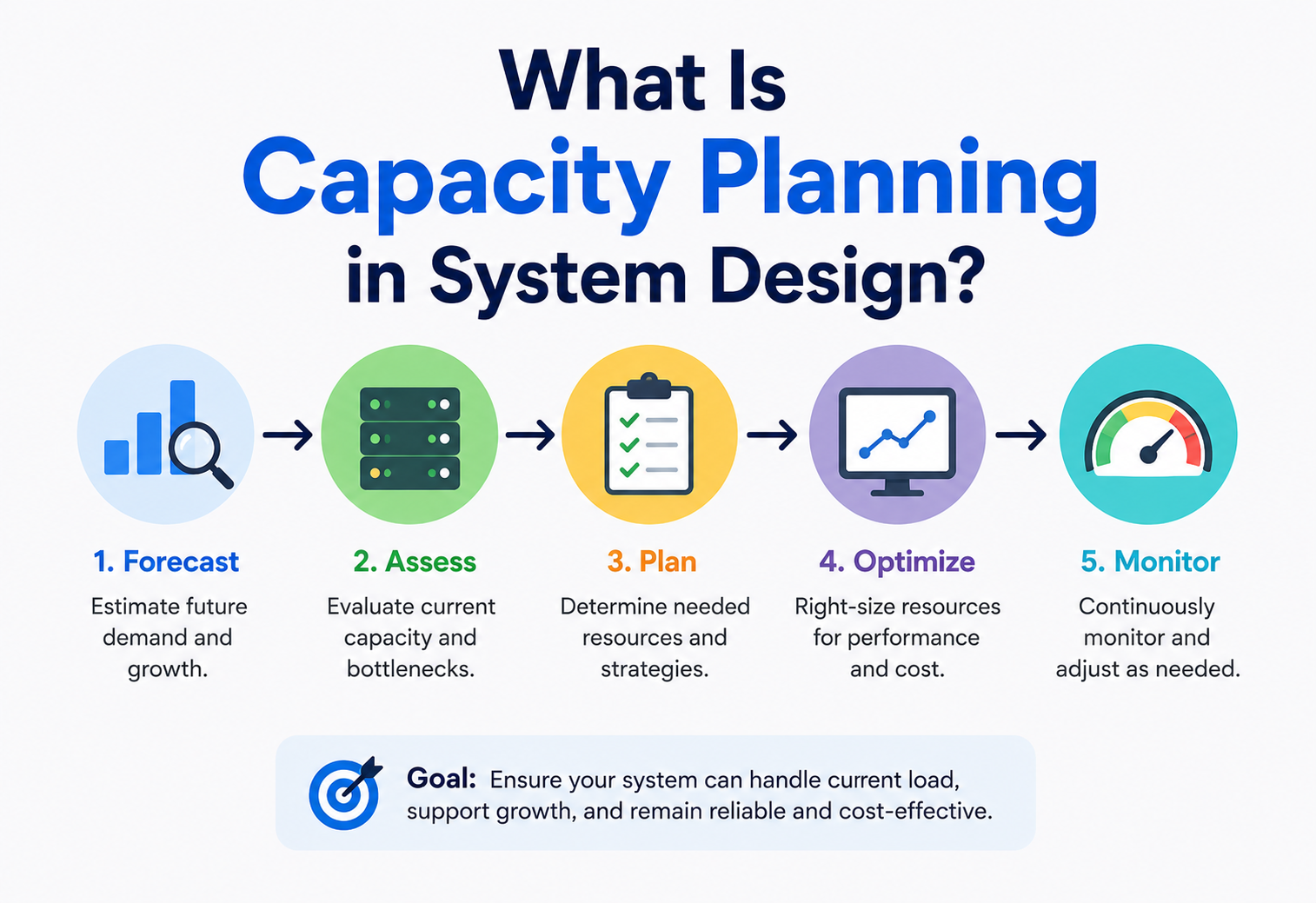
What Is Capacity Planning in System Design?
Before a system ever meets its first real user, someone has to answer a small set of very practical questions. How many people will use it? How hard will they push it? How much information will need a permanent home? Capacity planning is the disciplined, honest way of turning those questions into real numbers — and turning those numbers into a system that survives its own success without quietly bleeding money along the way.
The Big Idea, in One Breath
Capacity planning is the quiet, unglamorous skill that separates systems humming along nicely from systems that crash the moment they get popular.
Imagine you are throwing a birthday party. Before the big day, you do not just wing it — you sit down and think it through. How many friends are actually coming? How many slices of pizza does each person usually eat? Is there going to be a rush right after the cake comes out, when everybody wants a plate at once? Do you have enough chairs, enough plates, enough space in the fridge for all those drinks?
Get these guesses roughly right, and the party runs smoothly. Get them badly wrong — say, you only order one pizza for twenty hungry kids — and the whole afternoon falls apart, no matter how nice the decorations look. Software systems face the exact same problem, just at a much bigger scale, with usernames instead of guests and computer servers instead of pizza boxes. Figuring out, ahead of time, exactly how much “stuff” a system will need in order to serve its users comfortably is called capacity planning, and it is one of the quiet, unglamorous skills that separates systems that hum along nicely from systems that crash the moment they get popular.
Think about a school planning next year’s lunch menu. The cafeteria staff do not just cook whatever amount of food feels right on the day. They look at how many students are enrolled, how many usually show up for lunch, how much each student typically eats, and whether Friday pizza day always brings a bigger crowd than Tuesday’s vegetable soup. That careful, ahead‑of‑time thinking is capacity planning — just wearing an apron instead of a hard hat.
What Capacity Planning Really Is
Capacity planning is the disciplined process of figuring out how much computing power, storage space, and network bandwidth a system will need — both right now and as it grows — so it can serve its users reliably without wasting money on resources nobody uses.
It sits at the crossroads of two things engineers often treat as opposites: making sure a system never falls over, and making sure it does not cost a fortune to run.
At its heart, capacity planning tries to answer a small set of very practical questions. How many people will use this system, and how often? How much information will it need to store, today and a year from now? How many requests per second must it be able to answer without slowing down? And crucially — will the design we have sketched on the whiteboard actually survive contact with real‑world demand, or will it quietly buckle the moment things get busy?
If someone asks “have you done capacity planning for this system?”, they are really asking: “Do you actually know how big this thing needs to be, or are you just hoping it will be fine?”
It is worth noticing that capacity planning is both a one‑time exercise and an ongoing habit. Early on, it helps decide whether a design is even realistic. Later, once the system is alive and serving real traffic, it becomes a continuous loop of watching, measuring, and adjusting — because no popular system ever stays the same size for long.
It is also worth being honest that capacity planning is never about finding one perfectly precise number and locking it in forever. Real demand wobbles — a rainy afternoon, a school holiday, a competitor’s product launch can all nudge traffic up or down in ways nobody predicted on a spreadsheet. Good capacity planning is not about pretending to have a crystal ball; it is about building a sensible, well‑reasoned estimate, backed by real numbers, and staying humble and watchful enough to correct course the moment reality disagrees with the plan.
Why It Matters So Much
It is tempting to think of capacity planning as an optional, extra‑credit step. In practice, it is closer to the opposite: capacity planning is often what reveals whether a design is real at all.
A design can look elegant on a whiteboard and still be practically unworkable. Perhaps it technically does everything it is supposed to, but it would need ten thousand servers running around the clock to survive a busy Friday evening — an amount of hardware that would bankrupt the company operating it. Capacity planning is what catches this kind of problem early, while it is still just an eraser mark on a whiteboard, rather than after months of expensive engineering work.
Is this even possible?
Capacity planning reveals bottlenecks, storage limits, and bandwidth walls long before a single line of code gets written.
Can we actually afford this?
A system that works but needs an absurd amount of hardware to survive peak demand can be prohibitively expensive to run.
Will it survive success?
Good capacity planning means a sudden wave of new users becomes a celebration, not an emergency.
Do you know your craft?
Understanding how to size a system properly is one of the clearest signs of real architectural experience.
There is a very human cost hiding underneath all of this, too. Every time a popular app crashes during its busiest, most exciting moment — a big sale, a major sporting event, a viral moment — real people feel that failure. Capacity planning is, in a quiet way, an act of respect for the people who are about to trust their time, their money, or their attention to a system you have built.
There is also a quieter, less dramatic reason capacity planning matters, and it shows up on a spreadsheet rather than on the evening news: money spent on hardware nobody uses is money that could have gone anywhere else in the business — new features, better support, or simply a healthier bottom line. A team that runs three times more servers than it actually needs, every single day of the year, is quietly bleeding budget in a way nobody will ever write a news story about, but that adds up to a very real cost over time. Good capacity planning is what keeps that number honest.
The Different Flavours of Growth
Not all growth looks the same, and treating every kind of growth identically is one of the sneakier mistakes a planner can make. Recognising which flavour of growth you are actually facing changes how you should prepare for it.
Slow and steady
A gradual, predictable climb in users over months, driven by word of mouth. Easiest to forecast, and usually the friendliest kind of growth to plan around.
Sudden and sharp
A single post, video, or mention sends a huge, unpredictable spike of new visitors within hours. Thrilling for the business, terrifying for the servers.
Repeats every year
Predictable surges tied to a calendar — holiday shopping, tax season, back‑to‑school — that a team can prepare for well ahead of time, year after year.
Spreads outward
The same product suddenly used by people on the other side of the planet, which stresses network distance and time‑zone‑based peaks rather than raw volume.
A useful habit is to ask, early in any planning conversation: “Is this growth something we can see coming, or something that could hit us with almost no warning?” Seasonal and organic growth give a planner the gift of time — there is a real opportunity to lead with confidence. Viral growth offers no such luxury, which is exactly why systems expected to be shareable or newsworthy are often deliberately over‑built with extra headroom, purely as insurance against a spike nobody can predict the exact timing of.
A small bakery that slowly gains a few new regular customers every month can comfortably plan by simply baking a little more bread each week. But if a famous food reviewer suddenly posts about that same bakery online, a hundred new customers might show up by lunchtime the very next day. Both situations are “growth” — but only one of them gave the baker any warning at all.
The Core Ingredients: Traffic, Data, and Time
Nearly every capacity planning exercise, no matter how complicated the system, boils down to combining a handful of simple ingredients.
Understanding these ingredients is like learning the basic notes before trying to play a whole song.
Users tell you roughly how many people are pushing on the system. Requests tell you how hard and how often they are pushing. Data tells you how much information needs a permanent home. Bandwidth tells you how much of that information is moving around at any given moment. Blend all four together, add a dash of “what happens during our busiest five minutes,” and you have the raw material for a real capacity plan.

Estimating Traffic: How Many Knocks on the Door?
The most fundamental number in capacity planning is throughput — usually measured as queries per second, or QPS for short. It answers a simple question: in any given second, how many requests is the system expected to handle?
Sometimes this number is handed to you directly. Imagine a system built to collect temperature readings from ten million weather sensors scattered across a county, each one reporting in every five seconds. In the worst‑case, unlikely scenario where every single sensor reports at the exact same instant, you would briefly see ten million requests in one second. But because sensors do not perfectly synchronise with each other in real life, a calmer, more realistic estimate — factoring in how long each request actually takes to travel and land — lands closer to two million requests every second. That “worst case versus realistic case” gap is one of the most important habits in capacity planning: always sanity‑check the scary number against a more believable one.
Other times, you have to build the number yourself, piece by piece, starting from how many people use the product. Picture a social media app with 500 million daily active users, where each person checks their home timeline about ten times a day. Multiply those together and you get 5 billion timeline views every single day. Divide that by the number of seconds in a day — 86,400 — and you land on roughly 58,000 requests per second, comfortably rounded up to 60,000 for planning purposes.
Always round generously and think in clean, round numbers. Whether the true figure is 57,800 or 61,200 requests per second rarely changes the shape of the design — but chasing false precision wastes valuable time.
It also helps to separate different kinds of activity, because they rarely happen at the same rate. In that same social app, viewing a home timeline might happen far more often than viewing someone’s profile page, which in turn happens far more often than actually posting something new. If profile visits run at roughly a fifth of home‑timeline traffic, and posting happens at roughly a tenth, you end up with three separate, more accurate throughput numbers instead of one blurry average — and each one might need a slightly different part of the system to handle it well.
This split between reading and writing deserves its own spotlight, because the two rarely arrive in equal measure. Almost every popular system is read‑heavy: far more people look at a photo, an article, or a product page than ever create one. A system planned as if reads and writes were roughly equal often ends up with a database that is beautifully prepared for writes it rarely receives, while quietly buckling under the sheer volume of reads nobody accounted for. Estimating reads and writes separately, right from the start, tends to point a planner toward the right fix — usually more caching and read replicas, rather than simply “a bigger database.”
Estimating Peak Load: The Busiest Five Minutes
An average tells you what a normal moment looks like. It tells you almost nothing about the worst moment — and the worst moment is exactly when a poorly planned system falls apart.
This is why capacity planning pays special attention to peak load: the highest rate of demand the system is realistically expected to face.
Peaks show up for different reasons, and it helps to name them. A time‑driven peak follows a predictable daily or weekly rhythm — a work app that gets hammered between nine and five on weekdays and goes quiet on Sunday mornings. An event‑driven peak is tied to something happening in the world — a product launch, a big football match, a flash sale — where a huge crowd shows up in a short, specific window rather than spreading evenly across the day.
A widely used rule of thumb, borrowed from something called the Pareto Principle, assumes that roughly 80 percent of a day’s activity crams itself into about 20 percent of the day’s hours. Applying this to our earlier social‑media example — 5 billion timeline views a day — if 80 percent of those views land within an 8‑hour stretch, the peak hourly rate works out to around 500 million views an hour, which translates to roughly 138,000 requests per second at the busiest moments. That is more than twice the average rate calculated earlier, and it is this bigger, scarier number — not the calmer daily average — that should actually guide how much capacity gets built.
Designing only for the average is one of the most common and most damaging shortcuts in capacity planning. A system that comfortably handles the average day but collapses during the predictable rush hour has not really been planned at all — it has been guessed at.
Seasoned planners also tend to add a deliberate safety margin on top of even their peak estimate — sometimes called headroom or buffer capacity. If the maths says a system needs to handle 138,000 requests per second at its busiest, building it to comfortably handle somewhat more than that, rather than exactly that number, leaves room for the inevitable moment when reality slightly outpaces the forecast. This is not the same thing as wastefully over‑building for no reason; it is a small, intentional cushion, sized to the actual cost of being caught short during the system’s single worst moment of the year.

Estimating Storage: How Big Is the Filing Cabinet?
Alongside traffic, a system needs somewhere to keep the information it collects, and that pile of information almost never stops growing. Estimating storage means answering two connected questions: how much data does the system create today, and how fast is that pile likely to grow?
Go back to the sensor network example. If each sensor reading, once formatted, comes out to roughly half a kilobyte, and ten million sensors are each sending a reading every five seconds, that is a steady, calculable stream of new information pouring in around the clock. Multiply the size of one reading by the number of readings arriving every day, and you get a daily storage figure. Multiply that by 365, and you get a rough sense of how much space a full year of history will consume — which matters enormously if the business wants to keep that historical data around for future analysis rather than throwing it away.
For an application dealing with photos, video, and text, the sums look different but the approach is identical. If ten typical posts include, say, three images and one short video clip, alongside seven simple text updates, you can build a blended “average post size” and then multiply it by however many posts get created every day. This is exactly the kind of estimate that determines whether a growing photo‑sharing app needs a modest server closet or an entire warehouse of storage drives within a few years.
How fast is the pile growing?
New data added per day, multiplied out across months and years, reveals when today’s storage will run out.
How many copies exist?
Keeping two or three copies of everything for safety multiplies your real storage need by the same factor.
How long is it kept?
Data kept “forever” needs very different planning than data that is automatically deleted after 90 days.
Can it take up less room?
Smart formats and compression can shrink the same information into a noticeably smaller footprint.
Not all stored data deserves the same treatment, either. Information from the last few days or weeks — hot data — tends to get read constantly and benefits from living on fast, expensive storage. Information from months or years ago — cold data — is rarely touched, and can happily sit on slower, far cheaper storage without anyone noticing the difference. Splitting storage into these tiers, rather than treating every byte identically, is one of the simplest ways to keep a growing pile of data affordable without ever throwing anything away.
Estimating Bandwidth: How Much Is Moving at Once?
Storage tells you how much data is sitting still. Bandwidth tells you how much data is moving through the system’s “pipes” at any given moment, and it is usually split into two directions: ingress (data flowing in from users toward the system) and egress (data flowing back out from the system to users).
In many systems, egress dwarfs ingress. A single short text post might be a tidy one kilobyte on the way in, but if it gets shown to thousands of followers, each one loading their whole timeline and its accompanying images, the total amount of data flowing back out can balloon into something enormous — easily reaching into hundreds of gigabytes flowing every second for a truly large platform. This lopsided relationship is exactly why so much engineering effort goes into shrinking outgoing data: showing lower‑quality image placeholders until someone actually needs the full picture, trimming preview text instead of sending an entire post by default, and refusing to auto‑play video unless someone actively asks for it. Small, careful trims like these, applied across billions of daily views, can shave a very large chunk off the total bandwidth bill.
The format data travels in matters too. A chatty, heavily tagged format can carry noticeably more overhead than a leaner one carrying the same underlying information, and compressing data before sending it can meaningfully shrink a payload — at the modest cost of a little extra processing work to pack and unpack it.
Geography adds one more wrinkle worth mentioning. A server answering requests from users scattered across the entire planet has to push the same egress traffic across much longer distances, which adds delay on top of raw bandwidth cost. Placing copies of frequently requested content closer to where people actually are — the idea behind a content delivery network — does not just make things feel faster; it meaningfully reduces how much traffic ever needs to travel all the way back to a single, central set of servers in the first place, which is itself a form of capacity planning happening at the network layer.
Estimating Servers Needed: Turning Numbers Into Hardware
Once you know roughly how many requests per second a system must handle, and roughly how long each request takes to process, you can work backward to a genuinely useful number: how many servers does this actually require?
Suppose each individual server instance can run 32 parallel workers, and each worker takes about 200 milliseconds to answer a single request — meaning one worker can handle roughly five requests every second. That gives each server instance a total capacity of about 160 requests per second. If overall demand sits around two million requests per second, dividing that total by each server’s share reveals that roughly 12,500 server instances would be needed to comfortably keep up. That is an enormous, expensive number — and seeing it appear from a few lines of simple arithmetic is often the moment a team realises their original design needs serious rethinking, well before a single server has actually been purchased.
This is also exactly where caching, smarter algorithms, and architectural changes earn their keep. Shaving the average time a request takes to process, even by a modest amount, or diverting a good chunk of traffic to a lightweight cache instead of a full server, can dramatically shrink that final server count — and, by extension, the final bill.
Planning Component by Component
Capacity needs to be estimated separately for several different resources, because each one runs out for a completely different reason, and each one gets fixed with a completely different kind of upgrade.
Thinking power
How many calculations can happen per second. Runs out when logic gets complex or traffic gets heavy, and is fixed with faster or more processors.
Short‑term workspace
How much information can be held ready for instant use. Runs out when too many things are being juggled at once, and is fixed with more RAM.
Long‑term memory
How much information can be permanently kept. Runs out as data quietly piles up over time, and is fixed with more disk space or smarter archiving.
The roads in between
How much data can travel between parts of the system per second. Runs out when too much information tries to move at once, and is fixed with fatter pipes.
Databases deserve a special mention here, because they tend to combine all four of the above into one especially sensitive component. A database needs enough processing power to answer queries quickly, enough memory to keep popular data close at hand, enough storage to hold everything permanently, and enough network capacity to ship answers back out — and unlike a simple web server, a database usually cannot just be duplicated carelessly, because every copy needs to agree with every other copy about what the truth actually is.
Whenever a system feels sluggish, resist the urge to simply “add more servers” as a reflex. Ask which specific resource — CPU, memory, storage, or network — is actually the one running low. Fixing the wrong resource wastes money and leaves the real problem untouched.
Capacity Planning by System Type
The exact shape of capacity planning changes depending on what kind of system you are actually building. Four especially common categories are worth knowing, since each one leans on a different one of the ingredients covered earlier.
Requests rule everything
Traffic and peak QPS dominate the planning conversation. Storage matters, but the biggest question is almost always “how many requests per second must the front door handle?”
Bandwidth is king
Video and audio are enormous compared to plain text, so egress bandwidth and network capacity usually decide the budget long before server count does.
Millions of tiny voices
Individual messages are small, but the sheer number of connected devices, each reporting on its own schedule, creates a very different kind of steady, relentless load.
Storage and processing windows
These systems care less about instant response time and more about whether an enormous pile of data can be fully processed within an overnight or weekly time window.
A streaming video service, for example, might comfortably handle a modest number of requests per second, yet still need an enormous amount of network bandwidth, because each one of those “modest” requests is asking to stream several megabytes every single second for the length of an entire film. A sensor network, by contrast, might generate a genuinely staggering number of requests per second, yet need barely any storage or bandwidth at all, because each individual message is smaller than a single sentence of text. Recognising which ingredient dominates your particular system is often the single most useful shortcut in the entire capacity planning process — it tells you exactly where to spend your limited time estimating carefully, and where a rougher guess is perfectly acceptable.
Three Planning Strategies: Lag, Match, and Lead
Once you know roughly how much capacity you will eventually need, a second question appears: when should you actually go and build it? Add capacity too early, and you are paying for idle servers nobody is using. Add it too late, and real users hit a system that is already struggling.
Lag strategy: wait, then react
A lag strategy adds capacity only once demand has clearly and unmistakably increased. It is the cautious, cost‑conscious option — no money spent on hardware that might never get used — but it comes with a real risk: if the surge outpaces how quickly new capacity can be added, users feel the pain in the gap.
Match strategy: small steps, close behind
A match strategy adds capacity in smaller, more frequent increments, trying to track demand about as closely as realistically possible. It leans on solid forecasting and a flexible setup that can be adjusted often, offering a sensible middle ground between “too cautious” and “too eager.”
Lead strategy: build ahead of the wave
A lead strategy adds capacity before demand actually arrives, betting confidently on future growth. It is the boldest option, often chosen by organisations trying to capture a fast‑growing market or guarantee a flawless experience during a known, high‑stakes event. The upside is readiness; the downside is real financial risk if that anticipated demand does not show up on schedule.
When lead makes sense
- A major, well‑known launch or sale is coming.
- Being unprepared would be publicly embarrassing.
- The business can comfortably absorb some waste.
When lag makes more sense
- Budgets are tight and growth is uncertain.
- New capacity can be added quickly if needed.
- A short, temporary slowdown is an acceptable risk.
Strategic, Tactical, and Operational Planning
Capacity planning does not happen at just one altitude. It happens at three different heights, each answering a different kind of question, over a different stretch of time.
| Level | Time Horizon | Typical Question |
|---|---|---|
| Strategic | Years | “Do we need a whole new data centre region to support expanding into new countries?” |
| Tactical | Months | “Should we add another database replica ahead of the holiday shopping season?” |
| Operational | Days or hours | “Do we need to scale up server instances for tonight’s live event?” |
These three levels are not rivals — they nest neatly inside one another, like a set of Russian dolls. A strategic decision, made years in advance, sets the outer boundaries of what is even possible. Tactical decisions fill in the medium‑term detail within those boundaries. Operational decisions handle the small, fast adjustments day to day, often automatically, without anyone needing to have a meeting about it at all.
Elasticity and the Cloud
For a long time, capacity planning meant physically buying computers, bolting them into a rack, and waiting weeks for them to arrive. Cloud computing changed the shape of that problem considerably, without making capacity planning unnecessary.
Modern cloud platforms offer elasticity — the ability to request more computing power in minutes rather than weeks, and just as easily give it back the moment it is no longer needed. Auto‑scaling takes this a step further, automatically adding servers when traffic climbs and quietly removing them again once things calm down, all without a human needing to watch a dashboard and react in real time.
What elasticity buys you
- Handles unpredictable, viral‑style spikes gracefully.
- No more guessing weeks or months in advance.
- You generally pay only for what you actually use.
What it does not solve
- A database still cannot be endlessly duplicated in seconds.
- Sudden scaling has limits and can still lag behind an extreme spike.
- Careless auto‑scaling can produce an unpleasant surprise on the monthly bill.
It is tempting to think elasticity makes capacity planning obsolete — after all, if the cloud can simply summon more servers on demand, why bother estimating anything in advance? In practice, planning still matters enormously, because elasticity has real limits, real delays, and a real cost. A team that never thinks ahead and simply trusts auto‑scaling to catch everything often discovers, the hard way, that certain resources — especially databases — do not scale as instantly or as gracefully as a stateless web server does. Elasticity is a wonderful safety net; it was never meant to replace the plan underneath it.

The Capacity Planning Cycle
Rather than a single, one‑off task, capacity planning works best as a repeating loop — one that a team walks through again and again as a system grows and changes.
Assess current capacity
Understand exactly what resources exist today, and how heavily they are actually being used right now.
Forecast future demand
Use growth trends, business plans, and seasonal patterns to predict what tomorrow will look like.
Identify potential bottlenecks
Spot the specific resource — a database, a queue, a storage limit — most likely to run out first.
Develop a strategy
Decide whether to lag, match, or lead, and sketch out exactly what needs to change.
Implement the plan
Actually roll out the new servers, storage, or configuration changes the strategy calls for.
Monitor and adjust
Watch real usage against the plan, and feed what you learn straight back into step one.
The loop never truly ends. Healthy systems revisit this cycle constantly — not just once, at the very beginning of a project.
Metrics That Matter
Good capacity planning is only as good as the numbers feeding it. A handful of measurements come up again and again, and it is worth knowing each one by name.
Daily Active Users
How many distinct people actually use the system on a typical day — the starting point for almost every other estimate.
Queries Per Second
How many requests land on the system every second, on average and at peak.
How long is the wait?
The time between a request arriving and an answer being sent back — lower is almost always better.
All at once
How many users or requests the system must handle simultaneously without things slowing down.
How often it fails
The share of requests that come back broken or incomplete — a key signal that capacity is running thin.
The worst moment
The single highest level of demand the system must survive, not just the friendly daily average.
None of these numbers matter much in isolation. A system with blazing‑fast response times but a climbing error rate is quietly failing. A system with plenty of headroom on an average day but no plan for its predictable Friday‑night peak is planning for the wrong day entirely. Reading these metrics together, as a story rather than a scoreboard, is what turns raw numbers into genuine insight.
These same metrics also feed directly into alerting — automatic notifications that fire the moment a number crosses into dangerous territory, long before a human happens to glance at a dashboard. A sensible alert does not just say “something is wrong”; it points, as precisely as possible, at which metric crossed which threshold, so whoever is on call can start investigating the right part of the system immediately instead of hunting blindly through logs at three in the morning.
Tools of the Trade
Nobody does capacity planning purely with a pen, a napkin, and hope. A whole ecosystem of tools exists to help teams measure, simulate, and watch over their systems.
Simulating a crowd
Tools that pretend to be thousands of real users hitting the system at once, revealing how it behaves under pressure before real users ever show up.
Finding the breaking point
Deliberately pushing a system well past its expected limits, on purpose, to see exactly where and how it finally gives way.
The control room
Live, visual displays of metrics like traffic, errors, and response time, so problems can be spotted the moment they begin.
Reading tea leaves, carefully
Tools that study historical patterns to project what next month’s or next year’s demand is likely to look like.
What all of these tools share is a single underlying goal: replacing guesswork with evidence. A gut feeling about how much traffic a system can handle is a starting point at best. A graph showing exactly where response times start climbing as simulated users pile on is something you can actually plan around with confidence.
Used well, these tools form a continuous feedback loop rather than a one‑off checklist. Load testing shapes the initial plan; monitoring watches how that plan actually performs once real users show up; and whatever monitoring reveals feeds straight back into the next round of forecasting and load testing. Teams that treat these tools as a connected cycle, rather than separate boxes to tick once and forget, tend to catch capacity problems weeks or months before they would otherwise become a public, customer‑facing emergency.
A Worked Example: Getting Ready for a Big Sale
Let us pull everything together with one concrete scenario, walked through the way an architect might actually narrate it. Imagine an online store preparing for its biggest sale of the year, expecting around 200,000 daily active users on the big day, with each shopper making roughly eight requests during their visit — browsing categories, viewing products, adding items to a cart, and checking out.
Estimate throughput
200,000 users times 8 requests gives 1.6 million total requests for the day. Spread evenly across 86,400 seconds, that is a modest average of roughly 19 requests per second.
Estimate storage
If each shopper’s activity generates around 5 megabytes of data — orders, browsing history, images viewed — that is roughly 1,000 gigabytes of new data in a single day.
Estimate concurrency
If a quarter of daily users are active at the exact same moment during the sale’s opening minutes, that is 50,000 people hitting the system all at once.
Test it before it is real
Load‑test the system with 50,000 simulated shoppers to see how it copes, then stress‑test it with 250,000 — well beyond expectations — to find the actual breaking point.
Choose a strategy and prepare
Given the predictable, high‑stakes nature of a big sale, a lead strategy makes sense here — add extra servers and cache warmups ahead of time, rather than scrambling once the sale has already started.
Watch it happen live
Once the sale goes live, dashboards track real traffic, error rates, and response times, ready to trigger extra automatic scaling if reality outpaces the forecast.
Notice how naturally each earlier concept slots into place here: throughput, storage, concurrency, load testing, a deliberately chosen strategy, and live monitoring, all working together rather than as separate, disconnected ideas. That is what capacity planning looks like when it is done well — not a single calculation, but a small, connected story with a beginning, a middle, and an end.

A second story: moving to the cloud
A different, equally common scenario plays out whenever a company moves its computing systems from its own physical servers into a cloud provider’s data centres. Before making the move, the team studies historical usage patterns from their old infrastructure — how many virtual machines their workloads actually need, how much storage their data consumes, and how much network bandwidth typically gets used. From that study, they might conclude their workloads genuinely need something like a hundred virtual machines, ten terabytes of storage, and roughly one gigabit of network bandwidth to run comfortably. Rather than provisioning that exact fixed amount and hoping it stays right forever, the smarter move is layering auto‑scaling policies on top, letting the environment breathe — expanding automatically during busy periods and shrinking back down when things quiet off — turning a one‑time estimate into an ongoing, cost‑aware habit.
Common Pitfalls
Even experienced teams stumble into the same handful of traps. None of them come from a lack of intelligence — they usually come from time pressure, incomplete information, or simply not having walked through this exact situation before. Knowing them ahead of time is often enough to avoid them entirely.
Planning only for the average
- Ignoring predictable peaks leaves the system exposed at exactly the worst moment.
- A quiet Tuesday tells you very little about a chaotic Black Friday.
Trusting a forecast too much
- Markets shift, trends fade, and surprises happen.
- A plan with zero flexibility breaks the moment reality disagrees with it.
Overcapacity, “just in case”
- Paying for far more than is ever actually used wastes real money.
- Idle resources can hide inefficiencies elsewhere in the design.
Treating it as a one‑time task
- A plan made once, at launch, and never revisited quickly goes stale.
- Growing systems need a living, breathing plan, not a framed photograph.
Both extremes are genuinely dangerous. A system planned too small collapses under real success. A system planned too large quietly bleeds money every single month, whether anyone notices or not. The goal is not maximum capacity — it is the right capacity, honestly matched to real, evidence‑based need.
Capacity Planning vs. Related Ideas
A few neighbouring terms get mixed up with capacity planning surprisingly often. Untangling them makes conversations with teammates a lot clearer.
| Term | Time Frame | Main Question |
|---|---|---|
| Capacity Planning | Long‑term, strategic | “How much will we need, and when should we get it?” |
| Resource Planning | Short‑term, day to day | “Who or what is available for this specific task, right now?” |
| Capacity Management | Ongoing, continuous | “Are we currently using what we have efficiently?” |
| Scalability | A design property | “Can this system even grow if we wanted it to?” |
Scalability is really the foundation everything else stands on. A system can only be planned for a hundred times more capacity if it was actually designed, from the start, to be capable of scaling in the first place. Capacity planning decides how much and when; scalability decides whether that “how much” is even achievable at all.
The Human Side of Capacity Planning
It is easy to imagine capacity planning as a purely mathematical exercise — spreadsheets, formulas, and a lone engineer squinting at a graph. In practice, some of the most important work happens in conversations between people, not inside a calculator.
Engineers rarely have the full picture on their own. Marketing teams know when a big campaign is about to launch. Sales teams know when a major new client is about to onboard thousands of their own employees onto the platform overnight. Finance teams know exactly how much budget can realistically be spent on extra servers this quarter. A capacity plan built in isolation, without pulling these different voices into the room, is really just a well‑formatted guess — accurate about the technology, but blind to the business context surrounding it.
This is why experienced architects treat capacity planning as a genuinely cross‑functional habit rather than a private technical chore. A short, regular conversation with product and business stakeholders — “anything big coming up in the next quarter we should prepare for?” — often surfaces more useful information than another hour spent refining a formula. The best capacity plans are not the mathematically purest ones; they are the ones built with the widest, most honest view of what is actually coming.
Before finalising any capacity plan for a major event, ask three different teams — engineering, product, and business — the exact same question: “What could make this bigger or different than we expect?” Three different answers to the same question is often exactly the signal a planner needs.
Best Practices Checklist
Keep these habits close at hand, whether sketching a brand‑new system or reviewing one that is already live and growing.
Quick Glossary
A handful of terms carried most of the weight throughout this guide. Here they are again, gathered together in the plainest words possible.
Queries per second
How many requests arrive at a system in a single second — the basic unit of traffic measurement.
Daily active users
The number of distinct people who actually use a product on a given day.
The worst moment
The highest level of demand a system is realistically expected to face, not just its average day.
How much gets through
The overall rate at which a system can process work, usually measured in requests per second.
In and out
Data flowing into a system from users, versus data flowing back out to them.
Stretchy capacity
The ability to add or remove computing resources quickly, in response to changing demand.
The narrow point
Whichever single part of a system runs out of room first, limiting how much the whole system can handle.
Growing on its own
A system automatically adding or removing servers based on real‑time demand, without a human stepping in.
Key Takeaways
If you remember nothing else from this guide, remember the eight ideas below — and the quiet habit of matching capacity to real, evidence‑based need rather than gut feel.
Remember This
- Plan before it is needed. Capacity planning is the disciplined practice of figuring out how much a system will need — traffic, storage, and bandwidth — before it actually needs it.
- Two failure modes, one target. It protects against both crashing under load and overspending on unused hardware, and reveals whether a design is truly feasible in the first place.
- Simple ingredients, honest arithmetic. Good estimates start from users, requests, data, and bandwidth — combined with rounded, sensible numbers.
- Plan for peaks, not averages. Peak load, not the daily average, is usually what a real capacity plan needs to survive.
- Lag, match, or lead. Three strategies describe when to actually add new capacity relative to rising demand.
- Three altitudes. Capacity planning happens at strategic, tactical, and operational levels, and works best as a repeating cycle rather than a one‑time task.
- Two real dangers. The right amount of capacity sits between not enough, and needlessly, expensively too much.
- Evidence over guesswork. Tools like load testing, stress testing, and live monitoring dashboards turn guesses into evidence a team can actually trust.

