What Is a Key Benefit of GraphQL over REST?
A complete, beginner‑friendly walkthrough of the single biggest reason engineering teams at Netflix, GitHub, Shopify, and Facebook moved parts of their stack to GraphQL — explained simply enough for a 10‑year‑old, deep enough for a system design interview.
Introduction & History
Why a single sentence — “let the client ask for exactly what it needs” — reshaped how modern APIs are built.
Imagine you order food at a restaurant. If the restaurant only sells fixed combo meals, you get a burger, fries, AND a drink every single time — even if you only wanted the burger. You paid for and received more than you needed. That is roughly how the older style of web API, called REST, has worked for many years.
Now imagine a different restaurant where you can say exactly what you want: “I’d like just the burger, no fries, no drink, but add extra cheese.” You get precisely what you asked for, nothing more, nothing less. That second restaurant is a lot like GraphQL.
This tutorial answers one very specific, very common interview and real‑world question: “What is a key benefit of GraphQL over REST?” The short answer is this:
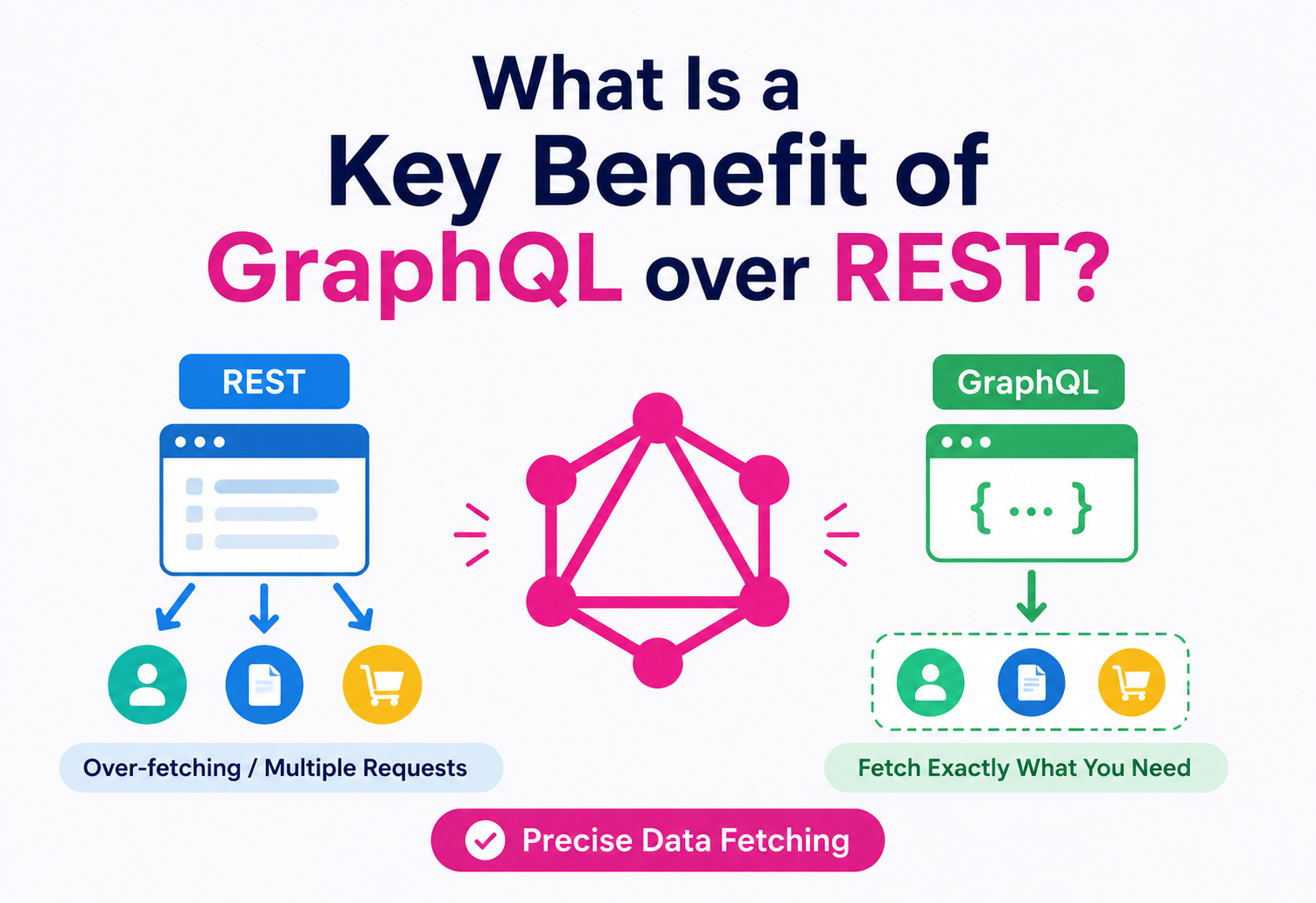
GraphQL lets the client ask for exactly the data it needs — in a single request — instead of being stuck with whatever shape of data the server decides to send back.
This single idea is called precise, client‑driven data fetching. It solves two very annoying problems that REST APIs suffer from: over‑fetching (getting more data than you need) and under‑fetching (not getting enough data in one request, forcing you to make several more requests). We will spend this entire tutorial unpacking that one sentence from every angle: history, internals, diagrams, code, production concerns, and real companies that rely on it.
1.1 A short history
- 2000Roy Fielding described REST (Representational State Transfer) in his PhD dissertation. It became the dominant style for web APIs because it mapped naturally onto HTTP verbs (GET, POST, PUT, DELETE).
- 2012Facebook’s mobile apps were struggling. Their REST APIs required many round trips to render a single News Feed screen, and mobile networks were slow and unreliable. Engineers Lee Byron, Nick Schrock, and Dan Schafer began building an internal solution.
- 2015Facebook open‑sourced GraphQL as a specification — deliberately not tied to any specific database or programming language.
- 2018The GraphQL Foundation was formed under the Linux Foundation, making it a vendor‑neutral, community‑governed standard.
- TodayGraphQL is used by GitHub, Shopify, Netflix, Twitter/X, Airbnb, PayPal, and thousands of other companies — usually alongside REST rather than fully replacing it.
REST is like a vending machine with pre‑packed snack bags — you pick a bag (an endpoint) and get everything inside it, even the items you don’t want. GraphQL is like a self‑serve buffet where you fill your own plate — you choose exactly what goes on it.
The Problem & Motivation
To understand why GraphQL’s key benefit matters, we first need to feel exactly what goes wrong with REST in real applications. There are two named problems every engineer should know by heart.
2.1 Problem 1: Over‑fetching
Over‑fetching happens when an API endpoint returns more fields than the client actually needs, wasting bandwidth and processing time.
Beginner example: Suppose a mobile app only wants to show a user’s name and profile picture in a small list. A REST endpoint like /users/42 might return this:
{
  "id": 42,
  "name": "Asha Verma",
  "email": "asha@example.com",
  "phone": "+91-9xxxxxxxxx",
  "address": "12, MG Road, Pune",
  "dateOfBirth": "1994-03-11",
  "profilePicture": "https://cdn.example.com/asha.png",
  "billingHistory": [ /* 50 records */ ],
  "preferences": { /* large nested object */ }
}
The app only needed name and profilePicture, but the server sent everything, including sensitive data like email, phone, and a huge billingHistory array. On a slow mobile network, this wastes data, battery, and time.
2.2 Problem 2: Under‑fetching
Under‑fetching is the opposite problem: a single endpoint does not return enough data, so the client must make several additional requests to gather everything it needs.
Beginner example: Suppose you want to show a blog post along with its author’s name and the last 3 comments. With REST, this often takes three separate calls:
- GET /posts/7 — returns the post, but only an authorId, not the author’s name.
- GET /users/15 — fetch the author using the ID from step 1.
- GET /posts/7/comments?limit=3 — fetch the comments separately.
Three network round trips for one screen. On a phone with a shaky 3G/4G connection, each round trip can take 200–800 milliseconds. Three of them, done one after another (because each depends on the last), can make a screen feel painfully slow.
Every network round trip has a fixed cost (DNS lookup, TLS handshake, server processing, latency) on top of the actual data transfer. Under‑fetching multiplies this fixed cost by the number of calls. Over‑fetching wastes the variable cost (bytes transferred). Both hurt performance, but in different ways.
2.3 Why REST struggles to fix this
REST ties data shape to the URL. /users/42 always returns the same fixed shape of data for every client, whether it’s a smartwatch app that needs 2 fields or an admin dashboard that needs 40 fields. Teams historically worked around this with:
Custom endpoints
Create /users/42/summary vs /users/42/full — but this multiplies the number of endpoints to maintain.
Query parameters
/users/42?fields=name,picture — helps, but is not standardized, and every API implements it differently.
Backend‑for‑Frontend (BFF)
A dedicated backend per client type — solves the shape problem but adds infrastructure and duplicated logic.
GraphQL was built specifically to remove the need for these workarounds, by letting the client describe the shape of data it wants, every single time, in the request itself.
Core Concepts
Let’s define every term carefully, one at a time, before going deeper.
WhatAn architectural style for designing networked applications, using standard HTTP verbs (GET, POST, PUT, PATCH, DELETE) against resource‑based URLs.
WhyTo create a simple, uniform, stateless way for clients and servers to communicate over HTTP, using the web’s existing infrastructure (caching, status codes, etc.).
WhereAlmost every traditional web API — payment gateways, e‑commerce backends, social media APIs (in earlier years), and internal microservices.
REST is like a library with fixed sections. To get a book, you go to a specific shelf (URL) labeled “Fiction – Science Fiction” (a resource endpoint), and you get the whole book (full object), not just chapter 3.
WhatA query language for APIs, plus a runtime for executing those queries against your data. It is not a database and not tied to any specific storage technology.
WhyTo let clients request precisely the data they need, in one request, using a strongly‑typed schema that both client and server agree on.
WhereMobile apps with limited bandwidth, dashboards that combine data from many sources, and any product where different clients (web, iOS, Android, smartwatch) need different data shapes from the same backend.
GraphQL is like ordering at a custom sandwich counter. You tell the person behind the counter exactly which ingredients you want, they assemble exactly that sandwich, and hand it to you — nothing pre‑packaged.
3.1 Key terms you must know
Schema
A contract, written in GraphQL’s Schema Definition Language (SDL), that describes every type of data and every operation the API supports.
Query
A read operation. The client describes the exact shape of data it wants back.
Mutation
A write operation (create, update, delete) — GraphQL’s equivalent of POST/PUT/DELETE in REST.
Resolver
A function on the server responsible for fetching the actual data for one field in the schema.
Type
A named shape of data, like User or Post, with a defined set of fields.
Subscription
A real‑time operation that pushes updates to the client when data changes (built on WebSockets).
Beginner example: a GraphQL schema
type User {
  id: ID!
  name: String!
  email: String!
  posts: [Post!]!
}

type Post {
  id: ID!
  title: String!
  author: User!
  comments: [Comment!]!
}

type Comment {
  id: ID!
  text: String!
}

type Query {
  user(id: ID!): User
  post(id: ID!): Post
}
This schema is like a menu that tells every client exactly what is available to order — and in what shape.
The Key Benefit, Explained in Depth
Let’s answer the exact question this tutorial is built around, slowly and completely.
Key Benefit: GraphQL gives clients precise, declarative control over the exact shape of data returned, in a single round trip — eliminating over‑fetching and under‑fetching.
4.1 Same data, two APIs, side by side
Let’s fetch a blog post with its author’s name and its first 2 comments — first with REST, then with GraphQL.
REST version (3 requests)
GET /posts/7
→ { "id": 7, "title": "Learning GraphQL", "authorId": 15 }GET /users/15
→ { "id": 15, "name": "Rohan Mehta", "email": "...", "phone": "..." }GET /posts/7/comments?limit=2
→ [ { "id": 101, "text": "Great post!" }, { "id": 102, "text": "Very clear." } ]Notice two things: it took 3 network round trips, and Request 2 over‑fetched — it returned email and phone, which we never asked for and will never display.
GraphQL version (1 request)
query {
  post(id: 7) {
    title
    author {
      name
    }
    comments(limit: 2) {
      text
    }
  }
}{
"data": {
"post": {
"title": "Learning GraphQL",
"author": { "name": "Rohan Mehta" },
"comments": [
{ "text": "Great post!" },
{ "text": "Very clear." }
]
}
}
}One request. One response. Exactly the fields we asked for — nothing more. This is the essence of the key benefit.
Fig 4.1 — REST requires three separate, sequential round trips to gather post, author, and comment data.
Fig 4.2 — GraphQL bundles the exact same requirement into a single request and a single, precisely‑shaped response.
In REST, the server declares the shape of data (“here is what /users/42 always returns”). In GraphQL, the client declares the shape it wants. This inversion of control is the fundamental architectural shift, and everything else in GraphQL (schemas, resolvers, single endpoint) exists to support it.
4.2 Why “one round trip” matters so much
Network latency is often the biggest cost in mobile and web applications — bigger than the actual data size. If a round trip takes 300ms, then:
This is exactly the problem Facebook had in 2012: their mobile app’s News Feed needed data from many different REST resources, and stacking round trips made the app feel sluggish on cellular networks. GraphQL’s single‑request model was invented directly to solve this.
Architecture & Components
Let’s look at the building blocks that make the “one precise request” benefit possible.
Schema (SDL)
The single source of truth defining every type, field, query, and mutation available. Both client and server validate against it.
Single endpoint
Unlike REST’s many URLs, GraphQL typically exposes one endpoint (e.g. /graphql) that handles all operations via POST.
Resolvers
Functions mapped to schema fields. Each resolver knows how to fetch its own piece of data — from a database, cache, or another service.
Execution engine
Parses the incoming query, validates it against the schema, and walks the query tree calling resolvers in the right order.
Data sources
The actual backends behind resolvers: SQL databases, NoSQL stores, REST APIs, gRPC services, or other microservices.
DataLoader
A batching and caching utility that prevents the same data from being fetched repeatedly within a single request (solves the “N+1” problem, covered later).
Fig 5.1 — A single GraphQL query fans out internally to multiple resolvers and data sources, then merges everything into one response before it ever reaches the client.
Think of the GraphQL server as a restaurant kitchen with one waiter (the endpoint). You give the waiter one detailed order. Behind the scenes, the kitchen has separate stations — grill, salad, drinks (resolvers) — that each prepare their part. But you, the customer, only talk to one waiter and get one tray back.
Internal Working
Here is what actually happens, step by step, inside a GraphQL server when it receives a query.
- Parsing: The raw query string is parsed into an Abstract Syntax Tree (AST) — a structured, tree‑shaped representation of the query.
- Validation: The AST is checked against the schema. Does post(id: 7) exist? Does Post have a field called comments? If not, the server rejects the query before touching any data.
- Execution: The engine walks the AST field by field, calling the resolver function attached to each field.
- Resolver chaining: A resolver for a nested field (like author inside post) receives the parent’s result as an argument, so it knows which author to fetch.
- Batching (optional but critical): Tools like DataLoader collect all the individual fetch requests generated during one query and batch them into fewer database calls.
- Merging: As resolvers return values, the engine assembles them back into a single JSON tree that mirrors the shape of the original query.
- Response: The final JSON object is sent back to the client in one HTTP response.
6.1 Java example: a minimal resolver (graphql‑java)
public class PostResolver implements DataFetcher<Post> {

    private final PostRepository postRepository;

    public PostResolver(PostRepository postRepository) {
        this.postRepository = postRepository;
    }

    @Override
    public Post get(DataFetchingEnvironment env) {
        String postId = env.getArgument("id");
        // Only fetches the Post entity here.
        // Nested fields like "author" and "comments"
        // are resolved by their OWN dedicated resolvers,
        // only if the client actually asked for them.
        return postRepository.findById(postId);
    }
}
This is the key line to understand: resolvers only run for fields the client actually requested. If the client’s query did not include comments, the comments resolver never executes at all — no wasted database call, no wasted computation.
6.2 Java example: wiring the schema
public class GraphQLServerConfig {

    public GraphQL buildGraphQL(PostRepository postRepository,
                                 UserRepository userRepository) {

        TypeDefinitionRegistry typeRegistry =
            new SchemaParser().parse(loadSchemaFile("schema.graphql"));

        RuntimeWiring wiring = RuntimeWiring.newRuntimeWiring()
            .type("Query", builder -> builder
                .dataFetcher("post", new PostResolver(postRepository)))
            .type("Post", builder -> builder
                .dataFetcher("author", new AuthorResolver(userRepository)))
            .build();

        GraphQLSchema schema =
            new SchemaGenerator().makeExecutableSchema(typeRegistry, wiring);

        return GraphQL.newGraphQL(schema).build();
    }
}
Notice how the schema file and the resolver wiring are separate. This separation is what enforces the “contract” between client and server — the schema is the promise, resolvers are the implementation.
Data Flow & Lifecycle
Let’s trace one query from the moment a user taps a button in a mobile app to the moment they see data on screen.
Fig 7.1 — End‑to‑end lifecycle of a single GraphQL request — one outbound network call, multiple internal fetches, one response.
7.1 The lifecycle in plain words
- The user does something (taps a button, opens a screen).
- The app builds a GraphQL query describing exactly what data that screen needs.
- That single query travels over the network once.
- The server does all the “many small fetches” work internally, close to the data.
- The server assembles one JSON response shaped exactly like the query.
- The app renders the screen directly from that response — no extra parsing or combining needed on the client.
Fetches between the GraphQL server and its own databases usually happen inside the same data center, over fast, low‑latency internal networks. Fetches between a mobile phone and the server cross the public internet, which is much slower and less predictable. Moving the “multiple fetches” work from the client side (REST) to the server side (GraphQL) is a major reason this benefit is so impactful.
Advantages, Disadvantages & Trade‑offs
No technology is free of trade‑offs. GraphQL solves over‑fetching and under‑fetching, but it introduces its own set of new challenges. A good engineer must understand both sides.
Advantages
- Client controls exact data shape — no over/under‑fetching
- Single request for complex, nested data
- Strongly typed schema catches errors early
- Self‑documenting API via introspection
- Great for apps with many different client types (web, iOS, Android)
- Easier to evolve API without breaking clients (deprecate fields instead of versioning URLs)
Disadvantages
- Harder to cache with standard HTTP caching (single endpoint, POST requests)
- Risk of very expensive or deeply nested queries (needs query cost limiting)
- N+1 database query problem if resolvers are not batched properly
- Steeper learning curve for teams used to REST
- File uploads and simple CRUD can feel more complex than plain REST
- Requires more server‑side tooling (schema management, resolver design)
8.1 When REST is still the better choice
REST is not “old and bad” — it is simpler and better suited for:
- Simple CRUD APIs with a small number of well‑defined resources.
- Public APIs where HTTP caching (CDNs, browser cache) is critical, since REST GET requests cache naturally.
- File uploads/downloads, streaming, and binary data.
- Teams without the operational maturity to manage a GraphQL schema and resolver layer.
GraphQL does not “replace” REST universally. Many companies (including Netflix and Shopify) run GraphQL as a layer in front of existing REST and gRPC services — GraphQL becomes the client‑facing contract, while REST continues to power internal service‑to‑service calls.
Performance & Scalability
The most famous GraphQL performance trap — and the tools every production team uses to sidestep it.
9.1 The N+1 query problem
This is the most famous GraphQL performance trap, and every engineer must understand it before shipping to production.
What it is: If you fetch 10 posts, and each post’s author field triggers its own separate database query, you end up with 1 query for the posts + 10 queries for the 10 authors = 11 queries, instead of 2 efficient queries.
Imagine asking 10 different people, one at a time, “what is your favorite color?” instead of gathering all 10 people in one room and asking the question once. Ten separate trips waste far more time than one batched trip.
The fix: batching with DataLoader
public class AuthorBatchLoader implements BatchLoader<String, User> {

    private final UserRepository userRepository;

    public AuthorBatchLoader(UserRepository userRepository) {
        this.userRepository = userRepository;
    }

    @Override
    public CompletionStage<List<User>> load(List<String> authorIds) {
        // Instead of one query PER author, collect all
        // requested IDs during this tick and run ONE query.
        return CompletableFuture.supplyAsync(() ->
            userRepository.findAllById(authorIds));
    }
}
DataLoader waits a tiny fraction of a millisecond to collect all the individual author lookups triggered during one query execution, then fires a single WHERE id IN (…) query instead of 10 separate ones.
9.2 Query complexity & depth limiting
Because clients can shape their own queries, a malicious or careless client could write a deeply nested query (e.g., “post → author → posts → author → posts → …”) that explodes into millions of resolver calls. Production GraphQL servers must enforce:
- Depth limiting: Reject queries nested deeper than, say, 8 levels.
- Query cost analysis: Assign a “cost” to each field and reject queries above a total budget.
- Timeouts: Cut off execution after a fixed time.
- Pagination: Always require limits on list fields (e.g. comments(first: 20)) instead of returning unlimited results.
9.3 Scalability approaches
Horizontal scaling
Run many stateless GraphQL server instances behind a load balancer; each instance can handle any request.
Persisted queries
Clients send a hash instead of the full query text, reducing payload size and letting the server pre‑validate/whitelist queries.
Response caching
Cache resolver‑level results (e.g., using Redis) since HTTP‑level caching is harder with GraphQL’s single POST endpoint.
Federation
Split a huge schema into smaller services (e.g., Apollo Federation) that combine into one virtual graph.
High Availability & Reliability
A GraphQL server is, at its core, still a stateless HTTP service, so most classic reliability techniques apply directly — and GraphQL adds one genuinely unique tool.
Redundancy
Deploy multiple instances across availability zones so one zone failing does not take the API down.
Circuit breakers
If a resolver’s downstream service (say, the Comments DB) is failing, a circuit breaker stops hammering it and returns partial data instead of hanging.
Partial responses
GraphQL has a unique reliability feature: if one field fails, the server can still return the rest of the data, with an errors array describing just that failure.
Graceful degradation
Non‑critical fields (like a “recommended posts” widget) can time out independently without failing the whole request.
Example: partial success response
{
  "data": {
    "post": {
      "title": "Learning GraphQL",
      "author": { "name": "Rohan Mehta" },
      "comments": null
    }
  },
  "errors": [
    {
      "message": "Comments service timed out",
      "path": ["post", "comments"]
    }
  ]
}
This is a genuinely useful reliability property: the title and author still rendered successfully even though the comments service had an outage — something much harder to achieve gracefully with REST’s all‑or‑nothing responses.
Security
GraphQL’s flexibility is a double‑edged sword — the same power that lets clients ask for exactly what they need also lets attackers ask for things they shouldn’t.
11.1 Key security concerns
- Introspection abuse: GraphQL schemas can be “introspected” (queried for their own structure). In production, this is often disabled or restricted so attackers cannot easily map your entire API.
- Denial of Service via deep/complex queries: Covered above — mitigated with depth limiting and cost analysis.
- Authorization at the field level: Unlike REST, where a whole endpoint can be protected, GraphQL needs per‑field authorization (e.g., only an admin can see a user’s email field, even though other fields on the same type are public).
- Injection attacks: Just like REST, resolvers that build raw SQL from user input are vulnerable to SQL injection. Always use parameterized queries or an ORM.
- Batching attacks: Sending thousands of small queries in one HTTP request (query batching) to bypass rate limits — mitigate with per‑operation rate limiting, not just per‑request.
Never assume “the client only asked for public fields, so it’s safe.” Every resolver must independently verify the requester is authorized to see that specific field’s data — authorization belongs in the resolver layer, not just at the API gateway.
11.2 Java example: field‑level authorization
public class EmailResolver implements DataFetcher<String> {
    @Override
    public String get(DataFetchingEnvironment env) {
        User requester = env.getContext(); // current logged-in user
        User target = env.getSource();     // the User being resolved

        boolean allowed = requester.getId().equals(target.getId())
                           || requester.isAdmin();

        if (!allowed) {
            throw new AuthorizationException("Not permitted to view email");
        }
        return target.getEmail();
    }
}Monitoring, Logging & Metrics
Because every request goes to a single /graphql endpoint, traditional URL‑based monitoring (“how many hits did /users/42 get?”) stops working. GraphQL needs operation‑aware observability.
Operation‑name tracking
Log and dashboard by the named operation (e.g. GetPostWithComments) instead of by URL, since the URL is always the same.
Resolver‑level tracing
Tools like Apollo Studio or OpenTelemetry trace how long each individual resolver took, revealing which field is the real bottleneck.
Error tracking
Since GraphQL can return HTTP 200 even when part of the query failed, error monitoring must inspect the errors array, not just the HTTP status code.
Query‑complexity metrics
Track the “cost score” of incoming queries over time to catch abusive or inefficient client‑side query patterns early.
Fig 12.1 — Field‑level tracing reveals exactly which resolver is slow, something a simple “endpoint response time” metric could never show.
Deployment & Cloud
A GraphQL server deploys much like any other stateless HTTP service, with a few extra considerations.
- Containerize: Package the server (e.g., a Spring Boot app using graphql‑java) into a Docker image.
- Orchestrate: Run it on Kubernetes, ECS, or a managed platform, with horizontal auto‑scaling based on CPU/latency.
- Gateway/API layer: Place an API gateway in front for TLS termination, rate limiting, and authentication.
- Schema registry: In larger organizations, publish the schema to a registry (e.g., Apollo GraphOS) so teams can validate changes don’t break existing client queries before deploying.
- Federation gateway (if applicable): If multiple teams own different parts of the graph, a federation gateway composes their sub‑schemas into one unified API.
Favor adding new fields and deprecating old ones over introducing breaking changes. GraphQL’s type system supports a @deprecated directive so clients get warnings in their tooling long before a field is actually removed — this is much smoother than REST API versioning (/v1/, /v2/).
Databases, Caching & Load Balancing
Where REST wins by default — and how GraphQL claws back parity with the right tooling.
14.1 Caching challenges
REST’s biggest natural advantage is HTTP caching: a GET /posts/7 request can be cached by browsers, CDNs, and proxies using the URL as the cache key. GraphQL typically sends all operations as POST /graphql, so the URL is always identical — standard HTTP caching cannot distinguish between different queries.
How production systems solve this
- Persisted queries + GET: Convert known queries into a hash and send them via GET, restoring CDN cacheability.
- Normalized client‑side caching: Libraries like Apollo Client and Relay cache data by object ID (e.g., User:42) in the browser/app, so repeated queries for the same object don’t hit the network again.
- Server‑side field caching: Cache individual resolver results in Redis, keyed by arguments, independent of the overall query shape.
14.2 Load balancing
Since GraphQL servers are stateless, standard load balancing (round robin, least connections) works well. The nuance is that some queries are far more expensive than others (a deeply nested query vs. a single field), so smarter load balancers may use request‑cost estimates to route traffic more evenly.
Fig 14.1 — A typical production GraphQL deployment: stateless servers behind a load balancer, sharing a caching layer and a replicated database.
APIs & Microservices
Where GraphQL genuinely shines — unifying many small services behind one client‑facing contract.
In a microservices architecture, dozens of small services each own a piece of the business domain (Users service, Orders service, Inventory service, etc.). Client apps historically had to call each service separately or rely on a hand‑built Backend‑for‑Frontend layer to combine them.
15.1 GraphQL as an aggregation layer
GraphQL is extremely well‑suited to sit in front of microservices as a unifying layer: one schema, backed by resolvers that each call a different internal service.
Fig 15.1 — GraphQL acting as an aggregation gateway over several independent microservices, so the client still only makes one call.
15.2 Schema federation
As organizations grow, one giant GraphQL schema owned by one team becomes a bottleneck. Federation (popularized by Apollo Federation) lets each microservice team own and publish its own small piece of the overall graph, which a gateway then stitches together into one unified schema for clients — without any single team needing to understand the whole graph.
| Aspect | Monolithic schema | Federated schema |
|---|---|---|
| Ownership | One team owns everything | Each team owns its slice |
| Scaling teams | Becomes a bottleneck | Scales with org size |
| Deployment | One deployable | Independent deployments per service |
| Complexity | Lower initially | Higher, needs a gateway |
Design Patterns & Anti‑patterns
Patterns to reach for, anti‑patterns to walk away from — even when they “look reasonable.”
16.1 Good patterns
Schema‑first design
Design the schema collaboratively with frontend teams before writing resolvers — the schema is a contract, not an afterthought.
DataLoader everywhere
Batch every relational lookup by default to avoid N+1 problems from day one, not as a later fix.
Connections/pagination pattern
Use the Relay‑style cursor pagination (edges, node, pageInfo) for consistent, scalable list fields.
Error as data
Model expected failure states (like “insufficient balance”) as typed fields in a mutation’s response, not just thrown errors.
16.2 Anti‑patterns to avoid
Anti‑pattern — REST‑in‑disguise schema
Mirroring REST endpoints one‑to‑one as GraphQL queries defeats the purpose — you’ve added complexity without gaining flexibility.
Fix — design around client needs
Model the schema around the shapes the UI actually renders, not around the tables in your database or the URLs of your legacy REST API.
Anti‑pattern — unbounded lists
Returning a full array with no pagination invites huge, slow responses and denial‑of‑service risk.
Fix — always paginate
Require limits on every list field (e.g. comments(first: 20)) and use cursor‑style pagination for stable ordering.
Anti‑pattern — God query / God type
One giant type with 100+ fields becomes unmaintainable — a single change ripples through every consumer.
Fix — split concerns
Split into smaller types linked by relations, and use interfaces or unions to share behavior across similar shapes.
Anti‑pattern — no query cost limits
Shipping to production without depth or complexity limits is a common and dangerous oversight — one bad query can take the server down.
Fix — enforce cost analysis
Assign a cost to each field, cap the total per request, and reject queries above a defined budget before they touch a database.
Best Practices & Common Mistakes
A practical checklist distilled from the sections above.
17.1 Best practices
- Version your schema through deprecation, not URL versioning.
- Always paginate list fields.
- Batch resolvers with DataLoader by default.
- Enforce query depth and complexity limits in production.
- Apply authorization at the field/resolver level, not just at the gateway.
- Use persisted queries for mobile clients to reduce payload size and enable safe‑listing.
- Monitor by operation name, not by URL.
- Write integration tests against the schema, not just unit tests on resolvers.
17.2 Common mistakes beginners make (and the fixes)
Mistake — unbatched nested resolvers
Forgetting to batch nested resolvers → N+1 explosion the moment production traffic arrives.
Fix — DataLoader on every relation
Add DataLoader batching to every one‑to‑many resolver, and enforce it as a lint/review rule for new resolvers.
Mistake — DB schema exposed 1:1
Exposing the entire database schema one‑to‑one as GraphQL types, instead of designing for client needs.
Fix — design types around the UI
Design types around what the UI actually needs to render, and treat the database as an implementation detail behind the resolvers.
Mistake — introspection wide open
Leaving introspection open on a public production API, giving attackers a free map of every field and argument.
Fix — disable or restrict introspection
Disable introspection (or restrict it to authenticated internal tooling) in production environments.
Mistake — only request‑count rate limits
No rate limiting on query cost, only on request count — so one expensive query still slips through.
Fix — cost‑aware rate limiting
Add a cost‑analysis middleware alongside request‑count rate limiting to reject expensive queries specifically.
Mistake — GraphQL as a silver bullet
Treating GraphQL like it replaces the need for a well‑designed data layer underneath — caching, indexes, and service boundaries still matter.
Fix — keep the fundamentals
Keep strong database indexing, caching, and service boundaries regardless of the API layer — GraphQL sits on top of a good system, not in place of one.
Real‑World & Industry Examples
The same patterns, at the scale where they were forged.
Facebook (Meta)
Created GraphQL to fix slow, round‑trip‑heavy News Feed loading on mobile networks — the original motivating use case for this entire tutorial’s key benefit.
GitHub
GitHub’s public API v4 is GraphQL‑based, letting developers fetch exactly the repository, issue, and pull‑request data they need in one call instead of chaining many REST calls.
Shopify
Shopify’s Storefront and Admin APIs use GraphQL so that themes and apps built by thousands of third‑party developers can each request only the product/order fields relevant to them.
Netflix
Netflix uses GraphQL (via Federation‑style architecture) to combine data from many backend services into the single, tailored payload each device (TV, phone, browser) needs to render its UI.
PayPal & Airbnb
Both adopted GraphQL to reduce the number of network calls mobile apps make and to let different product teams evolve their own parts of the schema independently.
Twitter/X
Uses GraphQL to power personalized timelines and profile screens where different clients (web, mobile, embed cards) require very different slices of the same underlying tweet, user, and engagement data.
Frequently Asked Questions
Quick, direct answers to the questions this topic almost always raises.
Is GraphQL a database?
No. GraphQL is a query language and runtime that sits between clients and your existing data sources (SQL, NoSQL, REST APIs, gRPC services). It does not store data itself.
Does GraphQL always replace REST?
No. Many production systems run both, with GraphQL as a client‑facing aggregation layer over internal REST or gRPC services.
Is GraphQL always faster than REST?
Not automatically. It is faster in scenarios involving multiple related resources (fewer round trips, less unwanted data). For a single, simple resource fetch, a well‑designed REST endpoint can be just as fast or faster, especially with HTTP caching.
What is the single biggest benefit for beginners to remember?
The client asks for exactly the data it needs, in one request — solving over‑fetching and under‑fetching at the same time.
Does GraphQL support real‑time updates?
Yes, through Subscriptions, typically implemented over WebSockets, allowing the server to push new data to clients as it changes.
Is GraphQL harder to learn than REST?
There is a learning curve around schemas, resolvers, and tools like DataLoader, but the query syntax itself is simple and readable, even for beginners.
Can GraphQL be used with a legacy REST backend?
Yes — this is one of the most common adoption paths. A thin GraphQL layer wraps existing REST endpoints, letting frontend teams enjoy the client‑driven query benefit without any backend rewrite. Over time, resolvers can be moved off REST onto direct database or service calls as needs evolve.
Summary & Key Takeaways
The core ideas — distilled — to walk away with.
20.1 Summary
REST ties data shape to fixed URLs, which forces clients into two frustrating patterns: over‑fetching (getting unwanted fields) and under‑fetching (needing multiple round trips to gather related data). GraphQL flips this relationship: the client declares exactly the fields and nested relationships it needs in a single query, and the server assembles precisely that shape in one response.
This single architectural shift — precise, client‑driven data fetching in one round trip — is the key benefit of GraphQL over REST, and it ripples outward into everything else covered in this tutorial: how schemas are designed, how resolvers are batched to avoid the N+1 problem, how caching and security must be rethought at the field level, and how companies like Facebook, GitHub, Shopify, and Netflix structure their APIs at scale.
Like any technology choice, it comes with trade‑offs — caching, tooling maturity, and operational complexity all shift in exchange for that flexibility. Understanding both the benefit and its costs is what separates a surface‑level answer from a genuinely strong one.
The URL used to describe both where data lived and what shape it took. GraphQL keeps the “where” on the server and hands the “what shape” back to the client.
20.2 Key takeaways
- Takeaway 1The key benefit: GraphQL lets clients request exactly the data they need, in one round trip — eliminating over‑fetching and under‑fetching.
- Takeaway 2REST ties response shape to fixed URLs; GraphQL lets the client declare the shape via a query.
- Takeaway 3A single GraphQL query can fan out internally to many resolvers/data sources but returns one merged response.
- Takeaway 4Watch out for the N+1 query problem — always batch with tools like DataLoader.
- Takeaway 5Production GraphQL needs query depth/cost limiting, field‑level authorization, and operation‑aware monitoring.
- Takeaway 6GraphQL and REST are not mutually exclusive — many companies use both, layered appropriately.
- Takeaway 7Real‑world adopters: Facebook (origin), GitHub, Shopify, Netflix, PayPal, Airbnb.