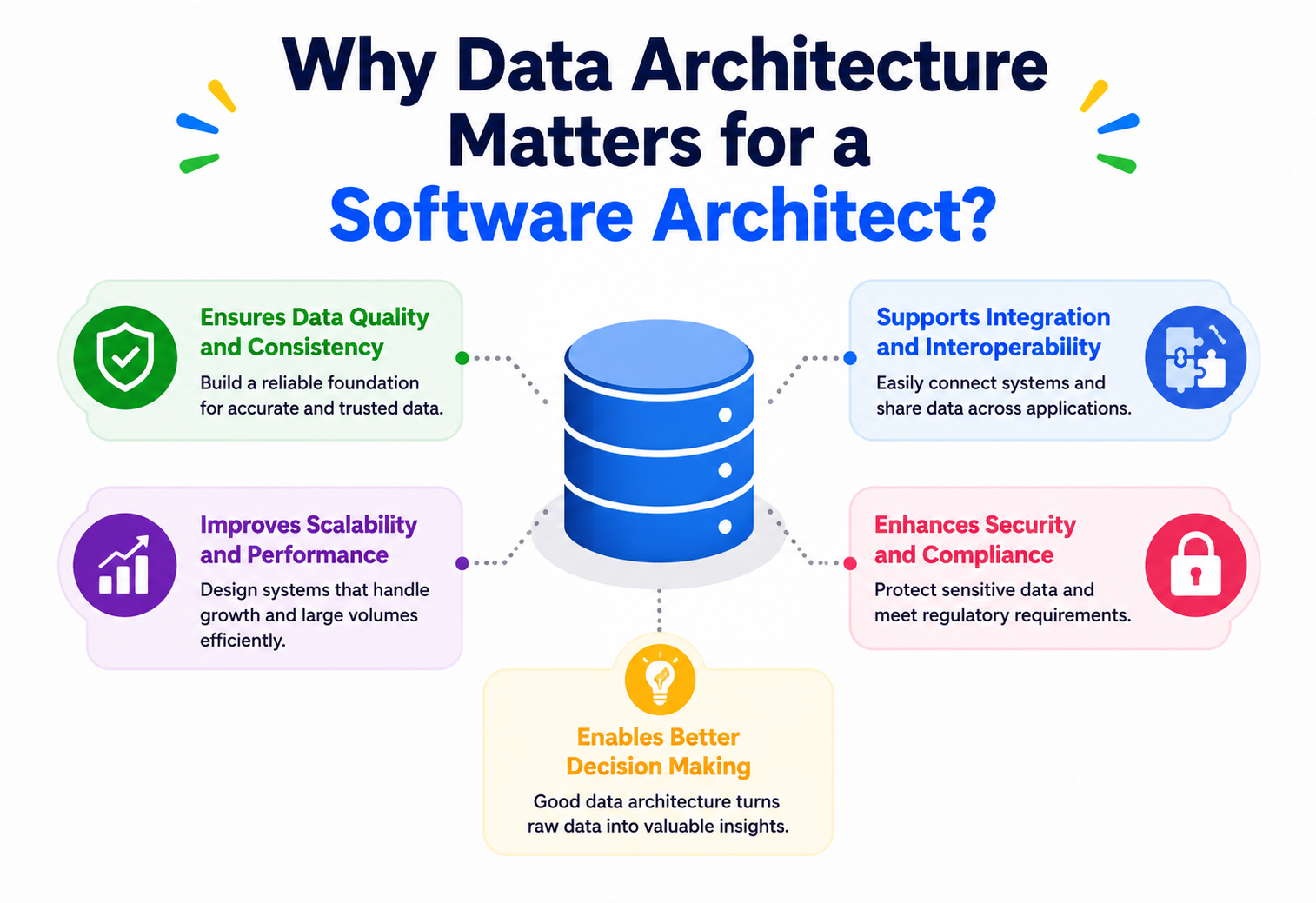
Why Data Architecture Matters for a Software Architect
Code lives for a few years. Data lives forever. This is the beginner-friendly, deep-dive tour of why every Software Architect — not just data engineers — must understand data architecture to design systems that survive contact with reality.
An architect who ignores data architecture is like a city planner who ignores water pipes: the buildings look fine on the surface, but the city eventually fails from underneath. This guide walks through why data is the one asset that reliably outlives every framework, team, and reorganization — and how a Software Architect deliberately plans for it.
Introduction & History
Two houses, two builders, one deep difference — and how “data architect” became a discipline in its own right.
Imagine two houses being built on the same street. Both builders hire the best carpenters, buy the best bricks, and use the best paint. One builder, though, first sits down with an engineer and plans where the water pipes go, where the electrical wiring runs, and how the foundation will handle the weight of everything above it. The other builder just starts building rooms as people ask for them.
Five years later, the first house still works perfectly. The second house has pipes running through walls that block new doors, wires that nobody can trace, and a foundation that cannot support the extra floor the family wants. Fixing it now means tearing down walls that were only built two years ago.
Software systems are exactly like this. The “pipes and wiring” of a software system is its data — where it is stored, how it moves, who can touch it, and how it is shaped. Data architecture is the discipline of planning that, deliberately, before the rooms (features) get built. And the person who is expected to think about the whole house, not just one room, is the Software Architect.
Simple Analogy
Think of a city’s water supply system. The city planner does not just build houses — they decide where the reservoirs sit, how pipes reach every neighbourhood, how water pressure stays consistent, and what happens if one pipe bursts. A Software Architect does the same thing, except instead of water it is data flowing between systems, teams, and users.
1.1 · A SHORT HISTORY: HOW WE GOT HERE
In the 1970s and 1980s, most companies had one big computer (a mainframe) and one big database. There was no “architecture” problem because there was barely any choice to make — everything lived in one place. Architects at the time mostly worried about how fast a single machine could process transactions.
In the 1990s, client-server systems became common. Applications started talking to databases over a network, and companies began running multiple databases for different departments — sales, finance, inventory. This is when the first real data problems appeared: the sales database said a customer’s address was one thing, and the finance database said something else. Nobody had planned for two systems to disagree.
The 2000s brought the internet, e-commerce, and an explosion in the sheer volume of data. Companies like Google, Amazon, and Yahoo were dealing with more data than any single database could hold. This forced the invention of distributed systems, data warehouses, and later technologies like Hadoop (2006) that could process huge amounts of data spread across thousands of cheap machines instead of one expensive one.
The 2010s introduced the “big data” era, cloud computing, and NoSQL databases (databases that don’t use the traditional row-and-column table format). Companies realised that data was not just something to store — it was a product in itself, something that could be sold, analysed, and turned into machine-learning models. This is also when the job title “Data Architect” started appearing separately from “Software Architect” — because the problem had become big enough to need a specialist.
Today, in 2026, data architecture is not a side skill. It sits at the centre of nearly every major architectural decision: how microservices share information, how AI models get trained, how companies stay compliant with privacy laws, and how systems recover from failure. A Software Architect who ignores data architecture is like a city planner who ignores water pipes — the buildings might look fine on the surface, but the city will eventually fail.
Problem & Motivation
Three teams, three “customers,” one broken dashboard — the story every architect has lived at least once.
Let’s get very concrete about the problem. Imagine you are the architect of an e-commerce company. There are three teams: Orders, Inventory, and Marketing. Each team, working independently and with good intentions, builds its own database.
- The Orders team stores customer names as
first_nameandlast_name. - The Inventory team doesn’t store customer names at all — it only cares about product IDs.
- The Marketing team stores a single
full_namefield, copied in from a signup form.
Six months later, the company wants a single dashboard showing “customer lifetime value” — how much each customer has spent, what they’ve bought, and how marketing campaigns influenced them. Now someone has to write code that stitches together three different definitions of “customer” and “name,” none of which fully agree with each other. This is not a coding problem. This is an architecture problem, and it happened because nobody planned the data layer before three teams started building independently.
Feature-level decisions are made by engineers every day. Architecture-level decisions — like “what does a Customer mean across our entire company?” — are rarely made by anyone unless the Architect insists on making them deliberately. If you don’t own this decision, it gets made by accident, one team at a time, and the accident compounds for years.
2.1 · THE CORE MOTIVATIONS
1. Data outlives code. Applications get rewritten every few years — old frameworks retire, new languages arrive. But the data those applications created often survives for decades. A poorly designed database schema from 2015 might still be silently powering reports in 2030, long after the original application was thrown away.
2. Systems don’t work in isolation. A modern company might have 50, 200, or even 2,000 different services and applications. Without a plan for how data flows and is shared between them, every new integration becomes a custom, fragile, one-off connection — what architects call a “spaghetti architecture.”
3. Bad data is worse than no data. A machine-learning model trained on inconsistent, duplicated, or outdated data will make confidently wrong predictions. A dashboard built on unreliable data will lead executives to make bad business decisions while trusting the numbers completely.
4. Regulations demand it. Laws like GDPR (Europe), India’s Digital Personal Data Protection Act (DPDP Act), and CCPA (California) require companies to know exactly what personal data they hold, where it lives, and who can access it. You cannot comply with a law you cannot even describe — and describing it requires a data architecture.
5. Cost. Storing and moving data at scale is expensive. Careless data architecture — duplicated data, unused pipelines, poorly compressed storage — can silently cost a company millions of dollars a year in cloud bills.
Simple Analogy
Think of data like water in a large office building. If every floor installs its own separate water tank, pump, and pipe system without talking to each other, you get leaks, wasted water, inconsistent pressure, and a nightmare when something breaks. A single, well-planned plumbing system serving the whole building is more efficient, safer, and easier to fix. Data architecture is the plumbing plan for a company’s information.
Core Concepts
Learning the names of the tools before we pick them up in the workshop.
Before we go further, let’s build a solid vocabulary. Each term below is something you will hear constantly in architecture discussions, interviews, and design documents.
3.1 · WHAT IS DATA ARCHITECTURE?
What it is: Data architecture is the set of rules, models, policies, and standards that govern how data is collected, stored, integrated, and used across an organisation or a system.
Why it exists: Without it, every team invents its own rules, and those rules collide the moment two teams need to share information.
Where it’s used: Every company that has more than one application talking to more than one database — which is nearly every real-world company.
Practical example: A bank decides that every system must represent money as an integer number of “paise” (or “cents”) instead of a decimal, to avoid rounding errors. That single rule, applied everywhere, is a small piece of data architecture.
3.2 · DATA MODEL
What it is: A data model describes what pieces of information exist (like “Customer,” “Order,” “Product”) and how they relate to each other (a Customer places many Orders).
Why it exists: Before you can store or move data, you need to agree on its shape. Two systems that disagree on what a “Customer” looks like cannot share data cleanly.
Simple analogy: A data model is like a blueprint of a family tree. It doesn’t tell you the actual names of people, but it tells you the rules — a parent can have many children, a child has exactly two biological parents, and so on.
Software example: In a relational database, a data model becomes tables: a customers table and an orders table, connected by a customer_id column.
3.3 · METADATA — “DATA ABOUT DATA”
What it is: Metadata describes data itself: when it was created, who owns it, what it means, how sensitive it is, and how fresh it is.
Why it exists: Imagine a warehouse full of unlabelled boxes. You’d have to open every single one to know what’s inside. Metadata is the label on the box.
Practical example: A column called amt in a database is meaningless on its own. Metadata tells you it means “transaction amount in Indian Rupees, updated in real time, owned by the Payments team.”
3.4 · DATA GOVERNANCE
What it is: The rules and processes that decide who can create, change, read, or delete data, and how data quality is enforced.
Why it exists: Without governance, anyone can change a shared piece of data in a way that breaks ten other systems relying on it.
Simple analogy: Governance is like the rules of a shared kitchen in a hostel. Everyone can cook, but there are agreed rules: label your food, clean up after yourself, don’t use someone else’s ingredients without asking.
3.5 · DATA DOMAIN / BOUNDED CONTEXT
What it is: A domain is a specific area of business (Orders, Payments, Inventory), and each domain typically “owns” a certain set of data.
Why it exists: It prevents every team from having to understand and touch every piece of data in the company. Ownership creates accountability.
Software example: In Domain-Driven Design, the Payments domain owns the definition of a “Transaction,” and no other team is allowed to directly modify the payments database — they must ask through an API.
3.6 · STRUCTURED, SEMI-STRUCTURED, AND UNSTRUCTURED DATA
| Type | Description | Example |
|---|---|---|
| Structured | Fits neatly into rows and columns, with a fixed schema. | A SQL table of orders. |
| Semi-structured | Has some organisation, but flexible fields. | A JSON document, a log file. |
| Unstructured | No predefined format. | Images, videos, emails, PDFs. |
A Software Architect must know which kind of data a system is dealing with, because it changes almost every downstream decision — which database to use, how to search it, and how to back it up.
3.7 · SCHEMA AND SCHEMA EVOLUTION
What it is: A schema is the formal shape of a piece of data — its fields, types, and constraints. Schema evolution is the practice of changing that shape over time without breaking existing consumers.
Why it matters: The moment two or more independent systems read the same data, changing its shape becomes dangerous. If the Orders service renames a field from total to totalAmount, every downstream consumer that reads total silently breaks.
Never make a “breaking” schema change directly. Add new fields alongside old ones, let consumers migrate at their own pace, and only remove the old field once everyone has moved on. This is called backward-compatible evolution, and it is one of the most valuable habits an architect can build.
3.8 · DATA LINEAGE
What it is: The traceable history of where a piece of data came from and every transformation it went through to reach its current form.
Simple analogy: Like a supply-chain label that tells you a shirt was made from cotton grown in one country, spun into thread in another, and stitched together in a third. Data lineage answers: “Where did this number in the report actually come from?”
Why an architect cares: When a number on an executive dashboard looks wrong, lineage is what lets you trace it back through five systems to find the bug — without lineage, this can take days of guesswork.
3.9 · MASTER DATA VS TRANSACTIONAL DATA
Master data is the core, relatively stable information about key business entities — customers, products, employees. Transactional data is the record of events — an order placed, a payment made, a login event. Master data changes rarely; transactional data changes constantly and grows fast. Architects design very differently for each: master data needs strong consistency and a single source of truth, while transactional data needs to handle high write volume and scale horizontally.
Architecture & Components
The building blocks a Software Architect assembles when designing a company’s data landscape.
Now let’s zoom out and look at the major building blocks a Software Architect assembles when designing a company’s data landscape.
4.1 · OPERATIONAL DATABASES (OLTP)
These are the databases behind live applications — where an order gets inserted the moment a customer clicks “Buy Now.” OLTP stands for Online Transaction Processing. These systems are optimised for fast, small, frequent reads and writes. Examples: PostgreSQL, MySQL, Oracle.
4.2 · DATA WAREHOUSE (OLAP)
A data warehouse is optimised for Online Analytical Processing — large, complex queries that scan millions of rows to answer questions like “what were total sales by region last quarter?” It is deliberately separate from operational databases so that heavy analytics queries never slow down live customer transactions. Examples: Snowflake, Amazon Redshift, Google BigQuery.
4.3 · DATA LAKE
A data lake stores raw data in its original form — structured, semi-structured, or unstructured — often at massive scale and low cost, typically in cloud object storage like Amazon S3. Unlike a warehouse, a data lake doesn’t force data into a fixed schema up front; it lets you decide the structure later, when you actually query it (“schema-on-read” instead of “schema-on-write”).
4.4 · DATA LAKEHOUSE
A newer, hybrid idea: combine the low-cost flexible storage of a data lake with the structure, transaction guarantees, and query performance of a warehouse. Technologies like Delta Lake, Apache Iceberg, and Apache Hudi make this possible. In 2026, most large-scale new data platforms are being built as lakehouses rather than choosing strictly one or the other.
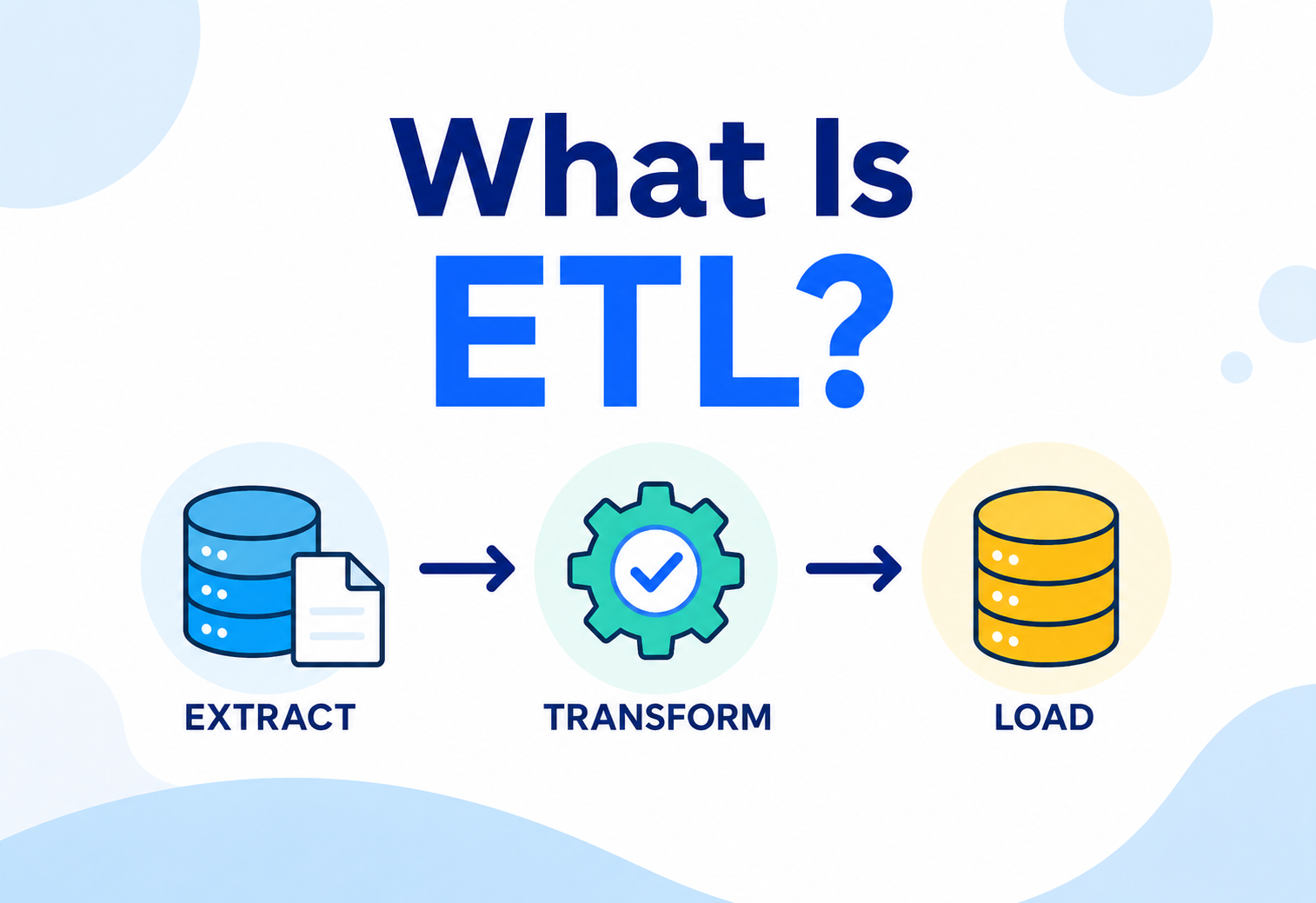
4.5 · DATA PIPELINES (ETL / ELT)
Pipelines move data from one place to another, usually transforming it along the way. ETL (Extract, Transform, Load) transforms data before loading it into its destination. ELT (Extract, Load, Transform) loads raw data first and transforms it afterwards, using the destination system’s own processing power — this has become more popular with cheap, powerful cloud warehouses.
4.6 · MESSAGE BROKERS / EVENT STREAMS
Systems like Apache Kafka or Amazon Kinesis let data move as a continuous stream of events rather than in scheduled batches. This is the backbone of real-time architecture — a payment event can be published the instant it happens, and every interested service can react immediately instead of waiting for a nightly batch job.
4.7 · MASTER DATA MANAGEMENT (MDM) SYSTEMS
A dedicated system whose entire job is to hold the single, authoritative version of important shared entities like “Customer” or “Product,” and to feed that clean version out to every other system, preventing the “three different customer records” problem we saw earlier.
4.8 · DATA CATALOG
A searchable inventory of what data exists, what it means, who owns it, and how sensitive it is — essentially a “Google search” for a company’s internal data, built on top of metadata.
Notice that no single box in this diagram is “the architecture.” The architecture is the decision of which boxes exist, how they connect, who owns each one, and what rules govern the arrows between them. That decision-making is exactly the job of a Software Architect working on the data layer.
Internal Working
Under the hood: how ETL steps run, how batch differs from streaming, and how indexes and schemas quietly shape everything.
5.1 · HOW ETL ACTUALLY WORKS
Extract, Transform, Load is a three-step dance:
Extract
Pull raw data out of a source system (a database, an API, a file).
Transform
Clean it up: fix data types, remove duplicates, join it with other data, apply business rules.
Load
Write the final, transformed data into its destination (usually a warehouse).
Here is a small, simplified Java example that models a transform step — converting raw order records into a cleaned, validated form before loading:
public class OrderTransformer {

    public CleanOrder transform(RawOrder raw) {
        // Business rule: normalize currency to smallest unit (paise)
        long amountInPaise = Math.round(raw.getAmount() * 100);

        // Data quality rule: reject negative or missing amounts
        if (amountInPaise <= 0) {
            throw new IllegalArgumentException(
                "Invalid order amount for order: " + raw.getOrderId());
        }

        // Standardize date format to UTC ISO-8601
        Instant utcTimestamp = raw.getLocalTimestamp()
                .atZone(raw.getTimeZone())
                .toInstant();

        return new CleanOrder(
            raw.getOrderId(),
            raw.getCustomerId(),
            amountInPaise,
            utcTimestamp
        );
    }
}
Notice this is ordinary Java — no special “big data” library required to understand the idea. Real-world pipelines run this same kind of logic, just at massive scale, using tools like Apache Spark, Apache Flink, or dbt.
5.2 · BATCH VS STREAMING PROCESSING
Batch processing collects data over a period (an hour, a day) and processes it all at once — simpler to reason about, but data is “stale” by the time you see it. Streaming processing handles each event as it arrives, giving near-instant results but requiring more careful engineering (ordering, duplicate handling, backpressure).
Simple Analogy
Batch processing is like doing laundry once a week — efficient, but your favourite shirt might sit dirty for six days. Streaming is like washing each item the moment it gets dirty — always fresh, but you need a much more capable washing setup running constantly.
5.3 · SCHEMA-ON-WRITE VS SCHEMA-ON-READ, INTERNALLY
In a traditional relational database (schema-on-write), the database engine checks every incoming row against a strict table definition before accepting it — reject anything that doesn’t fit. In a data lake (schema-on-read), raw files (often in formats like Parquet, Avro, or JSON) are simply stored as-is, and the structure is applied only at query time, by whatever tool reads the file. This trade-off is central to why lakes are more flexible but warehouses are more predictable.
5.4 · INDEXING — HOW SYSTEMS FIND DATA FAST INTERNALLY
Behind the scenes, databases and search systems use index data structures (commonly B-Trees for relational databases, and inverted indexes for search engines like Elasticsearch) to avoid scanning every single row for every query. An architect doesn’t need to implement a B-Tree from scratch, but understanding that every index speeds up reads while slowing down writes and using extra storage is a trade-off decision architects make constantly when designing data-heavy systems.
Data Flow & Lifecycle
Every piece of data goes through six predictable stages — and most teams design only for the first five.
Every piece of data goes through a predictable lifecycle, and a good architect designs for every stage of it — not just the moment data is created.
STAGE 1 — GENERATION
Data is born the moment a user clicks a button, a sensor reports a value, or a system logs an event. Architecture decisions here include: what format should this data take? What metadata should be attached immediately (timestamp, source system, version)?
STAGE 2 — INGESTION
Data moves from where it was created into a system designed to hold it — via an API call, a message queue, or a file upload. Architects decide: should this be real-time or batched? What happens if ingestion fails halfway through?
STAGE 3 — PROCESSING / TRANSFORMATION
Raw data is cleaned, validated, joined with other data, and reshaped into something useful, as we saw in the ETL example above.
STAGE 4 — STORAGE
Data is placed into its long-term home — a database, warehouse, or lake — with decisions about replication, partitioning, and retention.
STAGE 5 — CONSUMPTION
Applications, dashboards, APIs, and machine-learning models read the data to produce value — this is the whole point of the previous four stages.
STAGE 6 — ARCHIVAL & DELETION
Eventually, data must be archived to cheaper storage or deleted entirely — often required by law (a user requesting deletion under GDPR) or simply to control storage costs. Architects who skip designing this stage often discover, years later, that deleting one customer’s data safely is nearly impossible because it’s scattered across forty different systems with no map.
Teams design beautifully for stages 1–5 and completely forget stage 6. Then a regulator or a customer asks, “delete everything you have about me,” and nobody can even list all the places that data lives, let alone delete it safely.
Advantages, Disadvantages & Trade-offs
There is rarely a universally “correct” answer — only the right one for a specific company at a specific stage.
Advantages of Investing in Data Architecture
- Consistent definitions across teams — one “truth” for shared concepts.
- Faster onboarding of new systems and teams, since patterns already exist.
- Lower long-term cost — less duplicated storage, fewer redundant pipelines.
- Easier compliance with data-privacy regulations.
- Reliable foundation for analytics and machine learning.
- Faster incident recovery, because data lineage and ownership are known.
Disadvantages / Costs
- Upfront time investment before visible feature progress.
- Requires cross-team coordination, which can slow decisions.
- Over-engineering risk — building elaborate governance for a small startup wastes effort.
- Ongoing maintenance — schemas, catalogs, and pipelines need continuous care.
- Skill requirement — teams need training to follow architectural standards.
KEY TRADE-OFFS AN ARCHITECT MUST BALANCE
| Trade-off | Choosing one side favours | Choosing the other favours |
|---|---|---|
| Centralised vs. Decentralised data ownership | Consistency, easier governance | Team autonomy, faster local decisions |
| Strong schema (warehouse) vs. Flexible schema (lake) | Predictability, data quality | Speed of ingestion, flexibility for unknown future use |
| Batch vs. Streaming | Simplicity, lower cost | Freshness, real-time responsiveness |
| Normalization vs. Denormalization | Less duplication, easier updates | Faster reads, simpler queries |
| Build vs. Buy (managed platforms) | Full control, customisation | Speed to market, lower operational burden |
This is the essence of architecture work: there is rarely a universally “correct” answer, only the right answer for a specific company, at a specific stage, with specific constraints. A ten-person startup and a bank with 40 million customers should NOT have the same data architecture, even if they’re solving conceptually similar problems.
Performance & Scalability
Data-layer decisions swing performance more than the choice of language or framework ever will.
Data architecture decisions have an outsized effect on system performance — often far more than the choice of programming language or framework.
8.1 · PARTITIONING
What it is: Splitting a large dataset into smaller, manageable chunks based on some key (like date, region, or customer ID), so queries only scan the relevant partitions instead of the entire dataset.
Simple analogy: Imagine a library with a million books piled in one room versus a library where books are organised by genre into separate sections. Finding a mystery novel is much faster in the organised library — you go straight to the “Mystery” section instead of checking every shelf.
Practical example: An orders table partitioned by month means a query for “orders in July 2026” only reads July’s data, not ten years of history.
8.2 · SHARDING
Sharding spreads data across multiple independent database servers, typically based on a key like customer ID or geographic region. This allows a system to scale horizontally — instead of buying one giant, expensive machine, you use many smaller, cheaper machines, each responsible for a slice of the data.
8.3 · REPLICATION
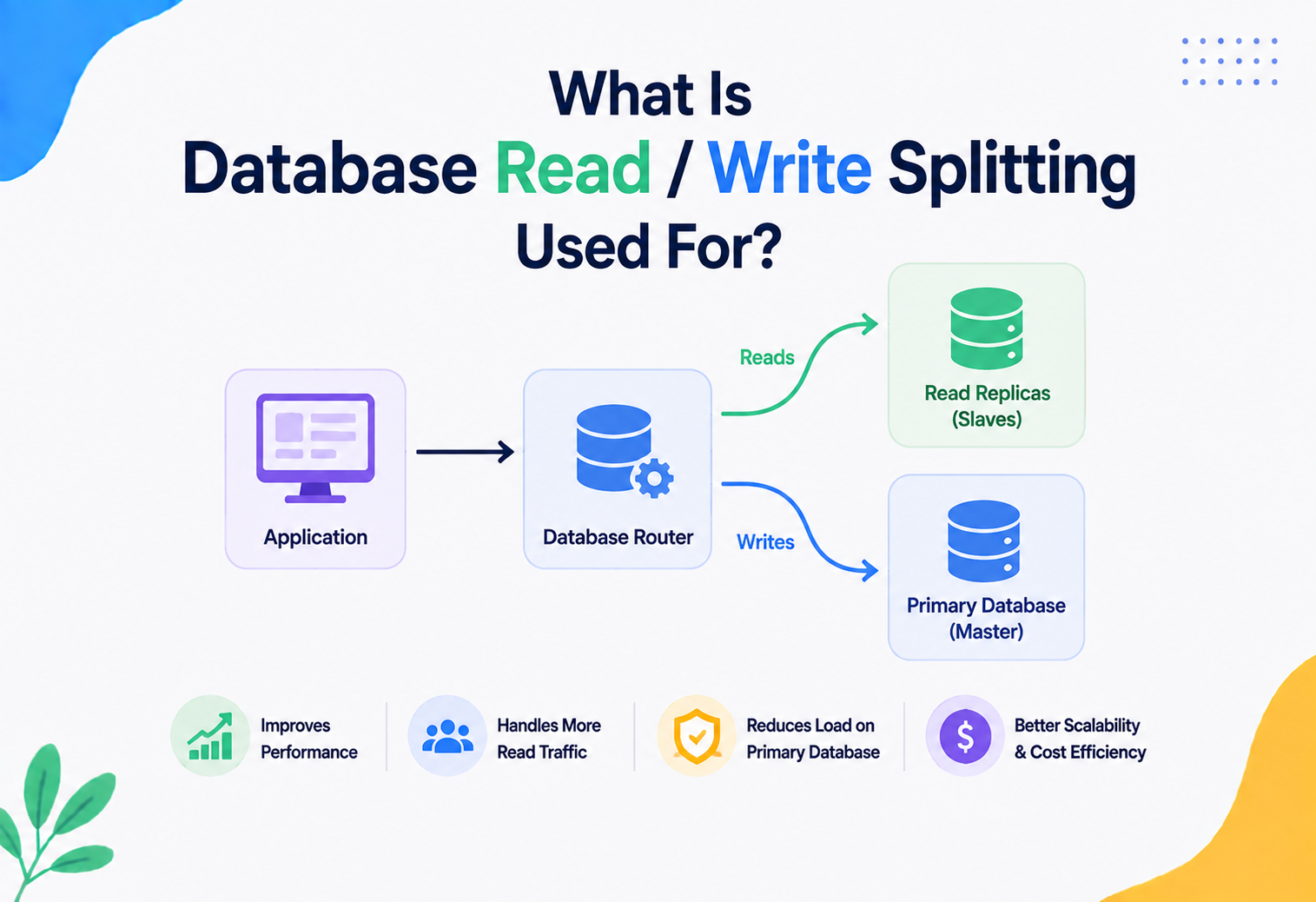
Copies of the same data are kept on multiple machines. This improves both read performance (many machines can serve read requests in parallel) and reliability (if one machine fails, another has the same data). We’ll dig deeper into replication’s reliability role in the next section.
8.4 · DENORMALIZATION FOR READ PERFORMANCE
In a normalised database, data is broken into many small, related tables to avoid duplication — clean, but often requires expensive joins to answer a single query. Denormalization deliberately duplicates some data to avoid those joins, trading storage space and update complexity for faster reads. High-traffic systems (like a product page on an e-commerce site) often denormalise aggressively because read speed matters more than storage cost.
8.5 · CACHING
Frequently accessed data is stored in fast, temporary storage (often in-memory, using tools like Redis or Memcached) so repeat requests don’t have to hit the slower primary database every time. We’ll explore this further in the databases section.
The CAP theorem (covered next) and the realities of physics mean you cannot make a distributed data system infinitely fast, infinitely consistent, and infinitely available all at once. Good architects don’t chase a mythical “perfect” system — they consciously choose which trade-off fits the specific business need in front of them.
8.6 · THE CAP THEOREM
In any distributed data system, when a network failure happens (a “partition”), you must choose between Consistency (every read gets the latest, correct value) and Availability (every request gets a response, even if it might be slightly stale). You cannot fully guarantee both at the same time during a partition — this is the CAP theorem, formalised by computer scientist Eric Brewer.
Simple Analogy
Imagine two people updating a shared shopping list, but their phones lose signal to each other. Person A can either (a) refuse to let anyone add items until the phones reconnect and agree on the exact list — that’s consistency — or (b) let both people keep adding items independently and merge the lists later, risking temporary disagreement — that’s availability. You cannot have perfect agreement and unlimited freedom to act at the same time when communication is broken.
Practically: banking systems often lean toward consistency (better to briefly reject a transaction than double-spend money), while social-media “like” counters often lean toward availability (better to show a slightly outdated count than make the app unresponsive).
High Availability & Reliability
Failover, backups, consensus, and idempotency — the four levers that keep data systems standing.
9.1 · REPLICATION FOR FAILOVER
A primary database is paired with one or more replicas that continuously receive copies of every change. If the primary fails, a replica is promoted to take over — this is called failover. Well-designed systems can do this automatically within seconds.
9.2 · BACKUP AND DISASTER RECOVERY
Replication protects against a single machine failing, but not against accidental deletion, corruption, or a natural disaster taking out an entire data centre. That’s why architects also design regular backups, stored in a separate physical location (or cloud region), along with a tested disaster recovery plan — a documented, rehearsed procedure for restoring service after catastrophic failure.
Two key metrics architects define for every critical system:
- RPO (Recovery Point Objective): how much data can we afford to lose? (e.g., “no more than 5 minutes of transactions.”)
- RTO (Recovery Time Objective): how long can we afford to be down? (e.g., “system must be restored within 1 hour.”)
9.3 · CONSENSUS ALGORITHMS
In distributed systems, multiple machines often need to agree on a single “truth” — for example, which replica is currently the primary. Algorithms like Raft and Paxos allow a group of machines to reach agreement even if some of them fail or messages get delayed, without needing a single central authority that could itself become a point of failure.
Simple Analogy
Think of five friends trying to agree on a single restaurant for dinner, using only text messages that sometimes get delayed. A consensus algorithm is like an agreed set of rules (“majority vote wins, and we wait for at least 3 confirmations”) that lets the group reliably land on one decision, even if one friend’s phone is briefly offline.
9.4 · IDEMPOTENCY — SURVIVING RETRIES SAFELY
In unreliable networks, the same request sometimes gets sent twice. An idempotent operation produces the same result no matter how many times it’s applied — for instance, “set balance to 500” is idempotent, but “add 100 to balance” is not, because running it twice by accident doubles the effect. Architects design data operations to be idempotent wherever possible, using techniques like unique request IDs, specifically to survive the retries that distributed systems inevitably produce.
public class PaymentProcessor {

    private final Set<String> processedRequestIds =
        new ConcurrentHashMap<>().newKeySet();

    public PaymentResult process(PaymentRequest request) {
        // Idempotency check: has this exact request already been handled?
        if (!processedRequestIds.add(request.getIdempotencyKey())) {
            return PaymentResult.alreadyProcessed(request.getIdempotencyKey());
        }

        // Safe to process exactly once, even if the network retries this call
        return chargeCustomer(request);
    }
}
Security
Data is the most attractive target for attackers — and the asset most tightly regulated by law.
Data is usually the single most attractive target for attackers, and it’s also the asset most tightly regulated by law. Security is not a bolt-on step — it must be part of the architecture from day one.
10.1 · ENCRYPTION
Encryption at rest protects data stored on disk — if someone steals the physical hard drive, the data is unreadable without the key. Encryption in transit (using protocols like TLS) protects data as it travels across networks, preventing eavesdropping.
10.2 · ACCESS CONTROL
Role-Based Access Control (RBAC) grants permissions based on a user’s role (“Analyst” can read sales data, “Admin” can also modify it). More fine-grained systems use Attribute-Based Access Control (ABAC), which can factor in context — for example, “only allow access to this data during business hours, from company devices.”
10.3 · DATA MASKING & ANONYMIZATION
Sensitive fields (like a credit-card number or a national ID) can be partially hidden (masking, e.g., showing only the last 4 digits) or fully stripped of identity (anonymisation) before being given to teams who don’t need the raw value — like data scientists building a general trend model who don’t need to know a specific person’s identity.
Simple Analogy
Think of a hospital giving research data to a university. They don’t hand over patient names and addresses — they strip that information out first, so researchers can still study patterns in the illness without ever knowing who any specific patient is.
10.4 · DATA CLASSIFICATION
Not all data deserves the same level of protection. Architects typically classify data into tiers, such as: Public (a company’s published prices), Internal (internal reports), Confidential (salary information), and Restricted (health records, government IDs). Each tier gets different rules for storage, access, and encryption.
10.5 · AUDIT LOGGING
Every access to sensitive data should be logged — who accessed what, when, and why. This isn’t just for catching bad actors; regulators frequently require companies to prove exactly who touched personal data, and audit logs are the evidence.
Teams often secure the “front door” (login screens, API authentication) very carefully, while leaving direct database access, backup files, or internal analytics tools wide open. Attackers — and careless insiders — routinely find the unlocked side door instead of trying to break the front one.
Monitoring, Logging & Metrics
You cannot manage what you cannot see. A well-architected data system exposes enough visibility to catch problems before customers notice.
You cannot manage what you cannot see. A well-architected data system exposes enough visibility to catch problems before customers notice them.
11.1 · DATA QUALITY METRICS
Architects define automated checks that run continuously: Is the row count today roughly what we expect, compared to yesterday? Are there unexpected null values in a critical field? Did a pipeline finish within its expected time window? Tools like Great Expectations or dbt tests are commonly used to codify these checks as part of the pipeline itself.
11.2 · PIPELINE OBSERVABILITY
Beyond data quality, you need to know if the pipelines themselves are healthy: how long did each stage take, did anything fail, and how much data passed through at each step. This is typically surfaced through dashboards (using tools like Grafana) fed by metrics systems (like Prometheus).
11.3 · LOGGING
Every stage of a pipeline should log enough context — timestamps, record counts, error details — that an engineer debugging a 3 a.m. incident can reconstruct exactly what happened without guessing.
11.4 · ALERTING
Metrics are only useful if someone acts on them. Architects design alerting rules (“page the on-call engineer if the daily pipeline hasn’t completed by 6 a.m.”) so problems get human attention before they cascade into a bigger failure — like a stale dashboard misleading an executive making a real-time decision.
Design monitoring for data pipelines with the same seriousness you’d design monitoring for a live customer-facing API. A silently broken nightly pipeline can go unnoticed for weeks, quietly feeding wrong numbers into every report downstream of it.
Deployment & Cloud
Modern data architecture is deeply intertwined with cloud platforms — because running this infrastructure yourself is brutally expensive.
Modern data architecture is deeply intertwined with cloud platforms, since building and operating this infrastructure yourself is extremely expensive and complex.
12.1 · MANAGED CLOUD DATA SERVICES
Cloud providers offer managed versions of nearly every component we’ve discussed: Amazon RDS or Aurora (managed operational databases), Snowflake or BigQuery (managed warehouses), Amazon S3 or Google Cloud Storage (data lakes), and managed streaming services like Amazon Kinesis or Confluent Cloud (managed Kafka). “Managed” means the provider handles the operational burden — patching, scaling, backups — so teams can focus on using the data instead of running the servers.
12.2 · INFRASTRUCTURE AS CODE
Rather than manually clicking through a cloud console to create a database, architects define infrastructure in code (using tools like Terraform), so environments are reproducible, versioned, and reviewable just like application code.
12.3 · MULTI-REGION AND MULTI-CLOUD CONSIDERATIONS
For global companies, data may need to live close to users in different geographic regions — both for performance (lower latency) and for legal reasons (some countries require citizen data to stay within their borders, known as data residency). Architects must decide how data replicates or stays isolated across regions, which directly affects both compliance and cost.
12.4 · COST OPTIMIZATION
Cloud data platforms often charge based on both storage and the amount of data scanned per query. Poor architecture — like storing everything in one giant uncompressed table, or running queries that scan far more data than necessary — can make monthly bills spiral. Techniques like partitioning, columnar storage formats (like Parquet), and tiered storage (moving old data to cheaper “cold” storage) are core cost-control tools every architect should know.
Databases, Caching & Load Balancing
Polyglot persistence, cache invalidation, and read replicas — the three concrete moves architects make most often.
13.1 · CHOOSING THE RIGHT DATABASE TYPE
| Database Type | Best For | Example |
|---|---|---|
| Relational (SQL) | Structured data with strong consistency needs, complex relationships | PostgreSQL, MySQL |
| Document (NoSQL) | Flexible, evolving schemas, nested data | MongoDB |
| Key-Value | Extremely fast lookups by a single key | Redis, DynamoDB |
| Wide-Column | Massive write volume, time-series-like data | Cassandra, HBase |
| Graph | Highly connected data — relationships matter more than the entities | Neo4j |
| Search Engine | Full-text search, ranked relevance | Elasticsearch |
A common beginner mistake is picking “the database I already know” for every problem. An experienced architect matches the database type to the shape of the data and the access pattern — this is often called polyglot persistence: using multiple types of databases within one system, each for what it does best.
13.2 · CACHING LAYERS
Caching stores a copy of frequently requested data somewhere much faster than the primary database — usually in memory. When a request comes in, the system checks the cache first (a “cache hit” avoids touching the database entirely); if the data isn’t there (a “cache miss”), it fetches from the database and stores a copy in the cache for next time.
Simple Analogy
A cache is like keeping your most-used spices on the kitchen counter instead of in a storeroom three floors down. You still keep the full stock in the storeroom (the database), but the items you reach for constantly live somewhere much faster to access.
The hardest problem in caching is cache invalidation — knowing when the cached copy has become stale because the underlying data changed. Common strategies include setting a time-to-live (TTL) so cached data automatically expires, or actively updating/removing the cache entry the moment the source data changes.
13.3 · LOAD BALANCING FOR DATA SYSTEMS
When multiple replicas of a database exist, a load balancer (or smart client logic) distributes read requests across them, so no single replica gets overwhelmed. Writes are typically still routed to a single primary to maintain consistency, while reads can be spread across many replicas — this pattern is called read replicas and is one of the most common scalability techniques in real systems.
APIs & Microservices
Every API is a data contract wearing a REST or GraphQL costume — and the shape of that contract is a data-architecture decision.
14.1 · THE “DATABASE PER SERVICE” PRINCIPLE
In a microservices architecture, each service should own its own database, and no other service should reach directly into it. If Service A wants data owned by Service B, it must ask through Service B’s API. This sounds simple, but it is one of the most frequently violated rules in real companies — and violating it is exactly what recreates the “shared, tangled database” problems microservices were meant to solve in the first place.
A team under deadline pressure writes a quick SQL query directly against another team’s database “just this once, to save time.” Six months later, five other teams have done the same thing, and now nobody can safely change that database’s schema without secretly breaking five unrelated services.
14.2 · DATA CONSISTENCY ACROSS SERVICES
Without one shared database, how do multiple services keep their data consistent? Two common patterns:
- Event-driven synchronisation: when data changes in one service, it publishes an event (e.g., “OrderPlaced”) that other services subscribe to and use to update their own local copies.
- Saga pattern: a sequence of local transactions across multiple services, where each step publishes an event triggering the next step, with defined “compensating actions” to undo earlier steps if something later fails — since a single all-or-nothing transaction across services usually isn’t practical at scale.
14.3 · API DESIGN AS A DATA CONTRACT
An API is, at its core, a data contract between two systems. Choices like API versioning, pagination for large result sets, and clear error formats are really data-architecture decisions wearing an API costume. A poorly designed API can leak internal database structure directly to consumers, making it nearly impossible to change that internal structure later without breaking everyone downstream.
// A simple, versioned REST contract for exposing Order data
public class OrderResponseV2 {
    private final String orderId;
    private final String status;         // enum-backed, not a raw internal DB code
    private final Money totalAmount;      // structured object, not a raw double
    private final Instant createdAt;      // always UTC, always ISO-8601

    // Getters only -- this is a read-only data contract for API consumers,
    // completely decoupled from the internal Orders table structure.
}
14.4 · GRAPHQL AND THE “DATA AGGREGATION” PROBLEM
When a frontend needs data from many microservices at once, calling five separate REST APIs can be slow and clunky. GraphQL lets a client ask for exactly the fields it needs from multiple sources in a single request, with a dedicated layer that aggregates data from the underlying services — another example of a data-architecture decision (how do we combine data from many owners efficiently?) driving a technology choice.
Design Patterns & Anti-patterns
The habits that scale — and the ones that quietly kill a data platform.
15.1 · USEFUL PATTERNS
CQRS (Command Query Responsibility Segregation)
Separates the model used for writing data (commands) from the model used for reading data (queries). This allows the read side to be optimised purely for fast, flexible queries (often denormalised), while the write side stays focused on correctness and business rules.
// Write side: focused on correctness, enforces business rules
public class PlaceOrderCommandHandler {
    public void handle(PlaceOrderCommand cmd) {
        Order order = new Order(cmd.getCustomerId(), cmd.getItems());
        order.validate();
        orderRepository.save(order);
        eventPublisher.publish(new OrderPlacedEvent(order));
    }
}

// Read side: a separate, denormalized model optimized purely for fast lookups
public class OrderSummaryQueryService {
    public OrderSummaryView getSummary(String orderId) {
        return readOnlyOrderSummaryStore.find(orderId);
    }
}Event Sourcing
Instead of storing only the current state of an entity, every change is stored as an immutable event (“OrderCreated,” “ItemAdded,” “OrderShipped”), and the current state is derived by replaying those events. This gives a complete, auditable history for free — extremely valuable in domains like banking or healthcare, where knowing exactly what happened, and when, matters as much as the final state.
Data Mesh
A newer organisational pattern (popularised around 2019–2020) that treats data as a product owned by individual domain teams, rather than centralising all data engineering into one overloaded central team. Each domain team is responsible for the quality, documentation, and API of the data it produces, governed by shared, company-wide standards.
Outbox Pattern
Solves a subtle but common bug: how do you reliably update a database AND publish an event about that change, without the risk of doing one but not the other if the system crashes in between? The outbox pattern writes the event to a special “outbox” table in the same database transaction as the actual change, and a separate process reliably publishes events from that table afterwards — guaranteeing the update and the event either both happen or neither does.
15.2 · ANTI-PATTERNS TO AVOID
The “Big Ball of Mud” Database
One giant, shared database with no clear ownership, used directly by dozens of services. Nobody can change anything without fear of breaking something unrelated.
Data Swamp
A data lake that received years of raw data with no metadata, no catalog, and no quality checks — technically full of data, practically unusable because nobody can find or trust anything in it.
God Table
A single, enormous table trying to represent too many unrelated concepts at once, with dozens of nullable columns that only make sense in certain situations — a data-layer version of the God Object anti-pattern.
Silent Schema Drift
Teams change the shape of shared data without announcing it or versioning it, quietly breaking downstream consumers who only discover the problem when their reports start showing wrong numbers.
Best Practices & Common Mistakes
The practical rules working architects actually follow — and the beginner traps to sidestep.
16.1 · BEST PRACTICES
Define ownership explicitly
Every important dataset should have one clearly accountable owning team.
Treat schemas as contracts
Version them, evolve them backward-compatibly, and communicate changes before they happen.
Document meaning, not just structure
A column name tells you the “what”; documentation should tell you the “why” and the business rules behind it.
Design for deletion from day one
Build the ability to trace and remove a specific entity’s data before you’re legally forced to do it under time pressure.
Automate data quality checks
Catch bad data with code, not with an analyst noticing something looks wrong three weeks later.
Right-size your architecture to your stage
A five-person startup doesn’t need a data mesh; a 500-engineer company probably needs more than a single shared spreadsheet-like database.
16.2 · COMMON MISTAKES
- Letting every team invent its own definitions for shared business concepts.
- Treating data architecture as “someone else’s job” (only the DBA’s, or only the data team’s) instead of a core architectural concern.
- Optimising only for how data is written, never for how it will be read and queried later.
- Skipping monitoring for data pipelines, treating them as “fire and forget” once deployed.
- Ignoring compliance requirements until a legal team raises an alarm.
- Choosing a trendy technology because a conference talk made it look impressive, rather than because it fits the actual access pattern.
When you’re asked to review a new system design, a strong signal of seniority is asking data-first questions before anything else: “What does this data mean? Who owns it? How will it grow? Who else needs it? How do we delete it if asked?” Engineers who focus purely on code structure often overlook these — and this is exactly the kind of proactive, high-leverage architectural ownership that separates a senior architect from someone who is simply a strong coder.
Real-World & Industry Examples
Four companies, four business priorities — and four visibly different data architectures.
Streaming-first, experimentation-driven
Netflix runs one of the largest event-streaming architectures in the world, processing hundreds of billions of events per day to power recommendations, A/B testing, and operational monitoring. Their data architecture had to evolve specifically to support fast experimentation — every UI change, every recommendation tweak, is validated using data pipelines that can quickly measure impact across millions of users. Without a deliberately designed, scalable data platform, this pace of experimentation simply wouldn’t be possible.
Service owns its own data
Amazon’s early move toward a strict “service owns its own data” architecture (each team fully responsible for its own database, exposed only through APIs) is often cited as one of the foundational decisions that made Amazon Web Services possible at all — internal service boundaries, enforced partly through data ownership rules, eventually became sellable external cloud products.
Freshness-first, streaming at scale
Uber’s core problem is inherently about data freshness — matching riders and drivers in real time requires location data flowing through the system with very low latency. Uber has published extensively about evolving from batch-oriented systems toward heavily streaming-based architecture (using tools like Apache Kafka at massive scale) specifically because stale location data directly translates into a worse product experience and lost trust.
Correctness above all
Banks and financial institutions generally favour strong consistency over availability for core transaction data (leaning toward the “C” in CAP theorem) because the cost of even briefly showing an incorrect account balance can be severe — both financially and legally. This is a clear example of business domain directly dictating a fundamental data-architecture trade-off, rather than following whatever is currently fashionable in tech blogs.
None of these companies picked their data architecture randomly. Each choice traces directly back to what the business actually needs: Netflix needs experimentation speed, Amazon needed clean service boundaries, Uber needs real-time freshness, and banks need unquestionable correctness. This is the essence of the architect’s job — translating business priorities into concrete data-architecture decisions, not copying whatever pattern is trending.
Frequently Asked Questions
Fast answers to the questions that come up in every design review, every interview, and every code review.
Is data architecture only relevant for “Data Architects,” not regular Software Architects?
No. A dedicated Data Architect role exists in larger organisations to go deep on this one area, but every Software Architect designing a system that stores or shares information is making data-architecture decisions, whether they realise it or not. Ignoring the discipline doesn’t remove the decisions — it just means they get made accidentally.
Do I need to learn big-data tools like Spark or Kafka to understand data architecture?
Not necessarily as a starting point. The core concepts — ownership, schema contracts, consistency trade-offs, lifecycle management — apply whether you’re running a single PostgreSQL database or a thousand-node cluster. Learn the concepts first; the specific tools become much easier to pick up once the underlying ideas make sense.
How much data-architecture planning does a small startup actually need?
Very little upfront ceremony, but a few cheap habits pay off enormously: agree on core entity definitions early, avoid letting every service reach directly into another service’s database, and keep basic documentation of what each important dataset means. Full governance frameworks and data catalogs can wait until the company and data volume actually justify them.
What’s the difference between a Data Architect and a Data Engineer?
A Data Architect focuses on designing the overall structure, standards, and strategy — the “blueprint.” A Data Engineer focuses on building and operating the actual pipelines and systems that implement that blueprint. In smaller companies, one person often does both.
Is SQL still relevant given all these newer NoSQL and streaming technologies?
Extremely relevant. SQL remains the dominant language for querying structured data, and most modern data warehouses and lakehouses are queried using SQL or SQL-like syntax. Understanding relational concepts deeply also makes it much easier to understand when and why NoSQL alternatives make sense.
How does data architecture relate to machine learning and AI systems?
Almost entirely. Machine-learning models are only as good as the data feeding them. Reliable, well-governed, well-documented data pipelines are the actual foundation that makes trustworthy AI possible — the modelling work often gets the attention, but the data architecture underneath it usually determines whether the whole system succeeds or quietly produces biased or wrong predictions.
Summary & Key Takeaways
Data outlives code, every application, and every reorganisation built around it — plan for it, or every team will plan for it by accident.
Data architecture is not a specialised side-topic that only “data people” need to worry about. It is one of the core responsibilities of a Software Architect, because data is the one thing that reliably outlives every application, framework, and team reorganisation built around it.
- Data architecture is the deliberate planning of how data is modelled, stored, moved, secured, and governed across a system or company — the “plumbing plan” behind every application.
- Skipping this planning doesn’t remove the decisions — it just means every team makes them independently, and those independent decisions eventually collide.
- Core building blocks include operational databases, data warehouses, data lakes, pipelines, and master-data systems — each suited to different needs.
- Every architecture decision here is a trade-off: consistency vs. availability, flexibility vs. predictability, speed vs. cost — there is no universally “correct” answer, only the right fit for a given business context.
- Performance, reliability, security, and compliance all trace back to decisions made at the data layer, often more than to the choice of programming language or framework.
- Real companies — Netflix, Amazon, Uber, banks — each shaped their data architecture around their specific business priorities, not around trends.
- The habits that separate a strong architect here are proactive: defining ownership before conflicts happen, designing for deletion before regulators ask, and asking “what does this data mean, and who owns it?” before any code gets written.
The next time you’re handed a system-design problem — in an interview, or in a real architecture review — resist the urge to jump straight to services and APIs. Start by asking what data exists, who owns it, how it will grow, and how it will eventually be deleted. That single habit is one of the clearest signals of architectural maturity, and it is exactly the kind of proactive, ownership-driven thinking that turns a good engineer into a trusted architect.