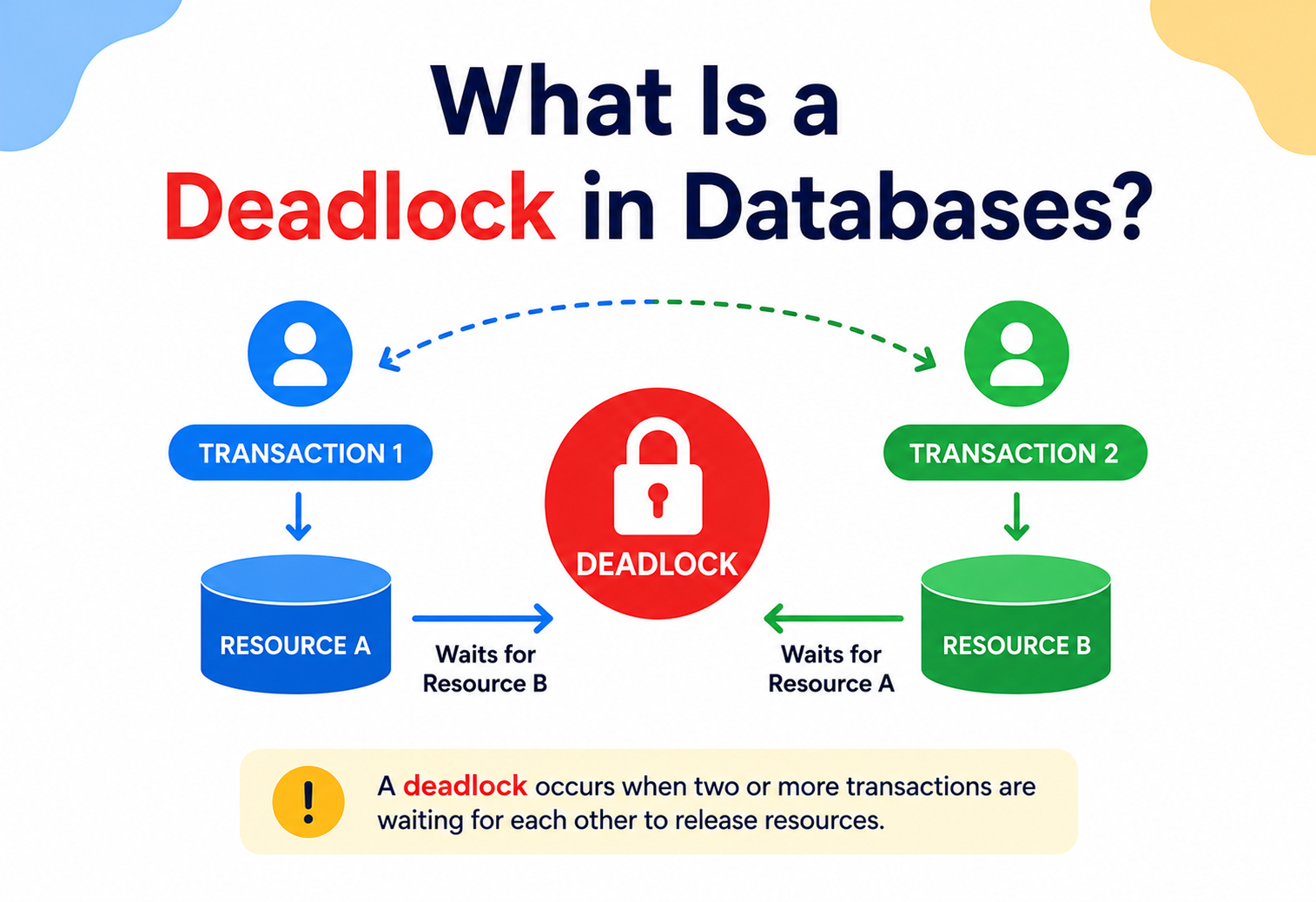
What Is a Deadlock in Databases?
A complete, beginner-friendly guide to why deadlocks happen, how databases detect and resolve them, and how to design applications that avoid them — with real diagrams, real Java code, and real production lessons from banking, e-commerce, ticketing, ride-sharing, and streaming systems.
Two Cars, One Bridge, and Nobody Backing Down
Imagine two kids at a dinner table. One kid is holding the fork and wants the knife. The other kid is holding the knife and wants the fork. Neither one will let go of what they already have. So both kids just sit there, staring at each other, waiting forever. Nobody eats. That, in a nutshell, is a deadlock — it is not a bug that someone wrote by mistake, it is a natural traffic jam that can happen any time two or more things are sharing limited resources and refuse to give way.
Picture two cars meeting on a single-lane bridge, facing each other. Car A can only move forward if Car B backs up. Car B can only move forward if Car A backs up. If both drivers stubbornly wait for the other to reverse first, both cars are stuck forever — even though the bridge itself is perfectly fine and both drivers are perfectly capable of driving. That “stuck forever, waiting on each other” situation is a deadlock.
In a database, a deadlock happens when two or more transactions (think of a transaction as “a piece of work someone asked the database to do”) each hold onto a piece of data that the other one needs, and each one is waiting for the other to release it first. Since nobody backs down, nobody moves forward. The database has to step in, like a traffic officer, and force one of them to back up.
1.1 Where did this idea come from?
The term “deadlock” did not start in databases. It came from the early days of operating systems in the 1960s and 1970s, when computers first started running multiple programs (processes) at the same time and sharing devices like printers, tape drives, and memory. Computer scientists like Edsger Dijkstra studied this problem while working on early multiprogramming systems. Dijkstra’s famous “Dining Philosophers Problem” (1965) is the classic textbook illustration of deadlock: five philosophers sit around a table, each needs two forks to eat, but there are only five forks between them. If every philosopher picks up the fork on their left at the same time, everyone is holding one fork and waiting for the other — and nobody can ever eat.
As databases grew more sophisticated in the 1970s and 1980s — especially with the rise of relational databases like IBM System R and later Oracle, DB2, and SQL Server — the same underlying problem showed up again, but this time with database rows, tables, and locks instead of forks and philosophers. Database researchers borrowed the concept directly and built specific tools to detect and resolve it, because unlike an operating system managing a handful of devices, a busy production database might have thousands of transactions running per second, all touching overlapping rows.
1.2 A quick history-of-deadlocks timeline
1965 — Dining Philosophers
Dijkstra formalises the canonical example of a circular resource wait, giving computer science its favourite deadlock parable.
1971 — Coffman conditions
Edward G. Coffman Jr. publishes the four conditions that must all be true for a deadlock to occur: mutual exclusion, hold-and-wait, no preemption, and circular wait.
1970s — IBM System R
Early relational database research at IBM introduces two-phase locking and formal transaction isolation — and inherits the deadlock problem in a new setting.
1980s — Wait-die and wound-wait
Timestamp-based deadlock avoidance schemes are developed for distributed database research, sidestepping the need for a global wait-for graph.
1990s–2000s — Enterprise RDBMS matures
Oracle, DB2, and SQL Server ship robust built-in deadlock detectors as a mandatory feature; row-level locking becomes the default.
2010s onward — Distributed SQL
Google Spanner, CockroachDB, and YugabyteDB lean heavily on timestamp-based avoidance, because building a live global wait-for graph across dozens of nodes is prohibitively expensive.
1.3 Why this topic matters today
Modern applications — e-commerce checkouts, banking transfers, ride-sharing bookings, ticket sales — all rely on databases to safely handle many people trying to read and write the same data at the same time. Every time two customers try to book the last seat on a flight, or two people try to update the same shopping cart, there’s a chance of lock conflicts, and occasionally, a full deadlock. Understanding deadlocks is not an academic exercise; it’s a day-one skill for any backend engineer, and it’s one of the most commonly asked topics in system design and backend interviews.
A deadlock is a situation where two or more transactions are each waiting for a resource (like a row lock) that is held by another transaction in the same group — forming a circular chain of waiting that can never resolve itself without outside help.
Why Locks Exist, and Why They Occasionally Deadlock
To understand why deadlocks exist, we first need to understand why databases use locks in the first place.
2.1 Why do databases need locks at all?
Imagine a bank account with $100 in it. Two requests arrive at almost the exact same moment: one wants to withdraw $80, and another wants to withdraw $50. If the database let both requests read the balance ($100), do their math, and write back the result without any coordination, here is what could go wrong:
- Request 1 reads balance = $100
- Request 2 reads balance = $100 (before Request 1 finishes)
- Request 1 calculates $100 − $80 = $20 and writes $20
- Request 2 calculates $100 − $50 = $50 and writes $50
The final balance is $50 — but in reality, $130 was withdrawn from an account that only had $100. The bank just lost $80 it didn’t have. This is called a lost update, and it’s exactly the kind of chaos that locks are designed to prevent.
To stop this, the database uses locks: before a transaction is allowed to change a row, it must first “claim” that row, the same way you might grab a whiteboard marker before writing on a shared whiteboard — if someone else already has the marker, you wait until they put it down.
Think of a public library with a “one copy” reference book that many people need. Each person who wants to write notes in the margins (edit it) has to sign it out at the desk. While signed out, nobody else can take it. This is fair, prevents two people scribbling over each other’s notes — but if two people both need two different books, and each one has already signed out the book the other person wants, they’re stuck waiting on each other.
2.2 So why do deadlocks happen if locks fix the lost-update problem?
Locks solve the “two people editing at once” problem, but they introduce a new problem: waiting. And whenever you have multiple people waiting on multiple resources, in more than one order, you get the risk of a circular wait — a deadlock.
Here’s the key motivation for learning this topic: deadlocks are the unavoidable side effect of correctness. A database that never locked anything would never deadlock — but it also could not guarantee your bank balance is accurate. So instead of avoiding locks altogether, database engineers accept that deadlocks will occasionally happen, and build systems to detect them quickly and recover gracefully, usually within milliseconds.
Many beginners think a deadlock means the database is broken or buggy. It’s not. A deadlock is actually a sign that the database’s locking system is working correctly — it is protecting your data from corruption. The database’s job is to detect the situation and clean it up quickly, which every mature database (MySQL, PostgreSQL, Oracle, SQL Server) does automatically.
2.3 A concrete beginner example
Let’s say you have a simple accounts table, and two transactions want to transfer money between two rows: Row A (Alice’s account) and Row B (Bob’s account).
| Step | Transaction 1 (T1) | Transaction 2 (T2) |
|---|---|---|
| 1 | Locks Row A (Alice) | Locks Row B (Bob) |
| 2 | Tries to lock Row B (Bob) — but T2 has it, so T1 waits | Tries to lock Row A (Alice) — but T1 has it, so T2 waits |
| 3 | Waiting… forever… | Waiting… forever… |
T1 is waiting for T2, and T2 is waiting for T1. Neither can proceed. This is a deadlock, and without intervention, both transactions would sit frozen indefinitely, potentially blocking other users too.
The Vocabulary Every Deadlock Discussion Uses
Before we go deeper, let’s build a solid vocabulary. Every new word below is explained with what it is, why it exists, and a simple example.
3.1 Transaction
What it is: A transaction is a group of one or more database operations (reads and writes) that are treated as a single, indivisible unit. Either all of them succeed, or none of them do.
Why it exists: Real-world actions often need multiple steps. A bank transfer needs to subtract money from one account AND add it to another. If only one step happened (say, the computer crashed halfway), money would vanish or be duplicated. Transactions guarantee “all or nothing.”
Simple analogy: Think of a transaction like mailing a package with tracking. Either the package fully arrives, or it’s fully returned to you — it never “half-arrives” with only some contents.
Practical example:
BEGIN TRANSACTION;
  UPDATE accounts SET balance = balance - 80 WHERE id = 'Alice';
  UPDATE accounts SET balance = balance + 80 WHERE id = 'Bob';
COMMIT;
3.2 Lock
What it is: A lock is a flag the database attaches to a piece of data (a row, a page, or a table) to say “someone is using this right now, please wait your turn.”
Why it exists: Without locks, two transactions could read and write the same data at the same time and corrupt it (like the lost-update example earlier).
Simple analogy: A lock is like the “occupied” sign on an airplane bathroom door. If it’s occupied, you wait outside until the light changes to “vacant.”
Types of locks you’ll encounter:
Shared Lock (S)
Multiple transactions can hold this at once — used for reading. Many people can read the same book at once.
Exclusive Lock (X)
Only one transaction can hold this — used for writing. Only one person can write in the book’s margins at a time.
Row-Level Lock
Locks just one row, letting other rows in the same table stay free for others to use.
Table-Level Lock
Locks the entire table — simpler but blocks far more people at once.
3.3 Wait-for graph
What it is: A diagram (used internally by the database) that shows which transaction is waiting for which other transaction. Each transaction is a “node,” and an arrow points from the waiting transaction to the one holding the lock it wants.
Why it exists: It gives the database a simple way to check for deadlocks: if the arrows ever form a closed loop (a cycle), that’s a deadlock.
Simple analogy: Picture a game of “who owes who a favor.” If Alice owes Bob a favor, Bob owes Carol a favor, and Carol owes Alice a favor, that’s a closed loop — nobody can be the first to “cash in” their favor because everyone is waiting on someone else.
3.4 Isolation level
What it is: A setting that controls how strictly the database keeps transactions separated from each other’s in-progress changes. Common levels: READ UNCOMMITTED, READ COMMITTED, REPEATABLE READ, SERIALIZABLE.
Why it exists: Stricter isolation means fewer surprises (like reading data that later gets rolled back) but requires more locking, which increases the chance of deadlocks. It’s a trade-off dial between safety and concurrency.
Simple analogy: It’s like the difference between a shared Google Doc where everyone sees live edits (loose isolation) versus a Word document that must be checked out from a shared drive one person at a time (strict isolation).
3.5 Victim (in deadlock resolution)
What it is: When a database detects a deadlock, it picks one of the involved transactions to forcibly cancel (roll back) so the others can continue. That chosen transaction is called the “victim.”
Why it exists: Since a deadlock cannot resolve on its own, someone has to “lose” so the rest of the system can keep moving. The database tries to pick the least costly transaction to cancel (e.g., the one that has done the least work).
Simple analogy: It’s like a game of musical chairs where the referee has to pick one player to sit out so the game can continue for everyone else.
3.6 Timeout
What it is: A maximum amount of time a transaction is allowed to wait for a lock before the database gives up and cancels it.
Why it exists: Some databases (or configurations) don’t build a full wait-for graph; instead, they use a simpler safety net — if you’ve been waiting “too long,” you’re probably stuck, so just cancel and try again.
Simple analogy: If you call a customer support line and get put on hold with music for over 30 minutes, most people just hang up and call back later instead of waiting forever.
Blocking is completely normal and healthy — it’s just one transaction waiting patiently for another to finish and release a lock. Deadlock is a special, unhealthy case of blocking where the waiting forms a closed loop, so waiting can never end on its own. All deadlocks involve blocking, but almost all blocking is not a deadlock.
The Machinery That Catches and Cleans Up Deadlocks
To catch and resolve deadlocks, a database server has a few internal components working together. You don’t need to build these yourself — every major database (MySQL/InnoDB, PostgreSQL, Oracle, SQL Server) has them built in — but understanding what they do helps you reason about production behaviour.
Lock Manager
Tracks who currently holds which locks, and who is waiting for which locks. This is the “ledger” of all locking activity in the database.
Wait-For Graph Builder
Continuously (or periodically) constructs a graph from the Lock Manager’s data to check whether any cycles (deadlocks) exist.
Deadlock Detector
The background process/thread that runs the cycle-detection algorithm on the wait-for graph, usually every few hundred milliseconds to a few seconds.
Victim Selector
Once a deadlock is found, this component decides which transaction to roll back based on cost heuristics (transaction age, amount of work done, number of locks held).
Transaction Manager
Executes the rollback of the chosen victim, releases its locks, and returns an error to that transaction’s client so the application knows to retry.
Logging/Monitoring Subsystem
Records deadlock events (which queries, which tables, which rows) so DBAs and developers can analyse and fix the root cause later.
4.1 How this differs across databases
| Database | Detection method | Default detection interval |
|---|---|---|
| MySQL (InnoDB) | Wait-for graph, checked immediately when a transaction starts waiting | Near-instant (event-driven) |
| PostgreSQL | Wait-for graph, checked after a configurable delay | deadlock_timeout, default 1 second |
| Oracle | Wait-for graph, background process scans periodically | Roughly every few seconds; also on lock wait |
| SQL Server | Dedicated “Deadlock Monitor” background thread | Every 5 seconds by default, adaptive if deadlocks are frequent |
Building and scanning a wait-for graph has a real computational cost. Most waits are just normal blocking that resolves in milliseconds — not deadlocks. Checking too aggressively wastes CPU on graphs that almost always turn out to be cycle-free. That’s why PostgreSQL waits a second before even bothering to check, and SQL Server checks every 5 seconds by default.
Step by Step, From Lock Request to Rollback
Let’s go step-by-step through exactly how a database identifies and breaks a deadlock internally.
5.1 Every lock request is recorded
When a transaction wants to read or write a row, it asks the Lock Manager for a lock on that row. The Lock Manager keeps a table (like a spreadsheet) of: which transaction holds which lock on which resource, and which transactions are waiting for which locks.
5.2 Waiting transactions are queued
If a lock is already held by someone else in a conflicting mode (e.g., you want an exclusive lock but someone else has a shared or exclusive lock), your transaction is placed into a wait queue for that specific resource, and your thread effectively “sleeps” until it’s notified.
5.3 The wait-for graph is built
The database builds a graph where each node is a transaction, and each directed edge (arrow) means “Transaction X is waiting for a lock held by Transaction Y.” This graph is rebuilt (or incrementally updated) whenever a new wait relationship appears.
5.4 Cycle detection runs
The deadlock detector runs a graph traversal algorithm (commonly Depth-First Search) starting from each waiting transaction, following the “waits for” arrows. If it ever revisits a node it has already seen in the current path, it has found a cycle — a deadlock.
5.5 A victim is chosen
Once a cycle is confirmed, the database must pick one transaction in that cycle to sacrifice. Common heuristics include:
- Least work done: Roll back whichever transaction has made the fewest changes so far (cheaper to undo).
- Youngest transaction: Roll back whichever transaction started most recently (the older one gets priority since it’s “been waiting longer” for its overall work).
- Fewest locks held: Roll back whichever transaction holds fewer resources, freeing up more for others faster.
5.6 Rollback and error signal
The chosen victim’s transaction is automatically rolled back (all its changes undone), all its locks are released, and the database returns a specific error to the client application — for example, MySQL returns error 1213 (ER_LOCK_DEADLOCK), and PostgreSQL returns SQLSTATE 40P01.
5.7 The surviving transaction proceeds
With the victim’s locks released, the other transaction(s) in the former cycle can now acquire the lock they were waiting for and continue normally.
Think of the deadlock detector like a teacher walking around a classroom checking who’s holding hands with who in a game. If the teacher ever traces a chain of hand-holding that loops back to where it started, she knows there’s a closed circle, and she picks one kid to let go of hands so the game can continue for everyone else.
The Full Life of a Deadlock, From Birth to Retry
Let’s trace the full lifecycle of a deadlock from beginning to end, using our earlier Alice/Bob bank transfer example, with exact timing.
T1 begins, locks Row A
Transaction 1 starts a transfer from Alice to Bob. It successfully locks Alice’s row to subtract money.
T2 begins, locks Row B
At nearly the same moment, Transaction 2 starts a transfer from Bob to Alice. It successfully locks Bob’s row to subtract money.
T1 requests Row B — blocked
T1 now needs to add money to Bob’s row, but T2 already holds that lock. T1 goes into the wait queue.
T2 requests Row A — blocked
T2 now needs to add money to Alice’s row, but T1 already holds that lock. T2 goes into the wait queue too.
Wait-for graph updates
The Lock Manager notifies the graph builder: “T1 waits for T2” and “T2 waits for T1” — two edges now exist.
Deadlock detector runs
On its next scheduled scan (or instantly, depending on the database), the detector traverses the graph and finds a cycle: T1 → T2 → T1.
Victim chosen and rolled back
The database picks T2 as the victim (say, because it has done less work). T2 is rolled back; its lock on Row B is released.
T1 resumes and completes
T1 immediately acquires the now-free lock on Row B, finishes the transfer, and commits successfully.
Application retries T2
The application code that submitted T2 receives a deadlock error and, if written correctly, automatically retries the whole transaction from scratch, which now succeeds since Row B is free.
A deadlock victim’s work is completely thrown away — as if it never ran. If your application code doesn’t catch the deadlock error and retry the transaction, the user’s action (like a money transfer) will silently fail, which is a serious bug. We’ll cover exact retry code in the Best Practices section.
Wait-For Graphs, Timeouts, and Edge-Chasing Probes
Now let’s go a level deeper into the actual algorithms databases use to catch deadlocks. This is a popular interview topic, so we’ll be precise.
7.1 Wait-for graph + cycle detection (Depth-First Search)
What it is: As described earlier, the database models transactions as nodes and “waits for” relationships as directed edges, then runs a graph traversal to check for cycles.
Why it’s used: It’s precise — it finds real deadlocks without false alarms — and works well when the number of active transactions is moderate (hundreds to low thousands).
Java-style pseudocode: cycle detection via DFS
Here’s a simplified version of what a deadlock detector does internally, written in Java so you can see the logic clearly. (Real database engines implement this in C/C++, but the algorithm is identical.)
import java.util.*;

public class DeadlockDetector {

    // adjacency list: transaction -> set of transactions it is waiting for
    private final Map<String, Set<String>> waitForGraph = new HashMap<>();

    public void addWaitEdge(String waitingTxn, String holdingTxn) {
        waitForGraph.computeIfAbsent(waitingTxn, k -> new HashSet<>())
                     .add(holdingTxn);
    }

    // Returns the cycle (deadlock) if found, otherwise null
    public List<String> detectDeadlock() {
        Set<String> visited = new HashSet<>();
        Set<String> inStack = new HashSet<>();  // nodes in current DFS path

        for (String txn : waitForGraph.keySet()) {
            List<String> path = new ArrayList<>();
            if (dfs(txn, visited, inStack, path)) {
                return path;  // cycle found -- this is your deadlock chain
            }
        }
        return null; // no deadlock
    }

    private boolean dfs(String node, Set<String> visited,
                         Set<String> inStack, List<String> path) {
        if (inStack.contains(node)) {
            path.add(node);
            return true; // found a cycle back to a node already in this path
        }
        if (visited.contains(node)) {
            return false; // already fully explored, no cycle from here
        }

        visited.add(node);
        inStack.add(node);
        path.add(node);

        for (String neighbor : waitForGraph.getOrDefault(node, Set.of())) {
            if (dfs(neighbor, visited, inStack, path)) {
                return true;
            }
        }

        inStack.remove(node);
        path.remove(path.size() - 1);
        return false;
    }
}
How this works: The inStack set tracks nodes currently on the active DFS path. If, while walking through “who’s waiting for who,” we bump into a node that’s already in our current path, we’ve found a loop — a deadlock. This is the exact same technique used to detect cycles in course-prerequisite graphs or dependency graphs in build tools.
7.2 Timeout-based detection
What it is: Instead of building a graph, the database simply says “if a transaction waits longer than X seconds for a lock, assume it might be deadlocked and cancel it.”
Why it’s used: It’s much simpler to implement and has near-zero overhead, which matters for distributed databases where building a global wait-for graph across many servers is expensive.
Pros of timeout-based detection
- Very simple to implement
- No need to track a complex graph
- Works even across distributed/sharded databases
Cons of timeout-based detection
- False positives: cancels transactions that were just slow, not deadlocked
- Wastes time waiting out the full timeout even for genuine deadlocks
- Picking the right timeout value is tricky (too short = wasted retries, too long = wasted waiting)
7.3 Edge-chasing (distributed detection)
What it is: Used in distributed databases (data spread across multiple servers). Instead of one central graph, each server sends small “probe” messages along the wait-for edges. If a probe ever comes back to the server that originally sent it, a cycle (deadlock) is confirmed.
Why it’s used: There is no single machine that can see the entire wait-for graph in a distributed system, so probes let the detection work in a decentralised way, similar to how a chain letter would eventually come back to its original sender if it looped.
Edge-chasing is like passing a note in class that says “if you get this note back with your own name still on it, tell the teacher.” Each person passes it to whoever they’re “waiting on.” If it loops back to the original sender, that’s proof of a cycle.
7.4 Which databases use what?
| Database | Primary technique |
|---|---|
| MySQL (InnoDB) | Wait-for graph, checked when a new lock wait begins |
| PostgreSQL | Wait-for graph, after deadlock_timeout elapses |
| Oracle | Wait-for graph, both local (within instance) and global (RAC clusters) |
| SQL Server | Dedicated background “Lock Monitor” thread building the wait-for graph |
| Distributed SQL (CockroachDB, YugabyteDB, Google Spanner) | Mostly avoidance via timestamp ordering rather than detection (see next section) |
Stopping Deadlocks Before They Ever Form
Detecting deadlocks after they happen is one strategy. But it’s even better when possible to stop them from happening at all. There are three broad families of strategy: prevention, avoidance, and detection + recovery (which we already covered).
8.1 Prevention: lock ordering
What it is: Force every transaction in your application to acquire locks in the exact same, agreed-upon order (e.g., always lock the row with the smaller ID first).
Why it works: A deadlock requires a circular wait. If everyone always locks resources in the same order, a cycle becomes mathematically impossible — you can’t have A wait for B and B wait for A if both always try to lock A before B.
Imagine an entire school agrees on a rule: everyone must always put on their left shoe before their right shoe. There’s no possible way two kids get stuck fighting over “who goes first,” because the order is fixed for everyone.
Practical example: In our Alice/Bob example, instead of always locking “the sender first,” both transactions should lock rows in a consistent order — say, alphabetically by account ID.
// BEFORE (deadlock-prone): locks in "sender, then receiver" order
public void transfer(String fromId, String toId, BigDecimal amount) {
    lockRow(fromId);
    lockRow(toId);
    // ... perform transfer
}

// AFTER (deadlock-safe): always lock in a fixed, consistent order
public void transfer(String fromId, String toId, BigDecimal amount) {
    String first  = fromId.compareTo(toId) < 0 ? fromId : toId;
    String second = fromId.compareTo(toId) < 0 ? toId : fromId;

    lockRow(first);   // always the "smaller" ID first
    lockRow(second);  // always the "larger" ID second
    // ... perform transfer using fromId/toId as needed
}
Now, whether Alice transfers to Bob or Bob transfers to Alice, both transactions lock rows in the same fixed order — Alice’s row first (assuming “Alice” < “Bob” alphabetically) — so the circular wait can never form.
8.2 Avoidance: wait-die and wound-wait schemes
What it is: These are timestamp-based algorithms where every transaction gets a timestamp when it starts. When a transaction requests a lock held by another, the database uses a rule based on which transaction is “older” (started earlier) to decide who waits and who gets cancelled — before a deadlock can even form.
Wait-Die
If the requesting transaction is older than the lock holder, it’s allowed to wait. If it’s younger, it “dies” (is rolled back) immediately rather than risk a cycle.
Wound-Wait
If the requesting transaction is older than the lock holder, it “wounds” (forcibly rolls back) the younger holder and takes the lock. If it’s younger, it waits.
Why this works: Timestamps only ever increase, so a chain of “always prefer the older transaction” or “always prefer to cancel the younger transaction” can never loop back on itself — there’s no way to have a cycle where everyone is “older” than everyone else.
Where it’s used: These schemes are especially popular in distributed databases (Google Spanner, CockroachDB) where building a full wait-for graph across many machines would be too slow. Deciding based on a timestamp comparison is fast and requires no central coordination.
8.3 Avoidance: reduce lock scope and duration
The less time a transaction holds a lock, and the fewer rows it locks, the less chance it has to collide with another transaction. Practical techniques:
Keep transactions short
Don’t do slow work (like calling an external API) while holding a database lock.
Access fewer rows per transaction
Break large batch updates into smaller batches to reduce the number of rows locked at once.
Use appropriate isolation levels
Don’t use SERIALIZABLE everywhere if READ COMMITTED is sufficient for the use case — stricter isolation locks more.
Index your queries
Poorly indexed queries can lock far more rows than necessary (a full table scan takes locks on rows it doesn’t even need to change).
8.4 Avoidance: use a single statement instead of multiple
Where possible, combine multiple updates into a single atomic SQL statement, which many databases can execute with less lock contention than the same logic split across multiple round trips.
-- Instead of two separate UPDATE statements from the app (higher deadlock risk):
UPDATE accounts SET balance = balance - 80 WHERE id = 'Alice';
UPDATE accounts SET balance = balance + 80 WHERE id = 'Bob';

-- Consider a single statement using a CASE, which many engines can lock more efficiently:
UPDATE accounts
SET balance = CASE
    WHEN id = 'Alice' THEN balance - 80
    WHEN id = 'Bob'   THEN balance + 80
END
WHERE id IN ('Alice', 'Bob')
ORDER BY id; -- ensures a consistent lock acquisition orderEven with perfect lock ordering in your own application code, deadlocks can still occur due to secondary/index locks, foreign key checks, or interactions with other applications hitting the same database. This is why detection and automatic retry logic (covered next) is still essential even if you follow every avoidance best practice.
Detect and Recover vs. Prevent and Avoid
It’s worth stepping back and evaluating the overall trade-off of “detect and recover” versus “prevent and avoid” as two overarching strategies.
Detect & Recover strategy
- Simple for application developers — just handle the retry
- Doesn’t require redesigning lock order across the whole codebase
- Works well when deadlocks are genuinely rare
- Database handles all the complexity internally
Detect & Recover strategy
- Wasted work: the victim transaction’s work is thrown away and redone
- Adds latency (detection time + rollback time + retry time)
- Can cascade under high load — more contention causes more deadlocks, causing more retries, causing more contention
Prevention & Avoidance strategy
- No wasted work — deadlocks structurally cannot occur
- More predictable performance under load
- Essential in distributed systems where detection is expensive
Prevention & Avoidance strategy
- Requires strict developer discipline across the whole codebase (one careless query breaks the guarantee)
- Timestamp-based schemes (wait-die/wound-wait) can cause unnecessary rollbacks even when no real deadlock would have occurred
- Harder to retrofit onto an existing large codebase
Most real-world systems use both: developers follow lock-ordering conventions where it’s easy to do so (e.g., always update the “parent” row before “child” rows), while still relying on the database’s built-in detect-and-recover mechanism as a safety net, combined with automatic retry logic in the application layer.
9.1 Trade-off summary table
| Dimension | Detect & Recover | Prevent & Avoid |
|---|---|---|
| Developer effort | Low (just retry on error) | Higher (must follow strict rules) |
| Wasted work | Yes, on every deadlock | None |
| Best for | Rare deadlocks, single-node DBs | High-contention systems, distributed DBs |
| Scales to distributed systems? | Expensive (global graph needed) | Yes (timestamp schemes scale well) |
Why Contention Grows Non-Linearly and Hot Rows Rule Everything
Deadlocks aren’t just a correctness issue — they’re a performance issue too. Here’s how they interact with scale.
10.1 Why deadlocks get worse under load
The probability of a deadlock roughly increases with the square of the number of concurrent transactions touching overlapping data (more precisely, it grows with contention, which itself grows non-linearly with concurrency). A system that sees 1 deadlock per hour at 100 concurrent users might see dozens per minute at 1,000 concurrent users if the workload pattern doesn’t change.
10.2 Hot rows: the real culprit
In practice, deadlocks rarely come from “random” collisions across a huge table. They almost always cluster around a small number of hot rows — popular rows that many transactions want to touch at once. Classic examples: a “total inventory count” row, a popular product’s stock row during a flash sale, or a single “global counter” row.
Think of a school with 30 classrooms but only one shared pencil sharpener. Even if every classroom is completely independent, if 200 kids all rush to sharpen a pencil at the same shared station at 9:00 a.m., you get a massive jam — not because the school is badly designed, but because of one popular shared resource.
10.3 Techniques to reduce contention at scale
Sharding hot rows
Split one “total count” row into several partial-count rows (e.g., per region or per shard) and sum them when reading, reducing contention on any single row.
Queueing writes
Route all writes to a hot row through a single-threaded queue/worker instead of letting many transactions fight over the lock directly.
Optimistic concurrency
Use version numbers instead of locks for low-conflict data — check the version hasn’t changed at commit time instead of locking upfront.
Shorter transactions
The shorter the time a lock is held, the smaller the “window of opportunity” for a deadlock to form.
10.4 Connection pooling and deadlock amplification
A subtle scalability trap: if your application’s connection pool is too small and transactions are long, requests start queueing at the connection-pool level too, on top of database-level locking. This compounds delays and can make deadlock storms far worse, because more transactions pile up waiting for both a connection and a lock.
If every failed transaction retries immediately with no delay, you can create a “thundering herd” — all the retries collide again instantly, causing another wave of deadlocks. Always use exponential backoff with jitter in retry logic (shown in the Best Practices section) to spread out retries over time.
Deadlocks in Replicated, Clustered, and Distributed Systems
Deadlocks intersect with high availability in a few important ways, especially in replicated and clustered database setups.
11.1 Deadlocks in replicated systems
In a typical primary-replica setup, writes go to a single primary node, so deadlock detection stays localised to that primary — it doesn’t need to coordinate with replicas. But in multi-primary (multi-master) setups, where more than one node can accept writes, deadlock detection becomes far harder because the wait-for graph is now spread across multiple machines.
11.2 Deadlocks in clustered/distributed databases
Systems like Oracle RAC, Google Spanner, CockroachDB, and YugabyteDB run across multiple nodes. Detecting a deadlock that spans two different nodes (a “global deadlock”) requires either:
- A global wait-for graph — periodically merging local graphs from every node, which adds network overhead and delay.
- Timestamp-based avoidance (wait-die / wound-wait) — sidesteps the need for a global graph entirely, which is why most modern distributed SQL databases lean heavily on this approach.
11.3 How deadlocks affect uptime and failover
A deadlock itself does not bring a database down — it’s resolved in milliseconds. But a deadlock storm (many deadlocks happening rapidly, often during a traffic spike or a bad deployment introducing a new hot row) can look like an outage from the user’s perspective: requests time out, retries pile up, and connection pools exhaust. Good monitoring (covered next) helps distinguish a real outage from a deadlock storm that will self-resolve as load drops.
Design your application’s retry logic to include a maximum retry count and a circuit breaker. If a transaction fails from deadlocks repeatedly (say, 5 times in a row), stop retrying blindly and surface a clear error — this prevents a localised hot-row problem from consuming all your application’s resources.
Deadlocks as a DoS Vector and an Information Leak
Deadlocks aren’t primarily a security topic, but there are two angles worth understanding.
12.1 Deadlocks as a denial-of-service vector
A malicious or careless actor with database access could intentionally craft queries that lock resources in conflicting orders on purpose, deliberately triggering repeated deadlocks to degrade performance for other users — a form of internal denial-of-service. This is more relevant in multi-tenant systems where different customers’ code can run queries against a shared database.
Query timeouts
Cap the maximum time any single query can run, limiting the damage a malicious long-held lock can cause.
Resource governance
Use database-level resource limits (e.g., max locks per session) available in enterprise editions of Oracle, SQL Server.
Least privilege
Restrict which tables/rows an application or user role can lock in the first place.
12.2 Information leakage through deadlock errors
Deadlock error messages sometimes include details like table names, row identifiers, or the exact SQL statements involved. If these error messages are shown directly to end users (instead of being logged internally and replaced with a generic message), it could leak internal schema details to an attacker probing your application.
Always catch deadlock exceptions in your application layer, log the full detail internally for debugging, and show the end user a generic message like “Something went wrong, please try again” — never the raw database error text.
Reading a Deadlock Graph Before It Becomes an Incident
You cannot fix what you cannot see. Every production database team should actively monitor for deadlocks, not just handle the errors reactively.
13.1 Key metrics to track
Deadlock count / minute
The raw rate of deadlocks. A sudden spike is your earliest signal of a hot-row problem or a bad deployment.
Lock wait time (p50/p95/p99)
How long transactions typically wait for locks — rising wait times often precede a deadlock spike.
Retry rate
How often the application layer is retrying due to deadlock errors — tracked separately from raw DB metrics.
Victim table/row hotspots
Which specific tables and rows appear most often in deadlock logs — pinpoints the exact code path to fix.
13.2 Built-in tools by database
| Database | Tool / command |
|---|---|
| MySQL | SHOW ENGINE INNODB STATUS (LATEST DETECTED DEADLOCK section), information_schema.innodb_trx |
| PostgreSQL | pg_locks view, log_lock_waits setting, deadlock entries in the server log |
| Oracle | V$LOCK, V$SESSION views, automatic trace files (.trc) written on every deadlock |
| SQL Server | Extended Events “xml_deadlock_report”, SQL Server Profiler, sys.dm_tran_locks |
13.3 Reading a deadlock graph / report
Most databases produce a structured “deadlock graph” showing exactly which two (or more) transactions were involved, which SQL statements they were running, and which locks they held versus wanted. Learning to read one is a core DBA/backend skill. Here’s a simplified example of what MySQL’s InnoDB deadlock output looks like:
------------------------
LATEST DETECTED DEADLOCK
------------------------
*** (1) TRANSACTION:
TRANSACTION 421, ACTIVE 2 sec starting index read
mysql tables in use 1, locked 1
LOCK WAIT 3 lock struct(s), heap size 1136, 2 row lock(s)
MySQL thread id 45, query id 998 updating
UPDATE accounts SET balance = balance + 80 WHERE id = 'Bob'

*** (1) WAITING FOR THIS LOCK TO BE GRANTED:
RECORD LOCKS space id 12 page no 4 n bits 72 index PRIMARY
of table 'bank'.'accounts' trx id 421 lock_mode X locks rec but not gap
waiting

*** (2) TRANSACTION:
TRANSACTION 420, ACTIVE 3 sec starting index read
UPDATE accounts SET balance = balance - 50 WHERE id = 'Alice'

*** WE ROLL BACK TRANSACTION (1)
Reading this: two transactions (421 and 420) each hold a lock the other needs. InnoDB decided to roll back transaction (1), i.e. transaction 421 (Bob’s update), letting transaction 420 (Alice’s update) complete.
13.4 Alerting recommendations
- Alert when deadlock rate exceeds a baseline threshold (e.g., more than 5× the normal hourly average).
- Alert on rising p99 lock wait time even before actual deadlocks spike — it’s an early warning sign.
- Send deadlock graphs to a dedicated log channel (not mixed with general app logs) so patterns are easy to spot over time.
- Track deadlocks per deploy — correlating a new spike with a recent code or schema change speeds up root-cause analysis enormously.
Configuration Knobs and the Migrations That Bite
How you deploy and configure your database affects how often you’ll see deadlocks, and how easily you can diagnose them.
14.1 Managed cloud databases
| Platform | Deadlock handling notes |
|---|---|
| Amazon RDS / Aurora (MySQL, PostgreSQL) | Same detection engine as open-source versions; deadlock logs available via CloudWatch and Performance Insights |
| Google Cloud SQL | Standard engine behaviour; integrates with Cloud Logging and Cloud Monitoring for deadlock alerts |
| Azure SQL Database | Same SQL Server deadlock monitor; Query Store and Extended Events available in the Azure Portal |
| Google Spanner / CockroachDB / YugabyteDB | Distributed SQL; primarily uses avoidance (timestamp ordering) rather than a detect-and-recover model, due to the cost of cross-node detection |
14.2 Configuration knobs worth knowing
deadlock_timeout
How long to wait before checking for a deadlock (default 1 s). Lower it in high-contention systems for faster detection, at the cost of more frequent graph checks.
innodb_lock_wait_timeout
Maximum time (default 50 s) a transaction waits for a lock before erroring out — acts as a safety net alongside deadlock detection.
DEADLOCK_PRIORITY
Lets you hint which transactions should be preferred as the victim (LOW, NORMAL, HIGH) for critical transactions you want to protect.
DEADLOCK_RESOLUTION
Controls how aggressively Oracle looks for and resolves distributed deadlocks across RAC nodes.
14.3 CI/CD and schema migrations
Large schema migrations (like adding an index or altering a column on a busy table) can hold long locks and dramatically increase deadlock risk during the deployment window. Modern practice is to use online / non-blocking migration tools (e.g., gh-ost or pt-online-schema-change for MySQL, or built-in concurrent index creation in PostgreSQL with CREATE INDEX CONCURRENTLY) to avoid taking heavy locks during deploys.
Schedule risky schema changes during low-traffic windows, and always test migrations against a staging database with realistic concurrent load — not just an empty test database — since deadlocks only appear under real contention.
Locking, Consistency, and Cross-Shard Transactions
Let’s connect deadlocks to some bigger distributed-systems concepts you’ll encounter in interviews and real architecture work.
15.1 CAP theorem and locking
The CAP theorem says a distributed system can only fully guarantee two of three properties at once: Consistency, Availability, and Partition tolerance. Strong locking (needed to prevent lost updates, and which creates deadlock risk) is fundamentally a consistency mechanism. Systems that prioritise consistency (CP systems, like traditional relational databases) accept more locking overhead and deadlock risk, while systems that prioritise availability (AP systems, like many NoSQL databases) often avoid locks and heavy consistency guarantees altogether — and as a trade-off, don’t experience database-level deadlocks the same way, but can suffer other consistency issues like lost updates or conflicting writes that must be resolved later.
15.2 Replication & consensus
Distributed databases that use consensus protocols like Raft or Paxos (used in etcd, CockroachDB, Spanner) elect a leader for each range/shard of data. Writes to that shard are serialised through the leader, which naturally limits deadlock scope to transactions touching the same shard’s leader — though cross-shard transactions (touching multiple leaders) reintroduce the harder distributed deadlock problem, which is why cross-shard transactions are generally more expensive and slower.
15.3 Failure recovery
If a database node crashes while holding locks (mid-transaction), those locks must eventually be released so waiting transactions aren’t stuck forever. This is handled through:
- Write-ahead logs (WAL): On restart, the database replays the log to determine which transactions were incomplete and rolls them back, releasing their locks.
- Lease/heartbeat timeouts: In distributed systems, if a node holding a lock stops sending heartbeats, its locks are eventually considered “abandoned” and released after a timeout, so other nodes aren’t stuck waiting on a dead node forever.
If asked “how would you design deadlock detection for a distributed database,” a strong answer usually starts with: “I’d prefer avoidance via timestamp ordering (wait-die/wound-wait) over detection, because building and maintaining a consistent global wait-for graph across nodes is expensive and adds latency to every lock request.”
Where Retry Logic Lives, and How Services Deadlock Each Other
Deadlocks aren’t only a “pure database” problem — they show up in interesting ways once you have APIs and microservices in the picture too.
16.1 Handling deadlocks at the API layer
A well-designed API should never leak a raw database deadlock error to its caller. Instead, the service layer should catch the deadlock exception, retry internally (with backoff), and only return an error to the caller if retries are exhausted.
@Service
public class TransferService {

    private static final int MAX_RETRIES = 3;

    public void transferMoney(String fromId, String toId, BigDecimal amount) {
        int attempt = 0;
        while (true) {
            try {
                doTransfer(fromId, toId, amount); // runs inside a @Transactional method
                return; // success
            } catch (DeadlockLoserDataAccessException e) {
                attempt++;
                if (attempt >= MAX_RETRIES) {
                    throw new TransferFailedException(
                        "Transfer failed after " + MAX_RETRIES + " attempts", e);
                }
                sleepWithBackoff(attempt);
            }
        }
    }

    private void sleepWithBackoff(int attempt) {
        long baseDelayMs = 50L * (1L << attempt);       // exponential backoff
        long jitterMs = (long) (Math.random() * 30);      // jitter to avoid retry storms
        try {
            Thread.sleep(baseDelayMs + jitterMs);
        } catch (InterruptedException ie) {
            Thread.currentThread().interrupt();
        }
    }
}
This pattern (Spring’s DeadlockLoserDataAccessException is shown here as an example, but the same idea applies to any framework/driver) retries a fixed number of times with increasing delays, and eventually gives up and surfaces a clean error rather than retrying forever.
16.2 Deadlocks across microservices (distributed transactions)
When a single business action spans multiple microservices, each with its own database, you can get a “logical deadlock” even without a single shared database wait-for graph. For example: Service A calls Service B synchronously while holding a resource, and Service B calls back into Service A (directly or indirectly) while waiting on the same logical resource.
16.3 Design patterns that avoid this
Saga pattern
Break a distributed transaction into a sequence of local transactions, each with a compensating action if a later step fails — avoids holding locks across service boundaries.
Asynchronous messaging
Replace synchronous cross-service calls with events/queues so no service blocks another while holding a resource.
Timeouts on all remote calls
Never let a service wait indefinitely on another service — this converts a potential deadlock into a fast, recoverable failure.
Idempotent retries
Design operations so retrying after a timeout/failure is always safe and doesn’t double-apply an action.
Unlike single-database deadlocks (a natural and expected side effect of locking), circular synchronous dependencies between microservices are almost always a sign of a design problem. The fix is architectural — decouple with async messaging or sagas — not a retry loop.
Patterns Worth Copying and Anti-Patterns Worth Fearing
17.1 Good patterns
Consistent lock ordering
Always acquire locks on resources in the same globally-agreed order (e.g., by primary key ascending).
Short, focused transactions
Do the minimum work necessary while holding a lock; move slow operations (API calls, email sending) outside the transaction.
Retry with exponential backoff + jitter
Gracefully recover from deadlock errors without hammering the database with instant retries.
Optimistic locking for low-conflict data
Use a version column instead of row locks when conflicts are rare, avoiding lock contention entirely for the common case.
17.2 Anti-patterns
Long-running transactions
Holding a lock open while waiting on user input, an external API call, or a slow report — dramatically increases deadlock windows.
Inconsistent update order
Different parts of the codebase locking the same tables in different orders — the #1 root cause of real-world deadlocks.
Catching and ignoring deadlock errors
Swallowing the exception without retrying silently drops the user’s requested operation — a serious correctness bug.
SELECT * without an index
Unindexed queries can lock far more rows (or even the whole table) than intended, dramatically raising collision odds.
17.3 Optimistic locking example (an alternative to heavy row locking)
Instead of locking a row the moment you read it, optimistic locking lets you read freely, and only checks for conflicts when you try to save — using a version number.
-- Table has a "version" column
UPDATE products
SET stock = stock - 1, version = version + 1
WHERE id = 42 AND version = 7;  -- must match the version we read earlier

-- If 0 rows were updated, someone else changed it first -- retry by re-reading and trying again
This approach never holds a lock while the application “thinks,” so it structurally cannot deadlock the way pessimistic (lock-upfront) approaches can — but it does require your application to handle the “someone else got there first” case gracefully with a retry.
Optimistic locking
- No deadlock risk from this mechanism
- Great for low-conflict, high-read workloads
- No locks held during user think-time
Optimistic locking
- Poor fit for high-conflict “hot row” scenarios (many wasted retries)
- Requires extra application logic to handle conflicts
- Adds a version column and slightly more complex queries
The Habits That Keep Locking Systems Healthy
18.1 Best practices checklist
Consistent lock order
Always touch tables/rows in the same order across your entire codebase.
Keep transactions short
No network calls, no user prompts, no slow computation inside a transaction boundary.
Index your WHERE and JOIN columns
Prevents accidental full-table locking from unindexed scans.
Use the right isolation level
Don’t default to the strictest level everywhere — match it to what each specific transaction actually needs.
Retry logic everywhere transactions run
Every write path should be able to gracefully retry a deadlock error.
Monitor and alert on deadlock rate
Treat rising deadlock counts as an early warning sign, not just background noise.
18.2 Common mistakes beginners make
| Mistake | Why it’s a problem | Fix |
|---|---|---|
| Not catching deadlock exceptions at all | The user’s request silently fails with an unhandled 500 error | Wrap DB calls in try/catch with retry logic |
| Retrying instantly with no delay | Causes a “retry storm” that makes the deadlock rate worse | Exponential backoff + random jitter |
| Locking rows in different orders in different code paths | The #1 cause of real production deadlocks | Establish and enforce a global lock-ordering convention |
| Doing slow work inside a transaction | Extends the “danger window” where a deadlock can form | Fetch/prepare data before opening the transaction |
| Ignoring deadlock logs | Root causes go unnoticed until they cause a major incident | Set up dashboards/alerts as described in the monitoring section |
How Real Companies Fight Contention at Scale
19.1 E-commerce: flash sale inventory
During a flash sale, thousands of customers try to buy the same limited-stock item at once. Companies like Amazon and Walmart historically dealt with heavy lock contention (and deadlock risk) on “stock count” rows. The common industry fix is moving away from a single locked “stock” row toward reservation-based systems, sharded counters, or dedicated inventory services that serialise writes through a queue rather than direct row locking by every customer request.
19.2 Banking: concurrent transfers
Banking systems process millions of transfers where the exact scenario in this tutorial (Alice ↔ Bob) happens routinely at massive scale. Financial systems typically combine strict lock ordering (e.g., always lock accounts in ascending account-number order) with careful transaction design and mandatory retry logic, since correctness (never losing or duplicating money) is non-negotiable, and downtime from a deadlock storm is unacceptable for a payment system.
19.3 Ride-sharing: driver matching
Platforms like Uber and Lyft need to atomically assign a specific driver to a specific rider — read the driver’s status, check they haven’t already been assigned elsewhere, and update both driver and ride records together. Under high demand (e.g., during a big event), many concurrent match attempts increase lock-contention risk. A common architectural fix is offloading matching decisions to an in-memory system (rather than doing it all via direct database row locks), then writing the final result to the database in a single fast transaction — minimising the time any lock is held.
19.4 Ticketing: high-demand event sales
Ticket sales platforms (like Ticketmaster-style systems) for extremely popular events face an extreme version of the flash-sale problem — potentially millions of users hitting “buy” on the same small pool of seats within seconds. These systems typically use queueing (a virtual waiting room) to throttle how many requests hit the database at once, dramatically reducing the concurrent contention that would otherwise cause severe deadlock storms.
19.5 Streaming: Netflix-style metadata updates
Large-scale content platforms managing viewing history, recommendations, and metadata across millions of concurrent users lean heavily on techniques discussed earlier: sharding hot counters (like “total views”), using eventually-consistent systems for non-critical data (avoiding heavy locking entirely where strict consistency isn’t required), and reserving strict transactional locking only for genuinely critical operations like billing.
Amazon / Walmart
Reservation-based inventory and sharded stock counters replace direct row locking on a single hot “stock” row during flash sales.
Payment networks
Strict lock ordering by account number + mandatory application-level retry logic — correctness is non-negotiable.
Uber / Lyft
Driver-matching decisions happen in-memory; only the final result is persisted in one short database transaction.
Ticketmaster-style
Virtual waiting rooms throttle concurrent hits on a small pool of seats before contention ever reaches the database.
Netflix-style
Sharded counters, eventually-consistent stores for non-critical data; strict locking reserved for billing and identity.
Across every industry example above, the real-world fix for severe deadlock problems is rarely “detect deadlocks faster.” It’s almost always architectural: reduce contention on hot resources through sharding, queueing, or moving logic outside the database transaction entirely.
The Portable Answers, In One Place
Fast, opinionated answers to the questions that come up first when teams are just starting to internalise what “deadlock” means — followed by a compact summary and the ideas worth carrying away into every design conversation.
Frequently asked questions
Q1 · Is a deadlock the same as a slow query?
No. A slow query just takes a long time to run. A deadlock is a specific situation where two or more transactions are permanently blocked waiting on each other in a cycle — the database must intervene, whereas a slow query eventually finishes on its own.
Q2 · Can a deadlock involve more than two transactions?
Yes. Deadlocks can form cycles of three, four, or more transactions (T1 waits for T2, T2 waits for T3, T3 waits for T1, and so on). The detection algorithm works the same way regardless of cycle length — it just follows the “waits for” arrows until it revisits a node.
Q3 · Does every database automatically detect and resolve deadlocks?
Every major relational database (MySQL, PostgreSQL, Oracle, SQL Server) has built-in automatic deadlock detection and resolution. Some distributed/NoSQL databases avoid the issue differently, either through avoidance schemes or by not offering the same strict locking guarantees in the first place.
Q4 · Can I completely eliminate deadlocks?
In a single, disciplined codebase with strict lock ordering, you can eliminate deadlocks caused by your own application logic. But deadlocks can still arise from secondary sources (index locks, foreign key constraint checks, interactions with other applications), so most production systems keep detection and retry logic as a safety net even when following best practices.
Q5 · What’s the difference between a deadlock and starvation?
A deadlock is a permanent standstill — those specific transactions will never proceed without intervention. Starvation is when a transaction keeps getting “skipped over” repeatedly (e.g., always losing out to higher-priority transactions) but is technically still able to eventually run — it’s a fairness problem, not a permanent freeze.
Q6 · Why does the database sometimes pick “the wrong” transaction as the victim?
The database’s victim-selection heuristics (least work done, youngest transaction, fewest locks) are general-purpose and don’t understand your business priorities. If a specific transaction type is critical, some databases let you hint priority (e.g., SQL Server’s DEADLOCK_PRIORITY) to reduce the chance it gets picked as the victim.
Summary
A deadlock is a natural side effect of using locks to keep shared data safe when multiple transactions run at the same time. It happens when two or more transactions form a circular chain of waiting, where each one holds a lock the next one needs. Databases solve this with a mix of detection (building a wait-for graph and searching for cycles, then rolling back a chosen “victim” transaction) and avoidance (like consistent lock ordering or timestamp-based schemes such as wait-die and wound-wait).
At scale, the real enemy isn’t the deadlock mechanism itself — which resolves in milliseconds — but contention on “hot” shared resources, which is best solved architecturally through sharding, queueing, shorter transactions, and thoughtful retry logic in the application layer.
Key takeaways
- A deadlock is a circular wait between two or more transactions — none can proceed without outside help.
- Locks exist to keep shared data safe; deadlocks are a natural, expected side effect of that safety mechanism.
- Databases detect deadlocks using a wait-for graph and cycle-detection algorithms (commonly DFS-based).
- When found, the database rolls back a “victim” transaction, which the application must be ready to retry.
- Prevention (consistent lock ordering) and avoidance (wait-die/wound-wait) reduce or eliminate deadlock risk before it happens.
- At scale, deadlocks cluster around “hot rows” — the real fix is usually architectural, not just faster detection.
- Always implement retry logic with exponential backoff and jitter — never let a deadlock silently fail a user’s request.
- Monitor deadlock rate and lock wait times as first-class production metrics, not an afterthought.
A deadlock in databases is a circular wait between transactions holding each other’s locks — solved automatically by the database in milliseconds through detection and rollback, and best prevented architecturally by consistent lock ordering, short transactions, and thoughtful retry logic in the application layer.