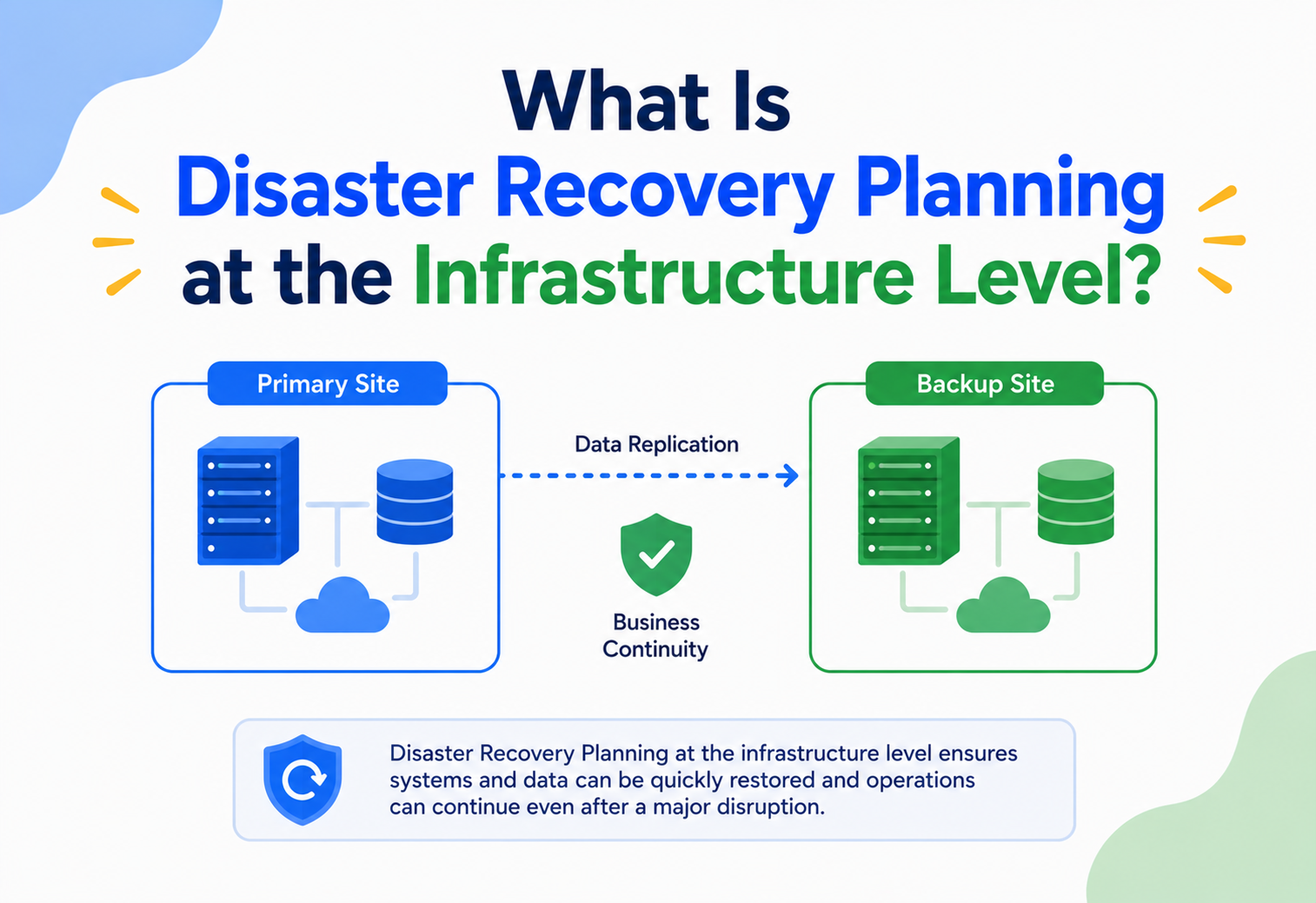
What Is Disaster Recovery Planning at the Infrastructure Level?
A beginner-to-production tour of the systems, patterns, and rituals that keep applications and data alive when infrastructure fails — from RTO and RPO through active-active multi-region, chaos engineering, and the real stories of how Netflix, Amazon, Google, and Uber design for the disasters they know will one day arrive.
Introduction & History
Imagine you run a small bakery. One evening, a fire breaks out in your kitchen and destroys your ovens, your recipe books, and your point-of-sale machine. If your only copy of every recipe and every customer order lived on that one machine, you are out of business — not just for a night, but possibly forever. Now imagine that, before the fire, you had kept a duplicate recipe book at home, a backup POS system at a friend’s shop, and a plan describing exactly which oven to rent and which supplier to call first. The fire would still hurt, but you would reopen within days instead of closing forever.
Disaster recovery planning at the infrastructure level is the software-engineering equivalent of that backup recipe book and the plan to reopen quickly. It is the discipline of designing, building, and rehearsing the systems, processes, and infrastructure that let an organisation’s applications and data survive a serious, unplanned disruption — and come back online within an acceptable amount of time and with an acceptable amount of data loss.
The term “disaster recovery” (DR) predates the cloud by decades. In the 1970s, banks and airlines running on mainframe computers began renting time on identical mainframes at a different physical location, so that if their primary data centre burned down, flooded, or lost power, they could load their latest tape backups onto the rented machine and resume operations. This gave rise to the earliest commercial DR industry — companies like Sungard built entire businesses around leasing “hot site” computer rooms to banks that needed insurance against catastrophe.
Through the 1990s and 2000s, as client-server and then web architectures emerged, DR planning became a standard part of IT operations, often bundled with a related discipline called business continuity planning (BCP) — the broader organisational plan for continuing operations of an entire business (people, processes, suppliers, and IT) after a disruption. DR is the technology-focused subset of BCP.
The rise of public cloud computing (AWS from 2006, Azure from 2010, Google Cloud from 2011) transformed DR from an expensive, manual, once-a-year fire-drill exercise into something that could be automated, tested continuously, and made available to companies of any size — not just banks with seven-figure IT budgets. Today, a two-person startup can replicate its database across three continents for a few hundred dollars a month, something that would have required a private jet full of tape backups in 1985.
1.1 A short timeline of how DR grew up
- 1970sBanks and airlines rent identical mainframes at a second physical site; the earliest commercial “hot site” DR industry is born around this need.
- 1980s-1990sOff-site tape backups become the standard corporate DR baseline; companies like Sungard build businesses around leasing standby computer rooms.
- 2000sClient-server and web architectures spread; DR planning becomes standard IT practice, usually bundled inside a broader business continuity plan.
- 2006-2011AWS, Azure and Google Cloud launch; multi-region infrastructure becomes purchasable by the hour, not procured by the year.
- Mid-2010sChaos engineering, infrastructure as code, and managed cross-region replication (RDS replicas, S3 CRR, Site Recovery) turn DR into a continuously exercised capability instead of a once-a-year drill.
- TodayA two-person startup can replicate data across continents for a few hundred dollars a month; regulated industries require documented, tested DR as a baseline.
The Problem & Motivation
Every piece of infrastructure will eventually fail. This is not pessimism; it is physics and probability. Hard drives wear out. Power grids trip. Network cables get cut by construction crews. Cloud regions experience outages. Human beings make mistakes — a single wrong command can delete a production database in seconds. And occasionally, real disasters strike: floods, earthquakes, fires, or cyberattacks that take an entire data centre offline.
The core problem DR planning solves is simple to state and hard to solve: how do you keep a business running, and its data intact, when the infrastructure it depends on suddenly disappears?
Without a DR plan, organisations typically discover the answer to that question during the disaster itself — which is the worst possible time to discover it. Common failure patterns without DR planning include:
- No recent backups. Backups exist but were last verified two years ago and turn out to be corrupted or incomplete.
- Single point of failure. Every service depends on one data centre, one database instance, or one region, with no fallback.
- No documented process. The one engineer who knows how to fail over the system left the company last year.
- Untested assumptions. A restore procedure that “should work” has never actually been executed end-to-end.
- Unclear ownership. When the outage happens, nobody knows who is authorised to declare a disaster and trigger failover.
Real-life analogy
Fire escape plan
DR planning is like a fire escape plan for a building. You don’t wait until smoke fills the hallway to figure out where the stairwell is. You mark exits in advance, run fire drills, and make sure everyone knows the plan before they ever need it.
Beginner example
Stolen laptop, lost thesis
A student stores their thesis only on a laptop. The laptop is stolen. Without a backup, months of work vanish. A simple DR plan — an automatic cloud backup — would have prevented total loss.
Software example
Single-AZ database
A small SaaS company runs its database on a single EC2 instance in one AWS Availability Zone. When that AZ has a power event, the database goes down and stays down until engineers manually provision a new server and restore from a nightly backup — six hours of downtime.
Production example
Netflix regional evacuation
Netflix designs its infrastructure assuming that entire AWS regions can fail. Its systems are built to automatically redirect traffic to healthy regions, a philosophy validated repeatedly by real AWS regional outages that Netflix rode out with minimal customer impact.
The motivation for DR planning, then, is not fear for its own sake — it is a rational response to the certainty that failures happen, combined with the very real, quantifiable cost of downtime: lost revenue, regulatory penalties, breach of SLAs, reputational damage, and in the most extreme cases, business closure. Studies across the IT industry consistently show that a large share of businesses that suffer catastrophic data loss without a recovery plan never fully recover.
Core Concepts
Before designing DR infrastructure, you need a shared vocabulary. These terms appear in every DR conversation, every vendor’s documentation, and every architecture review — so understanding them precisely matters.
3.1 Recovery Time Objective (RTO)
What. RTO is the maximum acceptable amount of time your system is allowed to be down after a disaster before it must be back up and serving traffic.
Why. It sets the target that your entire DR architecture is designed around. A four-hour RTO requires very different infrastructure than a four-second RTO.
Analogy. RTO is like asking “how long can the bakery stay closed before customers stop coming back?” If the answer is “one day,” you need a backup kitchen ready to go within a day.
Example. An internal HR tool might have an RTO of 24 hours (a minor inconvenience if down for a day). A payment-processing API might have an RTO of under 60 seconds (every minute of downtime costs real money and trust).
3.2 Recovery Point Objective (RPO)
What. RPO is the maximum acceptable amount of data loss, measured in time, between the last good backup or replica and the moment of failure.
Why. It tells you how often you need to back up or replicate data. An RPO of 5 minutes means you can never lose more than 5 minutes of transactions.
Analogy. RPO is like asking “how many pages of the recipe book am I willing to rewrite from memory?” If you photocopy the book every night, you can lose at most a day’s worth of new recipes.
Example. A blogging platform might tolerate losing the last hour of draft edits (RPO = 1 hour). A banking ledger typically demands an RPO close to zero — every committed transaction must be recoverable.
Fig 3.1 · RPO looks backward from the failure (how much data can we lose); RTO looks forward from the failure (how long can we be down).
3.3 Disaster
What. In infrastructure terms, a “disaster” is any event that makes a production system unavailable or its data untrustworthy in a way that ordinary operations (like restarting a crashed process) cannot fix. This includes hardware failure, data centre loss, region-wide cloud provider outages, ransomware, human error (accidental deletion), and natural disasters.
3.4 Business Continuity Planning (BCP) vs. Disaster Recovery (DR)
BCP is the umbrella plan for keeping the entire business running — people, offices, suppliers, communication channels, and technology. DR is the technology-focused subset of BCP: specifically how IT systems and data are recovered. Every DR plan should exist within a broader BCP, but you can absolutely start by building strong technical DR without having a fully mature BCP document.
3.5 High Availability (HA) vs. Disaster Recovery (DR)
These are frequently confused, so it is worth being precise:
| Aspect | High Availability (HA) | Disaster Recovery (DR) |
|---|---|---|
| Goal | Survive small, frequent failures (a server crashing, a disk dying) | Survive large, rare failures (a data centre or region going down) |
| Scope | Usually within one data centre / region | Usually spans multiple data centres / regions |
| Typical mechanism | Redundant servers behind a load balancer, auto-restart | Cross-region replication, failover runbooks, standby environments |
| Typical RTO | Seconds | Minutes to hours (sometimes seconds with active-active) |
In practice, mature systems layer HA within each region and DR across regions — HA handles the common case, DR handles the rare but catastrophic case.
3.6 Failover and Failback
Failover is the act of switching production traffic from a failed primary system to a standby or secondary system. Failback is the reverse: once the original primary system has been repaired, traffic (and often data) is switched back to it. Failback is frequently the more dangerous operation, because it risks losing data written to the standby during the outage if not handled carefully.
3.7 Blast Radius
What. The scope of impact a single failure can have. A well-designed DR architecture minimises blast radius by isolating failure domains — so that one broken component (a rack, a data centre, a region) cannot take down everything else.
Architecture & Components
Infrastructure-level DR is built from a set of recurring architectural building blocks. Understanding each piece — and how they combine — is the foundation for designing (or evaluating) a real DR architecture.
4.1 Failure domains: regions, availability zones, and data centres
Cloud providers organise infrastructure hierarchically so you can reason about blast radius:
- Data centre. A physical building full of servers, power, and cooling.
- Availability Zone (AZ). One or more data centres within a region, isolated from other AZs in terms of power and networking, but connected by low-latency links. AZ-level failures are relatively common (power events, hardware failures) but usually contained.
- Region. A geographic area (e.g., Mumbai, Frankfurt, Virginia) containing multiple AZs. Region-level failures are rare but severe — they can affect an entire geography.
Fig 4.1 · a typical two-tier failure domain design: HA across AZs within a region, DR across regions, coordinated by a global traffic manager.
4.2 DR site types
The “DR site” is the standby infrastructure your system fails over to. There are four common patterns, ranging from cheapest/slowest to most expensive/fastest:
| Strategy | What it is | Typical RTO | Typical RPO | Relative cost |
|---|---|---|---|---|
| Backup & Restore | Regular backups stored offsite; infrastructure rebuilt from scratch on disaster | Hours to days | Hours | $ |
| Pilot Light | A minimal, always-on core (e.g., a database replica) with the rest provisioned on demand | Tens of minutes to hours | Minutes | $$ |
| Warm Standby | A scaled-down but fully functional copy of production running continuously | Minutes | Seconds to minutes | $$$ |
| Active-Active (Multi-Site) | Two or more full-scale environments actively serving live traffic simultaneously | Near zero (seconds) | Near zero | $$$$ |
01 · Cheapest
Backup & Restore
Nightly (or more frequent) backups replicated to another region. On disaster, provision a fresh environment and restore. Slowest RTO, largest RPO, lowest cost.
02 · Minimal always-on
Pilot Light
A tiny always-running core in the DR region (typically a replicated database and a few essentials) waiting to be scaled up on demand. Fast enough for many business systems.
03 · Ready to serve
Warm Standby
A scaled-down but architecturally complete copy of production. On failover, scale up and shift traffic. Minutes-level RTO with seconds-to-minutes RPO.
04 · Zero-downtime
Active-Active
Two (or more) full-scale environments actively taking live traffic at all times. Failover is effectively continuous. Highest cost, near-zero RTO/RPO.
4.3 Core infrastructure components in a DR architecture
- Data replication layer. Database replicas, object storage cross-region replication, message queue mirroring.
- Traffic management layer. Global DNS with health checks (e.g., Route 53, Azure Traffic Manager, Cloudflare Load Balancing) or anycast networking to redirect users to healthy regions.
- Compute provisioning layer. Infrastructure-as-Code templates (Terraform, CloudFormation) that can stand up an entire environment on demand, or auto-scaling groups already running in the DR region.
- Configuration & secrets layer. Centralised, replicated configuration stores so the DR environment has identical settings to production.
- Observability layer. Monitoring and alerting that works independently of the primary region, so you can detect a primary-region failure even if the primary region’s own monitoring is down.
- Runbook & automation layer. Documented, ideally automated, step-by-step failover procedures.
Internal Working
To understand how DR actually works under the hood, let’s walk through what happens, mechanically, from the moment infrastructure fails to the moment users are back online.
- 1
Failure detection
Health checks — small periodic probes (HTTP pings, TCP connections, database queries) — continuously verify that each component is alive and correct. Detection systems must distinguish a real outage from a transient blip, usually by requiring multiple consecutive failed checks before declaring a component unhealthy (to avoid “flapping” — repeatedly failing over and back due to noise).
- 2
Declaring a disaster
Not every failure warrants a full DR failover. A single server crashing is handled by normal HA (auto-restart, load balancer removing it from rotation). A DR event is declared when the failure is broad enough that HA cannot absorb it — an entire AZ or region is impaired. Mature organisations define clear, written criteria for who can declare a disaster and under what conditions, because triggering a full regional failover is itself a risky operation with its own failure modes.
- 3
Data consistency check
Before shifting traffic, systems (automated or human) check how current the DR site’s data is. If replication lag is within the RPO, failover proceeds. If replication has fallen behind or broken, the team must decide between failing over with some data loss or waiting to attempt a resync — a judgment call that always favours having this decision pre-documented, not improvised live.
- 4
Traffic cutover
This is typically done by updating DNS records (with low TTLs so changes propagate fast), shifting weights in a global load balancer, or updating an anycast routing table. Well-designed systems automate this step so it takes seconds, not the many minutes a manual DNS change can take once you include propagation delay.
- 5
Application-level reconciliation
Once traffic reaches the DR site, applications there must be promoted to “primary” status — for example, a previously read-only database replica is promoted to accept writes. Any queued or in-flight requests from the old primary need careful handling to avoid duplicate processing or lost updates.
- 6
Validation
Automated smoke tests and synthetic transactions confirm the DR environment is genuinely serving traffic correctly — not just “up,” but functionally correct (can users log in, can orders be placed, does the database respond to real queries).
- 7
Communication
Status pages, customer notifications, and internal incident channels are updated. This is often overlooked in purely technical DR plans but is a core part of maintaining trust during an incident.
Fig 5.1 · the mechanical sequence of an infrastructure-level failover, from detection to validated recovery.
5.1 A simplified Java health check & failover trigger
Real cloud DR controllers are more sophisticated, but the two classes below capture the essential logic: keep pinging the primary, tolerate a few blips, and if it stays down long enough, hand the decision to a coordinator that checks replication lag before pulling the trigger.
HealthMonitor.java · consecutive-failure detection
public class RegionHealthMonitor {

    private final int failureThreshold = 3;
    private int consecutiveFailures = 0;
    private final FailoverCoordinator failoverCoordinator;

    public RegionHealthMonitor(FailoverCoordinator failoverCoordinator) {
        this.failoverCoordinator = failoverCoordinator;
    }

    // Called every few seconds by a scheduler
    public void checkPrimaryRegionHealth() {
        boolean healthy = pingPrimaryRegion();

        if (!healthy) {
            consecutiveFailures++;
            System.out.println("Health check failed. Consecutive failures: " + consecutiveFailures);
        } else {
            consecutiveFailures = 0;
        }

        if (consecutiveFailures >= failureThreshold) {
            System.out.println("Primary region unhealthy beyond threshold. Evaluating failover.");
            failoverCoordinator.evaluateAndTriggerFailover();
            consecutiveFailures = 0; // reset after action taken
        }
    }

    private boolean pingPrimaryRegion() {
        try {
            // In production this would be an HTTP health endpoint call
            // with a short timeout, e.g. 2 seconds
            return HttpHealthClient.ping("https://primary.internal/health", 2000);
        } catch (Exception e) {
            return false;
        }
    }
}
FailoverCoordinator.java · RPO-aware cutover
public class FailoverCoordinator {

    private final ReplicationStatusService replicationStatus;
    private final DnsTrafficManager dnsTrafficManager;
    private final int rpoSeconds = 300; // 5-minute RPO

    public FailoverCoordinator(ReplicationStatusService replicationStatus,
                               DnsTrafficManager dnsTrafficManager) {
        this.replicationStatus = replicationStatus;
        this.dnsTrafficManager = dnsTrafficManager;
    }

    public void evaluateAndTriggerFailover() {
        long replicationLagSeconds = replicationStatus.getCurrentLagSeconds();

        if (replicationLagSeconds > rpoSeconds) {
            // Data loss would exceed RPO - escalate to a human decision
            AlertService.pageOnCall(
                "Failover blocked: replication lag " + replicationLagSeconds +
                "s exceeds RPO of " + rpoSeconds + "s. Manual decision required."
            );
            return;
        }

        System.out.println("Replication lag acceptable. Promoting DR region.");
        DatabasePromotionService.promoteReplicaToPrimary("dr-region-1");
        dnsTrafficManager.shiftTrafficTo("dr-region-1");
        AlertService.notifyIncidentChannel("Failover to dr-region-1 completed.");
    }
}Data Flow & Lifecycle
DR is fundamentally about data flow — how data moves from the primary system to one or more standby systems, continuously, so that it is never trapped in a single location.
6.1 Backup-based data flow
Data is periodically copied (full or incremental backups) to durable, geographically separate storage. On disaster, backups are restored onto new or standby infrastructure. This is simple and cheap but has the largest RPO and RTO, because the gap between backups is the maximum data loss window, and restoring large backups takes real time.
6.2 Replication-based data flow
Instead of periodic snapshots, changes are streamed continuously from a primary data store to one or more replicas, often within seconds. Replication comes in two flavours:
- Synchronous replication. A write is not acknowledged to the application until it has been confirmed on both the primary and the replica. This gives an RPO of essentially zero but adds latency to every write and generally requires the replica to be relatively close (low network latency), which limits how far apart your DR site can be.
- Asynchronous replication. A write is acknowledged as soon as it is committed on the primary; the replica catches up shortly after. This allows replicas to be much farther away (even a different continent) with minimal latency impact, at the cost of a small, non-zero RPO (the replication lag).
Fig 6.1 · synchronous replication trades latency for zero data loss; asynchronous replication trades a small RPO for speed and distance.
6.3 The full data lifecycle in a DR-aware system
- 1
Write
A client sends a write request to the primary application tier.
- 2
Commit
The primary database commits the write to its local storage (often a write-ahead log first, for durability).
- 3
Propagate
The change is streamed to replicas — same-region replicas for HA, cross-region replicas for DR.
- 4
Acknowledge
Depending on the consistency model, the client is told the write succeeded either immediately (async) or after replica confirmation (sync).
- 5
Snapshot
Independently, periodic backups capture point-in-time snapshots for long-term retention, compliance, and protection against replicated corruption (if bad data is replicated instantly, snapshots let you roll back to before the corruption).
- 6
Archive
Backups age out of “hot” storage into cheaper cold/archive storage (e.g., AWS S3 Glacier) for long-term retention per compliance requirements.
- 7
Verify
Automated jobs periodically test-restore backups to confirm they are actually usable — an untested backup is just an unverified hope.
- 8
Expire
Old backups and replicated snapshots are deleted according to a retention policy, balancing compliance needs against storage cost.
Pros, Cons & Trade-offs
DR is never “free” — every increment of resilience costs money, complexity, and operational overhead. Understanding the trade-offs helps you choose the right level of investment for your actual risk tolerance.
Benefits of strong DR planning
- Minimises downtime and revenue loss during real incidents
- Protects against catastrophic, unrecoverable data loss
- Builds customer and regulator trust (many industries legally require it)
- Forces better architecture overall — DR-aware systems tend to be more modular and less coupled
- Reduces the panic and guesswork during an actual incident, since the plan is already written and rehearsed
Costs & trade-offs
- Running duplicate infrastructure (warm standby, active-active) roughly doubles infrastructure cost or more
- Cross-region replication adds architectural complexity and can introduce subtle consistency bugs
- Synchronous replication adds latency to every write
- DR testing consumes engineering time that could go toward features
- Over-engineering DR for low-risk systems wastes money that could be better spent elsewhere
7.1 Choosing the right level of DR investment
Not every system needs an active-active, zero-RPO architecture. The right level of DR investment is a function of business impact, not technical ambition. A useful exercise is to classify systems by tiers:
| Tier | Example system | Target RTO | Target RPO | Suggested strategy |
|---|---|---|---|---|
| Tier 0 — Mission Critical | Payment processing, core trading engine | < 1 minute | Near zero | Active-active multi-region |
| Tier 1 — Business Critical | Customer-facing web app, order management | < 15 minutes | < 5 minutes | Warm standby |
| Tier 2 — Important | Internal analytics dashboard | < 4 hours | < 1 hour | Pilot light |
| Tier 3 — Low Priority | Archived logs, internal wiki | < 24-48 hours | < 24 hours | Backup & restore |
Performance & Scalability
DR architecture interacts with performance and scalability in several important ways that are easy to overlook until they cause an incident.
8.1 Replication overhead
Synchronous replication across data centres adds network round-trip latency to every write. If your primary and replica are 50ms apart, every synchronous write now takes at least 50ms longer — which can be the difference between a snappy application and a sluggish one under load. Systems that need both low write latency and strong DR guarantees often use synchronous replication only within a metro area (two data centres a few kilometres apart, connected by dedicated fibre) and asynchronous replication to a farther DR region.
8.2 The “cold DR site” scaling trap
A pilot-light or warm-standby DR environment is usually scaled down to save cost — fewer servers, smaller database instances. This creates a hidden risk: when a real disaster forces a full failover, the DR site must scale up to handle 100% of production traffic almost instantly. If auto-scaling policies, quotas, or database connection limits in the DR region were never tested at full scale, the “recovery” can itself become a new outage — the DR site falls over under the sudden load it was never proven to handle.
8.3 Scalability of the DR architecture itself
As a company grows, its DR strategy needs to scale too:
- Data volume growth. Backup and restore times grow with data size; a 10 GB database restores in seconds, a 10 TB database might take hours unless you use faster mechanisms like storage-level snapshots instead of logical dumps.
- Number of services. As microservices multiply, coordinating a consistent, multi-service failover (so that dependent services fail over together, not independently and inconsistently) becomes a real engineering challenge — this is where orchestrated, automated runbooks matter far more than manual processes.
- Geographic growth. Global companies increasingly adopt multi-region active-active not just for DR but for latency (serving users from their nearest region), meaning DR capability becomes a side effect of normal operations rather than a separate, dormant investment.
8.4 Performance testing the DR path
It’s not enough to know the DR site “works” — you need to know it performs acceptably under real production load. Techniques include:
- Game days. Scheduled exercises where a team deliberately triggers a controlled failover during business hours and measures real RTO/RPO against targets.
- Chaos engineering. Tools (such as Chaos Monkey, popularised by Netflix) that randomly terminate infrastructure components in production to continuously validate that redundancy and failover mechanisms actually work, rather than trusting untested assumptions.
- Load testing the DR region directly. Periodically sending a portion of real or synthetic production traffic to the DR region to confirm it can genuinely handle full load, not just “boot up.”
High Availability & Reliability
DR and HA work together, layered like concentric rings of protection. HA absorbs common, small failures automatically and invisibly; DR absorbs the rare, large failures that HA cannot.
Fig 9.1 · layered resilience: redundant app servers behind a load balancer (HA), a same-region synchronous replica (HA), and a cross-region asynchronous replica (DR).
9.1 CAP theorem and DR
The CAP theorem states that a distributed data system can provide at most two of three guarantees simultaneously during a network partition: Consistency (every read gets the latest write), Availability (every request gets a response), and Partition Tolerance (the system keeps working despite network failures between nodes). Since network partitions are a real possibility in any distributed system spanning data centres, partition tolerance is effectively mandatory — meaning the real-world choice is between consistency (CP) and availability (AP) when a partition occurs.
This directly shapes DR design: an active-active multi-region database must decide, when the link between regions breaks, whether to keep accepting writes in both regions (AP — risking conflicting data that must be reconciled later) or to stop accepting writes in one region until the partition heals (CP — sacrificing availability to preserve consistency). There is no universally “correct” answer; it depends on the business cost of inconsistency versus the business cost of unavailability. A social media “like” counter can tolerate brief inconsistency; a bank ledger generally cannot.
9.2 Consensus and failover coordination
Deciding which node is “primary” after a failure is itself a distributed systems problem, solved using consensus algorithms like Raft or Paxos. These algorithms let a cluster of nodes agree on a single leader even when some nodes are unreachable, preventing the dangerous scenario of split-brain — where two nodes both believe they are primary and both accept writes, leading to conflicting, unreconcilable data. Tools like etcd, ZooKeeper, and Consul implement these consensus algorithms and are commonly used as the coordination layer underneath automated failover systems.
9.3 Concurrency considerations during failover
In-flight requests at the moment of failover need careful handling. A write that was sent to the primary but not yet acknowledged when failover occurs might be lost, duplicated, or applied twice. Well-designed systems make writes idempotent (safe to apply more than once with the same result) specifically so that retries during a failover window don’t corrupt data — for example, using a unique client-generated request ID that the server checks before applying a write.
9.4 Failure recovery patterns
- Automatic retry with backoff. Clients retry failed requests with increasing delays, giving the system time to recover without a thundering herd of retries making things worse.
- Circuit breakers. Prevent a struggling downstream service from being overwhelmed by continued requests, giving it room to recover.
- Graceful degradation. Non-critical features are disabled during recovery so core functionality can be prioritised (e.g., an e-commerce site disables personalised recommendations but keeps checkout working).
Security in Disaster Recovery
A DR plan that ignores security is dangerous — the DR site is, by definition, a place where sensitive production data lives, and it is often less scrutinised than the primary environment because it’s “just a backup.”
10.1 Encryption
Data must be encrypted both in transit (as it replicates between regions, using TLS) and at rest (backups and replicated storage encrypted using strong, managed keys). If backups are unencrypted, a stolen backup tape or an exposed cloud storage bucket becomes as damaging as a direct breach of production.
10.2 Access control parity
The DR environment must enforce the same access controls, network segmentation, and least-privilege policies as production. A common real-world mistake: the DR environment is provisioned quickly under time pressure with looser IAM policies “just to get it working,” and those looser policies are never tightened — creating a permanent security gap that attackers can exploit specifically because it’s less monitored.
10.3 Ransomware resilience
Modern DR planning must explicitly account for ransomware, where an attacker doesn’t just take infrastructure offline but corrupts or encrypts data across every connected system — including naively-configured replicas and backups. Two key defences:
- Immutable backups. Backups stored in a write-once-read-many (WORM) mode that cannot be altered or deleted, even by an administrator account, for a defined retention period — so ransomware (or a malicious insider) cannot destroy your recovery option.
- Air-gapped or logically isolated backups. At least one backup copy that is not continuously, automatically connected to production, so that malware spreading through production cannot reach and corrupt it.
10.4 Secrets and credentials in DR
DR runbooks, automation scripts, and standby infrastructure need access to secrets (database passwords, API keys, TLS certificates). These should be managed through a centralised, replicated secrets manager (e.g., HashiCorp Vault, AWS Secrets Manager) rather than hardcoded in scripts or documents — a DR runbook sitting in a shared drive with plaintext production credentials is a serious, common security failure.
10.5 Audit and compliance
Many regulated industries (finance, healthcare) legally require documented, tested DR plans, often with specific mandated RTO/RPO targets and periodic audit evidence that failover drills actually occurred. Security and compliance teams should be involved in DR design from the start, not bolted on afterward.
Monitoring, Logging & Metrics
You cannot recover from a disaster you don’t know is happening, and you cannot improve a DR plan you never measure. Observability is central to DR, not an afterthought.
11.1 What to monitor
- Replication lag. The continuous gap, in seconds, between the primary and each replica — this is your real-time RPO indicator.
- Health check status per region. Uptime and latency of health endpoints in every region, checked from multiple independent vantage points (not just from within the same region, which wouldn’t detect a full regional network failure).
- Backup job success/failure. Every backup job’s completion status, size, and duration, alerting immediately on failure rather than discovering a missed backup during an actual disaster.
- Backup restore verification results. Whether scheduled test-restores actually succeeded.
- DR-region capacity headroom. Whether the standby environment has enough scaled-up capacity to absorb full production load if needed.
- Quota utilisation. Cloud provider service quotas in the DR region, to catch the “invisible quota wall” problem before a real failover hits it.
11.2 Logging for post-incident review
Every step of a real (or drilled) failover should be logged with timestamps: when the failure was first detected, when it was escalated, when the decision to fail over was made, when traffic actually cut over, and when validation completed. This log becomes the raw material for a post-incident review (postmortem) — a blameless analysis of what happened, why, and what should change, which is one of the highest-value activities in maturing a DR program over time.
11.3 Distributed tracing across regions
In a microservices environment, correlation IDs that follow a request across services (and, during failover, across regions) let engineers reconstruct exactly what happened to in-flight requests during a cutover — essential for diagnosing subtle data issues introduced during failover.
11.4 Independent monitoring infrastructure
A frequently repeated mistake: hosting your monitoring and alerting system in the same primary region it’s supposed to be watching. If that region goes down, your alerting goes down with it — precisely when you need it most. Mature DR programs run monitoring and alerting from infrastructure independent of any single region (often a third-party SaaS monitoring provider, or a dedicated, geographically separate monitoring cluster).
Deployment & Cloud
Cloud providers have turned much of what used to be manual DR engineering into managed services, dramatically lowering the barrier to entry.
12.1 Infrastructure as Code (IaC) for DR
Tools like Terraform, AWS CloudFormation, and Pulumi let you define your entire infrastructure — networks, servers, databases, load balancers — as version-controlled code. For DR, this is transformative: instead of manually rebuilding a data centre’s worth of infrastructure during a crisis, you run a known-good template against the DR region, standing up a complete, correct environment in minutes rather than days. This is the technical foundation that makes the “pilot light” and “backup and restore” strategies fast and reliable rather than error-prone and manual.
Example · simplified Terraform snippet showing DR-region provisioning intent
provider "aws" {
  alias  = "primary"
  region = "ap-south-1"       # Mumbai
}

provider "aws" {
  alias  = "dr"
  region = "ap-southeast-1"   # Singapore
}

module "app_primary" {
  source         = "./modules/app-stack"
  providers      = { aws = aws.primary }
  instance_count = 6
}

module "app_dr" {
  source         = "./modules/app-stack"
  providers      = { aws = aws.dr }
  instance_count = 2          # pilot light: scaled down until failover
}

resource "aws_db_instance" "primary_db" {
  provider                = aws.primary
  identifier              = "orders-db-primary"
  engine                  = "postgres"
  backup_retention_period = 7
}

resource "aws_db_instance" "dr_replica" {
  provider            = aws.dr
  identifier          = "orders-db-dr-replica"
  replicate_source_db = aws_db_instance.primary_db.arn
}
12.2 Managed cloud DR services
- AWS. Route 53 health-check-based DNS failover, Multi-AZ and cross-region RDS read replicas, S3 Cross-Region Replication, AWS Elastic Disaster Recovery (continuous block-level replication for entire servers), AWS Backup.
- Azure. Azure Site Recovery (replicates entire VMs to a secondary region), Azure Traffic Manager for DNS-based failover, geo-redundant storage (GRS) for automatic cross-region blob replication.
- Google Cloud. Cross-region persistent disk snapshots, Cloud SQL cross-region replicas, Global external Load Balancer with health-check-based failover.
12.3 Containers, Kubernetes, and DR
Kubernetes simplifies DR at the compute layer because application deployment is already declarative (YAML manifests describing desired state). A DR cluster in a different region can be kept ready with the same manifests, and tools like Velero can back up and restore entire cluster states (deployments, config, and even persistent volume data) across clusters and regions. What Kubernetes does not solve automatically is stateful data replication — databases and persistent volumes still need the data-layer replication strategies discussed earlier.
12.4 Multi-cloud DR
Some organisations replicate not just across regions of one cloud provider but across entirely different providers (e.g., primary on AWS, DR on Azure), protecting against a failure specific to one provider’s global control plane. This significantly increases complexity and cost (few tools transfer seamlessly between clouds) and is generally reserved for the highest-tier, most risk-averse systems — most organisations get excellent protection from multi-region DR within a single well-chosen cloud provider.
Databases, Caching & Load Balancing
Compute is usually the easy part of DR because instances are stateless and disposable. Data is the hard part, because data must persist even as the machines around it come and go.
13.1 Database replication topologies for DR
- Primary-replica (leader-follower). One primary accepts writes; one or more replicas (often cross-region) receive changes asynchronously and can be promoted on failure. This is the most common pattern for relational databases like PostgreSQL and MySQL.
- Multi-primary (multi-leader). Multiple regions can each accept writes, which are then merged. Powerful for active-active architectures but requires careful conflict resolution (e.g., last-write-wins, vector clocks, or application-level merge logic) since two regions can write to the same record simultaneously.
- Quorum-based distributed databases. Systems like Cassandra, CockroachDB, and Google Spanner distribute data across nodes and regions with built-in consensus, letting you configure per-table or per-query consistency versus availability trade-offs directly, rather than bolting replication on afterward.
13.2 Sharding and DR
In sharded databases (where data is partitioned across many servers by key, such as customer ID range), DR must be planned per shard — losing one shard’s primary should not require failing over the entire database. Well-designed sharded systems replicate each shard independently to a DR region, so failure isolation matches the natural partitioning of the data.
13.3 Caching layers in DR
Caches (Redis, Memcached) are usually treated as disposable — rebuilt from the source of truth after failover rather than replicated, since cache data is derived, not authoritative. However, if a cache is used for something stateful and hard to regenerate quickly (like session data or rate-limiting counters), it may need its own replication strategy, or the application needs to tolerate a “cold cache” period gracefully (e.g., by handling cache misses without collapsing the database under a stampede of requests — a technique known as request coalescing or cache warming).
13.4 Load balancing across regions
Global load balancing for DR generally uses one of these mechanisms:
- DNS-based failover. Health-check-aware DNS (Route 53, Azure Traffic Manager) returns the DR region’s IP only when the primary fails its health checks. Simple, universally compatible, but subject to DNS caching delays (mitigated with low TTLs, though some resolvers ignore TTL guidance).
- Anycast IP routing. The same IP address is announced from multiple regions; network routing automatically sends traffic to the nearest/healthiest announcing region. Faster failover than DNS (no caching delay) but requires more advanced networking setup, typically available through CDN/edge providers like Cloudflare or cloud provider global load balancers.
- Client-side failover. The application client itself is configured with a list of endpoints and retries against a secondary endpoint if the primary fails — common in database drivers and some mobile/desktop applications.
Fig 13.1 · global load balancing reroutes users automatically; note the DR region’s cache typically starts cold and needs warming.
APIs & Microservices
In a microservices architecture, DR is not just about infrastructure — it’s about coordinating dozens or hundreds of independently deployed services so they fail over together, consistently.
14.1 Service dependency mapping
Before you can design microservices DR, you need to know which services depend on which. A checkout service that depends on a payment service, an inventory service, and a notification service cannot be considered “recovered” just because it, individually, is running in the DR region — all of its dependencies must also be healthy there. Distributed tracing and service dependency graphs (often visualised through observability platforms) are essential tools for this mapping.
14.2 API gateway and service discovery in failover
An API gateway sitting in front of microservices can be configured to route to the DR region’s service instances once service discovery (via tools like Consul, Eureka, or Kubernetes-native DNS) reports the primary region’s instances as unhealthy. This centralises failover logic in one place rather than requiring every service to individually implement region-awareness.
14.3 Eventual consistency across regions
Microservices commonly use asynchronous messaging (via Kafka, RabbitMQ, or cloud-native queues) for inter-service communication, often following the outbox pattern to reliably publish events alongside database writes. For DR, message brokers themselves need cross-region replication (e.g., Kafka MirrorMaker, or cloud-managed queue replication) — otherwise, events queued in the primary region’s broker are lost or stranded during a regional failure, silently breaking downstream services that never receive them.
Fig 14.1 · message brokers must be mirrored cross-region, or asynchronous inter-service communication silently breaks during failover.
14.4 Idempotency and saga recovery
Long-running business transactions spanning multiple microservices (implemented as sagas) are especially vulnerable during failover — a saga that was midway through, with some steps completed in the primary region and some not yet executed, must be resumable in the DR region without duplicating already-completed steps. This requires each saga step to be idempotent and the saga’s state to be persisted (and replicated) durably, not just held in memory.
14.5 Correlation IDs across the failover boundary
A correlation ID generated when a request enters the system should be preserved through every downstream call, log entry, and even across the failover event itself, so engineers reviewing an incident can trace a single user’s request from the primary region into the DR region and understand exactly what happened to it.
Design Patterns & Anti-patterns
15.1 Recommended patterns
- Immutable infrastructure. DR environments are rebuilt from version-controlled templates rather than hand-modified, ensuring the DR site is always a known, reproducible configuration.
- Blue-green failover. Maintaining two complete, independently switchable environments (not necessarily geographically separate, but architecturally isolated) makes cutover a simple traffic-routing change rather than a risky in-place modification.
- Circuit breaker. Prevents cascading failure by stopping calls to a downstream dependency that is failing, giving it time to recover and protecting upstream services from resource exhaustion.
- Bulkhead isolation. Partitioning resources (thread pools, connection pools) per dependency so that one failing dependency cannot exhaust resources needed by unrelated parts of the system — directly limiting blast radius.
- Chaos engineering. Proactively and continuously injecting real failures into production (in a controlled way) to verify DR and HA mechanisms actually work, rather than trusting them untested.
- Runbook-as-code. Encoding failover procedures as executable scripts (not just prose documents), so recovery is consistent, fast, and not dependent on a specific human’s memory under stress.
15.2 Anti-patterns to avoid
- “Backup theatre.” Backups are taken and stored, but restoration has never actually been tested — the team discovers during a real disaster that the backups are corrupted, incomplete, or that nobody remembers the restore procedure.
- Single point of coordination. The DR trigger mechanism itself (a script, a dashboard, a specific engineer’s knowledge) lives entirely in the primary region or depends on one person, becoming unavailable exactly when needed.
- Configuration drift. Over time, the DR environment’s configuration silently diverges from production (different library versions, different feature flags, different scaling settings) because changes are applied to production and forgotten in DR, so the DR site no longer behaves like a true replacement when finally activated.
- DR plans that are never rehearsed. A document describing the failover process, written once and never tested, that turns out to be wrong, outdated, or missing critical steps precisely when it matters most.
- Ignoring dependency chains. Failing over a service without failing over (or verifying the health of) everything it depends on, resulting in a “recovered” service that is actually still broken.
- Treating replication as backup. As covered earlier, relying solely on live replication provides no protection against logical corruption, accidental deletion, or ransomware that replicates the damage instantly.
Best Practices & Common Mistakes
16.1 Best practices
- Define RTO/RPO per system, based on business impact — not a single blanket number for the whole company.
- Test restores regularly, not just backups. A backup you have never restored is an assumption, not a guarantee.
- Run scheduled, realistic failover drills (game days) that involve real traffic shifting, not just tabletop walkthroughs.
- Automate as much of the failover process as safely possible, while keeping a clear, deliberate human checkpoint for the highest-risk, hardest-to-reverse decisions.
- Keep DR documentation (runbooks) close to the code and infrastructure they describe, version-controlled, and reviewed whenever the underlying architecture changes.
- Ensure monitoring and the failover trigger mechanism are independent of the primary region so you can detect and act on a primary-region failure even when that region is completely dark.
- Combine replication (for infrastructure failure) with immutable, retained backups (for logical/ransomware failure).
- Right-size DR investment per system tier rather than uniformly over- or under-investing.
- Include failback in the plan, not just failover — returning to the primary region safely is often harder and riskier than leaving it.
- Conduct blameless post-incident reviews after every drill and every real incident, and track whether identified action items actually get completed.
16.2 Common mistakes
- Assuming cloud provider redundancy alone (e.g., “AWS handles availability”) is a substitute for your own cross-region DR plan — cloud providers give you the tools, not a finished plan.
- Forgetting DNS TTL and propagation delay when calculating expected RTO, leading to a failover that is “triggered” quickly but doesn’t actually reach users for many extra minutes.
- Neglecting to pre-provision or pre-approve DR-region service quotas, hitting invisible cloud provider limits exactly during a real disaster.
- Letting DR-region configuration drift out of sync with production over time.
- Failing to account for stateful, hard-to-regenerate cache or session data, causing a painful “cold start” experience right after failover.
- Overlooking third-party and SaaS dependencies (payment processors, email providers, authentication services) that may themselves become unavailable or behave differently during a regional event, even though they’re outside your own infrastructure.
- Storing DR runbooks and credentials in a way that itself depends on the very systems that might be down (e.g., an internal wiki hosted in the primary region).
Real-World Industry Examples
Streaming · chaos-driven
Netflix: regional evacuation & chaos engineering
Netflix pioneered the idea of designing for constant, expected failure rather than treating disasters as rare exceptions. Its internal tooling can redirect all user traffic away from an entire AWS region within minutes — a technique it calls “regional evacuation” — and it validates this capability continuously using chaos engineering tools that deliberately fail infrastructure components in production. This means Netflix’s DR capability isn’t a document that’s dusted off once a year; it’s exercised, in some form, on an ongoing basis.
Retail · cell-based
Amazon: cell-based architecture
Amazon’s internal systems (and AWS itself) use a “cell-based” architecture, partitioning customers or workloads into independent, isolated units (“cells”) so that a failure in one cell cannot cascade into others. This directly limits blast radius — a core DR principle — by design, rather than relying purely on cross-region failover after the fact.
Data · global consensus
Google: global load balancing & Spanner
Google’s internal infrastructure and its Cloud Spanner database are built around globally distributed, consensus-based replication, allowing services to survive the loss of an entire data centre or region with strong consistency guarantees and minimal manual intervention — an example of the “active-active” end of the DR spectrum built directly into the data layer itself.
Mobility · geo-isolated
Uber: multi-region, real-time systems
Uber operates latency-sensitive, real-time matching systems (riders to drivers) across many geographic markets. Its infrastructure is designed so that regional outages affect only the specific geography served by that region, rather than causing a global service disruption — an application of failure-domain isolation to a system where downtime has an immediate, visible impact on real-world logistics.
Finance · regulated
Financial institutions: regulatory-driven DR
Banks and payment processors are frequently required by regulators to maintain documented DR plans with specific, audited RTO/RPO targets and to demonstrate periodic failover testing. This regulatory pressure has historically made the financial industry one of the most mature adopters of rigorous DR practices, predating much of the modern cloud-based tooling available today.
Analogy. These companies treat DR the way an airline treats emergency landings: not as an exceptional catastrophe scenario, but as a set of procedures every crew has practised so many times that when reality demands them, muscle memory takes over instead of panic.
FAQ, Summary & Key Takeaways
18.1 Frequently asked questions
Is disaster recovery the same as a backup strategy?
No. Backups are one tool within a DR strategy, focused on point-in-time data protection. Full DR planning also covers infrastructure provisioning, traffic failover, application promotion, testing, and organisational processes — the complete path from “disaster happened” to “users are back online with acceptable data loss.”
What is a reasonable RTO and RPO for a small startup?
There’s no universal number — it depends entirely on what the business can tolerate. Many early-stage products start with an RTO of a few hours and an RPO of under an hour, using backup-and-restore or pilot-light strategies, then tighten these targets (and invest in warm standby or active-active) as the business grows and downtime becomes more costly.
Do I need multi-region infrastructure to have “real” DR?
Not necessarily. Multi-AZ redundancy within a single region, combined with well-tested cross-region backups, is a legitimate and much cheaper DR strategy for many systems. Multi-region active infrastructure is reserved for systems where even minutes of downtime carry serious business cost.
How often should DR plans be tested?
Best practice is at least twice a year for full failover drills, with backup restore verification happening far more frequently (weekly or even daily, automated). Any significant architecture change should also trigger a re-validation of the DR plan, since it may have silently invalidated old assumptions.
Can DR be fully automated with no human involvement?
Technically yes, but most mature organisations deliberately keep a human decision point for the riskiest, hardest-to-reverse actions (like declaring a full regional disaster), because fully automated failover can itself misfire due to monitoring bugs or unusual edge cases, turning a false alarm into an unnecessary outage.
What’s the difference between disaster recovery and business continuity?
Disaster recovery is the technical subset focused on IT systems and data. Business continuity is the broader plan for the entire organisation — including people, physical offices, suppliers, and communication — to keep functioning through a disruption. DR should exist within a broader BCP.
How is DR different from high availability?
HA absorbs small, frequent failures inside a single region or data centre (a crashed process, a dead disk) automatically and invisibly. DR absorbs large, rare failures (a whole region going dark, a ransomware event, a mass deletion) that HA cannot. Mature systems layer both: HA inside each region, DR across regions.
What is the biggest single thing I can do to improve my DR posture today?
Actually restore a backup end-to-end into a fresh environment, on a schedule you can commit to. Nothing else — not another replica, not another region, not another dashboard — buys as much real DR confidence as regularly proving your recovery path works.
18.2 Summary
Disaster recovery planning at the infrastructure level is what separates systems that survive a bad day from systems that end businesses on a bad day. It replaces hope and improvisation with measured targets (RTO and RPO), rehearsed procedures, and infrastructure that has actually been tested at full load in the region it will one day have to save you. Every design decision — replication topology, DR site type, monitoring placement, secrets handling, dependency mapping — is ultimately answering one question: when the worst plausible failure happens, how quickly and how completely do we come back?
18.3 Key takeaways
- 01Disaster recovery planning at the infrastructure level is about ensuring systems and data survive large-scale, rare failures — not just the small, common ones handled by high availability.
- 02RTO (how long you can be down) and RPO (how much data you can lose) are the two numbers that should drive every architectural decision in your DR strategy.
- 03DR strategies range from cheap-and-slow (backup & restore) to expensive-and-instant (active-active multi-region) — choose based on real business impact, not technical ambition.
- 04Replication protects against infrastructure failure but not logical errors or ransomware; you need immutable, tested backups too.
- 05CAP theorem, consensus algorithms, and idempotency are not academic concepts — they directly determine whether your failover is safe or produces split-brain data corruption.
- 06Security, monitoring, and the failover trigger mechanism must all be independent of the primary region’s health.
- 07An untested DR plan is a guess, not a guarantee — regular drills, chaos engineering, and restore verification are what separate real resilience from “backup theatre.”
- 08Industry leaders like Netflix, Amazon, Google, and Uber treat resilience as a continuously exercised capability, woven into daily operations rather than a once-a-year emergency binder.