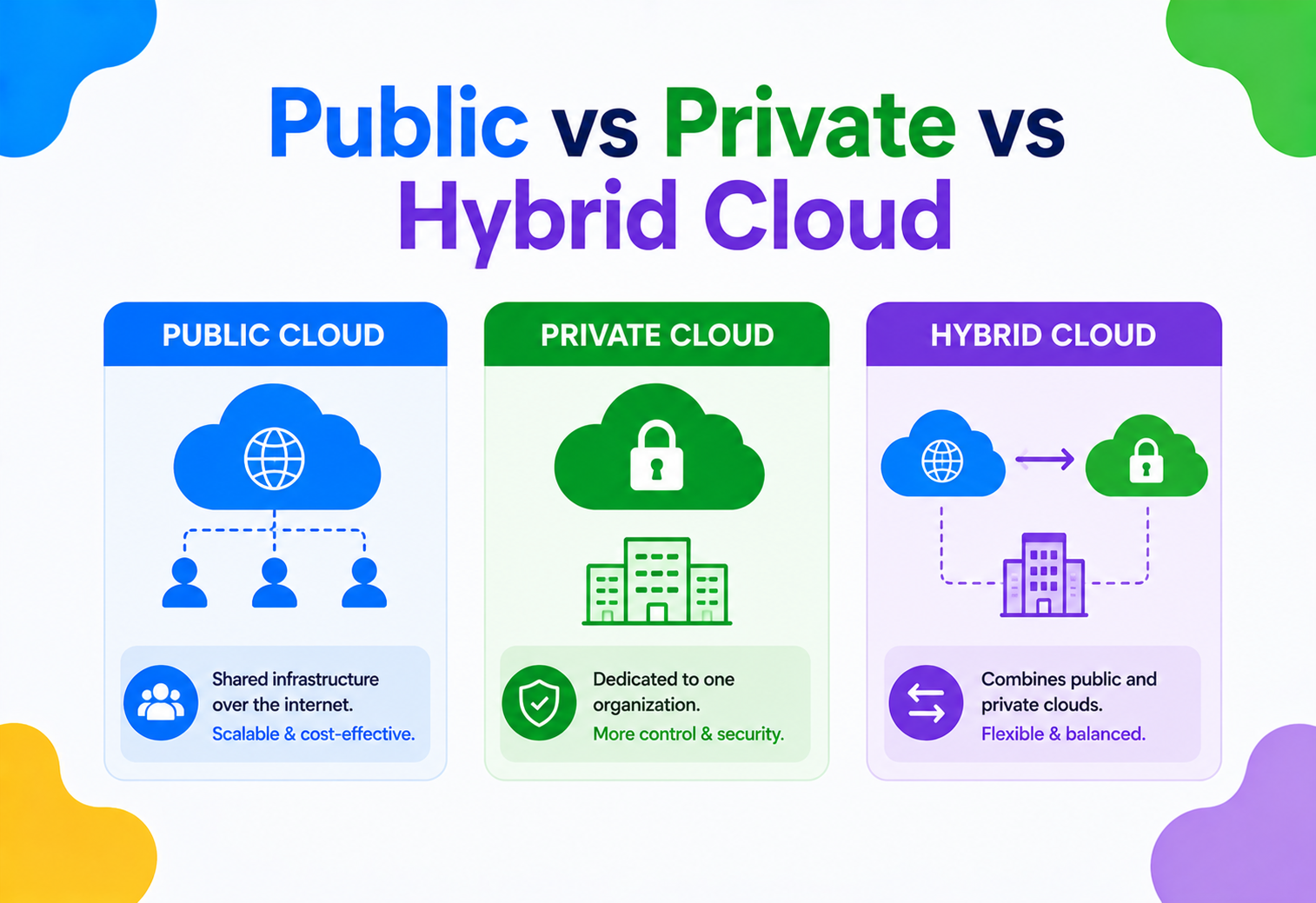
Public vs Private vs Hybrid Cloud
A ground-up, beginner-friendly walkthrough of the three major cloud deployment models — what each one actually is, how it works underneath, when to reach for it, and how the world’s biggest companies run them in production.
Where Cloud Deployment Models Came From
Cloud is really just a story about where your computers live and who else gets to share them. Three answers to that question — public, private, and hybrid — became the three deployment models we use today.
Picture the problem of storing your belongings. You have three sensible options: rent a locker in a giant public storage warehouse shared with thousands of strangers, build a private shed in your own backyard, or do a bit of both — keep everyday things in the shed while overflow items live in the shared warehouse. Cloud deployment models work almost exactly the same way. Swap “storage lockers” for servers, databases, and applications, and the three arrangements are called public cloud, private cloud, and hybrid cloud.
Before any of this existed, companies owned every single computer they used. If a bank needed more compute, it bought more physical servers, installed them in a room, cabled them up, cooled the room, and hired people to keep them alive. That approach — called on-premises (or “on-prem”) computing — worked, but it was slow to scale, expensive to maintain, and wasteful. Most of the time the servers sat idle, like buying ten cars for a family that only ever drives one at a time.
In the mid-2000s, Amazon spotted a clever opportunity. It had built enormous computing capacity to survive the holiday shopping rush, and for most of the year that capacity sat unused. So in 2006 it launched Amazon Web Services (AWS), renting out that spare capacity to anyone with a credit card. This was the birth of modern public cloud. Google and Microsoft followed with Google Cloud Platform and Microsoft Azure. Suddenly a two-person startup could rent the same class of infrastructure as a Fortune 500 bank, paying only for what it actually used.
But not everyone could — or wanted to — move everything into a shared public environment. Banks, hospitals, and governments faced strict rules about where sensitive data could physically live. So the idea of private cloud emerged: cloud-like flexibility (self-service, automation, elastic scaling) but on infrastructure used by a single organisation only, either inside its own data centre or in a data centre dedicated exclusively to it.
Eventually, businesses realised they didn’t have to pick just one. A retailer might run its main website on public cloud for elastic Black-Friday scaling while keeping customer payment data in a private cloud for compliance. Wire the two together with secure networking and you get hybrid cloud — the best (and sometimes the most complex) of both worlds.
1990s–early 2000s — On-Premises Era
Companies buy, rack, and manage their own physical servers. High upfront cost, months to scale, and armies of operators to keep the lights on.
2006 — Public Cloud is Born
AWS launches S3 and EC2, renting spare data-centre capacity by the hour and turning capital expenditure into an operational one.
2008–2010 — Private Cloud Matures
Virtualisation platforms (VMware, OpenStack) let enterprises build cloud-like self-service on their own hardware without giving up control.
2012–2015 — Hybrid Goes Mainstream
Enterprises connect private data centres to public clouds through VPNs and dedicated links (AWS Direct Connect, Azure ExpressRoute), moving workloads freely between them.
2018–Present — Multi-Cloud & Kubernetes
Container orchestration makes workloads portable across any of these environments, blurring the lines and giving rise to multi-cloud strategies alongside hybrid ones.
Why We Need Three Models Instead of One
Every organisation is pulled in four directions at once: cost, control, speed, elasticity. No single deployment model wins on all four, and that is exactly why three of them exist.
Why do we need three different models at all? Because every organisation lives inside a tug-of-war between four competing forces:
- Cost. Owning hardware is expensive and wasteful when demand fluctuates.
- Control. Some data — health records, financial transactions, government secrets — legally must stay under an organisation’s direct control.
- Speed. Businesses need to launch new services in days, not months.
- Elasticity. Traffic is never constant. An e-commerce site can see fifty times normal traffic on Black Friday.
No single deployment model wins on all four fronts. Public cloud wins on cost and elasticity but can lose on control. Private cloud wins on control but loses on elasticity and often on cost. Hybrid cloud tries to get the best of both, at the price of added complexity. Understanding this trade-off triangle is the single most important mental model in the entire guide — everything else is just detail.
Public cloud is like renting an apartment — flexible, no maintenance headaches, but you don’t control the building. Private cloud is like owning a house — full control, but you pay for every repair. Hybrid cloud is like owning a house and also renting a vacation home for the summer — you get the best of both, but now you’re managing two properties.
Public, Private, Hybrid — Plain Definitions
Before comparing, let’s pin down what each model actually is — and clear up the constant confusion between hybrid and multi-cloud.
What Is Public Cloud?
Public cloud means computing resources — servers, storage, databases, networking — are owned and operated by a third-party provider (AWS, Microsoft Azure, Google Cloud Platform, and others) and delivered over the internet to anyone willing to pay for them. Multiple customers, called tenants, share the same physical hardware, but software isolation (multi-tenancy) keeps each customer’s data and workloads invisible to the others — the same way apartment walls stop neighbours from seeing into each other’s homes.
What Is Private Cloud?
Private cloud means the computing resources are dedicated to a single organisation. It can live in that organisation’s own data centre (an “on-prem private cloud”) or be hosted by a third party but reserved exclusively for one customer (a “hosted private cloud”). The key idea isn’t where the hardware sits — it’s that nobody else shares it. You still get cloud-like conveniences: self-service portals, automation, virtual machines spun up in minutes — but on infrastructure that is single-tenant.
What Is Hybrid Cloud?
Hybrid cloud connects a private cloud (or on-prem environment) with one or more public clouds, allowing data and applications to move between them. The two environments aren’t merely sitting next to each other — they’re integrated: joined by secure networking, sharing identity systems, and typically orchestrated by the same tools (Kubernetes is a common one), so a workload can be built once and run in either place.
A Quick Note on Multi-Cloud
People often confuse hybrid cloud with multi-cloud. Multi-cloud means using two or more public cloud providers — say, AWS for compute and Google Cloud for machine learning — without necessarily involving a private environment at all. Hybrid cloud specifically implies a mix of private and public. You can absolutely be both hybrid and multi-cloud at once, for example a private data centre connected to both AWS and Azure.
Shared, elastic, pay-as-you-go
Third-party-owned, multi-tenant infrastructure delivered over the internet. Best when you need scale, speed, and low upfront cost.
Dedicated, single-tenant
Infrastructure reserved for one organisation. Best for compliance, predictable performance, and steady workloads.
Connected mix of both
Workloads move between private and public environments over secure links. Best for balancing flexibility with control.
Two or more public providers
Splitting workloads across multiple public clouds to avoid lock-in or use the best service for each job. Not the same as hybrid.
What Each Model Looks Like Under the Hood
Every model is assembled from the same building blocks — compute, storage, networking, and identity — but arranged and owned in very different ways.
Let’s look under the hood. Each model uses the same four ingredients — compute, storage, networking, and identity — but arranged, owned, and shared differently.
In a public cloud, the provider owns a global network of data centres, called regions, each split into multiple availability zones (physically separate buildings with independent power and cooling, so a single fire or flood doesn’t take everything down). You rent slices of this infrastructure through code or a web console. The provider handles the physical layer; you handle what runs on top of it.
In a private cloud, your organisation (or a hosting partner working exclusively for you) owns the physical layer: server racks, storage arrays (SAN/NAS), and networking switches. Sitting above the hardware is a virtualisation or orchestration layer — VMware vSphere, OpenStack, or a private Kubernetes cluster — that gives your internal teams the same self-service experience public cloud users get, minus the shared hardware.
In a hybrid cloud, the two environments above are stitched together by three things:
- Secure connectivity — a VPN over the public internet, or a dedicated private line such as AWS Direct Connect or Azure ExpressRoute, so traffic between the two environments never touches the open internet.
- Unified identity — a single sign-on system (typically Active Directory federated with a cloud identity provider) so a user’s login works in both places.
- Consistent orchestration — tools like Kubernetes, Terraform, or Anthos / Azure Arc that let the same application definition be deployed to either environment.
Notice in the diagram above that the sensitive customer database stays inside the private data centre, while the customer-facing website and the machine-learning recommendation engine — which need to scale quickly and don’t touch raw sensitive data directly — run in public cloud. This is the textbook hybrid pattern.
Virtualisation, Containers, and Isolation
How can one physical server safely serve hundreds of unrelated customers at once? The answer is virtualisation — and, increasingly, containerisation.
How does a single physical server in a public cloud data centre serve hundreds of different customers without them ever seeing each other’s data? The answer is virtualisation — and increasingly, containerisation.
A hypervisor is software that sits directly on physical hardware and carves it into multiple isolated virtual machines (VMs), each believing it has its own dedicated CPU, memory, and disk. Think of the hypervisor as an apartment building’s structural engineer — it guarantees that no matter what one tenant does inside their unit, they cannot knock down a wall into the neighbour’s unit. That is exactly how public cloud achieves multi-tenancy safely.
Private cloud uses the exact same hypervisor technology — the difference is who is allowed to move in. In a private cloud, every “apartment” in the building is reserved for the same company.
Hybrid cloud adds one more layer: container orchestration. A container (Docker is the canonical example) packages an application together with everything it needs to run, but shares the host machine’s operating-system kernel instead of shipping a whole separate OS like a VM does — making it much lighter and faster to start. Kubernetes then manages fleets of containers across both private and public infrastructure, deciding where each one should run based on rules you define — for example, “always run the payment-processing container in the private data centre; scale the web front-end container into the public cloud when CPU usage exceeds 70 percent”.
A VM is like renting a fully furnished separate apartment — your own kitchen, your own bathroom. A container is like renting just a bedroom in a shared house — you get your own space, but the kitchen and plumbing (the operating system) are shared with other tenants. That is why containers start up seconds after a VM does.
Following One Request Through a Hybrid Cloud
The theory is easier to feel when you watch a single request travel through a real hybrid architecture. Here is that trip end-to-end.
Let’s trace what actually happens when a customer places an order on a hybrid-cloud retail platform.
Request Hits Public Cloud
The customer’s browser sends a request to the web front-end running in public cloud behind a load balancer, with a Content Delivery Network (CDN) in front for fast global response times.
Business Logic Runs
Microservices in the public cloud validate the order, check inventory (usually cached in memory), and calculate pricing.
Sensitive Data Crosses the Boundary
Payment details are sent over the secure private link to a PCI-compliant payment service running in the private data centre — never stored directly in public cloud.
Confirmation Flows Back
The private-cloud payment service returns a success/failure token (not raw card data) back to the public-cloud order service.
Response & Async Events
The customer sees “Order Confirmed.” Meanwhile, an event is published to a message queue that triggers downstream systems — shipping, analytics, fraud detection — in both environments.
This lifecycle illustrates the golden rule of hybrid architecture: keep the crown jewels (sensitive data) in the environment with the strictest controls, and let everything else scale freely.
Advantages, Disadvantages & Trade-offs
Every model gains something and gives something up. This is the table you actually take into a decision meeting.
Public Cloud
Advantages
- No upfront hardware cost — pay only for what you use
- Near-instant, virtually unlimited scaling
- Provider handles physical maintenance, patching, and hardware failure
- Global reach — deploy close to users on every continent within minutes
Disadvantages
- Less direct control over the physical infrastructure
- Ongoing operational cost can exceed owning hardware at very large, steady scale
- Data residency and compliance can be harder to guarantee
- Vendor lock-in risk if you rely heavily on provider-specific services
Private Cloud
Advantages
- Maximum control over hardware, data location, and security policy
- Easier to satisfy strict regulatory or compliance requirements
- Predictable performance — no “noisy neighbour” competing for resources
- Can be more cost-effective for constant, high, predictable workloads
Disadvantages
- High upfront capital cost for hardware and facilities
- Slower to scale — buying and installing new servers takes weeks, not seconds
- Requires in-house expertise to operate and maintain
- Wasted capacity during low-demand periods
Hybrid Cloud
Advantages
- Flexibility to place each workload wherever it fits best
- “Cloud bursting” — handle demand spikes by temporarily scaling into public cloud
- Keeps sensitive data under tight control while modernising everything else
- Smooths a gradual, lower-risk migration path off legacy systems
Disadvantages
- Significantly higher architectural and operational complexity
- Requires strong networking, security, and identity integration
- Needs skilled staff comfortable with both worlds
- Harder to monitor and debug issues that span environments
| Dimension | Public Cloud | Private Cloud | Hybrid Cloud |
|---|---|---|---|
| Ownership | Third-party provider | Your organisation | Both |
| Tenancy | Multi-tenant | Single-tenant | Mixed |
| Cost model | Pay-as-you-go (OpEx) | Upfront + maintenance (CapEx) | Mixed |
| Scalability | Near-instant, elastic | Limited by owned hardware | Elastic where needed |
| Control | Lower | Highest | Selective |
| Compliance fit | Depends on provider certs | Easiest to guarantee | Best of both, if designed well |
| Complexity to operate | Low–Medium | Medium–High | Highest |
How Each Model Actually Scales
Elasticity is where the three models differ most obviously — public cloud can add capacity in seconds, private cloud in weeks.
Public cloud scales in two directions: vertical scaling (giving a single server more CPU or RAM) and horizontal scaling (adding more servers behind a load balancer). Because public cloud providers maintain enormous shared capacity pools, horizontal scaling can happen in seconds through auto-scaling groups that watch metrics like CPU usage and automatically add or remove servers.
Private cloud can auto-scale too, but only up to the ceiling of the hardware you actually own. If your private cloud has 100 physical servers and every one of them is busy, there is no “101st server” to summon — you must either buy more hardware (slow) or burst into public cloud (this is precisely what hybrid cloud enables).
Cloud bursting sounds simple — “just spill into public cloud when busy” — but it requires your application to be stateless, or to replicate its data in near-real-time to the public environment. Bursting a stateful, tightly-coupled legacy application usually fails badly.
Reliability When Things Inevitably Break
Every serious system must survive parts of itself failing. The three models take very different approaches to that survival strategy.
High availability (HA) means a system keeps running even when individual parts fail. Public clouds achieve this by spreading your application across multiple availability zones within a region, and sometimes across multiple regions entirely. If one data centre loses power, traffic automatically reroutes to another.
Private clouds can achieve HA too, but you must build the redundancy yourself: a second data centre in a different city, redundant power supplies, backup generators, replicated storage. This is expensive, which is one reason many organisations only build one or two private data centres rather than the dozens of regions a hyperscaler operates.
Hybrid cloud unlocks a clever HA strategy: use the public cloud as a disaster recovery (DR) site for your private cloud. If your private data centre goes down entirely, traffic fails over to a standby environment running in public cloud — without the cost of building and maintaining a whole second private data centre.
Shared Responsibility & the Boundary Between Worlds
Cloud security is a partnership. The provider secures the platform; you secure how you use it. Where private and public meet is the most dangerous seam.
Security in cloud computing follows the shared responsibility model. In public cloud, the provider secures “the cloud” itself — physical data centres, the hypervisor, the network backbone — while you’re responsible for security “in the cloud”: how you configure access, encrypt data, and patch your own applications. Most public cloud breaches are caused by customer misconfiguration (like an S3 storage bucket accidentally left open to the internet), not provider failure.
In private cloud, your organisation owns the entire responsibility stack, from the physical door lock on the server room to the application code. This gives full control but also means there is no one else to catch your mistakes.
In hybrid cloud, security must be consistent across both environments — a single weak link (say, a public-cloud service with overly broad access to your private database) can undermine everything else. Key security building blocks include:
- Identity and Access Management (IAM) — controls exactly who (or what service) can do what, following the principle of least privilege (give only the minimum permissions needed).
- Encryption — data should be encrypted both “at rest” (sitting in storage) and “in transit” (moving across the network), especially when it crosses the boundary between private and public environments.
- Network segmentation — using virtual private clouds (VPCs), subnets, and firewalls to ensure only the right services can talk to each other.
- Zero Trust — a modern security philosophy that assumes no request should be trusted by default, even if it originates inside your own network, and every request must be authenticated and authorised.
The connection point between private and public cloud is the single most attractive target for attackers in a hybrid environment. If that link isn’t tightly locked down with strong authentication and encryption, it becomes a bridge attackers can use to jump from a less-protected public-facing service straight into your sensitive private systems.
You Can’t Fix What You Can’t See
The three signals of observability — metrics, logs, traces — are easy in one environment and tricky across two.
You cannot fix what you cannot see. In public cloud, native tools like Amazon CloudWatch, Azure Monitor, and Google Cloud Operations Suite automatically collect metrics (numeric measurements over time, such as CPU usage or request latency), logs (detailed text records of events), and traces (the path a single request takes across multiple services).
In private cloud, teams typically deploy their own monitoring stack — commonly Prometheus for metrics collection, Grafana for dashboards, and the ELK stack (Elasticsearch, Logstash, Kibana) for logs.
In hybrid cloud, the challenge is unifying visibility. If your web front-end logs go to CloudWatch but your payment-service logs stay in an on-prem ELK stack, engineers investigating an incident have to check two completely different systems. Mature hybrid architectures solve this by shipping all logs and metrics to one centralised observability platform, regardless of where the workload physically runs.
Shipping Code Into Any Environment
Modern deployment is code, not clicks — and the same Infrastructure-as-Code style works across public, private, and hybrid targets.
Here is how deployment typically looks in practice for each model, along with a small Java example showing how application code can be written to work across environments.
Deploying to Public Cloud
Public cloud deployment usually goes through Infrastructure as Code (IaC) tools such as Terraform or AWS CloudFormation, combined with a CI/CD pipeline that automatically builds, tests, and ships code whenever a developer merges changes.
Deploying to Private Cloud
Private cloud deployment often uses the same IaC concepts, but targeting a private virtualisation layer like VMware vSphere or an OpenStack-based private cloud, or a self-managed Kubernetes cluster running on owned hardware.
Writing Environment-Portable Code
A common Java pattern in hybrid environments is to abstract away where a resource lives behind an interface, then choose the actual implementation at runtime based on configuration:
public interface StorageService {
    void save(String key, byte[] data);
    byte[] load(String key);
}

// Implementation that talks to public cloud object storage
public class PublicCloudStorageService implements StorageService {
    public void save(String key, byte[] data) {
        // uploads to a public cloud bucket via the provider's SDK
        System.out.println("Saving " + key + " to public cloud bucket");
    }
    public byte[] load(String key) {
        System.out.println("Loading " + key + " from public cloud bucket");
        return new byte[0];
    }
}

// Implementation that talks to an on-prem storage array
public class PrivateCloudStorageService implements StorageService {
    public void save(String key, byte[] data) {
        System.out.println("Saving " + key + " to private data centre NAS");
    }
    public byte[] load(String key) {
        System.out.println("Loading " + key + " from private data centre NAS");
        return new byte[0];
    }
}

// Factory picks the right implementation based on config,
// so business logic never has to know or care where it runs.
public class StorageServiceFactory {
    public static StorageService create(String environment) {
        if (environment.equalsIgnoreCase("public")) {
            return new PublicCloudStorageService();
        }
        return new PrivateCloudStorageService();
    }
}

public class OrderProcessor {
    public static void main(String[] args) {
        String env = System.getenv().getOrDefault("DEPLOY_ENV", "private");
        StorageService storage = StorageServiceFactory.create(env);
        storage.save("order-1234", "order-payload".getBytes());
    }
}
This design — programming against an interface rather than a specific provider’s SDK — is one of the most important techniques for keeping hybrid and multi-cloud applications maintainable.
Data Infrastructure Across Environments
Compute is easy to move; data has gravity. That is why databases, caches, and load balancers usually shape the hybrid design more than anything else.
Databases
Public cloud offers fully managed databases (Amazon RDS, Azure SQL Database, Google Cloud Spanner) where the provider handles backups, patching, and replication for you. Private cloud typically means self-managed databases (PostgreSQL, Oracle, MySQL) running on owned hardware, giving full control but requiring your own database administrators. In hybrid architectures, a common pattern is read replicas: the authoritative “source of truth” database lives in the private data centre, while read-only replicas live in public cloud close to end users, reducing latency for read-heavy operations like product searches.
Caching
Caching stores frequently accessed data in fast memory so it doesn’t need to be recomputed or re-fetched every time. Tools like Redis and Memcached are used in all three models. In hybrid setups, a public-cloud cache placed in front of a private-cloud database dramatically cuts down cross-boundary network calls, which are typically slower and more expensive than calls within a single environment.
Load Balancing
A load balancer distributes incoming requests across multiple servers so no single one gets overwhelmed. Public cloud load balancers (like an Application Load Balancer) can automatically route traffic across availability zones or even regions. In hybrid cloud, a global load balancer or DNS-based traffic manager can route users to either the private or public environment based on rules — for example, sending internal employee traffic to the private cloud and public customer traffic to the public cloud.
What Makes Hybrid Practical
Hybrid cloud only really works when the application is broken into small, well-defined services communicating over stable contracts.
Microservices architecture — breaking an application into small, independently deployable services that talk to each other over APIs — is what makes hybrid cloud practical. Instead of one giant, tightly-coupled application that must live entirely in one place, each microservice can be deployed wherever makes the most sense.
An API Gateway sits at the entry point of the system, routing incoming requests to the correct microservice regardless of whether that service runs in public or private cloud — hiding the underlying complexity from external callers. Communication between services typically uses REST (over HTTP) for simple request/response interactions, or a message broker (Kafka or RabbitMQ) for asynchronous, event-driven communication — particularly useful for reliably crossing the public/private boundary without services being tightly dependent on each other being online at the exact same instant.
Design Moves That Work — and Ones That Don’t
A short shortlist of the reusable patterns worth knowing, and the recurring mistakes worth avoiding.
Useful Patterns
- Cloud Bursting — run baseline load in private cloud, burst overflow traffic into public cloud during spikes.
- Data Gravity Awareness — keep compute close to where large datasets already live, since moving huge amounts of data is slow and costly.
- Strangler Fig Migration — gradually replace pieces of a legacy private-cloud application with new public-cloud services, routing traffic incrementally until the old system can be retired.
- Tiered Data Classification — explicitly label data by sensitivity (public, internal, confidential, restricted) and let that label determine which environment it’s allowed to live in.
Anti-patterns to Avoid
- Lift-and-Shift Without Redesign — moving a legacy app to public cloud unchanged usually keeps all its old bottlenecks while adding cloud costs.
- Chatty Cross-Boundary Calls — designing services that make dozens of small calls back and forth between private and public environments, causing huge latency and network cost.
- Shadow IT / Uncontrolled Sprawl — individual teams spinning up public cloud resources without central governance, leading to security gaps and duplicated cost.
- Treating Hybrid as “Two Separate Clouds” — running private and public environments with completely different tools, identity systems, and monitoring, defeating the purpose of integration.
Best Practices & Common Mistakes
Do these things by default, and steer clear of these traps, and you avoid most of the pain teams typically discover the hard way.
Best Practices
- Classify data by sensitivity before deciding where it lives
- Use Infrastructure as Code so environments stay consistent and reproducible
- Centralise identity and monitoring across all environments
- Design services to be stateless wherever possible to enable easy scaling and bursting
- Encrypt everything that crosses the private/public boundary
Common Mistakes
- Choosing hybrid cloud purely for “flexibility” without a concrete business driver
- Underestimating the networking and skills investment hybrid requires
- Leaving default security settings unchanged on public-facing resources
- Ignoring data-transfer (egress) costs between environments
- Not testing failover / disaster-recovery paths until an actual outage happens
How Real Companies Run These Models
The three models aren’t just theory — here is a snapshot of how well-known organisations mix and match them in production today.
Public cloud, private CDN
Runs almost entirely on public cloud (AWS) for its streaming backend, leaning on massive elastic scaling for global viewership spikes, while operating its own private CDN (Open Connect) for actual video delivery — a hybrid-style split between control-plane logic and content delivery.
Regulated bank on public cloud
Made a well-publicised move to almost fully public cloud while maintaining strict private, encrypted zones for the most sensitive financial data — proof that even highly regulated industries can lean heavily on public cloud with the right controls.
Hybrid industrial cloud
Combines private on-premises systems in factories (for real-time manufacturing control) with public cloud (Amazon and Microsoft partnerships) for data analytics and supply-chain optimisation.
Sensitive workloads, public front-ends
Many governments run private or specially-certified “government cloud” regions (like AWS GovCloud) for classified or citizen data, while using standard public cloud for public-facing informational websites.
Private records, public research
Patient records often stay in private, HIPAA-compliant infrastructure, while research computation, appointment scheduling, and telehealth platforms run in public cloud for scalability.
Bursting on Black Friday
E-commerce platforms commonly burst into public cloud during major sales events (Black Friday, Cyber Monday) while keeping core inventory and payment systems in a private data centre year-round.
Frequently Asked Questions
Short answers to the questions engineers, product leads, and executives ask most often when they first meet the three models.
Summary & Key Takeaways
The five ideas from this guide worth carrying with you into any conversation about cloud deployment models.
Public, private, and hybrid cloud aren’t rival technologies — they’re points along a spectrum of trade-offs between cost, control, speed, and elasticity. Understanding your organisation’s real constraints (compliance requirements, existing infrastructure investment, traffic patterns, team skill sets) is what determines the right model, not trend-following.
Key Takeaways
- Public cloud is shared, third-party-owned infrastructure — best for elasticity, speed, and low upfront cost.
- Private cloud is dedicated, single-tenant infrastructure — best for control, compliance, and predictable workloads.
- Hybrid cloud is a connected mix of both, letting each workload run where it fits best — at the cost of added architectural complexity.
- The public/private boundary is the most security-critical point in any hybrid design — protect it accordingly.
- Successful hybrid architectures unify identity, monitoring, and orchestration across environments rather than treating them as two disconnected silos.
- There is no universally “best” model — the right choice depends on your specific compliance needs, cost structure, and workload behaviour.