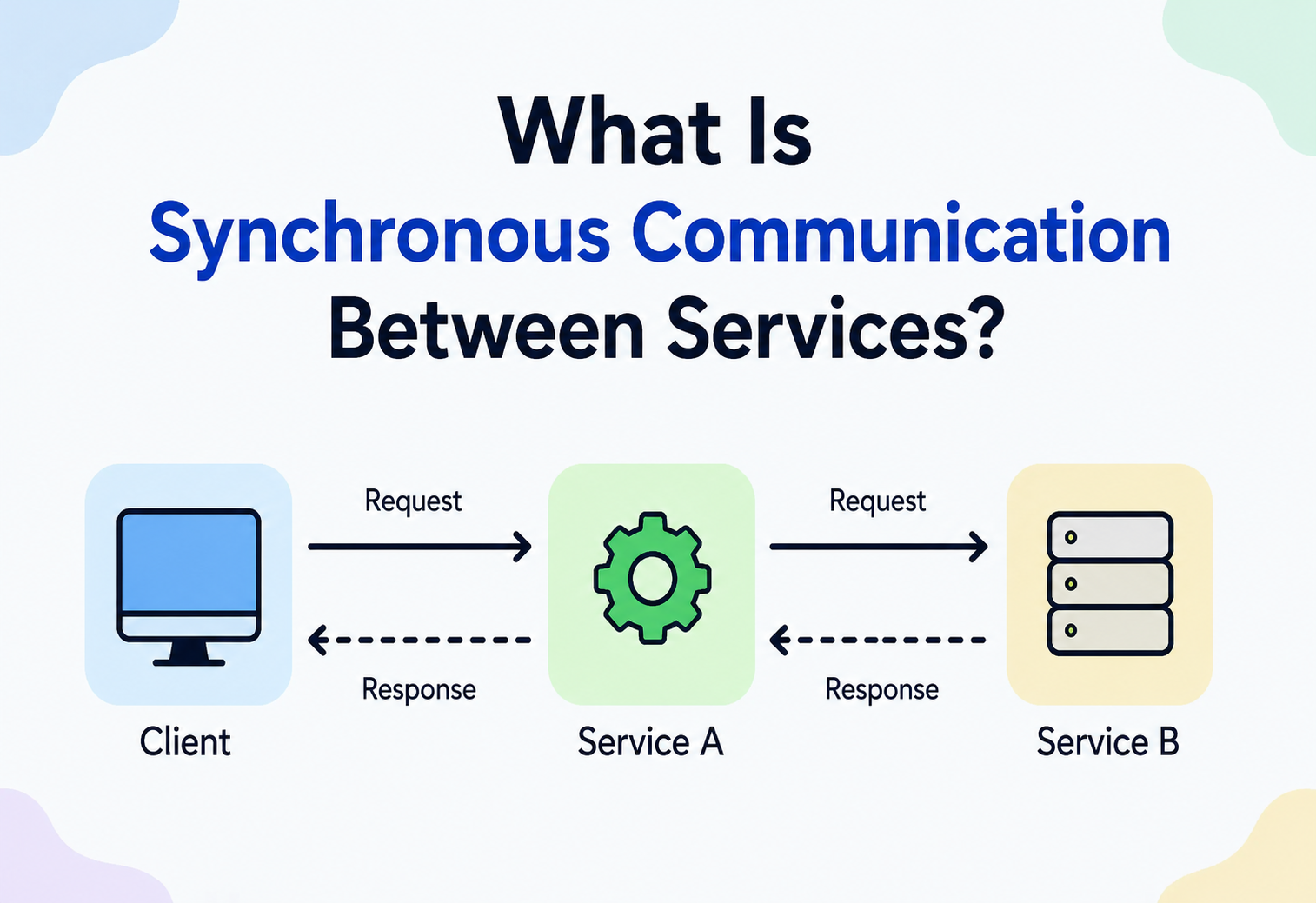
What Is Synchronous Communication Between Services?
A complete, beginner‑to‑production guide to how one piece of software talks to another and waits for the answer before doing anything else — with diagrams, Java code, real company examples, and the trade‑offs that show up in every system design interview.
Introduction & History
Imagine two friends talking on a phone call. One friend asks a question, and then goes quiet — they stop doing anything else — until the other friend answers. Only after hearing the answer does the first friend continue the conversation, hang up, or ask the next question. That is exactly what synchronous communication is, except instead of two friends, it is two pieces of software — usually called services — talking to each other.
A service is simply a program that does one job and can be asked to do that job by other programs. For example, a “Payment Service” knows how to charge a credit card. An “Order Service” knows how to create and track orders. Modern applications — the shopping app on your phone, the video app you stream movies from, the app that books your cab — are not one giant program. They are built from many small services that constantly talk to each other to get work done.
Synchronous communication between services means: Service A sends a request to Service B, and then Service A pauses and waits until Service B sends back a response. Service A cannot move forward until it hears back. This is different from asynchronous communication, where Service A sends a message and immediately continues doing other things, picking up the response (if any) later, whenever it arrives.
Think of ordering food at a small counter restaurant with no seating. You ask the cashier, “Is the biryani ready?” You stand right there, arms crossed, waiting. You cannot go sit down, walk around the mall, or do anything else meaningful related to that order until the cashier answers “yes” or “no.” That standing‑and‑waiting is synchronous communication. Compare this to dropping a letter in a mailbox — you post it and walk away to do other things, and whenever a reply comes, you deal with it then. That is asynchronous communication (covered briefly for contrast in this tutorial, since understanding what synchronous is not helps understand what it is).
A short history: how we got here
In the 1970s and 1980s, most software ran as a single large program on a single big computer (a “mainframe”). There weren’t many separate services talking to each other over a network — the “communication” mostly happened between functions inside the same program, which is naturally synchronous (a function calls another function and waits for its return value).
As networks became reliable and computers became cheaper, engineers started splitting programs across multiple machines. In the 1980s and 1990s, technologies like RPC (Remote Procedure Call) were invented specifically to make a function call on another computer feel just like a normal function call — you call it, you wait, you get a result — even though, behind the scenes, data was traveling over a real physical network. This is the direct ancestor of today’s synchronous service communication.
In the 2000s, the web matured, and HTTP (HyperText Transfer Protocol) — originally built for browsers to fetch web pages — became a popular way for services to talk to each other too, using styles like SOAP and later REST. HTTP is naturally synchronous: your browser sends a request for a web page and waits for the response before showing it to you.
In the 2010s, the rise of microservices (breaking one big application into many small independent services) made synchronous calls extremely common, because it was the easiest, most intuitive way for one service to ask another for information — “get me this user’s profile,” “check if this item is in stock,” “charge this card.” Around the same time, Google open‑sourced gRPC, a faster, more efficient synchronous communication technology built on HTTP/2, which many large companies now use internally.
Today, in 2026, synchronous communication remains the default starting point for most service‑to‑service calls, while asynchronous, event‑driven communication is used deliberately for situations where waiting is wasteful or risky — a distinction this tutorial explains in depth.
The Problem & Motivation
Why does synchronous communication even need to exist as a “topic”? Because once you have more than one service, you must decide how they will exchange information, and that decision has deep consequences for speed, reliability, and how easy your system is to reason about.
The problem it solves
Many real‑world operations genuinely need an immediate answer before you can proceed. If you are buying a plane ticket, the booking service must know right now whether a seat is available before it can show you a confirmation. It cannot say “I’ll let you know sometime later whether you have a seat” — that would be a broken user experience. Synchronous communication exists to solve exactly this: situations where the caller’s very next step depends entirely on the answer.
Suppose you are writing a simple calculator program. You write int total = add(5, 3); and then you print total. The program must wait for add() to finish and return a value before print can run — there is no other sensible order. Synchronous service communication takes this exact everyday programming idea (call a function, wait, get a result) and stretches it across a network, from one computer to another.
What goes wrong without a clear model
If every service just fired requests at every other service without a well‑understood pattern, you’d get chaos: services waiting forever on responses that never come, one slow service dragging down ten others, cascading failures during traffic spikes, and no clear way to debug “why did this request take 8 seconds?” Synchronous communication, done properly, comes with a whole toolkit — timeouts, retries, circuit breakers, load balancing — precisely to prevent this chaos. Done poorly, it is one of the most common causes of large‑scale outages in the industry (a slow database call in one small service has taken down entire websites for hours).
Why not just make everything asynchronous?
Asynchronous communication (message queues, event streams) is powerful, but it adds complexity: you need extra infrastructure (a message broker), you must handle “eventual consistency” (the answer isn’t available immediately, and other parts of the system may be temporarily out of date), and debugging becomes harder because cause and effect are separated in time. For many use cases — a mobile app asking “what is in my shopping cart right now?” — an immediate, synchronous answer is simpler, cheaper to build, and easier to reason about. Motivation for synchronous communication is therefore simplicity plus immediacy: use it when the caller truly cannot proceed without the answer, and when a short wait is acceptable.
When you open Amazon’s app and view a product page, the app calls a service synchronously to fetch the current price and stock status — you need that answer immediately to decide whether to click “Buy Now.” But when you actually place the order, Amazon does not synchronously wait for the warehouse robot to pick your item before showing you “Order Confirmed” — that part happens asynchronously in the background. Real systems mix both styles deliberately, choosing synchronous exactly where an immediate answer truly matters.
Core Concepts
Before going further, let’s build a solid vocabulary. Every term below is something you will see again and again in real job interviews and real production systems.
1. Request and Response
WhatA request is the message the caller sends (“please give me user #42’s profile”). A response is the message sent back (“here is user #42’s profile: name, email, address”).
WhyWithout a clear “ask, then answer” structure, two computers would have no shared understanding of whose turn it is to talk.
WhereEvery synchronous call — HTTP APIs, gRPC calls, database queries.
AnalogyA question and its answer in a classroom — the teacher waits for one student to finish answering before deciding what to do next.
ExampleYour browser requests GET /products/101, the server responds with the product’s JSON data and an HTTP status code like 200 OK.
2. Blocking
What“Blocking” describes a thread of execution (a single, ongoing sequence of instructions) that is paused, doing nothing productive, until an operation completes.
WhyIt is the natural side‑effect of “wait for the answer before continuing” — you cannot continue and also be waiting at the same time on a single thread.
WhereTraditional synchronous HTTP clients, JDBC database calls, most simple synchronous code.
AnalogyStanding in a queue at a bank counter — you cannot do your grocery shopping while standing in that queue; you’re “blocked” until it’s your turn and you’re served.
ExampleIn Java, calling httpClient.send(request) without any special settings pauses that thread until the HTTP response arrives.
3. Timeout
WhatA maximum amount of time the caller is willing to wait before giving up and treating the request as failed.
WhyWithout timeouts, a caller could wait forever if the other service crashes or the network drops the message, freezing the whole application.
WhereEvery production HTTP client, database driver, and RPC framework should have a configured timeout.
AnalogyTelling yourself, “If the bus doesn’t arrive in 10 minutes, I’ll just walk.” You don’t wait forever.
ExampleSetting connectTimeout = 2s and readTimeout = 5s on an HTTP client.
4. Retry
WhatAutomatically attempting the same request again after a failure, usually with a small delay.
WhyMany failures are temporary (“transient”) — a brief network hiccup — and simply trying again often succeeds.
WhereHTTP clients, message consumers, database reconnections.
AnalogyRedialing a phone number when the call drops, instead of assuming the person moved away forever.
ExampleRetrying a failed payment authorization call up to 3 times with increasing delay (called “exponential backoff”).
5. Circuit Breaker
WhatA safety mechanism that stops sending requests to a service that is clearly failing repeatedly, giving it time to recover, instead of hammering it with more requests.
WhyConstantly retrying against a broken service wastes resources and can make the outage worse (like pouring more people into an already‑jammed doorway).
WhereResilience libraries like Resilience4j, Hystrix (older), Istio service mesh.
AnalogyA physical circuit breaker in your house that trips and cuts power when there’s a dangerous electrical overload, protecting the rest of the house.
ExampleAfter 5 consecutive failed calls to the Inventory Service, the circuit “opens” and further calls fail instantly (without even trying) for 30 seconds, then it “half‑opens” to test if the service has recovered.
6. Latency
WhatThe time delay between sending a request and receiving the response.
WhyIt is a fundamental, unavoidable property of any real system — light and electricity take time to travel, and processing takes time too.
WhereMeasured everywhere; a core metric for every synchronous system.
AnalogyThe time between asking a question aloud and hearing the answer, even in the same room, is never exactly zero.
ExampleA call that takes 45 milliseconds has a latency of 45ms.
7. Idempotency
WhatAn operation is “idempotent” if doing it multiple times has the exact same effect as doing it once.
WhyBecause retries can accidentally send the same request twice (e.g., the response was lost even though the work succeeded), idempotency prevents a retried “charge $50” call from charging the customer $100.
WherePayment APIs, order creation APIs — anywhere retries are used.
AnalogyPressing an elevator call button five times doesn’t call five elevators — it’s the same request repeated, with the same outcome as pressing it once.
ExampleSending a unique “idempotency key” with a payment request so the payment service recognizes a retried request and does not double‑charge.
8. Protocol
WhatAn agreed‑upon set of rules for how messages are formatted and exchanged.
WhyTwo services written in different programming languages, by different teams, need a shared “language” to understand each other.
WhereHTTP, gRPC, GraphQL, TCP.
AnalogyTwo people agreeing to speak in English so they can understand each other, even though each might also know other languages.
ExampleA REST API that follows the HTTP/1.1 protocol, exchanging JSON‑formatted text.
Diagram 1 — Anatomy of a synchronous call. The Order Service is “activated” (busy) the entire time it waits. It cannot continue to the next line of code, such as sending a confirmation email, until the Payment Service replies. This blocking window is exactly what makes the call “synchronous.”
Architecture & Components
A synchronous call between two services rarely travels alone through empty space. In a real production system, it passes through several components, each with its own job. Understanding this “path” is essential for debugging and system design interviews.
1. Client / Caller
The service (or code inside it) that initiates the request. It owns the responsibility of setting timeouts, handling retries, and deciding what to do if no response comes.
2. DNS / Service Discovery
Before Service A can talk to Service B, it needs to know where Service B currently lives — which server, which IP address. In small systems, this might be a fixed address. In large cloud systems, services move around constantly (servers restart, scale up, scale down), so a service discovery system (like Consul, Eureka, or Kubernetes’ built‑in DNS) keeps a live directory of “who is currently running Service B and at what address.”
3. Load Balancer
Usually there isn’t just one copy (“instance”) of Service B — there might be 20 identical copies running to handle traffic. A load balancer sits in front of them and decides which specific copy receives each incoming request, spreading the load evenly (covered in depth in Chapter 13).
4. API Gateway
In many architectures, external clients (like a mobile app) don’t talk to internal services directly. Instead, they talk to an API Gateway — a single front door that handles authentication, rate‑limiting, and routing the request to the correct internal service.
5. Network
The actual physical/virtual wiring — routers, switches, cables, or virtual networks in the cloud — that carries the bytes of the request and response between machines.
6. Server / Callee
The service that receives the request, does the actual work (maybe reading a database, doing a calculation), and constructs the response.
7. Serialization / Deserialization
Data inside a running program exists as objects in memory. To send it over a network, it must be converted into bytes or text (like JSON) — this is serialization. The receiver then converts it back into objects it can use — deserialization.
Diagram 2 — A realistic path for one synchronous call. What feels like “the app calls the payment service” is really a chain of gateway, load balancer, service discovery, and database steps — every one of those hops adds a small amount of latency, and every one of them can fail.
Ordering a pizza by phone: you call a central number (API Gateway), an operator (Load Balancer) routes your call to whichever branch (service instance) is free, that branch checks its address book (service discovery) to know where the delivery driver currently is, and finally the kitchen (server) makes your food and sends a confirmation (response) back through the same chain.
Internal Working
Let’s go one level deeper and see, technically, what happens when a Java service makes a synchronous HTTP call to another service.
Step‑by‑step under the hood
- Connection establishment: If no existing connection exists, a TCP handshake happens (a three‑step exchange: SYN, SYN‑ACK, ACK) to establish a reliable channel between the two machines. If HTTPS is used, a TLS handshake also happens to set up encryption.
- Request serialization: The caller converts its request object (e.g., a Java object representing “charge this card”) into bytes — typically JSON text — following the HTTP protocol’s rules (method, headers, body).
- Transmission: The bytes travel over the network, possibly through several routers, load balancers, and firewalls.
- Server processing: The receiving service’s web server (like Tomcat, Netty, or a cloud‑managed runtime) picks up the incoming bytes, deserializes them into a usable object, and hands it to the application code (a “controller” or “handler”) which executes business logic — perhaps querying a database.
- Response serialization: The server converts its result back into bytes (JSON), attaches a status code (like
200for success or500for server error), and sends it back. - Caller resumes: The calling thread, which has been blocked (or, in modern non‑blocking models, “subscribed” and freed to do other work — more on this below), receives the bytes, deserializes them, and continues its own logic.
Blocking I/O vs Non‑blocking I/O
Here is a subtlety that often confuses beginners and comes up in interviews: “synchronous” is not exactly the same as “blocking.”
- Synchronous describes the logical relationship: the caller needs the result before proceeding with that particular piece of work, and the interaction follows a request‑then‑response pattern.
- Blocking describes the thread behavior: whether the operating system thread that made the call is frozen, unable to do anything else, while waiting.
Modern frameworks (like Spring WebFlux, or Java’s newer reactive libraries) can make a synchronous‑style call (you still logically wait for the result before proceeding to the next dependent step) without blocking the underlying thread — the thread is released to handle other requests while waiting, and gets notified (“callback”) when the response arrives. This is called non‑blocking synchronous or “asynchronous under the hood, synchronous in effect” — it improves efficiency without changing the fact that, logically, the caller’s next step still depends on this response.
Old‑style blocking Java code with HttpURLConnection or a plain RestTemplate ties up one thread per in‑flight request. Modern reactive Java code using WebClient with Mono/Flux lets one thread juggle thousands of in‑flight requests, resuming each one exactly when its data is ready — dramatically improving how many concurrent users a single server can serve.
Java: A classic blocking synchronous call
import java.net.http.HttpClient;
import java.net.http.HttpRequest;
import java.net.http.HttpResponse;
import java.net.URI;
import java.time.Duration;

public class PaymentClient {

    private final HttpClient client = HttpClient.newBuilder()
            .connectTimeout(Duration.ofSeconds(2))   // fail fast if we can't even connect
            .build();

    public String chargeCard(String cardId, int amountCents) throws Exception {
        HttpRequest request = HttpRequest.newBuilder()
                .uri(URI.create("https://payment-service.internal/charge"))
                .timeout(Duration.ofSeconds(5))       // give up waiting after 5s
                .header("Content-Type", "application/json")
                .POST(HttpRequest.BodyPublishers.ofString(
                        "{"cardId":"" + cardId + "","amount":" + amountCents + "}"))
                .build();

        // send() BLOCKS this thread until the response arrives, or the timeout fires.
        HttpResponse<String> response = client.send(request, HttpResponse.BodyHandlers.ofString());

        if (response.statusCode() != 200) {
            throw new RuntimeException("Payment failed: " + response.statusCode());
        }
        return response.body(); // e.g. {"status":"SUCCESS","txnId":"T-9081"}
    }
}
This method will not return control to whoever called it until the payment service replies or 5 seconds pass. That is textbook synchronous, blocking communication.
Data Flow & Lifecycle
Let’s trace the complete lifecycle of one synchronous request — from the moment a user taps a button to the moment they see a result — using a realistic example: a customer placing an order on a shopping app.
Diagram 3 — Full request lifecycle. Notice that Order Service makes three separate synchronous calls (stock check, payment, database write) before it can respond to the app. Each one is a fresh wait. If any one of these three fails or is slow, the entire chain slows down or fails — this is a critical trade‑off explored in Chapter 7.
Lifecycle stages explained simply
- Trigger: A user action or a scheduled job starts the chain.
- Request creation: The caller builds a request object with all needed data.
- Dispatch: The request is sent over the network to the target service.
- Waiting window: The caller is now blocked (or logically waiting) — this window is where timeouts, slow networks, and overloaded servers cause visible delay to the end user.
- Processing: The callee does its actual work, which may itself involve further synchronous calls (as shown above — Order Service calling Inventory and Payment).
- Response dispatch: The callee sends back a result.
- Resume: The caller receives the result and continues its own logic — success path or failure/error‑handling path.
- Completion: The very first caller (the user, ultimately) sees a final outcome.
Think of a relay race, but where each runner has to physically wait for the previous runner to hand them the baton before running even one step — nobody can start early. If any single runner trips, the whole team’s finishing time is affected. That is exactly the risk of a chain of synchronous calls: total time equals the sum of every step, and any one failure blocks the entire relay.
Advantages, Disadvantages & Trade‑offs
Advantages
| Advantage | Why it matters |
|---|---|
| Simplicity | The code reads top‑to‑bottom, like a normal function call. Easy for beginners to write and reason about. |
| Immediate consistency | The caller always gets the freshest, most up‑to‑date answer, because it asks right now and waits. |
| Easy error handling | Success or failure is known immediately — you can show the user an error message right away instead of “we’ll notify you later.” |
| Simple debugging | A single request‑response pair is easy to trace, log, and reproduce compared to distributed asynchronous chains. |
| No extra infrastructure | You don’t need a message broker (like Kafka or RabbitMQ) just to make one service ask another a question. |
Disadvantages
| Disadvantage | Why it matters |
|---|---|
| Tight coupling in time | The caller depends on the callee being available right now. If the callee is down, the caller usually fails too. |
| Cascading failures | A slow or broken service can make every service that calls it slow or broken too, spreading the damage. |
| Resource consumption | Blocked threads (in traditional blocking models) sit idle but still consume memory and thread‑pool slots, limiting how many concurrent requests a server can handle. |
| Higher perceived latency | Chained synchronous calls add up: 3 calls at 100ms each become 300ms minimum, felt directly by the end user. |
| Scaling challenges | Under heavy load, synchronous chains can create “backpressure” that ripples backward through every caller in the chain. |
The Trade‑off, in one sentence
Synchronous communication trades independence and resilience for simplicity and immediacy. You get a straightforward mental model and instant answers, at the cost of making services depend on each other’s real‑time health.
In 2020, several major outages across the industry were traced back to one internal service becoming slow, causing dozens of dependent services (all calling it synchronously, without proper timeouts) to also become slow or unresponsive, because their threads piled up waiting. This is often called a “thundering herd” or “cascading failure” and is the single most cited real‑world risk of synchronous architectures at scale — which is exactly why Chapters 9 and 15 of this tutorial focus heavily on timeouts, circuit breakers, and bulkheads.
Diagram 4 — Cascading failure. One slow dependency at the bottom of the chain can ripple all the way up to the end user, because every hop is a synchronous wait.
Performance & Scalability
Latency budgets
In production systems, engineers set a “latency budget” for an entire user‑facing request — say, 300 milliseconds total. If that request involves 4 chained synchronous calls, each call only gets roughly 75ms on average before the whole experience feels slow. This is why teams obsess over shaving milliseconds off each internal synchronous call — the cost is cumulative.
Thread pools and concurrency limits
In a traditional (blocking) server, each incoming request typically occupies one thread for its entire duration, including all the time spent waiting on synchronous calls to other services. Since threads are a limited resource (each consumes memory, and operating systems can only efficiently juggle so many), a server has a maximum number of requests it can handle at once — its “thread pool size.” If synchronous calls to a slow downstream service take longer, threads are held longer, and the server can accept fewer new requests, sometimes rejecting users entirely even though the CPU itself isn’t very busy — the server is simply “waiting,” not “working.”
A server configured with a thread pool of 200 can handle 200 concurrent requests. If a downstream synchronous call that normally takes 50ms suddenly takes 5 seconds (a 100x slowdown), the same 200 threads get “stuck” 100x longer, so the effective capacity of the server drops roughly 100x — even though nothing about the server’s own code changed. This single insight explains a huge fraction of real production outages.
Scaling strategies for synchronous systems
- Horizontal scaling: Run more copies (instances) of a service behind a load balancer, so more requests can be handled in parallel.
- Connection pooling: Reuse existing TCP/TLS connections instead of creating a brand‑new one for every single request (which is slow, due to handshakes).
- Caching: Avoid making a synchronous call at all if the answer was already fetched recently and is still valid (Chapter 13).
- Non‑blocking I/O / reactive programming: Free up threads while waiting, so one server can juggle far more concurrent in‑flight requests (Chapter 5).
- Bulkheads: Dedicate separate, limited thread pools to different downstream dependencies, so a slowdown in one dependency cannot exhaust the entire server’s threads (named after ship bulkheads that stop one flooded compartment from sinking the whole ship).
- Timeouts tuned tightly: A well‑tuned timeout (not too long, not too short) limits how long a slow dependency can hold a thread hostage.
Imagine a coffee shop with 10 baristas (threads). Normally each customer (request) takes 2 minutes, so the shop serves a lot of people per hour. But if the espresso machine (a downstream dependency) breaks and each order now takes 10 minutes because baristas keep trying and waiting, the same 10 baristas can now only serve a fraction of the customers — even though nothing else changed. A bulkhead would be like reserving 2 baristas only for simple drip coffee, so espresso problems don’t starve every customer.
High Availability & Reliability
Because synchronous calls create real‑time dependencies between services, keeping the overall system reliable requires deliberate design. Here are the standard tools, all of which you should be able to explain in an interview.
1. Timeouts (revisited)
Never call a downstream service without a timeout. An infinite wait is one of the most dangerous mistakes in distributed systems — it lets one broken dependency freeze its caller forever.
2. Retries with backoff and jitter
Retry failed calls, but not instantly and not forever. Exponential backoff means waiting longer between each retry (e.g., 100ms, then 200ms, then 400ms). Jitter means adding a small random variation to that delay so that many callers retrying at once don’t all hit the recovering service at the exact same moment (avoiding a new “thundering herd”).
3. Circuit breakers (revisited)
After repeated failures, stop calling the failing service for a cooldown period, failing fast instead. This protects both the caller (no more wasted waiting) and the callee (no more overwhelming traffic while it tries to recover).
Diagram 5 — Circuit breaker states. This three‑state machine (Closed → Open → Half‑Open → Closed) is the industry‑standard way to stop retrying against a clearly broken service, then carefully test recovery before fully trusting it again.
Java: Circuit breaker with Resilience4j
CircuitBreakerConfig config = CircuitBreakerConfig.custom()
        .failureRateThreshold(50)                     // open if 50% of recent calls fail
        .waitDurationInOpenState(Duration.ofSeconds(30))
        .slidingWindowSize(20)                         // look at the last 20 calls
        .permittedNumberOfCallsInHalfOpenState(3)
        .build();

CircuitBreaker breaker = CircuitBreaker.of("inventoryService", config);

Supplier<String> decoratedCall = CircuitBreaker
        .decorateSupplier(breaker, () -> inventoryClient.checkStock("item-42"));

try {
    String result = decoratedCall.get();
} catch (CallNotPermittedException e) {
    // circuit is OPEN — fail fast, maybe return a cached/default response
    result = fallbackStockResponse();
}
Resilience4j wraps the risky synchronous call. Once too many recent calls fail, further calls are rejected immediately (CallNotPermittedException) without even touching the network — protecting both services.
4. Fallbacks
A pre‑planned “Plan B” response used when the real call fails or the circuit is open — such as showing a cached price instead of a live one, or a generic “recommended items” list instead of a personalized one.
5. Bulkheads (revisited)
Isolate resources (like thread pools or connection pools) per dependency so one bad dependency cannot exhaust resources needed for other, healthy dependencies.
6. Redundancy & replication
Run multiple instances of each service across multiple machines, data centers, or cloud “availability zones,” so the failure of one machine (or even one entire data center) doesn’t take down the whole service.
7. Health checks
Load balancers and orchestration systems (like Kubernetes) regularly ping each service instance with a small synchronous “are you healthy?” request. Unhealthy instances are automatically removed from receiving new traffic.
Security
Since synchronous calls often travel over networks — sometimes the public internet, sometimes internal company networks — they must be secured at multiple layers.
1. Transport encryption (TLS/HTTPS)
Data traveling between services should be encrypted using TLS (the “S” in HTTPS), so that anyone intercepting the network traffic sees only scrambled bytes, not the actual request or response content (like credit card numbers).
2. Mutual TLS (mTLS)
Normal HTTPS proves the server’s identity to the client. Mutual TLS goes further: both sides present certificates, so the server also verifies the client’s identity. This is common in internal microservice communication (often automatically handled by a “service mesh” like Istio or Linkerd) to ensure only trusted, known services can call each other.
3. Authentication
Proving who is making the request. Common mechanisms: API keys, OAuth 2.0 access tokens, and JWTs (JSON Web Tokens) — a compact, signed piece of data that says “this request is from user X, verified by an authority we trust.”
4. Authorization
Once identity is known, deciding what that identity is allowed to do. For example, a regular user’s token might allow “view my own orders” but not “view any user’s orders” — that second action requires an admin‑level token.
5. Input validation
Never trust incoming request data blindly. A service receiving a synchronous request should validate the shape, type, and range of every field to prevent malformed or malicious data from causing crashes or security holes (like SQL injection).
6. Rate limiting
Restricting how many requests a single caller can make in a given time window, to prevent abuse (accidental infinite retry loops, or deliberate denial‑of‑service attacks) from overwhelming a service.
TLS/HTTPS is like sealing a letter in a tamper‑proof envelope so no one along the way can read it. Mutual TLS is like both the sender and receiver showing government‑issued ID to each other before exchanging the envelope. Authorization is like a security guard checking not just your ID, but whether your ID badge actually grants access to this particular room.
Large companies like Netflix and Uber use service meshes that automatically wrap every internal synchronous call with mTLS, so individual engineering teams don’t have to manually implement encryption and identity verification in every single service — it’s handled transparently by the shared infrastructure layer.
Monitoring, Logging & Metrics
When dozens or hundreds of services call each other synchronously, you cannot just “look at the code” to understand what’s slow or broken in production — you need visibility tools.
1. Logging
Recording what happened, in text form, usually with a timestamp: “Received request X at 10:32:01, responded with status 200 in 43ms.” Good logs include a correlation ID (also called a trace ID) — a unique identifier attached to a request when it first enters the system, and passed along to every downstream synchronous call, so you can find every log line related to one specific user action across many services.
2. Metrics
Numeric measurements collected over time: request count, error rate, and latency percentiles (like p50, p95, p99 — meaning “95% of requests finished faster than this value”). Tools like Prometheus collect these, and Grafana displays them as dashboards.
3. Distributed tracing
A technique (using tools like Jaeger, Zipkin, or OpenTelemetry) that visualizes the entire chain of synchronous (and asynchronous) calls for one single request as a timeline, showing exactly which hop took how long. This is invaluable for a chain like the order example in Chapter 6 — instantly showing “the Payment Service call took 4.2 out of the total 4.5 seconds.”
Diagram 6 — A distributed trace, simplified. Tracing tools produce a waterfall view exactly like this, letting engineers instantly spot that the payment call (200ms) is the biggest single contributor to total request time, rather than guessing.
4. Alerting
Automated notifications (Slack messages, pages to on‑call engineers) triggered when metrics cross dangerous thresholds — for example, “error rate above 5% for 3 minutes” or “p99 latency above 2 seconds.”
5. Health dashboards & SLOs
Teams define Service Level Objectives (SLOs) — target reliability goals, like “99.9% of requests succeed within 300ms” — and continuously monitor actual performance against these goals.
Imagine every request carries an invisible sticky note that says “Order #7781.” As that request passes through the Order Service, Inventory Service, and Payment Service, each service writes down the current time on that same sticky note before passing it along. At the end, you can read the whole sticky note and see exactly how long each stop took — that’s the essence of distributed tracing.
Deployment & Cloud
Modern services that talk synchronously are rarely deployed as single, hand‑managed servers. They typically run inside containers (packaged units of software, usually with Docker) orchestrated by a system like Kubernetes, which automatically manages how many copies of each service run, restarts crashed instances, and integrates with load balancers and service discovery.
Rolling deployments and synchronous calls
When you deploy a new version of a service, you don’t want to turn off all old instances at once (that would cause every synchronous caller to fail simultaneously). Instead, cloud platforms perform rolling deployments: a few new instances start up, get added to the load balancer only once they pass health checks, and only then are a few old instances shut down — repeating gradually until all instances are updated, with zero downtime for callers.
Blue‑green and canary deployments
- Blue‑green deployment: Two full environments exist (“blue” = current version, “green” = new version). Traffic is switched all at once (or gradually) from blue to green, with the ability to switch back instantly if something goes wrong.
- Canary deployment: A small percentage of real traffic (say, 5%) is routed to the new version first. If error rates and latency stay healthy, gradually increase to 100%. This limits the “blast radius” if the new version has a bug.
Service mesh
A dedicated infrastructure layer (like Istio or Linkerd) that sits alongside every service instance (often as a lightweight “sidecar” proxy) and automatically handles cross‑cutting concerns for synchronous calls: retries, timeouts, circuit breaking, mTLS encryption, and detailed metrics — without application code needing to implement any of it directly.
Diagram 7 — Service mesh sidecar pattern. The application code simply makes a plain synchronous call to a local address; the sidecar proxy quietly adds encryption, retry logic, and monitoring around it — the developer barely has to think about it.
Cloud provider building blocks
Cloud platforms (AWS, Google Cloud, Azure) offer managed load balancers (e.g., AWS Application Load Balancer), managed service discovery (e.g., AWS Cloud Map), and managed API gateways (e.g., Amazon API Gateway) — so teams don’t need to build this infrastructure themselves.
Databases, Caching & Load Balancing
Databases and synchronous calls
A database query is itself a form of synchronous communication — your application sends a query and waits for the database engine to return rows. Slow database queries are one of the most common root causes of slow synchronous service calls overall, because whatever calls that service is now waiting on that database wait, plus the network wait, plus everything else in the chain.
Caching — avoiding the call altogether
Caching means storing a copy of a previous answer somewhere fast (often in‑memory, like Redis) so that a repeated request can be answered instantly, without making a fresh synchronous call to the original, slower source.
Instead of the Order Service calling the Inventory Service every single time to check if a popular product is in stock, it can cache the answer for 2 seconds. During that 2‑second window, thousands of requests can be answered from the cache instantly, and only occasionally does a fresh synchronous call actually reach the Inventory Service. This is called “reducing call fan‑out.”
Common caching strategies
- Cache‑aside: The application checks the cache first; on a miss, it makes the synchronous call, then stores the result in the cache for next time.
- Write‑through: Every write updates both the cache and the underlying data store together.
- TTL (Time To Live): Cached data automatically expires after a set duration, balancing freshness against the cost of repeated calls.
Load balancing algorithms
When multiple instances of a service exist, a load balancer decides which instance handles each synchronous request. Common algorithms:
| Algorithm | How it works | Good for |
|---|---|---|
| Round robin | Cycles through instances in order: 1, 2, 3, 1, 2, 3… | Simple, uniform workloads |
| Least connections | Sends the next request to whichever instance currently has the fewest active requests | Uneven or long‑running requests |
| Weighted round robin | Like round robin, but stronger instances get proportionally more requests | Mixed hardware sizes |
| Consistent hashing | Routes requests with the same “key” (e.g., user ID) to the same instance consistently | When caching per‑instance benefits from the same user always landing on the same server |
Diagram 8 — Load balancing. The caller only knows about the load balancer’s address; it has no idea which specific instance actually processes each synchronous call, and doesn’t need to.
Caching is like remembering that the answer to “what’s 2+2” is 4, so you never need to recompute it from scratch. Load balancing is like a restaurant host directing each new group of guests to whichever table (waiter) is currently least busy, so no single waiter gets overwhelmed while others stand idle.
APIs & Microservices
Synchronous communication needs a concrete technology to actually carry the request and response. Here are the main options used in real microservice architectures.
1. REST (Representational State Transfer)
An architectural style built on top of HTTP, using standard verbs (GET, POST, PUT, DELETE) against resources identified by URLs (like /orders/7781). Data is usually exchanged as JSON. REST is simple, human‑readable, and widely supported — it’s the most common starting point for synchronous APIs.
2. gRPC
A high‑performance RPC framework built by Google, using HTTP/2 and a compact binary format (Protocol Buffers) instead of text‑based JSON. gRPC calls are typically faster and use less bandwidth than REST/JSON, and they support strict, strongly‑typed contracts (“schemas”) shared between client and server. Many large companies use gRPC for internal, high‑traffic, service‑to‑service synchronous calls, while keeping REST for external, public‑facing APIs (which benefit from being simple and browser‑friendly).
3. GraphQL
A query language that lets the caller specify exactly which fields it needs in the response, in a single request — avoiding both “getting too little data and needing a second call” and “getting too much unused data.” It’s still fundamentally synchronous (the client sends a query and waits for a response) but reduces the number of round trips compared to calling multiple separate REST endpoints.
4. SOAP (older, still seen in enterprise/legacy systems)
An older, XML‑based protocol with strict formal contracts (WSDL). Heavier and more verbose than REST, but still used in banking, insurance, and government systems that adopted it decades ago and haven’t fully migrated away.
| Style | Format | Best for |
|---|---|---|
| REST | JSON over HTTP/1.1 | Public APIs, simplicity, broad tooling support |
| gRPC | Protocol Buffers over HTTP/2 | High‑throughput internal microservice calls |
| GraphQL | JSON, flexible query | Client‑driven data shaping, mobile apps with limited bandwidth |
| SOAP | XML | Legacy enterprise systems with strict formal contracts |
Java: A synchronous gRPC client call (conceptual)
// Generated by the Protocol Buffers compiler from a .proto contract file
PaymentServiceGrpc.PaymentServiceBlockingStub stub =
        PaymentServiceGrpc.newBlockingStub(channel);

ChargeRequest request = ChargeRequest.newBuilder()
        .setCardId("card_123")
        .setAmountCents(4990)
        .build();

// "Blocking" stub — this line waits for the response, just like the HTTP example earlier
ChargeResponse response = stub.chargeCard(request);

System.out.println("Status: " + response.getStatus());
Notice how similar this “feels” to a normal Java method call — that similarity is exactly the point of RPC‑style frameworks: make a network call look and behave like a local function call, blocking included.
Microservices and synchronous coupling
In a microservices architecture, teams must carefully decide which calls should be synchronous (needs an immediate answer) versus asynchronous (can be handled eventually, via events or queues). Overusing synchronous calls between many services creates a tightly‑coupled “distributed monolith” — technically split into services, but practically as fragile as one giant program, since everything still depends on everything else responding immediately.
Design Patterns & Anti‑patterns
Helpful design patterns
1. Circuit Breaker Pattern (revisited)
Already explained in depth in Chapter 9 — stop calling a service that’s clearly failing.
2. Retry Pattern with Backoff
Retry transient failures with increasing delay and randomness (jitter), instead of hammering repeatedly at a fixed interval.
3. Bulkhead Pattern
Isolate resources per dependency, so one bad dependency can’t exhaust resources needed elsewhere.
4. Timeout Pattern
Always bound how long you’re willing to wait — never assume “it’ll probably respond eventually.”
5. Fallback / Graceful Degradation
When a synchronous dependency is unavailable, degrade gracefully — show slightly stale or simplified data rather than a hard failure.
6. Request Hedging
Send the same request to two different instances of a service simultaneously and use whichever response arrives first, canceling the other. This trades a bit of extra load for lower “tail latency” (protecting against the occasional very slow response).
7. Backend For Frontend (BFF)
A dedicated service that aggregates multiple synchronous calls to other services on behalf of a specific client (e.g., mobile app vs. web app), reducing the number of round trips the actual end‑user device has to make.
Diagram 9 — Backend For Frontend pattern. Instead of the mobile app making three separate synchronous calls over a possibly slow mobile network, it makes one call to a BFF, which fans out the three synchronous calls internally (over a fast internal network) and combines the results.
Common anti‑patterns (things to avoid)
Calling a downstream service without any timeout configured. If that service hangs, the caller hangs forever too. Always set explicit timeouts.
Service A calls B, which calls C, which calls D, which calls E — all synchronously, all within one user request. Total latency adds up, and any single failure breaks the whole chain. Prefer flattening such chains, using caching, or converting non‑urgent parts to asynchronous processing.
Making many small synchronous calls when one combined call (fetching several needed pieces of data at once) would do. Each call has network overhead — batch or combine when possible.
Splitting a system into many “microservices” but making them all so tightly synchronously coupled that you cannot deploy or scale any one of them independently — you get all the operational complexity of microservices with none of the independence benefits.
Adding retries to a synchronous call without making the underlying operation idempotent, risking duplicate side effects (like double‑charging a customer) when a retry actually succeeds after the first attempt’s response was merely lost in transit.
Making a caller wait synchronously for a task that genuinely takes a long time (e.g., generating a large report, processing a video). This wastes resources and risks timeouts — such work is a strong candidate for asynchronous processing instead, with the caller polling or being notified later.
Advanced Topics: CAP, Consensus, Concurrency & Failure Recovery
The CAP theorem
The CAP theorem states that in a distributed system, when a network failure (a “partition”) occurs between nodes, you can only guarantee two out of three properties at once:
- Consistency (C): Every read receives the most recent write (or an error).
- Availability (A): Every request receives a (non‑error) response, even if it isn’t the most recent data.
- Partition tolerance (P): The system continues to operate despite network partitions.
Since real networks do experience partitions (a cable gets cut, a data center loses connectivity), partition tolerance is generally non‑negotiable, so the real‑world choice is between prioritizing Consistency or Availability during a partition.
How this connects to synchronous communication: A synchronous call that insists on getting the absolute latest, most consistent answer (favoring “C”) may have to fail or wait if the relevant nodes can’t currently agree or communicate (a partition). A system that instead favors “A” might synchronously return a slightly stale answer rather than failing outright, prioritizing “always give some answer” over “always give the newest answer.”
Imagine two library branches sharing one card catalog, but their phone line goes down (a partition). If a visitor asks “is this book available?”, the librarian can either refuse to answer until the phone line is fixed (favoring consistency — never give a possibly‑wrong answer) or answer based on the last information she has, accepting it might be slightly outdated (favoring availability — always give some answer).
Consensus algorithms
When multiple servers must agree on a single value or decision (e.g., “who is the current leader?”, “what is the true, agreed order of these operations?”) despite failures and network delays, they use consensus algorithms like Paxos or the more widely‑taught Raft. These algorithms rely heavily on synchronous‑style request/response exchanges between nodes (votes, heartbeats, acknowledgments) to reach agreement safely, even if some nodes fail or messages are delayed.
Concurrency considerations
When many synchronous requests hit a service at once, the service must handle concurrency correctly:
- Thread safety: Shared data structures accessed by multiple concurrent request‑handling threads must be protected (using locks, or better, immutable/thread‑safe data structures) to avoid corrupted results.
- Connection pool sizing: The number of simultaneous outgoing synchronous calls a service can make to a downstream dependency is limited by its connection pool — sized too small, requests queue up and add latency; sized too large, it can overwhelm the downstream service.
- Backpressure: A mechanism to signal “slow down, I can’t handle more right now” back to the caller, rather than silently queueing unlimited work and eventually crashing.
Replication and partitioning (sharding)
Replication means keeping multiple copies of the same data (often on different machines) so that if one copy’s machine fails, another copy can still answer synchronous read requests. Partitioning (sharding) means splitting data across multiple machines by some key (like user ID ranges), so no single machine has to store or serve all the data — this lets synchronous read/write load scale beyond what one machine could handle.
Failure recovery
Well‑designed synchronous systems assume failure will happen and plan for it: automatic failover to a healthy replica, health‑check‑driven removal of unhealthy instances from load balancers, and “chaos engineering” practices (deliberately injecting failures in controlled tests, famously pioneered by Netflix’s “Chaos Monkey”) to continuously verify that timeouts, retries, and circuit breakers actually work as intended before a real outage tests them for you.
Algorithmic note: exponential backoff with jitter
public long computeBackoffMillis(int attempt, long baseMillis, long maxMillis) {
    long exp = (long) (baseMillis * Math.pow(2, attempt)); // exponential growth
    long capped = Math.min(exp, maxMillis);                // don't grow forever
    return ThreadLocalRandom.current().nextLong(0, capped + 1); // add jitter
}
A simple, standard formula: delay doubles each attempt, capped at a maximum, and randomized (jitter) so many failing callers don’t all retry at the exact same instant.
Best Practices & Common Mistakes
Best practices checklist
- TimeoutsAlways set explicit connect and read timeouts on every synchronous call.
- RetriesUse retries only for idempotent operations, with backoff and jitter.
- CircuitWrap risky downstream calls with a circuit breaker.
- FallbackDesign a clear fallback or degraded response for when a dependency is unavailable.
- TracePropagate a correlation/trace ID through every hop for observability.
- ShallowKeep synchronous chains as shallow as possible; move non‑urgent work to asynchronous processing.
- PoolingUse connection pooling to avoid the cost of repeated handshakes.
- CacheCache aggressively where slight staleness is acceptable.
- p99Monitor latency percentiles (p95, p99), not just averages — averages hide painful outliers.
- ChaosLoad‑test synchronous chains under realistic failure conditions, not just the happy path.
- TLSSecure every call with TLS (and mTLS internally where feasible) plus proper authentication and authorization.
- VersionVersion your APIs carefully so callers aren’t broken by changes to a service they depend on.
Common mistakes to avoid
- No timeout at all — silently the most dangerous and most common mistake.
- Retrying non‑idempotent operations — risking duplicate charges, duplicate emails, or duplicate orders.
- Treating every dependency as equally critical — a “nice‑to‑have” recommendation service failing shouldn’t block the entire checkout flow; only truly essential calls should be able to fail the whole request.
- Ignoring tail latency — optimizing only for the average case while 1% of users experience multi‑second waits.
- Deep synchronous chains — five or more sequential hops within one user request is a red flag worth re‑architecting.
- Not load testing failure scenarios — assuming timeouts and circuit breakers work without ever actually testing what happens when a dependency is deliberately made slow or unavailable.
- Hardcoding downstream addresses instead of using service discovery, making deployments fragile.
Netflix’s engineering team popularized “chaos engineering” specifically because they learned, from painful outages, that resilience mechanisms (timeouts, retries, circuit breakers) often silently fail to work as intended until they are deliberately, regularly tested against real, injected failures — not just designed on a whiteboard and assumed to be correct.
Real‑World Industry Examples
Netflix’s streaming app makes synchronous calls to fetch your profile, viewing history, and personalized recommendations when you open the app — you need this data immediately to render the home screen. Netflix pioneered many of the resilience patterns discussed in this tutorial (circuit breakers, bulkheads, chaos engineering) precisely because it operates hundreds of interdependent synchronous services at massive scale.
Amazon’s product pages synchronously call services for price, availability, and reviews the moment you load the page. Amazon is also famous for its internal engineering principle that every team’s service must expose a well‑defined API — synchronous or asynchronous — and services communicate strictly through those APIs, never by directly accessing another team’s database.
When you request a ride, Uber’s app synchronously calls a matching service to find a nearby driver and a pricing service to calculate the fare — both answers are needed immediately before you can confirm the ride. Uber operates thousands of microservices and has written extensively about the operational challenges of managing synchronous call chains at that scale, including building internal tools for tracking service dependencies.
Google created gRPC (based on an internal system called “Stubby”) specifically to make internal synchronous service‑to‑service calls faster and more efficient across its enormous internal service ecosystem, replacing older, heavier communication mechanisms.
Payment processing (like verifying a card and authorizing a charge) is almost always synchronous, because merchants and customers need an immediate yes/no answer at checkout. This is also why idempotency keys are a standard, mandatory feature of virtually every payment API — retries are common on unreliable networks, and double‑charging customers is unacceptable.
All these examples share the same underlying idea from Chapter 1: whenever the very next thing that happens — showing a price, confirming a ride, approving a payment — truly cannot proceed without an answer, synchronous communication is the natural, sensible choice, however large or small the company.
Frequently Asked Questions
Is synchronous communication the same as REST?
No. REST is one specific technology/style for implementing synchronous (or even asynchronous, though rarely) communication over HTTP. “Synchronous” describes the wait‑for‑a‑response behavior; REST, gRPC, GraphQL, and SOAP are all different concrete ways to implement that behavior.
Is synchronous communication always blocking?
Not necessarily. As explained in Chapter 5, modern non‑blocking (reactive) frameworks can implement a logically synchronous relationship (the caller’s next step depends on this response) without freezing the underlying operating system thread while waiting.
When should I choose synchronous over asynchronous communication?
Choose synchronous when the caller genuinely cannot proceed without an immediate answer (e.g., “is this in stock?” before showing a buy button) and a short wait is acceptable. Choose asynchronous when the work can happen later, doesn’t need to block the user, or when you want to reduce tight coupling between services (e.g., sending a “welcome email” after signup).
Does synchronous communication mean the two services must be written in the same language?
No. Synchronous communication works across any programming languages, because it relies on shared protocols (HTTP, gRPC) and data formats (JSON, Protocol Buffers) rather than shared code. A Java service can synchronously call a Python or Go service without either one knowing what language the other is written in.
What happens if a synchronous call times out?
The caller treats it as a failure and executes its error‑handling logic — this might mean retrying (if the operation is idempotent and the failure seems transient), returning a fallback/cached response, or surfacing an error to the end user, depending on how the system is designed.
Can synchronous communication cause an entire application to go down?
Yes, if it’s implemented carelessly — this is called a cascading failure (Chapter 7), where one slow or broken service causes every service that depends on it synchronously (without timeouts, circuit breakers, or bulkheads) to also become slow or unresponsive.
Is gRPC always faster than REST?
Generally yes, for internal service‑to‑service traffic, because it uses a binary format and HTTP/2 multiplexing rather than text‑based JSON and (often) HTTP/1.1. However, REST remains simpler to debug, more broadly supported by browsers and tools, and is often preferred for public‑facing APIs where developer ease‑of‑use matters more than raw performance.
What is the relationship between synchronous communication and the CAP theorem?
They’re related but distinct concepts. CAP is about trade‑offs during network partitions in distributed data systems. Synchronous communication is about the request‑response interaction style between services. A synchronous call can be built on top of a system that favors either consistency or availability, and the choice affects what kind of answer the synchronous call can guarantee during a partition (Chapter 16).
Summary & Key Takeaways
Synchronous communication between services is the request‑then‑wait‑then‑respond pattern that underlies most everyday interactions in software — from a mobile app checking your order status, to a payment gateway authorizing a card, to one microservice asking another for data it needs right now. It is simple, intuitive, and gives immediate, consistent answers, but it also creates real‑time dependencies between services that, if left unmanaged, can turn one small failure into a large outage.
Key takeaways
- 01Synchronous communication means the caller sends a request and waits (blocks, logically or literally) until it receives a response before continuing that piece of work.
- 02It is best suited for situations where the caller genuinely cannot proceed without an immediate answer.
- 03Real synchronous calls pass through many components — load balancers, service discovery, gateways, networks — each adding latency and each a potential point of failure.
- 04The core resilience toolkit is: timeouts, retries with backoff and jitter, circuit breakers, bulkheads, and fallbacks — always used together, never in isolation.
- 05Idempotency is essential wherever retries are used, to avoid duplicate side effects like double payments.
- 06Performance and scalability hinge on thread/connection management — a slow downstream dependency can silently exhaust a caller’s capacity even if the caller’s own code is perfectly fine.
- 07Security requires encryption (TLS/mTLS), authentication, authorization, and input validation on every synchronous hop.
- 08Observability — logging with correlation IDs, metrics, and distributed tracing — is what makes complex chains of synchronous calls debuggable in production.
- 09REST, gRPC, and GraphQL are the most common technologies used to implement synchronous communication today, each with different trade‑offs in simplicity, speed, and flexibility.
- 10The biggest anti‑pattern to avoid is uncontrolled, deep synchronous coupling — turning independent microservices into a fragile “distributed monolith.”
- 11Real production systems (Netflix, Amazon, Uber, Google, and virtually every payments company) deliberately mix synchronous and asynchronous communication, choosing synchronous specifically where immediacy is genuinely required.
With this foundation, you now understand not just what synchronous communication is, but why it exists, how it works internally, and how to build it reliably, securely, and at scale — the exact depth of understanding expected in real production engineering work and in system design conversations.
“Synchronous is a phone call — simple, immediate, and dangerous if the other side stops picking up. Timeouts, circuit breakers, and bulkheads are the tools that make the phone call safe.”

