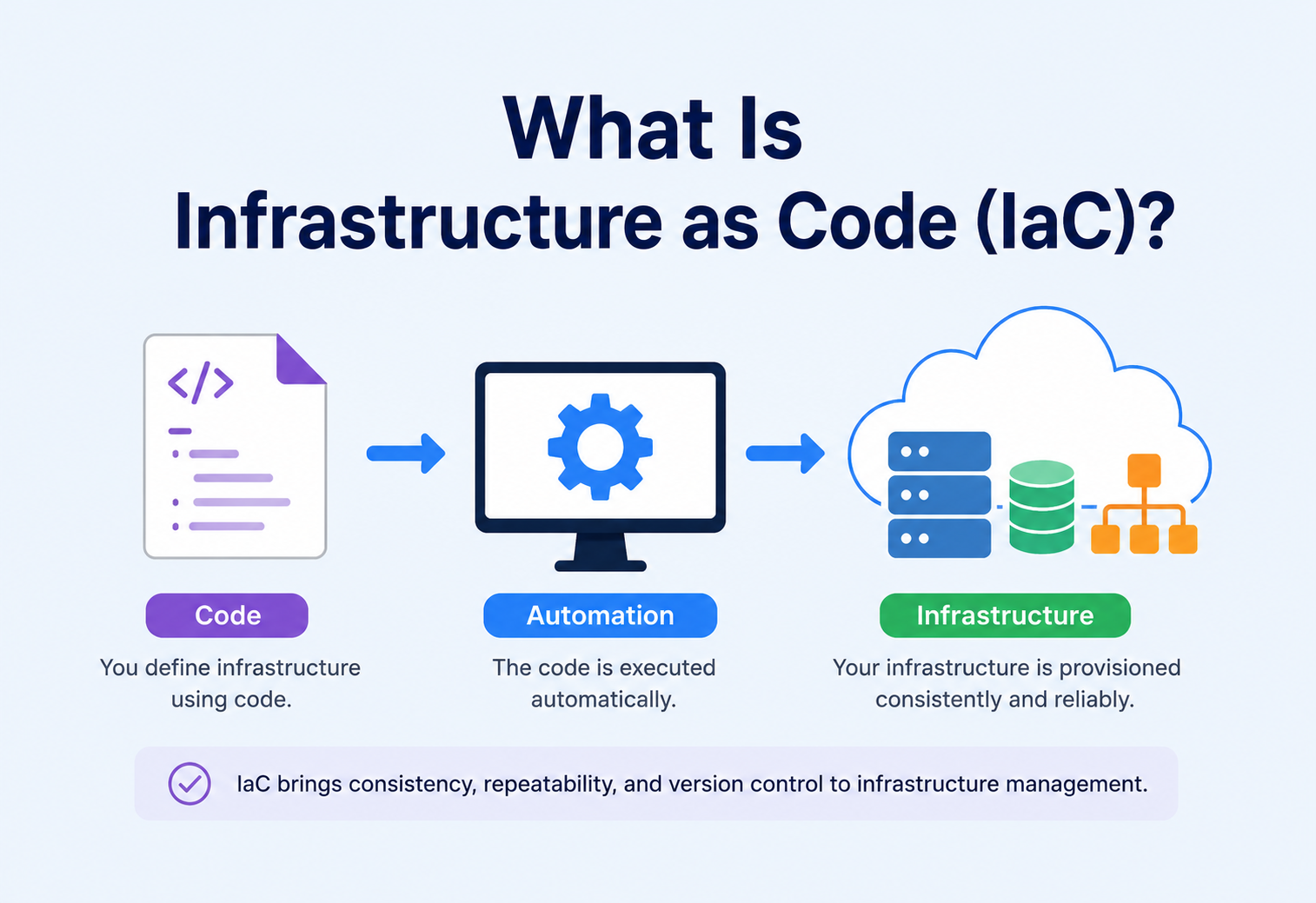
What Is Infrastructure as Code (IaC)?
A complete, beginner‑friendly guide to managing servers, networks, and cloud resources the same way you manage software — with code, version control, and automation. We’ll build the idea up from first principles, then trace how Netflix, Amazon, Google, and Uber use it to run at planetary scale.
Introduction & History
Imagine you’re building a house. The old way is to hire workers who show up and build it by hand, remembering measurements in their heads. If they get sick, or forget a step, or a second house needs to be built exactly the same way, you’re in trouble. Now imagine instead you have a detailed blueprint — a document anyone can follow to build the exact same house, every single time, with no guesswork.
Infrastructure as Code (IaC) is that blueprint, but for computers. Instead of a person manually clicking buttons in a cloud console to create a server, a database, or a network, you write a text file that describes exactly what you want, and a tool reads that file and builds it for you. The text file is the “code,” and the servers, networks, and databases are the “infrastructure.”
In plain English: IaC means you write down what your computer systems should look like, save that description in a file (just like a recipe), and let a program do the actual building. If you need the same setup again — for a new project, a disaster recovery site, or a teammate’s laptop — you just run the same recipe again.
1.1 A short history
In the early days of computing (1990s and earlier), engineers configured servers by hand: physically racking machines, installing operating systems from CDs, and typing commands one at a time over a terminal. This was slow, error‑prone, and impossible to repeat exactly. Two identical‑looking servers set up by two different people on two different days would quietly drift apart in tiny ways — a missing patch here, a different config value there. Engineers call this configuration drift.
As data centres grew from a handful of machines to thousands, manual setup became physically impossible. The 2000s brought configuration management tools like CFEngine, Puppet, and Chef, which let engineers describe a machine’s desired state in a script and apply it automatically. Then in the early 2010s, the rise of public cloud computing — Amazon Web Services, Microsoft Azure, Google Cloud — meant that entire virtual data centres could be created and destroyed with a single API call. This gave birth to true Infrastructure as Code: tools like AWS CloudFormation (2011) and later HashiCorp’s Terraform (2014) let you describe not just a single server’s software, but an entire cloud environment — networks, load balancers, databases, permissions — in one set of files.
Today, IaC is considered a foundational practice of modern software delivery, standing alongside version control and automated testing as something almost every serious engineering team relies on.
- 1990sManual builds. Engineers configure servers by hand, racking machines, installing OSes from CDs, and typing commands one at a time. Two “identical” servers quietly drift apart within weeks.
- 2000sConfiguration management. CFEngine, Puppet, and Chef let engineers describe a machine’s desired software state in a script and apply it automatically to fleets of servers.
- 2011AWS CloudFormation launches. For the first time, an entire cloud environment — networks, load balancers, databases, IAM — can be described in one file and created with one API call.
- 2014HashiCorp Terraform arrives. A cloud‑agnostic, declarative provisioning tool with a huge provider ecosystem quickly becomes the default general‑purpose IaC choice.
- 2015+Kubernetes YAML manifests popularise declarative, desired‑state configuration for the workloads running on the infrastructure, complementing IaC below the container.
- 2018+Pulumi & the CDKs. Engineers can now write infrastructure in familiar general‑purpose languages (TypeScript, Python, Go, Java) rather than a bespoke syntax, blurring the line between app and infra code.
- 2020sPolicy‑as‑code, Internal Developer Platforms, GitOps, and AI‑assisted authoring make IaC not just possible but expected on any serious engineering team.
1.2 Why “as Code” matters more than the infrastructure part
The phrase “as Code” is doing more work in this term than people realise at first. It isn’t just that infrastructure is described in a file — it’s that infrastructure now gets to borrow every good habit software engineers have spent decades building around code. That includes version control (every change has a timestamp, an author, and a reason), code review (a second engineer checks a change before it goes live), automated testing (catching mistakes before they reach production), branching (trying out a risky change safely, in isolation), and continuous integration (automatically validating every proposed change). Before IaC, none of these practices were realistically possible for infrastructure — you can’t “code review” a person clicking through a web console, and you can’t easily “roll back” a manual change that nobody wrote down.
This is also why many engineers describe the shift to IaC as being just as significant as the earlier shift from manually copying files between servers to using proper version control for application code. It didn’t just make an existing task faster — it fundamentally changed what was possible, because problems that used to require a detective’s memory of “what did I click last time?” became simple questions a computer could answer by reading a file.
1.3 The two big families of IaC tooling
Broadly, IaC tools fall into two families that grew up solving slightly different problems, and it helps to know both names even before we define them in detail later in this guide. Provisioning tools (like Terraform, CloudFormation, and Pulumi) specialise in creating the infrastructure itself — the virtual machine, the network, the database instance. Configuration management tools (like Ansible, Puppet, and Chef) specialise in configuring what runs inside a machine once it exists — installing software packages, writing config files, starting services. In modern practice, teams frequently use both together: a provisioning tool builds the empty server, and a configuration management tool (or a pre‑baked machine image) fills it with the right software.
The Problem & Motivation
To understand why IaC matters, it helps to understand the pain it removes. Before IaC became common, teams managed servers by hand — logging into each machine over SSH or Remote Desktop and typing commands, or clicking through a cloud provider’s web console. This approach, sometimes nicknamed “ClickOps,” causes several very real problems.
Configuration Drift
Two servers that started identical slowly become different because of small manual changes, forgotten patches, or one‑off fixes applied under pressure.
No Audit Trail
If someone clicks a button in a console, there’s often no record of who changed what, when, or why — making it hard to debug outages.
Slow, Error‑Prone Setup
Manually building a new environment (say, for a new customer or a disaster recovery region) can take days and is easy to get wrong.
Impossible to Reproduce
Recreating “exactly what production looks like” for testing is nearly impossible if no one wrote down every step.
Scaling Bottlenecks
A human can only click so fast. Scaling to hundreds of servers or dozens of environments by hand simply doesn’t work.
Knowledge Silos
Only the one engineer who built the system “remembers” how it works — a huge risk if that person leaves or is unavailable.
IaC solves all of these by turning infrastructure into a text file. Text files can be stored in version control (like Git), reviewed by teammates before being applied (like a code review), tested automatically, and reused endlessly. If a server misbehaves, you don’t debug it by hand — you simply delete it and let the code rebuild it identically. Engineers call this treating servers like “cattle, not pets”: instead of nursing one sick server back to health, you replace it with a fresh, identical one.
“If you can’t reproduce your infrastructure from a Git repository, you don’t actually know what’s running in production — you’re just hoping.”
2.1 A concrete before‑and‑after example
Consider a team launching a new product feature that needs its own database, a couple of application servers, and a load balancer in front of them. Without IaC, an engineer opens the cloud console, clicks through several screens to create the database (remembering to pick the right size, region, and backup settings), clicks through more screens for each server, and then configures the load balancer to point at those servers — perhaps 45 minutes of careful clicking, with no record left behind except whatever the engineer happens to write in a chat message afterward. Six months later, when a second team needs an identical setup for a different product, they either interrupt the original engineer to ask “how did you set this up again?” or they start over from scratch and inevitably configure something slightly differently.
With IaC, that same environment is described in a configuration file once. The first team’s setup takes roughly the same 45 minutes to write and review — but every future environment, for any team, takes the time it takes to run one command: often just a few minutes, with zero risk of forgetting a step. The knowledge isn’t locked in one engineer’s memory anymore; it’s sitting in a file anyone on the team can read, question, and improve.
Core Concepts & Terminology
Before going further, let’s define the vocabulary you’ll see throughout this guide, explained simply. These terms get used loosely in casual conversation, but they mean specific things.
| Term | What it means (in plain English) |
|---|---|
| Provisioning | The act of creating infrastructure — e.g., spinning up a new virtual server. |
| Desired State | A description of what you want to exist (e.g., “3 servers, 1 database, 1 load balancer”). |
| Current State | What actually exists right now in the real world (the cloud account). |
| Reconciliation | The process of comparing desired state to current state and making changes to close the gap. |
| Idempotency | Running the same code twice produces the same result — it doesn’t create duplicates or break things. |
| State File | A record the IaC tool keeps of what it built last, used to detect changes. |
| Module / Template | A reusable, packaged chunk of infrastructure code (like a function in programming). |
| Provider / Plugin | A translator that lets the IaC tool talk to a specific cloud (AWS, Azure, GCP, etc.). |
| Plan / Diff | A preview showing exactly what will change before anything actually happens. |
| Apply | The step where the planned changes are actually executed against real infrastructure. |
Here’s a simple way to think about idempotency, since it’s the concept beginners find trickiest: imagine a light switch. Flipping a switch to “on” is idempotent — no matter how many times you flip it “on,” the room stays lit exactly the same way. Compare that to “toggle the switch,” which is NOT idempotent — running it twice turns the light back off. Good IaC tools work like the first kind of switch: you declare “this light should be on,” and the tool figures out whether it needs to do anything at all.
3.1 A quick tour of popular IaC tools
You don’t need to memorise every tool on the market, but recognising the major names — and roughly what makes each one distinct — will help everything else in this guide click into place.
| Tool | Style | What it’s known for |
|---|---|---|
| Terraform | Declarative (HCL) | Cloud‑agnostic, huge ecosystem of providers, the most widely adopted general‑purpose IaC tool. |
| AWS CloudFormation | Declarative (YAML/JSON) | Native to AWS, deeply integrated with other AWS services, no separate state file to manage. |
| Pulumi | Declarative, written in general‑purpose languages | Lets you write infrastructure in Java, Python, TypeScript, or Go instead of a custom syntax. |
| Ansible | Mostly imperative/procedural | Popular for configuration management (installing software) and simple provisioning tasks. |
| Kubernetes manifests | Declarative (YAML) | Describes desired state for containerised applications running on a Kubernetes cluster. |
| Chef / Puppet | Declarative configuration, imperative execution model | Older‑generation configuration management tools, still common in enterprise data centres. |
Notice that most modern tools lean declarative — this is not an accident. As you’ll see in the “Declarative vs Imperative” section later in this guide, describing the destination rather than the journey scales far better once you have hundreds of engineers touching the same infrastructure.
Architecture & Components
An IaC system, no matter which tool you use (Terraform, Pulumi, AWS CloudFormation, Ansible), is built from a small set of moving parts that work together.
Fig 4.1 — The end‑to‑end IaC pipeline. Configuration files are read by an engine that compares them to a state store, calls the right provider plugins, and drives real infrastructure through cloud APIs.
- Configuration files — the human‑written description of desired infrastructure, usually in a declarative language like HCL (HashiCorp Configuration Language), YAML, or JSON, or in a general‑purpose language (Pulumi supports Java, Python, TypeScript).
- The engine (core) — the brain that reads your files, figures out dependencies between resources, and decides the order of operations.
- Providers / plugins — translators that convert generic instructions (“create a virtual machine”) into the specific API calls a cloud provider understands.
- State store — a record of what was built last time, so the tool knows the difference between “already exists” and “needs to be created.”
- Cloud APIs — the actual endpoints exposed by AWS, Azure, GCP, or on‑prem systems like VMware or Kubernetes that do the real work of creating resources.
4.1 Why the provider/plugin model matters
Cloud providers each expose their own APIs, with their own authentication schemes, naming conventions, and quirks — AWS, Azure, and Google Cloud don’t agree on what to call a virtual server, let alone how to configure one. The provider/plugin layer is what makes it possible for one engineer to learn a single configuration language and apply that knowledge across dozens of different systems, from cloud platforms to SaaS tools to internal company APIs. This is also what enables multi‑cloud setups, where a single configuration repository might manage resources in AWS for one workload and Google Cloud for another, using the same core engine and the same review process for both.
It’s worth noting that “multi‑cloud” is often oversold as a goal in itself — many teams that try to make every single resource perfectly portable across clouds end up paying a real complexity tax for a flexibility they rarely use. A more common and pragmatic pattern is choosing one primary cloud provider for most workloads, while still benefiting from the provider‑plugin architecture to manage secondary tools (like a DNS provider or a monitoring SaaS) that live outside that primary cloud.
4.2 Where the engine actually runs
An easy question that trips up beginners is: where does the “engine” box in the diagram actually live? The honest answer is — it depends, and the choice matters. Early on, most teams run the engine on individual laptops: an engineer clones the repo, runs a command, and their machine directly calls the cloud APIs. That works for learning, but breaks down quickly, because now the “source of truth” about what changed depends on whichever laptop happened to run the last apply. Mature teams move the engine into a shared CI/CD system where every run is triggered by a merged pull request, logged centrally, and executed with a well‑defined identity — not whichever engineer’s personal credentials happened to be cached in a terminal that day. This shift, from “laptop‑driven” to “pipeline‑driven” IaC, is arguably the biggest single reliability upgrade a team ever makes.
Internal Working — How IaC Actually Runs
When you run an IaC tool, it goes through a predictable internal process. Let’s walk through it step by step, using Terraform‑style behaviour as the running example since it’s the most widely used tool today.
- Parsing — the tool reads your configuration files and builds an internal graph of every resource you want (a virtual server, a network rule, a database).
- Dependency graph construction — resources are linked based on references. If a server needs a network to exist first, the tool automatically figures out “network before server,” without you writing that order explicitly.
- Refresh — the tool asks the cloud provider “what does the real world actually look like right now?” and updates its understanding of current state.
- Diffing — it compares desired state (your code) against current state (reality) and computes the minimal set of changes needed — create this, update that, delete this other thing.
- Plan output — a human‑readable preview is shown, usually with colour‑coded symbols (+ to create, ~ to modify, – to destroy), so a person can review it before anything happens.
- Apply — once approved, the engine walks the dependency graph (often in parallel where safe) and calls the provider plugins, which call the real cloud APIs.
- State update — after each resource is successfully created or changed, the state file is updated to reflect the new reality.
This graph‑based approach is what allows IaC tools to safely parallelise work — creating ten independent servers at the same time instead of one after another — while still respecting genuine dependencies, like waiting for a virtual network to finish before attaching a server to it.
5.1 The algorithm underneath: topological sorting
Under the hood, the dependency graph problem is a classic computer‑science concept called a topological sort — arranging items in an order that respects all “must happen before” relationships. If resource B depends on resource A, a topological sort guarantees A is processed before B, and if resources are completely independent, the engine is free to process them at the same time. This is exactly the same algorithm used in build systems (deciding which files to compile first) and in task schedulers.
Here’s a simplified Java implementation showing the core idea — resolving a safe creation order for a handful of infrastructure resources based on their declared dependencies:
JAVA — TOPOLOGICAL SORT VIA KAHN’S ALGORITHM
import java.util.*;

public class DependencyResolver {

    // Returns a safe creation order, respecting dependencies, using
    // Kahn's algorithm for topological sorting.
    public List<String> resolveOrder(Map<String, List<String>> dependencies) {
        Map<String, Integer> inDegree = new HashMap<>();
        Map<String, List<String>> graph = new HashMap<>();

        for (String resource : dependencies.keySet()) {
            inDegree.putIfAbsent(resource, 0);
            graph.putIfAbsent(resource, new ArrayList<>());
        }

        for (Map.Entry<String, List<String>> entry : dependencies.entrySet()) {
            String resource = entry.getKey();
            for (String dependsOn : entry.getValue()) {
                graph.computeIfAbsent(dependsOn, k -> new ArrayList<>()).add(resource);
                inDegree.merge(resource, 1, Integer::sum);
            }
        }

        Queue<String> ready = new LinkedList<>();
        for (Map.Entry<String, Integer> entry : inDegree.entrySet()) {
            if (entry.getValue() == 0) ready.add(entry.getKey());
        }

        List<String> order = new ArrayList<>();
        while (!ready.isEmpty()) {
            String current = ready.poll();
            order.add(current);
            for (String neighbor : graph.getOrDefault(current, List.of())) {
                inDegree.merge(neighbor, -1, Integer::sum);
                if (inDegree.get(neighbor) == 0) ready.add(neighbor);
            }
        }

        if (order.size() != inDegree.size()) {
            throw new IllegalStateException("Cycle detected u2014 cannot resolve a safe order");
        }
        return order;
    }
}
Notice the final check: if the resulting order doesn’t include every resource, it means there’s a cycle — for example, resource A depends on B, and B depends on A. Real IaC tools detect exactly this kind of mistake and refuse to proceed, showing a clear error instead of getting stuck in an infinite loop.
5.2 A run visualised as a sequence
Fig 5.1 — A single plan‑and‑apply run, drawn as a sequence of interactions between the engineer, the IaC tool, the state store, and the cloud API. Every step is predictable and auditable.
Data Flow & Resource Lifecycle
Every resource managed by IaC moves through a lifecycle, similar to how an object moves through stages in object‑oriented programming. Understanding this lifecycle helps you predict what a tool will do before you run it.
- 1
Define
You describe a resource — its type, name, and properties — inside a configuration file. Nothing exists yet in the real world; this is purely intent captured as text.
- 2
Plan
The tool computes what would happen without touching real infrastructure yet, producing a diff you can read, share, and reason about before anything real changes.
- 3
Create
An API call is made, the resource is built in the cloud, and its identifier is recorded in state so future runs know the resource already exists.
- 4
Update
When you edit the config (for example, resize a server), the tool either calls an update API in place, or, if the change requires it, destroys the old resource and creates a new one.
- 5
Drift Detection
Periodic refreshes catch manual changes made outside of IaC (someone clicked a button in the console) and flag them so the code and reality don’t quietly diverge.
- 6
Destroy
When code is deleted or a destroy command is run, the tool calls the provider’s delete API and removes the entry from state — leaving no orphan resources quietly costing money.
An important, beginner‑tripping detail: not every change is a smooth “update.” Some properties (like the region a database is deployed in) can’t be changed after creation — the only way to change them is to destroy the old resource and create a new one. Good IaC tools clearly mark these “destructive” changes in the plan output so nobody is surprised.
It’s worth pausing on drift detection specifically, since it’s one of the most practically useful — and most commonly skipped — steps in the lifecycle. Drift happens whenever the real world diverges from what the code says, and it happens more often than most new teams expect: an on‑call engineer manually bumps a server’s memory at 2 AM during an incident, a well‑meaning teammate adjusts a firewall rule directly in the console “just to test something,” or an automated process outside of IaC makes a change to save time. None of these people are being careless — they’re usually solving an urgent problem the fastest way they know how. Without regular drift detection, that unrecorded change simply sits there, invisible, until the next code‑driven update either quietly overwrites it or, worse, produces a confusing plan nobody can explain. Scheduling drift detection as a routine, low‑drama job (rather than reacting to it only after something breaks) is one of the simplest ways a team can keep its “code” and its “reality” honestly in sync.
Declarative vs Imperative IaC
There are two philosophies for writing infrastructure code, and understanding the difference is one of the most important beginner lessons.
Declarative — the “What”
- You describe the end result you want: “there should be 3 servers.”
- The tool figures out HOW to get there.
- Running it repeatedly is safe (idempotent).
- Examples: Terraform, CloudFormation, Kubernetes YAML.
Imperative — the “How”
- You describe the exact steps to take: “run this command, then that one.”
- You are responsible for the order and for not repeating steps badly.
- Great for one‑off tasks or sequencing software installs.
- Examples: shell scripts, Ansible playbooks (mostly), Chef recipes.
A simple analogy: declarative is like telling a taxi driver “take me to the airport” — you don’t care about the route, the driver figures it out and adapts to traffic. Imperative is like giving turn‑by‑turn directions yourself — “turn left, then go straight for 2 miles, then turn right.” Most modern cloud‑focused IaC tools favour the declarative style because it’s safer and easier to reason about at scale, while configuration‑management tools (installing software packages on a server) often use a semi‑imperative style.
Advantages, Disadvantages & Trade‑offs
Every serious engineering practice has costs. Understanding both sides of the ledger — where IaC pays off and where the discipline required to sustain it can feel painful — is what separates a hobby experiment from real, working infrastructure.
Advantages
- Consistency — every environment is built the same way.
- Speed — new environments in minutes, not days.
- Version control — full history of every infrastructure change.
- Code review — teammates catch mistakes before they happen.
- Disaster recovery — rebuild everything from code if a region goes down.
- Cost control — easy to see and delete unused resources.
Disadvantages / Trade‑offs
- Learning curve — new syntax and mental models to learn.
- State management complexity — a corrupted state file can cause real headaches.
- Tooling drift — providers/plugins need regular updates.
- Not a silver bullet — still requires good design; bad architecture in code is still bad architecture.
- Secrets handling — passwords and keys need careful, separate management.
8.1 The organisational trade‑off
Beyond the technical pros and cons, adopting IaC is also an organisational decision. It typically shifts some responsibility that used to sit with a small, specialised operations team onto the broader engineering organisation, since any developer can now propose an infrastructure change through a pull request. This is often described as breaking down the wall between “developers” and “operations” — a cultural movement usually called DevOps. The upside is much faster delivery and shared ownership; the trade‑off is that more people need at least a basic understanding of how infrastructure works, which requires investment in training and clear guardrails (like the policy‑as‑code checks discussed later in the Security section) so that shared ownership doesn’t turn into shared chaos.
“IaC is a discipline, not a switch you flip — every un‑codified click today is a mystery you or your teammate will have to solve tomorrow.”
Performance & Scalability
As infrastructure grows from a handful of resources to thousands, the performance characteristics of the IaC tool itself start to matter.
9.1 Why large codebases get slow
Every “plan” run typically has to ask the cloud provider about the current status of every resource it manages (the refresh step). If you have 5,000 resources in one giant configuration, that means thousands of API calls before the tool can even show you what will change — this can take minutes.
9.2 Techniques for scaling IaC
- Splitting state — instead of one giant state file for the whole company, split infrastructure into smaller, independently‑managed units (per team, per environment, per service).
- Modules/templates — reusable building blocks reduce duplicate code and make large systems easier to reason about.
- Parallelism — most modern tools create independent resources concurrently rather than one‑by‑one, dramatically cutting apply time.
- Targeted runs — the ability to plan/apply only a specific resource or module instead of the entire configuration.
- Caching provider data — some tools cache metadata between runs to reduce redundant API calls.
9.3 Where parallelism has limits
It’s worth understanding that parallelism from the dependency graph only helps within a single run, and only up to the natural limits of the graph’s shape. A configuration where every resource depends on one central resource (say, a shared network that everything else attaches to) will always have a bottleneck at that one resource, no matter how much parallel capacity the tool has available elsewhere. This is one of the practical reasons flatter, more modular designs tend to apply faster than deeply nested, everything‑depends‑on‑everything designs — the shape of your code directly determines how much of the work can actually happen at the same time.
High Availability & Reliability
IaC isn’t just about building infrastructure — it’s also a powerful tool for building highly available, reliable systems, and the IaC tooling itself needs to be reliable too.
10.1 Using IaC to build HA systems
Because IaC lets you describe infrastructure precisely and repeatedly, it’s the natural way to deploy patterns like multi‑availability‑zone deployments, auto‑scaling groups, and multi‑region failover — all as code, all reviewed and tested before going live.
10.2 Making the IaC process itself reliable
- Remote state with locking — prevents two engineers from applying changes at the same time and corrupting the state file.
- State backups/versioning — remote backends that keep historical snapshots so a bad apply can be rolled back.
- Automated pipelines — running plan/apply through CI/CD rather than individual laptops reduces “works on my machine” surprises.
- Blast‑radius limiting — smaller, isolated state units mean a mistake in one part of the system can’t accidentally destroy everything.
10.3 Disaster recovery as a code exercise
Perhaps the clearest demonstration of IaC’s value for reliability is disaster recovery. Before IaC, recovering from a lost data centre or a deleted cloud account meant scrambling to remember (or find someone who remembered) exactly how everything had been set up — often under enormous time pressure, with customers unable to use the product. With IaC, recovery becomes a matter of running the same configuration against a new region or a new account. Many mature teams periodically test this on purpose — deliberately tearing down a non‑production environment and rebuilding it entirely from code — specifically to prove that their disaster recovery plan actually works, rather than discovering gaps for the first time during a real emergency. This practice is sometimes called a “game day” exercise.
Security
Because IaC has the power to create, modify, and delete real infrastructure, securing the IaC process itself is critical.
Secrets Management
Never hard‑code passwords or API keys into configuration files. Use a dedicated secrets manager and reference secrets at runtime.
Least Privilege
The identity running IaC pipelines should only have the permissions it truly needs — not full admin access to the cloud account.
Policy as Code
Automated guardrails (e.g., “no public S3 buckets,” “encryption required”) that scan every plan before it’s allowed to apply.
State File Protection
State files can contain sensitive data. Store them encrypted, in access‑controlled remote backends — never commit them to public Git repos.
Code Review
Every infrastructure change goes through pull requests, just like application code, so a second person catches risky changes.
Supply Chain Checks
Pin and verify provider/module versions to avoid pulling in a compromised dependency.
11.1 Why secrets and IaC are an awkward mix
Infrastructure code often needs to reference sensitive values — a database password, an API key for a third‑party service, a certificate. The temptation, especially for beginners, is to simply type the value directly into the configuration file, since that’s the fastest way to get something working. The problem is that configuration files are meant to be shared, reviewed, and stored in version control forever — which means a secret typed directly into one doesn’t just leak to whoever reads the file today, it stays recoverable in the project’s history indefinitely, even after it’s later “removed,” unless the entire history is rewritten. The standard fix is to store secrets in a dedicated secrets manager and have the IaC tool fetch them at run time by reference (a name or path), never by value, so the actual secret never appears in a file that gets committed anywhere.
11.2 Policy as code in practice
Policy as code takes the same “as code” philosophy applied to infrastructure and applies it to the rules that infrastructure must follow. Instead of relying on a human reviewer to remember every security requirement — “did they remember to enable encryption? did they remember to block public access?” — organisations write those requirements as automated checks that run against every proposed plan. A failed policy check blocks the apply automatically, the same way a failing automated test blocks a bad application deployment. This turns tribal security knowledge into something that scales automatically across every team and every pull request, rather than depending on one reviewer’s memory on a given day.
Monitoring, Logging & Metrics
Just like application code, IaC pipelines need visibility so problems are caught quickly.
- Plan/apply logs — every run should be logged with who triggered it, what changed, and the outcome.
- Drift detection alerts — scheduled jobs that compare code to reality and alert when someone made a manual change outside the pipeline.
- Change metrics — tracking how often resources are created/destroyed can reveal instability (a resource that gets destroyed and recreated every run usually indicates a configuration bug).
- Cost tracking — many teams integrate cost‑estimation tools into the plan step so engineers see the dollar impact of a change before approving it.
- Audit trails — cloud‑native logging services (like AWS CloudTrail) record every API call made by the IaC tool, providing a second layer of accountability.
A useful mental model here is that IaC pipelines deserve the same observability treatment as any other production system, because that’s exactly what they are — a critical system that, when it fails silently, can leave infrastructure in a half‑finished or inconsistent state. Teams that run IaC seriously typically wire pipeline failures into the same alerting channels (chat notifications, on‑call paging) they already use for application incidents, rather than letting a failed apply sit unnoticed in a build log that nobody checks until something breaks downstream.
Deployment & Cloud Integration
IaC tools are typically run inside a CI/CD pipeline rather than manually, so infrastructure changes follow the same rigor as application deployments.
Fig 13.1 — The canonical IaC change pipeline. Pull request → automated plan + policy checks → human review → merge → apply → infra updated. On rejection, the engineer revises the code and the loop repeats.
Here is a small Java example showing how a deployment service might trigger and monitor an infrastructure pipeline programmatically — for instance, kicking off a Terraform run through a REST API and polling for completion.
JAVA — TRIGGERING AN INFRASTRUCTURE PIPELINE
public class InfraPipelineTrigger {

    private final HttpClient client = HttpClient.newHttpClient();
    private final String apiBaseUrl;
    private final String authToken;

    public InfraPipelineTrigger(String apiBaseUrl, String authToken) {
        this.apiBaseUrl = apiBaseUrl;
        this.authToken = authToken;
    }

    // Triggers a "plan" run for a given workspace and returns the run ID
    public String triggerPlan(String workspaceId) throws Exception {
        String body = String.format("{"workspaceId":"%s"}", workspaceId);

        HttpRequest request = HttpRequest.newBuilder()
                .uri(URI.create(apiBaseUrl + "/runs"))
                .header("Authorization", "Bearer " + authToken)
                .header("Content-Type", "application/json")
                .POST(HttpRequest.BodyPublishers.ofString(body))
                .build();

        HttpResponse<String> response = client.send(request, HttpResponse.BodyHandlers.ofString());
        return parseRunId(response.body());
    }

    // Polls until the run reaches a terminal state (applied, errored, discarded)
    public String waitForCompletion(String runId) throws Exception {
        String status;
        do {
            Thread.sleep(5000); // simple polling backoff
            status = fetchRunStatus(runId);
            System.out.println("Run " + runId + " status: " + status);
        } while (status.equals("planning") || status.equals("applying"));
        return status;
    }

    private String fetchRunStatus(String runId) throws Exception {
        HttpRequest request = HttpRequest.newBuilder()
                .uri(URI.create(apiBaseUrl + "/runs/" + runId))
                .header("Authorization", "Bearer " + authToken)
                .GET()
                .build();
        HttpResponse<String> response = client.send(request, HttpResponse.BodyHandlers.ofString());
        return parseStatus(response.body());
    }

    private String parseRunId(String json) { /* JSON parsing omitted for brevity */ return "run-123"; }
    private String parseStatus(String json) { /* JSON parsing omitted for brevity */ return "applied"; }
}
This is a simplified illustration — real pipelines add retries, timeouts, and structured JSON parsing — but the core idea is the same: infrastructure changes get triggered, tracked, and reported on just like any other automated deployment.
State Management — the “Database” of IaC
If configuration files are the recipe, the state file is the tool’s memory of what it already cooked. Without state, an IaC tool would have no way to know the difference between “this resource doesn’t exist yet” and “this resource already exists and matches the code.”
14.1 Local vs remote state
Storing state as a plain file on one engineer’s laptop works for learning, but breaks down immediately in a team: two people can’t safely work from two different copies of the truth. That’s why teams use a remote backend — a shared, centralised location (like a cloud storage bucket) that:
- Stores the state file so the whole team reads from the same source of truth.
- Locks the state during an apply, so two people can’t change infrastructure at the exact same moment.
- Keeps a version history, so a corrupted or bad state can be rolled back.
- Encrypts the file at rest, since state often contains sensitive values.
14.2 Caching for performance
Some IaC tools maintain a local cache of provider plugin binaries and metadata (similar in spirit to how a build tool caches dependencies) so that repeated runs don’t need to re‑download the same plugin over and over — this is the closest IaC equivalent to “caching” in a traditional application sense.
14.3 How locking actually prevents corruption
It’s worth understanding locking a bit more concretely, since it’s easy to nod along without seeing why it matters. Imagine two engineers, on opposite sides of the world, both run an apply at almost the same moment against the same environment. Without locking, both processes would read the same starting state, both would compute their own plan based on that snapshot, and both would start making changes — potentially overwriting each other’s work, or worse, leaving the state file reflecting neither engineer’s final result accurately. A lock works like a “do not disturb” sign: the moment the first apply begins, it claims an exclusive lock on the state; the second apply, arriving moments later, sees the lock and waits (or fails cleanly with a clear message) rather than barrelling ahead into a race condition. This is a small mechanism, but it’s one of the main reasons remote state backends are considered non‑negotiable for any team larger than one person.
APIs & Microservices Integration
Modern IaC is fundamentally an API‑calling system: every “create a server” instruction eventually becomes an authenticated HTTP call to a cloud provider’s REST or gRPC API. This matters for two reasons.
First, because everything is an API call, IaC tools can manage far more than just servers — they can create API gateways, message queues, container clusters, DNS records, and permission policies, all through the same declarative model, which is essential for deploying microservice architectures where a single “application” might consist of dozens of small, independently deployed services, each needing its own infrastructure.
Second, IaC itself is often exposed as an API within larger organisations — internal platform teams build a thin API layer on top of their IaC tooling so that other engineering teams can request infrastructure (“give me a new microservice environment”) without needing to learn the underlying tool directly. This pattern is often called an Internal Developer Platform (IDP).
JAVA — A THIN SELF‑SERVICE API IN FRONT OF IaC
// A minimal Java (Spring-style) REST endpoint that lets other teams
// self-service request a new microservice environment via IaC under the hood.

@RestController
@RequestMapping("/api/environments")
public class EnvironmentController {

    private final InfraPipelineTrigger pipeline;

    public EnvironmentController(InfraPipelineTrigger pipeline) {
        this.pipeline = pipeline;
    }

    @PostMapping
    public ResponseEntity<String> createEnvironment(@RequestBody EnvironmentRequest req) throws Exception {
        // Behind the scenes, this generates/selects an IaC module
        // for the requested microservice and triggers a pipeline run.
        String runId = pipeline.triggerPlan(req.getServiceName());
        return ResponseEntity.accepted().body("Environment provisioning started: " + runId);
    }
}

class EnvironmentRequest {
    private String serviceName;
    private String tier; // e.g. "small", "medium", "large"
    // getters/setters omitted
    public String getServiceName() { return serviceName; }
}
This is exactly how many large companies let hundreds of developers safely provision infrastructure without ever touching the raw IaC configuration files themselves — the platform team owns the modules and the pipeline, while product teams simply describe what they need through a small, well‑documented API surface.
Design Patterns & Anti‑patterns
A small number of patterns keep showing up around IaC because they answer recurring problems well. An equally small number of anti‑patterns keep showing up because they’re the shortcuts everyone is tempted to take.
16.1 Good patterns
Modules / Reusable Components
Package common infrastructure (like “a standard web app environment”) into a reusable module, used across many projects.
Environment Parity
Use the same code for dev, staging, and production, changing only input values — so environments don’t quietly diverge.
Immutable Infrastructure
Instead of patching a running server, replace it entirely with a new one built from updated code — eliminating drift.
Layered State
Split state by concern (networking, data, application) so teams can work independently without stepping on each other.
16.2 Anti‑patterns to avoid
The Monolithic State File
One giant file managing everything the company owns — slow, risky, and a single mistake can affect unrelated systems.
ClickOps Alongside IaC
Manually changing resources in the cloud console “just this once” — guarantees drift and confusing plan output later.
Copy‑Paste Sprawl
Duplicating the same 200 lines of config across ten projects instead of using a shared module — a maintenance nightmare.
Hard‑coded Secrets
Putting passwords directly in configuration files, which often end up committed to Git history forever.
16.3 Immutable infrastructure, explained simply
Immutable infrastructure is one of the most powerful ideas in this whole guide, so it’s worth slowing down on. In the “mutable” world, when you need to update a server — say, install a security patch — you log into that same running server and change it in place. Over time, after dozens of small in‑place changes, nobody can say with confidence what state that server is actually in; it has quietly become a unique, hand‑modified “pet” that would be very hard to recreate from scratch. In the “immutable” world, you never modify a running server directly. Instead, you build a brand‑new server image that already includes the patch, and you replace the old server with a new one built from that image. The old server is simply deleted. Because every server is always built fresh from the same code, there’s no accumulated, undocumented drift — the environment on day 500 is created by exactly the same process as the environment on day one.
This idea maps directly back to the “cattle, not pets” analogy from earlier in this guide, and it’s a big part of why containers and container orchestration platforms like Kubernetes became so popular alongside IaC — a container image is, by design, immutable, making the whole “replace, don’t repair” philosophy the default rather than something teams have to enforce through discipline alone.
Best Practices & Common Mistakes
The gap between an implementation that scales gracefully and one that quietly collapses under load is rarely a technology gap — it’s a discipline gap. These are the habits successful teams share.
- Always review the plan before applying — never blindly trust that a change does only what you expect.
- Keep state remote, locked, and encrypted — never leave it on a single laptop.
- Use small, focused modules — easier to test, review, and reuse.
- Pin provider and module versions — avoid surprise behaviour changes from automatic upgrades.
- Run IaC through CI/CD, not laptops — consistent environment, full audit trail.
- Separate secrets from code — use a secrets manager, reference values at runtime.
- Tag and label everything — makes cost tracking and ownership clear at scale.
- Write automated tests for infrastructure code — validate that modules produce expected results before they reach production.
- Document intent, not just syntax — a comment explaining WHY a setting exists saves the next engineer hours of confusion.
17.1 Testing infrastructure code
A question beginners often ask is: “how do you even test infrastructure code, since it creates real things?” There are a few layers, ordered from cheapest to most realistic:
- Static analysis / linting — checks syntax and style without touching any real infrastructure, catching typos and obvious mistakes in seconds.
- Policy checks — automated rules that scan the plan output for violations (e.g., “no publicly exposed databases”) before an apply is even allowed.
- Plan review — treating the human‑readable diff itself as a test: does the proposed change match what the engineer actually intended?
- Integration testing in a sandbox — actually applying the code to a temporary, isolated environment, verifying it behaves correctly, then tearing it down.
- Post‑apply verification — automated checks after a real apply confirming the new infrastructure responds correctly (e.g., a health‑check endpoint returns success).
Most mature teams combine several of these layers rather than relying on just one — similar to how application code benefits from unit tests, integration tests, and manual QA working together rather than any single layer alone.
“Write your infrastructure like the next engineer reading it has never met you — because, eventually, that’s exactly who will.”
Real‑World / Industry Examples
Almost every major engineering organisation of the last decade has an IaC story buried in its architecture. Here’s a quick tour of the most cited cases.
Netflix
Uses infrastructure automation extensively to manage its massive, globally distributed streaming backend, enabling rapid, consistent scaling during peak demand events.
Amazon
Internally, thousands of teams provision their own isolated environments through standardised IaC templates, letting Amazon operate an enormous number of independent services safely.
Popularised declarative, desired‑state infrastructure management internally long before it was mainstream, an approach that directly influenced today’s public IaC and Kubernetes ecosystems.
Uber
Relies on IaC to stand up region‑specific infrastructure consistently as it expands into new cities, reducing the manual work required for each new market.
Across all of these organisations, the common thread is the same: as the number of services and environments grows into the hundreds or thousands, manual infrastructure management becomes physically impossible, and IaC becomes not just a convenience but a requirement for operating at scale.
18.1 What smaller teams can learn from these examples
It’s tempting to assume these lessons only apply to companies operating at massive scale, but the underlying pattern shows up at every size. A five‑person startup that stores its infrastructure as code in a Git repository can already onboard a new engineer by having them run one command instead of following a stale wiki page. A fifty‑person company can already stand up an entire duplicate of production for a big customer demo without touching a live environment. The core insight — that infrastructure described as text is easier to reason about, review, and reproduce than infrastructure clicked into existence — scales down just as well as it scales up. What changes with company size isn’t whether IaC is worth using, but how much investment goes into surrounding practices like policy enforcement, cost governance, and self‑service platforms.
Frequently Asked Questions
A short set of the questions engineers, students, and interviewers ask most often about Infrastructure as Code.
Do I need to know how to code to use IaC?
You need to learn a configuration syntax (often simpler than a general‑purpose programming language), but you don’t need to be a professional software engineer. Many IaC languages are designed to be readable even by people newer to programming, and modern tools like Pulumi and the AWS CDK let you use familiar languages (Python, TypeScript, Java, Go) if you already know one.
Is IaC only for huge companies?
No — even a single developer managing one small project benefits from IaC, because it removes the risk of forgetting how an environment was set up, and makes it trivial to tear down and rebuild for testing. The tools scale down just as gracefully as they scale up.
Does IaC replace configuration management tools?
Not exactly — many teams use both together. IaC tools are typically best at creating the infrastructure itself (servers, networks), while configuration management tools are often used to install and configure software once a server exists. The line between the two has blurred over time, especially now that immutable container images do a lot of what configuration management used to do.
What happens if the state file is lost?
The IaC tool loses track of what it built, which can lead to it trying to recreate resources that already exist. This is exactly why remote, backed‑up, versioned state storage is considered essential rather than optional — and why teams take state backups almost as seriously as database backups.
Can IaC manage things outside the cloud?
Yes — many tools support on‑premises systems, Kubernetes clusters, DNS providers, SaaS platform settings, and more, through the same provider‑plugin model. Anything with an API can, in principle, be managed as code.
How is IaC different from a shell script that sets everything up?
A shell script only knows how to move forward — run these commands in order. It has no built‑in concept of “what already exists,” so running it twice often either fails (because a resource already exists) or creates duplicates. IaC tools track state and compute a minimal diff, so re‑running them is always safe, and they can also handle deletions and updates, which a simple script usually can’t do cleanly.
Is it risky to let automated pipelines apply changes to production without a human clicking a final button?
It can be, which is why most teams keep a human approval step between “plan” and “apply” for production changes, even when everything else is automated. The goal isn’t to remove humans from the loop entirely — it’s to remove the error‑prone, undocumented manual work while keeping a deliberate, visible decision point before anything real happens.
How does IaC fit into a modern DevOps or platform engineering practice?
IaC is one of the load‑bearing pillars: it’s what lets developers self‑serve infrastructure through pull requests and internal platforms rather than filing tickets with a dedicated operations team. Combined with CI/CD, policy‑as‑code, and observability, it turns “ops” from a bottleneck into a shared responsibility.
Summary & Key Takeaways
Infrastructure as Code turns the process of building servers, networks, and cloud resources from a manual, error‑prone, one‑person task into a repeatable, reviewable, version‑controlled engineering discipline — the same discipline already trusted for application code.
If you take away a single idea from this guide, let it be this: infrastructure that only exists in someone’s memory, or in a series of manual clicks nobody wrote down, is infrastructure your team doesn’t actually control — it’s infrastructure your team is merely hoping continues to work. Writing it down as code, reviewing it like code, and rebuilding it from code whenever needed is what turns that hope into something you can actually trust, test, and improve over time.
Key Takeaways
- 01IaC describes infrastructure as text files instead of manual clicks, enabling repeatability, version control, code review, and true reproducibility.
- 02The core loop is: write desired state → plan (preview) → apply (execute) → state is updated to match reality. Everything else is variation on that theme.
- 03Declarative tools (describe what) are generally safer and more common for cloud infrastructure than imperative ones (describe how).
- 04State management, security, and running changes through CI/CD pipelines are what separate a hobby setup from a production‑grade IaC practice.
- 05Modules, environment parity, and immutable infrastructure are proven patterns; monolithic state and manual “ClickOps” changes are proven anti‑patterns.
- 06At scale, IaC isn’t optional — it’s the only realistic way large companies manage thousands of interdependent services reliably.
- 07Every mature IaC practice pairs code with policy‑as‑code, drift detection, and cost visibility so guardrails scale as automatically as the infrastructure itself.
- 08Assume no one will remember how it was built — then design so a fresh engineer, on day one, can recreate everything from the repository alone.
“If it isn’t in the repo, it isn’t infrastructure — it’s a rumour.”