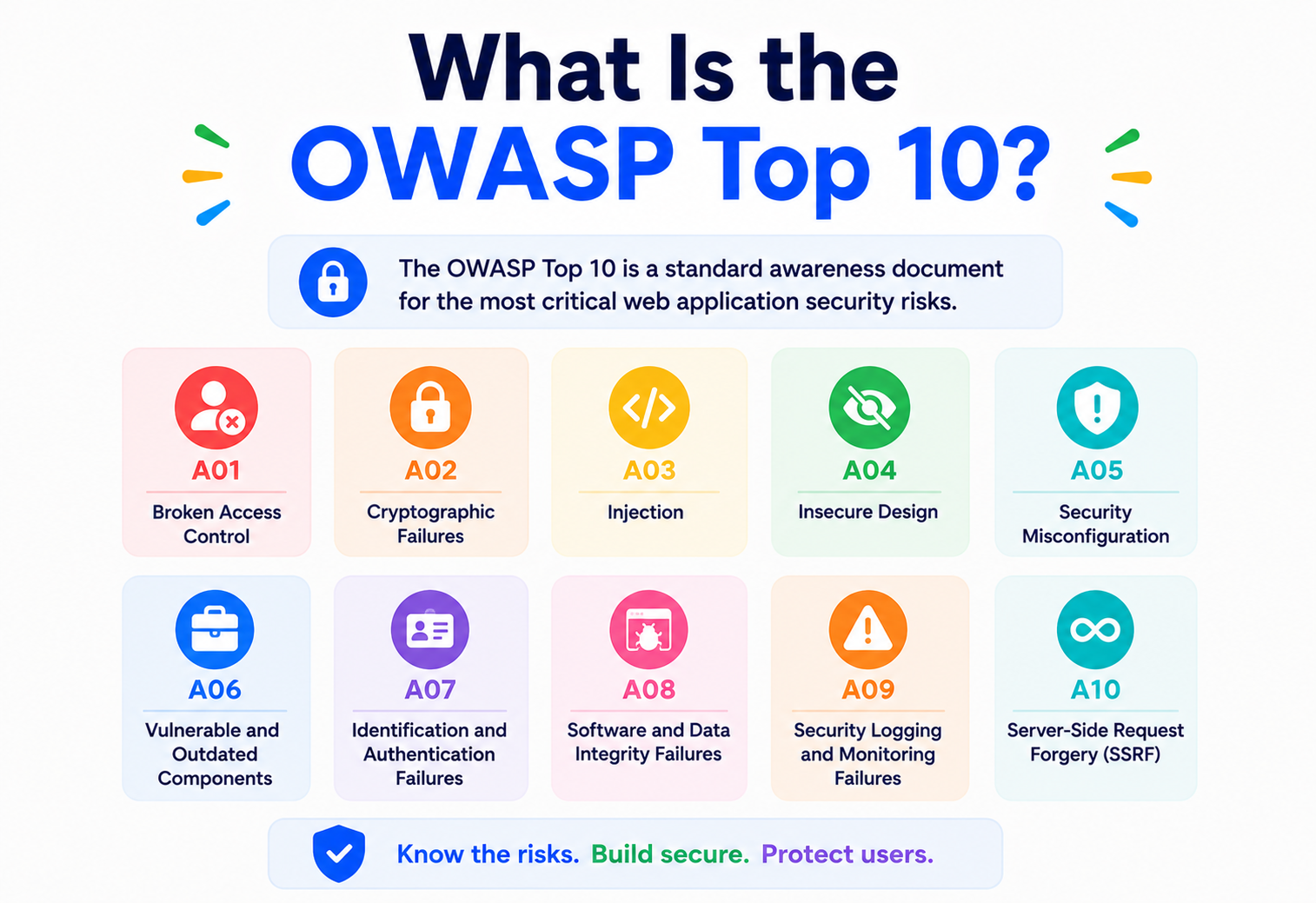
What Is the OWASP Top 10?
A complete, beginner‑friendly, production‑ready walk‑through of the world’s most influential web application security standard — what it is, why it exists, how each risk actually works under the hood, and how to defend against it with real Java / Spring Boot code.
Introduction & History
If you have spent even a few weeks around backend engineers, security teams, or DevSecOps discussions, you have almost certainly heard someone mention “the OWASP Top 10.” It gets referenced in job descriptions, security audits, code‑review checklists, and compliance documents. But what actually is it, who decides what goes into it, and why should a working software engineer care about it as much as they care about, say, unit testing or database indexing?
In the simplest possible terms: the OWASP Top 10 is a regularly updated report that lists the ten most critical security risks facing web applications today. It is not a law, not a certification, and not a piece of software. It is a community‑driven, evidence‑based ranking — a kind of “most‑wanted list” for the mistakes that most commonly get applications hacked.
Think of it like a doctor’s list of the ten most common causes of preventable illness. A doctor does not need to know every disease that has ever existed to be effective; they need to deeply understand the handful of conditions that account for the vast majority of patient visits. The OWASP Top 10 plays exactly that role for application security: instead of asking every developer to become a security researcher, it distills decades of real‑world breach data into ten categories that, if addressed properly, eliminate the overwhelming majority of exploitable vulnerabilities in typical applications.
1.1 Who Is OWASP?
OWASP stands for the Open Worldwide Application Security Project (originally “Open Web Application Security Project”). It is a nonprofit foundation — not a vendor, not a government body, and not tied to any single company. It was founded in 2001 by Mark Curphey, and its mission from day one has been to make application‑security knowledge freely available to everyone, from students writing their first web app to Fortune 500 security architects.
OWASP is entirely volunteer‑driven. Security researchers, penetration testers, developers, and companies around the world contribute data, write documentation, and review drafts. Because nobody pays for a seat at the table and no vendor can buy a favorable ranking, the OWASP Top 10 has earned a reputation as one of the most trusted, vendor‑neutral resources in the entire security industry.
1.2 A Brief Timeline
- 2001OWASP founded as a nonprofit to improve software security.
- 2003First OWASP Top 10 published, based on early contributor consensus.
- 2004, 2007Early revisions refine categories as the web‑application landscape (AJAX, richer client‑side apps) evolves.
- 2010, 2013Data‑driven methodology matures; risk rating (likelihood × impact) is formalized using the OWASP Risk Rating Methodology.
- 2017Introduces broader community‑survey data alongside vendor‑submitted vulnerability statistics.
- 2021Major restructuring: categories are reorganized around root cause (e.g. “Broken Access Control” replaces older, narrower categories), and for the first time some categories are ranked by analyzing anonymized data from dozens of organizations covering hundreds of thousands of applications — not just surveys.
As of this guide, OWASP Top 10:2021 is the current official edition, and it is the version this tutorial is built around. OWASP typically refreshes the list every three to four years as attack patterns, frameworks, and cloud architectures evolve, so always check owasp.org for the very latest edition before an audit or interview.
Think of the OWASP Top 10 the way a pilot thinks of a pre‑flight checklist. A checklist does not cover every possible thing that could go wrong with an aircraft — but it systematically covers the failures that history shows cause the most crashes. Skipping the checklist doesn’t guarantee disaster, but following it eliminates the overwhelming majority of preventable ones.
Problem & Motivation
Before OWASP existed, application security was scattered and inconsistent. Every company invented its own checklist, security teams argued about priorities with no shared vocabulary, and developers had no single, digestible reference to point to when deciding where to spend limited security budget and time. Meanwhile, attackers were becoming more organized, and the same handful of mistakes — trusting user input, storing passwords carelessly, exposing internal object references — kept appearing across completely unrelated applications, industries, and even programming languages.
2.1 The Core Problem OWASP Set Out to Solve
- Too much noise, too little signal. There are thousands of ways an application can be attacked. Without prioritization, teams either try to defend against everything (and burn out or blow budgets) or defend against nothing coherent (and get breached by the obvious stuff).
- No shared vocabulary. A developer in Bangalore and a security architect in Berlin need to be able to say “this is an A01 issue” and both instantly understand the class of problem, its severity range, and general mitigation strategy.
- Security as an afterthought. Historically, security was bolted on right before launch via a penetration test. OWASP pushes the industry toward “shift‑left” thinking — catching these ten categories of mistakes during design and code review, not during an expensive audit two weeks before a compliance deadline.
- Compliance and vendor requirements. Many regulatory frameworks (PCI‑DSS for payment processing, various government security standards, and countless enterprise vendor security questionnaires) explicitly require applications to be assessed against the OWASP Top 10. If you cannot show you tested against it, you may fail an audit regardless of your actual security posture.
2.2 Real‑Life Analogy — Building Codes
Imagine a city with no building codes. Some builders would build safely out of professional pride; many would not, because cutting corners is cheaper and faster. Building codes exist because history — earthquakes, fires, structural collapses — taught engineers which mistakes reliably kill people, and it became cheaper for society to mandate avoiding those mistakes than to keep repeating them. The OWASP Top 10 is the “building code” of web application security: not exhaustive, but targeted directly at the failures that have, historically, caused the most damage.
2.3 Why This Matters Even if You Never Have “Security” in Your Job Title
A backend engineer writing a simple CRUD API, a frontend developer wiring up a login form, and a DevOps engineer configuring a Kubernetes ingress are all, whether they realize it or not, making security decisions every day. The OWASP Top 10 gives every one of these roles a common checklist so that security is not solely the responsibility of a separate “AppSec team” that reviews code once a quarter — it becomes part of everyone’s baseline competence, the same way basic error handling or input validation is.
Core Concepts
Before diving into the list itself, it helps to understand a handful of foundational concepts that the OWASP Top 10 is built on.
3.1 What Counts as a “Vulnerability” vs. an “Exploit” vs. a “Risk”?
WhatA flaw or weakness in a system that could be misused.
Beginner exampleA login form that does not check the length of a username field.
WhatThe actual technique or code used to take advantage of a vulnerability.
Beginner exampleAn attacker sending a 50,000‑character username to crash the server (buffer / resource exhaustion).
WhatVulnerability × likelihood of exploitation × business impact. This is what OWASP actually ranks.
Beginner exampleThe oversize‑username bug is low‑risk if it just returns a harmless error page, but high‑risk if it lets an attacker take over accounts.
3.2 The Risk Rating Methodology
OWASP does not rank categories by gut feeling. Historically it used the OWASP Risk Rating Methodology, which multiplies two broad factors:
- Likelihood — how easy is this to discover, how easy is it to exploit, how many attackers are actively looking for it, and how likely is it to be detected before damage is done?
- Impact — what happens if it succeeds? Data breach? Financial loss? Regulatory fines? Reputational damage? Full system takeover?
For the 2021 edition, OWASP went further and incorporated real incidence data — anonymized statistics from dozens of organizations and testing vendors covering vulnerabilities actually found across hundreds of thousands of applications — combined with an industry practitioner survey capturing categories that testers believe are emerging or under‑tested. This hybrid of “what we’re actually finding” and “what experienced practitioners are worried about” is what makes the 2021 list more evidence‑based than earlier editions.
3.3 CWEs — the Building Blocks Under Each Category
Each OWASP Top 10 category is actually a bucket containing multiple more specific weaknesses, each identified by a CWE (Common Weakness Enumeration) number — a standardized catalog maintained by MITRE. For example, “Injection” (A03:2021) bundles together CWE‑79 (Cross‑Site Scripting), CWE‑89 (SQL Injection), CWE‑77 (Command Injection), and dozens more. Understanding this hierarchy matters: when a scanner or pentest report cites a specific CWE number, you can map it back to which OWASP Top 10 category it belongs to, and vice versa.
3.4 Attack Surface and Trust Boundaries
Almost every category in the Top 10 comes back to one core idea: never trust input that crosses a trust boundary without validating it. A trust boundary is any point where data moves from a zone you control less to a zone you control more — a browser sending form data to your server, one microservice calling another, a third‑party API returning a response you then render. The single most common root cause across the entire OWASP Top 10 is a failure to properly validate, sanitize, or authorize something at one of these boundaries.
Imagine your application is a nightclub. The trust boundary is the front door. “Authentication” is checking ID at the door. “Authorization” is deciding which rooms that person is allowed into once inside (VIP lounge vs. main floor). “Input validation” is the bouncer refusing to let someone in carrying a weapon. Almost every OWASP Top 10 category is a story about one of these three checks failing.
The OWASP Top 10 (2021 Edition) — Full List
Here is the current official ranking, from most to least prevalent / impactful based on the 2021 data set.
Broken Access Control
Users can act outside their intended permissions — viewing, modifying, or deleting data or functionality they should not have access to. Moved up from #5 in 2017; now the single most reported category.
Cryptographic Failures
Previously called “Sensitive Data Exposure.” Renamed to focus on the root cause — failures related to cryptography (or its absence) that lead to exposure of sensitive data such as passwords, credit‑card numbers, or health records.
Injection
Untrusted data is sent to an interpreter as part of a command or query, tricking it into executing unintended commands. Includes SQL Injection, NoSQL Injection, OS Command Injection, and — newly folded in for 2021 — Cross‑Site Scripting (XSS).
Insecure Design
A brand‑new category for 2021. Focuses on flaws in the fundamental design and architecture of a system — missing or ineffective control design — as opposed to an implementation bug. No amount of “perfect coding” fixes a fundamentally insecure design.
Security Misconfiguration
Insecure default configurations, incomplete configurations, open cloud storage, misconfigured HTTP headers, and verbose error messages that leak information. Extremely common as applications get more configurable (cloud, containers, microservices).
Vulnerable and Outdated Components
Formerly “Using Components with Known Vulnerabilities.” Using libraries, frameworks, or other software modules with known vulnerabilities, or running unsupported / out‑of‑date software.
Identification and Authentication Failures
Formerly “Broken Authentication.” Weaknesses in confirming a user’s identity, authentication, and session management — weak passwords, credential stuffing, missing multi‑factor authentication, exposed session IDs.
Software and Data Integrity Failures
A new category for 2021 covering code and infrastructure that does not protect against integrity violations — think insecure CI/CD pipelines, unsigned / unverified software updates, and insecure deserialization (folded in from 2017’s standalone category).
Security Logging and Monitoring Failures
Formerly “Insufficient Logging & Monitoring.” Without adequate logging and monitoring, breaches cannot be detected in time to limit damage — many breaches go undetected for months.
Server‑Side Request Forgery (SSRF)
A new standalone category added directly from the community survey (practitioners flagged it as a growing concern even though incidence data was relatively modest). Occurs when an application fetches a remote resource without validating the user‑supplied URL, letting an attacker coerce the server into making unintended requests.
Where the OWASP Top 10 Fits in Your Architecture
A common misconception among beginners is that “security” is a single layer you can bolt onto a finished application — like adding a firewall in front of it and calling it done. In reality, each OWASP Top 10 category maps to a different layer of a typical application architecture, which is exactly why no single tool or team can address all ten alone.
Notice how the ten categories are not stacked neatly in one box — they are scattered across the edge (WAF / gateway), the application layer (business logic and auth), the data layer (databases and storage), and cross‑cutting engineering practices (CI/CD, logging, dependency management). This is precisely why OWASP is a checklist for the entire engineering organization, not just a “security team.”
How Each Risk Actually Works Under the Hood
This is the heart of the tutorial. For each of the ten categories, we look at: what it actually is, a beginner‑level example, a vulnerable code snippet, a fixed version, and a production‑scale example from a well‑known company or incident type.
6.1 A01 — Broken Access Control
What: The application fails to properly enforce what an authenticated (or even unauthenticated) user is allowed to do. This includes both vertical privilege escalation (a regular user performing admin actions) and horizontal privilege escalation (User A accessing User B’s data).
Why it happens: Developers often authenticate a user (“who are you?”) correctly but forget to authorize each individual action (“are you allowed to do this specific thing to this specific resource?”). A classic culprit is the Insecure Direct Object Reference (IDOR) pattern — using a raw, guessable database ID directly in a URL without checking ownership.
@GetMapping("/api/invoices/{id}")
public Invoice getInvoice(@PathVariable Long id) {
    // BUG: any logged-in user can fetch ANY invoice
    // just by changing the id in the URL.
    return invoiceRepository.findById(id)
            .orElseThrow(() -> new NotFoundException());
}@GetMapping("/api/invoices/{id}")
public Invoice getInvoice(@PathVariable Long id,
@AuthenticationPrincipal UserDetails user) {
Invoice invoice = invoiceRepository.findById(id)
.orElseThrow(() -> new NotFoundException());
// Enforce ownership check on EVERY access, not just at login
if (!invoice.getOwnerUsername().equals(user.getUsername())) {
throw new AccessDeniedException("Not your invoice");
}
return invoice;
}Beginner example: Changing ?userId=1042 to ?userId=1043 in a browser URL bar and seeing someone else’s profile page.
Production example: Numerous fintech and healthcare breaches over the years have stemmed from IDOR‑style bugs where sequential record IDs let researchers or attackers enumerate and download other customers’ documents simply by incrementing a number in an API call.
6.2 A02 — Cryptographic Failures
What: Sensitive data — passwords, tokens, credit‑card numbers, health data — is transmitted or stored without adequate protection: no encryption at all, weak / outdated algorithms (MD5, SHA‑1 for passwords), hardcoded encryption keys, or encryption used incorrectly (e.g. ECB mode, predictable IVs).
// BUG: storing raw MD5 hash with no salt -- crackable in seconds via rainbow tables
public String hashPassword(String rawPassword) {
    return DigestUtils.md5Hex(rawPassword);
}// Use a slow, salted, adaptive hashing algorithm (BCrypt via Spring Security)
private final PasswordEncoder encoder = new BCryptPasswordEncoder(12);
public String hashPassword(String rawPassword) {
return encoder.encode(rawPassword); // salt is generated & stored automatically
}
public boolean verifyPassword(String raw, String storedHash) {
return encoder.matches(raw, storedHash);
}Beginner example: A website emails you your original plaintext password when you click “forgot password” — a sure sign they never hashed it in the first place.
Production example: Several large‑scale breaches over the past decade exposed hundreds of millions of user records specifically because passwords were stored using fast, unsalted hash functions instead of purpose‑built algorithms like bcrypt, scrypt, or Argon2.
6.3 A03 — Injection
What: Untrusted input is concatenated directly into a command interpreted by a database, shell, or other engine, letting the attacker change the meaning of that command. SQL Injection is the classic example; command injection, LDAP injection, and (as of 2021) Cross‑Site Scripting are also grouped here.
// BUG: string concatenation lets attacker inject SQL
String query = "SELECT * FROM users WHERE username = '" + username + "'";
Statement stmt = connection.createStatement();
ResultSet rs = stmt.executeQuery(query);
// input: admin' OR '1'='1 --> bypasses the WHERE clause entirely// Parameterized queries: the driver treats input as DATA, never as CODE
String query = "SELECT * FROM users WHERE username = ?";
PreparedStatement stmt = connection.prepareStatement(query);
stmt.setString(1, username);
ResultSet rs = stmt.executeQuery();
// With Spring Data JPA, this is the default and safe pattern:
public interface UserRepository extends JpaRepository {
Optional findByUsername(String username); // parameterized automatically
} Beginner example: Typing ‘ OR ‘1’=’1 into a login form’s username field and being logged in without a valid password because the resulting SQL always evaluates to true.
Production example: SQL injection has been the root cause of some of the largest data breaches in internet history, including incidents affecting retail chains and government systems, often because a single legacy endpoint still built raw SQL strings years after the rest of the codebase had moved to an ORM.
6.4 A04 — Insecure Design
What: Unlike the other categories, this is not about a specific coding bug — it is about a missing security control at the design stage. Even bug‑free code built on an insecure design (e.g. an unlimited password‑reset flow with no rate limiting or a “trust the client to calculate the price” checkout flow) remains exploitable.
// BUG: client sends the price; server trusts it blindly
public class CheckoutRequest {
    private String productId;
    private BigDecimal price; // attacker can set this to 0.01
}

@PostMapping("/checkout")
public Order checkout(@RequestBody CheckoutRequest req) {
    return orderService.createOrder(req.getProductId(), req.getPrice());
}// Server is the single source of truth for price -- never trust client input for it
@PostMapping("/checkout")
public Order checkout(@RequestBody CheckoutRequest req) {
Product product = catalogService.getProduct(req.getProductId());
BigDecimal serverCalculatedPrice = product.getPrice(); // ignore client price entirely
return orderService.createOrder(req.getProductId(), serverCalculatedPrice);
}Beginner example: An e‑commerce app where the discount percentage is calculated in JavaScript in the browser and simply sent to the server as a final number — a user can open dev tools and change 10% off to 99% off.
Production example: Threat‑modeling exercises at large e‑commerce and fintech companies routinely catch “insecure design” issues like missing rate limits on OTP verification endpoints, which if shipped would let attackers brute‑force one‑time passcodes.
6.5 A05 — Security Misconfiguration
What: The system is technically capable of being secure, but somewhere in its configuration — default credentials left unchanged, directory listing enabled, verbose stack traces shown to end users, unnecessary ports / services left open, permissive CORS policies, or cloud‑storage buckets left publicly readable — a mistake exposes it.
# application.properties -- BUG: exposes full stack traces & actuator endpoints publicly
server.error.include-stacktrace=always
management.endpoints.web.exposure.include=*
spring.h2.console.enabled=true# Production-safe configuration
server.error.include-stacktrace=never
server.error.include-message=never
management.endpoints.web.exposure.include=health,info
management.endpoint.health.show-details=when-authorized
spring.h2.console.enabled=falseBeginner example: Visiting a broken URL on a website and seeing a full Java stack trace with internal package names, database table names, and framework versions instead of a clean “Page not found.”
Production example: A large share of publicly disclosed cloud data leaks each year trace back not to sophisticated hacking but to object‑storage buckets (S3‑style) left configured for public read access by mistake.
6.6 A06 — Vulnerable and Outdated Components
What: Your application is only as secure as every third‑party library, framework, and container base image it depends on. Using a library with a known, publicly disclosed CVE (Common Vulnerabilities and Exposures) is equivalent to leaving a known unlocked door in your house.
<!-- pom.xml -- BUG: pinned to an old version with known deserialization CVEs -->
<dependency>
    <groupId>com.fasterxml.jackson.core</groupId>
    <artifactId>jackson-databind</artifactId>
    <version>2.9.8</version>
</dependency># Automate detection in CI instead of relying on memory
# Maven: run the OWASP Dependency-Check plugin on every build
mvn org.owasp:dependency-check-maven:check
# Or use Snyk / GitHub Dependabot to auto-open PRs when a
# dependency has a known CVE, and fail the build on "high" severity.Beginner example: Installing an old version of a popular npm or Maven package because a five‑year‑old tutorial told you to, without checking whether newer versions patched serious vulnerabilities since then.
Production example: The widely publicized Log4Shell vulnerability (CVE‑2021‑44228) in the Log4j logging library affected an enormous number of Java applications worldwide simply because they depended, often transitively through other libraries, on a vulnerable version.
6.7 A07 — Identification and Authentication Failures
What: Weaknesses in how the application confirms “who are you?” — permitting weak or default passwords, not rate‑limiting login attempts (enabling credential stuffing / brute force), exposing session IDs in URLs, or failing to invalidate sessions on logout.
// BUG: no rate limiting -- attacker can try millions of passwords
@PostMapping("/login")
public ResponseEntity login(@RequestBody LoginRequest req) {
    User user = userRepository.findByUsername(req.getUsername());
    if (user != null && encoder.matches(req.getPassword(), user.getPasswordHash())) {
        return ResponseEntity.ok(tokenService.generate(user));
    }
    return ResponseEntity.status(401).build();
}// Rate-limit failed attempts per username/IP, and lock out temporarily
@PostMapping("/login")
public ResponseEntity login(@RequestBody LoginRequest req, HttpServletRequest http) {
String key = req.getUsername() + ":" + http.getRemoteAddr();
if (rateLimiter.isBlocked(key)) {
return ResponseEntity.status(429).body("Too many attempts. Try again later.");
}
User user = userRepository.findByUsername(req.getUsername());
if (user != null && encoder.matches(req.getPassword(), user.getPasswordHash())) {
rateLimiter.reset(key);
return ResponseEntity.ok(tokenService.generate(user));
}
rateLimiter.recordFailure(key);
return ResponseEntity.status(401).build();
}Beginner example: A login page that lets you attempt a password an unlimited number of times per second with no CAPTCHA, lockout, or delay.
Production example: Large‑scale “credential stuffing” attacks — where attackers reuse username / password pairs leaked from one breach against unrelated sites — succeed specifically because many login endpoints lack rate limiting and multi‑factor authentication.
6.8 A08 — Software and Data Integrity Failures
What: Code, CI/CD pipelines, or serialized data are trusted without verifying their integrity. This includes insecure deserialization (turning attacker‑controlled bytes back into live objects without validation) and supply‑chain risks like unsigned auto‑updates or unreviewed third‑party CI/CD plugins with excessive permissions.
// BUG: deserializing arbitrary, untrusted bytes into live Java objects
ObjectInputStream ois = new ObjectInputStream(untrustedInputStream);
Object obj = ois.readObject(); // can trigger arbitrary code execution via gadget chains// Prefer safe, schema-validated data formats over native Java serialization
ObjectMapper mapper = new ObjectMapper();
// Explicit allow-list of types; reject anything else
mapper.activateDefaultTyping(
BasicPolymorphicTypeValidator.builder()
.allowIfSubType("com.gauravsinghtech.model.")
.build(),
ObjectMapper.DefaultTyping.NON_FINAL
);
MyDto dto = mapper.readValue(untrustedJson, MyDto.class);Beginner example: An application that accepts a “saved game” file from a user and blindly reconstructs Java objects from it, not realizing a malicious file can be crafted to execute code the moment it’s loaded.
Production example: Several major supply‑chain compromises in recent years occurred when attackers slipped malicious code into a popular open‑source package’s build pipeline, and that unverified code was then automatically pulled into thousands of downstream applications’ CI/CD builds.
6.9 A09 — Security Logging and Monitoring Failures
What: Without adequate logging of security‑relevant events (failed logins, access‑control failures, input‑validation failures) and without active monitoring / alerting on those logs, breaches can go undetected for weeks or months, giving attackers far more time to cause damage.
// BUG: silently swallowing security-relevant exceptions -- no trace left behind
try {
    accessControlService.checkPermission(user, resource);
} catch (AccessDeniedException e) {
    // nothing logged -- a real attacker's probing attempts vanish without a trace
}try {
accessControlService.checkPermission(user, resource);
} catch (AccessDeniedException e) {
securityLogger.warn(
"ACCESS_DENIED user={} resource={} ip={} ts={}",
user.getUsername(), resource.getId(), request.getRemoteAddr(), Instant.now()
);
alertingService.recordSecurityEvent(SecurityEventType.ACCESS_DENIED, user, resource);
throw e;
}Beginner example: A server that has no record whatsoever of failed login attempts, so when an account is compromised, nobody can tell whether it was brute‑forced, phished, or something else — or even when it first happened.
Production example: Industry breach reports consistently find that the median time between a breach starting and an organization detecting it is measured in weeks or months, and inadequate logging / monitoring is repeatedly cited as a primary reason detection takes so long.
6.10 A10 — Server‑Side Request Forgery (SSRF)
What: The application fetches a remote resource (an image from a URL, a webhook callback, a PDF‑generation service) based on user‑supplied input without validating that URL, letting an attacker redirect the server itself to make requests to internal systems it should never be able to reach — like cloud metadata endpoints or internal admin panels.
// BUG: server fetches whatever URL the user provides, no restrictions
@PostMapping("/fetch-avatar")
public byte[] fetchAvatar(@RequestParam String imageUrl) {
    return restTemplate.getForObject(imageUrl, byte[].class);
    // attacker sends: http://169.254.169.254/latest/meta-data/
    // and the SERVER, not the attacker, requests internal cloud metadata
}@PostMapping("/fetch-avatar")
public byte[] fetchAvatar(@RequestParam String imageUrl) {
URI uri = URI.create(imageUrl);
// Allow-list scheme, and block internal/private/link-local IP ranges
if (!"https".equals(uri.getScheme())) {
throw new BadRequestException("Only https URLs allowed");
}
InetAddress resolved = InetAddress.getByName(uri.getHost());
if (resolved.isLoopbackAddress() || resolved.isLinkLocalAddress()
|| resolved.isSiteLocalAddress()) {
throw new BadRequestException("Internal addresses are not allowed");
}
return restTemplate.getForObject(uri, byte[].class);
}Beginner example: A “generate PDF from this URL” tool that an attacker points at an internal‑only admin endpoint, letting them read pages they could never reach directly because the request now originates from inside the trusted network.
Production example: A well‑documented category of cloud breaches has involved attackers exploiting SSRF in a public‑facing application to reach a cloud provider’s instance‑metadata service and steal temporary cloud credentials, which were then used to access much broader internal infrastructure.
Data Flow & Attack Lifecycle
It helps to see how these categories typically chain together during a real attack, rather than thinking of each one as an isolated, unrelated event. Attackers rarely rely on just one weakness — they chain several together.
This lifecycle is why OWASP is best used holistically rather than treating each category as a box to tick independently. A perfectly parameterized query (fixing A03) does little good if a misconfigured cloud bucket (A05) exposes the same data directly, and even a fully secured application can suffer enormous business damage if a breach that does occur (A09) goes undetected for months, giving attackers time to monetize stolen data.
Pros, Cons & Trade‑offs of Using the OWASP Top 10 as a Standard
Pros
- Prioritization under limited resources. No team has infinite time; the Top 10 tells you where to focus first for maximum risk reduction.
- Shared vocabulary across roles. Developers, QA, security engineers, auditors, and executives can all reference “A01” or “A03” and mean the same thing.
- Vendor‑neutral and free. Unlike proprietary security frameworks, nobody has to pay to access or use it, and no single company controls its content.
- Widely recognized in compliance. Referencing OWASP in security policies satisfies many audit and vendor‑assessment requirements out of the box.
- Backed by real data in its more recent editions, not just opinion.
Cons & Limitations
- Not exhaustive. It is explicitly the “Top 10,” not the “Top 200.” Business‑logic flaws specific to your domain may never appear on any general‑purpose list.
- Web‑application focused. Mobile, IoT, and API‑specific concerns are only partially covered by the general Top 10 (OWASP maintains separate, more specialized lists — see the FAQ — for those).
- Can create a false sense of completeness. Passing an “OWASP Top 10 scan” is not the same as being secure; it is a floor, not a ceiling.
- Updates lag real‑world attack evolution somewhat, since the list is only refreshed every few years, while attacker techniques evolve continuously.
- Category boundaries can blur. A single real bug (e.g. a bad deserialization flaw exposed through a misconfigured endpoint) can plausibly be filed under two or three categories at once, which occasionally causes debate during audits.
Many organizations layer the OWASP Top 10 as their “minimum bar,” then add domain‑specific threat modeling on top — for example, a bank might add explicit categories for transaction‑tampering or account‑takeover fraud that go well beyond what a generic web‑app checklist covers.
Performance & Scalability Impact of Security Controls
Security is never entirely free from a performance standpoint. Understanding these trade‑offs helps you make informed engineering decisions instead of either ignoring performance or ignoring security.
| Control | Performance cost | How production systems manage it |
|---|---|---|
| BCrypt / Argon2 password hashing | Deliberately slow (100–300 ms) by design, to resist brute force. | Only runs on login, not on every request; async where possible; horizontally scaled auth services. |
| TLS / encryption in transit | Small CPU / latency overhead per connection. | TLS session resumption, hardware acceleration (AES‑NI), connection pooling to amortize handshake cost. |
| Fine‑grained authorization checks (A01 fix) | Extra DB lookups or policy evaluations per request. | Cache authorization decisions briefly; push simple checks to a fast in‑memory policy engine (e.g. OPA) instead of round‑tripping to the DB every time. |
| Rate limiting (A07 fix) | Small overhead per request to check / update counters. | Use fast, distributed counters (e.g. Redis with sliding window) rather than the primary database. |
| Extensive security logging (A09 fix) | I/O and storage overhead, potential log‑volume cost. | Asynchronous logging, sampling of low‑risk events, structured logs shipped to a dedicated pipeline (e.g. ELK / Kafka) rather than written synchronously to disk. |
| Dependency scanning in CI (A06 fix) | Adds minutes to build pipeline. | Run scans in parallel with tests; cache vulnerability databases; only fail builds on high / critical severity to avoid pipeline fatigue. |
The overall lesson: almost every one of these controls can be implemented in a way that adds negligible, imperceptible overhead if engineered thoughtfully (caching, async processing, batching), versus catastrophic overhead if bolted on naively (e.g. synchronously hitting the database for an authorization check on every single field access).
High Availability & Reliability Considerations
Security controls themselves must be designed with the same reliability discipline as the rest of your system — a security control that becomes a single point of failure can turn a security incident into an availability incident, or worse, get bypassed under load.
- Authentication services must be highly available. If your auth service goes down, every downstream service that depends on it for token validation goes down too. Design auth as a horizontally scalable, stateless service (e.g. JWT validation that does not require a synchronous call back to a central auth server for every request).
- Rate limiters and WAFs should fail closed for critical actions, fail open for availability‑critical reads depending on business context — a payment endpoint should probably reject traffic if its fraud‑check service is down, while a public content‑read endpoint might choose to serve slightly stale, less‑personalized content rather than go fully offline.
- Logging pipelines need their own redundancy. If your centralized log aggregator (which detects A09‑style issues) goes down, you lose your ability to detect an active breach at exactly the worst time. Buffer logs locally and retry delivery rather than dropping them silently.
- Secrets and key management must survive failover. Cryptographic keys (for A02 mitigations) stored in a single‑region secrets manager can become unavailable during a regional outage; use a secrets manager with multi‑region replication for critical keys.
- Graceful degradation over hard failure. A poorly designed dependency‑vulnerability blocker (A06) that fails the entire deployment pipeline on every single medium‑severity CVE can create so much friction that teams start disabling it entirely — better to have a tiered response (block on critical, warn‑and‑track on medium / low).
Security Deep Dive — Defense in Depth
Because the OWASP Top 10 is a security topic, this section focuses on the meta‑principle that ties every category together: defense in depth — the idea that you should never rely on a single control to stop an attack, because any single control can fail or be bypassed.
11.1 Layering Example — Protecting a Single Sensitive API Endpoint
Notice that a single request passes through six or seven independent checks before touching the database, and each layer maps to a different OWASP category. If any single layer has a bug, the others still provide protection — this is the essence of defense in depth, and it’s why experienced architects resist the temptation to consolidate all security logic into one “security module.”
11.2 CAP Theorem and Consensus Considerations for Security Services
Distributed authorization and rate‑limiting services face the same CAP theorem trade‑offs as any distributed data store. A globally distributed rate limiter, for instance, must choose between strict global consistency (every node agrees on the exact request count, at the cost of latency) or eventual consistency (each region tracks counts locally and syncs periodically, risking slightly permissive limits during network partitions). Most production systems choose availability and eventual consistency for rate limiting — a slightly generous limit during a network partition is an acceptable trade‑off versus taking the entire service down. For core authentication and cryptographic key services, however, consistency is usually prioritized, since serving stale authentication decisions (e.g. allowing a request from a token that was just revoked) is a much more serious risk.
11.3 Concurrency & Race Conditions
Several OWASP categories have subtle concurrency dimensions. A classic example is a race condition in a “redeem coupon code” endpoint: if the check‑then‑use logic (“has this code been used? if not, mark it used and apply discount”) is not atomic, two simultaneous requests can both pass the check before either marks the code as used, letting a single‑use coupon be redeemed twice. The fix typically involves a database‑level unique constraint or an atomic compare‑and‑swap operation rather than a naive read‑then‑write in application code — this overlaps with A04 (Insecure Design) since the flaw is architectural, not a typo.
Monitoring, Logging & Metrics
A09 deserves its own deeper treatment because “just add logging” is not, by itself, an actionable engineering plan. Effective security monitoring requires answering three questions: what do you log, where does it go, and who / what watches it?
12.1 What to Log — a Minimum Viable Security Event Set
- Authentication events: successful logins, failed logins, password resets, MFA challenges and failures.
- Authorization events: every access‑denied decision, with the resource and user involved.
- Input validation failures: especially patterns suggestive of injection attempts (unusual characters, oversized payloads).
- High‑value business actions: fund transfers, permission changes, data exports — the actions an attacker would actually want to perform once inside.
- Administrative and configuration changes: who changed what, when.
12.2 Sample Structured Log Event
{
  "timestamp": "2026-07-22T09:14:03Z",
  "eventType": "ACCESS_DENIED",
  "userId": "usr_88213",
  "resource": "invoice:99213",
  "sourceIp": "203.0.113.44",
  "correlationId": "c9f31e2a-...",
  "service": "invoice-service",
  "severity": "WARN"
}
12.3 Where Logs Go and Who Watches Them
In production, security‑relevant logs should never live only on the individual application server’s local disk — they should be shipped, ideally asynchronously and with local buffering for resilience, to a centralized system (an ELK / OpenSearch stack, a SIEM like Splunk, or a cloud‑native equivalent). Automated alerting rules then watch for patterns like “50 failed logins for one account in 60 seconds” or “a single IP triggering access‑denied on 20 different resource IDs” — patterns a human would never catch by manually reading logs, but that a simple threshold‑based or anomaly‑detection alert catches instantly.
Correlation IDs, as shown in the example above, matter enormously here: they let you trace one user’s single request as it flows through a gateway, three microservices, and a database call, which is essential for reconstructing what actually happened during an incident across a distributed system.
Deployment & Cloud Considerations
Modern deployment practices (containers, Kubernetes, managed cloud services) introduce their own flavor of several OWASP categories.
- A05 in the cloud: Default‑open security groups, publicly readable object‑storage buckets, and overly permissive IAM roles are today’s most common real‑world instances of Security Misconfiguration — arguably more common now than classic server misconfigurations were a decade ago.
- A06 in containers: Base container images can themselves carry known‑vulnerable OS packages. Image scanning (e.g. Trivy, Grype) as part of your CI/CD pipeline is now considered as standard as dependency scanning for application libraries.
- A08 in CI/CD: Pipeline configuration itself is an attack surface. A CI job with overly broad cloud credentials, or a pipeline that pulls unpinned / unverified third‑party actions or plugins, can let an attacker who compromises just the pipeline configuration deploy malicious code straight to production.
- A10 and cloud metadata services: As shown in the SSRF example earlier, cloud environments introduce the metadata endpoint (commonly reachable at a link‑local address) as an extremely high‑value SSRF target, since it can hand out live, temporary cloud credentials.
Treat your infrastructure‑as‑code (Terraform, CloudFormation, Helm charts) with the same code‑review rigor as application code — a single misconfigured Terraform module can silently reintroduce A05 across every environment it is applied to.
Databases, Caching & Load Balancing
14.1 Databases
Beyond parameterized queries (A03), production database security typically layers in: least‑privilege database accounts (the application’s DB user should not have DROP TABLE permission if it never needs it), encryption at rest for the underlying storage volume (A02), and network‑level restrictions so the database is reachable only from application servers, never directly from the public internet.
14.2 Caching
Caches introduce their own access‑control subtleties relevant to A01: a poorly keyed cache (for example, caching a personalized API response under a key that does not include the user ID) can leak one user’s cached data to a different user entirely. Always include the authenticated user’s identity as part of the cache key whenever the cached content is user‑specific.
14.3 Load Balancers & API Gateways
These are natural, centralized places to enforce several OWASP mitigations once, rather than re‑implementing them in every backend service: TLS termination (A02), rate limiting (A07), and basic WAF rule matching (A03/A05) are all commonly pushed to this layer so individual microservices do not each have to reinvent them — though defense‑in‑depth still recommends services validate independently rather than trusting the edge layer blindly, since misconfiguration at the edge (A05) should not become a single point of total failure.
APIs & Microservices
Microservice architectures change how several OWASP categories manifest. OWASP actually maintains a dedicated OWASP API Security Top 10 precisely because pure API‑driven systems (mobile backends, service‑to‑service communication) surface some risks the general web‑app list under‑represents, such as excessive data exposure (returning an entire internal object when only three fields were needed) and lack of resources / rate limiting per client.
- Service‑to‑service authentication (A07): Internal microservices should not implicitly trust each other just because they’re on the same private network — mutual TLS (mTLS) or signed service tokens prevent a single compromised service from impersonating any other.
- Access control across service boundaries (A01): Authorization decisions made in one service must be correctly propagated or re‑validated by downstream services — a common mistake is validating a user’s access in the API gateway and then implicitly trusting every request that reaches an internal service, which fails badly if an attacker can reach that internal service directly.
- Correlation and tracing (A09): Distributed tracing (with correlation IDs, as discussed earlier) becomes essential in microservices specifically because a single security‑relevant event might only make sense in the context of five chained service calls.
Design Patterns & Anti‑Patterns
16.1 Helpful Patterns
- Centralized policy enforcement point (PEP) pattern: route all authorization decisions through one well‑tested module or service rather than scattering ad‑hoc if (user.isAdmin()) checks throughout the codebase — directly mitigates A01.
- Allow‑list over deny‑list: for input validation, defining exactly what characters / formats / URLs are permitted is far more robust than trying to enumerate every dangerous pattern to block — directly mitigates A03 and A10.
- Secure‑by‑default configuration: ship frameworks and libraries with the safest setting as the default, requiring an explicit, deliberate opt‑in to loosen it — mitigates A05.
- Immutable, signed build artifacts: in CI/CD, sign build artifacts and verify signatures before deployment — mitigates A08.
16.2 Anti‑Patterns to Avoid
Anti‑pattern — security through client‑side validation only
Validating input only in JavaScript with no server‑side re‑validation (A03/A04). Client‑side checks are a UX nicety, never a security control, since they can trivially be bypassed.
Fix — validate at every trust boundary, server included
Treat browser input as untrusted; re‑validate on the server (types, ranges, allow‑lists) and enforce every business rule in code that lives on the server.
Anti‑pattern — trust the frontend for pricing / permissions
Letting the client dictate anything that affects security or money (A04), as in the checkout example earlier.
Fix — server owns money, price, and permission decisions
The server looks up the authoritative price / role / entitlement itself and ignores whatever the client claims.
Anti‑pattern — roll your own crypto
Implementing custom encryption or hashing algorithms instead of well‑vetted, standard libraries (A02). Even brilliant engineers get this wrong in subtle ways that only surface under real attack.
Fix — use vetted libraries and standard modes
Prefer BCrypt / Argon2 for passwords, standard TLS libraries for transport, and AES‑GCM (never ECB) for symmetric encryption — with keys managed by a secrets service.
Anti‑pattern — fail silently on security exceptions
Swallowing exceptions related to access control or validation without logging them (A09), destroying your ability to detect probing behavior.
Fix — log, alert, then rethrow
Every access‑denied or validation failure emits a structured, correlated log event that the SIEM can pattern‑match on, and the exception continues to unwind normally.
Anti‑pattern — “god object” services with no internal boundaries
A single service that can read / write everything makes A01‑style mistakes catastrophic in blast radius, since there’s no bounded context limiting the damage of one bug.
Fix — bounded contexts + least privilege
Split responsibilities across services with narrow, purpose‑specific database credentials so one compromised service can only reach the data it strictly needs.
Best Practices & Common Mistakes
17.1 Best‑Practices Checklist
- Validate and sanitize every input at every trust boundary — never assume upstream validation already happened.
- Use parameterized queries / ORMs exclusively; never build queries via string concatenation.
- Enforce authorization checks on every single request to a protected resource, not just at login time.
- Use vetted cryptographic libraries (BCrypt / Argon2 for passwords, standard TLS libraries for transport) — never invent your own.
- Keep dependencies current and automate vulnerability scanning in CI, not as a manual quarterly task.
- Log security‑relevant events with enough context (who, what, when, from where) to reconstruct an incident, and ship those logs somewhere durable and monitored.
- Design rate limiting and lockout into authentication flows from day one, not as a post‑incident patch.
- Treat infrastructure‑as‑code and CI/CD configuration with the same review rigor as application code.
- Adopt defense in depth — assume any single control can fail, and layer multiple independent controls.
- Re‑run threat modeling whenever a major new feature is designed, not just once at project inception.
17.2 Common Mistakes
- Treating an OWASP Top 10 scan result as a certificate of security rather than a floor to build above.
- Fixing the specific reported instance of a bug without searching the codebase for the same pattern elsewhere.
- Disabling security scanners or WAF rules because they produce noisy false positives, instead of tuning them.
- Assuming internal / microservice‑to‑microservice traffic doesn’t need the same scrutiny as public traffic.
- Postponing security review until right before launch instead of integrating it into design and code review from the start.
Real‑World / Industry Examples
| Category | Illustrative industry pattern |
|---|---|
| A01 Broken Access Control | Fintech and SaaS platforms have repeatedly disclosed IDOR bugs found by independent researchers where sequential document or invoice IDs allowed cross‑account data access. |
| A02 Cryptographic Failures | Large consumer platforms have faced breaches attributed partly to weak or legacy password‑hashing schemes discovered only after user databases were exposed. |
| A03 Injection | SQL injection remains a recurring root cause cited in breach post‑mortems across retail, government, and healthcare sectors for well over a decade. |
| A06 Vulnerable Components | The Log4Shell (Log4j) vulnerability in 2021 demonstrated how a single widely embedded logging library could put an enormous share of the Java ecosystem at risk simultaneously. |
| A09 Logging Failures | Numerous breach retrospectives across industries note detection times of weeks to months, repeatedly citing insufficient logging / alerting as a contributing factor. |
| A10 SSRF | Cloud‑hosted applications have suffered breaches where SSRF was used to reach instance‑metadata services and retrieve temporary cloud credentials, escalating a web bug into full infrastructure compromise. |
Large technology companies like Netflix, Amazon, and Google address these risks not through the OWASP checklist alone but through dedicated platform‑level investments: internal service meshes enforcing mTLS between every microservice (mitigating A07/A01 at the network layer), automated dependency‑update bots merging patch‑level security fixes continuously (mitigating A06), and internal “chaos” and red‑team exercises that specifically probe for access‑control and SSRF weaknesses before attackers do.
Frequently Asked Questions
The six questions that come up most often about the OWASP Top 10.
Is the OWASP Top 10 a law or regulation?
No. It is a voluntary, community‑maintained standard. However, many regulatory frameworks and enterprise security questionnaires explicitly reference it, so in practice it often becomes a de facto requirement for passing audits or vendor security reviews.
How often is the OWASP Top 10 updated?
Roughly every three to four years historically (2003, 2004, 2007, 2010, 2013, 2017, 2021). Always verify the current edition directly on owasp.org before relying on it for an audit, interview, or compliance document, since a newer edition may have been released.
Is passing an OWASP Top 10 scan the same as being “secure”?
No. It addresses the ten most common and impactful categories of risk, not every possible vulnerability, and definitely not business‑logic flaws unique to your specific application. Treat it as a mandatory floor, not a ceiling.
Are there other OWASP Top 10‑style lists?
Yes — OWASP also maintains specialized lists including the OWASP API Security Top 10, the OWASP Mobile Top 10, and the OWASP Top 10 for Large Language Model Applications, each tailored to that specific technology’s most common risks.
Do I need a dedicated security team to address these?
Not necessarily to get started. Many of the highest‑impact fixes — parameterized queries, dependency scanning, proper password hashing, basic access‑control checks — are well within reach of any competent development team using standard framework features. A dedicated security function becomes more valuable as the organization and attack surface grow.
Which category should a small team prioritize first?
Generally A01 (Broken Access Control) and A03 (Injection), since both are extremely common, well understood, and have well‑established, low‑cost mitigations (ownership checks and parameterized queries / ORMs) that a small team can implement quickly with high impact.
Summary & Key Takeaways
The OWASP Top 10 endures as the industry’s shared starting point for application security precisely because it turns an overwhelming, abstract problem — “make this application secure” — into ten concrete, well‑documented, actionable categories that any engineer, at any experience level, can learn to recognize and defend against.
20.1 Key Takeaways
- 01The OWASP Top 10 is a free, vendor‑neutral, evidence‑based ranking of the ten most critical web‑application security risk categories, maintained by the nonprofit OWASP foundation since 2003.
- 02The current (2021) list is: Broken Access Control, Cryptographic Failures, Injection, Insecure Design, Security Misconfiguration, Vulnerable and Outdated Components, Identification and Authentication Failures, Software and Data Integrity Failures, Security Logging and Monitoring Failures, and Server‑Side Request Forgery.
- 03Almost every category traces back to a failure to validate, authenticate, or authorize something at a trust boundary.
- 04Fixing these issues typically requires changes across the entire architecture — edge, application, data, and CI/CD layers — not a single bolted‑on security tool.
- 05Defense in depth — layering multiple independent controls — protects you even when any single control fails or is bypassed.
- 06Security controls have real performance and availability costs, but these can almost always be engineered to be negligible with caching, async processing, and thoughtful design.
- 07Passing an OWASP Top 10 assessment is a necessary floor for application security, never a ceiling — domain‑specific threat modeling should always be layered on top.
- 08Specialized companion lists (API, Mobile, LLM) extend the same methodology to technologies the general web‑app list does not fully cover.
“The OWASP Top 10 isn’t a certificate. It’s a floor — the minimum below which you shouldn’t ship, and the shared vocabulary that lets an entire engineering organization talk about security in the same words.”

