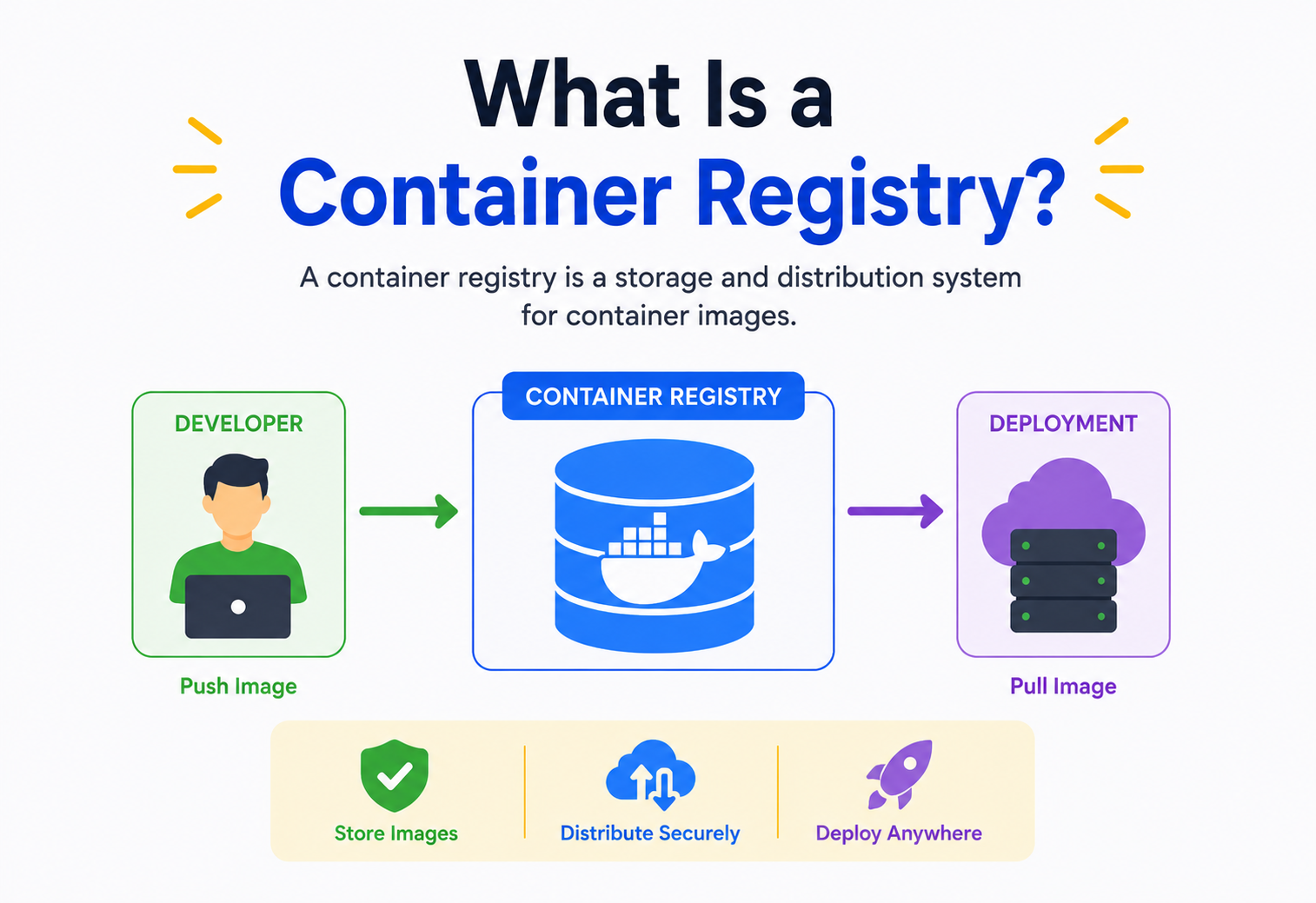
What Is a Container Registry?
A container is a sealed box for software. A container registry is the warehouse where those boxes are stored, versioned, signed, scanned, and handed out on demand. This is the ground-up tour of how registries work, why they exist, and how they behave under production load.
Almost every piece of production software in 2026 travels through a container registry on its way to a running server. This guide starts from “what is even inside a container image” and ends at “how does a registry survive a Black-Friday-scale traffic spike” — the same way a Software Architect actually reasons about it.
Introduction & History
Containers are sealed boxes for software. Registries are the warehouses that keep the boxes.
Imagine you baked a cake using a very specific recipe, a specific oven, and a specific set of ingredients from your kitchen. If you handed a friend just the recipe, they might not have the same oven, the same brand of flour, or the same altitude — and the cake could come out completely different. Now imagine instead you could hand them the entire baked cake, in a sealed box, exactly as it came out of your oven. Anyone, anywhere, could open that box and get the exact same cake.
A container is that sealed box for software. It packages an application together with everything it needs to run — code, libraries, system tools, settings — so it behaves identically no matter where it runs: your laptop, a teammate’s laptop, or a server in a data centre on the other side of the planet.
A container registry is the warehouse where these sealed boxes (called container images) are stored, organised, versioned, and handed out on demand. It is, in the simplest possible terms, a specialised file server plus a database plus a set of rules for how images are named, tagged, and retrieved.
1.1 · A SHORT HISTORY
Before containers, developers relied on virtual machines (VMs) to isolate applications. VMs work, but each one carries a full copy of an operating system, making them heavy — often gigabytes in size and slow to start (minutes, not seconds).
2008 — Linux cgroups & namespaces mature
The Linux kernel gains the building blocks (control groups for resource limits, namespaces for isolation) that containers are built on.
2013 — Docker is released
Docker packages Linux containers with a friendly CLI and, crucially, a standard image format — plus Docker Hub, the first widely-used public container registry.
2015 — Open Container Initiative (OCI) formed
Docker, Google, CoreOS and others agree on open standards for image formats and registry APIs so no single vendor controls the ecosystem.
2016–2018 — Cloud registries arrive
Amazon ECR, Google Container Registry (later Artifact Registry), and Azure Container Registry launch, moving registries into managed cloud services.
2018 — Harbor becomes a CNCF project
VMware’s Harbor brings enterprise-grade security scanning, replication, and role-based access to self-hosted registries.
2020s — Registries as security control points
Image signing (Sigstore/Cosign), vulnerability scanning, and software bill of materials (SBOM) attachment turn registries into the front line of supply-chain security.
Today, a container registry is not an optional extra — it is the backbone of how nearly every modern company ships software, from a two-person startup to Google’s internal infrastructure.
1.2 · WHY CONTAINERS WON OVER VMs FOR MOST WORKLOADS
To really understand why registries matter, it helps to understand what containers replaced. A virtual machine works by emulating an entire computer — including its own operating system kernel — on top of your real computer, using a piece of software called a hypervisor. That gives strong isolation, but it’s expensive: booting a VM means booting an entire OS, which can take a minute or more and consume gigabytes of memory before your actual application even starts.
Containers take a different approach. Instead of emulating a whole computer, they use features already built into the host operating system’s kernel — namespaces (which make a process think it has its own filesystem, network, and process list) and cgroups (which limit how much CPU, memory, and disk a process can use) — to create an isolated “room” for an application without duplicating the entire OS. The result: containers start in milliseconds to seconds, and a single machine can run dozens or hundreds of containers where it might run only a handful of VMs.
This lighter weight is precisely why containers exploded in popularity for microservices — architectures made of many small, independently deployable services, each needing to start up and scale quickly. And once you have hundreds or thousands of containers being built and deployed continuously, you need somewhere organised to keep the images they’re built from. That “somewhere” is the registry.
The Problem & Why Registries Exist
Building an image is easy. Getting it — safely, quickly, verifiably — onto every machine that needs it is the actual hard problem.
Once you can build a container image, a new question appears immediately: where does that image live, and how does anyone else get it? Without a registry, you would have to manually copy image files around — over USB drives, email, or scp — which is slow, error-prone, and impossible to do safely at scale.
Think of it like a library. Anyone can write a book (build an image), but without a library (a registry) to catalog, store, and lend it out, nobody else can easily find or borrow it. A registry solves several concrete problems at once:
Distribution
Get an image from the machine that built it to every machine that needs to run it — reliably and quickly.
Versioning
Track many versions of the same application (tags like v1.0, v1.1) so you can roll forward or roll back.
Access control
Decide who can push (upload) and who can pull (download) each image.
Trust & provenance
Prove an image came from a trusted build and hasn’t been tampered with.
Efficiency
Avoid re-transferring bytes that haven’t changed, using content-addressable layers.
Analogy
In everyday terms: a container registry is to container images what an app store is to mobile apps — a trusted, organised place to publish and download versioned software packages, with rules about who can publish what.
2.1 · WHAT LIFE LOOKS LIKE WITHOUT A REGISTRY
It’s worth spelling out the alternative in concrete terms, because it makes the registry’s value obvious. Suppose your company has 40 microservices, each deployed to 30 servers, and you ship updates several times a day. Without a registry, every deployment would require someone to manually build the image on each target machine (slow and inconsistent, since machines might have slightly different tools installed) or copy a built image file to each of the 30 servers by hand (fragile, and there’s no single source of truth for “what is currently running in production”).
Worse, there would be no easy way to answer basic questions like “which exact version of the payments service is running right now?” or “can we roll back to yesterday’s version if this deploy breaks something?” A registry answers all of these by centralising storage, giving every image a precise, addressable identity (its digest), and letting any authorised machine pull exactly the bytes it needs, on demand, over the network — the same way a bank doesn’t ship you physical cash for every transaction, but instead keeps a ledger that any authorised party can query.
Core Concepts
Nine terms that make every other section click into place.
Before going further, let’s define the vocabulary precisely. Getting these terms straight now will make everything after this section click into place.
3.1 · CONTAINER IMAGE
A read-only template made of stacked layers, each layer being a set of filesystem changes (added, changed, or removed files). Layers stack on top of each other like transparent sheets to form the final filesystem the container sees.
3.2 · LAYER
Each instruction in a Dockerfile (like RUN, COPY) typically produces one layer. Layers are content-addressed — identified by a cryptographic hash (a digest) of their contents — so identical layers shared between images are stored only once.
3.3 · MANIFEST
A JSON document that lists an image’s layers (by digest), its configuration, and metadata such as the target architecture (e.g., amd64, arm64). The manifest is what the registry actually hands out first when you request an image — it’s the “table of contents.”
3.4 · TAG
A human-friendly, mutable pointer to a specific manifest digest — like myapp:1.4.2 or myapp:latest. Tags can be moved to point at a new image; digests never change, which is why production systems should prefer pinning to digests.
3.5 · REPOSITORY
A named collection of related images sharing a name but differing by tag, e.g. library/nginx holds many versions of the nginx image.
3.6 · DIGEST
A SHA-256 hash of a manifest or layer’s content — a unique fingerprint. Two files with the same content always produce the same digest, no matter who created them or when.
To make this concrete: imagine two completely different teams, in two different countries, both build an image starting from the exact same base layer — say, a minimal Alpine Linux filesystem. Even though they’ve never communicated, both of their builds produce byte-for-byte identical bytes for that layer, so both compute the exact same SHA-256 digest for it. When either team pushes their image, the registry recognises “I already have a blob with this exact digest” and skips storing it a second time. This is the mechanism, not a coincidence, behind why registries can efficiently store millions of images built by unrelated teams without wasting enormous amounts of duplicate storage.
Because layers are identified by the hash of their contents (not a name someone chose), the registry can deduplicate automatically: if 500 images all share the same Ubuntu base layer, that layer is stored on disk exactly once, and only downloaded once per machine.
3.7 · REGISTRY VS. REPOSITORY VS. REGISTRY PROVIDER
| Term | What it means | Example |
|---|---|---|
| Registry | The server / service that stores and serves images | ghcr.io, docker.io |
| Repository | A named group of images within a registry | myorg/payments-api |
| Tag | A version label within a repository | 2.3.0, latest |
| Registry provider | The company / product operating the registry | Docker Hub, ECR, GCR, ACR, Harbor |
3.8 · IMAGE INDEX (MULTI-ARCHITECTURE IMAGES)
Modern applications often need to run on more than one CPU architecture — for example, x86-64 servers in a data centre and ARM-based chips like Apple Silicon or AWS Graviton. Rather than force users to know which architecture they need, registries support an image index (sometimes called a “manifest list”) — a manifest of manifests. When you pull myapp:1.0, the client first fetches the index, which lists a separate manifest for each architecture (amd64, arm64, and so on), and automatically selects the one matching the machine it’s running on. This is exactly how the same tag, like nginx:latest, works correctly whether you pull it on a MacBook with an Apple M-series chip or a cloud server with an Intel processor.
3.9 · CONFIG BLOB
Alongside the layers, every manifest references a small JSON config blob describing how the container should actually run: its entrypoint command, default environment variables, exposed ports, working directory, and the history of which instruction produced which layer. Think of the layers as the cake itself, and the config blob as the little card taped to the box saying “serve chilled, cuts into 8 slices.”
Architecture & Components
A registry is a front counter, a sorting room, and a warehouse — three parts, each doing what it does best.
At its core, a container registry is a fairly simple system built from a small number of moving parts, similar to how a post office needs a front counter, a sorting room, and a warehouse.
API / Auth Layer
Implements the OCI Distribution Spec HTTP API and validates tokens (OAuth2 / JWT), deciding who can push or pull which repositories.
Registry Service
The core logic: accepts uploads, assembles manifests, validates digests, and resolves pull requests.
Metadata Store
A database holding repository names, tags, manifest JSON, user permissions, and audit logs.
Blob Storage
Where the actual layer bytes live — usually an object store like Amazon S3, Google Cloud Storage, or local disk for small setups.
Scanner
Analyses image contents against vulnerability databases (CVEs) and policy rules.
Event / Webhook System
Notifies other systems (like a CI/CD pipeline) the moment a new image is pushed.
4.1 · WHY THE ARCHITECTURE IS SPLIT THIS WAY
Notice that the metadata store and the blob storage are deliberately separate systems, even though from the outside they look like one “registry.” This separation is a classic distributed-systems pattern: keep the small, frequently-updated, relationally-structured data (who owns this repository, what does this tag point to, who has permission to write here) in a database optimised for fast, consistent reads and writes, while keeping the large, rarely-changing, unstructured data (the actual layer bytes, which can be gigabytes) in cheap, massively scalable object storage.
This is analogous to how a hospital keeps patient records in a fast, carefully-controlled database, while storing bulk X-ray images in a separate archival system optimised for large files — you wouldn’t want a system that’s great at storing huge images to also be the system responsible for enforcing exactly who is allowed to update a patient’s medication list, and vice versa. Mixing those concerns into a single monolithic store tends to make both jobs worse.
The registry service itself is typically stateless — it holds no data of its own between requests, only orchestrating calls to the metadata store and blob storage. This statelessness is what makes it trivial to run many identical copies of the registry service behind a load balancer: any instance can handle any request, because none of them are hiding data the others don’t have.
Internal Working
Trace one push, byte by byte — then trace the pull that comes after it.
Let’s trace exactly what happens, byte by byte, when you run docker push myregistry.io/team/app:1.0.
Layer diffing
Docker computes which layers in the local image already exist on the registry (via a HEAD request per digest) and skips those.
Blob upload
Missing layers are uploaded as compressed blobs, often in chunks, using a two-step “start upload, then PATCH/PUT” protocol so large layers can resume if interrupted.
Digest verification
Once a blob is fully uploaded, the registry recomputes its SHA-256 hash and rejects the upload if it doesn’t match what the client claimed — this is what prevents corruption or tampering in transit.
Manifest creation
The client uploads a manifest JSON referencing all the layer digests plus a config blob (environment variables, entrypoint, exposed ports).
Tag update
The registry updates the metadata store so the tag
1.0now points at this manifest’s digest.
A docker pull reverses this: fetch the manifest for the tag, then fetch each layer digest not already cached locally, then let the container runtime unpack and stack the layers.
5.1 · HOW LAYERS ACTUALLY STACK INTO A RUNNING FILESYSTEM
It’s worth demystifying exactly how several separate, read-only layers become one coherent filesystem a program can use. Each layer is really just a compressed archive (a tarball) describing files that were added, changed, or deleted relative to the layer beneath it. The container runtime uses a filesystem technology called a union filesystem (commonly OverlayFS on Linux) to transparently merge these layers into a single view, without ever physically copying their contents together.
On top of all the stacked, read-only image layers, the runtime adds one final writable layer, unique to that specific running container. Any file the running application creates or modifies lands only in this writable layer, leaving the original image layers completely untouched underneath. This is exactly why you can run the same image as ten separate containers simultaneously, each freely writing files, without any of them interfering with each other or with the shared, read-only image layers they all point back to — much like ten people photocopying and marking up their own copy of the same original document, without ever touching the master copy.
This also explains a subtlety that surprises many newcomers: if you delete a container, its writable layer is deleted with it, and any changes it made are gone — unless that data was explicitly stored somewhere outside the container, such as in a mounted volume.
5.2 · A MINIMAL REGISTRY CLIENT IN JAVA
The OCI Distribution Spec is just HTTP, so you can talk to a registry with plain Java. Here’s a simplified example that checks whether a specific layer digest already exists in a repository (the same check Docker performs before uploading):
import java.net.URI;
import java.net.http.HttpClient;
import java.net.http.HttpRequest;
import java.net.http.HttpResponse;

public class RegistryClient {

    private final HttpClient http = HttpClient.newHttpClient();
    private final String registryUrl; // e.g. https://myregistry.io
    private final String repository;  // e.g. team/app
    private final String bearerToken;

    public RegistryClient(String registryUrl, String repository, String bearerToken) {
        this.registryUrl = registryUrl;
        this.repository = repository;
        this.bearerToken = bearerToken;
    }

    // Checks if a blob (layer) already exists in the registry, by digest.
    public boolean blobExists(String digest) throws Exception {
        URI uri = URI.create(registryUrl + "/v2/" + repository + "/blobs/" + digest);
        HttpRequest request = HttpRequest.newBuilder(uri)
                .header("Authorization", "Bearer " + bearerToken)
                .method("HEAD", HttpRequest.BodyPublishers.noBody())
                .build();

        HttpResponse<Void> response = http.send(request, HttpResponse.BodyHandlers.discarding());
        return response.statusCode() == 200; // 200 = exists, 404 = not found
    }
}This HEAD-before-PUT pattern is exactly why pushing an updated image is fast after the first push: only the changed layers get uploaded again.
5.3 · CONCURRENCY: WHAT HAPPENS WHEN TWO PEOPLE PUSH AT ONCE?
Registries have to handle a subtle concurrency problem. Imagine two developers, or two CI jobs, both push a new version of the same tag, myapp:latest, at almost the same moment. Both uploads succeed at the blob layer (layers are content-addressed and immutable, so there’s no conflict there — uploading the “same” layer twice is harmless and idempotent). The real race is at the very last step: updating the tag pointer in the metadata store to point at the new manifest digest.
Registries handle this the same way most databases handle concurrent writes to the same row: with either a locking transaction or an atomic compare-and-swap operation on the tag record, so the two updates are serialised rather than corrupting each other. Whichever push’s manifest update transaction commits last simply “wins,” and the tag ends up pointing at that manifest — the other push still succeeded (its manifest and layers are safely stored and reachable by digest), it’s just that the tag no longer points to it. This is precisely why relying on mutable tags in a highly concurrent CI environment can produce confusing, non-deterministic results, and why disciplined teams prefer to generate unique, immutable tags (like a git commit SHA) per build rather than repeatedly overwriting one shared tag.
5.4 · A MINIMAL MANIFEST-FETCHING EXAMPLE IN JAVA
Building on the blob-existence check above, here’s how a client fetches a manifest by tag — the very first network call in any pull:
import java.net.URI;
import java.net.http.HttpClient;
import java.net.http.HttpRequest;
import java.net.http.HttpResponse;

public class ManifestFetcher {

    private final HttpClient http = HttpClient.newHttpClient();

    public String fetchManifest(String registryUrl, String repository,
                                 String reference, String bearerToken) throws Exception {
        URI uri = URI.create(registryUrl + "/v2/" + repository + "/manifests/" + reference);

        HttpRequest request = HttpRequest.newBuilder(uri)
                .header("Authorization", "Bearer " + bearerToken)
                // Ask specifically for the OCI manifest media type
                .header("Accept", "application/vnd.oci.image.manifest.v1+json")
                .GET()
                .build();

        HttpResponse<String> response = http.send(request, HttpResponse.BodyHandlers.ofString());

        if (response.statusCode() != 200) {
            throw new RuntimeException("Manifest fetch failed: HTTP " + response.statusCode());
        }
        return response.body(); // JSON containing layer digests, config digest, etc.
    }
}
Data Flow & Image Lifecycle
Every image goes through five stages — and the fifth one is what quietly eats storage bills.
An image’s journey through a registry typically has five stages:
Garbage collection deserves special mention: because tags can move and images can be deleted, a registry periodically needs to find blobs that are no longer referenced by any manifest and reclaim their storage. This is analogous to a library removing books nobody has checked out or referenced in years, once it’s sure no catalog entry still points to them.
Deleting a tag does not immediately free storage — the underlying blobs are only removed once a garbage-collection pass confirms nothing else references them. Running GC while pushes are in progress can corrupt images if not implemented carefully (most registries lock or use a read-only mode during GC).
6.1 · HOW GARBAGE COLLECTION ACTUALLY WORKS
Most registries implement garbage collection as a two-phase “mark and sweep” process, a technique borrowed directly from how programming language runtimes (like the JVM) clean up unused memory. In the mark phase, the registry walks every manifest currently referenced by any tag and records every blob digest it depends on — essentially building a complete set of “blobs that are still needed.” In the sweep phase, it scans all blobs actually sitting in storage and deletes any blob whose digest never showed up in the mark phase’s set.
This two-phase approach exists specifically to be safe under concurrency: if a new push happens in the middle of a GC run and starts referencing a blob that GC hasn’t marked yet, a well-implemented registry either delays that blob’s eligibility for deletion until the next GC cycle, or puts itself into a temporary read-only mode for the (usually short) duration of the sweep, so nothing can “pull the rug out” from underneath a blob mid-scan.
6.2 · RETENTION AND LIFECYCLE POLICIES
Left unmanaged, a busy registry accumulates images forever, since every CI build might push a new tag. Lifecycle policies let teams automatically expire old images based on rules such as:
- Delete untagged manifests (orphaned by a moved tag) older than 7 days.
- Keep only the most recent 20 tags per repository.
- Keep all tags matching a “release” pattern (e.g.
v*.*.*) forever, but expire “dev-*” tags after 14 days.
These policies are the registry equivalent of a library’s periodic weeding process — removing books that are outdated or unused so shelf space stays available for what people actually need.
Advantages, Disadvantages & Trade-offs
The registry gives you distribution and reproducibility — and asks you to operate one more critical system in return.
Advantages
- Fast, incremental distribution via shared layers.
- Strong versioning and rollback via tags / digests.
- Central point for security scanning and policy enforcement.
- Works identically across dev, staging, and production.
- Enables reproducible builds via immutable digests.
Disadvantages
- Another piece of critical infrastructure to secure and operate.
- Storage costs grow quickly without lifecycle policies.
- Network egress costs can be significant at scale.
- Tag mutability can undermine reproducibility if misused.
- Outages block both deployments and, if misconfigured, running workloads that need to re-pull images.
Performance & Scalability
At small scale a registry is invisible. At the scale of a company deploying thousands of times a day, it becomes a first-class engineering concern.
At small scale, a registry is barely noticeable. At the scale of a company deploying thousands of times a day across thousands of servers, registry performance becomes a first-class engineering concern.
8.1 · KEY LEVERS
- Layer caching: shared base images mean most pulls only fetch a small “diff” layer.
- Geographic replication: pushing images to registries close to where they’ll be pulled (multi-region mirrors) cuts latency dramatically.
- Pull-through caches: a local proxy registry caches upstream images so 1,000 machines in one data centre only fetch a popular base image from the internet once.
- Parallel layer downloads: clients fetch multiple layers concurrently instead of one at a time.
- Image size reduction: multi-stage builds and minimal base images (like distroless or Alpine) shrink what needs to move at all.
8.2 · THE CAP THEOREM, APPLIED TO REGISTRIES
The CAP theorem states that a distributed system can only fully guarantee two of three properties at once during a network failure: Consistency (every read sees the latest write), Availability (every request gets a response), and Partition tolerance (the system keeps working even if parts of the network can’t talk to each other). Since real networks do experience partitions, in practice every distributed system chooses between prioritising consistency or availability when a partition occurs.
Registries generally lean toward availability for pulls: it’s far more important that a production cluster can still pull an image during a network hiccup than that every single replica agrees on the absolute latest tag at that exact instant. This is why replication between registry regions is usually eventually consistent — a newly pushed image might take a few seconds to propagate to a distant region, but a temporarily “stale” read (getting the previous version of a tag) is a far smaller problem than an outright failure to deploy anything at all. Pushes, by contrast, usually favour consistency: you don’t want two conflicting writes to silently corrupt a tag’s history, which is why the compare-and-swap behaviour described earlier exists.
8.3 · CONSISTENT HASHING FOR CACHE AND SHARD DISTRIBUTION
Large registries that shard blob storage or caching layers across many machines commonly use a technique called consistent hashing to decide which machine is responsible for which blob. In a naive scheme, you might compute hash(digest) % number_of_servers to pick a server — but this falls apart the moment you add or remove a server, since almost every digest now maps to a different server, causing a massive, unnecessary cache invalidation.
Consistent hashing solves this by mapping both servers and digests onto the same circular numeric range (a “hash ring”). Each blob is assigned to the next server clockwise from its position on the ring. When a server is added or removed, only the blobs between it and its neighbour need to move — typically a small fraction of the total — rather than nearly everything. This is the same technique used by distributed caches like memcached clusters and by many NoSQL databases, and it’s exactly why a registry’s caching layer can grow or shrink capacity without causing a stampede of cache misses.
High Availability & Reliability
If your registry goes down, you can’t deploy. It’s tier-0 infrastructure, on par with DNS.
If your registry goes down, you can’t deploy — and in some cluster configurations, you can’t even scale up existing services, because new nodes need to pull images to start containers. Registries are therefore treated as tier-0 infrastructure, on par with DNS.
Multi-region replication
Images are asynchronously copied to registries in multiple regions so a regional outage doesn’t halt deployments elsewhere.
Object storage durability
Backing blob storage (S3, GCS) typically offers 99.999999999% durability, making data loss extremely unlikely.
Read replicas / caches
Pull traffic (far more frequent than pushes) is served from local caches, insulating the primary registry from load spikes.
Graceful degradation
Running containers keep running even if the registry is unreachable — only new pulls are affected, which limits blast radius.
9.1 · DISASTER RECOVERY
High availability protects against small, transient failures (a single server crashing); disaster recovery plans for the rare but serious case where an entire region or the primary registry account becomes unusable — due to a natural disaster affecting a data centre, a catastrophic misconfiguration, or a security incident. A solid disaster recovery plan for a registry typically includes:
- Cross-region backups of both the metadata database and blob storage, tested regularly (a backup nobody has ever restored from is not a real backup).
- A documented, rehearsed failover procedure so that if the primary region becomes unavailable, traffic can be redirected to a secondary region within a defined Recovery Time Objective (RTO).
- A Recovery Point Objective (RPO) — an explicit answer to “how much recently-pushed data are we willing to potentially lose in the worst case?” — which determines how frequently replication or backups must run.
Many organisations run periodic “game day” exercises where they deliberately simulate a registry outage to verify the failover plan actually works, rather than discovering gaps in it during a real incident.
Security
The registry is the single funnel through which nearly all production software passes — which makes it one of the highest-value targets in a company’s infrastructure.
Because a registry is the single funnel through which nearly all production software passes, it’s one of the highest-value targets in a company’s infrastructure. A compromised registry could let an attacker silently swap a trusted image for a malicious one.
Authentication
Every push/pull is authenticated, usually via short-lived OAuth2 / JWT bearer tokens rather than long-lived passwords.
Authorization (RBAC)
Fine-grained roles decide who can read vs. write to specific repositories or namespaces.
Vulnerability scanning
Every pushed image is scanned against CVE databases; policies can block deployment of images with critical vulnerabilities.
Image signing
Cryptographic signatures (e.g., via Sigstore / Cosign) prove an image was built by a trusted pipeline and hasn’t been altered since.
SBOM
A Software Bill of Materials lists every package inside an image, making it possible to instantly find affected images when a new CVE is announced.
Immutable tags
Locking a tag once pushed prevents an attacker (or a careless teammate) from silently replacing what prod:stable points to.
The 2021 Codecov and 2020 SolarWinds incidents both illustrate the same broader lesson: an attacker who can insert themselves anywhere in a software supply chain — including a registry — can compromise every downstream consumer at once. This is why registries increasingly enforce signature verification before a deployment is allowed to pull an image.
10.1 · HOW IMAGE SIGNING ACTUALLY WORKS, STEP BY STEP
Image signing can sound abstract, so let’s walk through it concretely. When a CI pipeline finishes building and testing an image, it generates a cryptographic signature over the image’s manifest digest using a private key (or, increasingly, a short-lived “keyless” identity tied to the CI system itself, verified via an OpenID Connect token — this is how Sigstore’s Cosign tool avoids the headache of managing long-lived private keys). That signature is then stored alongside the image, often as a separate attached artifact in the registry.
Later, when a Kubernetes cluster or deployment tool is about to run that image, an admission controller intercepts the request and verifies the signature against a known, trusted public key or identity before allowing the pod to start. If the signature is missing or doesn’t match — meaning either the image was never signed by a trusted pipeline, or its bytes were altered after signing — the deployment is blocked. This turns “we trust our CI pipeline” into a technically enforced guarantee rather than an assumption.
10.2 · SCANNING DEPTH: MORE THAN JUST THE TOP LAYER
Good vulnerability scanners don’t just look at an image’s file list — they identify the specific package manager databases inside the image (like Debian’s dpkg, Alpine’s apk, or a Java application’s bundled JAR dependencies) and cross-reference every installed package version against CVE databases such as the National Vulnerability Database. This is why the same base OS image can suddenly show new vulnerabilities in a scan weeks after it was built and never touched again: it isn’t that the image changed, it’s that new CVEs affecting its already-installed packages were disclosed after the fact. This is also the core argument for periodically rebuilding and re-scanning even “unchanged” images, rather than treating a clean scan as permanent.
Monitoring, Logging & Metrics
Operating a registry reliably means being able to answer, at 3 a.m., “why can’t anyone deploy right now?”
Operating a registry reliably means being able to answer, at 3 a.m., “why can’t anyone deploy right now?” That requires visibility into a few key signals:
| Metric | Why it matters |
|---|---|
| Push / pull latency (p50 / p95 / p99) | Detects slow storage backends or network issues before users complain |
| Error rate (4xx / 5xx) | Surfaces auth failures, quota issues, or backend outages |
| Storage growth rate | Predicts when lifecycle / cleanup policies are needed |
| Cache hit ratio | Shows how effective pull-through caching is |
| Scan queue depth | Flags when vulnerability scanning is falling behind new pushes |
Logs should record who pushed / pulled what and when — both for debugging and for security audits — while distributed tracing helps pinpoint whether a slow deploy was caused by the registry, the network, or the node pulling the image.
11.1 · ALERTING: TURNING METRICS INTO ACTION
Collecting metrics is only half the job — the other half is deciding which combinations of metrics deserve to wake someone up at night versus which can simply be reviewed the next morning. A well-tuned registry alerting setup typically distinguishes between:
- Page-worthy alerts: a sustained spike in 5xx errors, or push / pull latency crossing a threshold that would visibly slow down deployments across the company.
- Ticket-worthy alerts: storage approaching a capacity limit within the next few weeks, or a steady rise in scan queue depth suggesting the scanning fleet needs more capacity soon.
- Dashboard-only signals: cache hit ratio trending slowly downward, useful for long-term capacity planning but not urgent on its own.
This tiering mirrors good on-call practice generally: alerts that don’t require immediate human action but page someone anyway quickly train engineers to ignore alerts altogether — a failure mode sometimes called “alert fatigue” that ironically makes systems less reliable, not more.
Deployment & Cloud Options
Managed convenience versus self-hosted control — and the hybrid answer most large organisations end up with.
Most teams don’t build a registry from scratch — they choose from managed or self-hosted options:
| Option | Type | Good for |
|---|---|---|
| Docker Hub | Managed, public-first | Open-source projects, quick starts |
| Amazon ECR | Managed, cloud-native | Teams already on AWS |
| Google Artifact Registry | Managed, cloud-native | Teams already on GCP |
| Azure Container Registry | Managed, cloud-native | Teams already on Azure |
GitHub Container Registry (ghcr.io) | Managed | Projects already hosted on GitHub |
| Harbor | Self-hosted, open source | Enterprises needing full control & on-prem compliance |
Use a managed registry from your primary cloud provider unless you have a specific compliance or air-gapped requirement that demands self-hosting.
12.1 · MANAGED VS. SELF-HOSTED: WHAT YOU’RE ACTUALLY TRADING OFF
Choosing between a managed and a self-hosted registry is really a decision about who owns operational responsibility. With a managed registry, the cloud provider handles patching, scaling, backup, and much of the security hardening — you configure policies and consume the service, similar to renting a fully-serviced apartment rather than owning a house. With a self-hosted registry like Harbor, your team gains full control over exactly where data lives (critical for organisations with strict data-residency or air-gapped network requirements, such as government or defence contractors), but takes on the ongoing work of patching the software, monitoring its health, and scaling its storage — the equivalent of owning the house and being responsible for the plumbing.
Many mid-to-large organisations end up running a hybrid: a managed cloud registry for the majority of day-to-day workloads, plus a self-hosted registry for specific air-gapped environments (like factory floor systems with no internet access) that need images mirrored in periodically by a controlled, audited process.
12.2 · AIR-GAPPED AND OFFLINE REGISTRIES
Some environments — submarines, industrial control systems, high-security government networks — have no direct internet connectivity at all, by design. These environments still need container images, so organisations set up an “air-gapped” registry: images are pulled from the internet on a connected machine, exported to a portable medium or a one-way data diode, and imported into the isolated registry inside the secure network. This process is slower and more manual by necessity, but it preserves the same core registry concepts — content-addressed layers, manifests, and tags — inside a network that may never touch the public internet.
Storage, Caching & Load Balancing
A registry splits into a small fast catalog and a huge cheap warehouse — then fronts both with caches.
Registries typically split concerns into two storage systems: a small, fast metadata database (tags, permissions, manifest JSON) and a large, cheap blob store (the actual layer bytes). This mirrors how a library keeps a compact card catalog separate from the enormous shelves of physical books.
- Blob storage: object stores like S3 / GCS scale to petabytes and handle the bulk of the data.
- Metadata store: a relational or key-value database indexed for fast tag lookups.
- CDN / edge caching: popular public images are cached at edge locations to cut latency for global pulls.
- Load balancing: pull requests (read-heavy) are spread across many stateless registry nodes sitting in front of shared storage.
13.1 · WHY REGISTRIES ARE READ-HEAVY, AND WHAT THAT IMPLIES
In almost any real deployment, pulls vastly outnumber pushes — a single push (one new image built by CI) might be followed by that same image being pulled onto hundreds or thousands of machines as it rolls out. This read-heavy pattern shapes nearly every design decision in a production registry: it’s why aggressive caching pays off so well, why load balancers typically use simple, low-overhead algorithms like round-robin or least-connections across a fleet of read replicas, and why the metadata database is often paired with a read-through cache (like Redis) in front of it, so that a burst of thousands of nodes all pulling the same freshly-deployed tag doesn’t hammer the primary database with identical lookups.
13.2 · LOAD BALANCING STRATEGIES COMPARED
| Strategy | How it works | Best for |
|---|---|---|
| Round-robin | Requests cycle evenly across all backend nodes | Homogeneous nodes with similar capacity |
| Least-connections | New requests go to the node currently handling the fewest active requests | Uneven request durations (e.g. large vs. small blobs) |
| Consistent hashing | Requests for the same digest always route to the same cache node | Maximising cache hit rate across a fleet |
| Geo-routing | Requests are routed to the nearest regional registry mirror | Globally distributed clusters minimising latency |
APIs & Microservices
The OCI Distribution Spec is why Docker, Podman, Kubernetes, and any CI tool can all speak to any compliant registry the same way.
Registries expose a standardised HTTP API defined by the OCI Distribution Specification, which is why Docker, Podman, Kubernetes, and countless CI tools can all talk to any compliant registry the same way. Key endpoints include:
GET  /v2/                              # Check API version support
GET  /v2/{repo}/tags/list              # List all tags for a repository
GET  /v2/{repo}/manifests/{reference}  # Fetch a manifest by tag or digest
PUT  /v2/{repo}/manifests/{reference}  # Upload/update a manifest
GET  /v2/{repo}/blobs/{digest}         # Download a layer blob
POST /v2/{repo}/blobs/uploads/         # Start a chunked blob upload
In a microservices architecture, the registry sits at a critical junction: every service’s CI pipeline pushes to it, and every Kubernetes node pulls from it whenever a pod is scheduled. It effectively becomes shared infrastructure between “build time” and “run time.”
14.1 · WEBHOOKS: MAKING THE REGISTRY EVENT-DRIVEN
Beyond serving simple push / pull requests, most production registries support webhooks — HTTP callbacks fired automatically whenever something happens, such as a new tag being pushed or a scan completing. This turns the registry from a passive file store into an active participant in a microservices event chain: a webhook firing on push can automatically trigger a deployment pipeline, post a notification to a team chat channel, or kick off an integration test suite, all without anyone needing to poll the registry and ask “has anything changed yet?”
14.2 · A SIMPLE JAVA SERVICE CONSUMING A REGISTRY WEBHOOK
Here’s a minimal example of a Java HTTP endpoint that a CI/CD system might expose to react to a registry’s “image pushed” webhook:
import com.sun.net.httpserver.HttpServer;
import java.io.OutputStream;
import java.net.InetSocketAddress;
import java.nio.charset.StandardCharsets;

public class RegistryWebhookListener {

    public static void main(String[] args) throws Exception {
        HttpServer server = HttpServer.create(new InetSocketAddress(8080), 0);

        server.createContext("/webhooks/registry", exchange -> {
            // In production: verify a shared-secret signature header here
            // before trusting the payload, to prevent spoofed events.
            String payload = new String(exchange.getRequestBody().readAllBytes(),
                    StandardCharsets.UTF_8);

            System.out.println("Received registry event: " + payload);
            // e.g. parse JSON, check event == "PUSH", then trigger a deploy job

            String response = "OK";
            exchange.sendResponseHeaders(200, response.length());
            try (OutputStream os = exchange.getResponseBody()) {
                os.write(response.getBytes(StandardCharsets.UTF_8));
            }
        });

        server.start();
        System.out.println("Listening for registry webhooks on port 8080");
    }
}
14.3 · REGISTRIES IN A MICROSERVICES WORLD
In a monolithic application, there’s typically one build artifact to manage. In a microservices architecture with dozens or hundreds of independently deployed services, the registry becomes the single shared “source of truth” that ties together otherwise completely decoupled teams. Team A’s payments service and Team B’s notifications service might share nothing in their codebases, deployment schedules, or on-call rotations — but they both push to and pull from the same registry, using the same authentication system and the same tagging conventions, which is often the only piece of shared infrastructure holding a large microservices estate together operationally.
Design Patterns & Anti-patterns
Digest pinning, promotion pipelines, and golden base images — the moves that separate mature registry usage from chaos.
15.1 · PATTERNS WORTH ADOPTING
- Immutable tags: once
v1.4.2is pushed, never overwrite it — cut a new tag instead. - Pull-through cache / mirror: a local proxy registry that transparently caches upstream public images.
- Promotion pipeline: images move through repositories / namespaces (e.g.
staging/app→prod/app) only after passing tests and scans, rather than mutating a tag in place. - Digest pinning in production: deployment manifests reference the exact digest, not a floating tag, guaranteeing exactly what will run.
15.2 · THE “GOLDEN BASE IMAGE” PATTERN
Larger organisations often standardise on a small set of centrally-maintained, security-hardened base images — sometimes called “golden images” — that every team is expected to build on top of, rather than each team independently choosing and patching its own base OS image. A platform team owns these golden images, keeps them patched against newly disclosed vulnerabilities, and publishes new versions on a predictable schedule. Individual application teams then simply rebuild on top of the latest golden base periodically, inheriting the security fixes automatically rather than each team needing its own expertise in OS-level patching.
This pattern trades a small amount of central-team overhead for a large reduction in organisation-wide risk: instead of two hundred teams independently deciding how to patch a vulnerability in a shared base library, one team fixes it once, and everyone else gets the fix by rebuilding against the updated golden image — much like a school issuing one approved textbook edition to every classroom, rather than trusting each teacher to independently source and verify their own materials.
15.3 · ANTI-PATTERNS TO AVOID
Relying on :latest in production
It’s ambiguous and can silently change underneath you — two deploys minutes apart can end up running different bytes.
No lifecycle / cleanup policy
Storage and cost grow unbounded forever, until someone gets an alarming invoice and starts a panicked cleanup.
Shared credentials for all teams
One set of push credentials used by every team makes auditing and revocation nearly impossible when something goes wrong.
Skipping vulnerability scanning “to move fast”
This debt compounds silently until an incident forces it to be paid all at once, usually at the worst possible time.
Best Practices & Common Mistakes
The habits that keep a production registry healthy — and the mistakes that reliably cause 2 a.m. pages.
Best Practices
- Use short-lived, scoped credentials for CI push access.
- Enable vulnerability scanning as a required check.
- Set image lifecycle policies (expire untagged / old images).
- Sign images and verify signatures at deploy time.
- Pin production deployments to digests, not mutable tags.
- Use multi-stage builds to keep images small.
Common Mistakes
- Embedding secrets / credentials directly inside image layers.
- Never rotating registry access tokens.
- Treating the registry as a generic file dump for non-image artifacts.
- No monitoring on push / pull error rates.
- Ignoring regional latency for globally distributed clusters.
16.1 · COST OPTIMIZATION
Storage in a registry is deceptively cheap per gigabyte but adds up quickly at scale, especially when every CI build pushes a new image and nothing is ever cleaned up. A few practices consistently make the biggest difference in real-world registry bills:
- Aggressive lifecycle policies for non-release tags (dev, feature-branch, and pull-request builds) — these are usually only needed for days, not indefinitely.
- Layer sharing across images by standardising on a small number of common base images organisation-wide, so the expensive base layers are stored (and cached) once rather than duplicated per team.
- Cross-region replication only where needed — replicating every image to every region multiplies both storage and egress costs; replicate only what a given region’s workloads actually run.
- Monitoring egress, not just storage — in cloud environments, the network cost of serving pulls can quietly exceed the cost of storing the images in the first place, particularly for very large images pulled frequently.
Real-World / Industry Examples
Netflix, Google, Uber, Amazon — four very different companies whose registry decisions all trace back to the same core patterns.
Regional replication for global deploys
Runs internal registries with aggressive regional replication so that thousands of microservice deployments a day across global regions pull images from the nearest copy.
OCI spec + deep GKE integration
Google’s internal build and artifact systems informed much of the OCI spec’s design; Artifact Registry now integrates directly with Cloud Build and GKE for automated scanning and deployment gating.
Mirrors near every data centre
Operates registry mirrors close to its many data centres to minimise the “cold start” cost of pulling large images onto newly provisioned nodes during traffic spikes.
ECR + IAM as one permissions story
ECR integrates directly with IAM, so image push / pull permissions are managed with the same fine-grained policies used across the rest of AWS.
17.1 · A CLOSER LOOK: SCALING REGISTRY PULLS FOR A TRAFFIC SPIKE
Consider a concrete scenario that illustrates why all of the concepts in this guide matter together. A retail company runs a flash sale and needs to scale a checkout microservice from 50 running instances to 2,000 within a few minutes to handle the load. Each new instance needs to pull the same container image before it can start serving traffic.
Without a well-designed registry, this moment — the exact moment reliability matters most — is when 1,950 near-simultaneous pull requests for the same image would hit the registry at once, potentially overwhelming it or a shared network link. With the patterns described throughout this guide working together, the outcome looks very different: a local pull-through cache in each availability zone means only the first pull in each zone actually reaches the origin registry; the remaining 1,949 requests within that zone are served from the local cache in milliseconds; consistent hashing spreads those cache lookups evenly across the caching fleet; and because the image was built with a slim base and multi-stage build, there are simply fewer total bytes to move in the first place. This is a good example of how registries aren’t interesting in isolation — their real value shows up under exactly this kind of pressure.
Frequently Asked Questions
Fast answers to the questions that come up in every design review, every interview, and every code review.
Is a container registry the same as a container repository?
No. A registry is the overall service / server; a repository is a named collection of images (with different tags) inside that registry.
Can I run my own container registry?
Yes — open-source options like Harbor, or even the reference Docker Registry image, let you self-host. Most teams still prefer a managed cloud registry unless they have specific compliance needs.
Why does my image push seem faster the second time?
Because layers are content-addressed, the registry (and your local Docker cache) skip re-uploading / downloading any layer whose digest already exists on the other side.
What’s the difference between a tag and a digest?
A tag is a mutable, human-readable pointer (like v1.2); a digest is an immutable content hash. Two pulls of the same tag can return different images over time, but a digest always returns exactly the same bytes.
Do private registries slow down deployments?
Not inherently — with proper caching, replication, and sizing, a private registry can be just as fast as, or faster than, pulling from the public internet.
What happens if I pull an image and the registry is temporarily down?
Any container already running is unaffected — only new pulls fail. Most orchestrators like Kubernetes will retry with backoff, and if a node already has the image cached locally from a previous pull, it can often start the container without contacting the registry at all.
Is Docker Hub the only public registry?
No — GitHub Container Registry, Quay.io, and various cloud provider registries also host public images. Many organisations also run “pull-through” mirrors of Docker Hub to reduce reliance on any single public registry and to work around its request rate limits.
How is a container registry different from a package registry like npm or Maven?
They solve a similar underlying problem — versioned, named artifact storage and distribution — but for different artifact types. A container registry stores whole runnable environments (layered filesystems); npm and Maven registries store language-specific libraries. Some registries, like Harbor and cloud “artifact registries,” now support both under one roof.
Summary & Key Takeaways
The essentials, distilled.
A container registry is where nearly all production software passes through on its way to the servers that run it. Getting the concepts, the patterns, and the operational discipline right around this one piece of infrastructure has an outsized effect on how safely and quickly a company can ship.
- A container registry stores, versions, and serves container images built from layered, content-addressed blobs plus a manifest.
- Tags are mutable pointers; digests are immutable fingerprints — prefer digests for production reliability.
- Registries follow the open OCI Distribution Spec, which is why any compliant client can talk to any compliant registry.
- At scale, performance depends on caching, replication, and keeping images small.
- Because nearly all production software flows through it, the registry is a critical security control point — scanning, signing, and RBAC are not optional extras.
- Choosing between managed (ECR / GCR / ACR / Docker Hub) and self-hosted (Harbor) depends mainly on compliance needs and existing cloud investment.
Treat the registry the way you’d treat DNS: quietly essential, worth over-engineering slightly, and never something you want to be discussing during an incident. The disciplines described here — digest pinning, signing, scanning, lifecycle policies, regional replication, careful GC — aren’t glamorous, but they are exactly what turns “we use containers” into “we ship containers reliably at scale.”