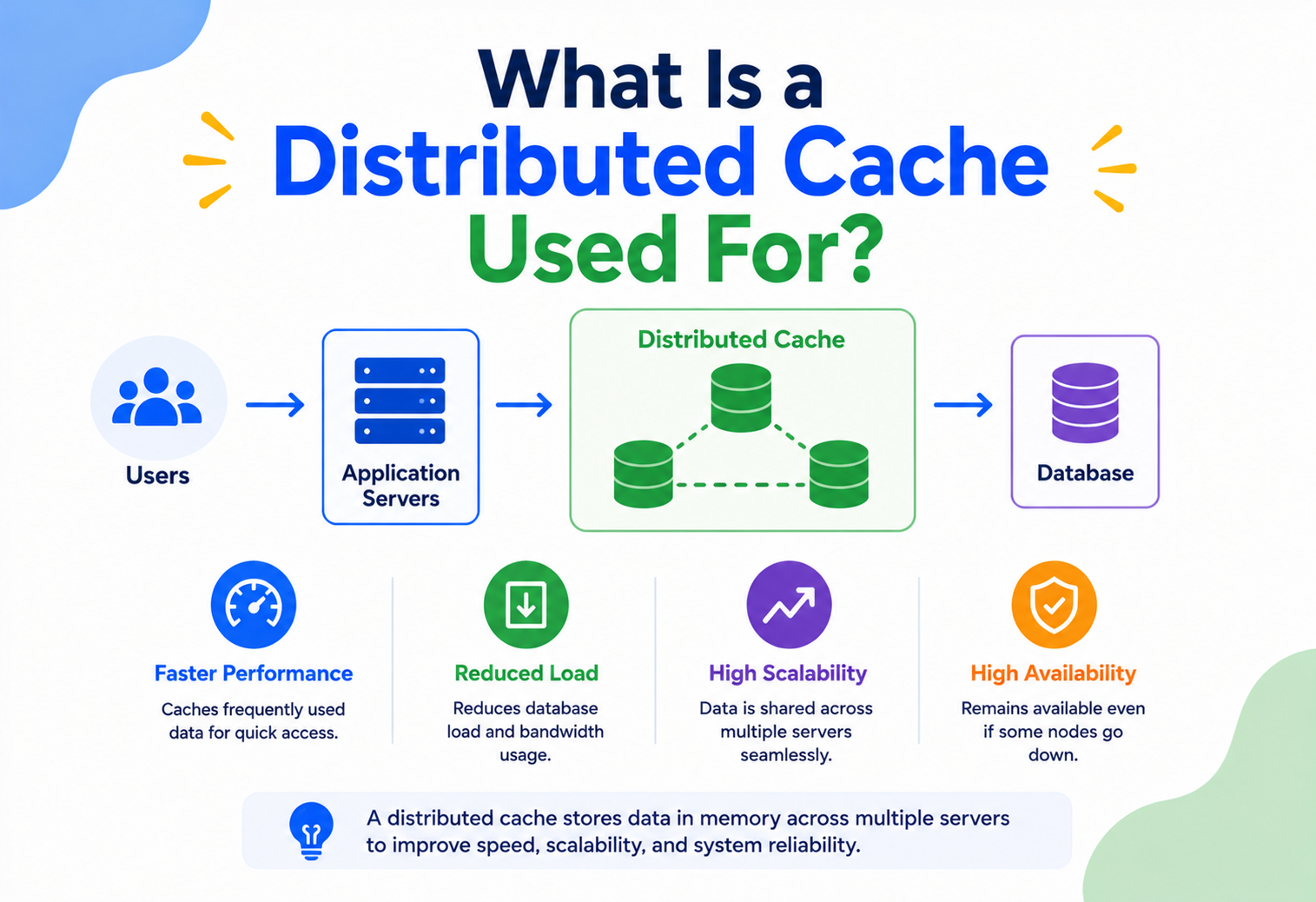
What Is a Distributed Cache Used For?
A complete, beginner-friendly guide to understanding, designing, and running distributed caches — from the first principles to Netflix-scale production systems.
Introduction & History
Imagine you run a small library. Every time someone asks “Do you have Harry Potter?”, you walk to the back room, search through thousands of boxes, find the book, and bring it out. That takes 5 minutes. Now imagine 500 people ask for the same book in one hour. You’d be exhausted, and everyone would be waiting in a long line.
What if, instead, you kept the 20 most-requested books on a small shelf right next to the front desk? Now, most requests are answered in 5 seconds instead of 5 minutes. That small shelf near the front desk is exactly what a cache is — a place that keeps frequently used things close and ready, so you don’t have to do the slow work again and again.
A distributed cache is the same idea, but instead of one shelf in one library, imagine a whole chain of libraries across a city, all sharing information about which books are popular, and each keeping a copy of the hot titles on their own front shelf. If one library’s shelf is missing a book, it can ask a neighboring library instead of going all the way to the giant central warehouse.
Where did caching come from?
Caching is not a new idea — it is older than computers. The word “cache” comes from the French word cacher, meaning “to hide,” originally used to describe a hidden storage spot for supplies. Computer scientists borrowed the term in the 1960s when they built the first CPU caches — small, fast memory chips sitting between the processor and the much slower main memory (RAM).
As the internet grew in the 1990s, websites started getting more visitors than a single database could handle. Engineers began caching web pages and database query results in a single server’s memory. This worked fine — until websites became so big that one server’s memory (RAM) simply wasn’t large enough, and one server couldn’t keep up with millions of users at once.
This is when the idea of a distributed cache was born: instead of one machine holding all the cached data, spread the cached data across many machines that work together as a team. Technologies like Memcached (created in 2003 for LiveJournal) and later Redis (2009) became the backbone of this movement, and today distributed caching is a core building block of nearly every large-scale application — from Instagram’s news feed to Uber’s ride matching.
Problem & Motivation — Why Distributed Caches Exist
To understand why distributed caches exist, we need to understand a basic truth about computers: not all memory is created equal. Some storage is extremely fast but small and expensive (like RAM). Some storage is slow but huge and cheap (like a hard disk or a database on a network).
| Storage type | Typical speed | Everyday analogy |
|---|---|---|
| CPU register | ~1 nanosecond | Thoughts already in your head |
| RAM (memory) | ~100 nanoseconds | Notes on your desk |
| SSD disk | ~100 microseconds | A filing cabinet in the next room |
| Network database call | ~1–100 milliseconds | Calling a warehouse across the city |
A single database query that involves reading from disk and traveling over a network can be 10,000 to 100,000 times slower than reading the same data from memory. Now imagine a popular app like Instagram, where millions of people ask “show me my feed” every second. If every single request had to go all the way to the database, three bad things would happen:
Slow responses
Users wait longer, and studies show that even a 100 ms delay can measurably hurt user engagement and sales.
Database overload
Databases can only handle a limited number of queries per second before they slow down or crash entirely.
High cost
Scaling a database to handle huge traffic is far more expensive than adding cheap memory-based cache servers.
This is the core motivation for caching in general: store a copy of frequently-needed data somewhere much faster to access, so you avoid repeating expensive work.
Why isn’t a single-server cache enough?
You might ask — why not just cache data in the memory of one application server? The problem is that modern applications rarely run on just one server. A popular app might run on hundreds or thousands of servers spread across multiple data centers, all serving different users at the same time.
If each server keeps its own private cache, you get two problems:
- Wasted memory: The same popular data gets copied a thousand times, once per server, instead of being stored once and shared.
- Inconsistent data: If User A updates their profile picture on Server 1, but Server 2’s cache still has the old picture, different users see different, contradictory versions of the truth.
Imagine 1,000 checkout counters at a giant store, each with its own private price list. If the store changes a price, updating 1,000 separate lists is slow and error-prone — some counters would keep charging the old price. A distributed cache is like one shared, synchronized price board that every counter reads from instantly.
The solution is a distributed cache: a single logical cache that is physically spread across multiple machines (called cache nodes), but that all application servers can talk to as if it were one big, shared, super-fast memory space.
Core Concepts
Before going further, let’s build a solid vocabulary. We’ll explain each term simply, like teaching a curious beginner.
Cache
What it is: A temporary storage area that holds a copy of data so future requests for that data can be served faster.
Why it exists: To avoid repeating slow, expensive work (like a database query or a complex calculation).
Where it’s used: CPUs, web browsers, mobile apps, databases, and large-scale backend systems.
Distributed cache
What it is: A cache whose data is spread across multiple machines (nodes) working together, rather than living on just one machine.
Why it exists: A single machine has limited RAM and limited processing capacity. Spreading the cache across many machines lets you store more data and serve more requests at once.
Where it’s used: Large-scale web applications, e-commerce sites, social media feeds, gaming leaderboards, and financial systems.
Cache hit and cache miss
A cache hit happens when the data you’re looking for is found in the cache — great, you get a fast answer! A cache miss happens when the data is not in the cache, so the system has to go fetch it from the slower original source (usually a database), and often stores a copy in the cache for next time.
Cache hit ratio
This is the percentage of requests that are answered directly from the cache. A hit ratio of 95% means 95 out of 100 requests were served instantly from the cache, and only 5 had to go to the slow database. This number is one of the most important health metrics for any caching system.
TTL (Time To Live)
What it is: A timer attached to cached data that says “this data is only valid for X seconds/minutes.”
Why it exists: Cached data can become stale (outdated) if the original data changes. TTL automatically removes old data so the system doesn’t serve wrong information forever.
Eviction policy
What it is: The rule a cache uses to decide what to remove when it runs out of space.
Why it exists: Memory is limited. When the cache is full and new data needs to be added, something old must be thrown away.
LRU (Least Recently Used)
Removes the item that hasn’t been accessed for the longest time. Most common policy — like removing the book nobody has borrowed in months.
LFU (Least Frequently Used)
Removes the item that has been accessed the fewest number of times overall.
FIFO (First In, First Out)
Removes the oldest added item first, regardless of how often it’s used.
Random
Removes a random item — simple and surprisingly effective in some workloads, used by Redis as an approximation option.
Sharding (partitioning)
What it is: Splitting the total cached data across multiple nodes so no single machine has to hold everything.
Why it exists: One machine’s RAM can only hold so much data. Sharding lets a distributed cache scale to terabytes of data by spreading it out.
Replication
What it is: Keeping copies of the same cached data on more than one node.
Why it exists: If one node crashes, another node still has the data, so the system keeps working without losing everything.
Consistent hashing
What it is: A clever technique for deciding which node should store a particular piece of data, in a way that minimizes disruption when nodes are added or removed. We will explore this deeply in Section 5.
If your cache hit ratio suddenly drops, it usually means either (a) a node was restarted and lost its data, (b) TTLs are too short, or (c) traffic patterns changed and users are now requesting less predictable/repeated data.
Architecture & Components
A distributed cache system is made up of a few key building blocks working together. Let’s meet each one.
Client / Application
The service that needs data — for example, a web server rendering a user’s profile page.
Cache Client Library
Code inside the application that knows how to talk to the cache cluster (e.g., Jedis for Redis, or the Memcached client).
Cache Nodes
Individual servers, each holding a portion (shard) of the total cached data in memory.
Coordination Layer
Decides which node owns which piece of data — often using consistent hashing, sometimes with a coordinator service.
Replication Manager
Keeps backup copies of data across nodes for fault tolerance.
Origin / Source of Truth
The real database that holds permanent data — the cache is just a fast, temporary copy of parts of it.
Here is what a typical distributed cache architecture looks like at a high level:
Deployment topologies
Distributed caches are commonly deployed in a few different shapes:
| Topology | Description | Best for |
|---|---|---|
| Client-side cache | Cached data lives inside the app process itself (e.g., Caffeine in Java) | Very low latency, small datasets |
| Centralized cache cluster | A separate fleet of cache servers shared by many app instances | Large shared datasets, most common in production |
| Side-car cache | A cache process running next to each app instance (e.g., in Kubernetes pods) | Microservices with per-service caching needs |
| CDN edge cache | Cache nodes placed geographically close to users worldwide | Static assets, images, videos, API responses |
Internal Working
Now let’s open the hood and understand exactly how a distributed cache decides where data lives, and how it stays fast and reliable.
Step 1: Hashing a key to find its home
Every piece of cached data has a key (like a label, e.g. user:1234:profile) and a value (the actual data). To decide which node stores a given key, the simplest approach is:
// Naive approach (has a big problem)
node_index = hash(key) % number_of_nodes
This works… until you add or remove a node. If you go from 4 nodes to 5, the % number_of_nodes changes for almost every key, meaning almost all cached data suddenly maps to the wrong node. This causes a massive wave of cache misses right when your cluster is trying to scale — the worst possible time.
With simple modulo hashing, adding just one new server can invalidate up to 100% of your cache, hammering your database with a flood of requests exactly when you’re trying to add capacity.
Step 2: Consistent hashing — the elegant fix
What it is: A hashing technique that arranges both cache nodes and data keys on an imaginary circle (called a “hash ring”). Each key is stored on the first node found by moving clockwise around the ring from the key’s position.
Why it exists: When a node is added or removed, only the keys near that node on the ring need to move. Everything else stays exactly where it was — typically only about 1/N of keys are affected instead of nearly all of them.
Virtual nodes
A real-world improvement: instead of placing each physical server at just one point on the ring, systems like Amazon DynamoDB and Apache Cassandra place each server at hundreds of points (virtual nodes). This spreads data more evenly and avoids “hot spots” where one unlucky node gets far more traffic than others.
Step 3: Storing and reading data in memory
Once a node “owns” a key, it stores the value in an in-memory data structure — typically a hash table (also called a hash map). A hash table lets the node find any value in close to O(1) time — meaning it doesn’t matter if there are 100 items or 100 million items, the lookup is still nearly instant.
Step 4: Handling eviction internally
For LRU eviction, caches often use a combination of a hash table (for O(1) lookup) plus a doubly linked list (to track order of use). When an item is accessed, it’s moved to the “most recently used” end of the list. When space runs out, the item at the “least recently used” end is removed — this whole operation is also O(1), which is important because it must happen extremely fast, on every single request.
Step 5: Replication for safety
To avoid losing data if a node crashes, the cache usually keeps replicas — copies of the same data on 1–2 other nodes. There are two common replication strategies:
Synchronous replication
- Write is confirmed only after all replicas are updated
- Very safe, no data loss on failure
- Slightly slower writes
Asynchronous replication
- Write is confirmed immediately; replicas catch up shortly after
- Faster writes
- Small risk of losing the very latest writes if the primary crashes
Redis uses asynchronous replication by default between a primary node and its replicas, prioritizing speed — a common and reasonable trade-off for cache data, since cache data is usually reconstructable from the original database anyway.
Concurrency and thread safety
What it is: Concurrency means many things happening “at the same time.” A distributed cache must safely handle thousands of simultaneous GET, SET, and DELETE requests arriving from many different application servers at once, without corrupting data or giving one client’s write a chance to be silently overwritten by another’s.
Why it exists as a challenge: If two requests try to update the same key at the exact same instant, and the system isn’t careful, one update can be lost — a classic bug called a race condition.
Two common approaches solve this:
- Single-threaded event loop: Redis famously processes commands one at a time on a single thread, which sounds slow but is actually extremely fast because it avoids the overhead of locking, and modern Redis versions also use background threads for I/O to boost throughput further.
- Optimistic locking (compare-and-swap): The client reads a value along with a “version,” then writes back only if the version hasn’t changed in the meantime. If it has changed, the write is rejected and the client retries. Redis implements this pattern using
WATCH/MULTI/EXECtransactions.
Serialization
What it is: The process of converting an in-memory object (like a Java object) into a stream of bytes that can be stored in the cache and sent over the network, and later converted back (deserialization).
Why it exists: A cache node doesn’t understand Java classes or Python objects — it only understands raw bytes. Serialization is the translator that makes cross-language, cross-machine storage possible.
Common serialization formats used with distributed caches include JSON (human-readable, flexible, but a bit larger and slower), Protocol Buffers and Avro (compact, fast, strongly typed, used heavily at companies like Google and LinkedIn), and simple binary formats for primitive values like numbers and short strings.
Choosing a compact serialization format can meaningfully cut memory usage and network transfer time — this matters a lot at scale, where even a 20% reduction in average object size can save significant infrastructure cost.
Partitioning strategies compared
Consistent hashing (covered above) is the most popular partitioning strategy, but it’s not the only one. Here’s how the main strategies compare:
| Strategy | How it decides node placement | Rebalancing cost |
|---|---|---|
| Modulo hashing | hash(key) % N | Very high — nearly all keys move when N changes |
| Consistent hashing | Hash ring, nearest node clockwise | Low — only ~1/N of keys move |
| Range partitioning | Keys are split into ordered ranges (e.g., A–M, N–Z) | Moderate, but can cause uneven “hot ranges” |
| Rendezvous hashing (HRW) | Each node computes a score for a key; highest score wins | Low, similar benefits to consistent hashing with simpler implementation |
Data Flow & Lifecycle
Let’s trace exactly what happens, step by step, from the moment an application asks for data until that data eventually leaves the cache.
The lifecycle of a single cached item
1. Write / Populate
Data enters the cache either because the app explicitly stored it after a database read (cache-aside) or because a write operation updated both the database and cache together.
2. Serve reads
Every matching request is now served directly from memory — this is the “productive life” of the cached item, where it delivers real value by avoiding database load.
3. Aging / TTL countdown
A timer ticks down. Some caches also track “idle time” (time since last access) for LRU-style decisions.
4. Invalidation
The item is removed either because its TTL expired, because the app explicitly deleted/updated it, or because the cache needed space and evicted it.
5. Next miss triggers refresh
The next request for that key is a cache miss, restarting the lifecycle from Step 1.
Simple Java example: reading through a cache
Here’s a beginner-friendly Java example using a Redis client (Jedis) to implement the cache-aside pattern shown above.
// CacheAsideExample.java
import redis.clients.jedis.Jedis;

public class CacheAsideExample {

    private Jedis cache = new Jedis("cache-cluster.mycompany.com", 6379);

    public String getUserProfile(String userId) {
        String cacheKey = "user:" + userId + ":profile";

        // Step 1: Try the cache first
        String cachedValue = cache.get(cacheKey);
        if (cachedValue != null) {
            return cachedValue; // Cache HIT - fast path
        }

        // Step 2: Cache MISS - fetch from the real database
        String freshValue = fetchUserProfileFromDatabase(userId);

        // Step 3: Store it in the cache for next time (expires in 5 minutes)
        cache.setex(cacheKey, 300, freshValue);

        return freshValue;
    }

    private String fetchUserProfileFromDatabase(String userId) {
        // Imagine a slow SQL query happening here
        return "{ "id": "" + userId + "", "name": "Ada Lovelace" }";
    }
}
Notice the setex call — it sets a value and a TTL (300 seconds) in one step, so the data automatically expires and stays fresh without any manual cleanup.
Advantages, Disadvantages & Trade-offs
Advantages
- Dramatically reduces response time (microseconds vs milliseconds)
- Reduces load on the primary database, saving cost
- Scales horizontally by adding more nodes
- Improves availability — cached data can serve reads even if the database is briefly overloaded
- Enables features that need speed, like real-time leaderboards or session storage
Disadvantages
- Adds complexity — another system to run, monitor, and secure
- Risk of stale (outdated) data if invalidation isn’t handled carefully
- Extra cost for memory-based servers
- Cache stampedes can overwhelm the database if many keys expire at once
- Data in memory is volatile — a crash can lose data (mitigated by replication, but not eliminated)
The fundamental trade-off: consistency vs speed
This is one of the most important ideas in distributed systems. A cache is, by definition, a copy of data. The moment the original data changes, the cached copy risks becoming outdated (“stale”) until it is refreshed or expired. Every caching strategy is really a decision about how much staleness you’re willing to tolerate in exchange for speed.
This isn’t just a joke — deciding when to remove or update cached data is genuinely one of the trickiest problems in software engineering, because it requires coordinating multiple systems (app servers, cache nodes, databases) that don’t always know about each other’s changes in real time.
Performance & Scalability
Distributed caches are specifically designed to solve two related but different problems: making things fast, and making things handle huge amounts of traffic.
Vertical vs horizontal scaling
| Approach | What it means | Limitation |
|---|---|---|
| Vertical scaling | Buy a bigger, more powerful single machine (more RAM, faster CPU) | There’s a physical/cost ceiling — you eventually can’t buy a bigger machine |
| Horizontal scaling | Add more machines that share the workload | Requires coordination (like consistent hashing) but scales almost infinitely |
Distributed caches are built for horizontal scaling. Need to store more data or handle more requests per second? Add more nodes to the cluster. This is fundamentally different from a single-server cache, which hits a hard ceiling the moment your data no longer fits in one machine’s RAM.
Latency vs throughput
Latency is how long a single request takes (e.g., 2 milliseconds). Throughput is how many requests the system can handle per second (e.g., 500,000 requests/second). A well-designed distributed cache improves both: individual requests are fast (low latency), and because the work is spread across many nodes, the system as a whole can process a massive number of requests (high throughput).
Hot keys and the “thundering herd” problem
Sometimes one particular key becomes extremely popular — imagine a celebrity’s profile page during a viral moment. This is called a hot key. If millions of requests hit a single node holding that one key, that node can become overloaded even if the rest of the cluster is fine.
A related issue is the thundering herd (or “cache stampede”): when a popular key expires, many simultaneous requests can all experience a cache miss at the same time, and all of them rush to the database simultaneously, potentially overwhelming it.
- Request coalescing: only let one request fetch from the database on a miss; others wait for that result.
- Jittered TTLs: add a small random amount to expiration times so keys don’t all expire at the exact same moment.
- Early refresh: refresh popular keys slightly before they expire, in the background.
Big O intuition for cache operations
Most cache operations (get, set, delete) run in O(1) time — constant time, meaning the operation takes roughly the same time whether the cache holds 100 items or 100 million items. This is possible because of hash tables, which use the key’s hash value to jump directly to the right memory location instead of searching through everything.
Data structures that power modern caches
Beyond simple key-value pairs, production caches like Redis offer richer data structures that unlock powerful use cases:
Hash tables
The foundation of basic key-value lookups — O(1) average-case get/set, used for storing simple values like a user’s cached profile.
Sorted sets
Keep elements ordered by a score automatically, implemented internally with a skip list — perfect for real-time leaderboards and ranking systems.
Lists
Ordered collections useful for queues — for example, a simple background job queue or a recent-activity feed.
Bitmaps & HyperLogLog
Extremely memory-efficient structures for counting things like daily active users or approximate unique visitor counts using very little memory.
A skip list, used inside Redis’s sorted sets, is worth understanding on its own: it’s a layered linked list where higher layers “skip” over many elements, letting searches complete in O(log n) time — much faster than scanning a plain list one item at a time, while being simpler to implement correctly than a balanced tree.
High Availability & Reliability
A distributed cache needs to survive failures — because in any system with hundreds of machines, something is always failing somewhere (a hard drive dies, a network cable is unplugged, a server needs a restart for updates). Good architecture assumes failure is normal, not exceptional.
The CAP theorem
What it is: A famous rule in distributed systems stating that a distributed data store can only guarantee two out of these three properties at the same time, during a network failure:
- Consistency (C): every read gets the most recent write, everywhere.
- Availability (A): every request gets a response, even if it’s not the latest data.
- Partition Tolerance (P): the system keeps working even if network communication breaks between nodes.
Since network partitions (P) can and do happen in real distributed systems, you’re really choosing between C and A when a partition occurs. Most distributed caches lean toward Availability — it’s usually better to serve slightly stale data quickly than to make the user wait or see an error, since cache data is disposable and can always be refreshed from the source of truth.
Replication and failover
Quorum-based reads and writes
Some distributed caches (and databases) use a quorum system: a write is only considered successful once it’s confirmed by a majority of replicas, and a read is only trusted once a majority of replicas agree. This balances consistency and availability, and helps the system tolerate individual node failures without losing correctness.
Consensus and failure recovery
What it is: Consensus is how a group of independent machines agree on a single fact — for example, “which node is currently the primary?” — even when some machines might be slow, crashed, or temporarily unreachable.
Why it exists: Without an agreed-upon process, two nodes might both believe they are the primary at the same time (called a “split-brain” scenario), leading to conflicting writes and corrupted data.
Popular consensus algorithms include Raft (used by etcd and many modern distributed systems for its relative simplicity) and Paxos (older, more complex, but foundational). Redis uses a lighter-weight approach called Sentinel for smaller deployments, and Redis Cluster’s own gossip-based failure detection for larger ones — both aim to reliably detect a failed primary and safely promote a replica without conflicting decisions.
Disaster recovery
Because cache data is (usually) reconstructable from the original database, disaster recovery for caches is often simpler than for databases — if an entire cache cluster is lost, the application can rebuild it from scratch by fetching data again on the next round of cache misses. However, this “cold start” period can cause a temporary spike in database load, so some teams pre-warm a new cluster by pre-loading the most important keys before switching traffic to it.
Security
Because caches often hold copies of sensitive data (session tokens, personal information, pricing data), securing them properly matters just as much as securing the primary database.
Network isolation
Cache clusters should live in a private network (VPC) not reachable from the public internet.
Authentication
Require a password or token (e.g., Redis AUTH, ACL users) before any client can connect.
Encryption in transit
Use TLS to encrypt data flowing between the app and the cache nodes, especially across data centers.
Encryption at rest
If the cache writes anything to disk (like Redis’s optional persistence), encrypt those files too.
Access control (ACLs)
Give each application only the permissions it needs — e.g., a reporting service might only need read access.
Avoid caching secrets
Never cache raw passwords, credit card numbers, or other highly sensitive data unless absolutely necessary and properly encrypted.
Leaving a cache cluster exposed to the public internet with no password. This has caused real, well-publicized data leaks. Always treat your cache like a database — because to an attacker, it often holds just as much valuable data.
Monitoring, Logging & Metrics
You cannot fix what you cannot see. A production distributed cache needs strong observability so engineers can spot problems before users notice them.
Key metrics to track
| Metric | Why it matters |
|---|---|
| Hit ratio | Low hit ratio means the cache isn’t helping much — investigate TTLs or key design |
| Latency (p50, p95, p99) | Average latency can hide painful outliers; p99 shows the worst 1% of requests |
| Memory usage | High memory usage risks aggressive eviction or out-of-memory crashes |
| Evictions per second | A spike means the cache is too small for current traffic |
| Connected clients | Sudden spikes can indicate a connection leak in application code |
| Replication lag | How far behind a replica is from the primary — important for failover safety |
| Node CPU / network | Detects hot nodes that are unevenly loaded |
Tracing and debugging
Modern systems use distributed tracing tools (like OpenTelemetry, Jaeger, or Zipkin) to follow a single request as it travels through the app, into the cache, and possibly into the database. This helps engineers see exactly where time was spent — was it a cache hit that took 1 ms, or a miss that triggered a slow 200 ms database query?
Set up alerts on hit ratio drops and memory pressure before they become emergencies — a slowly declining hit ratio is often an early warning sign of an upcoming outage.
Deployment & Cloud
Most companies today don’t build and operate their own cache clusters from scratch — they use managed cloud services that handle the hard operational work automatically.
Amazon ElastiCache
Managed Redis or Memcached on AWS, with automatic failover, backups, and scaling.
Azure Cache for Redis
Microsoft’s managed Redis offering, integrated with Azure networking and monitoring.
Google Cloud Memorystore
Managed Redis and Memcached on Google Cloud Platform.
Self-hosted on Kubernetes
Running Redis clusters via Helm charts or operators for teams needing full control.
Containers and orchestration
Many teams run cache nodes as containers managed by Kubernetes, using tools like the Redis Operator to automatically handle scaling, failover, and rolling upgrades. This lets the caching layer scale up or down alongside application traffic, similar to how the application servers themselves scale.
Cost optimization
- Right-size your nodes: oversized cache nodes waste money; undersized ones cause excessive eviction.
- Use TTLs wisely: shorter TTLs on rarely-reused data free up memory for genuinely hot data.
- Compress large values: compressing big cached objects (like JSON blobs) can significantly cut memory costs.
- Use spot/reserved instances: for non-critical cache tiers, cheaper compute options can reduce cost.
Databases, Caching & Load Balancing
A distributed cache doesn’t work alone — it’s one piece of a bigger system that usually also includes databases and load balancers. Let’s see how they fit together.
Common caching strategies with databases
| Strategy | How it works | Trade-off |
|---|---|---|
| Cache-aside (lazy loading) | App checks cache first; on miss, reads DB and populates cache | Simple, but first request after expiry is always slow |
| Write-through | App writes to cache and DB at the same time, synchronously | Cache is always fresh, but writes are slower |
| Write-behind (write-back) | App writes to cache immediately; cache asynchronously writes to DB later | Very fast writes, but risk of data loss if cache crashes before syncing |
| Read-through | The cache itself (not the app) automatically loads missing data from the DB | Simplifies app code, requires cache to understand the data source |
Where the cache sits with a load balancer
Notice that all three app servers talk to the same cache cluster. This is the key benefit over a local, in-process cache: no matter which server a user’s request lands on, they see the same, consistent cached data.
Amazon’s product pages use a layered caching approach — a CDN cache for static assets, a distributed cache (like ElastiCache) for product details and pricing, and the database only as a last resort for truly uncached data.
APIs & Microservices
In a microservices architecture, an application is broken into many small, independent services (e.g., a “Users” service, an “Orders” service, a “Payments” service) that talk to each other over the network. Distributed caching plays several important roles here.
Session storage
When a user logs in, the system needs to remember who they are across many requests, possibly hitting different servers each time. Storing session data in a shared distributed cache (instead of one server’s local memory) means any server can recognize a logged-in user, which is essential for horizontal scaling.
API response caching
API gateways often cache the results of common API calls (like “get today’s exchange rates”) so that repeated requests from many clients don’t hit the backend service every time.
Rate limiting
Distributed caches (especially Redis, thanks to its atomic counters) are commonly used to implement rate limiting — tracking how many requests a user or API key has made in a time window, shared consistently across all servers.
Inter-service data sharing
Instead of the “Orders” service repeatedly calling the “Users” service over the network to get a username, it can cache recently-seen user data locally in the shared cache, cutting down on internal network chatter and improving overall system responsiveness.
Netflix uses a heavily customized distributed caching layer called EVCache (built on top of Memcached) to cache everything from user viewing history to personalized recommendations, serving requests across multiple AWS regions with very high availability requirements.
Design Patterns & Anti-patterns
Good patterns
Cache-aside
The most common, flexible pattern — the app controls exactly when to read and write the cache.
Read-through / Write-through
Pushes caching logic into the cache layer itself, simplifying application code.
Cache warming
Proactively loading expected-to-be-popular data into the cache before real traffic arrives (e.g., before a big sale event).
Negative caching
Caching the fact that something does not exist, to avoid repeatedly querying the database for missing data.
Circuit breaker on cache failure
If the cache cluster becomes unhealthy, temporarily route around it directly to the database rather than failing entirely.
Anti-patterns to avoid
Common mistakes
- Caching everything: not all data benefits from caching — rarely-read or constantly-changing data wastes cache space.
- No TTL at all: data lives forever and slowly becomes wrong, silently.
- Treating cache as a database: caches can lose data; never store the only copy of important information there.
- Ignoring the thundering herd problem: letting thousands of requests hit the database at once when a popular key expires.
- Overly large keys/values: huge objects waste memory and slow down network transfer.
- No monitoring: flying blind until the cache silently degrades and users notice slowness first.
How to avoid them
- Cache data based on actual read frequency, not “just in case”
- Always set a sensible TTL, even if generous
- Keep the database as the permanent source of truth
- Use request coalescing and jittered TTLs
- Store references/IDs instead of huge blobs where possible
- Set up dashboards and alerts from day one
Best Practices & Common Mistakes
Best-practices checklist
- Design keys thoughtfully: use a clear, consistent naming scheme like
service:entity:id:field(e.g.,orders:12345:status). - Pick the right TTL per data type: volatile data (stock prices) gets a short TTL; stable data (a user’s birthdate) can get a longer one.
- Handle cache failures gracefully: the app should still work (just slower) if the cache is temporarily unavailable — this is called “graceful degradation.”
- Version your cached data: if your data format changes, include a version in the key (e.g.,
v2:user:123) to avoid serving old, incompatible formats. - Test cache invalidation logic thoroughly: it is one of the most bug-prone parts of any caching system.
- Right-size your cluster: monitor memory and evictions to know when to add nodes.
- Secure it like a database: authentication, encryption, and network isolation always.
Assuming the cache will never fail. Production incidents have occurred at major companies when a cache cluster went down and the application, having no fallback, sent 100% of traffic straight to an underprepared database — causing a full outage instead of a partial slowdown.
Simple Java example: graceful degradation
// SafeCacheRead.java
public String getUserProfileSafely(String userId) {
    String cacheKey = "user:" + userId + ":profile";
    try {
        String cachedValue = cache.get(cacheKey);
        if (cachedValue != null) {
            return cachedValue;
        }
    } catch (Exception cacheError) {
        // Cache is down or slow - log it, but don't crash the app
        System.err.println("Cache unavailable, falling back to database: " + cacheError.getMessage());
    }

    // Fall back to the database whether it was a miss OR a cache failure
    String freshValue = fetchUserProfileFromDatabase(userId);

    try {
        cache.setex(cacheKey, 300, freshValue);
    } catch (Exception ignored) {
        // If we can't write to cache, that's okay - we still return good data
    }

    return freshValue;
}
This pattern ensures that even if the entire cache cluster goes offline, users still get correct data — just a bit slower — instead of seeing errors.
Real-World & Industry Examples
A brief case study: the “hot key” problem at scale
Imagine a flash sale where one item suddenly gets a huge burst of traffic. Without protection, thousands of requests per second could all hash to the same cache node, overwhelming it even though the rest of the cluster is idle. Large companies solve this with techniques like:
- Local caching layer in front of the distributed cache, so extremely hot keys are served directly from application memory.
- Key replication — deliberately storing a hot key’s data on multiple nodes and randomly picking one to read from, spreading the load.
- Automatic hot-key detection systems that flag and mitigate emerging hot keys before they cause an outage.
A brief case study: rebuilding a cache cluster after an outage
Picture an online ticket-selling platform right before a hugely popular concert goes on sale. Minutes before tickets open, engineers discover the cache cluster needs an urgent restart to apply a critical security patch. If they simply restart it, every single cached page — event details, seat maps, pricing — disappears at once, and the moment traffic floods in, every request becomes a cache miss, sending a massive, sudden wave of queries straight to the database.
To avoid this, experienced teams use a technique called cache warming: before switching real user traffic to the new cluster, a background process pre-loads the most important, most likely-to-be-requested keys (like the top 50 upcoming events) so the cache is already “warm” the instant real users arrive. Combined with request coalescing (so many simultaneous misses for the same key only trigger one database call) and a temporary rate limit on the database, this keeps the system stable even under an enormous, sudden spike in demand — exactly the kind of real-world engineering trade-off that separates a smooth product launch from a headline-making outage.
FAQ, Summary & Key Takeaways
Frequently asked questions
Is a distributed cache the same as a database?
No. A database is meant for permanent, reliable storage. A distributed cache is meant for temporary, fast storage of copies of data. Losing cache data is usually recoverable; losing database data usually isn’t.
Is Redis a distributed cache?
Redis can be used as a distributed cache when deployed in “Redis Cluster” mode across multiple nodes, but it’s actually a more general in-memory data store that can also be used as a database, message broker, and more.
Do small applications need a distributed cache?
Usually not right away. A single-server (local) cache is often enough for small applications. Distributed caching becomes valuable once you have multiple app servers that need to share the same cached data, or your dataset outgrows one machine’s memory.
What happens if the cache and database disagree?
The database is always treated as the source of truth. If they disagree, the cached copy is considered stale and should eventually be corrected — either through TTL expiration or explicit invalidation when the database changes.
How is a distributed cache different from a CDN?
A CDN (Content Delivery Network) is a specialized type of distributed cache focused on caching content geographically close to end users around the world — usually static files like images, videos, and web pages. A general-purpose distributed cache (like Redis or Memcached) typically lives inside a single data center or cloud region and caches dynamic application data, like database query results or session data. Some large systems use both together: a CDN at the edge, and a distributed cache closer to the application servers.
Can a distributed cache lose data?
Yes — by design, most distributed caches prioritize speed over guaranteed durability. If a node crashes before its data is replicated, that data can be lost. This is why caches should generally hold data that can be regenerated from a database, rather than data that exists only in the cache.
How do I choose between Redis and Memcached?
Memcached is simpler and extremely fast for basic key-value caching with multi-threaded reads. Redis offers everything Memcached does, plus richer data structures (lists, sets, sorted sets, hashes), built-in persistence options, pub/sub messaging, and Lua scripting — making it the more popular default choice for new projects today, while Memcached remains a solid, lightweight option for pure caching needs.
What’s the difference between a distributed cache and an in-memory database?
The line has blurred over the years. A traditional distributed cache (like Memcached) is optimized purely for volatile, key-value lookup speed. An in-memory database (like Redis with persistence enabled, or SAP HANA) keeps the same speed but also durably stores data on disk and supports richer querying — effectively serving both cache and database roles from the same engine.
Should the cache be updated on writes, or only invalidated?
Both approaches are common. “Write-through” updates the cache alongside the database so subsequent reads are always fast. “Invalidate on write” simply deletes the affected cache entry and lets the next read repopulate it via cache-aside. Invalidation is simpler but leaves the first read after a write slow; write-through is faster to read but harder to keep bug-free at scale.
Summary
A distributed cache is one of the single highest-leverage tools in a systems designer’s toolkit — a well-tuned cache can turn a slow, database-limited application into one that comfortably serves millions of requests per second, while cutting infrastructure cost at the same time. The real skill lies in understanding where caching genuinely helps, which pattern (cache-aside, write-through, write-behind, read-through) fits each read/write shape, and how to keep cached data honest through sensible TTLs, thoughtful invalidation, and graceful degradation for the day the cache inevitably has a bad hour.
Key Takeaways
- A distributed cache stores frequently-needed data in fast memory, spread across multiple machines, to avoid slow, repeated work on the original data source.
- It exists because a single server’s memory isn’t big enough, and because sharing one cache across many app servers keeps everyone’s view of the data consistent.
- Consistent hashing is the key algorithm that lets distributed caches add or remove nodes without disrupting most of the cached data.
- Common patterns include cache-aside, write-through, and write-behind — each with different trade-offs between speed and freshness.
- The CAP theorem explains why distributed caches typically favor availability over strict consistency during network issues.
- Real production systems (Netflix, Amazon, Twitter, Uber) rely on distributed caching as a foundational piece of their architecture, not an optional extra.
- Good practices — sensible TTLs, graceful degradation, strong monitoring, and proper security — separate a well-run cache from a source of outages.

