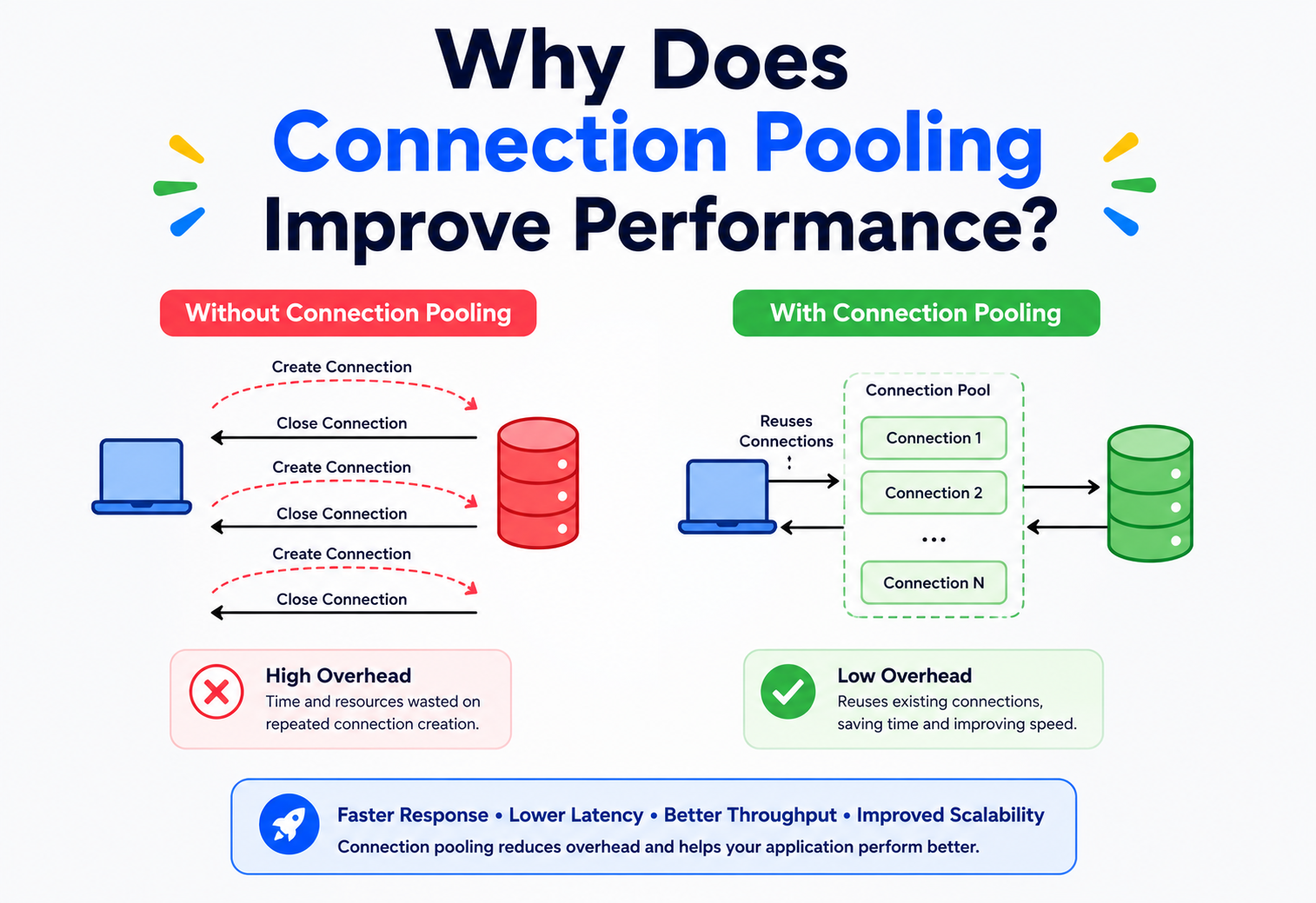
Why Does Connection Pooling Improve Performance?
A complete, beginner‑to‑production guide that explains how a small, boring‑sounding idea — reusing connections instead of creating new ones — quietly powers almost every fast application on the internet.
Introduction & History
Connection pooling is a small, unglamorous idea — keep the plumbing open, reuse it — that turns out to be one of the highest‑leverage performance techniques in all of backend engineering.
Imagine a water tap in your kitchen. Every time you want a glass of water, you don’t call a plumber to install a brand‑new pipe from the city’s water plant to your kitchen, fill your glass, and then rip the pipe out. That would be absurd — and incredibly slow. Instead, the pipe is already there, connected, ready. You just turn the tap.
A database connection is a lot like that pipe. It is the “plumbing” between your application and your database. And just like building a brand‑new pipe for every glass of water would be wasteful, opening a brand‑new database connection for every single request an application handles is wasteful too. Connection pooling is the practice of building that pipe once, keeping it open, and letting many requests share it safely, one after another.
This idea sounds almost too simple to matter. But it is one of the highest‑leverage performance techniques in all of backend engineering. A single line of misconfiguration in a connection pool has taken down production systems at major companies; a well‑tuned pool has let small teams serve millions of users on modest hardware.
A Short History
In the early days of client‑server computing (1970s–1980s), applications were simple: one program, one user, one database connection. As the web exploded in the 1990s, a single web server suddenly had to serve thousands of users at once, and each user’s request might need to talk to the database. Early web applications, written in technologies like CGI scripts, often opened a fresh database connection for every single incoming HTTP request and closed it when the request finished.
This worked for small traffic, but as traffic grew, engineers noticed something strange: the database itself wasn’t the bottleneck — the overhead of creating and destroying connections was. Establishing a new connection involves a network handshake, authentication, memory allocation on the database server, and sometimes encryption negotiation (TLS). Doing all of that thousands of times per second was like hiring and firing a new plumber for every glass of water.
By the mid‑to‑late 1990s, connection pooling became a standard feature of enterprise application servers. Java’s introduction of javax.sql.DataSource and connection pooling libraries in application servers like BEA WebLogic and IBM WebSphere formalized the pattern. Today, connection pooling is not optional — it is assumed. Modern frameworks like Spring Boot, Django, Ruby on Rails, and Node.js all ship with connection pooling built in or as the default recommended pattern, using pools like HikariCP (Java), pgbouncer (PostgreSQL), and Sequelize’s built‑in pool (Node.js).
One program, one connection
Early client‑server systems ran a single program against a single database with a single dedicated connection — pooling wasn’t needed because concurrency wasn’t either.
CGI meets the web
Web servers began opening a fresh database connection for every incoming HTTP request and closing it at the end. It worked at small scale but drowned under traffic growth.
Enterprise Java pools
Application servers like BEA WebLogic and IBM WebSphere formalized connection pooling as a first‑class feature; the javax.sql.DataSource API standardized the idea for Java developers.
PgBouncer & friends
Standalone connection poolers such as pgbouncer emerged, letting many application processes share a small set of real PostgreSQL connections.
HikariCP raises the bar
HikariCP was released in 2012 and quickly became the default Spring Boot pool because its internal locking design (the ConcurrentBag) proved measurably faster than existing Java pools under high concurrency.
Cloud & serverless poolers
Managed poolers such as Amazon RDS Proxy arrived to bridge highly elastic function tiers (Lambda, Cloud Functions) with a fixed‑capacity database backend.
Think of a busy restaurant. Instead of building a new table from scratch for every customer and demolishing it after they leave, the restaurant keeps a fixed number of tables ready. When a customer arrives, they are seated at an available table. When they leave, the table is cleaned and reused for the next customer. The restaurant doesn’t need infinite tables — it just needs enough tables, reused efficiently, to handle the flow of customers.
The Problem & Motivation
To understand why connection pooling matters, we first need to understand what actually happens when an application “connects” to a database — because that process is far more expensive than it looks from the outside.
What happens when you open a database connection?
When your application code calls something like DriverManager.getConnection(url, user, password), a chain of expensive steps happens behind the scenes:
- DNS resolution — translating the database hostname into an IP address (if not cached).
- TCP handshake — a three‑way exchange of packets (SYN, SYN‑ACK, ACK) to establish a reliable network channel. This alone takes at least one full network round‑trip.
- TLS/SSL negotiation — if the connection is encrypted (which it should be in production), several more round‑trips are needed to agree on encryption keys and verify certificates.
- Authentication — the database checks the username and password (or certificate), which may involve its own internal lookups.
- Session setup — the database allocates memory for the new session, sets up internal data structures, initializes default settings (time zone, character set, transaction isolation level), and sometimes spawns an OS‑level process or thread (PostgreSQL, notably, creates a new backend process per connection).
Each of these steps takes real, measurable time — often somewhere between 5 and 100+ milliseconds depending on network distance, encryption, and database engine. That might sound tiny, but remember: a modern web application might handle thousands of requests per second. If each request pays this “connection tax,” the system drowns in overhead before it does any actual work.
Milliseconds add up brutally at scale. If opening a connection takes 50ms and your app receives 200 requests per second, and each request opens its own connection, you need to perform 200 × 50ms = 10,000ms of pure connection setup work every second — that’s more time than exists in one second! The system would collapse into a growing backlog almost immediately.
The resource‑exhaustion problem
There’s a second, equally serious problem: databases have a hard limit on how many simultaneous connections they can accept. PostgreSQL, for example, defaults to a maximum of 100 connections. Each open connection consumes real memory on the database server — often several megabytes each, because the database keeps buffers, cursors, and session state for every connection, whether it’s actively doing work or not.
If every request opens its own connection and traffic spikes — say, during a flash sale or a viral social media post — the application can easily try to open thousands of simultaneous connections. The database either rejects new connections outright (causing errors for users) or, worse, accepts them and starts thrashing: spending so much memory and CPU managing idle connections that it has little left to actually process queries. This is sometimes called the “connection storm” problem.
Imagine a small library with only 10 study desks. If the library let in an unlimited number of students and each one tried to grab a desk, most would be standing around waiting, desks would be double‑booked, and chaos would follow. A librarian instead manages a queue: only 10 students study at once, and as soon as one leaves, the next student in line gets a desk. The library’s capacity is protected, and every student, though they may wait briefly, gets a fair, working desk. Connection pooling is that librarian.
The motivation, summarized
Connection pooling exists to solve two problems at once:
- Latency problem: avoid paying the expensive connection‑setup cost on every request.
- Resource‑exhaustion problem: avoid overwhelming the database with more simultaneous connections than it can safely handle.
The solution: create a fixed, manageable set of connections once, keep them alive, and let application threads borrow and return them as needed — just like library desks or restaurant tables.
Core Concepts
Before going deeper, let’s build a solid vocabulary. Every new term below is explained in plain language and will be used repeatedly throughout the rest of this guide.
The live phone line
What it is: A connection is an open communication channel between your application and the database — a live “phone line” that both sides keep open so they can send messages (queries and results) back and forth.
Why it exists: Databases don’t let just anyone read or write data over a single stateless message. A connection lets the database remember who you are, what transaction you’re in, and what settings you’ve configured, across many back‑and‑forth exchanges.
Simple analogy: A phone call. Dialing the number, waiting for the ring, and someone answering is like establishing a connection. Once connected, you can talk (send queries) and listen (receive results) without redialing every sentence.
The managed collection
What it is: A connection pool is a managed collection of pre‑opened, reusable database connections that an application keeps ready to use.
Why it exists: To avoid the cost of creating a new connection for every request, and to cap the total number of connections used at any time.
Simple analogy: A car rental company’s fleet. Cars (connections) are bought and maintained once. Customers (requests) borrow a car, drive around, and return it. The company doesn’t buy a brand‑new car for every customer.
The floor and ceiling
What it is: The minimum and maximum number of connections the pool is allowed to hold. The minimum idle setting keeps some connections always ready even when there’s no traffic; the maximum size caps how many connections can ever be open simultaneously.
Why it exists: Too few connections and requests wait unnecessarily; too many and you risk overwhelming the database or wasting memory on idle connections.
Checkout / checkin
What it is: When application code needs to talk to the database, it “borrows” (checks out) a connection from the pool, uses it, and then “returns” (checks in) it back to the pool — it does not close the underlying network connection.
Simple analogy: Borrowing a book from a library and returning it, rather than buying and burning a new book every time you want to read.
Open but unused
What it is: A connection that is open and healthy but currently not being used by any request — sitting in the pool, waiting to be borrowed.
The give‑up limit
What it is: The maximum time a request is willing to wait for a connection to become available before giving up and throwing an error.
Why it exists: Without a timeout, if the pool is exhausted (all connections in use), incoming requests would pile up and wait forever, eventually crashing the application from memory pressure (a “thread pile‑up”).
Retiring old connections
What it is: Idle timeout is how long an unused connection can sit in the pool before being closed and removed (to save resources). Max lifetime is the absolute maximum age a connection is allowed to reach before being retired and replaced, even if it’s healthy — this protects against subtle issues like memory leaks in database drivers, stale DNS entries, or database‑side connection limits from load balancers/proxies.
Confirming still‑alive
What it is: A quick test query (like SELECT 1) or a lightweight protocol‑level ping the pool runs to confirm a connection is still alive and usable before handing it to a request.
Why it exists: Networks fail silently. A connection can look fine in the pool’s records but actually be dead (the database restarted, a firewall dropped it, a network blip occurred). Validating prevents handing a broken connection to your application code.
In Java’s popular HikariCP pool, you configure minimumIdle, maximumPoolSize, connectionTimeout, idleTimeout, and maxLifetime as simple properties. Behind these five settings is the entire theory of pool sizing, health, and fairness that we’re building up in this tutorial.
The connection that never comes back
What it is: A bug where application code borrows a connection but never returns it (often because of a missing close() call in a failure path). Over time, leaked connections silently shrink the usable pool until no connections are left.
Simple analogy: Someone borrows a library book and never returns it. If enough people do this, the library “runs out” of books even though most books were technically only borrowed once.
Architecture & Components
Let’s zoom out and see how a connection pool fits inside a real application’s architecture.
Key Components of a Connection Pool
Pool Manager
The brain of the system. It tracks which connections are idle, which are active, enforces min/max size, and decides when to create or destroy connections.
Connection Factory
Knows how to actually create a brand‑new physical connection to the database (host, port, credentials, driver‑specific setup) when the pool needs one.
Idle Queue
A data structure (often a concurrent queue or stack) holding connections that are open and ready to be borrowed immediately.
Validator
Runs periodic or on‑checkout health checks to remove dead connections before they’re handed to application code.
Eviction / Reaper Thread
A background thread that closes connections that have exceeded idle timeout or max lifetime, keeping the pool “fresh.”
Wait Queue
Holds requests that asked for a connection when the pool was fully in use, releasing them fairly (usually first‑in‑first‑out) as connections become free.
Where the Pool Lives
Connection pools can live in different places depending on architecture:
- In‑process pool (application‑level): The pool lives inside your application’s memory (e.g., HikariCP inside a Spring Boot JVM). Every instance of your application has its own pool.
- External proxy pool (database‑level): A separate service sits between all your application instances and the database, pooling connections centrally (e.g., PgBouncer for PostgreSQL, ProxySQL for MySQL, or cloud‑managed poolers like Amazon RDS Proxy).
A company running 50 instances of a microservice, each with its own in‑process pool of 20 connections, could theoretically create 1,000 simultaneous database connections — potentially overwhelming the database. This is exactly why companies like Uber and Instagram (both heavy PostgreSQL users) rely on PgBouncer as a shared external pooling layer: it lets hundreds of application instances share a much smaller, centrally‑managed set of real database connections.
Internal Working
Let’s trace exactly what happens, step by step, inside a connection pool during normal operation.
Step 1: Pool Initialization (Application Startup)
When your application starts, the pool creates a small number of connections upfront (the “minimum idle” count) so the very first requests don’t have to pay the connection‑setup cost. This is sometimes called pool warm‑up.
Step 2: Borrowing a Connection
When application code needs to run a query, it calls something like pool.getConnection(). Internally:
- The pool manager checks the idle queue for an available connection.
- If one exists, it’s optionally validated (a fast health check) and handed to the caller, marked as “active.”
- If none exist and the pool hasn’t reached its maximum size, a brand‑new connection is created on demand.
- If none exist and the pool is already at maximum size, the requesting thread is placed on the wait queue until a connection is returned or the connection timeout expires.
Step 3: Using the Connection
The application runs its SQL query (or queries, if inside a transaction) over this borrowed, already‑established network channel. No handshake, no authentication — just the query and its result.
Step 4: Returning the Connection
When the code finishes (usually by calling connection.close(), which in a pooled driver does not actually close the network socket), the connection is reset to a clean default state (rolling back any uncommitted transaction, resetting session variables) and placed back into the idle queue for reuse.
Step 5: Background Maintenance
A separate housekeeping thread continuously:
- Closes and replaces connections that exceed max lifetime.
- Closes idle connections beyond the configured idle timeout (down to the minimum idle count).
- Optionally pings idle connections periodically to keep them alive through firewalls/load balancers that silently drop long‑idle TCP connections.
A Minimal Java Example Using HikariCP
Below is a small, realistic example showing how a Java application configures and uses a connection pool. Comments explain each important line.
import com.zaxxer.hikari.HikariConfig;
import com.zaxxer.hikari.HikariDataSource;
import java.sql.Connection;
import java.sql.PreparedStatement;
import java.sql.ResultSet;

public class OrderRepository {

    private final HikariDataSource dataSource;

    public OrderRepository() {
        HikariConfig config = new HikariConfig();
        config.setJdbcUrl("jdbc:postgresql://db.internal:5432/orders");
        config.setUsername("app_user");
        config.setPassword(System.getenv("DB_PASSWORD"));

        // Pool sizing: keep it small and deliberate (see Section 8)
        config.setMinimumIdle(5);
        config.setMaximumPoolSize(20);

        // How long a thread waits for a free connection before failing
        config.setConnectionTimeout(3000); // 3 seconds

        // Retire connections proactively to avoid stale/half-dead sockets
        config.setIdleTimeout(600000);     // 10 minutes
        config.setMaxLifetime(1800000);    // 30 minutes

        // Cheap query the pool uses to confirm a connection is alive
        config.setConnectionTestQuery("SELECT 1");

        this.dataSource = new HikariDataSource(config);
    }

    public int findOrderStatus(long orderId) throws Exception {
        // try-with-resources guarantees the connection is returned
        // to the pool even if an exception is thrown mid-query.
        try (Connection conn = dataSource.getConnection();
             PreparedStatement stmt = conn.prepareStatement(
                 "SELECT status FROM orders WHERE id = ?")) {

            stmt.setLong(1, orderId);
            try (ResultSet rs = stmt.executeQuery()) {
                if (rs.next()) {
                    return rs.getInt("status");
                }
                return -1; // not found
            }
        }
        // Connection.close() is called automatically here,
        // returning it to the pool -- NOT closing the socket.
    }
}
The critical detail is try‑with‑resources: it guarantees conn.close() runs even if an exception happens, which is exactly what prevents connection leaks in real production code.
Data Flow & Lifecycle
It helps to see the full life story of one single physical connection, from birth to death, and how many “borrow cycles” it goes through in between.
Why “Reset State” Matters
When a connection returns to the pool, it must be reset to a clean, neutral state before the next borrower gets it. Otherwise, leftover state from the previous user could leak into the next request — a subtle and dangerous class of bug. Typical reset actions include:
- Rolling back any transaction that wasn’t explicitly committed.
- Resetting session‑level settings (like
SET search_pathor timezone) back to defaults. - Clearing any temporary tables or prepared statement caches tied to that session, depending on the database.
If a request changes a session variable (e.g., a MySQL SET @user_id = 42) and forgets to reset it, the next unrelated request that borrows that same physical connection could silently inherit the wrong value. This is one of the trickiest bugs in pooled systems — it looks like “random” data corruption that only happens intermittently, because it depends on which physical connection you happen to be handed.
Lifecycle at the Application Level (Request Scope)
In a typical web request lifecycle, the pattern looks like this:
- HTTP request arrives at the server.
- A worker thread handles the request and, when it needs data, borrows a connection from the pool.
- The thread executes one or more queries — ideally inside a single, short transaction.
- The transaction commits (or rolls back on error).
- The connection is returned to the pool immediately — not held for the entire request if more processing (like rendering a response) doesn’t need the database.
- The response is sent back to the client.
The key lesson: hold connections for the shortest time possible. A connection borrowed for 2 milliseconds of actual query time but held for 200 milliseconds because of unrelated business logic wastes 100x more pool capacity than necessary.
Advantages, Disadvantages & Trade‑offs
Nothing is free in software architecture. Pooling buys you a lot — but it charges you in configuration and vigilance, and it is worth being honest about both sides.
Advantages
| Benefit | Explanation |
|---|---|
| Lower latency | Skips the expensive handshake/auth cost on almost every request, often saving tens of milliseconds each time. |
| Higher throughput | The application can serve far more requests per second because CPU and network time isn’t wasted on connection setup. |
| Protects the database | Caps the maximum simultaneous connections, preventing memory/CPU exhaustion on the database server. |
| Predictable resource usage | A fixed pool size makes capacity planning and monitoring much easier than an unbounded number of ad‑hoc connections. |
| Graceful degradation | Under overload, requests wait in a queue (with a timeout) instead of crashing the database outright. |
Disadvantages & Costs
| Cost | Explanation |
|---|---|
| Added complexity | Introduces new configuration (min/max size, timeouts) that must be tuned correctly — wrong tuning can cause new problems. |
| Stale/dead connections | A connection can silently die (network blip, database restart) while sitting idle in the pool, requiring validation logic. |
| Session‑state leakage risk | As discussed above, improperly reset session state can leak between unrelated requests. |
| Multiplied pools problem | If every application instance has its own pool, the total connections across all instances can still overwhelm the database — needs coordination. |
| Head‑of‑line blocking | If the pool is too small, requests queue up waiting for a free connection, adding latency instead of removing it. |
The Central Trade‑off: Pool Size
The most important trade‑off in connection pooling is deceptively simple: how big should the pool be? Bigger is not always better — this is one of the most counter‑intuitive lessons in the field, and we’ll dive deeper into it in the Performance section.
A small coffee shop has 4 baristas (like 4 CPU cores on a database server). Hiring 40 baristas doesn’t make coffee 10x faster — they’ll just crowd the same espresso machines, get in each other’s way, and actually slow things down due to congestion. The real bottleneck (the machines) determines the ideal staff size, not how many people you’d like to hire.
Performance & Scalability
This section is the heart of the tutorial — the actual mechanics of why pooling improves performance, and how to reason about sizing it correctly.
Where the Time Savings Come From
Let’s put real numbers on it. Suppose:
- Opening a new connection (TCP + TLS + auth) takes 40ms.
- Running a typical query takes 5ms.
Without pooling: every request pays 40ms + 5ms = 45ms, of which 89% is pure overhead.
With pooling: the connection is already open, so a request pays only 5ms — a 9x improvement in this example, without changing a single line of query logic.
At scale, this compounds dramatically. A service handling 1,000 requests/second without pooling would need 45 connection‑seconds of work per second just to keep up (impossible on a single thread, and expensive even across many threads). With pooling, the same load needs only 5 connection‑seconds of actual query work per second — the rest is just efficient reuse.
Little’s Law — The Mathematical Backbone of Pool Sizing
Little’s Law is a simple but powerful formula from queuing theory: L = λ × W, where L is the average number of items “in the system,” λ (lambda) is the arrival rate, and W is the average time each item spends in the system.
Applied to connection pools: the number of connections you need ≈ (requests per second) × (average time each request holds a connection).
If your service handles 200 requests/second, and each request holds a database connection for an average of 10 milliseconds (0.01 seconds), then: needed connections ≈ 200 × 0.01 = 2 connections. Yes — just 2! This surprises most engineers, who assume pool size should scale with request volume. In reality, it scales with (request volume × hold time), and hold time is usually tiny.
Why Bigger Pools Can Make Things Slower
This is one of the most important — and most counter‑intuitive — lessons taught by HikariCP’s own engineering team and widely confirmed across the industry. A database server has a limited number of CPU cores. Each active query consumes CPU, memory bandwidth, and disk I/O. If you allow, say, 500 simultaneous connections on an 8‑core database server, but only 8 queries can truly execute in parallel at the hardware level, the other 492 “active” connections are just fighting over CPU time via context switching, lock contention, and cache thrashing.
The often‑cited guidance from the HikariCP project (and general database engineering wisdom) is a formula adapted from PostgreSQL performance research:
connections = ((core_count * 2) + effective_spindle_count)For a modern server with fast SSDs, this often simplifies to roughly (2 × CPU cores) + 1 as a starting point for the database’s total connection budget — deliberately small, then tuned upward only with real load‑testing evidence.
Concurrency & Queuing Considerations
Internally, pools must be thread‑safe: many application threads may call getConnection() at the exact same instant. Well‑built pools use lock‑free or low‑contention concurrent data structures (like Java’s ConcurrentLinkedQueue or specialized structures like HikariCP’s ConcurrentBag) to avoid the pool itself becoming a bottleneck under high concurrency. A poorly implemented pool that uses a single global lock for every borrow/return operation can actually become slower than not pooling at all under extreme concurrency — this is why battle‑tested libraries matter more than hand‑rolled pools.
Scalability Across Multiple Application Instances
In a microservices or horizontally‑scaled architecture, each instance typically has its own local pool. The total connections hitting the database is (number of instances) × (pool max size per instance). As you scale out to handle more traffic, this total can quietly exceed the database’s connection limit — even though each individual pool looks small and reasonable. This is exactly why external poolers like PgBouncer exist: they let hundreds of applications share a much smaller, centrally‑controlled set of real database connections, using techniques like transaction pooling (a physical connection is only assigned for the duration of a single transaction, then immediately released for another client to use).
High Availability & Reliability
A connection pool doesn’t just make things faster — it plays a critical role in keeping systems alive under stress and failure.
Graceful Degradation Under Load
Without a pool (or with a misconfigured, unbounded one), a sudden traffic spike causes an uncontrolled flood of new connections to the database, which can crash it entirely — taking down the service for everyone, not just the spike’s traffic. A well‑configured pool with a sensible maximum size and connection timeout instead causes excess requests to wait briefly or fail fast with a clear error, protecting the shared database resource so that already‑in‑progress work can complete successfully.
Circuit Breaking and Fail‑Fast Behavior
Modern pools (HikariCP included) support a connection timeout: if no connection becomes free within, say, 3 seconds, the request fails immediately with a clear exception rather than hanging indefinitely. This is a form of “fail fast” design — it’s far better for a user to see a quick error (which can trigger a retry, a fallback cache response, or a friendly error page) than to wait 30 seconds for something that was never going to succeed.
Handling Database Failover
In high‑availability database setups (like a primary database with standby replicas, using tools like PostgreSQL streaming replication or AWS RDS Multi‑AZ), the underlying database endpoint can change during a failover event. Connection pools need to detect broken connections quickly (via validation queries or exception handling) and replace them with fresh connections pointed at the new primary, rather than continuing to retry a dead endpoint forever.
Retry Logic and Backoff
Good production systems pair connection pooling with a retry strategy that includes exponential backoff (waiting progressively longer between retries) and jitter (adding small random delays) to avoid all application instances retrying at exactly the same moment and causing a “thundering herd” against a recovering database.
Netflix’s engineering blog has documented extensively how their internal services combine connection pooling with circuit breakers (via their open‑source library, Hystrix, and its successor patterns in resilience4j) so that a struggling downstream database doesn’t cause cascading failures across their entire microservices mesh — a single overwhelmed database shouldn’t be able to take down unrelated services.
Security
Connection pooling touches security in several important, often‑overlooked ways.
Credential Management
Because pooled connections are long‑lived, the credentials used to establish them matter over a longer time window. Best practice is to avoid hard‑coding database passwords in application code or config files, and instead use secret managers (like AWS Secrets Manager, HashiCorp Vault, or environment variables injected securely at deploy time) that can be rotated without restarting the entire application.
Encryption in Transit
Every pooled connection should use TLS/SSL to encrypt data flowing between the application and the database, especially when they communicate over a network that isn’t fully private (e.g., across cloud availability zones or through a proxy). Because pooling amortizes the TLS handshake cost across many requests, there’s rarely a good excuse to skip encryption for “performance” reasons anymore.
Session State and Multi‑Tenancy Risk
As discussed in Section 6, if session‑level state (like a “current user” context set via a database session variable, sometimes used for row‑level security) isn’t properly reset between borrows, a dangerous scenario can occur: one tenant’s request could accidentally execute in a session that still has another tenant’s context active. This has been the root cause of real, publicly‑disclosed data‑leak incidents in multi‑tenant SaaS systems. The fix is disciplined: always reset session state explicitly, and never rely on “it probably still had the old value” assumptions.
Never use raw string concatenation to build SQL queries on pooled connections — always use parameterized queries / prepared statements (as shown in the Java example in Section 5). This prevents SQL injection, and as a bonus, prepared statement caching (many pools cache compiled statement plans per connection) also improves performance.
Least‑Privilege Database Accounts
The database user configured in the pool should have only the permissions it actually needs (read‑only where possible, restricted to specific schemas/tables), following the principle of least privilege. Since a compromised application server would reuse the exact same pooled credentials for every query, over‑privileged pool accounts multiply the blast radius of any application‑level vulnerability.
Connection Limits as a Security Control
A capped pool size also acts as a natural defense against certain denial‑of‑service scenarios: even if an application bug or attack tries to trigger a flood of database queries, the pool’s hard maximum prevents that flood from ever reaching the database as raw, unbounded connection attempts.
Monitoring, Logging & Metrics
A connection pool is only as good as your visibility into it. Silent pool exhaustion is one of the most common causes of mysterious production slowdowns.
Key Metrics to Track
| Metric | What it tells you |
|---|---|
| Active connections | How many connections are currently in use — sustained closeness to max size signals a pool that’s too small or queries running too long. |
| Idle connections | How many are sitting ready — consistently near zero idle can mean you’re under‑provisioned. |
| Pending/waiting threads | How many requests are queued waiting for a connection — the earliest, clearest warning sign of trouble. |
| Connection wait time | How long requests wait before getting a connection — directly impacts user‑facing latency. |
| Connection creation rate | How often brand‑new connections are being opened — a high rate suggests churn, leaks, or a pool that’s too small relative to load. |
| Connection timeouts / errors | Failed attempts to get a connection — a direct signal of saturation. |
Tooling
Most production Java systems expose these metrics via Micrometer (integrated by default with HikariCP and Spring Boot Actuator), feeding into observability platforms like Prometheus + Grafana, Datadog, or New Relic. A typical dashboard panel plots active vs. idle vs. max connections over time, alongside p50/p95/p99 query latency, so engineers can visually correlate pool saturation with latency spikes.
A common pattern: a slow, unindexed query gets deployed. Each request using it now holds its connection 500ms instead of 5ms. Little’s Law kicks in — the same request rate now needs 100x more connections to keep the pipeline flowing. The pool saturates, the “pending threads” metric spikes, request latency explodes across the entire application (even for unrelated, fast endpoints), and on‑call engineers see what looks like a total system outage — when the real root cause was one bad query starving the shared pool.
Logging Practices
Good pools log (at appropriate severity levels) events like: pool exhaustion warnings, slow connection acquisition, connections that exceed max lifetime, and validation failures. It’s important to log connection acquisition timing at the debug level in normal operation (too noisy for info/warn) but ensure exhaustion and timeout events are logged at warn or error so they trigger alerts.
Distributed Tracing
In microservice architectures, tools like OpenTelemetry can trace how much of a request’s total latency was spent waiting for a database connection versus executing the query itself versus other application logic — making pool‑related bottlenecks visible directly inside a request’s trace waterfall, not just in aggregate dashboards.
Deployment & Cloud
Connection pooling behaves differently depending on how and where an application is deployed.
Traditional (Long‑Lived Server) Deployments
On a traditional server or virtual machine that runs continuously, an in‑process pool (like HikariCP) is a natural fit — the application starts once, warms up its pool, and serves traffic for a long time, fully amortizing the pool’s setup cost.
Containers & Kubernetes
In containerized deployments, applications are frequently scaled up and down (horizontal pod autoscaling) and instances are short‑lived compared to a traditional server. This creates a subtle challenge: every time a new pod starts, it opens a fresh batch of connections; every time a pod is terminated (scaled down or redeployed), its pool must be gracefully shut down (draining active connections) to avoid abruptly killing in‑flight transactions. Kubernetes’ rolling deployment and pre‑stop hooks are commonly used to give pools time to drain before a pod is killed.
Serverless (Lambda, Cloud Functions)
Serverless functions present connection pooling’s hardest modern challenge. Each function invocation may run in a brand‑new, isolated execution environment that doesn’t share memory with other invocations — meaning a traditional in‑process pool provides little benefit, since a “warm” pool from one invocation is often unavailable to the next. Worse, if thousands of function invocations each try to open their own database connections simultaneously (a burst of traffic), they can easily overwhelm a traditional database’s connection limit within seconds.
The industry’s solution is to move pooling outside the serverless function entirely, using an external, shared connection pooler such as Amazon RDS Proxy, Azure SQL’s built‑in pooling, or a self‑managed PgBouncer layer, so that many ephemeral function invocations share a small set of real, stable database connections managed centrally.
Cloud‑Managed Database Considerations
Managed database services (Amazon RDS, Google Cloud SQL, Azure Database) enforce connection limits based on the instance size you provision — a small instance might allow far fewer connections than a large one. This is a critical, often‑missed cost‑and‑capacity planning input: pool sizing decisions must respect the ceiling your cloud database tier actually allows, and scaling out application instances without a shared pooler can silently hit that ceiling.
Databases, Caching & Load Balancing
A connection pool is not a cache and not a load balancer — but it works alongside both, and it looks slightly different against every database engine.
How Different Databases Handle Connections
Connection cost and behavior vary meaningfully across database engines:
- PostgreSQL: spawns a full OS process per connection, making each connection relatively “heavy” (several MB of memory) — this is exactly why PostgreSQL deployments lean so heavily on external poolers like PgBouncer.
- MySQL: uses a thread‑per‑connection model, somewhat lighter than PostgreSQL’s process model, but still non‑trivial at high connection counts.
- MongoDB: drivers maintain their own internal connection pools per client, with configurable pool size settings similar in spirit to relational database pools.
- Redis: connections are much lighter weight, but pooling is still recommended for high‑throughput applications to avoid handshake overhead, especially when TLS is enabled.
Pooling and Caching Work Together, Not Against Each Other
It’s a common misconception that caching (like Redis or an in‑application cache) makes connection pooling less important. In reality, caching reduces how often you need to hit the database at all, while pooling reduces the cost of each hit that does happen. A well‑designed system layers both: a cache absorbs repeat reads, and a pool makes the cache misses (and all writes) as cheap as possible.
Connection Pooling and Load Balancers
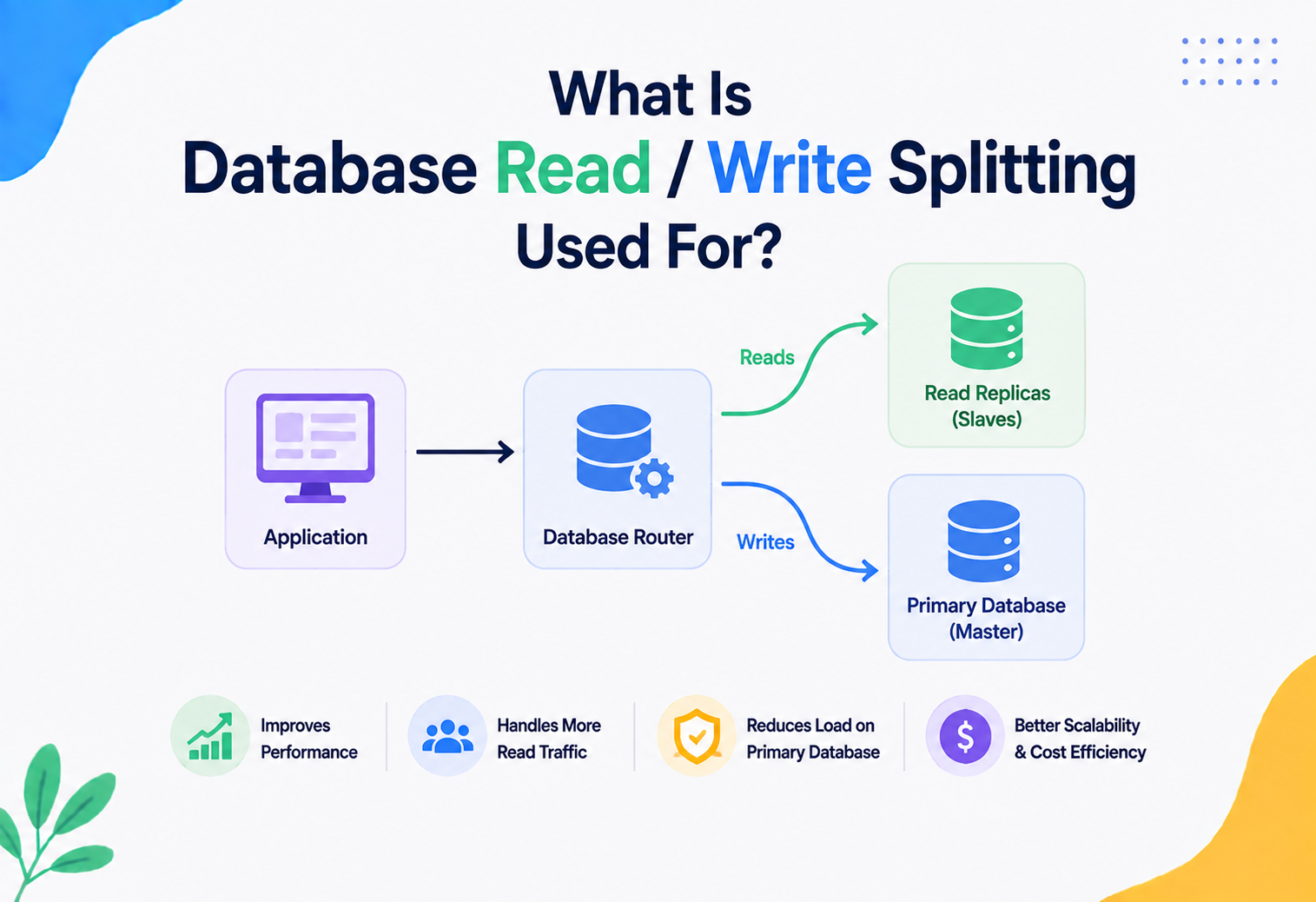
When a database has read replicas, applications often use separate connection pools per role — a pool pointed at the primary for writes, and one or more pools pointed at replicas for reads, sometimes behind a load balancer that distributes read traffic across multiple replicas. This is a common pattern in read‑heavy systems (like content platforms or social feeds) where reads vastly outnumber writes.
Large‑scale platforms like Shopify and GitHub have publicly discussed splitting database traffic between primary (write) and replica (read) pools as one of their core scaling techniques — allowing read‑heavy endpoints (like viewing a product page or a repository) to scale horizontally across many replicas, while writes remain funneled safely through the primary.
APIs & Microservices
In a microservices architecture, connection pooling decisions multiply across service boundaries, and get more nuanced.
One Pool per Service, per Database
Each microservice that talks to a database typically maintains its own connection pool, sized according to that service’s traffic and query patterns — not a single global pool shared blindly across unrelated services. This isolation is intentional: it prevents one service’s database‑heavy behavior from starving another, unrelated service’s pool.
Connection Pooling for HTTP Too
The same underlying idea — reuse expensive‑to‑establish connections — applies beyond databases. HTTP clients (like Java’s HttpClient, Apache HttpClient, or Node’s http.Agent) also pool TCP connections to downstream APIs, avoiding repeated TCP/TLS handshakes for service‑to‑service calls. This is why, in a microservices mesh, both database connection pools and HTTP connection pools matter for overall latency.
Shared Infrastructure: Sidecars and Service Meshes
Some architectures push connection pooling (for both databases and HTTP) into a shared “sidecar” proxy running alongside each service instance (as seen in service meshes like Istio, or database‑specific sidecars). This centralizes pooling logic, makes it consistent across every service regardless of programming language, and simplifies monitoring — at the cost of an extra network hop to the sidecar itself.
API Gateway and Connection Fan‑Out
An API gateway that fans a single incoming request out to multiple backend microservices (an aggregation pattern) benefits enormously from HTTP connection pooling to each downstream service — without it, the gateway would pay repeated handshake costs for every fan‑out call, multiplying latency exactly where a system is trying to minimize it.
Think of a school office that needs information from the library, the cafeteria, and the gym for a student report. If a runner had to walk to each building, knock, wait for someone to answer, explain who they are, and only then ask the question — every single time — that’s slow. If instead each building has a phone line already connected and staffed, the runner can just ask directly. Pooled HTTP connections between microservices work the same way.
Design Patterns & Anti‑patterns
Patterns are the shortcuts thoughtful teams keep re‑using. Anti‑patterns are the traps every one of them fell into once and now warns others about.
The Object Pool Pattern
Connection pooling is a specific, famous application of a broader software design pattern called the Object Pool pattern — a creational pattern where expensive‑to‑create objects are reused from a managed pool rather than created and destroyed repeatedly. Thread pools, buffer pools, and connection pools are all siblings under this same idea.
Good Patterns to Follow
- Short‑lived borrow scope: acquire a connection as late as possible, release it as early as possible.
- Try‑with‑resources / RAII‑style cleanup: use language features that guarantee release even on exceptions (as in the Java example above).
- Fail‑fast timeouts: always set a reasonable connection timeout rather than waiting indefinitely.
- Externalized, environment‑specific configuration: pool size and timeouts should differ between local development, staging, and production — never hard‑coded.
- Pool per database role: separate pools for read replicas vs. primary, or for different databases entirely.
Common Anti‑patterns
The “bigger is better” pool
Setting pool size to an arbitrarily large number (like 500) “just to be safe.” As explained in Section 8, this often degrades performance by overwhelming the database’s real parallel capacity.
Forgotten connections (leaks)
Not returning connections in error/exception paths, slowly starving the pool until the application appears to “randomly” hang under load.
Long‑held connections
Borrowing a connection at the start of a request and holding it through unrelated, slow operations (like calling an external API) instead of releasing it immediately after the database work is done.
No validation
Assuming every idle connection is still alive, and only discovering it’s dead when a real user request fails — instead of proactively validating or using keep‑alive pings.
One pool per request
Accidentally creating a brand‑new pool object for every request instead of reusing a single, application‑scoped pool — this defeats the entire purpose of pooling and is surprisingly common in poorly structured code.
Ignoring multi‑instance math
Sizing each instance’s pool without considering that (instances × pool size) must stay under the database’s total connection limit.
Best Practices & Common Mistakes
Ten habits that separate a pool that quietly hums along for years from one that produces late‑night pages every other weekend.
Best practices checklist
- Start small, measure, then tune. Begin with a conservative pool size (guided by Little’s Law and CPU core count), load test, and adjust based on real evidence — not guesses.
- Always set a connection timeout. Never let a request wait indefinitely for a connection.
- Always set max lifetime. Rotate connections periodically to avoid subtle long‑term issues (stale DNS, memory growth in drivers, load balancer idle‑connection drops).
- Use try‑with‑resources (or the equivalent in your language). Guarantee connections are always returned, even on exceptions.
- Monitor active/idle/pending metrics. Set alerts before the pool is fully exhausted, not after.
- Separate pools by role. Read vs. write, and critical vs. non‑critical workloads, especially in larger systems.
- Account for multi‑instance math. Total connections across all instances must respect the database’s real limit — use an external pooler if needed.
- Keep transactions short. Long transactions hold connections longer than necessary and reduce effective pool capacity.
- Use parameterized queries. Both for security (SQL injection) and for statement‑cache efficiency.
- Test pool behavior under failure. Simulate a database restart or network blip in staging to confirm the pool recovers gracefully.
Common mistakes
- Using default pool settings in production without ever load‑testing them.
- Not closing connections in exception/error paths.
- Sizing the pool on gut feeling instead of applying Little’s Law.
- Ignoring pool metrics until an outage happens.
- One giant shared pool for many unrelated services or workloads.
Common Mistakes and Their Fixes
| Mistake | Fix |
|---|---|
| Using default pool settings in production without testing | Load test with realistic traffic patterns and tune based on Little’s Law and observed hold times. |
| Not closing connections in exception/error paths | Use try‑with‑resources or equivalent guaranteed‑cleanup constructs. |
| Sizing pool based on “gut feeling” instead of math | Apply Little’s Law: connections ≈ throughput × average hold time. |
| Ignoring pool metrics until an outage happens | Set up dashboards and alerts on pending/waiting threads before problems occur. |
| One giant shared pool for many unrelated services | Give each service or workload its own appropriately‑sized pool. |
Real‑World & Industry Examples
The same core idea — reuse expensive connections, cap the total, monitor the queue — shows up wherever real workloads meet real databases.
Flash sales
During high‑traffic events like Black Friday sales, e‑commerce platforms see request volume spike 10–50x within minutes. Without carefully tuned connection pools (and often external poolers plus aggressive caching), the surge in simultaneous database connection attempts alone — separate from the actual query load — can crash backend databases. Retailers commonly pre‑warm pools and pre‑scale infrastructure ahead of known high‑traffic events for exactly this reason.
Dispatch systems
Ride‑sharing platforms like Uber process enormous volumes of very short‑lived database interactions (location updates, ride matching) where the actual query time per request is tiny but the request rate is massive — precisely the scenario where connection pooling delivers its biggest wins, since connection setup overhead would otherwise dominate total latency. This is also why such companies invest heavily in external, shared connection poolers rather than relying purely on in‑process pools per service instance.
Read‑heavy feeds
Read‑heavy social platforms typically pair connection pooling with heavy caching layers (like Redis) and read‑replica pools (Section 13) so that the vast majority of feed‑reading traffic never touches the primary write database at all — connection pooling then ensures that the requests which do reach the database (cache misses, writes, personalization queries) are served with minimal overhead.
Correctness first
Financial transaction systems prioritize correctness and availability over raw throughput. Connection pools in this domain are often deliberately conservative in size, paired with strict transaction timeouts and careful monitoring, because a “runaway” pool that overwhelms a core banking database could halt transaction processing entirely — a far more costly outcome than slightly higher latency.
HikariCP itself — now the default connection pool in Spring Boot — was created specifically because its author benchmarked existing Java connection pools and found substantial, measurable overhead in their internal locking and bookkeeping under high concurrency. HikariCP’s redesign (using specialized low‑contention data structures like the ConcurrentBag) became a widely‑cited case study in how the pool’s own internal implementation efficiency directly affects application performance, not just the pooling concept itself.
FAQ, Summary & Key Takeaways
The last stretch: the questions people ask most often once they start working with pools, a one‑paragraph summary, and the ideas most worth carrying forward.
Frequently Asked Questions
Does connection pooling help with NoSQL databases too?
Yes. Any database accessed over a network connection — MongoDB, Cassandra, Redis, Elasticsearch — benefits from reusing established connections instead of repeatedly paying handshake and authentication costs. The specific mechanics differ slightly per driver, but the core idea is identical.
Is a bigger connection pool always safer for handling traffic spikes?
No. As explained in Section 8, an oversized pool can overwhelm the database’s real parallel processing capacity, causing contention that makes things slower, not faster. The safer approach to traffic spikes is a well‑sized pool combined with caching, read replicas, and queueing/backpressure at the application layer.
Should I use one pool for my whole application, or multiple pools?
It depends on your workload. Simple applications with one database can use a single pool. Systems with multiple databases, read/write splitting, or multiple independent services should use separate, appropriately‑sized pools per role or per database.
What happens if the pool runs out of connections?
New requests wait in an internal queue until a connection is returned or their configured connection timeout expires, at which point they fail with a clear error rather than hanging forever — assuming timeouts are configured correctly.
Do serverless functions need connection pooling?
They need a different kind of pooling — typically an external, shared pooler (like RDS Proxy or PgBouncer) placed between the many short‑lived function invocations and the database, since in‑process pooling inside each ephemeral function instance provides little benefit.
Summary
Connection pooling solves a deceptively simple but critical problem: establishing a database connection is expensive, and databases can only handle a limited number of simultaneous connections. By creating a managed set of reusable connections — borrowed, used briefly, and returned — applications avoid paying repeated setup costs and protect databases from being overwhelmed. Good pool design isn’t just about picking a pool size; it involves timeouts, validation, lifecycle management, monitoring, and careful sizing grounded in real math (Little’s Law) rather than guesswork. As applications move toward containers, microservices, and serverless architectures, the location of pooling has evolved — from purely in‑process pools toward shared external poolers — but the fundamental motivation has never changed since the earliest days of client‑server computing.
Key Takeaways
Remember This
- Opening a database connection is expensive (network handshake, TLS, auth, session setup) — pooling amortizes this cost across many requests.
- Databases have hard connection limits; pooling protects against exhausting them.
- Pool size should be derived from math (Little’s Law: throughput × hold time), not intuition — bigger is often worse, not better.
- Always configure connection timeout, idle timeout, and max lifetime — never leave these at risky defaults without understanding them.
- Reset session state on return to prevent subtle correctness and security bugs.
- Monitor active/idle/pending connection metrics as a leading indicator of trouble, not a lagging one.
- In serverless and highly elastic environments, move pooling to a shared external layer rather than relying on in‑process pools alone.
- Connection pooling is one instance of the broader Object Pool design pattern — the same reuse principle applies to HTTP clients, thread pools, and other expensive‑to‑create resources.