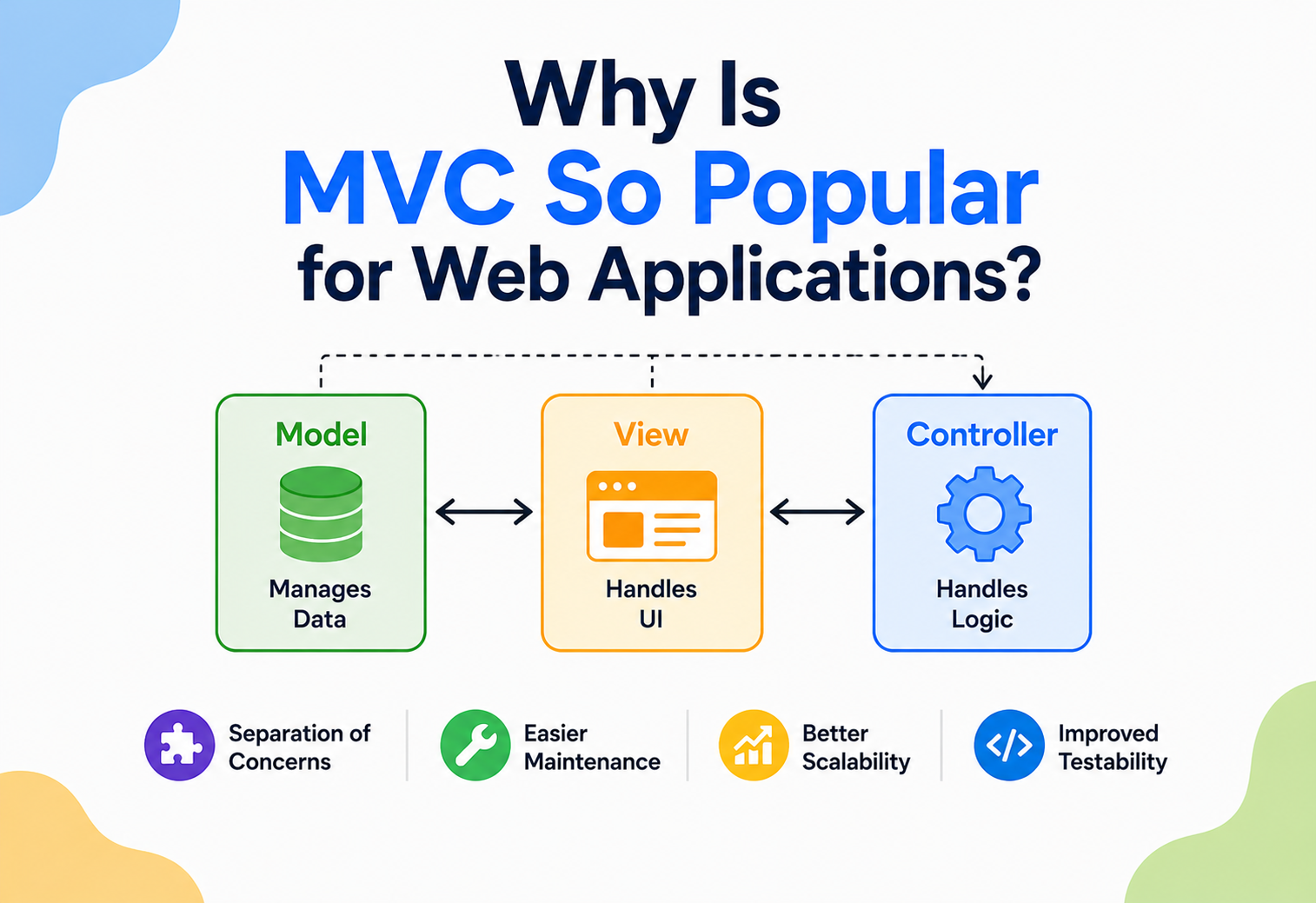
Why Is MVC So Popular for Web Applications?
Walk into almost any big website’s engine room — a banking app, a social network, an online store — and there’s a very good chance you’ll find the same three-part structure quietly running the show. This is the story of why Model-View-Controller became the web’s favorite way to get organized, and where it still earns its keep today.
The Big Idea, in One Breath
Think about a busy newspaper office. Reporters go out and gather the actual facts of a story. Editors and layout artists decide how those facts will look on the printed page — the headline size, the photo placement, the column width. And a separate managing process decides which story goes where, coordinates deadlines, and makes sure the right layout gets paired with the right facts before anything gets printed. Nobody expects one single person to report, design, and manage all at once — the newspaper runs smoothly precisely because those three jobs stay separate.
Websites face a nearly identical juggling act, just compressed into a fraction of a second. Every time you click a link or submit a form, a web application has to fetch or update some actual data, decide how to present that data as a web page, and coordinate the whole exchange between your browser and its own internal logic. The MVC pattern — Model, View, Controller — gives web applications the same kind of clean division the newspaper relies on, and that clean division turns out to matter enormously once a website has thousands, or millions, of visitors and a growing team of engineers behind it.
Picture ordering a birthday cake online. The bakery’s recipe book and inventory of ingredients are the Model — the real substance behind the cake. The website page showing you cake photos, prices, and a customization form is the View. And the order-processing logic that takes your customization choices, checks them against what’s actually available, and confirms your order is the Controller. You interact only with the View, yet all three parts have to work together flawlessly, every single time, for thousands of customers ordering cakes at the exact same moment.
This guide focuses specifically on why MVC, out of all the ways an application could be organized, became such a natural fit for the web — and honestly examines where that fit still holds up today, and where newer approaches have started to take its place for certain kinds of projects.
It’s worth being upfront about something many articles gloss over: MVC wasn’t invented for the web at all. It was originally designed decades earlier for desktop software with graphical windows. The web adopted it later, adapted it to fit the very different rhythm of browsers, servers, and HTTP requests, and then ran with it so successfully that many engineers today assume MVC was a web invention from the start. Understanding that history helps explain both why MVC fits the web so well in some ways, and why a few of its assumptions occasionally feel like a slightly awkward fit for the browser-based, highly interactive applications people expect today.
What Makes Web Applications Especially Tricky
Web applications face a few pressures that a simple desktop program or a one-off script rarely has to deal with, and understanding those pressures explains a lot about why MVC caught on so strongly in this particular corner of software.
Shared, simultaneous access
Thousands of people might be reading and changing the same underlying data at the same moment, not just one person using their own copy of a program.
Same data, different devices
A modern product might need a website, a mobile app, and a public API, all built on the exact same underlying business data.
Features ship weekly, not yearly
Web teams tend to update, redesign, and extend their applications far more frequently than traditional shipped software once did.
Dozens of engineers, one codebase
A single popular website might be maintained by many different engineers and teams working in parallel, all the time.
Put those four pressures together, and it becomes obvious why a tangled, undivided pile of code causes so much more pain on the web than it might in a small desktop tool used by one person. A messy structure that one lone developer could tolerate on a personal project becomes genuinely dangerous once dozens of engineers, millions of users, and weekly feature releases are all leaning on the same system at once.
There’s also a timing pressure unique to the web that’s easy to overlook: an HTTP request has to be handled, start to finish, in a very short window — often well under a second — or users start to notice and abandon the page. That tight timing budget rewards a structure where each piece of the system has one clear, fast job to do, rather than a tangled process that has to figure out what it’s supposed to be doing at every step along the way. A clean, predictable path through the system isn’t just tidier — it’s genuinely faster to reason about and optimize when speed actually matters.
Reason 1: A Clean Division of Labor
Perhaps the single biggest reason MVC took hold on the web is how naturally it matches the way web teams are already organized. Most web teams already have people who lean toward visual design and front-end craftsmanship, and people who lean toward data modeling, business rules, and backend systems. MVC gives both groups a clear, well-labeled home for their work.
A front-end-leaning engineer can spend an entire day reshaping the View — adjusting layout, styling, and interactive behavior — without needing to fully understand how the underlying business rules in the Model are implemented. A backend-leaning engineer can spend an entire day improving how the Model validates and stores data, confident that the View will keep working as long as the shape of the data it receives doesn’t change. Neither person needs to fully understand the other’s half of the codebase to make real progress on their own.
The bigger a web team gets, the more valuable this division becomes. A five-person team can get away with looser boundaries. A fifty-person team, working across many features simultaneously, genuinely depends on having clear, predictable places to put new code.
This division also makes onboarding dramatically easier. A newly hired engineer joining a large, unfamiliar web codebase can be told, with real confidence, “the business rules live in the models, the templates live in the views, and the request-handling logic lives in the controllers.” That one sentence gives them a working mental map of an enormous codebase almost immediately, long before they’ve read every file.
Code review benefits from this same clarity. A reviewer looking at a pull request that only touches files inside the views folder can reasonably expect that pull request to be about presentation, not business logic — narrowing what they need to think carefully about and speeding up the review itself. Multiply that small efficiency across hundreds of pull requests a month on a busy engineering team, and the cumulative time saved becomes genuinely significant, even though no single instance of it feels dramatic on its own.

Reason 2: One Model, Many Faces
Modern products rarely stop at a single website anymore. A shopping app might need a responsive website, a native mobile app, and a public API that lets other businesses integrate with it — often all three, built around the exact same catalog of products, prices, and inventory rules.
Because the Model in a well-built MVC application doesn’t know or care whether it’s being displayed on a website, a mobile screen, or fed into another company’s system through an API, that same Model can be reused across all of them. Only new Views, and sometimes new Controllers, need to be added for each new way of presenting the data — the actual business rules for calculating a price, checking stock, or applying a discount only need to be written, tested, and maintained in one single place.
This reuse pays off in a very concrete way: a bug fixed in the pricing logic gets fixed everywhere at once — website, mobile app, and API — because all three were reading from the same underlying Model the whole time. Without that separation, the same pricing bug might need to be found and fixed three separate times, in three separate places, with three separate chances of being missed.
Reason 3: Easier Testing at Web Scale
Web applications live or die by reliability — a broken checkout page or a miscalculated bill isn’t just an annoyance, it can cost a business real money and real trust within minutes. Automated testing is how modern web teams catch these problems before real users ever see them, and MVC makes that kind of testing dramatically more practical.
Because the Model doesn’t depend on the View or the Controller, its business rules — calculating totals, validating input, applying discounts — can be tested completely on their own, with fast, simple automated tests that don’t need to load a real web page or simulate a real browser click at all. Those tests can run in milliseconds, by the thousands, every single time a developer changes a line of code, catching mistakes almost instantly.
Testing tangled code is like trying to check whether a single ingredient tastes right by cooking, plating, and eating an entire seven-course meal every time. Testing an MVC Model is like tasting that one ingredient directly, in seconds, as many times as needed.
This speed matters enormously for teams shipping new features every week. Fast, focused tests mean bugs get caught within minutes of being introduced, rather than days later during a slow, manual review — and catching a bug within minutes is both far cheaper and far less stressful than catching the same bug after it’s already reached real customers.
There’s a related, quieter benefit too: because Views and Controllers are also cleanly separated, they can each be tested with tools built specifically for their own job. A View’s rendered output can be checked against an expected layout without needing real business data behind it. A Controller’s request-handling logic can be tested by simulating incoming requests, without needing a real browser or a fully rendered page at all. This ability to test each layer with the right tool, in isolation, is something a tangled, undivided codebase simply can’t offer, no matter how good the testing tools themselves happen to be.
Reason 4: A Head Start From Popular Frameworks
MVC’s popularity on the web owes a lot to a handful of especially influential frameworks that built the pattern directly into their default project structure, rather than leaving developers to invent their own organization from scratch.
Ruby on Rails, released in the mid-2000s, is often credited with popularizing a philosophy called “convention over configuration” — the framework simply expects a models folder, a views folder, and a controllers folder, and a huge amount of tedious setup work happens automatically as a result, as long as a developer follows the expected convention. This made it dramatically faster to start a new, well-organized web project, and a wave of other frameworks across many different programming languages followed a similar pattern soon after.
Ruby on Rails
Widely credited with popularizing convention-driven MVC for the modern web, inspiring many later frameworks.
Django
Follows the same underlying spirit, offering a batteries-included framework organized around the same core idea.
Spring MVC
Brought the pattern into large-scale enterprise web development, where team size and longevity matter enormously.
ASP.NET MVC
Gave Microsoft’s web ecosystem a first-class, well-documented MVC implementation of its own.
Because so many popular frameworks shared roughly the same three-folder structure, an engineer who learned MVC on one framework could recognize the same shape almost immediately on a completely different one, in a different programming language. That familiarity lowered the learning curve across the entire industry, which in turn made MVC an even safer, more attractive default choice for new projects — a reinforcing cycle that helped cement its popularity for well over a decade.
This “head start” effect shouldn’t be underestimated. Starting a brand-new web project with a framework that already enforces MVC’s structure means a team skips weeks of debate over how to organize their own codebase from scratch. The framework’s documentation, its community forums, its plugins, and its hiring pool are all already speaking the same MVC vocabulary, which removes a whole category of early-stage friction that teams choosing a completely custom architecture have to work through entirely on their own.
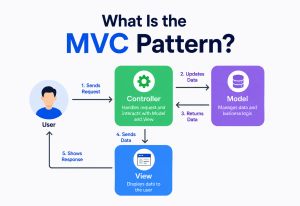
How a Web Request Actually Flows Through MVC
It helps to trace exactly what happens, step by step, the moment someone clicks a link on an MVC-powered website.
- Your browser sends a request when you click a link or submit a form — for example, asking to view a particular product page.
- A router, a small helper that’s often bundled alongside the Controller layer, reads the request and decides which Controller should handle it.
- The Controller receives the request and asks the Model for whatever data is needed — in this case, that one product’s details.
- The Model fetches or calculates the requested data and hands it back to the Controller, with no awareness of what will happen to it next.
- The Controller passes that data along to the View, which turns it into an actual HTML page, ready to be sent back to the browser.
- The finished page travels back across the internet, and the browser displays it — the whole round trip usually happening in a fraction of a second.
Every one of those six steps has a clearly defined owner. If a product’s price is wrong, the problem is almost certainly in the Model. If the price is right but displayed with the wrong currency symbol, the problem is almost certainly in the View. That predictability, repeated across millions of requests a day on a busy website, is a huge part of why MVC has proven so dependable for web applications specifically.
Real-World Examples on the Web
MVC’s fingerprints are all over the modern web, often in places you’d never think to look.
Online storefronts
Product catalogs, shopping carts, and checkout flows are classic MVC territory, with the Model shared across web, mobile, and sometimes in-store kiosk systems.
Blogs and news platforms
Articles, authors, and categories live in the Model, while different themes or layouts act as swappable Views around the same content.
Online banking portals
Account balances and transaction rules stay firmly in the Model, tested exhaustively, while the View simply presents that trusted data.
Business dashboards
The same underlying business data often powers a web dashboard, exported reports, and a public API — all Views around one Model.
A particularly telling real-world sign of MVC’s popularity is how many job postings, coding bootcamps, and university courses still teach it as a foundational concept for web development, even years after newer architectural ideas have entered the conversation. Understanding MVC well tends to make picking up its many descendants and variations — MVP, MVVM, and various framework-specific flavors — considerably easier, since the underlying instinct of separating concerns carries over directly.
Government and public-sector websites offer a less flashy but very telling example of MVC’s staying power. These systems are often built to be maintained for a decade or more, by rotating teams of contractors and civil servants who weren’t part of the original build. In that environment, a well-known, well-documented, predictable pattern like MVC is often preferred deliberately over something newer and flashier, precisely because its long track record and enormous body of existing documentation make it a safer long-term bet than a trendier alternative with a shorter history.

Strengths and Trade-offs, Specifically for the Web
Strengths
- Matches how web teams are naturally organized, by specialty.
- Lets one Model power a website, a mobile app, and an API at once.
- Makes automated testing fast and practical at scale.
- Backed by mature, well-documented frameworks in nearly every language.
- New engineers can orient themselves quickly in an unfamiliar codebase.
Trade-offs
- Traditional server-rendered MVC can feel heavier for highly interactive, app-like interfaces.
- Every user interaction often requires a full round trip to the server, which can feel slower for real-time features.
- Large applications can end up with bulky, overloaded controllers if discipline slips.
- Doesn’t inherently solve challenges around scaling across many servers, which needs additional architecture.
- Some newer front-end approaches offer smoother, more app-like user experiences by default.
None of these trade-offs mean MVC is outdated — they simply mean it was optimized for a certain era and style of web application, one built primarily around pages being requested and rendered. As the web has grown more interactive, some of these trade-offs have pushed parts of the industry toward newer, complementary approaches, which is worth exploring honestly next.
MVC vs. Modern Web Architectures
It’s worth addressing a fair question directly: with so many newer approaches available today — single-page applications, microservices, JAMstack, serverless functions — is MVC still relevant, or has it quietly become old news?
| Approach | What It Changes | Relationship to MVC |
|---|---|---|
| Single-Page Applications | Most of the View logic moves into the browser itself, built with JavaScript frameworks. | Often still backed by an MVC-style API on the server, just with the View split off to the client. |
| Microservices | A large application is split into many small, independently deployed services. | Each individual service can still be organized internally using MVC — the two ideas operate at different scales. |
| JAMstack | Pages are pre-built ahead of time and served as static files, with dynamic data pulled in through APIs. | The API layer behind a JAMstack site is frequently built using classic MVC principles. |
| Serverless Functions | Backend logic runs as small, independently triggered functions instead of one long-running application. | Individual functions often still separate their own data logic from their response-formatting logic, echoing MVC’s core idea even without the name. |
The honest answer is that MVC hasn’t so much been replaced as it has been repositioned. Many of these newer approaches don’t reject MVC’s core insight — separating data, presentation, and coordination — they simply redraw where the boundary between “server” and “browser” sits. A single-page application still needs somewhere to hold business rules and validate data, and that role still looks remarkably like a Model, even if a JavaScript framework on the client is now handling what used to be the View’s job entirely.
It’s also worth noting that plenty of hugely successful, high-traffic web applications still run classic, server-rendered MVC today, quietly and effectively, without needing any of the newer approaches at all. The rise of single-page applications and microservices tends to dominate industry conversation because they’re newer and more actively discussed, but that visibility doesn’t mean traditional MVC has become rare in practice — it simply means the web now has more tools in its toolbox than it used to, and different projects reasonably reach for different ones based on their actual needs.
MVC didn’t disappear — its View just learned to run in the browser instead of on the server.
Where MVC Still Shines Today
Content-heavy, page-based sites
News sites, blogs, documentation platforms, and e-commerce catalogs still map naturally onto classic MVC.
Backend APIs behind a modern front end
Even a flashy single-page app usually talks to a well-organized MVC-style API doing the real data work underneath.
Teams that value predictability over novelty
Large, long-lived enterprise systems often favor MVC’s maturity, documentation, and hiring pool over newer, less proven approaches.
Extremely real-time, app-like interfaces
Live collaborative tools or fast-paced games may benefit more from architectures built specifically around constant, instant updates.
A grounded way to think about it: MVC remains an excellent default for the vast majority of web applications, particularly anywhere data needs to be reliably stored, validated, and shown across more than one kind of screen. It becomes less of an automatic choice only in the specific corners of the web that demand extremely rich, real-time interactivity — and even there, its underlying instinct to separate concerns tends to show up again, just wearing different names.
For anyone starting a new web project today, a genuinely practical approach is to ask what kind of application is actually being built, rather than chasing whichever architecture happens to be trending. A content-driven site, an internal business tool, or an API-first backend will very likely be well served by classic MVC from day one. A highly interactive, real-time collaborative product might lean more heavily on client-side state management alongside a leaner MVC-style API. Neither choice is wrong — they’re simply suited to different kinds of problems, and understanding MVC deeply makes it far easier to recognize which situation you’re actually in.
Key Takeaways
Remember This
- MVC became popular on the web because it matches how web teams are organized, splitting design-focused and logic-focused work cleanly.
- A single Model can power a website, a mobile app, and a public API at once, avoiding duplicated business logic.
- Its clean separation makes automated testing fast and practical, which matters enormously for teams shipping features constantly.
- Influential frameworks like Ruby on Rails, Django, and Spring MVC baked the pattern into their defaults, spreading it across the industry.
- Every request follows the same predictable path — router, controller, model, view — which makes large web codebases far easier to reason about.
- Newer architectures haven’t replaced MVC so much as repositioned it — its core idea of separating data, presentation, and coordination still shows up everywhere, even under different names.