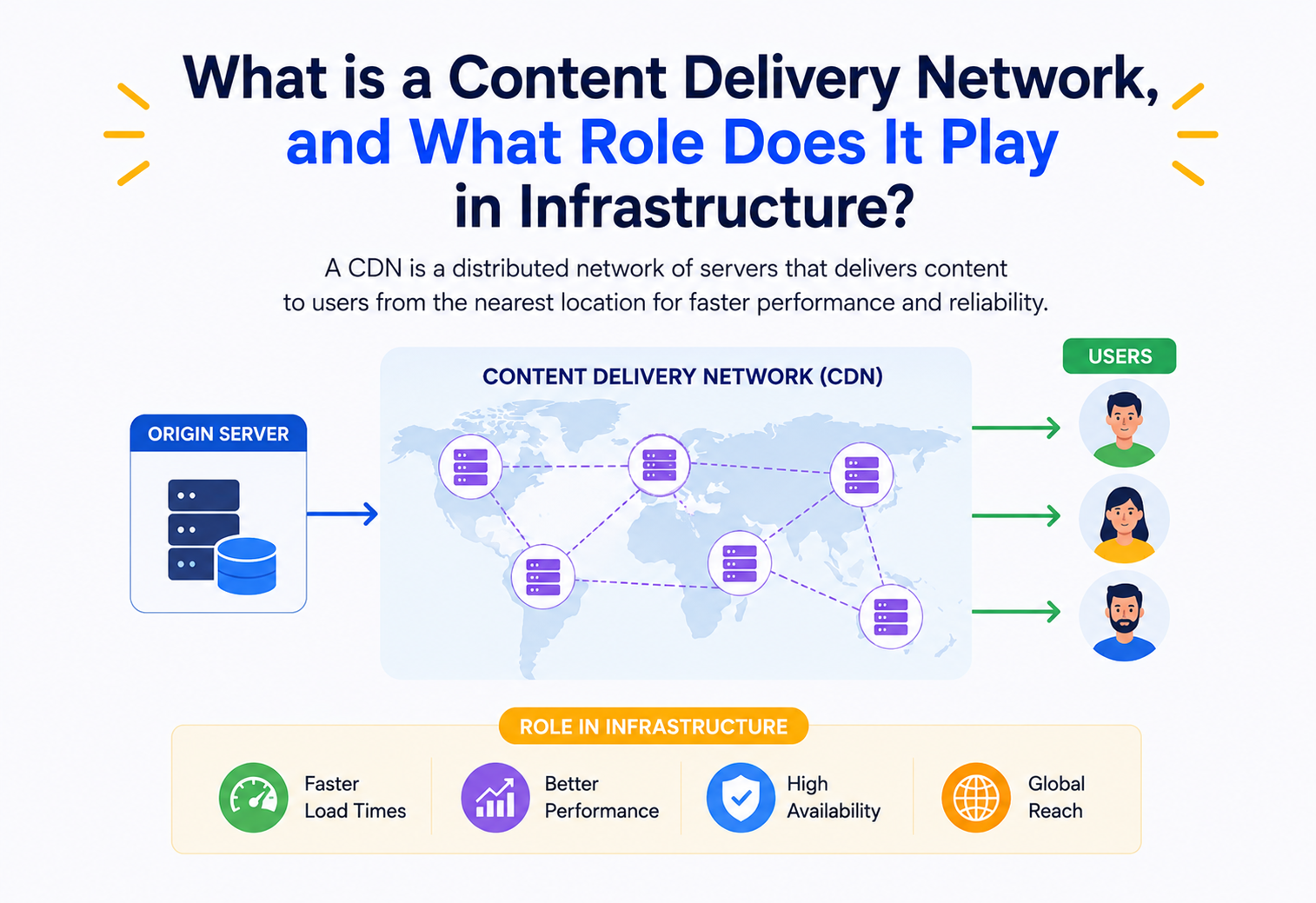
What is a Content Delivery Network, and What Role Does It Play in Infrastructure?
A beginner-friendly, deep-dive walkthrough of CDNs — why they exist, how they actually move your bytes across the planet, and how companies like Netflix and Amazon lean on them every second of every day. By the end of this guide, the invisible layer of servers quietly powering most of the modern web will feel a lot less mysterious.
What is a CDN, really?
A Content Delivery Network is a globe‑spanning group of servers that cooperate to hand each visitor the bytes they asked for from the nearest possible location — and its whole reason for existing can be captured in one small trick: put copies of popular things closer to the people who want them.
Imagine you run a bakery, but you only have one shop — in Chicago. Someone in Tokyo orders a loaf of bread from your website. That bread has to travel from Chicago to Tokyo, crossing oceans and time zones, before it reaches them stale and cold. Now imagine instead you open small bakery kiosks in every major city around the world, each one stocked with copies of your best recipes, baked fresh and ready to hand over the moment someone walks in. That is, in essence, what a Content Delivery Network (CDN) does for websites, videos, images, and apps — except the “bread” is data, and the “kiosks” are servers scattered across the globe.
Formally: a CDN is a geographically distributed group of servers that work together to deliver internet content — HTML pages, JavaScript files, images, videos, API responses — to users based on their physical location, the origin of the content, and the health of a delivery server. The goal is simple to state and hard to build well: get the right bytes to the right person as fast as possible, as reliably as possible, without melting the original server that owns the “true” copy of the data (called the origin server).
Think of the internet as one enormous library and your origin server as a single flagship building downtown. A CDN opens branch libraries in every neighbourhood, each stocked with the most popular books, so almost nobody has to travel far to borrow what they need. The flagship remains the source of truth — the branches simply save everyone a long trip.
A short history
In the mid‑1990s, the web was growing faster than the physical internet could comfortably carry it. A single popular website — hosted on one machine in one data centre — would get hammered with traffic from users all over the world, and everyone far from that data centre suffered slow load times or outright crashes. This was called the “World Wide Wait” problem. In 1998, a group of MIT researchers, including Tom Leighton and Danny Lewin, worked on algorithms (rooted in a field called consistent hashing) to solve exactly this problem. That research became the foundation of Akamai Technologies, founded in 1998 — widely regarded as the first commercial CDN.
Over the following two decades, the idea exploded. Companies like Limelight Networks, Cloudflare (2009), Amazon CloudFront (2008), Fastly (2011), and Google Cloud CDN joined the space, each bringing their own flavour — some focused on video streaming, some on security, some on developer‑friendly edge computing. Today, CDNs are not a “nice to have” — they are load‑bearing infrastructure for nearly the entire internet. It is estimated that a majority of all web traffic today passes through a CDN at some point.
1998 — Akamai founded
MIT research on consistent hashing becomes the first commercial CDN, solving the “World Wide Wait.”
2008 — Amazon CloudFront launches
Cloud providers begin bundling CDN as a pay‑as‑you‑go service alongside compute and storage.
2009 — Cloudflare founded
CDN merges with security: DDoS protection and WAF become part of the “edge” offering.
2010s — Video streaming boom
Netflix, YouTube, and live sports push CDNs to handle massive, bursty video workloads.
2017+ — Edge computing era
CDNs evolve into programmable platforms (edge functions) running actual application logic near users.
It is worth appreciating just how quietly universal this evolution has become. Video streaming, mobile apps, e‑commerce checkouts, software updates — almost every meaningful digital experience today rides at least partly on the shoulders of a CDN, even though the people benefiting from it rarely know what a CDN is or that one exists.
The Problem a CDN Solves
To understand why CDNs matter, you need to understand three physical realities of the internet that no amount of clever software can fully erase — distance, single‑server limits, and the unpredictability of everything in between.
- Distance costs time. Data cannot travel faster than the speed of light. A round trip from New York to Sydney is roughly 16,000 km one way — even at the speed of light in fibre (about two‑thirds of light speed in a vacuum), that is a physical floor of well over 100 milliseconds round trip, before any processing happens. This delay is called latency.
- A single server has a limit. Every server has a maximum number of requests, connections, and bytes‑per‑second it can push out. If ten million people request the same video at once, one origin server (or even a small cluster) buckles.
- Networks in the middle are unpredictable. The internet is not one pipe — it is a huge mesh of independently owned networks. Congestion, outages, and bad routing anywhere along the path from origin to user can slow things down or drop packets entirely.
Every single user, no matter where they are on Earth, has to travel all the way to your one data centre for every image, script, and video chunk. It is like every customer of a global coffee chain having to fly to Seattle just to get a cup of coffee.
A CDN attacks all three problems at once by placing copies of your content on servers physically closer to users (reducing distance and thus latency), spreading load across many machines instead of one (reducing the “single server limit” problem), and using smarter, pre‑tested network routes between its own servers (reducing exposure to unpredictable middle‑of‑the‑internet congestion).
Who actually needs this?
Shoppers who never wait
Product images and pages must load in under a couple of seconds or shoppers abandon carts, directly costing revenue.
Zero tolerance for buffering
Netflix, YouTube, live sports — huge files, huge simultaneous demand, and one hiccup can ruin the whole viewing experience.
Big files, many devices
Game updates, OS patches, and app downloads pushed to millions of devices at once without melting the origin.
Handles breaking‑story spikes
Traffic surges unpredictably when a story breaks, and the site must absorb the wave rather than fall over under sudden load.
Static assets at the edge
JavaScript bundles, CSS, and even some read‑heavy API responses benefit hugely from edge caching.
Latency‑sensitive delivery
Low‑latency edge servers matter for matchmaking, patches, asset delivery, and increasingly, edge‑side game logic.
Even seemingly “small” sites feel the same physics. A personal blog with a few readers in another continent, a documentation portal shared across a distributed engineering team, or a static marketing page linked from a viral social post — all of them experience the same latency, load, and middle‑mile problems in miniature, and all of them can benefit from the same CDN techniques used by the giants.
Core Concepts and Vocabulary
Before going further, let’s build a shared vocabulary. Each of these terms will come up repeatedly, and knowing them makes every later section far easier to follow.
Origin server
The origin is the “source of truth” — the actual server (or cluster) that owns the real, authoritative copy of your content. Everything the CDN serves is, at some point, fetched from here.
Edge server / PoP (Point of Presence)
An edge server is a machine that sits physically close to end users — in a data centre in, say, Mumbai, Frankfurt, or São Paulo. A collection of edge servers in one location is called a Point of Presence (PoP). Large CDNs operate hundreds of PoPs worldwide.
Cache
A cache is simply a temporary storage layer that keeps a copy of data so future requests can be served without repeating expensive work. Think of it like keeping a photocopy of a document on your desk instead of walking to the archive room every time someone asks to see it.
Cache hit vs. cache miss
A cache hit means the edge server already has a fresh copy of what was requested and can serve it immediately. A cache miss means it does not (or the copy is stale), so it must fetch a fresh copy from the origin first — this is slower, and is sometimes called an “origin round trip.”
TTL (Time To Live)
TTL is a timer attached to cached content that says “this copy is considered fresh for N seconds.” After the TTL expires, the edge server will re‑validate or re‑fetch from the origin before serving it again.
Latency
The delay between requesting something and starting to receive it, usually measured in milliseconds (ms). Lower is better. A CDN’s whole purpose is to cut latency down.
Anycast routing
A networking trick where the exact same IP address is announced from many physical locations at once. The internet’s routing protocols automatically send each user to the topologically nearest location advertising that address — without the user or their device needing to know anything about it.
Imagine dialling a single national customer‑service phone number, but the phone system automatically connects you to whichever call centre is physically closest to you — without you dialling a different number per city. That is anycast, applied to internet addresses instead of phone numbers.
Edge computing
Modern CDNs do not just cache static files — many now let developers run small pieces of code (functions) directly on edge servers, close to users. This is called edge computing, and it lets you do things like A/B testing, authentication checks, or image resizing without a round trip to the origin.
Together, these terms form the working vocabulary of anyone operating a CDN. If you can comfortably picture an origin behind a mesh of PoPs, each PoP holding caches whose freshness is governed by TTLs and whose location is chosen by anycast, you already have the mental model most senior engineers carry around every day.
Architecture and Components
A production CDN is really a distributed system with several cooperating layers — a routing layer up front, edge servers on the ground, mid‑tier and shield caches in between, and a control plane that ties everything together.
Let’s break it down.
Key components
The traffic director
Decides which PoP a given user should be routed to, based on geography and network topology.
Front‑line responders
The machines that hold cached copies and directly answer user requests from the nearest location.
Regional buffer
An optional middle layer that reduces how often edge servers must bother the origin.
Herd protection
A single designated cache layer in front of the origin that “shields” it from a flood of simultaneous cache‑miss requests.
Configuration & APIs
The management system where you configure caching rules, purge content, and view analytics.
Programmable runtime
A sandboxed environment (like a lightweight V8 isolate) for running custom logic at the edge.
How PoPs are distributed
CDN providers place PoPs in strategic locations: major internet exchange points (IXPs), telecom hubs, and cloud regions. Some CDNs (like Akamai) push servers deep inside ISPs’ own networks, minimising the “last mile” hop even further. Others rely more on a moderate number of very well‑connected, high‑capacity PoPs at internet backbone intersections. Both approaches are valid engineering trade‑offs between footprint size and operational complexity.
Neither approach is universally “better.” A deep‑in‑ISP footprint tends to shave the very last few milliseconds off delivery to end users but multiplies the number of physical locations that must be operated and kept in sync. A leaner, high‑capacity backbone approach is simpler to run and often easier to secure, at the cost of slightly longer last‑mile hops for users at the edge of the world. The right shape depends on the workload — video streaming rewards the deep approach, while global static‑asset delivery often thrives on the leaner one.
How a CDN Actually Decides Where to Route You
There are two dominant mechanisms CDNs use to route a user to the “best” edge server: DNS‑based routing and Anycast routing. Both are invisible to the user but very different under the hood.
DNS‑based routing
When you type a website’s address, your device asks a DNS resolver “what IP address is this?” A CDN can control the DNS answer dynamically: it looks at where the request seems to be coming from (based on the resolver’s location) and returns the IP address of a nearby edge server. Different users in different countries get different answers to the exact same DNS question.
Anycast routing
As covered earlier, Anycast advertises the same IP address from many PoPs simultaneously, and internet routers (using BGP, the Border Gateway Protocol) naturally forward traffic to the “closest” one in terms of network hops, not necessarily physical distance. This is faster to react to outages (if one PoP goes dark, routers automatically reroute) but gives the CDN operator slightly less fine‑grained control than DNS‑based approaches.
Consistent hashing — the algorithm behind cache placement
Inside a single PoP with many machines, a CDN needs to decide which server holds the cached copy of a particular piece of content, and do so in a way that does not require every server to hold every file. Consistent hashing — the same core idea from Akamai’s original 1998 research — maps both servers and content keys onto a circular number space (“the hash ring”). A piece of content is assigned to the first server found by walking clockwise from its hashed position. The brilliance of this approach: when a server is added or removed, only a small fraction of content needs to be reassigned, instead of reshuffling everything.
// A tiny simplified illustration of consistent hashing in Java
import java.util.TreeMap;
import java.security.MessageDigest;

public class ConsistentHashRing {
    private final TreeMap<Long, String> ring = new TreeMap<>();

    public void addServer(String serverId) {
        ring.put(hash(serverId), serverId);
    }

    public String getServerFor(String contentKey) {
        long h = hash(contentKey);
        Long nodeKey = ring.ceilingKey(h);       // first server clockwise
        if (nodeKey == null) nodeKey = ring.firstKey(); // wrap around the ring
        return ring.get(nodeKey);
    }

    private long hash(String input) {
        try {
            MessageDigest md = MessageDigest.getInstance("MD5");
            byte[] digest = md.digest(input.getBytes());
            long h = 0;
            for (int i = 0; i < 8; i++) h = (h << 8) | (digest[i] & 0xff);
            return h;
        } catch (Exception e) {
            throw new RuntimeException(e);
        }
    }
}
Cache‑control decision logic
When a request lands on an edge server, it runs through a decision tree roughly like this:
Is the content in cache?
If not, it is an outright cache miss — fetch from the mid‑tier or origin and store the fresh copy along with a new TTL.
Is the TTL still valid?
If yes, serve immediately — a clean cache hit. If not, move to the next step and consider revalidation.
Can the origin revalidate?
Send a conditional request with If‑None‑Match or If‑Modified‑Since; if the origin answers “304 Not Modified,” keep serving the cached copy.
Otherwise, refetch
Pull a fresh copy from origin, store it with a new TTL, and hand it to the waiting visitor.
Following that same tree, one PoP might be quietly answering thousands of requests per second, most of them cache hits, all invisible to the visitor.
The Lifecycle of a Single Request
Let’s trace one real request end to end — say, a user in Berlin loading an image from an e‑commerce site whose origin lives in Virginia, USA — because seeing the whole path in motion makes every previous section click into place.
- DNS resolution: The browser resolves the CDN‑controlled hostname; anycast or geo‑DNS points it to a PoP in Frankfurt.
- TLS handshake: The user’s device and the Frankfurt edge server establish an encrypted connection — this happens close to the user, so it is fast.
- Cache lookup: The edge server checks its local cache for the image using a cache key (usually derived from the URL, and sometimes headers like language or device type).
- Hit path: If found and fresh, the image is returned immediately — often in under 20 ms from the user’s perspective.
- Miss path: If not found, the Frankfurt edge asks a mid‑tier cache (perhaps in a larger European hub); if that also misses, the request finally travels across the Atlantic to the Virginia origin.
- Origin shield: The origin shield ensures that even if a thousand different European edge servers miss on the same image at the same moment, only one request actually reaches the origin — the shield holds the others until the first response comes back, then fans it out to everyone waiting. This is often called request collapsing.
- Response caching: The response travels back, gets cached at the mid‑tier and edge layers with a TTL attached (from a
Cache‑Controlheader, for example), and is finally delivered to the user. - Subsequent requests: Any other user near Frankfurt requesting that same image will now get a fast cache hit, for as long as the TTL remains valid.
Without it, a sudden spike in traffic for a fresh, uncached piece of content (a “cold” cache after a deploy, for instance) could send thousands of simultaneous identical requests straight to your origin — a self‑inflicted traffic spike known as a “thundering herd.”
Multiply that single‑image walkthrough by every asset on a real web page — often dozens of images, scripts, stylesheets, fonts, and API calls — and it becomes clear why CDN performance choices matter so much: each of those requests takes the same path, and every millisecond saved on one of them stacks up into a meaningfully faster overall experience.
Weighing the Trade‑offs
CDNs deliver real, measurable wins — but they also introduce genuine complexity. Being honest about both sides leads to much better architectural decisions than treating CDNs as automatically the right answer.
✓ Advantages
- Dramatically lower latency for geographically distributed users
- Absorbs traffic spikes without overwhelming the origin
- Reduces origin bandwidth costs and server load
- Improves resilience — origin outages can be partly masked by cached content
- Built‑in DDoS mitigation and security tooling in most modern CDNs
- Often includes free TLS certificate management
✗ Disadvantages / Trade‑offs
- Cache invalidation is genuinely hard — stale content can be served to users
- Added architectural complexity and another vendor to operate/monitor
- Cost scales with bandwidth and requests — can get expensive at large scale
- Debugging becomes harder — is the bug in your app, or the cache?
- Not all content is cacheable (highly personalised or real‑time data)
- Vendor lock‑in risk around configuration and edge‑compute code
There is an old saying in computer science, often attributed to Phil Karlton: “There are only two hard things in Computer Science: cache invalidation and naming things.” CDNs make the first of those genuinely central to your architecture — every time you update content, you must think about how and when the old cached copies disappear.
The important takeaway is not that CDNs are good or bad — it is that they trade one set of problems (raw latency, single‑origin overload) for a different set of problems (cache management, vendor dependency, debugging across a distributed edge). For most global or spiky workloads, the new problems are the ones engineering teams would rather have.
Performance and Scalability
CDNs improve performance along several distinct dimensions, not just “it is faster.” Each dimension is measurable, and each one is a lever an engineering team can tune deliberately.
Cache hit ratio
This is the single most important performance metric for a CDN deployment: the percentage of requests served directly from cache, versus requests that require an origin round trip. A higher hit ratio means less latency, less origin load, and lower bandwidth cost. Engineers tune TTLs, cache keys, and content structure specifically to push this number up.
Horizontal scalability
Because edge servers within and across PoPs are largely stateless with respect to any single user’s session, CDNs scale horizontally extremely well — need more capacity in a region? Add more edge servers. This is fundamentally different from trying to vertically scale a single origin server, which eventually hits a hard ceiling.
TCP and TLS optimisations
Beyond raw caching, CDNs also optimise the network protocols themselves: keeping long‑lived, “warmed up” connections between edge PoPs and origins (avoiding repeated slow TCP/TLS handshakes), using modern protocols like HTTP/2 and HTTP/3 (built on QUIC, which reduces handshake round trips), and applying TCP tuning (like larger initial congestion windows) that a typical origin server might not bother configuring.
The compounding effect of all of these optimisations is often larger than any single one of them. A page that would have needed multiple slow handshakes plus a long trans‑continental round trip suddenly needs zero handshakes (reused connections), the shortest possible network path, and can even parallelise multiple asset downloads over a single connection — each piece unremarkable on its own, but together dramatic.
High Availability and Reliability
A CDN is, itself, a critical single point that must be engineered for reliability — ironically, using many of the same principles it provides to its customers.
Health checking and failover
Edge servers and PoPs are continuously health‑checked. If a PoP becomes unhealthy (hardware failure, local network issue, overload), anycast routing or DNS‑based routing automatically stops sending traffic there and shifts it to the next‑nearest healthy PoP — usually within seconds, without any human intervention.
Origin failover
Well‑configured CDNs can be told about multiple origins (a primary and a backup, perhaps in different cloud regions or even different providers). If the primary origin stops responding, the CDN automatically retries against the backup.
Stale‑while‑revalidate and stale‑if‑error
Two particularly clever reliability patterns: stale‑while‑revalidate serves a slightly outdated cached copy instantly while quietly fetching a fresh one in the background for next time. Stale‑if‑error means that if the origin is completely down, the CDN can keep serving the last known‑good cached copy rather than showing users an error page — trading perfect freshness for continued availability.
During a brief origin outage, a site using stale‑if‑error might look completely normal to most visitors, because the CDN is quietly serving slightly old — but still working — cached pages.
This kind of resilience is not automatic just because a CDN is switched on — it takes deliberate configuration, including tested backup origins, sensible stale directives, and periodically rehearsed failover drills. A CDN provides the tools for reliability; a well‑run team still has to use those tools intentionally to earn the full benefit.
Security at the Edge
Because edge servers sit directly in the path of all incoming traffic, CDNs have become a natural place to bolt on security features — a first line of defence positioned before attackers can ever reach the real origin.
Absorbing floods
The CDN’s enormous, distributed capacity absorbs volumetric attacks that would instantly flatten a single origin server.
Web Application Firewall
Inspects requests for common attack patterns (SQL injection, XSS) and blocks them before they ever reach your app.
Certificates handled at the edge
Handles HTTPS encryption/decryption at the edge, often with free, auto‑renewing certificates.
Humans vs. scrapers
Distinguishes real users from scrapers and credential‑stuffing bots using behavioural signals.
Guardrails on abuse
Caps how many requests a single client can make in a time window, protecting login pages and APIs from abuse.
Hiding the true IP
Hides the origin server’s real IP address, so attackers cannot bypass the CDN and attack it directly.
If your origin’s real IP address is ever exposed (through old DNS records, email headers, or misconfigured subdomains), attackers can bypass your CDN’s protections entirely and attack the origin directly. Origin IPs should be firewalled to accept traffic only from the CDN’s published IP ranges.
Because a CDN sees every incoming request in real time and at global scale, it also enjoys a uniquely well‑informed vantage point for spotting emerging attack patterns — a strange spike in suspicious requests from a specific region, a new type of bot signature, a coordinated credential‑stuffing wave. Turning those observations back into automatic protective rules is a large part of the modern “CDN as a security platform” value proposition.
Monitoring, Logging and Metrics
Operating a CDN well requires visibility into what is happening across every PoP, in real time. Without that visibility, engineering teams are effectively flying blind on top of some of the most critical infrastructure in their stack.
Key metrics teams watch:
| Metric | Why it matters |
|---|---|
| Cache hit ratio | Directly reflects how effectively you are avoiding origin load |
| Origin response time | Signals origin health; rising numbers mean trouble brewing upstream |
| Edge response time (TTFB) | What users actually experience — time to first byte |
| 4xx / 5xx error rates | Flags broken links, misconfigurations, or origin failures |
| Bandwidth by region/PoP | Cost tracking and capacity planning |
| Purge/invalidation latency | How fast a content update propagates across all PoPs |
Real‑time logs (often streamed to a log pipeline or observability platform) let engineers correlate a spike in errors with a specific deploy, origin issue, or even an ongoing attack. Distributed tracing, where a single request ID is stamped and followed through DNS resolution, edge, mid‑tier, and origin, is increasingly common for debugging complex cache‑miss chains.
Alerting on these signals matters just as much as measuring them. A steadily falling cache hit ratio, for instance, is often the first quiet warning that a recent deploy accidentally busted the cache keys for a whole category of content — something that would otherwise silently balloon origin bills and slow down every visitor before anyone thought to check.
Deployment and Cloud Integration
In practice, almost nobody builds a CDN from scratch — they configure one of the major providers in front of their existing infrastructure. A typical deployment is a series of small, mostly‑reversible configuration steps.
The common providers include Cloudflare, Akamai, Fastly, Amazon CloudFront, Google Cloud CDN, and Azure Front Door. A typical deployment involves:
- Pointing your domain’s DNS at the CDN provider (via a CNAME or, for apex domains, provider‑specific mechanisms).
- Configuring origin(s) — which could be object storage (like S3), a load balancer in front of app servers, or another cloud service entirely.
- Defining caching rules per path or file type (e.g., cache images for 30 days, never cache
/api/checkout). - Setting up TLS certificates for your domain.
- Configuring security rules (WAF, rate limits, bot rules).
- Wiring up purge/invalidation into your deployment pipeline, so new deploys automatically clear stale cached assets.
CDN as part of a cloud‑native stack
Cloud providers increasingly treat CDN as one layer in a full stack alongside object storage, compute, and DNS — for example, a static site might be built once, uploaded to object storage, and served worldwide through the provider’s CDN with almost no “server” involved at all (a fully serverless static site).
This tight integration also lowers the cost of experimentation. Turning a CDN on in front of an existing site, watching real traffic for a few days, and rolling back or reconfiguring if needed is often the work of a single afternoon rather than a multi‑month project — and that low‑risk, easily‑reversible nature is a big reason CDNs feel like a routine default today rather than a heroic architectural undertaking.
How CDNs Relate to Caching and Load Balancing
A CDN is, at its heart, a giant distributed caching and load‑balancing system — it is worth being precise about how these pieces connect, because that precision explains most of the day‑to‑day tuning knobs teams reach for.
Cache keys
A cache key is what the edge server uses to decide whether two requests are “the same” content. By default this is usually the URL, but it can be extended to include headers like Accept‑Language (to cache different language versions separately) or cookies (though caching per‑cookie is usually avoided since it destroys cache efficiency).
Cache‑Control headers
Cache-Control: public, max-age=86400, stale-while-revalidate=3600
ETag: "a1b2c3d4"
Vary: Accept-Encoding
Here, max‑age=86400 tells the CDN this content is fresh for a day; stale‑while‑revalidate=3600 allows serving a stale copy for up to an extra hour while quietly refreshing it; ETag allows cheap revalidation (asking the origin “has this changed?” instead of re‑downloading the whole thing); and Vary: Accept‑Encoding tells the cache to store separate compressed and uncompressed versions.
Load balancing at the edge
Within a PoP, incoming requests are load‑balanced across many physical machines — typically using consistent hashing (so the same content lands on the same machine, maximising cache efficiency) combined with health‑aware routing that skips overloaded or failing nodes. This is the same load‑balancing philosophy used inside microservice architectures, just applied at planet scale.
What is genuinely elegant about this design is that it lets the same underlying primitives — hashing, health checks, TTLs — solve two very different problems at once: which machine should hold this content, and which machine should serve this request. Tuning either one nudges cache efficiency and load distribution together, which is a big reason well‑run CDNs feel so calmly efficient even under wildly uneven traffic patterns.
CDNs, APIs and Microservices
CDNs are not only for static files anymore. Many teams now cache selected API responses at the edge and place edge functions in front of whole microservice fleets — a shift sometimes called “API acceleration.”
Many teams cache selected API responses at the edge for endpoints that are read‑heavy and do not change every millisecond — like a product catalogue or a list of public blog posts. This is sometimes called API acceleration.
In a microservices architecture, the CDN often sits as the outermost layer of the whole system — in front of an API gateway, which itself routes to individual backend services. The CDN’s control plane frequently exposes a management API of its own, letting engineering teams programmatically create cache rules, purge content, or deploy edge functions as part of their CI/CD pipeline, rather than clicking through a dashboard.
Edge compute takes this further: instead of just caching a response, a small function running on the edge server itself might handle authentication token validation, request routing, or even assemble a personalised response from multiple cached fragments — all without ever reaching the backend microservices.
Design Patterns and Anti‑patterns
Successful CDN deployments tend to lean on the same handful of patterns, and struggling ones tend to fall into the same handful of anti‑patterns. Naming them plainly makes both easier to spot.
Useful patterns
Match TTL to change rate
Long TTLs for immutable, versioned assets (like app.a1b2c3.js); short or no caching for dynamic HTML.
Version in the URL
Embed a content hash in the filename so a new deploy naturally gets a new URL, avoiding stale‑cache issues entirely.
Herd control
Always route cache misses through a single shield layer to prevent thundering‑herd traffic to origin.
Multiple layers of buffer
Use mid‑tier regional caches between edge and origin to further reduce origin load.
Anti‑patterns to avoid
A serious privacy bug
Serving User A’s cached dashboard to User B is a serious privacy bug — never cache sensitive per‑user data with a shared cache key.
Slow and risky
Manual “clear the whole cache” purges after every deploy are slow and cause origin traffic spikes; prefer versioned filenames.
Wasted resilience
Treating the CDN as a single point of failure protection without a backup origin defeats part of the reliability benefit.
Freshness paranoia
Setting TTLs to a few seconds “just in case” often erases most of the performance benefit for content that barely changes.
The difference between a CDN deployment that hums along quietly and one that surprises the team every few weeks with a strange bug or unexpected bill usually comes down to which of these lists it has been paying attention to. Patterns are cheap to adopt deliberately; anti‑patterns are expensive to unwind after they have quietly taken root.
Best Practices and Common Mistakes
Beyond the specific patterns above, a handful of general habits distinguish teams whose CDN setups quietly work from teams who dread touching theirs.
- Set explicit Cache‑Control headers on every response — do not rely on defaults, which vary by provider and content type.
- Use immutable, versioned URLs for static assets so you can set very long TTLs safely.
- Separate cacheable and non‑cacheable paths clearly — e.g., never accidentally cache an endpoint that returns a CSRF token or session data.
- Monitor cache hit ratio continuously, not just at setup time — traffic patterns and content mix shift over time.
- Automate purges as part of deployment, not as a manual afterthought someone forgets to do.
- Firewall the origin to only accept traffic from the CDN’s IP ranges.
- Test failover paths deliberately (chaos‑engineering style) rather than discovering they do not work during a real outage.
None of these habits require heroic engineering effort — they mostly come down to treating a CDN as a first‑class, ongoing part of the system rather than a one‑time switch that gets flipped and then forgotten.
How Major Companies Actually Use CDNs
Concrete examples make the abstract ideas real. Some of the most familiar internet companies have made deliberate, sometimes very different, choices about how they lean on CDNs.
Netflix — Open Connect
Netflix built its own purpose‑built CDN, called Open Connect, rather than relying solely on third‑party providers. Netflix places its own caching appliances directly inside ISP networks around the world, pre‑loading them with popular shows overnight during off‑peak hours, so that when you hit play, the video is often served from a box physically sitting inside your own internet provider’s network.
Amazon — CloudFront
Amazon’s own CDN, CloudFront, integrates tightly with the rest of AWS (S3 for storage, Lambda@Edge for edge compute, Shield for DDoS protection) and is used both internally by Amazon.com and externally by countless AWS customers running everything from static sites to full applications.
Google — Global network
Google operates one of the largest private backbone networks on Earth, connecting its own data centres with dedicated fibre rather than relying on the public internet for as much of the path as possible — an approach sometimes described as “premium tier” networking, with Cloud CDN as the customer‑facing product built on top of it.
Uber and real‑time systems
While Uber’s core matching logic is not cacheable in the traditional sense (it is highly dynamic), the company still relies on CDNs heavily for static app assets, map tiles, and images — reducing load on core services so they can focus capacity on the truly dynamic, real‑time parts of the system.
Notice the pattern across all four examples: none of these companies use a CDN in exactly the same way, but each one has thought carefully about which parts of their workload benefit most from being served close to users, and each has designed the rest of their architecture around that decision.
Frequently Asked Questions
A few questions about CDNs come up repeatedly, from casual curiosity to genuine architectural planning. Here are the ones worth answering plainly, in short form.
Is a CDN the same as a web host?
No. A web host (or origin) stores and computes your actual application and data. A CDN is a layer in front of that, caching and distributing copies closer to users. Most real sites use both together.
Can a CDN cache dynamic, personalised content?
Generally not in the traditional full‑page‑cache sense, but techniques like edge compute, fragment caching, and short‑TTL API caching let CDNs accelerate parts of dynamic experiences too.
Does using a CDN mean I do not need a strong origin?
No — cache misses, purges, and non‑cacheable requests still hit your origin, so it still needs to be reasonably robust. The CDN reduces load; it does not eliminate the need for a solid backend.
What happens if the CDN itself goes down?
This is a real risk — CDNs are large, shared pieces of internet infrastructure, and outages (though rare) have taken down large swaths of the web at once historically. This is why some large organisations use multi‑CDN strategies, routing traffic across more than one provider for extra resilience.
Is a CDN only for big companies?
Not anymore — most modern CDNs offer generous free tiers or very low‑cost pricing, and many static site hosts include CDN distribution automatically, making it accessible even for small personal projects.
How quickly does an update propagate across the CDN?
It depends on the TTLs on the affected content and whether a manual purge is issued. Purges typically clear caches worldwide within seconds to minutes; without a purge, propagation is bounded by whatever TTL was in effect.
Can a CDN help even if all my visitors are in one country?
Often yes, especially in larger countries — the same distance, traffic‑spike absorption, and security benefits still apply within a single country, just at a smaller geographic scale than a fully global deployment.
Summary and Key Takeaways
If everything else fades from memory, keep the shape of this in mind — because it explains most of what a CDN is doing behind almost every website and app you use.
A Content Delivery Network is a distributed layer of servers placed strategically around the world whose job is to bring content physically closer to the people requesting it, absorb traffic that would otherwise overwhelm a single origin, and add resilience and security along the way. It works through a combination of smart routing (anycast or DNS‑based), caching (with TTLs, cache keys, and revalidation), and increasingly, actual code execution at the edge. It is not a replacement for a solid backend — it is a force multiplier sitting in front of one, and today it forms one of the load‑bearing layers of how the entire internet actually works.
Key Takeaways
- A CDN exists to fight the physics of distance, the limits of a single server, and the unpredictability of the internet’s middle mile.
- Edge servers, PoPs, origin shields, and mid‑tier caches together form the architecture of a modern CDN.
- Consistent hashing is the classic algorithm behind both cache placement and edge‑server load balancing.
- Cache‑Control headers, TTLs, and cache keys are the levers engineers pull to control freshness versus performance.
- Reliability patterns like origin shielding, stale‑while‑revalidate, and stale‑if‑error keep sites up even when origins wobble.
- Security (DDoS protection, WAF, bot management) has become a core, expected part of any modern CDN offering.
- Real companies like Netflix, Amazon, and Google have each built or heavily customised CDN infrastructure to match their specific scale and workload.
At its heart, a CDN is a quietly clever answer to a very old problem: information takes time to travel, and the further it has to go, the slower it feels. By spreading copies of that information across the world, so nearly every visitor can be served from somewhere close by, a CDN turns what could have been a stubborn physics problem into a routine engineering solution — one that today powers a huge share of the everyday internet, entirely invisibly, in the background of nearly everything we do online.

