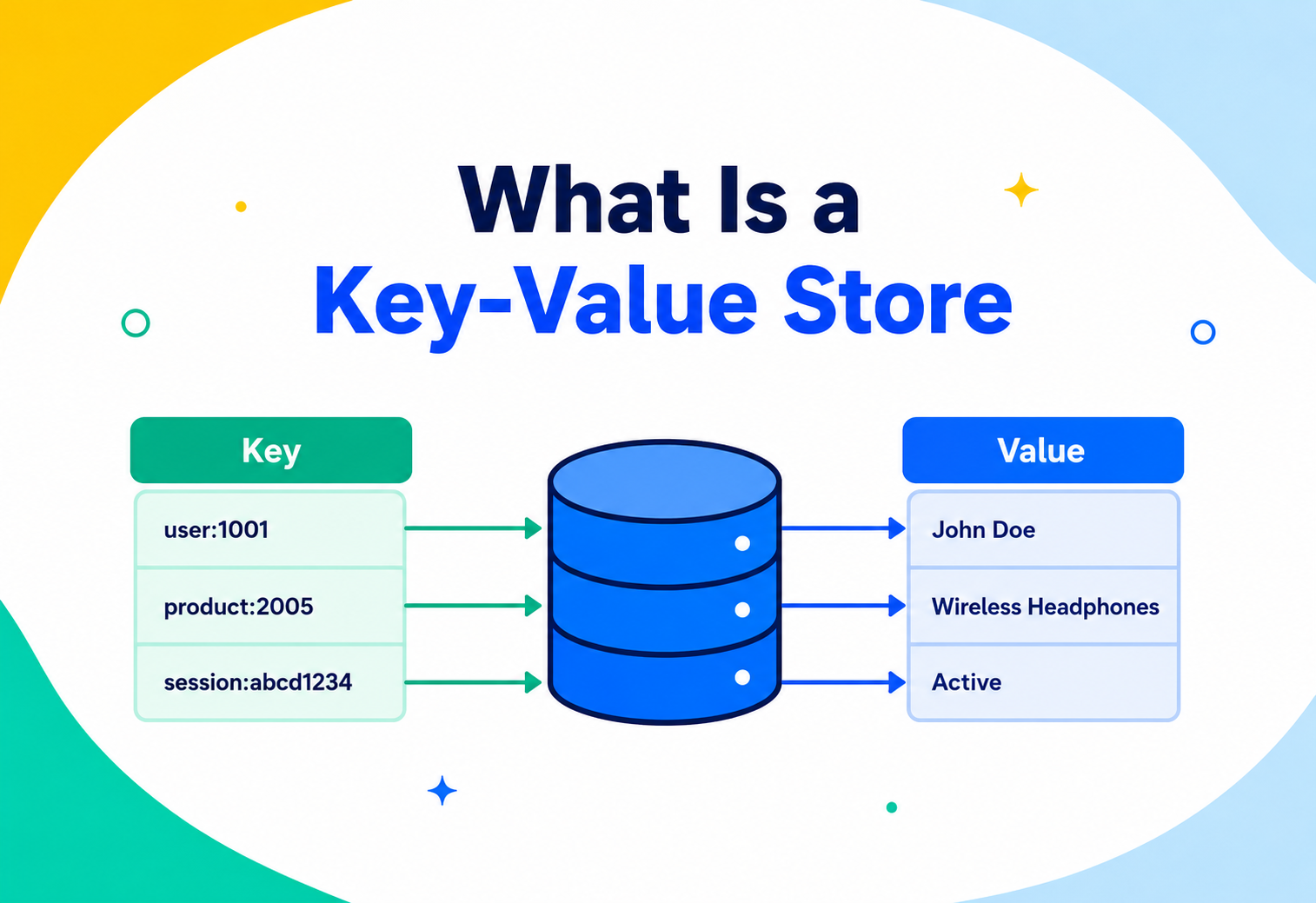
What is Key Value Store ?
A ground-up tutorial explaining, in plain English, the simplest and fastest kind of database — how it works internally, how it scales to billions of lookups a second, and how to use it well in real systems.
Introduction & History
A coat-check counter, a hash table, and half a century of engineering that turned one very old idea into the fastest database on the internet.
Picture the coat-check counter at a busy theatre. You hand over your coat, and the attendant gives you a small numbered ticket. Two hours later, you hand that ticket back, and — instantly — you get your exact coat, with no questions asked, no searching through racks, no need to describe its colour or size. The attendant doesn’t care what your coat looks like. They only care about matching your ticket number to a hook on the wall.
That is, in essence, exactly what a key-value store is: a database that only knows how to do one thing, extremely well — take a label (the key) and instantly find whatever was stored under that label (the value). No searching. No scanning. No understanding of what’s inside the value. Just a direct, near-instant match.
This idea is not new — it’s basically a hash table, one of the very first data structures taught in computer science, turned into a full database service that can run across many machines. What changed over time is scale. A hash table in a single program handles thousands of entries in memory. A key-value store needs to handle billions of entries, spread across hundreds of machines, surviving hardware failures, serving millions of requests per second, for millions of different applications, all at once.
1.1 A short timeline
1950s–1960s · hash tables formalised
Hash tables are formalised as a computer science concept — the direct ancestor of every key-value store.
1970s–1990s · embedded engines
Simple key-value engines like Berkeley DB emerge, used as embedded storage inside larger applications (like email servers).
2003–2006 · web-scale storage
Google’s engineers popularise distributed storage at web scale with the Bigtable paper (a related but different, column-oriented system).
2007 · the Dynamo paper
Amazon publishes the famous Dynamo paper, describing a highly available, distributed key-value store built to keep the shopping cart working even during massive traffic spikes and partial hardware failures. This paper directly inspired Cassandra, Riak, and Voldemort.
2009 · Redis is released
An in-memory key-value store that becomes one of the most widely used databases in the world, prized for its speed and simplicity.
2012 · DynamoDB launches
Amazon launches a fully managed cloud version of the ideas from the original Dynamo paper.
2010s–present · the invisible backbone
Key-value stores become the default choice for caching, session storage, and any workload needing extreme speed at extreme scale — powering a huge share of the modern internet behind the scenes, often invisibly.
Today, when someone says “key-value store,” they usually mean one of two things: an in-memory cache like Redis or Memcached (blazing fast, often temporary data), or a distributed, durable key-value database like Amazon DynamoDB or Riak (built to be a permanent source of truth at massive scale). This tutorial covers both, and the shared ideas underneath them.
Problem & Motivation
Why would anyone want a database that can only look things up by an exact key, with no fancy queries?
Because that restriction is exactly what makes it so fast — and speed, at scale, is often the single most important requirement in modern software.
2.1 The problems key-value stores were built to solve
- Read/write speed. A relational database has to check constraints, maintain indexes, and sometimes lock rows before a write succeeds. A key-value store can skip almost all of that and just place a value at an address — much like writing a name directly on a labelled mailbox instead of filing paperwork first.
- Unpredictable, bursty traffic. Websites like Amazon see huge spikes on sale days. A system serving shopping carts must never say “sorry, try again later” just because a table lock or index update is slow — it needs to accept the click immediately.
- Simple access patterns that don’t need SQL. A huge amount of real traffic is genuinely simple: “get me this user’s session,” “get this product’s price,” “get this API key’s owner.” These don’t need joins or complex filtering — they need one thing, fast: the value for a known key.
- Protecting slower databases from repeated work. Many systems compute or fetch the same expensive result over and over (e.g., “today’s top 10 trending posts”). Storing that result once, under a key, and serving it from memory for the next 60 seconds avoids redoing expensive work millions of times.
Real-life analogy. A relational database is like a full-service reference librarian: you can ask complicated, layered questions (“find me all books published after 1990 by authors born in France who wrote about sailing”), and they’ll figure it out — but it takes time and effort. A key-value store is like a vending machine: you punch in a specific code (B4), and instantly, without any thinking involved, the exact matching item drops out. You cannot ask a vending machine “what’s healthy and under $2?” — but for the one thing it does, nothing is faster.
Key-value stores made a deliberate trade: give up rich querying, give up understanding what’s inside the data — and in exchange, get extreme speed, extreme simplicity, and the ability to scale horizontally to a near-unlimited number of machines.
Core Concepts You Need Before Going Further
A tight vocabulary. Every word in the rest of this guide is defined here, one at a time.
3.1 Key and Value
What it is. A key is a unique identifier — usually a short string like "user:4471" or "cart:9981". A value is whatever data is stored under that key — a number, a string, a JSON blob, a list, even an image or file, depending on the database.
Why it exists. Separating “the label” from “the content” is the simplest possible way to organise data for instant retrieval — you don’t need to understand the content to find it, only to know its exact label.
Simple analogy. A key is like a house address. A value is everything inside that house. The mail carrier doesn’t need to know what’s inside — just the address.
3.2 Hash function
What it is. A hash function takes any input (like the key string "user:4471") and converts it into a fixed-size number, called a hash, in a way that is fast to compute and spreads different inputs evenly across possible output values.
Why it exists. Numbers are easy for computers to use as direct memory addresses or bucket indexes. Turning any arbitrary key into a predictable number lets the database jump straight to where the data should be, instead of searching.
Simple analogy. Imagine you’re told to always store a word in the coat-check rack slot equal to (the word’s first letter’s position in the alphabet) modulo 20. “Amy” always goes to the same slot, every single time — you compute the slot number directly instead of hunting through the whole rack.
3.3 Hash table (hash map)
What it is. The core data structure behind most key-value engines. It’s an array of “buckets.” A hash function decides which bucket a given key’s value should live in. Looking up a key means: hash the key, jump to that bucket, and (if needed) check the few items in that bucket for an exact match.
Why it exists. This gives, on average, O(1) — constant time — lookups, insertions, and deletions, regardless of how many total items are stored. Whether you have 100 keys or 100 million keys, a well-built hash table finds your data in roughly the same tiny amount of time.
3.4 Hash collisions
What it is. Sometimes two different keys hash to the same bucket. This is called a collision. It’s mathematically unavoidable once you have more possible keys than buckets (a fact known as the pigeonhole principle).
Why it matters. A good key-value store needs a plan for collisions — commonly, each bucket holds a small list of entries (“chaining”), so on the rare occasion two keys collide, the lookup checks just those few extra entries instead of breaking.
Simple analogy. If two people’s names happen to hash to coat-check slot 12, the attendant simply keeps a tiny list of coats in slot 12 and checks the 1 or 2 tickets there — still nearly instant, since collisions are rare and lists stay short in a well-sized hash table.
3.5 TTL (Time To Live) and expiration
What it is. A TTL is an optional timer attached to a key, telling the database to automatically delete it after a set amount of time.
Why it exists. Lots of key-value data is meant to be temporary — a login session, a one-time password, a cached page. Without TTLs, developers would have to manually clean up old data, which is easy to forget and leads to storage bloat.
Simple analogy. It’s like a parking garage ticket that automatically expires after 24 hours — after that, the spot is freed for someone else without anyone needing to manually check.
3.6 Eviction policy
What it is. When a key-value store (especially an in-memory cache) runs out of space, it needs a rule for what to remove to make room for new data. Common policies: LRU (Least Recently Used — remove what hasn’t been touched in the longest time), LFU (Least Frequently Used — remove what’s accessed least often), and random eviction.
Simple analogy. LRU is like cleaning out a fridge by throwing away whatever you haven’t eaten in the longest time — not necessarily the oldest item, but the one you’ve most clearly forgotten about.
3.7 Beyond simple strings — richer value types
Modern key-value stores like Redis don’t limit a value to a plain string. They offer several built-in data structures as values, each solving a different problem:
- Lists. An ordered sequence of values under one key — useful for queues (add to one end, remove from the other) like a to-do list or a message queue.
- Sets. An unordered collection of unique values under one key — useful for things like “tags on this article” or “users currently online,” where you need fast membership checks (“is Amy online?”) and no duplicates.
- Sorted sets (ZSETs). Like a set, but every member has a numeric “score,” and the set is always kept in sorted order by that score. This is the data structure behind almost every real-time leaderboard you’ve ever used in a game or app.
- Hashes. A key-value store inside a single key — like a mini record with named fields (e.g., a user’s
name,email,planall stored under one outer key, individually updatable). - HyperLogLog. A special, extremely memory-efficient structure for approximately counting unique items (like “how many unique visitors today”) using only a few kilobytes, even for billions of items — trading perfect accuracy for massive space savings.
How sorted sets work internally: the skip list
What it is. A sorted set is typically implemented using a skip list — a linked list with several “express lane” layers on top, letting the database jump over many elements at once instead of checking them one by one.
Simple analogy. Think of a train line with a local train that stops at every station, plus an express train that only stops every 10th station. To get to station 47, you ride the express train to station 40, then switch to the local for the last 7 stops — much faster than riding local the whole way. A skip list works the same way for finding a value’s position in sorted order: O(log n) instead of O(n).
Software example (Java + Redis sorted set leaderboard)
import redis.clients.jedis.Jedis;
import java.util.List;
import redis.clients.jedis.resps.Tuple;

public class GameLeaderboard {
    public static void main(String[] args) {
        try (Jedis redis = new Jedis("localhost", 6379)) {

            // WRITE: add or update a player's score in the sorted set
            redis.zadd("leaderboard:global", 1520, "amy");
            redis.zadd("leaderboard:global", 980,  "raj");
            redis.zadd("leaderboard:global", 2310, "mia");

            // READ: get the top 3 players, highest score first
            List<Tuple> top3 = redis.zrevrangeWithScores("leaderboard:global", 0, 2);
            for (Tuple player : top3) {
                System.out.println(player.getElement() + " -> " + player.getScore());
            }
        }
    }
}
Explanation. zadd inserts or updates a player’s score in the sorted set — Redis automatically keeps it sorted using its underlying skip list. zrevrangeWithScores asks for the top scorers instantly, without the application ever having to sort anything itself.
3.8 Persistence
What it is. Whether data survives a restart or crash. Some key-value stores are purely in-memory (fast, but data vanishes if the process restarts, unless configured otherwise). Others write to disk so data survives crashes.
Where it’s used. Redis, for example, supports optional persistence via RDB snapshots (periodic full copies of memory saved to disk) and/or an AOF (Append-Only File) log (every write command logged to disk, replayed on restart) — letting teams choose the right balance of speed versus durability.
Architecture & Components
The recurring building blocks that show up in every production key-value store, from a single Redis instance to a globally distributed DynamoDB table.
A production key-value store, whether it’s a single Redis instance or a globally distributed DynamoDB table, is built from a handful of recurring components:
- Client driver/SDK. A small library the application uses to talk to the store — it knows the network protocol and often knows which node owns which key.
- Coordinator / router. Decides which physical node should handle a given key, often using consistent hashing (explained in detail in Section 6).
- Storage engine per node. The actual hash table (in-memory) or on-disk structure that stores this node’s slice of the data.
- Replication layer. Keeps copies of each partition on other nodes, so a single machine failure doesn’t lose data.
- Persistence layer (optional). Write-ahead logs and periodic snapshots that let a node recover its exact data after a crash or restart.
Internal Working — Two Common Designs
Not all key-value stores work the same way inside. Two dominant designs exist, and it’s worth understanding both.
Redis, Memcached
The entire dataset lives in RAM, organised as a hash table. Reads and writes are direct memory operations — no disk involved on the hot path. This is why Redis can serve requests in well under a millisecond. Optional background processes copy data to disk for durability, but that never blocks the main read/write path.
DynamoDB internals, Riak, RocksDB-backed stores
Optimised for datasets far larger than memory. New writes are appended to a fast, sequential on-disk log (a Log-Structured Merge-Tree, or LSM-Tree), buffered first in an in-memory table called a memtable. Periodically the memtable is flushed to disk as an immutable file, and background compaction merges these files over time.
5.1 Design A — In-memory hash table (Redis, Memcached)
The entire dataset lives in RAM, organised as a hash table. Reads and writes are direct memory operations — no disk involved on the hot path. This is why Redis can serve requests in well under a millisecond. Optional background processes copy data to disk for durability, but that never blocks the main read/write path.
Software example (Java + Redis / Jedis)
import redis.clients.jedis.Jedis;
import redis.clients.jedis.params.SetParams;

public class SessionStore {
    public static void main(String[] args) {
        try (Jedis redis = new Jedis("localhost", 6379)) {

            // WRITE: store a session token with a 15-minute expiry (TTL)
            redis.set("session:abc123", "{"userId":4471,"role":"admin"}",
                      SetParams.setParams().ex(900));

            // READ: fetch it back — O(1) hash table lookup
            String session = redis.get("session:abc123");
            System.out.println("Session data: " + session);

            // Atomically increment a counter — a common key-value pattern
            redis.incr("pageviews:homepage");
        }
    }
}
Explanation. set(...ex(900)) stores the value and tells Redis to auto-expire it in 900 seconds. incr shows a key strength of in-memory key-value stores: atomic operations (like incrementing a counter) that are safe even if a thousand requests hit the same key at the same instant.
5.2 Design B — Log-structured / LSM-based (DynamoDB internals, Riak, RocksDB)
Rather than keeping everything in RAM, these stores are optimised for datasets far larger than memory. New writes are appended to a fast, sequential on-disk log (a Log-Structured Merge-Tree, or LSM-Tree), buffered first in an in-memory table called a memtable. Periodically, the memtable is flushed to disk as an immutable file, and a background process merges and cleans up these files over time (compaction). Reads may need to check the memtable and a few on-disk files, using in-memory summaries (like Bloom filters) to quickly skip files that definitely don’t contain the key.
Bloom filter — a key supporting concept
What it is. A compact, probabilistic data structure that can say “this key is definitely not in this file” or “this key might be in this file” — never a false “definitely not,” but occasionally a wasted check.
Why it exists. Without it, a read might have to open and scan every single on-disk file to check whether a key exists — extremely slow. A Bloom filter lets the engine skip almost all irrelevant files in microseconds.
Simple analogy. Imagine a bouncer who, without checking your ID, can instantly and correctly say “you’re definitely not on this list,” but occasionally says “you might be on this list, let me actually check” for someone who also isn’t on it. That “might be” check is rare — most of the time, the bouncer saves everyone time by ruling people out instantly.
Data Flow & Lifecycle
How a request finds the right node, and how the data settles across the cluster from write to durable success.
6.1 Consistent hashing — how the cluster picks a node for a key
What it is. A technique for mapping keys to servers so that, when servers are added or removed, only a small fraction of keys need to move — instead of reshuffling almost everything.
Why it exists. A naive approach — server = hash(key) % number_of_servers — breaks badly when you add or remove a server, because the modulus changes and almost every key suddenly maps to a different machine. That would mean a massive, disruptive data shuffle every time you scale up or down.
Simple analogy. Picture a round table with labelled seats going clockwise. Each guest (key) sits at the next open seat (server) they find walking clockwise from where their name lands. If one guest (server) leaves, only the people who would have used that exact seat need to shift to the next one — everyone else stays put.
Virtual nodes — smoothing out the ring
What it is. Instead of placing each physical server at just one point on the hash ring, real systems place each server at many points (often 100–256), called virtual nodes.
Why it exists. With only one point per server, some servers can randomly end up “owning” a much bigger slice of the ring than others, creating uneven load. Spreading each physical server across many small virtual points averages this out, so load balances evenly, and when one physical server is removed, its load is spread thinly across many other servers instead of dumping it all on one neighbour.
Simple analogy. Instead of writing each raffle contestant’s name on the entry box just once, you write it on 200 small tickets and mix them in — this way, if one contestant’s tickets are removed, no single remaining contestant suddenly gets an unfairly large share of the leftover tickets.
6.2 Full write lifecycle
6.3 Full read lifecycle (with cache-aside pattern)
One of the most common real-world lifecycles is a key-value store used as a cache in front of a slower primary database — called the cache-aside (or “lazy loading”) pattern:
Advantages, Disadvantages & Trade-offs
Choosing a key-value store is a deliberate trade — giving up query power in exchange for speed, simplicity, and scale.
| Aspect | Advantage | Disadvantage |
|---|---|---|
| Speed | Near-instant O(1) lookups, ideal for hot-path data | Speed advantage disappears if used for complex queries it wasn’t designed for |
| Simplicity | Very easy data model — trivial to reason about | No relationships, no joins, no rich filtering without extra tooling |
| Scalability | Scales horizontally with near-linear performance via consistent hashing | Poor fit for range queries or “find all X where Y” patterns |
| Flexibility | Values can be any shape — no schema enforcement | No built-in validation; malformed data is easy to introduce accidentally |
| Cost | Cheap, commodity hardware works well; in-memory options reduce load on expensive primary databases | Pure in-memory storage costs more per GB than disk-based databases |
Performance & Scalability
Where the microseconds live — and where a badly designed access pattern silently gives them all back.
8.1 Big-O intuition
| Operation | In-memory hash table (Redis-style) | LSM-based store (DynamoDB-style) |
|---|---|---|
| GET by exact key | O(1) average | O(1) average, with Bloom filter assist |
| SET by exact key | O(1) average | O(1) amortised (append-only) |
| DELETE by exact key | O(1) average | O(1) amortised (writes a “tombstone” marker) |
| Range scan / “find keys between A and B” | Not supported natively (unless using sorted-set structures) | Possible if keys are stored in sorted order on disk |
8.2 Vertical vs. horizontal scaling
A single key-value node can be scaled vertically (more RAM, faster CPU) up to a point. Beyond that, horizontal scaling — adding more nodes and using consistent hashing to spread keys across them — is how systems like DynamoDB handle millions of operations per second across a fleet of machines with no single bottleneck.
8.3 Networking: round trips and pipelining
What it is. Every request to a key-value store, no matter how fast the server responds, still has to travel over the network — this travel time is called a round trip. If your application does 1,000 separate GET calls one after another, it pays that network round-trip cost 1,000 times, even if each individual lookup takes almost no time on the server.
Why it exists (as a problem). On a typical network, a round trip might take 0.5–2 milliseconds. That sounds tiny, but 1,000 sequential round trips adds up to a full second or more of pure waiting — often far more than the actual database work.
The fix — pipelining. Instead of sending one command, waiting for the reply, then sending the next, the client bundles many commands together in one network trip, and the server sends all the replies back together. This turns 1,000 round trips into effectively one.
Simple analogy. Instead of walking to the mailbox and back a thousand times to send a thousand separate letters, you put all thousand letters in one bag and make a single trip. The mailbox (server) still processes each letter individually, but you save all the walking (network) time.
Software example (Java + Redis pipelining)
import redis.clients.jedis.Jedis;
import redis.clients.jedis.Pipeline;
import redis.clients.jedis.Response;
import java.util.ArrayList;
import java.util.List;

public class BulkPriceLookup {
    public static void main(String[] args) {
        try (Jedis redis = new Jedis("localhost", 6379)) {
            Pipeline pipeline = redis.pipelined();
            List<Response<String>> responses = new ArrayList<>();

            // Queue up 1000 GET commands without waiting for each reply
            for (int i = 1; i <= 1000; i++) {
                responses.add(pipeline.get("product:" + i + ":price"));
            }

            pipeline.sync(); // send everything in one network round trip

            for (Response<String> r : responses) {
                // values are now available after sync()
            }
            System.out.println("Fetched 1000 prices in a single round trip.");
        }
    }
}
Explanation. All 1,000 GET commands are queued locally and sent together, then all 1,000 replies come back together. This is one of the single highest-impact performance techniques when working with key-value stores in bulk, and it costs nothing extra on the server.
8.4 Hot keys
What it is. A “hot key” is a single key that receives a disproportionate share of traffic — for example, a celebrity’s profile data, or a globally shared configuration flag — overwhelming the one node responsible for it, even while every other node in the cluster sits nearly idle.
Fix. Techniques include client-side caching of hot keys, splitting a hot key into several sub-keys (e.g., counter:0 through counter:9, summed at read time), or replicating especially hot data to every node.
Simple analogy. It’s like one checkout lane at a grocery store getting a hundred customers at once while every other lane is empty — the fix isn’t a faster cashier, it’s spreading the crowd across multiple lanes.
High Availability & Reliability
Replication, quorums, and the everyday tricks that keep a distributed key-value store correct while machines quietly fail underneath it.
9.1 Replication strategies
- Leader-follower. One node accepts writes for a given key and streams changes to followers, which serve reads. Simple, but the leader can be a bottleneck for that key’s writes until a new leader is elected on failure.
- Leaderless (Dynamo-style). Any replica can accept a write for a key, using tunable read/write quorums (as covered in the lifecycle section). More available during failures, but requires conflict resolution.
9.2 Quorum consistency, explained with numbers
If a key is replicated to N=3 nodes, and a write requires W=2 acknowledgments while a read requires R=2 responses, then R + W > N (2+2 > 3) guarantees any read overlaps with the most recent write on at least one node — mathematically ensuring you never read stale data, at the cost of needing 2 nodes to respond instead of just 1.
9.3 Conflict resolution
- Last-Write-Wins (LWW). Compare timestamps, keep the newest. Simple but can silently discard a concurrent update.
- Vector clocks. Track causal history across replicas so the system can tell true conflicts apart from simple “newer” updates.
- CRDTs. Special value types (counters, sets) that merge automatically and consistently, with no data loss, even when updated on different replicas simultaneously.
9.4 Failure detection & recovery
Nodes exchange periodic heartbeat/gossip messages. When a node stops responding, the cluster routes its traffic to healthy replicas. When the node returns, mechanisms like hinted handoff (a temporary stand-in node holds writes meant for the down node, then delivers them once it’s back) and read repair (a stale replica is quietly corrected during a normal read) bring it back in sync.
9.5 Concurrency: distributed locks
What it is. A distributed lock lets multiple separate application servers agree that only one of them may perform a certain action at a time — for example, only one server should send a scheduled report email, even though ten copies of the server are running.
Why it exists. In a single-process program, a lock is easy — one thread waits for another. Across many independent servers, there’s no shared memory to lock, so the key-value store itself is used as neutral, shared ground for coordination.
Simple analogy. It’s like a single physical key hanging outside a meeting room. Whoever grabs the key first can go in and use the room; everyone else waits until the key is hung back up. The key-value store plays the role of the hook holding that one key.
Software example (Java + Redis simple lock)
import redis.clients.jedis.Jedis;
import redis.clients.jedis.params.SetParams;

public class DistributedLock {
    public static void main(String[] args) {
        try (Jedis redis = new Jedis("localhost", 6379)) {
            String lockKey = "lock:daily-report";
            String owner   = "server-7-" + System.nanoTime();

            // Atomically: set the key ONLY if it doesn't already exist, with a 30s expiry
            String result = redis.set(lockKey, owner,
                    SetParams.setParams().nx().ex(30));

            if ("OK".equals(result)) {
                System.out.println("Lock acquired — running the daily report job.");
                // ... do the exclusive work here ...
                redis.del(lockKey); // release when done
            } else {
                System.out.println("Another server already holds the lock — skipping.");
            }
        }
    }
}
Explanation. nx() means “only set this key if it does not already exist” — this check-and-set happens as a single atomic operation, so even if a hundred servers race to grab the lock at the exact same millisecond, only one of them will succeed. The ex(30) expiry acts as a safety net: if the lock holder crashes before releasing it, the lock automatically frees itself after 30 seconds instead of staying stuck forever.
9.6 Persistence & disaster recovery
For durable key-value stores, disaster recovery relies on: periodic snapshots (point-in-time backups), continuous write-ahead logs (to replay recent changes after a crash), and cross-region replication (so an entire data centre outage doesn’t cause data loss). Teams should regularly test restoring from backups — an untested backup is a false sense of safety.
Security
The most-attacked databases on the public internet are misconfigured key-value stores. Do these things and it’s not you.
- Authentication. Always require a password or token (Redis’s
requirepass/ACLs, IAM policies for DynamoDB) — never run a key-value store with no authentication. - Authorization. Use role-based or fine-grained access control so, for example, a reporting job can only read certain key prefixes, never write or delete.
- Encryption in transit. Enable TLS between clients and the store, and between replica nodes.
- Encryption at rest. Encrypt any on-disk snapshots or logs, so a stolen disk doesn’t expose plain-text data.
- Network isolation. Never expose a key-value store’s port directly to the public internet — keep it inside a private network/VPC, reachable only by application servers.
- Key-naming discipline. Since there’s no schema to enforce structure, teams should adopt and document clear key-naming conventions (e.g.,
service:entity:id) to avoid collisions and confusion as the system grows.
Monitoring, Logging & Metrics
A key-value store’s whole purpose is speed. That means latency regressions are visible almost instantly — if you’re looking.
- Latency. Track p50/p95/p99 GET and SET latency — a key-value store’s whole purpose is speed, so latency regressions matter immediately.
- Hit rate / miss rate. For caches, the percentage of GETs that find a value versus come back empty — a dropping hit rate often signals a cache that’s too small, has a bad TTL policy, or is being invalidated too aggressively.
- Memory usage & eviction rate. How full the store is, and how often it’s evicting data early — high eviction usually means you need more memory or a smarter eviction policy.
- Replication lag. How far behind a replica is, to catch stale-read risk before users notice.
- Connections & throughput. Active client connections and operations per second, to catch saturation before it causes timeouts.
- Hot key detection. Some tools can flag keys receiving unusually high traffic, so engineers can address hot spots proactively.
Common tooling: Prometheus + Grafana with the Redis exporter, Amazon CloudWatch for DynamoDB, and distributed tracing (OpenTelemetry) to see exactly how much of a user’s request latency came from cache calls versus other services.
Deployment & Cloud
Managed services, self-managed clusters, and serverless capacity — how key-value stores actually run in production.
- Fully managed. Amazon DynamoDB, Amazon ElastiCache (managed Redis/Memcached), Google Cloud Memorystore, Azure Cache for Redis — the provider handles patching, failover, and scaling.
- Self-managed clustering. Redis Cluster or Redis Sentinel for self-hosted high availability; running on Kubernetes with an operator for automated failover and scaling.
- Serverless / on-demand. DynamoDB’s on-demand capacity mode automatically scales throughput with traffic, billing only for actual usage — ideal for unpredictable workloads.
Databases, Caching, APIs & Microservices
A key-value store rarely lives alone. Here’s how it slots into a real microservices system.
Key-value stores usually play one of two roles in a larger system: a cache sitting in front of a primary database, or a system of record for data that’s naturally simple and key-based (sessions, feature flags, shopping carts, rate-limit counters).
Key-value stores are also the backbone of rate limiting at API gateways — a counter keyed by "ratelimit:apikey:timestamp_bucket" can be atomically incremented and checked against a threshold in a single fast operation, protecting backend services from being overwhelmed.
Design Patterns & Anti-patterns
The habits that make key-value stores sing — and the ones that quietly turn them into a liability.
Good patterns
- Cache-aside. Application checks cache first, falls back to the database on a miss, then populates the cache (shown in Fig. 6).
- Write-through cache. Every write goes to the cache and the database at the same time, keeping them always in sync, at the cost of slightly slower writes.
- Key namespacing. Prefixing keys by service and entity type (
orders:12345:status) avoids collisions and makes debugging and access-control far easier. - Sharded counters. Splitting one extremely hot counter key into several sub-keys to spread write load, summing them at read time.
- TTL discipline. Setting an explicit expiry on every temporary key, rather than relying on manual cleanup.
Anti-patterns to avoid
- Using a key-value store as a relational substitute. Trying to build multi-entity joins or complex filtering entirely in application code — a strong sign a different (or additional) database type is needed.
- Giant values under one key. Storing a huge blob (megabytes) under a single key that’s read/written frequently — this blocks other operations and wastes bandwidth. Break large data into smaller, purpose-specific keys.
- No TTLs on temporary data. Leads to unbounded memory growth over time — a classic cause of “why did our cache server run out of memory at 3 AM” incidents.
- Ignoring hot keys. Assuming traffic is always evenly spread, then being surprised when one popular key overwhelms one node while the rest of the cluster is idle.
- Treating cache data as guaranteed durable. Building critical business logic that assumes cached data can never disappear, when caches can and do evict or restart.
Best Practices & Common Mistakes
A concentrated checklist. Nothing here is exotic — but skipping any of it is what makes a team wish they’d picked a different database.
Design your key naming scheme deliberately and document it
It’s the closest thing a key-value store has to a schema.
Always set TTLs on anything that isn’t meant to live forever
Otherwise memory grows silently and predictably fails at 3 AM.
Choose keys with high cardinality
Many unique values spread load evenly and avoid hot spots.
Monitor cache hit rate continuously
A silently dropping hit rate quietly increases load on your primary database.
Decide up front whether data must be durable or can be lost
This changes whether you need persistence, replication factor, and backup strategy.
Keep values reasonably small
Split large blobs into multiple keys or move them to object storage, referencing them by a key instead.
Use atomic operations
Prefer built-in
INCR, compare-and-set, and similar operations over read-modify-write in application code, to avoid race conditions under concurrency.Test failover
Deliberately kill a node in staging and confirm the application handles it gracefully.
Real-World & Industry Examples
Ten well-known companies where a key-value store is quietly holding up the hot path.
DynamoDB
Powers shopping carts and order data with single-digit-millisecond latency at massive scale, favouring availability during peak sales events like the original Dynamo system was built for.
Redis
Caches hot timeline and trending data in front of slower primary storage, absorbing enormous read volume from a relatively small set of very popular keys.
Redis
Uses Redis extensively for caching, background job queues, and rate limiting across its platform.
Memcached
Pioneered large-scale Memcached deployment to cache database query results and reduce load on backend databases at enormous scale.
EVCache (Memcached)
Caches personalisation and metadata across regions so video-browsing pages load almost instantly for users worldwide.
Redis & in-house stores
Uses fast key-value lookups for things like driver location caching and rate-limiting ride requests during high-demand periods.
Distributed KV stores
Used for real-time player session and match state data where speed under massive concurrent load is critical.
Riak
An early, well-known Dynamo-inspired key-value database used for highly available data across financial and gaming platforms.
Redis
Uses Redis for caching search results and rate-limiting, reducing load on backend services during high-traffic booking windows.
Redis & in-memory stores
Relies on fast key-value lookups to serve ephemeral, high-velocity user state (like active stories and presence data) at extremely low latency.
Frequently Asked Questions
The questions that come up on the third day of every new project and in every interview.
Is a key-value store the same thing as a cache?
Not exactly. A cache is a use case — a role a database plays. A key-value store is a type of database. Redis can be used purely as a cache (temporary, disposable data) or, with persistence enabled, as a genuine system of record. DynamoDB is generally used as a durable primary database, not just a cache.
Can a key-value store replace SQL entirely?
For some applications, yes — many production systems run entirely on DynamoDB or similar. But if you need complex queries, joins, or ad-hoc reporting across many fields, you’ll either need a different database type alongside it, or you’ll end up rebuilding query logic yourself in application code, which is usually the wrong trade.
Why is Redis single-threaded for command execution, and is that a problem?
Redis processes commands one at a time on a single main thread by design, which avoids the complexity and bugs of concurrent access to shared memory. Because each operation is extremely fast (microseconds), this single thread can still handle hundreds of thousands of operations per second. Newer Redis versions add multi-threaded I/O for network handling while keeping command execution single-threaded for safety.
What happens if two clients write to the same key at the same time?
It depends on the database and the consistency mode. Leaderless systems may apply last-write-wins or require the application to handle conflicts. In-memory single-node stores like Redis process commands one at a time, so simple operations on a single key are naturally safe from race conditions without extra locking.
How is a key-value store different from a document database?
A key-value store treats the value as an opaque blob — it generally can’t search inside it. A document database (like MongoDB) understands the internal structure of each value (a JSON-like document) and can query and index fields inside it. Some modern key-value stores blur this line by adding limited value inspection, but the core distinction remains useful.
Do key-value stores support transactions?
Many do, in a limited form. Redis supports multi-command transactions (MULTI/EXEC) and atomic single-key operations. DynamoDB supports transactions across multiple items. These are generally simpler and more constrained than full relational database transactions across many tables.
What’s the difference between Redis and Memcached?
Both are in-memory key-value stores, but Redis supports richer data structures (lists, sets, sorted sets, hashes), optional persistence, and built-in replication/clustering. Memcached is deliberately simpler — plain string values only, purely in-memory, multi-threaded — which some teams prefer specifically for its simplicity and raw speed on basic caching workloads.
How much data can a key-value store hold?
An in-memory store is limited by available RAM across the cluster (though clustering lets you add more machines to add more RAM). A disk-backed, LSM-based store like DynamoDB can scale to petabytes, since it isn’t limited by memory size the same way.
Is a key-value store a good choice for a beginner’s first project?
Yes — Redis in particular is one of the easiest databases to start with. Its commands are simple and readable, it requires almost no configuration to get started locally, and its behaviour (get, set, expire) is easy to reason about compared to more complex database systems.
Note: this is general educational information about database technology, not medical, legal, or safety guidance.
When Should You Actually Choose a Key-Value Store?
A short decision table you can use in the next architecture meeting.
A simple way to decide is to ask a few honest questions about your access pattern:
| Question | If mostly “yes” → |
|---|---|
| Will almost every read/write use a known, exact key (like a user ID or session token)? | Key-value store is a strong fit |
| Do you need to filter or search by fields inside the value (e.g., “find all orders over $50”)? | Consider a document or relational database instead, or alongside it |
| Do you need multi-record transactions across many different entities? | Consider a relational database, or a key-value store with careful transaction design |
| Is sub-millisecond latency on simple lookups critical to your product? | Key-value store (especially in-memory) is an excellent fit |
| Is the data naturally about relationships between many things (friends, followers, connections)? | Consider a graph database instead |
| Do you mainly need to protect a slower database from repeated, expensive reads? | Key-value store as a cache layer is a textbook use case |
In practice, most large systems don’t choose “just one” database. It’s completely normal — and usually the right call — to use a key-value store for sessions, caching, and rate limiting, while a relational or document database handles the core business data with richer relationships and query needs. This approach, called polyglot persistence, lets each part of a system use the tool best suited to its specific access pattern, instead of forcing one database to do every job.
Simple analogy. A carpenter doesn’t use one tool for every job — a hammer for nails, a saw for cutting, a level for checking straightness. A key-value store is the hammer of the database world: simple, incredibly fast at its one job, and not the right tool for everything.
Summary & Key Takeaways
Everything above, boiled down to the sentences worth remembering.
- A key-value store is the simplest database model: a unique key maps directly to a value, with lookups powered by a hash table for near-instant, O(1) access.
- Key-value stores exist because giving up complex queries buys enormous speed and near-unlimited horizontal scalability — a trade-off, not a universal upgrade.
- Two dominant internal designs exist: purely in-memory hash tables (Redis, Memcached) for maximum speed, and LSM-tree-based engines (DynamoDB internals, Riak) for datasets larger than memory with durable, disk-backed storage.
- Consistent hashing lets distributed key-value clusters add and remove nodes with minimal data movement — a foundational technique behind Dynamo-style systems.
- Replication, quorum reads/writes, and conflict resolution (LWW, vector clocks, CRDTs) are how these systems stay available and durable despite hardware failures.
- In practice, key-value stores show up everywhere: caching layers, session storage, shopping carts, rate limiters, and — for some companies — as the primary database powering an entire product.
- Success with a key-value store comes down to disciplined key design, correct TTL usage, understanding your consistency needs, and knowing when a different database type should sit alongside it.
- Values are opaque to the store — if you find yourself trying to filter inside them, you probably want a document database next to your key-value store, not instead of it.
- Networking round trips often dominate latency; pipelining is the single most impactful client-side speedup.
- The most-attacked databases on the public internet are misconfigured Redis instances. Authentication, TLS, and network isolation are not optional.
“The key-value store didn’t become the backbone of the internet by doing more — it did it by doing exactly one thing, absurdly well.”

