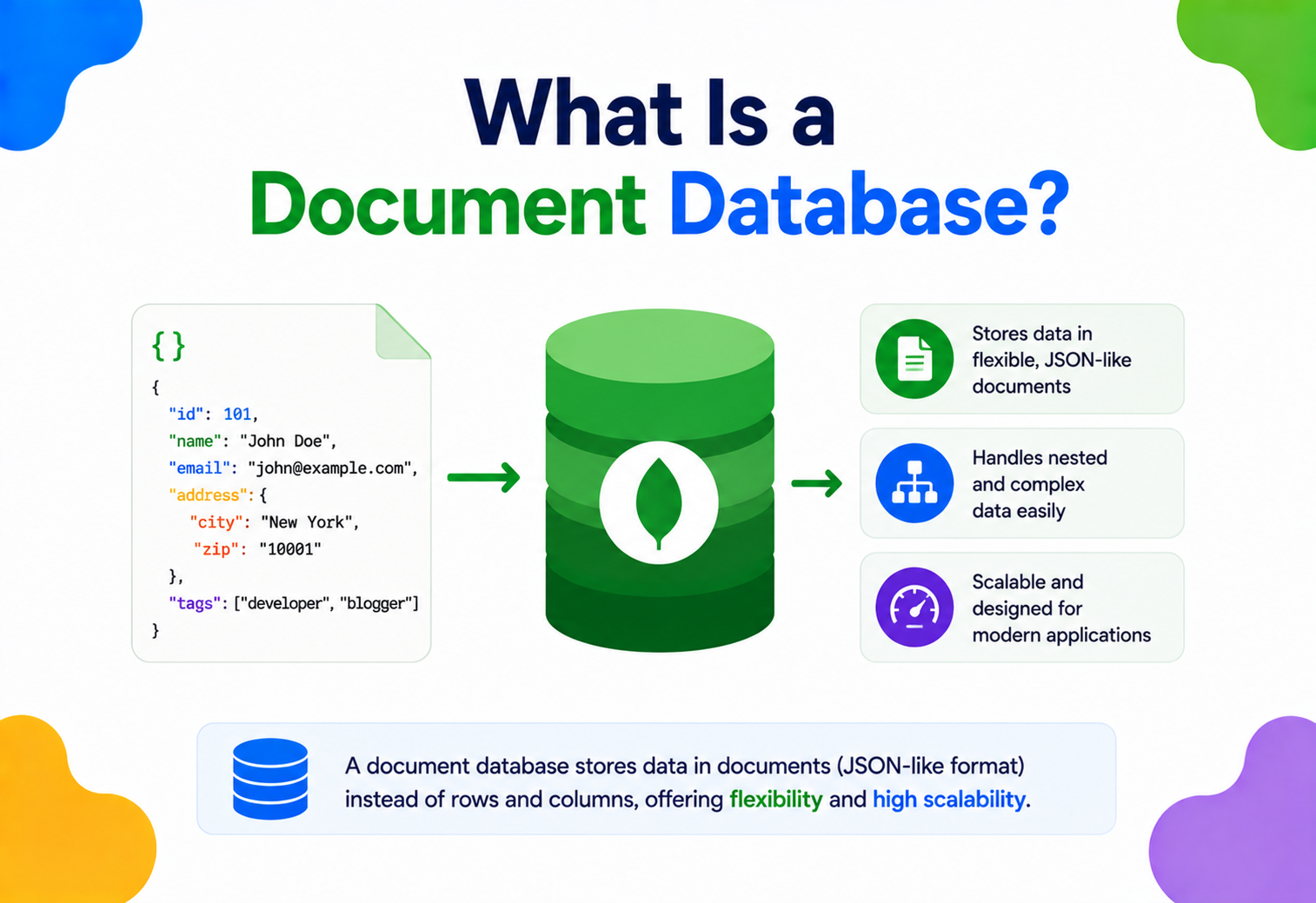
What Is a Document Database?
From “what even is a document?” to how Amazon, Netflix and Uber run document databases at global scale — every core concept, internal mechanic, trade‑off and production pattern, in one long, honest walkthrough.
Introduction & History
Imagine you keep a diary. Every day, you write a new page. Some days you write three lines. Some days you write three pages, glue in a movie ticket, and draw a little sketch in the corner. Nobody stops you. Your diary does not demand that every page look identical.
A document database is a way of storing data on a computer that works a lot like that diary. Instead of forcing every piece of information into identical rows and columns, it lets you save each “entry” — called a document — in a flexible, self‑describing shape. One entry can have five fields. The next can have twelve. The database does not complain.
This single idea — store data the way it naturally occurs, not the way a spreadsheet forces it to look — is the whole reason document databases exist. Everything else in this tutorial is really just working out the consequences of that one idea.
A short history: why did we need something new?
For roughly four decades starting in the 1970s, the dominant way to store structured data was the relational database (think tables, rows, and columns — like Microsoft Excel, but far more powerful, with strict rules). Relational databases such as Oracle, IBM Db2, PostgreSQL, and MySQL powered banks, airlines, and government systems. They were reliable, mathematically well‑understood, and are still hugely important today.
But around 2005–2010, something changed. Companies like Google, Amazon, and later Facebook and Netflix started building applications used by hundreds of millions of people simultaneously. They discovered three painful truths:
- Data doesn’t always fit neatly into tables. A product catalog, a social media post, or a user profile often has a nested, irregular shape — comments inside posts, variants inside products, addresses inside customers.
- A single powerful machine couldn’t keep up. No matter how large a single server was, it eventually ran out of room to grow. Companies needed to spread data across hundreds or thousands of ordinary machines.
- Rigid schemas slowed down engineering teams. Every time a relational table’s structure needed to change, teams had to run careful, sometimes risky, schema migrations. Fast‑moving startups couldn’t afford that friction.
Out of this pressure came a wave of new database designs collectively nicknamed NoSQL (“Not Only SQL”). Document databases are the most popular branch of this NoSQL family.
Amazon publishes the Dynamo paper
An influential research paper describing an internal key‑value store built to survive massive scale and hardware failure — it heavily influenced the entire NoSQL movement.
MongoDB released
Launched as an open‑source document database and quickly became — and remains — the most widely used document database on the planet.
CouchDB and Couchbase
Apache CouchDB and Couchbase popularise document storage built around JSON and native HTTP‑style access.
Amazon DynamoDB launches
Amazon releases DynamoDB as a fully managed cloud service, later adding rich document support on top of its key‑value core.
Fully managed document databases go mainstream
Azure Cosmos DB, Google Firestore, and MongoDB Atlas remove the burden of running servers yourself — provisioning a global document cluster becomes a few clicks.
Some notable milestones behind that timeline:
- 2007: Amazon published a research paper describing Dynamo, an internal key‑value store built to survive massive scale and hardware failure. It heavily influenced the entire NoSQL movement.
- 2009: MongoDB was released as an open‑source document database, and it remains the most widely used document database today.
- 2010: CouchDB (from Apache) and Couchbase popularized document storage built around JSON and HTTP‑native access.
- 2012: Amazon released DynamoDB as a fully managed cloud service, later adding rich document support.
- 2015 onward: Cloud providers built fully managed document databases — Azure Cosmos DB, Google Firestore, and MongoDB Atlas — removing the burden of running servers yourself.
Think of a relational database like a school register printed on a fixed spreadsheet: Name, Roll Number, Class, Marks — every row must have exactly these columns, in this order. A document database is like a folder of individual student report cards: each one can include extra notes, drawings, or achievements that don’t apply to every student, and yet all report cards are still organized in the same folder.
By the end of this tutorial, you will understand not just what a document database is, but why it was built the way it was, how it works underneath the hood, and when you should — and should not — reach for one in a real project.
The Problem & Motivation
To understand why document databases exist, we first need to understand the pain they were built to remove. Let’s build a simple example: an online store that sells products.
The world before: rows, columns, and rigid schemas
In a traditional relational database, you would design tables like this:
| products | product_variants | product_images | product_reviews |
|---|---|---|---|
| id, name, price | product_id, size, color | product_id, url | product_id, rating, text |
To show one product page, your application must run several separate queries and join (combine) these tables back together — because a real product naturally has variants, images, and reviews all bundled together, but the relational model insists on splitting them into flat tables first.
Every time you add a new kind of attribute — say, a “care instructions” field that only clothing products need — you must alter a table structure that is shared by every single row, clothing or not. In a system with millions of rows and multiple applications reading that table, this is slow, risky, and requires careful coordination.
What a document database does differently
A document database stores the entire product — its name, price, variants, images, and even recent reviews — as a single, self‑contained document, usually written in a JSON‑like format:
{
  "_id": "P10293",
  "name": "Wireless Headphones",
  "price": 2499,
  "variants": [
    { "color": "Black", "stock": 40 },
    { "color": "Blue",  "stock": 12 }
  ],
  "images": [
    "https://cdn.gauravsinghtech.com/p10293/front.jpg",
    "https://cdn.gauravsinghtech.com/p10293/side.jpg"
  ],
  "reviews": [
    { "user": "amit_k", "rating": 5, "text": "Great sound!" }
  ]
}
One read. One document. No joins needed. This is the core productivity win of document databases: the shape of the stored data matches the shape your application actually thinks in.
Why this matters at scale
When Amazon or Netflix serve tens of millions of requests per second across the globe, every extra join, every extra network hop between tables, and every schema lock adds up to real latency and real risk. Document databases were built with three motivating goals:
- Developer velocity — model data close to how the application code (objects, JSON APIs) already represents it.
- Horizontal scalability — spread data across many cheap servers instead of relying on one enormous, expensive server.
- Schema flexibility — allow different documents in the same collection to evolve independently, without a blocking migration.
Uber uses document‑style and key‑value stores (built on their own Schemaless datastore, layered over MySQL) for trip data because trip records vary — a bike trip, a car trip, and a food delivery order all carry different fields, but they all need to be written and read at enormous speed across the globe.
The trade‑off nobody should skip
Flexibility is not free. When you remove strict schema enforcement, you shift responsibility for data correctness from the database onto your application code. We’ll explore this trade‑off honestly in Chapter 7 — a good architect must understand both sides, not just the marketing pitch.
Core Concepts
Before going further, let’s build a solid vocabulary. We’ll explain each term the same way every time: what it is, why it exists, where it’s used, an analogy, and an example.
3.1 Document
What it is: The basic unit of storage — a single record, stored in a semi‑structured format, usually JSON or a binary variant of JSON called BSON (used by MongoDB).
Why it exists: Real‑world entities (a user, an order, a blog post) are naturally nested and irregular; a document lets you store that shape directly instead of flattening it into rows.
Where it’s used: Every record in MongoDB, Couchbase, Amazon DocumentDB, Firestore, and similar databases is a document.
A document is like a single index card in a recipe box. Each card can have a different number of ingredients and steps, but every card lives in the same box and can be pulled out by its title.
{
  "_id": "U5521",
  "name": "Priya Sharma",
  "email": "priya@example.com",
  "addresses": [
    { "type": "home", "city": "Delhi" },
    { "type": "office", "city": "Gurugram" }
  ]
}
3.2 Collection
What it is: A named group of related documents — the rough equivalent of a “table” in a relational database, except it does not enforce a fixed structure.
Why it exists: Applications need a way to organize documents by type (all users in one place, all orders in another) so queries can target the right set.
Where it’s used: A typical e‑commerce app might have collections named users, products, and orders.
If a document is an index card, a collection is the recipe box that holds all the “Dessert” cards together, separate from the “Main Course” box.
3.3 JSON and BSON
What it is: JSON (JavaScript Object Notation) is a lightweight, human‑readable text format for representing structured data using keys and values. BSON (Binary JSON) is a binary‑encoded version of JSON used internally by MongoDB for faster storage and traversal, and it adds extra types like dates and raw binary data that plain JSON lacks.
Why it exists: Applications, especially web and mobile apps, already speak JSON natively (it’s the standard format for APIs), so storing data in the same shape removes a translation step.
Where it’s used: Nearly every modern REST or GraphQL API returns JSON; document databases store data in the same family of format so there is little to no conversion needed.
3.4 Schema flexibility a.k.a. schema-less
What it is: The property that different documents in the same collection are not required to have identical fields or types.
Why it exists: Real applications evolve. New features add new fields. Not every record needs every field (an unemployed user has no “employer” field, for instance).
Where it’s used: Content management systems, product catalogs with wildly different product types (a book vs. a television), and rapidly evolving startup products.
“Schema‑less” does not mean “no structure ever.” It means the database does not force the structure. Most serious production teams still define an expected shape in application code, and many document databases (including MongoDB) support optional schema validation rules to catch mistakes.
3.5 Embedding vs referencing
What it is: Two different strategies for representing relationships between data. Embedding nests related data directly inside the parent document. Referencing stores just an ID that points to a document in another collection — similar to a foreign key in a relational database.
Why it exists: Some relationships (a blog post and its comments) are usually read together, so embedding avoids extra queries. Other relationships (an order and the exact user who placed it) may be reused across many documents, so referencing avoids duplicating data.
✓ Embed when…
- Data is almost always read together
- The nested data is small and bounded (won’t grow forever)
- The nested data rarely changes independently
→ Reference when…
- The related data is large or unbounded (e.g., thousands of orders per user)
- Multiple parents share the same child data
- The child data changes independently and frequently
{
  "_id": "post1",
  "title": "Why We Chose MongoDB",
  "comments": [
    { "user": "dev_raj", "text": "Great write-up!" },
    { "user": "sneha_p", "text": "Very helpful, thanks." }
  ]
}{
"_id": "ORD9091",
"userId": "U5521",
"items": [ { "sku": "P10293", "qty": 1 } ],
"total": 2499
}3.6 Index
What it is: A separate, sorted data structure that lets the database find matching documents quickly without scanning every document — much like the index at the back of a textbook.
Why it exists: Without an index, finding a document by, say, email address would require scanning the entire collection, one document at a time.
Where it’s used: Any field you frequently search, sort, or filter by — user emails, product SKUs, order dates.
If your recipe box has a thousand cards, flipping through every card to find “Chocolate Cake” is slow. An index is like a tabbed divider system sorted alphabetically — you jump straight to “C” and find it in seconds.
3.7 Sharding (horizontal partitioning)
What it is: Splitting one large collection across multiple servers (called shards), so that no single machine has to store or process all the data.
Why it exists: A single server has limits — memory, disk, and CPU. Sharding lets a database grow beyond what any one machine could hold.
We’ll dig into sharding in detail in Chapters 4 and 8, since it’s one of the most important scalability concepts in this entire tutorial.
3.8 Replication
What it is: Keeping multiple copies of the same data on different servers, so that if one server fails, another already has the data ready to serve.
Why it exists: Hardware fails. Data centers lose power. Replication is the primary defense against data loss and downtime.
3.9 Consistency model
What it is: The set of guarantees a database gives about when a write becomes visible to subsequent reads, especially across replicas.
Why it exists: In a distributed system with multiple copies of data, it takes time for a write on one server to propagate to others. Different applications can tolerate different amounts of delay, so databases offer different consistency guarantees (we’ll cover strong vs. eventual consistency in Chapter 5).
Architecture & Components
Let’s zoom out and look at how a production document database is actually put together — the moving parts that work together every time your application sends a query.
4.1 The building blocks
- Client driver — a library in your programming language (Java, Python, Node.js) that translates your code’s method calls into the database’s wire protocol.
- Query router / coordinator — in a sharded cluster, this component figures out which shard(s) hold the data needed to answer a query, and forwards the request there.
- Storage nodes (mongod, in MongoDB’s case) — the actual servers that store data on disk and execute queries against it.
- Storage engine — the software layer inside each node responsible for reading and writing bytes to disk efficiently (e.g., WiredTiger in MongoDB).
- Replica set — a group of nodes holding copies of the same data, with one elected as the primary (accepts writes) and others as secondaries (serve reads, stand ready to take over).
- Config servers — in a sharded cluster, these small, specialized servers store the metadata mapping: which shard holds which range of data.
- Oplog / write‑ahead log — an ordered record of every write operation, used to replicate changes to secondary nodes and to recover after a crash.
4.2 Replica sets in detail
A replica set is the fundamental building block of reliability. At any time, exactly one member is the primary — it is the only node allowed to accept write operations. The other members are secondaries — they continuously copy the primary’s changes and can serve read operations (if your application allows reading from secondaries).
If the primary crashes or becomes unreachable, the remaining members hold an election (using a consensus protocol closely related to Raft) and promote one secondary to become the new primary — usually within a few seconds.
Think of a replica set like a classroom with one teacher (primary) and several teaching assistants (secondaries) who are always copying down everything the teacher writes on the board. If the teacher suddenly leaves, the assistants quickly agree among themselves on who takes over the marker — and class continues almost without interruption.
4.3 Sharded clusters in detail
When a single replica set can no longer hold all your data or handle all your traffic, you split the collection across multiple shards, each of which is itself a replica set. A shard key — a field or combination of fields you choose — determines which shard a given document lives on.
Choosing a shard key is one of the most consequential decisions in a document database’s design. A poor shard key (like a field that’s always increasing, such as a timestamp) can create a “hot shard” — one server absorbing almost all the writes while others sit idle. We’ll discuss shard key selection further in Chapter 8.
4.4 Storage engine
Inside each node, the storage engine is the layer that actually manages bytes on disk. MongoDB’s default engine, WiredTiger, uses a structure called a B‑tree (a balanced, tree‑shaped index structure — we will unpack this fully in Chapter 5) for indexes, and supports document‑level locking, compression, and checkpoints.
Netflix uses Cassandra (a wide‑column store closely related in spirit to document databases) as one of its primary datastores for viewing history and personalization data, precisely because its architecture allows writes to be spread evenly across thousands of nodes across the globe with no single point of failure.
Internal Working
This chapter goes one level deeper: what actually happens, mechanically, inside the database engine.
5.1 How documents are stored on disk
When you insert a document, the storage engine doesn’t just dump raw JSON text onto disk. It converts it into BSON — a binary format where every field has a type tag and a length prefix. This makes it much faster for the database to skip over fields it doesn’t need and to know exactly how many bytes to read, instead of having to parse text character by character.
Documents are grouped into fixed‑size blocks called pages (commonly 4KB–32KB), which are the smallest unit the storage engine reads from or writes to disk. Pages are organized on disk according to the storage engine’s internal structures — WiredTiger, for instance, uses a B‑tree layout.
5.2 B‑trees: the backbone of indexing
What it is: A B‑tree is a self‑balancing tree data structure where each node can hold multiple keys and multiple children, keeping the tree shallow (few levels) even with millions of entries.
Why it exists: Disk reads are slow compared to memory reads. A B‑tree is designed to minimize the number of disk reads needed to find any given key, by keeping the tree wide and shallow rather than tall and thin.
Finding a word in a dictionary is a real‑world B‑tree in action. You don’t read every page from the start — you open roughly to the right letter, then narrow down further, needing only a few “jumps” no matter how thick the dictionary is.
5.3 Query execution: what happens when you run a query
- The driver sends the query to the router (or directly to the primary in an unsharded setup).
- The query planner inspects available indexes and estimates the cheapest way to satisfy the query — this is conceptually similar to how a relational database’s query optimizer works.
- If a matching index exists, the engine walks the B‑tree to find matching document locations directly, instead of scanning every document (a collection scan, which is far slower).
- Matching documents are fetched from disk (or memory, if cached) and returned to the client, optionally after sorting, filtering, or transforming through an aggregation pipeline.
MongoCollection<Document> products = database.getCollection("products");

// Find all products priced below 3000, sorted by price ascending
FindIterable<Document> results = products
    .find(Filters.lt("price", 3000))
    .sort(Sorts.ascending("price"))
    .limit(20);

for (Document doc : results) {
    System.out.println(doc.toJson());
}
This short piece of code builds a query filter, asks the driver to send it to the database, and iterates over matching documents — the driver and server handle index selection and execution automatically.
5.4 Write‑ahead logging & durability
What it is: Before a change is applied to the actual data files, the storage engine first writes a compact record of that change to a sequential log file (in MongoDB, this is closely tied to the journal).
Why it exists: If the server crashes midway through updating data files, the log lets it replay unfinished operations on restart, so no acknowledged write is silently lost.
It’s like writing a shopping list before you go shopping. If you forget an item halfway through the store, you can glance at the list and know exactly where to pick up — instead of guessing what you already grabbed.
5.5 Concurrency control
Multiple clients can read and write at the same time. Document databases typically use document‑level locking — when one client is updating a document, only that specific document is locked, not the whole collection. This is a major improvement over older systems that locked entire tables or pages, and it allows far higher write throughput under concurrent load.
Under the hood, this often relies on Multi‑Version Concurrency Control (MVCC): the engine keeps multiple versions of a document in memory temporarily, so readers can keep reading a consistent snapshot while a writer prepares a new version, without blocking each other.
5.6 The CAP theorem, in plain terms
What it is: A rule, proven mathematically by computer scientist Eric Brewer, stating that a distributed data system can only fully guarantee two out of three properties at the same time: Consistency (every read sees the latest write), Availability (every request gets a response, even during failures), and Partition tolerance (the system keeps working even if network communication between servers breaks).
Why it exists: Network failures between servers are a fact of life in any distributed system — you cannot design them away entirely — so partition tolerance is effectively mandatory. That leaves a real choice between prioritizing consistency or availability when a partition actually happens.
Imagine two branches of the same library, connected by a phone line that sometimes goes dead. If someone returns a book at Branch A while the phone line is down, Branch B has two choices: refuse to lend that book out until the phone line is fixed (favoring consistency), or let someone borrow it anyway, risking two people thinking they have the only copy (favoring availability).
Most document databases let you tune this behavior per‑operation. MongoDB, for example, offers read concern and write concern settings that let you choose stronger consistency (wait for replication to multiple nodes) or higher availability/speed (acknowledge immediately) depending on what a specific operation needs.
5.7 Consensus: how nodes agree who’s in charge
When a primary node fails, the remaining replica set members must agree on exactly one new primary — never two, which would cause conflicting writes (a dangerous scenario called split‑brain). Document databases solve this using consensus algorithms in the same family as Raft and Paxos: nodes vote, and a candidate needs a majority of votes to become primary. Requiring a strict majority (not just “more votes than anyone else”) is what mathematically prevents two nodes from both believing they won.
Data Flow & Lifecycle
Understanding the algorithms only gets you halfway. The lifecycle — what happens on write, on read, on TTL expiry, on delete — is what determines whether a design actually survives production.
6.1 The life of a write
- Your application calls something like
insertOne()orsave(). - The driver serializes your object into BSON/JSON and sends it to the primary node.
- The primary appends the operation to its write‑ahead log for durability.
- The primary applies the change to its in‑memory representation of the data.
- The change is streamed to secondary nodes, which apply it to their own copies.
- Depending on the configured write concern, the primary acknowledges success either immediately, or only after a certain number of secondaries confirm they’ve applied the change too.
6.2 The life of a read
- The application issues a query with a filter, such as “find the user with email X.”
- The router (in a sharded setup) or the primary/secondary itself receives the query.
- The query planner checks whether a usable index exists for the filtered field.
- The engine retrieves matching document locations from the index (or falls back to scanning every document, which is far slower, if no index exists).
- Documents are pulled from the in‑memory cache if present, or read from disk if not.
- Results are returned to the driver, which converts BSON back into native language objects for your application.
6.3 Document lifecycle: birth to deletion
| Stage | What happens |
|---|---|
| Create | Document is inserted, assigned a unique _id if not provided. |
| Index | Any relevant indexes are updated to include the new document’s key values. |
| Read | Application queries retrieve and use the document repeatedly over its life. |
| Update | Fields are modified; if the document grows past its allocated space, the engine may need to relocate it internally. |
| TTL expiry (optional) | Documents can be configured to auto‑delete after a set time — useful for session data or temporary caches. |
| Delete | Document is removed; associated index entries are cleaned up. |
| Compaction | Background processes reclaim disk space left behind by updates and deletes. |
Many document databases support a TTL (Time‑To‑Live) index — a special index that automatically deletes documents a set number of seconds after a timestamp field. This is extremely useful for session storage, OTP codes, or temporary carts, removing the need to write your own cleanup job.
Advantages, Disadvantages & Trade‑offs
No database is universally “best.” A good architect chooses tools based on trade‑offs, not trends. Let’s be honest about both sides.
✓ Advantages
- Flexible schema speeds up development and iteration
- Natural fit for nested, hierarchical data (matches JSON APIs)
- Horizontal scalability via sharding across many servers
- High write throughput with document‑level locking
- Rich query languages (filtering, aggregation pipelines, text search)
- Built‑in replication for high availability
! Disadvantages
- Weaker enforcement of data integrity rules (no built‑in foreign key constraints in most)
- Multi‑document transactions historically limited, though modern versions support them at a performance cost
- Data duplication (from embedding) can complicate updates
- Poor shard key choice can be costly to fix later
- Complex multi‑collection joins are harder and slower than in relational systems
- Easy to accidentally create inconsistent document shapes without discipline
7.1 Document database vs relational database
| Aspect | Relational (SQL) | Document (NoSQL) |
|---|---|---|
| Schema | Fixed, enforced at write time | Flexible, enforced by application (optionally by validation rules) |
| Relationships | Joins across normalized tables | Embedding or manual referencing |
| Scaling | Traditionally vertical (bigger server); modern systems add sharding too | Designed for horizontal scaling from the start |
| Transactions | Full ACID across many tables, mature and standard | ACID within a single document always; multi‑document transactions supported but heavier |
| Best for | Financial systems, complex relationships, strict integrity needs | Content platforms, catalogs, user profiles, rapidly evolving data |
7.2 When to choose a document database
- Your data is naturally hierarchical or varies significantly between records
- You need to scale writes horizontally across many cheap servers
- Your team needs to iterate quickly on the data model without frequent migrations
- Most of your access patterns retrieve a single, self‑contained entity at a time
7.3 When to avoid a document database
- Your data is highly relational with many complex, ad‑hoc joins (e.g., deep financial reporting)
- You need strict, database‑enforced referential integrity everywhere
- Your workload is dominated by heavy multi‑table transactional consistency (e.g., core banking ledgers)
Many real production systems use both: a relational database for financial or highly relational core data, and a document database for catalogs, user‑generated content, or activity feeds. This is called polyglot persistence — using the right storage tool for each job rather than forcing one database to do everything.
Performance & Scalability
Modern applications live and die by how they scale. Document databases were designed with horizontal scaling in mind from day one — but the design decisions you make (shard key, indexes, batching) still make or break real‑world performance.
8.1 Vertical vs horizontal scaling
Vertical scaling means giving a single server more CPU, RAM, or disk. It’s simple but has a hard ceiling — eventually no bigger machine exists, or it becomes prohibitively expensive. Horizontal scaling means adding more servers and spreading the load across them. Document databases are architected for horizontal scaling from day one.
Vertical scaling is like hiring one super‑fast chef and giving them a bigger kitchen. Horizontal scaling is like hiring ten regular chefs who each cook a portion of the meal at the same time. Past a certain point, ten reasonably fast chefs beat one superhuman chef — and they’re cheaper to replace individually if one calls in sick.
8.2 Sharding strategies
Choosing how documents get distributed across shards is one of the highest‑leverage decisions in the whole system.
| Strategy | How it works | Risk |
|---|---|---|
| Range‑based | Documents are split by ranges of the shard key (e.g., A–M, N–Z) | Sequential keys (like timestamps) create hot shards |
| Hash‑based | A hash function scrambles the shard key before distributing, spreading writes evenly | Range queries become less efficient (must check multiple shards) |
| Zone / geo‑based | Documents are pinned to shards based on geography (e.g., EU users stay in EU data centers) | Requires careful planning for compliance and latency |
A team that shards an orders collection by createdAt (a timestamp) will find that all new writes land on the single “latest” shard, while older shards sit nearly idle. This is called a hot shard and is one of the most common real‑world sharding mistakes.
8.3 Indexing for performance
Indexes dramatically speed up reads but slow down writes slightly (because every insert or update must also update the index) and consume extra disk and memory. The skill of performance tuning is choosing indexes that match your actual query patterns — not indexing every field “just in case.”
MongoCollection<Document> orders = database.getCollection("orders");

// Speeds up queries that filter by status AND sort by date
orders.createIndex(
    Indexes.compoundIndex(
        Indexes.ascending("status"),
        Indexes.descending("createdAt")
    )
);
8.4 Caching layer
Most document databases keep a large portion of “hot” (frequently accessed) data in memory automatically. WiredTiger, for example, maintains an internal cache sized to a configurable fraction of available RAM. On top of this, many production systems add an external cache (like Redis) in front of the database for extremely hot, simple lookups — we’ll expand on this in Chapter 13.
8.5 Read / write throughput tuning
- Read scaling: Distribute read traffic to secondary replicas (accepting slightly stale data) instead of always hitting the primary.
- Write scaling: Shard across more servers, and choose a shard key that spreads writes evenly.
- Batching: Group multiple small writes into a single bulk operation to reduce network round trips.
- Connection pooling: Reuse database connections instead of opening a new one for every request — the driver handles this automatically if configured correctly.
Amazon’s DynamoDB automatically splits (“partitions”) tables behind the scenes as data grows, and encourages developers to design a well‑distributed partition key up front — the same underlying concern as shard key selection, just under a different name.
High Availability & Reliability
Anything at scale eventually fails. High availability is not an accident — it is the sum of a lot of small design choices about replication, failover, backups, and disaster recovery.
9.1 What “high availability” actually means
What it is: The ability of a system to keep functioning, with minimal or no downtime, even when individual components fail.
Why it exists: Servers crash, disks fail, data centers lose power, and network cables get physically cut. A system that assumes nothing will ever fail is a system that will eventually surprise its users with an outage.
9.2 Automatic failover
We touched on this in Chapter 4: when a primary node becomes unreachable, the replica set detects the failure (usually via missed heartbeat signals) within seconds, holds an election, and promotes a secondary to primary. Client drivers are usually smart enough to detect this automatically and redirect traffic to the new primary without requiring application code changes.
9.3 Replication lag
What it is: The delay between when a write is applied on the primary and when that same write is applied on a given secondary.
Why it matters: If your application reads from a secondary that’s lagging, it may see stale (outdated) data — a direct real‑world consequence of the CAP theorem trade‑off discussed earlier.
For anything where “just‑written data must be visible immediately” (like showing a user their own just‑placed order), read from the primary or use a “read your own writes” consistency setting. For less time‑sensitive analytics or reporting, reading from secondaries reduces load on the primary.
9.4 Disaster recovery & backups
- Snapshot backups: Point‑in‑time copies of the entire dataset, often taken using filesystem or cloud‑volume snapshots.
- Continuous (oplog‑based) backups: Streaming every write operation to backup storage, enabling restoration to almost any specific second in time.
- Cross‑region replication: Keeping a full copy of data in a geographically distant data center, so a regional disaster (earthquake, major power outage) doesn’t destroy all copies.
- Regular restore drills: A backup you have never test‑restored is not a reliable backup — production teams periodically rehearse full recovery.
9.5 Multi‑region deployments
Global applications often deploy replica set members across multiple geographic regions. This protects against regional outages and can reduce read latency for users close to a given region, at the cost of higher replication latency between distant nodes.
Netflix famously practices “chaos engineering” — deliberately triggering failures (via its Chaos Monkey tooling) in production to continuously verify that replication and failover mechanisms across its distributed datastores actually work as expected, rather than assuming they do.
Security
Security is layered: authentication, authorisation, encryption, network isolation, injection defence, and auditing. Skipping any one of these can quietly turn a great architecture into tomorrow’s incident report.
10.1 Authentication
What it is: Verifying that a client connecting to the database is who it claims to be, usually via username/password, certificates, or integration with identity providers (like LDAP or a cloud provider’s IAM system).
Why it exists: Without authentication, anyone who can reach the database’s network address could read or destroy your data.
10.2 Authorization (role‑based access control)
What it is: Controlling what an authenticated client is allowed to do — read‑only access to one collection, full admin rights on another, and so on.
Why it exists: The principle of least privilege: an application that only needs to read products should never hold credentials capable of deleting the entire orders collection.
Using a single “admin” database user for every microservice is a widespread and dangerous shortcut. If one service is compromised, the attacker inherits full database control. Create narrowly scoped roles per service instead.
10.3 Encryption
- Encryption in transit: TLS/SSL encrypts data as it travels between your application and the database, preventing eavesdropping on the network.
- Encryption at rest: Data files on disk are encrypted, so a stolen physical disk or unauthorized filesystem access doesn’t expose raw data.
- Field‑level (client‑side) encryption: Especially sensitive fields (like a national ID number) are encrypted by the application before they ever reach the database, so even database administrators cannot read the raw value.
10.4 Network security
- IP allow‑listing: Only permit connections from known application servers, not the open internet.
- VPC / private networking: Run the database inside a private cloud network, inaccessible from outside without a VPN or bastion host.
- Firewalls: Restrict which ports and protocols are reachable from outside the trusted network.
10.5 Injection risks
Document databases are not immune to injection‑style attacks. If user input is carelessly concatenated into a query object (especially in dynamically‑typed languages), an attacker can sometimes inject query operators to bypass logic checks. Always use parameterized queries and validate / sanitize user input rather than building queries from raw strings.
// SAFE: using the driver's typed filter builders
String userEmail = request.getParameter("email"); // untrusted input
Document result = users.find(Filters.eq("email", userEmail)).first();
// The driver treats userEmail strictly as a string value, not as
// executable query logic - this prevents operator injection.
10.6 Auditing
Production‑grade deployments log who accessed or modified what data, and when — critical for compliance regimes like GDPR, HIPAA, or PCI‑DSS, and invaluable when investigating a suspected breach.
Monitoring, Logging & Metrics
You cannot operate what you cannot see. Good monitoring is the difference between a quiet, boring database and one that surprises you at 3 a.m.
11.1 Why monitoring matters
A database that “seems fine” can be quietly heading toward an outage — a slowly filling disk, a creeping replication lag, or a memory usage trend climbing toward a limit. Monitoring turns invisible trends into visible, actionable alerts before they become incidents.
11.2 Key metrics to track
| Metric | Why it matters |
|---|---|
| Query latency (p50 / p95 / p99) | Average latency can hide painful outliers; p99 shows what your slowest 1% of users experience. |
| Replication lag | High lag risks stale reads and, in an outage, more lost data. |
| Connections in use | Approaching the connection limit can cause new requests to be rejected. |
| Cache hit ratio | A falling hit ratio often means the working data set has outgrown available memory. |
| Disk utilization & IOPS | Running out of disk space is one of the most common causes of unplanned downtime. |
| Lock / wait times | Rising wait times can signal contention from a poorly designed query or index. |
| Oplog window | How much time worth of writes the log currently retains — a small window risks secondaries falling too far behind to catch up normally. |
11.3 Logging
Slow query logs record any operation that exceeds a configured time threshold, making it possible to find and fix expensive queries. Combined with centralized log aggregation (tools like the ELK stack — Elasticsearch, Logstash, Kibana — or a managed equivalent), teams can search across every node’s logs from one place.
11.4 Distributed tracing
In a microservices architecture, a single user action might touch a dozen services and several databases. Distributed tracing tools (like Jaeger or a cloud provider’s tracing service) attach a unique trace ID that follows a request across every hop, making it possible to pinpoint exactly which database call added the most latency to a slow request.
11.5 Alerting
Good alerting is actionable and rare — alerts that fire constantly train engineers to ignore them (a phenomenon called alert fatigue). Effective alerts are tied to symptoms that actually affect users (rising error rate, rising p99 latency) rather than every minor internal fluctuation.
Companies like Google popularized the concept of Service Level Objectives (SLOs) and error budgets — defining, for example, that 99.9% of database reads must complete within 100ms, and treating any month that misses that target as a signal to slow down new feature work and invest in reliability instead.
Deployment & Cloud
Where and how you run the database shapes cost, reliability, and how much of your weekend you keep. This chapter walks through the modern options.
12.1 Self‑managed vs fully managed
☁ Fully managed (Atlas, DocumentDB, Firestore…)
- Provider handles patching, backups, and failover
- Faster to launch, less operational overhead
- Usually more expensive per unit of compute over time
⚙ Self‑managed (your own servers)
- Full control over configuration and tuning
- Requires in‑house expertise for upgrades, backups, and incident response
- Can be more cost‑effective at very large, predictable scale
12.2 Containerization & orchestration
Document databases are commonly deployed inside containers (Docker) and managed with orchestration platforms like Kubernetes, often using a specialized Operator (a piece of automation software that understands how to safely scale, back up, and heal a specific database, beyond what generic Kubernetes primitives handle alone).
12.3 Infrastructure as code
Production teams typically define their database clusters (instance sizes, replica counts, network rules) as code using tools like Terraform, so that environments are reproducible, reviewable, and version‑controlled rather than manually clicked together in a cloud console.
12.4 Cost optimization
- Right‑sizing: Regularly reviewing whether provisioned CPU / RAM actually matches real usage, avoiding both waste and under‑provisioning.
- Storage tiering: Moving old, rarely accessed data to cheaper storage classes.
- Index hygiene: Removing unused indexes, since every index consumes storage and slows down writes.
- Reserved capacity: Committing to predictable baseline usage in advance for a discount, while allowing burst capacity for spikes.
Many teams accidentally pay for indexes nobody uses. Most document databases expose index usage statistics (e.g., MongoDB’s $indexStats) — periodically reviewing this is a quick, high‑value cost and performance win.
12.5 Zero‑downtime upgrades
Because replica sets have multiple nodes, production upgrades are typically done as a rolling upgrade: upgrade one secondary at a time, let it rejoin and catch up, and only step down and upgrade the primary last — keeping the cluster continuously available throughout the process.
Databases, Caching & Load Balancing
A document database rarely stands alone. Cache invalidation, load balancing, and polyglot persistence are how you keep it fast and honest in a real backend.
13.1 Where caching fits
Even a well‑tuned document database has to read from disk or do real work for each query. For data that’s read far more often than it changes — like a product’s price or a user’s profile picture URL — an in‑memory cache like Redis or Memcached sits in front of the database, serving repeated requests without touching it at all.
13.2 Cache invalidation
The hardest part of caching is knowing when cached data is now wrong. Common strategies include setting a short TTL (time‑to‑live) so stale data expires automatically, or actively deleting / updating the cache entry whenever the underlying document changes.
“There are only two hard things in computer science: cache invalidation and naming things.” Underestimating cache invalidation complexity is one of the most common sources of confusing, hard‑to‑reproduce production bugs.
13.3 Load balancing
What it is: Distributing incoming requests across multiple servers so no single one is overwhelmed.
Where it applies here: Read traffic can be load‑balanced across secondary replicas; in a sharded cluster, the query router itself performs a form of load balancing by directing each query only to the shard(s) that actually hold relevant data.
13.4 Polyglot persistence in practice
Large systems rarely use just one type of database. A typical modern e‑commerce backend might combine: a document database for the product catalog, a relational database for financial transactions, Redis for session and cart caching, Elasticsearch for full‑text product search, and a message queue like Kafka connecting it all together.
APIs & Microservices
Because a document database and a JSON API speak almost the same language, they slot beautifully into modern REST, GraphQL, and event‑driven microservice architectures.
14.1 Document databases as a natural fit for APIs
Since most document databases store and query data in JSON‑like structures, and most modern REST and GraphQL APIs also speak JSON, there is often little to no transformation needed between what’s stored and what’s returned to a client — a meaningful reduction in code compared to mapping relational rows into nested API responses.
@RestController
@RequestMapping("/api/products")
public class ProductController {

    private final MongoCollection<Document> products;

    public ProductController(MongoDatabase database) {
        this.products = database.getCollection("products");
    }

    @GetMapping("/{id}")
    public ResponseEntity<String> getProduct(@PathVariable String id) {
        Document doc = products.find(Filters.eq("_id", id)).first();
        if (doc == null) {
            return ResponseEntity.notFound().build();
        }
        return ResponseEntity.ok(doc.toJson());
    }
}
Notice how little translation code is needed — the document is fetched and returned almost as‑is, since the storage shape and the API response shape already match.
14.2 Microservices and database‑per‑service
In a microservices architecture, a common best practice is database‑per‑service: each service owns its own data store and exposes it only through its own API, rather than services directly reading each other’s tables. Document databases fit naturally here because each service’s data model can evolve independently without waiting on a shared, centrally governed schema.
Letting multiple microservices write directly to the same document collection breaks encapsulation — any service can now silently break another by changing document shape. Always go through a service’s own API or event stream, not direct database access.
14.3 Event‑driven integration
Many document databases support change streams (MongoDB) or similar mechanisms that let other services subscribe to a live feed of insertions, updates, and deletions — enabling event‑driven architectures where, for example, an “order created” document write automatically triggers a notification service, without polling.
Design Patterns & Anti‑patterns
A short catalogue of the shapes that keep document databases fast and maintainable, and the ones that quietly turn a promising design into a maintenance nightmare.
15.1 Useful design patterns
The Subset Pattern
Instead of embedding an entire large array (like every review a product has ever received), embed only the most recent or most relevant subset (e.g., the 10 latest reviews), and reference the full collection separately for “view all reviews.”
The Bucket Pattern
For high‑volume time‑series data (like sensor readings every second), group many readings into a single document representing, say, one hour — rather than creating one document per reading — reducing the total number of documents and associated index overhead.
The Extended Reference Pattern
When referencing another document, copy over just the handful of fields you’ll frequently need alongside it (like a user’s display name next to their ID in an order document), avoiding a second lookup for common read patterns while still keeping the full record elsewhere.
The Computed Pattern
Pre‑calculate and store expensive‑to‑compute values (like a product’s average rating) directly on the document, updating it whenever a new review arrives, instead of recalculating it from scratch on every single read.
{
  "sensorId": "TEMP-04",
  "hour": "2026-07-17T10:00:00Z",
  "readings": [
    { "min": 10, "value": 22.4 },
    { "min": 11, "value": 22.6 }
  ]
}
15.2 Anti‑patterns to avoid
Embedding an array that can grow indefinitely (like every single order a customer has ever placed, inside their user document) eventually makes that one document too large, slow to load, and slow to update. Most document databases also enforce a maximum document size (16MB in MongoDB) — an unbounded array will eventually hit that wall.
Creating a brand‑new collection per user or per tenant (instead of one shared collection with a tenant ID field) seems like clean isolation, but it can overwhelm the database’s internal metadata management once you have thousands of collections.
Engineers new to document databases sometimes recreate a fully normalized relational schema using references everywhere, then wonder why performance is worse than the relational database they came from. This throws away the main advantage of document storage — fetching a complete, meaningful entity in a single read.
Best Practices & Common Mistakes
Most production incidents don’t come from missing knowledge — they come from a checklist item that quietly stopped being followed. Treat the lists below as things to actively verify.
16.1 Best practices
- Design around access patterns, not around “correct” data normalization. Ask “how will this data actually be read?” before deciding how to shape a document.
- Choose shard keys carefully, and choose them early. Changing a shard key after a collection has grown large is expensive and risky.
- Use schema validation rules even in a “schema‑less” database. Most document databases let you optionally enforce required fields and types, catching bugs early without sacrificing all flexibility.
- Index deliberately. Every index has a cost; build indexes to match real, observed query patterns, not speculative ones.
- Set appropriate read / write concerns per operation. A password change might need strong consistency; a “like” counter increment might not.
- Monitor before you scale. Understand what’s actually slow before throwing more hardware at a problem.
- Practice restoring backups, not just taking them. An untested backup is a hypothesis, not a safety net.
16.2 Common mistakes
| Mistake | Consequence | Fix |
|---|---|---|
| No indexes on frequently queried fields | Slow, disk‑scanning queries under load | Profile slow queries and add targeted indexes |
| Storing large binary files (images, videos) directly in documents | Bloated documents, slower reads, hitting size limits | Store files in object storage (like S3); keep only a URL in the document |
| Ignoring document growth over time | Frequent internal document relocation, fragmentation | Design bounded, predictable document sizes from the start |
| Treating “schema‑less” as “no validation needed” | Inconsistent, buggy data accumulates silently | Add schema validation rules and strong typing in application code |
| Over‑sharding too early | Unnecessary operational complexity for a dataset that didn’t need it yet | Shard when you have evidence of a real scaling need, not preemptively |
Real‑World & Industry Examples
A whistle‑stop tour of the companies whose document‑database decisions have shaped how the industry thinks about data storage today.
Amazon’s original Dynamo system, described in its influential 2007 paper, was built to keep the shopping cart available even during network failures between data centers, directly informing the design of Amazon DynamoDB, now used across countless AWS‑hosted applications for session storage, product catalogs, and gaming leaderboards.
Netflix stores massive volumes of viewing history and personalization data across globally distributed, horizontally‑scaled NoSQL datastores, chosen specifically because they can absorb constant writes from hundreds of millions of devices without a single point of failure.
Uber built its own document‑oriented datastore layer to handle trip and location data that naturally varies by product type (rides, deliveries, freight), prioritizing write availability across its global footprint of drivers and riders.
Content‑heavy platforms with highly varied item listings (eBay’s catalog spans everything from electronics to antiques) benefit from document databases’ schema flexibility, since a listing for a used car and a listing for a vintage stamp naturally have very different attributes.
Forbes rebuilt its publishing platform on MongoDB to handle rapidly evolving article structures — embedded media, live blog updates, and varied layouts — that would have required constant schema migrations in a traditional relational system.
FAQ, Summary & Key Takeaways
The last stop — the questions engineers, product managers and founders keep asking the first time they think seriously about how their app’s data is going to be stored.
Frequently asked questions
Is a document database the same as MongoDB?
No. MongoDB is the most popular example of a document database, but others exist too — including Couchbase, Amazon DocumentDB, Google Firestore, and Azure Cosmos DB (in document mode). “Document database” describes a category; MongoDB is one product within it.
Can document databases handle transactions like a bank needs?
Modern document databases do support multi‑document ACID transactions, but they were not the original design priority and typically carry a bigger performance cost than single‑document operations. For core financial ledgers with heavy, complex transactional needs, many teams still lean on mature relational databases.
Do I have to choose between SQL and document databases?
No — polyglot persistence (covered in Chapter 13) is extremely common. Many production systems use both, choosing per data type based on its actual access patterns.
Is “schema‑less” dangerous?
It’s a trade‑off, not a flaw. It removes a safety net the database used to hold, shifting that responsibility to application‑level validation and discipline — which is manageable with the right practices (Chapter 16), but genuinely risky if ignored.
How big can a single document be?
Limits vary by product — MongoDB, for example, caps a single document at 16MB. This is a strong signal that documents should represent one meaningful entity, not an ever‑growing log of everything related to it.
Chapter‑by‑chapter summary
- Chapters 1–3: Document databases store data as flexible, JSON‑like documents instead of rigid rows and columns, emerging from the need for developer speed and horizontal scale.
- Chapters 4–6: Underneath, replica sets and sharded clusters coordinate through B‑tree indexes, write‑ahead logs, and consensus protocols to store and retrieve data reliably.
- Chapters 7–9: Flexibility and scalability come with trade‑offs in integrity enforcement and consistency, managed through careful architecture, replication, and tested disaster recovery.
- Chapters 10–12: Production‑readiness requires deliberate security, observability, and deployment practices — none of which are automatic.
- Chapters 13–15: Real systems combine document databases with caches, APIs, and microservices using well‑established patterns, while avoiding common structural anti‑patterns.
- Chapters 16–17: Discipline in indexing, validation, and access‑pattern‑driven design separates successful production deployments from painful ones — as proven by companies like Amazon, Netflix, and Uber operating at extreme scale.
Key takeaways
A document database is not a replacement for relational databases — it’s a different lens for modeling data that matches how many modern applications, and the real world, actually think: as flexible, self‑contained entities, not rigidly identical rows.
You now understand document databases from the ground up: why they were invented, the vocabulary that describes them, how they physically store and retrieve data, how they stay available during failure, and how real companies use them at enormous scale. The next step is practice — model a small project’s data as documents, add appropriate indexes, and observe how your queries perform.