What Is a Timeout, and Why Should Every External Call Have One?
A deep, practical tour of the single most important — and most frequently skipped — line of code in distributed systems: the timeout. From first principles all the way to production incidents at Netflix, Amazon, Google and Uber, this guide covers what a timeout really is, how it works under the hood, and how to tune one on purpose rather than by accident.
The Clock On Every Wait
A timeout is the single most important — and most frequently skipped — line of code in distributed systems. It is the small clock a program puts on every wait so that “the other side never answered” cannot silently become “we wait forever.”
Imagine you call a friend and ask them a question, then just… wait. No matter how long it takes them to answer — a minute, an hour, a week — you stand there, phone to your ear, doing nothing else, until they finally reply. That would be absurd in real life. Yet this is exactly what a piece of software does by default when it asks another piece of software for something and does not set a timeout.
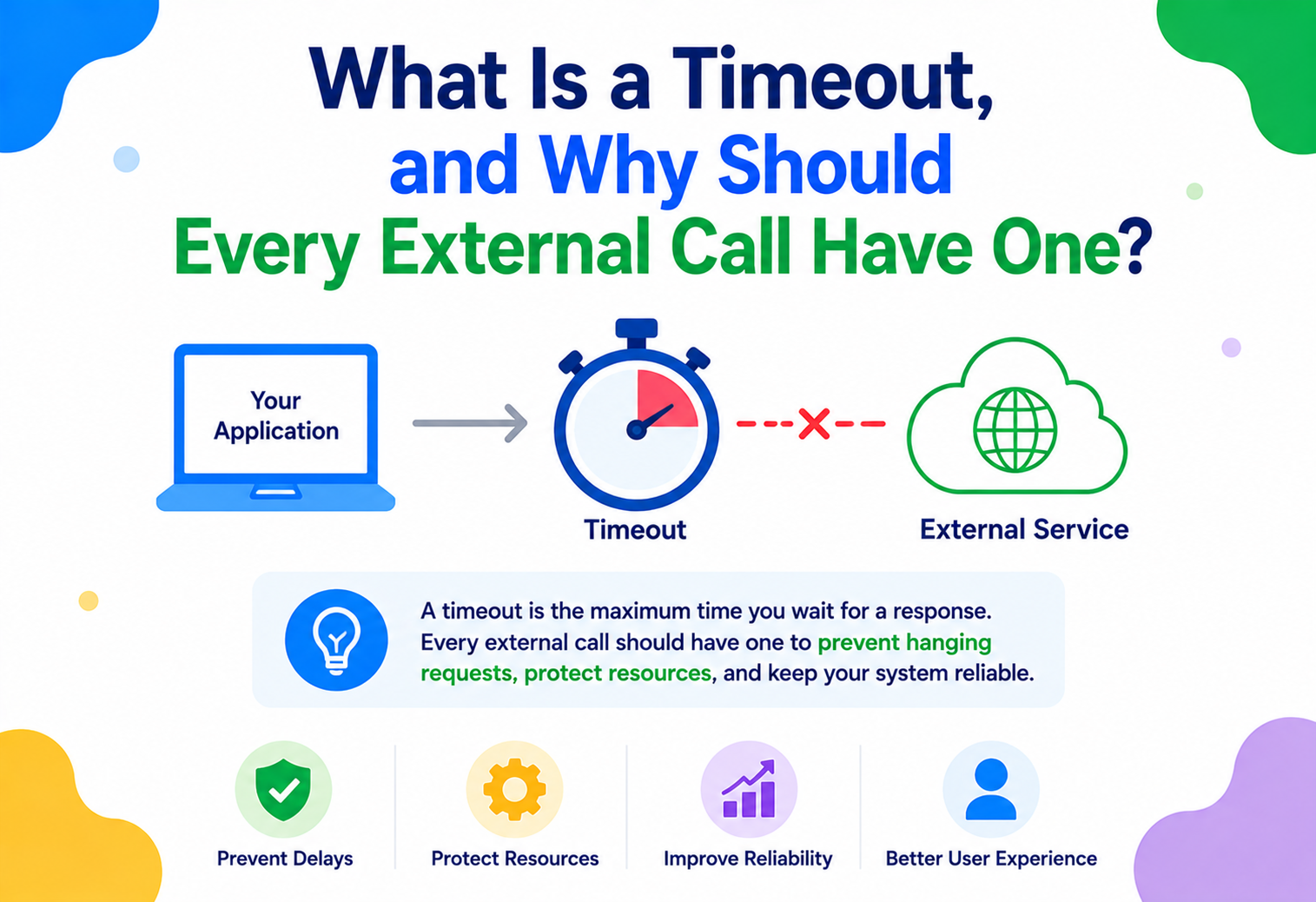
A timeout is a maximum amount of time you are willing to wait for a response before you give up and move on. It is a promise you make to yourself (or to your program) ahead of time: “If I don’t hear back within X seconds, I will stop waiting and do something else — retry, fail, fall back to a default, or tell the user something went wrong.”
This idea is not new. It comes from the earliest days of computer networking. When engineers at ARPANET and later TCP/IP designers built the protocols that let computers talk to each other over unreliable wires, they immediately ran into a hard truth: messages can get lost, and you cannot tell the difference between “the other side is just slow” and “the other side will never answer.” The only way to make a system that behaves predictably in the face of that uncertainty is to put a clock on every wait.
That is why TCP itself has timeouts baked in at the protocol level (retransmission timers, connection timeouts), and why nearly every networking library, database driver, and HTTP client ships with configurable timeout settings. The concept has scaled up from “a router waiting for an acknowledgment” to “a checkout service waiting for a payment gateway” to “a mobile app waiting for an API response” — the underlying problem is identical at every layer.
A timeout is like the “I’ll wait 10 minutes for the table, then we’re leaving” rule at a restaurant. Without that rule, a single late friend could ruin the whole evening. With it, you have a plan no matter what happens.
As software moved from single machines to networks, to the internet, and now to sprawling fleets of microservices calling each other thousands of times per second, the timeout went from being a nice-to-have networking detail to being one of the foundational building blocks of reliability engineering — the discipline of building systems that keep working (or fail gracefully) even when parts of them break.
Think of a timeout the way you think of a kitchen timer set for a boiling pot. You do not stare at the stove indefinitely; you set a limit and walk away, confident that when the bell rings you will either have dinner or a clear signal to check what went wrong. Every “external call” a program makes deserves the same discipline.
It Might Simply Never Come Back
Why do we need timeouts at all? Because every external call has one property that is easy to forget: it might never come back. Not “probably slow.” Not “might return an error.” It might simply never respond.
Every external call — a network request to another service, a query to a database, a read from a cache, a call to a third-party API — can fail in a way that never resolves. There are plenty of realistic reasons for this:
- The remote server crashed mid-request and never sent a reply.
- A network switch silently dropped the packet and no retransmission ever gets through.
- The remote service is alive, but stuck in an infinite loop or deadlock.
- A firewall or load balancer is quietly discarding traffic that matches some rule.
- The connection is technically “open” but nobody at either end is doing anything (a half-open connection).
Without a timeout, the calling code will wait forever — or at least until the operating system itself gives up, which for some default TCP settings can be minutes. Meanwhile, that calling thread, that connection, and that memory are all tied up doing nothing useful. Multiply this by thousands of concurrent requests, and you get a phenomenon reliability engineers dread: resource exhaustion, followed by cascading failure — one slow dependency drags down the service that called it, which drags down the service that called that one, and so on, until an entire platform is down because of a single unresponsive component three layers deep.
This exact chain of events — one hung dependency, no timeout, thread pool exhaustion, cascading outage — is one of the most common root causes cited in public post-mortems from companies like Amazon, Google, and Netflix. It is so common it has its own name in the reliability world: a “gray failure” cascade.
The motivation for timeouts, then, is not just “make slow things time out.” It is much bigger: timeouts are what let a distributed system convert an unknown, unbounded risk into a known, bounded cost. Instead of “we don’t know how long we might wait, or if we ever will,” you get “we will wait at most 2 seconds, and then we know exactly what happens next.”
To make this concrete, think about a checkout service in an online store. It needs to call an inventory service to confirm stock, a payment service to charge the customer, and a shipping service to schedule delivery. Each of these is, from the checkout service’s point of view, an “external call” — even if all three services are owned by the same company and run in the same data center. If the payment service has a bad deploy and starts hanging on every request, and the checkout service has no timeout, then every single checkout thread will eventually pile up waiting on the payment service. Within seconds or minutes (depending on traffic), the checkout service will have no threads left to serve any request — including ones that do not even touch payments, like simply loading someone’s shopping cart. A problem in one narrow code path has now become a total outage of an unrelated feature, purely because of resource contention. This is the essence of a cascading failure, and it is almost always preventable with a correctly configured timeout.
It is also worth being precise about what “external” means here. It does not just mean “a different company’s server on the internet.” Any call that crosses a process boundary, a network boundary, or even just a boundary of trust and control counts: calling your own database, calling a cache you run yourself, calling a message queue, or calling a microservice built by the team next door. If it is not a simple, local, in-memory function call — if it has to go over a network, however short that network hop might be — it can hang, and it needs a timeout.
A Shared Vocabulary For The Different Clocks
Before going deeper, let us build a solid vocabulary. These terms show up constantly in networking code and in every HTTP client library (Java’s HttpClient, OkHttp, Apache HttpClient, database JDBC drivers, gRPC, and so on).
Connect Timeout
How long you’ll wait just to establish a connection (the TCP handshake) with the remote host, before the request has even been sent.
Read / Response Timeout
How long you’ll wait for data to arrive after the request has been sent — i.e., the time between sending your request and getting the response bytes.
Write Timeout
How long you’ll wait while sending your own request data to the remote server, relevant for large uploads or slow-writing clients.
Overall / Deadline
A single end-to-end budget for the whole operation — connect + write + read + retries — often the most useful one in practice.
Idle Timeout
How long a connection can sit open with no activity before it’s closed, common in connection pools and keep-alive HTTP connections.
Retry Timeout / Backoff
Not a timeout itself, but closely related: how long to wait between retries after a timeout occurs, usually growing exponentially.
Think of these as different clocks measuring different phases of a journey. If you are driving to a friend’s house: the connect timeout is like “if I can’t even get my car to start within 2 minutes, I’ll give up.” The read timeout is like “once I’m driving, if I haven’t arrived within 30 minutes, I’ll turn around.” The deadline is “no matter what happens — traffic, car trouble, wrong turns — I will not spend more than 45 minutes on this trip, period.”
Why a single “timeout” isn’t enough
A common beginner mistake is setting only one generic timeout value and assuming it covers everything. In reality, connecting to a dead IP address behaves very differently from connecting successfully but then waiting on a slow server — they can (and often should) have different timeout values, because they represent different failure modes with different likely causes and different appropriate responses.
A timeout is not about being impatient. It is about making an explicit, deliberate decision: “Past this point, I have more value in giving up than in continuing to wait.” That is a business and reliability decision as much as it is a technical one.
Relative timeouts vs. absolute deadlines
There is an important, subtle distinction between a relative timeout (“wait up to 3 seconds from when I start this call”) and an absolute deadline (“give up at exactly 14:32:07.500 UTC, no matter when the call started”). For a single, isolated call, these are basically the same thing. But once a request fans out across multiple hops — Service A calls Service B, which calls Service C — relative timeouts at each hop can silently add up to far more total wait time than the original caller ever intended. If Service A waits up to 5 seconds for B, and B independently waits up to 5 seconds for C, the user could end up waiting nearly 10 seconds even though A’s own timeout was “only” 5. Absolute deadlines fix this by carrying a single shared expiration time through the whole call chain, so every hop knows precisely how much real time is left, not just how much time it personally is willing to spend.
Timeout vs. cancellation
A timeout tells the caller to stop waiting. It does not automatically tell the callee to stop working. True cancellation — actually signalling the remote side to abandon the operation — requires additional protocol support (like gRPC’s built-in cancellation signal, or a cooperative cancellation token in async code). Without it, a “timed-out” request may continue consuming CPU, memory, and database locks on the server long after the client has given up and moved on, silently wasting resources. This is why some of the most mature RPC frameworks treat cancellation as a first-class citizen alongside timeouts, rather than bolting it on as an afterthought.
Timeouts Live At Every Layer, Not Just One
Timeouts are not a single mechanism — they show up at multiple layers of the stack, each with its own component responsible for enforcing them. Understanding the architecture helps you know where to configure a timeout and who is actually enforcing it.
Let us walk through each layer in turn:
Application Layer
Your code (or the client library you call) sets a deadline: “I want this operation done within N milliseconds.” This is the layer developers interact with most directly.
Client Library / SDK
Libraries like OkHttp, Apache HttpClient, JDBC drivers, and gRPC stubs translate that deadline into concrete socket-level settings and enforce it with internal timers.
Operating System / TCP Stack
The kernel has its own timers for connection attempts (SYN retransmits) and keep-alive probes, which act as a backstop even if application-level timeouts are misconfigured.
Network Infrastructure
Load balancers, API gateways, reverse proxies (like NGINX or Envoy) enforce their own upstream/proxy timeouts, often independently of what the client requested.
Remote Service & Downstream Resources
The service you called might itself be waiting on a database, cache, or another API — and it needs its own timeouts for those calls, or the problem just moves one hop deeper.
This layered nature is important: setting a timeout in your application code does not automatically protect every layer beneath it. A well-designed system sets timeouts at every layer — client, proxy, and server — so that no single missing configuration becomes the weak link.
Who owns which timeout?
Because responsibility is spread across so many layers, it is easy for two teams to each assume the other “must be setting a reasonable timeout somewhere.” That assumption is exactly how the missing-timeout outage repeatedly happens. A useful discipline is to make ownership explicit for every dependency: which team owns the client-side timeout, which team owns the proxy/gateway timeout, and which team owns the server-side statement or execution timeout. Written down once, this eliminates a huge class of “it turned out nobody was really enforcing that” incidents.
How A Timeout Actually Fires
Mechanically, how does a timeout “happen”? At the lowest level, it is just a race between two events: “did the response arrive?” versus “did the clock run out?” Whichever happens first wins.
Most client libraries implement this using one of a few underlying mechanisms:
- Socket-level timeouts (
SO_TIMEOUT): The OS socket itself is told “if no data arrives within N milliseconds of a read call, throw an error.” This is enforced by the kernel’s networking code. - Event-loop / scheduled timers: In async frameworks (Netty, Node.js-style event loops, Java’s
CompletableFuture.orTimeout), a timer is scheduled alongside the async operation. If the timer fires before the operation’s callback does, the operation is cancelled and aTimeoutExceptionis raised. - Deadline propagation: Modern RPC frameworks like gRPC compute an absolute deadline (a wall-clock timestamp) rather than a relative duration, and pass that deadline along with the request itself — even across service boundaries — so every hop in a call chain knows exactly how much time budget is left.
Here is a minimal illustration in Java using HttpClient, showing where each timeout type is actually configured and what exception you get when it fires:
import java.net.http.HttpClient;
import java.net.http.HttpRequest;
import java.net.http.HttpResponse;
import java.net.URI;
import java.time.Duration;

public class TimeoutExample {
    public static void main(String[] args) throws Exception {
        HttpClient client = HttpClient.newBuilder()
            .connectTimeout(Duration.ofSeconds(2))   // connect timeout
            .build();

        HttpRequest request = HttpRequest.newBuilder()
            .uri(URI.create("https://api.example.com/orders/42"))
            .timeout(Duration.ofSeconds(3))          // overall request/read timeout
            .GET()
            .build();

        try {
            HttpResponse<String> response =
                client.send(request, HttpResponse.BodyHandlers.ofString());
            System.out.println("Status: " + response.statusCode());
        } catch (java.net.http.HttpTimeoutException e) {
            // Fired because the clock ran out, NOT because of a 4xx/5xx response
            System.out.println("Request timed out — falling back to cached data.");
        } catch (java.net.ConnectException e) {
            System.out.println("Could not even connect — service may be down.");
        }
    }
}
Notice something crucial: a timeout throws a different kind of error than a normal failed response (like an HTTP 500). A 500 tells you “the server answered, and the answer was ‘I failed.’” A timeout tells you “I genuinely do not know what happened — the server may have succeeded, failed, or never even received my request.” This ambiguity has huge implications, especially for operations that are not safe to blindly retry (more on this in Design Patterns).
A timeout does not guarantee the remote operation actually stopped. If you send a “charge this credit card” request and it times out, the charge might still go through on the server side even though your client gave up waiting. The timeout only bounds your wait, not the remote side’s work.
Timers under the hood: why they aren’t perfectly precise
It is worth understanding that a “3 second timeout” rarely fires at exactly 3.000 seconds. Timers in most runtimes are implemented using a timer wheel or a priority queue of scheduled callbacks, checked periodically by the event loop or a dedicated timer thread. Under heavy CPU load, garbage collection pauses (notably relevant in the JVM), or scheduling contention, a timer can fire a little late — sometimes tens or even hundreds of milliseconds late in pathological cases. This is rarely a problem in practice, but it explains why teams building extremely latency-sensitive systems sometimes add a small safety margin around their nominal timeout value rather than treating it as a razor-precise cutoff.
It is also worth knowing that some timeouts are enforced cooperatively rather than forcibly. In blocking I/O, the OS can genuinely interrupt a stuck read call. In cooperative, single-threaded async runtimes, however, a timeout can only fire between scheduled tasks — if some other piece of code is hogging the event loop with a long-running synchronous computation, even an expired timer’s callback has to wait its turn. This is one reason well-behaved async code avoids long synchronous blocks: they do not just slow down their own work, they can delay the very timeout mechanisms meant to protect the rest of the system.
The Full Lifecycle Of A Timed Call
Let us trace the full lifecycle of a single external call with a timeout in place, step by step, so the mental model is concrete.
Walking through this:
- Initiation: The application calls out, specifying (explicitly or via defaults) how long it is willing to wait.
- Timer start: The client library starts an internal clock the moment the operation begins.
- Request transmission: Bytes go out over the network toward the remote service.
- Waiting: The client waits for a response, while the timer keeps running in the background.
- Race resolution: Either the response arrives first (happy path) or the timer expires first (timeout path).
- Cleanup: On timeout, the client library should cancel the underlying socket/connection and release any held resources (threads, connections) back to the pool.
- Propagation: A
TimeoutException(or equivalent) bubbles up to application code, which decides what to do next — retry with backoff, use a fallback/cached value, or fail the user-facing request with a clear error.
Step 6 — cleanup — is where many real-world bugs live. If the client library does not actually close the underlying connection when a timeout fires, you can end up with “zombie” connections that quietly leak, eventually exhausting the connection pool even though every individual request “timed out correctly.”
Tolerance Versus Responsiveness
Timeouts are not free. Setting them well requires balancing competing concerns. Here is the honest picture.
Advantages
- Bounds resource usage (threads, connections, memory) to a predictable maximum.
- Prevents cascading failures from spreading across service boundaries.
- Turns unknown, unbounded risk into a known, plannable cost.
- Enables fast failure, which lets fallback logic kick in quickly.
- Makes system behaviour testable and reproducible under failure conditions.
Disadvantages / Trade-offs
- Set too short: you get false failures on requests that would have succeeded given a bit more time.
- Set too long: you delay failure detection and let resource exhaustion build up anyway.
- Timed-out operations may have still completed server-side, creating ambiguity (especially dangerous for non-idempotent writes).
- Adds configuration surface area — more values to tune, monitor, and get wrong.
- Retries after timeouts can amplify load on an already-struggling downstream service (“retry storms”).
The core trade-off is a classic engineering tension: tolerance versus responsiveness. A longer timeout is more tolerant of slow-but-healthy responses, but less responsive to genuine failures. A shorter timeout fails fast and protects your system, but risks cutting off requests that were about to succeed. There is no universally correct number — the right value depends on the operation’s normal latency distribution (often chosen from p99 or p99.9 latency data) plus some safety margin.
A commonly cited starting point: set your timeout at roughly 2–3× the p99 latency of the dependency under normal conditions, then adjust based on real production data and the cost of a false failure versus the cost of waiting too long.
Weighing the cost of “too short” against “too long”
It helps to think in terms of two distinct costs, and to be honest with yourself about which one is worse for the specific operation in front of you. The cost of a timeout being too short is a false failure: a request that would have eventually succeeded gets cut off and reported as an error, potentially triggering an unnecessary retry, an unnecessary alert, or a frustrated user seeing an error message for no real reason. The cost of a timeout being too long is delayed detection: resources stay tied up longer than necessary, cascading failures have more time to build up, and users experience a long, silent wait rather than a quick, clear failure. For a background batch job that runs once a night, erring toward “too long” is usually harmless. For a payment button a customer is staring at, erring toward “too short but with a clear retry option” is usually the better trade, because a fast, honest “something went wrong, please try again” beats a customer staring at a spinner for 30 seconds wondering if they should close the tab.
How Timeouts Shape System Behaviour Under Load
Timeouts have a direct, measurable relationship to how well a system scales under load. Here is why.
Every in-flight request holds resources: a thread (in traditional blocking architectures), a connection from a pool, and some memory. If requests hang indefinitely, those resources never get returned to the pool, and the pool eventually empties. Once the pool is empty, every new request — even ones to completely healthy dependencies — starts queuing or failing, because there is nothing left to serve them with. This is how one slow dependency can take down an entire service, even though 99% of the service’s logic has nothing to do with that dependency.
Timeouts also interact with concurrency models. In thread-per-request architectures (common in traditional Java web servers), a hung request ties up an entire OS thread — an expensive resource. In async/non-blocking architectures (Netty, Node.js, reactive frameworks), a hung request ties up much cheaper resources (a callback registration, a small state object), but it still consumes memory and, more importantly, still delays the user-visible outcome. Either way, an aggressive, well-tuned timeout keeps the system’s resource usage bounded and predictable under load — which is the entire definition of scalability: predictable behaviour as demand grows.
Timeouts and load shedding
At scale, timeouts are often paired with load shedding: if the system detects it is already under heavy load, it may intentionally shorten timeouts or reject new requests outright, rather than let them queue up and eventually time out anyway. This trades a small number of immediate, clean failures for avoiding a much larger, messier failure later.
Capacity planning that includes timed-out work
Because a timeout only bounds the caller’s wait — not the callee’s work — capacity plans that ignore “work still being done for requests nobody is waiting for anymore” can silently underestimate real load. A healthy service, over its lifetime, is likely to spend a non-trivial fraction of its CPU on finishing operations whose clients have already given up. Recognising this early — and where possible, pairing timeouts with server-side cancellation so this waste is minimised — is one of the quieter but higher-leverage moves a platform team can make.
The Trigger That Makes Every Other Pattern Work
Timeouts are a foundational building block of high availability (HA) — the practice of keeping a system usable even when parts of it fail. They work hand-in-hand with several other reliability patterns.
Circuit Breakers
Track timeout/error rates per dependency; once a threshold is crossed, “open” the circuit and fail fast without even attempting the call, giving the dependency room to recover.
Retries with Backoff
After a timeout, retry with exponential backoff and jitter — but only for idempotent operations, and only up to a bounded number of attempts.
Bulkheads
Isolate resource pools (thread pools, connection pools) per dependency, so a timeout-prone dependency cannot starve resources needed by healthy ones.
Fallbacks
Define a “good enough” default response (cached data, a degraded feature) to return immediately when a call times out, instead of failing the whole user request.
Without timeouts, none of these patterns can function correctly — a circuit breaker cannot measure failure rate if failures never resolve, a retry cannot happen if the original call never returns, and a bulkhead’s isolated pool still eventually empties if calls inside it never finish. The timeout is the trigger that makes every other reliability mechanism possible.
Timeouts and the CAP-adjacent trade-off
In distributed systems theory, there is a well-known trade-off between waiting for certainty and returning an answer quickly (related to, though distinct from, the CAP theorem’s consistency/availability trade-off). A short timeout favours availability — you get an answer (even if it is “I don’t know, try again”) quickly. An unbounded wait favours a kind of false consistency — you might eventually get the “real” answer, but at the cost of availability for everyone waiting behind you.
A minimal circuit breaker built on timeout data
To make the relationship between timeouts and circuit breakers concrete, here is a simplified sketch in Java showing how timeout outcomes feed directly into a circuit breaker’s decision-making:
public class SimpleCircuitBreaker {
    private final int failureThreshold = 5;
    private final Duration openDuration = Duration.ofSeconds(30);
    private int consecutiveTimeouts = 0;
    private Instant openedAt = null;

    public boolean allowRequest() {
        if (openedAt == null) return true; // circuit closed, traffic flows normally
        if (Instant.now().isAfter(openedAt.plus(openDuration))) {
            openedAt = null;        // cool-down elapsed, try again ("half-open")
            consecutiveTimeouts = 0;
            return true;
        }
        return false; // circuit open — fail fast, skip the call entirely
    }

    public void recordOutcome(boolean timedOut) {
        if (timedOut) {
            consecutiveTimeouts++;
            if (consecutiveTimeouts >= failureThreshold) {
                openedAt = Instant.now(); // trip the breaker
            }
        } else {
            consecutiveTimeouts = 0; // reset on any success
        }
    }
}
Every call site checks allowRequest() before attempting a call, and reports the outcome afterward with recordOutcome(). Notice that the entire mechanism depends on calls actually resolving — successfully or via a timeout — within a bounded window. If calls could hang forever, recordOutcome() would never be invoked for the failing calls, the breaker would never see enough data to trip, and the “protection” it is supposed to offer would never activate precisely when it is needed most.
Timeouts Are A Security Control, Not Just A Performance Nicety
Timeouts are not just a performance concern — they are also a security control. Several attack patterns specifically exploit the absence of timeouts.
- Slowloris-style attacks: An attacker opens many connections and sends data extremely slowly, keeping connections alive just long enough to exhaust the server’s connection pool — a defence that fundamentally relies on the server having (and enforcing) idle and read timeouts.
- Resource exhaustion / Denial of Service (DoS): Without timeouts, a flood of slow or stalled requests can pin down threads and memory far more cheaply than a traditional volumetric DoS attack.
- Slow-response third-party dependencies as an attack surface: If your service calls an external API with no timeout, and that API (or an attacker impersonating it) responds slowly on purpose, your own service becomes collateral damage.
Timeouts should be treated as a required security control, not just a performance nicety. Security checklists and frameworks (for example, OWASP guidance on resource management) explicitly call out unbounded waits as a vulnerability class.
On the flip side, timeouts must be configured thoughtfully to avoid becoming a security weakness themselves: a timeout that is too aggressive on an authentication or session-validation call could cause legitimate requests to fail in ways that get silently retried without proper credentials, or expose subtle timing side-channels (timing attacks) if response times leak information about internal state. As with most security controls, the goal is deliberate, measured configuration — not simply “shorter is safer.”
A Timeout You Can’t See Is A Timeout You Can’t Tune
A timeout you cannot see is a timeout you cannot tune. Production systems should treat timeout events as first-class signals, not just exceptions to swallow and forget.
What to measure
| Metric | Why it matters |
|---|---|
| Timeout rate per dependency | A rising rate is often the earliest signal of a downstream degradation, before full outages appear. |
| Latency percentiles (p50 / p95 / p99 / p99.9) | Tells you whether your configured timeout value is well-calibrated against real-world behaviour. |
| Timeout vs. error vs. success ratio | Distinguishes “slow” problems from “broken” problems, which need different responses. |
| Retry count after timeout | High retry volume after timeouts can itself become a load problem (“retry storm”). |
| Connection pool exhaustion events | A leading indicator that timeouts are not releasing resources properly. |
Logging guidance
When a timeout fires, logs should capture: which dependency, which operation, the configured timeout value, how long the call actually ran before being cut off, and any correlation/trace ID so the event can be tied to the broader request across services. In distributed tracing systems (like OpenTelemetry, Jaeger, or Zipkin), a timed-out span should be clearly marked as such, distinct from a span that simply returned an error response.
Alert on the rate of change in timeout frequency, not just an absolute threshold. A dependency that normally times out 0.01% of the time jumping to 2% is a much stronger early-warning signal than waiting for it to cross some fixed “5% is bad” line.
A useful practice adopted by many mature engineering organisations is to build a single dashboard per critical dependency, showing latency percentiles, timeout rate, and error rate side by side over time, with the configured timeout value drawn as a horizontal reference line across the latency graph. This makes it visually obvious, at a glance, how much headroom exists between “typical” behaviour and “the point at which we give up,” and makes conversations about whether a timeout value needs adjusting much faster and more evidence-based than debating it from memory during an incident.
Extra Timeout Layers The Cloud Adds For You
Cloud environments add extra timeout layers you need to be aware of, on top of your own application code.
Load Balancers (ALB / NLB, GCLB)
Cloud load balancers enforce their own idle/upstream timeouts (commonly defaulting to 60 seconds) that can silently cut connections your application never configured itself.
API Gateways
Managed API gateways (AWS API Gateway, Apigee) often have hard-capped maximum execution timeouts (e.g., 29 seconds), regardless of what your backend is willing to wait for.
Serverless Functions
Functions-as-a-service platforms (AWS Lambda, Cloud Functions) have their own execution time limits, which effectively act as an outer timeout wrapping everything your code does.
Service Mesh
Sidecars like Envoy (in Istio/Linkerd deployments) can enforce timeouts at the infrastructure layer, independent of and sometimes overriding application-level settings.
The practical implication: your application-level timeout must be compatible with — usually shorter than — every infrastructure timeout sitting between your code and the caller. If your load balancer cuts connections at 60 seconds but your application timeout is 90 seconds, you will get confusing, inconsistent failures that look like bugs but are actually just two timeout configurations disagreeing with each other.
Teams frequently tune the “obvious” application-level timeout but forget the load balancer, API gateway, or sidecar proxy sitting in front of it — leading to mysterious partial failures that only show up under specific timing conditions in production.
Every Leaf Call Is An External Call Too
External calls are not limited to HTTP APIs — database queries and cache lookups are external calls too, and they need timeouts just as much.
Databases
A database connection pool (like HikariCP in the Java world) has multiple timeout settings worth knowing:
// HikariCP configuration example
HikariConfig config = new HikariConfig();
config.setJdbcUrl("jdbc:postgresql://db.example.com:5432/orders");
config.setConnectionTimeout(3000);   // max wait to get a connection FROM the pool
config.setValidationTimeout(2000);   // max wait to validate a connection is alive
config.setIdleTimeout(600000);       // how long an unused connection stays in the pool
config.setMaxLifetime(1800000);      // forced connection recycling age

HikariDataSource dataSource = new HikariDataSource(config);
// Separately, the query itself should have a statement timeout:
// e.g. "SET statement_timeout = '5s';" in PostgreSQL,
// preventing a single runaway query from holding a connection forever.
Note the distinction: connectionTimeout bounds how long you wait to borrow a connection from the pool (relevant when the pool is exhausted), while a database-level statement/query timeout bounds how long an individual SQL query is allowed to run once it is executing. Both matter, and they solve different problems.
Caching
Cache lookups (Redis, Memcached) are often assumed to be “fast enough to not need a timeout” — a dangerous assumption. A degraded cache cluster, a network blip, or a single overloaded cache node can turn a normally sub-millisecond operation into a multi-second hang. Because caches are usually on the hot path for many requests, an untimed cache call can be an even more severe single point of failure than a slow database, precisely because it is called so much more often. A well-designed system treats the cache as unreliable and falls back to the source of truth (with its own timeout) if the cache call itself times out.
Load Balancers
Load balancers sit at the boundary between clients and a fleet of backend instances, and they need timeouts for two directions: how long to wait for a backend to respond (upstream timeout) and how long to keep a client connection open with no activity (idle timeout). Misconfigured load balancer timeouts are a very common source of the “it works locally but fails intermittently in production” class of bugs, because local testing rarely exercises the load balancer layer at all.
Cache stampedes and timeout interaction
There is a subtle interaction worth flagging: if a cache entry expires and a timeout on the cache lookup causes many concurrent requests to fall back to the database at the same moment, you can trigger a cache stampede — a sudden spike of duplicate database load, all caused by requests that would otherwise have been served instantly from cache. Mitigations include request coalescing (letting only one request recompute the value while others wait briefly for it), staggered expiration times, and short “lock” keys that signal “someone is already refreshing this, don’t refresh again.”
Read replicas and timeout asymmetry
In systems using read replicas, it is common to set a shorter timeout for reads (which can often be safely retried against a different replica) than for writes (which typically must go to a single primary and are riskier to retry blindly). This asymmetry reflects a broader principle: the “right” timeout value is not a single global constant for your whole system — it should be set per operation, based on that operation’s own latency profile, criticality, and safety of retrying.
Think About The Whole Call Chain, Not One Hop
In a microservices architecture, a single user-facing request often fans out into a chain of calls across many services. Timeouts here need to be thought about holistically, not service-by-service in isolation.
This is called deadline propagation: instead of each service independently picking its own timeout with no context, the original caller’s remaining time budget is passed along the chain, shrinking at each hop to account for time already spent. gRPC supports this natively via its deadline mechanism; REST-based systems often implement it with a custom header (e.g., X-Request-Deadline) that each service reads and respects.
Without deadline propagation, you can get a subtle but damaging failure mode: Service A times out after 2 seconds and gives up, but it never told Service B to stop — so Service B keeps working on a request whose result nobody will ever use, wasting resources on “orphaned” work.
Idempotency and retries in an API context
Because a timeout means “I don’t know if this succeeded,” retrying after a timeout is only safe if the operation is idempotent — meaning running it multiple times has the same effect as running it once. GET requests are naturally idempotent. POST requests that create a new resource (like “charge $50”) are not, unless you add an idempotency key that lets the server recognise and deduplicate a retried request.
HttpRequest request = HttpRequest.newBuilder()
    .uri(URI.create("https://api.example.com/payments"))
    .timeout(Duration.ofSeconds(4))
    .header("Idempotency-Key", "order-8842-attempt-1") // safe retries
    .POST(HttpRequest.BodyPublishers.ofString(paymentJson))
    .build();
The server, upon receiving a second request with the same idempotency key, recognises it as a retry of a request it has already seen — either still in progress or already completed — and returns the original result instead of performing the operation again. This small addition converts a dangerous “maybe it happened twice” situation into a safe, predictable one, and is considered a baseline requirement for any payment, order-creation, or similarly consequential API in production use today.
Timeout budgets add up faster than they seem
It is easy to underestimate how quickly individual timeout values compound across a call chain. If a user-facing request has a 2-second budget, and it fans out sequentially through three services each allowing up to 1 second for their own downstream call, a worst-case scenario could easily exceed the original 2-second budget by 50% or more once queueing delays, serialization overhead, and network latency at each hop are added in. This is exactly why mature platforms invest in deadline propagation rather than trusting each team to independently choose “reasonable-sounding” timeout values — reasonable in isolation does not mean reasonable in aggregate.
The Patterns That Work — And The Ones That Bite
A handful of timeout-adjacent patterns keep showing up because they answer recurring problems well — and a handful of anti-patterns keep showing up in post-mortems because they ignore those same problems.
Good patterns
Bounded Retry with Jitter
Retry a timed-out call a small, fixed number of times, with exponentially growing delays plus randomness (jitter) to avoid synchronised retry storms across many clients.
Circuit Breaker
Stop attempting calls to a dependency that’s timing out repeatedly, and periodically test if it has recovered, instead of hammering it with doomed requests.
Timeout Budget / Deadline Propagation
Pass a shrinking time budget through a call chain so downstream services know exactly how much time is left to be useful.
Graceful Degradation / Fallback
Define a lower-quality but immediate response (cached value, default, simplified feature) to use when a timeout occurs, rather than failing the whole request.
Anti-patterns to avoid
Anti-patterns
- No timeout at all — relying on OS-level defaults, which are often far too long (minutes) for a responsive system.
- One giant global timeout — applying the same value to a fast health-check endpoint and a slow batch-report endpoint.
- Unbounded retries — retrying forever on timeout, which can turn a brief blip into a self-inflicted DoS attack on your own dependency.
- Timeout without cleanup — catching the exception but forgetting to release the connection/thread, leaking resources anyway.
- Ignoring the ambiguity of a timed-out write — blindly retrying non-idempotent operations and risking duplicate side effects (e.g., double-charging a customer).
Instead, aim for
- Timeouts tuned per-operation, based on real latency data.
- Retries that are bounded, backed off, and jittered.
- Explicit fallback behaviour defined up front, not improvised during an incident.
- Idempotency keys on any retried write operation.
- Timeout values reviewed and adjusted as part of normal operational hygiene, not set once and forgotten.
Choose Timeout Values On Purpose, Not By Accident
Most of the guidance in this section boils down to one theme: treat timeout configuration as a deliberate engineering decision with real data behind it, not a value you copy-paste from a tutorial (including this one) and never revisit. The specific numbers matter far less than the discipline of choosing them thoughtfully and checking them against reality over time.
- Always set an explicit timeout — never rely on defaults. Library and OS defaults are frequently far too generous (sometimes literally “no timeout” or several minutes), which defeats the purpose entirely.
- Set separate connect and read timeouts. A dead host and a slow-but-alive host are different failure modes and often warrant different tolerances.
- Base timeout values on real latency data (p99 / p99.9), not guesses. Revisit them as traffic patterns and dependencies change.
- Always clean up resources on timeout — close connections, cancel in-flight work where possible, and return pooled resources promptly.
- Pair timeouts with retries, backoff, and circuit breakers rather than using a timeout in isolation.
- Propagate deadlines across service boundaries in microservice architectures, so no service works on a request the original caller has already abandoned.
- Never blindly retry non-idempotent operations after a timeout without an idempotency mechanism.
- Monitor timeout rates as a first-class metric, not an afterthought buried in generic error logs.
- Align timeouts across every layer — application, load balancer, API gateway, service mesh — so no layer silently disagrees with another.
- Test timeout behaviour deliberately, e.g., using chaos engineering tools that inject artificial latency, to confirm your system actually behaves the way you expect when a dependency goes slow.
The single most common mistake is simply forgetting to set a timeout at all — trusting that “it’ll probably be fine” because it usually is, right up until the one dependency that hangs takes the whole system down with it.
How The Biggest Systems Actually Use Timeouts
A pattern common to all of these companies: the ones with the most reliable systems do not have zero failures — they have systems designed around the assumption that failures, including hangs and slow responses, will happen constantly, and timeouts are the mechanism that makes that assumption survivable.
Netflix
Netflix’s engineering team built and open-sourced Hystrix, one of the most influential libraries for timeouts, circuit breakers, and fallbacks in microservice architectures — born directly from lessons learned about cascading failures in their streaming backend.
Amazon
Amazon’s internal engineering culture is famous for emphasising “everything fails all the time” — timeouts, retries with backoff and jitter, and bounded resource pools are treated as mandatory, not optional, for any service calling another service.
Google’s Site Reliability Engineering (SRE) practices, documented publicly in the SRE books, treat deadline propagation as a core requirement across their internal RPC framework, ensuring no request keeps consuming resources after the original caller has given up.
Uber
Uber’s real-time dispatch and pricing systems depend on many microservices completing within tight latency budgets; aggressive, well-tuned timeouts combined with fallback pricing/matching logic are essential to keeping the rider experience responsive even when individual backend services degrade.
A recurring incident pattern — and its fix
A generalised version of an incident seen repeatedly across the industry looks something like this: a service depends on a third-party API for a non-critical feature — say, fetching product recommendations to display alongside a shopping cart. That third-party API, normally responding in under 100 milliseconds, has an internal issue and starts taking 30+ seconds per request without ever fully failing. Because the recommendations call has no timeout, every request that touches the shopping cart page — including the “critical path” of actually checking out — gets stuck waiting on a feature nobody would even miss if it simply did not load. Within minutes, the entire checkout flow, worth far more to the business than recommendations ever were, goes down. Post-incident reviews for this exact pattern, across many different companies over the years, consistently arrive at the same fix: add a short, aggressive timeout to non-critical calls, wrap them in a fallback that simply omits the feature on failure, and isolate their resource pool from the critical path entirely. It is a simple fix, but only once you know to look for it — which is precisely why understanding timeouts deeply, rather than just knowing the keyword, is so valuable.
The Questions That Come Up Every Design Review
Short, opinionated answers to the timeout questions that come up most often in interviews, design reviews, and post-incident reviews.
What’s a good default timeout value?
There is not a universal number — it depends entirely on the operation. A good starting approach is to look at the dependency’s actual p99 latency under normal load and set the timeout at roughly 2–3× that value, then adjust based on production observations.
Is a timeout the same as an error?
No. An error (like an HTTP 500) means the server responded and reported a failure. A timeout means you stopped waiting without knowing what happened on the other end — the operation may have succeeded, failed, or never even started, which is precisely why timeouts require careful handling.
Should I always retry after a timeout?
Only if the operation is idempotent, or if you are using an idempotency key. Retrying a non-idempotent operation (like “create an order”) blindly after a timeout can cause duplicate side effects.
What happens if I don’t set a timeout?
Your code falls back on whatever default the library, OS, or network stack uses — which is frequently minutes long, or effectively unbounded. This risks resource exhaustion and cascading failures under real-world conditions.
Are timeouts relevant for internal calls, or just external APIs?
Every network call is an external call from the perspective of reliability — including calls to your own database, cache, or another microservice you built yourself. “External” here means “outside this process,” not “outside this company.”
How do timeouts relate to circuit breakers?
A circuit breaker uses timeout (and error) rates as its input signal. Without timeouts bounding how long a failing call takes, a circuit breaker has no reliable, timely data to decide whether to “open” and stop sending traffic to a struggling dependency.
Should client-side and server-side timeouts be the same value?
Generally no. It is good practice for the server to have a slightly shorter internal timeout (or processing budget) than the client’s overall timeout, so the server has a chance to respond with a clean, informative error before the client simply gives up and stops listening. If the client times out first, the server’s eventual response — even a well-formed error — is wasted, because nobody is listening for it anymore.
Do timeouts matter for internal function calls within the same process?
Not usually, and this is an important boundary to understand. A plain in-memory function call is bounded by CPU speed and either returns or the whole thread is stuck in a way a network timeout cannot fix anyway (like an infinite loop). Timeouts earn their value specifically at boundaries where waiting is caused by something outside your own process’s direct control — a network, another machine, another team’s service — where “it might simply never come back” is a real, common possibility rather than a rare programming bug.
The Cheapest, Highest-Leverage Reliability Mechanism In Software
A timeout is a deliberate, upfront decision about how long you are willing to wait for a response before giving up — and it is one of the cheapest, highest-leverage reliability mechanisms available in software engineering.
It converts an unknown, unbounded risk (the remote side might never respond) into a known, bounded one (you will wait at most N seconds, then move on with a clear plan).
Every layer of a distributed system — application code, client libraries, the OS network stack, load balancers, API gateways, service meshes, databases, and caches — has its own timeout knobs, and a well-engineered system configures and aligns all of them deliberately, rather than trusting defaults.
Key takeaways
- Never rely on default timeouts — they are usually far too long for a responsive, resilient system.
- Distinguish connect, read, write, and overall deadlines — they represent different failure modes and deserve different values.
- A timeout means “I don’t know what happened,” not “it failed” — handle that ambiguity carefully, especially for writes.
- Pair timeouts with retries (bounded, backed off, jittered), circuit breakers, and fallbacks for a complete reliability strategy.
- Set timeout values from real latency data, and revisit them as your system and its dependencies evolve.
- Every external call needs one — HTTP APIs, databases, caches, message queues, and internal microservice calls alike — because from a reliability standpoint, anything outside your own process can hang, and only a timeout guarantees you won’t hang with it.
A well-configured timeout is invisible on a good day, informative on a bad one, and the single line of code that most reliably keeps one hung dependency from taking your whole system down with it.