What Is Pessimistic Locking?
A beginner‑friendly walk‑through of how databases keep two people from stepping on each other’s work — explained from first principles, with diagrams, Java code, and real production stories.
Introduction & History
Imagine a shared notebook that your whole family uses for shopping lists. Now imagine two people grab a pencil at the exact same moment and try to write on the same page. One person is about to write “buy milk,” and the other is about to erase it and write “buy bread.” Whoever writes last “wins,” and the other person’s note simply disappears. That is messy — and it is exactly the problem computers face too.
Except computers do not have a family notebook. They have a database — a place where a program permanently stores information, like your bank balance, your online shopping cart, or a movie ticket seat number. And instead of a few family members, they have thousands, sometimes millions, of user requests all arriving at the exact same instant.
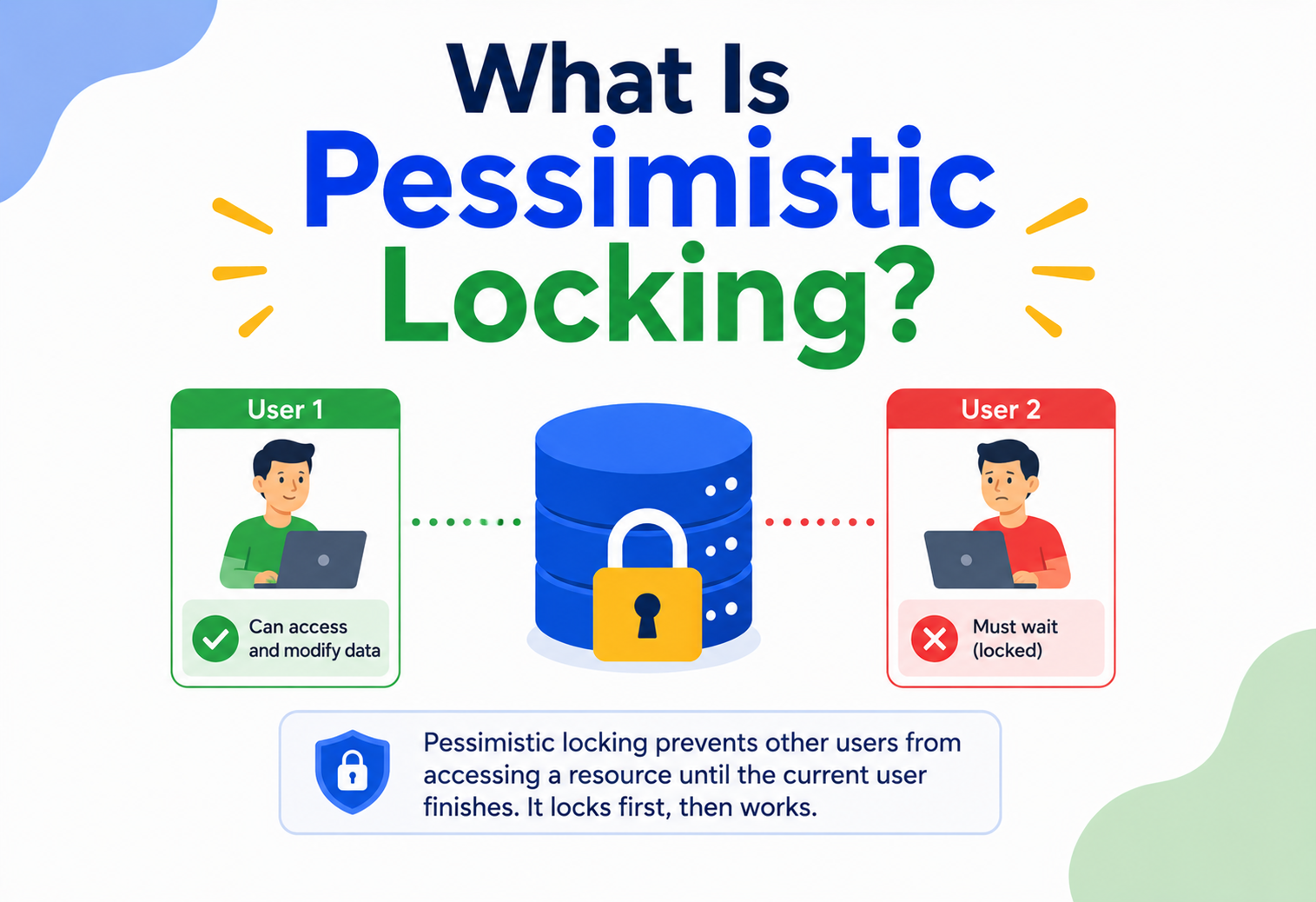
Pessimistic locking is one of the two classic strategies computers use to make sure that when many people want to change the same piece of data at once, they do not step on each other’s toes. The word “pessimistic” is the key clue: this strategy assumes the worst. It assumes a conflict (two people trying to change the same thing) is likely to happen, so it takes action before anything goes wrong — by locking the data first and only letting one user touch it at a time.
Think of a single‑person public restroom. When someone goes in, they lock the door. Everyone else outside has to wait until the door is unlocked — nobody can even try to enter while it is occupied. That, in one image, is pessimistic locking: lock first, then work, then unlock.
A short history
The idea of locking data is not new. It goes back to the early 1970s, when researchers at IBM — including Jim Gray, a computer scientist who later won the Turing Award for his work on transaction processing — were building some of the first database management systems. They needed a way to guarantee that when multiple programs read and wrote data simultaneously, the results would still be correct, exactly as if the programs had run one after another.
This led to the formal idea of a transaction — a group of operations that must all succeed or all fail together — and to concurrency control, the general field of techniques (pessimistic locking among them) that keep simultaneous operations from corrupting data. Pessimistic locking, using mechanisms like two‑phase locking (which we will explain later), became one of the foundational techniques and remains in use today inside nearly every major relational database: PostgreSQL, MySQL, Oracle, SQL Server, and more.
Early 1970s — Transactions and concurrency control formalised
IBM researchers, including Jim Gray, formalise the transaction concept and begin work on concurrency control techniques for the first commercial database systems.
1976 — Two‑Phase Locking (2PL) formalised
Eswaran, Gray, Lorie, and Traiger publish the formal 2PL protocol, giving pessimistic locking a rigorous mathematical foundation for serialisability.
1980s — Row‑level locking becomes standard
Commercial databases move from coarse table‑level locks to fine‑grained row‑level locks, dramatically improving concurrency on shared tables.
1990s — Isolation levels standardised
The SQL standard formalises isolation levels (Read Committed, Repeatable Read, Serializable), tying pessimistic locking behaviour to well‑known guarantees.
2000s — Web scale forces new patterns
High‑traffic web apps and NoSQL stores push optimistic and eventually‑consistent designs alongside classical pessimistic locking.
2010s — Distributed locks and Spanner‑class systems
Redis, ZooKeeper, and etcd popularise distributed lock services; Google Spanner brings pessimistic locking to a globally‑replicated SQL database using synchronised time (TrueTime).
Today — Still the default for high‑stakes writes
Banking transfers, seat booking, inventory management, and ticket sales continue to lean on pessimistic locking because getting it slightly wrong means real money lost or very angry customers.
Why it still matters
Even with modern distributed systems, cloud databases, and NoSQL stores, pessimistic locking has not gone away. In fact, it is more relevant than ever in high‑stakes systems — banking transfers, airline seat booking, inventory management, and ticket sales — where getting it slightly wrong means real money lost or very angry customers.
The Problem & Motivation
Let us build the problem up slowly, using a simple example anyone can picture.
The bank account example
Suppose your bank account has $100. You and your partner both have the banking app open on your phones. At the exact same second, you both try to withdraw $80.
Here is what happens, step by step, without any protection:
Both apps read the balance
Your phone reads: balance = $100. Your partner’s phone also reads: balance = $100.
Both apps calculate the new balance
Your phone calculates $100 − $80 = $20. Your partner’s phone calculates the same: $100 − $80 = $20.
Both apps write the new balance
Your phone writes $20. A split second later, your partner’s phone also writes $20.
The result is wrong
The bank just handed out $160 total, but only subtracted $80 from a $100 account. The final balance shows $20 instead of the correct −$60 (which should have been rejected outright). The bank just lost $80.
This is called a race condition — a situation where the final result of a program depends on the unpredictable timing (the “race”) between two or more operations. It is specifically called a “lost update” problem here, because one of the withdrawals got silently overwritten.
Race conditions do not show up every time you test your code. They might only happen once in ten thousand tries, which makes them incredibly hard to catch before going live — and incredibly expensive when they finally do happen in production.
Other everyday examples
- Concert tickets: two fans click “Buy” on the last seat in the same second. Without protection, the system might sell that one seat twice.
- Online shopping: two customers both add the last item in stock to their cart, and both checkouts succeed — even though only one item existed.
- Google‑Docs‑style editors: two people edit the same paragraph at once, and one person’s edit silently erases the other’s.
All of these are the same underlying problem: multiple actors trying to read, modify, and write the same piece of shared data at the same time, without any coordination.
The motivation for pessimistic locking
Pessimistic locking’s answer to this problem is simple and direct: if you think a conflict is likely, do not let it happen in the first place. Before any user is allowed to read data with the intention of changing it, the system forces them to “claim” it first — the same way you would claim a fitting room by closing and locking the door. Anyone else who wants that fitting room simply waits until you are done.
Notice what this buys you: instead of two people racing to write the same page of the notebook and hoping for the best, only one person is ever allowed to hold the pencil for that page at a time. The second person waits their turn. By the time they get the pencil, they see the first person’s finished note, so their own update is based on correct, up‑to‑date information — not a stale guess. This single idea, applied carefully and consistently, is enough to eliminate an entire category of bugs that are otherwise notoriously difficult to reproduce, debug, and fix after the fact.
Core Concepts
Before we go further, let us build a solid vocabulary. Each term below is one you will see again and again when working with databases.
Lock
A flag the database attaches to a piece of data (row, table, page) saying “this is being used, please wait” — the “occupied” sign on the restroom door.
Transaction
A sequence of one or more database operations treated as a single, indivisible unit: either all of them happen, or none do.
ACID
The four guarantees a transaction should offer — Atomicity, Consistency, Isolation, Durability. Pessimistic locking is a primary tool for delivering Isolation.
Concurrency control
The umbrella term for any technique that manages what happens when multiple transactions run at the same time.
Deadlock
When two transactions each hold a lock the other one needs, and both wait forever, going nowhere.
Blocking
What happens to any transaction that tries to acquire a lock already held by someone else — it pauses and waits.
Granularity
How big or small the locked area is: an entire table, a single row, or even a specific field.
Isolation level
The strictness setting (Read Committed, Repeatable Read, Serializable) that decides how much locking the database applies for you automatically.
Lock — a closer look
Locks exist in many places beyond databases: file systems use them so two programs do not corrupt the same file, operating systems use them to protect shared memory between threads, and distributed systems use “distributed locks” to coordinate across machines. The underlying idea is identical everywhere: prevent more than one process from changing the same resource at the same time.
Transaction — a closer look
Think of a transaction like a recipe step: “crack 2 eggs into the bowl.” You cannot crack “half an egg” — it is one complete action, done fully or not at all. A database transaction has the same all‑or‑nothing character across every SQL statement inside it.
ACID — the four letters, in plain English
| Letter | Means | Plain English |
|---|---|---|
| A | Atomicity | All steps happen, or none do. |
| C | Consistency | The data always follows the rules (e.g., a balance cannot go negative). |
| I | Isolation | Transactions do not interfere with each other, even when they run at the same time. |
| D | Durability | Once saved, it stays saved — even if the power goes out. |
Deadlock — the classic picture
Picture two people in a narrow hallway, each holding a big box, facing each other. Person A needs to pass but is blocked by Person B, and Person B needs to pass but is blocked by Person A. Neither will put down their box, so neither can move. They are stuck — a deadlock. Databases run into exactly this shape when transactions grab locks in incompatible orders.
Granularity, briefly
Finer granularity (row‑level) allows more people to work at once but costs more overhead to manage. Coarser granularity (table‑level) is simpler and cheaper for the database to track, but blocks more people unnecessarily. Choosing the right granularity is one of the central design decisions of any locking‑heavy system.
Architecture & Components
Pessimistic locking is not a single tool — it is a small system of cooperating parts inside your database engine.
Lock Manager
The internal component that tracks who is holding which lock on which piece of data, and decides who has to wait.
Lock Table
An in‑memory table the Lock Manager uses to record: resource ID → lock type → owner transaction.
Wait Queue
A list of transactions waiting for a lock to be released, usually served first‑come‑first‑served.
Deadlock Detector
A background process that periodically checks for circular waiting between transactions and kills one to break the cycle.
Transaction Manager
Coordinates begin, commit, and rollback of transactions, and tells the Lock Manager when to release locks.
Timeout Controller
Ensures a transaction does not wait forever for a lock — it cancels the wait after a configured time limit.
How these pieces fit together
When your application sends a query like “give me this row, and I intend to update it,” the database’s Lock Manager checks its Lock Table. If nobody holds a conflicting lock, it grants one to you and lets the query through. If someone already holds a conflicting lock, your request joins the Wait Queue. Meanwhile, the Deadlock Detector is quietly watching in the background for any circular waiting.
Reading the diagram: the application asks for a row “for update.” The Lock Manager either grants it immediately or makes the request wait. Once the transaction finishes (commit or rollback), the lock is released, and the database automatically wakes up the next waiting transaction, if there is one.
Internal Working
Let us go one level deeper and understand exactly what happens inside the database engine.
Step 1: requesting a lock
When your code runs a statement such as SELECT * FROM accounts WHERE id = 1 FOR UPDATE, you are telling the database: “I want to read this row, and I plan to change it, so please lock it for me now, not later.”
Step 2: lock type decision
The Lock Manager decides what kind of lock to place. The two most fundamental types are:
- Shared Lock (S‑Lock): multiple transactions can hold this at once. It allows only reading, not writing. Think of it like several people reading the same library book copy at once, but nobody being allowed to write in the margins.
- Exclusive Lock (X‑Lock): only one transaction can hold this at a time, and while it is held, nobody else — not even readers in some configurations — can touch the data. This is the “occupied restroom” lock.
Step 3: compatibility check
The Lock Manager uses a small logic table (a “lock compatibility matrix”) to decide if a new lock request can be granted immediately:
| Held lock | New request: Shared | New request: Exclusive |
|---|---|---|
| None | Granted | Granted |
| Shared | Granted | Must wait |
| Exclusive | Must wait | Must wait |
Step 4: Two‑Phase Locking (2PL)
Most real databases follow a protocol called Two‑Phase Locking, which has exactly two phases:
- Growing phase: the transaction can acquire (grab) locks, but cannot release any yet.
- Shrinking phase: the transaction starts releasing locks, and from this point on, cannot acquire any new ones.
In practice, most databases use a simplified version called Strict Two‑Phase Locking, where all locks are held until the transaction fully commits or rolls back, and then released all at once. This is simpler to reason about and avoids certain subtle bugs.
Step 5: deadlock detection
Sometimes Transaction 1 locks Row A and wants Row B, while Transaction 2 locks Row B and wants Row A. Neither can proceed. Databases solve this with a wait‑for graph: a background thread builds a graph of “who is waiting for whom,” and if it finds a cycle, it picks one transaction (usually the one that has done the least work) as the “victim,” aborts it, and lets the other proceed.
If your application hits a deadlock, the database usually throws an error like Deadlock found when trying to get lock. Your code must be ready to catch this and retry the transaction — deadlocks are a normal, expected event in busy systems, not a bug.
Algorithms & Data Structures Behind Locking
It helps to peek at the actual data structures databases use internally. You do not need to memorise these to use locking well, but understanding them removes the “magic” and makes debugging far easier.
The Lock Table as a hash map
At its simplest, the Lock Table is implemented as a hash map where the key is a resource identifier (like table_name + row_id) and the value is a small object describing the lock: its mode (shared or exclusive), the transaction ID that holds it, and a list of transaction IDs waiting for it.
// Simplified conceptual structure
class LockEntry {
    String resourceId;              // e.g. "accounts:row:1"
    LockMode mode;                  // SHARED or EXCLUSIVE
    Set<Long> holders;              // transaction IDs currently holding it
    Queue<LockRequest> waitQueue;   // transactions waiting in order
}
When a transaction requests a lock, the database looks up the resource ID in this hash map in roughly constant time (O(1) average case), checks compatibility against the current holders, and either adds the requester to holders or appends it to the waitQueue.
The wait‑for graph
To detect deadlocks, the database builds a directed graph where each node is a transaction, and an edge from Transaction A to Transaction B means “A is waiting for a lock that B currently holds.” Periodically (or triggered by new waits), the deadlock detector runs a cycle‑detection algorithm (similar to depth‑first search) across this graph. If it finds a cycle — A waits for B, B waits for C, C waits for A — it knows those transactions can never all proceed, and it must abort one of them.
Victim‑selection strategies
Different databases use different heuristics to choose which transaction to sacrifice when a deadlock is found:
- Youngest transaction first: abort whichever transaction started most recently, since it has the least invested work to lose.
- Fewest locks held: abort the transaction holding the fewest resources, minimising the ripple effect of the rollback.
- Lowest priority: some systems let you assign explicit priorities to certain transaction types (e.g., background reports get lower priority than customer‑facing checkouts).
Wound‑Wait and Wait‑Die schemes
Instead of detecting deadlocks after they happen, some systems try to prevent them proactively using transaction timestamps (the moment each transaction started):
- Wait‑Die: an older transaction is allowed to wait for a younger one. But if a younger transaction wants a lock held by an older one, it is immediately aborted (“dies”) rather than waiting.
- Wound‑Wait: an older transaction can forcibly abort (“wound”) a younger transaction that holds a lock it needs. A younger transaction, though, must wait for an older one.
Both schemes guarantee that no cycle can ever form, because they always respect the same ordering rule (older transactions never wait for younger ones, or vice versa), which mathematically rules out circular waiting.
Data Flow & Lifecycle
Let us trace the complete lifecycle of a locked transaction, end to end, using our bank withdrawal example.
Begin transaction
The application tells the database “start a new transaction” (BEGIN).
Acquire lock
The application runs a locking read, such as SELECT ... FOR UPDATE. The Lock Manager grants an exclusive lock on that row.
Business logic executes
The application checks the balance, calculates the new value, and validates business rules (e.g., “is there enough money?”).
Write
The application issues an UPDATE statement. Because the lock is already held, this succeeds instantly with no additional waiting.
Commit or rollback
If everything succeeded, the app issues COMMIT to make the change permanent. If something failed (like insufficient funds), it issues ROLLBACK to undo everything.
Lock release
The moment the transaction ends (commit or rollback), all locks it held are automatically released.
Next transaction proceeds
If any other transaction was waiting for that lock, it is granted immediately and the cycle repeats for them.
Notice the key idea: the lock is held for the entire duration of the transaction, not just for a single statement. This is what makes it “pessimistic” — the system assumes it needs to protect the data for the whole operation, start to finish.
Types of Locks
Different situations call for different lock strengths and scopes. Here is a practical map.
By lock mode
Shared (Read) Lock
Many readers allowed simultaneously. Blocks writers.
Exclusive (Write) Lock
One holder only. Blocks all other readers and writers.
Intent Lock
A “heads‑up” lock placed at a higher level (like the whole table) to signal “I hold a lock somewhere inside here,” so other transactions can quickly check for conflicts without scanning every row.
Update Lock
A special hybrid used by some databases (like SQL Server) to avoid deadlocks that happen when two transactions try to upgrade a shared lock to exclusive at the same time.
By granularity (scope)
Row‑level lock
Locks a single row. High concurrency, more bookkeeping overhead.
Page‑level lock
Locks a fixed‑size block of storage (often containing several rows).
Table‑level lock
Locks the entire table. Simple and cheap to manage, but blocks everyone.
Database‑level lock
Rare, used for administrative operations like schema changes or backups.
Row‑level locking is like locking a single drawer in a filing cabinet. Table‑level locking is like locking the entire cabinet. If ten people just need different drawers, row‑level locking lets them all work at once. Table‑level locking makes them all wait in line even if they do not need the same drawer.
Pessimistic vs. Optimistic Locking
The natural counterpart to pessimistic locking is optimistic locking. Instead of assuming conflicts are likely and locking early, optimistic locking assumes conflicts are rare. It lets everyone read and work freely, and only checks for conflicts right before saving — usually using a version number or timestamp.
Pessimistic locking is like reserving a table at a restaurant before you arrive. Optimistic locking is like walking in and hoping a table is free — and if someone else grabbed “your” table at the same moment, you deal with it right then (find another table, or wait).
How optimistic locking works (briefly)
Every row has a version column. When you read a row, you also read its version (say, version 5). When you save your change, the database runs something like:
UPDATE accounts
SET balance = 20, version = 6
WHERE id = 1 AND version = 5;
If another transaction already updated the row (making the version 6), this statement affects zero rows, and the application knows to retry or show an error — instead of overwriting someone else’s change.
Side‑by‑side comparison
| Aspect | Pessimistic locking | Optimistic locking |
|---|---|---|
| Assumption | Conflicts are likely | Conflicts are rare |
| When it checks | Before the work begins | Right before saving |
| Blocking | Yes, others must wait | No blocking; conflicts handled after the fact |
| Best for | High‑contention data (same row, many writers) | Low‑contention data (rare overlap) |
| Performance under low contention | Slower (unnecessary locking overhead) | Faster (no waiting) |
| Performance under high contention | Predictable, controlled queueing | Many failed retries, wasted work |
| Risk | Deadlocks, reduced throughput | Repeated retries, user‑facing conflict errors |
Pessimistic locking trades some speed for certainty. Optimistic locking trades some certainty for speed.
When to choose which
Choose Pessimistic Locking when
- Many users frequently edit the same records (e.g., limited seat inventory).
- The cost of a conflict is very high (money, safety‑critical data).
- Transactions are short and fast.
Choose Optimistic Locking when
- Conflicts are genuinely rare (e.g., editing your own profile).
- You need maximum read throughput and low latency.
- The system can gracefully handle occasional retries.
Advantages, Disadvantages & Trade‑offs
Weighing pessimistic locking honestly — the real upside, the real cost, and how the balance shifts with contention.
Advantages
- Guarantees data correctness — no lost updates, ever.
- Simple mental model: lock, work, unlock.
- Predictable behaviour under heavy contention (no wasted retries).
- Well supported by every major relational database.
- Ideal for critical operations like payments and inventory.
Disadvantages
- Reduces concurrency — other users must wait.
- Risk of deadlocks if locks are acquired in inconsistent order.
- Locks held too long can cause cascading slowdowns.
- Does not scale well across distributed systems without extra coordination (e.g., distributed locks).
- A crashed or stuck client can hold a lock and block everyone else until timeout.
The core trade‑off
Pessimistic locking trades throughput (how many operations you can process per second) for safety (guaranteed correctness). The more concurrent users you have contending for the exact same row, the more this trade‑off matters. The fewer conflicts you expect, the less it is worth paying this cost.
Performance & Scalability
Locking always has a cost. Understanding where that cost comes from helps you design systems that scale.
Lock contention
Lock contention happens when many transactions want the same lock at the same time, forming a queue. High contention on a “hot row” (like a single popular product’s stock count) can become a serious bottleneck — even if your servers have plenty of CPU and memory left, throughput is capped by how fast that one row’s lock can be acquired and released.
Techniques to improve performance
- Keep transactions short: do all your calculations and validation before acquiring the lock, then lock, write, and commit as fast as possible.
- Use fine‑grained (row‑level) locks: never lock a whole table if you only need one row.
- Lock in a consistent order: if a transaction needs multiple locks, always acquire them in the same order across your whole codebase to avoid deadlocks.
- Set sensible timeouts: do not let a transaction wait forever — fail fast and retry.
- Shard hot data: if one row (like a global counter) is locked constantly, consider splitting it into multiple partial counters that get combined later.
- Use indexes: an unindexed
WHEREclause can cause the database to lock far more rows than necessary (a full table scan under lock).
A transaction that locks a row and then makes a slow network call (e.g., calling a third‑party payment API) before committing is a scalability disaster. That lock is held for the entire duration of that slow call, blocking everyone else. Always do external, slow calls outside the locked transaction when possible.
Scalability in distributed systems
In a single database, locking is straightforward because there is one Lock Manager. But in distributed systems — where data is spread across multiple servers — pessimistic locking needs a distributed lock, often built using coordination tools like ZooKeeper, etcd, or Redis‑based algorithms like Redlock. These add network round‑trips, so distributed pessimistic locks are noticeably slower than local, in‑database locks, and require careful handling of failure scenarios (e.g., what happens if the node holding the lock crashes?).
High Availability & Reliability
Keeping a locking system trustworthy under failure — because a lock that vanishes at the wrong moment, or persists after a crash, can silently corrupt data.
The CAP theorem connection
The CAP theorem states that a distributed data system can only fully guarantee two out of three properties at any moment: Consistency (everyone sees the same data), Availability (every request gets a response), and Partition tolerance (the system keeps working even if network links between servers fail).
Pessimistic locking leans heavily toward Consistency. If a lock cannot be safely granted because part of the system is unreachable, a strict, correct pessimistic system should refuse the request (sacrificing availability) rather than risk a conflict (sacrificing consistency).
Replication and locks
Most production databases use replication — keeping copies of data on multiple servers for safety and read scaling. Locking normally happens only on the primary (leader) node, because it is the only one allowed to accept writes. Replica (follower) nodes receive already‑committed data and generally do not need to worry about write locks for that data.
Failover and lock loss
If the primary node crashes while holding locks, those locks simply vanish along with the crashed process — because most databases keep locks in memory, tied to an active transaction. When a new primary is promoted (failover), any transactions that were mid‑flight are rolled back, and their locks are gone. This is generally safe because of the Durability guarantee: uncommitted work is never considered “done,” so nothing is lost that should not be.
Because in‑progress locked transactions are lost on failover, keep transactions short. A five‑second transaction that gets interrupted just means a five‑second delay and a retry. A five‑minute transaction interrupted mid‑way is a much bigger operational headache.
Security
Locking is not primarily a security feature, but it interacts with security in important ways.
Denial of service via lock abuse
A malicious or careless client could open a transaction, acquire a lock on a critical row (e.g., a popular product), and then simply never commit or roll back — holding the lock indefinitely and blocking every legitimate user. This is effectively a denial‑of‑service attack through resource exhaustion.
Always configure a maximum lock wait timeout and a maximum transaction duration at the database level, so a stuck or abusive client is automatically killed after a set period. Both guards matter: a per‑lock timeout alone will not stop a client that grabs one lock and then simply refuses to commit.
Privilege and access control
Locking a row does not bypass normal access control. A user still needs proper permissions (via database roles, application‑level authorisation, or row‑level security policies) to read or write a row in the first place. Locking only governs the timing and ordering of concurrent access, not who is allowed to access what.
Audit and data integrity
Because pessimistic locking prevents lost updates, it indirectly supports data integrity requirements common in regulated industries (finance, healthcare). Combined with an audit log (a record of who changed what and when), locking helps ensure that the recorded history of changes is trustworthy and sequential, not a jumbled mess of overlapping writes.
Monitoring, Logging & Metrics
In production, you cannot manage what you cannot measure. Here are the key things to track.
Lock wait time
How long transactions spend waiting for locks. Rising wait time is an early warning sign of contention problems.
Deadlock count
Deadlocks detected and resolved per minute/hour. A sudden spike usually means a code change introduced inconsistent lock ordering.
Active locks
How many locks are currently held, broken down by table. Helps identify “hot” tables.
Longest‑held lock
Identifies transactions that are holding locks unusually long — often the root cause of cascading slowdowns.
Lock timeout errors
How often clients give up waiting. A rising trend signals your app needs better retry logic or a redesign to reduce contention.
Transactions per second
Overall throughput; correlate dips with lock wait spikes to confirm locking is the bottleneck.
Practical tools
- PostgreSQL: query the
pg_locksandpg_stat_activitysystem views to see live locks and blocking chains. - MySQL (InnoDB): use
SHOW ENGINE INNODB STATUSor theperformance_schema.data_lockstable. - General: Application Performance Monitoring (APM) tools like Datadog, New Relic, or Prometheus/Grafana dashboards, tracking custom metrics exported from your database driver or ORM.
When you see a “blocked” transaction, always trace it back to the “blocking” transaction that is holding the lock, and look at what that transaction is doing right now — often it is stuck waiting on something else entirely, like a slow external API call.
Deployment & Cloud
Nearly every managed cloud database supports pessimistic locking out of the box, since it is built into the underlying database engine.
Amazon RDS / Aurora
Runs standard PostgreSQL/MySQL engines, so SELECT ... FOR UPDATE works exactly as on self‑hosted instances.
Google Cloud SQL / Spanner
Cloud SQL behaves like standard PostgreSQL/MySQL. Spanner uses its own distributed pessimistic locking combined with a globally synchronised clock (TrueTime).
Azure SQL Database
Supports full SQL Server locking hints, including exclusive and update locks.
Distributed locks (Redis/ZooKeeper)
Used when the “resource” being locked is not a database row but something else, like a scheduled job that must run on only one server.
Cost considerations
Locking itself does not directly cost money in the cloud, but its side effects do: long lock waits mean longer‑running compute instances, more retries, higher CPU usage, and in some managed database pricing models (like pay‑per‑request), wasted retried operations are billed. Efficient, short‑lived locks help control cloud database costs.
Databases, Caching & Load Balancing
Where locking fits among its neighbours — the raw SQL syntax by vendor, its relationship with caches, and how it survives horizontal scaling.
How different databases implement it
| Database | Syntax / mechanism |
|---|---|
| PostgreSQL | SELECT ... FOR UPDATE, FOR SHARE, FOR NO KEY UPDATE |
| MySQL (InnoDB) | SELECT ... FOR UPDATE, LOCK IN SHARE MODE |
| Oracle | SELECT ... FOR UPDATE [NOWAIT | WAIT n] |
| SQL Server | Locking hints: WITH (UPDLOCK, ROWLOCK) |
| MongoDB | Document‑level locking is automatic; explicit multi‑document locking uses transactions with WiredTiger’s concurrency control |
Caching and locking
Caches like Redis or Memcached are often used to speed up reads, but they complicate locking because the cache might hold stale data — a copy that is out of date compared to the database. A common pattern is: acquire the database lock, update the database, then invalidate (delete) the cached entry so the next read fetches fresh data. Some systems use Redis itself as a distributed lock (via SETNX or the Redlock algorithm) to coordinate access across multiple application servers.
Updating the cache directly, instead of invalidating it and letting the next read repopulate it from the now‑correct database, can reintroduce race conditions — two processes might write to the cache in the wrong order, leaving stale data behind even though the database itself is correct.
Load‑balancing considerations
When traffic is spread across multiple application servers behind a load balancer, all of them still connect to the same primary database for writes, so pessimistic locking works correctly regardless of how many app servers exist — the database is the single source of truth for locks. The challenge appears only when you try to build application‑level locks (like “only one server should run this job”), which is why distributed lock services exist.
APIs & Microservices
How locking survives — and stops working the way you expect — when data is split across independently‑owned services.
Locking inside a single service
When one microservice owns a database table exclusively, pessimistic locking works exactly as described throughout this tutorial — it is a local, in‑database concern.
Locking across microservices
Things get harder when a business operation spans multiple services (e.g., “reserve seat” in a Booking Service, then “charge card” in a Payment Service). A database lock in one service cannot protect data in another service’s separate database. Common solutions include:
- Saga pattern: a sequence of local transactions, each with a compensating “undo” action if a later step fails, instead of one giant distributed lock.
- Reservation pattern: the owning service locks and reserves its resource first (e.g., “seat reserved, pending payment”) using a normal pessimistic lock on its own table, with a short expiry, then confirms or releases based on the outcome of later steps.
- Distributed locks: used sparingly, for coordination that truly cannot be modelled as a saga, with tools like Redis, ZooKeeper, or etcd.
API design tip
When exposing endpoints that involve locking (like “reserve”), always design them to be idempotent — calling the same request twice (e.g., due to a network retry) should not reserve two seats or double‑charge. This is usually done with a client‑provided unique request ID.
Design Patterns & Anti‑patterns
The proven shapes that show up in healthy locking‑heavy systems — and the classic traps that show up in the post‑mortems of ones that fell over.
Good patterns
Lock ordering
Always acquire multiple locks in the same, agreed‑upon order (e.g., always by ascending ID) across the entire codebase to prevent deadlocks.
Short transactions
Validate and prepare everything possible before opening the transaction that holds the lock.
Retry with backoff
When a deadlock or timeout occurs, retry the transaction after a short, randomised delay rather than instantly, to avoid repeated collisions.
Explicit timeouts
Always set a maximum wait time for lock acquisition instead of relying on defaults.
Anti‑patterns to avoid
Lock everything
Wrapping entire large operations (including slow, unrelated work) inside one giant lock “just to be safe.”
Nested unordered locking
Acquiring locks on multiple rows/tables in inconsistent order across different code paths — the #1 cause of deadlocks.
External calls under lock
Calling a third‑party API, sending an email, or doing file I/O while holding a database lock.
No timeout
Letting a lock wait indefinitely, risking the entire system grinding to a halt from one stuck client.
Best Practices & Common Mistakes
The rules experienced teams live by — and the mistakes that keep showing up in incident reviews.
Best practices
- Only lock the exact rows you need — prefer row‑level over table‑level locking.
- Keep the time between acquiring a lock and committing as short as possible.
- Always handle deadlock and timeout exceptions gracefully with a retry strategy.
- Add indexes on columns used in your
WHEREclause for locking queries, so the database locks only the rows it truly needs. - Use monitoring dashboards to watch lock wait times and deadlock rates continuously, not just when something breaks.
- Document and enforce a consistent lock‑acquisition order across the whole team.
Common mistakes
- Forgetting to commit or rollback promptly, leaving locks held far longer than necessary.
- Locking in a loop — e.g., locking rows one at a time inside application code instead of using a single, efficient locking query.
- Mixing lock order between different parts of the codebase (one function locks A then B, another locks B then A).
- Ignoring deadlock exceptions instead of catching and retrying them.
- Using pessimistic locking everywhere “just in case,” even for low‑contention data where it only adds unnecessary overhead.
Java Example: Pessimistic Locking with JPA
Here is how pessimistic locking looks in a typical Java application using JPA/Hibernate, applied to our bank withdrawal example.
@Service
public class AccountService {

    @PersistenceContext
    private EntityManager entityManager;

    @Transactional
    public void withdraw(Long accountId, BigDecimal amount) {
        // 1. Acquire a pessimistic exclusive lock on this row.
        //    This issues: SELECT ... FOR UPDATE under the hood.
        Account account = entityManager.find(
            Account.class,
            accountId,
            LockModeType.PESSIMISTIC_WRITE
        );

        // 2. Business logic runs while we safely hold the lock.
        if (account.getBalance().compareTo(amount) < 0) {
            throw new InsufficientFundsException(accountId);
        }

        account.setBalance(account.getBalance().subtract(amount));

        // 3. No explicit save needed; JPA flushes changes on commit.
        // 4. The lock is released automatically when the
        //    @Transactional method finishes (commit or rollback).
    }
}
LockModeType.PESSIMISTIC_WRITE tells JPA to acquire an exclusive lock the moment it fetches the row. Because Spring’s @Transactional wraps this whole method in one transaction, the lock is held for the entire method and released automatically the instant it returns, whether successfully or via an exception.
// Handling deadlocks and timeouts gracefully
@Retryable(
    value = { PessimisticLockingFailureException.class },
    maxAttempts = 3,
    backoff = @Backoff(delay = 100, multiplier = 2)
)
@Transactional
public void withdrawWithRetry(Long accountId, BigDecimal amount) {
    withdraw(accountId, amount);
}
Spring Retry’s @Retryable automatically retries the method if a locking failure (like a deadlock) occurs, waiting a little longer between each attempt (exponential backoff), which is a best practice for production reliability.
// Setting an explicit lock timeout (Hibernate)
Map<String, Object> hints = new HashMap<>();
hints.put("javax.persistence.lock.timeout", 3000); // milliseconds

Account account = entityManager.find(
    Account.class,
    accountId,
    LockModeType.PESSIMISTIC_WRITE,
    hints
);
This tells the database to wait a maximum of 3 seconds for the lock before giving up and throwing a LockTimeoutException, instead of waiting indefinitely.
Real‑World & Industry Examples
How the giants actually use this — and a couple of closer looks at end‑to‑end patterns that combine several of the techniques above.
Core banking systems
Core banking platforms use row‑level pessimistic locks on account balance rows during transfers and withdrawals, since even a tiny miscalculation has direct financial and regulatory consequences.
Airline seat booking
Systems used by major airlines lock a seat record briefly during the reservation step to prevent two passengers being assigned the exact same seat.
Ticketmaster‑style ticket sales
High‑demand ticket sales (concerts, sports) use short‑lived pessimistic locks or reservation holds on individual seats/tickets during checkout, often paired with a countdown timer.
Amazon‑style inventory
Inventory deduction during checkout for limited‑stock items uses row‑level locking on the stock count to avoid overselling the last few units.
Uber‑style driver matching
When matching a driver to a rider, the system locks the driver’s “available” status briefly so two riders cannot be matched to the same driver simultaneously.
Google Spanner
Google’s globally distributed database combines pessimistic locking with a globally synchronised clock (TrueTime) to provide strong consistency across data centres worldwide.
Every system where “the last item” or “the last seat” matters is, underneath, a story about locking.
A closer look: flash‑sale inventory
Imagine an e‑commerce flash sale with exactly 50 units of a limited sneaker release, and 10,000 shoppers refreshing the page at 9:00 AM sharp. Without any concurrency control, the “check stock, then decrease stock” logic would let far more than 50 orders slip through, because thousands of requests would all read “50 in stock” before any of them finished writing the decrement.
A typical production‑grade solution combines several of the techniques covered in this tutorial:
- A queue (like a message queue) absorbs the initial burst of traffic, so the database is not hit with 10,000 simultaneous requests.
- Each queued request is processed one at a time (or in small controlled batches) against the stock row using
SELECT ... FOR UPDATE, guaranteeing the count never goes negative. - Once stock hits zero, subsequent requests immediately receive a “sold out” response without ever needing to wait for a lock.
This pattern — funnel traffic through a queue, then apply a tight pessimistic lock at the very last, smallest possible step — is exactly how many large retailers handle high‑demand product drops without overselling.
A closer look: distributed job scheduling
Large platforms often run scheduled background jobs (like “send daily digest emails”) across many identical server instances for reliability. But if ten instances all wake up and start the same job at once, users would receive the digest ten times. The common fix is a distributed lock: before running the job, each instance tries to acquire a lock (often stored in Redis or a database row) with a short expiry. Only the instance that successfully acquires the lock runs the job; the rest see the lock is already taken and skip their turn. This is pessimistic locking applied outside a traditional database transaction, but the underlying idea — claim exclusive access before acting — is identical.
FAQ, Summary & Key Takeaways
The questions that come up over and over — and a compact set of ideas worth carrying into every future design conversation.
Frequently asked questions
Does pessimistic locking make my application slow?
Not by itself. It adds a small overhead per transaction, and it can create waiting under heavy contention on the same rows. For low‑to‑moderate contention with short transactions, the impact is usually negligible.
Can I use pessimistic locking with NoSQL databases?
Some do (like MongoDB’s document‑level locking), but many NoSQL databases favour eventual consistency and optimistic approaches instead. Check your specific database’s documentation.
What happens if my application crashes while holding a lock?
The database detects the dropped connection and automatically rolls back the open transaction, releasing all its locks. This is a built‑in safety mechanism.
Is pessimistic locking the same as a mutex in programming?
They are conceptually similar — both ensure exclusive access to a shared resource — but a mutex typically protects in‑memory data within a single process, while pessimistic locking protects data at the database level, often across many separate processes and servers.
Can two different lock types be combined?
Yes. Many systems use pessimistic locking for high‑contention critical paths (like payment processing) and optimistic locking elsewhere (like updating a user’s display name), tailoring the approach to each table’s real‑world access pattern.
Does pessimistic locking prevent all types of concurrency bugs?
No. It specifically prevents lost updates and similar write conflicts on the data it locks. It does not automatically prevent application‑level logic bugs, such as incorrect business rules, nor does it protect data that your code forgets to lock in the first place. Locking is a tool, not a substitute for careful transaction design.
How is pessimistic locking related to isolation levels?
Isolation levels (like Read Committed, Repeatable Read, and Serializable) describe the overall guarantees a transaction gets when running concurrently with others. Pessimistic locking is one of the mechanisms databases use to implement stricter isolation levels; the exact locking behaviour can shift depending on which isolation level you choose.
Should beginners worry about implementing locking from scratch?
Almost never. Every mainstream relational database already implements robust, battle‑tested locking internally. Your job as a developer is mainly to use the right SQL clauses (like FOR UPDATE), keep transactions short, and handle errors gracefully — not to reinvent the Lock Manager yourself.
Summary
Pessimistic locking is the “assume the worst” strategy for database concurrency control: before any transaction is allowed to touch data it intends to modify, it must first claim an exclusive right to that data, forcing every other interested transaction to wait its turn. It is built on the foundational ideas of transactions, ACID guarantees, and shared vs. exclusive locks, formalised through the Two‑Phase Locking protocol that nearly every mainstream database uses internally. Its cost is throughput — other users wait — and its reward is guaranteed correctness on the shared data it protects.
It remains the default choice for high‑stakes writes: bank balances, seat inventory, ticket sales, stock counts, driver matching. Modern systems combine it with newer tools — queues to smooth bursts, sagas and reservation patterns to bridge microservices, distributed locks for cross‑machine coordination, monitoring to catch contention before it hurts — but the core idea from the 1970s is unchanged: claim exclusive access before acting.
Key takeaways
- Pessimistic locking assumes conflicts are likely, so it locks data before work begins, forcing other transactions to wait.
- It is built on core database concepts: transactions, ACID, shared/exclusive locks, and the Two‑Phase Locking protocol.
- Internally, a Lock Manager tracks who holds what, queues waiters, and a deadlock detector resolves circular waits.
- It trades some throughput for guaranteed correctness — the opposite trade‑off from optimistic locking.
- Best used for high‑contention, high‑stakes data: bank balances, seat inventory, ticket sales, stock counts.
- In production, always: keep transactions short, lock in consistent order, set timeouts, monitor lock waits and deadlocks, and retry gracefully on failure.
- Across microservices, direct database locks do not span services — patterns like sagas and short‑lived reservations fill that gap.