What Is the MVC Pattern?
Think about a restaurant. The kitchen cooks the food, the waiter takes your order and carries your plate, and the dining table is where you actually see and enjoy the meal. Three different jobs, three different people, all working together so smoothly you barely notice the handoffs. That’s the entire idea behind one of the most widely used patterns in software.
The Big Idea, in One Breath
Imagine trying to run a restaurant where the same person has to cook every dish, memorize every customer’s order, carry every plate, wipe every table, and ring up every bill — all at once, with no one else helping. It would work for exactly one customer before completely falling apart. That’s why real restaurants split the work: someone cooks, someone serves, someone sits and eats. Each person focuses on one job and does it well, and the whole system runs far more smoothly because of that split.
Software applications face a strikingly similar problem. An app needs to store and manage information, needs to show that information to a person in a way they can understand, and needs to react when that person clicks a button or types something in. Cramming all three of those jobs into one tangled pile of code works fine for a tiny toy project, but it quickly becomes a nightmare to understand, fix, or grow as the app gets bigger. The MVC pattern — short for Model, View, Controller — is the software world’s version of splitting up the restaurant’s jobs.
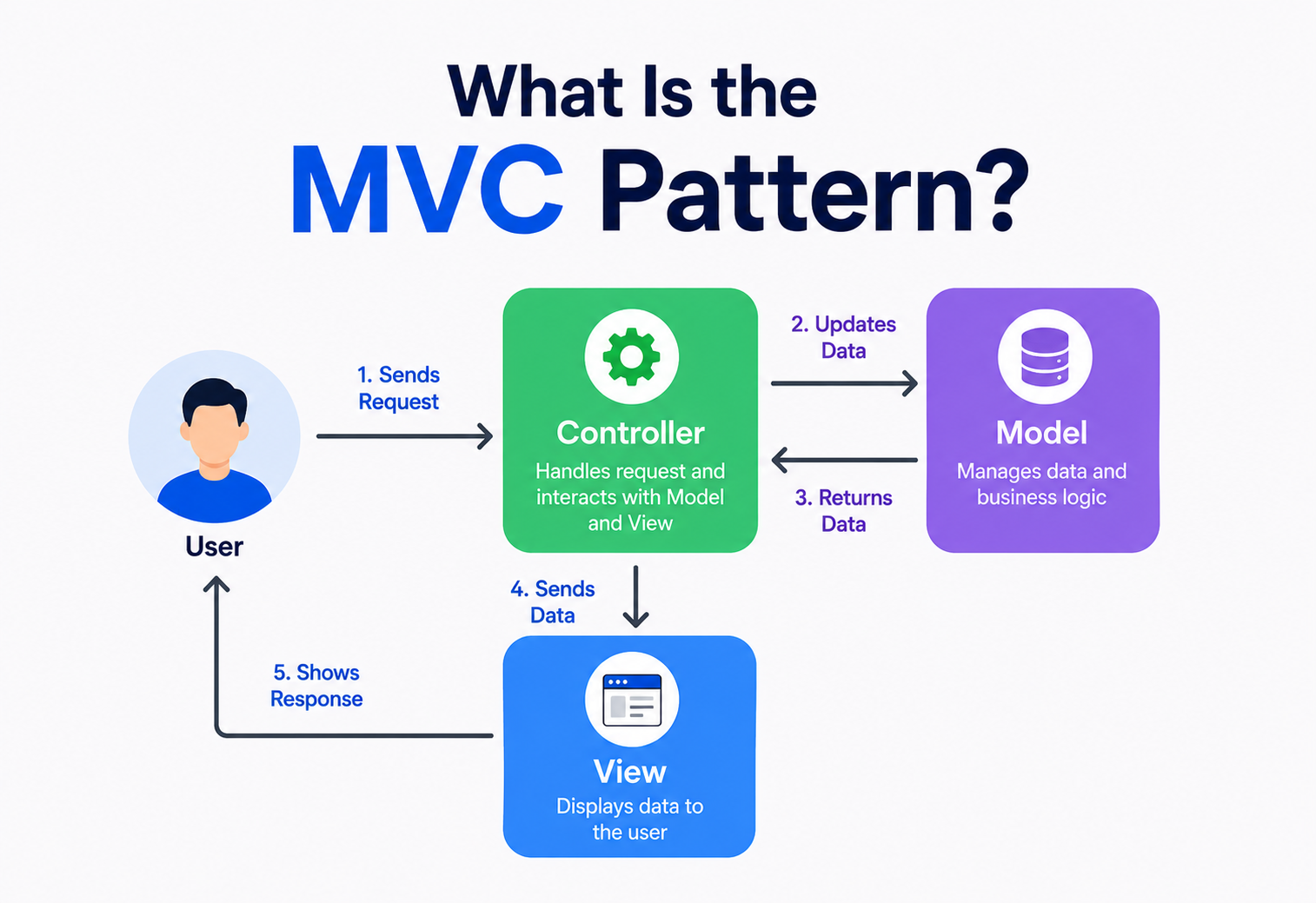
Picture that restaurant one more time. The kitchen is the Model — it holds the real ingredients and does the real work of preparing the food, but customers never walk into it. The table setting, the plate, the way the food is presented to you, is the View — it’s simply how everything gets shown to the customer. The waiter is the Controller — taking your order, walking it to the kitchen, and carrying the finished plate back out to your table. None of the three ever does another one’s job, and that’s exactly why the restaurant runs smoothly even when it’s busy.
In software terms, MVC splits an application into three cooperating pieces, each with one clear responsibility: the Model manages the data and the rules around it, the View displays that data to a person, and the Controller sits in between, taking input from the person and deciding what the Model and View should each do in response. None of the three pieces tries to do another one’s job, which is exactly what keeps the whole application easier to build, test, and grow over time.
What makes this split so powerful isn’t just tidiness for its own sake. It’s that each piece can now change for its own reasons, on its own schedule, without dragging the other two along with it. A designer can redesign how the to-do list looks — new colors, new layout, a completely different visual style — without touching a single line of the logic that actually stores and validates tasks. A backend engineer can rewrite how tasks are stored — moving from a simple list in memory to a proper database — without the screen needing to change at all. That independence is the real prize, and it only becomes possible once the three responsibilities are genuinely kept apart.
What the MVC Pattern Really Is
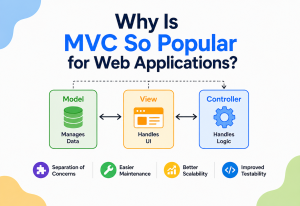
Formally speaking, MVC is an architectural pattern that divides an application into three interconnected parts — Model, View, and Controller — in order to separate the internal representation of information from the way that information is presented to, and accepted from, the user. It’s one of the oldest and most influential patterns in the history of software design, and it laid the groundwork for a great many patterns that came afterward.
Two ideas anchor this pattern, and they’re worth holding onto through the rest of this guide:
- Separation of concerns. Each of the three parts focuses on exactly one job — managing data, displaying data, or responding to input — and stays out of the other two jobs entirely.
- One-way awareness, not equal awareness. The Controller knows about the Model and the View. The View typically knows about the Model, since it needs data to display. But the Model doesn’t know that either the View or the Controller exist at all — it simply does its job, indifferent to who’s watching or asking.
If someone asks “what does MVC actually do?”, the honest short answer is: it keeps the “what the data is,” the “how it looks on screen,” and the “what happens when you interact with it” as three separate, clearly labeled jobs, instead of one giant tangled mess.
A bit of background helps explain why this particular pattern has lasted so long. It was first described in the late 1970s by Trygve Reenskaug, a researcher working on the Smalltalk programming language, who was looking for a clean way to connect a program’s internal data to the graphical windows a person could see and interact with on screen. What started as a solution for early graphical desktop software went on to become one of the most widely adopted architectural ideas in web development, mobile apps, and beyond — a testament to how genuinely useful the underlying idea of separating these three concerns turned out to be.
It’s worth pointing out one small but genuinely important detail: whether MVC counts as a “design pattern” or an “architectural pattern” is something even experienced engineers debate. Design patterns, like the ones covered in the classic Gang of Four catalog, usually describe how a handful of classes relate to each other at a fairly small scale. MVC operates at a larger scale, shaping the overall structure of an entire application rather than just a few classes. Most modern engineers comfortably call it an architectural pattern for exactly this reason, though the two terms get used somewhat loosely and interchangeably in everyday conversation, and there’s no need to lose sleep over which label technically applies.
The Problem It Solves (Why It Matters)
To understand why MVC caught on so widely, it helps to imagine building an application without it. Picture a simple to-do list app where a single file both stores the list of tasks, draws the checkboxes and text on screen, and directly handles what happens when someone clicks “add task” or “mark complete.” Everything lives together, tangled into one long, sprawling piece of code.
This tangled approach — often nicknamed spaghetti code, because tracing any one thread of logic means following it back and forth through everything else — causes a specific set of headaches. Change how a task looks on screen, and there’s a real risk of accidentally breaking the logic that saves tasks to storage, purely because the two were never actually separate to begin with. Testing becomes a nightmare too: to check whether “adding a task” correctly stores it, a test now has to load an entire visual screen, since the storage logic and the screen logic were never split apart.
There’s a deeper, more human cost as well. In any real team, some engineers are especially good at visual design and user experience, while others are especially good at data modeling, business rules, and backend logic. When everything is tangled together in one undivided pile of code, both kinds of engineers end up stepping on each other’s work constantly, since there’s no clean boundary describing which parts belong to whom.
There’s also a growth problem that only becomes obvious later. A to-do list app that starts as a single web page might later need a mobile app version, and maybe eventually a voice-assistant version too. If the data storage logic was never separated from the original web page’s display code, building that mobile version means either copying and adapting a tangled mess, or starting over almost from scratch. When the Model has been kept properly independent from the start, the exact same task-storage logic can be reused as-is, with only a new View and Controller built around it for each new way of presenting the same underlying data.
Small changes ripple everywhere
A tweak to how something looks can accidentally break how data is stored, and vice versa.
Everything is entangled
Testing business logic alone means dragging along the visual layer too.
One look, one implementation
Wanting the same data shown a different way — say, on a mobile app instead of a website — means starting nearly from scratch.
No clean boundaries for teams
Designers and backend engineers keep colliding over the same tangled files.
MVC fixes this by drawing three clear boundaries. The data and its rules live only in the Model. The visual presentation lives only in the View. The coordination between user input and the other two lives only in the Controller. A change to how a task looks on screen now only ever touches the View. A change to how tasks are stored now only ever touches the Model. Each piece can be built, tested, and understood largely on its own.
The Building Blocks
Every implementation of MVC, in any language or framework, is built from the same three roles, connected in a specific, well-defined way.
The data and the rules
Holds the actual information — a list of tasks, a user’s profile, a shopping cart — and the business rules governing how that information can change.
What the person sees
Displays the Model’s data in a human-friendly way — a web page, a mobile screen, a printed receipt — without deciding what that data means.
The coordinator
Takes input from the person — a click, a form submission, a typed command — and decides how the Model and View should respond.
Notice the shape of the arrows. The Model never reaches out to the Controller or the View on its own — it simply holds data and enforces rules, and lets the other two ask it questions or hand it updates. That one-directional flow of awareness is what keeps the Model reusable and easy to test entirely on its own, completely independent of whatever screen or interface happens to be displaying it at any given moment.
Some versions of MVC add a small refinement worth knowing about, sometimes called the “observer” connection between Model and View. Rather than the Controller always explicitly telling the View to redraw itself after every change, the View can instead quietly “subscribe” to the Model, automatically refreshing itself the moment the underlying data changes, no matter what caused that change. This keeps the View always in sync with the latest data, even in situations where a change happens somewhere the Controller wasn’t directly involved — for example, a background process updating a task’s status on its own. Not every implementation of MVC uses this refinement, but many popular ones do, and it’s a detail worth recognizing when reading framework documentation.
How It Works, Step by Step
Let’s build the to-do list example properly, using simple pseudocode that reads a lot like Java, C#, TypeScript, or Python.
Step 1 — The Model owns the data and the rules
TaskModel.tsclass TaskModel {
    private tasks: Task[] = []

    addTask(title: string) {
        if (title.trim() === "") throw new Error("Task cannot be empty")
        this.tasks.push({ title, done: false })
    }

    markComplete(index: number) {
        this.tasks[index].done = true
    }

    getAll() { return this.tasks }
}
Notice the little rule tucked inside addTask — an empty task title isn’t allowed. That’s a business rule, and it belongs here, in the Model, not scattered somewhere in a button’s click handler.
Step 2 — The View only knows how to display
TaskView.tsclass TaskView {
    render(tasks: Task[]) {
        for (const task of tasks) {
            drawCheckbox(task.done)
            drawLabel(task.title)
        }
    }

    showError(message: string) {
        drawErrorBanner(message)
    }
}
Notice what’s missing here entirely: no storage logic, no validation rules, nothing about how tasks are added or completed. The View’s only job is turning data it’s handed into something a person can see.
Step 3 — The Controller coordinates the two
TaskController.tsclass TaskController {
    constructor(private model: TaskModel, private view: TaskView) {}

    onAddTaskClicked(inputText: string) {
        try {
            this.model.addTask(inputText)
            this.view.render(this.model.getAll())
        } catch (err) {
            this.view.showError(err.message)
        }
    }

    onTaskChecked(index: number) {
        this.model.markComplete(index)
        this.view.render(this.model.getAll())
    }
}
The Controller doesn’t store anything itself, and it doesn’t draw anything on screen itself. It simply listens for what the person did, asks the Model to update itself accordingly, and then asks the View to re-display the latest data. It’s the waiter, carrying orders to the kitchen and plates back to the table.
If a bug shows up in the checkbox’s appearance, you know exactly where to look — the View. If a bug shows up in tasks not saving correctly, you know exactly where to look — the Model. That predictability is the entire payoff of the separation.
MVC vs. Related Patterns
MVC has inspired several close cousins over the years, each tweaking the division of responsibility slightly. Knowing the differences helps avoid confusing them in conversation or in a job interview.
| Pattern | How It Divides Responsibility | Key Difference From MVC |
|---|---|---|
| MVC | Model, View, Controller — Controller updates the Model, View reads from the Model. | — |
| MVP | Model, View, Presenter — the View is more passive, and the Presenter updates it directly. | The View never talks to the Model directly; everything routes through the Presenter. |
| MVVM | Model, View, ViewModel — the ViewModel exposes data in a form the View can bind to automatically. | Uses data-binding so the View updates itself automatically when the ViewModel’s data changes. |
| Layered Architecture | Presentation, business logic, and data layers stacked on top of each other. | A broader, more general split; MVC is really a specific way of organizing the presentation layer. |
A simple way to keep these apart: in classic MVC, the View is often allowed to read directly from the Model, which keeps things simple but means the View and Model know a little about each other. MVP and MVVM both try to remove that direct connection, giving the View even less responsibility and making it easier to swap out or test in isolation — a natural evolution as applications, and their screens, grew more complex over time.
Every one of MVC’s cousins is really just a different opinion about exactly how “hands-off” the View should be.
Real-World Examples You’ve Already Used
MVC isn’t just a diagram in a textbook — it quietly runs an enormous share of the software you use every day.
Ruby on Rails, Django, Spring MVC
Each of these popular frameworks organizes an entire web application around Models, Views, and Controllers by default.
Classic iOS app structure
Apple’s original application frameworks were explicitly built around MVC, shaping how a generation of mobile apps were structured.
Word processors and spreadsheets
The document’s actual content is the Model, the window showing it is the View, and menu clicks and keystrokes are handled by a Controller.
A physical, real-world example
Your account balance and transaction rules are the Model, the screen is the View, and the keypad-driven logic deciding what happens next is the Controller.
Even something as simple as a vending machine follows the same basic shape. The stock count and pricing rules are the Model. The lit-up display showing your selection and change owed is the View. The buttons, coin slot, and the logic deciding whether you’ve paid enough are the Controller. None of these three jobs could be swapped for another without the whole machine breaking down.
Weather apps offer one more especially clear example, since the same underlying data so visibly powers multiple different Views. A single weather Model — today’s temperature, the forecast, the chance of rain — might be displayed as a simple text summary in a phone’s notification, as a colorful animated icon on a home screen widget, and as a detailed hour-by-hour chart inside the full app. All three Views are reading from the exact same underlying Model, each simply choosing to present that shared data differently, which is precisely the kind of flexibility MVC is designed to make easy.
Strengths and Trade-offs
Strengths
- Each part can be built, understood, and tested largely on its own.
- The same Model can power multiple different Views — a website and a mobile app, for instance.
- Teams can divide work cleanly along the three boundaries.
- Bugs are easier to trace, since each concern lives in a predictable place.
- A well-worn, widely documented pattern with strong community support.
Trade-offs
- Adds structure and files that feel like overkill for a very small project.
- New engineers need to learn the convention before it starts paying off.
- Controllers can quietly become overloaded if discipline slips.
- Some frameworks apply MVC loosely, causing inconsistent implementations across projects.
- Doesn’t, by itself, solve every architectural challenge in a large system.
MVC’s value grows with a project’s size and lifespan. A five-minute script barely benefits from it; a multi-year application maintained by a growing team benefits enormously.
When to Reach for It (and When Not To)
Applications with a real user interface
Any app where data needs to be shown to, and changed by, a person benefits from separating those two concerns.
Multiple views of the same data
A dashboard that needs both a chart view and a table view of the same underlying numbers is a natural fit.
Teams split by specialty
Designers and backend engineers can each work confidently within their own boundary.
A tiny script or one-off tool
A ten-line script that reads a file and prints a result gains little from three formal layers.
A useful gut-check question: “Will more than one person ever need to touch this code, or will this application ever need to be shown in more than one way?” If either answer is yes, MVC’s structure tends to pay for itself quickly. If the honest answer to both is no, a simpler, more direct approach may genuinely be the better choice — at least until the project grows into needing more structure.
It also helps to think about the expected lifespan of what’s being built. A demo thrown together to test an idea over a weekend, destined to be thrown away or completely rewritten soon after, rarely benefits from the discipline MVC asks for. A production application expected to be maintained, extended, and handed between different engineers over several years benefits enormously, because the clear boundaries MVC establishes tend to outlive any single engineer’s personal familiarity with the codebase’s finer details.
Common Pitfalls and Best Practices
The “Fat Controller” Problem
It’s tempting to let the Controller quietly absorb business logic that really belongs in the Model — validation rules, calculations, decisions about what’s allowed. Over time this turns the Controller into an overloaded, tangled class doing far more than coordination, undoing much of the benefit MVC was meant to provide. Business rules belong in the Model, even when it feels faster in the moment to just write them directly in the Controller.
Letting the View Make Decisions
A View that starts containing real logic — deciding prices, validating input, deciding what counts as “complete” — has quietly taken on the Model’s job. Keep the View strictly focused on formatting and displaying whatever data it’s handed.
A Model That Knows Too Much About the View
If Model code starts formatting dates for display, or returning data shaped specifically for one particular screen, it’s tightly coupling itself to a single View, undermining the reusability that was one of MVC’s biggest selling points in the first place. A healthy Model returns clean, general-purpose data, and lets the View decide how to present it.
Treating MVC as a Cure-All
MVC organizes the presentation side of an application well, but it isn’t a complete answer to every architectural question a large system faces — things like how services communicate, how data is stored at scale, or how a system handles heavy traffic usually call for additional patterns working alongside MVC, not instead of it.
Whenever you’re about to write a line of code, ask which of the three jobs it actually belongs to — storing and enforcing rules, displaying information, or coordinating a response to user input. That one habit prevents most MVC violations before they happen.
Skipping the Controller Entirely
Some smaller applications, especially ones built quickly under deadline pressure, quietly let the View call directly into the Model, skipping the Controller altogether “just this once.” Done occasionally and deliberately, this rarely causes harm. Done repeatedly across a growing codebase, it slowly erodes the very separation MVC was meant to provide, until the View has quietly become responsible for coordination too, and the boundaries that once made the codebase predictable start to blur.
A Quick Tour Across Frameworks
The core idea stays remarkably consistent, though every framework brings its own flavor and naming conventions.
| Framework / Platform | How MVC Typically Appears |
|---|---|
| Ruby on Rails | One of the earliest and most influential web frameworks to make MVC a built-in, opinionated default, with folders literally named models, views, and controllers. |
| Django (Python) | Follows the same spirit, though it names its own version slightly differently, often described as Model-Template-View. |
| Spring MVC (Java) | A long-standing, widely used enterprise framework built explicitly around the MVC name and structure. |
| ASP.NET MVC (C#) | Microsoft’s web framework offering a very direct, textbook implementation of Models, Views, and Controllers. |
What stays constant across every one of these frameworks is the underlying discipline: keep data and rules in one place, keep presentation in another, and keep the coordination logic connecting them somewhere clearly separate from both. Once that habit becomes second nature, recognizing — and correctly using — MVC in any new framework becomes far easier, since the names may change, but the underlying shape almost never does.
Key Takeaways
Remember This
- MVC splits an application into three roles: the Model manages data and rules, the View displays it, and the Controller coordinates between the two.
- It solves the tangled-code problem that shows up when data, display, and interaction logic are all mixed together in one place.
- The Model never depends on the View or Controller — it stays independent and reusable, no matter how the data ends up being displayed.
- MVC has inspired close cousins like MVP and MVVM, each adjusting how hands-off the View is kept.
- Its biggest strengths are testability, reusability, and clean team division — its biggest risk is controllers or views quietly absorbing logic that isn’t really theirs.
- MVC is a strong default for anything with a real user interface, but it’s one tool among many, not a complete answer to every architectural challenge.