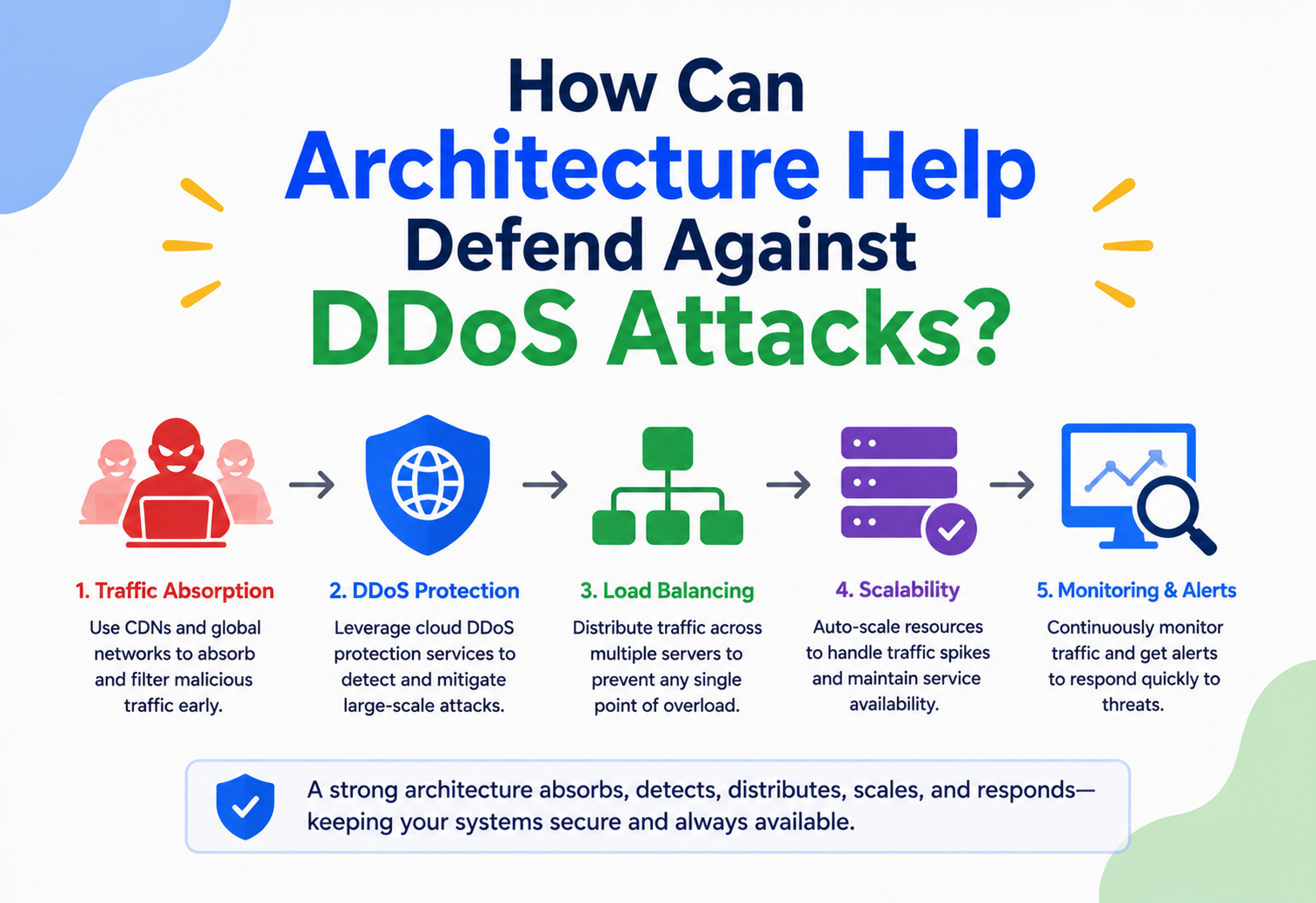
How Can Architecture Help Defend Against DDoS Attacks?
A complete, beginner‑to‑production guide to designing systems that absorb, filter, and survive Distributed Denial of Service attacks — from first principles to the exact patterns Netflix, Cloudflare, and AWS use in production.
Introduction & History
What a DDoS attack actually is, and how defending against it became an architecture problem instead of just a “buy more bandwidth” problem.
Imagine a small bakery with one door. On a normal morning, forty customers walk in, buy bread, and leave. One day, a rival pays two thousand people to walk in, stand in line, ask questions, and never buy anything. The real customers can’t get through the door. The bakery hasn’t been robbed, hacked, or damaged — it has simply been overwhelmed by volume of legitimate‑looking traffic. That is precisely what a Distributed Denial of Service (DDoS) attack does to a website, API, or network: it floods the “door” — a server, a link, an application endpoint — with so many requests that real users cannot get through.
A Denial of Service (DoS) attack is any attempt to make a computer resource unavailable to its intended users. The “Distributed” in DDoS means the attack doesn’t come from one machine, but from thousands or millions of machines simultaneously — usually a botnet, a network of compromised devices (computers, routers, IoT cameras, smart fridges) controlled remotely by an attacker without their owners’ knowledge.
A short history
The concept dates back further than most people expect:
SYN flood attacks emerge
Attackers begin exploiting the TCP three‑way handshake to exhaust server connection tables — the first mainstream protocol‑layer DoS technique.
MafiaBoy takes down Yahoo, CNN, eBay, Amazon
A 15‑year‑old, using simple flooding tools, disrupts several of the largest internet companies of the era — proving DDoS could hit anyone.
Estonia is hit by a nationally coordinated campaign
Government, banking and media sites are targeted simultaneously, marking DDoS as a geopolitical weapon, not just a technical nuisance.
Spamhaus attack — ~300 Gbps
DNS amplification is used to generate the then‑largest attack on record, showing what a well‑engineered reflection technique can do.
Mirai botnet takes down Dyn — ~1.2 Tbps
Thousands of hacked IoT cameras and routers are weaponised to disrupt Twitter, Netflix, Reddit and more across the U.S. via DNS.
AWS Shield mitigates a 2.3 Tbps attack
One of the largest volumetric attacks ever recorded against cloud infrastructure — and it is absorbed, not defeated.
HTTP/2 “Rapid Reset” sets new records
Protocol‑level stream cancellation generates hundreds of millions of requests per second with comparatively modest botnets — efficiency, not brute force.
Some of the notable milestones in that timeline in detail:
- 1996 — SYN flood attacks emerge, exploiting the TCP three‑way handshake to exhaust server connection tables.
- 2000 — MafiaBoy, a 15‑year‑old, takes down Yahoo, CNN, eBay, and Amazon using simple flooding tools, demonstrating that DDoS could disrupt even the largest internet companies of the era.
- 2007 — Estonia experiences a nationally coordinated DDoS campaign against government, banking, and media sites, marking DDoS as a geopolitical weapon.
- 2013 — Spamhaus attack reaches roughly 300 Gbps using DNS amplification, at the time the largest attack ever recorded.
- 2016 — Mirai botnet compresses thousands of hacked IoT devices (cameras, routers) into a botnet that takes down Dyn’s DNS infrastructure, disrupting Twitter, Netflix, Reddit, and more across the U.S. This attack peaked around 1.2 Tbps and proved that ordinary consumer devices could be weaponized at massive scale.
- 2020 — AWS Shield mitigates a 2.3 Tbps attack, one of the largest volumetric attacks recorded against cloud infrastructure.
- 2023–2024 — HTTP/2 “Rapid Reset” attacks exploit protocol‑level stream cancellation to generate record‑breaking request rates (hundreds of millions of requests per second) with comparatively modest botnet sizes, showing that attacks are shifting from “brute force bandwidth” toward “protocol‑level efficiency.”
What’s important for architects is the trend line: attacks have grown from a handful of machines flooding a single server, to global botnets capable of terabits‑per‑second floods, to highly efficient protocol‑level attacks that need far less bandwidth to cause equal damage. Defense has therefore moved from a purely network‑engineering problem (“buy a bigger pipe”) into a full‑stack architecture discipline spanning network design, application design, caching, rate limiting, and organizational readiness.
A DDoS attack is like a flash mob deliberately blocking every checkout counter in a supermarket at once — not to steal anything, but purely so that real shoppers can never reach the register. No single “guard” can stop it because the mob is everywhere at once; you need store‑wide design changes: more counters, ID checks at the door, and a way to spot fake shoppers before they even enter the queue.
Why architecture, and not just “more servers”
A common beginner instinct is: “if traffic overwhelms my server, just add more servers.” This works for organic growth (a viral blog post, a product launch) but fails against a determined DDoS attacker for a simple reason: attackers can generate traffic faster and cheaper than you can provision capacity. A botnet with 100,000 compromised devices can, in seconds, generate more concurrent connections than most companies could ever cost‑effectively provision servers for. This is why defense against DDoS is fundamentally an architecture problem — you need layered systems that absorb, filter, and shed malicious traffic long before it reaches your application code, combined with application‑level designs that make legitimate work cheap and illegitimate work expensive.
Problem & Motivation
What breaks, who it affects, and why every production system architect must plan for this.
What exactly breaks
When a DDoS attack succeeds, one or more of these resources gets exhausted:
| Resource | What gets exhausted | Typical attack type |
|---|---|---|
| Network bandwidth | The “pipe” into your data center or cloud region fills up with junk traffic | Volumetric (UDP floods, amplification) |
| Connection state tables | Firewalls, load balancers, and OS network stacks run out of memory tracking half‑open connections | Protocol (SYN flood, ACK flood) |
| Application threads / worker pools | Every thread is busy handling slow or expensive requests, none left for real users | Application‑layer (Slowloris, HTTP flood) |
| Backend compute (CPU/DB) | Expensive endpoints (search, PDF generation, complex queries) are hammered directly | Application‑layer, “smart” floods |
| DNS resolution | DNS servers can’t answer lookups, so nobody can even find your IP address | DNS query floods |
Beginner example
Picture a personal blog running on a single virtual machine with Apache and MySQL. A script kiddie downloads a free tool, points it at the blog’s IP address, and sends 500 requests per second from a handful of rented servers. Apache’s default worker limit is exhausted within seconds; the VM’s CPU pins at 100% running database queries for every request; legitimate visitors just see a spinning browser tab and eventually a timeout. No hacking occurred — nothing was “broken into” — the service was simply denied to real users.
Software / mid‑size example
A mid‑size e‑commerce company runs a Spring Boot monolith behind a single load balancer and one PostgreSQL primary. During a flash sale promotion (announced publicly, so the URL is easy to find), a competitor hires a “stresser” service to flood the checkout API with fake POST /orders requests. Because checkout writes to the database and calls a third‑party payment gateway, each malicious request is expensive — tying up connection pool slots and payment gateway rate limits. Real customers can’t check out even though the front page loads fine, because the damage is concentrated on the most expensive code path.
Production example: Netflix, Amazon, Uber‑scale motivation
At the scale of Netflix, Amazon, or Uber, a DDoS attack is not a hypothetical — it is treated as a near‑certainty over the system’s lifetime. These companies architect for it the same way they architect for a data center catching fire: not “if” but “when.” A single hour of downtime for a global e‑commerce checkout system can cost millions of dollars in lost revenue, plus a much longer tail of reputational damage and SLA penalties to enterprise customers. This is why organizations at this scale invest in dedicated DDoS scrubbing infrastructure (their own or a vendor’s, like AWS Shield, Cloudflare, or Akamai), globally distributed points of presence, and automated traffic‑shedding logic baked directly into their service architecture — not bolted on after an incident.
DDoS defense cannot be “someone else’s job” handled purely by a network team. Application architecture decisions — which endpoints are public, how expensive each request is, whether authentication happens before or after expensive work, how caching is layered — directly determine whether a flood of traffic is a non‑event or an outage. This is why DDoS defense belongs in the same conversation as your system’s overall architecture, not as an afterthought.
The motivation behind attacks
- Extortion — “pay us or we keep flooding you” (common against gambling and crypto platforms).
- Competitive sabotage — disrupting a rival during a critical business moment (product launch, sale, exam registration).
- Hacktivism — political or ideological protest against an organization.
- Smokescreen — distracting security teams with a loud volumetric attack while a separate, quieter data breach is attempted.
- Nation‑state disruption — attacking critical infrastructure, banking, or government services during geopolitical conflict.
Core Concepts
The vocabulary you need before any architecture diagram makes sense.
Types of DDoS attacks by OSI layer
DDoS attacks are usually grouped by which layer of the network stack they target. This matters architecturally because each layer needs a different defense mechanism — you cannot stop an application‑layer flood with a network firewall rule alone.
| Category | OSI Layer | Example attacks | What it exhausts |
|---|---|---|---|
| Volumetric | Layer 3/4 (Network/Transport) | UDP flood, ICMP flood, DNS/NTP amplification | Raw bandwidth |
| Protocol | Layer 3/4 | SYN flood, ACK flood, Ping of Death, Smurf attack | Connection state tables, firewall/router CPU |
| Application‑layer | Layer 7 | HTTP flood, Slowloris, HTTP/2 Rapid Reset, expensive‑query flood | Application threads, database, backend CPU |
Key terms explained
Amplification attack
What: The attacker sends a small request to a third‑party server (like a DNS resolver) with a spoofed source IP address set to the victim’s IP. The server replies with a much larger response, sent directly to the victim. Why: This lets attackers achieve enormous traffic volume using relatively little bandwidth of their own — some DNS amplification techniques can achieve 50x or greater amplification. Analogy: It’s like calling a pizza restaurant, saying “Deliver 50 pizzas to my neighbor’s house, they’ll pay,” and hanging up — the restaurant (an innocent third party) does the heavy lifting of overwhelming the victim.
Botnet
What: A large network of compromised devices under an attacker’s remote control, used to generate distributed attack traffic. Why it matters: Because traffic originates from thousands of genuinely different IP addresses (real home routers, cameras, servers), simple IP‑blocking defenses don’t scale — you’re blocking a firehose of individually plausible‑looking sources.
SYN flood
What: Exploits the TCP handshake (SYN → SYN‑ACK → ACK). The attacker sends many SYN packets but never completes the handshake with the final ACK, leaving the server holding “half‑open” connections until they time out. Why: Each half‑open connection consumes a slot in the server’s connection table; enough of them exhaust the table and legitimate connections get rejected.
Slowloris
What: An application‑layer attack that opens many HTTP connections and sends data extremely slowly (a few bytes every few seconds), keeping each connection “alive” and occupying a server worker thread indefinitely. Why it’s dangerous: It needs very little bandwidth — a single machine can take down a poorly configured server — because it targets thread/connection limits, not bandwidth.
Rate limiting
What: Restricting how many requests a client (identified by IP, API key, or user account) can make within a time window. Why: It caps the damage any single source can do, forcing an attacker to use far more distributed sources to achieve the same effect.
Scrubbing center
What: A specialized data center (run by providers like Cloudflare, Akamai, or AWS Shield) that traffic is routed through during an attack. It inspects and filters malicious packets, forwarding only clean traffic to the origin server. Analogy: Like a water treatment plant — dirty water (mixed legitimate and malicious traffic) goes in, and only clean water (legitimate traffic) comes out the other side.
Anycast routing
What: A network addressing method where the same IP address is announced from multiple geographically distributed locations. Routers automatically send each user’s traffic to the nearest location. Why it matters for DDoS: It naturally spreads attack traffic across many data centers instead of concentrating it on one, and lets a provider “absorb” an attack across globally distributed capacity rather than a single choke point.
Web Application Firewall (WAF)
What: A layer‑7 filter that inspects HTTP requests against rules (known attack signatures, request anomalies, bot fingerprints) and blocks or challenges suspicious ones before they reach the application. Why: Volumetric defenses can’t tell a malicious POST /login from a legitimate one — that judgment call happens at the WAF layer, which understands HTTP semantics.
CAPTCHA / proof‑of‑work challenges
What: A challenge presented to a suspicious client to prove it’s operated by a human (CAPTCHA) or willing to spend real computational effort (proof‑of‑work, like Cloudflare’s “checking your browser” page). Why: It’s cheap for one legitimate user to solve once, but expensive for a botnet to solve millions of times, tilting the economics back in the defender’s favor.
Imagine a coffee shop that lets each customer order at most 3 drinks per visit. This doesn’t stop a legitimate group of 10 friends from getting coffee (they just queue individually), but it makes it economically painful for someone trying to buy out the entire stock — they’d need to send in hundreds of individual “customers” (i.e., distribute across many IPs), which is exactly what rate limiting forces an attacker to do.
CAP theorem relevance
DDoS defense interacts with the CAP theorem (a distributed system can only fully guarantee two of Consistency, Availability, and Partition tolerance at once) in a specific way: under a volumetric attack, your system is effectively experiencing a severe, artificial network partition — the “pipe” between users and your service is saturated with junk. Architectures that lean toward Availability (serving slightly stale cached content, degrading gracefully, allowing eventual consistency) survive DDoS far better than architectures that insist on strict consistency for every read, because strict‑consistency reads usually require a live round trip to a primary database — exactly the resource an attacker is trying to exhaust.
Architecture & Components
The layered “defense in depth” architecture that production systems use.
No single component stops a DDoS attack. Production‑grade defense is built as a series of concentric rings, each catching what the previous ring missed — much like airport security has a perimeter fence, a bag scanner, a metal detector, and a final gate check, rather than relying on just one checkpoint.
Component breakdown
1. Anycast network edge
Traffic first lands at the nearest of dozens or hundreds of globally distributed points of presence (PoPs) rather than traveling directly to your origin server. This alone defeats a large class of volumetric attacks, since the attack traffic gets spread thin across the provider’s entire global capacity instead of hitting one link.
2. Scrubbing center / managed DDoS protection
Specialized infrastructure (AWS Shield Advanced, Cloudflare Magic Transit, Akamai Prolexic, Azure DDoS Protection) inspects traffic patterns in real time, using traffic baselining to detect anomalies and automatically reroute or drop malicious packets — all before traffic reaches anything you manage directly.
3. Edge firewall & network‑layer rate limiting
Stateful firewalls and network ACLs enforce coarse rules: block known‑bad IP ranges, cap connections per source IP, drop malformed packets, and enforce SYN cookies to defeat SYN floods without holding state for every half‑open connection.
4. Web Application Firewall (WAF)
Operates at Layer 7, understanding HTTP/HTTPS semantics. It blocks known attack signatures (SQLi, XSS payloads riding along with flood traffic), enforces geo‑blocking if needed, and applies bot‑detection heuristics (missing headers, suspicious user agents, abnormal request timing).
5. Load balancer
Distributes legitimate traffic across many backend instances, terminates TLS (offloading expensive cryptographic handshakes from application servers), and can itself enforce connection limits and health‑check‑based traffic shedding — automatically pulling overloaded instances out of rotation.
6. Application‑layer defenses
This is where architecture decisions inside your own codebase matter most: per‑user/per‑API‑key rate limiting, authentication before expensive work, circuit breakers around downstream dependencies, and request validation that rejects malformed or oversized payloads early.
7. Caching layer
A CDN or in‑memory cache (Redis, Memcached) serves repeated requests for the same content without touching the origin server or database at all — turning what would be an expensive database hit into a cheap memory lookup, dramatically raising the bar an attacker must clear to cause real damage.
8. Database & backend services
The innermost, most expensive, and most protected ring. Connection pooling, query timeouts, read replicas, and prepared statement limits ensure that even traffic that makes it this far cannot exhaust the database’s capacity for legitimate transactions.
Java / Spring Boot example: a minimal application‑layer rate limiter
While network‑layer defenses (firewalls, scrubbing centers) are typically infrastructure, not code, application architects still need to build defense‑in‑depth inside the service itself. Here’s a simple token‑bucket rate limiter implemented as a Spring Boot filter, protecting a specific endpoint from being hammered even if it slips past upstream defenses:
@Component
public class RateLimitingFilter extends OncePerRequestFilter {

    // In production, back this with Redis (see section 13) so limits
    // are shared across all instances, not per-JVM.
    private final Map<String, TokenBucket> buckets = new ConcurrentHashMap<>();

    private static final int CAPACITY = 20;      // max burst
    private static final int REFILL_PER_SEC = 5; // sustained rate

    @Override
    protected void doFilterInternal(HttpServletRequest request,
                                     HttpServletResponse response,
                                     FilterChain chain)
            throws ServletException, IOException {

        String clientKey = resolveClientKey(request); // IP, API key, or user ID
        TokenBucket bucket = buckets.computeIfAbsent(clientKey,
                k -> new TokenBucket(CAPACITY, REFILL_PER_SEC));

        if (bucket.tryConsume()) {
            chain.doFilter(request, response);
        } else {
            response.setStatus(429); // Too Many Requests
            response.setHeader("Retry-After", "1");
            response.getWriter().write("{"error":"rate_limit_exceeded"}");
        }
    }

    private String resolveClientKey(HttpServletRequest request) {
        String apiKey = request.getHeader("X-API-Key");
        return apiKey != null ? apiKey : request.getRemoteAddr();
    }
}

class TokenBucket {
    private final int capacity;
    private final int refillPerSecond;
    private double tokens;
    private long lastRefillTimestamp;

    TokenBucket(int capacity, int refillPerSecond) {
        this.capacity = capacity;
        this.refillPerSecond = refillPerSecond;
        this.tokens = capacity;
        this.lastRefillTimestamp = System.nanoTime();
    }

    synchronized boolean tryConsume() {
        refill();
        if (tokens >= 1) {
            tokens -= 1;
            return true;
        }
        return false;
    }

    private void refill() {
        long now = System.nanoTime();
        double secondsElapsed = (now - lastRefillTimestamp) / 1_000_000_000.0;
        tokens = Math.min(capacity, tokens + secondsElapsed * refillPerSecond);
        lastRefillTimestamp = now;
    }
}
This is a last line of defense, not a replacement for upstream network‑layer protection — a determined volumetric attacker will exhaust your bandwidth or connection table long before this filter code even runs. But it is essential protection against application‑layer floods and abusive clients that slip past the perimeter, and it demonstrates the principle that every layer of your architecture should assume the layer above it might fail.
Internal Working
What actually happens, packet by packet and request by request, during detection and mitigation.
Step 1: Baseline traffic modeling
Before any attack even starts, DDoS protection systems continuously build a statistical baseline of “normal” traffic for your service: typical requests per second, typical geographic distribution of clients, typical ratio of GET to POST requests, typical packet sizes. This baseline is what makes anomaly detection possible — the system isn’t looking for “bad” traffic (attackers can make individual packets look perfectly legitimate); it’s looking for statistical deviation from the norm.
Step 2: Detection
Detection uses several signals in combination:
- Volume‑based thresholds: requests per second (RPS) or bits per second (bps) exceeding some multiple of baseline.
- Traffic shape anomalies: sudden spikes from a narrow set of ASNs (network providers), abnormal SYN‑to‑ACK ratios, unusual packet size distributions.
- Behavioral fingerprinting: clients that don’t execute JavaScript, don’t render cookies, or complete requests in impossibly consistent timing intervals (real humans are “jittery”; scripts are metronomic).
- Protocol violations: malformed headers, TCP options that don’t match any known real browser/OS combination.
Step 3: Mitigation activation
Once detection crosses a threshold, mitigation typically escalates progressively rather than switching on all at once (to minimize false positives against real users):
Step 4: SYN cookies (protocol‑layer defense in detail)
A particularly elegant internal mechanism worth understanding deeply is the SYN cookie, used to defeat SYN floods without consuming server memory for half‑open connections. Normally, when a server receives a SYN packet, it allocates memory to track that “pending” connection while waiting for the final ACK. Under a SYN flood, attackers never send that ACK, and the table fills up.
With SYN cookies, instead of storing state, the server encodes the connection information (source/destination IP and port, a timestamp, a hash of a secret key) directly into the sequence number of its SYN‑ACK reply, and stores nothing. If the real client responds with the correct ACK (reflecting that sequence number + 1), the server can reconstruct the connection state purely from the ACK packet itself — no table lookup needed. If the ACK never arrives (as with attack traffic), no memory was ever wasted.
It’s like a restaurant that, instead of writing down every phone reservation in a notebook (which could be filled up by prank calls), instead tells each caller “your table number is a code based on your phone number and the time you called — just repeat that code back when you arrive.” No notebook page is wasted on callers who never show up.
Step 5: Application‑layer request lifecycle under attack
Inside the application itself, a well‑architected request pipeline evaluates cost before doing expensive work:
- Cheap checks first: Is the request well‑formed? Is there a valid API key or session token? (microseconds, in‑memory)
- Rate limit check: Has this client exceeded its quota? (single Redis lookup, sub‑millisecond)
- Cache check: Can this be served from cache without touching the database? (sub‑millisecond to a few milliseconds)
- Expensive work last: Only requests that pass all prior gates reach database queries, third‑party API calls, or heavy computation.
This ordering — cheapest checks first — is one of the single most important internal architecture principles for DDoS resilience: never let an unauthenticated or unvalidated request reach your most expensive code path.
Data Flow & Lifecycle
Tracing a single request end‑to‑end, both in the normal case and under active attack.
Normal request lifecycle
Lifecycle under a volumetric attack
Malicious packets are identified and dropped at the earliest possible point — typically within the scrubbing center, before they even consume bandwidth on the link closest to your origin. Legitimate packets continue through the normal pipeline largely undisturbed. This is the key architectural goal: the further “left” (upstream) an attack is stopped, the less damage it can do, because every hop it travels further consumes more of your own infrastructure’s limited capacity.
Lifecycle under an application‑layer (Layer 7) attack
These attacks are harder to filter early because each individual request looks like valid HTTP traffic — the malicious signal is in the pattern across many requests, not in any single packet. The data flow therefore routes more traffic further downstream (to the WAF and even into the application) before a verdict can be reached, which is exactly why Layer 7 attacks are considered more dangerous per unit of attacker effort than raw volumetric floods.
| Stage | Normal traffic | Volumetric attack | Layer 7 attack |
|---|---|---|---|
| Detected at | N/A | Network edge (early) | WAF / application (late) |
| Resource at risk | N/A | Bandwidth, connection tables | App threads, DB connections |
| Primary defense | N/A | Scrubbing, Anycast, SYN cookies | Rate limiting, CAPTCHA, caching |
| Time to detect | N/A | Seconds (volume spikes fast) | Minutes (pattern must emerge) |
Pros, Cons & Trade‑offs
Every layer of defense costs something — money, latency, or complexity. Good architecture is about choosing trade‑offs deliberately.
Managed scrubbing / cloud DDoS protection
Pros: Massive absorption capacity, 24/7 expert operation, automatic and fast.
Cons: Ongoing cost (often usage‑based and can spike during an actual attack), vendor lock‑in, less visibility into exact filtering logic.
Self‑hosted firewalls & rate limiting
Pros: Full control, no recurring vendor fee, customizable to your exact traffic patterns.
Cons: You bear detection engineering effort, capped by your own infrastructure’s bandwidth ceiling, slower to adapt to novel attack types.
Aggressive caching
Pros: Dramatically reduces load reaching origin/database, cheap, also improves normal‑traffic latency.
Cons: Doesn’t help for personalized or write‑heavy endpoints (checkout, login), risk of serving stale data if not invalidated correctly.
CAPTCHA / JS challenges
Pros: Very effective at filtering out simple bots.
Cons: Real friction and accessibility concerns for legitimate users; sophisticated bots increasingly solve CAPTCHAs; hurts conversion rates if overused.
Strict per‑user rate limiting
Pros: Simple, predictable, cheap to implement.
Cons: Can false‑positive against legitimate power users or shared corporate NATs/IPs where many real users share one address.
Anycast + global points of presence
Pros: Naturally dilutes attack impact, also improves normal‑user latency worldwide.
Cons: Requires a provider with genuinely global infrastructure — not something a small company builds alone; adds architectural complexity for cache/session consistency across regions.
The fundamental trade‑off: false positives vs. false negatives
Every DDoS defense mechanism sits on a spectrum between two failure modes:
- False positive (too aggressive): Legitimate users get blocked, rate‑limited, or CAPTCHA’d unnecessarily — you’ve effectively completed the attacker’s goal yourself by denying service to real users.
- False negative (too lenient): Attack traffic gets through and causes real damage.
There is no configuration that eliminates both risks simultaneously; the job of the architect is to tune thresholds based on the actual cost of each type of error for their specific business (an e‑commerce checkout page can tolerate almost zero false positives during a sale; an internal admin panel can tolerate aggressive filtering with little business cost).
Cloud DDoS protection is usually priced with a baseline subscription plus data‑transfer costs — and ironically, without a plan like AWS Shield Advanced’s cost protection, a large‑scale attack can spike your own cloud bill dramatically even while it’s actively degrading your service, because you’re billed for the traffic your infrastructure absorbs before it’s dropped. Committing to a managed DDoS protection tier with cost guarantees is itself an architectural and financial decision.
Performance & Scalability
Designing so that “more traffic” — good or bad — degrades gracefully rather than catastrophically.
Horizontal scalability as a defense
Systems that scale horizontally (adding more identical instances behind a load balancer) tolerate traffic surges — legitimate or malicious — far better than systems that scale vertically (a single bigger machine), because auto‑scaling groups can absorb a burst while upstream defenses catch up, and no single instance failure takes down the whole service.
Auto‑scaling caution
A subtle trap: naive auto‑scaling configured purely on CPU or request‑count thresholds can actually reward an attacker — the attack triggers your system to spin up (and pay for) dozens of new instances, all of which then also get flooded. This is sometimes called an economic denial of sustainability (EDoS) attack. The fix is to combine auto‑scaling with upstream filtering, so that only legitimate traffic ever reaches the auto‑scaling trigger, and to set sane maximum scaling caps with alerting.
Graceful degradation over hard failure
Rather than a binary “up or down” system, resilient architectures degrade in stages:
- Full service: All features, personalized content, real‑time data.
- Degraded service: Serve cached/stale content, disable expensive features (recommendations, search), simplify pages.
- Essential‑only service: Only the highest‑priority function remains (e.g., checkout stays up, browsing is disabled).
- Maintenance page: Absolute last resort, only for the most severe attacks.
This staged approach means an attack has to be proportionally larger to cause proportionally more damage, rather than a single threshold being the difference between “fine” and “fully down.”
Load shedding
When a system nears capacity, it’s architecturally better to intentionally reject a fraction of requests early and cheaply (returning a fast 503 Service Unavailable with a Retry-After header) than to accept every request and let all of them slowly time out — the latter wastes resources on requests that will fail anyway and can cause cascading failure across the whole system. This is sometimes implemented via admission control: checking current queue depth/latency and rejecting new requests once a threshold is crossed.
@RestController
public class AdmissionControlFilter {

    private final AtomicInteger inFlightRequests = new AtomicInteger(0);
    private static final int MAX_CONCURRENT = 500;

    public boolean shouldAdmit() {
        return inFlightRequests.get() < MAX_CONCURRENT;
    }

    public void onRequestStart() { inFlightRequests.incrementAndGet(); }
    public void onRequestEnd()   { inFlightRequests.decrementAndGet(); }
}
Scalability of the defense layer itself
It’s easy to focus only on scaling the application, but the defense mechanisms themselves must scale too: a rate limiter backed by a single Redis instance can itself become a bottleneck or single point of failure under extreme load, so production systems typically use Redis Cluster or a purpose‑built distributed rate‑limiting service, and WAF rule evaluation is usually pushed to the edge (CDN PoPs) rather than a central choke point.
High Availability & Reliability
Making sure the defenses themselves don’t become the single point of failure.
Redundancy at every layer
A DDoS‑resilient architecture assumes any single component — including the DDoS protection service itself — can fail or become the next target, and builds redundancy accordingly:
- Multiple upstream providers / BGP paths: Some large organizations run multi‑homed network connections through more than one ISP, so a saturated link doesn’t take down the whole service.
- Multi‑region deployment: If one region’s edge or scrubbing capacity is overwhelmed, traffic can fail over to another region.
- Redundant load balancers: Active‑active or active‑passive load balancer pairs so the LB tier itself isn’t a single point of failure.
- Database replicas: Read replicas absorb read traffic so a flood of read requests doesn’t starve the primary, which is needed for writes.
Failure recovery patterns
Circuit breakers prevent a struggling downstream dependency (say, a payment gateway being hammered indirectly by attack‑driven checkout attempts) from cascading failure back up into your own service. Once error rates or latency cross a threshold, the circuit “opens,” and calls fail fast instead of piling up waiting threads:
@Service
public class PaymentGatewayClient {

    private final CircuitBreaker circuitBreaker;

    public PaymentGatewayClient() {
        CircuitBreakerConfig config = CircuitBreakerConfig.custom()
                .failureRateThreshold(50)                 // open at 50% failures
                .waitDurationInOpenState(Duration.ofSeconds(30))
                .slidingWindowSize(20)
                .build();
        this.circuitBreaker = CircuitBreaker.of("paymentGateway", config);
    }

    public PaymentResult charge(PaymentRequest request) {
        Supplier<PaymentResult> decorated =
            CircuitBreaker.decorateSupplier(circuitBreaker,
                () -> externalGatewayCall(request));

        return Try.ofSupplier(decorated)
                .recover(throwable -> PaymentResult.deferred(request))
                .get();
    }
}
Consensus and replication under attack
For systems relying on distributed consensus (e.g., a Raft‑based configuration store, or a multi‑node database cluster), a DDoS attack that saturates inter‑node network links can disrupt leader election or replication itself, effectively creating a self‑inflicted partition. Architects should ensure that internal cluster/consensus traffic travels over a private network path physically separated from public‑facing traffic, so a public‑facing volumetric attack cannot starve the bandwidth that cluster nodes need to talk to each other.
Runbooks and human reliability
Reliability isn’t purely technical — high‑availability DDoS defense includes having a tested incident response runbook: who gets paged, what dashboards to check first, pre‑approved emergency scaling budgets, and a pre‑negotiated escalation path with your CDN/scrubbing provider’s emergency support line. Organizations at Netflix/Amazon scale run periodic “game days” simulating an active DDoS attack to rehearse this response before it’s needed for real.
High availability under DDoS is like a hospital’s disaster plan: it’s not enough to have backup generators (redundant infrastructure) — you also need a rehearsed triage protocol (runbooks), clearly assigned roles (on‑call rotation), and the ability to divert new patients to another hospital if yours is overwhelmed (failover/load shedding).
Security
DDoS defense as one thread in the broader security fabric — and the security mistakes that make attacks worse.
Defense in depth, applied to security specifically
DDoS protection should never be your only security control — it should compose with authentication, authorization, input validation, and encryption, because a sophisticated attacker often blends a DDoS flood with an attempted breach (using the flood as a smokescreen, or exploiting an endpoint that’s both a DoS vector and an injection vector).
Securing against IP spoofing
Many amplification and reflection attacks rely on source IP spoofing — sending packets with a forged source address. Network operators can mitigate this at the source using BCP38 / ingress filtering: an ISP verifies that outbound packets from its network actually originate from IP ranges it owns, dropping anything spoofed before it ever leaves. While this is largely an ISP/network‑operator responsibility rather than something an application architect configures directly, understanding it explains why amplification attacks remain possible today — adoption of BCP38 is inconsistent across the global internet.
Securing authentication endpoints specifically
Login, password reset, and account creation endpoints are common DDoS targets because they’re unauthenticated by definition (an attacker doesn’t need valid credentials to hit them) yet often trigger real backend cost (hashing algorithms like bcrypt are deliberately slow, database lookups, email sending). Best practice:
- Apply stricter rate limits to auth endpoints than to general browsing endpoints.
- Use CAPTCHA after a small number of failed attempts, not before (to avoid friction for normal users).
- Rate‑limit by both IP and account identifier, since attackers can distribute across many IPs while targeting one account (credential stuffing) or vice versa.
TLS and encrypted attack traffic
As more traffic is encrypted (HTTPS everywhere), attackers increasingly hide floods inside legitimate‑looking encrypted connections, and TLS handshakes themselves are computationally expensive to establish — making a TLS handshake flood an efficient attack (each connection forces the server to do expensive asymmetric cryptography). Mitigations include TLS session resumption, offloading TLS termination to dedicated hardware/edge infrastructure, and rate‑limiting new (non‑resumed) TLS handshakes per source.
The “smokescreen” pattern
Security teams should treat every DDoS incident as a potential distraction technique: while the on‑call team is firefighting a volumetric attack, a separate, quieter attempt to exploit a vulnerability or exfiltrate data may be underway. Good practice is to maintain full monitoring and alerting on all systems during a DDoS incident, not just the systems visibly under load, and to have a defined process for a second responder to keep watching for unrelated anomalies.
Zero Trust principles applied
A Zero Trust posture — “never trust, always verify,” applied even to traffic that has passed the perimeter — helps limit the blast radius of an attack that partially succeeds: internal services should still authenticate and rate‑limit calls from other internal services, so that even if an attacker manages to overwhelm one component, it can’t freely hammer every downstream service with unauthenticated internal calls.
Exposing detailed error messages or stack traces on rate‑limited or failed requests gives attackers free reconnaissance about your architecture (framework versions, internal hostnames, database error formats). Always return generic, minimal error bodies on any endpoint that’s a plausible attack target.
Monitoring, Logging & Metrics
You cannot defend against what you cannot see. Observability is the nervous system of DDoS defense.
Key metrics to track
| Metric | Why it matters |
|---|---|
| Requests per second (overall + per endpoint) | The most basic volumetric signal; spikes on specific endpoints reveal targeted application‑layer attacks |
| Error rate (4xx / 5xx) | A rising 429 (rate limited) rate shows your defenses activating; a rising 5xx rate shows the attack breaking through |
| P50 / P95 / P99 latency | Latency degradation under load is often an earlier warning sign than outright errors |
| Connection count / SYN‑to‑ACK ratio | Reveals protocol‑layer attacks before they exhaust connection tables |
| Unique source IP count vs. total requests | Distinguishes a viral traffic spike (many unique users) from a botnet flood (many requests, suspicious IP diversity patterns) |
| Bandwidth in/out (bps) | Direct signal for volumetric attacks, especially inbound spikes with no matching outbound “real work” |
| Cache hit ratio | A dropping hit ratio during a traffic spike suggests attackers are deliberately targeting uncached/unique URLs to bypass caching |
| Auto‑scaling events / instance count | Uncontrolled scale‑out is a signal of a possible EDoS in progress |
Logging strategy
During an actual attack, logging volume itself can explode — ironically, verbose logging can become its own resource exhaustion vector. Best practices:
- Sample, don’t log everything for high‑volume/low‑value events (e.g., log 1‑in‑1000 rate‑limited requests with a counter, rather than every single one).
- Structured logging (JSON, with fields like source IP, endpoint, response code, latency) so logs can be queried and aggregated quickly during an incident, not just grepped.
- Correlation IDs propagated across services so a single suspicious request can be traced through the whole system if needed.
- Separate the logging pipeline’s capacity from the request‑serving capacity, so a logging backend overload doesn’t itself become a cascading failure.
Alerting design
Alerts should be tiered, not binary:
- Informational: Traffic 2x above baseline — dashboard flag only, no page.
- Warning: Error rate or latency crossing a soft threshold, or rate limiting activating broadly — page the on‑call engineer during business hours, or auto‑escalate after a delay off‑hours.
- Critical: Origin 5xx rate spiking, or upstream scrubbing provider reporting active mitigation — immediate page, incident channel auto‑created.
Beginner example
A solo developer running a small SaaS on a single server can get meaningful protection just by setting up a free‑tier uptime monitor plus a simple Grafana dashboard on requests‑per‑minute and error rate, with an email/SMS alert if error rate exceeds 10% for more than two minutes — cheap, but enough to know within minutes that something is wrong rather than finding out from angry customer emails hours later.
Production example
Large‑scale operators run dedicated Network Operations Centers (NOCs) with real‑time dashboards correlating network‑layer telemetry (from routers, scrubbing providers) with application‑layer telemetry (from APM tools like Datadog, New Relic, or an internal observability stack), because a full picture of an attack requires seeing both “how much junk hit the edge” and “how the application actually responded” side by side.
Deployment & Cloud
How DDoS defense actually gets deployed in AWS, Azure, GCP, and hybrid/on‑prem environments.
Cloud‑native managed protection
| Provider | Service | What it covers |
|---|---|---|
| AWS | Shield Standard / Shield Advanced + WAF | Automatic Layer 3/4 protection (Standard, free) and advanced Layer 3‑7 protection with cost protection and 24/7 DRT support (Advanced, paid) |
| Cloudflare | Cloudflare DDoS Protection + WAF | Anycast network absorbing attacks across their global edge, automatic Layer 3‑7 mitigation |
| Azure | Azure DDoS Protection (Basic/Standard) | Network‑layer protection integrated with Azure Virtual Network, with adaptive tuning |
| GCP | Google Cloud Armor | WAF and DDoS protection integrated with GCP load balancers, leveraging Google’s global network |
| Akamai | Prolexic | Dedicated scrubbing centers, popular for very large enterprises with hybrid/on‑prem infrastructure |
The architectural decision isn’t just “which vendor” but where protection is applied in your deployment topology: at the DNS level (routing all traffic through the provider’s network before it reaches you), at the CDN/edge level (for HTTP/HTTPS traffic specifically), or at the network level (protecting an entire IP range, useful for non‑HTTP services like game servers or VPNs).
Infrastructure as Code for DDoS defense
Production teams codify their defense configuration rather than clicking through consoles, so it’s version‑controlled, reviewable, and reproducible across environments. Example (Terraform, AWS WAF rate‑based rule):
resource "aws_wafv2_web_acl" "api_protection" {
  name        = "api-ddos-protection"
  scope       = "REGIONAL"

  default_action {
    allow {}
  }

  rule {
    name     = "rate-limit-per-ip"
    priority = 1

    action {
      block {}
    }

    statement {
      rate_based_statement {
        limit              = 2000   # requests per 5-minute window
        aggregate_key_type = "IP"
      }
    }

    visibility_config {
      cloudwatch_metrics_enabled = true
      metric_name                = "RateLimitRule"
      sampled_requests_enabled   = true
    }
  }

  visibility_config {
    cloudwatch_metrics_enabled = true
    metric_name                = "APIProtectionACL"
    sampled_requests_enabled   = true
  }
}
Kubernetes and container‑level considerations
For services deployed on Kubernetes, several deployment‑level settings directly affect DDoS resilience:
- Resource requests/limits on pods prevent a single overwhelmed pod from starving other pods on the same node of CPU/memory.
- Horizontal Pod Autoscaler (HPA) tuned with sensible min/max replica bounds avoids both under‑provisioning during a legitimate spike and uncontrolled cost explosion during an attack.
- Ingress‑level rate limiting (via NGINX Ingress annotations, or a service mesh like Istio) applies protection before traffic even reaches individual pods.
- Network policies restrict which pods can talk to which, limiting the blast radius if one service is compromised or overwhelmed.
Multi‑cloud and hybrid deployment
Some organizations deliberately deploy across more than one cloud provider or maintain a hybrid on‑prem + cloud footprint specifically for resilience — if a volumetric attack saturates capacity in one provider’s network, traffic can be shifted (via DNS failover or BGP changes) to another. This adds real operational complexity and cost, so it’s typically reserved for organizations where downtime cost clearly outweighs the added complexity (financial services, large e‑commerce, critical infrastructure).
Even a small project on a single VM gets meaningful protection for free by simply putting Cloudflare’s free tier in front of it (as a DNS proxy) — this alone provides Anycast distribution, basic Layer 3/4/7 DDoS mitigation, and a free‑tier WAF, without needing to touch your existing server setup at all.
Databases, Caching & Load Balancing
The three architectural components that most directly determine whether an attack reaches your most fragile resource: the database.
Caching as the single highest‑leverage defense
For read‑heavy applications, aggressive caching is often the single most effective architectural DDoS defense available, because it means the vast majority of traffic — legitimate or malicious — never reaches the database at all.
- CDN edge caching: Static assets and cacheable API responses served directly from edge PoPs, never touching origin infrastructure.
- Application‑level caching (Redis/Memcached): Frequently accessed data (product catalogs, user profiles, computed results) served from memory instead of re‑querying the database on every request.
- Negative caching: Even “not found” (404) results should be cached briefly — otherwise an attacker can flood requests for non‑existent resources specifically to bypass a naive cache that only stores successful responses.
Database‑layer protections
| Technique | How it helps |
|---|---|
| Connection pooling with hard limits | Caps how many concurrent database connections the application can open, preventing a flood of requests from exhausting the database’s own connection limit |
| Query timeouts | Kills long‑running queries automatically, preventing a single expensive/malicious query pattern from tying up database resources indefinitely |
| Read replicas | Offloads read traffic from the primary, so a flood of read requests doesn’t compete with the writes the business actually depends on |
| Statement/prepared query allowlisting | Restricts the application to a known set of parameterized queries, preventing attackers from crafting expensive ad‑hoc query patterns even if they find an injection point |
| Sharding | Spreads data (and therefore load) across multiple database instances, so an attack targeting one shard’s key range doesn’t take down the entire dataset |
@Configuration
public class DataSourceConfig {

    @Bean
    public HikariDataSource dataSource() {
        HikariConfig config = new HikariConfig();
        config.setJdbcUrl("jdbc:postgresql://db-primary:5432/orders");
        config.setMaximumPoolSize(50);        // hard ceiling, prevents DB overload
        config.setConnectionTimeout(3000);    // fail fast rather than queue forever
        config.setValidationTimeout(2000);
        config.addDataSourceProperty("socketTimeout", "5"); // seconds, query timeout
        return new HikariDataSource(config);
    }
}
Load balancing strategies for resilience
Beyond simple round‑robin distribution, resilient load balancers use:
- Least‑connections algorithm: Routes new requests to the instance with the fewest active connections, naturally avoiding piling more load onto an already‑struggling instance.
- Active health checks: Instances that fail health checks (due to overload, not just crash) are automatically pulled out of rotation, preventing cascading failure across the fleet.
- Weighted routing: During a partial attack or degraded state, traffic can be weighted away from affected regions/instances toward healthy ones.
- Connection draining: When removing an overloaded instance, in‑flight requests are allowed to complete rather than abruptly dropped, minimizing collateral damage to legitimate users.
The “hot key” problem
A subtle DDoS‑adjacent failure mode: an attacker (or even organic traffic) hammering a single popular resource — one viral product page, one trending user’s profile — can overwhelm a single cache shard or database partition even while the overall system has plenty of spare capacity elsewhere. This is mitigated with techniques like local (in‑process) caching layered in front of the distributed cache, cache key randomization/jittered TTLs to avoid synchronized cache expiry stampedes, and request coalescing (only the first of many simultaneous requests for the same uncached key actually queries the database; the rest wait for and share that result).
If ten people simultaneously ask a librarian for the same rare book, the librarian doesn’t run to the archive ten separate times — she fetches it once and hands a copy to everyone waiting. Request coalescing applies exactly this logic to duplicate concurrent database queries, which matters enormously when an attack (or a viral moment) sends a thundering herd of identical requests at once.
APIs & Microservices
DDoS defense gets more complex — and more important — once a monolith splits into many independently callable services.
The API gateway as a chokepoint (in a good way)
In a microservices architecture, the API gateway is the natural place to centralize DDoS‑relevant defenses — authentication, rate limiting, request validation — so that individual downstream services don’t each have to reimplement this logic, and so there’s one consistent policy enforcement point rather than dozens of inconsistent ones.
East‑west traffic protection
It’s a common mistake to protect only “north‑south” traffic (external users calling your API gateway) while leaving “east‑west” traffic (services calling each other internally) completely unguarded. If one internal service is compromised, buggy, or simply misconfigured to retry aggressively, it can effectively DDoS its own sibling services. A service mesh (Istio, Linkerd) can enforce rate limits, timeouts, and circuit breakers on internal service‑to‑service calls too, not just external‑facing ones.
Fan‑out amplification risk
A single external request that triggers a fan‑out to five internal microservices means an attacker sending 1,000 requests per second at your gateway is actually generating 5,000 requests per second of internal load. Architects must account for this multiplier when sizing rate limits and internal service capacity — the gateway’s rate limit needs to be set with the most expensive downstream fan‑out pattern in mind, not just the gateway’s own capacity.
Per‑client and per‑tenant isolation
In multi‑tenant SaaS APIs, a flood (malicious or accidental, like a buggy customer integration in a retry loop) targeting one tenant’s traffic should never be allowed to degrade service for other tenants. This is achieved through:
- Per‑tenant rate limiting and quotas, enforced at the gateway using the tenant’s API key.
- Bulkhead isolation: Separate thread pools, connection pools, or even separate service instances per tenant tier, so one tenant’s overload can’t exhaust shared resources.
- Priority queuing: Paid/enterprise tenants’ requests can be prioritized over free‑tier requests when the system is under load.
Java example: per‑tenant bulkhead with Resilience4j
@Service
public class TenantAwareOrderService {

    private final Map<String, Bulkhead> tenantBulkheads = new ConcurrentHashMap<>();

    public OrderResponse createOrder(String tenantId, OrderRequest request) {
        Bulkhead bulkhead = tenantBulkheads.computeIfAbsent(tenantId,
            id -> Bulkhead.of("tenant-" + id,
                BulkheadConfig.custom()
                    .maxConcurrentCalls(20)     // per-tenant concurrency cap
                    .maxWaitDuration(Duration.ofMillis(200))
                    .build()));

        Supplier<OrderResponse> decorated =
            Bulkhead.decorateSupplier(bulkhead, () -> processOrder(request));

        return Try.ofSupplier(decorated)
                .recover(BulkheadFullException.class,
                    ex -> OrderResponse.rejected("Tenant capacity exceeded, retry shortly"))
                .get();
    }
}
GraphQL‑specific considerations
GraphQL APIs deserve special mention: because a single GraphQL query can request arbitrarily deep and nested data, a small malicious query can trigger enormous backend cost — an attack pattern unique to this API style. Defenses include query complexity analysis (rejecting queries above a computed “cost” score before execution), maximum query depth limits, and disabling introspection in production to reduce reconnaissance surface.
Design Patterns & Anti‑patterns
Recognized good patterns to reach for, and common anti‑patterns that quietly make systems more fragile.
Recommended patterns
Bulkhead pattern
Named after ship compartments that prevent one flooded section from sinking the whole vessel: isolate resource pools (threads, connections) per dependency or per tenant, so exhaustion in one area can’t cascade into total failure.
Circuit breaker pattern
Stop calling a failing or overwhelmed dependency after a threshold of errors, failing fast instead of piling up requests and threads waiting on a doomed call — covered in detail in Section 9.
Token bucket / leaky bucket rate limiting
Smooth, predictable request admission that allows small bursts while enforcing a sustained average rate — see the working Java example in Section 4.
Cache‑aside with stampede protection
Combine caching with request coalescing and jittered TTLs (Section 13) so a cache miss under load doesn’t turn into a “thundering herd” of simultaneous database hits.
Graceful degradation ladder
Predefine explicit degraded states (Section 8) rather than a binary up/down system, so partial capacity loss produces partial functionality loss, not total outage.
Progressive challenge escalation
Start with the least intrusive verification (silent fingerprinting) and escalate only as suspicion increases (JS challenge, then CAPTCHA, then hard block) — minimizes friction for the overwhelming majority of legitimate traffic.
Anti‑patterns to avoid
Routing 100% of traffic through one load balancer, one region, or one un‑redundant network path with no failover plan. A single well‑placed attack (or even a routine hardware failure) takes down everything at once.
Application servers configured to spawn a new thread (or accept unlimited concurrent connections) per incoming request with no cap. Under a flood, memory and CPU exhaust rapidly and the whole JVM/process can crash, taking down legitimate traffic along with attack traffic.
Performing database lookups, third‑party API calls, or heavy computation before validating that a request is authenticated/authorized. This means an attacker doesn’t even need valid credentials to trigger your most expensive code path.
As covered in Section 8, scaling out purely in response to raw traffic volume — without first filtering malicious traffic — rewards the attacker with your own infrastructure cost (EDoS).
Relying on an endpoint being “hard to guess” instead of properly securing/rate‑limiting it. Endpoints get discovered — through client‑side JavaScript bundles, API documentation leaks, or simple brute‑force enumeration — far more often than teams expect.
Applying a single global rate limit across all clients combined, rather than per‑client/per‑tenant limits. One misbehaving or malicious client can exhaust the shared quota and lock out every other legitimate user.
Client or internal service retry logic with no backoff or jitter. When a dependency briefly struggles under attack‑driven load, naive immediate retries from every caller can turn a minor blip into a full outage — clients should always use exponential backoff with jitter.
Best Practices & Common Mistakes
A practical checklist distilled from the sections above.
Best practices checklist
Network & edge
- Front public‑facing services with Anycast CDN/scrubbing
- Enable managed DDoS protection with cost‑protection guarantees where available
- Use SYN cookies and connection rate limits at the firewall
Application
- Validate and authenticate before doing expensive work
- Rate limit per client identity, not just per IP
- Set aggressive but sane timeouts on every outbound call
Data layer
- Cache aggressively; protect against cache stampedes
- Bound connection pools; enforce query timeouts
- Use read replicas to isolate read load from writes
Operations
- Build dashboards and tiered alerts before you need them
- Write and rehearse an incident response runbook
- Set auto‑scaling caps to prevent EDoS cost explosions
Common mistakes (and their fixes)
| Mistake | Consequence | Fix |
|---|---|---|
| Testing failover only in theory, never in practice | Failover mechanism silently broken when actually needed | Run regular chaos/game‑day drills simulating real attack traffic |
| Rate limiting only at the application layer | Volumetric attacks still exhaust bandwidth/connections before reaching your code | Layer network‑level protection (Section 4) in front of application‑level limits |
| Ignoring internal/east‑west traffic | One compromised or overloaded internal service cascades to others | Apply rate limits, circuit breakers, and timeouts to service‑to‑service calls too |
| No cost alerting on cloud spend | An attack silently causes a massive, unexpected cloud bill via auto‑scaling | Set billing alerts and hard auto‑scaling ceilings |
| Treating DDoS defense as “set and forget” | Attack techniques evolve; static rules and thresholds become stale | Periodically review traffic baselines, rules, and thresholds; subscribe to vendor threat intelligence updates |
| Blocking by IP alone | Botnets use huge numbers of distinct real IPs; IP blocklists can’t keep up and also risk blocking legitimate shared‑IP users (corporate NATs) | Combine IP‑based signals with behavioral fingerprinting and per‑account/per‑key limits |
Treat DDoS readiness as a continuous engineering practice, not a one‑time project. Traffic baselines drift as your product grows, attack techniques evolve, and your architecture itself changes over time (new endpoints, new microservices, new third‑party dependencies) — each of which can quietly reopen a gap that was closed a year ago. Revisit this checklist on a recurring cadence, not just after an incident.
Real‑World / Industry Examples
How the concepts above show up in the architecture of companies operating at massive scale.
Netflix
Netflix’s architecture is built around the assumption that any component can fail at any time — a philosophy popularized by their open‑source Chaos Monkey tooling, which deliberately kills production instances to force resilient design. This same philosophy extends naturally to DDoS resilience: Netflix relies heavily on CDN‑level caching (their own Open Connect CDN for video content) so that the overwhelming majority of traffic never reaches core services at all, and uses circuit breakers extensively (via their Hystrix library, and its successor patterns) so that any single overwhelmed dependency degrades gracefully rather than cascading.
Amazon
Amazon’s retail platform and AWS both apply the layered defense‑in‑depth model described throughout this guide, and AWS productizes much of it directly as AWS Shield and AWS WAF. Internally, Amazon is known for strict service‑to‑service contracts with well‑defined timeouts, retries with backoff, and bulkhead‑style resource isolation between services — treating every internal dependency call with the same caution normally reserved for external, untrusted traffic.
Cloudflare
As a DDoS protection provider itself, Cloudflare’s own network is a case study in this guide’s Section 4 architecture at extreme scale: hundreds of Anycast points of presence worldwide, absorbing and analyzing traffic across their entire global network so that even record‑breaking attacks are diluted across enormous aggregate capacity rather than concentrated on a single link.
GitHub (2018 Memcached amplification attack)
In 2018, GitHub was hit by what was at the time the largest recorded DDoS attack, peaking around 1.35 Tbps, using a novel Memcached amplification technique (exploiting publicly exposed Memcached servers with extremely high amplification factors). GitHub’s architecture — already routed through Akamai Prolexic’s scrubbing infrastructure — detected the anomaly and rerouted traffic through scrubbing centers within roughly ten minutes, with service restored shortly after. This incident is frequently cited as a textbook example of layered defense (Anycast + scrubbing + rapid detection) working as designed under an unprecedented, novel attack pattern.
Dyn / Mirai botnet (2016)
The Mirai botnet attack against DNS provider Dyn illustrates the opposite lesson: because Dyn’s DNS service was a shared dependency for many major platforms (Twitter, Netflix, Reddit, Spotify), a single point of concentrated failure at the DNS layer cascaded into widespread outages across seemingly unrelated services. It’s a widely referenced case for why architects should avoid single‑vendor, single‑path dependency even for infrastructure services that feel “boring” and reliable, like DNS.
Every one of these cases reinforces the same architectural principle repeated throughout this guide: distribute early, filter cheaply before filtering expensively, isolate failure domains, and never assume any single layer — however well‑funded or well‑engineered — will catch everything alone.
FAQ, Summary & Key Takeaways
Quick answers to common questions, and the core ideas to walk away with.
Frequently asked questions
Can architecture alone fully prevent a DDoS attack?
No architecture can guarantee immunity against every possible attack, especially against attackers with sufficient resources (nation‑state‑level botnets). The goal of architecture is to dramatically raise the cost and difficulty of a successful attack, minimize the blast radius when defenses are partially breached, and ensure fast, graceful recovery — not to claim absolute prevention.
Do small websites/apps really need to worry about this?
Yes, though proportionally. Small sites are less likely to be targeted by sophisticated attackers, but they’re also far more fragile — a modest flood that a large company wouldn’t even notice can take down an under‑provisioned personal project entirely. Fortunately, basic protection (a free‑tier CDN/WAF like Cloudflare, sane rate limiting, caching) is inexpensive and covers the majority of realistic risk for small‑scale services.
What’s the difference between a DDoS attack and just a traffic spike from going viral?
Technically, both can produce identical symptoms (overload, timeouts, errors) — the difference is intent and traffic pattern, not damage. Viral traffic tends to have organic geographic/device diversity and normal request patterns (browsing many pages, varied timing); attack traffic tends to show statistical anomalies (narrow ASN concentration, metronomic timing, hitting the same expensive endpoint repeatedly). Well‑designed defenses (caching, graceful degradation, rate limiting) actually help with both scenarios simultaneously, which is one more reason this architecture is worth investing in regardless of which cause you’re more worried about.
Is it possible to over‑invest in DDoS protection?
Yes — the trade‑offs in Section 7 are real. Aggressive filtering can hurt legitimate users, expensive managed protection tiers may not be justified for low‑risk internal tools, and excessive complexity can itself introduce new failure modes. The right investment level is proportional to the actual business cost of downtime for that specific system.
How is a DDoS attack different from a regular DoS attack?
A DoS attack originates from a single source, making it comparatively easy to block (one IP, one connection to drop). A DDoS attack is distributed across many sources simultaneously, which is exactly what makes source‑based blocking insufficient and forces the layered, architecture‑wide defense strategy covered throughout this guide.
Should I build my own DDoS protection or use a managed provider?
For the vast majority of organizations, a managed provider (Cloudflare, AWS Shield, Akamai) is more cost‑effective and more capable than self‑built infrastructure, simply because of the aggregate global network capacity they operate at. Building your own volumetric‑attack absorption infrastructure only makes sense at truly massive scale, or for organizations (like the providers themselves) whose core business is exactly this capability.
Summary
Defending against DDoS attacks is not a single tool or vendor purchase — it is a property that emerges from deliberate architectural choices made across every layer of a system: the network edge, the load balancer, the application code, the caching layer, and the database. The most resilient systems assume attacks will happen, filter malicious traffic as early and cheaply as possible, isolate failure domains so problems can’t cascade, degrade gracefully instead of failing catastrophically, and are continuously observed and rehearsed rather than configured once and forgotten.
Key takeaways
DDoS attacks exploit the fundamental asymmetry that generating traffic is cheaper than provisioning capacity to absorb it — architecture’s job is to flip that economic equation back in the defender’s favor.
- DDoS attacks exploit the fundamental asymmetry that generating traffic is cheaper than provisioning capacity to absorb it — architecture’s job is to flip that economic equation back in the defender’s favor.
- Different attack types (volumetric, protocol, application‑layer) require different defenses; no single mechanism covers all three.
- Defense in depth — Anycast, scrubbing, WAF, rate limiting, caching, and database protection layered together — is far more effective than any single strong control.
- Application architecture decisions (ordering cheap checks before expensive work, caching aggressively, isolating tenants) matter just as much as network‑level infrastructure.
- Observability and rehearsed incident response are what turn “we have defenses” into “we actually survived the attack with minimal damage.”
- Design deliberately for graceful degradation, not a binary up/down system, so bigger attacks cause proportionally worse — not catastrophically total — impact.

