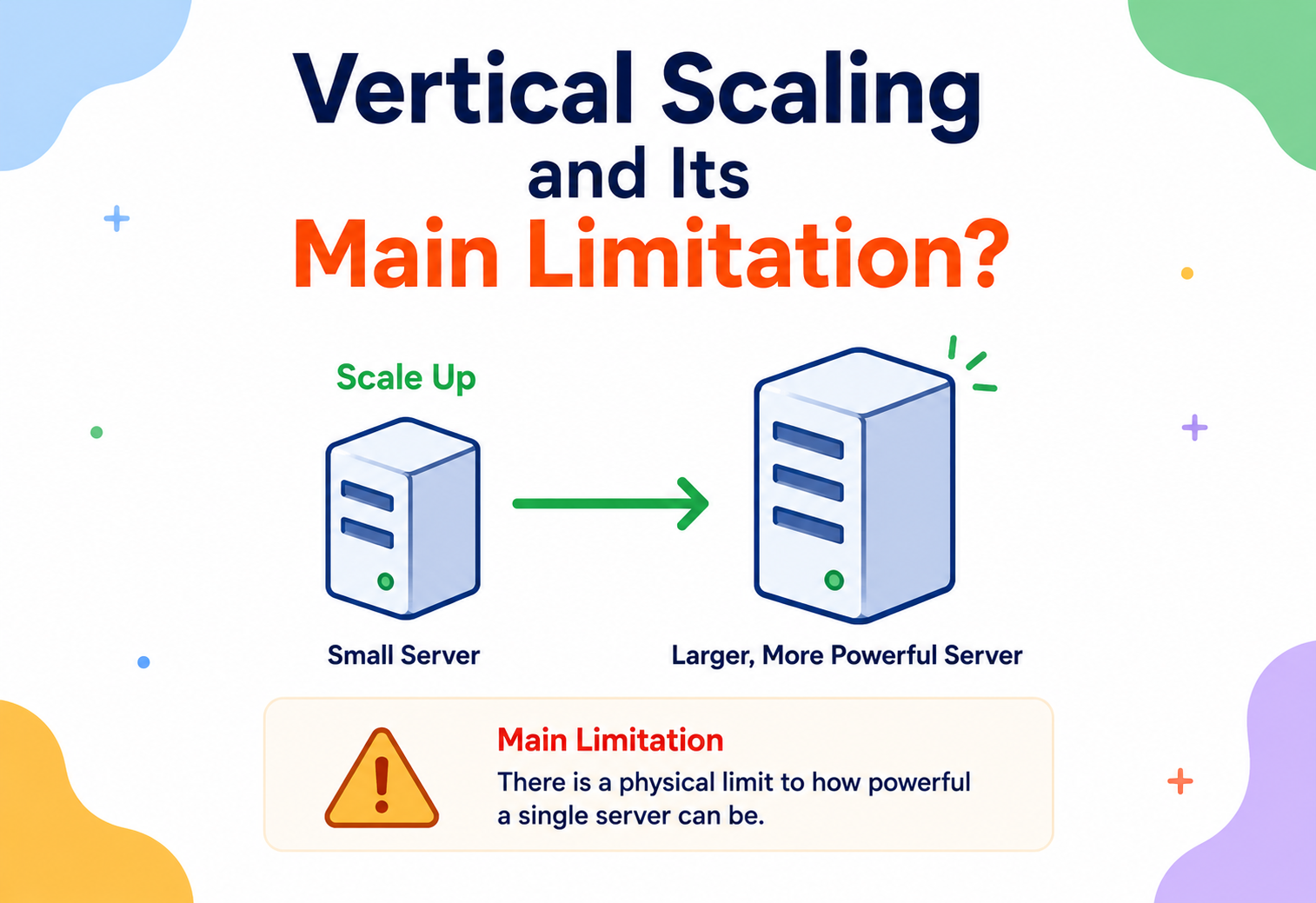
Vertical Scaling and Its Main Limitation
A ground-up, no-assumptions guide to “just buy a bigger machine” — why it works beautifully at first, and why every single machine on Earth eventually hits a wall no amount of money can move. This guide walks through the physics, the economics, and the engineering discipline behind the single most fundamental limit in server capacity planning.
Introduction & History
Before any code or hardware specs, let’s build the idea in plain words — the kind of intuition an engineer can carry into every capacity-planning conversation afterward.
Imagine you run a small bakery, and business is booming. Your one oven can’t keep up with orders. The simplest fix: buy a bigger oven — one that bakes twice as many loaves at once. Business keeps growing, so you buy an even bigger oven. And an even bigger one after that. This works great for a while. But eventually, you run into a wall that has nothing to do with money: there literally isn’t an oven big enough to fit in your building, or the electrical wiring in your neighborhood can’t supply enough power for an oven that large, or no manufacturer on Earth has ever built one that big because the physics and engineering of “one giant oven” get harder and harder the bigger you go.
This is vertical scaling in a nutshell, and it’s exactly what happens with computers. Vertical scaling (also called “scaling up”) means making a single machine more powerful — adding more CPU power, more memory (RAM), faster storage — rather than adding more machines. It’s simple, it’s often the first scaling technique anyone reaches for, and it works remarkably well right up until it doesn’t. The point where “buy a bigger machine” stops being possible, no matter how much money you’re willing to spend, is the central subject of this guide.
Vertical scaling is like making one person stronger and stronger to move more boxes — more muscle, more training, better tools. It works, up to the limit of what a single human body can physically do. Horizontal scaling, by contrast, is hiring more people to move boxes together. One approach has a hard biological ceiling; the other can, in principle, keep adding people almost indefinitely.
A Short History
In the earliest decades of computing, vertical scaling wasn’t really a choice — it was the only option. Mainframe computers in the 1950s–70s were singular, room-sized machines, and “scaling” a computing workload meant physically replacing or upgrading that one machine with a more powerful model. IBM’s mainframe line, for instance, was built around this philosophy for decades: enterprises paid enormous sums to upgrade to bigger, more powerful single machines because there simply wasn’t a mature alternative.
Through the 1980s and 90s, as networking matured and commodity servers became cheap, engineers began exploring an alternative: instead of one enormous, extremely expensive machine, use many smaller, cheaper machines working together. This is horizontal scaling (scaling out), and it initially came with substantial software complexity — coordinating many machines is much harder than programming one. Companies like Google, in the early 2000s, made horizontal scaling a first-class strategy out of necessity: no single machine, however expensive, could index and serve the entire web. Google’s early papers on the Google File System (2003) and MapReduce (2004) were, at their core, about how to get thousands of ordinary, unreliable, individually unremarkable machines to do the work that a single enormous supercomputer never could.
Today, cloud computing has made vertical scaling almost trivially easy to invoke — resizing a virtual machine to a bigger instance type is often a few clicks or an API call — but the underlying physical and economic ceiling it eventually runs into hasn’t gone away. Understanding exactly where and why that ceiling appears is essential for any engineer making real capacity-planning decisions.
Problem & Motivation
Why does the vertical-versus-horizontal distinction matter in practice? What goes wrong if a team only ever scales vertically and never plans past it?
Growth Is Often Less Predictable, and Larger, Than One Machine Can Absorb
Let’s build intuition with a concrete example. Imagine a startup’s database server starts on a machine with 4 CPU cores and 16GB of RAM, comfortably handling its early traffic. As the product grows, the team responds the way most teams instinctively do first: upgrade to a bigger machine — 8 cores, then 16, then 32, then 64 cores, doubling RAM each time too. This is vertical scaling, and for a surprisingly long stretch, it’s the right, simplest choice: no application code changes, no new distributed-systems complexity, just a bigger box.
But this strategy runs into two separate problems as growth continues. First, an economic problem: the cost of ever-larger machines doesn’t grow linearly with their power — it grows much faster. A machine with twice the CPU cores and twice the RAM of another very often costs far more than twice as much, because extremely high-end hardware serves a much smaller market and commands a steep premium. Second, and more fundamentally, a physical problem: there is an actual, hard ceiling on how much CPU, memory, and I/O capacity can exist inside a single machine at any given point in engineering history — a ceiling set by physics (heat dissipation, the speed of light limiting how fast signals can travel across a chip, quantum effects at very small transistor sizes) and by what hardware manufacturers currently sell, not by how much money you’re willing to spend.
A team that has only ever scaled vertically eventually reaches a point where the very largest machine money can buy is still not big enough for their workload — and unlike every previous scaling decision, there’s no bigger box to buy next. If the application was never designed to run across multiple machines, this moment can trigger a genuine crisis: a fundamental re-architecture, done under the pressure of an already-struggling system, rather than as a calm, planned decision made years earlier.
A Real Motivating Scenario
Picture a social media platform whose single relational database server handles all reads and writes. As the user base grows from thousands to tens of millions, the team repeatedly upgrades the database server — more cores, more RAM, faster NVMe storage. This works for years. Eventually, they’re running the single largest database instance type their cloud provider offers, tuned to its limits, and it’s still saturated during peak hours. There is no bigger instance to move to. At this point, the only paths forward are all forms of horizontal scaling: splitting data across multiple database servers (sharding), separating reads onto replica servers, or re-architecting around a distributed database — all significantly more complex than clicking “resize” one more time, and all much harder to retrofit onto a system built with the unstated assumption that “it’s just one big database” would always be an option.
Understanding vertical scaling’s ceiling early lets engineering teams make a deliberate, informed choice about when to invest in horizontal scalability — building in sharding, statelessness, or distributed data strategies well before they’re forced to, under much less pressure and with much more design freedom, rather than being surprised by a wall they didn’t know was there.
— The single most consequential sentence any team can hear on a capacity-planning call, and the reason horizontal scalability deserves to be designed for long before it is desperately needed.
Core Concepts
Let’s define every term carefully before going further. Precise language here is what turns fuzzy hallway debates into structured architectural decisions later.
Vertical Scaling (Scaling Up)
Vertical scaling means increasing the capacity of a single machine or instance — adding more CPU cores, more RAM, faster or larger storage, or a faster network interface — without changing the number of machines involved. The application typically requires no architectural change; it simply runs on more powerful hardware.
Horizontal Scaling (Scaling Out)
Horizontal scaling means increasing capacity by adding more machines (or instances/nodes) that share the workload, rather than making any single machine bigger. This usually requires the application to be designed to distribute work across machines — which is real engineering effort, not just a hardware purchase.
Vertical scaling is upgrading from a bicycle to a car to a truck to a freight train — each step carries more, but you’re always moving one vehicle. Horizontal scaling is adding more trucks, each carrying a portion of the load, driving in parallel. A fleet of a thousand ordinary trucks can move far more total cargo than any single vehicle ever could, even a very impressive one.
Compute, Memory, Storage, and I/O — the Four Resources Being Scaled
When people say “scale up,” they usually mean increasing some combination of:
CPU (Compute)
More cores and/or faster clock speeds, letting more calculations happen per second.
Memory (RAM)
More working space for data the application needs quick access to, reducing how often it must go to slower storage.
Storage
More disk capacity and/or faster disk technology (for example, moving from spinning hard drives to solid-state drives to NVMe).
Network I/O
A faster network interface card, allowing more data to move in and out of the machine per second.
Crucially, a single machine can only scale each of these so far before hitting physical or economic limits — and, importantly, these four resources don’t always scale at the same rate, which creates internal bottlenecks even before you hit an absolute hardware ceiling (explored in the Internal Working section).

Scale-Up Ceiling
The scale-up ceiling (sometimes just called “hitting the ceiling”) is the point at which no larger single machine is available — either because none exists on the market at any price, or because the cost/complexity of the next tier makes it impractical. This is the central concept of this entire guide, and we dedicate all of the Performance & Scalability section to unpacking it rigorously.
Single Point of Failure (SPOF)
A single point of failure is any single component whose failure takes down the whole system. A purely vertically-scaled architecture — one giant machine handling everything — is, by definition, a single point of failure: if that one machine crashes, the entire service goes down, regardless of how powerful it was.
Statelessness
A service is stateless if it doesn’t store any client-specific data between requests — each request is handled independently, using only the data provided in that request (plus, perhaps, external storage like a database). Stateless services are much easier to horizontally scale, because any instance can handle any request; this concept becomes essential once vertical scaling’s ceiling forces a move toward multiple machines.
Elasticity vs. Scalability
These two related terms are worth distinguishing. Scalability is the general ability of a system to handle more load by adding resources. Elasticity specifically refers to how quickly and automatically a system can adjust its resource allocation — scaling both up and back down — in response to changing demand. A system can be vertically scalable without being especially elastic (resizing a database instance is scalable, but usually manual and slow, and rarely scaled back down); horizontally-scaled cloud systems are often prized specifically for their elasticity, since new instances can be launched and terminated automatically within minutes as demand rises and falls throughout the day.
Diminishing Returns and the Cost Curve
A concept that will recur throughout this guide, especially in the Performance section: as you move up a hardware catalog toward larger and larger machines, the cost per unit of additional capacity tends to increase, not stay flat. A machine with twice the specifications of a smaller one frequently costs meaningfully more than twice as much — this non-linear cost curve, combined with the eventual hard ceiling, is what makes vertical scaling’s limitation a two-part story: it gets progressively more expensive well before it becomes outright impossible.
Architecture & Components
What does a vertically-scaled architecture actually look like, and how does it compare structurally to the horizontal alternative? A side-by-side view makes the two philosophies immediately visible.
Fig 1 — A Vertically-Scaled Architecture
- Clients → single upgraded server.
- Single Server (upgraded over time from 4 → 8 → 16 → 64 cores) → single database.
- Single Database on the same or another ever-larger machine.
Fig 2 — A Horizontally-Scaled Architecture
- Clients → Load Balancer.
- Load Balancer distributes traffic across many app servers (Server 1, Server 2, … Server N).
- Every app server → a Distributed / Sharded Database.
Components Involved in Vertical Scaling
The Machine (Physical or Virtual)
The single unit whose CPU, RAM, storage, and network capacity are being increased — a physical server, or a cloud virtual machine instance.
Instance Type / Hardware Tier
In cloud environments, a catalog of predefined machine sizes (for example, AWS EC2 instance types) that a workload can be resized between — vertical scaling in the cloud usually means moving up this catalog.
Operating System & Kernel Limits
Even with unlimited hardware, the operating system itself imposes limits (maximum addressable memory, maximum file handles, maximum thread count) that can become relevant at extreme scale.
Application-Level Concurrency Model
How effectively the application itself can actually use additional cores and memory — a poorly parallelized application won’t benefit much from more hardware, a subtlety explored in the Internal Working section.
The Resize Operation, in a Cloud Context
In modern cloud environments, vertical scaling an existing server usually means: stopping the instance, changing its instance type/size to a larger tier, and restarting it — typically causing a brief period of downtime (unless the workload is designed to tolerate a planned failover). This operational simplicity is a major reason vertical scaling is so often the first tool reached for — but it’s worth noting even this simple operation isn’t instantaneous or free of impact.
Internal Working
What actually happens, internally, as you keep adding CPU and RAM to one machine — and why doesn’t performance just keep climbing forever, even before you hit the outright ceiling?
Amdahl’s Law: Why More Cores Give Diminishing Returns
Adding more CPU cores only helps the portions of a program that can actually run in parallel. Any portion that must run sequentially (one step strictly after another) doesn’t get faster no matter how many cores you add. This relationship is captured precisely by Amdahl’s Law, formulated by computer architect Gene Amdahl in 1967:
Speedup = 1 / ( (1 − P) + P/N )
where P is the proportion of the program that can be parallelized, and N is the number of processors.
The sobering implication: even if 90% of a program can be perfectly parallelized (P = 0.9), the maximum possible speedup — even with an infinite number of cores — is only 10x, because the remaining 10% must still run sequentially, one core at a time, and that sequential portion becomes the dominant cost as N grows large. This is a purely mathematical, not economic, limitation — it explains why simply adding more cores to a single machine gives rapidly diminishing returns for most real software, well before any hardware ceiling is even reached.
Fig 3 — Speedup vs. Cores, at Different Parallelizable Fractions
| Cores (N) | Speedup at P = 0.90 | Speedup at P = 0.80 |
|---|---|---|
| 1 | 1.0× | 1.0× |
| 2 | 1.8× | 1.6× |
| 4 | 2.9× | 2.3× |
| 8 | 4.7× | 3.1× |
| 16 | 6.4× | 3.6× |
| 32 | 7.8× | 3.9× |
| 64 | 8.8× | 4.1× |
Memory Bandwidth and the “Memory Wall”
CPU speeds have historically improved faster than memory access speeds — a long-standing gap engineers call the memory wall. Adding more cores to a single machine means more cores competing for the same shared path to memory (the memory bus). Beyond a certain point, adding yet more cores doesn’t help, because the cores spend increasing amounts of time waiting for data to arrive from memory rather than actually computing — the bottleneck shifts from “not enough compute” to “not enough memory bandwidth to feed the compute we already have.”
NUMA Effects on Large Multi-Socket Machines
Very large single machines often contain multiple physical CPU sockets, each with its own local bank of memory — an architecture called NUMA (Non-Uniform Memory Access). A core accessing its own socket’s local memory is fast; a core accessing memory attached to a different socket is noticeably slower, because the request has to travel across an inter-socket link. As machines scale up to more sockets, software that isn’t NUMA-aware can actually get less efficient per-core as the machine grows, because more memory accesses end up crossing sockets. This is a very concrete, internal illustration of why “just add more hardware to one box” eventually stops translating cleanly into “proportionally more performance,” even before you run out of sockets to add.
Physical Limits: Heat, Power, and the End of Easy Clock-Speed Gains
At the hardware level, CPU clock speeds (how many cycles per second a processor runs) grew rapidly for decades but largely plateaued in the mid-2000s around a few gigahertz, because running transistors faster generates more heat, and heat that can’t be dissipated fast enough causes chips to fail or throttle down automatically. This is why the industry’s strategy shifted from “make one core faster” to “add more cores” as the primary way to keep increasing a chip’s total compute power — which, as Amdahl’s Law shows above, has its own steeply diminishing returns for a great deal of real-world software.
The “main limitation” of vertical scaling isn’t a single wall you hit all at once — it’s a series of compounding diminishing returns (parallelizability limits, memory bandwidth limits, NUMA overhead) that make each additional unit of hardware less and less effective, culminating in a hard, literal ceiling: eventually, no bigger machine exists to buy, at any price.
Data Flow & Lifecycle
Let’s trace the typical lifecycle of a system that scales vertically over time, from launch to hitting its ceiling. The same pattern recurs across nearly every product that starts on a single powerful server.
Fig 4 — The Vertical-Scaling Lifecycle
| Stage | State | What triggers the next transition |
|---|---|---|
| 1 | Launch | Traffic within capacity → comfortable headroom. |
| 2 | Comfortable headroom | Sustained growth → approaching limits. |
| 3 | Approaching limits | Upgrade to bigger instance → resize. |
| 4 | Resize | Capacity restored → loop back to comfortable headroom. |
| 5 | Hard ceiling | Largest available instance reached → horizontal scaling now required. |
| 6 | Forced re-architecture | Sharding, replication, or a distributed database is adopted; the pure vertical era ends. |
Stage by Stage
- Launch: A new system starts on a modest machine, well within its capacity for current traffic.
- Comfortable headroom: As usage grows, the machine still comfortably handles load; no action needed.
- Approaching limits: CPU, memory, or I/O utilization climbs toward saturation during peak periods; latency begins to degrade under load.
- Resize (repeatable, for a while): The team upgrades to a larger instance/machine — often the easiest, fastest fix, requiring little to no code change. This cycle (grow → approach limits → resize) can repeat multiple times.
- Hard ceiling: Eventually, the largest available instance type or physical machine configuration is reached, and it’s still insufficient during peak load, or the cost of the next tier is prohibitive.
- Forced re-architecture: With no bigger machine available, the team must adopt horizontal scaling strategies — sharding, replication, distributed processing — typically a significantly larger engineering effort than any previous resize.
Because stages 1–4 can repeat comfortably for a long time — sometimes years — teams can develop a false sense that “we’ll just keep upgrading the machine” is a permanent strategy. The lifecycle above shows why that assumption eventually, predictably, breaks — and why forward-looking teams plan for stage 6 well before being forced into it by stage 5.
Advantages, Disadvantages & Trade-offs
Every scaling strategy trades one class of problem for another. Here is the honest balance sheet for vertical scaling, and a side-by-side comparison with its horizontal counterpart.
Advantages of Vertical Scaling
- Simplicity: No application architecture changes needed — the software doesn’t need to know or care that it’s running on bigger hardware.
- No distributed systems complexity: Avoids the hard problems that come with multiple machines — network partitions, data consistency across nodes, distributed coordination.
- Lower operational overhead initially: One machine to monitor, patch, and manage, rather than a fleet.
- Fast to execute: Resizing an existing cloud instance is often a matter of minutes, far faster than redesigning an application for horizontal distribution.
- Ideal for certain workloads: Some workloads (a single large in-memory computation, certain relational database engines) genuinely perform better on one powerful machine than spread across many, due to the overhead of coordinating across a network.
Disadvantages of Vertical Scaling
- Hard ceiling: As this whole guide explores, there’s an absolute limit to how big a single machine can get.
- Single point of failure: One machine handling everything means one machine’s failure is catastrophic.
- Downtime during upgrades: Resizing typically requires a restart, causing at least brief unavailability (unless carefully engineered around).
- Non-linear cost growth: High-end hardware carries a steep price premium relative to the performance gained.
- Diminishing returns: As explored in the Internal Working section, adding more cores/memory to one machine yields progressively smaller performance gains due to Amdahl’s Law, memory bandwidth limits, and NUMA effects.
Trade-off Summary: Vertical vs. Horizontal
| Dimension | Vertical scaling | Horizontal scaling |
|---|---|---|
| Application changes required | None to minimal | Often significant (statelessness, data partitioning) |
| Upper capacity limit | Hard ceiling (largest available machine) | Effectively open-ended (add more machines) |
| Fault tolerance | Poor — single point of failure | Good — one node failing doesn’t take down the system |
| Cost growth pattern | Increasingly steep at the high end | More linear (roughly N × cost of one commodity machine) |
| Operational complexity | Low | Higher — load balancing, distributed data, coordination |
| Downtime during scaling | Often required (restart) | Typically none (add nodes without interrupting others) |
Vertical and horizontal scaling are not mutually exclusive rivals — most large-scale production systems use both: individual nodes are reasonably well-specified machines (some vertical scaling), and there are many of them working together (horizontal scaling). The question in practice usually isn’t “which one” but “how big should each individual node be, and how many of them do we run.”
Performance & Scalability — The Main Limitation, In Depth
This is the section that directly answers our title question. Every earlier chapter has been circling this idea; here we state it precisely, list the forces that compose it, and show what its shape looks like in numbers.
The Main Limitation, Stated Precisely
The main limitation of vertical scaling is that it has a hard physical and economic ceiling: at any point in time, there exists a maximum amount of compute, memory, and I/O capacity that can be packed into a single machine, and beyond that ceiling, no amount of money can make a single machine bigger. This is fundamentally different from horizontal scaling’s limitation, which is one of engineering complexity and diminishing coordination efficiency, but not an absolute wall — you can, in principle, always add one more machine.
Where the Ceiling Actually Comes From
It’s worth being precise about the several distinct forces that compose this ceiling, since “there’s a limit” alone isn’t a very actionable engineering insight:
| Source of the limit | What it means in practice |
|---|---|
| Physical manufacturing limits | A single chip can only contain so many transistors given current fabrication technology; a single server chassis can only physically hold so many chips, memory modules, and drives. |
| Power and heat (thermal limits) | More transistors switching faster generates more heat; cooling a single machine beyond a certain density becomes disproportionately expensive and eventually physically impractical. |
| Memory bandwidth (the memory wall) | More cores need more memory bandwidth to stay fed; bandwidth doesn’t scale as fast as core count, so returns diminish. |
| Amdahl’s Law | The non-parallelizable portion of a workload caps the maximum possible benefit from adding more cores, regardless of how many you add. |
| Market availability | Hardware vendors only manufacture and sell machines up to certain sizes, driven by what’s commercially viable to produce; the biggest instance type your cloud provider offers is, for practical purposes, your ceiling, even if theoretically bigger hardware could exist. |
| Cost non-linearity | Even before the literal ceiling, the largest machines carry such a steep price premium that continuing to scale vertically becomes economically irrational long before it becomes physically impossible. |
A Concrete Numeric Illustration
Suppose a workload needs to process 1 million operations per second, and a single modern high-end server can process roughly 100,000 operations per second per core, with reasonably good (but not perfect) parallelization efficiency. Naively, you might think 10 cores would suffice. But applying Amdahl’s Law with, say, 85% parallelizable code, the maximum possible speedup from adding cores caps out well below the naive linear expectation — you might need 20, 30, or more cores to hit the 1 million/sec target, and each additional core beyond a certain point contributes less and less. Even if a machine with enough cores exists, memory bandwidth contention and NUMA overhead mean the real-world throughput per additional core continues to shrink. At some point, the numbers simply stop working: the single largest machine on the market, running as efficiently as physically possible, still cannot hit the target — and there’s no larger machine to move to.
Fig 5 — Capacity Gained per Additional Dollar Spent
| Instance size | Capacity gained per $1,000 spent (illustrative) |
|---|---|
| Small | 95 |
| Medium | 88 |
| Large | 74 |
| X-Large | 55 |
| 2X-Large | 32 |
| 4X-Large (max) | 12 |
How This Directly Affects Scalability
Scalability, recall, is a system’s ability to handle growing load by adding resources, ideally without disproportionate cost or degradation. Vertical scaling’s ceiling means that a purely vertically-scaled system has a hard, calculable maximum capacity — once you know the largest machine available and the workload’s characteristics, you can compute (roughly) the absolute most that architecture can ever serve, no matter the budget. Any growth requirement beyond that number is not a “spend more money” problem — it’s an architecture problem, requiring horizontal scaling.
This is precisely why virtually every internet-scale system — search engines, social networks, streaming platforms, e-commerce sites — is built on horizontal scaling as its primary growth strategy, using vertical scaling only as a secondary, complementary tuning tool (choosing a “reasonably large” node size for cost-efficiency) rather than the main lever for handling growth. The main limitation of vertical scaling is, in a very real sense, the single biggest reason distributed systems exist at all.
Relational databases are a classic illustration. A single PostgreSQL or MySQL instance can be vertically scaled a very long way — modern cloud database instance types offer machines with hundreds of CPU cores and multiple terabytes of RAM. Companies routinely run enormously successful products on a single, powerful database server for years. But every one of those instance catalogs has a largest entry, and workloads that outgrow it (extremely high write throughput, datasets far exceeding what fits efficiently in memory or on a single machine’s attached storage) must eventually adopt sharding, read replicas, or a distributed database architecture — there is no bigger single-instance option left to buy.
High Availability & Reliability
Vertical scaling’s ceiling isn’t the only reliability concern — the single-machine model itself creates availability risks distinct from capacity limits, and it’s worth pulling those apart.
Single Point of Failure, Revisited
A purely vertically-scaled architecture concentrates all risk into one machine. Hardware failures (disk failure, memory corruption, power supply failure), operating system crashes, and even routine maintenance (patching, reboots) all cause full outages, because there’s no redundant machine to fail over to. Horizontally-scaled systems can lose individual nodes without full outages, because remaining nodes continue serving traffic.
Downtime During Vertical Resize Operations
As mentioned earlier, resizing a single machine (especially changing its fundamental instance type/hardware tier) commonly requires stopping and restarting it, which means planned downtime. Teams relying purely on vertical scaling must schedule these operations carefully (low-traffic windows, maintenance notices) — a very different operational rhythm from horizontally-scaled systems, which can typically add capacity with zero downtime by simply bringing new nodes online alongside existing ones.
Mitigating Single-Machine Risk Without Abandoning Vertical Scaling
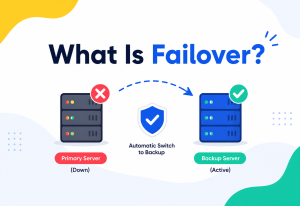
Teams that are still primarily vertically scaled (often smaller systems not yet needing horizontal complexity) commonly mitigate the single-point-of-failure risk with: a standby replica machine kept in sync and ready to take over (active-passive failover), regular automated backups and tested restore procedures, and infrastructure-as-code so a replacement machine can be provisioned quickly if the primary fails entirely.
A standby replica for failover is not the same as horizontal scaling for capacity — the standby typically sits idle, ready to take over, rather than actively sharing load. It solves the availability problem (surviving a failure) but does nothing for the capacity ceiling problem (serving more total traffic than one machine can handle) — the two problems require different solutions, even though they’re often discussed together.
Security
A handful of security considerations are specific to, or amplified by, a vertically-scaled, single-machine architecture. Consolidation is a security-relevant design choice in its own right.
Concentrated Blast Radius
If a single large machine is compromised, an attacker potentially gains access to the entire system’s data and workload at once — there’s no isolation boundary between “this part of the system” and “that part,” unlike a horizontally-partitioned architecture where compromising one node might expose only a subset of data.
Patching Risk and Downtime Trade-off
Applying critical security patches to a single production machine often requires a restart, creating a difficult trade-off between staying current on security fixes and avoiding downtime — horizontally-scaled systems can patch nodes one at a time with no visible interruption.
Multi-Tenancy Risk on Large Shared Machines
Very large machines are sometimes used to host multiple applications or tenants for efficiency; a vulnerability allowing one tenant to access another’s resources on the same physical hardware (a “noisy neighbor” or isolation-escape scenario) is a more serious concern the more workloads are consolidated onto fewer, larger machines.
DDoS Resilience
A single machine, however powerful, has a finite network capacity; a sufficiently large distributed denial-of-service attack can saturate even the largest single server’s network interface, whereas horizontally-scaled systems behind a distributed load-balancing layer can absorb and mitigate larger attack volumes.
Monitoring, Logging & Metrics
Knowing when you’re approaching vertical scaling’s ceiling — ideally well before you hit it — depends on watching the right signals, and on turning “we’ll figure it out later” into a real number tracked on a dashboard.
| Metric | Why it matters |
|---|---|
| CPU utilization (sustained, not just peak) | Consistently high utilization during normal peak hours (not just rare spikes) signals the current machine size is becoming insufficient. |
| Memory utilization and swap usage | Rising memory pressure, or any use of disk-based swap space, indicates the machine no longer comfortably fits its working data set in RAM. |
| Disk I/O latency and queue depth | Growing queue depth for storage operations signals the storage subsystem is becoming a bottleneck relative to demand. |
| Network throughput vs. interface capacity | Approaching the network interface’s maximum throughput is an early sign that even a CPU/RAM upgrade won’t help — networking becomes the ceiling. |
| Cost per unit of capacity at each tier | Tracking how cost-efficiency changes as you move up instance tiers helps quantify when vertical scaling stops being economically sensible, even before it’s technically impossible. |
| Headroom to the largest available instance type | An explicit, deliberately tracked metric: “how many more resize steps do we have left before hitting the ceiling?” — turning an abstract future risk into a concrete, monitorable number. |
Monitoring vertical scaling headroom is like watching a fuel gauge on a long road trip with no gas stations for the next several hundred miles. The danger isn’t running low on fuel — that’s expected and fine. The danger is not knowing how many miles of “empty” remain before you’re truly stuck, and failing to plan the trip (or the architecture) accordingly.
Deployment & Cloud
How does vertical scaling actually get exercised in modern cloud deployments — where a “bigger machine” is a menu selection rather than a purchase order?
Instance Type Catalogs
Cloud providers (AWS, Google Cloud, Azure) publish catalogs of instance types organized into families (general purpose, compute-optimized, memory-optimized) and sizes within each family (for example, AWS’s m6i.large, m6i.xlarge, up through very large sizes). Vertical scaling in the cloud typically means moving a workload up (or down) this catalog — the ceiling, practically speaking, is whatever the largest published size in the relevant family is.
Vertical Pod Autoscaling in Kubernetes
In containerized environments, Kubernetes’ Vertical Pod Autoscaler (VPA) can automatically adjust the CPU and memory requested/allocated to a container based on observed usage — a form of automated vertical scaling at the container level. This is distinct from (and often used alongside) the more commonly discussed Horizontal Pod Autoscaler (HPA), which adds or removes container replicas instead.
apiVersion: autoscaling.k8s.io/v1
kind: VerticalPodAutoscaler
metadata:
  name: checkout-service-vpa
spec:
  targetRef:
    apiVersion: "apps/v1"
    kind: Deployment
    name: checkout-service
  updatePolicy:
    updateMode: "Auto"
  resourcePolicy:
    containerPolicies:
      - containerName: '*'
        maxAllowed:
          cpu: "8"
          memory: "16Gi"
Note the explicit maxAllowed field in the example above — a direct, practical acknowledgment that even automated vertical scaling needs a configured ceiling, both for cost control and because the underlying cluster nodes themselves have finite capacity.
Downtime-Minimizing Resize Strategies
Production teams commonly avoid vertical-resize downtime by provisioning a new, larger replacement machine alongside the existing one, syncing state/data to it, and then cutting traffic over (via DNS or load balancer changes) — effectively borrowing a horizontal-scaling technique (running two machines briefly) to make a vertical-scaling operation (resizing) safer.
Databases, Caching & Load Balancing
Application servers can usually be horizontally scaled with modest effort. Stateful components cannot. That’s why, in practice, databases are almost always the first tier to feel vertical scaling’s hard edge.
Databases: Often the First Thing to Hit the Vertical Ceiling
Application servers are often relatively easy to scale horizontally (many stateless copies behind a load balancer), which is why, in practice, the database tier is usually the component that hits vertical scaling’s ceiling first and hardest — a database inherently needs to coordinate around shared, consistent state, making horizontal scaling (sharding, distributed consensus) significantly more complex than horizontally scaling a stateless web server.
Read Replicas as a Partial, Intermediate Step
Before fully committing to sharding, many teams first add read replicas — additional database copies that handle read-only queries, while a single primary machine still handles all writes. This offloads read traffic horizontally while writes remain vertically scaled on the primary — a common, pragmatic middle ground that extends the useful life of a primarily vertical strategy, though it doesn’t solve the ceiling for write-heavy workloads.
Caching to Reduce Pressure on the Vertically-Scaled Tier
An in-memory cache (like Redis or Memcached) placed in front of a database can dramatically reduce the load reaching that single, vertically-scaled machine, effectively buying additional headroom without another resize — though the cache layer itself will eventually need its own scaling strategy as load grows further.
Load Balancing’s Relationship to Vertical Scaling
Load balancers are fundamentally a horizontal-scaling tool — they only make sense once there’s more than one machine to distribute traffic across. Their appearance in an architecture is often the clearest practical signal that a system has moved (or is moving) past pure vertical scaling, since there would be nothing to “balance” traffic across if only one machine existed.
Adding a load balancer in front of multiple copies of an application, while those copies all still write to a single, un-sharded, vertically-scaled database, only moves the ceiling from the application tier to the database tier — it doesn’t remove it. True horizontal scalability requires addressing every tier that holds state, not just the stateless layers.
APIs & Microservices
Architectural style and scaling strategy are tightly coupled. Whether a system is built as one large process or many small ones has a direct effect on which scaling lever is available first.
Monoliths and Vertical Scaling
A monolithic application (all functionality in one deployable unit) is naturally aligned with vertical scaling: since it’s one unit, the simplest way to give it more capacity is to run it on a bigger machine. This is a completely reasonable choice for many systems, especially earlier in a product’s life, and is a major reason well-run monoliths often scale vertically successfully for a long time before needing to change strategy.
Microservices and Horizontal Scaling
Microservices architectures are typically built with horizontal scaling as a first-class assumption: each service is designed to run as multiple independent, stateless instances behind a load balancer or service mesh, specifically so that individual services can scale out (add more instances) rather than needing an ever-bigger machine. Adopting microservices is, in large part, a strategy for sidestepping vertical scaling’s ceiling at the architecture level — though it’s worth being clear-eyed that this trades one set of limitations for a different set (network latency between services, distributed data consistency, operational complexity of many moving parts).
API Rate Limits as an Indirect Reflection of Vertical Limits
Many APIs impose per-client rate limits partly to protect the finite capacity of the backend infrastructure serving them — and for API providers still relying heavily on vertical scaling for a particular component, those rate limits often reflect, directly or indirectly, the real capacity ceiling of that underlying machine, rather than being an arbitrary business decision.
Design Patterns & Anti-patterns
A handful of patterns capture what mature teams actually do around vertical scaling, and a handful of anti-patterns capture the traps that repeatedly bite teams that don’t plan.
Useful Patterns
Patterns Worth Adopting
- Scale up, then out: A common, pragmatic sequencing — use vertical scaling for its simplicity while it remains cost-effective and sufficient, and adopt horizontal scaling once the ceiling (or its economics) starts to bind, rather than prematurely taking on distributed-systems complexity a system doesn’t yet need.
- Read replicas: A lightweight, partial horizontal-scaling step that extends a primarily vertical strategy’s useful life for read-heavy workloads.
- Sharding: Splitting data across multiple independent database instances by some key (for example, user ID range), each vertically scaled to a reasonable size — combining both strategies rather than choosing one exclusively.
- Stateless services: Designing application-tier services to hold no client-specific state, so they can be trivially replicated horizontally whenever vertical scaling of that tier stops making sense.
- Right-sizing: Deliberately choosing a moderate, cost-efficient machine size rather than either under-provisioning (frequent resizes) or over-provisioning (paying steep premiums for headroom that may not be needed), informed by the diminishing-returns curve.
Anti-Patterns to Avoid
- “Scale up forever” as an explicit strategy: Treating vertical scaling as an indefinitely renewable resource without ever planning for its ceiling, discovered only under crisis conditions.
- Ignoring early warning signals: Not tracking headroom-to-largest-available-instance and being caught by surprise when the largest tier is reached.
- Stateful sprawl: Allowing application-tier code to accumulate in-memory state (session data, caches) that makes it hard to later run multiple instances — quietly foreclosing the horizontal-scaling option for that tier until a painful refactor is done.
- Premature horizontal complexity: The opposite mistake — adopting sharding, microservices, or distributed data stores for a system nowhere near vertical scaling’s actual ceiling, paying real complexity costs for a problem that doesn’t exist yet.
Best Practices & Common Mistakes
The difference between a team that handles the vertical ceiling calmly and one that hits it in a crisis is not intelligence or budget — it is a small number of well-established habits, applied consistently over time.
Best Practices
- Know your ceiling in advance. Identify the largest instance type/machine configuration realistically available for your workload, and calculate (even roughly) what capacity it represents — turn an abstract future risk into a known number.
- Design for statelessness early in application-tier components, even while still running on a single machine — it costs little upfront and preserves the option to scale horizontally later without a painful rewrite.
- Monitor sustained utilization trends, not just instantaneous spikes, to get early warning of approaching capacity limits.
- Use vertical scaling for what it’s genuinely good at — simplicity, low operational overhead, and workloads that are hard to parallelize efficiently — rather than avoiding it dogmatically.
- Introduce horizontal scaling for the specific tier that needs it (often the database first), rather than assuming the whole system must be re-architected at once.
- Test resize/failover procedures before you need them under pressure, including the downtime characteristics of a vertical resize.
Common Mistakes
- Assuming “we can always just get a bigger server” without ever checking what the actual largest available option is, or what it costs.
- Waiting until the current machine is fully saturated in production before beginning to plan or build horizontal-scaling capability, guaranteeing that the eventual transition happens under maximum stress.
- Conflating vertical scaling’s availability weaknesses (single point of failure) with its capacity ceiling — they’re related but distinct problems requiring different solutions.
- Over-indexing on CPU/RAM upgrades while ignoring that memory bandwidth, NUMA effects, or Amdahl’s-Law-limited parallelizability may mean the application simply can’t use the extra hardware efficiently.
- Building a system with heavy in-memory session state or other tightly-coupled-to-one-machine assumptions, making an eventual move to horizontal scaling far more expensive than it needed to be.
Real-World / Industry Examples
The examples below span decades and orders of magnitude — from famous vertically-scaled success stories to the giants that had to reject the model entirely — and each illustrates a different facet of the same underlying limit.
Stack Overflow
For many years, Stack Overflow was famously run on a surprisingly small number of very powerful, vertically-scaled servers, serving enormous traffic — a well-documented example of how far vertical scaling can genuinely go for a well-optimized workload before horizontal scaling becomes necessary.
Google (Early Web Search)
Google’s founding technical insight was essentially a rejection of pure vertical scaling: rather than buying ever-larger supercomputers to index the web, they built systems (the Google File System, MapReduce, and later Bigtable) explicitly designed to run reliably across thousands of ordinary, individually replaceable machines — a direct architectural response to vertical scaling’s ceiling.
Traditional Mainframe Banking Systems
Many large financial institutions still run core transaction-processing systems on powerful mainframes — a domain where vertical scaling, combined with extreme reliability engineering on that single class of machine, remains a deliberate, defensible architectural choice, though even these systems increasingly pair mainframes with horizontally-scaled surrounding services.
Sharded Databases at Social Platforms
Large social platforms with relational data (user profiles, posts, connections) commonly shard their databases by user ID once a single, maximally vertically-scaled database instance can no longer keep up with global write volume — a textbook example of hitting, and responding to, the ceiling described throughout this guide.
A Generic Case Study: A SaaS Analytics Platform
Consider a SaaS analytics product whose core database, over several years, is repeatedly resized: from a modest instance to progressively larger ones as the customer base and data volume grow. Each resize is quick, requires no code changes, and restores comfortable headroom. Eventually, the team reaches the largest database instance type their cloud provider offers in the relevant family. Query latency during peak hours remains elevated even on this largest instance, because the underlying workload (specific analytical queries scanning large amounts of data) has genuinely outgrown what any single machine, however powerful, can serve within an acceptable response time.
The team’s response illustrates the typical resolution: they don’t attempt to find an even bigger machine (none exists), and they don’t rewrite the entire system overnight. Instead, they introduce a horizontally-scaled read layer (a distributed query engine or a set of purpose-built read replicas partitioned by customer), while keeping the original database as the vertically-scaled system of record for writes — a hybrid approach that directly reflects the “scale up, then out, tier by tier” pattern.
A Generic Case Study: A Video Game’s Matchmaking Backend
Online multiplayer games often start their matchmaking and session-management backend as a single, powerful vertically-scaled server, since matching players and coordinating live game sessions benefits from having a lot of state readily available in one place, with minimal cross-machine coordination overhead. As a game’s player base grows past what any single machine can track and match in real time, studios typically shard matchmaking by region or game mode first — a natural, relatively low-risk partitioning boundary — before tackling harder problems like fully distributed, globally consistent matchmaking. This staged approach, moving from one large vertically-scaled node to a small number of large regional nodes before eventually adopting finer-grained horizontal partitioning, mirrors the general “scale up, then out, gradually” pattern seen across nearly every domain discussed in this guide.
Frequently Asked Questions
A short set of the questions that come up most often the first time an engineer is asked to decide between scaling up and scaling out on a real production workload.
Is vertical scaling ever the “wrong” choice compared to horizontal scaling?
Not inherently — it depends on current scale and trajectory. For many systems, especially early on or with genuinely single-machine-friendly workloads, vertical scaling is the right, simplest choice. It becomes the wrong ongoing strategy only when growth trajectory suggests it will eventually exceed what any available machine can provide, and the team hasn’t planned for that transition.
What exactly is the “main” limitation, in one sentence?
There is always a largest machine available at any point in time, set by physical manufacturing limits, thermal/power constraints, and market availability — and once a workload’s needs exceed that largest machine’s capacity, no amount of additional spending can make a single machine bigger; only adding more machines (horizontal scaling) can continue to grow capacity.
Doesn’t cloud computing solve this, since you can always resize?
Cloud computing makes vertical scaling operationally much easier (a quick resize instead of buying new physical hardware), but it doesn’t remove the underlying ceiling — cloud providers still only offer instance types up to some maximum size, dictated by the same physical and economic limits described throughout this guide. The ceiling still exists; the cloud just makes it faster and easier to reach.
Can you avoid the ceiling entirely by just always building horizontally-scaled systems from day one?
You could, but it’s often not the best engineering trade-off. Horizontal scaling introduces real complexity (distributed data consistency, network overhead, more operational surface area) that isn’t worth paying for until a system’s actual scale requires it. Most successful systems deliberately start simple (often vertically scaled) and introduce horizontal scaling for specific components once genuinely needed, as covered in the “scale up, then out” pattern.
Which usually hits the ceiling first: the application server or the database?
Typically the database, or more generally, whichever component holds shared, consistent state. Stateless application servers are comparatively easy to run as many parallel copies, so they’re often scaled horizontally relatively early and cheaply. Stateful components like databases require much more careful engineering (sharding, distributed consensus) to scale horizontally, so teams often push vertical scaling on them the furthest before making that investment.
Summary & Key Takeaways
Vertical scaling — making a single machine bigger — is simple, fast to execute, and requires no architectural changes, which is exactly why it’s usually the first scaling lever any team reaches for. But it comes with one defining, unavoidable limitation.
There is always a largest machine available, set by physics (heat, power, memory bandwidth), engineering constraints (Amdahl’s Law, NUMA effects), and market economics — and once a workload’s needs exceed that ceiling, more money simply cannot buy more capacity from a single machine.
Key Takeaways
- Vertical scaling’s main limitation is a hard, eventual ceiling — a maximum machine size beyond which no further single-machine upgrade is possible, at any price.
- That ceiling is produced by several compounding factors: physical manufacturing limits, thermal/power constraints, memory bandwidth (the “memory wall”), NUMA overhead on multi-socket machines, and the fundamentally diminishing returns described by Amdahl’s Law for any workload with a non-parallelizable portion.
- Vertical scaling also carries availability risk (single point of failure) and downtime risk (resize operations often require restarts) distinct from, but related to, the capacity ceiling itself.
- Horizontal scaling — adding more machines — is the standard response once the vertical ceiling is reached, but it introduces real complexity: distributed data consistency, coordination, and network overhead that vertical scaling never has to deal with.
- Most successful large-scale systems use both strategies together: reasonably (not maximally) sized individual machines, combined with many of them working in parallel — treating vertical scaling as a tuning tool within a fundamentally horizontal architecture, once scale demands it.
- The single most valuable practice is knowing your ceiling in advance — tracking headroom to the largest available machine — so the eventual transition to horizontal scaling is a planned engineering decision, not a crisis discovered in production.
Every system that grows large enough eventually meets this same wall — not because of a design mistake, but because it’s a fundamental property of physical hardware. Understanding exactly where that wall is, and why it exists, is what separates teams that plan calmly for it years in advance from teams that discover it, all at once, in the middle of an outage.
As a closing, practical checklist: know the largest machine size realistically available to you and roughly what capacity it represents; watch sustained utilization trends rather than only reacting to spikes; keep application-tier components stateless wherever reasonably possible, so the horizontal-scaling door never quietly closes on you; and treat the eventual move to horizontal scaling not as a failure of the vertical approach, but as its natural, expected successor — the same way a growing business eventually needs more than one delivery truck, no matter how large the first one was. Get comfortable with that idea early, and the day you finally hit the ceiling will feel like a planned milestone rather than an emergency.

