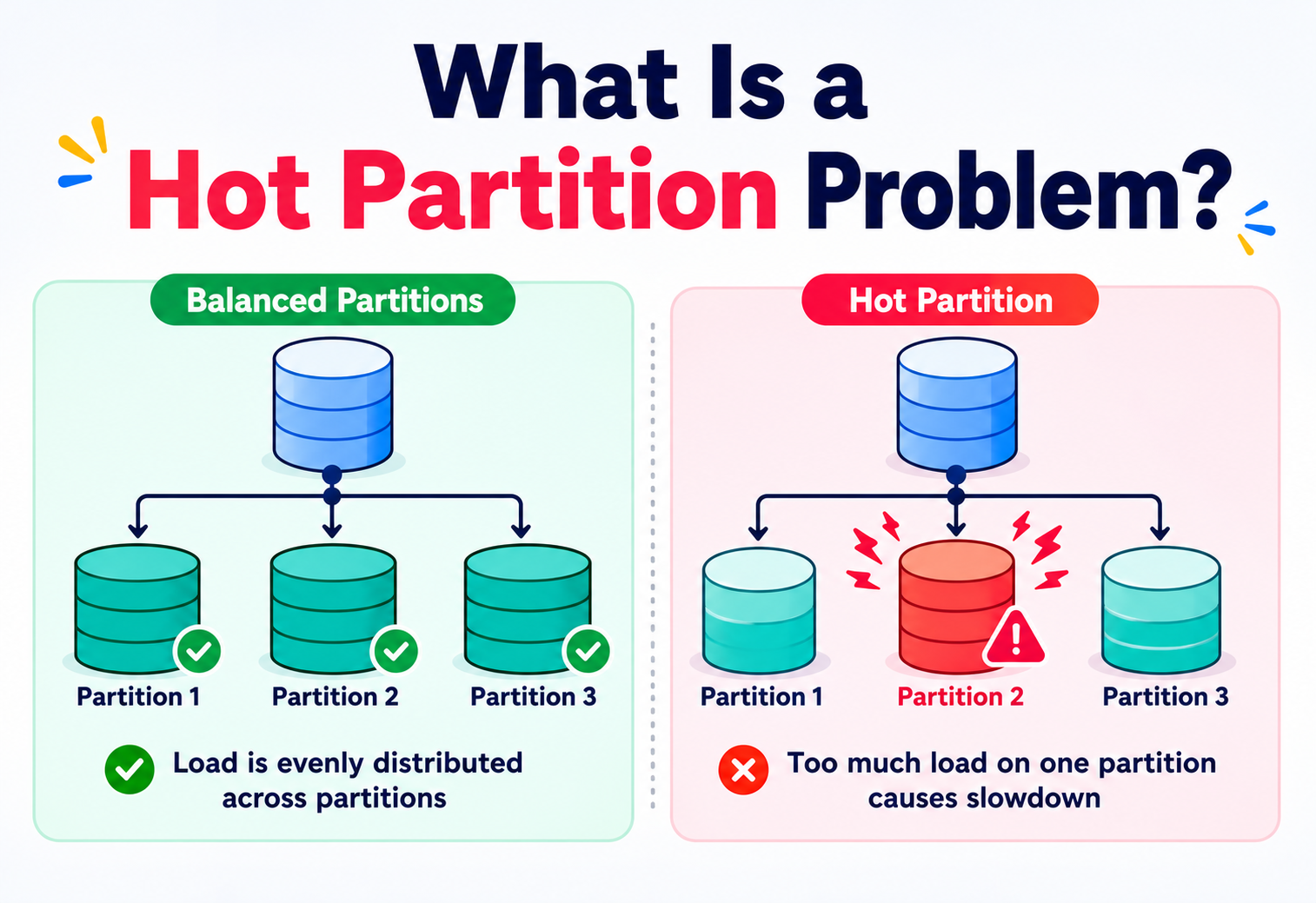
What Is a Hot Partition Problem?
Imagine a school with ten teachers where every student lines up in front of just one. That one teacher gets crushed while the other nine stand idle. That is what a hot partition looks like inside a distributed system — and it is one of the most common ways a “perfectly scaled” cluster still collapses. This guide walks the problem end to end: why partitioning exists, why hot spots form, how to detect them, and every production-proven technique used to fix them.
A hot partition — also called a hot key, hot shard, or hot spot — is a section of a distributed data store that receives a disproportionately large share of reads, writes, or storage compared to its neighbours. It is one of the most common and most asked-about problems in system design, because almost every large-scale system runs into it eventually: social feeds, e-commerce carts, ride-sharing apps, chat, IoT pipelines. This tutorial walks 22 sections from first principles to Java code samples, covering history, architecture, detection, root causes, salting, composite keys, caching, replicas, adaptive capacity, backoff-with-jitter, security-oriented DoS variants, cloud-vendor features, and real-world case studies from Netflix, DynamoDB, Uber, Instagram, Kafka, and Bigtable.
Introduction & History
Ten teachers, one queue — and why mainframes never had this problem, but every cloud database eventually does.
Imagine a school with 10 teachers, and every single student in the school lines up in front of just one teacher, while the other 9 teachers stand around with nobody to help. That one teacher gets exhausted, the line grows longer and longer, and students start complaining. Meanwhile, 9 teachers are doing nothing.
This is almost exactly what happens inside a computer system when we talk about a hot partition problem. Instead of teachers, we have servers. Instead of students, we have data and requests. And instead of one overworked teacher, we have one overworked server (or “partition”) while the rest of the system sits idle.
Simple analogy — the alphabet shelf
Think of a big library with 26 shelves, one for each letter of the alphabet (A to Z). If everyone suddenly wants to borrow books whose titles start with “S,” the “S” shelf and the librarian standing near it get crushed by crowds, while the “Q,” “X,” and “Z” shelves stay empty all day. The “S” shelf is now a hot shelf — in computer terms, a hot partition.
1.1 · WHY DOES THIS TOPIC EXIST?
In the early days of computing (1960s–1990s), most applications ran on a single big computer, often called a mainframe. All the data lived in one place, so there was no concept of “partitions” spreading data across multiple machines. If that one machine was slow, everything was slow — but at least the slowness was shared equally by everyone.
As the internet grew in the late 1990s and 2000s, companies like Amazon, Google, and eBay started serving millions of users at the same time. A single computer could no longer store all the data or handle all the traffic. Engineers came up with an idea called partitioning (also called sharding): break the data into smaller pieces, and spread those pieces across many computers, so each computer only handles a fraction of the total work.
This was a brilliant idea — until engineers discovered a new problem. If you don't split the data evenly, some pieces (partitions) end up much bigger or much busier than others. This uneven, overloaded piece is what we call a hot partition. The term became widely used in the 2010s as companies like Amazon (DynamoDB), Google (Bigtable, Spanner), and Apache projects (Cassandra, Kafka, HBase) published papers and documentation describing exactly this problem and how to solve it.
A hot partition (also called a hot key, hot shard, or hot spot) is a section of a distributed data store that receives a disproportionately large share of reads, writes, or storage compared to other sections — causing it to become a performance bottleneck while the rest of the system remains underused.
Today, this is one of the most common and most asked-about problems in system design interviews, because almost every large-scale system — social media feeds, e-commerce carts, ride-sharing apps, chat applications, IoT sensor pipelines — eventually runs into it.
Problem & Motivation
Why we split data at all, and what goes wrong when we split it badly. Real-world traffic is almost never evenly distributed.
Before we can understand the “hot partition problem” deeply, we need to understand two building blocks: why we split data at all, and what goes wrong when we split it badly.
2.1 · WHY DO WE SPLIT (PARTITION) DATA?
Imagine you run an online store like Amazon, and you store every customer's order in a single giant table inside a single database on a single server. Now imagine 50 million customers are placing orders every day. One server — no matter how powerful — will eventually run out of:
- Storage space — a hard drive can only hold so much data.
- Processing power (CPU) — one machine can only calculate so many things per second.
- Memory (RAM) — only so much data can be kept “ready to use” at once.
- Network bandwidth — only so many requests can travel in and out per second.
The solution is partitioning: split the giant table into smaller tables (called partitions or shards), and store each partition on a different server. Now, instead of one server handling 50 million customers, we might have 100 servers each handling 500,000 customers. This is the foundation of almost every large-scale system today.
2.2 · WHAT GOES WRONG — THE HOT PARTITION
Splitting data sounds simple — just divide it evenly, right? The problem is that real-world traffic is almost never evenly distributed. Some examples:
- A celebrity with 100 million followers posts a photo on Instagram. Everyone rushes to view that one post's data — the partition storing that post becomes overloaded.
- An e-commerce site partitions orders by date, and today is Black Friday. Today's partition receives a massive, unusual spike of writes while yesterday's partition is quiet.
- A ride-sharing app partitions rides by city. New York City generates far more ride requests than a small town — the New York partition becomes hot.
A hot partition doesn't just slow down — it can crash the server holding it, cause requests to time out, create a cascading failure across dependent services, and in the worst case, take down an entire application even though 99% of the system's total capacity is sitting completely idle.
This is the core motivation for this tutorial: understanding why hot partitions form, how to detect them before they cause an outage, and what techniques engineers use to prevent and fix them.
Core Concepts
Partitioning, keys, hashing, hot keys, skew, throughput, latency, capacity units — every term you will need for the rest of this guide.
Let's build up our vocabulary carefully, one term at a time. Every new word will get a plain-English definition, why it exists, where it is used, an analogy, and an example.
3.1 · PARTITIONING (SHARDING)
What it is: Partitioning is the process of splitting a large dataset into smaller, more manageable pieces called partitions (in some systems called “shards”). Each partition is stored and served independently, often on a different physical machine.
Why it exists: No single machine can store or serve unlimited data. Partitioning allows a system to scale horizontally — by adding more machines — instead of scaling vertically (buying one bigger, more expensive machine, which always has a ceiling).
Where it's used: Databases (MySQL sharding, MongoDB, Cassandra, DynamoDB), message queues (Kafka topics and partitions), caching systems (Redis Cluster), and search engines (Elasticsearch shards).
Analogy — 20 checkout counters
A supermarket with 20 checkout counters instead of one — the total customer load is split so no single counter has to serve everyone.
Example: An app with 10 million users might store users 1–1,000,000 on Partition A, 1,000,001–2,000,000 on Partition B, and so on, across 10 partitions.
3.2 · PARTITION KEY (SHARD KEY)
What it is: The specific field or value used to decide which partition a piece of data belongs to. Examples: user_id, order_date, city, device_id.
Why it exists: The system needs a consistent, repeatable rule to know where to store and where to find any given piece of data. Without a partition key, the system wouldn't know which of the 100 servers holds a particular record.
Where it's used: Every partitioned database requires you to choose a partition key up front — this single decision is often the difference between a healthy system and a hot-partition disaster.
Analogy — the shelving rule
A library's shelving rule (“sort by first letter of the author's last name”) is the “partition key” for organizing books.
Example: In DynamoDB, if you choose user_id as the partition key, all data for one user always lands on the same partition, making lookups for that user fast.
3.3 · HASHING
What it is: A mathematical function that takes an input (like a partition key) and converts it into a fixed-size number, which is then used to decide which partition the data goes to.
Why it exists: Hashing is used to spread data as evenly and unpredictably as possible across partitions, so similar keys don't cluster together on the same server.
Where it's used: Almost every distributed database (Cassandra, DynamoDB, Kafka) uses a hash function on the partition key.
Analogy — shuffling a deck
Imagine shuffling a deck of cards before dealing them, so that no single player always gets all the aces. Hashing “shuffles” data before assigning it to a partition.
Example: hash("user_123") % 10 might produce the number 4, meaning this user's data goes to Partition 4.
3.4 · HOT PARTITION (HOT KEY / HOT SPOT)
What it is: A partition that receives significantly more traffic (reads/writes) or holds significantly more data than other partitions, causing it to become overloaded.
Why it exists as a “problem”: Even with hashing, some keys are naturally more popular than others (a celebrity's user ID, today's date, a trending product ID). No amount of clever hashing can make an unevenly popular real-world item evenly popular.
Where it's seen: Social media, e-commerce flash sales, gaming leaderboards, IoT telemetry, financial trading systems.
Analogy — the one busy lane
One single highway lane getting all the traffic during rush hour while four other lanes stay empty.
Example: A Twitter-like app storing “likes” per tweet, where one viral tweet's partition receives 1 million writes per second while a normal tweet's partition receives 2 writes per second.
3.5 · SKEW (DATA SKEW / LOAD SKEW)
What it is: The general statistical term for uneven distribution — either of data volume (data skew) or of request traffic (load skew) — across partitions.
Why it matters: Hot partitions are a symptom of skew. Understanding skew helps engineers reason about the problem mathematically, not just anecdotally.
Analogy — 20 vs 10 in a group
If you divide a class of 30 students into 5 groups but one group ends up with 20 students and the other four groups share the remaining 10, that is skew.
3.6 · THROUGHPUT, LATENCY, AND CAPACITY UNITS
| Term | Meaning | Everyday analogy |
|---|---|---|
| Throughput | How many operations a system can handle per second | How many cars a toll booth can process per minute |
| Latency | How long a single operation takes to complete | How long one car takes to pass through the toll booth |
| Capacity Unit | A pre-allocated amount of throughput assigned to a partition (common in DynamoDB, Kafka) | The number of toll booth workers assigned to one lane |
A hot partition often means throughput demand exceeds the capacity units assigned to that specific partition, even though the overall system has plenty of spare capacity elsewhere.
Architecture & Components
Router, partition nodes, load balancer, metadata store, replication, monitoring — and the two partitioning schemes (range and hash) that decide who becomes hot.
Let's look at the pieces that make up a typical partitioned system, and where the hot partition problem can appear.
Router / Coordinator
Decides which partition a request should go to, usually by hashing the partition key.
Partition Nodes
The actual servers storing a slice of the data — each one is independent.
Metadata Store
Keeps track of which partition holds which range or hash of keys.
Replication Layer
Keeps copies of each partition on multiple nodes for durability and availability.
Monitoring System
Watches per-partition metrics to detect when one partition is being overworked.
Notice something important: in Figure 1, the client and load balancer don't know or care which partition is “hot.” Only per-partition monitoring can reveal that Partition 1 is receiving far more traffic than Partition 2 or 3. This is a key architectural lesson — you must monitor at the partition level, not just at the whole-cluster level, or hot partitions hide in plain sight.
4.1 · RANGE VS. HASH VS. CONSISTENT HASH PARTITIONING
| Type | How it works | Pros | Cons |
|---|---|---|---|
| Range Partitioning | Data split by ranges of the key (e.g., dates, alphabet, IDs 1–1000) | Efficient range queries (e.g., “all orders in March”) | Very prone to hot partitions if traffic clusters around one range (e.g., “today”) |
| Hash Partitioning | Key is hashed, and the hash determines the partition | Spreads data evenly on average | Range queries become expensive; a single popular key can still create a hot partition |
| Consistent Hashing | A ring-based hash scheme that minimizes data movement when nodes are added/removed | Scales elastically, popular in Cassandra, DynamoDB | Still vulnerable to hot keys, needs virtual nodes to smooth distribution |
Internal Working — How A Partition Becomes “Hot”
Six steps from a healthy cluster to a cascading failure — and why the routing logic isn't “broken” while it happens.
Let's walk through, step by step, exactly how a normal, healthy partitioned system slides into a hot-partition crisis.
Even Distribution (Healthy State)
Initially, traffic is spread fairly evenly. Each partition handles roughly the same number of requests per second, and each server's CPU, memory, and disk usage stay within a comfortable range.
A Trigger Event Occurs
Something changes the usual pattern: a product goes viral, a celebrity posts, a flash sale starts, a bug causes retries, or a batch job writes millions of rows tagged with today's date.
Requests Concentrate on One Partition
Because all these new requests share the same (or a very similar) partition key, they all get routed — correctly, according to the hashing and routing rule — to the exact same partition.
Resource Exhaustion Begins
The single server hosting that partition starts running out of CPU cycles, memory, disk I/O, or network bandwidth, while every other server in the cluster remains mostly idle.
Latency Spikes and Throttling
Requests to the hot partition start slowing down. Many managed databases (like DynamoDB) begin actively rejecting requests (“throttling”) to protect the server from crashing.
Cascading Failure (Worst Case)
Client applications retry failed requests, which adds even more load to the already-struggling partition. Connected services waiting on this data may also slow down or time out, spreading the failure outward.
The routing logic is not “broken.” It is doing exactly what it was designed to do — sending the same key to the same partition every time (which is necessary for consistency). The problem is that real-world popularity is unevenly distributed, and no routing algorithm can fix a data-modeling decision by itself.
Data Flow & Lifecycle
Six steps from a user tap to bytes on disk — and the exact step where “hotness” is silently introduced.
Let's trace the full lifecycle of a single write request, from the moment a user clicks a button to the moment data lands on a partition — and see exactly where “hotness” can be introduced.
Client Sends Request
A mobile app sends a write request: “Add a like to post #999.”
API Gateway / Load Balancer
The request is authenticated and routed toward the correct backend service.
Application Layer Extracts the Partition Key
The service reads the partition key — in this case,
post_id = 999.Hash Function Computes Target Partition
hash(999) % num_partitionsdeterministically returns, say, Partition 7.Write Lands on Partition 7
The write is appended, and Partition 7's leader node processes it, then replicates it to followers.
Acknowledgment Returns to Client
Once enough replicas confirm the write (based on the consistency level configured), success is returned.
If post #999 goes viral, step 4 keeps producing the exact same answer — “Partition 7” — millions of times per second, no matter how many total partitions exist in the cluster. This is the essential mechanical reason hot partitions form: determinism, which is required for correctness, becomes a liability under extreme popularity skew.
Any partitioning scheme that always maps the same key to the same partition (which almost all of them must, for consistency) will always be vulnerable to a hot partition if a single key becomes extremely popular. The fixes covered in Section 9 work by changing what counts as the key, not by breaking this fundamental rule.
Detecting A Hot Partition
Five signals to watch, four industry-standard tools, and a decision flow for separating a real hot spot from a passing spike.
You cannot fix what you cannot see. Before jumping to solutions, engineers need reliable ways to detect a hot partition early — ideally before users notice slowness.
7.1 · SIGNALS TO WATCH
- Per-partition CPU/IO usage — one node consistently near 90–100% while siblings sit at 10–20%.
- Per-partition throttling/rejection counts — cloud databases like DynamoDB expose a metric literally called
ThrottledRequestsper partition. - Request latency percentiles (p50, p95, p99) — a rising p99 latency for a specific key range, while overall average latency looks “fine,” is a classic early sign.
- Queue depth — a growing backlog of unprocessed requests on one node.
- Skewed key access logs — a small number of keys accounting for a disproportionate share of total requests (a “top-N keys” report).
7.2 · TOOLS COMMONLY USED
CloudWatch
Tracks per-table and per-partition throttling and consumed capacity for DynamoDB.
Prometheus + Grafana
Open-source metrics collection and dashboards; widely used for Cassandra, Kafka, and custom services.
Consumer Lag Metrics
Shows if one partition's consumer is falling behind due to overload.
Distributed Tracing
Jaeger and Zipkin help pinpoint which specific downstream partition is adding latency to a request chain.
Root Causes Of Hot Partitions
Six recurring root causes — five of them design decisions, one of them a feedback loop that mistakes recovery for load.
Understanding the “why” helps you prevent the problem at design time, which is far cheaper than fixing it in production.
8.1 · POOR CHOICE OF PARTITION KEY
Choosing a key with low cardinality (few possible values) or a key correlated with popularity — like country, status, or product_category — means many records inevitably share the same partition.
8.2 · CELEBRITY / VIRAL EFFECT
A small number of entities (a celebrity account, a trending video, a viral tweet) attract a hugely disproportionate share of traffic compared to typical entities.
8.3 · TIME-BASED CLUSTERING
Partitioning by date or timestamp (e.g., “today's log partition”) means all current writes go to a single “hot” partition representing the current time window, while older date partitions go cold.
8.4 · SEQUENTIAL / MONOTONIC IDs
Auto-incrementing IDs (1, 2, 3, 4…) mean the newest, most recently created records — which are usually also the most frequently accessed — all cluster into the same range or the same few partitions.
8.5 · BATCH JOBS AND BACKFILLS
A nightly batch job or data migration that writes millions of rows under one key or short key range can create a temporary but severe hot partition.
8.6 · RETRY STORMS
When a partition starts to slow down, client applications often retry failed requests automatically. These retries pile more load onto the already-struggling partition, making the problem worse — a feedback loop.
Many teams pick a partition key purely based on what makes application code simplest to write (e.g., always query by tenant_id) without checking whether that key's real-world distribution is even. This is the single most common root cause of hot partitions in production systems.
Solutions & Design Patterns
Eight production-proven techniques — salting, composite keys, caching, replicas, adaptive capacity, randomized IDs, coalescing, and circuit breakers with backoff.
Now the fun part — how do experienced engineers actually fix and prevent hot partitions? Here are the most widely used, production-proven techniques.
9.1 · KEY SALTING (WRITE SHARDING)
What it is: Adding a small random or calculated suffix/prefix to a hot key so that its writes spread across multiple partitions instead of one.
Analogy — multiple doors
Instead of forcing every fan of a celebrity to line up at Door #1, you randomly send them to Door #1, #2, #3, or #4, then combine the results when needed.
Example: Instead of using key post_999, use post_999_shard_0 through post_999_shard_9, chosen randomly for each write. When reading, query all 10 shards and sum/merge the results.
9.2 · COMPOSITE / COMPOUND KEYS
What it is: Combining two fields to form the partition key so no single value dominates. For example, using user_id + date instead of just date.
Example: A logging system partitioned only by date creates one massive hot partition per day. Partitioning by date + service_name spreads that same day's writes across many partitions.
9.3 · CACHING LAYER FOR HOT KEYS
What it is: Placing an in-memory cache (like Redis or Memcached) in front of the database to absorb the majority of read traffic for popular items, so the underlying partition only handles cache misses.
Analogy — the front desk copy
Keeping today's most popular library book at the front desk instead of making everyone walk to the shelf — most people are served instantly without touching the shelf at all.
9.4 · READ REPLICAS
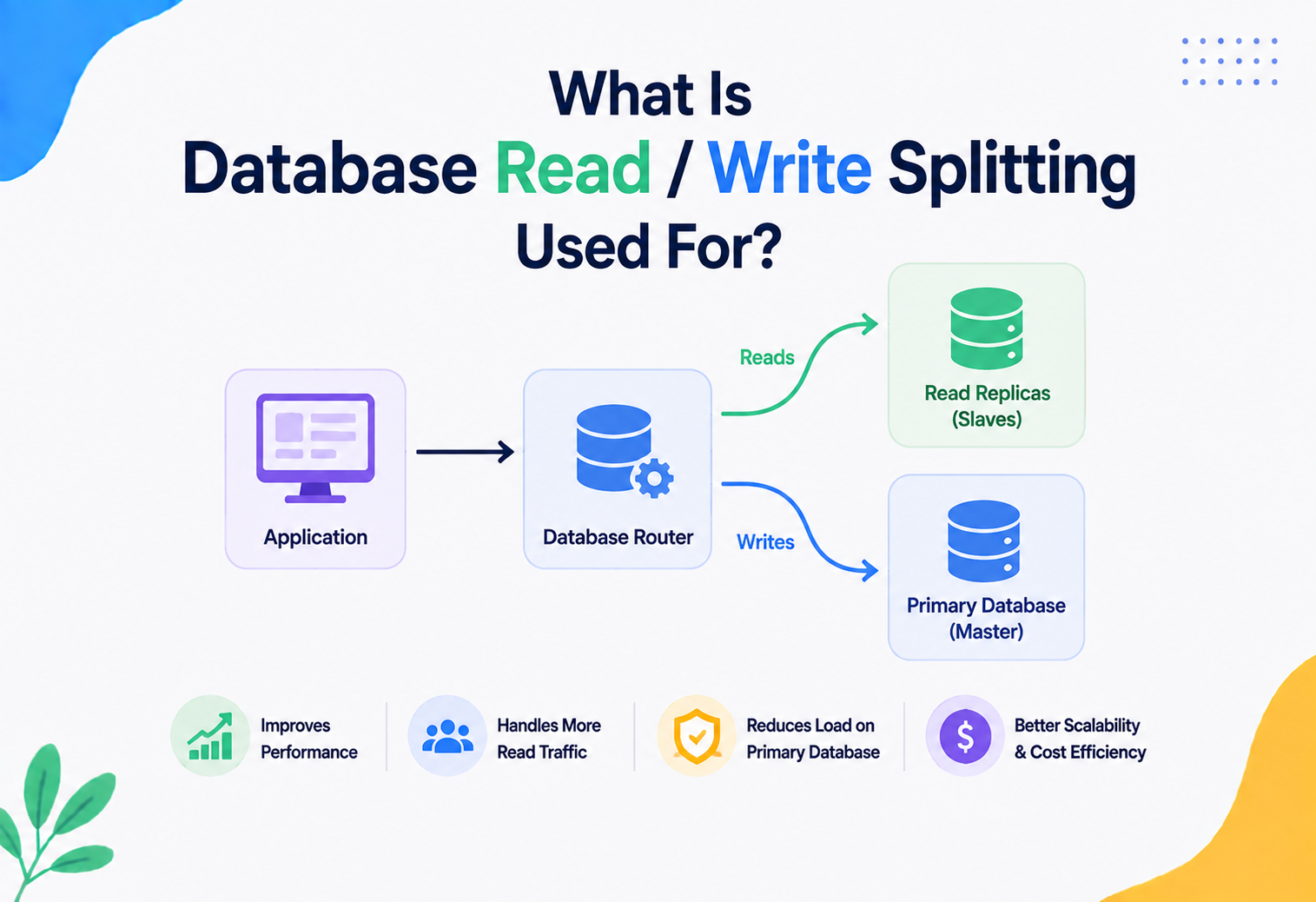
What it is: Creating multiple read-only copies of a hot partition, and directing read traffic across all of them, while writes still go to a single primary.
9.5 · ADAPTIVE / ELASTIC CAPACITY
What it is: Modern managed databases (DynamoDB On-Demand, Bigtable autoscaling) automatically detect a hot partition and temporarily allocate it more resources, or automatically split it into smaller sub-partitions.
9.6 · RANDOMIZED OR TIME-BUCKETED KEYS
What it is: Instead of a strictly sequential ID, use a randomized identifier (like a UUID) or bucket time into wider windows (hourly instead of per-second) to smooth out clustering.
9.7 · REQUEST COALESCING / BATCHING
What it is: Grouping many small requests to the same hot key into a single batched operation, reducing the number of individual round trips hitting that partition.
9.8 · CIRCUIT BREAKERS & BACKOFF
What it is: When a partition starts failing, stop hammering it. Circuit breakers detect repeated failures and temporarily stop sending requests, while exponential backoff spaces out retries instead of retrying instantly (which would worsen a retry storm).
Adaptive concurrency
Netflix uses adaptive concurrency limits and circuit breakers (via Hystrix's successors) to isolate failures from a single overloaded shard.
DynamoDB adaptive capacity
DynamoDB uses “adaptive capacity” to automatically shift throughput toward hot partitions without manual intervention.
Cache first
Instagram uses caching layers heavily in front of its sharded PostgreSQL-based storage to absorb celebrity-post read spikes.
Advantages, Disadvantages & Trade-offs
Every fix costs something — complexity, latency, or new cache-invalidation bugs. Don't solve a problem you don't have yet.
Every solution to hot partitions involves trade-offs. Nothing is free.
Benefits of solving hot partitions
- Predictable, stable latency for all users
- Better utilization of the entire cluster's resources
- Reduced risk of cascading outages
- Lower cost — no need to massively over-provision every partition “just in case”
Costs of fixing hot partitions
- Salting and composite keys add complexity to application code
- Merging results from multiple sub-partitions adds latency and code paths
- Caching introduces cache-invalidation complexity (“There are only two hard things in computer science…”)
- Over-partitioning too early adds unnecessary operational overhead for small systems
Don't solve a hot-partition problem you don't have yet. For small or medium systems, a simpler design with good monitoring is often better than a highly complex, pre-salted architecture that nobody can debug. Add complexity when data proves you need it.
Performance & Scalability
Adding servers doesn't help when a single key routes to a single partition. Little's Law explains why the queue grows without bound.
Scalability is the ability of a system to handle growing amounts of work by adding resources. Hot partitions directly attack scalability, because adding more servers to the cluster does nothing to help a single overloaded partition — the new servers just sit idle.
11.1 · VERTICAL VS. HORIZONTAL SCALING IN THIS CONTEXT
| Approach | Description | Effect on hot partitions |
|---|---|---|
| Vertical Scaling | Give the hot partition's server more CPU/RAM | Buys time but has a hard ceiling; doesn't fix the underlying skew |
| Horizontal Scaling (naive) | Add more partitions overall | Doesn't help unless the hot key's traffic is actually spread across the new partitions |
| Horizontal Scaling (with salting) | Add more partitions AND redesign the key to use them | Directly fixes the hot partition by spreading the specific hot key's load |
11.2 · LITTLE'S LAW AND QUEUEING
A useful mental model: Average number of requests in a system = Arrival rate × Average time each request takes. When a hot partition's processing slows down (average time increases) while requests keep arriving at the same or higher rate, the number of requests “in flight” grows without bound — this is exactly the queue buildup we described in Section 5.
High Availability & Reliability
Replication protects against hardware failure but not uneven load. Bulkheads, graceful degradation, and load shedding do.
A hot partition threatens not just performance but availability — the ability of the system to keep serving requests successfully.
12.1 · REPLICATION
Most distributed databases keep multiple copies (replicas) of each partition. If the primary (leader) replica of a hot partition fails under load, a follower can be promoted to take over. However, if the followers are also being hit with the same skewed traffic, replication alone does not solve a hot partition — it only protects against a hardware failure, not against uneven load.
12.2 · FAILURE RECOVERY PATTERNS
- Bulkheads: Isolate resources per partition (e.g., separate thread pools) so a hot partition's overload doesn't starve unrelated partitions of resources on a shared machine.
- Graceful Degradation: Serve slightly stale cached data for a hot key instead of failing the request outright.
- Load Shedding: Deliberately reject a small percentage of low-priority requests to a hot partition to keep it alive for higher-priority ones.
Security Considerations
Hot partitions aren't always accidental. Attackers can deliberately concentrate requests on a single key as a targeted DoS vector.
Hot partitions aren't only caused by legitimate popularity — they can also be caused deliberately by attackers.
13.1 · DENIAL-OF-SERVICE VIA TARGETED HOT KEYS
An attacker who understands your partitioning scheme could deliberately flood requests targeting a single key (e.g., repeatedly requesting the same product ID or user profile) to create an artificial hot partition and degrade service for everyone else — a variant of a Denial-of-Service (DoS) attack.
13.2 · DEFENSES
- Rate limiting per key/user: Cap how many requests a single client can make for a specific key within a time window.
- Web Application Firewalls (WAF): Detect and block abnormal traffic patterns targeting specific resources.
- Authentication & quotas: Require authenticated access with per-account quotas so anonymous flooding is harder.
- Obscured/rotated internal keys: Don't expose your raw internal partition key or hashing scheme to clients where avoidable.
Some large-scale outages that looked like “random bugs” were later traced to either accidental hot-partition traffic (a bug causing a client to hammer one key) or deliberate targeted abuse. Treat unexpected hot partitions as both a performance issue and a potential security signal worth investigating.
Monitoring, Logging & Metrics
Five per-partition metrics, one relative-imbalance alert rule, and a heat-map dashboard that makes the hot cell obvious the second it appears.
We touched on detection in Section 7 — here we go deeper into building a proper observability strategy.
14.1 · WHAT TO LOG PER PARTITION
- Request count (reads and writes separately)
- Error/throttle count
- P50/P95/P99 latency
- CPU, memory, disk I/O of the hosting node
- Top-N most frequently accessed keys within that partition
14.2 · ALERTING STRATEGY
Set alerts based on relative imbalance, not just absolute thresholds. For example: “Alert if any single partition's request rate exceeds 3x the cluster's average request rate for more than 2 minutes.” This catches hot partitions even when overall cluster load is low.
Build a “heat map” dashboard showing all partitions as colored tiles (green = healthy, yellow = elevated, red = hot). This visual pattern makes it instantly obvious when one tile stands out, the same way a thermal camera makes a single hot spot on a wall obvious.
Deployment & Cloud
DynamoDB, Bigtable, Cassandra, and Kafka all ship features specifically designed to fight hot partitions — because they see the problem constantly at scale.
Modern cloud platforms have built specific features to fight hot partitions, because it is such a common problem at scale.
Amazon DynamoDB
Offers on-demand capacity mode and “adaptive capacity,” which automatically redistributes throughput toward partitions receiving more traffic, without requiring the customer to manually re-shard.
Google Cloud Bigtable
Automatically splits and rebalances “tablets” (its version of partitions) based on load and size, and recommends row-key design guidelines to avoid hotspotting (e.g., avoiding sequential timestamps as the leading key part).
Apache Cassandra
Uses consistent hashing with “virtual nodes” (vnodes) to spread a single physical node's responsibility across many smaller token ranges, reducing the blast radius of any one hot range.
Apache Kafka
Lets producers choose a custom partitioner; a common practice is “sticky partitioning” or round-robin assignment for keyless messages to avoid overloading one partition or broker.
15.1 · INFRASTRUCTURE-AS-CODE CONSIDERATIONS
When defining infrastructure (via Terraform, CloudFormation, etc.), teams often provision autoscaling policies tied to per-partition metrics, so infrastructure reacts automatically rather than requiring a human to intervene during a hot-partition event at 3 AM.
Databases, Caching & Load Balancing
Relational versus NoSQL sharding, cache-aside versus write-through, and why load balancers can't see “hot keys” — only your application can.
16.1 · DATABASES
Relational databases (MySQL, PostgreSQL) can be manually sharded, but they weren't originally built with automatic rebalancing — engineers often add tools like Vitess (for MySQL) to manage sharding and rebalancing. NoSQL databases (Cassandra, DynamoDB, MongoDB) build partitioning and rebalancing into their core design.
16.2 · CACHING
A well-placed cache is often the single most effective and simplest fix for read-heavy hot partitions. Popular caching strategies:
- Cache-aside: Application checks cache first; on a miss, reads from the database and populates the cache.
- Write-through: Writes go to the cache and database together, keeping them in sync.
- TTL (Time to Live): Cached data automatically expires after a set time, balancing freshness against database load.
16.3 · LOAD BALANCING
Load balancers distribute incoming requests, but a standard load balancer doesn't know about “hot keys” inside your data — it only balances connections or requests across servers. That is why hot-partition fixes usually happen at the application or database layer, not purely at the load-balancer layer.
APIs & Microservices
One service's hot partition becomes another service's outage — unless timeouts, bulkheads, per-resource rate limits, and batched resolvers are in place.
In a microservices architecture, one service's hot partition can silently become another service's outage.
17.1 · TIMEOUTS AND BULKHEADING BETWEEN SERVICES
If Service A calls Service B, and Service B's database has a hot partition, Service A's requests to Service B will slow down. Without proper timeouts, Service A's own thread pool can become exhausted waiting on Service B — a phenomenon sometimes called “thread pool starvation.” Setting sensible timeouts, using async/non-blocking calls, and applying bulkheads (isolating resource pools per downstream dependency) prevent this from spreading.
17.2 · API RATE LIMITING PER RESOURCE
Well-designed APIs apply rate limits not just per client but per resource (e.g., per post_id), preventing any single resource from monopolizing backend capacity even if it is legitimately very popular.
17.3 · GRAPHQL AND BATCHED RESOLVERS
In GraphQL APIs, a naive resolver might issue one database call per requested field per item, multiplying load on a hot partition. Techniques like “DataLoader” batch and cache these calls within a single request, reducing redundant hits to the same hot key.
Anti-Patterns & Best Practices
Five ways to guarantee a hot partition, six ways to avoid one, and the single interview-relevant sentence that separates a good system design answer from a great one.
Anti-patterns to avoid
- Using a low-cardinality field (like
statusorcountry) as your only partition key - Partitioning purely by current date/timestamp without a secondary spreading factor
- Ignoring per-partition metrics and only watching cluster-wide averages
- Retrying failed requests instantly and infinitely, worsening retry storms
- Adding “just one more index” without considering its own hot-key risk
Best practices
- Choose high-cardinality, evenly distributed partition keys wherever possible
- Combine fields (composite keys) to spread naturally clustered data
- Add a caching layer in front of read-heavy hot keys
- Implement exponential backoff with jitter for retries
- Continuously monitor per-partition metrics, not just aggregate ones
- Load test with realistic (skewed) traffic patterns, not just uniform random test data
When asked to design a system in an interview, proactively mention how you would choose your partition key and how you would detect and mitigate a hot partition. This single topic frequently separates a “good” system design answer from a “great” one.
Java Code Walkthrough
Four small, focused Java examples: a hash partitioner, key salting for writes and reads, a per-partition load monitor, and exponential backoff with jitter.
Below are small, focused Java examples illustrating the core ideas. These are simplified for learning, not full production frameworks.
19.1 · A SIMPLE HASH-BASED PARTITIONER
public class SimplePartitioner {

    private final int numPartitions;

    public SimplePartitioner(int numPartitions) {
        this.numPartitions = numPartitions;
    }

    // Decides which partition a given key belongs to
    public int getPartition(String key) {
        int hash = key.hashCode();
        // Math.abs guards against negative hash codes
        return Math.abs(hash) % numPartitions;
    }
}
This is the simplest possible partitioner. Notice that getPartition("post_999") will always return the same partition number — this is exactly the deterministic behavior that causes hot partitions when a single key becomes extremely popular.
19.2 · KEY SALTING TO SPREAD A HOT KEY
import java.util.concurrent.ThreadLocalRandom;

public class SaltedKeyWriter {

    private static final int SALT_RANGE = 10; // spread across 10 sub-keys

    // Generates a salted key for writes
    public String buildWriteKey(String originalKey) {
        int salt = ThreadLocalRandom.current().nextInt(SALT_RANGE);
        return originalKey + "_shard_" + salt;
    }

    // Generates all possible salted keys for reads (to be merged)
    public String[] buildReadKeys(String originalKey) {
        String[] keys = new String[SALT_RANGE];
        for (int i = 0; i < SALT_RANGE; i++) {
            keys[i] = originalKey + "_shard_" + i;
        }
        return keys;
    }
}
Every write picks a random salt (0–9), spreading writes for post_999 across 10 different underlying partitions. On read, the application queries all 10 salted keys and merges (e.g., sums) the results — this is exactly Figure 4 from Section 9.1.
19.3 · SIMULATING DETECTION — TRACKING REQUESTS PER PARTITION
import java.util.concurrent.ConcurrentHashMap;
import java.util.concurrent.atomic.LongAdder;

public class PartitionLoadMonitor {

    private final ConcurrentHashMap<Integer, LongAdder> requestCounts =
        new ConcurrentHashMap<>();

    public void recordRequest(int partitionId) {
        requestCounts
            .computeIfAbsent(partitionId, id -> new LongAdder())
            .increment();
    }

    // Returns true if this partition's load is more than 3x the average
    public boolean isHot(int partitionId) {
        long thisPartitionCount = requestCounts
            .getOrDefault(partitionId, new LongAdder())
            .sum();

        double average = requestCounts.values().stream()
            .mapToLong(LongAdder::sum)
            .average()
            .orElse(0.0);

        return average > 0 && thisPartitionCount > average * 3;
    }
}
This small monitor tracks how many requests each partition has received and flags any partition receiving more than 3 times the cluster average — a simplified version of the alerting strategy described in Section 14.
19.4 · EXPONENTIAL BACKOFF WITH JITTER (PREVENTING RETRY STORMS)
import java.util.concurrent.ThreadLocalRandom;

public class BackoffCalculator {

    private static final long BASE_DELAY_MS = 100;
    private static final long MAX_DELAY_MS = 5000;

    // Calculates how long to wait before the next retry attempt
    public long computeDelay(int attemptNumber) {
        long exponentialDelay = (long) (BASE_DELAY_MS * Math.pow(2, attemptNumber));
        long cappedDelay = Math.min(exponentialDelay, MAX_DELAY_MS);
        // Adding jitter avoids many clients retrying at the exact same instant
        long jitter = ThreadLocalRandom.current().nextLong(cappedDelay / 2);
        return cappedDelay / 2 + jitter;
    }
}
Without jitter, thousands of failed clients would all retry at exactly the same moment (e.g., after exactly 1 second), recreating the same overload instantly. Adding randomness (“jitter”) spreads retries out over time, giving the hot partition breathing room to recover.
Real-World Case Studies
Netflix, DynamoDB, Uber, Instagram, Kafka, and Bigtable — six industry examples that shaped today's hot-partition playbook.
Bulkheads & chaos engineering
Netflix's microservices architecture famously uses circuit breakers, bulkheads, and adaptive concurrency limiting to prevent one overloaded shard or service from cascading into a full outage — concepts popularized through its “chaos engineering” practices and its Hystrix library.
DynamoDB adaptive capacity
Amazon documented “adaptive capacity” as a direct answer to the hot partition problem: DynamoDB automatically shifts throughput allocation toward partitions receiving heavier traffic without requiring a manual re-shard, and recommends high-cardinality partition keys in its best-practices documentation.
Geo-sharding
Uber's ride-matching system deals with heavy geographic skew — a downtown area during rush hour generates vastly more ride requests than a suburb at 3 AM. Uber uses geo-sharding techniques (like partitioning by finer-grained geohash cells rather than whole cities) to keep any single partition from becoming overloaded.
Memcache in front of shards
Viral posts from celebrity accounts create extreme read skew. Heavy caching layers (Memcache-based systems) sit in front of sharded storage specifically to absorb this kind of “celebrity problem” without hammering the underlying database shard.
Sticky and custom partitioners
Kafka's partition-per-topic design means a topic with a poorly chosen (or missing) partition key can overload a single broker. LinkedIn and other large Kafka users apply “sticky” and custom partitioners to spread load evenly across brokers.
Reverse-timestamp keys
Google's own documentation explicitly warns against using sequential timestamps as a leading row key, because it causes all recent writes to hit a single tablet server — a textbook hot partition — and recommends techniques like reversing or hashing timestamp prefixes.
Frequently Asked Questions
Six recurring questions from interviews, incident reviews, and design docs — answered plainly.
Is a hot partition the same as a “hot key”?
They're closely related. A “hot key” refers to one specific data item being extremely popular. A “hot partition” is the result — the physical or logical storage unit holding that key (and possibly others) becoming overloaded. In practice, the terms are often used interchangeably.
Can more servers fix a hot partition?
Not by themselves. Adding servers increases total cluster capacity, but if the partitioning scheme keeps routing the same popular key to the same partition, the new servers won't receive any of that key's traffic. You must also change how the key is partitioned (salting, composite keys, etc.).
Does this only happen in NoSQL databases?
No. Hot partitions / hot spots can occur in relational databases (via manual sharding), message queues, caching layers, and even file storage systems — anywhere data or requests are split across multiple physical resources using a key.
How do I choose a good partition key from the start?
Favor high-cardinality fields (many possible distinct values), avoid fields correlated with real-world popularity spikes, and where possible, model access patterns first — design the key around how data will actually be read and written, not just what is convenient to store.
Is caching always the right fix?
Caching is excellent for read-heavy hot partitions but does not directly help write-heavy hot partitions (you still have to write the data somewhere). For write-heavy hotspots, techniques like salting or composite keys are more appropriate.
How is this related to the CAP theorem?
The CAP theorem says a distributed system can't simultaneously guarantee perfect Consistency, Availability, and Partition tolerance during a network failure. Hot partitions are a separate but related concern — they're about uneven load distribution rather than network partitioning, but the mitigation strategies (replication, eventual consistency, graceful degradation) often overlap with CAP-related design decisions.
Summary & Key Takeaways
Deterministic partitioning meeting uneven real-world demand — that is the whole problem in one sentence. A well-known toolkit fixes it.
A hot partition problem happens whenever a distributed system splits data or requests across multiple partitions, but real-world popularity is skewed enough that one partition ends up handling far more work than the others — turning it into a bottleneck even while the rest of the cluster has spare capacity.
The problem is not a bug in hashing or routing logic — it is a natural, unavoidable consequence of deterministic partitioning meeting uneven real-world demand. The good news is that decades of production experience at companies like Amazon, Google, Netflix, and Uber have produced a well-understood toolkit of fixes: better partition key design, key salting, caching, adaptive capacity, replication, circuit breakers, and careful monitoring.
22.1 · KEY TAKEAWAYS
- A hot partition is a partition receiving disproportionately more load or storage than others, causing a bottleneck.
- Deterministic partition-key routing is necessary for correctness, but it means popular keys always land on the same partition.
- Root causes include low-cardinality keys, viral/celebrity effects, time-based clustering, sequential IDs, and batch jobs.
- Detection requires per-partition monitoring — cluster-wide averages hide hot partitions.
- Fixes include key salting, composite keys, caching, read replicas, adaptive capacity, and circuit breakers.
- Every fix has a trade-off — added complexity, merge logic, or cache-invalidation challenges — so apply them based on real evidence, not speculation.
- This concept is highly relevant to real system design interviews and real production incidents alike.