What Is Kafka?
From “what problem does it even solve” to running a resilient, secured, monitored Kafka cluster in production — with real Java code, inline diagrams, and lessons from Netflix, Uber, and LinkedIn.
Introduction & History
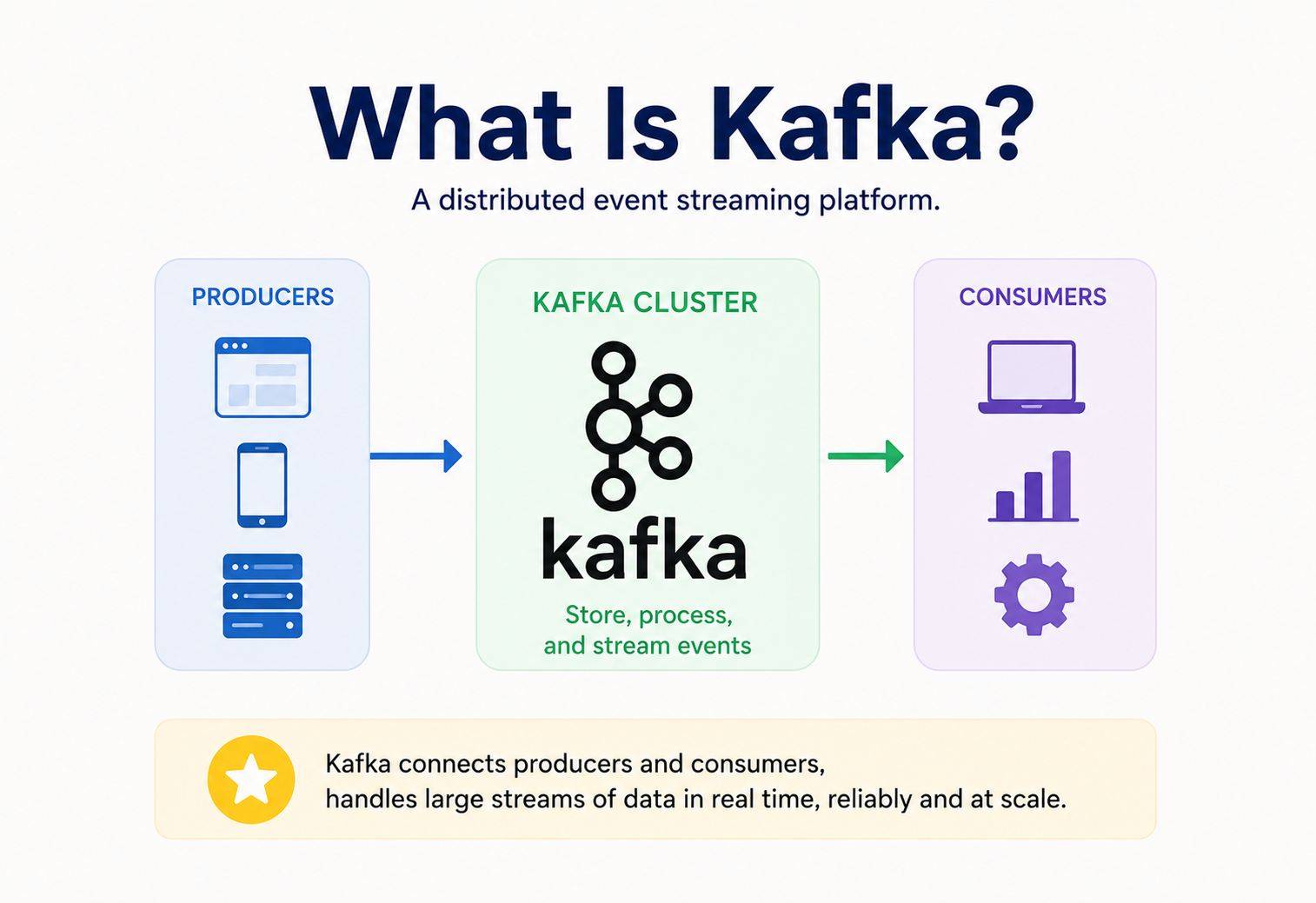
Apache Kafka is a distributed event streaming platform. In plain words: it is a system that lets one part of your software send a continuous stream of messages (“events” — a user clicked a button, a payment was made, a sensor recorded a temperature) and lets many other parts of your software read that same stream, independently, in real time or later, without the sender ever knowing or caring who is reading.
Think of Kafka as a durable, ordered, replayable pipe for data that flows between systems, rather than a database you query with conditions, or a simple message queue that deletes a message the moment someone reads it.
Imagine a rolling news ticker outside a stock exchange. Reporters (producers) post headlines onto the ticker continuously. Any number of people walking by — traders, journalists, tourists (consumers) — can read the ticker at their own pace. The ticker does not erase a headline just because one person read it; it keeps scrolling, and it keeps a full historical tape that anyone can rewind to check what was said an hour ago. That rolling tape, with its permanent record and many independent readers, is exactly what Kafka is for software systems.
1.1 A short history
Kafka was built at LinkedIn around 2010 by a team including Jay Kreps, Neha Narkhede, and Jun Rao. LinkedIn had a very specific pain: dozens of internal systems (search indexing, monitoring, recommendation, ad tracking) all needed a copy of the same activity data — page views, likes, connection requests — and every existing messaging system of the time (traditional queues, custom point-to-point pipes) either buckled under LinkedIn’s volume or made it painful to have many independent consumers reading the same data at different speeds.
The team designed a log-based system inspired by how database replication logs work, optimized it heavily for sequential disk I/O (which is far faster than people assume), and named it Kafka — reportedly after the writer Franz Kafka, because Jay Kreps thought a system built for writing (logging) deserved a writer’s name. LinkedIn open-sourced it in 2011, and it became an Apache Software Foundation top-level project in 2012. Confluent, a company founded by the original creators, was formed in 2014 to build a commercial ecosystem (Confluent Platform, Confluent Cloud) around it.
Since then Kafka has become the de facto backbone for event-driven architecture across the industry — used at companies like Netflix, Uber, Airbnb, Walmart, and thousands of others to move trillions of messages a day.
1.2 Where Kafka fits in the bigger picture
It helps to place Kafka among its neighbors. A relational database like PostgreSQL is optimized to answer “what is the current state of this row, and let me query it flexibly.” A traditional message queue like RabbitMQ is optimized to reliably hand a unit of work to exactly one worker and forget about it once done. Kafka occupies a third space: it is optimized to answer “give me the entire ordered history of everything that happened, and let me and anyone else replay it as many times as we want, at whatever pace we want.” None of these three replaces the others — most serious production systems use all three together, each for the job it is actually good at.
1.3 What “distributed” actually means here
Calling Kafka “distributed” is not marketing language — it describes concrete engineering choices. Data is not stored on one machine; it is split (partitioned) across many machines, and each piece is copied (replicated) onto several machines so that the loss of any single server does not lose data. Client applications don’t talk to “a single Kafka server” the way they might talk to a single database instance — they talk to a cluster, and the cluster internally figures out routing, failover, and rebalancing. This is precisely what allows Kafka to keep working, without a human intervening, when individual machines inevitably fail, which they will, at scale, on a regular basis.
Problem & Motivation
To understand why Kafka exists, it helps to see the mess it replaced.
2.1 The N×M integration problem
Imagine you have 5 source systems (order service, payment service, inventory service, user service, shipping service) and 6 downstream systems that need their data (analytics, fraud detection, search index, recommendation engine, email service, data warehouse). If each source system integrates directly with each downstream system, you end up building and maintaining 5 × 6 = 30 point-to-point connections. Add a new source or consumer, and the number of connections explodes.
Kafka collapses this into a hub: every producer writes once to a topic, and every consumer reads independently from that topic.
2.2 Problems Kafka specifically solves
Buffering spiky traffic
A flash sale can generate 50x normal order volume for ten minutes. Kafka absorbs the burst; downstream systems drain it at their own pace instead of falling over.
Decoupling producers and consumers
The order service doesn’t need to know that a fraud-detection team exists, or wait for it to respond. It just publishes the event and moves on.
Replaying history
A brand-new “fraud model v2” service can be deployed today and replay the last 7 days of transaction events to build up its state, something a traditional queue (which deletes on read) cannot do.
Ordering guarantees
Events for the same entity (e.g., the same user, the same order) can be guaranteed to arrive in the order they happened.
Multiple independent readers
Ten different teams can each read the same stream at their own pace without interfering with each other, unlike a classic queue where one consumer “claims” a message.
A food delivery app: when a customer places an order, the order service publishes one event, “OrderPlaced”. The restaurant app, the delivery-partner matching engine, the customer notification service, and the analytics pipeline all independently subscribe to that same event and react in their own way — no direct calls between any of them.
2.3 Why not just use HTTP calls between services?
A natural first instinct is: why not have the order service just call each downstream service’s API directly? This works fine at small scale, but it creates several compounding problems as a system grows. First, if the fraud-detection service is slow or down, does the order-placement flow have to wait for it, or fail because of it? With direct calls, the answer is often “yes,” which means an unrelated team’s outage becomes your outage. Second, adding a new consumer (say, a new personalization team) means changing and redeploying the order service to add one more outbound call — a change to a system that has nothing to do with personalization. Third, if a consumer was down for an hour and comes back up, direct HTTP calls have no memory; the missed calls are simply gone forever, whereas a Kafka consumer can resume exactly where it left off.
2.4 Why not just use a traditional message queue?
Classic queues solve some of this — for example, RabbitMQ decouples the sender from needing the receiver to be online. But classic queues are generally built around the idea that a message is “consumed” once and then gone, which is perfect for distributing work items (like image-resizing jobs) across a pool of workers, but a poor fit when five completely different teams each need their own full copy of every event, potentially at different times and different speeds. Kafka’s retained, replayable log is the specific design choice that makes multiple independent, replayable consumers a first-class use case rather than a workaround.
Core Concepts
Event (message / record)
The basic unit of data in Kafka. It has an optional key, a value (the payload, usually JSON, Avro, or Protobuf), a timestamp, and optional headers. Example: key = user-482, value = {"action":"login","ip":"10.2.3.4"}.
Topic
A named, ordered, append-only log of events, similar in spirit to a table name or a named channel. Producers publish events to a topic; consumers subscribe to a topic. A topic could be orders, payments, or user-signups.
Partition
Each topic is split into one or more partitions — independent, ordered append-only logs. Splitting a topic into partitions is what lets Kafka scale horizontally: different partitions can live on different machines and be written/read in parallel. Ordering is guaranteed only within a partition, not across the whole topic.
Think of a topic as a book, and partitions as separate chapters being written simultaneously by different scribes. Each chapter (partition) is strictly in order page-by-page, but there’s no guarantee chapter 3 was finished before chapter 1 — they progress independently.
Offset
A sequential ID number assigned to each event within a partition (0, 1, 2, 3…). Consumers track “how far they’ve read” using offsets, which is what allows a consumer to pause, crash, restart, and resume exactly where it left off.
Producer
A client application that publishes (writes) events to a topic.
Consumer & consumer group
A client application that subscribes to (reads) events from a topic. Consumers are usually organized into consumer groups: Kafka automatically divides a topic’s partitions among the consumers in a group, so a group of 4 consumers reading a 4-partition topic each handle one partition, giving you parallelism with automatic load balancing. Two different consumer groups reading the same topic are fully independent of each other.
Broker
A single Kafka server that stores data and serves client requests. A Kafka cluster is a set of brokers working together.
Replication factor
The number of copies of each partition kept across different brokers, for fault tolerance. A replication factor of 3 means if one broker dies, two other brokers still have the data.
Leader & follower (ISR)
For each partition, one broker is the “leader” that handles all reads and writes for it; the other replicas are “followers” that copy data from the leader. The set of replicas that are fully caught up with the leader is called the In-Sync Replica set (ISR).
Consumer lag
The gap between the latest offset produced and the offset a consumer has actually processed. High lag means consumers are falling behind producers — one of the most important metrics to monitor.
3.1 The vocabulary at a glance
| Term | What it is | Everyday analogy |
|---|---|---|
| Topic | Named stream of events | A TV channel |
| Partition | An ordered shard of a topic | One lane on a multi-lane highway |
| Offset | Position within a partition | A page number in a logbook |
| Producer | Writes events | A news reporter |
| Consumer Group | Set of consumers sharing the work | A team of readers splitting up chapters |
| Broker | A Kafka server | A single warehouse in a chain |
3.2 Retention
Unlike a traditional queue, Kafka does not delete a record the moment it’s read. Instead, each topic has a retention policy — commonly time-based (e.g., keep 7 days of data) or size-based (e.g., keep the most recent 100 GB per partition) — after which old segments are deleted regardless of consumption status. A special variant, log compaction, instead keeps only the most recent value for each key forever, turning the topic into a compact changelog rather than a time-bounded stream.
3.3 Serialization format
Kafka stores and transmits raw bytes; it has no opinion on what those bytes mean. Teams typically choose a structured format — JSON (readable but verbose and loosely typed), Avro (compact, schema-driven, widely used with Schema Registry), or Protobuf (compact, strongly typed, popular in polyglot environments) — to serialize event payloads consistently so producers and consumers agree on structure.
3.4 Exactly-once, at-least-once, at-most-once
These describe delivery guarantees. At-most-once means a message might be lost but is never duplicated (fire-and-forget). At-least-once, Kafka’s default and most common mode, means a message is never silently lost but might be delivered more than once after a retry or a crash recovery. Exactly-once semantics (achievable within Kafka-to-Kafka pipelines via Kafka Streams or transactional producers/consumers) means each message affects the final result precisely once — the strongest but most expensive guarantee.
Retention is like a security camera’s hard drive: it keeps the last 30 days of footage on a rolling basis whether or not anyone has watched it, and automatically overwrites the oldest footage once the disk fills up — nobody has to manually “consume” the tape for it to eventually be cleared.
Architecture & Components
A production Kafka deployment is made up of several moving parts working together.
4.1 Brokers
The workhorses. Each broker stores a subset of partitions on local disk, serves producer writes and consumer reads, and replicates data to/from other brokers. A cluster typically has 3 or more brokers in production.
4.2 Controller (KRaft)
Modern Kafka (2.8+, and mandatory from Kafka 4.0 onward) uses KRaft (Kafka Raft), where a small quorum of controller nodes manages cluster metadata (which broker is leader of which partition, cluster membership, configuration) using the Raft consensus protocol. This replaced the older architecture that depended on a separate Apache ZooKeeper cluster for the same job — removing an entire external dependency and simplifying operations significantly.
4.3 ZooKeeper (legacy)
Older Kafka versions used ZooKeeper as an external coordination service to store metadata and elect controllers. It is now deprecated in favor of KRaft, though many existing production clusters still run it.
4.4 Producers
Client libraries (Java, Python, Go, etc.) that batch, optionally compress, and send records to the appropriate partition leader.
4.5 Consumers
Client libraries that poll brokers for new records, track their own offsets (stored in a special internal Kafka topic called __consumer_offsets), and can rebalance automatically as group membership changes.
4.6 Kafka Connect
A framework for building reusable “source connectors” (pull data into Kafka from databases, files, APIs) and “sink connectors” (push data from Kafka into databases, data lakes, search indexes) without writing custom producer/consumer code for every integration.
4.7 Kafka Streams
A Java library for building stream-processing applications directly on top of Kafka — filtering, joining, aggregating, and transforming streams of events with exactly-once semantics, without needing a separate processing cluster like Spark or Flink.
4.8 Schema Registry (Confluent ecosystem)
A companion service that stores and enforces Avro/Protobuf/JSON schemas for topics, preventing producers from publishing malformed or incompatible data that would break consumers.
4.9 How a client finds the right broker
A producer or consumer doesn’t need to know the exact broker holding a particular partition in advance. It connects to any broker in its bootstrap.servers list, asks for cluster metadata (which broker leads which partition, for every topic it cares about), caches that metadata locally, and then talks directly to the correct leader broker for each partition. If leadership moves (say, because a broker crashed), the client detects the error, refreshes its metadata, and reconnects to the new leader automatically — all without any human or load balancer intervening.
4.10 Topic configuration at a glance
| Config | Purpose |
|---|---|
num.partitions | How many parallel shards the topic is split into |
replication.factor | How many copies of each partition exist across brokers |
retention.ms | How long records are kept before deletion |
cleanup.policy | delete (time/size based) or compact (keep latest per key) |
min.insync.replicas | Minimum replicas that must acknowledge a write for it to succeed under acks=all |
Internal Working
5.1 The log — Kafka’s core data structure
At its heart, a Kafka partition is nothing more than an append-only file on disk, split into segment files (e.g., 1 GB each) as it grows. New records are always appended to the end of the active segment — Kafka never rewrites existing data, it only appends and, later, deletes old segments per the retention policy.
This append-only design is why Kafka is so fast: writing sequentially to disk is dramatically faster than random-access writes, and modern OS page caches make sequential reads nearly as fast as reading from memory. Kafka deliberately relies on the OS page cache rather than managing its own in-process cache, and uses sendfile (zero-copy) system calls to transfer data straight from disk to network socket without copying it through user space — a major reason for its high throughput.
5.2 Partition assignment for producers
When a producer sends a record, Kafka decides which partition it lands in:
- If a key is provided (e.g.,
userId), Kafka hashes the key to consistently pick the same partition every time — guaranteeing all events for that key stay in order. - If no key is provided, Kafka distributes records round-robin (or using a sticky partitioner) across partitions for load balancing, with no ordering guarantee across them.
5.3 Segment files and indexes
Within a partition’s directory on disk, Kafka doesn’t keep one giant file forever — it rolls into a new “segment” once the active one hits a configured size or age limit (e.g., 1 GB). Alongside each segment’s .log file, Kafka maintains a .index file mapping offsets to byte positions, and a .timeindex file mapping timestamps to offsets. This is what lets a consumer say “give me everything after this timestamp” and have Kafka jump almost directly to the right position instead of scanning from the beginning.
5.4 Consumer group rebalancing
When a consumer joins or leaves a group (or crashes), Kafka’s group coordinator triggers a “rebalance” — partitions are reassigned among the remaining consumers so that every partition still has exactly one owner within the group. Older “eager” rebalancing stopped every consumer in the group and reassigned everything from scratch, causing a brief full-group pause. Newer “cooperative sticky” rebalancing strategies minimize disruption by only reassigning the partitions that actually need to move, instead of stopping the whole group — dramatically reducing the “stop the world” effect during scale-up/scale-down events or rolling deploys.
5.5 The group coordinator protocol, step by step
JoinGroup request
Each consumer sends a
JoinGrouprequest to the broker acting as coordinator for its group.Group leader selected
The coordinator picks one consumer as the “group leader” and gives it the full member list.
Partition assignment
The group leader runs the partition-assignment strategy locally and sends the resulting assignment back via
SyncGroup.Assignments distributed
The coordinator distributes each consumer’s specific assignment.
Heartbeat loop
Consumers periodically send heartbeats; if a consumer misses too many (controlled by
session.timeout.ms), the coordinator considers it dead and triggers a new rebalance.
5.6 Idempotent and transactional producers
Network retries create a subtle danger: if a producer sends a record, the broker writes it successfully, but the acknowledgment is lost on the way back due to a network blip, the producer’s retry logic will resend the same record — resulting in a duplicate. Setting enable.idempotence=true has the broker track a sequence number per producer session and silently drop exact duplicates caused by retries, giving exactly-once write semantics for a single partition without any extra application code. Kafka transactions extend this further, letting a producer write to multiple partitions (and, in Kafka Streams, consume-process-produce in one atomic step) so that either all the writes in a transaction become visible to consumers, or none do — the mechanism underlying Kafka Streams’ exactly-once processing guarantee.
5.7 Replication under the hood
acks=all: the leader broker only acknowledges the producer after both in-sync followers have replicated the record.With acks=all, the leader only confirms the write to the producer once all in-sync replicas have copied it — trading a little latency for a strong durability guarantee that data survives a broker crash.
5.8 Java example — a minimal producer
Properties props = new Properties();
props.put("bootstrap.servers", "broker1:9092,broker2:9092");
props.put("key.serializer", "org.apache.kafka.common.serialization.StringSerializer");
props.put("value.serializer", "org.apache.kafka.common.serialization.StringSerializer");
props.put("acks", "all");                 // wait for all in-sync replicas
props.put("enable.idempotence", "true");  // avoid duplicate writes on retry

try (KafkaProducer<String, String> producer = new KafkaProducer<>(props)) {
    ProducerRecord<String, String> record =
        new ProducerRecord<>("orders", "order-4821", "{"status":"PLACED"}");

    producer.send(record, (metadata, exception) -> {
        if (exception != null) {
            System.err.println("Send failed: " + exception.getMessage());
        } else {
            System.out.printf("Sent to partition %d at offset %d%n",
                metadata.partition(), metadata.offset());
        }
    });
}
5.9 Java example — a minimal consumer
Properties props = new Properties();
props.put("bootstrap.servers", "broker1:9092,broker2:9092");
props.put("group.id", "order-analytics-service");
props.put("key.deserializer", "org.apache.kafka.common.serialization.StringDeserializer");
props.put("value.deserializer", "org.apache.kafka.common.serialization.StringDeserializer");
props.put("enable.auto.commit", "false"); // commit manually for reliability

try (KafkaConsumer<String, String> consumer = new KafkaConsumer<>(props)) {
    consumer.subscribe(List.of("orders"));

    while (true) {
        ConsumerRecords<String, String> records = consumer.poll(Duration.ofMillis(500));
        for (ConsumerRecord<String, String> record : records) {
            System.out.printf("key=%s value=%s partition=%d offset=%d%n",
                record.key(), record.value(), record.partition(), record.offset());
        }
        consumer.commitSync(); // acknowledge only after successful processing
    }
}Data Flow & Lifecycle
Let’s trace one event’s full life, from creation to eventual deletion.
Production
The application calls
producer.send(). The record is serialized (e.g., to JSON bytes), routed to a partition, and buffered client-side for batching.Batching & compression
The producer groups several records heading to the same partition into one batch, optionally compresses it (gzip, snappy, lz4, zstd), and sends the batch over the network — far more efficient than one record per network call.
Write
The partition leader broker appends the batch to its log segment on disk.
Replication
Follower brokers pull the new data and append it to their own copies.
Commit
Once enough replicas (per the
ackssetting) have the data, it’s considered “committed” and visible to consumers.Consumption
Consumers poll the broker, receive new records past their last committed offset, and process them.
Offset commit
After successful processing, the consumer commits its offset (to
__consumer_offsets), marking progress.Retention & deletion
Based on the topic’s retention policy (e.g.,
retention.ms=604800000for 7 days, or size-based, or “compacted” to keep only the latest value per key), old segments are eventually deleted — independent of whether anyone has consumed them.
Netflix uses Kafka as the backbone of its “Keystone” data pipeline, moving hundreds of billions of events per day — everything from play/pause/seek actions to A/B test exposures — into stream processors and eventually into its data warehouse for analytics, without any producing service needing to know about downstream consumers.
Pros, Cons & Tradeoffs
Strengths
- Extremely high throughput via sequential disk I/O and zero-copy transfer.
- Durable, replayable log — new consumers can process history.
- Horizontal scalability through partitioning.
- Decouples producers from consumers completely.
- Strong ordering guarantees per partition/key.
- Rich ecosystem: Connect, Streams, Schema Registry.
Weaknesses & tradeoffs
- Operational complexity — running Kafka well is nontrivial (partition planning, JVM tuning, disk management).
- Not a request/response system — poor fit for synchronous, low-latency query patterns.
- No native query language — you can’t “SELECT WHERE” a Kafka topic like a database.
- Rebalancing storms can cause temporary processing pauses under high churn.
- Global ordering across a whole topic is not guaranteed, only per-partition.
- Costs (storage + compute) can grow quickly with long retention and high replication.
The core tradeoff is throughput and durability versus latency and simplicity: Kafka trades away sub-millisecond point-to-point latency and query flexibility for very high sustained throughput, replayability, and loose coupling at scale — this is why it’s chosen for event pipelines, not for, say, a synchronous “get user profile” API call.
Performance & Scalability
8.1 Why Kafka is fast
- Sequential disk writes: Append-only logs avoid slow random disk seeks.
- OS page cache reliance: Kafka lets the operating system cache recently written data in memory, so recent reads rarely touch physical disk.
- Zero-copy transfer: The
sendfile()syscall moves bytes from disk cache to network socket without an extra copy through the JVM heap. - Batching and compression: Fewer, larger network round-trips with compressed payloads.
8.2 Scaling horizontally
Throughput scales primarily by increasing partition count: more partitions mean more parallel writers and readers, spread across more brokers. But partitions aren’t free — each one costs file handles, memory, and replication overhead, and too many partitions per broker can hurt latency and increase leader-election time during failover. A common rule of thumb is to size partitions based on target throughput per partition (often tens of MB/s) divided into your total required throughput, then round up for headroom and future growth.
Over-partitioning “just in case” (e.g., 1000 partitions for a topic doing 10 MB/s) creates unnecessary overhead: more open file handles, longer controller failover times, and more end-to-end latency from cross-broker fetch overhead. Partition count should be a deliberate, calculated decision — and increasing it later is possible, but you cannot decrease it without recreating the topic.
8.3 Consumer-side scaling
You can add more consumer instances to a group up to the number of partitions — beyond that, extra consumers sit idle since a partition can only be owned by one consumer within a group at a time.
8.4 Producer tuning knobs
| Setting | Effect |
|---|---|
batch.size | Max bytes the producer buffers per partition before sending — larger batches mean fewer, more efficient network calls |
linger.ms | How long the producer waits to fill a batch before sending anyway — a small delay traded for much higher throughput |
compression.type | gzip/snappy/lz4/zstd — trades CPU for reduced network and disk usage, often a large win |
buffer.memory | Total memory the producer can use for unsent batches before send() blocks or throws |
A typical high-throughput pipeline might set linger.ms=10 and batch.size=64KB with lz4 compression, accepting 10 milliseconds of added latency per batch in exchange for a throughput increase often measured in multiples, since far fewer, denser network requests are needed to move the same volume of data.
8.5 Disk and hardware considerations
Because Kafka is I/O-bound rather than CPU-bound for most workloads, disk throughput (not just capacity) is often the real bottleneck in a self-managed cluster. SSDs dramatically outperform spinning disks for workloads with many partitions and high write concurrency, and separating Kafka’s data directory onto dedicated disks (not shared with the OS or other services) avoids contention. Network bandwidth between brokers also matters heavily, since every write to a leader with replication.factor=3 generates two more replication writes across the network.
High Availability & Reliability
9.1 Replication
Setting replication.factor=3 means every partition has 2 extra copies on different brokers. If a broker fails, one of the followers is promoted to leader automatically, and clients transparently reconnect to the new leader.
9.2 acks setting — the durability dial
| Setting | Meaning | Tradeoff |
|---|---|---|
acks=0 | Producer doesn’t wait for any confirmation | Fastest, but records can be silently lost |
acks=1 | Waits for leader only | Good balance; data lost if leader crashes before replicating |
acks=all | Waits for all in-sync replicas | Strongest durability, higher latency |
9.3 min.insync.replicas
Combined with acks=all, this setting (e.g., set to 2 out of 3 replicas) refuses writes entirely if too few replicas are available — trading some availability for a hard guarantee against data loss.
9.4 Rack / AZ awareness
In cloud deployments, brokers and their replicas are spread across different availability zones so a single AZ outage doesn’t take down every copy of a partition — an essential setting for disaster recovery.
9.5 Multi-cluster replication
For cross-region disaster recovery, tools like MirrorMaker 2 or Confluent’s Cluster Linking continuously replicate topics from one Kafka cluster to another in a different region, so you can fail over an entire application to a standby region if a whole data center goes down.
Uber runs Kafka across multiple data centers and uses active-active replication so that a regional outage doesn’t stop ride requests, payments, and driver-matching events from flowing — traffic simply shifts to healthy regions.
9.6 Walking through a broker failure
Suppose Broker 2 (leader for partition 0 of the orders topic) suddenly loses power. Here is what happens, without any human touching a keyboard:
Heartbeat timeout
The controller quorum detects Broker 2 has stopped sending heartbeats within its session timeout.
Leader election
The controller looks at partition 0’s ISR list, picks an in-sync follower (say Broker 3), and promotes it to leader.
Metadata propagation
Updated metadata (Broker 3 is now the leader of partition 0) propagates to all brokers.
Clients reconnect transparently
Producers and consumers that try to reach the old leader get a “not leader” error, refresh their metadata, and reconnect to Broker 3 — typically within a few seconds.
Recovery of the failed broker
When Broker 2 eventually restarts, it rejoins as a follower, catches up on missed data, and rejoins the ISR — it does not automatically reclaim leadership unless configured to do so.
No data is lost as long as the write had already been acknowledged under acks=all with min.insync.replicas=2, because that setting guarantees the promoted follower had a full copy before the original write was ever confirmed to the producer.
9.7 Graceful degradation under partial failure
Kafka is designed so that losing a minority of brokers degrades the cluster rather than halting it entirely — partitions whose leaders are unaffected keep serving traffic completely normally, while only the specific partitions that lost their leader experience a brief leader-election pause, usually measured in seconds.
Security
- Encryption in transit: TLS/SSL between clients and brokers, and between brokers themselves.
- Authentication: SASL mechanisms (SASL/SCRAM, SASL/GSSAPI-Kerberos, SASL/OAUTHBEARER) or mutual TLS (mTLS) to verify client identity.
- Authorization: Access Control Lists (ACLs) define exactly which principals can produce to, consume from, or administer specific topics and consumer groups — following the principle of least privilege.
- Encryption at rest: Typically handled at the disk/filesystem or cloud-volume level (e.g., encrypted EBS volumes), since Kafka itself doesn’t natively encrypt data on disk.
- Quotas: Per-client byte-rate and request-rate quotas prevent one noisy producer or consumer from starving the cluster for everyone else.
Shipping Kafka to production with the default PLAINTEXT listener and no ACLs is a surprisingly common mistake — it means any machine that can reach the broker’s port can read and write every topic. Always enable TLS and ACLs before going anywhere near real data.
10.1 A layered security checklist
Network layer
Place brokers in a private subnet/VPC, reachable only from application networks — never expose broker ports directly to the public internet.
Transport layer
TLS everywhere, including inter-broker traffic, so data can’t be sniffed on the wire even inside your own network.
Identity layer
SASL or mTLS so every client authenticates as a specific, auditable principal, never as an anonymous connection.
Authorization layer
Fine-grained ACLs per topic and consumer group, following least privilege — a service should only be able to write to the topics it owns.
Data layer
Sensitive fields (PII, payment data) should be encrypted or tokenized at the application level before being published, since Kafka itself stores payloads as opaque bytes with no field-level encryption.
Audit layer
Log administrative actions (ACL changes, topic deletions) since a compromised admin credential can otherwise cause silent data loss or exposure.
A healthcare startup storing appointment-booking events might encrypt the patient’s name and diagnosis fields at the application layer before publishing to Kafka, so that even someone with valid read access to the topic (for infrastructure debugging, say) only sees ciphertext for the sensitive fields, not plain PII.
Monitoring, Logging & Metrics
Kafka exposes a large set of JMX metrics; most teams scrape these with Prometheus’s JMX exporter and visualize them in Grafana.
| Metric | Why it matters |
|---|---|
| Consumer lag | The single most important health signal — how far behind consumers are from the latest data |
| Under-replicated partitions | Non-zero means some replicas are falling behind, risking data loss on failure |
| Request latency (produce/fetch) | Detects broker-side slowdowns before clients time out |
| Bytes in/out per second | Tracks throughput and capacity headroom |
| Active controller count | Should always be exactly 1 across the cluster; 0 or >1 signals a serious problem |
| Offline partitions | Partitions with no available leader — a critical, page-immediately alert |
Tools like Confluent Control Center, Burrow, or Kafka’s own kafka-consumer-groups.sh --describe command are commonly used specifically to track consumer lag per group and partition.
11.1 Logging considerations
Broker logs (the operational server logs, not to be confused with the Kafka “log” data structure) capture events like controller elections, ISR shrink/expand events, and log-segment cleanup. Client-side application logs should always include producer/consumer correlation IDs or event keys, so a support engineer can trace one specific business event (e.g., order-4821) all the way from the producing service, through Kafka, to every consumer that touched it — this is invaluable when debugging a report of a “missing” downstream update.
11.2 Alerting thresholds worth setting up
| Condition | Suggested response |
|---|---|
| Consumer lag growing for >10 minutes | Investigate whether the consumer is slow, stuck, or under-scaled |
| Any under-replicated partitions | Check broker health immediately; durability is at reduced margin |
| Offline partitions > 0 | Page on-call — active data unavailability |
| Disk usage above ~80% on any broker | Plan capacity expansion or tighten retention before it becomes an outage |
Deployment & Cloud
12.1 Self-managed
Running Kafka yourself on VMs or Kubernetes (using an operator like Strimzi) gives full control over configuration and cost, at the price of owning upgrades, scaling, and failure recovery yourself.
12.2 Managed / cloud services
Confluent Cloud
Fully managed by Kafka’s original creators, with schema registry, connectors, and stream processing built in.
Amazon MSK
AWS-managed Kafka clusters integrated with the rest of the AWS ecosystem (IAM, VPC, CloudWatch).
Azure Event Hubs (Kafka-compatible)
Speaks the Kafka protocol while being run as a native Azure service.
Redpanda / WarpStream
Kafka-API-compatible alternatives built with different internal engines, often marketed around lower operational overhead or cost.
12.3 Kubernetes deployment
Kafka on Kubernetes (via the Strimzi or Confluent operators) treats brokers as StatefulSets with persistent volumes, letting Kubernetes handle restarts and rescheduling while the operator manages Kafka-specific concerns like rolling upgrades without downtime and rack-aware pod placement across zones.
12.4 Choosing self-managed vs managed
| Factor | Self-managed | Managed (Confluent Cloud / MSK / etc.) |
|---|---|---|
| Operational effort | High — you own patching, scaling, failure recovery | Low — provider handles broker operations |
| Cost model | Infrastructure cost + engineering time | Usage-based, often higher per-GB but lower total headcount cost |
| Customization | Full control over configuration and versions | Constrained to what the provider exposes |
| Time to production | Weeks (cluster design, security, monitoring) | Hours to days |
Many organizations start on a managed service to move fast, and only invest in self-managed infrastructure once Kafka usage is large and stable enough that the cost savings clearly outweigh the added operational burden.
12.5 Rolling upgrades
Kafka clusters are upgraded broker-by-broker, not all at once — a broker is stopped, upgraded, and restarted while the rest of the cluster (with replication in place) continues serving traffic, and the process repeats around the cluster. This is precisely why replication factor 3 and correctly configured min.insync.replicas matter operationally, not just for disaster scenarios — routine maintenance relies on the same redundancy.
Databases, Caching & Load Balancing
13.1 Kafka vs a database
Kafka is not a replacement for a database — it has no secondary indexes and no ad-hoc query language. However, “compacted topics” (retention policy cleanup.policy=compact) turn a topic into a durable, replayable key-value changelog, keeping only the latest value per key — this is the basis for Kafka Streams’ internal state stores and for the “event sourcing” pattern, where a compacted topic effectively becomes the source of truth that materialized views (in Redis, Elasticsearch, or a relational DB) are built from.
13.2 Caching alongside Kafka
Consumers commonly maintain a local cache or materialized view (in Redis or an embedded store like RocksDB, which Kafka Streams uses internally) built by continuously consuming a topic — giving fast local reads while Kafka remains the durable, replayable source of truth.
13.3 “Load balancing” in Kafka
Kafka doesn’t use a traditional load balancer in front of brokers the way a web service does; instead, client libraries are “cluster-aware” — they fetch cluster metadata (which broker leads which partition) directly from any broker and then talk straight to the correct leader, spreading load naturally across brokers by partition ownership.
13.4 Follower fetching for read load
By default all reads go to the partition leader, which keeps things simple but can add latency for geographically distributed consumers. Kafka supports “follower fetching,” letting consumers in a particular availability zone or region read from the nearest in-sync replica instead of always crossing the network to the leader — trading a small amount of read freshness for significantly reduced network cost and latency in multi-region deployments.
APIs & Microservices
14.1 Kafka in an event-driven microservices architecture
Kafka is frequently the backbone connecting microservices asynchronously, complementing (not replacing) synchronous REST/gRPC APIs used for direct request/response needs.
14.2 The transactional outbox pattern
A common problem: how do you update a database row and publish a Kafka event atomically, so you never end up with a database change but no event (or vice versa)? The outbox pattern solves this by writing the event into an “outbox” table in the same local database transaction as the business change, then using a separate process (like Kafka Connect’s Debezium CDC connector) to read that outbox table’s changes and publish them to Kafka reliably.
14.3 Event-carried state transfer vs event notification
Some teams publish “thin” events (just an ID, “OrderPlaced: order-4821”) that force consumers to call back to an API for details; others publish “fat” events carrying the full payload so consumers never need to call back at all — trading topic size for looser runtime coupling.
A Spring Boot microservice publishing an event after saving an order, and a matching consumer that reacts to the event:
@Service
public class OrderService {

    private final OrderRepository orderRepository;
    private final KafkaTemplate<String, OrderEvent> kafkaTemplate;

    public OrderService(OrderRepository orderRepository,
                         KafkaTemplate<String, OrderEvent> kafkaTemplate) {
        this.orderRepository = orderRepository;
        this.kafkaTemplate = kafkaTemplate;
    }

    @Transactional
    public Order placeOrder(Order order) {
        Order saved = orderRepository.save(order);

        OrderEvent event = new OrderEvent(saved.getId(), "PLACED", saved.getTotal());
        kafkaTemplate.send("orders", saved.getId().toString(), event);

        return saved;
    }
}

@KafkaListener(topics = "orders", groupId = "notification-service")
public void onOrderEvent(OrderEvent event) {
    if ("PLACED".equals(event.getStatus())) {
        notificationClient.sendOrderConfirmation(event.getOrderId());
    }
}Design Patterns & Anti-Patterns
15.1 Useful patterns
- Event sourcing: store every state change as an immutable event in a compacted topic; rebuild current state by replaying.
- CQRS with Kafka: writes go through a command service that emits events; separate read-optimized views are built by consumers materializing those events into query-friendly stores.
- Saga pattern: coordinate a multi-step distributed transaction (e.g., book flight → charge card → reserve seat) via a sequence of events and compensating events on failure, instead of a two-phase-commit distributed transaction.
- Dead-letter topics: route records that repeatedly fail processing to a separate topic for manual inspection instead of blocking the whole partition.
15.2 Anti-patterns to avoid
Forcing synchronous “call and wait for reply” patterns over Kafka adds needless complexity and latency; use REST/gRPC instead.
Mixing unrelated event types in a single topic makes consumer filtering, schema evolution, and access control unnecessarily hard.
Without a retention policy, disks fill up and cluster operations get harder over time.
Kafka’s at-least-once delivery means consumers must be written to safely handle duplicate messages (e.g., using idempotent database upserts keyed by event ID).
15.3 Fan-out pattern
Because any number of consumer groups can independently read the same topic from the beginning, “fan-out” — one event triggering many unrelated reactions — is essentially free in Kafka, unlike systems where the publisher would need to know every subscriber in advance. A single UserSignedUp event might simultaneously trigger a welcome email, a CRM sync, an analytics record, and a fraud-risk check, each owned by a completely different team’s consumer group, added independently over time without ever touching the producer.
15.4 Change Data Capture (CDC)
Rather than having application code manually publish events whenever data changes, CDC tools (most commonly Debezium, often run via Kafka Connect) tail a database’s internal transaction log and automatically publish an event for every insert, update, and delete — guaranteeing Kafka’s event stream never drifts out of sync with the database, since it’s derived directly from the database’s own write-ahead log rather than from application code that could have a bug or a missed code path.
Best Practices & Common Mistakes
Pick keys deliberately
Choose a partition key that groups related events (e.g., userId) so ordering is preserved where it matters, while still spreading load reasonably across partitions.
Enable idempotent producers
enable.idempotence=true prevents duplicate records from producer retries, at negligible cost.
Set sane retention
Match retention time/size to actual business need — “keep forever” is rarely necessary and gets expensive.
Monitor consumer lag actively
Alert on rising lag before it becomes an outage, not after.
Use schema registry
Enforce backward/forward-compatible schema evolution so producers and consumers can deploy independently without breaking each other.
Right-size partitions upfront
Plan partition count based on target throughput; remember you can only add partitions later, never remove.
Treating Kafka’s “at-least-once” delivery guarantee as “exactly-once” without doing the work — Kafka can deliver exactly-once within Kafka Streams pipelines with transactions enabled, but a plain consumer writing to an external system (a database, an API) must handle duplicate deliveries itself, usually via idempotent writes keyed on a unique event ID.
16.1 Naming and governance conventions
At scale, a consistent topic-naming convention (e.g., domain.entity.event like orders.order.placed) makes a cluster with thousands of topics navigable instead of chaotic. Pairing this with clear ownership metadata (which team owns which topic, documented schemas, and a review process for breaking schema changes) prevents the common failure mode where nobody remembers who’s producing to a topic or what its fields mean six months later.
16.2 Testing Kafka-dependent code
Rather than mocking the producer/consumer APIs directly, most teams use an embedded or containerized Kafka broker (via Testcontainers) in integration tests, so serialization, partitioning, and consumer-group behavior are exercised against a real broker rather than assumptions about how Kafka behaves.
Real-World / Industry Examples
What’s notable across these examples is that Kafka’s role is rarely “the product” itself — it’s the connective tissue that lets dozens or hundreds of independently deployed teams and services stay loosely coupled while still sharing a consistent, ordered view of what happened in the business. A ride-matching team at Uber doesn’t need a direct relationship with the fraud team’s service; both simply read the same trip-event stream, on their own schedule, using their own technology choices, and evolve independently as long as they respect the event schema.
Think of these companies’ Kafka clusters as a city’s central water mains rather than individually plumbed buildings: every new building (service) just needs to tap into the existing main to get water (events), instead of every building running its own private pipeline to every other building it needs water from.
FAQ, Summary & Key Takeaways
Is Kafka a message queue?
Not exactly. Traditional queues (like RabbitMQ) typically remove a message once it’s consumed and are optimized for point-to-point work distribution. Kafka retains messages for a configured period regardless of who has read them, supports many independent consumer groups reading the same data, and is optimized for high-throughput streaming rather than complex per-message routing logic.
Does Kafka guarantee message ordering?
Yes, but only within a single partition. If you need strict ordering for a given entity, make sure all its events share the same partition key.
What happens if a consumer crashes mid-processing?
Since it hadn’t committed its offset yet, another consumer in the group (or the same one on restart) will re-read from the last committed offset — meaning at-least-once delivery, so duplicate processing is possible and should be handled idempotently.
Is Kafka good for small applications?
Often it’s overkill. For small systems, simpler tools (a lightweight queue, or even direct API calls) may be more appropriate; Kafka earns its operational complexity at meaningful scale or when replayability/multiple-consumer patterns are genuinely needed.
Do I still need ZooKeeper?
New Kafka clusters should use KRaft mode, which removes the ZooKeeper dependency entirely. ZooKeeper support was removed starting with Kafka 4.0.
How is Kafka different from RabbitMQ?
RabbitMQ excels at flexible message routing (exchanges, routing keys, priority queues) and is optimized around delivering each message to one worker and discarding it. Kafka excels at high-throughput, ordered, replayable streaming with many independent consumer groups, but has a simpler routing model. Choose based on whether you need flexible routing and per-message work distribution (RabbitMQ) or high-volume, replayable event streaming (Kafka).
Can Kafka lose data?
With careless configuration (e.g., acks=0, replication.factor=1), yes. With acks=all, an adequate min.insync.replicas, and a properly sized replication factor (typically 3), Kafka is designed to survive the loss of any single broker without losing acknowledged data.
How long should I retain data in a topic?
It depends entirely on the use case: operational event pipelines often keep just a few days (enough to recover from a downstream outage), while topics feeding analytics or acting as a system of record might keep months or use log compaction to retain the latest state indefinitely.
Key takeaways
- Kafka is a distributed, durable, replayable log for streaming events between systems — not a database and not a classic message queue.
- Topics are split into partitions for parallelism; ordering is only guaranteed within a partition.
- Producers write, consumer groups read independently and in parallel, and offsets track progress per consumer group.
- Replication and the
acks/min.insync.replicassettings are the core levers for durability and availability. - KRaft has replaced ZooKeeper as the modern way to manage cluster metadata.
- Kafka shines for decoupling, high-throughput event pipelines, and event-driven microservices — not for synchronous request/response calls.
- Production Kafka needs deliberate partition planning, security (TLS + ACLs), and active consumer-lag monitoring to run reliably.
Where to go next
If you’re just getting started, the most productive path is usually: spin up a single-broker Kafka instance locally (or a free tier of a managed service), write a minimal producer and consumer like the Java examples above, deliberately kill the broker mid-run to see how the client reacts, and then read through the official Kafka documentation’s sections on consumer group semantics and delivery guarantees — concepts that are far easier to internalize after you’ve watched them happen once with your own eyes than from documentation alone. From there, topics like Kafka Streams for in-cluster processing, Kafka Connect for integrations, and Schema Registry for safe schema evolution become natural next steps as real production requirements surface.