What Is a Connection Timeout, and Why Does It Matter?
A complete, beginner‑friendly, production‑grade guide to one of the most important — and most misunderstood — ideas in networked software.
Introduction & History
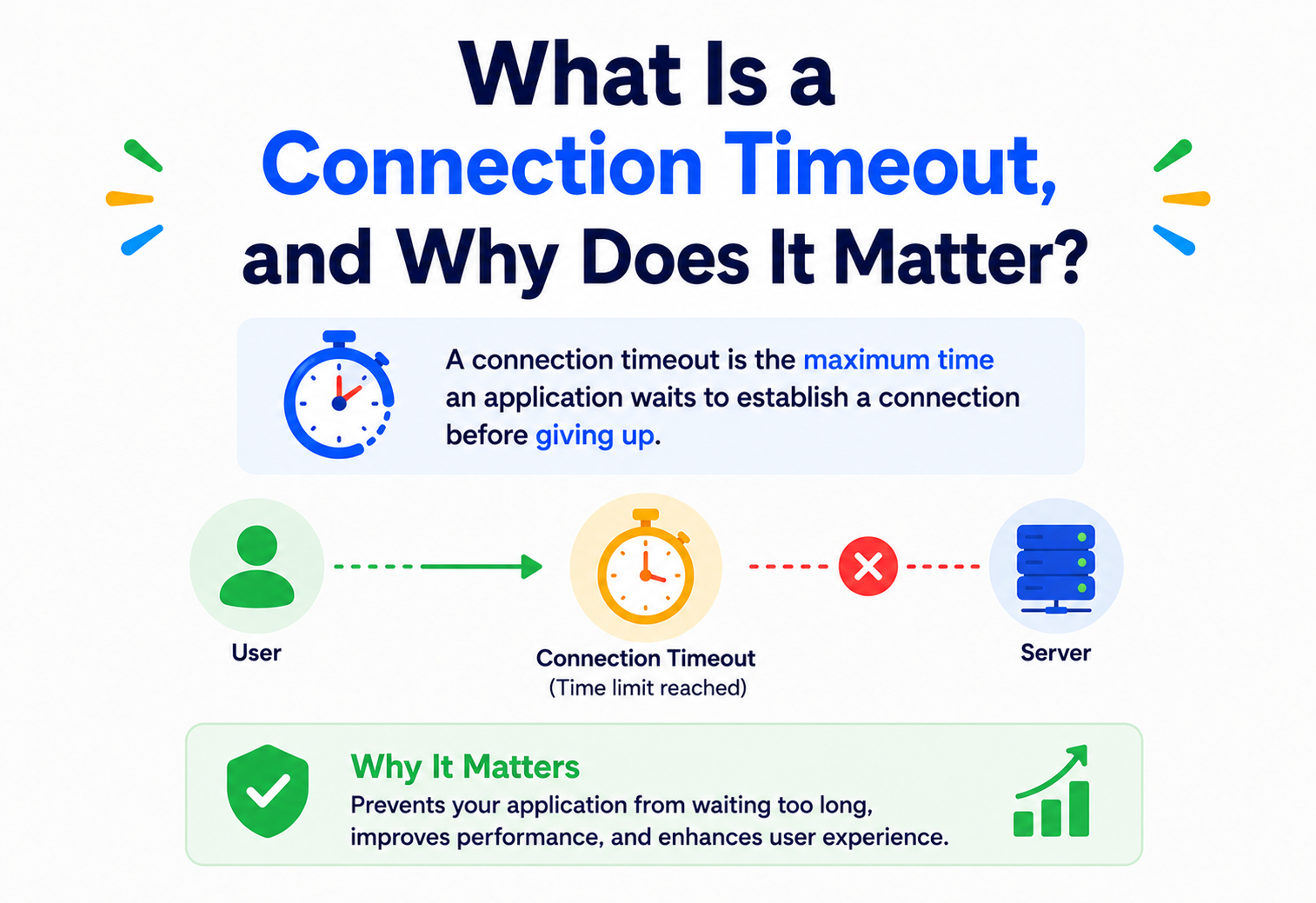
Imagine you call a friend’s landline. You dial the number, and then you wait. If nobody picks up after, say, 30 seconds, you hang up. You don’t wait forever. You made a decision: “I will only wait this long, and then I will stop trying.” That decision — waiting for a reasonable amount of time and then giving up — is exactly what a connection timeout is in computer networking.
A connection timeout is a rule that tells a computer program: “Try to connect to this other computer or service. But if the connection isn’t established within a certain amount of time, stop waiting and treat it as a failure.” It is one of the simplest ideas in software engineering, yet it is also one of the most important, because almost every real‑world outage, slowdown, or “hanging” application you’ve ever experienced traces back to a missing or badly configured timeout.
1.1 Where Did This Idea Come From?
To understand connection timeouts, we have to go back to the early days of computer networking. In the 1960s and 1970s, computers began talking to each other over wires — first over research networks like ARPANET, and later over what became the modern Internet. Two computers that want to exchange data need a way to agree: “Are you there? Are you ready? Let’s talk.”
This agreement process is called a handshake. In 1974, Vint Cerf and Bob Kahn published the paper that eventually led to TCP (Transmission Control Protocol), the protocol that still powers most of the Internet’s reliable communication today, including web browsing, email, and file transfers. TCP introduced the idea of a formal “connection” — a virtual, reliable channel between two computers — established through a process called the three‑way handshake (we’ll explore this deeply in Section 6).
But here’s the catch: networks are unreliable. Cables get cut. Servers crash. Routers get overloaded. Wi‑Fi signals drop. If Computer A asks Computer B “can we connect?” and Computer B never answers — maybe because it’s offline, maybe because the network lost the message — Computer A cannot simply wait forever. If it did, every single failed connection attempt in history would freeze programs permanently. So network engineers built in a safety mechanism: a timer. If the connection isn’t established before the timer runs out, give up and report an error. This is the birth of the connection timeout.
Imagine knocking on a friend’s door. You knock, and you wait. If nobody opens the door after you count to 30 in your head, you decide “maybe they’re not home” and you leave. You don’t stand there forever. A connection timeout is a computer’s way of counting to 30 before deciding to leave.
As the Internet grew from a handful of research computers to billions of connected devices, the humble timeout evolved from a small technical detail into a critical piece of software architecture. Today, every mobile app, every website, every cloud service, and every microservice inside companies like Netflix, Amazon, and Google relies on carefully tuned timeouts to stay fast, stay available, and avoid collapsing under failure.
1.2 Why This Topic Matters So Much
Here’s a fact that surprises many beginners: most large‑scale system outages are not caused by servers being “down.” They’re caused by servers being slow, combined with client programs that don’t know when to stop waiting. A missing or misconfigured timeout can turn one slow server into a total system‑wide outage within seconds. We’ll see exactly how and why later in this tutorial (Section 15, “Cascading Failures”).
Timeouts weren’t designed as an optimisation. They were designed because unreliable networks made “wait forever” an unacceptable default. Every modern resilience pattern — retries, circuit breakers, deadlines, health checks — is built on top of this one 1970s‑era idea.
The Problem & Motivation
Let’s build intuition with a simple, real story.
Imagine you’re building a food delivery app. When a user opens the app, your app needs to fetch the restaurant list from a server. Your code says, roughly:
connect to server
wait for response
show restaurant list
Now imagine the server is overloaded, or the network cable between your phone and the server got unplugged, or a router somewhere in the middle silently dropped the connection request. What happens to “wait for response” if there is no rule about how long to wait?
Without a timeout
- The app freezes — the loading spinner spins forever.
- The user can’t cancel, retry, or do anything meaningful.
- Server‑side resources (threads, memory, sockets) stay locked up waiting too.
- One slow dependency can eventually exhaust all available connections, crashing the whole system.
With a timeout
- The app waits a sensible amount of time (say, 5 seconds).
- If no response arrives, it fails fast and shows “Couldn’t connect — try again.”
- Resources are freed up quickly for other requests.
- The failure is contained instead of spreading.
This is the fundamental motivation: networks fail, and software must fail gracefully instead of hanging indefinitely. A connection timeout is the mechanism that converts “unknown, indefinite waiting” into “a predictable, bounded decision.”
2.1 The Two Root Causes Timeouts Solve
- Unreliable networks: Packets can be lost, delayed, or misrouted. There’s no guarantee a “connect” request will ever get a reply.
- Unpredictable remote systems: The other side (a server, a database, an API) might be overloaded, crashed, restarting, or stuck — and it might never respond even though the network itself is fine.
A connection timeout defends against both. It doesn’t care why the connection is taking too long — it simply enforces a maximum patience limit and then acts.
Core Concepts
Before we go further, let’s pin down the exact vocabulary. Every term below is something you will see again and again in real jobs and interviews.
WhatAn agreed‑upon communication channel between two endpoints (usually a client and a server), established so that data can flow back and forth reliably.
WhyWithout an agreed channel, both sides would be shouting into the void — there’d be no way to know if messages were delivered, in order, or at all.
Shouting across a street is like sending random messages with no guarantee anyone hears them (similar to UDP, a “connectionless” protocol). A phone call, on the other hand, requires dialling, waiting for pickup, and both sides saying “hello” before the real conversation starts. That setup process — dialling and waiting for pickup — is the “connection establishment” phase, and it’s exactly where timeouts apply.
WhatA maximum amount of time a program will wait for something to happen before giving up and treating it as a failure.
HowImplemented using a timer: start counting when the wait begins, and if the expected event doesn’t happen before the counter reaches its limit, take a fallback action — usually raise an error.
WhatThe maximum time a client will wait for the initial connection to be established with a server — before any actual data (like a web page or API response) is exchanged.
ScopeIt only covers the “can we start talking?” phase, not the “how long did the conversation take?” phase.
A connection timeout is about whether a channel can be opened at all. A read/response timeout (covered in Section 4) is about whether data arrives after the channel is already open. Beginners often confuse these two — they are different timers, measuring different phases.
Picture ordering food by phone. Dialling the restaurant and waiting for someone to pick up is the connection phase. If nobody picks up within, say, 20 seconds, you hang up — that’s a connection timeout. But if someone does pick up and then puts you on hold for 10 minutes while you wait to place your order, that’s a different kind of timeout — a read timeout — because the “connection” (the phone call) is open, but you’re not getting the response you need.
3.4 Beginner Example — what your browser does
When you type a website address into your browser and press Enter, your browser:
- Looks up the website’s IP address (DNS resolution — has its own timeout too).
- Tries to open a TCP connection to that IP address on port 443 (HTTPS) — this attempt has a connection timeout, typically a few seconds.
- If connected, it sends the actual HTTP request and waits for a response — this has a read timeout.
If step 2 doesn’t succeed within the timeout window, your browser shows something like ERR_CONNECTION_TIMED_OUT.
3.5 Software Example
In almost every HTTP client library (Java’s HttpClient, Python’s requests, Node’s axios, etc.), you can configure a connection timeout separately from other timeouts:
// Java example (java.net.http.HttpClient)
HttpClient client = HttpClient.newBuilder()
        .connectTimeout(Duration.ofSeconds(5))
        .build();
This tells the HTTP client: “Spend at most 5 seconds trying to establish the TCP connection. If it’s not open by then, throw an error.”
3.6 Production Example
Netflix’s internal services set connection timeouts as low as a few hundred milliseconds for calls between microservices within the same data center, because a healthy internal network should connect almost instantly. If a connection takes longer than that, it’s a strong signal something is wrong — so failing fast and trying a different server (via retries and load balancing) is far better than waiting.
Types of Timeouts
“Timeout” is actually an umbrella term. To really understand connection timeouts, you need to see how they relate to their siblings. Here’s the complete family:
1. Connection Timeout
Max time to establish the initial connection (e.g. complete the TCP handshake). Fails before any data is exchanged.
2. Read / Response Timeout
Max time to wait for data after the connection is open and a request has been sent.
3. Write Timeout
Max time to wait while sending data to the other side, useful when uploading large payloads.
4. Idle / Keep‑Alive Timeout
Max time a connection can sit unused before it’s closed to free up resources.
5. DNS Resolution Timeout
Max time to wait for a domain name to be translated into an IP address before connecting.
6. Request Timeout (End‑to‑End)
Max total time allowed for the entire operation, from connection to final response — a budget covering everything.
4.1 Comparison Table
| Timeout type | Measures | Typical value | Failure symptom if missing |
|---|---|---|---|
| Connection timeout | Time to open the socket | 1–5 seconds | App hangs when server is unreachable |
| Read timeout | Time waiting for response data | 2–30 seconds | App hangs when server is slow/stuck |
| Write timeout | Time sending request data | 2–30 seconds | Upload hangs on poor networks |
| Idle timeout | Time a connection sits unused | 30–120 seconds | Wasted server resources, “stale connection” errors |
| DNS timeout | Time to resolve hostname to IP | 1–5 seconds | App hangs before even attempting to connect |
| Overall request timeout | Total end‑to‑end time budget | Depends on SLA | Unbounded worst‑case latency |
Many beginners set only one generic “timeout” value and assume it covers everything. In reality, connection and read timeouts should almost always be configured separately, because a slow‑to‑connect server and a slow‑to‑respond server represent very different failure modes.
Architecture & Components
To understand how a connection timeout is enforced, you need to know the layers of software and hardware it passes through. Here are the key components involved.
5.1 The Socket
A socket is the operating system’s abstraction for “one end of a network connection.” When your program wants to connect to a server, it asks the operating system to create a socket and attempt a connection through it. The socket is where the connection timeout is technically enforced — either by the OS itself or by application‑level timers.
5.2 The Client Application
Your program (browser, mobile app, backend service) that initiates the connection. It configures the timeout value, usually through a library or framework setting.
5.3 The Network Stack (OSI Layers)
Data travels through multiple layers: Application → Transport (TCP/UDP) → Network (IP) → Data Link → Physical. Connection timeouts primarily operate at the Transport layer (TCP), since that’s where “connections” are formally established.
5.4 Routers, Switches, and Firewalls
These intermediate devices can silently drop packets (especially firewalls blocking unexpected traffic), which is one of the most common real‑world causes of connection timeouts — the client’s SYN packet (see Section 6) simply disappears into a firewall’s “deny” rule with no response at all.
5.5 The Server / Listening Process
The destination machine, which must be running a process that is actively “listening” on the target port. If nothing is listening, most operating systems respond immediately with a “connection refused” — which is actually not a timeout; it’s a fast, explicit rejection. Timeouts specifically happen when there’s silence, not rejection.
5.6 Load Balancers and Proxies
In production systems, a client rarely connects directly to a single server. Instead, it connects through a load balancer (like AWS ALB, NGINX, or HAProxy) which itself has its own connection and idle timeouts, adding another layer where timeout tuning matters.
Fig 5.1 — A single “connection attempt” actually travels through six or more components before it succeeds or fails. A connection timeout on the client protects against failure at any of these hops — it doesn’t need to know which component failed, only that no successful reply came back in time.
Internal Working
Now let’s look under the hood at exactly what happens when you call connect().
6.1 The TCP Three‑Way Handshake
Most connection timeouts you’ll encounter relate to TCP, the protocol underlying HTTP, HTTPS, database connections, and most reliable network communication. TCP connections are established through a three‑step process:
- SYN: The client sends a “synchronize” packet to the server, essentially saying “I’d like to start a connection.”
- SYN‑ACK: If the server is available and listening, it replies with “synchronize‑acknowledge,” saying “okay, I got your request, let’s connect.”
- ACK: The client sends a final “acknowledge” packet, confirming “great, connection established.”
Only after all three steps complete is the TCP connection considered “open,” and only then can actual application data (like an HTTP request) be sent.
Fig 6.1 — The connection timeout timer starts the moment the client sends the SYN packet and stops the moment the ACK completes the handshake. If the SYN‑ACK never arrives — because the server is down, overloaded, or a firewall silently dropped the SYN — the timer keeps running until it expires, and the client gives up with a timeout error.
6.2 What Happens When There’s No Response?
There are three distinct failure scenarios, and only one of them is a true “timeout”:
| Scenario | What happens | Is it a timeout? |
|---|---|---|
| Server actively refuses (nothing listening on port) | OS sends back an immediate RST (reset) packet | No — instant “Connection Refused” error |
| Firewall silently blocks the SYN packet | No response of any kind is ever sent | Yes — client waits until timeout expires |
| Server or network is too slow / overloaded | SYN‑ACK arrives, but after a long delay | Yes, if delay exceeds the configured limit |
6.3 Retransmission: TCP’s Built‑In Retry Mechanism
Here’s a detail many engineers don’t know: the operating system doesn’t just send one SYN packet and wait passively. TCP has its own internal retry mechanism, called SYN retransmission. If no SYN‑ACK arrives, the OS automatically resends the SYN packet several times, with increasing delays between each attempt (exponential backoff, covered more in Section 8). Only after all these internal retries are exhausted does the OS report a failure — and this can take a surprisingly long time (on Linux, the OS‑level default can be over 60 seconds across ~5–6 retries, though modern application frameworks almost always set their own, much shorter, connection timeout on top of this to avoid ever waiting that long).
This is exactly why application‑level connection timeouts exist: relying on the operating system’s default retry behaviour is far too slow for user‑facing software. Setting an explicit, short connection timeout in your HTTP client or database driver overrides the OS default and gives you control.
6.4 Timers Under the Hood (Simplified)
Conceptually, a connection timeout is implemented like this pseudocode:
startTime = now()
send SYN packet
while (connection not established) {
    if (now() - startTime > timeoutLimit) {
        abort connection attempt
        throw ConnectTimeoutException
    }
}
In real systems, this isn’t a busy‑loop (that would waste CPU) — it’s implemented using non‑blocking I/O and event‑driven timers managed by the operating system or an async runtime (like Java’s NIO, Node’s event loop, or Go’s netpoller), which efficiently wait for either “connection established” or “timer expired,” whichever comes first.
Data Flow & Lifecycle
Let’s trace the complete lifecycle of a network call, from the moment your code calls “connect” to the moment it either succeeds or fails.
- Step 1Initiation. Application code calls a method like connect(), passing a hostname/IP and port. The connection timeout clock conceptually starts here.
- Step 2DNS resolution (if needed). If a hostname (like api.example.com) was given instead of a raw IP, it must first be translated. This step has its own timeout, separate from the connection timeout.
- Step 3Socket creation. The OS allocates a socket — a data structure representing “one end” of the connection.
- Step 4SYN sent. The three‑way handshake begins. The connection timeout timer is now actively “racing” against the handshake completing.
- Step 5Outcome A: success. SYN‑ACK and ACK complete before the timer expires. The connection is now open, and the application can send/receive data (governed by read/write timeouts from here on).
- Step 6Outcome B: timeout. The timer expires first. The OS/library aborts the attempt, releases the socket, and raises a timeout exception/error back to the application.
- Step 7Application response to failure. The application decides what to do: retry, fail fast and show an error, fall back to cached data, or open a circuit breaker (Section 16).
Fig 7.1 — Every decision point in a connection attempt’s life. Notice the loop back from “Retry policy?” to “Send SYN” — this is where retry logic (Section 16) interacts with timeouts, and it’s a common place where systems get overwhelmed if not designed carefully.
Advantages, Disadvantages & Trade-offs
Choosing a timeout value is a genuine engineering trade‑off — there is no single “correct” number. It depends entirely on context.
Advantages of setting timeouts
- Prevents applications from freezing indefinitely.
- Frees up system resources (threads, sockets, memory) quickly.
- Enables fast failure detection and automatic recovery (retries, failover).
- Improves user experience — a clear error beats endless spinning.
- Protects against certain denial‑of‑service patterns (Section 11).
Disadvantages / risks of bad timeout values
- Too short: legitimate but slightly slow connections get killed unnecessarily, causing false failures.
- Too long: resources stay tied up for too long during real outages, worsening cascading failures.
- Inconsistent timeouts across a distributed system can cause confusing partial failures.
- Aggressive retries after timeouts can create “retry storms” that overload a recovering server.
8.1 The Goldilocks Problem
Setting a connection timeout is a balancing act:
- Too aggressive (too short): You’ll get false‑positive failures on networks with natural latency variance (e.g. mobile networks, cross‑continental calls), frustrating users and triggering unnecessary retries.
- Too relaxed (too long): Your application will hang for a long time during real failures, tying up threads/connections, potentially causing a small problem to snowball into a full outage.
Connection timeouts should be short (typically 1–5 seconds for internal services, up to 10–30 seconds for external/public APIs over the internet) because establishing a TCP connection to a healthy server should almost always be fast. Long connection delays are a strong early warning signal of trouble.
8.2 Real‑Life Analogy — the restaurant reservation
Imagine calling ten restaurants to find a table for tonight. If you let each unanswered call ring for 5 minutes before hanging up, you’d only get through two restaurants in that time. If you hang up after 15 seconds of no answer, you can call all ten within a few minutes. A short, sensible waiting rule per call lets you explore more options faster — exactly what timeouts + retries + load balancing achieve in software.
Performance & Scalability
A single hung connection is a nuisance. Thousands of hung connections is an outage. Here’s the arithmetic.
9.1 Thread and Resource Exhaustion
In many server architectures (especially older thread‑per‑request models), each incoming request occupies a thread, and each outgoing call to another service occupies a connection. If timeouts are too long or missing, slow downstream calls hold onto threads and connections far longer than necessary. Eventually, all available threads are stuck waiting, and the server can no longer accept new requests — even for completely unrelated, healthy operations. This is called resource exhaustion, and it’s one of the most common causes of full outages in production systems.
The math above illustrates the danger: with a 200‑thread pool and a 30‑second timeout on a failing dependency, your entire server can only process about 6–7 requests per second system‑wide once that dependency starts failing — regardless of how fast everything else is. Shortening the timeout to 2 seconds raises that ceiling roughly 15×.
9.2 Connection Pooling
Creating a brand‑new TCP connection for every request is expensive — it requires a full handshake each time. Connection pooling solves this by keeping a set of already‑established connections open and reusing them. This introduces its own timeout concept: a pool acquisition timeout — how long a thread should wait to borrow a connection from the pool if all connections are currently busy.
9.3 Asynchronous, Non‑Blocking I/O
Modern high‑scale systems (like those built with Netty, Node.js, or Go) use non‑blocking I/O, where a single thread can manage thousands of connections simultaneously by using event loops instead of dedicating one thread per connection. Timeouts in this model are handled by lightweight timer events rather than blocked threads, dramatically improving scalability — a slow connection wastes almost no resources while waiting, compared to a blocked thread model.
Uber’s backend handles millions of ride requests using services that make many downstream calls per request (pricing, ETA, driver matching, payments). Each of those calls has aggressively tuned timeouts (often under a second) specifically because Uber’s engineers learned that loose timeouts under high scale cause resource exhaustion that cascades across the entire system within seconds.
High Availability & Reliability
Every reliability pattern used in modern distributed systems has one thing in common: they all need a timeout to work.
10.1 Timeouts as a Building Block of Resilience
In distributed systems, failure is not an exception — it is a certainty. Reliable systems are built assuming components will fail, and timeouts are the foundational tool that makes recovery possible. Without a timeout, none of the following resilience patterns can function, because they all depend on first detecting that something has failed.
10.2 Retries with Backoff
After a connection timeout, a common recovery strategy is to retry — but naively retrying immediately can make things worse (a “retry storm”). The standard solution is exponential backoff: wait progressively longer between each retry (e.g. 1s, 2s, 4s, 8s), often combined with jitter (a small random delay) to prevent many clients from retrying at exactly the same moment and overwhelming a recovering server all at once.
Fig 10.1 — Each failed attempt increases the wait before the next try. This reduces load on a struggling server while still giving the system a chance to recover automatically.
10.3 Circuit Breakers
A circuit breaker is a pattern (popularised by Netflix’s Hystrix library) that “trips” after repeated timeouts/failures to a specific dependency, temporarily blocking all further calls to it for a cooldown period — instead of letting every request individually wait and time out. This protects both the failing service (by reducing load on it) and the calling service (by failing fast instead of piling up blocked threads). We’ll cover this in more depth in Section 16.
10.4 Failover and Redundancy
In highly available systems, a connection timeout to one server can trigger an automatic failover to a healthy replica. For example, a database client might be configured with multiple database replica addresses; if the primary times out, it tries a secondary. This requires the timeout to be short enough that failover happens within an acceptable time budget for the overall request.
10.5 CAP Theorem Connection
Timeouts are deeply tied to the CAP theorem, which states a distributed system can only fully guarantee two of three properties: Consistency, Availability, and Partition tolerance. When a network partition happens (some nodes can’t reach others), a node has to decide: keep waiting to confirm consistency (sacrificing availability), or respond immediately with possibly stale data (sacrificing consistency). A timeout is literally the mechanism that forces this decision — without one, a system would have to wait forever to be “sure,” which is not a realistic option.
Security
Timeouts don’t just protect against unreliable networks — they also protect against attackers who deliberately exploit slow behaviour.
11.1 Slowloris and Slow‑Connection Attacks
Timeouts aren’t just about performance — they’re a security control. A famous attack called Slowloris works by opening many connections to a web server and sending data extremely slowly, just fast enough to avoid being disconnected, but slow enough to hold the connection open indefinitely. If a server has no (or overly generous) timeouts, an attacker can exhaust all available connection slots with a relatively small number of malicious clients, denying service to legitimate users — a form of Denial of Service (DoS) attack.
Setting strict connection, read, and idle timeouts on servers is one of the simplest and most effective defences against Slowloris‑style attacks. Modern web servers (NGINX, Apache with mod_reqtimeout) have this built in and enabled by sensible defaults, but it must still be verified and tuned.
11.2 Preventing Resource Exhaustion Attacks
More broadly, any attacker who can cause your system to hold open connections/resources for a long time (by exploiting missing timeouts) can potentially bring your system down with far less effort than a traditional high‑volume DDoS attack. This is sometimes called a “low and slow” attack.
11.3 Timeouts and Encrypted Connections (TLS/SSL)
HTTPS connections add a TLS handshake on top of the TCP handshake. This introduces a related concept: the TLS handshake timeout, guarding against attackers or misbehaving clients who initiate a TLS negotiation but never complete it, tying up cryptographic resources on the server.
11.4 Timeout‑Based Information Leakage (A Subtle Risk)
Interestingly, timeout behaviour can sometimes leak information. For example, if a login system responds instantly for invalid usernames but takes measurably longer for valid ones (because it’s doing extra work, like checking a password hash), an attacker could use these timing differences to enumerate valid accounts — a class of vulnerability called a timing attack. Security‑conscious systems deliberately normalise response times to avoid leaking such signals.
Monitoring, Logging & Metrics
You cannot tune what you cannot see. Production systems must actively monitor timeout‑related behaviour to catch problems before they become outages.
12.1 Key Metrics to Track
Timeout Rate
Percentage of requests that fail specifically due to connection timeouts, tracked per downstream dependency.
Connection Latency (p50/p95/p99)
How long connections typically take to establish, and how the “tail” (slowest 1–5%) behaves — tail latency often reveals emerging problems first.
Pool Exhaustion Events
How often threads/requests had to wait for a free connection from a pool, or were rejected outright.
Retry Counts
How often retries are triggered — a rising trend often precedes a full outage.
12.2 Why Percentiles Matter More Than Averages
A common beginner mistake is looking only at average connection time. Averages hide problems: if 95 requests connect in 10 ms and 5 requests take 8 seconds, the average might look fine (~400 ms), but those 5 slow requests could represent real user‑facing failures or looming resource exhaustion. That’s why engineers track percentiles — p95 means “95% of requests were faster than this value,” and p99 means “99% were faster than this value.” The tail (p99, p99.9) usually reveals problems long before averages do.
12.3 Distributed Tracing
In a microservices architecture, a single user request might pass through a dozen internal services. Distributed tracing tools (like Jaeger, Zipkin, or AWS X‑Ray) attach a unique trace ID to a request as it flows through the system, letting engineers see exactly which hop in the chain experienced a connection timeout — essential for debugging complex, multi‑service failures.
Fig 12.1 — A trace timeline quickly shows that the “Order Service” connection attempt is the bottleneck responsible for the timeout, rather than the gateway or auth service — turning a vague “the app is slow” complaint into an actionable, specific fix.
12.4 Alerting
Production systems typically set alerts when the timeout rate for a given dependency crosses a threshold (e.g. “alert if more than 2% of calls to the payments service time out over 5 minutes”), allowing engineers to respond before a minor issue turns into a customer‑facing outage.
Deployment & Cloud
In real production environments, your application timeouts are just one of many timeout layers — and they often quietly disagree with each other.
13.1 Load Balancer Timeouts
Cloud load balancers, such as AWS’s Application Load Balancer (ALB) or Google Cloud Load Balancing, sit between clients and your servers and have their own configurable timeouts — separate from your application’s timeouts. If these are misaligned (for example, the load balancer’s idle timeout is shorter than your application’s expected processing time), you can see mysterious connection resets that have nothing to do with your application code at all.
AWS ALB has a default idle timeout of 60 seconds. If your backend takes longer than that to respond (say, for a slow report‑generation endpoint) and you haven’t increased the ALB’s idle timeout setting, the load balancer will forcibly close the connection — the client sees an error even though your server was still working correctly.
13.2 Kubernetes and Container Networking
In Kubernetes, requests often flow through multiple layers: an Ingress controller, a Service (virtual IP), kube‑proxy, and finally the target Pod. Each hop can introduce latency and has its own default timeouts, so tuning timeouts in containerised environments requires understanding the whole traffic path, not just the application code.
13.3 Service Meshes
Modern cloud‑native architectures often use a service mesh (like Istio or Linkerd), which manages inter‑service networking through lightweight proxies (“sidecars”) deployed alongside each service. Service meshes let operators configure timeouts, retries, and circuit breakers centrally, without changing application code — a major operational advantage at scale.
13.4 Health Checks
Cloud platforms and orchestrators (like Kubernetes) use periodic “health check” connection attempts to determine if an instance is healthy. These health checks have their own short timeouts; if an instance fails to respond in time repeatedly, it’s automatically removed from the pool of servers receiving traffic — timeouts are literally what triggers auto‑healing in modern infrastructure.
Databases, Caching & Load Balancing
Databases are almost always the most fragile hop in the stack — and therefore the most important place to get timeouts right.
14.1 Database Connection Timeouts
Database drivers (JDBC for Java, psycopg2 for Python, etc.) have their own connection timeout settings, controlling how long the driver waits to establish a connection to the database server. This is critical because databases are often the most resource‑constrained component in a system — a hung database connection attempt can quickly exhaust an application’s entire connection pool.
14.2 Connection Pools (HikariCP Example)
Popular connection pool libraries, like HikariCP (widely used in Java/Spring applications), expose several distinct, tunable timeout settings:
| Setting | Meaning |
|---|---|
| connectionTimeout | Max time to wait for a connection from the pool (including creating a new one if needed) |
| idleTimeout | Max time a connection can sit idle in the pool before being closed |
| maxLifetime | Max total lifetime of a connection before it’s recycled, even if healthy |
| validationTimeout | Max time to wait when checking if a pooled connection is still alive |
14.3 Caching to Reduce Timeout Impact
One powerful mitigation strategy is caching: if a downstream service (like a database) is slow or times out, a well‑designed system can serve slightly stale data from a cache (like Redis or Memcached) instead of failing the user’s request entirely. This trades perfect freshness for resilience — an example of graceful degradation.
14.4 Load Balancing and Timeout Interaction
Load balancers distribute requests across multiple backend servers. When one backend is slow (approaching a client’s timeout), health‑check‑aware load balancers can detect this and route future traffic away from that unhealthy instance — reducing the overall rate of timeouts experienced by users, even if one server is struggling.
“In distributed systems, a timeout isn’t a bug report — it’s a heartbeat. It tells you exactly where your system’s weakest link is.”
APIs & Microservices
Microservices are where timeouts stop being a nice‑to‑have and start being existentially important.
15.1 Timeout Propagation and Budgets
In a microservices architecture, a single user‑facing API call might trigger a chain of internal calls: Service A calls Service B, which calls Service C, which calls a database. If each layer independently sets a generous 30‑second timeout, a slow database can cause the entire chain to take up to 90+ seconds before failing — a terrible user experience. The solution is a timeout budget: the overall request has a total time budget (say, 3 seconds), and each layer is allocated a smaller slice of that budget, often passed along as metadata (a “deadline”) with the request itself.
15.2 Cascading Failures
This is one of the most important concepts in distributed systems reliability. Here’s how a single slow dependency can bring down an entire platform:
Fig 15.1 — A single slow database causes Service C’s threads to pile up waiting. Because Service B is waiting on Service C (with too generous a timeout), Service B’s own threads get tied up too. This repeats all the way up the chain until even completely unrelated features behind the same API Gateway become unavailable. This is a cascading failure, and it is almost always caused — or at least massively amplified — by missing or overly long timeouts combined with insufficient isolation (like circuit breakers or bulkheads).
15.3 gRPC and Modern RPC Deadlines
Modern RPC frameworks like gRPC formalise this idea with “deadlines” — an absolute point in time by which a call must complete, passed along automatically to downstream calls. This is considered a best practice evolution over simple per‑call timeouts, because it naturally implements the “timeout budget” idea described above without manual calculation at every layer.
15.4 Idempotency and Retries in APIs
When a connection times out, it’s often unclear whether the request was actually received and processed by the server, or lost entirely. Retrying blindly can cause duplicate operations (e.g. charging a customer twice). This is why well‑designed APIs support idempotency keys — a unique identifier per logical operation that lets the server safely ignore duplicate retries of the same request.
Design Patterns & Anti-Patterns
A small set of patterns show up again and again in production — and an equally small set of anti‑patterns keep causing the same outages year after year.
16.1 Pattern: Circuit Breaker
Wraps calls to a dependency and “trips” (stops sending requests) after a threshold of failures/timeouts, giving the failing dependency time to recover and protecting the caller from wasting resources on doomed calls. It has three states: Closed (normal operation), Open (calls fail immediately without attempting connection), and Half‑Open (a trial request is allowed through to test recovery).
Fig 16.1 — Three states, two transitions. A repeated failure trips the breaker Open; after a cooldown, one trial call in Half‑Open either heals the breaker back to Closed or re‑opens it.
16.2 Pattern: Bulkhead Isolation
Named after ship compartments that prevent one flooded section from sinking the whole vessel, this pattern isolates resources (like connection pools or thread pools) per dependency, so a timeout‑heavy failure in one dependency can’t exhaust resources needed for calls to other, healthy dependencies.
16.3 Pattern: Exponential Backoff with Jitter
Covered in Section 10 — spacing out retries increasingly and randomly to avoid overwhelming a recovering service.
16.4 Pattern: Fail Fast
Deliberately using short timeouts so failures are detected and reported quickly, rather than allowing slow failures to consume resources for a long time before ultimately failing anyway.
16.5 Common Anti‑Patterns and Their Fixes
Anti‑pattern
No timeout at all — relying on default library behaviour (which is sometimes “wait forever”) or the operating system’s very long default retransmission timers. This is the single most common root cause of hung production systems.
Fix
Explicitly configure a connection timeout on every network client, at the client’s construction site — never inherit defaults you haven’t verified.
Anti‑pattern
One global timeout for everything — using the same timeout value for a fast internal cache lookup and a slow external third‑party API call.
Fix
Tune each dependency’s timeout independently based on its own healthy latency profile.
Anti‑pattern
Infinite or unbounded retries — retrying forever after a timeout, without a maximum retry count or circuit breaker, turning a temporary blip into a self‑inflicted denial‑of‑service against your own dependency.
Fix
Cap retries (typically 2–3), use exponential backoff with jitter, and wrap the whole thing in a circuit breaker.
Anti‑pattern
Ignoring timeout exceptions — catching a timeout exception and silently swallowing it (doing nothing, logging nothing) hides critical operational signals and makes debugging production issues far harder later.
Fix
Always log timeouts with structured context (dependency name, duration, correlation ID) and expose them as first‑class metrics that alerting rules can watch.
Best Practices & Common Mistakes
The distance between a well‑tuned production system and a fragile one is often just a handful of habits.
17.1 Best Practices
- Always set an explicit connection timeout. Never rely on library or OS defaults, which are often too generous or even “infinite” in some configurations.
- Set connection timeouts separately from read/write timeouts — they represent different failure modes and should be tuned independently.
- Keep connection timeouts short (typically single‑digit seconds or less for internal services) since a healthy handshake should be fast.
- Combine timeouts with retries, backoff, and circuit breakers — a timeout alone only detects failure; these other patterns help you recover from it gracefully.
- Propagate deadlines/budgets across service calls in microservice chains to avoid unbounded total latency.
- Monitor timeout rates and connection latency percentiles as first‑class production metrics, with alerting.
- Test timeout behaviour deliberately using chaos engineering practices (e.g. Netflix’s Chaos Monkey) to verify your system degrades gracefully under real failure conditions.
- Document your timeout values and reasoning so future engineers understand why a value was chosen, not just what it is.
17.2 Common Mistakes
- Copy‑pasting timeout values from tutorials or other services without considering your actual latency requirements.
- Setting timeouts so long that resource exhaustion (Section 9) becomes likely under load.
- Setting timeouts so short that healthy but slightly slow requests fail unnecessarily, causing excessive retries.
- Forgetting that load balancers, proxies, and API gateways have their own independent timeout settings that can silently override or conflict with application‑level settings.
- Not distinguishing between “connection refused” (fast, explicit) and “connection timeout” (slow, silent) when debugging — they have very different root causes.
- Retrying non‑idempotent operations (like payments) without idempotency protection after a timeout.
A third‑party payment gateway begins responding slowly (but not completely down). Because the calling checkout service has no connection/read timeout configured, every checkout request begins piling up, exhausting the checkout service’s thread pool within seconds. Since the checkout service is also used (directly or indirectly) by the homepage, search, and other pages, the entire site effectively goes down — even though only one small external dependency was actually degraded. This exact pattern has caused real, public outages at multiple major companies over the years.
Real-World & Industry Examples
Every recognisable digital experience you use is quietly held up by carefully tuned timeouts somewhere in the stack.
Netflix
Pioneered much of modern resilience engineering with its Hystrix library (and its successor patterns), built specifically to enforce timeouts and circuit breakers around every network call between its hundreds of microservices, after learning from painful early outages that a single slow dependency could take down the entire streaming platform.
Amazon
Amazon’s internal engineering culture is famous for the principle that “everything fails all the time,” and services are required to set aggressive timeouts and retry budgets. AWS’s own managed services, like DynamoDB and S3 SDKs, expose fine‑grained connection and request timeout configuration precisely because Amazon’s own experience running planet‑scale infrastructure taught these lessons the hard way.
Google’s Site Reliability Engineering (SRE) discipline, documented in their widely‑read SRE books, treats timeout tuning as a core reliability practice, and Google’s internal RPC framework (which influenced the design of gRPC) builds deadline propagation directly into the protocol rather than leaving it as an afterthought.
A real incident pattern
A third‑party payment gateway responds slowly. Missing timeouts pile checkout requests up, exhausting the whole thread pool, and the entire site — homepage, search, and unrelated pages — goes down. This pattern has caused real, public outages at multiple major companies, and it’s precisely why timeout discipline plus circuit breakers are now considered non‑negotiable in production‑grade architecture.
Java Code Examples
Four practical, minimal examples showing how connection timeouts are configured in common Java scenarios.
19.1 Raw Socket Connection Timeout
import java.net.Socket;
import java.net.InetSocketAddress;

Socket socket = new Socket();
try {
    // Attempt to connect with a 3-second connection timeout
    socket.connect(new InetSocketAddress("example.com", 443), 3000);
    System.out.println("Connected successfully!");
} catch (java.net.SocketTimeoutException e) {
    System.out.println("Connection timed out u2014 server too slow or unreachable.");
} finally {
    socket.close();
}
Explanation: The connect() method’s second argument is the timeout in milliseconds. If the three‑way handshake isn’t complete within 3000 ms, a SocketTimeoutException is thrown.
19.2 Java’s Modern HttpClient (java.net.http)
import java.net.http.HttpClient;
import java.net.http.HttpRequest;
import java.net.http.HttpResponse;
import java.time.Duration;
import java.net.URI;

HttpClient client = HttpClient.newBuilder()
        .connectTimeout(Duration.ofSeconds(5))   // connection timeout
        .build();

HttpRequest request = HttpRequest.newBuilder()
        .uri(URI.create("https://api.example.com/data"))
        .timeout(Duration.ofSeconds(10))          // overall request timeout
        .GET()
        .build();

try {
    HttpResponse<String> response =
        client.send(request, HttpResponse.BodyHandlers.ofString());
    System.out.println(response.body());
} catch (java.net.http.HttpTimeoutException e) {
    System.out.println("Request timed out.");
}
Explanation: connectTimeout governs the initial connection phase, while timeout() on the request governs the overall end‑to‑end request budget — a real‑world illustration of the “separate timeouts for separate phases” principle from Section 4.
19.3 HikariCP Database Connection Pool
import com.zaxxer.hikari.HikariConfig;
import com.zaxxer.hikari.HikariDataSource;

HikariConfig config = new HikariConfig();
config.setJdbcUrl("jdbc:postgresql://db.example.com:5432/orders");
config.setUsername("app_user");
config.setPassword("secret");
config.setConnectionTimeout(3000);   // wait up to 3s to get a connection
config.setIdleTimeout(60000);        // close idle connections after 60s
config.setMaxLifetime(1800000);      // recycle connections after 30 minutes

HikariDataSource dataSource = new HikariDataSource(config);
Explanation: connectionTimeout here actually covers “time to obtain a connection from the pool,” which includes creating a brand‑new TCP connection to the database if the pool is empty — combining the pool‑wait timeout and the raw connection timeout concepts.
19.4 Simple Retry with Backoff Around a Timeout‑Prone Call
int maxRetries = 3;
long backoffMs = 500;

for (int attempt = 1; attempt <= maxRetries; attempt++) {
    try {
        callExternalService(); // may throw SocketTimeoutException
        break; // success u2014 stop retrying
    } catch (java.net.SocketTimeoutException e) {
        System.out.println("Attempt " + attempt + " timed out.");
        if (attempt == maxRetries) {
            throw e; // give up after final attempt
        }
        Thread.sleep(backoffMs);
        backoffMs *= 2; // exponential backoff
    }
}
Explanation: Each failed attempt doubles the wait time before retrying, implementing the exponential backoff pattern discussed in Section 10, reducing pressure on a struggling downstream service.
FAQ
The six questions that come up most often about connection timeouts.
Is a connection timeout the same as a “connection refused” error?
No. “Connection refused” is a fast, explicit rejection from the operating system when nothing is listening on the target port. A connection timeout happens when there is silence — no response at all — and the client’s own timer eventually expires.
What’s a reasonable default connection timeout value?
There’s no universal number, but for internal microservice calls, 1–3 seconds is common; for external/public internet APIs, 5–10 seconds is more typical, since public networks have more inherent latency variance.
Can a connection timeout happen even if the server is healthy?
Yes — network congestion, firewall misconfiguration, DNS issues, or an overloaded intermediate router/load balancer can all cause a timeout even when the destination server itself is perfectly healthy.
Should I always retry after a connection timeout?
Generally yes, but with a bounded number of attempts, exponential backoff, and — for non‑idempotent operations like payments — an idempotency key to avoid duplicate side effects.
Does HTTPS add extra timeout considerations compared to HTTP?
Yes — HTTPS adds a TLS handshake after the TCP handshake, which can introduce its own timeout window (the TLS handshake timeout), especially relevant when debugging slow HTTPS connections.
What’s the difference between a connection timeout and a socket timeout?
In many libraries, “socket timeout” is used loosely to mean the read timeout (time waiting for data on an already‑open connection), while “connection timeout” specifically means time waiting for the connection itself to open. Always check your specific library’s documentation, since terminology varies.
Summary & Key Takeaways
A connection timeout is a deceptively simple idea — “don’t wait forever to connect” — that turns out to be foundational to almost every reliable, scalable, and secure networked system in existence. From a single mobile app talking to one server, to Netflix’s global streaming infrastructure spanning thousands of interdependent microservices, the same core principle applies: unreliable networks and unpredictable remote systems demand bounded, deliberate waiting, not indefinite patience.
21.1 Key Takeaways
- 01A connection timeout bounds how long a client waits for a network connection (like a TCP handshake) to be established — before any data is exchanged.
- 02It’s distinct from read, write, idle, and DNS timeouts — each protects a different phase of a network call and should be configured separately.
- 03Missing or overly generous timeouts are a leading cause of resource exhaustion and cascading failures in production systems.
- 04Timeouts work best combined with retries (with exponential backoff and jitter), circuit breakers, and bulkhead isolation.
- 05Short, well‑tuned connection timeouts (typically single‑digit seconds) are almost always safer than long or missing ones.
- 06Timeouts are also a security control, defending against slow‑connection denial‑of‑service attacks like Slowloris.
- 07Monitoring timeout rates and connection latency percentiles (not just averages) is essential for catching problems early.
- 08In microservices, propagate deadlines/time budgets across the whole call chain to avoid unbounded total latency.
“A connection timeout isn’t about giving up quickly. It’s about giving up deliberately, so the rest of the system can keep working.”