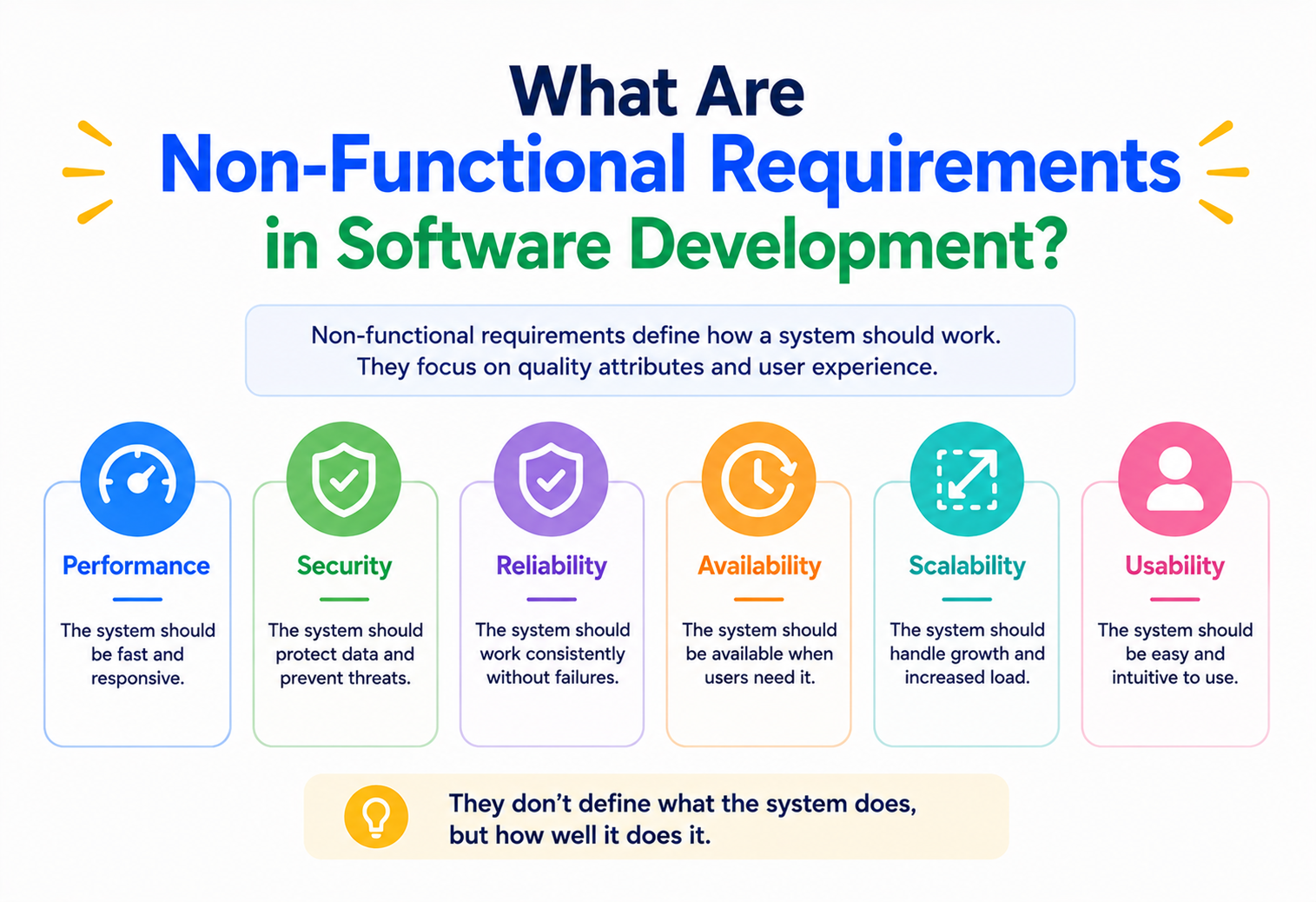
What Are Non-Functional Requirements in Software Development?
The measurable qualities every user feels but nobody sees on a screen — speed, uptime, security, ease of use. Get them right and the product disappears into the background. Get them wrong and the features are wasted.
The Big Idea, in One Breath
Non-functional requirements describe how well the system does what it does. Functional requirements say the feature exists; non-functional requirements decide whether anyone will actually enjoy using it.
Two apps can offer the same list of features and feel like entirely different products. One is fast, quiet, and forgiving; the other loads in nine seconds, times out on Wednesdays, and asks you to log in again after every backspace. Same feature list, same functional requirements. Everything that separates them lives in the non-functional requirements: the measurable qualities of the system as a whole.
NFRs are how you turn “it works” into “it’s good”. Written down, they become a shared target. Left unwritten, they become an argument every sprint and a surprise at every launch.
Think of a gymnastics or figure-skating routine. There is a required element list: a triple axel, a specific vault, a set of tumbles. Complete every element and you technically finished the routine — that is the functional part. But the score is not the checklist; it is execution, artistry, difficulty, landing. Two athletes can hit every required element and one still loses by a whole point because they wobbled. Non-functional requirements are the scorecard: the invisible qualities that decide whether the routine is world-class or merely completed.
Users do not deduct points on a sheet, but they behave as though they do. They churn, they complain, they rebook to a competitor. Every deduction they make is a non-functional requirement that was implicit and got missed.

What a Non-Functional Requirement Really Is
A precise, measurable statement about a quality of the system — expressed with a number, a threshold, or a target that a stopwatch or a query can settle.
A useful NFR reads more like an SLA than a product idea. It names the quality, it names the metric, and it names the target. Anything softer than that will not survive contact with a real sprint.
It names a quality
Performance, availability, security, maintainability, usability. One quality per requirement, not a bag of them.
It attaches a metric
Response time, uptime percentage, mean time to recovery, error budget, throughput. Nothing that requires an argument to check.
It sets a target
A number, a percentile, a threshold, a bound. “Fast” is not a target. “p95 < 500 ms” is.
It says under what conditions
“Over any 30-day window”, “during peak season”, “for signed-in users”. NFRs without conditions are quietly lying to everyone.
Read it aloud. If the answer to “did we meet it?” requires a conversation, it is still a wish, not a requirement.
Quick Recap: Functional vs. Non-Functional
One line each. Keep this pair in your head and every requirements conversation gets simpler.
Functional (what)
- “Users can reset their password by email.”
- “Admins can export orders as CSV.”
- “Refunds require finance approval.”
- “Cart totals VAT for the buyer’s region.”
Non-functional (how well)
- “Reset email is delivered within 60 seconds.”
- “CSV export of 1M rows completes in < 30s.”
- “Refund workflow retains audit trail 7 years.”
- “Cart page loads < 1.5s at p95, in every region.”
Teams that write only functional requirements ship features that technically work and practically frustrate. A search that returns the right results in 12 seconds fails the user — even though every result is correct.
The Nine Core Types
Almost every NFR you will ever write falls into one of nine buckets. Sorting them this way makes them harder to forget.
Performance
How fast the system responds — latency, throughput, resource use. Measured in milliseconds, requests per second, CPU and memory.
Scalability
How gracefully the system handles more load — more users, more data, more transactions. Vertical, horizontal, elastic.
Reliability
How often the system produces the correct answer. Error rates, defect rates, mean time between failures.
Availability
How much of the time the system is up. 99%, 99.9%, 99.99%. Each extra nine is roughly ten times more expensive.
Maintainability
How easily engineers can change the system without breaking it. Time to onboard, cycle time, change-failure rate.
Usability
How easy the system is to learn and use. Task completion rate, time on task, error rate, satisfaction score.
Security
Confidentiality, integrity, and non-repudiation. Vulnerabilities per release, time to patch, audit compliance.
Compatibility
Which browsers, devices, operating systems, APIs, standards the system supports — and how gracefully it degrades outside them.
Portability
How easily the system moves — to another cloud, another database, another platform. Rarely urgent; occasionally decisive.
Nobody maxes out all nine. That is the point of writing them down: to declare, explicitly, which ones matter most for this product and which ones you are willing to compromise on.

The Speed Test: Performance and Scalability
The two are related but different. Performance is how the system behaves for one user; scalability is what happens when there are a lot of them.
Performance — the felt-speed dimension
Performance is what a single interaction feels like. It is judged by the user, not by the server. If a page takes six seconds to become interactive, it does not matter how efficient the backend is — the user is already unhappy.
Response time
Time from click to visible result. Usually reported as p50, p95, p99 — the median plus the tails, because the tails are where trust is lost.
Throughput
Requests per second the system can serve at a healthy latency. The number the system can do while also hitting response-time targets.
Resource utilisation
CPU, memory, network, disk. Useful as a leading indicator: bad utilisation curves predict bad response times.
Time to first byte / first paint
Browser-side sub-metrics that decide whether a page feels alive or dead.
Scalability — the “now everyone shows up” dimension
Scalability is what happens when demand multiplies. Good scalability means response times stay roughly flat as load rises. Poor scalability means each additional user makes every other user’s life a little worse.
| Kind | What it means in practice |
|---|---|
| Vertical | Same box, bigger box. More CPU, more RAM. Simple; hits a ceiling. |
| Horizontal | More boxes, coordinated. No fixed ceiling; forces a design that can be split. |
| Elastic | Automatic scale-out and scale-in with demand. Good for spiky loads and cost curves. |
Performance and scalability are cheap in the design phase and expensive after launch. NFRs written on day one are architectural decisions in disguise; NFRs written after year one are apologies.
The Trust Triangle
Reliability, availability, and maintainability. Users experience these three as a single feeling: whether the system is worth relying on.
These three NFRs decide whether a system feels dependable. They act together, and each keeps the others honest.
Reliability
The probability that the system produces the correct answer for a given interaction. Measured by error rate, defect density, mean time between failures.
Availability
The proportion of the target window during which the system is usable. 99.9% is 8h 45m of downtime a year; 99.99% is 52 minutes. Each nine is dramatically more work.
Maintainability
How quickly and safely the team can change the system when reality shifts. Cycle time, change-failure rate, MTTR — and, quietly, engineer retention.
The nines, in plain language
| Availability target | Downtime allowed per year | Per month |
|---|---|---|
| 99% | 3d 15h | 7h 18m |
| 99.9% | 8h 45m | 43m |
| 99.95% | 4h 22m | 21m |
| 99.99% | 52m | 4m 22s |
| 99.999% | 5m 15s | 26s |
Every extra nine costs roughly ten times more than the previous one. Ask the business what it actually needs before promising four.
The Guardrails: Security, Compatibility, Portability
Three NFRs users notice mostly when they are missing — but leadership, auditors, and future you notice them all the time.
Security
Security is the set of NFRs that describe how the system resists misuse. Not just external attackers — also honest mistakes, stolen credentials, and rogue insiders. Real security requirements are specific: encryption in transit and at rest, no PII in logs, credentials rotated on a schedule, MFA required for admin, every access audited.
Compatibility
Compatibility is which environments the system is committed to work in: which browsers, devices, screen sizes, operating systems, screen readers, APIs, standards. NFRs here read like “the checkout page passes WCAG 2.1 AA on the last two major versions of Chrome, Safari, Firefox and Edge”.
Portability
Portability is how easily the system moves — to another cloud provider, another database, another operating system. Rarely a day-one requirement; occasionally the difference between an option kept and an option quietly given away.

Sample requirement
All PII encrypted with a customer-managed key at rest; TLS 1.2+ on every public endpoint; secrets rotated every 90 days.
Sample requirement
Full functionality on the last two major versions of Chrome, Safari, Firefox and Edge; degraded but usable on IE11 for reports only.
Sample requirement
No hard dependency on any single cloud provider’s proprietary service outside a defined list; migration to a second provider achievable within six months.
They travel together
A change to any one usually forces changes in the other two. Add a compliance region and you touch security, compatibility, and portability at once.
The Human Side: Usability’s Five Dimensions
Usability is the NFR that users can articulate the most easily — and that teams write down the least often. Five dimensions, all measurable.
Learnability
How quickly a new user reaches basic competence. Time to first successful task; percentage of new users completing onboarding without support.
Efficiency
Once learned, how quickly a competent user can complete a task. Clicks, keystrokes, seconds. Where power users decide whether to stay.
Memorability
After a gap, how easily a returning user can pick up where they left off. Determines whether the product is worth coming back to occasionally.
Error prevention & recovery
How often users make mistakes, how bad those mistakes are, and how easily they can undo them. Ideal systems make mistakes hard and recovery obvious.
Satisfaction
Subjective, and still measurable. Task-level surveys, System Usability Scale, NPS, session replays. Numbers you can watch move.
Usability NFRs sound soft. They are not. They are what the user actually judges. A product with brilliant back-end NFRs and clumsy usability will lose to a product with the reverse — every time.
Writing Measurable NFRs
A recipe you can apply to any non-functional requirement in under a minute.
The single biggest failure mode of NFRs is writing them like adjectives. “Fast”, “secure”, “user-friendly”. Every one of those needs to be rewritten as a number, a threshold, and a condition.

The pattern
“<quality> of <target subject> must be <metric> <target> under <conditions>, measured over <window>.”
Before and after
| Wish (do not ship) | Requirement (ship this) |
|---|---|
| The site should be fast. | Product-page TTFB must be < 400 ms at p95 for signed-in users, measured over any 30-day window. |
| The system should be reliable. | Payment API error rate must be < 0.1% of all requests over any 7-day window. |
| Data should be secure. | All PII must be encrypted with AES-256 at rest and TLS 1.2+ in transit; access logged for 7 years. |
| Reporting must scale. | The revenue report must return < 5 s for datasets up to 10M rows, at any concurrency below 200 users. |
| Onboarding should be easy. | A new user completes their first successful transaction within 6 minutes, without contacting support, in 90% of cases. |
An NFR without conditions and a window is not measurable in any useful sense. “99.9% availability” needs “across a rolling 30-day window, excluding scheduled maintenance published 72 hours in advance” before it means anything to a support engineer at 2 AM.
How NFRs Shape Architecture
NFRs are the reason architecture exists. Every serious design decision is really a trade between two or more of them.
Ask an architect what they spend their day on and the answer, almost always, is trading NFRs against each other. Availability against cost. Performance against consistency. Flexibility against simplicity. Security against usability. Each trade needs to be made deliberately, because they cannot all be maximised at once.
| NFR you push up… | … usually costs you somewhere in |
|---|---|
| Availability (more nines) | Cost (extra regions, redundancy) and complexity (failover, testing). |
| Performance (lower latency) | Cost (bigger machines, more caches) and consistency (harder to keep data fresh). |
| Security (tighter controls) | Usability (more auth steps) and delivery speed (more review, more gates). |
| Scalability (horizontal, elastic) | Simplicity (stateful is easier than stateless) and initial delivery time. |
| Portability (multi-cloud) | Feature richness (lowest-common-denominator services) and cost (running two of everything). |
| Maintainability (cleaner boundaries) | Short-term velocity (harder to hack past a boundary in a hurry). |
The best design is not the one that scores highest on every NFR. It is the one where the trades match what the business actually needs — and everyone is honest about which trades were made.
Common Myths, Cleared Up
The topic attracts strong opinions from people who have not paid the bill. A few of them are worth answering directly.
“Non-functional requirements are a nice-to-have, not a must-have.”
NFRs are how users judge the product. A checkout that works but takes twelve seconds is a checkout that loses sales. A dashboard that is correct but times out at month-end is a dashboard nobody trusts. NFRs are the difference between a feature that shipped and a feature that was actually adopted.
“We’ll figure out performance and security once it’s built.”
Performance and security bolted on late cost three to ten times more than performance and security designed in early — and cover a fraction of the surface. Every mature team learns this the same way: once. The lesson is expensive, and it always sticks.
“One non-functional requirement fits the whole system equally.”
Different parts of a system deserve different NFRs. The signup form and the batch reconciliation job are not the same problem. Blanket NFRs guarantee overkill in some places and starvation in others. Write NFRs per subsystem, per critical journey, and per external interface — not one sheet for the whole codebase.
“NFRs are just for large enterprise systems.”
Startups need NFRs even more. Enterprises can afford to over-provision their way out of a bad performance decision. A five-person team, running on a startup budget, cannot — and a single unwritten “we assumed it would be fast” is a real threat to the runway.
Key Takeaways
The whole guide, compressed into a handful of lines you can carry into your next NFR conversation.
Remember This
- Functional requirements say what. Non-functional requirements say how well. Miss the second half and the first half is wasted.
- A good NFR is a metric, a target, and a condition. Not an adjective. If two people can disagree about whether it’s met, it isn’t written.
- Nine buckets cover almost everything. Performance, scalability, reliability, availability, maintainability, usability, security, compatibility, portability.
- Speed comes in two flavours. Performance is for one user; scalability is for a crowd. Both need explicit targets, and both are architectural decisions in disguise.
- Trust is a triangle. Reliability, availability, and maintainability together decide whether users experience the system as dependable.
- Every nine is roughly ten times more expensive. Ask the business what it actually needs before promising four.
- Usability is a hard NFR wearing soft clothes. Learnability, efficiency, memorability, error handling, satisfaction — all measurable, all decisive.
- NFRs are what architects trade all day. Every serious design decision is a deliberate exchange between two or more NFRs. Make the trades explicit or they will be made accidentally.

