What Is a Database Read Replica?
A complete, beginner-friendly guide to one of the most important scaling patterns in modern software systems — explained from first principles, with real production examples from companies like Netflix, Amazon, and Uber.
What Is a Database Read Replica?
A copy of the primary database whose only job is to answer read queries — freeing the primary to focus on the writes that actually change data.
Imagine a small library with only one librarian. Every single person who wants to borrow a book, return a book, check if a book is available, or ask a question must go through that one librarian. On a quiet day, this works fine. But now imagine 10,000 people show up at once. The librarian is overwhelmed. People wait in long lines just to ask “Is this book available?” — a question that does not even need the librarian to change anything.
Now imagine the library hires five more librarians. These new librarians cannot add new books or remove books themselves (only the head librarian does that), but they keep a perfectly updated copy of the entire catalog. Anyone who just wants to look something up can go to any of the five new librarians. Only people who want to change something — add a book, remove a book, update a record — must go to the head librarian.
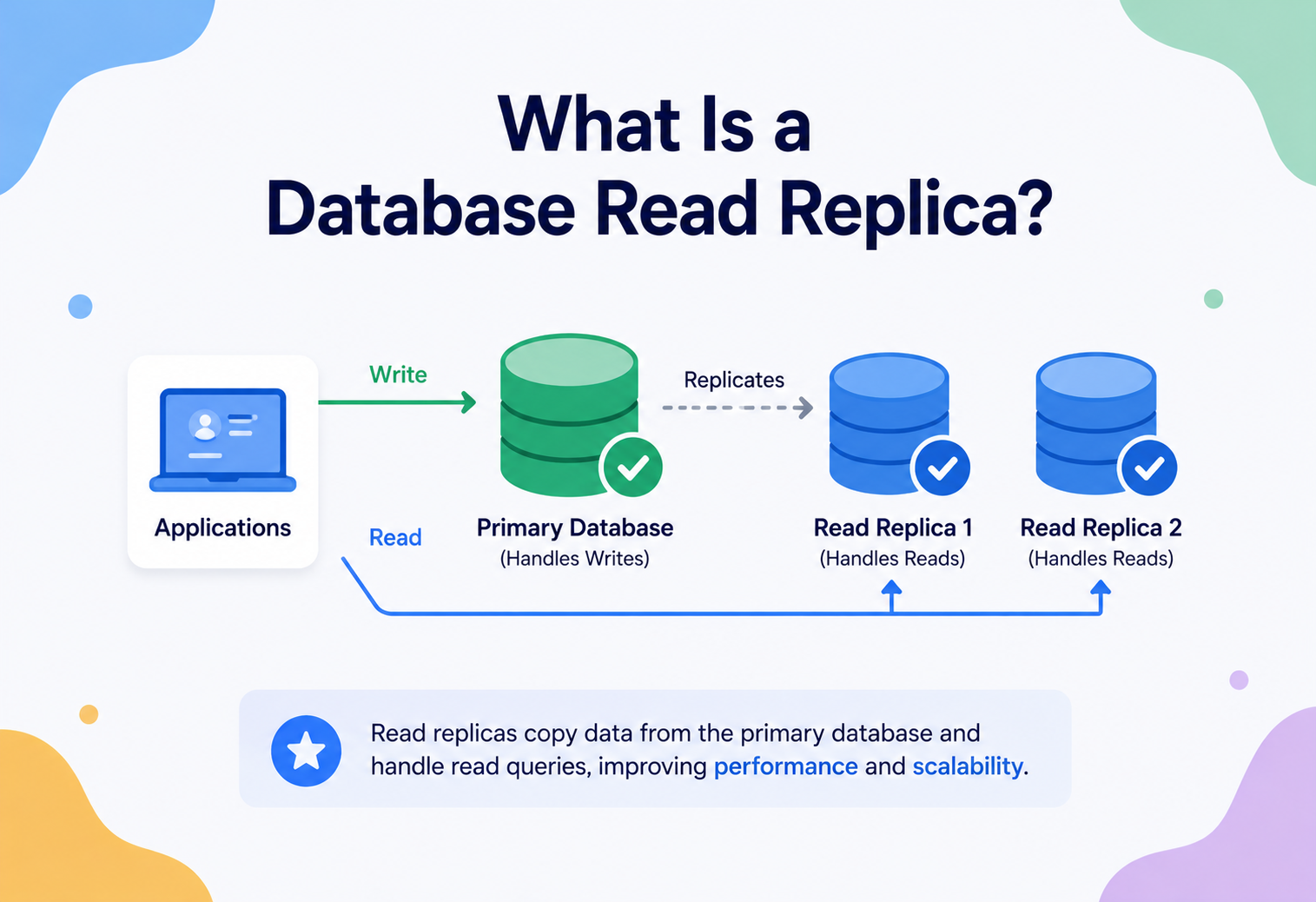
This is, in essence, exactly what a database read replica is. It is a copy of your main database that exists purely to answer read requests (queries that only look up data), so that your main database is free to focus on write requests (queries that change data).
A read replica is like a photocopy machine that keeps making fresh copies of a master document. People who just want to read the document can grab a photocopy instead of waiting to use the original. Only the person updating the master document needs the actual original.
A Short History
In the early days of software — the 1970s through the 1990s — most applications used a single database server. Companies were small, the internet was young, and a single powerful machine could usually handle all the reads and writes an application needed. Relational database systems like Oracle, IBM DB2, and later MySQL and PostgreSQL were built with this “one server does everything” model in mind.
As the internet grew in the late 1990s and early 2000s, something changed. Websites went from serving a few hundred users to millions of users. Companies like Yahoo, eBay, and later Google and Amazon discovered that no single machine, no matter how powerful, could handle the sheer volume of read traffic their applications generated. A product page on an e-commerce site might be viewed 10,000 times for every single time its price or stock quantity actually changes.
Database engineers realized something important: most applications read data far more often than they write it. Reading a tweet happens far more often than posting one. Viewing a product happens far more often than buying it. Watching a video happens far more often than uploading one. This observation — that read traffic and write traffic are fundamentally different in volume and behavior — led directly to the invention of database replication, and specifically, the read replica pattern.
MySQL introduced native replication support in the late 1990s, and by the mid-2000s, using replicas to scale read traffic had become a standard, well-understood pattern taught in every serious backend engineering team. Today, nearly every major cloud provider — Amazon Web Services, Google Cloud, Microsoft Azure — offers “read replica” as a one-click feature on their managed database products.
Think of a school notice board. The principal’s office maintains the master notice board (the source of truth). Every classroom has its own smaller notice board where the class monitor copies down the exact same notices. Students in each classroom read the notice board in their own room. Only the principal’s office can create a brand-new notice. This is a read replica system: one writer, many readers, all synchronized.
Why Do We Need Read Replicas?
To understand why read replicas exist, we need to understand the problem they solve. Let’s build this up step by step, the way you would discover the problem yourself if you were building a growing application.
Step 1: The single-server bottleneck
Every database server has finite resources: a limited amount of CPU power, a limited amount of memory (RAM), and a limited number of disk input/output operations per second. When your application is small, one server easily handles everything. But as your user base grows, every single query — whether it is reading a user’s profile or updating their password — competes for the exact same limited resources on the exact same machine.
This creates a bottleneck. A bottleneck is the single narrowest point in a system that limits how much work the whole system can do, just like the narrow neck of a bottle limits how fast water can pour out, no matter how wide the rest of the bottle is.
Picture an e-commerce app during a flash sale. Thousands of users are refreshing the product page every second (reads), while a much smaller number are actually completing purchases (writes). If all of this hits one database server, the flood of read queries slows down everything — including the checkout writes that actually make the company money.
Step 2: Read-heavy workloads are extremely common
Most real-world applications are read-heavy. Industry studies and common engineering experience suggest a typical ratio of somewhere between 80:20 and 95:5 for reads versus writes. A handful of concrete examples make the pattern hard to miss:
| Application | Typical Read Action | Typical Write Action | Read : Write (approx.) |
|---|---|---|---|
| Social media feed | Scrolling posts | Creating a post | ~ 100 : 1 |
| E-commerce | Viewing products | Placing an order | ~ 50 : 1 |
| Video streaming | Watching a video | Uploading a video | ~ 1000 : 1 |
| Banking app | Checking balance | Transferring money | ~ 20 : 1 |
If reads dominate so heavily, it makes sense to scale reads independently from writes, rather than throwing more hardware at a single server that treats both the same way.
Step 3: Vertical scaling has limits
The first instinct many teams have is vertical scaling: buying a bigger, more powerful server. More CPU cores, more RAM, faster disks. This works for a while, but it has three real limits:
- Physical limits — there is a ceiling on how much CPU and RAM a single machine can physically hold.
- Cost limits — the most powerful servers are extremely expensive, and cost grows much faster than performance near the top end.
- Single point of failure — if that one giant, expensive server goes down, your entire application goes down with it.
This naturally leads engineers to horizontal scaling — using more machines instead of one bigger machine. Read replicas are the most common and simplest form of horizontal scaling applied specifically to database reads.
Companies like Netflix, Uber, and Airbnb serve read traffic from many replicas spread across data centers, while a small number of primary database instances handle writes. This separation is one of the most foundational scaling decisions in modern backend architecture, applied long before more complex techniques like sharding are even considered.
Step 4: The motivation, summarized
Read replicas exist to solve four connected problems at once:
- Scalability — spread read traffic across multiple machines instead of one.
- Performance — reduce contention so writes are not slowed down by a flood of reads (and vice versa).
- Availability — if the primary database has a problem, replicas can often keep serving read traffic, or one can be promoted to become the new primary.
- Geographic distribution — replicas can be placed physically closer to users in different regions, reducing network latency.
Core Concepts You Must Know
Before going further, let’s build a solid vocabulary. Every term below is something you will hear constantly in real engineering conversations and interviews.
Primary (Master) Database
The primary database, sometimes still called the “master” in older documentation, is the single source of truth. It is the only database that directly accepts write operations: INSERT, UPDATE, and DELETE. Every change that happens anywhere in the system starts here.
The primary database is like the original master recipe book kept by a head chef. Only the head chef is allowed to write new recipes or correct mistakes in it.
Read Replica
A read replica is a copy of the primary database that continuously receives updates from the primary, but only accepts read operations (SELECT queries) from applications. It cannot be written to directly by the application in a correctly configured system.
Replication
Replication is the general process of copying data from one database server to one or more other database servers, so they stay synchronized. Read replicas are one specific use of replication technology, but replication itself is a broader concept used for backups, disaster recovery, and analytics as well.
Replication Lag
Replication lag is the delay between when a write happens on the primary and when that same change appears on a replica. Because copying data across a network takes time, replicas are almost never perfectly up to date — they are slightly “behind” the primary, usually by milliseconds, but sometimes by seconds under heavy load.
You update your profile picture. The write goes to the primary database instantly. But if you immediately refresh the page and that read gets routed to a replica that hasn’t received the update yet, you might briefly see your old profile picture. A moment later, once replication catches up, you see the new one. This is replication lag in action.
Synchronous vs. Asynchronous Replication
This is one of the most important distinctions in the entire topic. It ultimately controls whether your writes are optimized for safety or for speed.
| Type | How It Works | Trade-off |
|---|---|---|
| Synchronous | The primary waits for the replica to confirm it received and applied the change before telling the application the write succeeded. | Zero data loss risk, but writes become slower because the primary must wait for the network round trip. |
| Asynchronous | The primary confirms the write immediately and sends the change to replicas in the background, without waiting. | Writes are fast, but if the primary crashes before the replica catches up, the very latest changes could be lost. |
| Semi-synchronous | The primary waits for at least one replica to confirm receipt (not necessarily full application) before continuing. | A middle ground: safer than pure async, faster than pure sync. |
Leader-Follower Terminology
You will often see “master/slave” in older textbooks and documentation. The modern, widely-adopted, and more descriptive terms are leader (or primary) and follower (or replica). This terminology is used across most modern documentation, including PostgreSQL, Redis, and major cloud providers, and we will use leader/primary and follower/replica interchangeably throughout this guide.
Replica Set
A replica set is the group of database servers consisting of one primary and one or more replicas that are all replicating from it, working together to serve one application’s data.
Read/Write Splitting
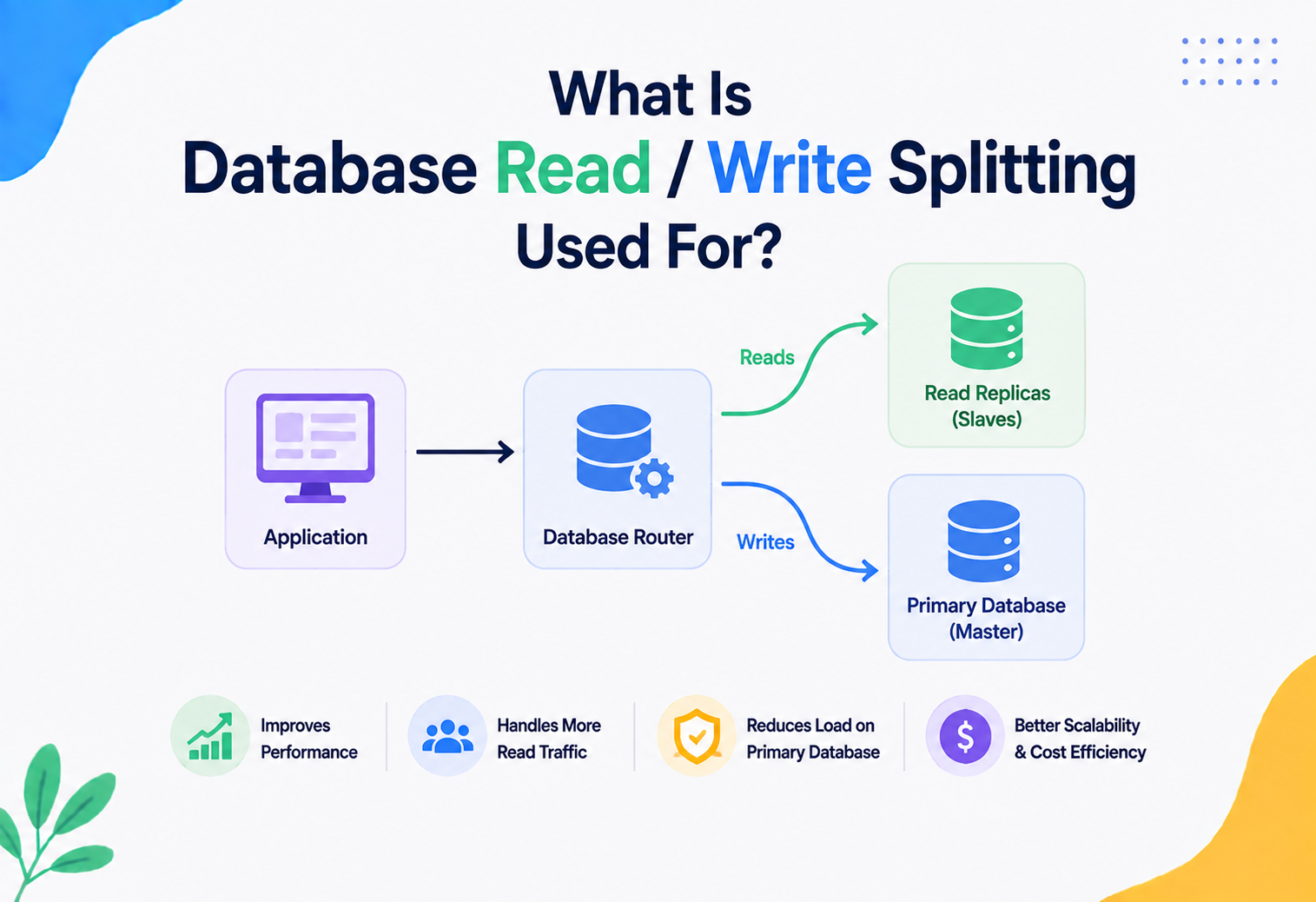
Read/write splitting is the application-level (or proxy-level) technique of routing write queries to the primary database and read queries to one or more replicas. This is the mechanism that actually makes read replicas useful — without it, replicas would just sit there holding a copy of data that nothing ever queries.
Read/write splitting is like a receptionist at a hospital directing patients: “If you’re here to file new paperwork, go to Room 1 (the primary). If you just want to check your existing test results, any of Rooms 2, 3, or 4 (the replicas) can help you.”
Architecture & Components
Let’s look at how a real read replica architecture is put together, piece by piece — from the primary all the way out to the routing layer that decides which query lands where.
The Building Blocks
- Primary database instance — accepts all writes, is the authoritative source of data, and generates a stream of changes.
- Replication stream / change log — a continuous feed of every change made on the primary (we’ll dig into exactly how this works in Section 05).
- One or more replica instances — each one independently connects to the primary (or to another replica, in chained setups), pulls the change stream, and applies it locally.
- A routing layer — this could be your application code, a database driver with built-in read/write splitting, or a dedicated proxy like ProxySQL, PgBouncer with routing rules, or AWS RDS Proxy. This layer decides which queries go to the primary and which go to replicas.
- Health checks — a mechanism that continuously verifies each replica is alive and not too far behind, so the routing layer can avoid sending traffic to an unhealthy or badly-lagging replica.
Topology Variations
Read replicas can be arranged in a few different shapes, depending on the scale and needs of the system:
1. Single-level (fan-out) topology
The most common setup: one primary, multiple replicas, all replicating directly from the primary. Simple to reason about, but every replica adds load to the primary’s replication process.
2. Chained (cascading) topology
Replicas can replicate from other replicas instead of directly from the primary. This reduces the load on the primary when you have a very large number of replicas, but it increases replication lag for the replicas at the end of the chain, since changes must pass through multiple hops.
3. Cross-region topology
Replicas placed in different geographic data centers, so users in Europe, Asia, and North America can each read from a replica physically close to them, reducing network latency dramatically.
Where the Router Lives
The read/write routing logic can live in three different places, and this is a common architectural decision point:
| Location | Description | Example Tools |
|---|---|---|
| Application code | The application itself decides, using two separate database connection pools. | Custom Spring DataSource routing |
| Database driver | The driver understands replica topology and splits queries automatically. | MySQL Connector/J with replication-aware URLs |
| Middleware / Proxy | A separate service sits between the app and the database, inspecting each query and routing it. | ProxySQL, AWS RDS Proxy, PgBouncer + PgPool-II |
Large-scale platforms often use a dedicated proxy layer rather than embedding routing logic in every microservice. This means routing rules, failover behavior, and connection pooling are managed centrally in one place instead of duplicated across dozens of services, each of which would otherwise need to reimplement the same logic.
How Replication Actually Works Internally
This is where we go under the hood. Understanding this section well will help you in system design interviews and in genuinely debugging replication issues in production.
The Write-Ahead Log (WAL)
Almost all modern relational databases use a structure called a write-ahead log (WAL), sometimes called a “binary log” (binlog) in MySQL or a “transaction log” in SQL Server. Before the database changes any actual data on disk, it first writes a record of that change to this log file, in order.
Imagine a construction site foreman who keeps a diary. Before any wall gets built or torn down, the foreman writes it in the diary first: “Tearing down wall 4B”, “Building wall 7C”. If a fire destroys half the building, you can reconstruct exactly what should have existed by replaying the diary from the beginning. This diary is the write-ahead log.
This log exists primarily for crash recovery: if the database server crashes mid-operation, it can replay the log on restart to get back to a consistent state. But engineers realized this same log is perfect for another purpose — replication.
How the Log Becomes Replication
Here is the step-by-step internal process, each stage cleanly separated so you can trace exactly where any one write ends up:
- An application sends a write query (say,
UPDATE users SET status='active' WHERE id=42) to the primary database. - The primary’s transaction manager processes the write and appends a record describing the change to its write-ahead log.
- The primary applies the change to its actual data files (tables, indexes) and commits the transaction.
- Each connected replica has its own background process (in MySQL, this is called the “I/O thread”; in PostgreSQL, the “WAL receiver”) that continuously requests new log entries from the primary.
- The replica receives the new log entries and writes them to its own local copy of the log (called the “relay log” in MySQL).
- A second background process on the replica (MySQL’s “SQL thread” or PostgreSQL’s “startup process” in recovery mode) reads the relay log and re-applies each change to the replica’s own data files, in the exact same order they happened on the primary.
Two Replication Strategies: Statement-Based vs. Row-Based
| Strategy | What Gets Sent | Pros | Cons |
|---|---|---|---|
| Statement-based | The actual SQL statement (e.g., “UPDATE … WHERE …”) | Very small log size | Can produce different results on replica if the statement uses non-deterministic functions like NOW() or RAND() |
| Row-based | The exact before/after values of each changed row | Always produces an identical result on the replica | Larger log size, more replication traffic |
Most modern database systems, including MySQL by default since version 5.7 and PostgreSQL’s physical replication, favor row-based or physical replication precisely because it guarantees consistency.
Logical vs. Physical Replication
Physical replication copies the raw disk-block-level changes — it is fast and exact, but the replica must generally run the exact same database version and cannot easily be queried differently. Logical replication (used in PostgreSQL’s logical replication feature, and conceptually similar to row-based binlog replication in MySQL) copies changes at the level of rows and tables, which is more flexible: you can replicate only certain tables, or even replicate into a different database engine entirely.
Why Replication Lag Happens
Understanding the internals explains exactly why lag occurs:
- Network latency — sending log entries across a network, especially between regions, takes real time.
- Single-threaded apply (historically) — older MySQL versions applied changes on the replica using a single thread, meaning the replica could easily fall behind a busy multi-threaded primary. Modern versions support parallel replication to reduce this.
- Large transactions — a single huge transaction (like a bulk update of a million rows) must be fully replicated and applied as one unit, which can cause a lag spike.
- Replica hardware — if a replica is running on cheaper or smaller hardware than the primary, it may simply not be able to apply changes as fast as they arrive.
The Full Lifecycle of a Query
Let’s trace two complete journeys: one for a write, and one for a read, through a system using read replicas.
Lifecycle of a Write Request
User submits
The user submits a form (for example, updates their email address) and the request lands on the application.
Router classifies
The routing layer identifies this as a write and sends it exclusively to the primary database.
Primary commits
The primary validates the query, acquires any necessary locks, writes to its write-ahead log, applies the change, and commits.
Success returned
The primary returns a success response to the application.
Change streams out
Independently and asynchronously (in the common case), the primary streams this change to all connected replicas.
Replicas catch up
Each replica applies the change locally, eventually becoming consistent with the primary.
Lifecycle of a Read Request
- User loads a page that needs data (e.g., viewing a product listing).
- The routing layer identifies this as a read-only query.
- The router picks one replica — often using a load-balancing strategy like round-robin, least-connections, or lowest-replication-lag.
- The chosen replica executes the
SELECTquery against its local copy of the data and returns results. - The application receives the data and renders the page.
Imagine you just changed your password and are immediately redirected to a “Profile Updated” page that re-reads your profile. If that read hits a lagging replica, you might briefly see your old data, which is confusing and can look like a bug. This is called the read-your-own-writes consistency problem, and we’ll cover solutions for it in Section 07 and Section 15.
Advantages, Disadvantages & Trade-offs
Every scaling technique buys you one thing at the cost of another. Read replicas are no exception — here is what you gain, what you give up, and how to choose sensibly.
Advantages
| Benefit | Explanation |
|---|---|
| Horizontal read scaling | Add more replicas to handle more read traffic, without touching the primary. |
| Reduced load on primary | The primary can dedicate more resources to writes, which are often more sensitive to latency (e.g., checkout flows). |
| Improved availability | If the primary temporarily fails, a healthy replica can often continue serving reads, and one can be promoted to primary. |
| Geographic latency reduction | Placing replicas near users in different regions reduces the physical distance data has to travel. |
| Isolated analytics workloads | A dedicated replica can run heavy reporting queries without slowing down the live application. |
| Safer maintenance | You can take one replica offline for upgrades or maintenance without any application downtime, since traffic simply routes to the others. |
Disadvantages & Costs
| Drawback | Explanation |
|---|---|
| Eventual consistency | Replicas are not always perfectly up to date, which can confuse both users and developers if not handled carefully. |
| Increased infrastructure cost | Every replica is a running server that costs money, even though it does not accept writes. |
| Increased complexity | Your application now needs routing logic, health checks, and a strategy for handling stale reads. |
| Replication lag under load | Heavy write bursts can cause replicas to fall behind, sometimes noticeably (seconds, occasionally longer). |
| Does not scale writes | Read replicas do nothing to help you scale write throughput; that requires different techniques like sharding. |
Strengths
- Scale reads linearly with replica count
- Improve availability via failover
- Enable geo-local reads for global users
- Isolate analytics from live traffic
Trade-Offs
- Reads may briefly be stale
- More infrastructure to run and pay for
- Application must be replica-aware
- Zero help for write-heavy workloads
The Core Trade-off: Consistency vs. Availability/Performance
This directly connects to a famous concept in distributed systems called the CAP theorem, proposed by computer scientist Eric Brewer in 2000. It states that a distributed data system can only fully guarantee two out of three properties at the same time:
- Consistency (C) — every read receives the most recent write or an error.
- Availability (A) — every request receives a non-error response, even if it might not be the latest data.
- Partition tolerance (P) — the system continues to operate even if network communication between nodes is disrupted.
Since network partitions are a fact of life in any real distributed system, partition tolerance is generally non-negotiable, which means real systems must choose between prioritizing consistency and prioritizing availability when a partition happens. A typical asynchronous read replica setup leans toward availability and performance, accepting eventual consistency as the cost.
A banking application showing your account balance might prefer strong consistency (always read from the primary) to avoid showing an incorrect balance. A social media application showing your follower count can comfortably tolerate a replica being a few seconds stale — nobody notices or cares if the count is briefly off by one.
Solving the Consistency Problem in Practice
- Read-after-write routing: immediately after a user performs a write, route their next few reads to the primary for a short window.
- Sticky sessions: pin a user’s session to the primary (or to a specific replica known to have applied their write) for a period of time.
- Monotonic reads: ensure a user’s successive reads never go “backward” in time by routing them consistently to the same replica.
- Version/timestamp checks: have the application check whether a replica’s applied log position is recent enough before trusting its answer.
Performance & Scalability
Read replicas are, at their heart, a scalability tool. Let’s look at how they actually improve performance, and where their limits are.
How Replicas Improve Throughput
Throughput is the number of queries a system can handle per second. If one primary database can comfortably handle 5,000 read queries per second before performance degrades, adding four read replicas (each equally powerful) can theoretically allow the system to handle roughly 20,000 read queries per second — the primary now only needs to handle writes.
In reality, scaling is not perfectly linear. Each replica adds a small amount of load back onto the primary (it must stream changes to every replica), and there is a diminishing-returns effect as you add more and more replicas, because coordination and network overhead grow too.
Connection Pooling
A connection pool is a cache of already-open database connections that the application reuses, rather than opening a brand-new, expensive connection for every single query. Because read replicas multiply the number of database endpoints your application talks to, connection pooling becomes even more important — typically you maintain a separate pool for the primary and one (or one per replica) for reads.
Query Caching in Front of Replicas
Many systems add a caching layer (see Section 13) in front of replicas for the most frequently requested data, so that even replicas are shielded from repetitive identical queries. This creates a natural performance hierarchy: cache → replica → primary, each layer absorbing progressively more specialized traffic.
Load Balancing Strategies Across Replicas
| Strategy | How It Works | Best For |
|---|---|---|
| Round robin | Requests are distributed evenly, one after another, across replicas. | Simple systems with uniform replica capacity. |
| Least connections | Send the next request to whichever replica currently has the fewest active connections. | Uneven query durations. |
| Lag-aware routing | Skip or deprioritize replicas whose replication lag exceeds a threshold. | Systems where data freshness matters. |
| Geo-based routing | Route users to the replica physically closest to them. | Global, latency-sensitive applications. |
Measuring the Real Impact
Engineers typically measure the benefit of read replicas using metrics like queries per second (QPS), p50/p95/p99 latency (the response time that 50%, 95%, and 99% of requests fall under), and primary CPU utilization before and after introducing replicas. A healthy setup usually shows primary CPU utilization dropping significantly once read traffic is offloaded, freeing capacity for write throughput.
High Availability & Reliability
High availability (HA) means a system stays operational and accessible even when individual components fail. Read replicas play a surprisingly important role in HA design, beyond just scaling reads.
Failover: Promoting a Replica to Primary
If the primary database crashes, becomes unreachable, or needs emergency maintenance, the system can perform a failover: promoting one of the existing replicas to become the new primary. This is one of the most critical operations in database reliability engineering.
Manual vs. Automatic Failover
- Manual failover — a human engineer decides when and which replica to promote. Safer in ambiguous situations, but slower (minutes to tens of minutes).
- Automatic failover — managed by tooling (e.g., AWS RDS Multi-AZ, Patroni for PostgreSQL, MHA/Orchestrator for MySQL) that detects failure and promotes a replica automatically, usually within seconds to a couple of minutes.
Split-Brain: A Critical Failure Mode
Split-brain is a dangerous scenario where, due to a network partition, both the old primary (which is actually still alive, just unreachable from the monitor) and a newly promoted replica believe they are the primary at the same time. Both start accepting writes independently, and the data diverges — a serious data integrity problem.
Production systems use techniques like fencing (forcibly cutting off the old primary’s ability to accept writes, e.g., by revoking its network access or shutting it down) and quorum-based consensus (requiring a majority of nodes to agree before a promotion happens) to prevent this. This connects to the broader field of distributed consensus algorithms like Raft and Paxos, which formally solve the problem of getting distributed nodes to agree on a single source of truth.
Recovery Time Objective (RTO) and Recovery Point Objective (RPO)
Two standard reliability metrics apply directly here:
- RTO (Recovery Time Objective) — how long the system can be down before it must be back up. A well-tuned automatic failover system might achieve an RTO of under a minute.
- RPO (Recovery Point Objective) — how much data loss is acceptable, measured in time. With asynchronous replication, RPO is roughly equal to your replication lag at the moment of failure (any writes not yet replicated could be lost).
Multi-AZ vs. Read Replicas: A Common Point of Confusion
Cloud providers often offer two related-but-different features, and it’s important to distinguish them:
| Feature | Purpose | Traffic Serves |
|---|---|---|
| Multi-AZ (High Availability) standby | Pure failover safety net, usually synchronous, in a different data center (Availability Zone). | No read traffic in most configurations; exists purely for failover. |
| Read replica | Scale read throughput; can also serve as a failover target. | Actively serves application read queries. |
Modern cloud databases (e.g., AWS Aurora) increasingly blur this line, allowing read replicas to also participate in fast automated failover, giving you both benefits from the same infrastructure.
Security Considerations
Adding replicas expands your system’s attack surface — there are now more database endpoints to protect, not just one. Security must be considered carefully.
Key Security Practices
- Encrypted replication traffic — the stream of changes flowing from primary to replicas should be encrypted using TLS, especially when replicas live in a different network or region, so the data cannot be intercepted in transit.
- Read-only enforcement — replicas should be configured at the database engine level (not just by convention) to reject write attempts, so a misconfigured application or a compromised credential cannot corrupt data through a replica.
- Least-privilege database accounts — the application’s “read” database user should only have
SELECTprivileges, and ideally a completely separate credential from the “write” user connecting to the primary. - Network isolation — replicas, like primaries, should sit inside a private network (a VPC subnet, for example) and never be directly exposed to the public internet.
- Auditing and access logging — track which services and users are querying which replicas, to detect unusual patterns that might indicate a security issue.
- Data masking for analytics replicas — if a replica is used for broader analytics access (more people can query it than the main application), consider masking or redacting sensitive fields like personal identifiers.
Some teams give the “read-only” application user the same broad privileges as the write user, just pointing it at a replica by convention, and trust the application code to never send a write query there. This is fragile. A single bug, or a compromised credential, can attempt a write against what should be a read-only endpoint. Always enforce read-only access at the database engine and account level, not just in application logic.
Compliance Considerations
Regulations like GDPR (Europe) and various data residency laws affect replica placement directly. If a regulation requires certain user data to remain within a specific country or region, you cannot simply place a replica anywhere convenient — the geographic location of every replica holding regulated data must be deliberately chosen and documented.
Monitoring, Logging & Metrics
You cannot operate a replica-based system safely without visibility into its health. Here are the metrics that matter most and how to alert on them.
Essential Metrics
| Metric | What It Tells You | Typical Tooling |
|---|---|---|
| Replication lag (seconds/bytes) | How far behind each replica is from the primary. | MySQL SHOW REPLICA STATUS, PostgreSQL pg_stat_replication |
| Replica connection count | Whether a replica is being overloaded with too many connections. | Database-native stats, connection pool dashboards |
| Query latency per replica | Whether one replica is performing worse than others (hardware issue, hot query). | APM tools like Datadog, New Relic |
| Primary write throughput | How much replication traffic replicas need to keep up with. | CloudWatch, Prometheus + Grafana |
| Failover events | How often and how quickly failovers occur, and whether they were clean. | Alerting systems (PagerDuty, Opsgenie) |
Setting Up Meaningful Alerts
A well-designed alerting strategy typically escalates in stages: a warning if replication lag exceeds a few seconds (investigate soon), and a critical alert if it exceeds a much larger threshold or a replica falls out of sync entirely (immediate action, possibly remove it from the routing pool automatically).
A monitoring dashboard for a mid-size application might show: Primary CPU 42%, Replica-1 lag 80 ms, Replica-2 lag 120 ms, Replica-3 lag 4.2 seconds (flagged in yellow). An on-call engineer sees Replica-3 is lagging and investigates whether it’s under-provisioned or running a slow analytics query that’s blocking replication apply threads.
Distributed Tracing
In microservice architectures, a single user request might touch several services, each querying different replicas. Distributed tracing tools (like Jaeger or Zipkin, or built into APM platforms) let engineers follow one request’s full path, including exactly which database instance (primary or which replica) handled each query, and how long each step took. This is invaluable for debugging performance issues that only show up under specific routing conditions.
Logging Best Practices
- Log which database endpoint served every write and, ideally, every read (or at least a sample of reads for performance analysis).
- Log all failover events with timestamps, the replica promoted, and the replication lag at the time of promotion.
- Avoid logging sensitive query parameters (like passwords or personal data) even in debug-level logs.
Deployment & Cloud Approaches
You rarely need to hand-build replication from scratch today. Every major cloud provider has turned this into a managed, mostly automated feature.
Managed Read Replica Offerings
| Provider / Product | Read Replica Feature | Notable Capability |
|---|---|---|
| AWS RDS | Up to several read replicas per instance, including cross-region | Can promote a replica to a standalone primary in one action |
| AWS Aurora | Up to 15 low-latency read replicas sharing the same distributed storage layer | Very low replication lag because replicas share storage with the primary rather than copying data separately |
| Google Cloud SQL | Read replicas within region or cross-region | Simple one-click creation from the console |
| Azure Database | Read replicas for PostgreSQL/MySQL flexible server | Geo-replication for disaster recovery scenarios |
| MongoDB Atlas | Replica sets are the default deployment model | Automatic failover is built into the core architecture, not an add-on |
Aurora takes a fundamentally different approach from traditional replication. Instead of each replica maintaining its own separate copy of the data files, all Aurora instances (primary and replicas) share a common, distributed, multi-availability-zone storage layer. This means replication lag in Aurora is often just milliseconds, because replicas aren’t copying entire data files — they’re just refreshing their in-memory view from shared storage.
Infrastructure as Code
Modern teams provision replicas using infrastructure-as-code tools like Terraform or AWS CloudFormation, rather than clicking through a console. This makes replica configuration reviewable, version-controlled, and repeatable across environments (staging, production).
resource "aws_db_instance" "read_replica" {
  identifier                 = "orders-db-replica-1"
  replicate_source_db        = aws_db_instance.primary.identifier
  instance_class             = "db.r6g.large"
  publicly_accessible        = false
  auto_minor_version_upgrade = true
}
Containerized & Kubernetes Deployments
In Kubernetes environments, database operators like the Zalando Postgres Operator, CloudNativePG, or Percona’s MySQL/MongoDB operators automate replica creation, health checking, and failover as native Kubernetes resources, treating “add a replica” as a simple change to a declarative configuration file rather than a manual operational task.
Cost Optimization
- Right-size replicas — a replica dedicated to lightweight reads doesn’t always need to match the primary’s instance size.
- Use read replicas for non-critical workloads — point reporting, batch jobs, and analytics at a replica so you don’t need to over-provision the primary for peak combined load.
- Auto-scaling replica fleets — some managed services (like Aurora Auto Scaling) can add or remove replicas automatically based on load, so you pay only for the capacity you need at any given time.
- Reserved instances / committed use discounts — for replicas you know you’ll run continuously, committing in advance typically reduces cost significantly compared to on-demand pricing.
How Replicas Fit With Caching & Load Balancing
Read replicas are one layer in a broader system of techniques that all work together to handle scale. Let’s see how they relate to caching and load balancing.
The Layered Read Path
Cache vs. Replica: Different Tools for Different Jobs
| Aspect | Cache (e.g., Redis) | Read Replica |
|---|---|---|
| Data location | In-memory, extremely fast | On-disk (with memory buffering), a full database |
| Query flexibility | Usually simple key-value lookups | Full SQL query power (joins, filters, aggregations) |
| Freshness | Can become stale until explicitly invalidated | Automatically kept in sync via replication (with lag) |
| Best for | Extremely hot, repeatedly-requested data | General-purpose read traffic, including complex queries |
Most large-scale systems use both together: a cache in front for the “hottest” data (like a celebrity’s profile page viewed millions of times), and read replicas underneath for everything else, including the initial cache-miss lookups that populate the cache.
Load Balancers for Database Traffic
Just as a load balancer distributes web traffic across application servers, a database-aware load balancer (or proxy) distributes read query traffic across the pool of available replicas. This is conceptually the same idea applied one layer deeper in the stack — the difference is that a database load balancer often needs to be “read/write aware” and “lag aware,” which a generic HTTP load balancer is not.
Think of a busy restaurant. The host at the door (application load balancer) seats customers at open tables (application servers). Inside the kitchen, orders that just need something from the pantry (reads) can be grabbed by any of several kitchen assistants (replicas), while only the head chef (primary) can actually cook a brand-new dish (write) that changes what’s available.
Read Replicas in APIs & Microservices
In a microservices architecture, database access patterns become more complex because many independent services may need to read the same or related data. Read replicas play a specific, important role here.
Database-per-Service and Replicas
A common microservices principle is that each service owns its own database, and other services should not directly query it. However, some organizations relax this rule specifically for read replicas: a dedicated, read-only replica of a service’s database might be exposed to other services (or to a reporting team) for read-heavy use cases, without violating write ownership, since no other service can ever write to it.
Exposing a raw database replica across service boundaries can create tight coupling: if the owning service changes its internal table structure, every other service reading from the replica directly could break. Many architects prefer exposing data through an API or an event stream (see below) instead, reserving direct replica access for well-controlled, internal analytics use cases only.
Read Replicas and CQRS
CQRS (Command Query Responsibility Segregation) is an architectural pattern that separates the models used for writing data (commands) from the models used for reading data (queries). Read replicas are a natural, lightweight implementation of CQRS at the database level: writes go through one model (the primary, enforcing all business rules and constraints), while reads can be served from a differently-optimized replica, sometimes even with different indexes tuned purely for query performance since replicas don’t need to optimize for write speed.
API Design Considerations
When designing REST or GraphQL APIs backed by a primary/replica setup, a few practical patterns emerge:
- GET endpoints (reads) map naturally to replica-backed queries.
- POST/PUT/PATCH/DELETE endpoints (writes) must always go to the primary.
- Some APIs expose a “consistency hint” header or parameter (e.g.,
X-Read-Preference: primary) letting a client explicitly request strongly consistent data for a specific call, similar to read preference modes in MongoDB drivers.
Java Example: A Simple Read/Write Routing DataSource
Here is a simplified example of how a Java Spring application might route reads and writes to different data sources using an AbstractRoutingDataSource. Note this is illustrative — production systems typically use a proxy layer instead of hand-rolled routing, but this shows the underlying mechanism clearly.
public class ReadWriteRoutingDataSource extends AbstractRoutingDataSource {

    // A ThreadLocal flag set by our transaction-aware aspect
    // to indicate whether the current operation is read-only.
    private static final ThreadLocal<Boolean> readOnly = new ThreadLocal<>();

    public static void markReadOnly(boolean value) {
        readOnly.set(value);
    }

    @Override
    protected Object determineCurrentLookupKey() {
        boolean isRead = Boolean.TRUE.equals(readOnly.get());
        return isRead ? "replica" : "primary";
    }
}

// Example usage inside a service method
@Transactional(readOnly = true)
public List<Order> findRecentOrders(Long customerId) {
    ReadWriteRoutingDataSource.markReadOnly(true);
    try {
        return orderRepository.findRecentByCustomer(customerId); // hits a replica
    } finally {
        ReadWriteRoutingDataSource.markReadOnly(false);
    }
}
The key idea: Spring’s @Transactional(readOnly = true) annotation is a strong, idiomatic signal that a method only reads data. A well-designed routing layer can use this exact signal to automatically choose a replica, without the developer needing to manually pick a data source every time.
Design Patterns & Anti-patterns
A handful of patterns show up repeatedly around read replicas — and a matching handful of anti-patterns keep tripping up teams who ignore them.
Useful Patterns
Sticky Read-After-Write
Immediately after a user’s write, route their subsequent reads to the primary (or to a replica confirmed to have caught up) for a short window, typically a few seconds, before falling back to normal replica routing. This directly solves the “read your own write” problem described earlier.
Lag-Aware Circuit Breaking
Automatically remove a replica from the routing pool if its replication lag crosses a defined threshold, and automatically add it back once it catches up. This prevents users from being routed to a badly stale replica during a temporary slowdown.
Dedicated Analytics Replica
Route all heavy, long-running reporting and analytics queries to one specific replica, isolated from the replicas serving live application traffic. This way, a slow analytics query can never degrade the experience of regular users.
Read Replica Per Region
Deploy one or more replicas in each major geographic region your users are concentrated in, and route users to the replica nearest them, minimizing network round-trip time.
Anti-patterns to Avoid
1. Treating Replicas as Interchangeable with the Primary
The most dangerous anti-pattern: writing application code that assumes any database connection is equally safe to write to. Without strict enforcement, a bug can attempt a write on a replica, which either fails unpredictably or, worse, silently succeeds against the wrong intended target in a misconfigured environment.
2. Ignoring Replication Lag in Business Logic
Building critical logic (like fraud checks, inventory counts, or financial balances) entirely on top of replica reads without accounting for staleness can lead to real business errors — for example, allowing an order to go through for an item that a replica still (incorrectly) shows as in stock.
3. Over-Replicating
Adding far more replicas than your read traffic actually needs wastes money and adds unnecessary load on the primary’s replication process, without providing proportional benefit.
4. Single Point of Failure in the Routing Layer
If your read/write router or proxy itself has no redundancy, it becomes a new single point of failure — ironically undermining the very availability goal that replicas were meant to improve.
5. Skipping Replica Testing in Staging
Testing an application only against a single database in staging, then deploying to a production environment with multiple replicas for the first time, is a recipe for discovering consistency bugs in the worst possible place: production.
A frequent real-world bug: a developer writes a new record, then immediately reads it back in the same request to return it in an API response, but that read hits a replica that hasn’t caught up yet, returning a “not found” error for data that was just successfully created seconds earlier. The fix is almost always to return the data you just wrote directly from memory (you already have it), rather than re-querying at all.
Best Practices & Common Mistakes
A short, opinionated checklist of what to do — and the recurring mistakes that show up when teams skip these steps.
Best Practices Checklist
- Enforce read-only access at the database engine level, not just in application conventions.
- Monitor replication lag continuously, with automated alerts and automated removal of severely lagging replicas from the routing pool.
- Design explicitly for eventual consistency: decide, feature by feature, whether strong consistency (read from primary) is required.
- Return freshly-written data directly from application memory after a write, instead of immediately re-reading it from a replica.
- Use connection pooling for both primary and replica connections to avoid connection exhaustion.
- Isolate heavy analytical or reporting queries onto a dedicated replica.
- Test failover procedures regularly — a failover mechanism you’ve never actually exercised is a failover mechanism you cannot trust.
- Automate replica provisioning through infrastructure-as-code for consistency across environments.
- Document, for every read endpoint in your system, whether it tolerates eventual consistency or requires strong consistency.
Common Mistakes
| Mistake | Why It’s a Problem | Better Approach |
|---|---|---|
| Assuming replicas are always “close enough” to real-time | Lag can spike unexpectedly under load, breaking assumptions. | Design explicitly for staleness; add lag-aware routing. |
| Sending all reads to replicas indiscriminately | Some reads genuinely need the latest data (e.g., account balance before a transfer). | Classify reads by consistency requirement; route critical reads to the primary. |
| Not load testing with realistic replica lag | Staging environments with a single low-traffic replica hide lag-related bugs. | Simulate realistic lag and load in staging/pre-production testing. |
| Manually managing failover with no runbook | Under pressure during an actual incident, manual steps are error-prone. | Automate failover, or maintain a clear, tested, written runbook. |
| Forgetting to update replicas after a schema migration | Schema drift between primary and replicas can break replication entirely. | Use replication-safe migration tools and apply schema changes carefully, often in phases. |
Real-World & Industry Examples
The same pattern shows up in every large consumer platform. The scale differs, the details differ, but the underlying decision — separate reads from writes — stays remarkably constant.
Netflix operates at a scale where read traffic (browsing titles, checking watch history, loading recommendations) vastly outweighs write traffic (rating a show, updating “continue watching” position). Netflix’s engineering culture has long emphasized regional data replication and read scaling as part of its broader resilience strategy, allowing the service to keep working smoothly for viewers even under massive concurrent load, such as during a hit new season’s release.
E-commerce platforms handle an enormous volume of product-page views compared to actual purchases. A single popular product listing might be viewed thousands of times for every unit sold. Serving these product-detail reads from replicas (often layered behind caching) keeps browsing fast, while the primary database stays focused on the comparatively rarer, but far more critical, checkout and inventory-adjustment writes.
Ride-hailing platforms need to serve enormous volumes of read queries — checking driver locations, fare estimates, trip history — while keeping the actual state-changing writes (starting a trip, completing a payment) fast and reliable. Distributing read load across replicas (and increasingly, purpose-built read-optimized data stores) is a foundational part of how such systems keep the app responsive during rush-hour demand spikes.
Social platforms with feed-scrolling behavior are among the most extreme read-heavy workloads in existence: users scroll through many posts for every single post they create. Serving feed reads from replicas (again, typically behind aggressive caching for the hottest content) is essential to keeping the scrolling experience smooth at massive scale.
Common Thread Across These Examples
In every case, the pattern is the same: identify that reads vastly outnumber writes, separate the two workloads onto different infrastructure, and let each be optimized independently — replicas tuned for fast, parallel reads; the primary tuned for reliable, consistent writes. This single architectural decision, applied consistently, is one of the most cost-effective scaling techniques in all of backend engineering, precisely because it requires no change to your data model, and can usually be introduced without a single line of business logic changing — only the routing layer changes.
Frequently Asked Questions
The questions that come up most often in interviews and design reviews, followed by the summary and takeaways to carry with you.
Is a read replica the same as a backup?
No. A backup is a point-in-time snapshot meant for recovering from data loss or corruption, and is not meant to be actively queried. A read replica is a live, continuously-updated, queryable database. However, some teams do use a replica as one part of a broader backup and disaster-recovery strategy — the two concepts are related but not identical.
Can I write to a read replica?
In a correctly configured system, no. Replicas are configured as read-only at the database engine level specifically to prevent this. If you need a data store that accepts distributed writes, you’re looking at a different pattern entirely, such as multi-primary (multi-master) replication, which has its own significant complexity around conflict resolution.
How much does replication lag usually add up to?
It varies enormously depending on write volume, network distance, and hardware, but healthy same-region replicas commonly see lag in the tens to low hundreds of milliseconds under normal load, occasionally spiking to a few seconds during heavy write bursts. Cross-region replicas typically see higher baseline lag due to physical network distance.
Do NoSQL databases use read replicas too?
Yes. The same read replica concept appears across almost every type of database: MongoDB has “replica sets” as its core building block, Redis supports replica nodes, and Cassandra uses a related but distinct multi-primary replication model. The specific terminology and consistency guarantees vary by database, but the underlying motivation — scaling reads, improving availability — is the same.
How many read replicas should I have?
There’s no universal number. Start with one or two, monitor your primary’s CPU utilization and your replicas’ query latency and lag, and add more only when data shows you actually need the extra read capacity. Over-provisioning replicas “just in case” wastes money without clear benefit.
Do read replicas help with write-heavy workloads?
No. Read replicas do nothing to scale write throughput, since all writes still funnel through a single primary. For write-heavy scaling, you need different techniques entirely, such as database sharding (splitting data across multiple independent primaries) or choosing a database designed for distributed writes from the ground up.
Summary
A database read replica is a continuously-updated, read-only copy of a primary database, created specifically to absorb read traffic so the primary can focus on writes. This simple idea — separating reads from writes onto different infrastructure — is one of the single most impactful and widely used scaling patterns in modern software engineering, used by nearly every large-scale application in existence.
Read replicas work by streaming a continuous log of changes (the write-ahead log) from the primary to each replica, which re-applies those changes locally, usually asynchronously. This introduces replication lag and eventual consistency as necessary trade-offs in exchange for dramatically improved read scalability, reduced primary load, and improved availability through failover capability.
Using replicas well requires more than just spinning up extra database instances: it requires a routing strategy (in application code, a driver, or a proxy), careful handling of consistency-sensitive reads, continuous monitoring of replication lag, a tested failover process, and clear security boundaries around read-only access.
Key Takeaways
- Read replicas exist because most real applications are read-heavy — reads vastly outnumber writes.
- All writes go to a single primary — reads can be distributed across one or more replicas.
- Replication is powered internally by a write-ahead log, streamed from primary to replicas.
- Replication lag is a fundamental, unavoidable trade-off of asynchronous replication — design around it, don’t ignore it.
- Read replicas also improve availability, enabling failover if the primary fails.
- They do not help scale writes — that requires different techniques like sharding.
- Security, monitoring, and a tested failover process are not optional extras; they are core parts of running replicas safely in production.
- Nearly every major cloud provider offers managed read replicas, making adoption straightforward for most teams.
The next time you scroll through a social feed, browse a product catalog, or check your order history, there’s a very good chance you’re not talking to your data’s one true source — you’re talking to one of its many carefully-synchronized copies, quietly doing its job so the real thing stays fast and safe.