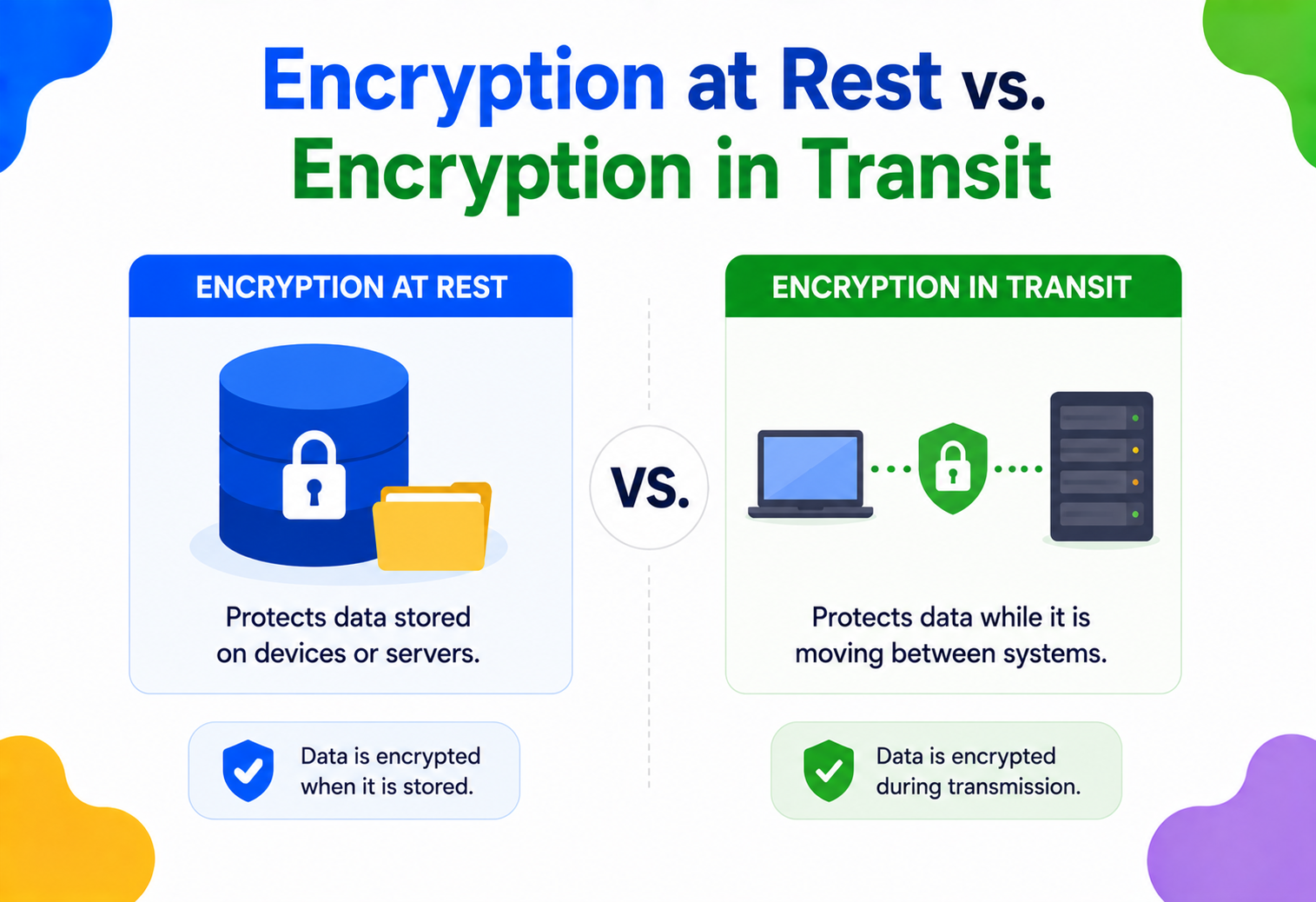
Encryption at Rest vs. Encryption in Transit
Two names, two very different jobs. Here’s exactly what each one protects, how it works under the hood, and why real systems need both — explained from first principles, with diagrams and real Java code.
Introduction & History
Imagine you write a secret note and put it in a locked box (that’s your data sitting still, saved somewhere). Now imagine you hand that note to a friend to carry across a crowded room (that’s your data moving from one place to another). A thief could try to steal the box while it’s sitting on a shelf, or snatch the note while it’s being carried across the room. You need a different kind of protection for each situation. That, in one sentence, is the entire difference between encryption at rest and encryption in transit.
Encryption itself is an old idea — humans have been scrambling messages for thousands of years. Julius Caesar reportedly shifted letters of the alphabet to hide military messages (the “Caesar cipher”). In World War II, the German military used the Enigma machine to scramble messages, and breaking it (led by Alan Turing and his team) is considered one of the turning points of the war and the birth of modern computer science.
Computers changed the scale of the problem. Once information started living on hard drives and travelling across telephone wires and, later, the internet, engineers needed mathematical, automatic ways to scramble data — not by hand, but by algorithm. Two standards eventually became dominant, and one protocol grew up alongside the web itself:
DES (1977)
The first widely adopted government encryption standard. Used a 56‑bit key — tiny by today’s standards, and eventually broken by brute force.
AES (2001)
The Advanced Encryption Standard replaced DES. It’s the algorithm that protects data at rest almost everywhere today, from your phone to bank vaults.
Today, both flavors of encryption are considered non‑negotiable in any serious system — required by law in many industries (healthcare, finance, government) and expected by every security‑conscious user. This guide walks through both, side by side, so the difference becomes obvious and permanent in your mind.
Think of your data’s life like a valuable diamond. When it sits in a vault, you protect it with steel walls and a combination lock (encryption at rest). When you drive it to a new vault across town, you protect it with an armored courier van (encryption in transit). Skipping either one is a headline‑grade mistake.
The Problem & Motivation
Data has exactly two states it can be in at any moment: it’s either stored somewhere (on a disk, in a database, in a backup tape) or it’s being sent somewhere (over a network, between a phone and a server, between two data centers). A complete security strategy has to protect both states, because an attacker only needs to succeed at one point of weakness to steal your data.
Many beginners assume that if their website uses “https” (encryption in transit), their data is fully protected. It isn’t. Once that data lands on the server’s disk, it can sit there in plain, readable text — completely exposed to anyone who steals the hard drive, gains server access, or gets an unauthorized database backup.
Real breaches have happened exactly this way. A company encrypts traffic beautifully with TLS, but stores customer passwords or credit card numbers as plain text in a database. An attacker doesn’t even need to intercept network traffic — they just breach the database directly and walk away with everything, unencrypted and ready to read.
The reverse gap is also real: a company might encrypt its database files perfectly, but send data between internal microservices over plain, unencrypted HTTP. Anyone who can tap that internal network (a rogue employee, a compromised load balancer, a misconfigured cloud network) can read every request and response in plain text.
This is the motivation for treating the two forms of encryption as separate, mandatory layers — not a checkbox you tick once. A modern system needs both, working together, to close both doors.
Core Concepts
What is Encryption at Rest?
Encryption at rest means scrambling data while it is stored — on a hard drive, SSD, database file, backup tape, or cloud storage bucket — so that if someone gets physical or file‑level access to that storage, all they see is unreadable gibberish, not your actual information.
Think of a filing cabinet with a combination lock built into every single drawer, and every single folder inside is also written in a secret code only you and the intended reader know. Even if a burglar steals the entire cabinet, they get nothing useful without the code.
What is Encryption in Transit?
Encryption in transit (also called encryption in motion) means scrambling data while it’s actively moving between two points — your laptop and a web server, one microservice and another, your phone and a cloud API — so anyone eavesdropping on the network only sees scrambled noise.
This is like putting your secret note inside a locked, armored courier bag before handing it to a messenger. Anyone who intercepts the messenger mid‑delivery can grab the bag, but they can’t open it or read what’s inside.
Symmetric vs. Asymmetric Encryption (the building blocks)
Before going further, two vocabulary words need to be nailed down, because both types of encryption are built from these two ingredients:
- Symmetric encryption: One single secret key both locks (encrypts) and unlocks (decrypts) the data. It’s fast, but both sides need to already share that same secret key safely. AES is the most common symmetric algorithm.
- Asymmetric encryption: Uses a mathematically linked pair of keys — a public key (safe to share with anyone) that locks data, and a private key (kept absolutely secret) that unlocks it. It’s slower but solves the “how do two strangers agree on a secret” problem. RSA and Elliptic Curve Cryptography (ECC) are common asymmetric algorithms.
Encryption at rest almost always relies on symmetric encryption (AES) because you’re encrypting and decrypting for yourself, on the same system, over and over — speed matters. Encryption in transit uses a clever hybrid: asymmetric encryption first to safely agree on a temporary shared secret, then symmetric encryption for the actual bulk data — getting both security and speed.
Architecture & Components
Encryption at Rest — Architecture
A typical at‑rest encryption setup has these pieces working together:
Data Encryption Key (DEK)
The actual symmetric key (usually AES‑256) that scrambles the raw bytes of your files or database records.
Key Encryption Key (KEK)
A separate, higher‑privilege key used only to encrypt and protect the DEK itself — so the DEK is never stored in the open.
Key Management Service (KMS)
A dedicated, hardened system (like AWS KMS, Google Cloud KMS, or HashiCorp Vault) that generates, stores, rotates, and audits key usage.
Storage Layer
The disk, filesystem, or database engine that actually performs the encrypt/decrypt operation, often transparently (Transparent Data Encryption, or TDE).
Encryption in Transit — Architecture
Encryption in transit is built around the TLS (Transport Layer Security) protocol, which sits between your application data and the raw network connection (TCP). Its main components:
Certificate Authority (CA)
A trusted organization (like Let’s Encrypt or DigiCert) that verifies a server’s identity and issues a digital certificate.
TLS Certificate
Contains the server’s public key plus proof of identity, signed by a CA, so clients can trust who they’re talking to.
Handshake Protocol
The negotiation dance where client and server agree on encryption algorithms and exchange keys before any real data flows.
Session Keys
Temporary symmetric keys generated fresh for each connection, used to encrypt the actual data once the handshake finishes.
Internal Working — Step by Step
How Encryption at Rest Actually Works
- Key generation: A Key Management Service generates a strong Data Encryption Key (DEK), typically 256 bits of random data.
- Encryption: When the application writes a file or database row, the storage engine passes the plaintext bytes through the AES algorithm together with the DEK, producing ciphertext.
- Key wrapping: The DEK itself gets encrypted (wrapped) with a Key Encryption Key that lives in the KMS’s hardware security module (HSM) — so even if someone steals the DEK file, it’s useless without the KEK.
- Storage: Only the ciphertext (and the wrapped DEK) touches the disk. The plaintext never gets written anywhere.
- Decryption on read: When an authorized process needs the data back, it asks the KMS to unwrap the DEK (after checking permissions), then uses that DEK to decrypt the ciphertext back into plaintext, entirely in memory.
How Encryption in Transit Actually Works (the TLS Handshake)
- ClientHello: Your browser says “here are the encryption algorithms (cipher suites) and TLS versions I support.”
- ServerHello + Certificate: The server picks a cipher suite, and sends back its digital certificate, which contains its public key.
- Certificate verification: Your browser checks that certificate against a list of trusted Certificate Authorities. If it’s signed by someone untrusted, or expired, you get the “connection not private” warning.
- Key exchange: Using an algorithm like Diffie‑Hellman (specifically ECDHE in modern TLS 1.3), client and server each contribute secret material and mathematically arrive at the same shared session key — without ever transmitting that key directly over the network.
- Symmetric encryption begins: From this point on, all actual data (HTML, JSON, images, everything) is encrypted using fast symmetric encryption (typically AES‑GCM) with that shared session key.
- Session ends: When the connection closes, the session key is discarded. A brand new one is generated for the next connection — this property is called forward secrecy.
Even if an attacker somehow steals a server’s long‑term private key years later, they still cannot decrypt yesterday’s traffic, because each session used its own throwaway key that was never stored anywhere.
Data Flow & Lifecycle
Let’s trace a single piece of data — say, a credit card number a user enters at checkout — through its entire life, and see exactly where each type of encryption kicks in.
User types the card number
Plaintext exists briefly in the browser’s memory — this is the one moment it’s genuinely “in the clear,” which is why client‑side input validation and a trustworthy device matter.
Submitted over HTTPS
Encryption in transit (TLS) wraps the card number the instant it leaves the browser, protecting it across the internet to your server.
Server processes the request
TLS is terminated at the server (or load balancer), briefly exposing plaintext in server memory to run business logic.
Saved to the database
Encryption at rest takes over: the storage engine encrypts the value with the DEK before writing it to disk.
Replicated to a backup / another data center
Encryption in transit again protects the data as it moves between internal services or regions.
Backup sits on tape or in cold storage
Encryption at rest continues to protect it indefinitely, even years later, in storage no one is actively watching.
Notice the pattern: data alternates between “moving” and “resting” its whole life, and each phase needs its matching form of encryption. Miss one phase, and that’s your weak link.
Advantages, Disadvantages & Trade‑offs
Encryption at Rest — Pros
- Protects against stolen disks, hardware theft, and unauthorized backup access.
- Often “transparent” — many databases (TDE) require zero application code changes.
- Meets compliance requirements (HIPAA, PCI‑DSS, GDPR) almost automatically.
Encryption at Rest — Cons
- Does nothing once data is legitimately read out into memory or over a network.
- Adds a small but real CPU/IO overhead on every read and write.
- Key management becomes a critical, high‑stakes system of its own.
Encryption in Transit — Pros
- Protects against network eavesdropping, Wi‑Fi sniffing, and man‑in‑the‑middle attacks.
- Standardized (TLS) and supported almost everywhere out of the box.
- Forward secrecy means even leaked keys don’t expose old traffic.
Encryption in Transit — Cons
- Only protects data while moving — offers zero protection once it lands on disk.
- Handshake adds latency (though TLS 1.3 reduced this significantly).
- Misconfigured certificates or weak cipher suites can create a false sense of security.
Performance & Scalability
Neither type of encryption is free — both cost CPU cycles — but modern hardware has made the cost nearly invisible for most workloads.
- AES‑NI: Almost every modern CPU (Intel, AMD, ARM) has built‑in hardware instructions specifically for AES encryption, making at‑rest encryption/decryption extremely fast — often under 1% overhead.
- TLS 1.3 handshake savings: Older TLS 1.2 needed two network round‑trips to complete a handshake; TLS 1.3 cut that to one round‑trip (and supports “0‑RTT” resumption for repeat connections), directly reducing latency at scale.
- Session resumption: Servers can cache session parameters so returning clients skip the full handshake entirely, which matters enormously for high‑traffic APIs.
- Connection pooling: Reusing already‑encrypted TLS connections (instead of opening a new one per request) avoids repeated handshake costs in microservice‑to‑microservice traffic.
At large scale (millions of requests per second), TLS termination is often offloaded to dedicated load balancers or hardware appliances so application servers don’t spend CPU cycles on cryptography at all.
Security Considerations & Threat Models
Threats Encryption at Rest Defends Against
- Physical theft of a hard drive, laptop, or server.
- An attacker gaining raw filesystem or storage‑snapshot access.
- Improperly discarded or resold storage hardware.
- Unauthorized access to database backup files.
Threats Encryption in Transit Defends Against
- Eavesdropping: Someone passively listening on a network (public Wi‑Fi, a compromised router).
- Man‑in‑the‑middle (MITM) attacks: An attacker secretly intercepting and possibly altering communication between two parties.
- Session hijacking: Stealing an active, unencrypted session to impersonate a user.
Application‑level vulnerabilities like SQL injection, a compromised application server reading data it’s legitimately authorized to decrypt, an insider with valid credentials, or a stolen user password. Encryption protects data from unauthorized access to the storage or wire — it is not a substitute for authentication, authorization, and secure coding practices.
Monitoring, Logging & Metrics
Encryption isn’t “set and forget” — production systems actively monitor it:
Certificate expiry alerts
An expired TLS certificate silently breaks connections; tools like Prometheus + Blackbox Exporter alert weeks before expiry.
Key usage audit logs
KMS systems log every single decrypt request — who asked, when, for which key — critical for compliance audits.
TLS handshake failure rate
A spike in handshake failures can indicate outdated client software, misconfiguration, or an active downgrade attack.
Cipher suite compliance scans
Regular scans (via tools like SSL Labs or testssl.sh) verify no weak or deprecated ciphers are still enabled.
Deployment & Cloud Providers
All major cloud providers now offer encryption at rest by default for storage, and make encryption in transit close to unavoidable:
| Provider | Encryption at Rest | Encryption in Transit |
|---|---|---|
| AWS | S3, EBS, RDS default AES‑256 via AWS KMS | TLS enforced on S3/API endpoints; VPC traffic can require TLS |
| Google Cloud | All storage encrypted by default (Cloud KMS) | Google Front End enforces TLS; internal traffic uses ALTS |
| Azure | Storage Service Encryption (SSE) on by default | TLS 1.2+ enforced for Storage and SQL connections |
The practical takeaway for engineers: on modern cloud platforms, at‑rest encryption is often a single checkbox or even the unchangeable default — but in‑transit encryption between your own services still needs deliberate configuration (mutual TLS, service mesh policies, etc.), especially inside a Virtual Private Cloud where traffic can feel “internal” and falsely safe.
Databases & Caching
Database engines implement encryption at rest in a few common ways:
- Transparent Data Encryption (TDE): Available in SQL Server, Oracle, and PostgreSQL (via extensions) — encrypts entire data files automatically, invisible to application code.
- Column‑level encryption: Only specific sensitive columns (like a social security number) are encrypted, useful when the rest of the table doesn’t need it.
- Client‑side (application‑level) encryption: The application encrypts the value before it ever reaches the database, so even a database administrator with full access can’t read it — the strongest but most complex option.
Caching layers (like Redis or Memcached) deserve special attention: many teams forget that cache traffic between an application and a cache server needs encryption in transit too, and that cached sensitive data sitting in memory or persisted to disk (Redis’s RDB/AOF files) needs at‑rest protection just like a primary database.
Best Practices & Common Mistakes
Encrypt everything by default
Don’t make encryption opt‑in per feature. Make it a platform‑level default that engineers have to deliberately opt out of, not into.
Rotate keys regularly
Automate DEK/KEK rotation on a schedule, and immediately upon suspected compromise.
Use TLS 1.2+ only
Disable TLS 1.0 and 1.1 (both deprecated and vulnerable) and weak cipher suites entirely.
Separate keys from data
Never store encryption keys in the same place as the encrypted data — use a dedicated KMS or HSM.
Common mistakes
- Terminating TLS at a load balancer, then sending plaintext to backend servers over an “internal” network assumed to be safe.
- Hardcoding encryption keys directly in source code or configuration files checked into version control.
- Forgetting to encrypt database backups, snapshots, and log files that contain sensitive data.
- Using outdated, deprecated algorithms like DES or MD5 for anything security‑related.
- Assuming HTTPS on the main website means every internal API call is also encrypted.
Java Example: Encryption at Rest with AES‑GCM
import javax.crypto.Cipher;
import javax.crypto.KeyGenerator;
import javax.crypto.SecretKey;
import javax.crypto.spec.GCMParameterSpec;
import java.security.SecureRandom;
import java.util.Base64;

public class AtRestEncryptionExample {

    public static void main(String[] args) throws Exception {
        // 1. Generate a strong AES-256 key (in production, this comes from a KMS)
        KeyGenerator keyGen = KeyGenerator.getInstance("AES");
        keyGen.init(256);
        SecretKey dek = keyGen.generateKey();

        // 2. Prepare data and a random nonce (IV) - never reuse a nonce with the same key
        String plaintext = "4111-1111-1111-1111"; // example card number
        byte[] iv = new byte[12];
        new SecureRandom().nextBytes(iv);

        // 3. Encrypt before writing to storage
        Cipher cipher = Cipher.getInstance("AES/GCM/NoPadding");
        GCMParameterSpec spec = new GCMParameterSpec(128, iv);
        cipher.init(Cipher.ENCRYPT_MODE, dek, spec);
        byte[] ciphertext = cipher.doFinal(plaintext.getBytes());

        System.out.println("Stored ciphertext: " + Base64.getEncoder().encodeToString(ciphertext));

        // 4. Decrypt only when legitimately reading the data back
        cipher.init(Cipher.DECRYPT_MODE, dek, spec);
        byte[] decrypted = cipher.doFinal(ciphertext);
        System.out.println("Decrypted: " + new String(decrypted));
    }
}
AES‑GCM authenticates the data too, so tampering is detected, not just prevented.
Java Example: Enforcing Encryption in Transit
import javax.net.ssl.HttpsURLConnection;
import java.net.URL;
import java.io.BufferedReader;
import java.io.InputStreamReader;

public class InTransitExample {

    public static void main(String[] args) throws Exception {
        // Simply using "https://" delegates the entire TLS handshake,
        // certificate verification, and session encryption to the JVM.
        URL url = new URL("https://api.example.com/secure-endpoint");
        HttpsURLConnection conn = (HttpsURLConnection) url.openConnection();
        conn.setRequestMethod("GET");

        // Optional: inspect which cipher suite and protocol were negotiated
        System.out.println("Cipher suite: " + conn.getCipherSuite());

        BufferedReader reader = new BufferedReader(
                new InputStreamReader(conn.getInputStream()));
        String line;
        while ((line = reader.readLine()) != null) {
            System.out.println(line);
        }
        reader.close();
    }
}
The JVM’s default trust store validates the server certificate automatically; no manual cryptography needed.
Real‑world / Industry Examples
Netflix
Encrypts video content and metadata at rest across its storage fleet, and uses TLS for every client‑to‑server and internal service‑to‑service connection, including its custom‑built Open Connect CDN.
Amazon
Enforces default encryption at rest on S3 buckets and RDS instances, backed by AWS KMS, while all API Gateway and customer‑facing traffic requires TLS 1.2 or higher.
Banks & Financial Institutions
PCI‑DSS compliance legally requires cardholder data to be encrypted both at rest (in databases) and in transit (during authorization requests) — audited annually.
Healthcare (HIPAA)
Patient records must be encrypted at rest in Electronic Health Record systems and in transit whenever shared between hospitals, labs, or insurance providers.
Signal / WhatsApp
Go a step further with end‑to‑end encryption in transit — even the company’s own servers can’t read message content while it’s relayed.
Encrypts data at rest across all its data centers by default and uses its own internal protocol (ALTS) for encryption in transit between internal services at massive scale.
Frequently Asked Questions
Do I need both, or is one enough?
You need both. They protect completely different attack surfaces — skipping either one leaves an entire category of attacks wide open.
Which one is “more important”?
Neither — it depends on your threat model, but most compliance frameworks (PCI‑DSS, HIPAA, GDPR) require both as a baseline, not a choice.
Does encryption at rest slow down my database significantly?
With modern hardware AES acceleration (AES‑NI), the overhead is typically small — often under a few percentage points — and considered a worthwhile trade for the protection it provides.
Is HTTPS the same thing as encryption in transit?
HTTPS is HTTP running over TLS, so yes — HTTPS is a specific, extremely common implementation of encryption in transit for web traffic.
What is “encryption in use,” and is it different again?
Yes — it’s a newer, third category referring to techniques like confidential computing or homomorphic encryption that protect data even while it’s actively being processed in memory, closing the last remaining gap beyond rest and transit.
Can encrypted data still be lost or leaked?
Yes — encryption protects data from being read without authorization, but doesn’t stop legitimate but careless access, weak passwords, misconfigured permissions, or insider threats. It’s one essential layer, not the whole security strategy.
Summary & Key Takeaways
Encryption at rest and encryption in transit solve two different halves of the same problem: keeping data unreadable to anyone who isn’t supposed to see it, no matter whether that data is sitting still or actively moving. Understanding both — and implementing both, correctly and by default — is the baseline expectation for any serious modern system.
Key Takeaways
- Encryption at rest protects stored data (disks, databases, backups) — typically using symmetric AES‑256, managed through a Key Management Service.
- Encryption in transit protects moving data (over networks) — typically via TLS, using a hybrid of asymmetric key exchange and symmetric session encryption.
- They defend against completely different threats: physical/storage theft vs. network eavesdropping and man‑in‑the‑middle attacks.
- A secure system needs both — missing either one leaves a real, exploitable gap.
- Modern cloud platforms make at‑rest encryption nearly automatic; in‑transit encryption between your own internal services still needs deliberate configuration.
- Encryption is one layer of defense, not a full security strategy — pair it with strong authentication, access control, and secure coding practices.