Master‑Slave (Primary‑Replica) Replication
A complete, beginner‑friendly walkthrough of how databases copy themselves across machines so your application never has to sleep, stall, or lose data — explained from first principles up to how Netflix, Uber, and Amazon actually run it in production.
Introduction & History
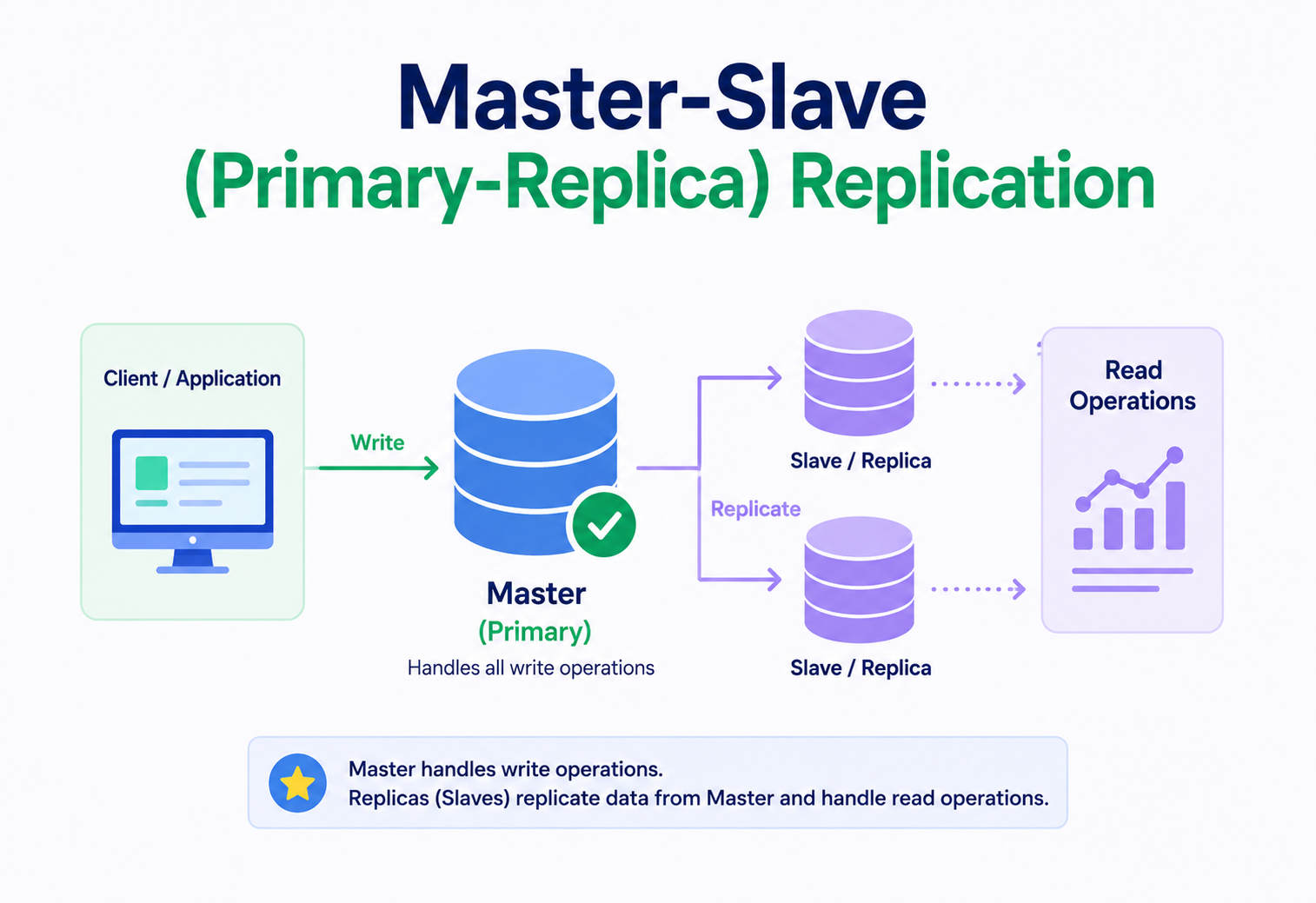
Imagine a single librarian who is the only person in the world allowed to lend out books, answer questions about books, and re‑shelve returned books. If ten thousand people show up at once, that librarian collapses under the load. Now imagine that librarian makes several photocopies of the entire library’s catalog and hands them to trusted assistants. The assistants can answer “where is this book” and “tell me about this book” questions all day long, while only the original librarian is allowed to actually add new books or change catalog entries. That is, in one sentence, what master‑slave replication (now commonly called primary‑replica replication) does for databases.
A database is the part of a software system that remembers things: user accounts, bank balances, orders, messages, video‑watch history. Early software systems — from the 1970s mainframes through the early web of the late 1990s — usually kept all of this memory in a single database running on a single machine. That worked fine when a website had a few hundred users. It stopped working the moment products like Amazon, eBay, and later Facebook and Twitter grew into services with millions of people reading and writing data every second.
Two very old, very human problems drove the invention of replication. First, machines break. A hard disk fails, a data center loses power, a network cable gets cut by a backhoe (this has genuinely happened to major cloud providers). If your only copy of the data lives on one machine, that machine’s death is your business’s death. Second, machines get overloaded. A single computer, no matter how powerful, can only serve so many requests per second before its CPU, memory, or disk simply cannot keep up.
Database replication was the direct answer to both problems. The idea is deceptively simple: keep more than one copy of your data, on more than one machine, and keep those copies automatically synchronized. The earliest production replication systems appeared in commercial databases in the late 1980s and early 1990s, and by the time MySQL introduced built‑in replication in the early 2000s, “one master, many slaves” had become the default mental model that an entire generation of engineers learned database scaling from. PostgreSQL, Oracle, SQL Server, MongoDB, and Redis all eventually adopted their own versions of the same core idea.
Single‑box mainframe era
Early software systems keep the entire database on one machine — adequate when user counts are measured in the hundreds, catastrophic when the machine fails.
First commercial replication
Enterprise databases (Oracle, DB2, Sybase) introduce built‑in log‑shipping and replication features to survive hardware failure and support disaster recovery.
MySQL built‑in replication
MySQL ships native async replication with the binlog — making “one master, many slaves” the default scaling mental model for an entire generation of web engineers.
PostgreSQL WAL streaming
PostgreSQL adds Write‑Ahead Log shipping and later streaming replication, giving the open‑source Postgres world a first‑class replica story.
Managed cloud replication
AWS RDS Multi‑AZ, Google Cloud SQL replicas, Azure Database, and MongoDB Atlas make automated failover and read replicas a checkbox rather than a project.
Terminology shift to primary / replica
Major database vendors and open‑source communities move to non‑harmful language: primary instead of master, replica or secondary instead of slave.
For many years, the industry standard terms were “master” and “slave.” Since roughly 2020, the major database vendors and open‑source communities (MySQL/Oracle, GitHub, Redis, PostgreSQL documentation, and others) have been actively moving to more precise, non‑harmful language: primary instead of master, and replica (or secondary) instead of slave. This tutorial uses “primary‑replica” as the main working vocabulary going forward, and mentions “master‑slave” only because it is still the term you will see in a lot of older documentation, textbooks, and interview questions, so you need to recognize it instantly.
By the end of this tutorial, you will understand not just what primary‑replica replication is, but exactly how bytes move from one database server to another, what can go wrong along the way, how professional teams monitor and recover from failure, and how this single idea quietly powers almost every large‑scale application you use every day.
The Problem & Motivation
Before learning any solution, it helps enormously to feel the pain of the problem it solves. Let’s build that intuition from scratch.
Problem 1 · The single point of failure
Picture an online store with exactly one database server. That server stores every product, every order, every customer’s password hash. One night, the server’s disk controller fails. The store now has zero database. No one can browse, buy, or log in. Depending on how good the backups were and how recently they were taken, the company might even permanently lose the last few hours or days of orders.
This single machine is called a single point of failure, often abbreviated SPOF. A SPOF is any one component whose failure brings down the entire system. Good architecture tries to eliminate SPOFs wherever the cost of doing so is justified by the value of staying online.
Problem 2 · One machine cannot read fast enough for everyone
Now picture a photo‑sharing app that has grown popular. Every time anyone opens the app, it reads photos, captions, and like‑counts from the database. If a million people open the app in the same minute, that is potentially tens of millions of read operations hitting a single database server. Even a very powerful machine has a ceiling — a maximum number of queries per second it can process before response times start to climb and eventually requests start timing out.
The important observation here is that most applications are read‑heavy. For every one time a user posts a photo (a write), they might scroll through a hundred other people’s photos (a read). If you could somehow spread those hundred reads across several machines while keeping the one write on a single machine, you would dramatically increase how much traffic the system can handle without making the system more complicated to reason about.
Problem 3 · Geography and latency
Light itself takes time to travel. A user in Tokyo asking a database in Virginia for data will wait longer than a user in Virginia asking that same database, purely because of the physical distance the network signal has to travel. If a business has a global user base, keeping copies of the data physically closer to those users measurably improves the experience.
Problem 4 · You should never run analytics on your production database
Business analysts frequently want to run large, slow queries — “show me total sales by region for the last three years” — that can scan millions of rows and lock up resources for minutes. If that query runs on the same database that is also trying to process a customer’s checkout in real time, the checkout may slow down or even fail. Businesses need a way to run these heavy queries without punishing live, paying customers.
Think of an old‑fashioned telephone exchange with a single human operator manually connecting every call in a city. It works fine for a small town. Now imagine that city becomes a metropolis. The single operator cannot possibly connect every call fast enough, and if that operator gets sick, the entire city loses phone service. The fix telephone companies eventually adopted was very similar in spirit to database replication: many operators, working from synchronized directories, sharing the load, with backups ready to step in.
Master‑slave (primary‑replica) replication was designed to solve all four of these problems at once: it removes the single point of failure, it spreads out read traffic, it allows copies to live closer to users, and it gives analysts a safe place to run heavy queries — all without touching the machine that customers depend on for writes.
Core Concepts
Before we look at architecture diagrams, you need a small, precise vocabulary. Each term below follows the same pattern: what it is, why it exists, where you’ll see it, a simple analogy, and a concrete example.
Replication
What it is: The process of continuously copying data from one database to one or more other databases so that all copies eventually hold the same information.
Why it exists: To protect against data loss, to survive hardware failure, and to spread out traffic.
Where it’s used: Nearly every production relational database (MySQL, PostgreSQL, SQL Server, Oracle) and most NoSQL databases (MongoDB, Redis, Cassandra).
Analogy: Photocopying a signed contract and giving copies to every department, so if one office burns down, the contract still exists elsewhere.
Example: A bank keeps three copies of your account balance on three different servers in three different buildings.
Primary (Master)
What it is: The one database node that is allowed to accept write operations — inserts, updates, deletes.
Why it exists: Having exactly one node own all writes avoids the extremely hard problem of two machines disagreeing about which change happened first.
Where it’s used: Every primary‑replica cluster has exactly one primary at any given moment (during normal operation).
Analogy: The one person in a group project allowed to edit the “master” copy of a shared document, while everyone else has a read‑only copy.
Example: In an e‑commerce app, when a customer places an order, that INSERT INTO orders statement is always sent to the primary database.
Replica (Slave)
What it is: A database node that continuously receives and applies a copy of every change made on the primary, and typically serves only read operations.
Why it exists: To absorb read traffic and to act as a live, almost‑real‑time backup of the primary.
Where it’s used: A cluster can have anywhere from one to dozens of replicas, depending on read demand.
Analogy: A student who copies every word the teacher writes on the board into their own notebook, a fraction of a second behind, but never writes anything back onto the board.
Example: A news website sends every “get today’s headlines” request to one of five replicas, keeping the primary free to handle the newsroom’s article‑publishing writes.
Replication Log (Binlog / WAL)
What it is: An ordered, append‑only record of every change made to the primary database, written before or as the change is applied.
Why it exists: Replicas need a reliable, ordered feed of “what changed” to replay against their own copy of the data — they cannot simply peek at the primary’s memory.
Where it’s used: MySQL calls this the binary log (binlog); PostgreSQL calls it the Write‑Ahead Log (WAL); MongoDB calls it the oplog.
Analogy: A ship’s captain’s log, where every event is written down in the exact order it happened, so someone reading the log later can reconstruct the entire voyage.
Example: The primary writes UPDATE accounts SET balance = balance ‑ 100 WHERE id = 42 into its binlog immediately after committing the change.
Replication Lag
What it is: The delay between when a change is committed on the primary and when that same change becomes visible on a replica.
Why it exists: Copying and re‑applying data across a network is never instantaneous; some amount of delay is physically unavoidable.
Where it’s used: Every asynchronous replication system has lag; the question is only how small teams can keep it.
Analogy: Watching a “live” TV broadcast that is actually running 5 seconds behind the real event because of satellite transmission delay.
Example: A user updates their profile picture; the primary reflects it instantly, but a replica three time zones away shows the old picture for 200 milliseconds until the change arrives.
Failover
What it is: The process of promoting a replica to become the new primary after the original primary fails.
Why it exists: To restore write availability quickly after a crash, without a human having to manually rebuild a database from scratch.
Where it’s used: Every serious production replication setup, either automated (via tools like Orchestrator, Patroni, or a managed cloud service) or manual.
Analogy: A vice‑captain taking over a ship immediately if the captain becomes unable to lead, rather than the crew waiting helplessly for the original captain to recover.
Example: AWS RDS Multi‑AZ automatically detects a primary database failure and redirects application traffic to a standby replica, usually within about 60–120 seconds.
Synchronous vs. asynchronous replication
This single distinction is one of the most important ideas in all of distributed databases, and it appears constantly in interviews and real design decisions.
| Aspect | Synchronous Replication | Asynchronous Replication |
|---|---|---|
| When does the primary confirm a write? | Only after at least one replica confirms it received the change | Immediately, without waiting for any replica |
| Write latency | Higher (waits on network round‑trip) | Lower (does not wait) |
| Data loss risk on primary crash | Very low — a synced replica has the data | Possible — recent writes may not have reached a replica yet |
| Availability if a replica is slow or down | Can block or reduce availability | Unaffected — primary keeps accepting writes |
| Typical usage | Financial systems, semi‑sync setups | Most read‑scaling replica fleets (default in MySQL, PostgreSQL) |
Many production systems use semi‑synchronous replication: the primary waits for confirmation from just one replica (not all of them) before acknowledging the write to the client, then lets the rest of the replicas catch up asynchronously. This gives a strong safety guarantee — at least two copies of every committed write exist — without paying the full latency cost of waiting for every single replica.
Architecture & Components
Let’s now look at the actual shape of a primary‑replica cluster. At its simplest, the architecture has three moving parts: the primary, one or more replicas, and the replication stream connecting them.
The core components, one by one
1 · The Primary Node
This is a fully functional database server. Nothing about its own storage engine is special — it stores data exactly like any standalone database. What makes it a “primary” is a role: it is configured to accept write traffic and to generate a replication log of every change.
2 · Replica Nodes
Each replica also runs a full copy of the database engine. It connects to the primary (or, in some topologies, to another replica) and continuously pulls or receives the replication log, replaying each change locally to keep its data in sync.
3 · The Replication Stream / Channel
This is the network connection and protocol used to move changes from primary to replica. In MySQL, a replica runs an I/O thread that connects to the primary and copies binlog events into its own local relay log, and a separate SQL thread (or multiple worker threads in modern MySQL) applies those events to the data.
4 · A Coordinator / Orchestration Layer (in mature setups)
Tools such as Orchestrator, Patroni (for PostgreSQL), or a managed cloud control plane (AWS RDS, Google Cloud SQL, Azure Database) constantly watch the health of the primary and replicas, and automatically perform failover if the primary disappears.
5 · A Proxy or Router (optional but common)
Tools like ProxySQL, PgBouncer combined with a router, or application‑level logic decide, for every incoming query, whether it is a write (send to primary) or a read (send to one of the replicas).
Common topologies
Master‑slave replication is not limited to one shape. Depending on the scale and geography of a system, engineers arrange primaries and replicas in a few well‑known patterns.
| Topology | Description | Typical use case |
|---|---|---|
| Single primary, multiple replicas (star) | One primary streams directly to every replica | Most common; read scaling for a single region |
| Chained / cascading replication | Primary → Replica A → Replica B (A relays changes onward) | Reduces load on the primary when there are many replicas or replicas are far away |
| Multi‑region replicas | Replicas placed in different geographic data centers | Lower read latency for global users, disaster recovery |
| Tree / hierarchical | A primary feeds regional “relay” replicas, which each feed local replicas | Very large fleets (hundreds of replicas), e.g. large social platforms |
Internal Working
This is where we open the hood. Understanding the internals is what separates someone who has memorized “master‑slave replication copies data” from someone who can actually design, debug, and tune a real replication setup.
Step 1 · The write happens and is logged
When your application executes something like UPDATE accounts SET balance = balance ‑ 100 WHERE id = 42, the primary database does two things almost simultaneously: it applies the change to its own data files, and it writes a durable record of that exact change into its replication log (the binlog in MySQL, the WAL in PostgreSQL). This log entry is not a vague description — it is precise enough that replaying it elsewhere produces an identical result.
Databases actually use two common strategies for what gets logged:
- Statement‑based replication: the log records the actual SQL statement that was executed (e.g., the UPDATE statement itself). It’s compact, but risky if the statement depends on something non‑deterministic like the current time or a random function, because replaying it later could produce a different result.
- Row‑based replication: the log records the exact before‑and‑after values of the affected rows, rather than the SQL statement. It is larger in size but perfectly deterministic — replaying it always produces exactly the same outcome, which is why most modern systems default to this or a mixed mode.
Step 2 · The replica requests (or receives) the log
Each replica maintains a connection to the primary and keeps track of exactly how far it has read into the primary’s replication log — this position is often called a log sequence number (LSN) in PostgreSQL or a binlog position / GTID (Global Transaction Identifier) in MySQL. When a replica reconnects after a disconnect, it simply tells the primary, “send me everything after this exact position,” which is what makes replication resumable rather than needing to start over from scratch every time.
Step 3 · The change is replayed locally
The replica takes each log entry and applies it to its own copy of the data, in the exact same order the primary applied it. Preserving order matters enormously — if a replica applied an UPDATE before the INSERT that created the row, the operation would simply fail or produce wrong data. Most systems use a single ordered stream per primary specifically to guarantee this ordering.
Step 4 · Acknowledgment (in synchronous or semi‑synchronous modes)
If replication is synchronous or semi‑synchronous, the replica sends a confirmation back to the primary once it has durably received (and sometimes applied) the change. The primary only tells the original client “your write succeeded” after receiving this confirmation. In pure asynchronous mode, this step is skipped entirely — the primary has already told the client “success” the moment it committed locally.
How a brand‑new replica gets its first full copy
Streaming only works once two databases already agree on a starting point. The very first time a replica joins a cluster, it needs a full copy of all existing data before it can start applying the incremental log stream. This initial step is called bootstrapping or snapshotting, and it typically works like this:
- The operator takes a consistent snapshot (a backup) of the primary’s data at a specific point in time, and records the exact log position that snapshot corresponds to.
- That snapshot is restored onto the new replica’s disk.
- The replica connects to the primary and asks for every log entry generated after that exact recorded position.
- The replica plays “catch‑up” until it reaches the primary’s current position, then settles into ongoing, near‑real‑time replication.
Imagine joining a group chat that started a year ago. Someone exports the entire chat history up to today at 3:00 PM and sends it to you as a file (the snapshot). You read the whole file (the catch‑up), and from that point forward, you simply keep receiving new messages live, exactly like everyone else (steady‑state replication).
What actually causes replication lag
Lag is not one single thing — it accumulates from several distinct sources, and diagnosing lag well means knowing which of these is the actual bottleneck:
| Source of lag | Explanation |
|---|---|
| Network latency | Physical distance and network congestion between primary and replica |
| Single‑threaded replay (older systems) | Historically, many replicas applied changes with a single thread even though the primary made changes with many concurrent connections, creating a bottleneck |
| Large or long‑running transactions | A transaction that changes millions of rows on the primary produces a huge log entry that takes a while to transmit and replay |
| Replica hardware being weaker | Cost‑saving teams sometimes run replicas on smaller machines than the primary, which then cannot replay changes as fast as they arrive |
| I/O contention on the replica | If the replica is also serving heavy read traffic, its disk and CPU are competing between “answer reads” and “apply the log” |
Modern MySQL and PostgreSQL both support applying independent transactions on a replica using multiple worker threads in parallel (as long as those transactions did not touch the same rows on the primary), instead of forcing one single thread to apply every change strictly one at a time. This dramatically reduces lag under heavy write load.
Data Flow & Lifecycle
Let’s trace one concrete, realistic example end‑to‑end: a user named Aditi updates her phone number in a food delivery app.
- Request arrives: Aditi’s app sends a
PATCH /profilerequest to the backend API. - Routing decision: The backend’s data layer recognizes this as a write operation and routes the SQL statement to the primary database, never to a replica.
- Transaction begins: The primary opens a transaction, validates the new phone number, and updates the row.
- Commit & log: The primary commits the change to its own storage and appends a corresponding entry to its replication log.
- Response to user: In the (typical) asynchronous setup, the primary immediately responds “success” to the backend, which responds to Aditi’s app. Her screen shows the updated phone number right away, because her app is reading directly from the primary’s response, or from a cache that was just invalidated.
- Streaming begins: Milliseconds later, the log entry travels across the network to every connected replica.
- Replay on replicas: Each replica applies the change to its local copy, in order.
- Eventual consistency achieved: A moment later — usually well under a second — every replica’s copy of Aditi’s phone number matches the primary’s.
Now here’s the subtle and very commonly tested detail: if, immediately after step 5, a completely different part of the app (say, a customer support dashboard) reads Aditi’s profile from a replica instead of the primary, there is a small window where it could show her old phone number, simply because that replica has not caught up yet. This is the practical, everyday face of what computer scientists call eventual consistency.
A very common real‑world bug: a user submits a form, gets redirected to a confirmation page, and that confirmation page reads from a replica that hasn’t caught up yet — so the user sees “not found” or stale data for their own just‑submitted action. The standard fixes are: read immediately‑critical data from the primary right after a write, use “read‑after‑write consistency” features some databases offer, or route a specific user’s follow‑up reads to the primary for a short window after they write.
Advantages, Disadvantages & Trade‑offs
Every scaling technique is a set of trade‑offs, and replication is no exception. Here is a candid list of what you actually gain and what you pay for.
✓ Advantages
- Removes the single point of failure — a replica can be promoted if the primary dies
- Scales read throughput horizontally by adding more replicas
- Allows heavy analytical queries to run on a replica without slowing down live traffic
- Enables geographically distributed reads for lower latency to global users
- Acts as a continuously up‑to‑date backup, in addition to traditional backups
- Relatively simple mental model compared to multi‑primary or leaderless replication
✗ Disadvantages
- Writes still go through a single primary — write throughput does not scale by adding replicas
- Replication lag can cause stale reads (eventual, not immediate, consistency)
- Failover is not instantaneous and, if handled manually, can mean real downtime
- More infrastructure to operate, monitor, patch, and pay for
- Application code often needs to be “replication‑aware” (know which queries must hit the primary)
- Risk of data loss for the most recent, unreplicated writes if the primary crashes suddenly (in async mode)
The fundamental trade‑off · consistency vs. availability vs. latency
This connects directly to one of the most famous ideas in distributed systems: the CAP theorem, proposed by Eric Brewer in 2000. It states that a distributed data system can only guarantee two of the following three properties at the same time during a network partition (a communication breakdown between nodes): Consistency (every read sees the latest write), Availability (every request gets a response, even if it’s not the latest data), and Partition tolerance (the system keeps working even if some nodes can’t talk to others).
Since real networks do experience partitions, in practice every distributed database has to choose whether it favors consistency or availability when a partition happens. Asynchronous primary‑replica replication clearly leans toward availability: replicas keep serving reads even if they’re a little behind, rather than refusing to answer until they’re perfectly caught up. Synchronous replication leans more toward consistency, at the cost of availability and latency if a replica is slow or unreachable.
Imagine a teacher (primary) updating a syllabus and several teaching assistants (replicas) each keeping their own copy to answer student questions. If the classroom’s Wi‑Fi (network) goes down, the assistants have two choices: refuse to answer any questions until the Wi‑Fi is back and they’ve resynced (favoring consistency), or keep answering using whatever version of the syllabus they last had, warning it might be slightly outdated (favoring availability). They cannot do both perfectly at the same time during the outage.
PACELC · the extension worth knowing
A refinement called PACELC (proposed by Daniel Abadi) points out that CAP only describes behavior during a partition. Even when there is no partition at all (Else), a system still must choose between Latency and Consistency — because waiting for a replica to confirm a write (synchronous replication) is always slower than not waiting (asynchronous replication). This is exactly the trade‑off we described earlier between synchronous and asynchronous replication, and it’s worth knowing this term for architecture interviews.
Performance & Scalability
Replication is, first and foremost, a scaling technique. Understanding exactly how it scales — and where it stops scaling — is essential for real system design.
Read scaling is (mostly) linear… up to a point
If one replica can serve 5,000 read queries per second, adding a second, well‑provisioned replica roughly doubles your read capacity to about 10,000 queries per second, because reads are independent of each other. This is the core reason primary‑replica setups are so popular: read capacity becomes something you can buy more of, simply by adding machines.
However, this scaling is not infinite. The primary’s network bandwidth is shared across all replicas it feeds — at some point, streaming the replication log to dozens of replicas becomes its own bottleneck, which is exactly why the cascading / tree topology from earlier exists.
Write scaling does NOT improve with more replicas
This is one of the most important facts to internalize: adding replicas does absolutely nothing for write throughput, because every single write must still pass through the one primary. If your application is write‑heavy (for example, a system ingesting millions of IoT sensor readings per second), primary‑replica replication alone will not solve your scaling problem — you would need a different technique such as sharding (splitting data across multiple independent primaries, each owning a slice of the data) or a multi‑primary architecture.
Connection pooling and query routing overhead
Introducing replicas adds a routing decision to every single query: “does this go to the primary or a replica?” Doing this decision naively inside application code (scattered if/else checks) becomes messy and error‑prone at scale. Production systems typically centralize this decision using a proxy layer (ProxySQL for MySQL, PgBouncer combined with routing logic for PostgreSQL, or a driver‑level read/write splitting feature) so the application code just says “this is a read” or “this is a write” and the routing layer figures out where to send it.
Caching in front of replicas
Even with several replicas, extremely “hot” pieces of data (like a celebrity’s profile page during a viral moment) can still overwhelm a database tier. Production systems typically place a caching layer, such as Redis or Memcached, in front of the database entirely, so that the most frequently requested data never even reaches a replica. We cover this interplay more in the “Databases, Caching & Load Balancing” section below.
High Availability & Reliability
This is the section that turns “we have some replicas” into “our system stays up even when a server dies at 3 AM.”
Detecting primary failure
Automated failover systems continuously send small “are you alive” health checks (heartbeats) to the primary. If a primary misses enough consecutive heartbeats within a configured window, the orchestration system concludes the primary is unavailable and begins the failover process. Getting this timing right is itself an engineering challenge: too sensitive, and a brief network hiccup triggers an unnecessary failover; too relaxed, and real outages take too long to detect.
The failover process, step by step
- Detect: The orchestration layer confirms the primary is truly unreachable (often by checking from multiple independent observers, to avoid a false alarm caused by just one observer’s own network issue).
- Select: Among the remaining replicas, the system picks the best candidate to promote — typically the one with the least replication lag (i.e., the one whose data is most up to date).
- Promote: That chosen replica is reconfigured to stop being read‑only and start accepting writes, becoming the new primary.
- Re‑point: The other replicas are told to start replicating from the new primary instead of the old one.
- Redirect traffic: The application, proxy layer, or DNS is updated so that write traffic now flows to the new primary.
- Recover the old primary (later): If and when the original primary comes back online, it is typically reconfigured as a replica of the new primary — it does not simply resume being primary, to avoid two nodes both thinking they are in charge.
Split‑brain · the danger every failover system must prevent
A split‑brain scenario happens when, due to a network partition, both the old primary and a newly promoted replica believe they are the legitimate primary at the same time, and both start accepting writes independently. This is dangerous because the two nodes’ data can silently diverge, and reconciling that divergence later can mean choosing which set of writes to simply throw away. Mature systems prevent this using techniques like fencing (forcibly cutting off the old primary’s ability to write, for example by revoking its network access or its ability to reach storage) and quorum‑based consensus (requiring a majority of nodes to agree on who the primary is, similar in spirit to the Raft consensus algorithm used by systems like etcd and CockroachDB).
If an old primary recovers from a network partition and simply resumes as if nothing happened, while a new primary has already been promoted and accepted new writes, you now have two databases with genuinely different, conflicting histories. This is exactly why fencing and careful re‑provisioning of the old primary as a fresh replica are non‑negotiable steps in production failover procedures.
RPO and RTO · the two numbers that define your disaster recovery plan
| Term | Meaning | How replication affects it |
|---|---|---|
| RPO (Recovery Point Objective) | How much data you can afford to lose, measured in time | Synchronous replication → near‑zero RPO; asynchronous → RPO equals typical replication lag |
| RTO (Recovery Time Objective) | How long you can afford to be down before recovering | Automated failover → RTO of seconds to a couple of minutes; manual failover → RTO of many minutes to hours |
Backups are still necessary — replication is not a backup strategy
This is one of the most important lessons for beginners: replication protects you from hardware failure, but it does not protect you from human error or bad application logic. If someone accidentally runs DELETE FROM orders without a WHERE clause on the primary, that catastrophic mistake gets faithfully replicated to every replica in a fraction of a second. Replicas are not a substitute for point‑in‑time backups and tested restore procedures.
Security
Replication multiplies the number of places your data physically lives, which means it also multiplies the number of places that data needs to be protected.
Encrypt the replication stream itself
Replication traffic travels over the network, often between different data centers or even across the public internet in cloud setups. Without encryption (typically TLS/SSL), anyone able to intercept that network traffic could read every row of data being replicated, or even every password hash, in plain text. Production systems always enable TLS for the replication channel, exactly as they would for any other sensitive network traffic.
Use dedicated, least‑privilege replication credentials
The account a replica uses to connect to the primary should have only the specific permission needed to read the replication log — nothing more. It should never be a general‑purpose administrator account. If that credential were ever leaked, the damage should be limited strictly to “can read the replication stream,” not “can do anything to the database.”
Network isolation
Best practice restricts replication ports so that only known replica IP addresses (typically within a private network / VPC in cloud deployments) can even attempt to connect to the primary’s replication port, rather than leaving it open to the wider internet.
Replicas hold a full copy of sensitive data too
It’s easy to forget that a replica is not a “lesser” or less sensitive copy of the data — if the primary holds customer credit card tokens or health records, every replica holds an exact copy of the same sensitive data, and needs exactly the same access controls, encryption‑at‑rest, and audit logging as the primary.
Security audits frequently discover that a company locked down its primary database carefully but left a read replica — used “just for internal analytics” — with weaker access controls, no encryption at rest, or an overly broad firewall rule. Attackers specifically look for these softer targets, because a replica holds the exact same sensitive data as the primary.
Monitoring, Logging & Metrics
You cannot manage what you cannot measure. A replication cluster running “silently” without monitoring is a cluster where the first sign of trouble is an angry customer.
The metrics that matter most
| Metric | What it tells you |
|---|---|
| Replication lag (seconds behind primary) | How stale a replica’s data currently is; the single most‑watched replication metric |
| Replica connection status | Whether the I/O and SQL/apply threads are actually running and connected |
| Replication errors | Whether the replica has stopped replaying due to a conflict, corrupted data, or a schema mismatch |
| Queries per second, by node | Confirms read traffic is actually being spread across replicas as intended |
| Primary write latency | Detects if synchronous / semi‑sync acknowledgment is slowing writes down |
| Disk usage and growth rate | Replication logs and relay logs consume disk space and need retention limits |
| Failover events | Every promotion should be logged, alerted on, and reviewed afterward |
Alerting thresholds
Most teams set at least two thresholds on replication lag: a “warning” level (for example, 5 seconds) that gets logged and shown on a dashboard, and a “critical” level (for example, 60 seconds) that pages an on‑call engineer immediately, because at that point stale reads are likely visibly affecting users.
Common tools used in production
- Prometheus + Grafana: the most common open‑source combination for collecting and visualizing replication lag and throughput metrics over time.
- Database‑native commands: MySQL’s
SHOW REPLICA STATUS(formerlySHOW SLAVE STATUS) and PostgreSQL’spg_stat_replicationview give an instant snapshot of health. - Cloud‑native dashboards: AWS CloudWatch (for RDS/Aurora), Google Cloud Monitoring, and Azure Monitor all expose replication‑specific metrics out of the box for managed databases.
- Distributed tracing: tools like Jaeger or OpenTelemetry help correlate “this specific user request was slow” back to “because it happened to read from a lagging replica.”
A very useful, often‑overlooked practice: log which node (primary or which specific replica) actually served each request. When a user reports “I saw stale data,” this log lets you immediately confirm whether they hit a lagging replica, rather than guessing.
Deployment & Cloud
Very few teams today hand‑build replication clusters from scratch on bare servers. Most use managed cloud database services that handle the mechanical parts of replication, while the team still needs to understand what’s happening underneath to configure and operate it correctly.
Managed replication across the major clouds
| Provider | Service | What it automates |
|---|---|---|
| AWS | RDS Multi‑AZ & Read Replicas, Aurora | Synchronous standby for failover (Multi‑AZ) plus separate asynchronous read replicas; Aurora uses a shared distributed storage layer that changes the replication internals further |
| Google Cloud | Cloud SQL Read Replicas, AlloyDB | Managed asynchronous read replicas and automated failover for high‑availability configurations |
| Microsoft Azure | Azure Database for MySQL / PostgreSQL Read Replicas | Cross‑region read replicas and zone‑redundant high availability |
| MongoDB | Replica Sets (self‑managed or Atlas) | Automatic election of a new primary among the replica set members using a Raft‑like consensus protocol |
Infrastructure as code
In modern DevOps practice, replica count, instance sizes, and failover configuration are typically defined declaratively using tools like Terraform or CloudFormation, rather than clicked together manually in a cloud console. This makes the entire replication topology reproducible, version‑controlled, and reviewable, exactly like application code.
Containers and orchestration
When databases run inside Kubernetes, dedicated database “operators” (for example, the Zalando Postgres Operator, or Percona’s operators for MySQL) encode the failover and replica‑management logic as Kubernetes controllers, watching cluster health and automatically reconciling the desired replication topology.
Cost considerations
Every replica is a full, running database server, which means every replica roughly multiplies your infrastructure cost. Teams commonly right‑size this by using smaller instance types for read replicas that serve simple queries, using auto‑scaling to add and remove read replicas based on traffic patterns, and being deliberate about how many replicas are truly needed versus purely for peace of mind.
Databases, Caching & Load Balancing
Replication rarely lives alone. In a real production stack it’s wrapped in caches, sits behind proxies, and is fronted by load balancers — each with its own role.
Read / write splitting in practice
The technique of sending writes to the primary and reads to replicas is called read / write splitting. It can live in a few different places in the stack:
- Application‑level: the code explicitly picks a different database connection depending on whether the operation is a read or write.
- Driver‑level: some database drivers / ORMs (for example, certain configurations of Spring’s
@Transactional(readOnly = true)combined with a routing DataSource) automatically decide the target based on transaction type. - Proxy‑level: a dedicated proxy like ProxySQL parses incoming SQL and transparently forwards it to the correct node, so the application code doesn’t need to know replicas even exist.
A simple Java example · routing reads and writes
public class ReadWriteSplitDataSource extends AbstractRoutingDataSource {

    // Thread-local flag set by a transaction interceptor
    private static final ThreadLocal<Boolean> READ_ONLY =
            ThreadLocal.withInitial(() -> false);

    public static void markReadOnly(boolean readOnly) {
        READ_ONLY.set(readOnly);
    }

    @Override
    protected Object determineCurrentLookupKey() {
        // Returns "replica" or "primary" as the routing key
        return READ_ONLY.get() ? "replica" : "primary";
    }
}

// Usage in a service method
@Transactional(readOnly = true)
public Order fetchOrder(Long orderId) {
    ReadWriteSplitDataSource.markReadOnly(true);
    return orderRepository.findById(orderId)
            .orElseThrow(() -> new OrderNotFoundException(orderId));
}

@Transactional
public void placeOrder(Order order) {
    ReadWriteSplitDataSource.markReadOnly(false);
    orderRepository.save(order); // always goes to the primary
}
This pattern lets ordinary application code stay clean — a developer just marks a method as read‑only or not, and the routing DataSource decides which physical database connection to actually use underneath.
Caching sits in front of, not instead of, replicas
Replicas and caches solve overlapping but different problems. A cache like Redis stores pre‑computed or recently‑read results in memory, and can serve a request in well under a millisecond without touching a database at all. Replicas still run full SQL queries, just spread across more machines. A very common production stack layers both: application → cache (checked first) → replica (on a cache miss) → primary (writes only).
Load balancing across replicas
With multiple replicas, something has to decide which specific replica answers each read. Common strategies include simple round robin (spread requests evenly in rotation), least connections (send to whichever replica currently has the fewest active queries), and lag‑aware routing (skip any replica whose lag currently exceeds a safe threshold, sending traffic only to replicas that are sufficiently caught up).
APIs & Microservices
In a microservices architecture, it’s common for each service to own its own database, and each of those databases may independently use primary‑replica replication internally. A few patterns show up repeatedly.
Read APIs vs. write APIs
Some teams design their API layer to explicitly separate read paths from write paths — sometimes going as far as the CQRS pattern (Command Query Responsibility Segregation), where reads and writes are handled by entirely separate code paths, and reads are explicitly modeled to tolerate the reality of replica lag, for example by showing a “last updated a few seconds ago” indicator rather than pretending everything is perfectly live.
Health checks and service discovery
A microservice’s data access layer typically needs to know, at runtime, which node is currently the primary — because after a failover, that can change. Service discovery tools (like Consul, or a cloud provider’s managed DNS endpoint that automatically points to the current primary) remove the need for the application to hardcode a specific server address.
Idempotency for retried writes
If a write to the primary times out because of a failover in progress, the client often doesn’t actually know whether the write succeeded before the connection dropped. Well‑designed write APIs use an idempotency key (a unique identifier for that specific operation) so that safely retrying the same write after a failover cannot accidentally create a duplicate record, like a double‑charged payment.
Design Patterns & Anti‑patterns
Every mature production replication setup gravitates toward the same handful of good patterns, and steps on the same handful of well‑known landmines.
Good patterns
Read Replica Pool with Health‑Aware Routing
Maintain a pool of replicas, continuously check their lag and connectivity, and automatically remove unhealthy or excessively lagging replicas from the routing rotation until they recover. This keeps the “read scaling” benefit while protecting users from the worst stale‑read scenarios.
Sticky Reads After Write
For a short window right after a user performs a write (for example, 2–3 seconds), route that specific user’s subsequent reads to the primary (or to a replica confirmed to have caught up), rather than a random replica. This directly solves the “read‑your‑own‑write” problem described earlier.
Dedicated Analytics Replica
Designate one replica specifically for heavy, slow analytical or reporting queries, and exclude it from the normal load‑balanced pool that serves fast, latency‑sensitive application reads. This way, a giant analytics query cannot accidentally starve real user traffic.
Anti‑patterns to avoid
Some teams, under pressure, temporarily allow writes on a replica “just this once” to fix urgent production data. This is extremely dangerous: that write is not part of the primary’s replication log, so it can silently be overwritten or lost the next time the replica applies the primary’s stream, and it also risks the replica and primary permanently diverging.
Teams that set up automated failover but never actually test it (through practices like chaos engineering or scheduled failover drills) frequently discover, during a real outage, that the failover script was broken, misconfigured, or slower than expected — precisely when they can least afford surprises.
As covered earlier, replication faithfully copies mistakes just as quickly as it copies legitimate changes. Relying on “well, we have replicas” instead of maintaining real point‑in‑time backups is one of the most common and costly mistakes in production database operations.
Running a schema migration (like adding a column) only on the primary without a coordinated rollout plan can cause replication to break entirely the moment the primary’s replication log contains a change that references the new schema, if replicas are not prepared to apply it.
Best Practices & Common Mistakes
A field‑guide checklist distilled from what mature teams actually do — and the surprisingly common things beginners get wrong.
Best practices
- Always monitor replication lag continuously, with alerting, not just occasional manual checks.
- Automate failover wherever the business impact of downtime justifies the operational complexity, and test that automation regularly.
- Use GTIDs (Global Transaction Identifiers) or an equivalent where available, since they make it far easier and safer to re‑point a replica to a new primary after a failover, compared to tracking raw binary log file positions manually.
- Design the application to tolerate eventual consistency deliberately, rather than discovering the problem in production. Decide up front which reads must be strongly consistent (go to the primary) and which can tolerate slight staleness (go to a replica).
- Keep replicas provisioned close to the primary’s hardware capability, so they can actually keep up with the write rate rather than perpetually lagging.
- Encrypt replication traffic and lock down network access to replication ports, as covered in the Security section.
- Version‑control your replication topology as infrastructure‑as‑code, so it’s reproducible and reviewable.
Common mistakes beginners make
- Assuming a replica is always perfectly up to date, and building features that break the moment lag exceeds a few hundred milliseconds.
- Forgetting to redirect the application after a manual failover, so writes keep failing even though a new primary is technically ready.
- Running a single giant, long transaction on the primary without realizing it will also become one giant, slow‑to‑replay entry on every replica.
- Not load‑testing with replication enabled, only testing against a single standalone database during development, and being surprised by lag‑related bugs only after launch.
- Confusing “replica” (a copy for scaling and failover) with “backup” (a point‑in‑time, restorable snapshot) — they solve different problems and you generally need both.
Real‑World & Industry Examples
The same idea — one writer, many readers, streaming log — quietly powers the products you touch every day. Here’s how five very different industries actually deploy it.
E‑commerce checkout flow
A typical large online store routes the actual “place order” and “update inventory count” operations to the primary database, while product browsing, search result pages, and “customers also bought” recommendations are served from a pool of read replicas — because a few hundred milliseconds of staleness in a recommendation is harmless, but an incorrect inventory write is not.
Social media feeds
When you post an update on a large social platform, the write goes to a primary (often itself part of a much larger sharded architecture, where each shard has its own primary‑replica set). The feeds that other users see, however, are typically assembled from heavily cached and replicated read paths, which is part of why a friend might occasionally see your post appear a second or two after you published it.
Streaming platforms
A video‑streaming service’s “continue watching” and viewing‑history data is written the moment you interact with a video, hitting a primary database, while the browsing catalog, recommendations, and search — read constantly by every user, all the time — are served from extensive, geographically distributed replica and caching layers, so that a login surge in one region doesn’t degrade browsing for users elsewhere.
Ride‑sharing dispatch
A ride‑hailing app’s real‑time matching of drivers to riders is extremely write‑ and consistency‑sensitive (you cannot double‑book the same driver), so that logic typically leans on strongly consistent, often synchronously replicated data for the active matching window, while historical trip data, receipts, and ratings — read far more often than written — flow through a standard asynchronous replica fleet.
Banking and payments
Financial systems are one of the clearest real‑world cases for synchronous or semi‑synchronous replication: a bank cannot risk telling a customer “your transfer succeeded” and then losing that transaction if the primary crashes a second later, because money, unlike a stale product recommendation, cannot be casually “eventually consistent.”
Cross‑cutting insight
None of these companies apply one uniform replication strategy everywhere. They deliberately choose stronger consistency (synchronous replication, primary‑only reads) for the small slice of operations where being wrong is expensive, and looser consistency (asynchronous replication, replica reads, caching) for the much larger slice of operations where a little staleness is invisible or harmless.
Notice the recurring shape: teams don’t apply one uniform replication strategy everywhere. They deliberately choose stronger consistency (synchronous replication, primary‑only reads) for the small slice of operations where being wrong is expensive, and looser consistency (asynchronous replication, replica reads, caching) for the much larger slice of operations where a little staleness is invisible or harmless. Recognizing which category a given read or write falls into is one of the most valuable architectural instincts you can develop.
FAQ & Summary
A last set of questions we hear repeatedly, followed by a distilled summary and the key takeaways from the entire guide.
Is master‑slave replication the same as sharding?
No. Replication makes multiple full copies of the same data for redundancy and read scaling. Sharding splits the data itself into separate, non‑overlapping pieces spread across multiple independent primaries, primarily to scale write throughput and total storage. Large systems very often use both together: each shard is itself a primary‑replica set.
Can a replica ever accept writes?
In a standard primary‑replica configuration, no — replicas are configured as read‑only specifically to prevent conflicting, unreplicated changes from being made outside the primary’s replication log. Some databases offer multi‑primary or multi‑leader configurations where more than one node can accept writes, but that is a fundamentally different, more complex architecture with its own conflict‑resolution challenges.
How many replicas should a system have?
There’s no fixed universal number — it depends on your read traffic volume, how much you want to spend, and your failover strategy (many teams keep at least one replica purely as a standby for failover, separate from the ones serving live read traffic). A common starting point for a growing application is two to three replicas: one primarily for failover readiness, and one or two for read scaling.
What happens to in‑flight writes if the primary crashes mid‑transaction?
An uncommitted transaction is never considered “done” and is rolled back — the client should treat it as failed and, if appropriate, safely retry (ideally with an idempotency key, as discussed earlier). Only committed transactions are guaranteed durable, and even then, in purely asynchronous replication, a committed‑but‑not‑yet‑replicated transaction can theoretically be lost if the primary fails at exactly the wrong instant, which is precisely why financial and other critical systems often choose synchronous or semi‑synchronous replication instead.
Does replication slow down writes?
Pure asynchronous replication adds essentially no extra latency to writes, since the primary doesn’t wait for any replica. Synchronous and semi‑synchronous replication do add some latency, because the primary waits for a network round‑trip acknowledgment from at least one replica before confirming the write — this is the deliberate, accepted cost of the extra durability guarantee they provide.
Is master‑slave replication still relevant, or has it been replaced by newer techniques?
It remains extremely relevant and is still the default replication model for the vast majority of relational and many NoSQL databases in production today. What has evolved are the details: better tooling for automated failover, GTID‑based positioning instead of manual log‑file offsets, parallel replay to cut down on lag, and increasingly sophisticated managed cloud offerings — but the fundamental “one writer, many readers, streaming log” idea is as foundational today as it was two decades ago.
Summary
Master‑slave, or primary‑replica, replication solves a deceptively simple problem — “what if the one database machine we depend on fails, or can’t keep up with traffic?” — with a deceptively simple answer: keep more than one synchronized copy of the data, let exactly one node own writes, and let the rest serve reads and stand ready to take over.
Key Takeaways
- A primary accepts all writes; replicas continuously receive and replay a replication log of every change.
- Asynchronous replication is fast but can lose the most recent writes on a crash; synchronous and semi‑synchronous replication trade some latency for stronger durability guarantees.
- Replication lag is the natural, unavoidable delay between a write on the primary and its visibility on a replica — and it is the root cause of most stale‑read bugs.
- Failover promotes a replica to primary after a failure; done well, it’s automated, fast, and carefully guards against split‑brain.
- Replication scales reads well by adding more replicas, but does not scale writes — that requires other techniques like sharding.
- Replication is not a substitute for real backups; it faithfully copies mistakes just as fast as legitimate changes.
- Real systems deliberately mix strategies: strong consistency where correctness is critical (payments, inventory), looser consistency where a little staleness is harmless (feeds, recommendations, browsing).